Midjourney sells four subscriptions and not one of them promises a number of images. That single fact decides whether this purchase works for you.
This Midjourney review is written for creators, designers, and agencies paying real money for visual production in 2026. The short verdict: Standard at $30 per month is the practical tier for most frequent image work, while Basic at $10 per month fits light experimentation. Pro at $60 per month is the first plan that carries Stealth, so confidential client work starts there and nowhere lower.
Skip it entirely if you need an official API, single sign-on, or centralized seat administration. Among the best AI image generators, Midjourney is still a creator-first generative AI platform rather than a developer platform, and no plan changes that.
In This Article (24 sections)
Quick Verdict: Midjourney in 2026
| Category | Verdict |
|---|---|
| Best for | Designers, art directors, and agencies doing high-volume still-image ideation and short motion clips |
| Not ideal for | Engineering teams needing API generation, IT teams needing SSO and seat control, buyers needing exact typography |
| Starting price | $10 per month on Basic, or $96 per year |
| Best practical plan | Standard at $30 per month, because unlimited Relax image generation begins there |
| Free plan or trial | No free trial on midjourney.com or Discord. A limited niji journey mobile trial exists |
| Setup difficulty | Low for creation, Medium for account and privacy configuration |
| Main strength | Fast, high-quality visual ideation with Draft Mode, references, and native image-to-video |
| Main limitation | GPU minutes are the real budget unit, and video consumes them roughly 30 times faster than a still-image prompt |
| Best alternative | Adobe Firefly for teams that need enterprise governance, reviewed separately |
Methodology: How This Midjourney Review Was Built
This review is based on Midjourney’s official plan comparison, product documentation, help-center pages, Terms of Service, and privacy documentation. Pricing, GPU allowances, and plan gates were checked on August 10, 2026 in the US market and are listed in USD.
Midjourney was assessed against the same buyer-focused criteria applied to every tool on this site. Those criteria are usable entry pricing, plan gates that force an upgrade, workflow fit, output and resolution limits, privacy and commercial-use terms, administration requirements, and total cost at real team sizes.
Greater weight went to the factors that change a purchase decision rather than a first impression. Those are GPU economics per operation, the plan at which privacy becomes available, version compatibility inside one project, and the governance limits an IT or procurement team runs into.
Claims that could not be verified from Midjourney’s own pages were excluded. Aggregate ratings from review directories were left out because no reliable current tally was available, and cost figures derived by arithmetic are labeled as calculations rather than vendor pricing.
What Is Midjourney?
Midjourney is an AI image generation platform from Midjourney, Inc. that also produces short image-to-video clips. Creation happens in the web app at midjourney.com and in Discord, and every paid subscriber can use both surfaces.
The product is built around a prompt, a grid of four results, and a set of refinement actions: variations, upscaling, panning, zooming, region editing, style and character references, and personalization. Version 8.2 is the current default engine.
Nothing in the product resembles a normal SaaS admin console. There is no workspace, no seat pool, and no shared team library, and that shapes almost every buying decision below.
What Changed in 2026: V8.2 and the Version Handoffs
Midjourney’s documentation states that V8.2 became the default version on July 24, 2026. Several reviews still ranking for this query describe V7 or V8.1 as current, which makes their resolution numbers, GPU costs, and workflow advice stale.
Two details matter more than the version number itself.
First, HD costs more GPU time than SD. Midjourney’s version documentation puts V8.1 and V8.2 HD generation at roughly 1.3 GPU minutes against roughly 0.8 for SD. The same page states that Pan, Zoom Out, Edit, and Vary Region applied to an HD image can return the edited result at SD resolution.
Second, the current default engine is not a single end-to-end workflow. Omni Reference, the feature most teams reach for when they need a consistent character or object, still runs through the V7 workflow, costs about twice normal V7 GPU time, and is not directly compatible with Vary Region, Pan, or Zoom Out.
Midjourney documents a workaround through the web Editor with the Omni parameters removed.
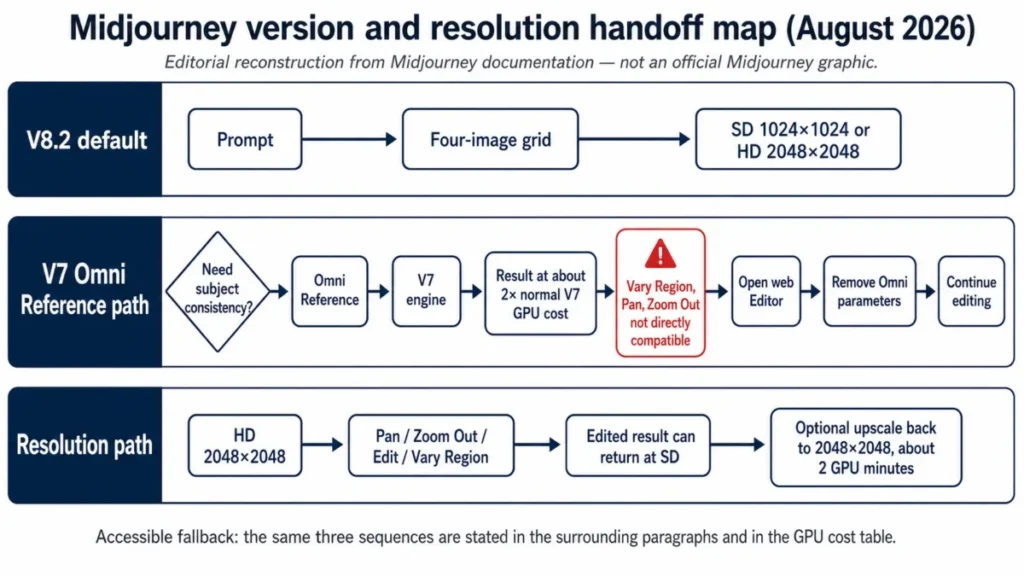
Source: Midjourney Version documentation and Omni Reference documentation, checked August 10, 2026.
Setup, Onboarding, and the Account Trap Returning Users Hit
Getting started is easy. Midjourney’s getting-started guide describes the web flow as opening Create, typing a prompt into the Imagine bar, receiving four images, then refining, adding references, animating, or filing the result in Organize.
The friction is not in creation. It is in identity.
Midjourney supports Google and Discord logins and documents a Connected Accounts path for linking them. Returning users with old Discord history are instructed to sign in with Discord first, because subscribing through a fresh Google login can create a separate account whose history and subscription do not simply merge later.
That matters because subscriptions and image history cannot normally be transferred between Midjourney accounts, although support documents limited assistance such as a possible credit transfer in some cases. A five-minute signup mistake becomes a permanent split between your archive and your paid plan.
If you have ever generated anything under an old Discord identity, authenticate with that identity before you enter a payment method. That is the single highest-value onboarding step in the whole product.
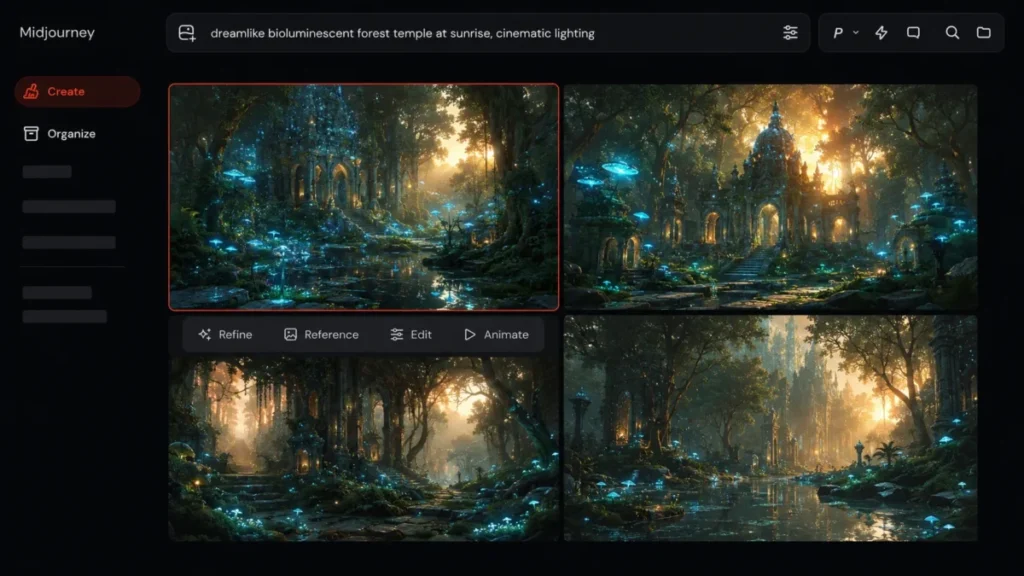
Source: Midjourney Getting Started Guide, Logging In and Connecting Accounts, and Transferring Your Subscription, checked August 10, 2026.
Web App vs Discord: Which Surface Does What
Older reviews still say Discord is mandatory. Newer ones imply the web app replaced it.
Both are wrong.
Midjourney’s own comparison states that all subscribers can create on the web and in Discord, and that the surfaces are not feature-identical. The web app carries the Editor and profile management.
Some custom suffix and Option Set management remains Discord-based.
| Workflow | Web app | Discord |
|---|---|---|
| Prompting and four-image generation | Yes | Yes |
| Editor | Yes | Not documented as available |
| Profile and personalization management | Yes | Not documented as available |
| Draft Mode (V8.1 / V8.2) | Yes | Not documented as available |
| Custom suffix and Option Set management | Not documented as available | Yes |
| Product help channel | Documentation and tickets | #support channel |
Source: Web vs Discord, Draft and Conversational Modes, and Discord Quick Start, checked August 10, 2026.
Plan the surface before you plan the workflow. A team that standardizes on the web app and then discovers Option Set management sits in Discord has a training problem, not a product problem.
Key Features That Matter for Paid Production
Draft Mode for Cheap Ideation
Draft Mode on the web is the strongest cost feature in the product. Midjourney documents V8.1 and V8.2 Draft Mode as producing 24 images at 512 by 512 for approximately 0.4 GPU minutes per prompt.
Compare that against roughly 0.8 GPU minutes for a standard four-image SD prompt and the value is obvious. You get six times the visual options for half the GPU cost, at a resolution good enough to pick a direction.
Picking a winner does not mean re-prompting. Midjourney documents Vary and Remix on an individual draft image as the way to regenerate it at your SD or HD setting.
The limitation is resolution and surface. Draft output is not final art, and Midjourney states that Draft Mode in V8.1 and V8.2 is available only on midjourney.com and not in Discord, so a Discord-first team loses the cheapest ideation path in the product.
One inconsistency is worth knowing before you plan around this. Midjourney’s Version page carries a feature compatibility chart that marks Draft Mode as unavailable on V8.1 and V8.2, while the Draft Mode page itself documents a dedicated V8.1 and V8.2 behavior with the 24-image batch.
Treat the feature page as the operative one and re-check before you build a team workflow on it.
HD Generation and Upscaling
For V8.2 at a 1:1 aspect ratio, Midjourney’s upscaler documentation puts SD at 1024 by 1024 with an upscale path to 2048 by 2048, and HD starting at 2048 by 2048 with no further native upscale step. Upscaling consumes roughly twice the initial generation GPU time.
The trap sits in editing. Pan, Zoom Out, Edit, and Vary Region applied to an HD image can hand back an SD result, so a “2K” production workflow often needs another upscale pass and another block of GPU time.
Budget the extra upscale before you promise a client a 2K deliverable.
Omni Reference and Subject Consistency
Omni Reference is how Midjourney keeps a character, object, or product recognizable across generations. It runs on the V7 workflow, costs about twice normal V7 GPU time, and does not work directly with Vary Region, Pan, or Zoom Out. For a real person rather than a character, the headshot prompts that preserve likeness set shows the same job written as an edit instruction, and how the equivalent control works in ChatGPT and Gemini.
The documented path is to move to the web Editor and remove the Omni parameters before those edits. Anyone building brand-consistent assets on Midjourney is running a two-version pipeline in 2026, not a single V8.2 pipeline.
The older Character Reference parameter is not an escape route. Midjourney’s version compatibility chart lists it as available on V6 only, not on V7 or V8.x.
The Editor and Region Work
The web Editor is where inpainting, region changes, and canvas extension happen, and it doubles as the workaround surface for Omni Reference incompatibilities. It is web-only in the documented feature split.
The limitation is the resolution handoff described above rather than the tool itself.
Seeds and Reproducibility
Seeds appear in every prompt tutorial as a way to lock a look. Midjourney’s seed documentation is more careful, stating that seeds are 99 percent identical in V8.X, that they cannot save a style or character across prompts, and that they should not be relied on for the same results across separate sessions.
The same page says seed locking is unreliable in Turbo mode, and the version compatibility chart does not list Turbo as available on V8.1 or V8.2. For consistency, Midjourney points to style references, Omni Reference, and Personalization instead.
Anyone who needs deterministic, repeatable output for a production system has hit a real wall here. Good prompt engineering narrows the variance but does not remove it.
Text Inside Images
Midjourney’s text guidance favors short words and phrases using standard Latin characters, and documents Raw mode, lower Stylize values, the Editor, and Vary Region as mitigation techniques.
Read that as a boundary, not a bug. Final ad creative with exact copy still belongs in a design tool, and Midjourney supplies the image underneath it.
Source: Draft and Conversational Modes and Upscalers. Also Seeds and Text Generation, all checked August 10, 2026.
Midjourney Video: Five Seconds at a Time
Midjourney supports native five-second image-to-video generation. All plans can use Fast video, Standard and above can use HD Fast video, and Pro and Mega can use Relax SD video.
The feature is genuinely useful for short social motion and animated stills. The cost profile is where buyers get surprised.
Midjourney’s GPU documentation puts four SD videos at roughly 8 GPU minutes and four HD videos at roughly 26, against roughly 0.8 for a four-image SD prompt. One batch of four HD videos can consume more Fast time than 30 still-image prompts.
Basic is capped at SD video resolution and one concurrent video job, so a Basic subscriber testing motion is working with the slowest and lowest-resolution version of the feature.
Relax SD video starting at Pro is a pricing feature rather than a convenience feature. It moves the most expensive routine operation in the product off the metered allowance for anyone who can tolerate queue waits.
This is not a video editing suite. Teams building timelines, multi-shot sequences, or long-form output need one of the dedicated AI video generators instead, and Midjourney becomes the source of the frames.
Source: Midjourney Video documentation and Midjourney GPU Speed documentation, checked August 10, 2026.
Integrations, API, and Reporting
This section is short because the answer is short.
Midjourney’s community guidelines state that, apart from rare expressly granted exceptions, there is no public API and automated interactions with the service through unauthorized third-party applications or scripts are prohibited. Account sharing and reselling access are prohibited as well.
Treat that as a binary buyer gate. If your pipeline requires programmatic generation triggered by a CMS, a product feed, or a batch job, Midjourney is not a candidate at any price, and third-party wrappers are not an equivalent substitute for first-party support.
Reporting is equally thin. There is no documented organization-level usage console, so a studio tracking GPU consumption across ten creators tracks it manually or not at all.
Source: Midjourney Community Guidelines, checked August 10, 2026.
Midjourney Pricing and Plans
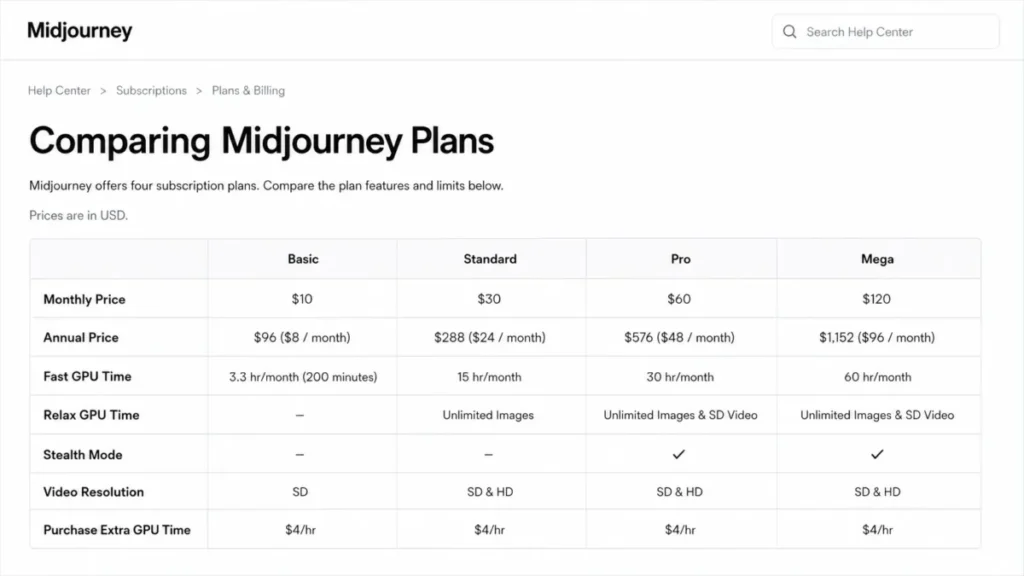
Prices below are US list prices in USD, checked on the official plan comparison page on August 10, 2026. Annual billing is 20 percent below twelve monthly payments and is paid upfront.
| Plan | Monthly | Annual (effective per month) | Fast GPU per month | Best for | Worth it? |
|---|---|---|---|---|---|
| Basic | $10 | $96 ($8) | 200 minutes | Light experimentation | Good only if you stay inside Fast time |
| Standard | $30 | $288 ($24) | 15 hours | Frequent non-confidential image work | Best practical plan |
| Pro | $60 | $576 ($48) | 30 hours | Confidential client work, heavy video | First privacy tier |
| Mega | $120 | $1,152 ($96) | 60 hours | High-throughput studios | Throughput only, no extra governance |
Source: Comparing Midjourney Plans, checked August 10, 2026. Prices are subject to change, and Midjourney’s billing pages state that applicable sales tax or VAT is added to the listed amount.
The annual difference against twelve monthly payments works out to $24 per year on Basic, $72 on Standard, $144 on Pro, and $288 on Mega before tax. Those figures are arithmetic from the standard list prices above and carry no time limit.
There is no free trial through midjourney.com or Discord. Midjourney’s free-trial documentation preserves one narrow exception: a limited trial can exist in the niji journey iOS and Android app.
Reviews that state flatly that no trial exists anywhere are overstating it.
The GPU Math Nobody Shows You
Midjourney does not sell images. It sells Fast GPU minutes, and every operation draws a different amount.
| Operation | Approximate Fast GPU cost | What it means at Basic’s 200 minutes |
|---|---|---|
| Draft Mode prompt (24 images at 512 x 512) | 0.4 minutes | About 500 draft prompts |
| Standard SD prompt (4 images) | 0.8 minutes | About 250 prompt batches |
| HD prompt (4 images) | 1.3 minutes | About 153 prompt batches |
| Upscale | About 2 minutes | About 100 upscales |
| Four SD videos | About 8 minutes | About 25 batches |
| Four HD videos | About 26 minutes | About 7 batches |
Source: Fast, Relax, and Turbo GPU speed and Comparing Midjourney Plans, checked August 10, 2026. Midjourney describes these consumption values as approximate, and the right-hand column is arithmetic from those approximations rather than an official image quota.
The right-hand column is the honest version of the “how many images do you get” question. Basic’s 200 minutes theoretically covers about 250 SD prompt batches, which is about 1,000 grid images, but only in a world where you never upscale, never generate HD, never use references, and never touch video.
Add one habit of upscaling every third pick and that number drops hard.
Three more mechanics change the math. Included Fast time resets each month and does not roll over.
Relax image generation carries documented waits from zero to about 30 minutes. Relax does not cover every operation, including repeat and permutation prompts and HD video.
Concurrency is tiered too. Basic runs 3 Fast image jobs, Standard runs 3 Fast or Relax, and Pro and Mega run 12 Fast or 3 Relax, with video concurrency rising by tier.
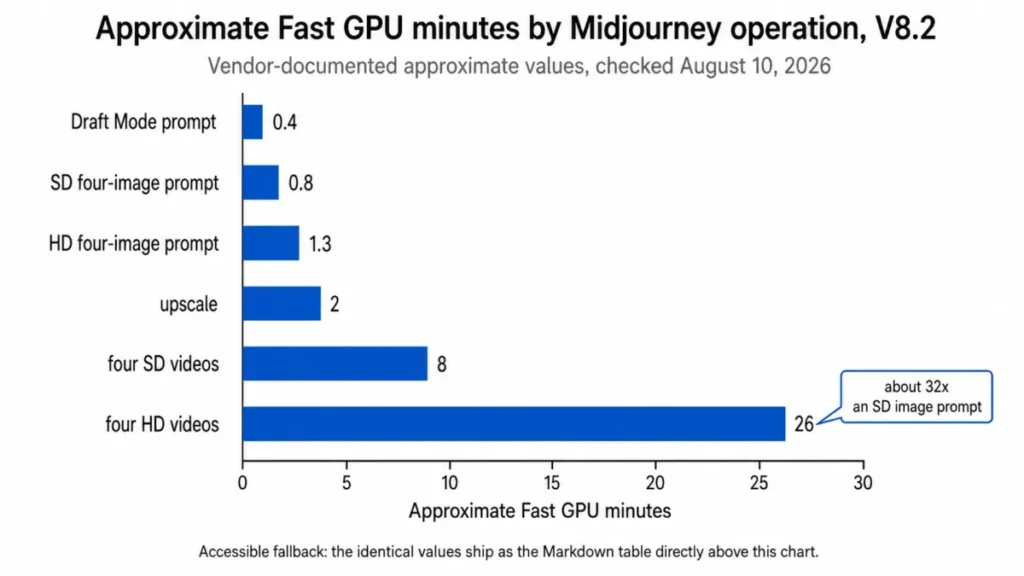
Accessible data for the chart above: Draft Mode prompt 0.4 minutes, SD four-image prompt 0.8, HD four-image prompt 1.3, upscale about 2, four SD videos about 8, four HD videos about 26.
Feature Gates: What You Get on Each Plan
| Capability | Basic | Standard | Pro | Mega |
|---|---|---|---|---|
| Fast GPU time per month | 200 minutes | 15 hours | 30 hours | 60 hours |
| Unlimited Relax image generation | No | Yes | Yes | Yes |
| Stealth Mode | No | No | Yes | Yes |
| HD Fast video | No | Yes | Yes | Yes |
| Relax SD video | No | No | Yes | Yes |
| Fast image concurrency | 3 | 3 or Relax | 12 or 3 Relax | 12 or 3 Relax |
| Fast video concurrency | 1 | 3 | 6 or 3 Relax | 12 or 3 Relax |
| Maximum repeat or permutation size | 4 jobs | 10 jobs | 40 jobs | 40 jobs |
| Rate images to earn free GPU time | Yes | Yes | Yes | Yes |
| Extra Fast time purchase | $4 per hour | $4 per hour | $4 per hour | $4 per hour |
| Asset ownership for companies above $1M revenue | No | No | Yes | Yes |
| SSO and centralized seat administration | No | No | No | No |
Source: Comparing Midjourney Plans, Terms of Service, and Group Plans and Corporate Billing, checked August 10, 2026.
Two rows in that table decide most upgrades. Unlimited Relax images at Standard changes the marginal cost of iteration from metered to free-with-waiting.
Stealth at Pro turns a $30 decision into a $60 decision the moment a client contract mentions confidentiality.
Team Costs at 5, 10, and 50 Users
Midjourney accounts are individual. The community guidelines prohibit sharing or reselling access, so team cost is multiplication rather than a seat pool with a volume curve.
| Team size and plan | Annual billing | Monthly billing, annualized | Difference |
|---|---|---|---|
| 5 users on Standard | $1,440 | $1,800 | $360 |
| 5 users on Pro | $2,880 | $3,600 | $720 |
| 10 users on Standard | $2,880 | $3,600 | $720 |
| 10 users on Pro | $5,760 | $7,200 | $1,440 |
| 50 users on Pro | $28,800 | Not modeled | Bulk invoicing available on request |
| 50 users on Mega | $57,600 | Not modeled | Bulk invoicing available on request |
Source: arithmetic from the list prices on Comparing Midjourney Plans, combined with the individual-account rule in the Community Guidelines and the corporate billing threshold in Group Plans and Corporate Billing. Checked August 10, 2026. These are calculated totals, not quoted group pricing.
The 50-user row is the one procurement teams misread. Midjourney documents single-invoice bulk billing only for organizations with at least 50 yearly Pro or Mega subscriptions, and it documents no organizational discount.
Reaching 50 seats buys an easier invoice, not a lower price. Below that threshold, an organization manages separate subscriptions with unique billing emails on its own domain and keeps its own roster of who has access.
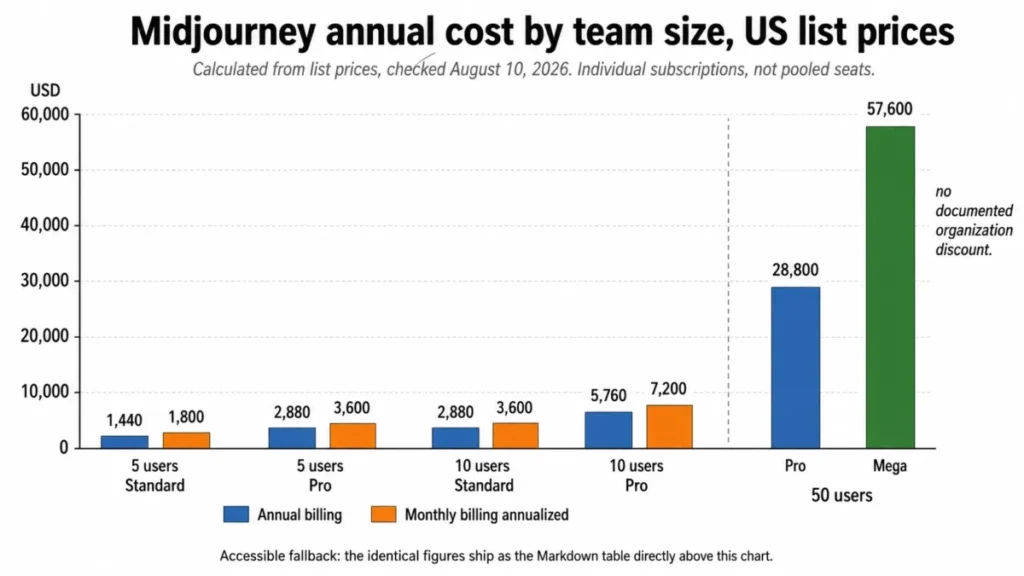
Accessible data for the chart above, five and ten users: Standard $1,440 annual against $1,800 monthly, Pro $2,880 against $3,600, Standard $2,880 against $3,600, Pro $5,760 against $7,200. At fifty users: Pro $28,800 annual and Mega $57,600 annual.
Hidden Costs, Refunds, and Cancellation
Four contract mechanics belong in the budget conversation, and none of them appear on a pricing card.
Extra Fast time costs $4 per hour. It expires after 60 days, requires an active subscription to use, and is non-refundable, so buying capacity ahead of a busy quarter carries real perish risk.
A team buying ten extra hours every month adds $480 per year before tax.
Refund eligibility is narrow. Midjourney documents a refund option only when lifetime GPU use is below 20 minutes and the refund choice appears during cancellation.
That is roughly 25 SD prompt batches, so a serious evaluation weekend removes the option.
One lever runs the other way. Every plan can rate images to earn free GPU time, which is the only documented way to add capacity without paying for it.
Subscriptions auto-renew. Cancelling stops the next renewal, preserves access through the current paid period, and leaves saved images accessible afterward.
The renewal question worth answering before month 12: did the team’s GPU consumption stay inside the included allowance, or did extra Fast purchases quietly become a second line item?
Source: Purchasing Extra Fast Time, Requesting a Refund, and Turning Off Automatic Renewals, checked August 10, 2026.
Commercial Use and Ownership
Midjourney’s Terms state that users own the Assets they create to the fullest extent possible under applicable law. There is a condition attached that most reviews skip.
Companies with more than $1 million in annual revenue, and employees acting on behalf of those companies, must be on Pro or Mega for Asset ownership under the agreement. A marketing manager at a $5 million company running Standard is on the wrong plan for the contract, regardless of how modest the usage is.
That turns a legal term into a pricing term. For those buyers the practical entry price is $60 per month, not $30.
This is contract interpretation for buyer evaluation rather than legal advice, and the exact wording is on the official page. Read it with your own counsel before you standardize a plan across a company.
Source: Midjourney Terms of Service, checked August 10, 2026.
Privacy, Stealth Mode, and Data Handling
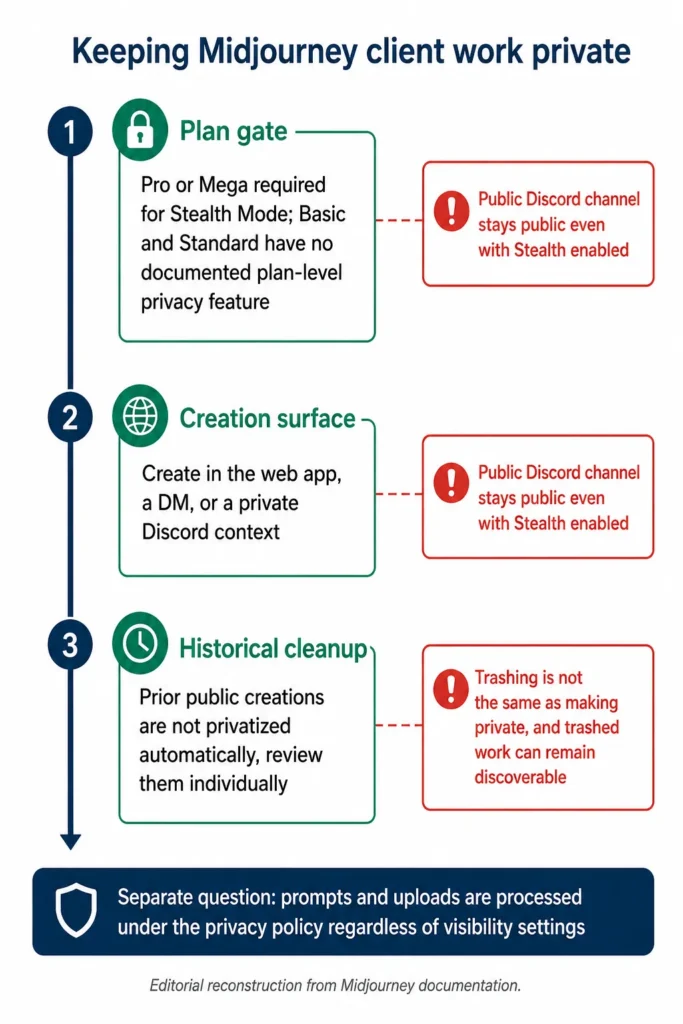
Privacy on Midjourney is three separate questions, and collapsing them into one is how agencies leak client work.
Question one is the plan. Stealth Mode requires Pro or Mega. Below that tier there is no documented plan-level privacy feature.
Question two is the surface. Midjourney’s Stealth documentation states plainly that Stealth does not hide creations made in public Discord channels. Paying $60 per month and then prompting in a public channel produces public work.
Question three is history. Moving to a Stealth-enabled plan does not automatically privatize prior public creations, and trashing a creation is not the same as making it private. Trashed work can remain discoverable.
Separately from visibility, Midjourney’s privacy policy includes prompts and uploads among the data it may process to provide, maintain, and improve the service, and it does not promise absolute security. Its privacy FAQ states that personal information it handles is stored on servers in the United States, that it does not sell personal information, and that successful deletion requests complete within 30 days after a seven-day cancellation window.
Visibility settings and data processing are different questions with different answers. A client NDA that only asks “are the images private” has not asked the second one.
Source: Stealth Mode, Privacy Policy, and Data Deletion and Privacy FAQ, checked August 10, 2026.
Security, Support, and Admin Controls
This is where Midjourney separates itself from normal business software, and not favorably.
Midjourney’s corporate billing documentation states that the program does not add seat administration, SSO, negotiated terms or policies, or participation in vendor, supplier, or security-review processes. Organizations running multiple subscriptions are told to use unique billing emails on their organization domain and to maintain their own external roster.
An IT team gets no user provisioning, no deprovisioning, no audit trail, and no central console. When a designer leaves, someone reads a spreadsheet and cancels a subscription manually.
| Support route | What it covers | Documented response commitment |
|---|---|---|
| Discord #support channel | Product assistance | None stated on the checked pages |
| Billing ticket or email | Subscriptions, payments, refunds | None stated on the checked pages |
| Help center documentation | Self-serve product and billing guidance | Not applicable |
Source: Contacting Support, Discord Quick Start, and Billing Support, checked August 10, 2026. No committed human-response SLA appeared on those pages, which is narrower than saying none exists anywhere.
If your procurement process requires a signed DPA, a security questionnaire response, and an SSO rollout, this product fails the process before anyone looks at an image.
Midjourney Limitations
Six limitations stand on their own, independent of the pros and cons list.
GPU minutes are volatile as a budgeting unit. A month heavy on HD video consumes Fast time roughly 30 times faster than a month of SD stills, and unused time does not roll over.
The current default version is not a closed system. Omni Reference routes through V7 at about twice normal V7 GPU cost, and several edit operations on HD output return SD.
There is no generally available public API. Automation through unauthorized third-party applications or scripts is prohibited outside rare express exceptions.
Enterprise administration does not exist. No SSO, no centralized seat management, no negotiated policy terms, and no participation in standard vendor security reviews, even at 50 or more subscriptions.
Reproducibility is not dependable. Seeds support controlled comparison rather than durable identical output across sessions, and are documented as unreliable in Turbo mode.
Typography is a boundary. Text generation favors short standard-Latin words and phrases, with documented mitigations rather than a promise of exact rendering.
Buyer Risk Ledger
| Risk | Who it hits | Consequence | Mitigation |
|---|---|---|---|
| Fast time exhausted mid-project | Basic and Standard subscribers running video | Work stalls or shifts to Relax queues of up to 30 minutes | Model video separately, or move to Pro for Relax SD video |
| Client work created in a public surface | Agencies on Pro who assume the plan is enough | Unreleased campaign work becomes discoverable | Create in web, DM, or private Discord contexts and audit history |
| Account split at signup | Returning Discord users | History and subscription live in different accounts with no normal transfer | Authenticate with the existing Discord identity before paying |
| Wrong plan for company revenue | Employees of companies above $1M revenue | Asset ownership condition in the Terms is not met | Standardize on Pro or Mega for those buyers |
| Extra Fast hours expire unused | Studios pre-buying capacity | Non-refundable spend lost after 60 days | Buy in the month of use only |
| No deprovisioning path | Any team above five users | Departing staff keep access until someone cancels manually | Maintain an external roster with renewal dates |
Midjourney Pros and Cons
| Pros | Cons |
|---|---|
| Draft Mode returns 24 candidates for about 0.4 GPU minutes, the cheapest ideation path in the product | GPU minutes vary roughly 32 times between an SD image prompt and four HD videos, which makes budgeting volatile |
| Unlimited Relax image generation from Standard removes the marginal cost of iteration | Stealth Mode is gated at Pro, so confidentiality doubles the entry price |
| Native five-second image-to-video works on every plan, with HD Fast video from Standard | Public Discord creations stay visible even with Stealth enabled |
| Annual billing is a clean 20 percent below monthly, saving up to $288 per year on Mega | No public API and automated interaction through unauthorized scripts is prohibited |
| Creation works on both the web app and Discord for every subscriber | No SSO, seat administration, or vendor security-review participation at any subscription count |
| Ownership of created Assets is stated in the Terms for the fullest extent applicable law allows | Refund eligibility ends after 20 lifetime GPU minutes, about 25 SD prompt batches |
Who Should Use Midjourney?
Solo visual ideators producing a few dozen concepts a month. Basic at $10 works when the workflow stays inside 200 Fast minutes and nothing needs to stay private.
Freelance designers and art directors iterating heavily on non-confidential work. Standard is the value tier because unlimited Relax image generation starts there and turns iteration into a time cost rather than a money cost.
Agencies handling unreleased client campaigns. Pro is the minimum viable plan, and the workflow discipline around creation surfaces matters as much as the plan.
Studios producing images plus frequent short motion clips. Pro or Mega depending on throughput, with video GPU consumption modeled explicitly before the plan is chosen.
Creative organizations of 50 or more that accept manual administration. Bulk invoicing on annual Pro or Mega removes the invoice mess, and everything else stays manual.
Who Should Avoid Midjourney?
Teams that need programmatic generation. No public API and a prohibition on unauthorized automation makes this a hard no rather than a workaround.
Organizations with mandatory SSO or lifecycle administration. The corporate billing program does not provide identity management, and no plan adds it.
Confidential production on a budget below Pro. Stealth begins at $60 per month and there is no documented substitute lower down.
Workflows that require deterministic reproduction. Seed behavior is documented as a comparison aid, not a locking mechanism.
Teams needing a full video production suite. Five-second image-to-video is a clip generator, not a timeline editor.
Final creatives that require exact long-form typography inside the generated image. The documented guidance points to short phrases and mitigation techniques.
Midjourney Alternatives
| Alternative | Better for | Choose it instead if |
|---|---|---|
| Adobe Firefly | Enterprise creative teams | Procurement needs the tool to sit inside an existing enterprise creative stack rather than individual consumer subscriptions |
| Stable Diffusion | Engineering-led pipelines | Programmatic and self-hosted generation is required, which Midjourney’s guidelines prohibit |
| Leonardo AI | Game and product asset teams | The workflow needs more structure around asset production than a prompt bar provides |
| DALL-E | Teams standardized on one AI assistant | Image generation should arrive inside a broader assistant rather than a separate subscription |
| Runway ML | Motion-first production | Output is video-led rather than five-second clips generated from a still |
Plan pricing for these alternatives was not verified in this research pass, so no figures are quoted above. Enterprise creative buyers start with the Adobe Firefly review.
Engineering-led teams that need programmatic generation belong in the Stable Diffusion review. Asset-heavy game and product work is covered in the Leonardo AI review.
Assistant-embedded generation is covered in the DALL-E image generator review. Motion-first production belongs in the Runway ML review.
Buyers weighing subscription cost across creative tools can compare Adobe Firefly pricing directly, and a broader shortlist of AI tools for content creation covers adjacent categories.
Final Verdict: Is Midjourney Worth It in 2026?
Midjourney is worth it for creators and agencies whose output is aesthetic still-image production, where speed of iteration and visual quality decide the value of the tool.
The decision chain is short. Official documentation puts one supported feature behind each price step, so unlimited Relax images at Standard makes $30 per month the practical floor for frequent work.
Stealth at Pro makes $60 per month the floor for client confidentiality, and that plan gate carries a workflow consequence for a specific buyer. If an affected team cannot reach Pro, the operating consequence is that confidential work has no documented private path, so the recommendation for that buyer is to choose a different platform.
The $1 million company revenue condition in the Terms pushes larger employers to that same $60 plan for a separate reason.
It is not worth it for engineering-led or IT-governed buyers. No public API, no SSO, no seat administration, and no vendor security-review participation are documented limits rather than gaps waiting to be filled, and a bigger plan does not close any of them.
Choose Basic if you generate a few dozen concepts monthly, never touch video, and nothing needs to stay private.
Choose Standard if you iterate constantly on non-confidential work and can accept Relax waits of up to 30 minutes in exchange for uncapped image generation.
Choose Pro if confidentiality is contractual, if your employer clears $1 million in revenue, or if Relax SD video moves your most expensive operation off the metered allowance.
Choose Mega only when Fast throughput and concurrency are the binding constraint, and never in the belief that it adds governance.
Choose a different platform if programmatic generation or centralized identity management is non-negotiable. That decision is about architecture, not image quality, and Midjourney will not win it at any price.
Choose a Midjourney plan only when its GPU economics, privacy model, workflow compatibility, and governance limits fit the production process you already run. When any one of those four fails, shortlist an alternative instead of buying a larger plan.
Ninety days in, the purchase is working if your Fast time stayed inside the included allowance and your client work never appeared in a public surface. The third test is whether anyone had to rebuild an asset because an HD edit came back at SD.
Frequently Asked Questions
Is Midjourney worth it in 2026?
Yes, if your work is high-volume still-image ideation and you can live without an API or centralized administration. Standard at $30 per month is the practical tier for most frequent users because unlimited Relax image generation begins there.
Confidential client work needs Pro at $60 per month, because Stealth Mode is not available below that plan.
How much does Midjourney cost?
Basic is $10 per month or $96 per year, Standard is $30 or $288, Pro is $60 or $576, and Mega is $120 or $1,152, checked on August 10, 2026 in the US. Annual billing is 20 percent cheaper and paid upfront.
Extra Fast time costs $4 per hour on every plan.
Does Midjourney have a free trial?
No, not through midjourney.com or Discord. Midjourney’s free-trial documentation preserves one narrow exception, which is a limited trial in the niji journey iOS and Android app.
A paid subscription is refundable only when lifetime GPU use stays below 20 minutes and the refund option appears during cancellation.
How many images can the Basic plan generate?
Midjourney does not publish an image quota. Basic includes 200 Fast GPU minutes, and a standard four-image SD prompt costs roughly 0.8 minutes, so 200 minutes theoretically covers about 250 prompt batches.
That number falls fast once upscales, HD output, references, or video enter the workflow.
Are Midjourney images private?
Only under three conditions together. Stealth Mode requires Pro or Mega, creation has to happen outside public Discord channels, and older public work is not privatized automatically by upgrading.
Trashing an image is not the same as making it private, and trashed work can remain discoverable.
Does Midjourney have an API?
No, unless you have a rare express exception. Midjourney’s community guidelines state there is no generally available public API and prohibit automated interactions through unauthorized third-party applications or scripts.
Third-party wrappers are not first-party support, so any pipeline that depends on programmatic generation should evaluate a different platform.
Can Midjourney images be used commercially?
Yes, with one plan condition. Ownership of created Assets is stated in the Terms to the fullest extent applicable law allows, but companies above $1 million in annual revenue, and employees acting for them, must be on Pro or Mega for that ownership to apply.
Read the current Terms with your own counsel.
Can Midjourney make videos?
Yes. Midjourney supports native five-second image-to-video generation, with Fast video on every plan, HD Fast video from Standard, and Relax SD video on Pro and Mega.
Four HD videos consume roughly 26 Fast GPU minutes against roughly 0.8 for a four-image SD prompt, so video dominates plan capacity quickly.
Is Discord still required to use Midjourney?
No. Every subscriber can create on both the web app and Discord, though the two surfaces are not feature-identical.
The web app carries the Editor and profile management, while some custom suffix and Option Set management stays Discord-based, so teams standardizing on one surface should check which workflows live where.
Is Midjourney good for a small agency?
Yes, if the agency budgets Pro at $60 per month per person rather than Standard. Client confidentiality needs Stealth, individual subscriptions mean five people cost $2,880 per year on annual Pro billing, and there is no seat console, so someone maintains the roster and cancellations manually.
Choose a Midjourney plan only if its GPU economics, privacy model, workflow compatibility, and governance limits fit the intended production process at your agency. Otherwise shortlist an alternative rather than buying a larger plan.