If you need a straight answer on adobe firefly pricing, here it is: Adobe Firefly costs $0 to $199.99 per month depending on which plan you choose and how many generative credits you need. The main cost driver is premium generative credits, the tokens that power video generation, audio translation, sound effects, and partner-model outputs. Standard AI features such as Generative Fill and text-to-image on Adobe’s older Firefly image models are unlimited on every paid plan.
This guide breaks down every current Firefly plan, explains what credits actually buy, shows where the first-year “unlimited generations” offer stops applying, and gives you a clear framework for picking the right tier, whether you are a solo creator, a small studio, or an agency.
All prices below were re-checked against Adobe’s official plan page on the US storefront on August 25, 2026.
In This Article (17 sections)
Adobe Firefly Pricing Quick Answer
Adobe Firefly ranges from free to $199.99/mo. Firefly Standard is $9.99/mo (2,000 credits). Firefly Pro is $19.99/mo (4,000 credits). Firefly Pro Plus is $49.99/mo (10,000 credits). Firefly Premium is $199.99/mo (50,000 credits). All paid plans include unlimited standard generations. Credits are only consumed by premium features such as video, translation, sound effects, and partner models.
Limited-time offer, verified August 25, 2026: Adobe is discounting its two largest Firefly plans by 30% for the first year on the Firefly plans page. Firefly Pro Plus shows a regular price of $49.99/mo alongside $34.97/mo, and Firefly Premium shows a regular price of $199.99/mo alongside $139.91/mo. Both discounts are first year only and the plan page states they end on October 21. Budget for the standard price in month 13, not the promotional one.
At a glance
- Firefly Free: $0/mo. No plan required. Adobe describes it as free daily generations across image, video, and audio with access to popular models, and the limits refresh every day rather than every month. Best for testing before buying.
- Firefly Standard: $9.99/mo. 2,000 credits. Unlimited standard generations, up to 20 five-second videos, up to 6 minutes of translation, up to 200 sound effects. No Photoshop or Express bundle.
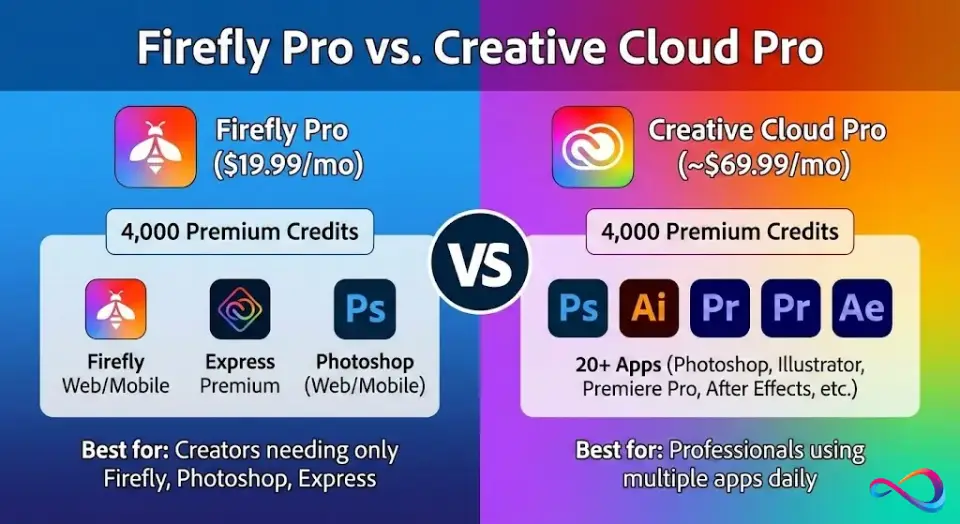
- Firefly Pro: $19.99/mo. 4,000 credits. Up to 40 five-second videos, 13 minutes of translation, 400 sound effects. Adds Adobe Express Premium and Photoshop on web and mobile.
- Firefly Pro Plus: $49.99/mo regular price, $34.97/mo on the current first-year offer. 10,000 credits. Up to 100 five-second videos, 33 minutes of translation, 1,000 sound effects.
- Firefly Premium: $199.99/mo regular price, $139.91/mo on the current first-year offer. 50,000 credits. 166 minutes of translation, 5,000 sound effects, and unlimited access to the Firefly Video Model in Generate Video.
- Credit add-on plans: $9.99 to $199.99/mo for 2,000 to 50,000 extra credits stacked on an existing subscription.
Pricing Table
| Plan | Monthly Price | Credits/mo | 5-Second Videos | Translation | Sound Effects | Best For |
|---|---|---|---|---|---|---|
| Firefly Free | $0 | Daily limits, refreshed daily | Included in daily limits | Included in daily limits | Included in daily limits | Testing Firefly |
| Firefly Standard | $9.99 | 2,000 | Up to 20 | Up to 6 min | Up to 200 | Solo creators, occasional video |
| Firefly Pro | $19.99 | 4,000 | Up to 40 | Up to 13 min | Up to 400 | Creators who also want Photoshop and Express |
| Firefly Pro Plus | $49.99 (offer: $34.97) | 10,000 | Up to 100 | Up to 33 min | Up to 1,000 | Regular video and translation work |
| Firefly Premium | $199.99 (offer: $139.91) | 50,000 | Unlimited on the Firefly Video Model | Up to 166 min | Up to 5,000 | Studios, agencies, production teams |
Source: Adobe official Firefly plans page, US storefront, checked 2026-08-25: adobe.com/products/firefly/plans
Quotas in this table are Adobe’s published per-plan maximums. Actual consumption depends on the model, resolution, and length you choose.
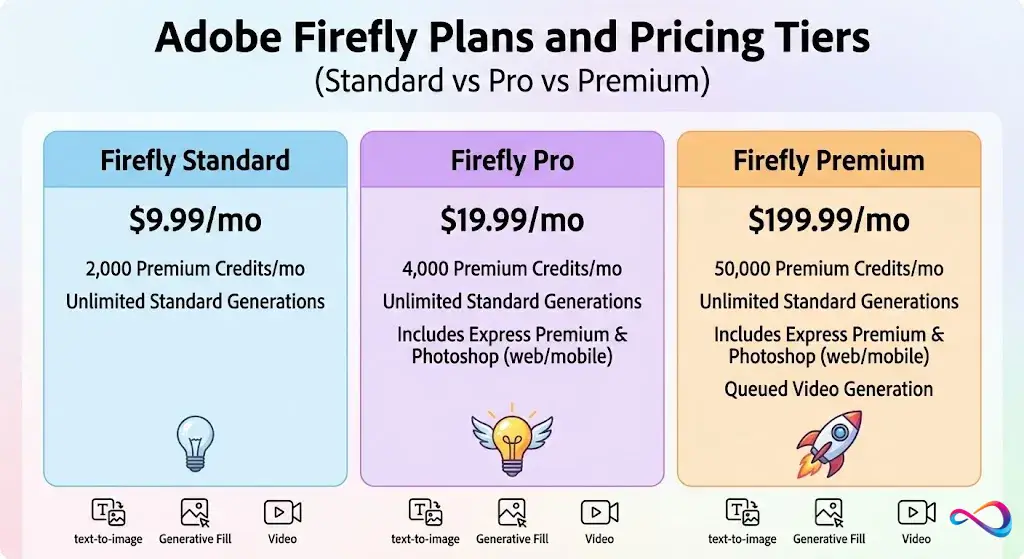
Adobe Firefly Plans and Pricing Tiers
Understanding the Firefly pricing plans requires one core concept. Adobe splits generative features into two buckets. Standard features are unlimited on every paid plan and never touch your balance. Premium features draw down credits every time you use them, and that is where the real cost sits.
Every paid tier below includes Firefly on web and mobile, unlimited access to Firefly Boards, and Adobe Fonts.
Firefly Standard: Who It Is For
Price: $9.99/mo | Credits: 2,000 per month
The Firefly Standard price is the lowest-cost paid entry point. You get:
- Unlimited standard generations, with no credit deduction.
- 2,000 monthly credits for premium features, which Adobe rates at up to 20 five-second video clips, 6 minutes of video or audio translation, or 200 sound effects.
- Access to Firefly on web and mobile, plus unlimited Firefly Boards.
One detail buyers miss: Standard is the only paid tier that does not include Adobe Express Premium or Photoshop on web and mobile, and it is the only paid tier excluded from the first-year unlimited generations offer described below.
Who should buy: Solo creators who mainly need images and vectors with occasional video experiments, and who do not want the Adobe app bundle.
Who should skip: Anyone generating more than a handful of videos per month. At roughly 100 credits per five-second clip, 2,000 credits disappear in a single afternoon of video work.
Firefly Pro: Who It Is For
Price: $19.99/mo | Credits: 4,000 per month
The step from Standard to Firefly Pro doubles your credits and adds two products:
- 4,000 credits, rated at up to 40 five-second videos, 13 minutes of translation, or 400 sound effects.
- Adobe Express Premium.
- Photoshop on web and mobile, described by Adobe as full access.
- Eligibility for the first-year unlimited generations offer on a selected model list.
Who should buy: Professionals and small studios who want generative AI plus editing tools in one line item. The bundled Express Premium and Photoshop access make the Firefly Pro price the strongest value in the lineup.
Who should skip: Nobody on Standard who is also buying a 2,000-credit add-on. See the crossover math further down, because that combination costs a penny less than Pro and gives you strictly less.
Firefly Pro Plus: Who It Is For
Price: $49.99/mo regular, $34.97/mo on the current first-year offer | Credits: 10,000 per month
Pro Plus is the tier missing from most Firefly pricing guides, and it is the one that changes the math for video buyers:
- 10,000 credits, rated at up to 100 five-second videos, 33 minutes of translation, or 1,000 sound effects.
- The same Express Premium and Photoshop bundle as Pro.
- A wider first-year unlimited model list than Pro, covering all image models at 1K and 2K plus selected video models.
Who should buy: Creators producing video or translated content weekly. At the offer price of $34.97/mo you are paying less than Pro Plus normally costs and getting 2.5 times the credits of Pro.
Who should skip: Buyers who only need stills. Standard features are already unlimited on the $9.99 plan, so paying five times more for credits you will not spend is waste.
Firefly Premium: Who It Is For
Price: $199.99/mo regular, $139.91/mo on the current first-year offer | Credits: 50,000 per month
The Firefly Premium price targets high-volume production. At the regular price you get:
- 50,000 credits, rated at 166 minutes of translation or 5,000 sound effects.
- Unlimited access to the Firefly Video Model in Generate Video, which is the single feature no lower tier offers at any credit level.
- The broadest first-year unlimited model list, including Veo 3.1 Fast, Kling 3.0, and all image models at 1K, 2K, and 4K.
Who should buy: Agencies and production houses running Adobe’s own video model daily. The unlimited Firefly Video Model access, not the credit pool, is what you are actually buying.
Who should skip: Most individuals and small teams. At $2,399.88 per year at the standard price, this only pays for itself if it replaces outsourced video or translation work that costs more.
Common mistake: Buying Premium for the credit pool alone. A 50,000-credit add-on costs the same $199.99/mo and delivers the same 50,000 credits without the Premium subscription, so if unlimited Firefly Video Model access is not the reason you are upgrading, you are paying for a bundle you do not need.
The First-Year Unlimited Generations Offer: What It Really Covers
This is the biggest gap in most Firefly pricing coverage, and it is the reason a cheap first year can turn into an expensive second one. Adobe’s unlimited generations special offer documentation sets out the boundaries clearly, and they are tighter than the marketing suggests.
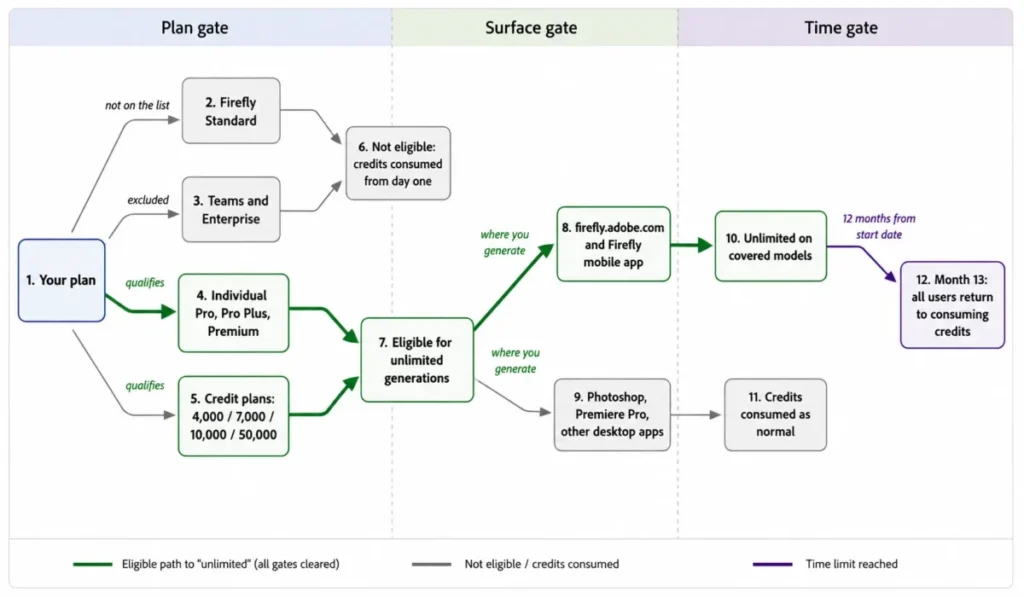
Who qualifies. Individual Firefly Pro, Pro Plus, and Premium plans, plus the 4,000, 7,000, 10,000, and 50,000 credit add-on plans. Firefly Standard is not on the list. Teams and Enterprise plans are excluded entirely. Existing Creative Cloud subscribers have to add a qualifying credit subscription to join.
Where it works. Only on firefly.adobe.com and the Firefly mobile app. Adobe states plainly that unlimited generations cannot be used in any other Adobe product or desktop application, so it does not follow you into Photoshop or Premiere Pro.
How long it lasts. Twelve consecutive months from the date you start the eligible plan. Adobe’s own worked example: a subscription started on May 21, 2026 runs through May 20, 2027. Upgrading mid-term unlocks more models but does not extend the end date.
What happens next. After the first year, every user returns to consuming credits, at rates that vary by model and resolution.
What Adobe reserves the right to do. The covered model list can change at any time, and if a partner model leaves Firefly it leaves the offer too. Adobe also states it may introduce usage management features or service safeguards, naming adjusted processing speeds and queueing during high demand, and may modify, limit, or discontinue any part of the offer.
One consequence worth pricing in. Adobe’s list of always-unlimited standard features names Firefly Image 4 and Firefly Image 3, while Firefly Image Model 5 and Firefly Image Model 4 Ultra appear in the special offer tables instead. In plain terms, the newest Adobe image models are promotional unlimited for the first year, not permanently unlimited. Plan your year-two budget on the older models being free and the newest ones costing credits.
Premium vs Standard: What Actually Costs Money
Adobe splits generative features into two categories, and misunderstanding this distinction is the single most common way Firefly buyers overspend.
Standard features are unlimited on every paid Firefly plan and every credit add-on plan, during and after any promotional period. No credits are deducted. Adobe’s current published list covers:
- Generative Fill
- Text-to-image on Firefly Image 4 and Firefly Image 3, the models behind Adobe’s AI art creator
- Generative Erase
- Generative Expand
- Remove Background
- Upscale
Premium features are compute-intensive, deduct multiple credits per use, and require a plan with premium access. Examples:
- Text-to-video and image-to-video
- Generative Extend in Adobe Premiere Pro
- Video and audio translation and lip sync
- Sound effect generation
- Partner model outputs
Note the wrinkle here. The Firefly art generator interface now lets you pick partner models such as Gemini, ChatGPT Image, and FLUX alongside Adobe’s own. Same screen, same workflow, completely different billing. The model selector, not the feature name, decides whether you spend credits.
The practical takeaway: if you only need AI-powered image editing on Adobe’s own established models, even the $9.99 Standard plan gives you unlimited access with no credit drain. Credits only matter once you step into video, audio, partner models, or the newest Adobe image models.
Generative Credits Explained
Generative credits are the currency of Adobe’s AI ecosystem. Every premium generation deducts credits from your monthly balance. Adobe’s generative credits page is the canonical reference for add-on pricing and quotas.
What Happens When You Run Out
Credits reset monthly on your billing date and do not roll over.
If you exhaust your credits mid-month:
- Standard features keep working. You never lose Generative Fill, Remove Background, or text-to-image on the standard models.
- Premium features pause until your credits reset.
- Add-on buyers can stack a credit plan for immediate capacity without changing their base subscription.
- Free users must subscribe to continue past the daily limits.
Credits-to-Outputs Cheat Sheet
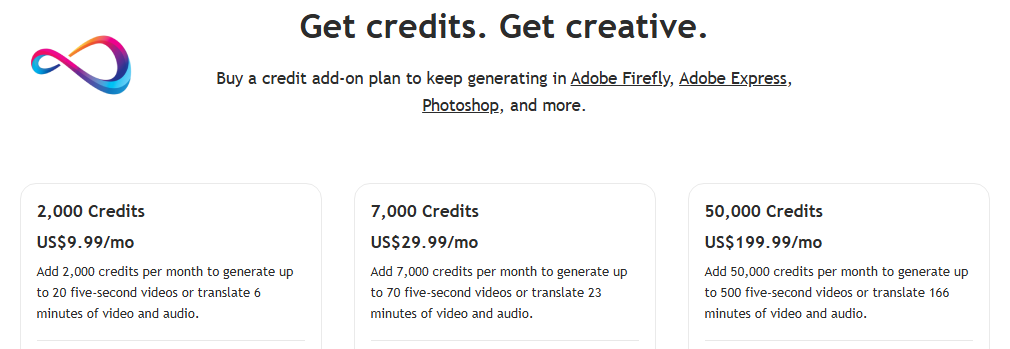
Adobe publishes price and quota together on its credit add-on plans, which lets you derive a consistent per-output rate. The 2,000-credit plan buys up to 20 five-second videos, the 7,000-credit plan up to 70, the 10,000-credit plan up to 100, and the 50,000-credit plan up to 500. All four resolve to the same figure.
| Output Type | Derived Credit Cost | Basis |
|---|---|---|
| Standard text-to-image | 0, unlimited on paid plans | Published standard-feature list |
| Generative Fill | 0, unlimited on paid plans | Published standard-feature list |
| Video generation, 5-second clip | About 100 credits | 2,000 credits divided by 20 clips, consistent across all four add-on tiers |
| Video or audio translation | About 5 credits per second, roughly 300 per minute | 50,000 credits divided by 166 minutes |
| Sound effect | About 10 credits each | 2,000 credits divided by 200 effects, consistent across all four add-on tiers |
| Partner model output | Varies by model and resolution | Shown in-product before you generate |
These are derived rates, not published per-unit prices. Adobe displays the exact credit cost in the interface before each generation, and rates differ by model and resolution.
Credit Add-On Plans
Already on a Firefly or Creative Cloud subscription but need more premium generations? Adobe sells credit add-on plans that stack on top of your existing allocation. Each is a separate monthly subscription.
| Add-On Plan | Monthly Price | Credits/mo | Video Output (5-sec clips) | Translation |
|---|---|---|---|---|
| 2,000 Credits | $9.99 | 2,000 | Up to 20 | 6 minutes |
| 7,000 Credits | $29.99 | 7,000 | Up to 70 | 23 minutes |
| 10,000 Credits | $49.99 | 10,000 | Up to 100 | 33 minutes |
| 50,000 Credits | $199.99 | 50,000 | Up to 500 | 166 minutes |
Every add-on unlocks unlimited standard generations and premium feature access, and add-on credits stack with your base plan.
There is a documentation discrepancy worth knowing about. Adobe’s unlimited generations page lists a 4,000-credit plan among the offers eligible for the first-year promotion, but the public credit add-on storefront shows only the four tiers above. If you are counting on a 4,000-credit add-on, check availability inside your own Adobe account before you build a budget around it.
The Crossover Math: When an Add-On Beats an Upgrade
This is where a few minutes of arithmetic saves real money. Comparing the ladder side by side produces three clean rules.
Never stack a 2,000-credit add-on on Standard. Standard at $9.99 plus the 2,000-credit add-on at $9.99 comes to $19.98 per month for 4,000 credits. Firefly Pro costs $19.99 for the same 4,000 credits and throws in Express Premium, Photoshop on web and mobile, and eligibility for the unlimited generations offer. You are paying one cent to give all of that up.
Pro plus a 7,000-credit add-on is a wash against Pro Plus. That combination is $49.98 per month for 11,000 credits, against Pro Plus at $49.99 for 10,000. The extra 1,000 credits are effectively free, but only at Pro Plus list price. At the current $34.97 offer, Pro Plus is $15.01 per month cheaper for a comparable pool, which flips the answer entirely while the promotion runs.
The 10,000-credit add-on and Pro Plus cost the same. Both are $49.99 for 10,000 credits, and both are eligible for the unlimited generations offer. If you already hold a Creative Cloud plan you like, the add-on gives you the credits without duplicating apps you already pay for.
Upgrading beats an add-on when you consistently run dry every month and you also want the app bundle. Add-ons win when your demand is seasonal, because you can buy and cancel them month to month.
The Annual View: What Firefly Costs Over Twelve Months
Monthly pricing hides the real commitment, and the current promotion hides it further. These figures are straight multiplications of the verified monthly prices.
| Plan | Year One at List | Year One on Current Offer | Year Two Increase |
|---|---|---|---|
| Firefly Standard | $119.88 | Not eligible | None |
| Firefly Pro | $239.88 | Not discounted | None |
| Firefly Pro Plus | $599.88 | $419.64 | $180.24 |
| Firefly Premium | $2,399.88 | $1,678.92 | $720.96 |
$720.96
The year-two column is the number to plan around. A Premium subscriber who starts on the offer sees their annual cost rise by more than $720 in month 13, at the same time the unlimited generations period ends and credit consumption resumes. Those two events landing together is the single biggest budgeting trap in Firefly pricing.
1-Minute Plan Decision Flow
1. Do you already pay Adobe for a Creative Cloud plan? Check your existing credit allocation in your Adobe account before buying anything standalone. If it covers your usage, buy nothing. If it does not, a credit add-on is usually cheaper than a second subscription. Otherwise continue to question 2.
2. Do you only need images, Generative Fill, Remove Background, and Upscale? Yes: Firefly Standard at $9.99/mo. Standard features are unlimited, so credits barely matter. No: continue to question 3.
3. Do you generate AI video weekly? Yes: Pro Plus is the honest starting point at 100 clips per month, especially at the current $34.97 offer price. Pro at 40 clips runs out inside two shooting days for anyone iterating on takes, and topping up mid-month costs more than sizing correctly at signup. No: continue to question 4.
4. Do you need translation, lip sync, or sound effects at volume? Match the minutes to the tier. Standard covers 6 minutes, Pro covers 13, Pro Plus covers 33, Premium covers 166. No: continue to question 5.
5. Do you want the Photoshop and Express bundle? Yes: Firefly Pro at $19.99/mo is the cheapest tier that includes it. No: Firefly Standard at $9.99/mo is your plan.
Is There a Free Plan or Free Trial?
Both. Adobe’s plans page states you do not need a plan to get free daily generations across image, video, and audio, with access to popular models, and that the limits refresh every day. That daily reset is a meaningful change from a monthly complimentary allowance, because it lets you spread light experimentation across a month instead of burning it in one session.
Adobe also offers free trials on Firefly Standard, Firefly Pro, and Firefly Pro Plus directly from the Firefly plans page. Firefly Premium is listed with a purchase option rather than a trial. Cancel before a trial ends to avoid the charge.
Cost-Per-Output: What Each Generation Actually Costs
Dividing each plan’s monthly price by its published quota gives an effective cost per output. These are estimates that assume you use your full allocation.
| Output | Standard $9.99 | Pro $19.99 | Pro Plus $49.99 | Premium $199.99 |
|---|---|---|---|---|
| Per 5-second video clip | About $0.50 | About $0.50 | About $0.50 | About $0.40 at 500 clips |
| Per minute of translation | About $1.67 | About $1.54 | About $1.51 | About $1.20 |
| Per sound effect | About $0.05 | About $0.05 | About $0.05 | About $0.04 |
| Per standard image | $0.00, unlimited | $0.00, unlimited | $0.00, unlimited | $0.00, unlimited |
At the current first-year offer prices, Pro Plus drops to roughly $0.35 per clip and $1.06 per translated minute, and Premium drops to roughly $0.28 per clip and $0.84 per translated minute. Those are promotional rates, not durable ones.
What Adobe Charges Per 1,000 Credits
Dividing each plan’s monthly price by its credit pool exposes the pricing logic behind the whole ladder. Firefly Standard, Pro, and Pro Plus all work out at $5.00 per 1,000 credits at list price. Firefly Premium is the only tier that breaks the pattern, at $4.00 per 1,000.
On the current first-year offer, Pro Plus falls to $3.50 per 1,000 credits and Premium falls to $2.80, which makes Premium the cheapest credits Adobe sells right now and Pro Plus the second cheapest.
| Plan | Per 1,000 credits at list | Per 1,000 credits on offer |
|---|---|---|
| Firefly Standard | $5.00 | No offer |
| Firefly Pro | $5.00 | No offer |
| Firefly Pro Plus | $5.00 | $3.50 |
| Firefly Premium | $4.00 | $2.80 |
Why this matters: professional translation services typically charge several dollars per minute. Even at list price, Firefly’s translation is materially cheaper for internal or preliminary content, though client-facing deliverables still warrant human review.
Cheapest Way to Get Firefly
Already paying for Creative Cloud? Check your included credit allocation in your account first. Many Creative Cloud plans bundle credits, and a standalone Firefly subscription on top of that can be pure duplication. If you need more, buy a credit add-on rather than a second plan.
Only need images, with no video or audio? The free daily allowance may be enough for light experimentation. For production work, Firefly Standard at $9.99/mo is the floor.
Need video or partner models? You need premium access, which every paid tier includes. Standard is the entry point, but budget realistically: 20 clips per month is a low ceiling.
Student or teacher? Adobe runs a separate students and teachers tab on the Firefly plans page with its own pricing. Check it before buying a standalone individual plan.
Firefly for Teams and Enterprise
Adobe sells three team tiers, all priced annually and billed monthly per license: Firefly Pro for teams at $19.99/mo per license with 4,000 credits, Firefly Pro Plus for teams at $49.99/mo per license with 10,000 credits, and Firefly Premium for teams at $199.99/mo per license with 50,000 credits. Each adds business features that Adobe describes as admin tools and 24×7 support.
Two points deserve emphasis before you scale a team purchase. First, per-license pricing matches the individual list price exactly, so the team tiers buy administration rather than a volume discount. Second, and more expensively, Teams and Enterprise plans are excluded from the first-year unlimited generations offer. A ten-seat team on Pro Plus pays $5,998.80 per year and consumes credits from day one, while a single individual on the same tier pays $419.64 for a year of unlimited generations on the covered models. If your team’s work would sit inside the covered model list, that gap is worth a conversation with your Adobe account manager.
Is Adobe Firefly Worth It?
Whether the Adobe Firefly subscription cost delivers value depends on your volume and on what it replaces.
Scenario 1: Solo Creator or Freelance Designer
Likely plan: Firefly Standard at $9.99/mo, or Pro at $19.99/mo
You generate images for client mood boards, social assets, and concept art, with a few short videos each month.
Break-even logic: standard generations are unlimited, so an image-heavy workflow costs nothing beyond the base subscription. If AI generation saves five hours a month of manual mockup work, the subscription pays for itself in the first hour.
- Verdict:
- clear return. Start on Standard and move to Pro when you want the Photoshop and Express bundle.
Scenario 2: Small Studio of Three to Five Creatives
Likely plan: individual plans plus credit add-ons as needed
Your team works in Photoshop, Illustrator, and Premiere daily, and AI features are embedded in tools they already use.
Break-even logic: credits are allocated per user rather than pooled, so buy per person against actual usage instead of standardising everyone on the same tier. One heavy video user on Pro Plus alongside three image users on Standard costs far less than five uniform mid-tier seats.
- Verdict:
- size each seat individually. The uniform-tier instinct is what makes studio spend balloon.
Scenario 3: Agency or Production House
Likely plan: Firefly Premium per heavy user, or an enterprise agreement
You produce dozens of video variations and multilingual deliverables. Credits deplete fast at roughly 100 per five-second clip.
Break-even logic: unlimited access to the Firefly Video Model on Premium is the real lever, because it removes the per-clip cost entirely for Adobe’s own model. Compare that against outsourcing, where a single stock or commissioned clip often costs more than a full day of Premium generation.
- Verdict:
- strong return at scale, but monitor consumption and confirm which of your models are covered before assuming unlimited means unlimited.
What I Would Recommend
| If you are… | Start with… | Why |
|---|---|---|
| A solo creator testing AI | Free, then Standard at $9.99 | Daily free limits cost nothing; $9.99 unlocks unlimited standard generations |
| A designer who wants Photoshop too | Firefly Pro at $19.99 | Cheapest tier bundling Express Premium and Photoshop on web and mobile |
| A weekly video creator | Firefly Pro Plus | 100 clips a month, and the current offer prices it below its own list rate |
| An agency running Adobe’s video model daily | Firefly Premium | The only tier with unlimited Firefly Video Model access |
| An existing Creative Cloud subscriber | A credit add-on | Same credits without paying twice for overlapping apps |
Alternatives and Comparisons
Adobe Firefly is not the only generative AI option. For a consolidated comparison, see our best AI image generators for 2026 roundup.
- Midjourney image generator ($10 to $120/mo): stronger artistic style control for illustration-heavy work, with no Adobe app integration. Better for standalone image generation if you are not in Creative Cloud.
- DALL·E image generator and ChatGPT Plus pricing ($20/mo): simpler interface and fast text-to-image, with no video or audio features. A good fit for non-designers who need occasional images.
- Stable Diffusion (free or self-hosted): maximum flexibility and no recurring cost if you have the hardware and skills, without Adobe’s commercial licensing posture.
- Leonardo AI ($12 to $120/mo): strong fine-tuning for game and concept art, without the broader Creative Cloud ecosystem.
- Runway ($15 to $95/mo): a dedicated AI video platform with its own credit model. If video is your only AI need and you do not use Premiere, its focused toolset may outperform the Firefly Video Model. See our full Runway ML pricing breakdown, or compare the wider field in our best AI video generators guide.
- Pika video generator (free tier plus paid): fast browser-based video for short-form social content, more accessible than Firefly but less capable overall.
- Canva AI ($15/mo for Pro): AI image generation for non-designers via Magic Studio. Far simpler than Firefly, and not built for professional creative workflows.
- Ideogram (free tier available): excels at text rendering inside images. A narrow use case, but strong where it applies.
Bottom line: if you are already in the Adobe ecosystem, the integration advantage is hard to beat, with Generative Fill in Photoshop, Generative Extend in Premiere, and consistent commercial-use terms across non-beta outputs. If you are not an Adobe user and only need images, Midjourney or Leonardo offer competitive quality at similar prices. For a wider view of the AI stack, our best AI tools for content creation roundup covers writing, SEO, and video alongside Firefly.
Adobe Firefly Pricing FAQ
How much does Adobe Firefly cost per month?
Adobe Firefly runs from free to $199.99 per month. Firefly Standard is $9.99 with 2,000 credits, Firefly Pro is $19.99 with 4,000 credits, Firefly Pro Plus is $49.99 with 10,000 credits, and Firefly Premium is $199.99 with 50,000 credits. Pro Plus and Premium currently show discounted first-year prices of $34.97 and $139.91.
Is Adobe Firefly free?
Yes. Adobe states that no plan is required to get free daily generations across image, video, and audio, with access to popular models, and that the limits refresh every day. For production work, a paid plan starting at $9.99/mo is the realistic floor.
What are generative credits?
Generative credits are Adobe’s metering system for premium AI usage. Standard features never consume them. Premium features do, at rates that vary by model and resolution. Adobe shows the exact cost in the interface before you generate.
How many credits do I get per month?
Standard includes 2,000, Pro includes 4,000, Pro Plus includes 10,000, and Premium includes 50,000. If you hold multiple Adobe subscriptions, credits stack.
Do generative credits roll over?
No. Unused credits expire at the end of each billing cycle and reset to your full allocation on your billing date, which is why right-sizing your plan matters more than buying headroom.
What happens when I run out of credits?
Standard features continue without interruption. Premium features pause until your credits reset. You can buy a credit add-on for immediate capacity or upgrade your tier.
Can I buy more Firefly credits?
Yes. Adobe’s storefront lists four add-on tiers: 2,000 credits at $9.99/mo, 7,000 at $29.99/mo, 10,000 at $49.99/mo, and 50,000 at $199.99/mo. Adobe’s promotions documentation also references a 4,000-credit plan that is not visible on the public storefront, so verify availability in your account.
What is the unlimited generations offer, and does my plan qualify?
It gives eligible subscribers unlimited generations on a selected list of models for twelve months from their start date. Individual Pro, Pro Plus, and Premium plans qualify, along with the 4,000, 7,000, 10,000, and 50,000 credit plans. Firefly Standard, Teams, and Enterprise do not. It works only on firefly.adobe.com and the Firefly mobile app, not inside Photoshop, Premiere Pro, or any other desktop application.
What happens after the unlimited generations year ends?
Everyone returns to consuming credits at rates that vary by model and resolution. If you started on a discounted Pro Plus or Premium plan, your price also reverts to list at renewal, so month 13 can carry two increases at once.
Which Firefly plan is best for me?
If you only need images and vectors, Standard at $9.99 is enough. If you want the Photoshop and Express bundle, Pro at $19.99 is the sweet spot. If you generate video weekly, Pro Plus is the honest tier. If you run Adobe’s video model daily, Premium is the only option with unlimited access to it.
How much does Firefly cost for teams?
Firefly Pro for teams is $19.99/mo per license with 4,000 credits, Pro Plus for teams is $49.99/mo per license with 10,000 credits, and Premium for teams is $199.99/mo per license with 50,000 credits, all billed annually and paid monthly. Each adds admin tools and 24×7 support.
Team plans are not eligible for the unlimited generations offer, which is the costliest difference between buying seats and buying individual plans.
How much video can I generate with my credits?
Adobe’s published quotas are up to 20 five-second clips on Standard, 40 on Pro, and 100 on Pro Plus. Premium instead provides unlimited access to the Firefly Video Model in Generate Video.
Across every add-on tier the implied rate is consistent at roughly 100 credits per five-second clip, so you can budget clips directly from any credit pool.
Are Adobe Firefly outputs safe for commercial use?
Adobe positions non-beta Firefly outputs for commercial projects and trains its own models on licensed content. Indemnification depends on your specific Adobe agreement and entitlement, and beta feature outputs are generally not indemnified.
Confirm the terms attached to your own plan before using outputs in client work.
How We Verified Pricing
- Plan pricing, credit quotas, and per-plan output limits: taken directly from Adobe’s official Firefly plans page on the US storefront, re-verified on publish date: 2026-08-25.
- Promotional pricing: the plans page displayed a regular price of $49.99/mo for Pro Plus alongside $34.97/mo, and a regular price of $199.99/mo for Premium alongside $139.91/mo, both labelled first year only with an October 21 end date, checked 2026-08-25.
- Credit add-on pricing: verified against Adobe’s generative credits page, which publishes price and output quota together for all four tiers, in the same check.
- Unlimited generations eligibility, duration, surface restrictions, and change rights: taken from Adobe’s Firefly promotions documentation, last updated by Adobe on July 23, 2026, reviewed in the same check.
- Standard-feature list: taken from the same Adobe promotions page, which enumerates the features that remain unlimited during and after the offer period.
- Derived figures: credits per clip, per translated second, and per sound effect are calculated from Adobe’s published price-and-quota pairings, not quoted as Adobe per-unit rates. Annual totals are the monthly price multiplied by twelve. These are estimates, and actual consumption varies by model, resolution, and length.
Update Log
| Date | What changed |
|---|---|
| Aug 25, 2026 | Full pricing refresh. Added the Firefly Pro Plus tier at $49.99/mo with 10,000 credits, which was previously missing. Replaced the expired March 2026 promotion with the current first-year offer at $34.97 and $139.91 ending October 21. Corrected Premium from an estimated 500 clips to unlimited Firefly Video Model access. Added the 10,000-credit add-on tier at $49.99. Added published sound-effect quotas. Added a full section on the unlimited generations offer, a twelve-month cost table, add-on crossover math, and verified team pricing. Corrected the standard-feature list to Adobe’s current published version. |
| Feb 20, 2026 | Initial publication. Pricing verified against Adobe’s plan page, credits FAQ, and credits overview page. |
Conclusion
Adobe Firefly pricing is straightforward once you separate the two things you are buying. Standard generative features are unlimited on every paid plan and always will be, so images, Generative Fill, Remove Background, and Upscale carry no marginal cost. Everything else runs on credits, and credits are where the money goes.
For most individual creators, Standard at $9.99 or Pro at $19.99 covers a normal month. Weekly video work belongs on Pro Plus.
Only daily production use of Adobe’s own video model justifies Premium.
The one number to write down is your renewal date. If you buy Pro Plus or Premium on the current offer, month 13 brings back both list pricing and credit consumption at the same time.
Pick the tier that fits your usage at the standard price, and treat the discounted first year and the unlimited generations window as a bonus rather than the basis for the decision.
For more AI tool comparisons, read our Adobe Firefly review for the full feature-by-feature evaluation behind these plan recommendations.