
Most buyers price Adobe Firefly by comparing the four monthly numbers and credit allowances on Adobe’s Firefly plan comparison, checked 2026-08-10. That comparison misses the largest economic difference between Firefly Standard and Firefly Pro, which is not the extra 2,000 credits.
It is a first-year unlimited-generation offer that Standard does not qualify for at all.
This Adobe Firefly review works the plan stack the way a buyer has to. What the offer covers, what it stops covering twelve months later, which features sit behind which tier, and where the credit math turns a Firefly Standard subscription into a budget problem.
In This Article (21 sections)
The Short Verdict
| Buyer fit | Verdict |
|---|---|
| Best fit | Adobe-centric designers and small marketing teams wanting generation plus Photoshop and Express refinement in one subscription |
| Poor fit | Studios needing production-ready photorealistic people, layered output, or high-volume API automation |
| Starting price | Firefly Standard at $9.99 per month, with 2,000 generative credits |
| Practical plan | Firefly Pro at $19.99 per month |
Both plan prices come from Adobe’s Firefly plan comparison, checked 2026-08-10.
| Practical detail | Verdict |
|---|---|
| Free plan | Yes, limited daily generations across image, video, and audio on a curated model set |
| Setup difficulty | Low to start, high to budget correctly |
| Main strength | One interface covering Adobe and partner models, with handoff into Photoshop, Express, and Premiere |
| Main limitation | Credit costs swing sharply across models and resolutions, and many rates are marked temporary |
| Best alternative | Midjourney for aesthetic ceiling, Leonardo AI for cheaper volume |
Free-plan and gate rows follow the same plan comparison, checked 2026-08-10.
What Adobe Firefly Actually Is in 2026
Firefly is no longer Adobe’s text-to-image tool. It is a creative AI environment covering image generation, prompt-based image editing, text-to-video and image-to-video, and audio work across translation, speech, and sound effects.
It also covers vectors, collaborative boards, and a conversational assistant that calls tools from other Creative Cloud apps.
The part most reviews still miss is that Firefly is also a model marketplace. Alongside Adobe’s own Firefly Image and Firefly Video models, the app exposes Google Gemini and Veo, OpenAI GPT Image and Sora, Black Forest Labs FLUX, Luma Ray, Runway, Topaz, ElevenLabs, Kling, and ByteDance Seedance.
Each carries its own credit rate and its own data-handling profile, as Adobe sets out in its partner models documentation.
That breadth is the product, and the reason its pricing is harder to reason about than any competitor here.
Methodology: How This Adobe Firefly Review 2026 Was Built
This review is documentation-based, so every documented capability below is traced to official documentation rather than to a product session. The source hierarchy runs official Adobe pricing and product pages first, then Adobe Help and Adobe Developer documentation, then the Adobe Trust Center compliance list, and finally attributed third-party review data from TrustRadius.
Firefly was assessed against seven buyer criteria: real monthly and annual cost, credit consumption per output type, plan-gated feature access, workflow coverage across image, video, audio, and collaboration, data handling for partner models, compliance scope, and automation ceilings.
Each documented capability is then read for its operating consequence, meaning what it changes for the affected buyer once the team is working inside a plan, and for the trade-off attached to it.
Every price, credit rate, plan gate, and API limit below traces to a named official Adobe page, each checked on August 10, 2026. Claims are limited to what those pages state, so this review carries no timing figures and no output quality scores.
TrustRadius supplies the user-sentiment section because it publishes a dated synthesis and attributes individual reviews. Those reviews are labelled incentivized, so they are read as directional signal rather than measurement.
Where Adobe’s own pages disagree with each other, the conflict is stated rather than resolved in favour of the tidier number.
The First-Year Unlimited Offer Changes the Whole Buying Decision
Adobe runs an unlimited-generation offer covering select models for the first twelve months of an eligible subscription. Adobe’s unlimited generations offer page, checked 2026-08-10, lists eligibility as Firefly Pro, Firefly Pro Plus, Firefly Premium, and the 4,000, 7,000, 10,000, and 50,000 credit add-on plans.
Firefly Standard is not on that list. Neither are teams or enterprise plans.
That single fact reorders the tier comparison against Adobe’s Firefly plan comparison. A buyer choosing Firefly Standard at $9.99 is not buying a smaller version of Firefly Pro. They are buying a metered product, while Pro buyers spend a year effectively unmetered on a defined model set.
The coverage widens as the tier rises. Adobe’s plan page describes Firefly Pro as unlimited on select models including Nano Banana and Flux.2 Pro.
Firefly Pro Plus adds unlimited use of all image models at 1K and 2K plus select video models including Kling 2.5 Turbo. Firefly Premium extends that to Veo 3.1 Fast, Kling 3.0, and all image models at 1K, 2K, and 4K.
Four conditions matter more than the headline.
The offer runs twelve consecutive months from the date the eligible plan starts, and upgrading mid-term unlocks more models without extending the end date. It applies only on the Firefly website and the Firefly mobile app, so generations inside Photoshop, Premiere, or any other desktop application still consume credits.
Adobe states the covered model list can change, and that it may introduce usage management such as adjusted processing speeds or queueing. After the first year, everyone returns to consuming credits.
Buyer read: treat the offer as a twelve-month discount on experimentation, not as a permanent capability. Budget the second year at metered rates before you sign.
The Pricing Math Nobody Shows You
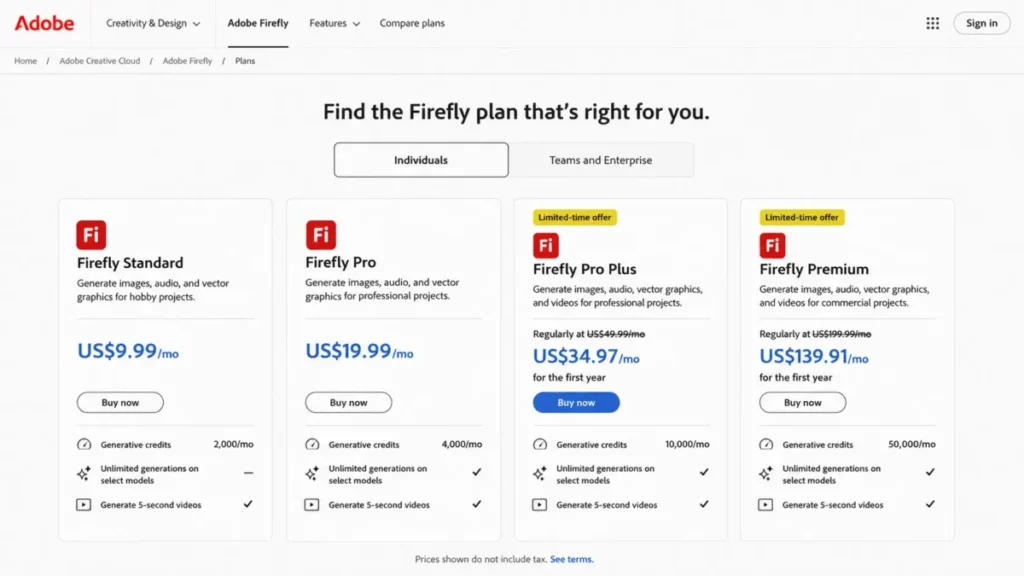
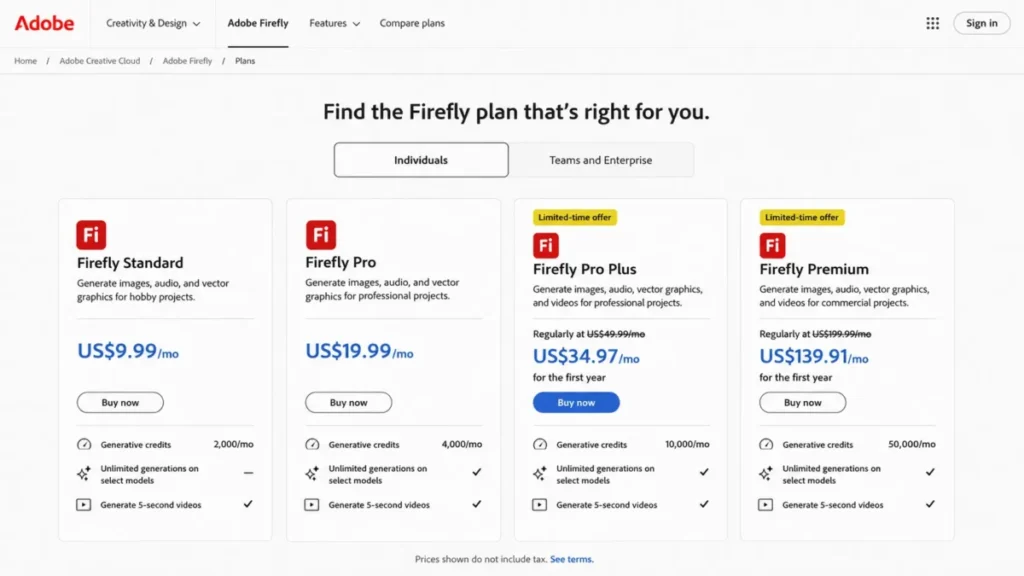
Adobe’s Firefly plans page, checked 2026-08-10, shows four individual tiers. Two are discounted for the first year only, with the offer ending August 26, 2026.
| Plan | Monthly price (US) | Monthly credits | Unlimited-model offer | Adobe apps included |
|---|---|---|---|---|
| Firefly Free | $0 | Limited daily generations | No | Firefly only |
| Firefly Standard | $9.99 | 2,000 | No | Firefly only |
| Firefly Pro | $19.99 | 4,000 | Yes, select models | Express Premium, Photoshop web and mobile |
| Firefly Pro Plus | $49.99 regular, $34.97 first year | 10,000 | Yes, wider set | Express Premium, Photoshop web and mobile |
| Firefly Premium | $199.99 regular, $139.91 first year | 50,000 | Yes, widest set | Express Premium, Photoshop web and mobile |
Every figure in that table comes from Adobe’s Firefly plan comparison, checked 2026-08-10.
Annualized figures for every tier, including both promotional rates, sit in the cost table further down and in the Adobe Firefly pricing guide.
Firefly Pro Plus has a standard price of $49.99 per month, and Firefly Premium has a standard price of $199.99 per month.
Against those, Firefly Pro Plus carries a promotional first-year rate of $34.97 and Firefly Premium carries $139.91. Each plan renews at its standard price once the first year ends.
Adobe states both offers end August 26, 2026. Promotional pricing re-verified on publish date: 2026-08-10.
Team pricing repeats the same three upper labels. Firefly Pro for teams is $19.99, Firefly Pro Plus for teams is $49.99, and Firefly Premium for teams is $199.99 per license.
The billing basis is different. Adobe lists team plans as annual, billed monthly, which is a commitment rather than a month-to-month arrangement.
For a ten-seat creative team, Firefly Pro for teams works out to $199.90 per month, or $2,398.80 for the year, using the per-license rate on Adobe’s Firefly plan comparison. Ten seats on Firefly Pro Plus for teams reach $499.90 per month and $5,998.80 for the year.
Two things make that team number worse than it looks. Team licenses are excluded from the unlimited offer, and Adobe’s generative credits FAQ confirms credits are not pooled across users on teams or enterprise plans.
Only enterprise customers on Edition 5, Edition 4, and Edition 4 with Premium Stock can purchase Shared Credits.
Credits also reset monthly on the plan’s billing date and do not roll over. A seasonal agency with two heavy months and four quiet ones pays for capacity it cannot bank.
Where add-ons stop making sense
Adobe sells credit add-on plans at 2,000 credits for $9.99, 7,000 for $29.99, 10,000 for $49.99, and 50,000 for $199.99 per month.
Run the arithmetic and two crossovers appear.
Firefly Standard plus the smallest recurring add-on costs $19.98 a month for 4,000 aggregate credits. Firefly Pro costs $19.99 for the same 4,000 credits.
Pro also adds Photoshop on web and mobile, Adobe Express Premium, AI Assistant eligibility, and the unlimited-model offer that the Standard combination does not qualify for.
One cent separates those two paths, and everything else favours Pro.
The second crossover sits a tier higher. Firefly Pro plus the 7,000-credit add-on totals $49.98 a month.
That is a cent below Firefly Pro Plus at the regular rate on Adobe’s plan comparison, and about fifteen dollars above its current promotional rate.
Buyer read: use add-ons for a spike, not as a standing arrangement. If you buy the same add-on three months running, you have already paid for the next tier.
Accessible text equivalent of the chart above:
| Plan | Annualized standard cost | Annualized first-year offer | Monthly credits |
|---|---|---|---|
| Firefly Standard | $119.88 | Not offered | 2,000 |
| Firefly Pro | $239.88 | Not offered | 4,000 |
| Firefly Pro Plus | $599.88 | $419.64 | 10,000 |
| Firefly Premium | $2,399.88 | $1,678.92 | 50,000 |
Those annualized totals multiply the monthly rates on Adobe’s Firefly plan comparison by twelve, checked 2026-08-10.
What Credits Actually Buy Once the Offer Year Ends
Adobe’s plan page advertises up to 20 five-second videos on Standard, 40 on Pro, and 100 on Pro Plus. Those numbers are accurate and also incomplete, because none of them state a resolution.
Adobe’s generative credits FAQ, checked 2026-08-10, publishes the Firefly Video rate by resolution. It runs 20 credits per second at 540p and 24 frames per second, 50 at 720p, and 100 at 1080p.
A five-second clip therefore costs 100 credits at 540p, 250 credits at 720p, or 500 credits at 1080p under those published rates.
| Plan | Credits | 540p clips | 720p clips | 1080p clips |
|---|---|---|---|---|
| Firefly Standard | 2,000 | 20 | 8 | 4 |
| Firefly Pro | 4,000 | 40 | 16 | 8 |
| Firefly Pro Plus | 10,000 | 100 | 40 | 20 |
Those capacities apply Adobe’s published rates in the generative credits FAQ to the allocations on the Firefly plan comparison, both checked 2026-08-10.
Adobe’s headline counts are computed at the cheapest resolution. The same 540p arithmetic reproduces every figure on Adobe’s credit add-on page, checked 2026-08-10.
There, 2,000 credits are described as up to 20 five-second videos, 7,000 as up to 70, 10,000 as up to 100, and 50,000 as up to 500.
The audio allowances line up the same way in the generative credits FAQ. Translation runs 5 credits per second, which turns the Firefly Standard allocation into roughly 6 minutes.
Sound effects cost 10 credits per generation, which is exactly the 200 sound effects Adobe advertises on that plan.
The plan page is internally consistent. It is just consistently quoting the floor.
A buyer producing 1080p social video on Firefly Standard gets four clips a month, not twenty. That is a five-fold gap between the marketing number and the working number, and the most expensive misunderstanding in this product.
Image generation carries its own spread. Firefly Image 5 costs 10 credits per generation and Firefly Image 4 Ultra costs 20.
Partner image models range from 5 credits for FLUX.2 klein 4B to 80 credits for GPT Image 2 at high resolution, checked 2026-08-10.
Video partner rates spread wider still in the same partner models documentation. Google Veo 3.1 Fast is listed at 10 credits per second and Kling 3.0 runs 20 to 35 depending on resolution and audio.
Sora 2 Pro is 90, Seedance 2.0 reaches 180 at 1080p, and Luma Ray3 in HDR at 4K reaches 450 credits per second.
At those two extremes, one second of Ray3 HDR 4K costs 45 times one second of Veo 3.1 Fast. Model choice is a bigger cost lever than plan choice.
Adobe marks a large share of these rates as applying for a limited time. The credit economics are provisional, which is reasonable for a fast-moving market and uncomfortable to budget against annually.
Feature Gates: What You Get on Each Plan
| Access gate | Free | Standard | Pro | Pro Plus | Premium |
|---|---|---|---|---|---|
| Unlimited standard generations, no credits deducted | No, deducts credits | Yes | Yes | Yes | Yes |
| First-year unlimited on select models | No | No | Yes | Yes, wider | Yes, widest |
| Firefly AI Assistant beta | No | No | Yes | Yes | Yes |
| Adobe Express Premium and Photoshop web and mobile | No | No | Yes | Yes | Yes |
| Unlimited Firefly Video Model in Generate Video | No | No | No | No | Yes |
Gate positions come from the Firefly plan comparison and Adobe’s AI Assistant page, both checked 2026-08-10.
| Monthly allowance | Free | Standard | Pro | Pro Plus | Premium |
|---|---|---|---|---|---|
| Audio and video translation | Limited trial | Up to 6 minutes | Up to 13 minutes | Up to 33 minutes | Up to 166 minutes |
| Sound effect generations | Limited trial | Up to 200 | Up to 400 | Up to 1,000 | Up to 5,000 |
Both allowance rows are listed on the same plan comparison, checked 2026-08-10.
Three gates in that table decide most purchases.
Firefly AI Assistant entered public beta on April 27, 2026, and Adobe’s AI Assistant page restricts it to Creative Cloud Pro or Firefly Pro, Pro Plus, and Premium. Standard is not listed, so the cheapest paid tier cannot reach Adobe’s flagship 2026 feature.
The Photoshop and Express bundle also starts at Pro. For anyone already paying separately for either app, that bundle alone can make Pro cheaper than the combination it replaces.
Firefly Premium is the only tier advertising unlimited access to the Firefly Video Model in Generate Video, and it comes with a quiet operational detail. The credits FAQ states that a Premium user who exhausts their credits has text-to-video and image-to-video generations queued in the background with no stated completion time.
Up to 20 jobs can queue at once, and the 21st returns an error.
Key Features and Where Each One Stops
Generate Image
Text-to-image runs from the Firefly homepage under Image and Generate image. The screen carries a model selector, aspect ratio, content type, visual intensity, and separate composition and style reference slots before the prompt field.
The reference controls are the practical differentiator against single-model tools. Style and composition references give an art director a repeatable way to steer output without rewriting prompts.
For campaign variations, that repeatability matters more than raw aesthetic quality.
Limitation: control availability varies by model. Selecting a partner model changes which sliders and reference inputs remain active, so a workflow built around Adobe’s own controls does not transfer cleanly when the team switches models for quality reasons.
Generate Video
Image-to-video and text-to-video sit under Video and Generate video, defaulting to the Firefly Video model. The screen carries resolution and aspect ratio settings, optional first and last keyframes, and handoff to the Firefly video editor, to Premiere, to generation history, or to download.
Keyframe control is the reason this is usable for storyboard-to-motion work rather than novelty clips. Supplying a first and last frame converts video generation into an interpolation task, which the model handles far more predictably than an open prompt.
Limitation: resolution is the cost dial, and it is unforgiving. Moving a five-second clip from 540p to 1080p multiplies the credit cost by five under Adobe’s published rate card, with no change in prompt or workflow.
Prompt-based image editing
Editing starts under Image and Edit image, taking an upload or a cloud asset, then an Adobe or partner model, then a plain-language instruction.
Limitation: Adobe’s known limitations page, checked 2026-08-10, states that Prompt to Edit supports premium models only, and advises users without premium-model access to generate a new image instead. An editing feature that silently becomes a regeneration feature is a workflow difference, not a minor gate.
Firefly Boards
Boards is Adobe’s collaborative canvas for moodboards, storyboards, remixing, and in-place generation, and Adobe’s plan page marks unlimited Boards access on all four paid tiers.
This is where Firefly is strongest. Previsualization, client concept rounds, and internal alignment are tasks where speed beats fidelity, and Boards is built for that rhythm.
Limitation: generation inside Boards still draws on the same credits and premium access as anywhere else, so the unlimited canvas does not mean unlimited output.
Firefly AI Assistant
The documented flow is to open Firefly, select AI Assistant from the left panel, upload assets or references, then describe the outcome. Sending the project returns suggested actions to refine or redirect, and results download or save to Creative Cloud storage.
Adobe positions Creative Skills as prebuilt multistep workflows, naming Portrait Retouch, Social Media Assets, and Mockup Studio.
Limitation: it is a public beta on a Pro-or-above gate documented on Adobe’s AI Assistant page, checked 2026-08-10, whose video demonstration carries an explicit note that not all features shown are available.
Ease of Use and the Model Selection Problem
Getting a first image out of Firefly takes one prompt and one click. The left navigation names the task and the result grid supports iteration without a manual.
The difficulty arrives one layer down, and it is economic rather than interface-driven. A user choosing between roughly thirty models and several resolutions makes a cost decision every time, and the interface does not surface the annual consequence.
That friction shows up in the review data. A TrustRadius reviewer at a mid-sized organization, writing in July 2026 and giving one of the lower ratings on the platform, listed difficulty understanding what generative credit and model access their organization had as a specific con.
For a solo designer this is a minor annoyance. For a ten-person team with no pooled credits, it is an administrative problem needing a written model policy before rollout.
Automation, Custom Models, and Reporting Limits
Firefly’s automation story splits by entitlement, and the split does not follow the plan ladder.
Firefly Custom Models beta is the feature brand teams want, and the generative credits FAQ, checked 2026-08-10, prices it at 500 credits per training run and 20 credits per generation. The same page states the beta is available only to Creative Cloud for individuals plans and Creative Cloud Pro and Pro Plus for teams plans.
Read that carefully before buying. A buyer purchasing a standalone Firefly Premium subscription specifically to train a brand model is buying against documentation that ties the current beta to Creative Cloud plans instead.
Buyer read: if brand-model training is the reason for the purchase, verify the exact entitlement with Adobe in writing before the card is charged.
Bulk and workflow automation lives in Firefly Creative Production and Firefly Graph, both documented as enterprise-oriented. Firefly Graph introduces a further wrinkle.
Standard generations that are unmetered everywhere else continue to consume credits inside Graph. Some Graph operations display a Credits vary indicator because the total cannot be calculated before the run completes.
Reporting is the thin part of the product. Credit balance is visible in the Adobe account menu and, for Photoshop users, in a Generative Credits Usage panel.
There is no published per-project or per-user consumption reporting for a team lead who needs to attribute spend to a client.
Partner Models Are a Data Routing Decision, Not Just a Style Choice
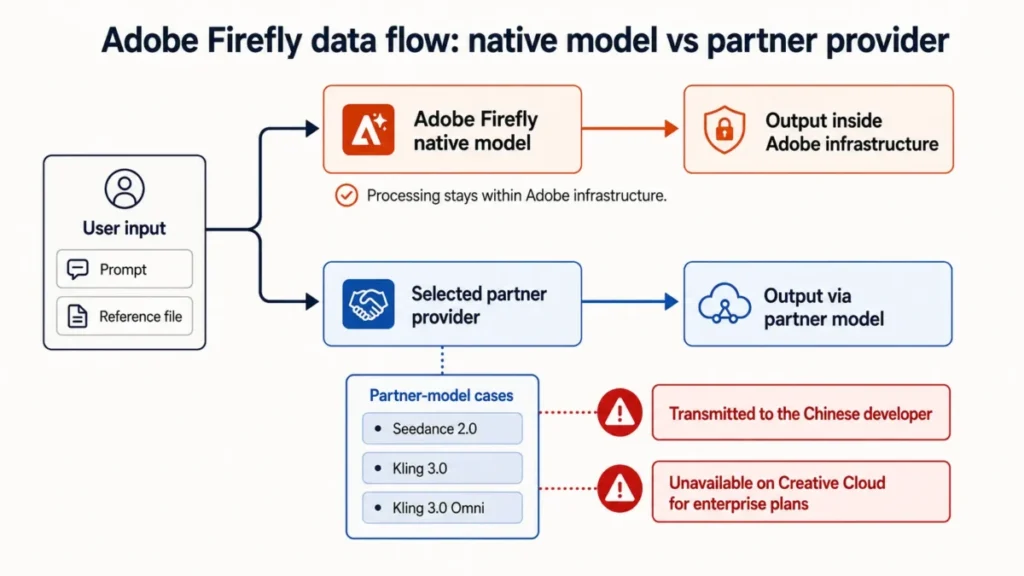
Adobe’s partner models documentation states that when a partner model is used, the text prompt and any uploaded reference image or video file are shared with the partner provider. Adobe describes that as the minimum data required to generate an output.
Adobe also states that content is never used to train partner generative AI models or Adobe models, and that it only offers partner models where the developer or hosting platform contractually agrees to that condition.
There is a separate and more specific disclosure. Generating with Seedance 2.0, Kling 3.0, or Kling 3.0 Omni requires sending prompts and reference files to the Chinese company that developed the model.
Adobe cites contractual protections and technical safeguards covering privacy regulation and the US DOJ Bulk Transfer Rule.
Here is the part almost every competing review gets backwards.
Those Chinese models are restricted to individual and Creative Cloud for individuals users. Adobe states plainly that partner models from China are not available through Creative Cloud for enterprise plans.
Kling 2.5 Turbo, Kling 3.0, Kling 3.0 Omni, Seedance 2.0, and Seedance 2.0 Fast are individual-only while business availability reviews continue.
So the governance exposure sits with freelancers, small studios, and agencies on individual subscriptions, precisely the buyers least likely to have a model policy. Enterprise buyers are already fenced off by default.
Creative Cloud for enterprise Edition 5, Edition 4, and Edition 4 with Premium Stock can further define which models reach which users through the Adobe Admin Console.
Adobe also requires each user to accept a confirmation modal before a partner model becomes usable, which is a consent record rather than a control.
Buyer read: an agency handling unreleased client campaigns on individual Firefly seats should write an approved-model list before the first partner generation, not after.
Security, Compliance, and Commercial Use
Adobe states that outputs from Adobe Firefly AI models can be used commercially, and that Firefly models draw on licensed and public-domain training sources.
That statement is about Adobe’s own models. Adobe separately places responsibility on the user for determining whether a partner model is appropriate for a project, which means the commercial-safety framing that dominates this SERP cannot be extended across the whole model menu.
There is a further caveat that procurement should read. The credits FAQ states that outputs from features carrying a beta label can generally be used commercially, but that for eligible teams and enterprise customers, beta outputs are not indemnified.
Given how much of Firefly’s 2026 surface is labelled beta, including AI Assistant, the video editor, Generate Soundtrack, and Precision Flow, that exclusion is not a footnote.
On certification, the Adobe Trust Center compliance list was checked 2026-08-10 and last updated May 21, 2026. It records Creative Cloud for enterprise under SOC 2 Type 2, SOC 3, ISO 9001, ISO 27001, ISO 27017, ISO 27018, ISO 22301, FedRAMP Tailored, GLBA ready, FERPA ready, and CSA STAR Level 2.
Its scope footnote explicitly names Adobe Firefly.
The scope word matters. That listing describes Creative Cloud for enterprise, so a standalone consumer Firefly subscription should not be presented to a security reviewer as carrying the same contractual compliance position.
Support follows the same split. Adobe’s plan page lists business features including admin tools and 24×7 support for team licenses, while individual Firefly plans are served through Help, Learn, Community, and Discord with no published response-time commitment.
Integrations, Mobile, and the API Ceiling
Firefly’s integration value is mostly internal. Generated assets open directly in Adobe Express, Photoshop, and Premiere, and Adobe documents native Firefly mobile workflows on Android and iOS covering generation, model selection, editing, download, and handoff.
Outside Adobe, the 2026 additions are a Figma plugin for enterprise, Adobe connectors, and an Adobe for creativity integration inside Claude that Adobe says both free and paid users can access with varying usage limits.
The API is where automation plans meet a hard number. Adobe’s Firefly API usage notes set a default limit of 4 requests per minute and 9,000 requests per day per organization.
Beyond that the API returns HTTP 429, and Adobe recommends retry logic or contacting an account manager for higher rates.
Four requests per minute is a prototype ceiling, not a production one. Any pipeline generating catalogue imagery at volume has to negotiate before it can be designed, and no published commercial rate schedule for Firefly Services exists to size that negotiation.
Adobe Firefly Limitations
Adobe publishes its own limitations, and they are more specific than the generic quality complaints in most reviews.
Generated text and human anatomy remain unreliable. Adobe documents irregularities in text and symbol generation and unrealistic facial or body features, and asks users to submit feedback on both. Any layout where typography or hands must survive client review still needs manual correction.
Famous people and brands are narrowly scoped. Firefly only generates images of public figures available for commercial use on Adobe Stock, excluding editorial content. Prompts naming a person, company, or branded item outside that set will not work, and soundtrack prompts referencing artists, bands, or songs are blocked for the same licensing reason.
Prompt translation is machine translation. Adobe supports prompts in over 100 languages through Microsoft Translator, and states that translated prompts may produce inaccurate or unexpected results. For non-English teams that is a quality variable sitting upstream of the model.
Shared Device Licenses cannot reach Firefly at all. Those licenses cover desktop apps only, not services, which rules out shared lab and classroom deployments without a named user license.
Layered output is not part of the deal. A vetted TrustRadius reviewer at a creative ad tech company, writing on April 23, 2026, listed the absence of layered output as their single con. For a production designer expecting separated, editable layers rather than flattened imagery, this is a workflow disqualifier rather than a quality complaint.
The limitations page itself is stale. Adobe last updated it on December 12, 2025, eight months before the plan stack and model roster described elsewhere in this review. Treat it as a floor on known issues, not a current inventory.
What Verified Reviewers Report
TrustRadius publishes a Community Insights synthesis of Adobe Firefly drawn from its verified review pool, last published May 27, 2026.
The praise clusters tightly around ideation, ease of use, efficiency, and getting multiple variations from one prompt. The criticism clusters just as tightly.
TrustRadius reports that a significant minority of reviewers, put at sixteen percent, specifically noted that overall image quality and detail are not yet sufficient for professional use. Recurring concerns cover realism in generated people, particularly faces and hands, consistency of style across generations, and precise prompt adherence.
Individual reviews sharpen the pattern. An AVP of Content at Indiana University, writing in April 2026 and rating Firefly highly overall, described it as “not quite ready for primetime from a production standpoint” while calling it great for previsualization. He noted that the design and photo teams needed more convincing.
That is the shape of this product: enthusiastic adoption for concepting, and a consistent reservation about final output.
It also matches Adobe’s own documentation rather than contradicting it, which is unusual and worth weighting. When a vendor’s known-limitations page and a synthesis of verified reviews name the same two weaknesses, that is a converging signal rather than an anecdote.
One caveat on the sample: TrustRadius labels these reviews incentivized, so read the scores as directional and the written cons as the more useful part.
Pros and Cons
| Pros | Cons |
|---|---|
| First-year unlimited generations on select models for Firefly Pro and above, on a published model list | Firefly Standard is excluded from the unlimited offer, making the cheapest paid tier poor value |
| Unlimited standard generations on every paid plan, including Generative Fill, Expand, Erase, Remove Background, and Upscale | Credit rates swing from 5 credits per image to 450 credits per second of video, and many are marked temporary |
| One interface covering Adobe, Google, OpenAI, Black Forest Labs, Luma, Runway, Topaz, ElevenLabs, Kling, and ByteDance models | Adobe’s headline video counts are quoted at 540p, so 1080p capacity is a quarter of the advertised figure |
| Adobe states its own model outputs are cleared for commercial use, with Content Credentials attached | Credits do not roll over and are not pooled across users on teams or enterprise plans |
| Documented mobile apps on Android and iOS with direct handoff into Express, Photoshop, and Premiere | Firefly API defaults to 4 requests per minute, which rules out unnegotiated production automation |
Each entry above traces to Adobe’s Firefly plan comparison or generative credits FAQ, both checked 2026-08-10.
Who Should Use Adobe Firefly
Adobe-centric solo designers and freelancers. If Photoshop or Express is already part of the workflow, Firefly Pro at $19.99 on Adobe’s plan comparison folds generation, editing, and refinement into one line item. The first-year unlimited offer then removes credit anxiety during the period when experimentation matters most.
Small marketing and social teams producing variations. Reference controls, Boards, and unlimited standard generations suit campaign variation better than a specialist generator with a separate export and import step.
Creative directors doing previsualization and client concepting. Both Adobe’s feature set and the review data support this use case most strongly, and the quality reservations matter far less when the output is a concept round.
Buyers who already hold other Adobe subscriptions. Credit allocations from multiple eligible subscriptions aggregate. An existing Creative Cloud Pro subscriber already holds 4,000 monthly credits and may need a smaller standalone Firefly tier than a new buyer would.
Who Should Avoid Adobe Firefly
Studios needing production-ready photorealistic people. Adobe documents unrealistic facial and body features, and TrustRadius reviewers flagged image quality and detail as insufficient for professional use. Both point the same direction.
Design pipelines requiring layered, editable output. If the deliverable to your designer is a layered file rather than a flattened image, validate that requirement against a trial before purchasing.
Editorial and advertising teams needing named people, brands, or music. The Adobe Stock boundary on public figures and the block on artist, band, and song prompts are licensing decisions, not bugs, and no subscription tier relaxes them.
Automation teams needing production API throughput. Four requests per minute by default means the integration has to start with a commercial conversation, not a sprint.
Buyers purchasing standalone Firefly specifically for Custom Models beta. The current documented entitlement points at Creative Cloud plans, so verify before buying rather than after.
Adobe Firefly Alternatives
| Alternative | Choose it if | Entry pricing signal |
|---|---|---|
| Midjourney | Aesthetic ceiling on stills matters more than workflow integration, and a separate production step is acceptable | Tiered monthly subscription with GPU-time allowances |
| Leonardo AI | You want higher generation volume per dollar and custom model training without a Creative Cloud entitlement question | Lower entry tiers with token-based allowances |
| Stable Diffusion | You can self-host, want full control of the pipeline, and fall under the free community licensing threshold | Free self-host under the revenue threshold, or per-credit API |
| Runway | Video generation and editing is the primary job rather than one capability inside a broader suite | Video-first subscription tiers |
| DALL-E and ChatGPT Images | Image generation sits inside a conversational workflow you already pay for | Bundled with an existing ChatGPT subscription |
Two of those swaps are worth costing properly. The Midjourney subscription tiers trade Adobe workflow integration for a higher aesthetic ceiling.
The Leonardo AI token model buys more generations per dollar for teams that do not need Photoshop in the loop.
For pipeline control, the Stable Diffusion licensing terms allow free self-hosting below a revenue threshold.
When video is the job rather than one capability in a suite, the Runway video generation platform is the stronger choice.
If image generation only needs to sit inside an assistant you already pay for, the DALL-E and ChatGPT image workflow removes the second subscription entirely.
For a wider field, the best AI image generators and best AI video generators roundups compare these on capability rather than on Adobe workflow fit.
Final Verdict: Is Adobe Firefly Worth It in 2026?
For an Adobe-centric creator, yes, and specifically at Firefly Pro.
Every documented capability in this review comes from official documentation, and the operating consequence for the affected buyer is the same in each case: the plan gate, not the feature list, decides what the team can actually do.
The decision chain is short. On Adobe’s plan comparison, Firefly Standard at $9.99 is excluded from the unlimited offer, from AI Assistant, and from the Photoshop and Express bundle. Firefly Pro at $19.99 includes all three.
There is no scenario where a serious individual creator should sit on Standard for a year.
Firefly Pro Plus earns its place only when premium consumption is genuinely sustained. Its current first-year rate of $34.97 on the plan comparison makes that decision cheaper to test before August 26, 2026 than after it. Premium is for buyers who specifically need the advertised unlimited Firefly Video Model access, and who can live with background queueing once credits run out.
For teams, the calculus inverts. Team licenses get no unlimited offer, no pooled credits, and no access to the Chinese partner models, while paying the same per-seat price on an annual commitment.
A ten-seat team should price Firefly against the possibility that individual subscriptions plus a written model policy would deliver more capability for the same money.
The trade-off that keeps this short of an unqualified recommendation is not price. It is that Adobe’s official documentation and the verified review record agree Firefly is stronger at concepting than at final output. A meaningful share of its 2026 headline capability is also beta, temporary, or gated somewhere other than where a buyer would expect.
If you are buying Firefly to accelerate ideation and keep production inside Adobe, it is the most coherent option in this category. If you are buying it to replace a production pipeline, budget for the cleanup.
So the purchase path runs by premium-credit demand and production requirements. Start with the Free plan to test output quality, choose Firefly Standard only for image-first work with light premium use, and choose Firefly Pro as the practical tier for most creators.
Move up to Firefly Pro Plus when premium volume is sustained, and reserve Firefly Premium for very high volume or unlimited Firefly Video Model access. Compare a team plan when central administration matters more than the unlimited offer.
My recommendation is conditional on the buyer. I would recommend Firefly only if the work is Adobe-centric and concept-heavy, and I would recommend a specialist tool instead when the main limitation bites, meaning buyers needing layered output, named public figures, or production API throughput. Those are poor-fit requirements no Firefly tier resolves, and they should shortlist a competing tool rather than a higher plan.
Frequently Asked Questions
Is Adobe Firefly free?
There is a free tier. Adobe provides limited free daily generations across image, video, and audio on a curated set of models, with limits refreshing each day, and notes that the number of generations, features, and models can change. Free users deduct credits for standard features, unlike paid subscribers.
How much does Adobe Firefly cost in 2026?
Firefly Standard is $9.99 per month with 2,000 generative credits and Firefly Pro is $19.99 with 4,000. Firefly Pro Plus is $49.99 with 10,000 and Firefly Premium is $199.99 with 50,000, and each was checked on 2026-08-10 against Adobe’s Firefly plan comparison. Firefly Pro Plus and Firefly Premium currently carry first-year rates of $34.97 and $139.91, an offer Adobe says ends August 26, 2026.
Which Adobe Firefly plan is best?
Firefly Pro at $19.99 on Adobe’s plan comparison is the practical choice for most individual creators. It doubles Standard’s credits, adds Photoshop web and mobile plus Express Premium, qualifies for AI Assistant, and is the cheapest tier in the first-year unlimited-generation offer.
Do Adobe Firefly credits roll over?
No. Adobe states that generative credits do not roll over month to month and that the balance resets to the plan allocation on the monthly reset date, which is the day the plan was first started or assigned.
What happens when Adobe Firefly credits run out?
Standard subscribers can upgrade or buy a credit add-on, and all paid subscribers keep unlimited standard generations regardless. Premium subscribers get a different behaviour: video generations are queued in the background with no stated completion time, up to 20 queued jobs at once.
How many videos can 2,000 Firefly credits generate?
Twenty five-second clips at 540p, eight at 720p, or four at 1080p, using the Firefly Video rates of 20, 50, and 100 credits per second in Adobe’s generative credits FAQ, checked 2026-08-10. Adobe’s advertised counts assume the 540p rate.
Can Adobe Firefly images be used commercially?
Adobe states that outputs from its own Firefly models can be used in commercial projects, and that those models are trained on licensed and public-domain sources. Partner model outputs are different: Adobe places responsibility on the user to determine whether a partner model is appropriate for a given project.
Does Adobe Firefly use my images for AI training?
Adobe states that content is never used to train partner generative AI models or Adobe models, and that it only offers partner models where the provider contractually agrees to that condition. Prompts and uploaded reference files are still transmitted to a partner provider when a partner model is selected.
Which Firefly models send data to China?
Seedance 2.0, Kling 3.0, and Kling 3.0 Omni require sending prompts and reference files to the Chinese company that developed them. Adobe restricts these models to individual users and states they are not available through Creative Cloud for enterprise plans.
Does Adobe Firefly have an API?
Yes, through Firefly Services, covering image generation, Custom Models, compositing, and upscaling. Adobe’s API usage notes, checked 2026-08-10, set the default at 4 requests per minute and 9,000 requests per day per organization.
Exceeding either returns HTTP 429, and higher rates are arranged through an Adobe account manager.
The action for most readers is the same. Compare your premium-credit demand and production requirements against the plan gates above, then select Free, Firefly Standard, Firefly Pro, Firefly Pro Plus, Firefly Premium, a team plan, or a competing specialist tool on that basis.