Runway sells per editor and pools credits across the whole workspace, and that single billing rule decides whether this platform is cheap or expensive for a given buyer. A solo creator on Standard pays $144 a year for 625 credits each month, which the Runway pricing page rates at 52 seconds of Gen-4.5 video.
Five editors on Standard pay five times $144 and still share those same 625 credits. Any Runway ML review that stops at the plan table misses that reversal.
This review works through the 2026 pricing, the credit arithmetic, the model gates, the export gates, the support gates and the enterprise identity limits, then names the buyers who should choose another tool.
The short answer: Runway is a strong generation layer and a weak finishing suite, and Standard is the practical entry plan for one person who can live inside 625 credits.
In This Article (27 sections)
Quick Verdict for Runway ML
| Question | Answer |
|---|---|
| Best for | Solo creators and small studios producing short generative clips |
| Not ideal for | Multi-editor teams that expect each paid seat to add credits |
| Setup difficulty | Low for generation, high for governance |
| Main strength | Current model lineup with published per-second credit rates |
| Main limitation | The built-in video editor is no longer actively maintained |
| Best alternative | A maintained local editor for assembly and finishing |
The commercial summary sits below, and every figure in it is checked against Runway’s published plan cards.
| Commercial question | Answer |
|---|---|
| Starting price | Free at $0, then Standard at $15 each month |
| Practical plan | Standard at $144 a year per editor |
| Free plan | 125 one-time credits and 5 GB storage, no credit purchases |
Source: Runway plan cards and prices
Runway ML Review 2026: Pricing, Limits, Workflows and Verdict
Three changes matter more than the feature list this year. Max has replaced Unlimited as the high-volume plan, Gen-4.5 has become the flagship at 12 credits per second, and the built-in video editor has been formally deprioritised.
Runway’s plan selection guide carries the migration notice directly. Max was offered to all new subscribers starting May 29, 2026, and existing Unlimited subscribers are automatically switched to Max on September 1, 2026.
Reviews still recommending Unlimited are quoting a plan a new buyer cannot select.
The second change is quieter but affects every budget. Credits are consumed per second of output, so duration and retries drive cost far more than the monthly fee does.
The third change is the one competitors skip. Runway states that the video editor is no longer being actively maintained because its development team is focused on generative workflows, and recommends a local video editor for larger projects requiring more than quick edits.
That single sentence turns Runway from a complete production suite into one layer of a stack.
Runway ML Pros and Cons
| Pros | Cons |
|---|---|
| Published per-second credit rates for every model, so cost is predictable before generating | Seat fees scale per editor while the credit pool stays flat for the whole workspace |
| Standard removes watermarks and unlocks the full image and video model list | The built-in video editor is no longer actively maintained |
| A documented cheaper draft model gives a real iteration path | Human product support starts at Pro, not at Standard |
| Workflows can be published as API endpoints without infrastructure work | Enterprise SSO is OIDC only, with no SAML and no SCIM |
Two entries in that table drive most of the buying decisions below: the credit pool that does not grow with the team, and the editor that Runway itself no longer develops.
What Is Runway ML?
Runway is a cloud platform from Runway AI, Inc. for generating and editing video, images and audio. The consumer product is branded Runway Creative, and the developer product is branded Runway Dev.
Most searches for “Runway ML” land on the creative web app. The 2026 lineup mixes first-party and third-party models, and paid plans list Gen-4.5, Nano Banana Pro, Aleph, Veo 3.1, Kling 3.0 and Seedance among the available image and video models.
The company sells more than the creative app, and that matters when a buyer reads marketing pages. Runway also publishes a developer portal, an agent product, mobile apps, a robotics division and an enterprise offering.
Credits are the common currency across the creative surfaces. Annual plans deposit 7,500 credits a year on Standard, 27,000 on Pro and 114,000 on Max, which is the number worth carrying into a yearly budget.
The practical framing for a buyer is narrow. Runway generates short clips, transfers performances onto characters, upscales, and chains those steps into visual workflows.
Assembly, colour, audio mixing and long-form finishing belong somewhere else. Teams that treat Runway as a shot factory and finish elsewhere spend credits on output they keep, while teams that treat it as an editing suite spend seats on people who mostly review.
Source: Runway plan and model lineup
Methodology: How This Runway ML Review Was Built
This review is built on a first-party source hierarchy: Runway’s pricing page, help-center articles, model guides, developer documentation and the Terms of Use dated May 11, 2026. Pricing, credit rules and plan limits were checked on August 17, 2026.
Runway was assessed against buyer-focused criteria: usable entry pricing, credit capacity per plan, model and export gates, collaboration economics, automation and API cost, support access, and enterprise identity and audit controls.
Greater weight went to the factors that change a purchase decision rather than a demo impression. Those are the practical plan for one editor, the real cost of adding editors, the upgrade triggers behind support and export formats, and the licence terms attached to inputs and outputs.
Every number below traces to a named official page, and each section carries its source. Rounded vendor capacity figures are labelled as rounded wherever exact credit arithmetic gives a different answer.
Runway ML Pricing and Plans
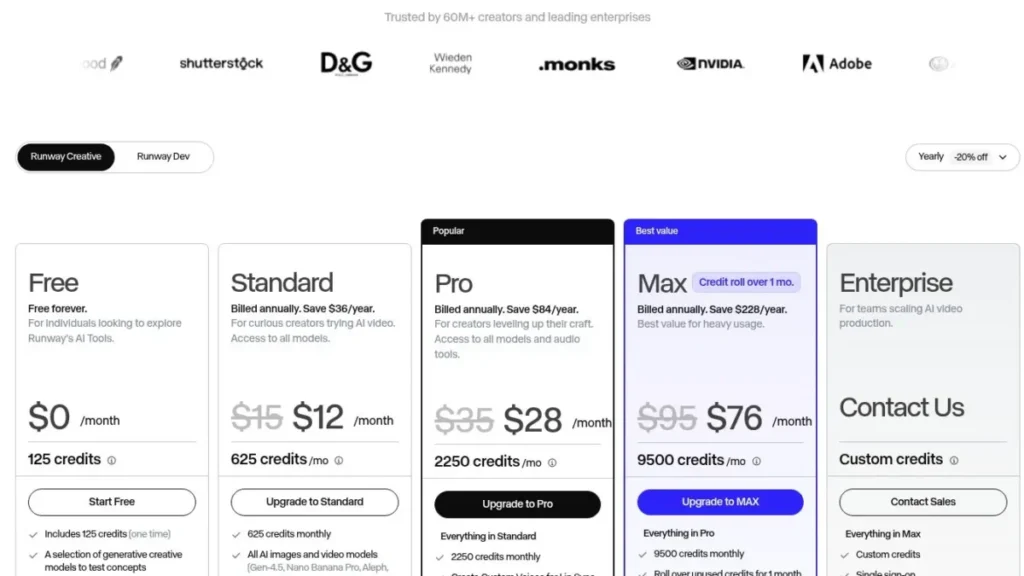
Four tiers are self-serve and one is sales-led. Prices are US dollars per editor, checked on August 17, 2026, and the Runway pricing table applies a 20 percent discount to yearly billing.
Enterprise sits above Max with custom credits, single sign-on, workspace analytics, configurable teamspaces, onboarding and priority support, and it is quoted by sales rather than published.
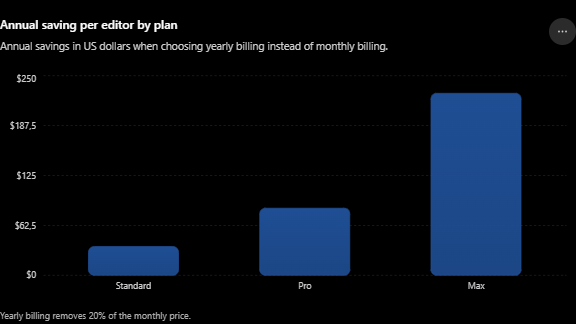
Paying month to month therefore costs 25 percent more across a year than committing annually. Annual billing saves $36 on Standard, $84 on Pro and $228 on Max for each editor.
There is a useful cross-check available here that plan tables never show. Runway Dev credits are sold at a published unit price, so the bundled subscription rate can be compared against it.
Annual Standard works out at roughly 1.92 cents per credit, Pro at roughly 1.24 cents and Max at roughly 0.80 cents. Runway Dev credits cost $0.01 each on the developer pricing page, so Standard buys generation capacity at close to double the developer rate.
That is not automatically bad, since the subscription also carries storage, model access and watermark removal. It does mean a heavy generator on Standard is paying a convenience premium.
| Plan | Monthly | Billed annually | Monthly credits |
|---|---|---|---|
| Free | $0 | $0 | 125 one-time |
| Standard | $15 | $12 per month, $144 per year | 625 |
| Pro | $35 | $28 per month, $336 per year | 2,250 |
| Max | $95 | $76 per month, $912 per year | 9,500 |
Source: Runway pricing page, checked August 17, 2026
How Runway Credits Reset, Roll Over and Run Out
Two billing mechanics decide the real budget, and both sit in the Runway credits guide rather than on the plan cards.
Standard and Pro credits do not roll over and reset within 24 hours of the billing date. Max rolls over up to one month of unused credits, and purchased credits do not expire.
Additional credits can be bought on paid plans with a minimum purchase of 1,000 credits, and Free plan users cannot buy credits at all.
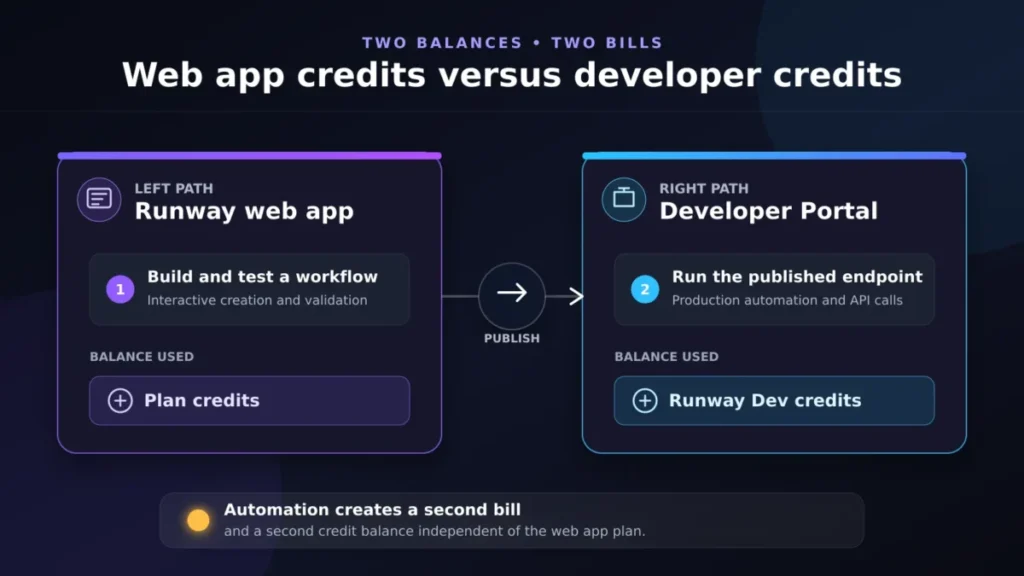
The web app balance and the API balance never mix. Credits purchased on the web app never appear in API credits, and credits purchased for the API never appear in the web app.
Source: How Runway credits work
The Team Pricing Math Nobody Shows You
Runway prices per editor. It does not multiply credits per editor.
Adding an editor charges the admin another full plan fee at the admin’s billing cadence, and one set of plan credits is shared by everyone in it. Two users each paying for Standard at $15 a month, the rate shown on the Runway plan cards, share a single allowance of 625 credits.
Editor caps follow the plan. The plan guide puts Standard at up to 5 editors for $15 a month or $144 a year each.
Pro and Max allow up to 10 editors, charged at $35 or $336 and $95 or $912 each, at the rates published on the Runway pricing cards.
At five editors, a Standard workspace splits into 125 credits a person each month, which funds about ten seconds of Gen-4.5 before the pool is empty. That is the buyer risk hiding behind a low headline price.
Runway says the quiet part on its own help page. If a subscription is being started primarily for the credits, Runway suggests setting that account up independently rather than as a collaborator on an existing workspace.
A vendor recommending against its own collaboration model is a strong signal for procurement. The mitigation is a role decision rather than a plan decision, because editors are charged seats and viewers are not.
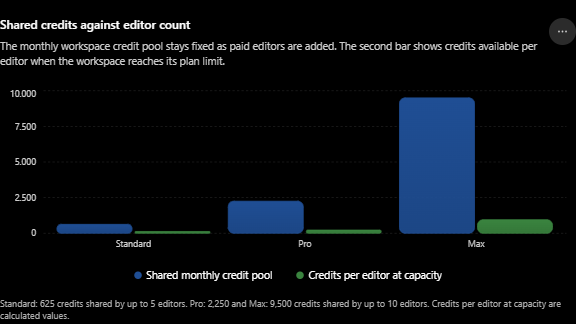
| Plan | Annual price per editor | Shared monthly credits | Credits per editor at five editors |
|---|---|---|---|
| Standard | $144 | 625 | 125 |
| Pro | $336 | 2,250 | 450 |
| Max | $912 | 9,500 | 1,900 |
Source: Editor pricing and shared credits
Credit Capacity: Rounded Minutes Versus Exact Arithmetic
Runway publishes two different capacity figures, and they do not agree. The plan capacity guide rounds, and the pricing page counts.
The plan guide states roughly 1 minute of Gen-4.5 on Standard, 3 minutes on Pro and 12.5 minutes on Max, with Gen-4 Turbo at 2, 7.5 and 31.5 minutes.
The pricing page is more precise. It states that 625 credits equals 52 seconds of Gen-4.5, 2,250 credits equals 187 seconds and 9,500 credits equals 791 seconds.
Budget from the seconds, not the minutes. Production plans built on the rounded figure will run short by roughly 8 seconds on Standard and by nearly 60 seconds on Max.
The clip count is the number that changes purchase decisions. A ten-second Gen-4.5 generation costs 120 credits, which funds 5 clips a month on Standard, 18 on Pro and 79 on Max before any retry is counted.
Video is also the most expensive way to spend the same pool. The model rate table rates Gen-4 images at 8 credits for 1080p and 2 credits on the Turbo variant, giving 937 images a year on Standard and 14,250 on Max.
Audio is cheaper still. Seed Audio is rated at 15 credits per minute, giving 500 minutes a year on Standard and 7,600 on Max, and text to speech is rated at 1 credit per 50 characters.
Heavier video models move the other way. Aleph 2.0 is rated at 140 credits per 5 seconds on the same rate table, so a Standard subscriber gets roughly 53 of those generations a year against 125 Gen-4.5 videos.
Buyers whose main deliverable is stills should price an image-first tool rather than a video subscription. The Midjourney review and the Stable Diffusion review cover that route.
| Plan | Rounded plan-guide capacity | Exact seconds of Gen-4.5 | Ten-second clips a month |
|---|---|---|---|
| Standard | About 1 minute | 52 seconds | 5 |
| Pro | About 3 minutes | 187 seconds | 18 |
| Max | About 12.5 minutes | 791 seconds | 79 |
Source: Published capacity per plan
Feature Gates: What You Get on Each Plan
Two gates decide most upgrades, and neither is about running out of credits. Human product support starts at Pro, and generation-time delivery formats start at Max, as documented in the Gen-4.5 model guide.
Free is an evaluation tier rather than a working one. It cannot reach the flagship model list, cannot remove watermarks and cannot buy credits.
Enterprise adds the governance layer: single sign-on, workspace analytics, configurable teamspaces and audit logging, none of which appear on self-serve plans.
| Capability | Free | Standard | Pro and Max |
|---|---|---|---|
| Gen-4.5 and full model list | No | Yes | Yes |
| Watermark-free output and 4K upscaling | No | Yes | Yes |
| Buy additional credits | No | Yes | Yes |
| Human product and technical support | No | No | Yes |
Source: Plan inclusions and model access
Export Formats: Two Different ProRes Gates
Runway documents ProRes twice, on two different surfaces, at two different plan levels. A client contract that specifies ProRes delivery can therefore be satisfied on Pro or require Max, depending on where the file is produced.
Pro unlocks video editor composition exports in ProRes and PNG sequences, plus transparent background exports when using ProRes, according to the export options guide.
Generation-time ProRes or PNG sequence output for Gen-4.5 is a different gate. It is available on Max, Unlimited legacy and Enterprise plans, is selected at generation time, and adds 5 credits per second to the base generation cost.
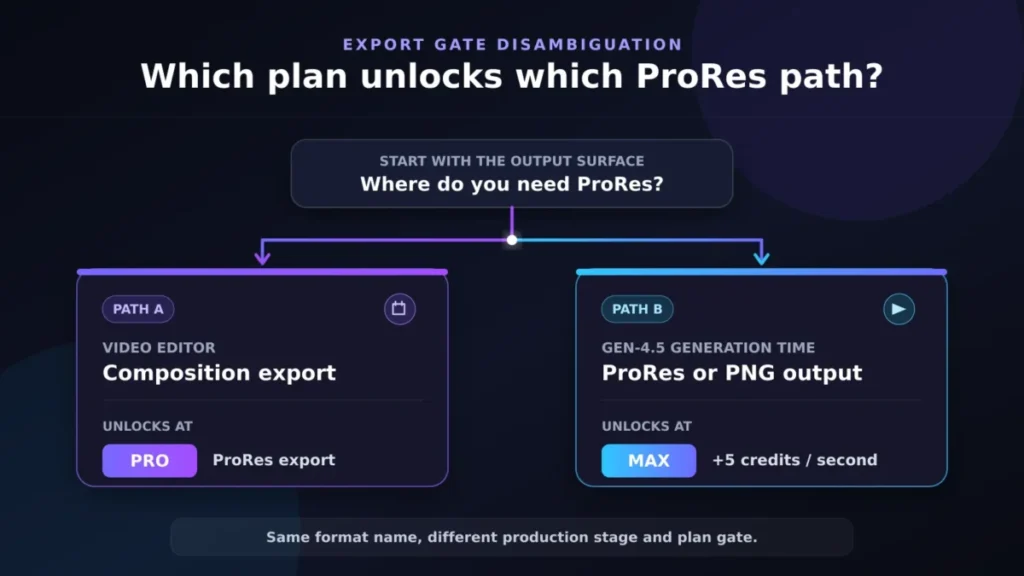
The surcharge changes the credit maths as well. A ten-second Gen-4.5 clip at 12 credits per second costs 120 credits, and the same clip delivered as generation-time ProRes costs 170 credits, so Max funds about 55 such clips a month instead of 79.
There is a second expectation to reset here. Gen-4.5 outputs at 720p, and 4K is reached through a separate upscale step rather than native generation.
Source: Gen-4.5 output formats and plan gate
Key Features and Where They Stop
Gen-4.5 for text to video and image to video
Gen-4.5 requires Standard or higher and costs 12 credits per second. It supports durations of 2 to 10 seconds, outputs 720p at 24 or 25 fps, is available on web, and offers six documented aspect ratios.
The web-only note deserves attention from mobile-first teams, because the flagship model is not listed for the mobile apps. A phone workflow runs on older models.
Source: Creating with Gen-4.5
Gen-4 and Gen-4 Turbo as the iteration path
Gen-4 requires an input image and costs 12 credits per second, while Gen-4 Turbo costs 5 credits per second. Runway recommends testing generations in Turbo and switching to Gen-4 as needed, and the Gen-4 model guide prices a five-second draft at 25 credits against 60 credits.
That is the single most useful cost habit available on the platform. Three Turbo drafts and one Gen-4 finish cost 135 credits, against 240 credits for four Gen-4 attempts.
Gen-4 also runs on the iOS app, carries a 1,000-character prompt limit and offers a fixed seed setting for similar motion across generations. Retiming a video, which covers trim, speed, handheld shake and reverse, does not spend credits.
Source: Gen-4 and Turbo rates and settings
Act-Two performance capture
Act-Two requires Standard or higher and costs 5 credits per second with a 3-second minimum, so the shortest generation charges 15 credits. It supports up to 30 seconds, which caps a single generation at 150 credits.
The input choice is a control decision rather than a convenience decision, as the Act-Two guide sets out.
| Character input | Gesture control | Camera and scene motion |
|---|---|---|
| Image | Available | Added automatically |
| Video | Not available | Retained from the source clip |
Source: Act-Two inputs, rates and limits
Workflows and published endpoints
Workflows chain models visually, and the result can be shipped as an API endpoint. Publishing requires linked Developer Portal and Web App accounts, and admins and editors can publish while developers integrate.
The billing boundary is the part to plan around. Published endpoints consume credits from the Developer account, while running the same workflow directly in the web app consumes web app credits.
Source: Publishing a workflow as an endpoint
Setup Path and First-Run Requirements
Signing up is trivial, and the first constraint is credit-related rather than technical. Free provides 125 one-time credits, which funds roughly ten seconds of Gen-4.5 at the published rate, and no top-up is available on that plan.
Model access follows a search or selector pattern rather than a project setup wizard. Gen-4.5 is reached from Apps View by searching the model name, or from the Tool Mode model selector with Video selected, and aspect ratio, duration and frame rate are confirmed before generating.
For an evaluation, the sequence that wastes the fewest credits is straightforward. Confirm the model gate in the Gen-4 guide, generate short Turbo drafts from a reference image, review, then spend Gen-4.5 credits only on the shot that already works.
Source: Gen-4.5 access path and settings
Integrations, MCP, and the Runway API
Three integration surfaces exist, and each has a different billing balance behind it.
Runway MCP connects to Claude, ChatGPT, Cursor and Replit, requires no API key, and bills generations to Runway app credits exactly as the web app does. The MCP setup guide also records two limits: only Streamable HTTP is supported, and Explore Mode generations are not available over MCP.
That last clause is the cost trap for agent workflows, because an agent asked to produce variations spends the paid pool on every attempt.
The Terms add a governance point that security teams should read before enabling any connector. Runway classifies MCP servers and similar tool-calling interfaces as Non-Runway Services, states they are provided without warranties, and treats enabling one as authorisation to transfer account data to that provider.
The developer API is separate in every sense. Runway Dev credits cost $0.01 each on the API price list.
Published rates there include Gen-4.5 at 12 credits per second, Gen-4 Turbo and Act-Two at 5, Aleph 2.0 at 28 with a 56-credit minimum, and Veo 3.1 at 40 with audio.
Teams already orchestrating pipelines with the Zapier automation review stack, or the self-hosted option in the n8n workflow review, should budget the Runway side twice. One balance funds the visual build, the other funds production traffic.
Source: Runway Dev credit rates
API Limits and What Happens When You Exceed Them
API limits are tiered and advance automatically with spend, and the usage tier documentation publishes the exact figures.
Tier 1 allows 1 concurrent video generation, 50 video generations per rolling 24 hours and 100 US dollars of monthly spend. Tiers advance immediately after 50, 100, 1,000 and 5,000 US dollars of purchases, reaching 20 concurrent generations and 100,000 US dollars of monthly spend at Tier 5.
There is no requests-per-minute limit, throttled tasks are queued in approximately submission order, and the daily window rolls continuously rather than resetting at a fixed time.
| Overload condition | API behaviour | Correct integration response |
|---|---|---|
| Above concurrency limit | Task status returns THROTTLED and is queued | Wait, do not resubmit |
| Above daily generation limit | Request returns 429 Too Many Requests | Back off until the window clears |
| At monthly spend cap | Further credit purchases are blocked | Request a limits exception |
Source: API usage tiers and limits
Security, Support, and Admin Controls
Support is where a low-cost plan quietly becomes a production risk. The support policy states that product and technical support is available only on a Pro plan or higher, while account and billing support is available to everyone.
Runway also states that phone and live chat with human agents are not offered at all. Free and Standard users are directed to the Discord community for product questions.
The page carries two slightly different response figures, with the body text citing 3 business days for Pro and higher and the FAQ citing 1 to 3 business days for paid plans. Either way, an incident on Standard has no human product path.
| Support channel | Free and Standard | Pro and higher |
|---|---|---|
| AI assistant and Discord community | Yes | Yes |
| Human escalation for billing | Yes | Yes |
| Human escalation for product guidance | No | Yes |
| Documented response expectation | About 5 business days for billing | About 3 business days |
Source: Getting help with your Runway account
Enterprise Identity and Audit Boundaries
Enterprise adds governance, with one protocol boundary that ends some procurement conversations early. The Enterprise SSO FAQ states plainly that Runway does not support SAML and does not support SCIM.
Enterprise SSO is OIDC based, supports identity providers such as Okta, Ping Identity, Google, Auth0 and Azure AD or Entra, and is configured by admins or billing admins.
Two more details belong in a requirements document. External domains such as gmail.com cannot be used for SSO because the organisation must control the domain, and email changes are disabled on accounts associated with an Enterprise workspace.
Audit logging exists and has a hard export ceiling. Logs cover account, permission, asset, generation and billing events, default to the last 7 days, and CSV exports are limited to 2,500 rows, so larger sets must be split by filter or date range.
Generation events are limited to GenerationCreated, with model and credit detail living in the analytics page instead. Logs retain activity from deleted users, which is useful when access is revoked mid-investigation.
Source: Enterprise audit logs
Commercial Use, Training Rights, and Content Storage
Commercial rights and confidentiality are separate questions, and the Terms of Use answer them differently.
Runway does not claim ownership of inputs or outputs and does not restrict compliant commercial use of outputs. That is the permissive half, and it covers client delivery.
The same clause states that inputs and outputs may be used by Runway to train and improve its models, and grants a non-exclusive, irrevocable, perpetual, worldwide, sublicensable licence for those purposes. For an agency handling unreleased client footage, that is a contract review item rather than a footnote.
Two related clauses affect operations. Runway has no obligation to store content made available through the services and disclaims liability for deletion, so Runway is not an archive.
Applications built on the API must prominently display “Powered by Runway” and link to runway.com, which is a product design requirement rather than a marketing suggestion.
Enterprise buyers should not read consumer terms as their own, because Runway publishes separate Enterprise Services Terms. The training question belongs in that contract, in writing.
Source: Runway Terms of Use, updated May 11, 2026
Runway ML Limitations
The editor is deprioritised, and Runway recommends a local editor for anything beyond quick edits, so a separate finishing tool stays in the budget.
Seats and credits scale differently, because five Standard editors pay five times $144 a year on the published price and still share one allowance each month.
Support starts at Pro, so Free and Standard have no human product escalation path at all. Enterprise identity is OIDC only, and the absence of SAML and SCIM removes Runway from some vendor shortlists automatically.
Audit exports stop at 2,500 rows, so monthly compliance exports for a busy organisation need a documented splitting procedure.
Documentation also contradicts itself on rollover. The plan guide FAQ says credits refresh monthly and do not roll over, while the pricing page and credits article grant Max up to one month of rollover.
That last point is not pedantry. A buyer choosing Max specifically for rollover should confirm the behaviour in writing before committing to an annual term.
Buyer Risk Ledger for Runway ML
Five risks account for most of the regret a Runway subscription can produce, and each has a mitigation that costs nothing to apply before purchase.
The renewal question follows from the same list. Before the next annual charge, a buyer should be able to say how many usable seconds the workspace produced, how many credits were wasted on retries and how many paid editors never generated anything.
If those three numbers are unknown, the subscription is being renewed on habit rather than evidence.
| Risk | Buyer consequence | Mitigation before signing |
|---|---|---|
| Credit dilution across editors | Collaboration halves usable output per person | Invite reviewers as viewers, price editors separately |
| Retry burn | The monthly allowance disappears on unusable attempts | Draft in Turbo, finish in Gen-4.5 |
| Wrong ProRes assumption | Pro is bought for a format that needs Max | Confirm which surface produces the deliverable file |
| Consumer training licence | Client inputs fall under a broad improvement licence | Move sensitive work to an Enterprise contract |
Source: Shared credits and editor charges
What Should Be True in the First Month and the First Quarter
Adoption for a generation tool fails differently from adoption for a CRM. There is no data migration to blame, so failure shows up as credits spent without deliverables.
By the end of the first month, a healthy rollout has a documented prompt and model recipe for at least one repeatable shot type, a Turbo-first drafting habit, and a credit balance that has not been exhausted before the billing date.
A workspace already buying extra credits in its first month is on the wrong plan rather than in the wrong tool.
By the end of the first quarter, the finishing question should be settled. Either the local editor is doing assembly and Runway is doing generation, or the team is fighting an unmaintained editor and losing hours that the subscription price does not show.
The same checkpoint is where seat count should be reviewed. Any charged editor who has not generated in that period should be downgraded to a viewer, which removes a full plan fee without removing access to the work.
Who Should Use Runway ML?
Solo creators producing under a minute of finished video a month. Standard covers watermark-free output and the full model list, which suits previsualisation, social cutdowns and concept work.
Freelance commercial editors who need support and audio tooling. Pro adds Custom Voices, 500 GB of storage and the only self-serve path to a human product answer.
High-volume single operators. Max supplies the largest allowance, one month of rollover and generation-time ProRes, which is the only self-serve route to delivery-grade codecs at generation time.
Developers shipping generative features. The API prices credits individually with automatic tier progression, and workflows can be published as endpoints without model orchestration.
Who Should Avoid Runway ML?
Teams expecting per-seat credits. Runway itself recommends separate accounts when credits are the reason for the subscription, which defeats the point of a shared workspace.
Studios wanting one tool for generation and finishing. The maintenance notice on the video editor makes Runway a component rather than a replacement for Premiere, Resolve or Final Cut.
Organisations that mandate SAML or SCIM. The Enterprise SSO FAQ answers both with a plain no, and no plan upgrade changes that.
Production users on Free or Standard who need help fast. Product escalation does not exist below Pro, and Discord is the documented fallback.
Privacy-sensitive consumer-plan buyers. The training and improvement licence in the consumer Terms applies unless an Enterprise contract says otherwise.
Runway ML Alternatives
This table names fits, not winners. Comparative feature and price research for rival video models was outside this review’s verified source set, so a ranked head-to-head would need its own evidence pass.
For short stylised clips, the Pika AI video review covers the same output category on a different credit model.
The wider field sits in the best AI video generators roundup. The plan mechanics behind these numbers are detailed in the Runway ML pricing guide.
| Alternative | Choose it if | Pricing note |
|---|---|---|
| A maintained local editor | Assembly, colour and audio finishing matter more than generation | Existing licence, outside this source set |
| invideo Agent | Agent-driven social video assembly beats shot-level control | Verified separately in that review |
| Pika | Short stylised clips are the main output | Verified separately in that review |
| Runway Dev API | Generation should run inside a product rather than a seat | Runway Dev credits at $0.01 each |
Source: Runway Dev pricing
Final Verdict: Is Runway ML Worth It?
Runway is worth paying for as a generation layer, and it is not worth buying as a video department.
The decision chain is short. The documented capability is credit-metered generation at published per-second rates, and the workflow consequence is that every retry spends the shared pool.
The affected buyer is any team with more than one editor, the trade-off is a plan gate on support and export formats, and the recommendation is to choose the tier that covers retries rather than the tier matching the headline price.
Because the official documentation puts human support at Pro and generation-time ProRes at Max, an upgrade is often triggered by a delivery requirement rather than by volume. If a client contract names a codec, check which surface produces that file before choosing a plan.
For one person, Standard is the practical plan, and the honest test is whether the published allowance survives real iteration. Five finished-length Gen-4.5 clips a month is the ceiling before retries, so anyone shooting for a weekly output should price Pro from the start.
For a small studio, the decision inverts. Two editors on Pro pay $336 each a year and still share one allowance under the shared credit rule, so the cheaper structure is often separate subscriptions plus a viewer seat for review.
For an enterprise, the identity question comes before the creative one. If SAML or SCIM is mandatory, this evaluation stops at the SSO FAQ, and the audit export ceiling belongs in the compliance runbook before signature.
Frequently Asked Questions
How much does Runway ML cost in 2026?
Free costs $0. Standard costs $15 a month, Pro costs $35 a month and Max costs $95 a month, all per editor on the published plan cards. Committing to a year removes 20 percent, and Enterprise is quoted by sales.
How many videos does 625 credits pay for?
At 12 credits per second in the Gen-4.5 documentation, 625 credits funds about 52 seconds, which is five ten-second clips or ten five-second clips. Retries come out of the same pool.
Do Runway credits roll over?
Max rolls over up to one month of unused credits. Standard and Pro credits reset within 24 hours of the billing date, and purchased credits do not expire, as the credits guide states.
Does adding an editor add more credits?
No. Each editor adds another full plan fee, but the workspace keeps one shared credit allowance regardless of how many editors are paid for.
Is Runway ML good for teams?
It is workable for small teams that generate centrally and invite reviewers as unpaid viewers. It is poor value where several people generate independently.
Can Runway videos be used commercially?
Yes. Runway does not claim ownership of outputs and does not restrict compliant commercial use, though the same terms allow inputs and outputs to be used for model training and improvement.
Does Runway support SAML or SCIM?
No. Enterprise SSO is OIDC based, and Runway states explicitly that neither SAML nor SCIM is supported at this time.
What plan is needed for ProRes?
Pro unlocks ProRes and PNG sequence composition exports from the video editor. Generation-time ProRes or PNG for Gen-4.5 requires Max or Enterprise and adds 5 credits per second, per the Gen-4.5 export note.
Does Runway have an API?
Yes. Runway Dev credits cost $0.01 each on the API price list, on a balance entirely separate from the web app, with concurrency, daily generation and monthly spend limits set by usage tier.
Is the Runway video editor still maintained?
No. Runway states the editor is no longer being actively maintained and recommends a local video editor for projects requiring more than quick edits.
Bottom Line
Select Free, Standard, Pro, Max or Enterprise only after matching monthly model usage against real editor count, export requirements and governance needs. The credits decide the plan, the editors decide the cost, the export format decides whether Pro is enough, and the identity and audit requirements decide whether Enterprise is eligible at all.
Match those four before subscribing, and Runway becomes a predictable line item rather than a surprise one.