The hard part of a Stable Diffusion review in 2026 is not judging image quality. It is working out what you are buying, because three separate commercial arrangements share one product name.
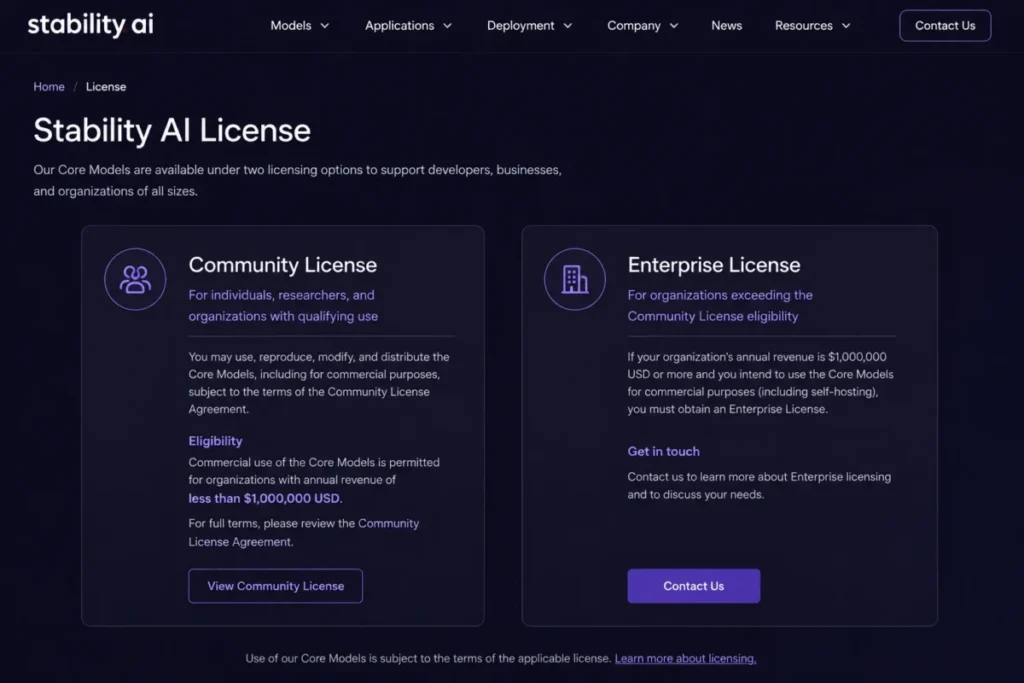
Self-hosting a Core Model under the Community License carries no license fee while your organization stays below one million dollars in annual revenue, according to the Stability AI license terms. Above that line, commercial use of a Core Model needs an Enterprise license that Stability AI quotes privately.
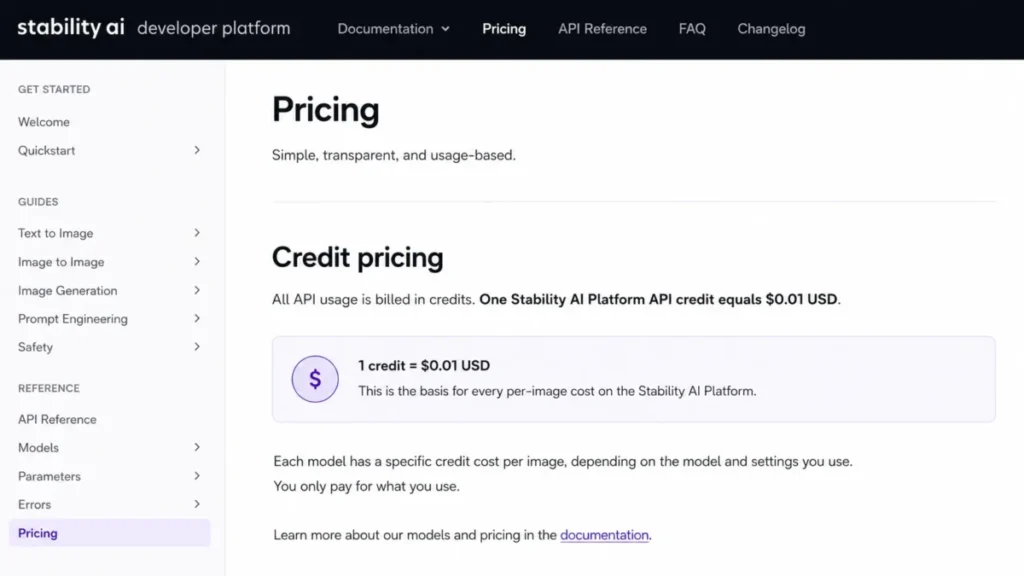
Generation through the Stability AI API is a different bill entirely. Successful images cost 2.5 to 6.5 credits across the Stable Diffusion 3.5 tiers, and one Platform API credit is priced at $0.01 on the Developer Platform pricing page.
So the short answer: Stable Diffusion is worth it for technical teams that need deployment control, structural control, and a per-image cost they can model. It is the wrong tool for anyone who wants polished output with no model decisions, and the managed options in my roundup of the best AI image generators suit that buyer better.
In This Article (19 sections)
Quick Verdict: Stable Diffusion at a Glance
| Category | Verdict |
|---|---|
| Best for | Technical creators and small engineering teams that want downloadable weights, structural control, and a deployment they choose |
| Not ideal for | Nontechnical buyers who want one-click polished output with no setup or model selection |
| Starting price | $0 for the Community self-host license; Stable Diffusion 3.5 Flash API from $0.025 per successful image |
| Best practical path | Self-hosted SD3.5 Medium for control, Stability AI API for embedded or bursty workloads |
| Free option | Yes, the Community self-host license, subject to the one-million-dollar annual revenue condition and the acceptable use policy |
| Setup difficulty | High for self-hosting, low to medium for the hosted API |
| Main strength | Deployment and customization choice that no closed hosted generator offers |
| Main limitation | Output variation and hardware requirements both land on the buyer, not the vendor |
| Best alternative | Midjourney for managed aesthetic output, Adobe Firefly for an enterprise creative stack |
Both figures in that table trace to the Stability AI licensing page and the Stability AI Platform credit pricing, checked August 10, 2026.
Stable Diffusion Pros and Cons
| Pros | Cons |
|---|---|
| Weights for SD3.5 Medium, Large, and Large Turbo are downloadable, so inference can run without sending prompts to Stability AI | Self-hosting transfers GPU capacity, dependency management, and workflow assembly to your team |
| Official Blur, Canny, and Depth ControlNets give SD3.5 Large repeatable structural guidance instead of prompt-only generation | Stability AI states that broader seed variation and vague prompts increase aesthetic uncertainty |
| API pricing is per successful generation, so a failed request does not consume credits | Purchased API credits expire one year after purchase or issuance and are non-refundable |
| Priced from the Stable Diffusion 3.5 Flash API at $0.025 to the Stable Diffusion 3.5 Large API at $0.065 per image | SD3.5 Flash appears in the API but not on the May 20, 2026 Core Models list, so its self-host license status is unverified |
| SOC 2 Type II and SOC 3 attestations exist for Stability AI, and AWS and Azure deployment paths are documented | Hosted content filtering can blur or prevent a generation, and Stability AI acknowledges false positives |
Every cost and limit in that table is sourced in the sections below, starting from the Stability AI License.
What Stable Diffusion Is, and What It Is Not
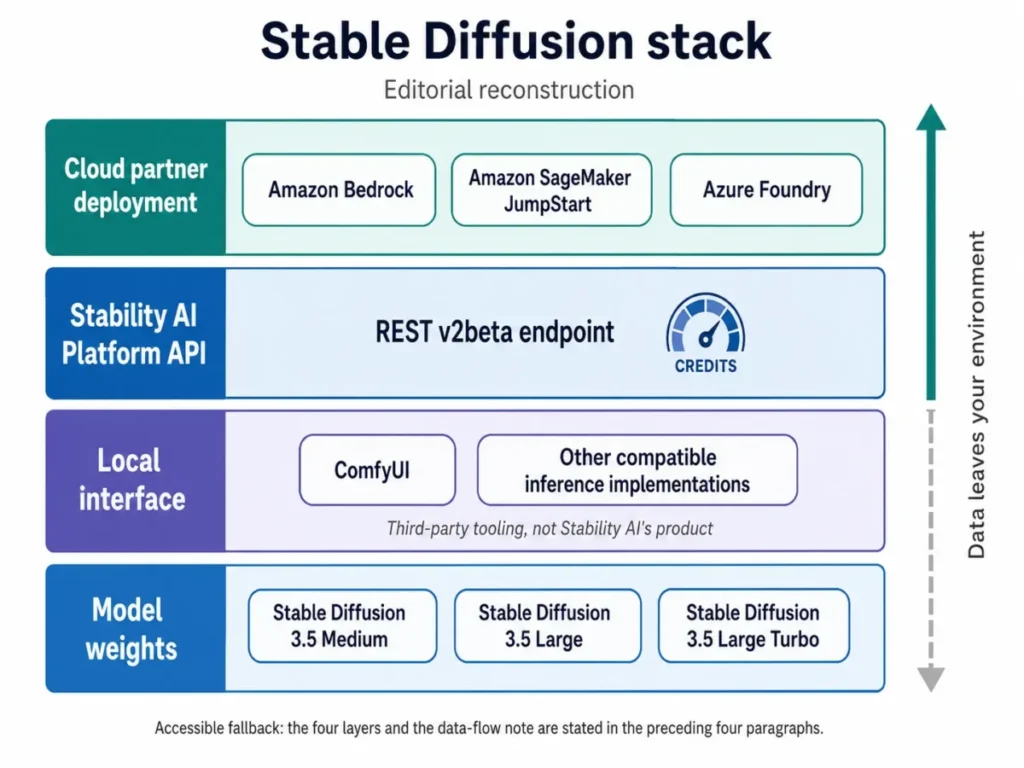
Most reviews treat Stable Diffusion as one application. It is four layers, and the confusion behind almost every bad buying decision in this category comes from collapsing them.
The first layer is the model family itself: open-weight text-to-image models from Stability AI, with Stable Diffusion 3.5 at the front of the family on the Core Models page dated May 20, 2026. The second layer is whatever interface you point at those weights, such as ComfyUI, which Stability AI names among the supported access routes.
The third layer is the Stability AI Platform API, an authenticated REST service that runs the models for you and bills per successful image. The fourth is deployment through a cloud provider, which Stability AI documents for Amazon Bedrock, Amazon SageMaker JumpStart, and Azure Foundry.
That separation matters because ease-of-use complaints usually belong to layer two, and privacy properties belong to layers three and four. If you have read that Stable Diffusion has a clumsy interface, you have read a review of somebody’s chosen front end, not of the model.
Stable Diffusion also sits inside the wider category of generative AI tooling, where the open-weight approach is now the minority position rather than the default.
The cloud routes above are the ones named on the Stability AI partner page, checked August 10, 2026.
Methodology: How This Stable Diffusion Review Was Built
This review draws on Stability AI’s license page, Core Models page, developer platform pricing, REST API reference, knowledge base articles, acceptable use policy, privacy policy, terms of service, and partner page. Pricing, credit values, and documented limits were checked on August 10, 2026.
Stable Diffusion was assessed against the criteria applied to every image-generation tool on this site: deployment options, licensing conditions, cost per output at realistic volume, hardware requirements, creative control, data handling, documented limits, and buyer fit.
Greater weight went to factors that change a purchase decision, including the commercial license threshold, per-image API cost, hardware eligibility, and the difference in data flow between local and hosted generation. Vendor positioning and category popularity carried no weight.
Performance and memory figures published by Stability AI are attributed to Stability AI rather than presented as independent benchmarks. Claims that could not be verified from the cited sources were excluded, and every price carries its checked date because these values change.
The Three Problems Stable Diffusion Solves
You choose where the prompts and reference images go
Stability AI’s privacy policy states that Inputs and Outputs submitted to its hosted Services are collected, and that they may be used to improve and train models, with an opt-out available for the training use. That is a normal arrangement for a hosted generator, and it is exactly the arrangement a studio working on unreleased client assets often cannot accept.
Because SD3.5 weights are downloadable, a local deployment can be built that never calls the Stability AI API. That is an architecture advantage rather than a privacy guarantee.
The word “local” does not by itself promise that nothing leaves the machine. Model repositories, third-party extensions, analytics in a front end, and any external service in the pipeline each create their own data flow, and each one needs checking before a compliance claim is made.
I would treat this as the single strongest reason to pick Stable Diffusion over a closed generator. If your legal team has ever asked where prompt text is stored, this is the only mainstream option where the honest answer can be “on hardware you control.”
Structural control instead of prompt roulette
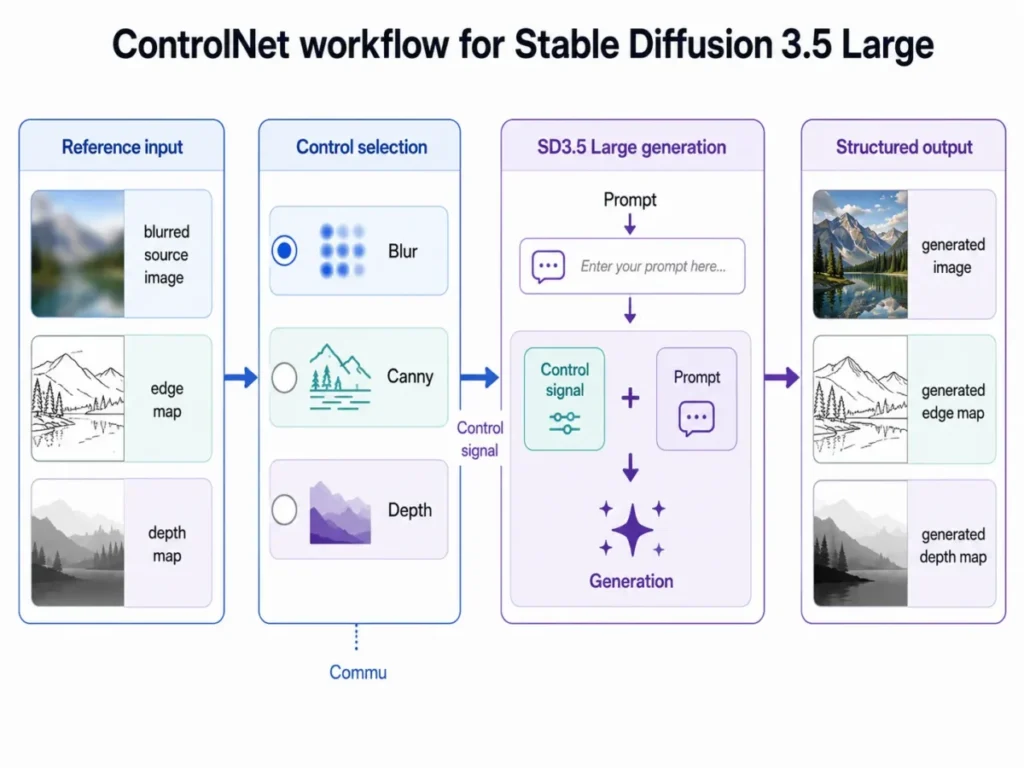
Stability AI publishes three official ControlNets for SD3.5 Large: Blur, Canny, and Depth, with documented ComfyUI support under the Community License. Each one takes a different control input and solves a different production problem.
| ControlNet | Control input | Production job it does |
|---|---|---|
| Blur | A blurred or low-detail source image | High-fidelity upscale-oriented work where the original composition must survive |
| Canny | An edge map | Locking line structure, layout, or product silhouette across a set of images |
| Depth | A depth representation | Holding scene composition and spatial relationships while style changes |
Each control type above is named in the official SD3.5 Large ControlNet release, checked August 10, 2026.
The buyer consequence is repeatability. A prompt-only generator asks you to re-roll until the composition is close enough, while a control input lets the composition be an input rather than an outcome.
For an agency producing forty variations of the same product shot, that is the difference between a workflow and a lottery. This is also the clearest answer to why the ecosystem still matters in 2026 when the closed competitors produce good images with less effort.
A per-image cost you can model before you commit
The Stability AI Developer Platform prices API usage in credits and sets one Platform API credit at $0.01. Every SD3.5 service tier has a published credit cost per successful generation in the REST v2beta API reference, and that reference states failed generations are not charged.
That combination is rarer than it sounds. It means a product team can calculate the generation line of a feature’s unit economics from published numbers, without a sales call and without a minimum commitment.
Compare that to a seat-priced creative tool, where cost scales with headcount rather than with output. If your application generates images on behalf of users, per-successful-image pricing is the billing model that matches the workload.
The Three Problems Stable Diffusion Creates
The hardware gate is real and it is specific
Stability AI states in the SD3.5 launch documentation that SD3.5 Medium requires 9.9 GB of VRAM, excluding text encoders, to reach full performance. That figure is the most useful hardware number in this review because it is model-specific and vendor-published, unlike the generic GPU advice that still circulates from the SDXL era.
For SD3.5 Large, the TensorRT optimization announcement reports a different picture. That NVIDIA TensorRT and FP8 path cut memory usage from 19 GB to 11 GB and reached up to 2.3x faster generation compared with the referenced base PyTorch model. Those are vendor figures for one referenced configuration, not a promise about every implementation.
Read together, the two numbers set the practical shape of a self-host decision. A consumer card that clears the 9.9 GB figure puts Medium in range and puts Large in range only through an optimized path, and neither figure includes the text encoders, the operating system, or anything else sharing the GPU.
Output variation is a documented tradeoff, not a bug report
Stability AI acknowledges that different seeds may produce greater output variation, and that prompts lacking specificity increase uncertainty and aesthetic variability. This is the vendor describing a deliberate design position: more variation is the price of more customizability.
For a brand team that needs the same treatment across a campaign, that position is a cost. The mitigation is the ControlNet and prompt discipline described above, and it is real work rather than a setting.
I would budget for that work explicitly. A team that expects deterministic branded output from prompts alone will conclude the model is inconsistent, when what they skipped was the control layer.
“Free” hides both a license condition and an infrastructure bill
The Community License carries no fee, but it is not unrestricted. Stability AI’s acceptable use policy applies to self-hosted code and weights as well as to the APIs and third-party hosted access.
The license guidance also separates permitted LoRA work and fine-tunes from a harder boundary. Using a Core Model or its outputs to build a competing new foundational-model architecture sits outside what the Community License allows.
The second hidden cost is infrastructure. A zero-dollar license sits next to a GPU, the power to run it, the engineer who maintains the stack, and the storage that holds the checkpoints.
This review does not estimate those figures, because they are buyer-specific and no official source prices them. What matters is that the $0 Community self-host license fee and an all-in API price are not the same kind of number, and putting them side by side without the infrastructure line produces a false result.
Stable Diffusion Pricing in 2026: Three Layers, Not One
| Access path | What you pay | Who it applies to | Key condition |
|---|---|---|---|
| Community self-host license | $0 license fee | Research, non-commercial use, and qualifying commercial Core Model use | Organization revenue below the one-million-dollar threshold, plus the acceptable use policy |
| Enterprise self-host license | Custom, not publicly disclosed | Commercial Core Model use above the documented revenue threshold | Requires contacting Stability AI before commercial use continues |
| Stability AI Platform API | Stable Diffusion 3.5 Flash API $0.025 up to Stable Image Ultra API $0.080 per generation | Any developer with an API key and funded credits | Credits expire one year after purchase or issuance |
| Cloud partner deployment | Cloud provider pricing, not published by Stability AI | Enterprises with existing AWS or Azure governance | Availability documented for Bedrock, SageMaker JumpStart, and Azure Foundry |
The license rows come from the Stability AI License, the API row from Platform pricing, and the cloud row from the partner listing, all checked August 10, 2026.
The license layer and the inference layer are independent. Paying nothing for the Community License does not reduce an API bill by a cent, and buying API credits does not grant a self-host commercial license.
What 1,000 and 10,000 images cost
Across the Stable Diffusion 3.5 tiers the credit cost per successful generation is 2.5 for Flash, 3.5 for Medium, 4 for Large Turbo, and 6.5 for Large.
| Model or service | Cost per image | 1,000 images | 10,000 images |
|---|---|---|---|
| Stable Diffusion 3.5 Flash API | $0.025 | $25 | $250 |
| Stable Image Core API | $0.030 | $30 | $300 |
| Stable Diffusion 3.5 Medium API | $0.035 | $35 | $350 |
| Stable Diffusion 3.5 Large Turbo API | $0.040 | $40 | $400 |
| Stable Diffusion 3.5 Large API | $0.065 | $65 | $650 |
| Stable Image Ultra API | $0.080 | $80 | $800 |
Credit costs come from the Stability AI API reference and the credit value from Platform pricing, checked August 10, 2026.
The formula is deliberately boring: credits per generation multiplied by the $0.01 Platform API credit, multiplied by the number of successful images. The totals exclude failed requests that the API states are not charged, taxes, enterprise volume discounts, storage, bandwidth, engineering time, and any self-host GPU cost.
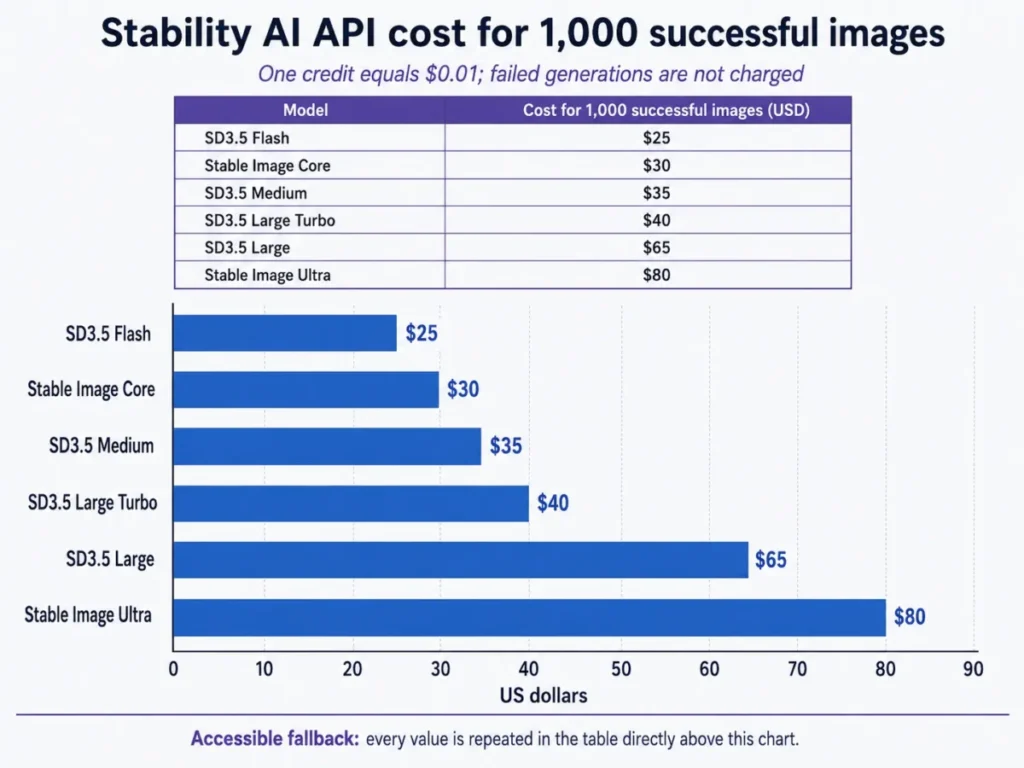
The spread is the decision. The Stable Diffusion 3.5 Large API costs $0.065 per image against $0.025 for the Stable Diffusion 3.5 Flash API, so the quality requirement, not the price list, has to drive the tier choice.
I would prototype on Flash or Medium and re-test on Large only where the output is customer-facing. Moving 10,000 images a month from the Stable Diffusion 3.5 Large API to the Stable Diffusion 3.5 Medium API saves $300 a month, which is real money for a small product team and nothing at all for an enterprise.
The pricing traps that most reviews skip
Three contract details change the arithmetic and rarely appear in a Stable Diffusion pricing section.
Service credits issued on or after the effective date of the Stability AI terms of service expire one year after purchase or issuance unless otherwise specified, and they are non-refundable and non-transferable. Buying a large credit balance to smooth procurement is therefore a use-it-or-lose-it decision rather than a stored asset.
Failed generations are not charged, which cuts the other way and is useful for a batch pipeline. The content safeguards knowledge base article also states that a user is not charged for a blurred image in the false-positive filtering situation it describes.
Enterprise pricing is not published. Anyone quoting a figure for a Stable Diffusion Enterprise license is guessing, and the only way to get that number is to ask Stability AI for a quote.
Feature Gates: What Each Access Path Gives You
| Capability | Self-host under Community or Enterprise license | Stability AI Platform API | Cloud partner deployment |
|---|---|---|---|
| Downloadable model weights | Yes, for Core Models | No | Not verified in this review |
| LoRA work and fine-tunes | Yes, subject to the foundational-model restriction | Not applicable | Not verified in this review |
| Official SD3.5 Large ControlNets | Yes, Blur, Canny, and Depth | Not verified in this review | Not verified in this review |
| SD3.5 Flash | Not listed as a Core Model on May 20, 2026 | Yes, at 2.5 credits per successful image | Not verified in this review |
| Inputs and Outputs processed by Stability AI | No, when the deployment genuinely stays local | Yes, under the Stability AI privacy policy | Governed by the cloud provider arrangement |
| Documented request rate limit | Not applicable | 150 requests per 10 seconds | Not verified in this review |
| Per-image charge | None, infrastructure cost instead | Stable Diffusion 3.5 Flash API $0.025 to Stable Image Ultra API $0.080 | Cloud provider pricing |
Rows above are drawn from the Core Models list, the API reference, and the Stability AI privacy policy, checked August 10, 2026.
The Flash row is the one to read twice. Stability AI’s API documents and prices SD3.5 Flash, while the Core Models page dated May 20, 2026 lists SD3.5 Medium, Large, and Large Turbo without it.
Nothing in the evidence says Flash cannot be self-hosted. It says the self-host licensing path covering Medium, Large, and Large Turbo has not been verified for Flash.
That is a different statement, and it is a real risk. Prototyping on the cheapest API tier and then planning to bring it in-house is exactly where the gap bites.
I would confirm that licensing question with Stability AI before a Flash prototype becomes a production self-host plan. Discovering the answer after the architecture is built is the expensive order to do it in.
Which Stable Diffusion 3.5 Model Should You Choose?
| Model | Size or derivation | Documented positioning | Self-host status on the May 20, 2026 Core Models list | API price per image |
|---|---|---|---|---|
| Stable Diffusion 3.5 Medium API | 2.5B parameters | Positioned for consumer hardware at 9.9 GB VRAM excluding text encoders | Listed | $0.035 |
| Stable Diffusion 3.5 Large API | 8.1B parameters | Quality tier, the only variant with official Blur, Canny, and Depth ControlNets | Listed | $0.065 |
| Stable Diffusion 3.5 Large Turbo API | Distilled from Large | Built to generate in four steps | Listed | $0.040 |
| Stable Diffusion 3.5 Flash API | Not published in this evidence set | Cheapest verified SD3.5 API tier | Not listed | $0.025 |
Model positioning comes from the SD3.5 announcement, self-host status from the Core Models page, and prices from the API reference, checked August 10, 2026.
For a self-host buyer with consumer hardware, Medium is the defensible starting point because Stability AI positions it that way and publishes a specific VRAM figure for it. Move to Large when prompt adherence matters enough to pay the resource cost, or when you need the official ControlNets, which are published for Large.
Large Turbo is a workload decision rather than a quality decision. Four-step generation suits high-volume batch work where throughput beats the last increment of fidelity.
On the API side, price alone should not pick the tier. Flash is the cheapest verified SD3.5 option here and Large is the most expensive, and the only sensible selection method is to generate the same brief on two tiers and look at the results against your own quality bar.
Ease of Use, Setup, and What It Takes to Run Locally
Setup difficulty splits by path. The hosted API is a normal REST integration: authenticate with an API key, choose a service variant, send the generation request, handle the response format, and handle moderation, 4xx, 429, and 5xx outcomes in code.
Self-hosting is the demanding path. The documented sequence is choosing a variant against your hardware, obtaining the weights through the official distribution route, loading them into a supported local workflow such as ComfyUI, supplying a prompt and any workflow controls, and running inference locally.
None of those steps is a one-click product. Installation, GPU memory management, dependency versions, and workflow assembly are the buyer’s responsibility, which is precisely the trade being made in exchange for control.
A useful 30-day and 90-day test for a self-host rollout: after 30 days, someone other than the person who installed it should be able to run a production job unassisted. After 90 days, checkpoint and workflow versions should be under change control, because an untracked ComfyUI graph is how a team quietly loses the ability to reproduce last quarter’s asset.
Customization: LoRA, Fine-Tuning, and Where the License Stops
Customization is the reason most technical buyers are here. Stability AI’s license guidance permits LoRA work and fine-tunes on Core Models, and separates that from using a Core Model or its outputs to create a competing new foundational-model architecture.
That boundary is narrower than it sounds for normal commercial work and sharper than it sounds for model labs. Training a style adapter on your own brand assets sits comfortably inside the permitted zone, while using SD3.5 outputs as the training corpus for a rival base model does not.
Two limits are worth naming before you plan a customization roadmap. The official ControlNets verified here are the SD3.5 Large Blur, Canny, and Depth releases, so a plan that depends on official Medium ControlNets needs its own confirmation from Stability AI before it becomes a commitment.
The second limit is that customization is where the variation problem gets solved, not where it gets worse. Teams that combine a fine-tune with a control input get the repeatability that prompt-only workflows never deliver.
For teams that mainly need retouching and cleanup rather than generation, the tools in my roundup of AI photo editors are a better starting point than a self-hosted diffusion stack.
Integrations, Deployment Paths, and the API Surface
Stability AI names Amazon Bedrock, Amazon SageMaker JumpStart, and Microsoft’s Azure AI service, Foundry, among the deployment paths for its models. For an enterprise with cloud governance already in place, that route can matter more than any model feature, because it moves the vendor question inside an existing procurement and security perimeter.
The direct API is documented as REST v2beta, and that is where new feature development is described as happening. If you are integrating for the first time, this is the surface to build against, and understanding what an API is in this billing context matters because charges attach to successful generations rather than to seats.
Two migration facts belong in any integration risk assessment. Stability AI discontinued the Stable Diffusion 1.6 API in July 2025, as recorded in its API price update.
The API documentation adds the second one. SD3.0 API calls were deprecated and rerouted to SD3.5 APIs in April 2025 at no additional cost.
Rerouting is convenient and is not the same as identical behavior. An application that depended on exact SD3.0 output characteristics should have validated the change rather than assuming a silent equivalence.
The documented rate limit in the Stability AI rate limit article is 150 requests per 10 seconds. Exceeding it returns HTTP 429 followed by a 60-second timeout, which is the detail that turns a limit into an architecture requirement.
A minute of enforced silence is long enough to break a user-facing feature that generates on demand. Any production integration needs a queue, a throttle below the ceiling, and retry logic with backoff before it sees real traffic.
Privacy, Security, Support, and Content Safeguards
Stability AI reports completing SOC 2 Type II and SOC 3 certifications, with reports available through its Trust Center. That is a meaningful signal for a vendor security review, and its scope is Stability AI as an organization and its services.
It does not extend to your self-hosted environment or to a third-party interface someone downloaded. A self-host deployment inherits your controls, not Stability AI’s attestations.
The data-flow difference between paths is the part to put in front of a security reviewer.
| Deployment | Where prompts and images go | Model-training use | Content filtering |
|---|---|---|---|
| Genuinely local self-host | Stays in your environment, subject to every extension and external service in the pipeline | Not applicable to Stability AI hosted Services | Your responsibility |
| Stability AI hosted API | Inputs and Outputs are collected by Stability AI | May be used to improve and train models, with an opt-out available | Hosted safeguards apply and can blur or prevent a generation |
The two rows above follow the Stability AI privacy policy and its content filtering guidance, checked August 10, 2026.
Hosted moderation deserves a specific note for automated pipelines. Stability AI documents that safeguards can blur an output or prevent generation, that false positives can occur, and that a user is not charged for a blurred image in the false-positive case it describes.
For a batch job running overnight, an unhandled moderation outcome is a silent gap in the output set. Build the failure state into the pipeline rather than discovering it in a delivery review.
Support is documentation-led rather than tiered by plan in the evidence available here. The knowledge base, API reference, and Trust Center are the published channels, and no plan-gated support tier is documented for the Community License.
The acceptable use policy applies across every access path, including self-hosted code and weights, along with a minimum-age requirement, and the SD3.5 model documentation is the reference for what each variant supports. Buyers who assume that downloading weights moves them outside Stability AI’s policies are reading the license wrong.
Stable Diffusion Limitations
Six limitations shape whether this is the right stack, and none of them is a complaint about image quality.
The hardware requirement is a hard gate. Medium needs 9.9 GB of VRAM excluding text encoders for full performance per the SD3.5 model documentation. That puts self-hosting out of reach on integrated graphics or an older laptop GPU.
Output variation is designed in. Stability AI’s own framing is that broader seed variation and less specific prompts increase aesthetic uncertainty, so consistency is bought with control workflows rather than assumed.
The commercial license has a revenue trigger. Crossing one million dollars in annual organizational revenue converts the Community self-host license into an Enterprise conversation under the Stability AI License. The price of that conversation is not published.
Hosted use is not private by default. Inputs and Outputs on the hosted Services are collected and may be used to improve and train models unless the training opt-out in the privacy policy is exercised.
API credits expire. One year after purchase or issuance, unspent credits are gone under the terms of service, and they are non-refundable and non-transferable.
The rate limit has teeth. Exceeding the documented ceiling of 150 requests per 10 seconds produces a 429 and a 60-second timeout, a published API behavior rather than a soft cap.
Who Should Use Stable Diffusion
Technical solo creators with a capable GPU. A card that clears the documented 9.9 GB figure plus the Community self-host license removes per-generation charges entirely, as the license terms set out. Every workflow decision then sits with you.
Two to ten person creative engineering teams building repeatable pipelines. ControlNet workflows plus fine-tunes give this group something no closed generator sells: composition as an input, versioned alongside the rest of the stack.
Application developers embedding image generation. Billing runs from $0.025 on the Stable Diffusion 3.5 Flash API to $0.065 on the Stable Diffusion 3.5 Large API, which matches usage-based product economics better than seat pricing. The published credit table makes unit-cost modeling a spreadsheet exercise.
Studios and agencies with confidentiality obligations. A deliberately local architecture is the only mainstream path where prompts and reference images can be kept out of a vendor’s hosted service, provided the whole pipeline is audited rather than assumed.
Enterprise platform teams with existing AWS or Azure governance. The documented Bedrock, SageMaker JumpStart, and Azure Foundry paths let the deployment sit inside an approved perimeter, though licensing and cloud economics still need separate procurement review.
Who Should Avoid Stable Diffusion
Nontechnical buyers who want polished output with no decisions. The differentiation here is control, and control is inseparable from setup work, model selection, and workflow assembly.
Teams that need deterministic branded output without investing in control workflows. Stability AI documents the variation tradeoff, and a team unwilling to build prompt and ControlNet discipline will read that tradeoff as unreliability.
Hosted-only teams that cannot tolerate a blocked or blurred generation. Documented safeguards and acknowledged false positives make moderation an operational reality for automated pipelines, not an edge case.
High-throughput API applications with no queueing layer. Without throttling and retry logic, a traffic spike buys a 60-second timeout at the worst possible moment.
Buyers whose real job is marketing asset volume rather than image control. A managed tool usually serves that work better, and the options in my guide to AI tools for content creation get there with less operational overhead.
Stable Diffusion Alternatives
| Alternative | Choose it if | Trade-off against Stable Diffusion |
|---|---|---|
| Midjourney | Managed aesthetic output matters more than deployment control | No downloadable weights and no self-hosted data flow |
| DALL-E | Conversational iteration inside a managed service fits the workflow | Prompts and outputs stay in a hosted environment you do not control |
| Adobe Firefly | The team already lives inside an Adobe production stack | Less model-level customization and no local inference path |
| Leonardo AI | A managed interface with model variety beats assembling your own | Token and plan mechanics replace per-image API costing |
| Z-Image Turbo | Another contemporary open-weight ecosystem is worth evaluating first | Different license and hardware profile that needs its own verification |
The two managed generators are the realistic substitutes for most buyers who bounce off the setup work, and the detail sits in my Midjourney review 2026 and my DALL-E image generation review. Neither offers weights you can download, which is the exact trade being made.
For teams inside an existing creative stack, the Adobe Firefly review covers the integration argument, while the Leonardo AI platform review covers the managed middle ground of model variety without local infrastructure.
Buyers who want to stay open-weight should also look at the Z-Image Turbo model review before committing, since license terms and hardware profiles differ between open-weight families and each one needs verifying on its own sources.
Pricing for these alternatives is not carried over into this review, because a competitor price that has not been verified on its own official page has no place in a Stable Diffusion pricing table. Each linked review holds its own dated figures.
Final Verdict: Is Stable Diffusion Worth It in 2026?
Stable Diffusion is worth it for buyers who value deployment control, structural control, and per-image cost transparency enough to accept setup and infrastructure responsibility. It is not worth it for buyers who want a managed creative tool, because the same properties that make it flexible make it work.
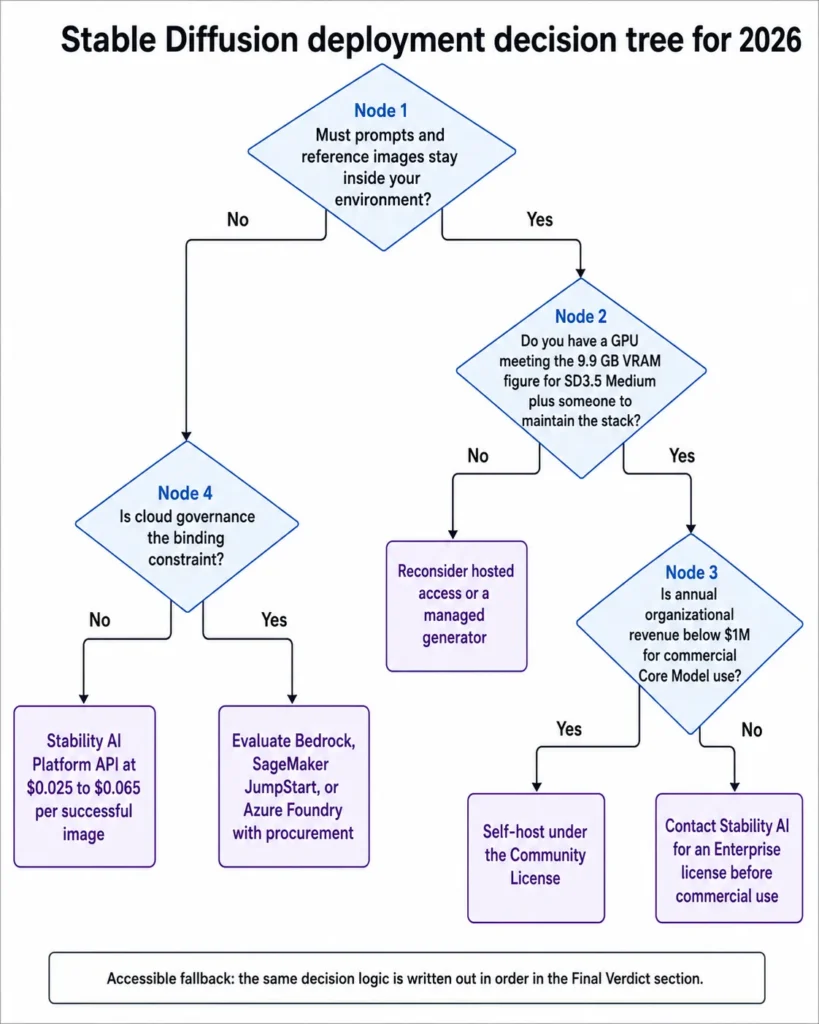
The decision chain is short. If local data control is mandatory and you have GPU capacity plus someone to maintain the stack, self-host SD3.5 Medium under the Community License and confirm the revenue threshold before commercial use.
If you have neither the hardware nor the operations capacity, and the hosted data flow is acceptable, the Platform API is the faster path. It runs from the Stable Diffusion 3.5 Flash API at $0.025 to the Stable Diffusion 3.5 Large API at $0.065 per successful image.
If cloud governance is the binding constraint, evaluate the Bedrock, SageMaker JumpStart, or Azure Foundry routes with procurement rather than starting from the model.
The decision chain behind that recommendation runs in one direction. Official documentation sets the documented capability for each variant, and the workflow consequence of self-hosting is that GPU capacity and maintenance move to the buyer.
The affected buyer is whoever owns that stack. The limitation to weigh is output variation plus the licensing gate.
The upgrade trigger is specific rather than vague. You outgrow the Community self-host license the moment commercial Core Model use continues above one million dollars in annual organizational revenue, and you outgrow SD3.5 Medium when prompt adherence or the official ControlNets justify the resource cost of Large.
Choose Midjourney or Adobe Firefly instead if the honest requirement is good images with low operational overhead. Choose Stable Diffusion if the requirement is a generation stack you own.
The question I would want answered before renewal or before the next hardware purchase: is the team using the control layer, or paying the setup cost of an open-weight stack while working like a prompt-only user? If it is the second, the tool is not the problem.
Frequently Asked Questions
Is Stable Diffusion still free in 2026?
Yes, if you qualify. The Stability AI Community License carries no fee for research, non-commercial use, and commercial Core Model use by organizations below one million dollars in annual revenue.
Above that threshold, commercial use requires an Enterprise license with custom pricing. Generation through the Stability AI Platform is billed separately, from $0.025 per successful image on the Stable Diffusion 3.5 Flash API, checked August 10, 2026.
Can I use Stable Diffusion commercially?
Yes, under conditions. Qualifying organizations below the one-million-dollar annual revenue threshold can use Core Models commercially under the free Community self-host license set out in the license terms.
Above it, Stability AI requires an Enterprise license.
The acceptable use policy applies either way, including to self-hosted weights, and the license separates permitted fine-tuning from building a competing foundational-model architecture.
How much does the Stable Diffusion API cost per image?
One Platform API credit equals $0.01 on the Platform pricing page. The Stable Diffusion 3.5 Flash API is 2.5 credits ($0.025) and the Stable Diffusion 3.5 Medium API is 3.5 ($0.035).
The Stable Diffusion 3.5 Large Turbo API is 4 credits ($0.040) and the Stable Diffusion 3.5 Large API is 6.5 ($0.065).
Failed generations are not charged under the API reference. At 1,000 images, that runs from $25 to $65.
Which Stable Diffusion 3.5 model should I pick?
For self-hosting on consumer hardware, Medium is the sensible default because Stability AI positions it that way. Choose Large when prompt adherence matters or when you need the official Blur, Canny, and Depth ControlNets.
Choose Large Turbo for four-step batch throughput. On the API, test two tiers against your own quality bar rather than choosing on price.
How much VRAM does Stable Diffusion 3.5 need?
The SD3.5 documentation puts SD3.5 Medium at 9.9 GB of VRAM excluding text encoders for full performance. Large drops from 19 GB to 11 GB in the TensorRT and FP8 configuration Stability AI describes.
Those are vendor figures for referenced setups, so treat them as guidance rather than a floor for every implementation.
Is Stable Diffusion private if I run it locally?
No, unless you audit the whole pipeline. A genuinely local deployment can avoid Stability AI’s hosted API entirely, which is a real architecture advantage.
But third-party interfaces, extensions, analytics, and model-download services each create their own data flows. Local inference is a privacy opportunity, not an automatic guarantee that nothing leaves your environment.
Can I self-host SD3.5 Flash under the Community License?
Not on this evidence. Flash appears in Stability AI’s API documentation and pricing, but it is absent from the Core Models list dated May 20, 2026, which is the list that governs Community and Enterprise self-host licensing.
Confirm the licensing status directly with Stability AI before planning to move a Flash prototype to self-hosted production.
Is Stable Diffusion better than Midjourney?
They solve different problems. Stable Diffusion wins on deployment control, downloadable weights, fine-tuning, and per-image API costing.
Midjourney wins on managed aesthetic output with no infrastructure work.
If you need composition control and a data flow you architect, take Stable Diffusion. If you need good images quickly, take Midjourney.
Do I own the images Stable Diffusion generates?
As between you and Stability AI, the terms address ownership of Outputs and place responsibility for their use on you. That contractual position is not the same as a guarantee that a given output is copyrightable or free of third-party rights, which depends on applicable law and the specific image.
Treat this as a question for your own counsel.
Do Stability AI API credits expire?
Yes. Under the Stability AI terms, applicable service credits lapse twelve months from purchase or issuance unless something else is specified, with no refund and no transfer.
Buying a large balance ahead of demand is a use-it-or-lose-it decision, so size credit purchases against a realistic twelve-month generation forecast.