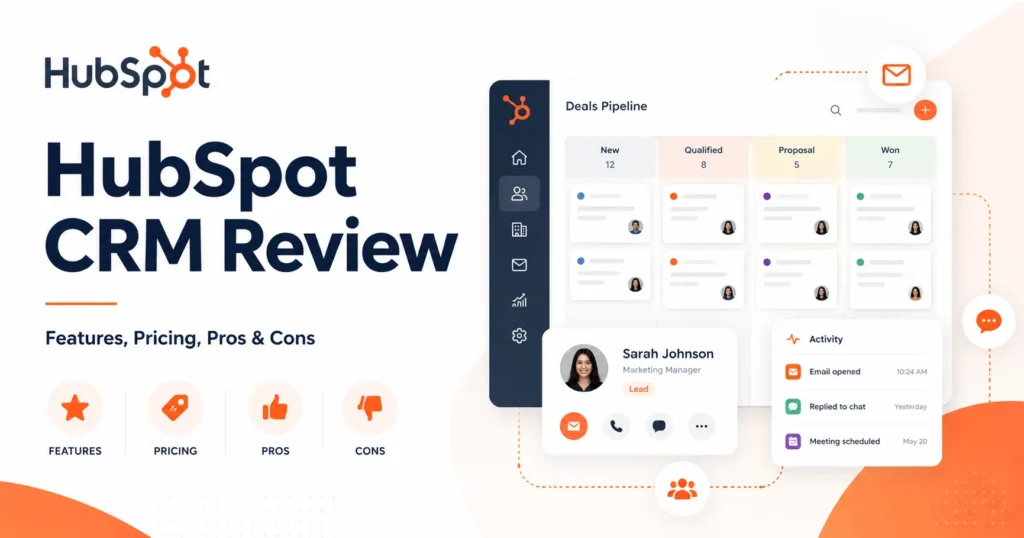
HubSpot CRM is easy to start and hard to budget. The free database will run a two-person team for months, then a single feature gate, a contact tier, or an onboarding fee turns a $0 tool into a four-figure monthly commitment.
This review treats HubSpot Smart CRM as a purchase you have to defend to finance, not a free logo on a landing page. I evaluated pricing, plan gates, HubSpot Credits, API and workflow ceilings, marketing-contact economics, support tiers, and sensitive-data scope using HubSpot’s official pricing pages and Product and Services Catalog, checked on July 3, 2026, plus verified user sentiment from Capterra, TrustRadius, and G2.
Measured against the broader best CRM software field, HubSpot CRM is worth it for a 5- to 25-person inbound-led team that wants one shared record and a clear upgrade path without a data migration. It is the wrong first purchase for a budget-tight sales team that needs automation and reporting on day one, and for a regulated team that assumes the free or Starter plan covers sensitive data.
In This Article (16 sections)
Quick Verdict
| Category | Verdict |
|---|---|
| Best for | 5- to 25-person inbound-led sales and marketing teams wanting one shared CRM record |
| Not ideal for | Budget-tight sales teams needing advanced automation and reporting immediately, and regulated teams assuming low tiers cover PHI |
| Starting price | Free CRM at $0; paid Smart CRM from $20/ |
| Best practical plan | Sales Hub Professional at $90/ |
| Free plan | Yes: up to 2 free users and up to 1,000 contacts |
| Setup difficulty | Low for free CRM, high for Professional or Enterprise with automation, migration, or sensitive data |
| Main strength | One unified record for sales and marketing with a 2,000-plus-app integration ecosystem |
| Main limitation | Cost escalates through seats, marketing contacts, HubSpot Credits, and onboarding fees |
| Best alternative | Pipedrive for sales-only simplicity, Salesforce for deep enterprise customization |
I would not budget from the free plan or the $7 promotional seat. The number that matters is the first-year total once you add the seats, contact tier, and onboarding your workflow needs.
How I Reviewed HubSpot CRM
This is a documentation-based review, not a hands-on trial. No test account or private sales quote was used, so I do not claim to have clicked through the product.
Every price, limit, and feature gate here comes from HubSpot’s official Smart CRM, Sales Hub, and Marketing Hub pricing pages and the HubSpot Product and Services Catalog, checked on July 3, 2026. Technical ceilings come from HubSpot’s Workflows FAQ, developer usage guidelines, mobile install requirements, Trust Center, and Sensitive Data documentation.
User sentiment is drawn from Capterra, TrustRadius, and G2 review pages. I treat that sentiment as a pattern of real-world complaints, not as product fact, and I map it to the plan or team size where it becomes a buyer risk.
HubSpot changes packaging often, and the pricing pages displayed promotional Starter rates on the date I checked. Verify the exact numbers in checkout or a HubSpot quote before you commit budget.
What You Are Buying With HubSpot CRM
Most reviews treat “HubSpot CRM” as one product. It is three things stacked together, and the confusion is where buyers overpay.
Free Tools are the no-cost edition: contact, company, and deal management, email tracking, forms, live chat, and dashboards, capped for a small team. Smart CRM is the underlying system of record, sold on its own as Starter, Professional, and Enterprise, and also bundled into every paid HubSpot product.
The Hubs sit on top of Smart CRM. Sales Hub adds sales-specific tools like sequences and forecasting; Marketing Hub adds campaigns and marketing-contact-based email; Service Hub adds support tooling.
Here is the practical boundary buyers miss.
| Layer | What it is | What it gives you | Where it charges |
|---|---|---|---|
| Free Tools | Free CRM edition | Contacts, deals, forms, chat, email tracking, dashboards | Free, with hard limits and HubSpot branding |
| Smart CRM | System of record | Custom properties, currencies, timeline, permissions, seats | $20 to $75 per seat per month by tier |
| Sales Hub | Sales workflow layer | Sequences, forecasting, deal automation, playbooks | Per seat, plus onboarding on Pro and Enterprise |
| Marketing Hub | Marketing workflow layer | Campaigns, marketing-contact email, workflows | By marketing-contact tier, plus onboarding |
The database is the cheap part; the workflow layer is what your team is paying for. A sales rep who needs sequences is buying Sales Hub, not the $20 Smart CRM seat, and pricing the wrong layer is the most common HubSpot budgeting mistake.
The Three Problems HubSpot CRM Solves Well
One shared record for sales and marketing
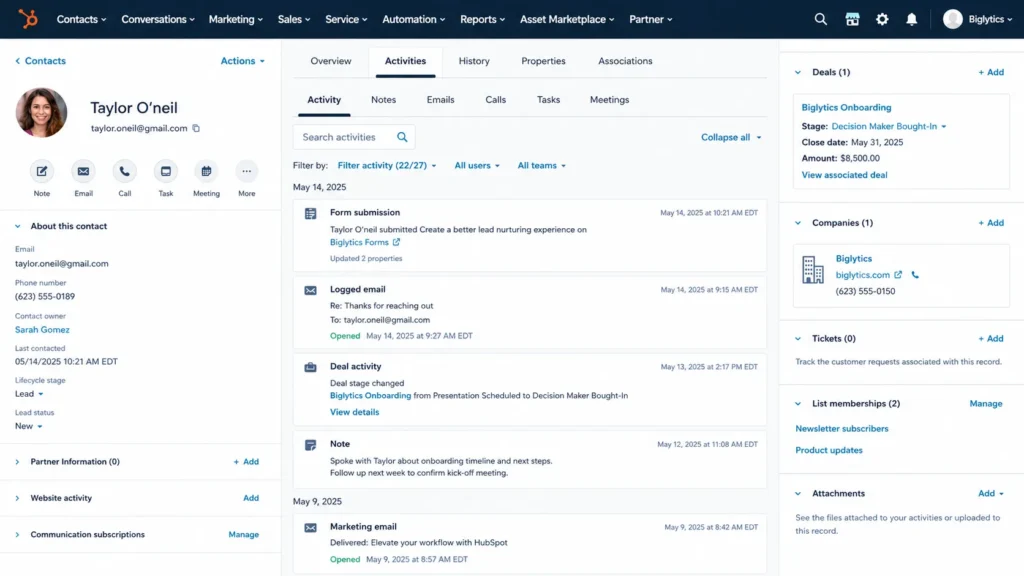
HubSpot’s core advantage is that marketing forms, sales activity, and support history live on the same contact record. A lead captured by a form is the same object a rep works later, with no export or sync in between.
For a 5- to 15-person team that currently splits data between a spreadsheet, an email tool, and a rep’s inbox, this is the core of what CRM software is meant to do: remove the handoff gap where leads go cold. That single-record model is the reason inbound teams tolerate HubSpot’s cost as they scale.
A free CRM a two-person team can run
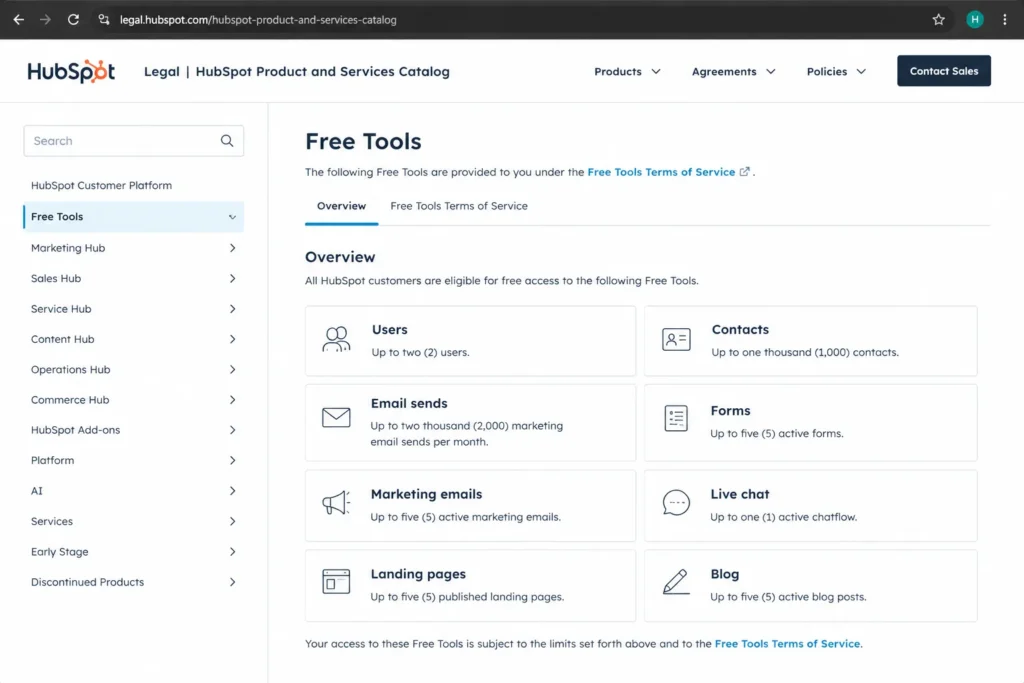
The free edition is a working database, not a trial. It supports up to two free users and up to 1,000 contacts, with one deal pipeline, email tracking, forms, live chat, and 10 dashboards holding up to 50 reports each.
For a solo founder or a two-person startup logging deals and tracking email, that covers real work at $0. The value is genuine as long as the team stays inside those ceilings, which I cover below.
A large, reviewed integration ecosystem
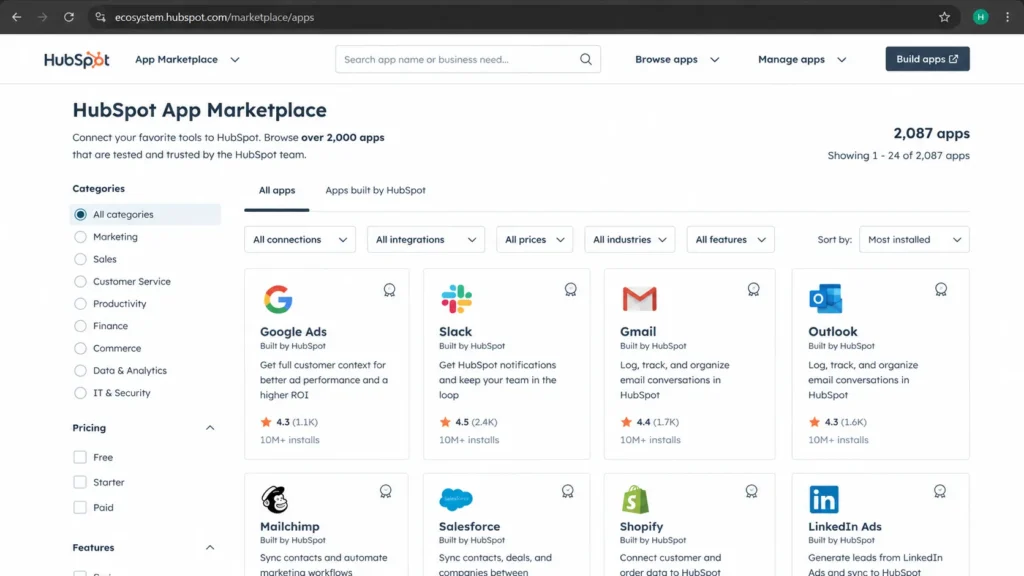
HubSpot’s App Marketplace has passed 2,000 apps and 2.5 million active installs, covering Gmail, Google Calendar, Slack, Salesforce, Zoom, Zapier, Aircall, and more. Apps in the Marketplace are reviewed and certified by HubSpot’s developer team, which lowers the risk of connecting a broken integration.
For a team assembling a stack around email, calendar, calling, and reporting, that breadth means most tools connect without custom development. Integration depth is one of the few HubSpot advantages that holds up against Salesforce.
The Problems HubSpot CRM Creates
Where the free plan stops working
The free plan is the hook, and its ceilings are purchase-decision facts, not footnotes. On the Product Catalog checked July 3, 2026, free accounts allow up to two free users and up to 1,000 contacts, with 10 total custom properties, 2,000 marketing email sends per calendar month, and 200 email-tracking notifications per month.
Several older third-party reviews still cite unlimited users or a one-million-contact free plan. Those numbers conflict with HubSpot’s current catalog, so treat any “free forever at scale” claim as stale, and compare it against other genuinely free CRM options before committing.
Branding is the second free-plan catch. Free forms, live chat, landing pages, website pages, and one-to-one email carry HubSpot branding, which is a problem for agencies and customer-facing startups that need a clean brand.
Custom properties are the first real customization wall. Ten total custom properties on free tools become 1,000 per object on paid Smart CRM tiers, so a team modeling anything beyond a basic sales process hits the upgrade trigger fast.
The pricing cliff after the Starter tier
HubSpot’s reputation for getting expensive is accurate, but the reason is specific. Cost climbs on four separate meters: paid seats, marketing-contact tiers, HubSpot Credits, and one-time onboarding fees.
G2 and Capterra sentiment repeats this pattern: users praise the ease of adoption, then report that contact growth, higher tiers, and gated features push the bill up faster than expected. The complaint is loudest for teams that bought on the entry price and did not model the contact tier or onboarding fee.
I would treat the advertised seat price as the floor, not the budget. The full pricing math is in the section below.
Reporting and workflow complexity as you scale
TrustRadius review patterns point to limited reporting flexibility, integration challenges with specialized tools, and navigation or workflow complexity. Capterra reviewers describe HubSpot as a broad all-in-one platform that can feel overwhelming, with occasional bugs and interface friction.
These are not deal-breakers for a small team running simple pipelines. They become real risks for a RevOps team building multi-step workflows and custom reports, where debugging automation and stretching native reporting turn into ongoing admin work.
HubSpot CRM Pricing Reality in 2026
HubSpot pricing depends on the product, the seat type, the billing term, the contact tier, and add-ons. All figures below are US pricing checked on the official pages July 3, 2026, and the Starter rates included a promotional display that can change, so cross-check them against a full HubSpot pricing breakdown before you build a budget.
Smart CRM seat pricing
| Plan | Price (per seat/ | Included HubSpot Credits | Key limits | Worth it? |
|---|---|---|---|---|
| Free Tools | $0 | None | 2 users, 1,000 contacts, 10 custom properties | Real value for solo and 2-person teams |
| Smart CRM Starter | $20 | 500 | 1,000 custom properties/ | Good for a small team needing the database only |
| Smart CRM Professional | $50 (page also showed $45 annual) | 3,000 | Email and chat support, up to 30 currencies | Fit when you need broader customization |
| Smart CRM Enterprise | $75 | 5,000 | Phone support, up to 200 currencies, sensitive-data scope | Only for large or regulated teams |
Smart CRM buys you the record and its customization, not sales automation. If your reps need sequences, forecasting, or playbooks, the Smart CRM seat is not the number you should be planning around.
Sales Hub seat pricing and first-year cost
| Plan | Price (per seat/ | One-time onboarding | Included Credits | Notes |
|---|---|---|---|---|
| Sales Hub Free | $0 | None | None | Up to 2 users |
| Sales Hub Starter | $20 standard; $7 promotional on July 3, 2026 | None | 500 | Verify promo in checkout |
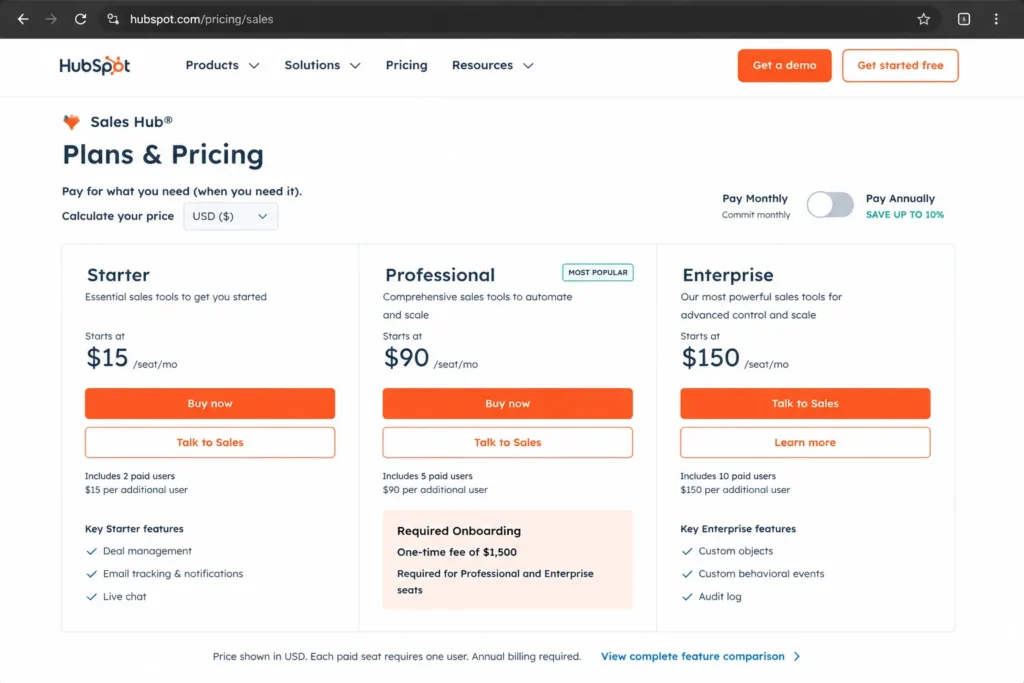
| Sales Hub Professional | $90 annual; $100 monthly | $1,500 required | 3,000 | The practical plan for automation |
| Sales Hub Enterprise | $150 | $3,500 required | 5,000 | Advanced control and flexibility |
The onboarding fee is the number competitors bury. A three-seat Sales Hub Professional team pays roughly $3,240 in year-one seats at the annual rate, plus the mandatory $1,500 onboarding, so the real first-year figure is near $4,740 before any add-ons.
Scale that to a 10-seat sales team and the math shifts again. Ten Sales Hub Professional seats at $90 annual run about $10,800 in year one, plus the same $1,500 onboarding, for roughly $12,300 before add-ons, and that number climbs the moment marketing contacts, extra credits, or an API pack enter the picture.
I would build the first-year budget from that all-in figure, not the promotional $7 seat, because the entry price and the working price are rarely the same at HubSpot.
The seat types that change your bill
HubSpot does not charge every stakeholder the same way. Core Seats, Sales Seats, Service Seats, and Revenue Seats are paid; View-Only Seats and Partner Seats are available at no additional cost.
For a team with managers and executives who only read dashboards, View-Only Seats are a real cost-control lever that pricing complaints ignore. Put editors and reps on paid seats and viewers on free seats before you assume everyone needs a license.
One mechanic can quietly raise the bill: in an account that mixes Starter, Professional, and Enterprise products, Core Seats are priced based on the highest-level subscription in the account. A single Enterprise product can lift the price of every Core Seat, so mixed-tier stacks cost more than the plan table suggests.
Marketing contacts, the hidden cost driver
Inbound teams often buy CRM first, then hit Marketing Hub economics later. Marketing Hub Professional starts at $800/month annual or $890/month monthly with 3 Core Seats and a required $3,000 onboarding fee; Enterprise starts at $3,600/month with 5 Core Seats and a $7,000 onboarding fee.
The meter is the marketing contact, not the user. Marketing contacts count toward your paid tier, while non-marketing contacts can be stored free up to a 15-million overall contact limit, and email send limits scale at 5x, 10x, and 20x the contact count by tier.
The trap is the downgrade rule. A marketing-contact tier cannot be reduced until contract renewal, so a temporary list spike locks in a higher price for the rest of the term.
I would ask one question before buying Marketing Hub: how many contacts will be marketed to in twelve months, not how many sit in the database today.
HubSpot Credits and AI cost
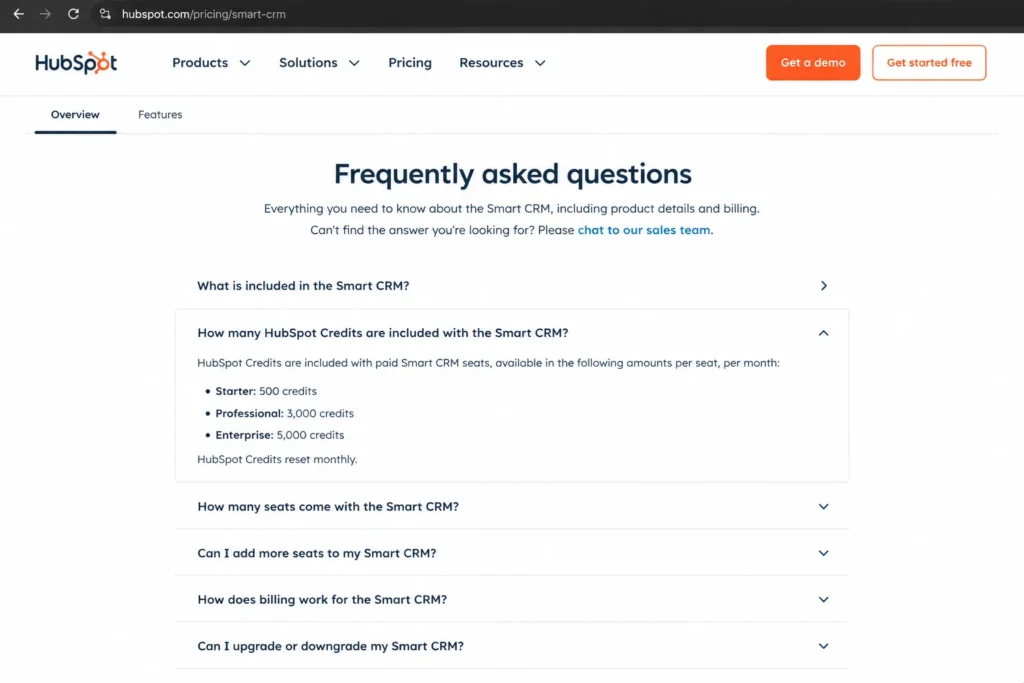
Breeze AI is not simply included; it runs on a credit meter. Included credits are 500 on Starter, 3,000 on Professional, and 5,000 on Enterprise, and those allotments are not additive across products.
Additional credits cost $10 per 1,000-credit capacity pack or $0.010 per credit pay-as-you-go. Credits reset monthly and unused credits do not roll over, and Breeze agents, including the data agent, customer agent, and prospecting agent, consume credits as they run.
For a team planning heavy AI enrichment or agent workflows, the predictable subscription is only part of the cost. Model the credit burn of your agents before you assume AI is free at your tier.
Feature Gates: What Unlocks at Each Plan
Automation and technical ceilings are where “HubSpot has that feature” turns into “HubSpot has that feature on Enterprise.” These are the gates that decide whether the plan you picked survives contact with your workflow.
| Capability | Free / Starter | Professional | Enterprise |
|---|---|---|---|
| Workflows | Not available | Up to 300 | Up to 1,000 |
| API calls per day | 250,000 | 650,000 | 1,000,000 |
| API burst (per 10 seconds) | 100 requests | 190 requests | 190 requests |
| Currencies | Up to 5 (Starter) | Up to 30 | Up to 200 |
| Custom properties | 10 total (free) | 1,000 per object | 1,000 per object |
The workflow cap is the one RevOps teams underestimate. Marketing, Sales, or Service Hub Professional subscriptions can build up to 300 workflows, and Enterprise raises that to 1,000, so an automation-heavy operation can outgrow Professional on a single meter.
API limits matter for data-heavy buyers that no marketing user ever notices. Free and Starter accounts get 250,000 calls per day and 100 requests per 10 seconds, Professional gets 650,000 per day and 190 per 10 seconds, and Enterprise gets 1,000,000 per day.
If that is not enough, the API Limit Increase add-on costs $500/month, adds another 1,000,000 calls per day, raises the burst limit, and caps at two packs.
International revenue teams hit the currency gate first. Starter supports up to 5 currencies, Professional up to 30, and Enterprise up to 200, so a US company selling across many markets can be pushed up a tier by currency count alone.
There is also a relationship-model ceiling that enterprise B2B teams should check. Free and paid accounts have different per-record association limits, with special exceptions for deals, tickets, line items, quotes, and form submissions, which matters for teams modeling complex account structures.
Key Features and Where They Break
Pipeline and deal management
HubSpot’s pipeline gives a small team a working view of deals, stages, and tasks without configuration overhead. The free edition includes one deal pipeline, which is enough for a single sales motion.
The limit appears when a team runs separate motions, such as new business and renewals, and needs multiple pipelines and stage automation. That is a paid-tier requirement, and it is a common reason a growing team leaves the free plan.
Email, sequences, and engagement
Email tracking, templates, and meeting scheduling are strong even at the low tiers, which is why reps adopt HubSpot quickly. Sequences and heavier sales automation, though, are Sales Hub features, not free CRM features.
A rep who expects automated multi-step outreach on the free plan will be disappointed. Budget Sales Hub if outbound cadence is part of the job.
Breeze AI and automation
Breeze AI covers an assistant, a data agent, a customer agent, and a prospecting agent, plus AI actions inside workflows. On paper this is a strong 2026 AI layer built into the CRM.
The catch is the credit meter covered above, where each agent action draws from a monthly allotment that does not roll over. AI capability is real, but AI cost is variable, and that variability is what a finance team will question at renewal.
Ease of Use, Integrations, Mobile, and Support
Setup and learning curve
Basic free CRM setup is genuinely low effort, and HubSpot Academy’s training and certifications shorten the ramp for new admins. This is a real strength for teams switching from spreadsheets.
Effort rises sharply at Professional and Enterprise, where automation, custom reporting, integrations, marketing contacts, and a full CRM data migration turn setup into a project. The onboarding fees on those tiers exist because the configuration is not trivial.
Integrations and API
Beyond the 2,000-plus Marketplace apps, HubSpot supports private apps, webhooks, imports, and data sync for teams that build their own connections. The certified-app review process reduces the odds of a fragile integration breaking a workflow.
The constraint is the API ceiling above, which a high-volume sync between HubSpot and a data warehouse or ecommerce platform can reach. Data-heavy teams should size their sync volume against the daily and burst limits before committing.
Mobile CRM for field reps
HubSpot’s mobile app is more than a badge on the pricing page. It supports contact and deal records, tasks, reminders, caller ID, calls, and the Breeze Assistant, which covers most field-rep workflows away from a desk.
The requirements are iOS 17 or later and Android 10 or above, so older company devices may need an upgrade first. For a field sales team, confirm device compatibility before you standardize on the mobile app.
Support tiers
Support is tiered and product-specific, not universal. Smart CRM Professional includes email and chat support, and Smart CRM Enterprise adds phone support, while Marketing Hub Starter includes email support and Marketing Hub Professional and Enterprise add phone.
All users get the Community, Academy, and Knowledge Base regardless of tier. If phone support matters to your implementation, it is an Enterprise-level expectation on most products, and that should factor into the plan choice.
| Product and tier | Chat | Phone | |
|---|---|---|---|
| Smart CRM Professional | Yes | Yes | No |
| Smart CRM Enterprise | Yes | Yes | Yes |
| Marketing Hub Starter | Yes | No | No |
| Marketing Hub Professional / Enterprise | Yes | No | Yes |
The support gap is a first-90-days risk more than a steady-state one. A team doing a complex migration on Professional gets email and chat, not a phone line, so plan the rollout around that access level.
Security and Compliance for Regulated Teams
HubSpot publishes a Trust Center with SOC 2 Type II and SOC 3 evidence, plus security documentation and GDPR-related tooling. For most B2B buyers, that baseline is sufficient.
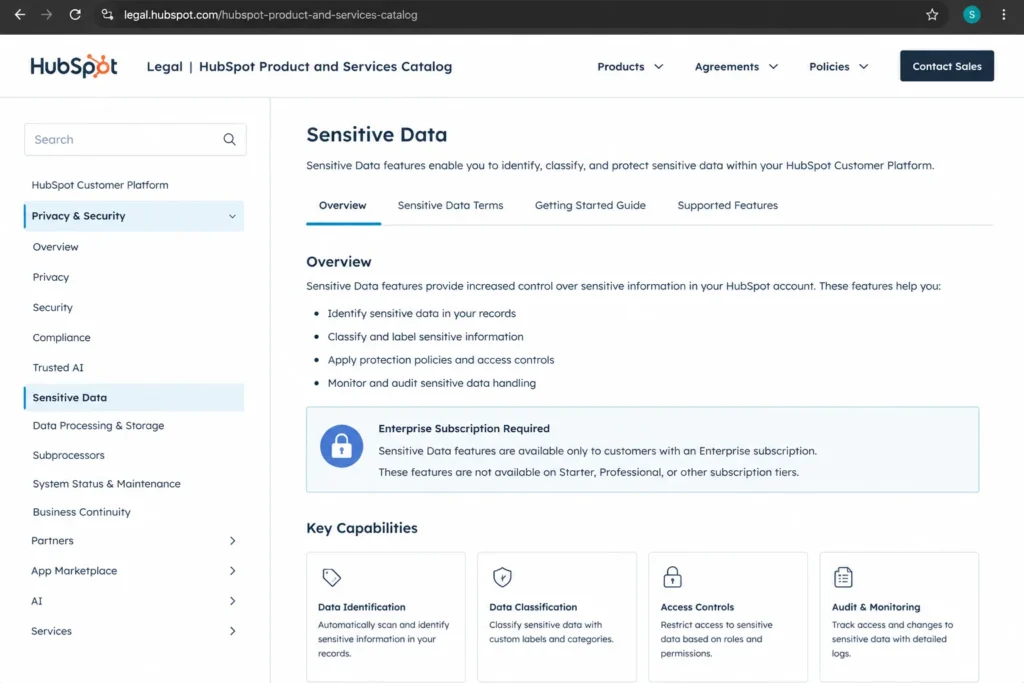
Regulated buyers need to read the fine print on sensitive data. HubSpot’s Sensitive Data functionality supports storing PI, PII, PHI, and financial records with encryption, audit logging, access controls, and HIPAA and BAA-related settings, but the Product Catalog scopes Sensitive Data to Enterprise subscriptions under specific terms.
That distinction matters. HubSpot is not blanket HIPAA-compliant across every plan and tool, so a healthcare team assuming the free or Starter plan covers PHI would be wrong.
Confirm the Enterprise requirement and the Sensitive Data terms with HubSpot before storing any regulated data.
What Real Users Report
Review-platform sentiment is consistent enough to group into buyer risks. These are patterns from Capterra, TrustRadius, and G2, not guaranteed outcomes for your team.
| Theme | What users say | Who it affects most |
|---|---|---|
| Ease of adoption | Quick to learn, strong onboarding resources | Teams switching from spreadsheets |
| All-in-one visibility | One record for sales and marketing | Inbound-led 5- to 25-person teams |
| Cost escalation | Contacts, seats, tiers, and gated features raise the bill | Startups and small teams that bought on entry price |
| Reporting limits | Native reporting feels constrained | RevOps teams needing custom analytics |
| Workflow complexity | Automation and navigation get complicated at scale | Ops-heavy teams building multi-step workflows |
The praise clusters around getting started, and the criticism clusters around scaling. That maps cleanly to my verdict: HubSpot is strong for the team that adopts it and risky for the team that outgrows the plan it bought.
Who Wins and Who Loses With HubSpot CRM
Generic “best for SMBs” advice is useless here, because HubSpot is excellent for some small teams and a budget trap for others. If you are still shortlisting, my CRM picks for small business give the wider context, but these are the cohorts I would use to decide on HubSpot specifically.
Wins with HubSpot:
- A solo founder or 2-person team that needs a free, working CRM database and stays under 1,000 contacts.
- A 5-person inbound team that wants marketing and sales on one record and can budget Starter or Professional seats.
- A 10-person sales team that needs sequences and forecasting and can absorb Sales Hub Professional plus the $1,500 onboarding fee.
Loses with HubSpot:
- A budget-tight sales team that needs automation and custom reporting on day one but cannot clear the Professional pricing cliff.
- A marketing-led team with a large, fast-growing list that will hit marketing-contact tiers and the no-downgrade rule.
- A regulated healthcare team that needs PHI storage without committing to Enterprise scope.
The 30/90-day adoption test decides it. If the team is not keeping records clean and using the shared timeline within 90 days, the problem is adoption, not features, and no tier upgrade fixes that.
Better Alternatives When HubSpot Is the Wrong Fit
The right alternative depends on why HubSpot fails for you, not on a generic ranking. Match the reason to the replacement, and see the full list of HubSpot CRM alternatives if none of these five fit.
Salesforce
Choose Salesforce when you need deep enterprise customization and reporting that HubSpot’s native tools constrain. It is more complex and usually more expensive to administer, so weigh the HubSpot versus Salesforce tradeoffs before you assume the enterprise platform is worth the overhead.
Zoho CRM
Choose Zoho CRM when you want a full suite at a lower price than HubSpot’s paid tiers. It is the budget-conscious pick for teams that still want breadth across sales, marketing, and support.
Pipedrive
Choose Pipedrive when you are a sales-only team that wants a clean visual pipeline without marketing tooling you will not use. It removes the layers that make HubSpot expensive for pure sales motions.
Freshsales
Choose Freshsales when you want an affordable sales CRM with built-in phone and AI features. It targets small sales teams that find HubSpot’s Sales Hub pricing steep.
Monday CRM
Choose Monday CRM when your team wants flexible, workflow-style customization and already thinks in boards and views. It suits teams that value adaptable workflows over a fixed CRM structure.
| Alternative | Choose it when HubSpot fails on | Best for |
|---|---|---|
| Salesforce | Customization and reporting depth | Enterprise teams with ops resources |
| Zoho CRM | Total cost across a full suite | Budget-conscious multi-function teams |
| Pipedrive | Simplicity for pure sales | Sales-only teams |
| Freshsales | Affordable sales CRM with calling | Small sales teams |
| Monday CRM | Flexible workflow customization | Board-oriented workflow teams |
The pattern is simple: leave HubSpot for cost, simplicity, or customization, and pick the tool that fixes your specific reason. A team switching only to save money should look at Zoho or Freshsales before Salesforce, which usually costs more to run.
The HubSpot CRM Buyer Risk Ledger
Before signing, I would put the four risks that break a HubSpot budget on one page, each tied to a consequence and a mitigation. This is the list I would hand to whoever approves the renewal.
| Risk | Buyer consequence | Mitigation |
|---|---|---|
| Pricing cliff after Starter | Entry price hides seats, onboarding, and add-ons | Budget the full first-year figure, including onboarding, before upgrading |
| Marketing-contact lock-in | A list spike raises the tier and cannot downgrade until renewal | Size the contact tier on 12-month marketed contacts, not current database size |
| Credit burn on Breeze AI | Agent workflows draw monthly credits that do not roll over | Estimate agent actions per month and price overage at $0.010 per credit |
| Enterprise-scoped compliance | Regulated data needs Enterprise plus Sensitive Data terms | Confirm the Enterprise requirement before storing PHI or financial records |
The first item to fail as a team grows is usually reporting, not the database. HubSpot holds the record well past 1,000 contacts, but native reporting flexibility is where RevOps teams start filing complaints, so I would pressure-test reporting needs against Professional before assuming the plan scales with the team.
Final Verdict: Is HubSpot CRM Worth It in 2026?
HubSpot CRM is worth it for inbound-led teams that value one shared record and a clean upgrade path, and that have modeled the real cost past the entry price. The free plan is a legitimate starting database for a two-person team, and the paid stack scales without a migration, which is a real advantage over switching CRMs later.
It is not worth it as a cheap sales-automation tool, because the features reps need live in Sales Hub Professional at $90 per seat annual plus a $1,500 onboarding fee. It is also not the safe default for regulated teams, since sensitive data is Enterprise-scoped, and a team that needs that depth may be better served by a platform like the one in my Salesforce CRM review.
My recommendation: start on the free CRM to prove adoption, then price the exact seat mix, contact tier, and onboarding fee before you upgrade. The renewal question to answer first is whether the shared record and automation are producing enough pipeline value to justify a bill that grows on four meters at once.
FAQs
Is HubSpot CRM really free?
Yes, the core CRM database is free with no expiration, but it caps at two free users and 1,000 contacts, and free customer-facing assets carry HubSpot branding.
What are the limitations of the HubSpot CRM free plan?
Free accounts allow up to 1,000 contacts, two users, 10 total custom properties, one deal pipeline, 2,000 marketing emails per month, and 200 email-tracking notifications per month, all checked on July 3, 2026.
How much does HubSpot CRM cost in 2026?
Paid Smart CRM seats run from $20 to $75 per month; Sales Hub Professional is $90 per seat annual plus a one-time $1,500 onboarding fee; Marketing Hub Professional starts at $800 per month with $3,000 onboarding.
Is HubSpot CRM good for small businesses?
Yes, if the small business is inbound-led and stays within Starter or Professional limits; no, if it is a budget-tight sales team needing automation and reporting immediately.
What is the difference between HubSpot CRM and Sales Hub?
Smart CRM is the shared database and customization layer, while Sales Hub adds sales-specific tools like sequences and forecasting on top, at a separate per-seat price.
Does HubSpot charge for onboarding?
Yes, Sales Hub Professional requires a one-time $1,500 fee and Enterprise $3,500, while Marketing Hub Professional requires $3,000 and Enterprise $7,000.
What are HubSpot Credits?
Credits are the metering unit for Breeze AI, included at 500, 3,000, or 5,000 by tier, priced at $0.010 each beyond that, resetting monthly with no rollover.
Is HubSpot better than Salesforce for SMBs?
For most SMBs wanting fast adoption and one shared record, HubSpot is the easier fit; Salesforce wins when you need deep customization and have ops resources to run it.