HubSpot wins deals on adoption speed, then collects on that goodwill at renewal. On July 12, 2026, Sales Hub Professional cost $90 per seat per month billed annually, plus a required $1,500 onboarding fee, before a single marketing contact or extra hub touched the invoice.
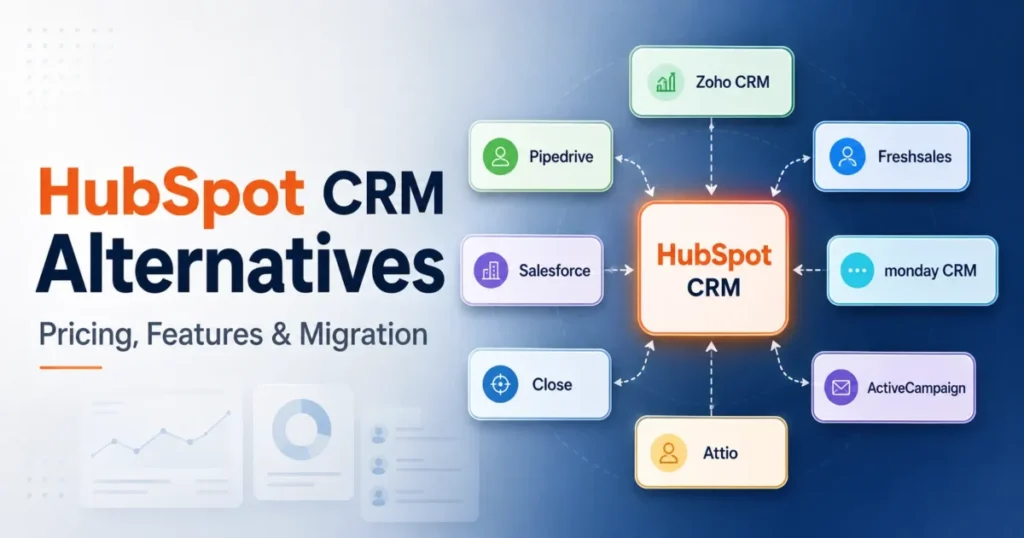
That gap between the entry price and the working price is what pushes teams to look at HubSpot CRM alternatives.
This guide ranks 10 contenders from the best CRM software field by the specific problem pushing you out. Those problems: seat cost, feature gates, calling tools, marketing automation, Google Workspace fit, enterprise control, or data-model flexibility.
I also cover the part most lists skip: what your HubSpot data will and will not do on the way out. Export limits, property-history caps, and workflow rebuilds decide whether switching saves money or just moves the pain.
In This Article (18 sections)
Quick Verdict: Best HubSpot Alternative by Switching Trigger
The fastest way to shortlist HubSpot CRM alternatives is to name your exit reason first. Each pick below fixes one specific HubSpot failure mode.
| If you are leaving HubSpot because… | Best alternative | Why |
|---|---|---|
| Professional seats plus onboarding fees break the budget | Zoho CRM | $14-$40 published seats, no required onboarding fee on listed plans |
| Reps only need pipeline execution, not a platform | Pipedrive | Activity-based pipelines from roughly $14 per user |
| You pay extra for calling, chat, and email tools | Freshsales | Email, phone, and chat built in from $9 per user |
| You need deep customization and formal governance | Salesforce | Enterprise data model, permissions, and partner ecosystem |
| Your sales process lives in boards and projects | monday CRM | No-code boards and visual workflow design |
| Outbound calling and SMS volume defines the job | Close | Power dialer plus usage-priced calling near $0.02 per minute |
| Marketing automation drives more revenue than sales tooling | ActiveCampaign | Deeper lifecycle automation, quote-based pricing |
| The team lives inside Gmail and Google Calendar | Copper | Google Workspace-native CRM from $23 per seat |
| You want the all-in-one concept at a fraction of the price | EngageBay | Sales, marketing, and support from $14.99 per user |
| Your data model never fit HubSpot’s fixed objects | Attio | Flexible objects and lists from a free three-seat plan |
Every recommendation in that table maps to a verified pricing page or official document checked on July 12, 2026. If your trigger is cost, start with Zoho CRM; if it is workflow mismatch, start with your row and read that product’s tradeoff before anything else.
How I Evaluated These HubSpot Alternatives
I am Macedona, the CRM buying analyst behind saascrmreview.com, and this comparison of HubSpot CRM alternatives is built from official research, not a hands-on trial. Based on official pricing pages, vendor migration documentation, API and export docs, and reviewer patterns on G2, Capterra, and TrustRadius, I scored each alternative on ten dimensions.
Those dimensions: price transparency, sales workflow fit, marketing coverage, feature gates, scalability, migration effort, integrations, support access, administration burden, and under-discussed limitations. Every price carries a July 12, 2026 verification date, and volatile or geolocated prices are flagged instead of guessed.
One limitation to state plainly: no full test migration was performed. Transfer completeness varies with your custom properties, connected apps, and legacy objects, so treat every migration note here as a documented method to verify, not a guarantee.
Why Teams Look for HubSpot CRM Alternatives
Teams rarely leave HubSpot because the product fails. They leave because the price of staying grows faster than the value of the features they use.
Reviewer patterns back this up, and the full HubSpot CRM review weighs both sides. G2 reviewers strongly praise Sales Hub’s ease of use, lead management, and automation.
TrustRadius patterns repeat three complaints: rising costs as contacts or functionality grow, setup effort for pipelines and dashboards, and expanding platform complexity.
Five switching triggers show up again and again in that feedback and in HubSpot’s own packaging:
Feature gates. Advanced workflows, custom reporting, forecasting, permissions, and sequences sit in Professional and Enterprise. The free CRM and Starter tier demonstrate the interface; the paid tiers run the sales process.
Mandatory onboarding fees. Professional adds a required $1,500 one-time fee and Enterprise adds $3,500, per HubSpot’s live pricing page. Competing lists almost never include these in their comparison tables.
Promotional price confusion. On July 12, 2026, HubSpot displayed a $7 per seat Starter promotion beside a $20 regular reference price. Budgeting from the promotional figure understates your renewal bill by nearly 3x, so I model long-term costs from the displayed regular price.
Multi-hub cost stacking. Sales, marketing, service, content, and operations needs are licensed separately. A team comparing one alternative subscription against one hub is not comparing full stacks.
Scope mismatch. A five-person outbound team pays for a customer platform when it needs a dialer and a pipeline. In my judgment this mismatch, not price alone, is the most defensible reason to switch.
The Real Cost of HubSpot Sales Hub in 2026
The honest HubSpot baseline is not one number. It is a plan price, a seat type, an onboarding fee, a credit pool, and any additional hubs, added together.
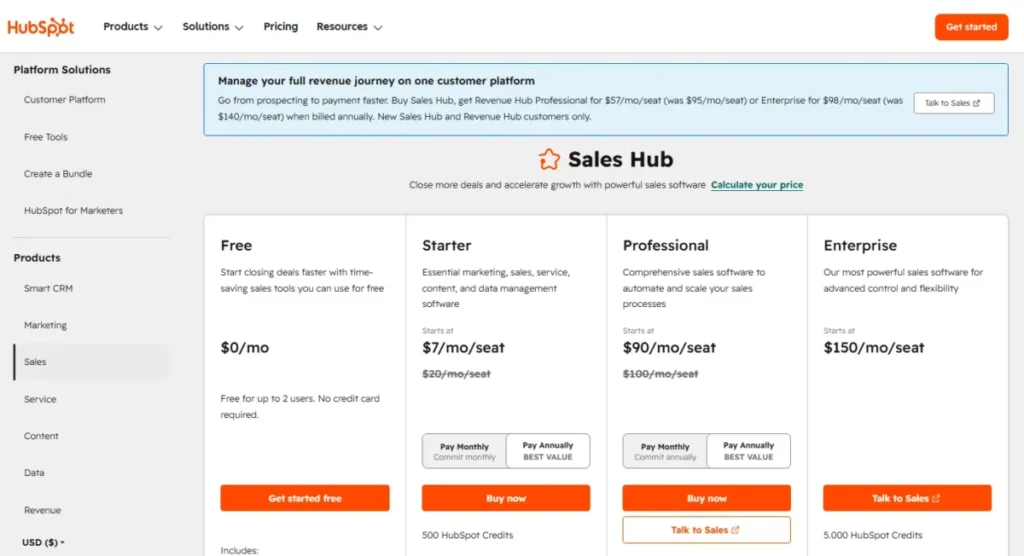
Here is the live Sales Hub structure verified on July 12, 2026 (official pricing page):
| Plan | Price per seat per month | Required onboarding | HubSpot Credits included | Support channels |
|---|---|---|---|---|
| Free | $0, up to two users | None | None listed | Knowledge base, community |
| Starter | $7 promotional; $20 displayed regular reference | None | 500 | |
| Professional | $90 annual, $100 monthly | $1,500 one time | 3,000 | Email and phone |
| Enterprise | $150 | $3,500 one time | 5,000 | Email and phone |
Two structural details change the math more than the prices themselves. First, HubSpot distinguishes core seats from sales seats, so managers and operations users reviewing records do not always need the full sales seat; multiplying $90 by every employee overstates the bill.
Second, official guidance caps customizable workflows at roughly 300 on Professional and 1,000 on Enterprise, which matters if automation is why you are paying. Credits meter AI and certain usage on top of that.
First-Year Cost Versus Renewal Cost
Onboarding fees make year one and year two different purchases. Model them separately before comparing any alternative.
| Scenario (10 full sales seats, annual billing) | Year-one cost | Renewal-year cost |
|---|---|---|
| Sales Hub Professional | $10,800 subscription + $1,500 onboarding = $12,300 | $10,800 |
| Sales Hub Enterprise | $18,000 subscription + $3,500 onboarding = $21,500 | $18,000 |
That $1,500 onboarding line is 12% of the first-year Professional bill for a 10-seat team. Any alternative you evaluate deserves the same first-year versus renewal split, because several charge for migration services or partners instead.
The Budget Pressure Point
The pressure point is rarely the Starter tier. It is the jump from Starter to Professional, where the per-seat price rises 4.5x against the displayed regular reference and an onboarding fee lands on top.
My rule for readers: if your team needs sequences, custom reporting, or serious automation within six months, budget HubSpot at Professional rates or price the alternatives below. Budgeting at Starter rates and hoping is how renewal surprises happen.
Decide What You Are Replacing First
A cheaper sales CRM is not automatically a HubSpot replacement. Before ranking tools, decide which slice of CRM software work you are replacing, because the honest shortlist changes with each of these three scopes.
Scope 1: Sales Hub only. Marketing stays where it is. Pipedrive, Close, Freshsales, and Attio compete here, and price-per-workflow is your deciding metric.
Scope 2: Sales plus marketing. You need pipelines and lifecycle automation together. Zoho CRM, ActiveCampaign, and EngageBay are the realistic candidates.
Scope 3: The full customer platform. Sales, marketing, service, and content in one contract. Only Zoho’s broader suite, Salesforce’s ecosystem, or EngageBay’s budget version genuinely attempt this, and each trades away some HubSpot polish.
Choosing a Scope 1 tool while running Scope 3 workflows does not remove costs. It converts one HubSpot invoice into three or four smaller subscriptions plus the integration work between them.
Best Overall Replacements: Zoho CRM and Pipedrive
These two fix the exit trigger reviewer patterns repeat most: paying platform prices for core CRM work. The standalone Zoho CRM review tells the value half of that story, and Pipedrive removes the platform overhead entirely.
1. Zoho CRM: Best Overall HubSpot Replacement

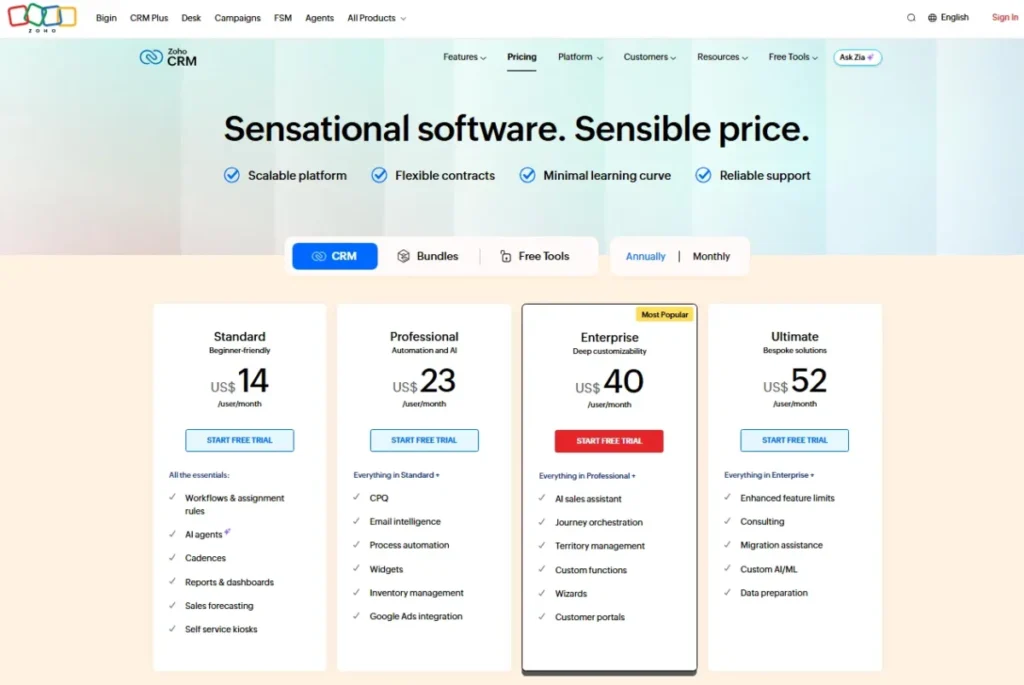
Zoho CRM is the strongest HubSpot CRM alternative for teams leaving over Professional seat costs and onboarding fees. It takes the top rank because it replaces the widest share of Sales Hub workflows at $23 or less per verified seat.
- Starting price:
- free for up to three users, then $14 per user per month billed annually for Standard (Zoho CRM pricing page). Zoho’s official HubSpot comparison listed Standard at $14, Professional at $23, and Enterprise at $40 on July 12, 2026, with a geolocation caveat on the main pricing page.
The practical tier for most switchers is Professional at $23. It carries automation depth, forecasting, and Blueprint process management that HubSpot prices into $90 seats.
Migration is documented rather than promised: Zoho imports HubSpot data through a HubSpot private app or API token, with assisted migration services available. Budget a validation pass for custom fields, associations, workflows, and reports.
The tradeoff is administration. Zoho’s configuration model takes longer to learn, and advanced AI, territories, sandbox, and encryption controls sit in Enterprise or Ultimate.
| Pros | Cons |
|---|---|
| $14-$40 published seat range with no required onboarding fee on listed plans | Steeper admin learning curve than HubSpot |
| Blueprint, cadences, and forecasting at mid tiers | Advanced AI and governance concentrated in Enterprise and Ultimate |
| 1,000+ integrations plus a full first-party business suite | Main pricing page geolocates, so verify the US checkout |
| Documented API-assisted HubSpot migration path |
Best for: 5-50 user sales teams wanting CRM depth at roughly a quarter of HubSpot Professional’s seat price. Avoid if nobody on the team will own admin setup.
Migration difficulty: Medium. Verdict: the default switch when cost is the trigger and depth cannot drop.
2. Pipedrive: Best for Pipeline-First Sales Teams

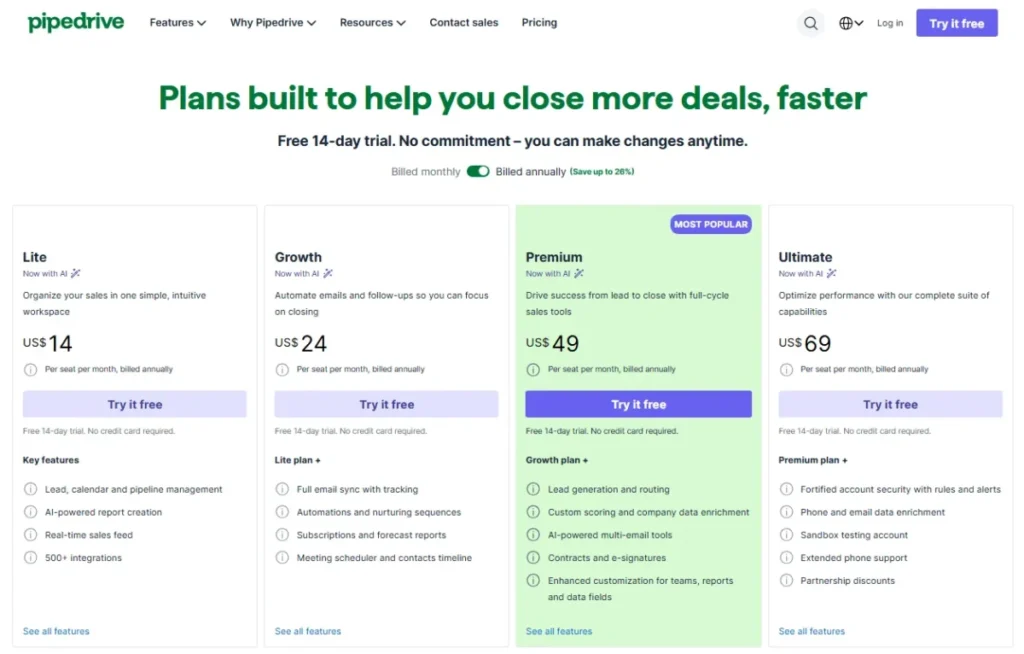
Pipedrive is the best HubSpot alternative for teams whose real complaint is platform overhead. It ranks second because it converts the most common daily workflow, moving deals and logging activities, into the entire product.
- Starting price:
- approximately $14 per user per month billed annually for the entry plan (Pipedrive pricing page). The official page renders dynamically, so verify the live US checkout before budgeting.
Reps who ignored HubSpot’s record clutter adopt Pipedrive’s visual pipeline with far less training. The full Pipedrive CRM review covers activity-based selling, email sync, scheduling, and the 400+ integration marketplace.
Migration has hard numbers attached: spreadsheet imports accept CSV, XLS, and XLSX files up to 50,000 rows and 50 MB each. A larger HubSpot portal needs batched imports with record-count checks after every batch, and batching does not preserve every relationship automatically.
The limitation is scope. Pipedrive is not a native marketing platform, so replacing Marketing Hub means adding a separate email and automation tool plus the integration between them.
| Pros | Cons |
|---|---|
| Entry pricing near $14 against HubSpot Professional’s $90 | Not a native marketing automation platform |
| Pipeline UX that field reps adopt with minimal training | Spreadsheet imports capped at 50,000 rows and 50 MB per file |
| Official HubSpot migration guide and import tooling | Advanced features spread across higher tiers |
| 400+ marketplace integrations |
Best for: 5-50 person B2B teams running a disciplined pipeline motion without marketing consolidation needs. Avoid if one tool must own sales and marketing together.
Migration difficulty: Medium. Verdict: choose Pipedrive when reps, not marketers, decide whether the CRM survives.
Best for Built-In Communication and Enterprise Control
Freshsales and Salesforce solve opposite problems. The Freshsales review documents the first path, collapsing communications into a $9 seat, while Salesforce expands the CRM into a governed enterprise system.
3. Freshsales: Best Built-In Email, Phone, and Chat

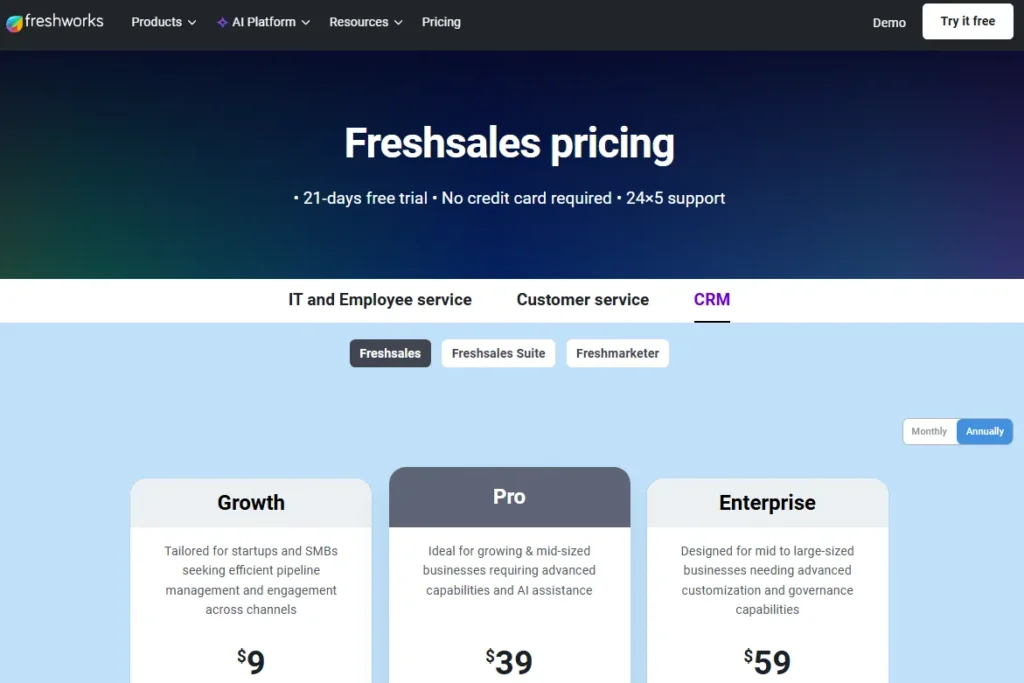
Freshsales is the top HubSpot alternative for inside-sales teams paying separately for calling and chat tools. It ranks third because it bundles the communication stack into a $9 seat, matched on this list only by Close’s single-user Solo plan.
- Starting price:
- free for up to three users, then Growth at $9 per user per month billed annually (Freshsales pricing page). Pro costs $39 and Enterprise $59, verified July 12, 2026, with a 21-day trial and 24×5 support.
The $9 headline needs a gate check. Contact scoring, sequences, multiple pipelines, territory management, advanced workflows, and AI deal insights require Pro at $39, while sandbox, audit logs, and custom modules require Enterprise.
So the practical tier for a team replacing an established HubSpot process is Pro, still 57% below HubSpot Professional. Freddy AI bot sessions come as a limited pool on paid plans, with extra sessions sold separately.
Migration runs through a documented HubSpot integration that synchronizes leads and contacts. Full history, custom objects, reports, and workflows need separate validation.
| Pros | Cons |
|---|---|
| Email, phone, and chat included from the $9 Growth tier | Scoring, sequences, and multi-pipeline gated at Pro |
| Pro at $39 undercuts HubSpot Professional by 57% | Smaller integration ecosystem than HubSpot’s marketplace |
| Free plan for up to three users | Bot sessions are metered, extra sessions cost more |
| 21-day trial with 24×5 support |
Best for: 3-50 person inside-sales teams consolidating CRM and communications into one bill. Avoid if your stack depends on a deep third-party app marketplace.
Migration difficulty: Medium. Verdict: pick Freshsales when the phone system is part of the CRM decision.
4. Salesforce: Best for Enterprise Customization

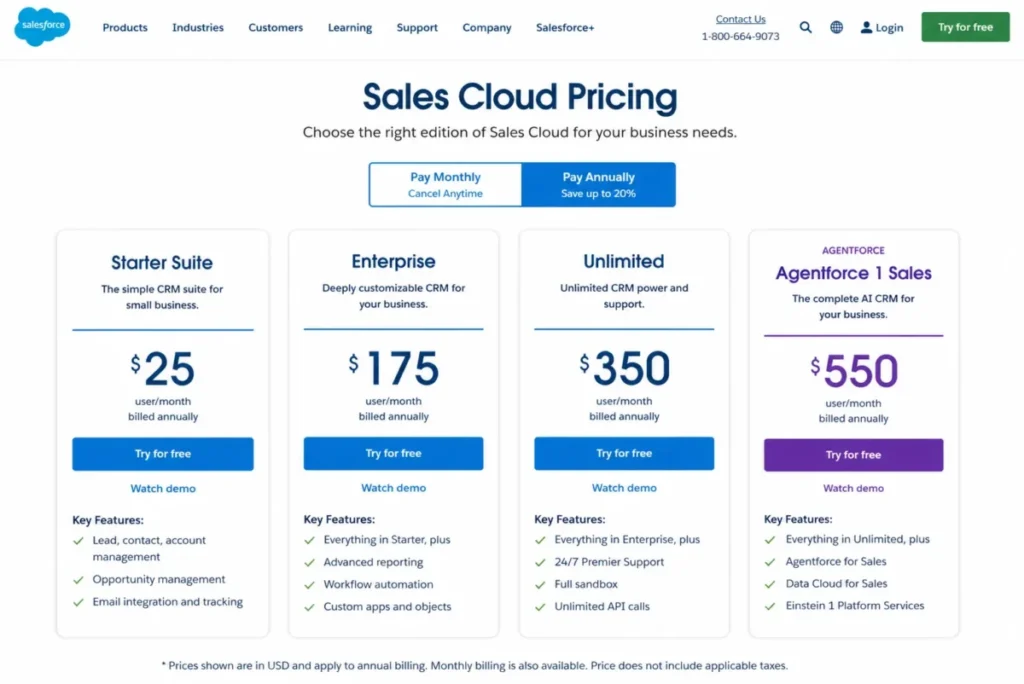
Salesforce is the right HubSpot alternative when the exit trigger is control, not cost. It ranks fourth because it out-builds HubSpot on data models, permissions, and governance while demanding more administration than any tool here.
- Starting price:
- Starter Suite at $25 per user per month (Salesforce pricing page), with a 30-day trial for up to ten users. Enterprise runs $175, Unlimited $350, and Agentforce 1 Sales $550 under applicable annual terms, verified July 12, 2026.
Do not read $25 as the replacement price. A configuration matching a serious HubSpot deployment typically lands on Enterprise-level editions, and add-ons like Sales Dialer, Sales Engagement, and Maps carry separate price tags.
What you buy for that money is depth HubSpot does not offer: custom objects everywhere, granular permission sets, formal sandboxes, and the deepest partner ecosystem in this ranking. What you also buy is an ongoing admin requirement, often a dedicated hire.
Migration from HubSpot is a genuine implementation project across object mapping, ownership, automation, reports, and training. Plan it with a partner, and read the Salesforce CRM review before committing.
| Pros | Cons |
|---|---|
| Deepest customization, permissions, and governance in this list | Enterprise edition at $175 is 94% above HubSpot Professional |
| Massive partner and integration ecosystem | Dialer, engagement, and maps are separately priced add-ons |
| Starter Suite at $25 with a 30-day trial | Requires dedicated administration capacity |
| Editions scale to Agentforce AI workflows |
Best for: 50+ user organizations with RevOps staffing and formal governance needs. Avoid if nobody owns Salesforce administration.
Migration difficulty: High. Verdict: choose Salesforce when HubSpot feels too small, never when it feels too expensive.
Best for Visual Workflows and Outbound Calling
monday CRM and Close replace HubSpot for teams whose daily work never matched a classic CRM record. The monday.com CRM review profiles the board-driven path, and Close turns the pipeline into a dialer queue.
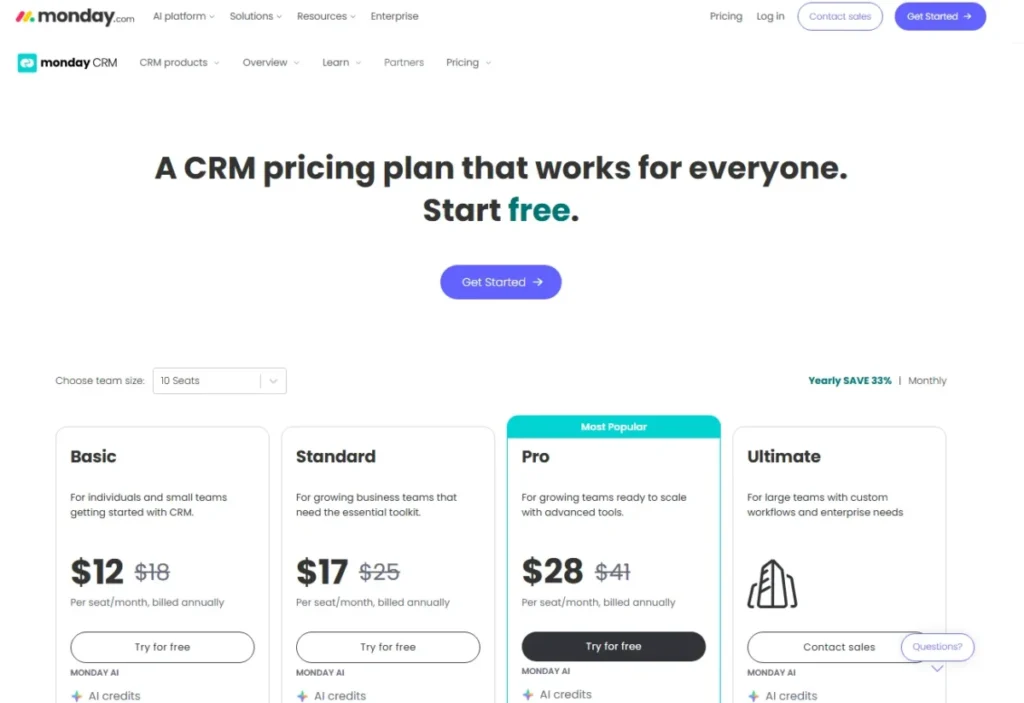
5. monday CRM: Best for Visual, No-Code Workflows

monday CRM is the best HubSpot alternative for teams that think in boards, statuses, and handoffs rather than CRM records. It ranks fifth because its workflow flexibility is real, but its pricing fine print catches small teams.
- Starting price:
- around $10 per user per month billed annually per official search material (monday CRM pricing page). The live page localized during research, so verify the US checkout, and note the three-seat minimum that sets your real minimum bill.
Plan limits deserve as much attention as the price. Lower tiers cap active records, dashboards, columns, workspaces, and monthly automation actions, and the Standard-to-Pro jump is mostly about buying automation headroom.
The HubSpot integration is the other fine-print item. monday documents full synchronization for default contact, company, and deal fields on one portal connection, which is not parity for custom HubSpot properties.
Inventory your custom fields before assuming the connector carries your qualification, territory, or attribution data. Paid partners exist for heavier migrations.
| Pros | Cons |
|---|---|
| No-code boards adapt to sales-plus-project workflows | Three-seat minimum purchase raises the real entry bill |
| Entry price near $10 per seat annually | Automation actions and records capped by tier |
| Dashboards and quotes without admin scripting | HubSpot sync covers default fields, not custom properties |
| Paid partner network for migration and setup |
Best for: 3-50 person teams running sales plus delivery handoffs in one visual system. Avoid if heavy automation on a Standard budget is the plan.
Migration difficulty: Medium. Verdict: pick monday CRM for workflow shape, not for automation volume.
6. Close: Best for Outbound Calling Teams

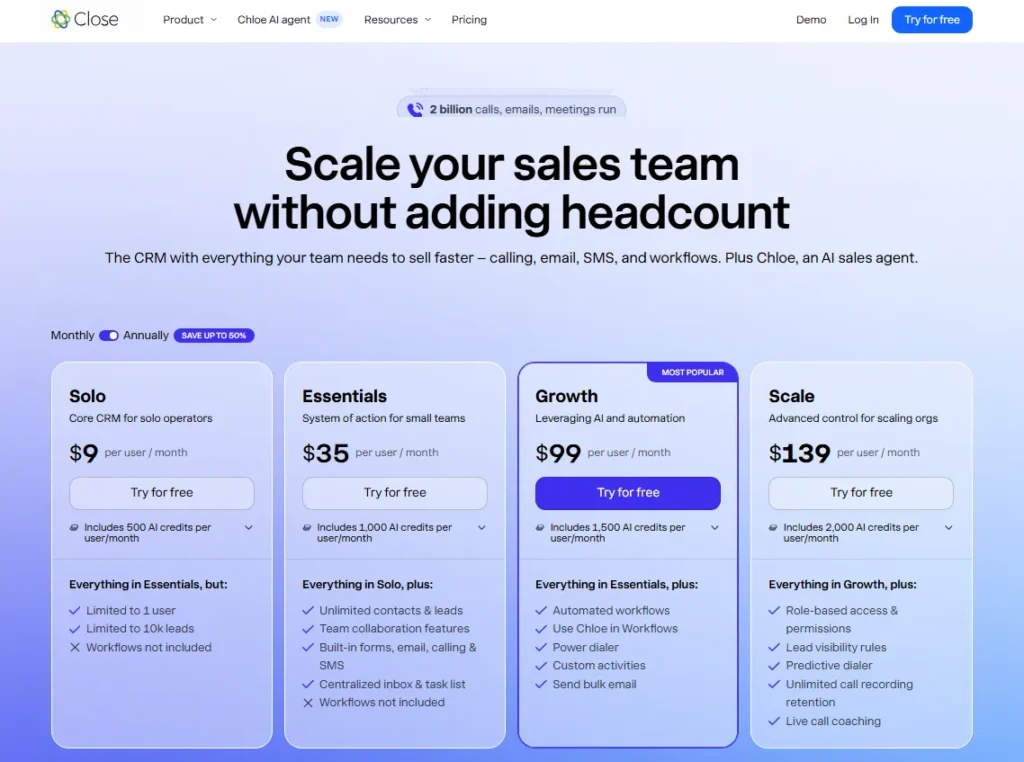
Close is the strongest HubSpot alternative for outbound teams that measure the day in dials and follow-ups. It ranks sixth overall but first for its niche, because no tool here matches its native calling workflow.
- Starting price:
- Solo at $9 per month for one user, then Essentials at $35, Growth at $99, and Scale at $139 per user billed annually (Close pricing page), verified July 12, 2026.
The subscription is only half the bill. Calling and SMS are usage-priced, with typical outbound calls near $0.02 per minute and phone numbers around $1 per month.
A rep logging 2,000 outbound minutes adds roughly $40 monthly on top of the seat.
Run that formula, minutes times rate plus numbers, across your team before comparing Close to flat-priced tools. Workflows start at Growth, and the Close CRM review breaks down each plan’s AI credit pool.
Migration uses Import2, sometimes free when initiated through Close, plus a documented HubSpot sync. Close states plainly that not all HubSpot objects and fields synchronize, so validate activity history early.
| Pros | Cons |
|---|---|
| Power dialer, predictive dialer, and SMS built into the CRM | Calling and SMS billed on usage above the seat price |
| Transparent seat pricing from $9 Solo to $139 Scale | Workflows excluded from Solo and Essentials |
| Import2 migration path with documented HubSpot sync | Not all HubSpot objects and fields sync |
| Call coaching for outbound managers |
Best for: 1-50 person outbound teams living in calls, SMS, and sequences. Avoid if marketing automation or a service desk must ship in the same tool.
Migration difficulty: Medium. Verdict: choose Close when talk time is the growth engine.
Best for Marketing Automation and Google Workspace Fit
ActiveCampaign and Copper replace different halves of HubSpot. The ActiveCampaign review covers the automation engine that rivals Marketing Hub, and Copper competes for the browser tab where your reps spend the day.
7. ActiveCampaign: Best Marketing Automation Replacement

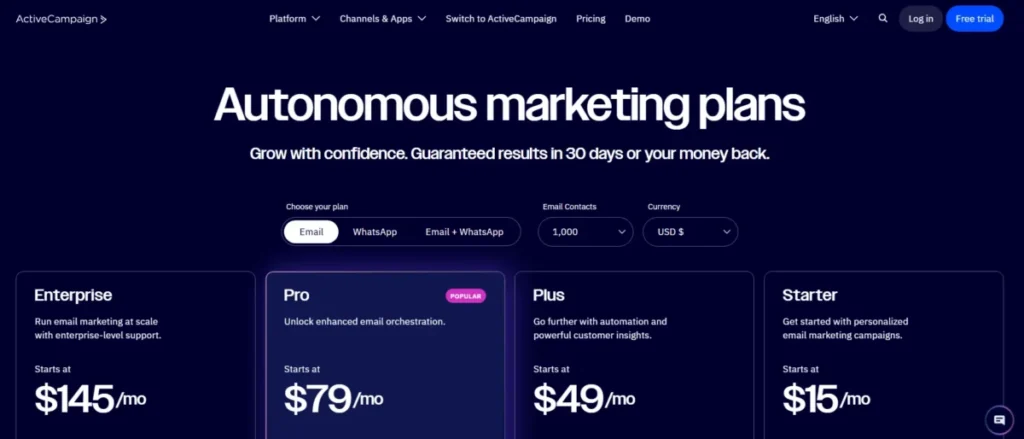
ActiveCampaign is the best HubSpot alternative when Marketing Hub automation, not Sales Hub, is the product you are replacing. It ranks seventh because its automation depth is elite while its pricing transparency is not.
Pricing status: custom. ActiveCampaign’s current flow asks for contact count, channels, and use cases before producing tailored pricing (ActiveCampaign pricing page), verified July 12, 2026. Several 2026 comparison lists still publish fixed entry prices; treat those as stale.
A 14-day trial requires no credit card, and the vendor promotes free migration and onboarding assistance. Get the migration scope in writing for automations, tags, custom fields, deals, forms, and email history.
On capability, the automation builder, segmentation, and lifecycle journeys run deeper than what HubSpot gates into Marketing Hub Professional. CRM pipelines exist and connect cleanly to the automation engine, but they are the supporting act.
Because price scales with contacts and modules, large databases need a quote before any cost comparison. That is this pick’s structural weakness against flat-seat rivals.
| Pros | Cons |
|---|---|
| Lifecycle automation and segmentation deeper than most CRM suites | No public universal price; quotes scale with contact count |
| Free migration and onboarding assistance promoted by the vendor | Sales CRM is secondary to the marketing engine |
| 1,000+ integrations including native CRM pairings | Service and support tooling still needs separate software |
| 14-day trial without a credit card |
Best for: marketing-led businesses where nurture journeys drive revenue and contacts are the pricing unit that matters. Avoid if you need published per-seat pricing for procurement.
Migration difficulty: Medium. Verdict: shortlist ActiveCampaign when automation sophistication beats pricing certainty.
8. Copper: Best for Google Workspace Teams

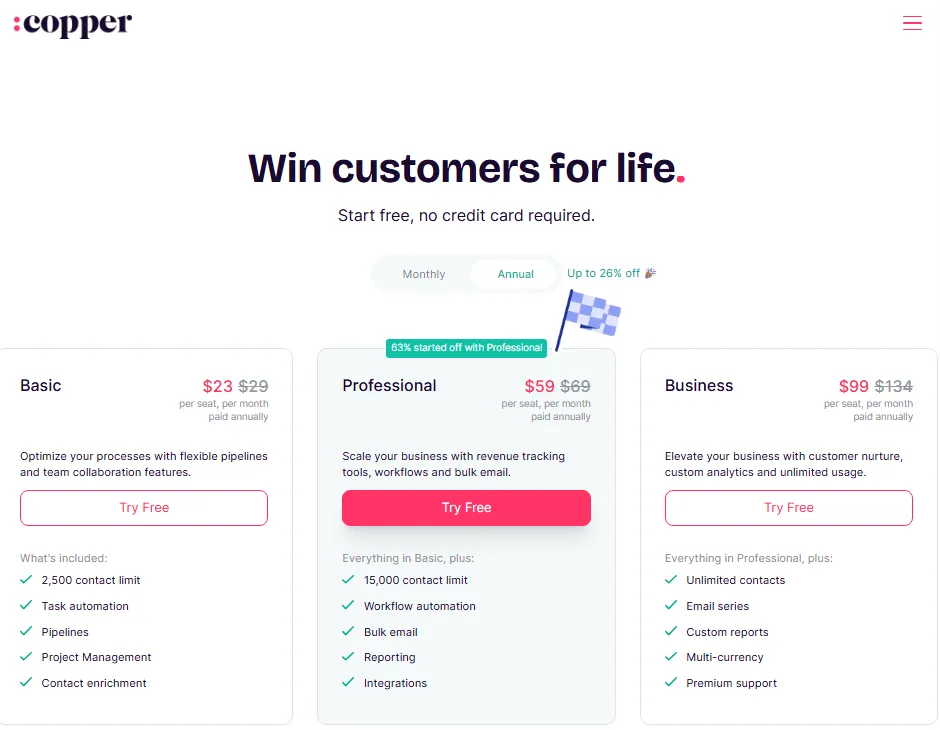
Copper is the best HubSpot alternative for teams that treat Gmail as the real CRM interface. It ranks eighth because its Google Workspace depth is unmatched here, while its ceilings arrive early.
- Starting price:
- Basic at $23 per seat per month billed annually, or $29 monthly (Copper pricing page). Professional runs $59 annually and Business $99, verified July 12, 2026.
The Basic gate matters more than the price: it caps the database at 2,500 contacts and excludes workflow automation. A team leaving HubSpot with a bigger list lands on Professional immediately, so budget $59, not $23.
What Copper does better than HubSpot is context. Records, pipelines, and tasks live inside Gmail and Google Calendar, a workflow the Copper CRM review examines in detail.
Migration is manual and order-sensitive. Copper’s official guide uses HubSpot exports mapped into templates, with custom fields prepared first and people imported before opportunities so dependent records keep their links.
Skipping that order breaks ownership and relationship links, and cleanup costs more than the import saved. Budget a reconciliation pass per pipeline.
| Pros | Cons |
|---|---|
| CRM embedded in Gmail, Calendar, and Drive | Basic caps at 2,500 contacts without workflow automation |
| Transparent $23 to $99 published seat range | Differentiation collapses outside Google Workspace |
| Documented HubSpot migration guide with import templates | Manual, order-sensitive migration process |
| Pipelines plus light project management |
Best for: 3-50 person relationship-driven teams fully committed to Google Workspace. Avoid if half the company works in Outlook.
Migration difficulty: Medium. Verdict: choose Copper when Gmail context saves more time than platform breadth adds.
Best Budget All-in-One and Flexible Data Model Picks
EngageBay and Attio bracket the list with opposite bets. One copies HubSpot’s all-in-one concept at a tenth of the price, and the other rebuilds the CRM data model from scratch.
9. EngageBay: Best Budget All-in-One Suite

EngageBay is the best HubSpot alternative for small teams that want the all-in-one concept without platform pricing. It ranks ninth because the coverage is broad and cheap while the ceilings sit low.
- Starting price:
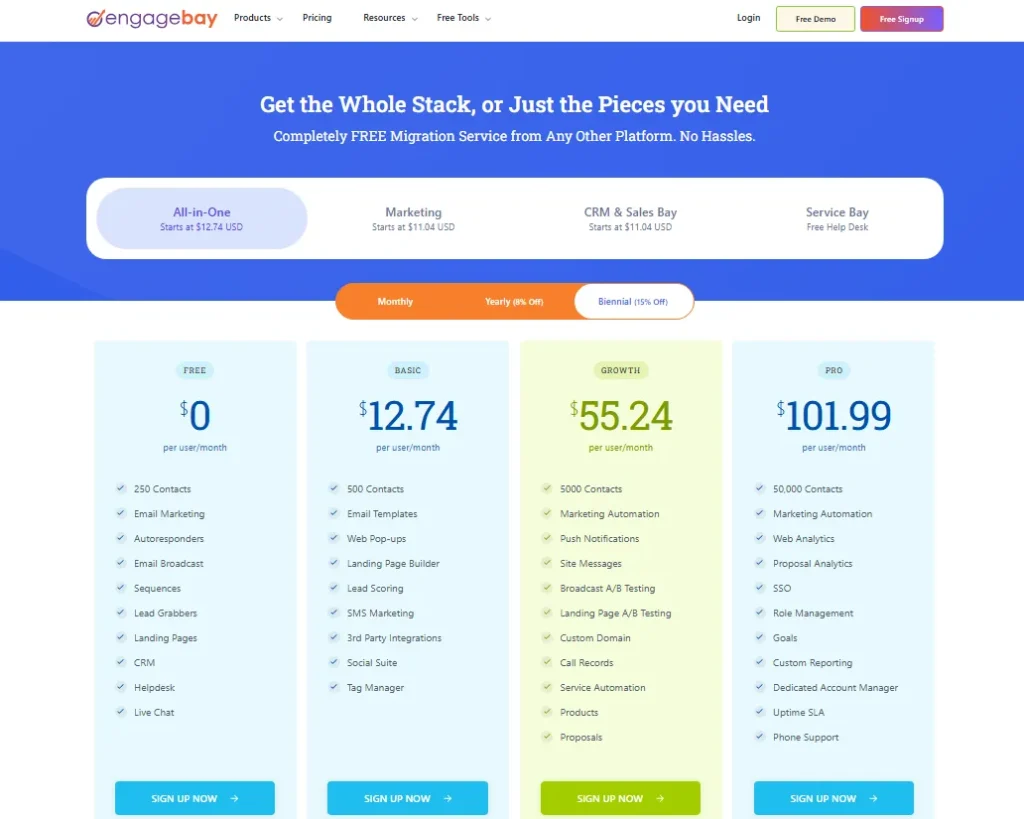
- All-in-One Basic at $14.99 per user per month billed annually (EngageBay pricing page), with a separate CRM and Sales Bay package near $12.99 and a limited free plan, verified July 12, 2026.
The package distinction matters when comparing quotes. All-in-One includes marketing, sales, chat, and help desk together, while the CRM and Sales Bay package covers sales only, so confirm which package your comparison uses.
Entry tiers carry low contact limits, and advanced automation, custom reporting, roles, SSO, and SLA support move to higher tiers. EngageBay advertises free migration from other platforms; request written scope for workflows, templates, attachments, and deal associations.
For a two-to-twenty person team, the math is hard to argue with: sales, marketing, and support at $14.99 a user, a sixth of one HubSpot Professional seat.
| Pros | Cons |
|---|---|
| Sales, marketing, chat, and help desk from $14.99 per user | Low contact caps on free and Basic tiers |
| Free plan plus advertised free migration | SSO, roles, and advanced reporting gated to higher tiers |
| Replaces three subscriptions for micro-teams | Far smaller marketplace than HubSpot’s 1,500+ apps |
| Sequences, landing pages, and calling on paid tiers |
Best for: 2-20 person budget-driven teams consolidating sales, marketing, and support. Avoid if you expect enterprise administration or a deep app ecosystem.
Migration difficulty: Low to Medium. Verdict: the value pick when total software spend is the metric that decides.
10. Attio: Best for Flexible Data Models

Attio is the best HubSpot alternative for teams whose business never fit contacts-companies-deals. It ranks tenth only because it replaces the least of HubSpot’s marketing and service surface, not because it is weak, a trade-off my Attio vs HubSpot comparison weighs for small sales teams.
- Starting price:
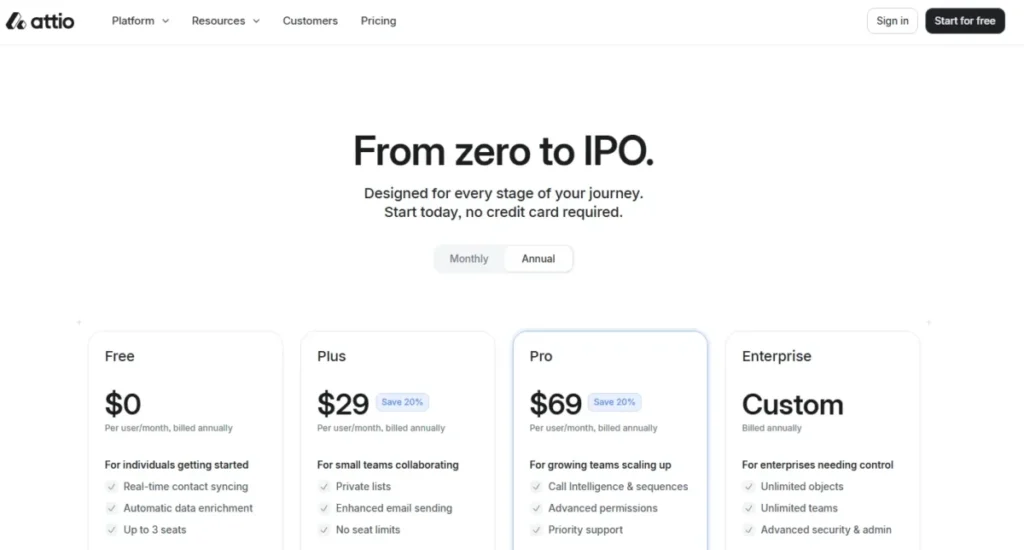
- free for up to three seats, then Plus at $29 per user per month and Pro at $69 billed annually (Attio pricing page), verified July 12, 2026.
Flexible modeling is the draw: custom objects, lists, real-time email and calendar sync, and enrichment behave like a modern data workspace. Deal-flow teams, marketplaces, and B2B startups model investors, listings, or accounts the way the business runs.
Flexibility still has published edges. Plans cap objects, records, reports, email accounts, and AI plus workflow credits, and SSO, SCIM, and unlimited objects require Enterprise.
Attio lists HubSpot as a supported import source, with sales-assisted migration on paid plans. Design the target schema before importing, because flexible objects reward planning and punish improvisation.
| Pros | Cons |
|---|---|
| Custom objects and lists without enterprise pricing | Object, record, report, and credit caps by plan |
| Real-time sync and enrichment reduce manual data entry | SSO and SCIM locked to Enterprise |
| Free three-seat plan for early teams | No native marketing or service suite |
| HubSpot listed as a supported import source |
Best for: 2-50 person startups and deal-flow teams that need the data model to match the business. Avoid if marketing automation must live in the CRM.
Migration difficulty: Medium. Verdict: the modern-architecture pick, chosen for the schema rather than the suite.
Pricing Comparison: Real Cost at 2, 10, and 50 Users
Starting prices decide nothing; team-size math does. The table below assumes every counted user is a quota-carrying sales user on annual billing, verified July 12, 2026, excluding usage charges and one-time fees unless noted.
| Product | Starting price (annual) | Practical tier for switchers | 10-user monthly cost | Free plan |
|---|---|---|---|---|
| HubSpot Sales Hub | $20 regular reference ($7 promo) | Professional, $90 | $900, plus $1,500 onboarding in year one | Yes, 2 users |
| Zoho CRM | $14 | Professional, $23 | $230 | Yes, 3 users |
| Pipedrive | ~$14, verify dynamic checkout | Entry plan for most | ~$140 | None listed |
| Freshsales | $9 | Pro, $39 | $390 | Yes, 3 users |
| Salesforce | $25 Starter | Enterprise, $175 | $1,750 | None listed |
| monday CRM | ~$10, localized page | Standard or Pro | ~$100, 3-seat minimum | None listed |
| Close | $9 Solo (1 user) | Growth, $99 | $990 plus calling usage | None listed |
| ActiveCampaign | Custom quote | Quote by contact count | Custom quote | None listed |
| Copper | $23 Basic | Professional, $59 | $590 | None listed |
| EngageBay | $14.99 All-in-One Basic | Basic or Growth | $149.90 | Yes, limited |
| Attio | $29 Plus | Pro, $69 | $690 | Yes, 3 seats |
The practical-tier column is the honest comparison row. At 10 users, Zoho Professional runs $230 monthly against HubSpot Professional’s $900, a 74% gap before HubSpot’s onboarding fee, while Salesforce Enterprise and Close Growth cost more than HubSpot, not less.
At 2 users, free tiers change the answer. Zoho, Freshsales, and Attio run a real sales workflow at $0, and HubSpot’s own two-user free tier is a legitimate reason to delay any purchase.
At 50 users, seat math compounds: HubSpot Professional reaches $54,000 a year plus onboarding, Zoho Professional about $13,800, and Freshsales Pro $23,400. At that scale I would negotiate every one of these prices rather than pay list, and I would model non-selling staff on cheaper or free seats first.
Prices change, and two vendors here render prices dynamically. Treat this table as a July 12, 2026 snapshot and verify each checkout before you commit.
The Free-Plan Reality Check
A free-plan checkmark says nothing about whether the plan can operate a business. Five products here offer real free tiers, each with different working limits verified July 12, 2026.
| Product | Free plan scope | Documented operating limits |
|---|---|---|
| HubSpot | $0, up to two users, no expiration | Advanced automation, reporting, and permissions gated to paid tiers |
| Zoho CRM | Up to three users | Entry-level features; automation depth arrives on paid editions |
| Freshsales | Up to three users | Scoring, sequences, and multi-pipeline require Pro |
| EngageBay | Limited free plan | Low contact caps; automation and reporting on higher tiers |
| Attio | Up to three seats | Published object, record, report, and credit ceilings |
The other six sell trials, not free tiers, per their official pricing pages: Salesforce offers 30 days for up to ten Starter users and ActiveCampaign 14 days without a card. A free tier that gates automation is a demo of your process, not a replacement for it, so test your actual workflow before moving in.
When the Database, Not the Team, Forces the Upgrade
Seat prices hide a second scaling trigger: record volume. High-contact, low-seat businesses like agencies, recruiters, and newsletter-led companies hit these ceilings before they hire a single extra rep.
| Product | Limit most likely to force an upgrade |
|---|---|
| Copper | 2,500 contacts on Basic |
| monday CRM | Active records, dashboards, and automation actions by tier |
| EngageBay | Contact bands on free and entry tiers |
| Attio | Records, objects, reports, and credits by plan |
| HubSpot | Marketing contact bands and credit pools |
| Close | AI credits and communication usage |
A 4-person team with 40,000 contacts pays database prices, not seat prices. Check your record count against the target plan’s ceiling before trusting any per-user comparison, including mine.
Feature Gates and Usage Limits Compared
Cheaper alternatives stay cheaper only if the features you need live in the tier you priced. This table shows where the important gates sit, based on official pricing pages checked July 12, 2026.
| Product | Serious automation arrives at | Built-in calling | Hard gate worth knowing |
|---|---|---|---|
| HubSpot Sales Hub | Professional, $90 | By tier and region | ~300 workflows on Professional, 1,000 on Enterprise |
| Zoho CRM | Professional, $23 | Via integrations | Sandbox, encryption, advanced AI in Enterprise+ |
| Pipedrive | Mid tiers | No, integration needed | Not a native marketing platform |
| Freshsales | Pro, $39 | Yes, from Growth | Sandbox and audit logs need Enterprise |
| Salesforce | Higher editions | Paid Sales Dialer add-on | Advanced API and flexibility above entry level |
| monday CRM | Standard, capped actions | No | Automation-action ceilings per month |
| Close | Growth, $99 | Yes, usage-priced | Workflows absent below Growth |
| ActiveCampaign | Included, scales by quote | No | Price scales with contacts and modules |
| Copper | Professional, $59 | No | Workflow automation absent on Basic |
| EngageBay | Growth and above | Paid tiers | Roles, SSO, SLA in higher tiers |
| Attio | Plus and Pro, credit-metered | Call intelligence features | SSO, SCIM, unlimited objects need Enterprise |
Read your own workflow list against this table before your budget list. A $9 seat that lacks sequences is not cheaper than a $39 seat that has them; it is a second migration waiting to happen.
AI Is a Metered Resource, Not a Checkbox
Four vendors here meter AI explicitly, and their units are not comparable. Do not convert credits across products; compare what your workflows consume against what each plan includes.
| Product | Published usage pool | Expansion path |
|---|---|---|
| HubSpot | 500, 3,000, or 5,000 HubSpot Credits by tier | Additional credits purchasable |
| Freshsales | Limited Freddy AI bot-session pool on paid plans | Extra sessions sold separately |
| Close | Plan-specific AI credit pools | Higher plans |
| Attio | Seat and workspace credits by plan | Credit add-on packages |
If AI drafting, scoring, or bots sit inside your daily process, ask each vendor what one month of your real usage costs. Across the pricing pages audited here, metered AI is where the second invoice surprise hides, right behind onboarding fees.
Migrating from HubSpot: Limits, Methods, and Risk
Migration is where cheaper alternatives earn or lose their savings. HubSpot documents real export constraints, and every destination supports a different slice of your data, so plan this section before signing anything.
The Buyer Risk Ledger for Leaving HubSpot
Risk 1: export throughput. HubSpot allows up to 300 exports in a rolling 24-hour period and three concurrent exports, and large jobs arrive as multiple files, per the official export documentation (export records limits). Mitigation: stage exports across days, name files by object and date, and reconcile record counts per file.
Risk 2: history loss. HubSpot retains limited property revisions, with documented examples of 45 revisions for contact properties and 20 for company, deal, and ticket properties (property history documentation). Current field values are not the same as complete change history, so decide which historical changes attribution or compliance needs and verify them separately.
Risk 3: API throughput. API-based transfers run inside published limits, including a 110-request-per-10-second OAuth burst limit per account (HubSpot API usage details). Mitigation: batch API migrations and expect large portals to take multiple sessions.
Risk 4: process rebuild. No importer moves your workflows, sequences, lead scoring, reports, forms, or permissions as working equivalents. Mitigation: treat data migration and process migration as two separate projects with two owners.
Migration Methods Are Not Interchangeable
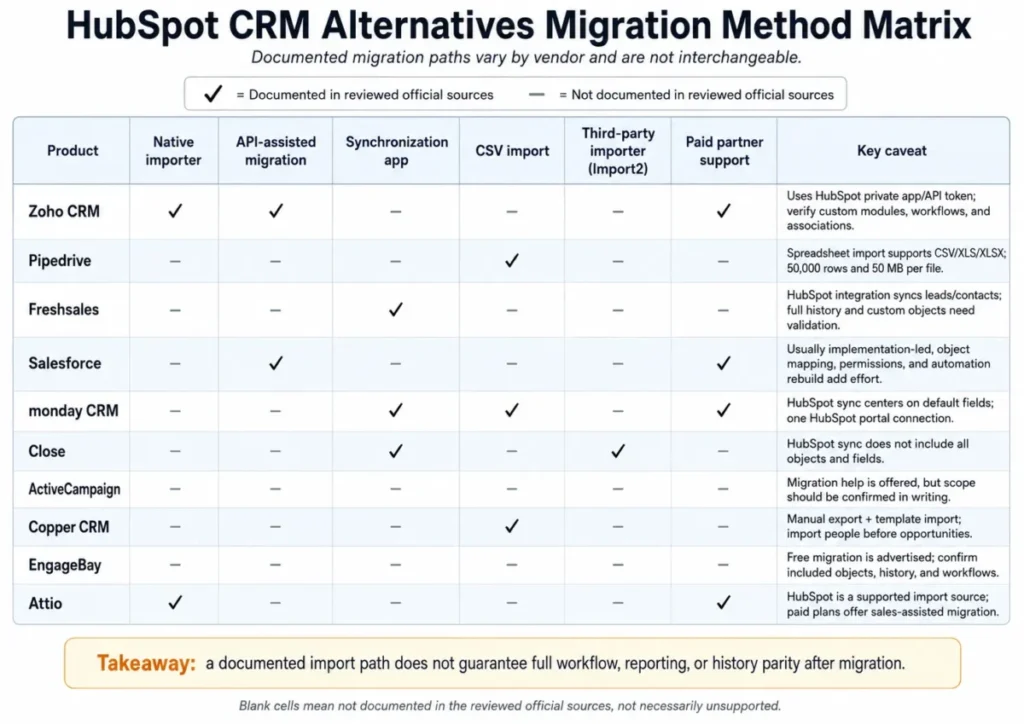
“Migration supported” hides five different mechanisms with different effort, repeatability, and rollback options. Here is what each vendor documents.
| Alternative | Documented method | Key caveat to verify |
|---|---|---|
| Zoho CRM | API-assisted import via HubSpot private app or token, plus assisted services | Custom modules, workflows, and reports need validation |
| Pipedrive | Official migration guide plus spreadsheet imports | 50,000 rows and 50 MB per file |
| Freshsales | HubSpot integration syncing leads and contacts | Full history and custom object scope unconfirmed |
| Salesforce | Import tools, APIs, and implementation partners | Full implementation project, not an import |
| monday CRM | HubSpot integration on default fields, plus paid partners | Custom fields and one-portal limit |
| Close | Import2 migration plus documented HubSpot sync | Not all objects and fields synchronize |
| ActiveCampaign | Vendor-promoted free migration and onboarding | Get object-level scope in writing |
| Copper | Manual export mapped to templates, people imported first | Import order protects record links |
| EngageBay | Advertised free migration | Written scope for workflows and attachments |
| Attio | HubSpot listed as import source, sales-assisted on paid plans | Design the target schema first |
Migration Difficulty by Alternative
Difficulty here is an editorial estimate based on data-model complexity, workflow rebuild effort, integration requirements, and setup depth. No timeline promises: duration depends on your data volume, customization, and validation standards.
| Alternative | Difficulty | Main risk to manage |
|---|---|---|
| Zoho CRM | Medium | Rebuilding workflows and validating custom fields |
| Pipedrive | Medium | Batched imports and relationship checks on large portals |
| Freshsales | Medium | Historical activity beyond synced leads and contacts |
| Salesforce | High | Object mapping, permissions, and admin capacity |
| monday CRM | Medium | Custom-field parity through the connector |
| Close | Medium | Unsynced objects and telephony setup |
| ActiveCampaign | Medium | Automation and email-history scope |
| Copper | Medium | Manual import order and field preparation |
| EngageBay | Low-Medium | Written migration scope and attachment handling |
| Attio | Medium | Target schema design before import |
None of these ratings is a blocker; all of them are work. The teams that regret switching are the ones that budgeted for licenses and forgot to budget for this table.
Data Moves, Processes Get Rebuilt
After contacts and deals appear in the new CRM, the second project starts. The step-by-step CRM migration guide covers the full sequence; verify or rebuild each of these before shutting HubSpot off:
| Rebuild item | What to verify in the new CRM |
|---|---|
| Workflows and sequences | Same triggers, delays, and exit rules, tested on live records |
| Reports and dashboards | Same definitions, compared against a HubSpot export snapshot |
| Lead scoring | Rebuilt criteria, spot-checked against known accounts |
| Forms and routing | Submissions create correctly assigned records |
| Permissions | Reps see and edit only what they did before |
| Integrations | Calendar, email, billing, and enrichment reconnected |
| Notifications | Owners get alerts on the same events |
My 30/90-day test for any switch: at 30 days, every rep works fully in the new CRM with reconciled record counts. At 90 days, pipeline reports match reality well enough that finance stops asking for the HubSpot numbers.
How to Choose the Right HubSpot Alternative
Six questions separate the right HubSpot CRM alternative from the merely cheaper one. Answer them in order, and most of this list eliminates itself.
1. What scope are you replacing? Sales Hub only points to Pipedrive, Close, Freshsales, or Attio; sales plus marketing points to Zoho CRM, ActiveCampaign, or EngageBay.
2. What does the practical tier cost at your headcount? Price the tier with your must-have features at your real seat count, using the 10-user table above as the template.
3. Where is your database against plan ceilings? Check contacts, records, and automation actions before seats.
4. Who owns administration? Salesforce and Zoho reward an owner; Pipedrive, Copper, and EngageBay tolerate not having one.
5. What must migrate, and what proves it worked? List objects, history, and reports, then match them against the migration-method table.
6. What breaks first as you grow? For monday CRM it is automation actions, for Copper it is contacts, for Close it is usage charges, for Attio it is credits and objects. Pick the ceiling you can live with.
If two tools survive all six questions, run both trials against one week of real work. The one your reps still use on day five wins.
Which HubSpot Alternative Should You Avoid?
Every tool on this list is the wrong choice for somebody. This table is the anti-recommendation layer that vendor-authored lists leave out.
| Alternative | Avoid if… |
|---|---|
| Zoho CRM | Nobody will own admin configuration in the first 90 days |
| Pipedrive | One tool must run sales and marketing automation together |
| Freshsales | Your stack depends on a deep third-party app marketplace |
| Salesforce | You have no dedicated admin capacity or formal governance need |
| monday CRM | You run heavy automation on a Standard-tier budget |
| Close | Your motion is inbound and marketing-led, not calls |
| ActiveCampaign | Procurement requires published per-seat pricing |
| Copper | Half the company works outside Google Workspace |
| EngageBay | You expect enterprise administration and a large app ecosystem |
| Attio | Marketing automation must live inside the CRM |
The most common avoidable mistake I see is choosing Salesforce as a cost escape. It is a control upgrade with a cost increase, and teams that buy it to save money churn out of it within two years.
When to Stay with HubSpot
An honest guide to HubSpot CRM alternatives includes the stay case, because switching has a real price. Stay with HubSpot if any of these applies:
Cross-hub dependency. Marketing, sales, and service already share HubSpot data, attribution, and automation. Splitting that into three tools adds integration work that eats the license savings.
Adoption is working. Reps keep records clean and managers trust the dashboards. Adoption is the hardest CRM outcome to achieve, and I would not trade a working one for a discount.
Complex attribution and history requirements. Documented export and property-history limits mean deep historical context transfers imperfectly. If revenue reporting depends on that history, staying protects it.
The savings are small. If switching saves less than about 20% of annual CRM spend after migration effort, rebuild time, and retraining, the project rarely pays back within the first renewal cycle.
Switch when the opposite holds. That looks like single-hub usage, feature gates you pay for but do not use, a promotional price expiring into a 3x renewal, or a workflow mismatch reps already route around with spreadsheets.
Final Verdict: The Best HubSpot Alternative for Most Teams
For most teams comparing HubSpot CRM alternatives in 2026, Zoho CRM is the best overall replacement: verified $14-$40 seats, documented API-assisted migration, and the broadest functional coverage per dollar on this list.
The scenario picks stand: Pipedrive for pipeline-first sales teams, Freshsales for built-in communications on a budget, Close for outbound calling volume, and ActiveCampaign for marketing-led automation. Copper serves Google Workspace loyalty, Salesforce serves enterprise governance, monday CRM serves visual workflow teams, EngageBay serves micro-team consolidation, and Attio serves flexible data models.
Best free path: Zoho CRM, Freshsales, or Attio at up to three users. Best value at 10 users: Zoho Professional at $230 monthly.
Best enterprise: Salesforce, budgeted honestly at Enterprise-edition rates.
The stay-versus-switch signal is simple. If you use one hub and pay platform prices, switch; if three hubs share your data and your team relies on all three, stay and renegotiate instead.
Verify the live pricing pages before you commit, because the July 12, 2026 figures here include one active promotion that will not last. Then run one two-week trial against real work, and let your reps’ behavior, not a feature grid, make the final call.
FAQ
What is the best alternative to HubSpot?
Zoho CRM is the best overall HubSpot alternative in 2026. That rests on verified pricing of $14-$40 per user, documented API-assisted migration, and the widest coverage of sales, automation, and reporting workflows per dollar.
The best choice by scenario differs: Pipedrive for pipeline focus, Freshsales for built-in calling, ActiveCampaign for marketing automation, and Salesforce for enterprise control.
Is there a cheaper CRM than HubSpot?
Yes, if you compare working tiers rather than entry prices. Freshsales Pro at $39, Zoho Professional at $23, and EngageBay Basic at $14.99 all undercut HubSpot Professional’s $90 seat plus $1,500 onboarding.
HubSpot’s $7 Starter promotion looks cheap, but it sat beside a $20 regular reference price on July 12, 2026.
Which CRM is most similar to HubSpot?
EngageBay copies HubSpot’s all-in-one structure most directly, bundling sales, marketing, chat, and help desk from $14.99 per user. Zoho CRM matches HubSpot’s breadth more credibly at scale through its wider first-party suite.
Neither matches HubSpot’s polish or its 1,500+ app marketplace, which is the real similarity gap.
Is Zoho CRM better than HubSpot?
Yes for value: Zoho Professional at $23 covers automation and forecasting that HubSpot prices at $90 plus onboarding. No, unless someone owns the admin work, because Zoho’s configuration depth takes longer to learn than HubSpot’s interface.
Ease-of-use reviews still favor HubSpot; total-cost math favors Zoho.
Is Pipedrive better than HubSpot?
For pure pipeline execution, yes. Pipedrive’s activity-based selling costs about $14 per user and carries less platform overhead than Sales Hub.
For anything beyond sales, no: Pipedrive has no native marketing automation, so replacing multiple hubs with it means buying and integrating extra tools.
What is the best free HubSpot alternative?
Zoho CRM, Freshsales, and Attio each offer free plans for up to three users, and each runs a real pipeline at $0. Check the operating limits before moving in: Attio caps objects, records, and credits, and free tiers across all three gate automation, which my Attio review weighs against the paid tiers.
HubSpot’s own two-user free tier remains a fair benchmark.
Why do companies leave HubSpot?
Review patterns across G2, Capterra, and TrustRadius repeat the same reasons. They include costs that climb with contacts and features, workflows gated into Professional and Enterprise, mandatory onboarding fees of $1,500 to $3,500, and platform complexity small teams never use.
Workflow mismatch drives the rest, especially for outbound and Google-native teams.
How much does HubSpot cost in total?
More than the seat price. A 10-seat Sales Hub Professional team pays $10,800 a year plus a required $1,500 onboarding fee, before marketing contacts, extra hubs, or credit top-ups.
The $7 Starter price displayed on July 12, 2026 is promotional, shown against a $20 regular reference.
Can I migrate from HubSpot without losing data?
Standard records move well; complete history does not. HubSpot caps exports at 300 per rolling 24 hours, and property history keeps limited revisions, documented at 45 for contact properties and 20 for company and deal properties.
Plan staged exports, validate record counts, and expect to rebuild workflows and reports by hand.
Which HubSpot alternative is best for outbound sales?
Close. It builds the power dialer, predictive dialer, SMS, and call coaching into the CRM, with seats from $9 to $139 and usage-priced calling near $0.02 per minute. Budget the usage line honestly: a high-volume team’s calling bill is real money that flat-rate comparisons ignore.