Attio vs HubSpot comes down to how your reps sell: an email-led team of 2 to 10 reps should pick Attio. Pick HubSpot Sales Hub when reps work the phone, a manager needs a forecast, or marketing already runs on HubSpot.
With sequences, year one for five seats costs:
- Attio Pro: $79 x 5 users x 12 months = $4,740, billed annually, with no onboarding fee listed.
- Sales Hub Professional: $90 x 5 seats x 12 months = $5,400 paid annually, plus a required $1,500 onboarding fee = $6,900.
Evidence basis: official pricing pages, plan guides and help-center articles from Attio and HubSpot, checked October 2026; this is a documentation-based comparison. How I review
In This Article (11 sections)
The Verdict for Your Sales Team
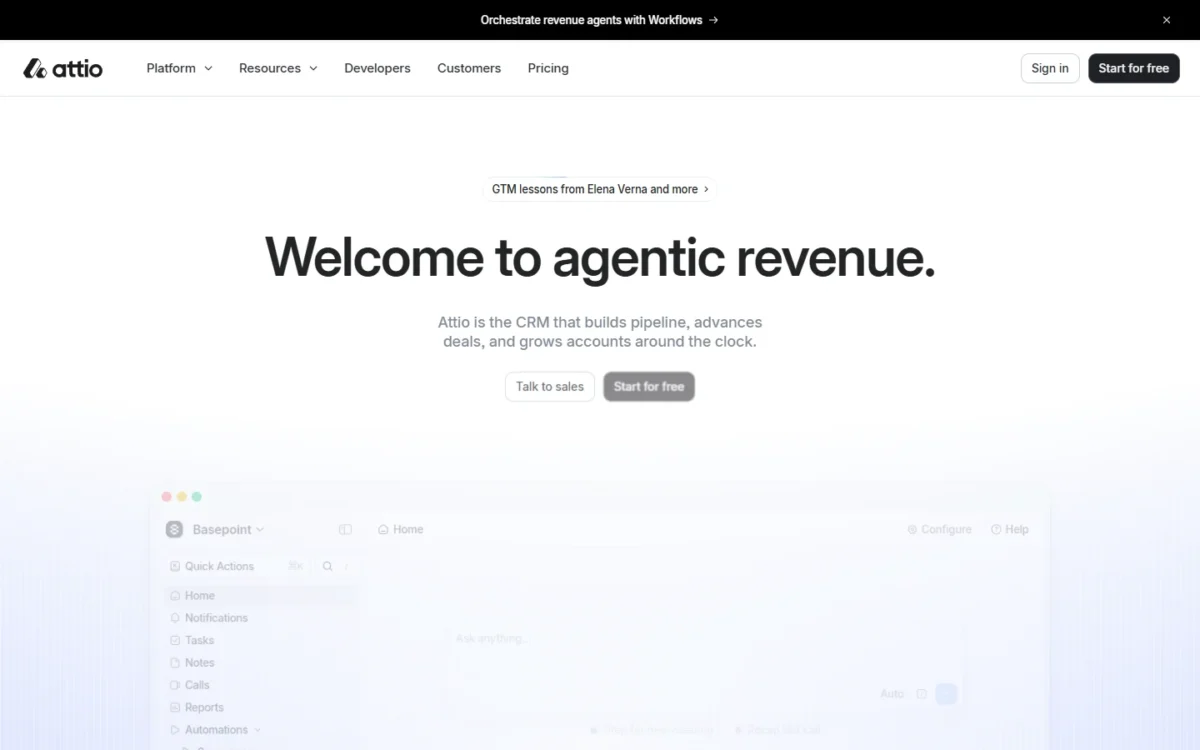
Attio is my pick for email-led selling, custom objects and a free plan for three people, which my Attio review covers in more depth. HubSpot Sales Hub is my pick for calling, forecasting, shared marketing and the cheapest paid seat.
| If your team… | Pick | Because |
|---|---|---|
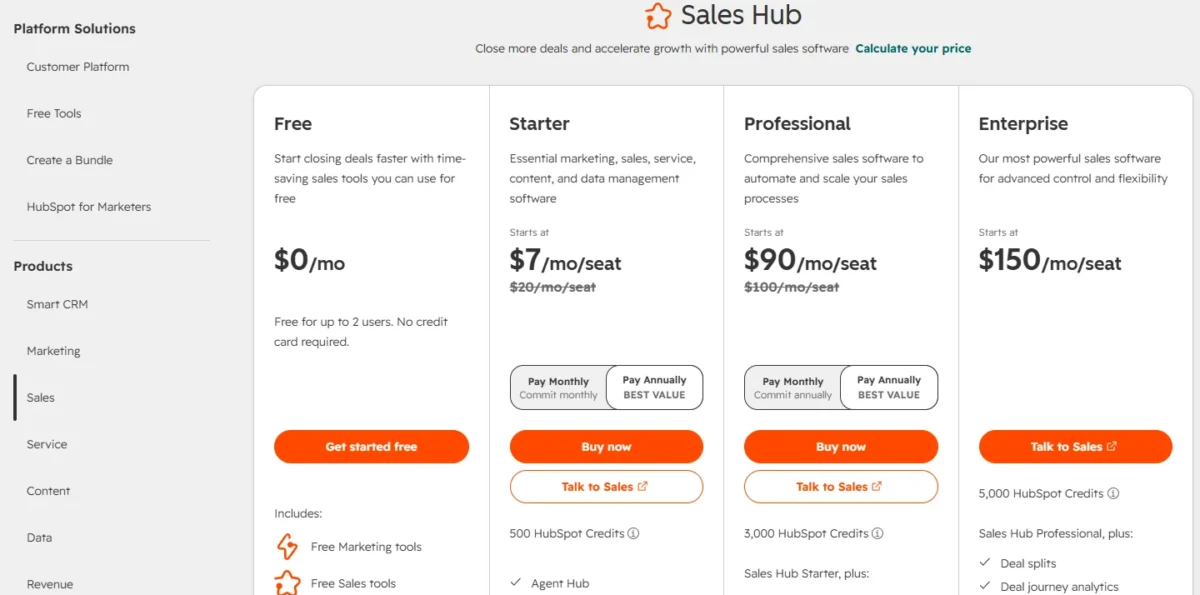
| Sells by email and wants sequences on a budget | Attio Pro | $79 per user per month billed annually, against $90 per seat paid annually plus $1,500 onboarding on Sales Hub Professional |
| Works the phone all day | Sales Hub Professional | Up to 3,000 calling minutes per account a month, with extra-minute packs; Attio does not publish calling minutes |
| Has a manager who forecasts quota | Sales Hub Professional | Forecasting starts on Professional; Attio offers report targets instead |
| Needs a custom object without Enterprise pricing | Attio Pro | Custom objects start on Attio Pro; on HubSpot they need Enterprise, at $150 per seat per month billed annually plus $3,500 onboarding |
| Has three people who want to stay free | Attio Free | Up to 3 seats and 50,000 records, against 2 users and 1,000 contacts on HubSpot’s free tools |
| Runs marketing on HubSpot already | HubSpot Sales Hub | Sales Hub shares HubSpot’s Smart CRM with the marketing and service products |
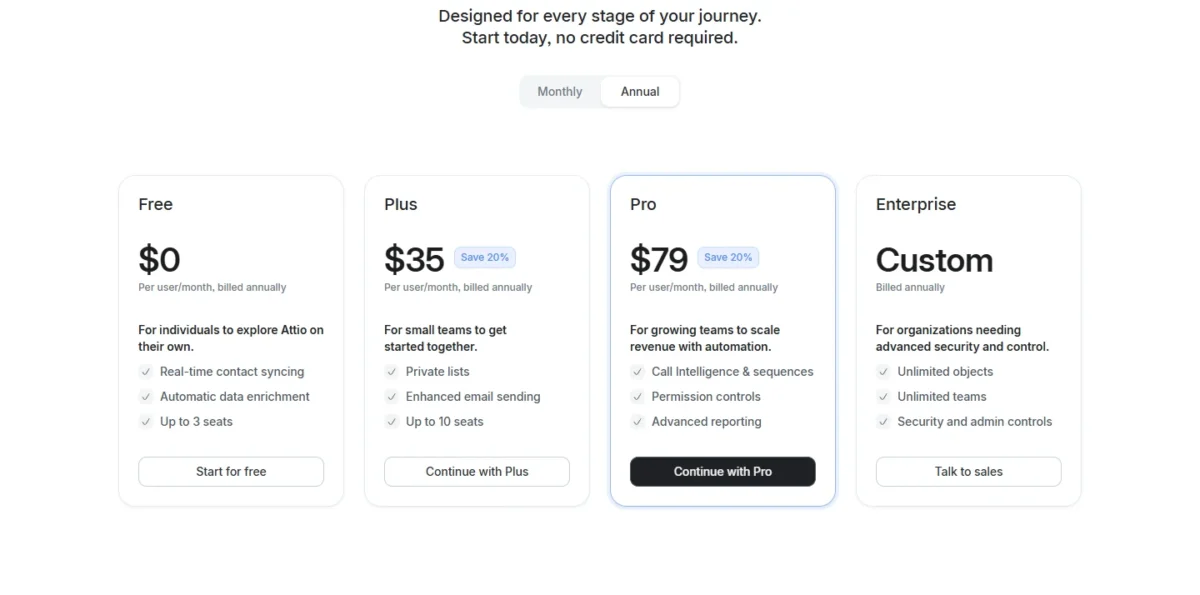
| Wants the cheapest paid seat and can skip sequences | Sales Hub Starter | $20 per seat per month at list price, against $35 per user on Attio Plus billed annually |
Sources: Attio pricing, Attio plans and features, HubSpot Sales Hub pricing, HubSpot product catalog, checked October 2026.
When two rows fit, let the sales channel break the tie: email favors Attio, and the phone favors HubSpot. The next table lines up the differences behind these picks.
Attio vs HubSpot at a Glance
Attio is a CRM whose data model you configure, priced per user. Sales Hub is HubSpot’s sales product on the shared Smart CRM, priced per seat, with required onboarding from Professional up.
| Criterion | Attio | HubSpot Sales Hub | Favors |
|---|---|---|---|
| Sequences | Pro: $79 per user a month billed annually, $99 billed monthly | Professional: $90 per seat a month paid annually, $100 paid monthly with an annual commitment | Attio |
| Onboarding fee | None listed | $1,500 on Professional, $3,500 on Enterprise, one-time and required | Attio |
| Free plan | Up to 3 seats and 50,000 records | Up to 2 users and 1,000 contacts | Attio |
| Custom objects | From Pro: up to 12 standard and custom objects | Enterprise editions: up to 10 objects and 1,000,000 records | Attio |
| Workflows | Metered in workspace credits: 250, 1,500 or 10,000 a month on Free, Plus or Pro | Counted: up to 50 restricted on Starter, 300 on Professional, 1,000 on Enterprise | HubSpot at high run volume |
| Calling | Call recording on Pro; minutes and numbers not published | 500 minutes per account a month on Starter, 3,000 on Professional | HubSpot |
| Forecasting | Not published; targets on Pro reports | Professional and Enterprise | HubSpot |
| Moving in from the other | Free Import2 migration from HubSpot on paid plans | No Smart Transfer from Attio; CSV import, migration services or API | Attio |
Sources: Attio pricing, Attio plans and features, Attio credits guide, Attio migration guide, HubSpot Sales Hub pricing, HubSpot product catalog, HubSpot custom objects, HubSpot Smart Transfer, checked October 2026.
The criteria below follow the order a sales team meets them.
Sequences, Email and Calling
Sequences start at $79 per user per month on Attio Pro, billed annually, and at $90 per seat paid annually plus $1,500 onboarding on Sales Hub Professional. Attio is the cheaper way to sequence email; HubSpot includes calling minutes from Starter up.
Free caps sends at 200 per user a month and Plus at 1,000, which a rep sending 50 emails a working day uses up in 20 days. Pro removes that cap, though hourly and daily limits still apply to each synced mailbox.
HubSpot Professional allows up to 500 sequence email sends per user per day. The barrier to HubSpot sequences is Professional’s price, not that volume.
HubSpot pools calling minutes per account, so each rep’s share shrinks as the team grows:
| Sales Hub plan | Calling minutes per account a month | Per rep, 5 reps | Per rep, 10 reps |
|---|---|---|---|
| Starter | 500 | 100 | 50 |
| Professional | 3,000 | 600 | 300 |
Sources: HubSpot Sales Hub pricing, HubSpot product catalog, checked October 2026.
At 100 minutes per rep with 5 reps, Starter covers occasional calls, not a calling team. Extra minutes cost $50 a month per 1,000 on Professional or Enterprise.
HubSpot also provides 1 phone number on Starter, up to 3 on Professional and up to 5 on Enterprise, not in every country. Attio Pro adds Call Intelligence and call recording, but Attio does not publish calling minutes or phone numbers.
For a team that books meetings by phone, that settles it: HubSpot puts dialing inside the CRM, and Attio’s published plans do not. If calls are most of the job, my Close CRM review weighs a calling-first CRM.
Outreach fills the CRM, so the next question is whether your data fits the plan.
Custom Objects and Record Limits
Attio puts custom objects on its Pro plan, while HubSpot needs an Enterprise edition for them. HubSpot, in turn, holds far more standard records on any paid plan.
Attio Free runs Companies and People plus one more standard object, and Plus allows three more: Deals, Users and Workspaces. Pro adds custom objects, up to 12 standard and custom objects in all. On Free, switching on Deals uses up the one extra slot.
Attio caps records at 50,000 on Free, 250,000 on Plus and 1,000,000 on Pro.
HubSpot custom objects need an Enterprise edition, which allows up to 10 object definitions and 1,000,000 custom object records. Every paid HubSpot plan holds up to 15 million contact records.
Five seats with a custom object cost $4,740 a year on Attio Pro ($79 x 5 x 12, billed annually). On Sales Hub Enterprise, billed annually, they cost $12,500 in year one: $150 x 5 x 12 = $9,000, plus $3,500 onboarding.
Pick Attio if your sales process needs its own object, such as subscriptions or partners. Pick HubSpot if your database is large but fits contacts, companies and deals. Once the data fits, the next limit is how much follow-up runs itself.
Workflows and Automation
HubSpot caps how many workflows you build, while Attio meters how often they run. Attio’s workspace credits, 250 a month on Free, 1,500 on Plus and 10,000 on Pro, also fund its AI features.
Sales Hub Starter allows up to 50 workflows with restricted triggers and actions, which suits simple follow-up rules. Professional raises that to 300 fully customizable workflows and Enterprise to 1,000.
In Attio’s new workflows, each block is priced by what it does:
- Triggers, logic and data lookups cost nothing.
- Blocks that write data or call an outside app such as Slack cost 1 credit each time they run.
- AI blocks are billed by token usage.
A workflow that adds each new deal to a list and posts a message to a channel spends 2 credits per run. Plus’s 1,500 credits cover 750 such runs a month (1,500 / 2), and Pro’s 10,000 cover 5,000.
Light automation fits either budget plan: Attio Plus while runs stay in the hundreds, Sales Hub Starter if 50 restricted workflows cover it. Heavy automation points to Attio Pro or HubSpot Professional.
Automation feeds the numbers a manager reports on, which is where the two split next.
Reporting and Forecasting
HubSpot Sales Hub Professional gives a manager forecasting and up to 100 custom reports, while Attio adds targets on Pro but does not publish a forecasting feature.
Attio allows up to 3 reports on Free, 15 on Plus and 100 on Pro, which adds Time in stage, Historical values and Stage changed reports.
Targets track a team against a number; a forecast projects what the pipeline will close. A manager who owes leadership a forecast is safer on HubSpot Professional. A founder who mostly watches deals move between stages gets that from Attio Pro’s stage reports.
Reporting also pulls in other tools, so scope comes next.
Platform Scope and Integrations
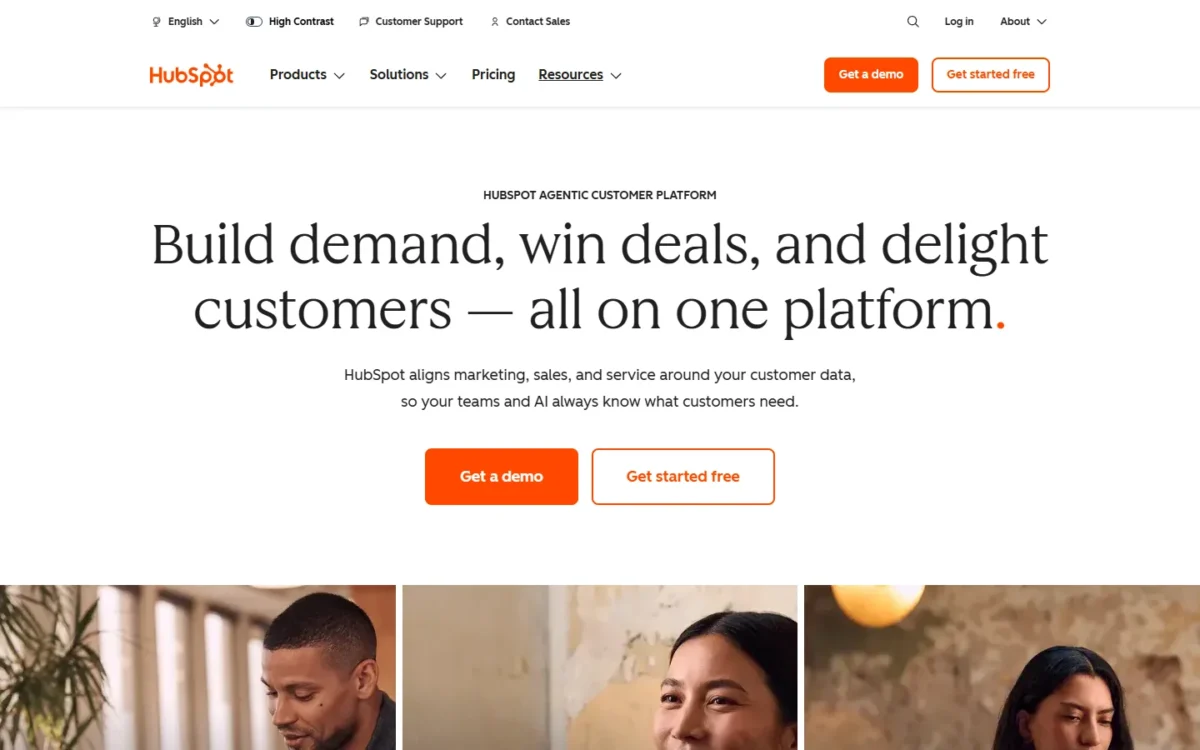
Sales Hub runs on HubSpot’s Smart CRM, shared with its marketing and service products, and HubSpot lists over 2,000 apps on its Sales Hub pricing page. Attio is a CRM you extend yourself, through its API, webhooks, App SDK and MCP server.
Owning several hubs changes seat prices, because HubSpot prices every Core Seat at the highest edition you own. Add Marketing Hub Professional to Sales Hub Starter, and Core Seats move from $20 to $50 per seat per month.
If the wider suite is why HubSpot is on your list, my HubSpot CRM review judges the platform beyond Sales Hub.
Attio’s API and App Store apps, including Gmail, Outlook, Slack, Zapier, Mailchimp and Outreach, are available on every plan.
A team with an engineer and its own tools gets more from that open access. A team that wants marketing, service and sales on one database gets more from HubSpot.
Scope sets the plan; the next question is its cost at your size.
Cost for a 5- and 10-Person Team
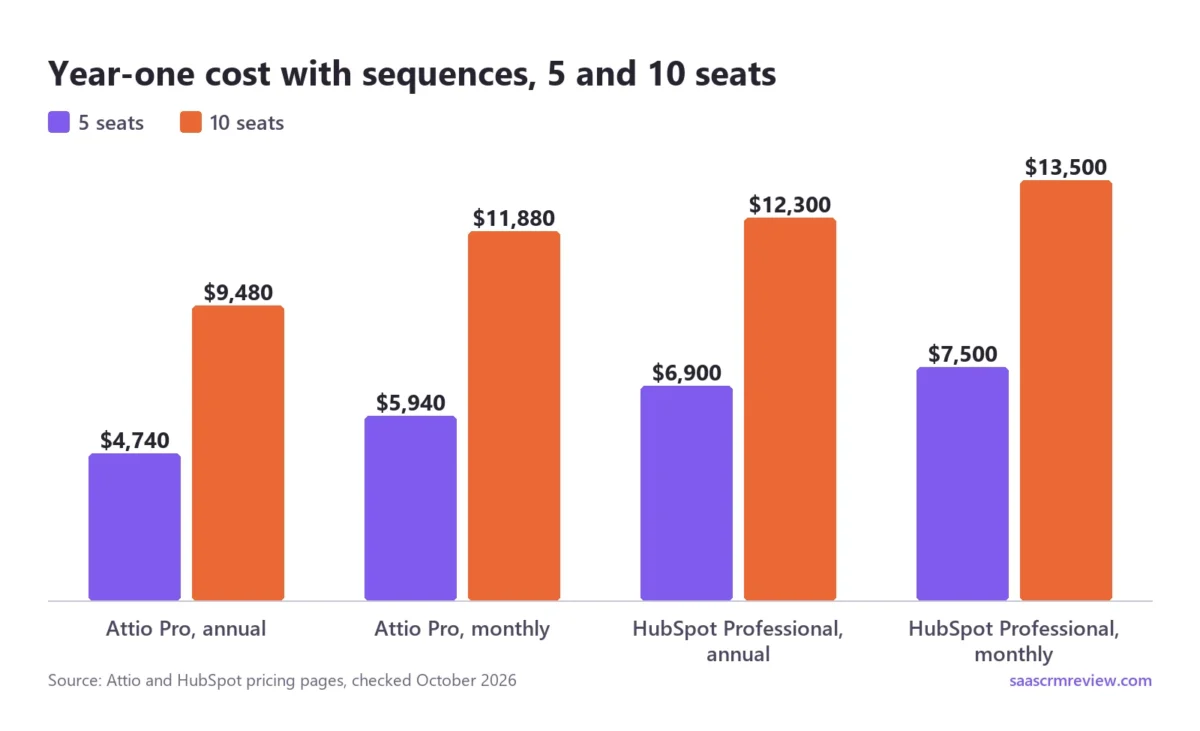
Attio costs less at both team sizes once sequences are in the plan, and the gap is widest in year one because of HubSpot’s $1,500 onboarding fee. HubSpot is cheaper at the budget tier, where Sales Hub Starter skips sequences.
HubSpot reserves full Professional and Enterprise features for Sales Seats, and View-Only seats cost nothing, so a founder who only reads the pipeline needs no paid seat. Attio puts every workspace member on the same plan.
Year-one cost with sequences
Billed annually, the year-one gap is $2,160 at 5 seats: $11 per seat a month ($90 – $79) x 5 x 12 = $660, plus the $1,500 onboarding fee. At 10 seats it is $2,820: $11 x 10 x 12 = $1,320, plus the fee.
From year two the fee drops out, so Attio Pro stays cheaper by the seat-price gap alone. Since the fee is more than half of each year-one gap, calling minutes or forecasting can justify Professional on their own.
| Setup | 5 seats, year one | 10 seats, year one |
|---|---|---|
| Attio Pro, $79 per user a month, billed annually | $4,740 | $9,480 |
| Attio Pro, $99 per user a month, billed monthly | $5,940 | $11,880 |
| Sales Hub Professional, $90 per seat a month paid annually, plus $1,500 onboarding | $5,400 + $1,500 = $6,900 | $10,800 + $1,500 = $12,300 |
| Sales Hub Professional, $100 per seat a month paid monthly with an annual commitment, plus $1,500 onboarding | $6,000 + $1,500 = $7,500 | $12,000 + $1,500 = $13,500 |
Sources: Attio pricing, HubSpot Sales Hub pricing, HubSpot product catalog, checked October 2026.
The two monthly options buy different things. A canceled Attio workspace keeps access until its current billing period ends (Attio billing guide). HubSpot labels Professional’s monthly option “Commit annually”, so paying monthly there changes when you pay, not how long you are bound.
My Attio pricing breakdown follows the current plans and credit packs.
If you will add other hubs later, my guide to HubSpot pricing and fees covers their seat prices and onboarding charges.
Budget tier: Plus vs Starter
Sales Hub Starter is the cheapest paid setup, and neither budget plan includes sequences.
| Budget plan | 5 seats, one year | 10 seats, one year | Seat rule |
|---|---|---|---|
| Sales Hub Starter, $20 per seat a month at list price | $1,200 | $2,400 | No seat minimums |
| Attio Plus, $35 per user a month billed annually ($44 billed monthly) | $2,100 | $4,200 | Up to 10 seats |
Sources: HubSpot product catalog, HubSpot Sales Hub pricing, Attio pricing, checked October 2026.
On October 9, 2026, HubSpot was selling Starter at $7 per seat per month paid annually, or $10 paid monthly, below its $20 catalog list price. I budget at $20 and treat any discount as a bonus.
Starter’s monthly option reads “Commit monthly”, so a team can try it without a year’s contract.
Free plans: 3 seats vs 2 users
Yes, a team of up to three can stay free on Attio, which covers 3 seats and 50,000 records. HubSpot’s free tools stop at 2 users and 1,000 contacts.
Attio Free still limits a selling team: 200 email sends per user a month, 3 reports and 250 workspace credits. Every email it sends includes “Sent with Attio”, and HubSpot’s free 1-to-1 email carries HubSpot branding.
For two founders testing a CRM, either free plan works. A third teammate, or a few thousand imported contacts, tips the choice to Attio Free.
Credits and upgrade triggers
Attio’s upgrade triggers are seats, sequences and data size; HubSpot’s are users, contacts, sequences, forecasting and custom objects. These limits force an Attio upgrade:
- A 4th user ends Free, and an 11th ends Plus. Because the whole workspace shares one plan, an 11th rep moves everyone to Pro. Ten users on Plus cost $35 x 10 x 12 = $4,200 a year; eleven on Pro cost $79 x 11 x 12 = $10,428, both billed annually.
- Sequences, custom objects, more than 1,000 email sends per user a month, more than 250,000 records or more reports than Plus allows all require Pro.
- Free cannot buy extra workspace credits, so automation beyond 250 credits a month means moving to Plus.
These limits force a HubSpot upgrade:
- A 3rd user or a 1,001st contact ends the free tools.
- Sequences, forecasting, more than 50 workflows or unrestricted workflow triggers require Professional and its $1,500 onboarding fee.
- Calling past 500 minutes a month means Professional, since extra minute packs are sold for Professional and Enterprise.
- Custom objects require Enterprise, which adds $3,500 onboarding.
Both tools meter AI with credits, but a credit buys different work. One HubSpot AI workflow action costs 10 credits, while Attio bills an AI block by token usage. So compare the cost of the action you would run, not the monthly counts.
HubSpot includes 500 credits a month with Starter, 3,000 with Professional and 5,000 with Enterprise, and unused credits do not roll over. Extra credits cost $10 per pack of 1,000.
Attio sells extra workspace credits from 5,000 a month at $70 a month billed annually ($85 billed monthly). Some triggers are dealbreakers rather than upgrades, which decides who should skip each tool.
Who Should Skip Each
Skip Attio if one of these fits:
- Your reps dial for most of the day. Attio does not publish calling minutes or phone numbers, while Sales Hub Professional allows up to 3,000 calling minutes per account a month.
- Your manager owes leadership a forecast. Attio does not publish a forecasting feature, while Sales Hub offers forecasting from Professional up.
- You will pass 10 users but cannot justify Pro’s per-user price. Plus stops at 10 seats.
Skip HubSpot Sales Hub if one of these fits:
- You want sequences without a setup fee or a year’s commitment. Professional requires $1,500 onboarding, and even its monthly option commits annually.
- Your process needs a custom object. On HubSpot, that need alone puts you on an Enterprise edition.
- You are three people who want to stay free. A third user means a paid HubSpot plan.
If HubSpot’s onboarding fee or seat prices rule it out, my list of HubSpot CRM alternatives covers other CRMs to consider.
If neither tool fits, my ranking of the best CRM software widens the shortlist. Picking one today is not permanent, but the two directions of a switch are not equally easy.
Switching: What Moves, What You Rebuild
Moving from HubSpot to Attio runs through Import2, a migration service that is free for Attio users on paid plans. Moving from Attio to HubSpot runs on CSV exports, HubSpot’s importer, a migration service or the API.
Neither path’s documentation mentions workflows, sequences or reports among the data that moves, so budget time to rebuild them.
Running both tools side by side instead is an integration project, and my guide to how CRM integrations work covers what that takes.
From HubSpot to Attio
The move takes six steps, and Import2 does the copying:
- Use an admin account on Attio Plus, Pro or Enterprise, since Import2 migrations are admin-only and unavailable on Free.
- Enable the Deals object first; custom objects and attributes are created during the migration.
- Import2 does not update attribute values on records Attio already holds. If HubSpot’s values should win, have each member remove their synced mailbox, then delete existing people and company records.
- Write phone numbers with a plus sign and country code, and check emails and domains, because Attio rejects invalid values.
- In Workspace settings, open Migrate CRM, choose HubSpot CRM and connect both accounts in Import2.
- Run a sample migration, review the new attributes, run the full migration, then resync email and calendars.
Import2 moves companies, people, deals, custom objects, notes, tasks and files, but not call recordings. Undoing a migration removes the imported records but leaves the lists and attributes it created.
On Attio Free, the fallback is CSV import, without notes (Attio CSV import guide). HubSpot’s export arrives as a download link that expires after 30 days, and calls and notes need individual contact exports, activity reports or the engagements API (HubSpot export guide).
From Attio to HubSpot
The reverse move is manual: export Attio views, import them into HubSpot, and remap custom-object data.
- In Attio, show every attribute you need as a column, then export the view as CSV or Excel, since only visible columns are exported (Attio export guide).
- Plan to re-source enriched fields, because Attio exports enriched attributes as blank cells.
- Import into HubSpot, where paid accounts take files of up to 1,048,576 rows (HubSpot import limits).
- Move custom-object data into custom properties, up to 1,000 per object, unless you buy an Enterprise edition.
HubSpot’s Smart Transfer covers 13 apps, such as Pipedrive, Zoho CRM and Salesforce, but not Attio. For a larger move, HubSpot points to migration services such as Import2 and SyncMatters, its APIs, or a HubSpot consultant (HubSpot import options).
That makes leaving Attio the harder direction, since enriched data also stays behind.
Attio vs HubSpot FAQ
Is Attio cheaper than HubSpot?
Yes for sequences, no at the budget tier. On annual billing, Attio Pro costs $11 per seat a month less than Sales Hub Professional ($90 – $79) and lists no onboarding fee, while Professional requires $1,500.
Sales Hub Starter lists at $20 per seat a month, below Attio Plus at $35 per user billed annually. Eligible startups can also apply for up to 80% off Attio.
Does Attio have a free trial?
Yes. New Attio workspaces start with a 14-day trial of the Pro plan, and starting needs no credit card.
Is HubSpot’s onboarding fee mandatory?
Yes, on Professional and Enterprise. Sales Hub Professional requires a one-time $1,500 onboarding fee and Enterprise $3,500, on top of seat prices.
Does Attio integrate with HubSpot?
No native sync is listed. Attio documents a migration from HubSpot through Import2, and its website lists HubSpot under “Import from” rather than among its apps.
Can a team of three use HubSpot for free?
No. HubSpot’s free tools allow up to 2 users, so a team of three needs a paid plan.