The best Google Flow alternatives each replace a different part of Flow, so the right one depends on what you used it for. Runway fits creators who generate and edit in one suite. Kling AI is the low-cost pick, with commercial use on paid plans.
Luma suits anyone who wants Veo 3.1 beside Kling and Seedance, and Krea keeps Veo 3.1 behind an agent and a node editor. Hailuo AI is the lowest-priced plan that lists Veo 3.1, though it prints no Veo footage, and Higgsfield prices each shot across Veo, Kling and Seedance.
LTX Studio fits script-to-storyboard production, Pika fits short social clips with sound, Vidu fits reference-driven clips, and invideo AI fits editing on a timeline.
Evidence basis: official pricing pages and documentation, checked October 2026. How I review
This guide converts Flow’s credits into actual clips and shows which rivals carry Google’s models, so you can compare on footage rather than sticker price. If you are still deciding whether to leave, my Google Flow review weighs the subscription on its own terms.
In This Article (21 sections)
The Ten Alternatives at a Glance
- Runway: generation, editing and 4K upscaling in one suite, with Kling 3.0 next to Gen-4.5
- Kling AI: a Standard plan at $79.2 billed yearly, with commercial use
- Luma: Veo 3.1, Gemini Omni Flash and Kling 3.0 on one credit balance
- Krea: Veo 3.1 and Gemini Omni Flash with an agent and a node editor, Pro at $21 a month billed yearly
- Hailuo AI: the lowest-priced plan that lists Veo 3.1, from $8.40 a month billed yearly
- Higgsfield: a credit price beside each listed video model, Plus at $39 a month billed annually
- LTX Studio: scripts turned into storyboards, pitch decks and edited timelines
- Pika: short social clips scored with music, ambience and foley
- Vidu: reference-to-video and clips up to 16 seconds, Standard at $99 billed yearly
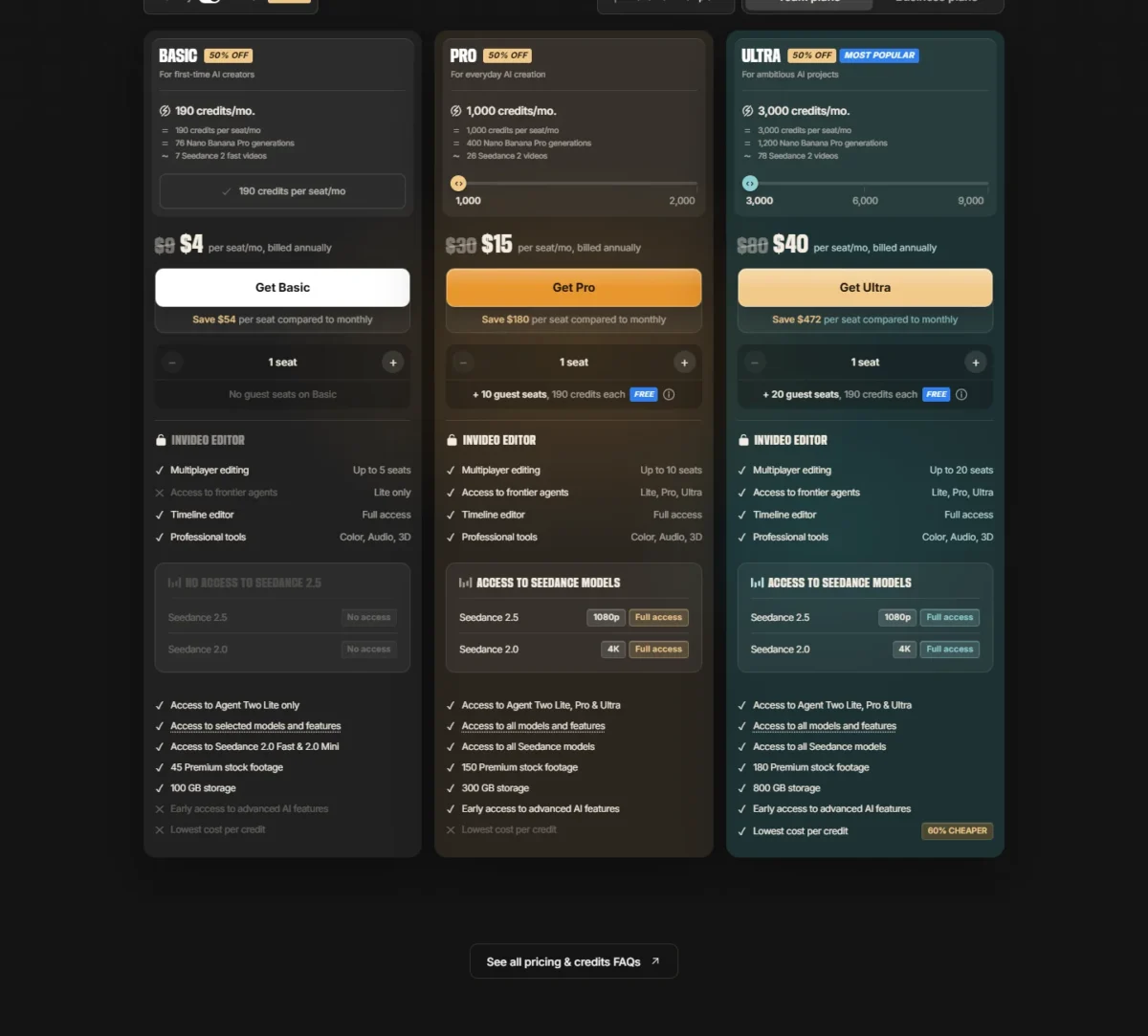
- invideo AI: an agentic timeline editor with Seedance 2.5, Pro at $15 a seat a month billed annually
| Tool | Best for | Plan priced | Google models it lists | Free option |
|---|---|---|---|---|
| Runway | Generating and editing in one suite | Standard, $12/ | Nano Banana Pro | 125 one-time credits |
| Kling AI | Low yearly price with commercial use | Standard, $79.2 billed yearly | Kling’s own models instead | Basic plan at $0 |
| Luma | Veo 3.1 beside other labs’ models | Plus, $30/ | Veo 3.1, Gemini Omni Flash, Nano Banana Pro | “Try for free” on the product page |
| Krea | Veo 3.1 behind an agent and node editor | Pro, $21/ | Veo 3.1, Gemini Omni Flash, Nano Banana 2 | Free plan, 100 units a day, video concurrency 0 |
| Hailuo AI | Lowest-priced plan that lists Veo 3.1 | Standard, $8.40/ | Veo 3.1 on Standard; Nano Banana Pro and Nano Banana 2 from Pro | One-time trial credits, Hailuo models only |
| Higgsfield | Pricing each shot across Veo, Kling and Seedance | Plus, $39/ | Veo 3.1, Nano Banana Pro, Nano Banana 2 | No free plan on the pricing page |
| LTX Studio | Script-to-storyboard production | Lite, $12/ | Veo 3.1 on Pro, Nano Banana Pro on Standard | 800 one-time credits, personal use only |
| Pika | Short social clips with sound | Starter, $8/month on annual billing ($10 monthly) | Gemini 1.1 Omni Flash, Nano Banana 2 | Free plan with 0 monthly credits (packs only) |
| Vidu | Reference-driven clips up to 16 seconds | Standard, $99 billed yearly | Vidu’s own models instead | Free plan, Q4 at 540P for 4 credits a second |
| invideo AI | Editing generated footage on a timeline | Pro, $15/ | Nano Banana Pro | No free plan on the pricing page |
Sources: Runway pricing, Kling AI plans, Luma pricing, Krea pricing, Hailuo AI plans, Higgsfield pricing, LTX Studio pricing, Pika pricing, Vidu pricing, invideo AI pricing, checked October 2026.
Five of the ten list Veo 3.1 on a plan. Reaching it costs from $100.80 a year on Hailuo AI, whose plan page lists Veo 3.1 but prints no Veo footage, to $1,200 a year on LTX Studio’s Pro plan. If Veo is why you used Flow, that spread is your first filter.
Why Look for a Google Flow Alternative
Flow’s limits are documented, so you can check each one against your own work before paying for something else.
The free tier is a sampler. Everyone gets 50 Flow credits a day, and unused daily credits do not roll over. During peak hours, roughly 2 PM to 5 PM UTC, people without a subscription may not be able to generate video at all.
Monthly plan credits do not roll over. The credits that come with Plus, Pro and Ultra refresh at the start of each billing cycle, and unused ones do not carry into the next month. A quiet month is money gone, which hurts project-based creators more than steady producers.
The priciest Veo model cannot use references. In the Flow model guide, Veo 3.1 Quality does not support Ingredients, video-to-video editing or extending a clip. Character-consistent work therefore runs on Veo 3.1 Fast or Lite, or on Gemini Omni Flash.
Clips are short. Veo 3.1 generates 4, 6 or 8 seconds per clip, and Gemini Omni Flash adds a 10-second option. Longer scenes mean extending an 8-second Veo 3.1 video, which has to be done with Veo 3.1 Lite.
You pay for a bundle. Flow credits come with Google AI plans. Google AI Pro at $19.99 a month also buys 5 TB of storage, YouTube Premium Lite and Gemini in Gmail and Docs. That is good value if you use them, and padding if you only want video.
What Google Flow’s Credits Buy in Clips
Credits make Flow’s plans hard to compare, so here they are converted into clips. Each figure is the plan’s monthly credits divided by the credit cost of one generation.
| Flow plan | Price per month | Monthly Flow credits | Veo 3.1 Quality 8s clips (100 credits) | Veo 3.1 Fast clips (20 credits, 10 on Ultra) | Gemini Omni Flash 720p 8s clips (12 credits) |
|---|---|---|---|---|---|
| Google AI Plus | $4.99 | 200 | 200 / 100 = 2 | 200 / 20 = 10 | 200 / 12 = 16 |
| Google AI Pro | $19.99 | 1,000 | 1,000 / 100 = 10 | 1,000 / 20 = 50 | 1,000 / 12 = 83 |
| Google AI Ultra | $99.99 | 10,000 | 10,000 / 100 = 100 | 10,000 / 10 = 1,000 | 10,000 / 12 = 833 |
| Google AI Ultra | $199.99 | 25,000 | 25,000 / 100 = 250 | 25,000 / 10 = 2,500 | 25,000 / 12 = 2,083 |
Sources: Google Flow pricing and Flow credits help page, checked October 2026.
On Google AI Pro, 10 Quality clips x 8 seconds = 80 seconds of Veo 3.1 Quality a month, before a single retake. That makes Pro a Fast-and-Omni plan with a few Quality shots on top. Anyone planning to finish everything in Quality is shopping for Ultra.
The 50 daily credits every account gets never cover one Quality clip, which costs 100, but they do cover 50 / 12 = 4 Omni Flash clips at 720p.
Credits are charged per generation, and one request can produce 2 videos, so a two-output request costs double.
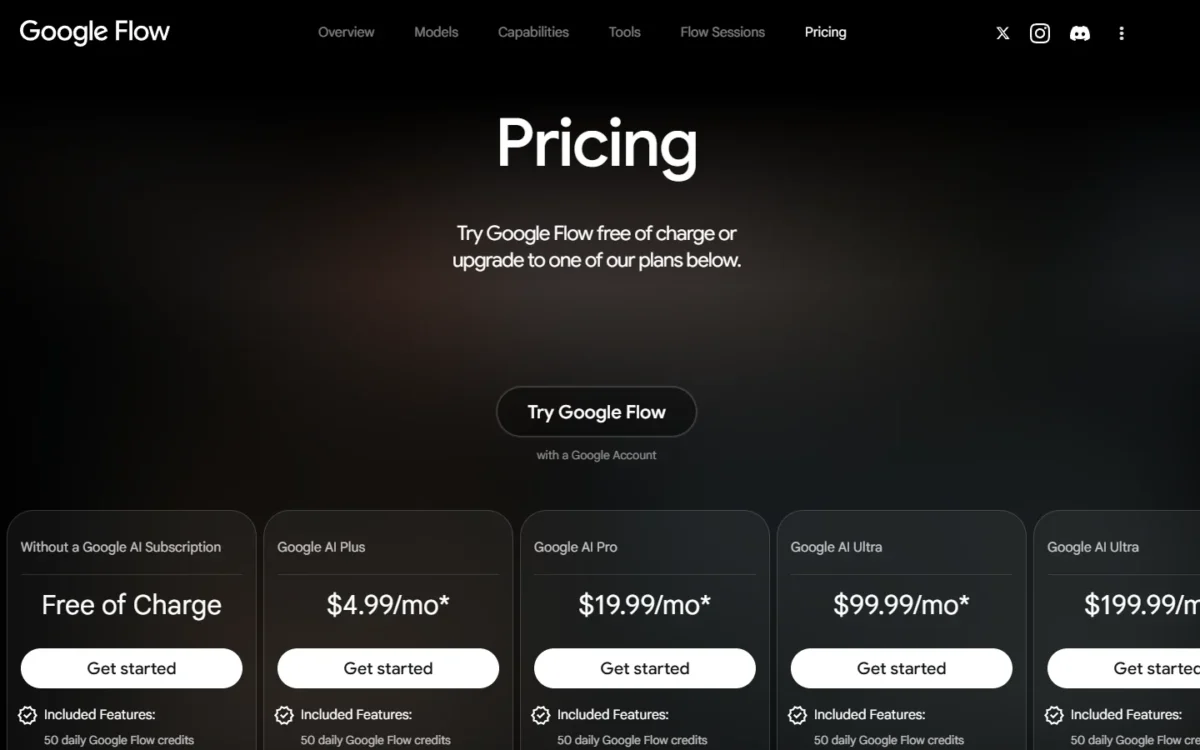
Ultra also gets Veo 3.1 Lite at lower priority for 0 credits. My breakdown of Google Flow pricing and credit costs goes plan by plan; the clip counts above are the yardstick for every alternative below.
1. Runway: Best for Creators Who Generate and Edit in One Suite
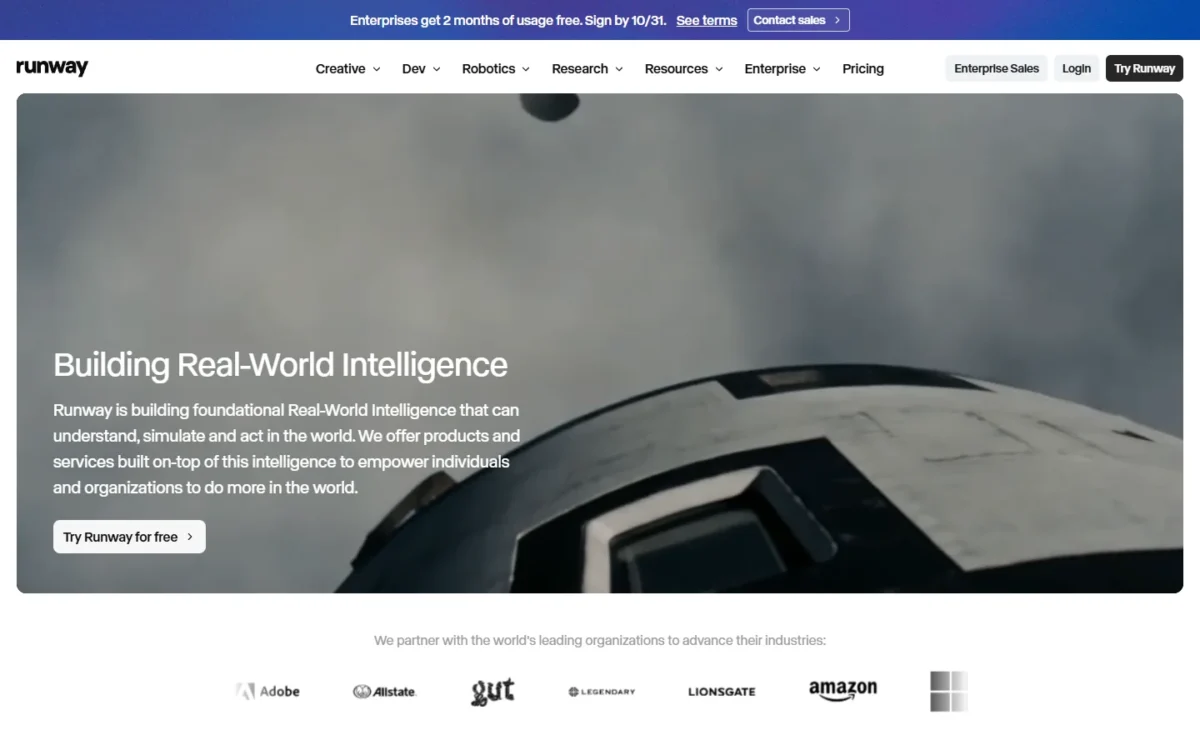
Runway makes the most sense for Flow users whose work starts after the clip exists: upscaling, adding sound, and keeping a brand look across projects. You pay for finishing more than for footage.
Standard covers every AI video and image model Runway hosts, an agentic creative collaborator, and music, voice and sound effects generation. Gen-4.5, Kling 3.0 and Nano Banana Pro all sit on that plan, so one bill covers Runway’s model and Kling’s.
Against Flow, Runway wins on model choice beyond Google and on 4K upscaling from the entry plan, where Flow keeps 4K for Ultra. Max also rolls unused credits over for one month, which Flow’s monthly credits do not.
The tradeoff. Runway buys fewer seconds than Flow. Standard’s 625 monthly credits buy 52 seconds of Gen-4.5, against 80 seconds of Veo 3.1 Quality on Google AI Pro.
Per dollar the gap closes on annual billing: 52 / 12 = 4.3 seconds a dollar on Standard’s $12, against 80 / 19.99 = 4.0 on Pro. Standard’s $15 monthly price gives 52 / 15 = 3.5. Standard also caps you at 3 projects, tight for a freelancer with several clients.
- Pricing:
- Standard is $12 a month billed annually, a $144 commitment, or $15 month to month. Pro is $28 a month billed annually for 2,250 credits, the plan to buy once 52 seconds a month runs short.
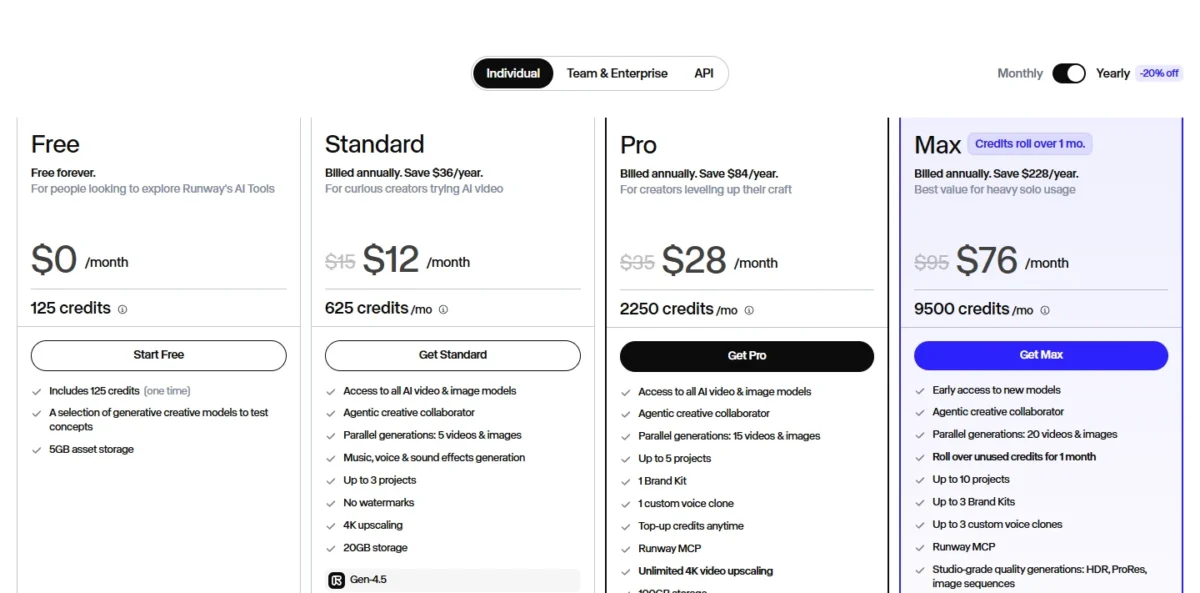
The Free plan’s one-time credits are a preview, not a workspace: 125 credits / 12 credits per second = about 10 seconds of Gen-4.5.
- Skip it if:
- Veo 3.1 is the model your look depends on, or you need more than 3 active projects without paying for Pro.
2. Kling AI: Best for a Low Yearly Price With Commercial Use
Kling AI’s yearly Standard plan costs $79.2, less than four months of Google AI Pro ($19.99 x 4 = $79.96). That price already includes commercial use, 1080p/4K video generation and brand watermark removal.
Kling 3.0 and 3.0 Omni generate synchronized audio and video, with storyboarding and element references for consistent characters. Canvas adds an agent that brainstorms, writes scripts and generates storyboards, which maps onto Flow’s own agent.
Against Google AI Pro, Kling wins on yearly cost: $79.2 against $19.99 x 12 = $239.88. Google AI Plus, at $4.99 x 12 = $59.88, is cheaper still.
The tradeoff. Kling replaces the model, not just the app. Its plans sell Kling’s own models, so Veo, Omni Flash and Nano Banana stay behind in Flow. The plan page counts credits, not seconds, so footage per dollar is something you measure yourself.
- Pricing:
- Standard is $79.2 a year for 660 credits a month. Monthly billing shows $6.99 for the first month as a first-purchase offer, then $8.8 a month, and the yearly plan saves $26.4 against that.
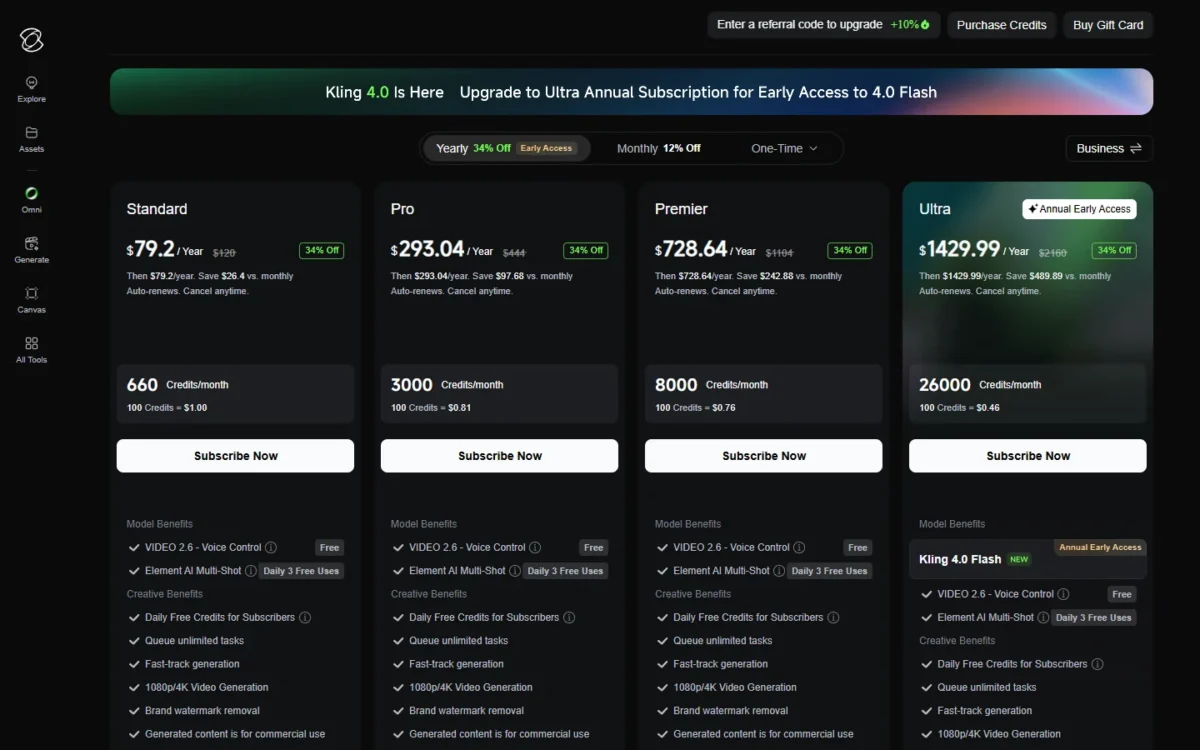
Pro, at $293.04 a year for 3,000 credits a month, is the step up once one real brief shows what Standard’s credits buy.
- Skip it if:
- Veo or Nano Banana is part of your look, because Kling’s plans run Kling’s models.
3. Luma: Best for Keeping Veo 3.1 Next to Other Models
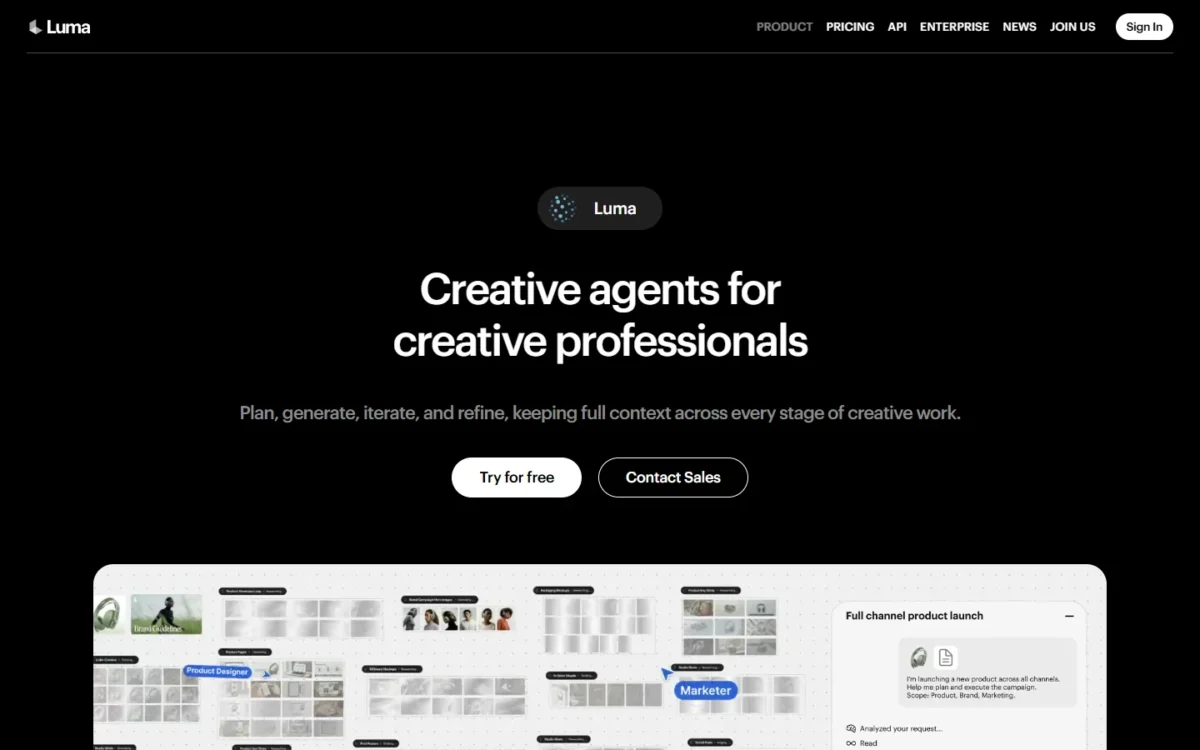
Luma describes creative agents on its product page that plan, generate, iterate and refine. It lists Ray3.2 and Ray3.14 beside Nano Banana, Veo 3.1 and Kling 3.0.
Luma Plus puts Veo 3.1, Kling 3.0 and Seedance 2.0 on one credit balance.
Plus covers Luma and third-party image and video models, from Ray3.2 and Ray3.14 to Gemini Omni Flash and Nano Banana Pro. For a Flow user, Google’s models stay in reach while Kling and Seedance fill the gaps. Commercial use and edit access for guest collaborators come with Plus.
The tradeoff. Measured in seconds, Veo is cheaper inside Flow. Veo 3.1 at 720p with audio costs 280 credits per second, so Plus’s 10,000 credits / 280 = about 35 seconds. Google AI Pro buys 80 seconds of Veo 3.1 Quality for $19.99.
Ray3.14 is the economical model here: 20 credits per second at 720p, or 10,000 / 20 = 500 seconds from Plus’s 10,000 credits. Luma pays off when Veo is one tool among several, not your daily driver.
- Pricing:
- Plus is $30 a month, or $300 billed yearly; paying monthly for a year comes to $30 x 12 = $360, $60 more than the yearly price.
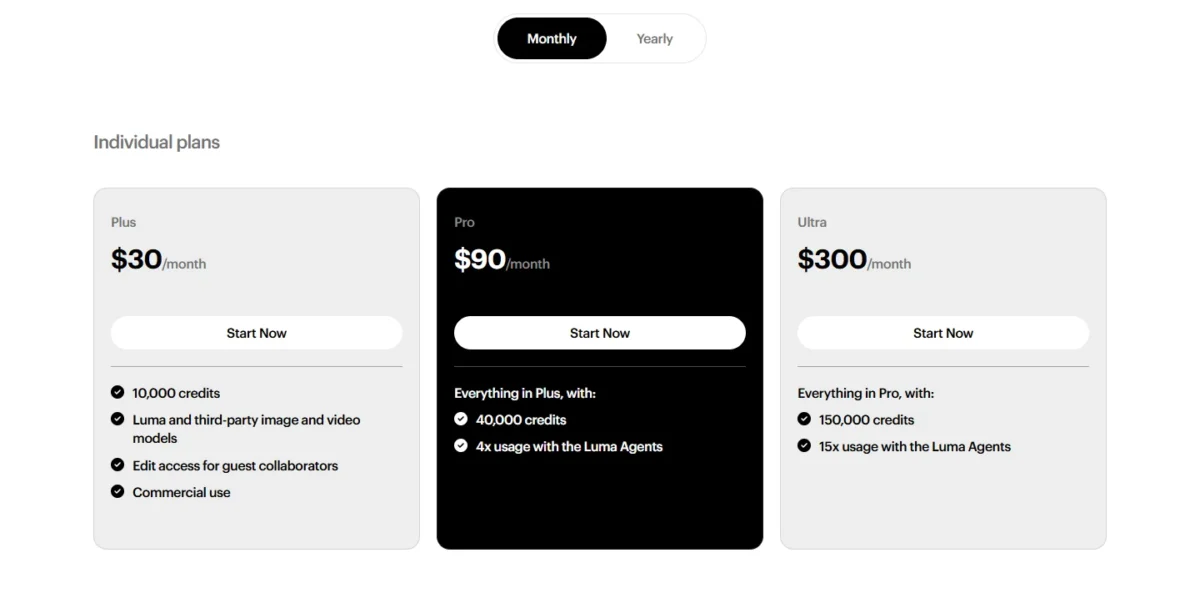
The pricing page starts at Plus, so the low-cost way to judge Luma is the “Try for free” option on its product page.
- Skip it if:
- Veo is most of what you generate, since Flow sells those seconds for less, or your budget stops below $30 a month.
4. Krea: Best for Keeping Veo 3.1 Behind an Agent and a Node Editor
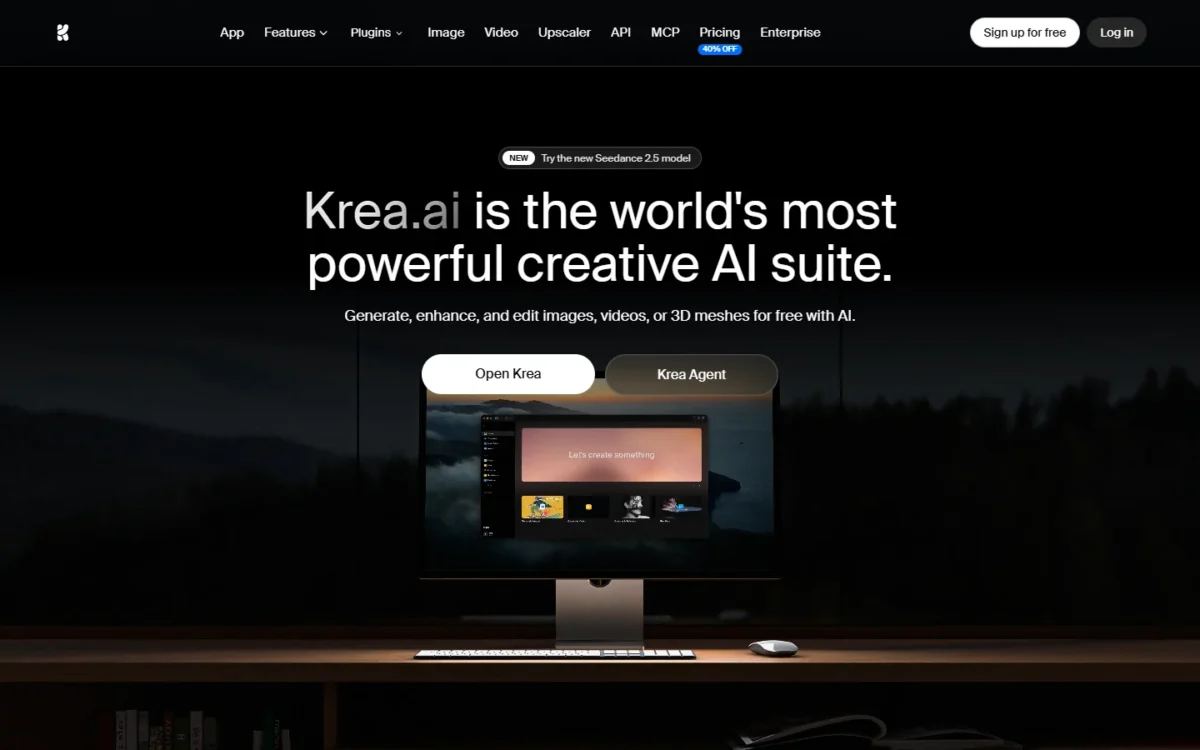
Krea keeps the Google half of Flow and changes the workspace around it. Its video model list names Veo 3.1, Veo 3.1 Fast, Veo 3.1 Lite and Gemini Omni Flash beside Kling 3.0, Seedance 2.5 and MiniMax H3.
Krea Agent plans, creates and refines images and videos with you. The Nodes editor connects models, prompts and processing steps, and Nodes Agent builds those workflows in natural language.
App Builder turns a workflow into an app you can run again or share, which echoes Flow’s tools built in natural language.
Against Flow, Krea wins on model choice. Flow wins on a published Veo price, since Veo 3.1 Quality costs 100 credits a clip there.
Krea’s model cards print a cost figure but name no unit or clip length. It is about 200 for Veo 3.1 Lite, 450 for Veo 3.1 Fast and 1,200 for Veo 3.1. Read as relative costs, a Lite draft runs at a sixth of a full Veo 3.1 generation.
The tradeoff. Krea’s plan cards count Seedance 2.0 videos, not Veo seconds: Pro shows 83 of them, so footage per dollar on Veo is something you measure. Basic, at $5.25 a month billed yearly, lists selected video models only, and the page says Pro unlocks all of them.
- Pricing:
- Pro is $21 a month on the yearly toggle, $21 x 12 = $252 a year, for 20,000 units a month, and the page says yearly billing saves 40%. Its card lists full access to all video models including Veo3, plus a commercial license. Max is $63 a month for 60,000 units.
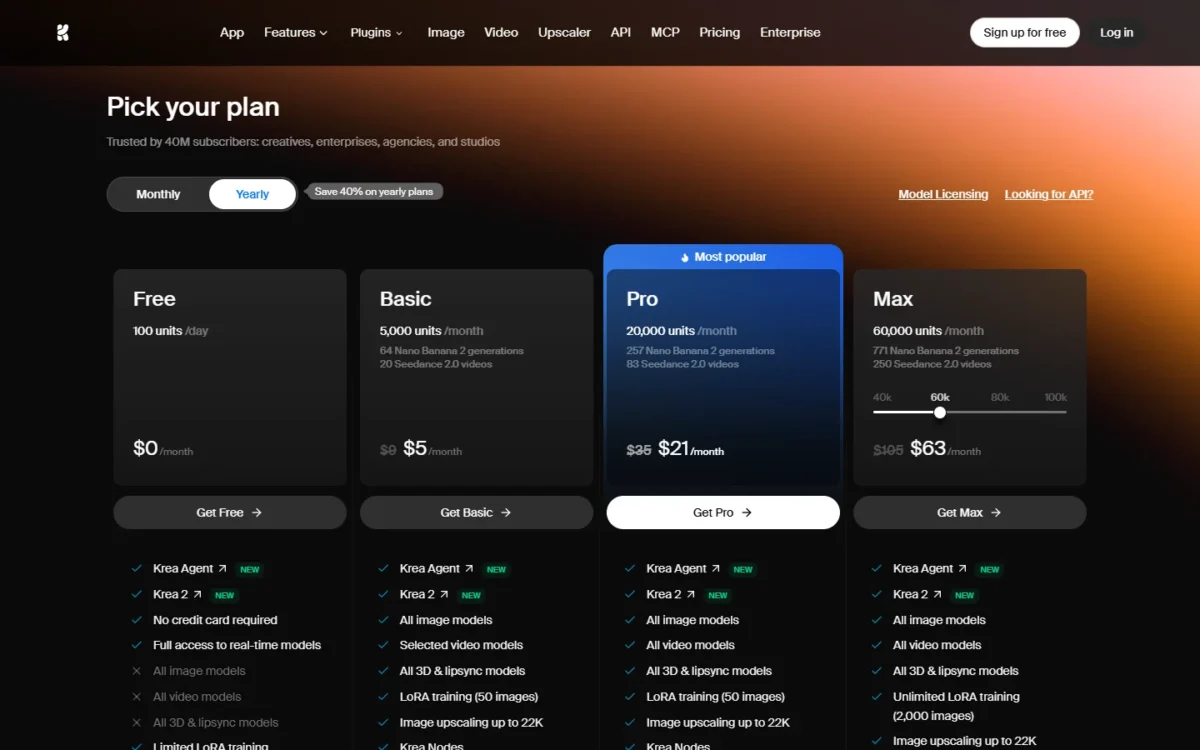
Free gives 100 units a day and lists video concurrency as 0.
- Skip it if:
- you want a stated number of Veo seconds per plan before paying, or you render one scene at a time rather than shots across several models.
5. Hailuo AI: Best for the Lowest-Priced Plan That Lists Veo 3.1
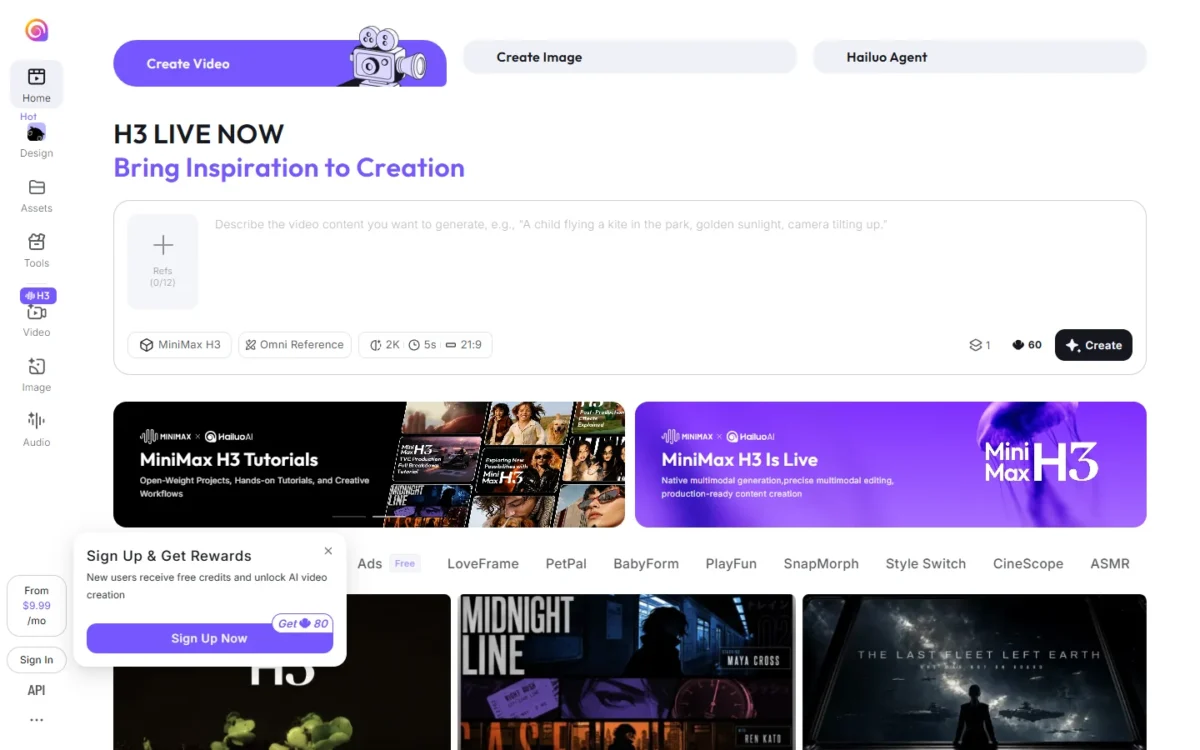
At $8.40 a month billed yearly, Hailuo AI’s Standard plan costs less than half of Google AI Pro, and its plan page lists Veo 3.1. Veo is the side door here; MiniMax H3 is the house model.
Standard’s 1,000 monthly credits buy about 143 seconds of MiniMax H3 at 768P, priced at $0.059 per second. That is more footage than Google AI Pro’s 80 seconds of Veo 3.1 Quality, from a different model, for less money.
Pro adds unlimited 1K images on Nano Banana Pro and Nano Banana 2, useful for building start frames without spending video credits.
The tradeoff. For anyone staying on a free tier, Hailuo is worse than Flow. Its Free plan gives one-time trial credits for Hailuo models only, while Flow refreshes 50 credits a day and includes Veo 3.1.
The seconds estimates on each plan card cover MiniMax H3, not Veo, so the page gives no Veo footage to check. The same page still lists Sora 2, which OpenAI has discontinued, so treat the Veo 3.1 listing as unconfirmed and run one Veo test before paying for a year.
- Pricing:
- Standard is $8.40 a month billed yearly, $100.80 up front. Pro is $30.40 a month billed yearly ($364.80) for 4,500 credits, and the H3 rate drops to $0.047 per second.
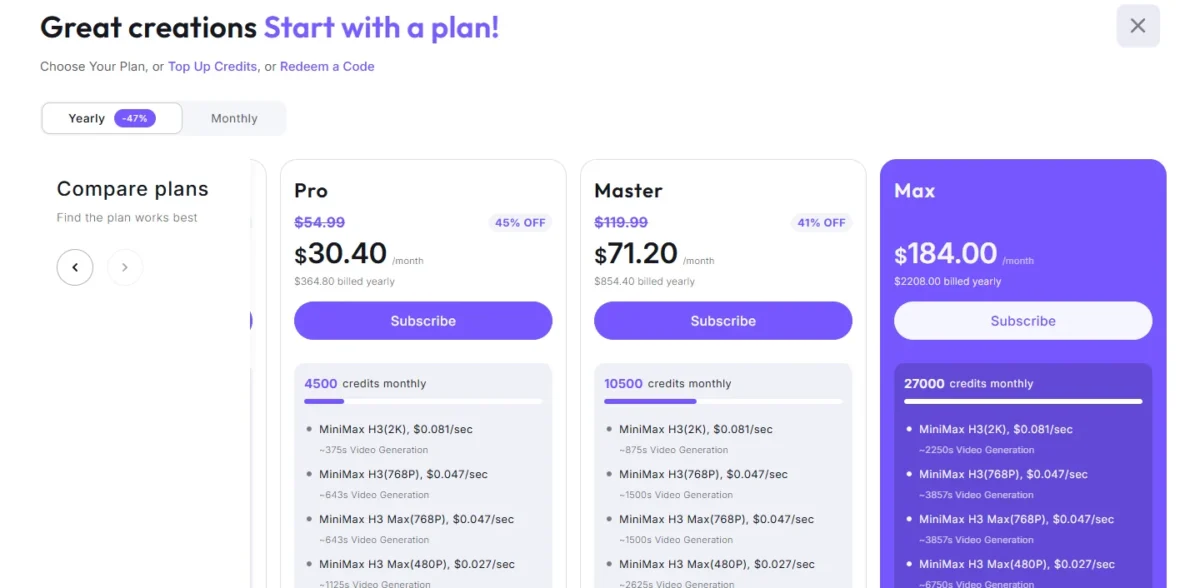
Upgrade when 143 seconds a month stops covering your drafts, not before.
- Skip it if:
- you want a free tier that keeps refreshing, because Hailuo’s free credits are a one-time trial.
6. Higgsfield: Best for Pricing Each Shot Across Veo 3.1, Kling and Seedance
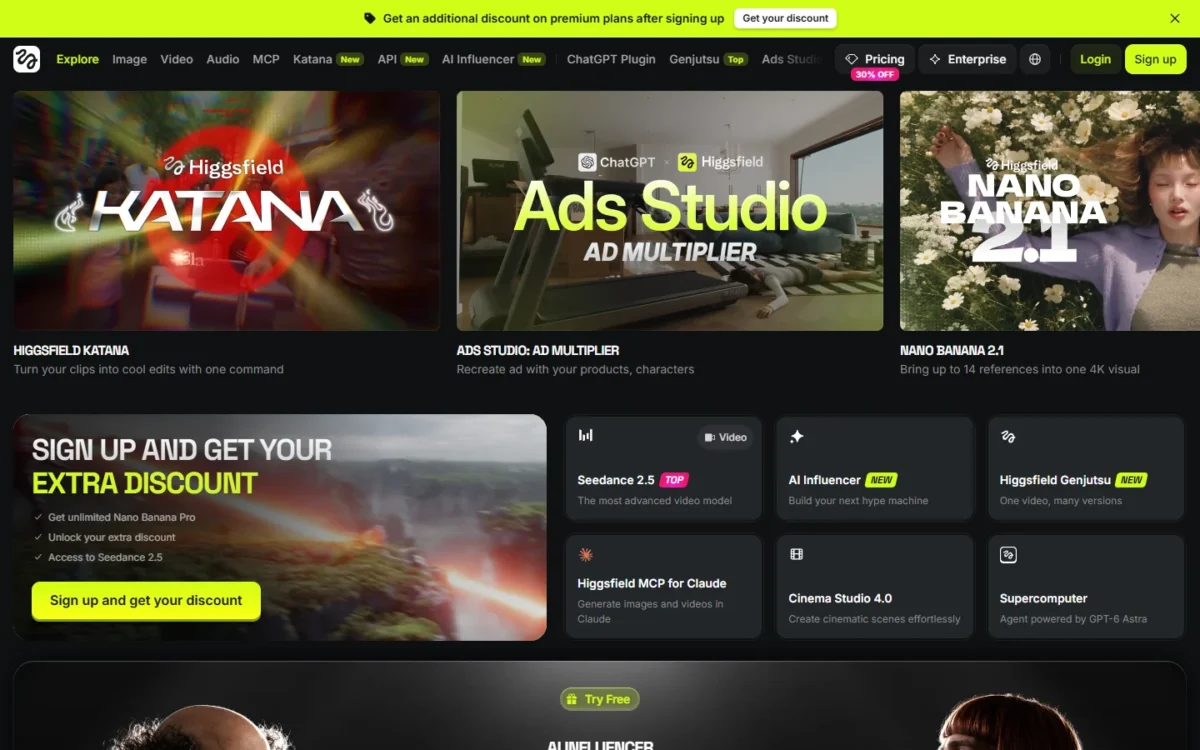
Higgsfield works like a price list for models: its pricing page prints a credit cost beside each model it lists, so you can cost a shot before you generate it.
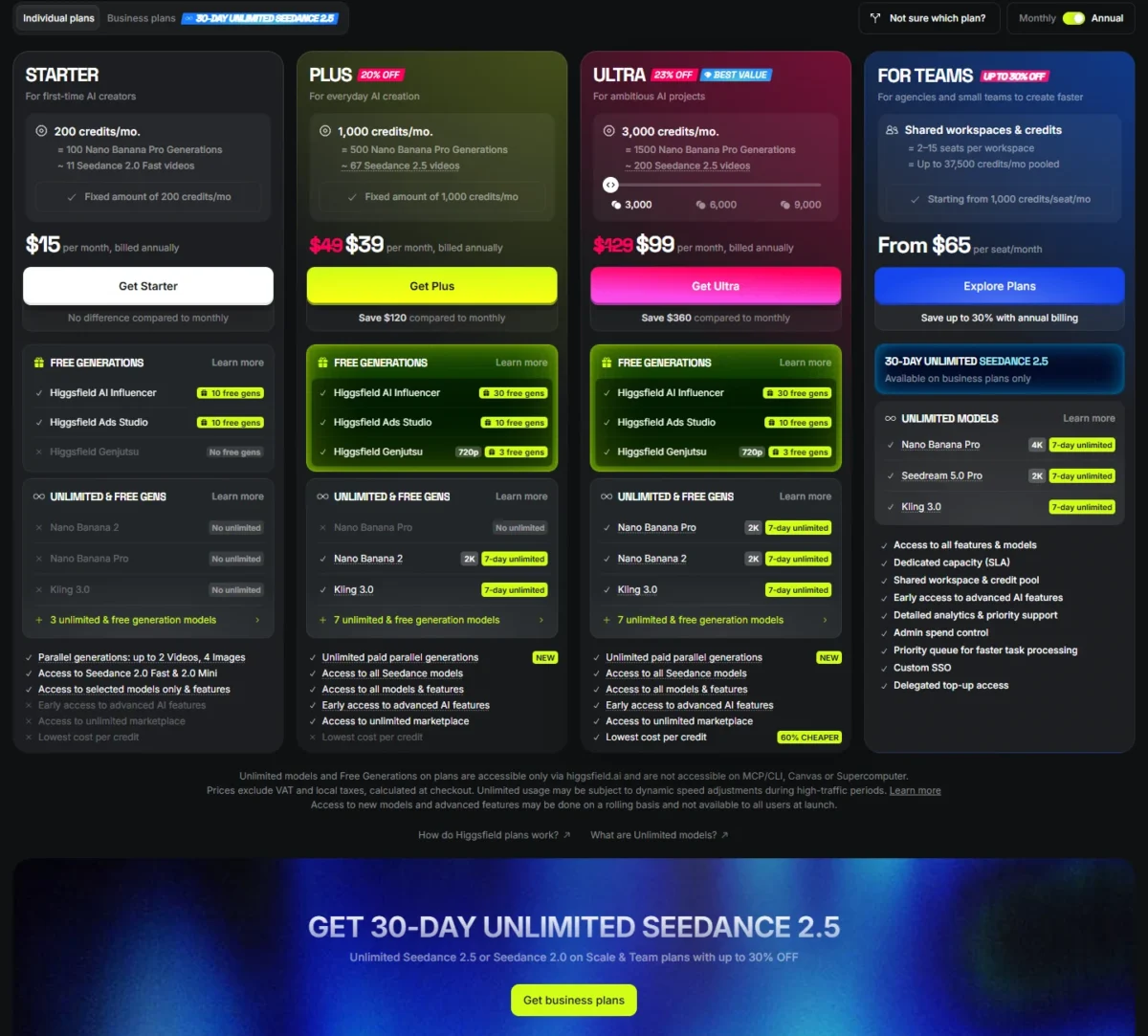
On Plus, 1,000 credits spend on Veo 3.1 at about 40 per 4-second clip. Kling 3.0 costs about 7 per 5-second clip at 720p, and Seedance 2.0 about 22.
Plus is also the first plan whose card lists access to all models. The homepage adds Cinema Studio 4.0 for cinematic scenes and Supercomputer, which it calls a superagent. For the full picture, see my Higgsfield review.
Against Flow, Higgsfield wins when one project needs Kling’s motion or Seedance beside Veo. Flow wins on the cost of Veo itself.
The tradeoff. Veo costs more here: 1,000 credits / 40 credits per clip = 25 clips x 4 seconds = 100 seconds for $39 a month billed annually. That is $39 / 100 = $0.39 a second, against $19.99 / 80 = $0.25 on Google AI Pro.
The “unlimited” tags on Plus are 7-day windows for Kling 3.0 and Nano Banana 2. The page adds that unlimited models work only on higgsfield.ai, not in MCP/CLI, Canvas or Supercomputer.
- Pricing:
- Plus is $39 a month billed annually, $39 x 12 = $468 a year; month to month the page shows $49, so annual billing saves $120. Starter is $15 a month for 200 credits and lists selected models only. Ultra is $99 a month billed annually for 3,000 credits at its smallest setting.
The same 1,000 credits buy 1,000 / 7 = about 142 Kling 3.0 clips x 5 seconds = 710 seconds. Per second that is 7 / 5 = 1.4 credits for Kling against 40 / 4 = 10 for Veo, so Kling work stretches the balance about seven times further.
- Skip it if:
- Veo is most of what you generate, since Flow sells those seconds for less, or you plan to run the unlimited windows through Supercomputer, Canvas or the CLI.
7. LTX Studio: Best for Script-to-Storyboard Production

LTX Studio starts where a script does. You upload the script, and LTX generates scenes and storyboards from it.
From there, Elements keep characters, objects and locations consistent across scenes, and a timeline editor and sound design handle the cut. Flow’s Storyboard Studio tool covers script-to-storyboard too; LTX adds pitch decks and the edit around it.
That makes LTX better than Flow for agencies that pitch before they produce. Standard brings Kling 3.0 Pro, Seedance 2.0 and Nano Banana Pro, and Pro adds Veo 3.1, Veo 3.1 Fast and Veo 3.1 Lite.
The tradeoff. Veo sits on the top self-serve plan. Pro costs $100 a month billed yearly, a $1,200 commitment, against $19.99 a month for Google AI Pro. Client work also needs Standard, the first plan carrying a commercial use license; Free is personal use only.
- Pricing:
- Lite is $12 a month billed yearly ($144) or $15 monthly for 8,000 credits a month. Standard is $28 a month billed yearly ($336) or $35 monthly for 28,000 credits a month. The pricing page does not convert those credits into seconds of footage, so price one real scene inside the refund window below before you commit.
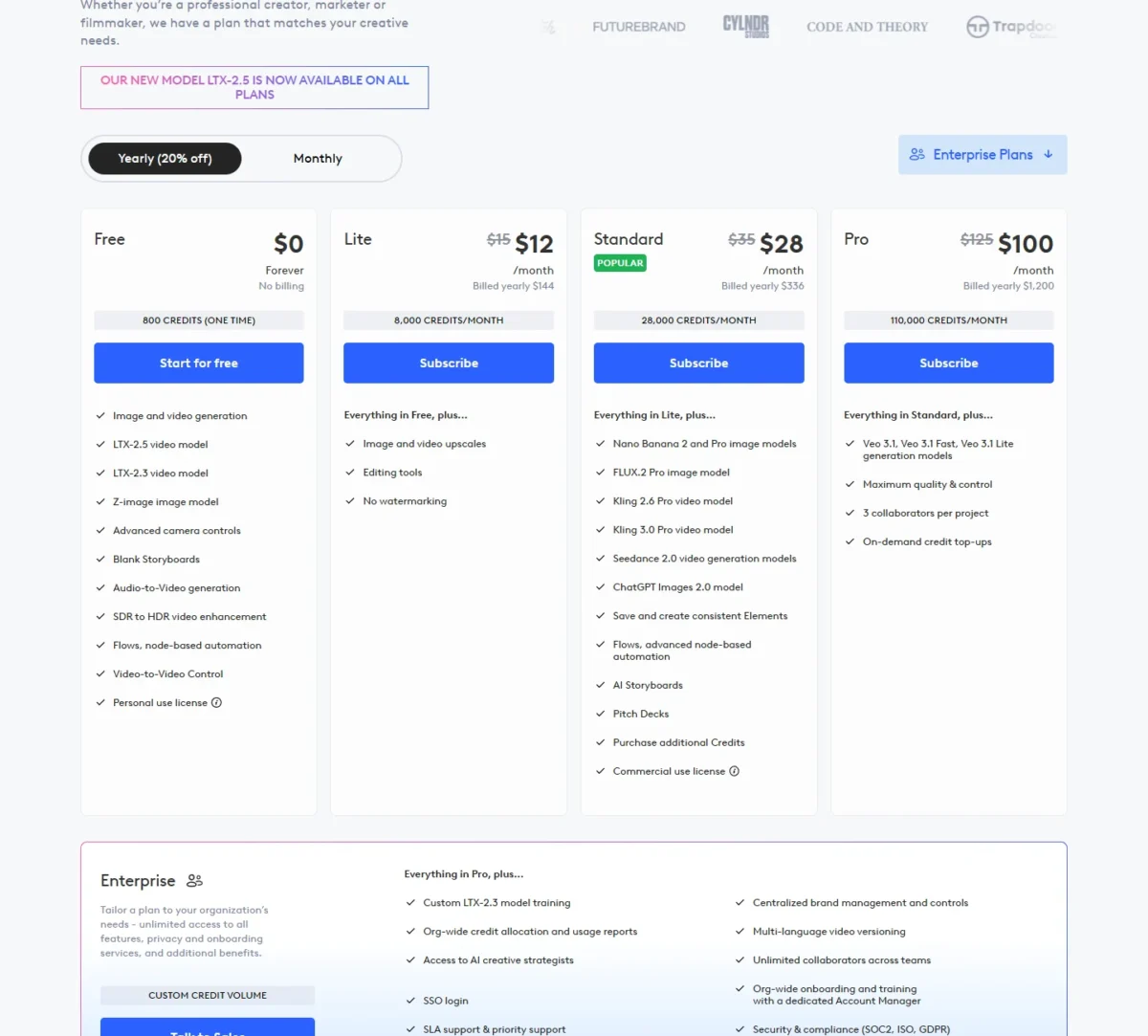
Refunds are typically granted within 14 days of payment if usage does not exceed 1,200 credits. That gives you a low-risk way to try the storyboard workflow on a real script.
- Skip it if:
- you want Veo for less than $1,200 a year, or you make single clips rather than scripted sequences.
8. Pika: Best for Short Social Clips With Sound

Pika is cheap to start and costs more than it looks once the clips are for a client.
Video Studio builds anything from a short clip to a 30-second multi-shot video, and Pika Soundtrack scores a clip with music, ambience and foley. For a finished social post, that beats stitching Flow’s 8- and 10-second generations.
The model list includes Seedance 2.5, Pika 2.5, MiniMax H3, Gemini 1.1 Omni Flash and Nano Banana 2, so a Flow user keeps Google’s Omni model. Character Studio saves a character for reuse across clips.
The tradeoff. Starter is thin and carries no commercial license. Its 900 credits make 7 Seedance 2.5 clips at 720p and 5 seconds, about 35 seconds a month. The Free plan has 0 monthly credits, so it runs on paid packs.
- Pricing:
- Starter is $10 a month billed monthly or $8 on annual billing. Creator, the first plan with a commercial license, is $35 monthly or $28 on annual billing ($28 x 12 = $336 a year).
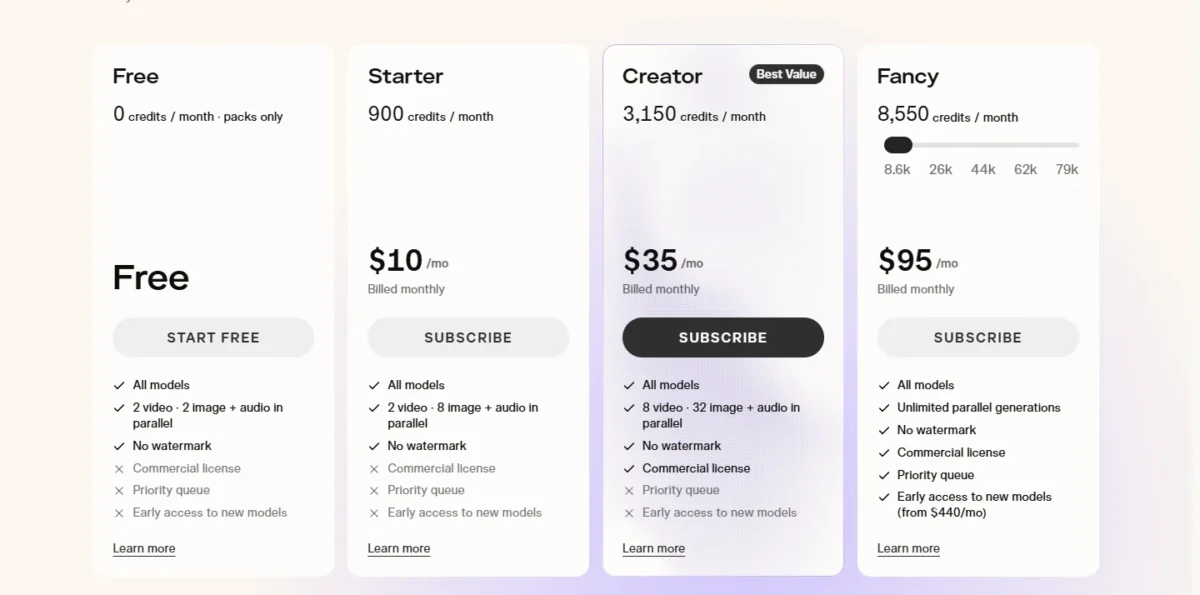
Credit packs run 60 credits per $1, and top-up credits expire 365 days after purchase, while plan credits do not roll over.
- Skip it if:
- you need commercial rights for under $28 a month, or Veo is part of your look.
9. Vidu: Best for Reference-Driven Clips Up to 16 Seconds

Vidu builds its workflow around references, which Flow’s priciest Veo model does not support.
Reference to Video takes three or more images of an object, character or scene and combines them in one prompted clip. My References saves characters, props and scenes for reuse: the Free plan holds 10 a month, and the paid plans list 300.
Standard also lists videos from 3 to 16 seconds, against 8 seconds for Veo 3.1 in Flow and 10 for Gemini Omni Flash.
That makes Vidu better than Flow for character consistency on longer single clips, and worse for anyone whose look depends on Google’s models. The homepage also lists a Vidu Agent that works from a single sentence.
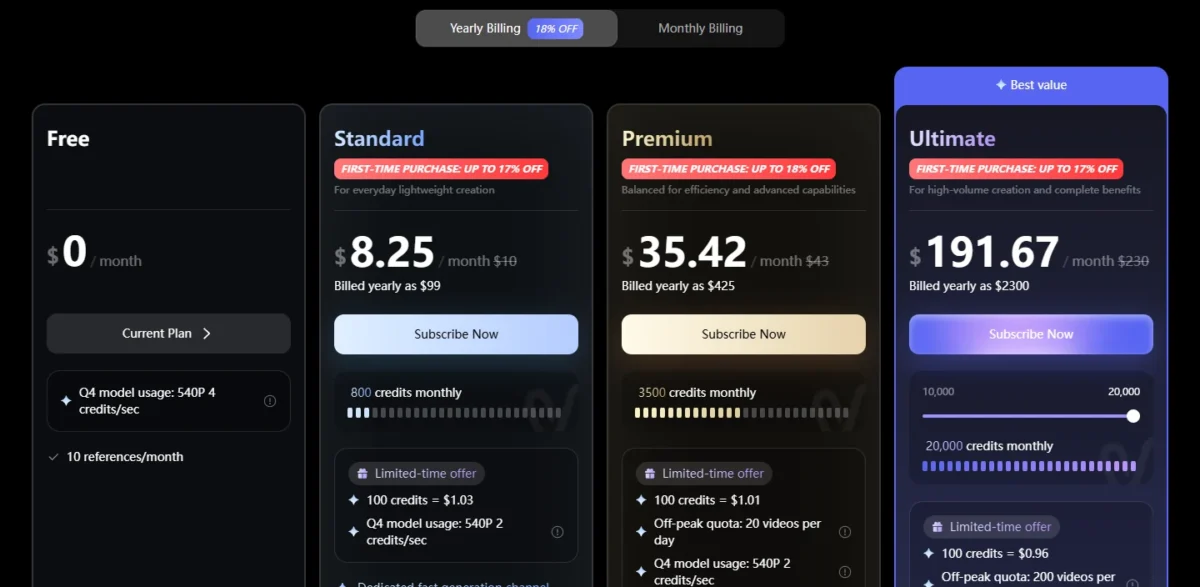
The tradeoff. Vidu replaces the model: its plan cards name Vidu’s own Q4 and Q3 video models and no Google ones. Standard’s 800 monthly credits price Q4 at 540P at 2 credits a second in a “Limited-time offer” box, so 800 / 2 = 400 seconds a month.
The Free card prices the same model and resolution at 4 credits a second, so if the offer ends and Standard moves to that rate, 800 / 4 = 200 seconds. The page gives no end date and prints no rate for higher resolutions.
- Pricing:
- Standard is $99 billed yearly, which the page shows as $8.25 a month, or $10 month to month ($10 x 12 = $120 a year). Premium is $425 billed yearly for 3,500 credits a month. All three paid plans list generated content as usable commercially.
- Skip it if:
- Veo or Nano Banana is part of your look, or you need 720p and 1080p prices per second, which the plan card does not print.
10. invideo AI: Best for Editing Generated Footage on a Timeline With Agents
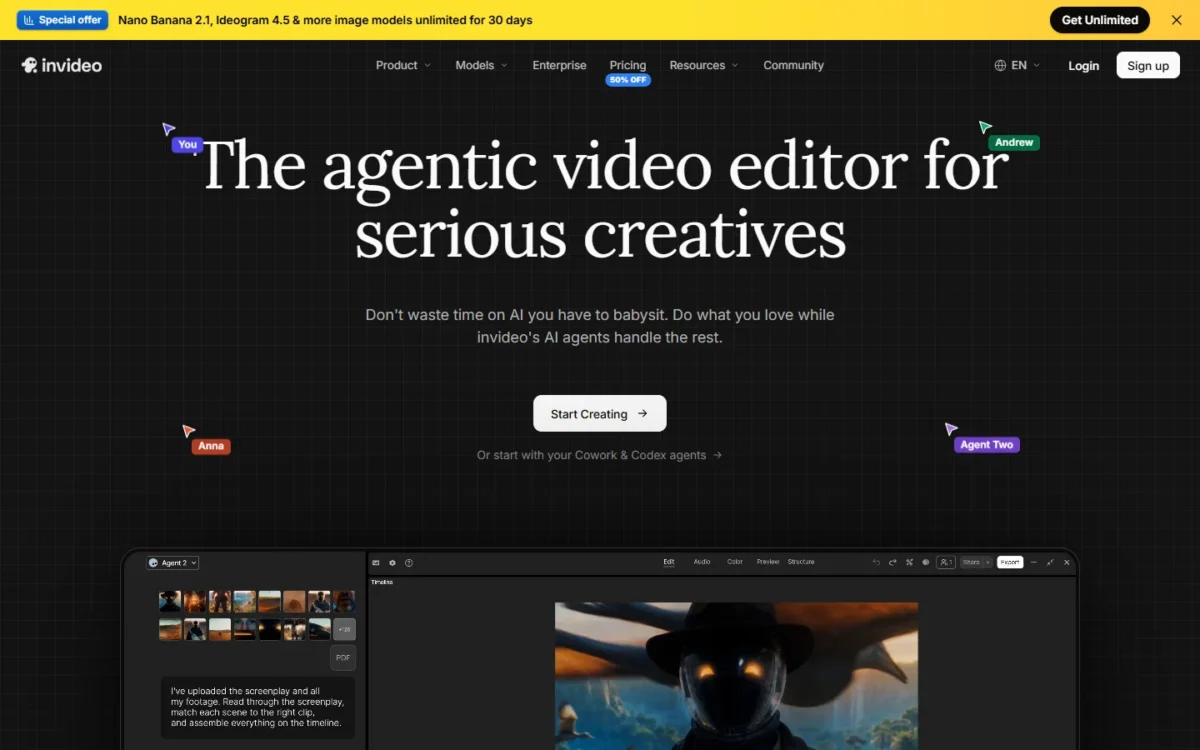
Editing is the product at invideo AI, and generation sits inside it. The homepage calls it an agentic video editor, where one direction to the editing agent applies to every shot on a multitrack timeline.
Storyboarding turns a script or idea into a shot-by-shot plan before anything is generated, and the editor carries color, audio and 3D tools. Pro and Ultra add Seedance 2.5 at 1080p and Seedance 2.0 at 4K, plus multiplayer editing for up to 10 and 20 seats.
Against Flow, invideo AI is built around timeline editing and multiplayer editing. It loses on models, since the plan cards name Seedance and Nano Banana Pro, not Veo.
The tradeoff. Credits are per seat, and the page says unused credits do not carry into the next month. Pro’s 1,000 credits cover 17 Seedance 2.5 clips at 720p: 17 x 5 seconds = 85 seconds a month, close to Google AI Pro’s 80 seconds of Veo 3.1 Quality, from a different model.
- Pricing:
- Pro is $15 per seat a month billed annually, $15 x 12 = $180 a seat a year, or $30 month to month. Basic comes to $54 a seat a year ($162 up front for three seats) but has no Seedance 2.5 and only Lite agents.
- Skip it if:
- you want Veo, or you generate clips and never edit them, because the timeline and the agents are what these plans are built around.
What Each Alternative Costs for a Year
Plan prices hide different units, so this table puts one year of price next to what one month of the plan’s credits buys. Luma is the exception: its page gives no period for its credits.
| Tool | Plan priced and billing | One year | What one month of credits buys |
|---|---|---|---|
| Google Flow | Google AI Plus, $4.99/ | $4.99 x 12 = $59.88 | 200 credits a month: 2 Veo 3.1 Quality clips |
| Google Flow | Google AI Pro, $19.99/ | $19.99 x 12 = $239.88 | 1,000 credits a month: 10 Veo 3.1 Quality clips |
| Runway | Standard, $12/ | $144 | 625 credits a month: 52s of Gen-4.5 |
| Kling AI | Standard, billed yearly | $79.2 | 660 credits a month, no seconds printed |
| Luma | Plus, billed yearly | $300 | 10,000 credits, no period on the page: 500s of Ray3.14 at 720p, or about 35s of Veo 3.1 with audio |
| Krea | Pro, $21/ | $21 x 12 = $252 | 20,000 units a month: 83 Seedance 2.0 videos |
| Hailuo AI | Standard, $8.40/ | $100.80 | 1,000 credits a month: about 143s of MiniMax H3 at 768P |
| Higgsfield | Plus, $39/ | $39 x 12 = $468 | 1,000 credits a month: 100s of Veo 3.1, or 710s of Kling 3.0 |
| LTX Studio | Lite, $12/ | $144 | 8,000 credits a month, no seconds printed |
| Pika | Starter, $8/month on annual billing | $8 x 12 = $96 | 900 credits a month: 7 Seedance 2.5 clips (720p, 5s) |
| Vidu | Standard, billed yearly | $99 | 800 credits a month: 400s of Q4 at 540P at the limited-time 2 credits a second, 200s at 4 |
| invideo AI | Pro, $15/ | $15 x 12 = $180 per seat | 1,000 credits per seat a month: 17 Seedance 2.5 clips (720p, 5s) |
Sources: Google Flow pricing, Runway pricing, Kling AI plans, Luma pricing, Krea pricing, Hailuo AI plans, Higgsfield pricing, LTX Studio pricing, Pika pricing, Vidu pricing, invideo AI pricing, checked October 2026.
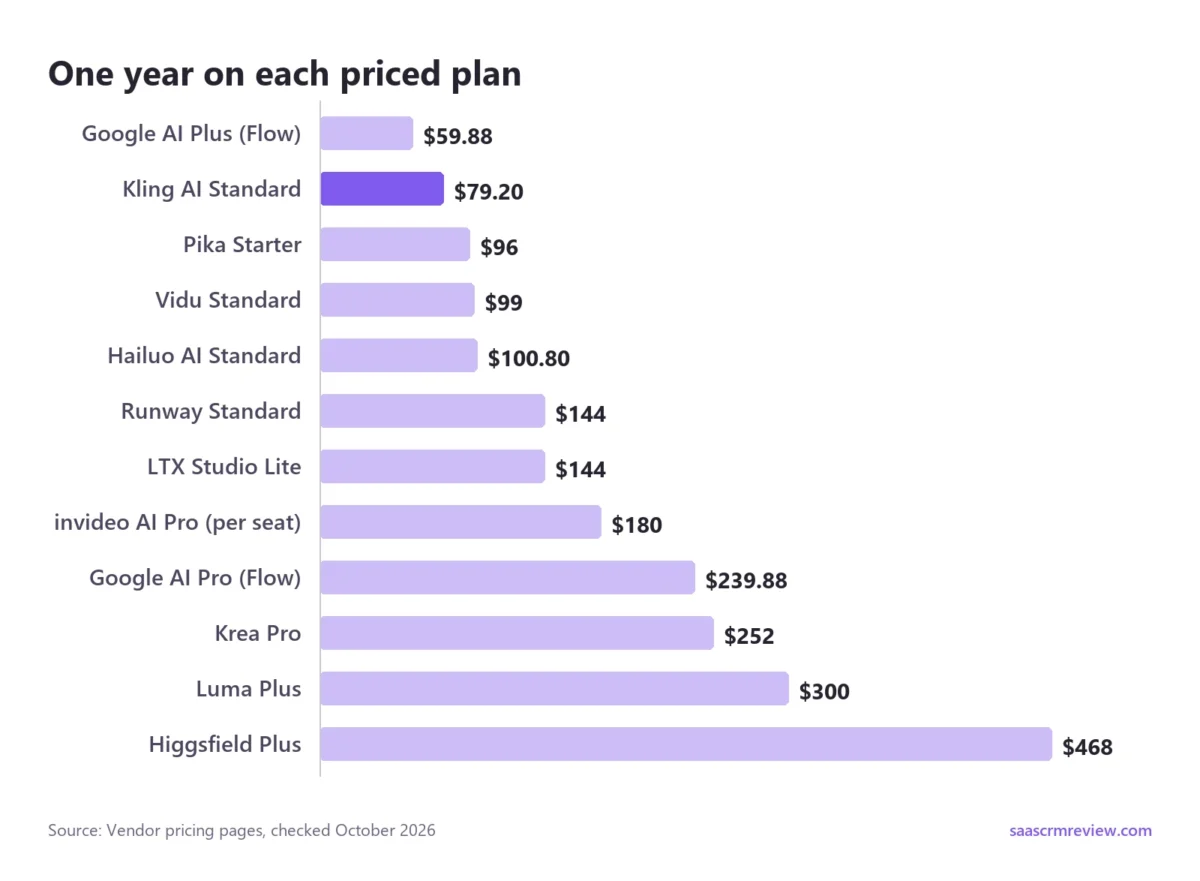
Sticker price and footage do not rank the same way. Runway Standard costs $144 a year and gives 625 credits a month, or 52 seconds of Gen-4.5. Hailuo AI’s $100.80-a-year plan gives 1,000 credits, about 143 seconds of MiniMax H3, every month.
The cheaper plan buys nearly three times the seconds, from a different model. Runway’s extra $43.20 pays for the suite around the footage rather than more of it.
Higgsfield shows how much the model sets the price of a second: the same 1,000 monthly credits give 100 seconds of Veo 3.1 or 710 seconds of Kling 3.0.
Commercial work changes the order among the plans priced here: Kling AI at $79.2, Vidu Standard at $99, Krea Pro at $252 and Luma Plus at $300. LTX Studio Standard and Pika Creator follow at $336 a year each ($28 x 12).
At three people, seats matter more than sticker price, which my Google Flow vs Runway comparison also covers for teams. Three Google AI Pro plans cost $19.99 x 3 x 12 = $719.64 a year, and three Runway Pro seats cost $28 x 3 x 12 = $1,008. invideo AI prices per seat, so three Pro seats cost $15 x 3 x 12 = $540 a year, with 1,000 credits each.
Higgsfield’s team plan starts from $65 per seat a month for 2 to 15 seats with pooled credits, so three seats start at $65 x 3 x 12 = $2,340 a year.
LTX Studio Pro, at $1,200 a year, lists 3 collaborators per project. The page does not say who they are or whether they are paid seats, so I cannot total it per person.
Runway also announces a Team plan for 2 to 9 seats with pooled credits, the format to ask about before buying three separate plans. For the other six, the pages I saved print no seat price you can total:
- Luma: the Team plan says “Contact us”.
- Pika: the Enterprise plan is custom.
- Krea: Business is one flat $160 a month on the yearly view for up to 50 members, so three people pay $160 x 12 = $1,920 a year.
- Kling AI, Hailuo AI and Vidu: no seat price printed.
Which Alternatives List Google’s Video Models
Five alternatives list Veo 3.1: Luma on Plus, Krea on Pro, Hailuo AI on every paid plan, Higgsfield from Plus, where its card lists all models, and LTX Studio from its Pro plan.
Gemini Omni Flash appears on Luma, Krea and Pika, and Nano Banana Pro on Runway, Luma, Hailuo AI, Higgsfield, LTX Studio and invideo AI.
Of the Veo prices that can be compared, Flow is the cheaper source. Google AI Pro, at $19.99 a month, sets the benchmark with 80 seconds of Veo 3.1 Quality.
Luma Plus’s 10,000 credits come to about 35 seconds of Veo 3.1 with audio, at $30 a month. Higgsfield Plus’s 1,000 credits come to 100 seconds at $39 a month billed annually. Krea and Hailuo AI print no Veo seconds, so their Veo prices cannot be compared.
Leave Flow for other models, better editing or a different workflow. Do not leave it expecting Veo to get cheaper.
How to Move Your Work Out of Google Flow
Flow exports through Google Takeout, and the archive holds media, prompts, generation settings, characters, scenes and edit history.
- Go to takeout.google.com and sign in with the account you use for Flow.
- Under “Select data to include,” click Deselect all, then check Flow.
- Click Next step and pick a delivery: an email link active for 7 days, Drive, Dropbox, OneDrive or Box.
- Choose Export once, a .zip or .tgz file and a maximum archive size, then click Create export.
- Unzip the archive when the email arrives.
Media lands in one media folder as .jpg, .mp4 and .wav files named by ID. Each file has a matching _metadata.json with its prompt, aspect ratio, model name and reference assets.
The structure sits in projects.json, characters.json, scenes.json and edit_stacks.json. Clips and images move as plain files, so they travel as uploads or reference images rather than as projects.
Characters and scenes are Flow’s own JSON, so plan to rebuild them as Kling elements, LTX Elements or a Pika character. Treat edit stacks as a record of how a shot evolved, not something to import.
Prompts survive in the metadata files, but Veo-tuned wording may need rework in a new model. A library of AI video prompts by style and shot is a quicker starting point than rewriting each one from scratch.
Time the switch to your billing date. Monthly Flow credits do not roll over, and Google AI plans give no refunds for partial billing periods, so spend the month’s credits, export, then cancel. Exporting does not delete anything from Google’s servers.
When to Stay With Google Flow
Stay if Veo 3.1 is most of your output. Google AI Pro’s 1,000 monthly credits buy 50 Veo 3.1 Fast clips or 10 Quality clips. Luma charges more per Veo second, and LTX Studio’s Veo plan costs $100 a month billed yearly.
Stay if you already use the bundle. Google AI Pro also carries 5 TB of storage, YouTube Premium Lite and Gemini 3.1 Pro in the Gemini app. If those earn their keep, the 1,000 Flow credits ride on a subscription you would pay for anyway.
Stay if you build your own tools. Flow lets Plus subscribers and above create tools in natural language. Among the ten, Luma Skills, which turns workflows into skills, and Krea’s App Builder, which turns a workflow into a reusable app, are the nearest ideas.
Stay if free use matters most. Anyone hunting for a free Google Flow alternative should weigh Flow’s own tier first. Fifty credits that refresh daily beat a one-time trial, as long as you can generate video outside 2 PM to 5 PM UTC.
How to Choose a Google Flow Alternative by Workflow
Four questions sort the list faster than any feature grid:
- Do you need Veo? Luma, Krea Pro, Hailuo AI, Higgsfield Plus and LTX Studio Pro list it. If not, Runway, Kling AI and Vidu open up, and all three cost less than Luma.
- Will you sell the work? Commercial terms are stated on Kling AI’s paid plans, Vidu’s paid plans, Krea Pro, Luma Plus, LTX Studio Standard and Pika Creator. LTX Studio Free and Pika Starter exclude them.
- How many seconds a month do you need? Compare the “What one month of credits buys” column, not the sticker price. Runway Standard’s 52 seconds a month at $144 a year and Hailuo AI Standard’s 143 seconds a month at $100.80 a year come from different models, so test the one you would use.
- Do unused credits survive? Flow’s monthly credits do not. invideo AI says the same of its credits. Runway Max rolls credits over for one month, and Runway credits you buy never expire.
If your job is broader than replacing Flow, my ranking of AI video generators compares a wider field of tools.
How I Built This List
This ranking comes from each vendor’s official pricing page and help documentation, checked October 2026, not from generation tests. Every tool here generates video from text or images, the core of Flow’s job.
The order is my judgment, not a score. It weighs breadth against yearly price:
- Breadth: how much of Flow’s job one plan covers, meaning more than one lab’s models, an agent or editor, and Veo.
- Price: one year of that plan.
- Tie-break: where two tools cover similar ground, the one whose footage I can price in seconds ranks higher.
The next paragraphs apply that rule to every position.
Runway ranks first: $144 a year covers Gen-4.5 and Kling 3.0, an agentic collaborator, 4K upscaling and sound, and it prints its seconds. Kling AI ranks second because $79.2 a year with commercial use is the lowest yearly price among the ten in the year table, but it covers only Kling’s models and prints no seconds.
Luma ranks third: it keeps Veo 3.1 beside Kling and Seedance with creative agents and lets me price Veo in seconds, but $300 a year is nearly four times Kling’s price.
Krea ranks fourth: it covers ground similar to Luma’s for $252 a year and adds a node editor, but it prints no Veo seconds per plan, so Luma’s measurable seconds hold third.
Hailuo AI ranks fifth as the lowest-priced plan that lists Veo 3.1, at $100.80 a year. It sits below Krea because its house model is MiniMax H3, its Veo footage is unpublished and its plan page is stale, which outweighs a $151.20 lower price.
Higgsfield ranks sixth: it prices Veo, Kling and Seedance model by model, but $468 a year is the highest price in the year table and its Veo seconds cost more than Flow’s. LTX Studio ranks seventh because its Veo plan costs $1,200 a year.
Pika, Vidu and invideo AI close the list because each solves one narrower job: sound-first social clips, reference-driven clips and timeline editing.
OpenAI’s Sora is not on the list. OpenAI’s Sora help page says the Sora web and app experiences were discontinued on April 26, 2026 and the API on September 24, 2026, yet Hailuo AI’s plan page still lists Sora 2.
PixVerse, Adobe Firefly and Dreamina are left out because their official plan prices did not load for me in US dollars.
Tools outside Flow’s cinematic niche belong in a broader text-to-video generator comparison.
Google Flow Alternatives FAQs
Is Google Flow actually free?
Yes: Flow’s free tier includes 50 credits a day, Veo 3.1, Gemini Omni Flash and Scenebuilder. The daily refresh is triggered by your first generation. When video is blocked at peak hours, image generation and the Flow Agent still work, so free users can keep building frames.
Is Google Flow still available?
Yes. Flow runs on the web and as a mobile app in the United States and the other countries on Google’s availability list, for users 18 and older. Features vary by country: editing uploaded videos and Avatars are unavailable in the EEA, Switzerland and the UK.
What has happened to Google Flow?
Flow moved from labs.google to its own address, flow.google.com, and now goes beyond Veo. It adds Gemini Omni Flash for editing video from any reference, an Agent built with Gemini, and Tools you create in natural language. Subscribers can also buy AI credits on top of their monthly Flow credits.
Is there any app like Google Flow?
The closest matches combine an agent, several models and a project canvas. Luma’s creative agents run Veo 3.1 among other models, Kling AI’s Canvas and Krea’s Nodes editor pair an agent with node editing, and LTX Studio turns scripts into storyboards. For phone-first work, Runway offers apps for iPhone and Android.
The Verdict: Which Google Flow Alternative to Pick
Pick Runway if you finish videos rather than just generate them: 4K upscaling, sound and Kling 3.0 sit in a $144-a-year plan. Pick Kling AI if price and commercial rights decide it, at $79.2 a year.
Pick Luma if you want Veo 3.1 alongside Kling and Seedance and accept that Veo seconds cost more there. Pick Krea if you want Veo 3.1 behind an agent and a node editor and will measure Veo footage yourself.
Choose Hailuo AI for the lowest-priced plan that lists Veo 3.1, after a test confirms Veo runs, and Higgsfield to price each shot across Veo, Kling and Seedance.
Choose LTX Studio for scripted, pitched productions, Pika for short social clips with sound, Vidu for reference-driven clips up to 16 seconds, and invideo AI to cut generated footage on a timeline.
If most of your output is Veo 3.1, stay on Flow. Google AI Pro at $19.99 a month still buys Veo seconds more cheaply than Luma or Higgsfield, the two rivals here that publish a Veo price you can convert to seconds.