Google Flow sells you a subscription and then meters the work. The subscription price is the small number, and the credit burn is the one that decides whether a plan survives contact with a real production month.
That gap is where most Google Flow AI pricing guides stop being useful. They list five tiers, quote a credit total, and leave you to work out whether 1,000 credits is a busy fortnight or a slow afternoon.
This guide treats the plan as a budget line. It converts every published price into credits, every credit into finished clips at a named model, and every feature gate into the specific moment it forces an upgrade.
If you are still shortlisting engines rather than plans, the wider roundup of best AI video generators is the better starting point. For Flow-specific workflow limits, read the Google Flow review; to test a chosen mode, use the 50 Google Flow prompts guide alongside the credit costs below.
The primer on what generative AI actually is covers the vocabulary this guide assumes.
In This Article (17 sections)
Quick Pricing Verdict
| Decision point | Answer |
|---|---|
| Starting price | $0 with no Google AI subscription, at 50 Flow credits per day |
| Cheapest paid entry | Google AI Plus at $4.99 per month for 200 monthly Flow credits |
| Best plan for most regular creators | Google AI Pro at $19.99 per month for 1,000 monthly Flow credits |
| Plan to avoid | Plus, if your workflow requires guaranteed mid-cycle top-ups; Google’s help pages disagree on eligibility |
| Biggest hidden cost | Credits bill per generation, not per request, so a two-output setting doubles the burn |
| Second biggest | Nothing rolls over, on any paid tier |
| Best alternatives if Flow’s budgeting model does not fit | Runway or Adobe Firefly, especially if published annual pricing or clearer budget forecasting matters. |
| Pricing verified | Plan prices checked 2026-08-22; credit rates and top-up documentation rechecked 2026-10-06 |
Source: Google Flow official pricing page and Google Flow credit documentation.
The short version is that Google Flow is cheap to try and easy to misbudget. The advertised prices are honest, and they describe a fraction of what determines your real monthly cost.
Executive Summary: What Google Flow Costs at Three Real Workloads
Plan price alone tells you almost nothing here, because the same credit balance produces wildly different output depending on which model you run. Three workloads make the point better than a tier list does.
The occasional evaluator. Sporadic experiments, no schedule, no deadline. The free route costs $0 and refreshes 50 credits daily, which funds five Veo 3.1 Lite generations a day and nothing heavier.
The regular solo creator. Roughly two or three finished clips a week, mostly on the fast models, with light editing. Google AI Pro at $19.99 per month covers 100 Veo 3.1 Lite generations or 50 Veo 3.1 Fast generations, which is comfortable until retries and second outputs enter the picture.
The high-volume producer. Daily output, batch generation, and 4K delivery. Google AI Ultra at $99.99 per month is the first tier where the credit rate itself changes, because Ultra halves the cost of the two models most production teams actually live on.
Notice what moved between those three. Not the feature list, and not the interface.
What moved was the credit rate and the monthly allocation, which is the only pair of numbers that reliably predicts whether a plan holds.
Google Flow Pricing and Credits Explained
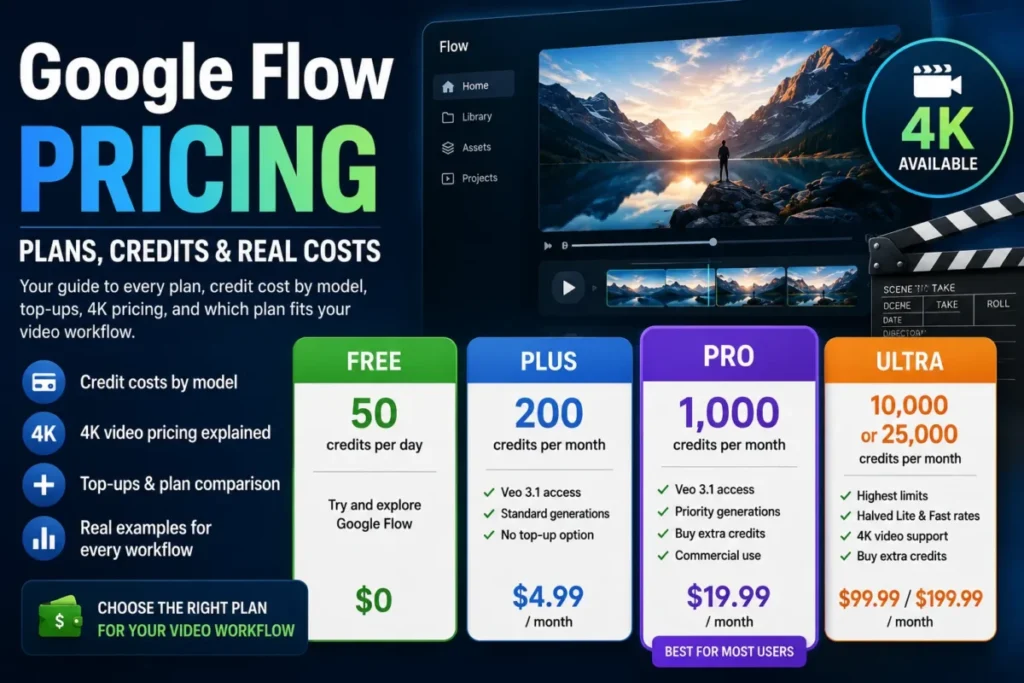
Google publishes five access routes to Flow. Four are paid Google AI subscriptions, and the fifth is a no-subscription tier that still carries a working credit grant.
| Plan | Monthly price | Included Flow credits | Refresh | Rollover |
|---|---|---|---|---|
| No Google AI subscription | $0 | 50 per day | Daily, on first generation | No |
| Google AI Plus | $4.99 | 200 per month | Billing cycle | No |
| Google AI Pro | $19.99 | 1,000 per month | Billing cycle | No |
| Google AI Ultra | $99.99 | 10,000 per month | Billing cycle | No |
| Google AI Ultra | $199.99 | 25,000 per month | Billing cycle | No |
Sources: Flow plan and price display for the amounts and allocations, Flow credit rules for refresh and rollover, checked 2026-08-22. Google’s own pricing page carries the caveat that prices may vary by market, so treat these as US list figures.
Two mechanics in that table matter more than the prices above them.
The first is that credits are charged per generation, not per request. Google states plainly that some product features create multiple generations from a single request, which means the output-count setting is a cost multiplier sitting in plain sight.
Set two outputs on a Veo 3.1 Fast prompt and you have not spent 20 credits. You have spent 40, and your 1,000-credit Pro month just became a 500-credit month.
The second is that nothing accumulates. Free credits refresh daily once your first generation triggers the reset, paid credits refresh at the start of the billing cycle, and unused credits in both cases expire rather than bank.
That single rule is why a high tier can be poor value for an intermittent schedule. A quiet month on the $199.99 Ultra tier does not fund a heavy month afterwards, and the unused balance funds nothing at all.
There is a third mechanic with a smaller blast radius and a sharp edge. Remaining free credits are forfeited the moment you upgrade to a paid Google AI plan, so upgrading mid-day throws away whatever the daily grant had left.
Line-Item Credit Cost by Model and Workflow
This is the table the pricing page does not show you, and it is where the real budgeting happens.
| Operation | Standard credit cost | Cost on Ultra |
|---|---|---|
| Veo 3.1 Lite generation | 10 | 5, halved |
| Veo 3.1 Fast generation | 20 | 10, halved |
| Veo 3.1 Quality generation | 100 | 100, no discount |
| Gemini Omni Flash 720p, 4 seconds | 7 | 7, no discount |
| Gemini Omni Flash 720p, 6 seconds | 10 | 10, no discount |
| Gemini Omni Flash 720p, 8 seconds | 12 | 12, no discount |
| Gemini Omni Flash 720p, 10 seconds | 15 | 15, no discount |
| Gemini Omni Flash 360p, 4 seconds | 4 | 4, no discount |
| Gemini Omni Flash 360p, 6 seconds | 5 | 5, no discount |
| Gemini Omni Flash 360p, 8 seconds | 6 | 6, no discount |
| Gemini Omni Flash 360p, 10 seconds | 7 | 7, no discount |
| Gemini Omni Flash video edit | 40 | 40, no discount |
| 1080p upscale | 0 on Plus and Pro, unavailable free | 0 |
| 4K upscale | Not available below Ultra | 50 per upscale |
Source: Google Flow per-generation credit costs, checked against the same page as the plan allocations above.
Read the first two rows again, because they change the shape of the whole pricing table. Ultra does not simply hand you a bigger bucket; it halves the price of Veo 3.1 Lite and Veo 3.1 Fast.
Quality and Omni Flash get no such discount. A studio that lives on Veo 3.1 Quality pays exactly the same 100 credits per generation whether it is on Plus or on the $199.99 Ultra tier, which quietly makes Quality-heavy work the least tier-sensitive workload on the platform.
The Omni Flash rows carry a separate trap. At 720p, video generation is priced by duration, from 7 credits at four seconds up to 15 at ten; 360p costs 4 to 7 credits across the same durations. Editing an existing clip is a flat 40 credits regardless of length.
Editing therefore costs more than generating in every duration bracket. If your process is generate, review, then fix, budget the fix as the expensive half.
The 1080p and 4K rows are usually collapsed into a single word on comparison pages, and they behave nothing alike. Any paid tier gets 1080p upscaling at zero credits, while 4K is gated to Ultra and charges 50 credits every time you use it.
That distinction is worth pricing out. Twenty 4K deliveries a month is 1,000 credits of pure post-processing, which is an entire Pro allocation spent before a single frame is generated.
Two output settings, two very different bills
Because billing follows generations rather than requests, the same prompt has two prices depending on one dropdown.
| Model or workflow | One output | Two outputs |
|---|---|---|
| Veo 3.1 Lite, non-Ultra | 10 credits | 20 credits |
| Veo 3.1 Lite, Ultra | 5 credits | 10 credits |
| Veo 3.1 Fast, non-Ultra | 20 credits | 40 credits |
| Veo 3.1 Fast, Ultra | 10 credits | 20 credits |
| Veo 3.1 Quality, any plan | 100 credits | 200 credits |
| Gemini Omni Flash 720p at 8 seconds | 12 credits | 24 credits |
| Gemini Omni Flash video edit | 40 credits | 80 credits |
The right column applies Google’s per-generation billing rule to the same rates, and it is not a second Google price list. It exists because the number-of-outputs control sits inside the same generation settings panel as the model picker, and it is the single most common reason a credit balance drains faster than a spreadsheet predicted.
How Many Videos Do Google Flow Credits Buy?
Credits only become a purchase decision once they are converted into finished clips. Every figure below assumes one output per generation, no retries, and the entire monthly allocation spent on that one category.
| Plan | Veo Lite | Veo Fast | Veo Quality | Omni Flash 8s (720p) | Omni Flash edits |
|---|---|---|---|---|---|
| Plus, 200 credits | 20 | 10 | 2 | 16 | 5 |
| Pro, 1,000 credits | 100 | 50 | 10 | 83 | 25 |
| Ultra $99.99, 10,000 credits | 2,000 | 1,000 | 100 | 833 | 250 |
| Ultra $199.99, 25,000 credits | 5,000 | 2,500 | 250 | 2,083 | 625 |
The Omni Flash 8s column uses 720p at 12 credits per generation. Ultra’s zero-credit Veo Lite Lower Priority option is excluded from the regular-priority Veo Lite column. Every cell there is this article’s arithmetic over Google’s published per-generation credit rates and the monthly allocation for each plan. The Ultra rows use the discounted Lite and Fast rates, and every other column uses the flat rate that applies to all plans.
Those are ceilings under ideal conditions, and they are the most useful numbers in this guide.
The Quality column is the one that reorders the plans. Plus funds two Veo 3.1 Quality generations a month, and a single retry wipes out half of that.
Any workflow that treats Quality as the default output rather than the final pass will outrun Pro inside a fortnight. That is the clearest upgrade trigger on the platform, and it has nothing to do with features.
Feature Gates by Plan
Some of what you buy at each tier is capacity, and some of it is access. The access half is short, specific, and easy to miss on the pricing page.
| Capability | Free | Plus | Pro | Ultra |
|---|---|---|---|---|
| Veo 3.1 Lite, Fast, Quality generation | Yes, at flat rates | Yes, at flat rates | Yes, at flat rates | Standard Lite and Fast rates halved; Lite Lower Priority is 0 credits for eligible Ultra subscribers and family plan managers |
| Google Flow Tools creation | Not available | Included from Plus upward | Included | Included |
| 1080p upscaling | Not available | Included, 0 credits | Included, 0 credits | Included, 0 credits |
| 4K image and video upscaling | Not available | Not available | Not available | Ultra only, 50 credits each |
| Buying extra AI credits | No purchase route | Official help pages conflict; check account eligibility | Packs of 2,500 to 20,000 | Packs of 2,500 to 20,000 |
Sources: Flow plan feature display for the upscaling and Tools rows, Google One AI credit purchase rules for the top-up row.
Gemini Omni Flash sits outside that table on purpose. Google documents it as available to all users, and it is the only model that generates ten-second clips, edits uploaded and generated video, and supports custom voice creation.
That makes Omni Flash the reason a free or Plus account can do serious editing work at all. It also means the model with the widest capability set is the one with no Ultra discount, which is an odd shape for a pricing ladder.
Omni Flash is the same Gemini model family covered in the Gemini review, so teams already paying for Gemini access should check what their existing plan covers before adding a second subscription.
Model availability is not the only gate worth checking. Google documents that Flow will switch you to a compatible model when the feature you selected is not supported.
Google tells you to confirm the active model and its credit cost in settings before you generate.
Treat that as a budgeting instruction rather than a UI note. A silent switch from Lite to a costlier model is a silent change to the price of that click.
Workflow Costs Beyond the First Clip
Most credit surprises happen after the first generation lands, in the steps a feature list describes with one verb.
Extending a clip. All Veo 3.1 eight-second videos can be extended, and Google states you must use Veo 3.1 Lite to extend them. The extension is billed at the Lite rate of 10 credits, or 5 on Ultra, whatever model produced the original.
Editing an extended clip. Once a clip is extended, the insert, remove, and camera edit modes stop being available on it. Plan the destructive edits before the extension, not after.
Editing an upload. Omni Flash accepts uploads up to 60 seconds and 1 GB, but anything longer than 30 seconds must be trimmed to 30 in Flow, and the editable window is a segment of up to 10 seconds. A two-minute source clip is not an Omni Flash job.
Running the advanced tools. Scenebuilder, camera position and motion, and batch editing are documented as available only on Google Flow Desktop. A mobile-only production plan loses the sequencing and batch steps entirely.
None of those four are priced as add-ons. All four change how many generations a finished deliverable takes, which is the same thing as changing its price.
The diagram makes one thing obvious that prose buries. The mid-cycle top-up route is clear for Pro and Ultra, while Google’s two help pages disagree about Plus eligibility.
Monthly vs Annual: What Twelve Months Actually Costs
Google displays Flow access as monthly Google AI subscription prices. Twelve consecutive months at those prices produce the following totals.
| Plan | Monthly | Twelve monthly payments | Subscription dollars per included credit |
|---|---|---|---|
| Google AI Plus | $4.99 | $59.88 | $0.02495 |
| Google AI Pro | $19.99 | $239.88 | $0.01999 |
| Google AI Ultra | $99.99 | $1,199.88 | $0.009999 |
| Google AI Ultra | $199.99 | $2,399.88 | $0.0079996 |
Both right-hand columns are arithmetic over the monthly prices and credit allocations shown on Google’s Flow plan display, and neither is an annual contract price. An exact US annual price for these plans was not visible on the public Flow pricing page at the check date, so no annual discount is assumed or implied here.
The right-hand column needs the same caution. It divides subscription price by included credits, which makes tiers comparable to each other, and it is not a rate at which Google sells a credit.
Nobody can buy a single Flow credit for $0.0079996. The subscription bundles other Google AI benefits, and Google does not publish a dollar price for its credit packs on the pages that describe them.
The upgrade deltas are the more honest way to read that column. Moving from Pro to the $99.99 Ultra tier adds 9,000 included credits for $80 a month, which is about $0.00889 of extra subscription spend per extra credit.
Moving from $99.99 Ultra to $199.99 Ultra adds 15,000 credits for $100, or roughly $0.00667 each. Both ratios improve as you climb, and both are worthless if the credits expire unused.
Add-Ons, Top-Ups, and Surprise Costs
Nothing in Flow carries a mandatory onboarding fee on the public pricing material. The costs that do exist are usage-shaped, and two of them are eligibility-shaped as well.
Extra AI credits. Google’s dedicated purchase instructions say additional AI credits are available to Pro and Ultra but not Plus. The Flow credit help page says Plus, Pro and Ultra can purchase them in supported regions outside Japan. These official pages conflict, so check the purchase option in your own account and billing region before depending on Plus top-ups. Example pack sizes are 2,500, 5,000 and 20,000 credits; checked October 6, 2026.
The dollar price of those packs is not published on that page. Without it, no honest break-even calculation exists between topping up Pro and upgrading to Ultra, and any guide that prints one has invented a number.
Auto-reload. Once a purchase has been made, auto-reload can top the balance up automatically when it falls below a threshold you set, capped at five reload purchases per day. That is a spend ceiling, and it is high enough to matter on a batch-heavy day.
Expiry on purchased credits. Google states that AI credits may expire after a period set out when you acquire them. Buying a large pack ahead of a project is therefore not the same as buying capacity you own indefinitely.
Billing-channel exclusions. Members subscribed through third-party platforms, Pixel Pass, or Apple billing cannot purchase AI credits at all, and credit purchases are unavailable in Japan. Check the billing channel before you assume the top-up valve exists.
Family pooling. A family group shares one pooled credit balance rather than receiving a separate allocation per person, and only the plan manager can buy credits or change the membership. Four people on a Pro plan share 1,000 credits, not 4,000.
Failed generations. Google states that failed generations are not charged, that audio-generation failures are refunded, and that a failed activity leaves the remaining balance unaffected even if there is a delay before credits reappear. Creative dissatisfaction is not a failure, so a technically successful but unusable clip is still billed.
Throughput, which is not a credit cost at all. After a large number of generations in a day, Google reduces how many generations you can make within a minute. A large balance does not guarantee the throughput to spend it.
Where Google’s Own Documentation Disagrees With Itself
Two of Google’s live pages contradict each other on questions a buyer needs answered before paying, and a third question is left arithmetically unresolved. I am flagging all of them rather than picking whichever version reads better.
Is Flow free or subscription-gated? The Flow pricing page and the credit documentation both describe a no-subscription route with 50 daily credits. The Get started with Google Flow page still says access requires a Google AI Plus, Pro, or Ultra subscription.
Both were live on 2026-08-22. Treat the free route as advertised and account eligibility as unconfirmed until Google reconciles the two.
Can free credits actually fund a Quality generation? The credit page states free credits may be used for Veo 3.1 Lite, Fast, and Quality generations. It also states the free grant is 50 credits a day with no rollover, and that a Quality generation costs 100 credits.
Nothing on the pages checked explains how a free account funds a 100-credit job from a non-accumulating 50-credit daily grant. No competing guide resolves it either, and inventing a starter bonus to make the arithmetic work would be worse than saying so.
How many credits does a Workspace subscriber get? This one agrees with itself. Both the Flow Get Started page and the Workspace Labs tools documentation state that qualifying Workspace editions receive Flow at no extra charge with 50 daily AI Credits.
That figure is a separate entitlement lane, not a sixth consumer tier, and it should never be added to a personal Google AI allocation. If your organisation already pays for a qualifying edition, price the gap against that grant rather than against zero, using the Google Workspace pricing guide as the baseline.
Google’s current Flow credit table lists Veo 3.1 Lite (Lower Priority) at 0 credits for Ultra subscribers and family plan managers. It lists that mode as unavailable to Ultra family members and non-Ultra subscribers. The regular-priority Veo 3.1 Lite generation still costs 5 credits on Ultra.
Lower Priority is a separate mode, so do not treat its zero-credit rate as the price of regular-priority generation. Check the active model and credit cost in Flow settings before running a batch; Google says limits can change.
Which Google Flow Plan Should You Choose?
The plan follows the workload, and the workload is defined by one question: which model produces your deliverable, and how many generations does one deliverable take?
Choose the free route if you are judging output quality before committing budget. Fifty credits a day funds five Veo 3.1 Lite generations, which is enough to form an opinion and not enough to ship anything on a schedule.
Choose Google AI Plus if your monthly generation count genuinely sits under 200 credits and you value the wider Plus bundle. If a deadline depends on mid-cycle top-ups, verify purchase eligibility in your account first: Google’s Flow and Google One help pages currently disagree about Plus.
Choose Google AI Pro if you generate regularly and roughly 1,000 credits covers the month. Pro has clearly documented top-up eligibility on both Google help pages, making it a more predictable choice for work with a delivery date.
Choose Google AI Ultra at $99.99 if your volume is dominated by Veo 3.1 Lite or Fast, or you need 4K upscaling at all. The halved rates mean Ultra buys far more Lite and Fast output than its ten-times credit count suggests against Pro.
Choose Google AI Ultra at $199.99 if you routinely exhaust 10,000 credits before the cycle resets. If you do not, the better allocation ratio is a discount on capacity you will throw away.
I would treat Pro as the honest benchmark and make every other tier argue for itself with a number. Ultra should be justified by a counted monthly volume or a hard 4K requirement, never by the length of its feature list.
Run the total cost the same way every time, because the subscription price is only the first line of it. Add the plan gate you need, the monthly volume you actually generate, and the upgrade trigger that would push you a tier higher, all against the rates documented on Google’s own credit page.
Which Google Flow Plan Should You Avoid?
Google AI Plus is the plan most likely to be bought for the wrong reason. At $4.99 it looks like a low-risk step up from free, and its 200 monthly credits are two Veo 3.1 Quality generations or ten Veo 3.1 Fast generations.
The main uncertainty is whether Plus can buy additional credits mid-cycle. Google’s dedicated purchase page says no, while Flow Help says yes in supported regions outside Japan. Check the option in your billing account before relying on it.
There is a documentation conflict worth knowing here. The Flow credit page mentions Plus alongside Pro and Ultra when discussing extra credits, while the Google One purchase page states directly that credits are not available for purchase on Plus plans.
Because neither help page explains the discrepancy, treat Plus top-up access as unconfirmed for your account until the purchase control is visible. If guaranteed top-ups are essential, Pro and Ultra are consistently listed by both pages.
The exception is real and narrow. If your entire use of Flow is occasional 1080p work under 200 credits a month, Plus is the cheapest way to clear the upscaling gate that the free tier cannot reach at any price.
Google Flow Pricing vs Runway and Adobe Firefly
Cross-platform credit comparisons are close to meaningless at the credit level, because a Google Flow credit, a Runway credit, and an Adobe generative credit each buy different work. What does compare is the monthly budget a serious creator ends up committing, which my Google Flow vs Runway comparison works out in more detail.
| Platform | Entry paid tier | Mid tier | Top published tier |
|---|---|---|---|
| Google Flow | $4.99, 200 credits | $19.99, 1,000 credits | $199.99, 25,000 credits |
| Runway | $15, 625 credits | $35, 2,250 credits | $95, 9,500 credits |
| Adobe Firefly | $9.99, 2,000 credits | $19.99, 4,000 credits | $199.99, 50,000 credits |
Sources: Runway plan pricing and Adobe Firefly plan comparison for the standard monthly amounts and credit allocations. Runway and Adobe credits are not interchangeable with Flow credits and are shown only as a budget anchor.
Google’s paid entry point is materially cheaper than either, and its top tier lands in the same place as Adobe’s. The distinguishing move is at the middle, where $19.99 buys 1,000 Flow credits or 4,000 Firefly credits, and lands between Runway’s $15 Standard and $35 Pro tiers without matching either.
Two structural differences matter more than the numbers. Runway publishes an annual price beside every monthly one, and Adobe publishes credit-pack economics that let a buyer model overage cost directly.
Flow does neither on its public pages. If predictable annualised budgeting is a procurement requirement, that is a genuine reason to look at the Runway ML pricing guide or the Adobe Firefly pricing breakdown before committing.
Is Google Flow Worth the Price?
Worth it if your output is dominated by Veo 3.1 Lite or Fast, you can count your monthly generations within about 20 percent, and you either sit inside Pro’s 1,000 credits or genuinely consume Ultra’s discounted rates. On that profile Google’s entry pricing is the cheapest serious route into current-generation AI video, and the free daily grant lets you prove the fit before paying anything.
Not worth it if your work is Quality-first, your volume is bursty, or your billing runs through Apple or a third-party channel. Quality generations ignore the Ultra discount, bursty months forfeit unused credits, and the wrong billing channel removes the top-up valve entirely.
Look elsewhere if you need a published annual price, a published overage rate, or a documented credit-pack cost to get a budget approved. Those are procurement basics, and Google does not publish them for Flow.
The verdict I would defend is narrow and specific. Google Flow is the strongest value in this category for high-volume Lite and Fast production, and one of the weakest for low-volume Quality production, and the pricing page gives you no way to tell those two apart.
How to Avoid Overpaying for Google Flow
- Check the output count before every batch. The number-of-outputs control multiplies the per-generation price directly, and it sits in the same panel as the model picker.
- Confirm the active model in generation settings. Google warns that an unsupported feature will switch you to a compatible model, and the credit cost moves with it.
- Reserve Veo 3.1 Quality for final passes only. At 100 credits it consumes half a Plus month per generation and gains nothing from the Ultra discount.
- Do the extension math before you extend. Extensions bill at the Lite rate and permanently close off insert, remove, and camera edits on that clip.
- Price 4K as an operation, not a feature. Ultra unlocks it, then charges 50 credits per upscale, so twenty deliveries is a full Pro allocation.
- Upgrade at the start of a day, not the end of one. Remaining free credits are forfeited the moment a paid plan activates.
- Tighten the prompt before you spend on a retry. A failed generation costs nothing, but an unusable successful one is billed in full, so a working AI video prompt library is a direct credit saving.
- Read the credit activity log when a month runs short. It shows timestamp, category, and amount per transaction, which is the fastest way to find the setting that is quietly doubling your burn.
- Do not budget a family plan per person. Eligible members share one pooled balance, and only the plan manager can add to it.
Methodology: How This Google Flow Pricing Was Checked
Every price, credit allocation, and per-generation rate in this guide comes from Google’s own published material: the Flow pricing display, Flow Help credit documentation, Google One AI credit pages, Workspace administrator documentation, and the Flow changelog. Volatile figures were verified on 2026-08-22.
Each plan was assessed against the same buyer-focused criteria: usable entry price, included credit allocation, per-model credit rate, refresh and rollover behaviour, feature gates, top-up eligibility, and cost at a realistic monthly volume.
Greater weight was given to factors that change a purchase decision rather than a feature count, above all the per-generation billing rule, the absence of rollover, and the model-specific rate differences between tiers.
Claims that could not be verified against a current official page were excluded or stated with the evidence limit visible, and calculated figures are labelled as arithmetic over published inputs rather than as Google prices.
FAQ – Google Flow AI Pricing
These are the questions the plan tables above leave open most often. Each answer resolves a single buying decision.
How much does Google Flow AI cost?
Google Flow costs nothing without a Google AI subscription, at 50 Flow credits per day. Paid access runs $4.99 a month for Google AI Plus, $19.99 for Google AI Pro, and $99.99 or $199.99 for the two Google AI Ultra tiers.
Is Google Flow free?
Google’s pricing page advertises a free route with 50 daily Flow credits, though the Get Started documentation still states that a Plus, Pro, or Ultra subscription is required. Both statements were live at the check date, so treat free access as advertised but account eligibility as unconfirmed.
Do Google Flow credits roll over?
No. Free credits refresh daily and paid credits refresh at the start of the billing cycle, and unused credits expire in both cases rather than accumulating.
How many videos can 1,000 Google Flow credits make?
At one output per generation with no retries, 1,000 credits fund up to 100 Veo 3.1 Lite clips or 50 Veo 3.1 Fast clips. The same balance funds 10 Veo 3.1 Quality clips, 83 eight-second Gemini Omni Flash 720p clips, or 25 Omni Flash edits.
Setting two outputs halves every one of those figures.
Can you buy more Google Flow credits?
Google AI Pro and Ultra top-ups are documented consistently. Google’s Flow Help also lists Plus in supported regions outside Japan, but the Google One purchase instructions exclude Plus; check your billing account before depending on it. Example pack sizes are 2,500, 5,000 or 20,000 credits. The dollar price is not published on the purchase documentation, and some third-party billing channels cannot purchase credits.
Does Google Flow charge credits for failed videos?
No. Google states that failed generations are not charged and that audio-generation failures are refunded, though there can be a delay before the balance updates.
A generation that succeeds technically but disappoints creatively is still charged.
Is Google AI Ultra worth it for Flow?
Ultra is worth it when Veo 3.1 Lite or Fast dominates your output, because those two models cost half as much per generation on Ultra, or when you need 4K upscaling, which no lower tier can reach. It is poor value for Quality-first work, which costs 100 credits per generation on every plan.
What happens when Google Flow credits run out?
Pro and Ultra can buy more AI credits or configure auto-reload, subject to Google’s limits. Plus top-up eligibility is disputed by Google’s own help pages, so check your account; if no purchase option appears, wait for the next refresh or upgrade. The free tier has no documented purchase route.