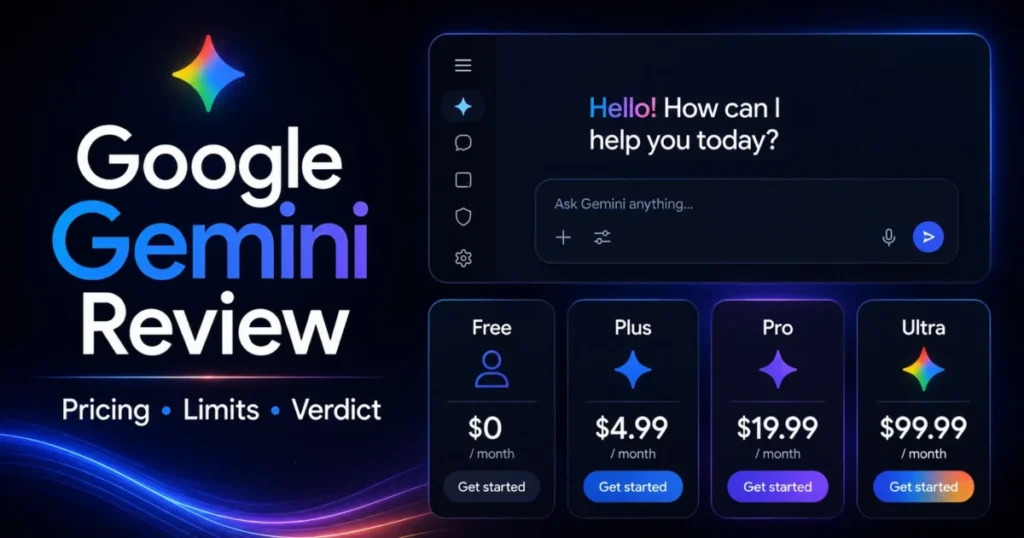
This Google Gemini review is written for buyers deciding whether to pay for Gemini as a personal AI assistant, a Google Workspace companion, or a research tool in 2026. The short answer: Gemini is worth paying for if your work already lives inside Gmail, Drive, and Docs and you regularly analyze large documents.
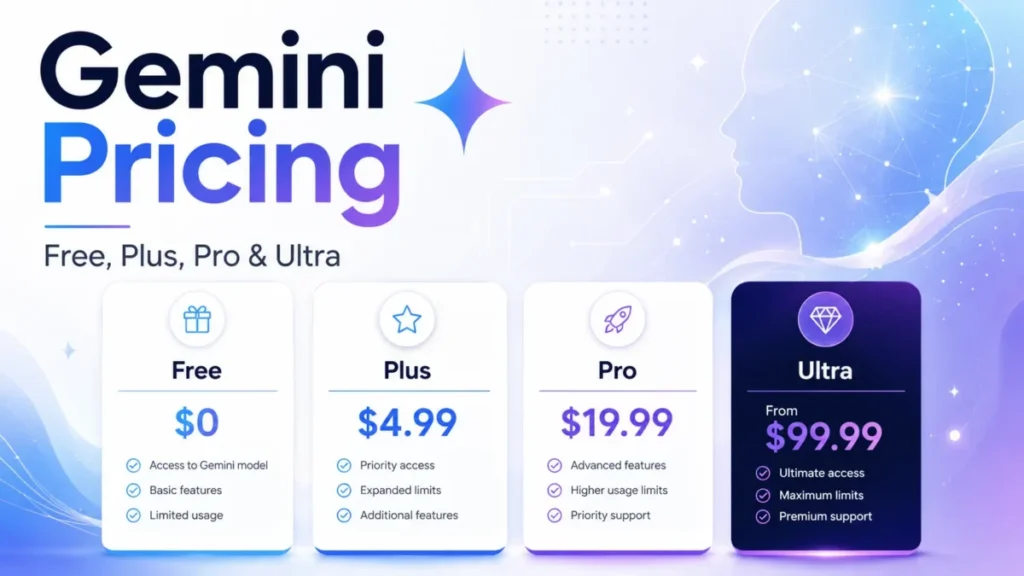
It is the wrong choice if you need a fixed, predictable prompt quota or enterprise data protection on a personal account. Pricing starts at $0 on the Free plan and runs to $199.99 per month at the top Google AI Ultra tier.
Most paying buyers land on Google AI Pro at $19.99 per month, because that is where the one million token context window and four times the standard usage allowance appear. If you are still mapping this category, the roundup of best AI chatbots and the primer on generative AI fundamentals cover the basics.
I checked every price and limit here against Google’s official pages on July 23, 2026. Where Google describes something as variable, I say so instead of inventing a number.
In This Article (18 sections)
Quick Verdict
| Category | Verdict |
|---|---|
| Best for | Solo professionals and 1 to 10 person teams already working inside Gmail, Drive, and Docs |
| Not ideal for | Buyers who need fixed prompt quotas, or regulated teams relying on a personal account |
| Starting price | $0 Free, then $4.99 per month for Google AI Plus |
| Best practical plan | Google AI Pro at $19.99 per month, for the 1M context window and 4x usage |
| Free plan | Yes, with a 32k context window and standard usage |
| Setup difficulty | Low for chat, medium for Connected Apps, migration, and scheduled actions |
| Main strength | Google ecosystem access plus a large context window on Pro |
| Main limitation | Usage is compute based, so there is no fixed prompt count to budget against |
| Best alternative | ChatGPT for a broader ecosystem, Claude for long document writing |
Source: Google’s Gemini subscriptions page and Gemini usage-limit documentation, checked 2026-07-23.
Google Gemini Pros and Cons
Each line below ties to a plan, a limit, or a documented behavior rather than a general impression.
| Pros | Cons |
|---|---|
| Google AI Pro publishes a 1M token context window, enough for long PDFs and research threads | Usage is compute based across a five hour and weekly window, so no plan states a fixed prompt count |
| Free access to Gemini 3.6 Flash with a real 32k context window and no card required | Deep Think, the premium reasoning mode, is capped at a 192k context window, smaller than the standard 1M |
| Connected Apps can pull eligible context from Gmail, Drive, and Docs in one place | Connected Apps availability changes by account, device, region, and admin policy |
| An official import path moves ChatGPT and Claude history into Gemini | Imported chats land in Gemini Apps Activity and can be used to improve services, including model training |
| Paid plans bundle large Google One storage, 400 GB on Plus and 5 TB on Pro | The two Google AI Ultra tiers cost $99.99 and $199.99 per month, hard to justify without a Deep Think need |
What Is Google Gemini?
Google Gemini is Google’s multimodal AI assistant for research, writing, analysis, image and media work, and task support, which my ranking of the best AI tools for research also covers. It is built by Google LLC, a subsidiary of Alphabet, and it runs on the web and on mobile.
The name covers three distinct products that buyers often blur together. The Gemini app is the consumer and Workspace-connected assistant most people mean.
Google Workspace with Gemini is the licensed, admin-governed version for organizations. The Gemini Developer API is a separate, usage-billed product for building software, and it is not included in any consumer subscription.
Keeping those three apart matters, because their pricing, data rules, and limits differ. Most of this review covers the consumer app, with a clear split whenever Workspace or the API changes the answer.
How I Reviewed Google Gemini: Methodology and Sources
This review draws on Google’s official subscription pages, the Gemini Help Center, the Google Workspace privacy and security pages, and the Gemini Developer API documentation. Pricing and plan limits were checked against those official pages on July 23, 2026.
Each plan and feature was assessed against the same buyer criteria: real cost at the practical tier, usage and context limits, file and media caps, privacy treatment by account type, migration friction, and integration eligibility. Workflow descriptions are reconstructed from Google’s documented behavior and public interface descriptions.
Greater weight went to facts that change a purchase: the plan where a feature unlocks, the point where usage or context forces an upgrade, and the data boundary between personal and Workspace accounts. Attributable user sentiment from G2 and TrustRadius was used only as sentiment, never as a measured result.
Output quality claims require a benchmark, so this review does not publish an accuracy score. Claims that Google’s pages did not support were left out rather than estimated.
Google Gemini Pricing and Plans
Gemini’s consumer ladder has five price points once you separate the two Google AI Ultra tiers. The table below reflects US monthly list prices checked on July 23, 2026.
The indexed version of this page that some buyers still see shows an older $7.99 Plus price and a $249.99 Ultra price. Both are stale against Google’s current Gemini subscriptions page.
| Plan | Monthly price | Usage vs Free | Context window | Storage | Best for |
|---|---|---|---|---|---|
| Free | $0 | Standard | 32k tokens | 15 GB | Casual use and testing |
| Google AI Plus | $4.99 | 2x | 128k tokens | 400 GB | Budget solo Google users |
| Google AI Pro | $19.99 | 4x | 1M tokens | 5 TB | Sustained document and Workspace work |
| Google AI Ultra (5x) | $99.99 | 5x Pro limits | 1M tokens | Higher | Deep Think and high volume |
| Google AI Ultra (20x) | $199.99 | 20x Pro limits | 1M tokens | Higher | Maximum limits and experimental tools |
Source: Google’s Gemini subscriptions page and Google One AI plans page, checked 2026-07-23. Wide tables use horizontal scroll with a pinned first column on smaller screens.
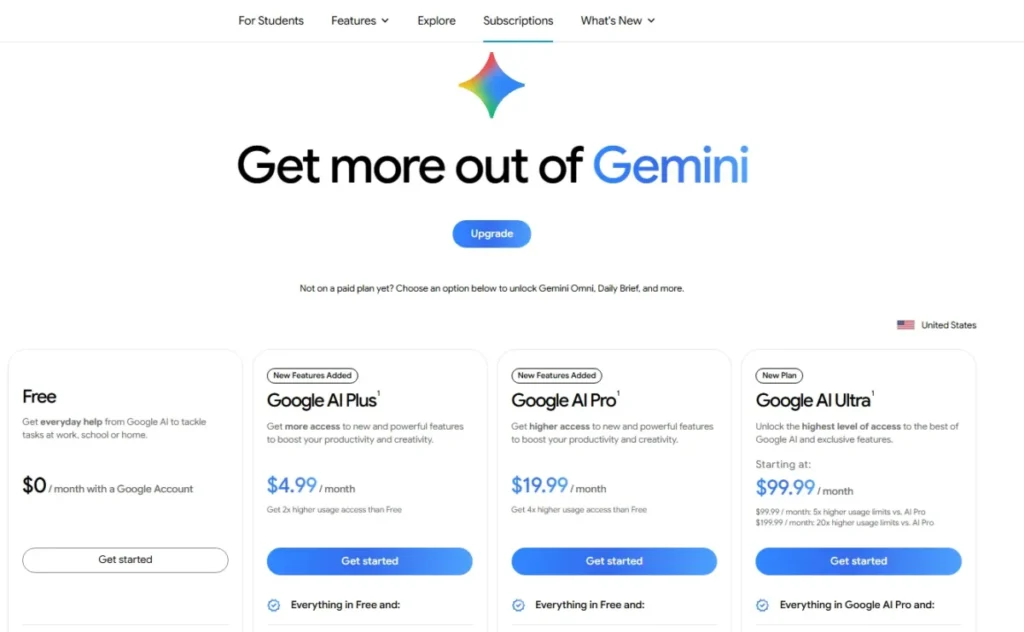
The practical plan for most paying buyers is Google AI Pro at $19.99 per month. That is the tier where the 1M token context window and four times the standard usage allowance appear, which makes it the smallest step that supports repeated large document work.
Google AI Plus at $4.99 per month is a narrower buy. It doubles Free usage, moves the context window to 128k tokens, and adds 400 GB of storage plus 200 Google Flow credits, which suits a solo user who has outgrown Free but does not need 1M context.
Here is the budget pressure point. The jump from Pro to either Ultra tier is large, $99.99 or $199.99 per month, and it buys higher usage multipliers, Deep Think, and experimental tools rather than a bigger standard context window.
The 12-month cost scenario
Google did not publish an annual plan or a lower yearly rate on the pages I checked, so these figures assume month to month billing at the July 2026 list price.
Twelve months of uninterrupted service works out to $0 for Free, $4.99 x 12 = $59.88 for Plus, and $19.99 x 12 = $239.88 for Pro. The two Ultra tiers reach $99.99 x 12 = $1,199.88 and $199.99 x 12 = $2,399.88.
Those totals are simple arithmetic, not an official annual contract. The point of showing them is the gap: a year of Ultra 20x costs roughly ten times a year of Pro, which is why Ultra needs a concrete reason.
One more budget note for developers. A Google AI subscription does not include Gemini Developer API usage, so anyone planning production API calls needs a separate API budget on top of the consumer price.
Feature Gates: What You Get on Each Plan
The table shows where key capabilities open up. The two Ultra tiers share feature access and differ mainly on the usage multiplier, so they are combined here.
| Capability | Free | Plus | Pro | Ultra |
|---|---|---|---|---|
| Standard usage allowance | Baseline | 2x | 4x | 5x or 20x Pro |
| Context window | 32k | 128k | 1M | 1M |
| Scheduled actions and Daily Brief | No | Yes | Yes | Yes |
| Deep Think reasoning mode | No | No | No | Yes |
| Video generation and paid image redo | No | Yes | Yes | Yes |
| Chrome auto browse (US only) | No | No | Yes | Yes |
Source: Google’s Gemini usage-limit help and Google One AI plans page, checked 2026-07-23.
The clearest upgrade trigger sits in that context row. If you repeatedly feed Gemini long PDFs, research threads, or code, the move from 128k on Plus to 1M on Pro is the concrete reason to pay more.
Scheduled actions and Daily Brief are the first workflow that pushes a buyer off Free, because both are paid or Workspace only. That is the point where a free-plan user has to decide whether recurring automation is worth a subscription.
Usage Limits and Context Windows
This is the part most competing reviews get wrong, so it is worth being precise. Gemini’s personal usage is compute based, not a fixed number of prompts.
Consumption depends on the model, the complexity of the request, the size of attached files, and how long the conversation runs. The allowance refreshes on a five hour cycle with an additional weekly ceiling.
That design has a direct consequence: no responsible number of daily prompts can be published, because Google does not define one. Anyone quoting a fixed prompt count is guessing.
The honest planning tools are the multiplier, 2x on Plus and 4x on Pro against the Free baseline, plus the account Usage Limits screen.
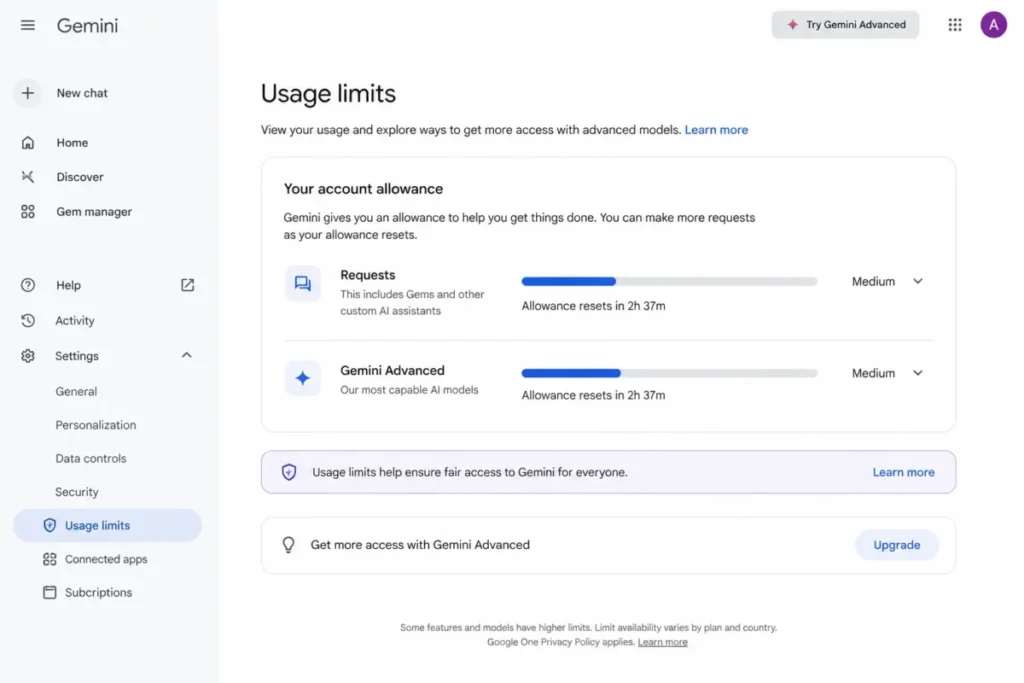
Context windows are more concrete. Google publishes 32k tokens on Free, 128k on Plus, and 1M on both Pro and Ultra.
A 1M window holds a long report or a sizable code folder in one pass, which is the main reason document heavy buyers move to Pro. It is also the single clearest line between the mid tier and the entry tier.
There is a counterintuitive catch on the top tier. Deep Think, the Ultra only reasoning mode, carries a published 192k context boundary, which is smaller than the standard 1M window on Pro and Ultra.
Buying Ultra does not give every mode the largest context. A buyer who needs both deep reasoning and a huge context should weigh that tradeoff before committing.
What happens at the ceiling also matters. Google documents that paid users can keep working with Flash-Lite after they reach the higher model allowance, rather than losing access outright, while Free behavior at the ceiling depends on account and capacity.
Source: Google’s Gemini usage-limit documentation, checked 2026-07-23.
Key Features
Gemini’s feature set is broad. The four capabilities below are the ones that change a buying decision, each with its use case, the plan it needs, and its main limit.
File and document analysis
Gemini accepts up to 10 files per prompt, with most files up to 100 MB and each video up to 2 GB. That envelope covers many mixed document, code, and media tasks without a separate ingestion tool.
Media duration is plan gated. Free analyzes up to 5 minutes of video and 10 minutes of audio, while Google AI Pro and Ultra raise that to one hour of video and three hours of audio.
A supported code folder or GitHub repository import is capped at 5,000 files and 100 MB. The real limit is not the cap, it is retrieval.
Google warns that when an uploaded file is too large, Gemini may miss details or connections even after it accepts the file. I would treat any single large upload as a first pass, not a final answer, for legal or financial work.
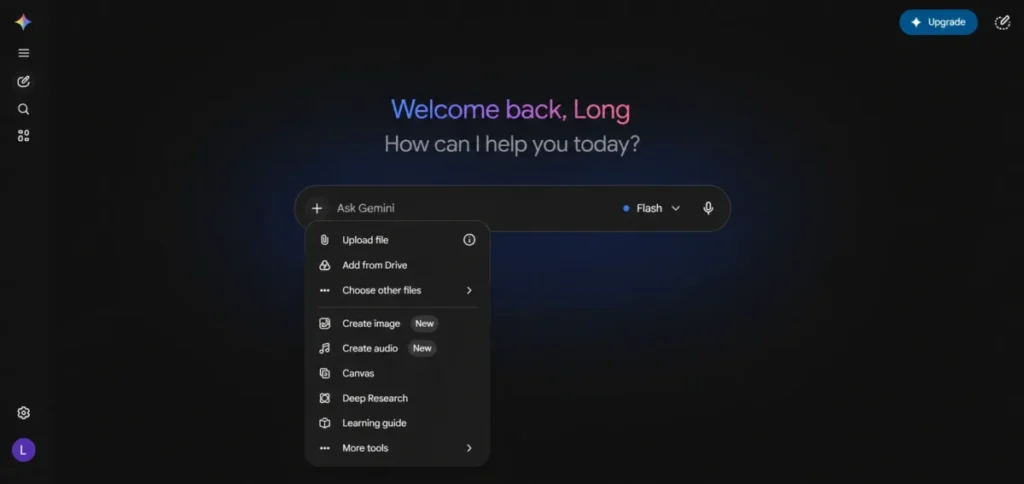
Deep Research
Deep Research turns a question into a structured, sourced report. It is available across the plan ladder with plan dependent limits rather than one universal allowance, which suits analysts who need a first synthesis of a topic with citations.
The caveat is verification. Google warns that Gemini can make mistakes, so the citations a report produces still need checking before any decision critical use.
Connected Apps
Connected Apps let Gemini work with eligible information from Gmail, Drive, Docs, and other Google services. For a Google centric team, that reduces tool switching for everyday research and drafting.
Availability is conditional, and this is the trap. Google states that app availability varies by account type, device, location, language, and administrator settings, so an integration that works for one person may be absent for a colleague.
I would verify the exact apps in your own Connected Apps settings before assuming a workflow is supported.
Scheduled actions
Scheduled actions deliver a recurring brief or generated response on a schedule, which is useful for routine morning summaries. The feature requires an eligible paid plan or qualifying Workspace access, plus Keep Activity turned on.
Two limits define its fit. A user can have at most 10 active scheduled actions, and Google documents that content can be prepared up to one hour before delivery.
That freshness gap makes scheduled actions a poor sole source for fast moving prices, market data, or breaking news, where the last hour is exactly what matters.
Source: Google’s Gemini file-upload, Deep Research, Connected Apps, and scheduled-actions documentation, checked 2026-07-23.
Accuracy and Reliability
This review does not attach an accuracy score to Gemini, because a score needs a controlled benchmark. What I can report is a risk framework built from Google’s own warning that Gemini can make mistakes and from recurring, attributable user sentiment.
Search grounding and the large context window on Pro are genuine strengths for research and synthesis. On the other side, TrustRadius reviewers specifically report that Gemini is prone to hallucinations during long conversations.
G2 and TrustRadius patterns together describe long threads that lose context or turn generic, while praising file handling, Deep Research, and responsiveness. The split points to a workflow habit rather than a single verdict.
The practical takeaway is a short verification routine: check the citations a report gives you, split long threads before they drift, and never let an output stand as the sole authority for a high stakes decision. Used that way, Gemini is reliable for drafting and first pass research and risky as a final source.
Source: G2 and TrustRadius review patterns and Google’s in-product accuracy warning, checked 2026-07-23.
Ease of Use, Setup, and Migration
Setup is low effort for basic chat on a personal Google account and medium effort once you add Connected Apps, scheduled actions, or migration. Gemini runs on the web and on mobile, though Google’s terms note that features and availability can differ by platform.
The switching story is stronger than most reviews mention. Eligible personal users can import ChatGPT or Claude history into Gemini through an official flow, using a ZIP export.
Each ZIP can be up to 5 GB, up to five ZIP files can be uploaded per day, and processing can take up to one day.
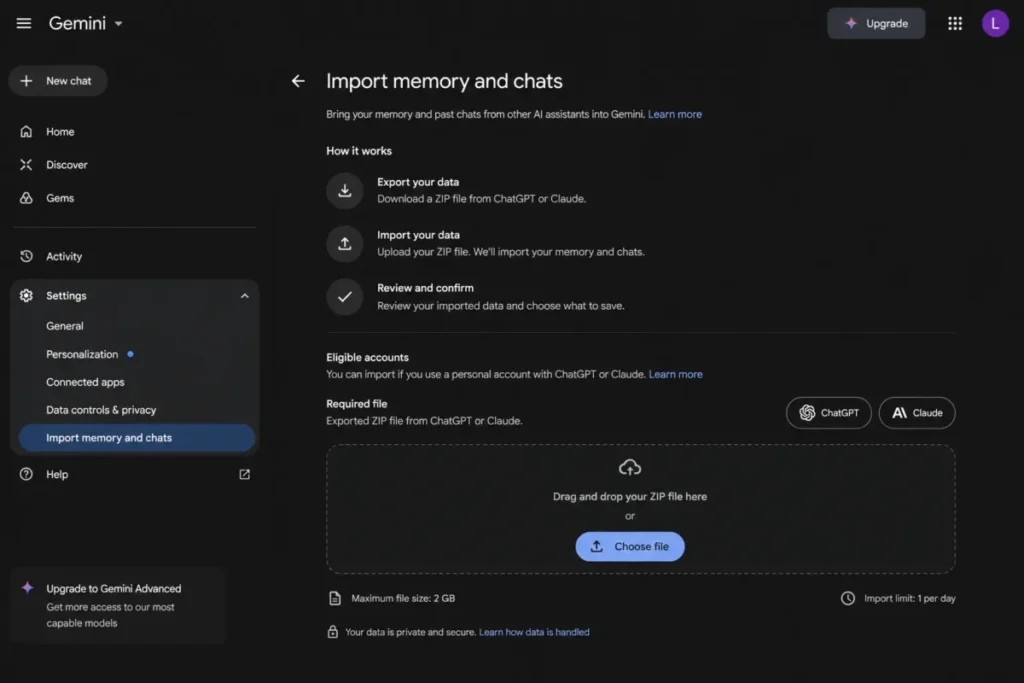
Migration has real friction. The import is limited by account type, region, and age eligibility, imports can arrive partial, and Google says a reupload can add new and overwrite previously imported chats.
If an import comes in partial, the documented fix is to delete it and retry with a clean export. There is a privacy consequence that belongs in the switching decision.
Imported chats are saved in Gemini Apps Activity and can be used to improve Google services, including training generative models. Sensitive histories are a poor fit for the consumer import path.
Source: Google’s supported platforms help and the import memory and chats documentation, checked 2026-07-23.
Integrations and Ecosystem
Gemini’s integration value is the Google stack itself. Through Connected Apps it can reach Gmail, Drive, Docs, and other services, and on the web it supports GitHub repository import for code review within the 5,000 file and 100 MB cap.
Treat the ecosystem as conditional rather than universal. Because availability shifts by account, device, location, language, and admin policy, the right move is to confirm each app in your own settings instead of trusting a logo wall.
Chrome auto browse and deeper browser search sit behind Google AI Pro or Ultra and, per Google’s plan page, are limited to the US. For a Microsoft centric team, that same ecosystem advantage mostly disappears.
For teams standardizing on Google, the stack fit is strong, and the Google Workspace review covers the wider deployment picture.
Source: Google’s Connected Apps help and Google One AI plans page, checked 2026-07-23.
Security, Support, and Privacy
Privacy is the area where account type changes the answer most, so it deserves a direct split. The table separates the personal consumer app from eligible Workspace core-service use.
| Data treatment | Personal Gemini account | Eligible Workspace core service |
|---|---|---|
| Human review of chats | A subset of chats may be human reviewed | Not human reviewed within core-service scope |
| Use for model training | Activity can improve services, including training | Not used to train generative models |
| Governance controls | Personal activity controls | Admin controls and enterprise protections |
| Compliance scope | Consumer terms | SOC 1/2/3, ISO 42001, FedRAMP High, HIPAA support |
Source: Google’s Gemini Apps Privacy Hub and Google Workspace AI privacy and compliance pages, checked 2026-07-23.
The buyer rule follows from that split. A personal Gemini subscription does not carry Workspace core-service protections, and Workspace access taken as an additional service can fall under consumer style terms rather than full core-service protection.
Regulated, legal, healthcare, finance, or security sensitive teams should use an approved Workspace deployment and verify their license and admin status, not assume a personal plan is enterprise ready.
Support is channel based without a published response time. Paid Google One members can reach support by chat, phone, or email for covered membership and feature issues, but I could not verify a public response time commitment, so I would not promise an SLA to a stakeholder.
Google Gemini Limitations
Gemini is strong for Google centric research and drafting, but several limits shape who it fits. These stand on their own, beyond the cons table.
Usage is not a fixed quota. Because consumption is compute based and varies by request, teams that need deterministic capacity for planning cannot rely on a stated prompts per day number.
The premium reasoning mode is smaller than it looks. Deep Think is Ultra only yet capped at a 192k context, so the most expensive tier does not give every mode the 1M window.
Automation freshness is limited. Scheduled actions cap at 10 active tasks and can use content prepared up to an hour before delivery, which rules them out as a real time monitor.
The consumer import is not enterprise migration. It is bounded by account, region, size, and a privacy consequence, so it lowers switching cost without guaranteeing a complete or safe move for sensitive history.
The API is a separate budget. Developers who assume a consumer plan covers Gemini Developer API calls will be wrong, since API usage is metered and tiered on its own.
Who Should Use Google Gemini?
Solo professionals and small teams already inside Gmail, Drive, and Docs get the most value, because Connected Apps and the large Pro context window cut tool switching for research and drafting.
Researchers, consultants, and content teams who repeatedly analyze large documents fit Pro well, since the 1M token context and four times usage support sustained work without constant batching.
Budget conscious solo Google users who have outgrown Free but do not need 1M context are the Plus audience, getting a 128k window and 400 GB of storage at $4.99 per month.
Existing ChatGPT or Claude users who want to switch benefit from the official import path, as long as the history they move is not sensitive.
Who Should Avoid Google Gemini?
Microsoft 365 centric teams should skip it, because the Google ecosystem advantage that justifies Gemini mostly does not apply to their stack.
Regulated teams relying only on a personal account should avoid it for governed data, since personal accounts do not carry Workspace core-service protections.
Buyers who need fixed, predictable prompt quotas will be frustrated, because compute based usage cannot be expressed as a fixed daily number.
Developers assuming a consumer subscription includes API access should not budget that way, since the Gemini Developer API is billed separately.
Google Gemini Alternatives
No single assistant wins every use case, so the table maps each alternative to the buyer it fits. Choose the one whose condition matches your workflow.
| Alternative | Better for | Why choose it instead |
|---|---|---|
| ChatGPT | Broad third party ecosystem | Wider plugin and app support beyond one vendor’s stack |
| Claude | Long form writing and analysis | Strong long document handling for writing heavy work |
| Perplexity | Search first research | Answer engine tuned for sourced, up to date lookups |
| NotebookLM | Source grounded document research | Keeps answers tied to your uploaded sources |
If ChatGPT is the shortlist, the ChatGPT review and the ChatGPT pricing guide cover its plan gates in the same depth as this page. For writing heavy teams, compare the Claude review and Claude pricing.
For research workflows, weigh the Perplexity review against the NotebookLM review. Developers building on the model rather than chatting should also read up on what an API is before budgeting for the separate Gemini Developer API.
Final Verdict: Is Google Gemini Worth It?
Google Gemini is worth it for Google centric individuals and small teams who analyze documents and work across Gmail, Drive, and Docs, because the ecosystem access and the 1M context on Pro remove real friction. It is not worth it for Microsoft centric teams, for regulated data on a personal account, or for buyers who need a fixed prompt quota.
My plan guidance is specific rather than a single score. I would stay on Free for casual use and choose Plus at $4.99 if 128k context and 2x usage cover the workload.
I would treat Pro at $19.99 as the default paid tier for sustained document and Workspace work. I would buy Ultra only for a concrete Deep Think, experimental tool, or highest volume need, and choose ChatGPT or Claude when a broader ecosystem or long form writing matters more than Google integration.
The renewal question to keep is simple: at renewal, can you show that the Pro context window and Connected Apps changed how the work got done? If the answer is no, drop to Plus or Free rather than paying for headroom you do not use.
FAQ
Short answers to the questions buyers ask most before choosing a Gemini plan.
Is Google Gemini free to use?
Yes, Gemini has a Free plan at $0 that includes access to Gemini 3.6 Flash, a 32k token context window, standard usage, and 15 GB of Google storage. Paid plans add larger context, higher usage, and features such as scheduled actions, but you can run everyday chat and file questions without paying, based on Google’s subscription documentation checked on July 23, 2026.
How much does Google Gemini cost?
Google AI Plus is $4.99 per month, Google AI Pro is $19.99 per month, and Google AI Ultra is offered at $99.99 or $199.99 per month depending on the usage level, on top of the Free tier. Most paying buyers choose Pro for its 1M context window, and these US monthly list prices were checked on Google’s Gemini subscriptions page on July 23, 2026.
Is Google Gemini better than ChatGPT?
It depends on your stack, but Gemini fits best when your work lives in Gmail, Drive, and Docs and you need a large context window on a mid tier plan. ChatGPT is the stronger fit for a broader third party ecosystem, so match the tool to where your data and workflows already sit.
Is Google Gemini accurate?
Gemini is reliable for drafting and first pass research but should not be a sole authority for high stakes work, because Google warns that it can make mistakes and TrustRadius reviewers report hallucinations in long conversations. This review does not publish an accuracy score because no controlled benchmark was run, so verify citations and split long threads before trusting an output.
Does Google Gemini use my data for training?
On a personal account, yes, it can: Google documents that Gemini Apps activity, including imported chats, can be used to improve services, including training generative models, and a subset of chats may be human reviewed. Eligible Workspace core-service use is different, because it is not used to train models and is not human reviewed within that scope, per Google’s privacy pages checked on July 23, 2026.
What is the Gemini context window?
The context window is how much text Gemini can consider at once, measured in tokens, and Google publishes 32k on Free, 128k on Google AI Plus, and 1M on Google AI Pro and Ultra. The Ultra only Deep Think mode is a separate case, capped at a 192k context, which is smaller than the standard 1M window.
Can Gemini analyze PDF and video files?
Yes, within limits: Gemini accepts up to 10 files per prompt, most files up to 100 MB and each video up to 2 GB. Media duration is plan gated, so Free handles 5 minutes of video and 10 minutes of audio while Pro and Ultra allow one hour of video and three hours of audio.
Does Gemini work with Gmail and Google Drive?
Yes, through Connected Apps, but availability is conditional because Google states that app access varies by account type, device, location, language, and administrator settings. An integration available to one user may be missing for another, so check your own Connected Apps settings to confirm which Google services are eligible before building a workflow around them.
What happens when Gemini usage limits are reached?
On paid plans, Google documents that you can keep working with Flash-Lite after you reach the higher model allowance, rather than losing access. Usage is compute based and refreshes on a five hour cycle with a weekly ceiling, so heavy or complex requests consume the allowance faster, and Free behavior at the limit depends on account and capacity.
Is Google AI Ultra worth it?
No, unless you have a specific need for Deep Think, experimental tools, or the highest usage limits, because at $99.99 or $199.99 per month Ultra costs far more than Pro and does not add a larger standard context window. For most individual and small team buyers, Google AI Pro at $19.99 covers the workflow, so Ultra is a specialized purchase rather than a default upgrade.