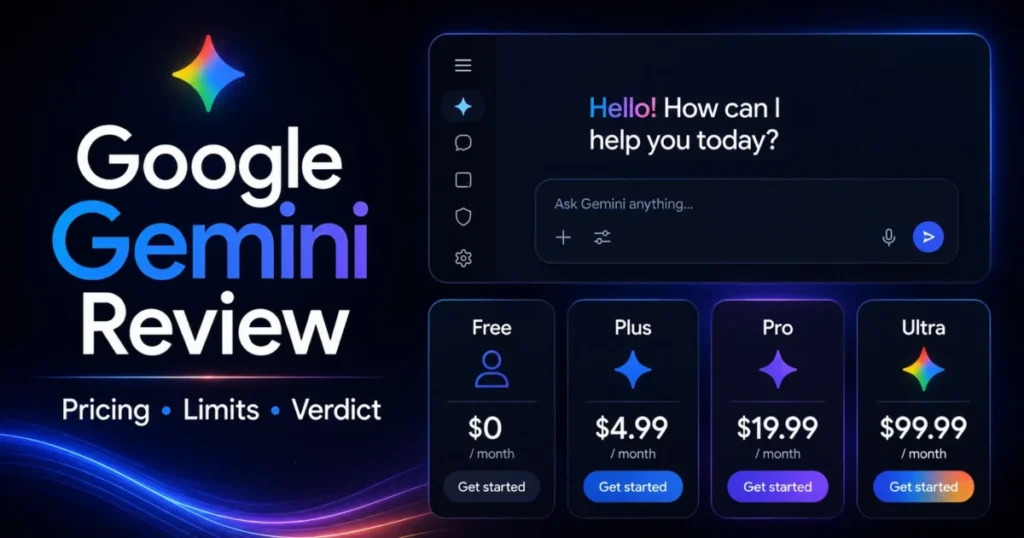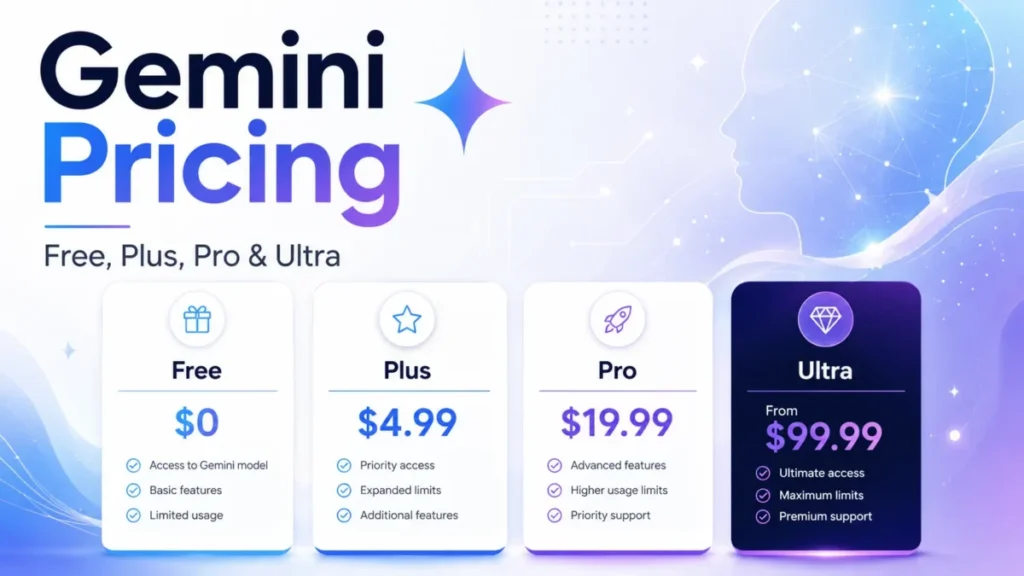
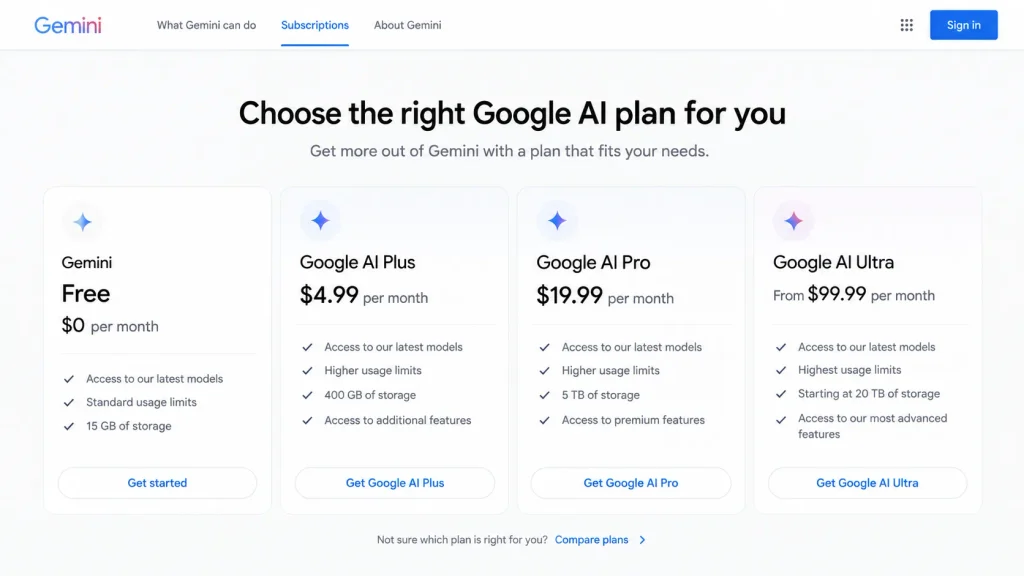
Gemini’s price list is short and the entry point is low. Google AI Plus runs $4.99 per month, Google AI Pro runs $19.99 per month, and the free tier costs nothing beyond a Google Account.
The number that decides which tier a buyer needs is not on that list. Every plan, paid or unpaid, reaches the same three models, so a subscription does not buy a better model.
What it buys is a larger context window, a higher usage band measured against a baseline that shifts between tiers, and a short list of features Google keeps behind the paywall.
Budget from those three things and the ladder is easy to read. Budget from the sticker price and the upgrade arrives as a surprise partway through a busy month.
In This Article (20 sections)
Quick Pricing Verdict
| Question | Answer |
|---|---|
| Starting price | $0 per month on Gemini Free with a Google Account |
| Cheapest paid tier | Google AI Plus at $4.99 per month |
| Best plan for most paying individuals | Google AI Pro at $19.99 per month, once long documents or Gemini Spark enter the workflow |
| Plan to avoid | Google AI Ultra at $99.99 per month unless Deep Think or sustained heavy capacity is a real requirement |
| Biggest hidden cost | AI credits, which only Pro and Ultra members are eligible to buy, at prices Google does not publish |
| Biggest planning trap | Reading the usage multipliers as fixed prompt counts |
| Best alternative if Gemini costs too much | Stay on Gemini Free, or move team work to Gemini Enterprise Business at $21 per seat per month |
| Team surface | Gemini Enterprise Business, a separate product with its own billing and data commitments |
Source: consumer prices from the Google AI subscription page and the seat price from the Gemini Enterprise business page. All prices are US dollars for the United States, checked 2026-09-04.
The Advertised Price vs The Real Price
A pricing page sells a monthly number. A buying decision runs on four numbers, and only one of them appears on the card.
| Plan | Advertised price | What actually changes | What does not change |
|---|---|---|---|
| Gemini Free | $0 per month | 32k token context, standard usage, 15 GB storage | Model access: Gemini 3 Flash-Lite, Flash and Pro |
| Google AI Plus | $4.99 per month | 128k context, 2x standard usage, 400 GB storage, Daily Brief, video generation, scheduled actions | Model access, and no eligibility to buy AI credits |
| Google AI Pro | $19.99 per month | 1M context, 4x standard usage, 5 TB storage, Gemini Spark, longer media uploads, AI credit eligibility | Model access |
| Google AI Ultra | From $99.99 per month | 5x or 20x AI Pro usage, storage from 20 TB, Deep Think | Model access, and the same 1M context window as Pro |
Source: prices and storage from the Google AI plan prices. Context windows, usage multipliers, model access and feature gates come from the Gemini Apps limits and upgrades documentation.
Two entries in that right-hand column deserve more attention than the price column gets.
The first is model access. Google’s own limits table lists Gemini 3 Flash-Lite, Gemini 3 Flash and Gemini 3 Pro as available on every tier, including no plan at all.
Competing pricing guides frequently imply that money buys a smarter model. Against Google’s documentation it buys more room to use the same models, which is a different purchase and a harder one to justify to finance.
The second is the context window on Ultra. Pro and Ultra share the same 1M token ceiling.
A buyer moving from Pro to Ultra at $99.99 per month is paying for relative capacity and for Deep Think, not for a larger working memory. Anyone upgrading in the hope of feeding in bigger documents is buying the wrong tier.
The Five Hidden Costs Nobody Mentions
None of these appear on a plan card. All five change what a buyer actually pays or actually gets.
1. Usage Is Compute-Relative, Not a Prompt Count
Google states usage in relative terms. No plan is standard, AI Plus is 2x standard, AI Pro is 4x standard, and AI Ultra is 5x or 20x AI Pro depending on which Ultra subscription is held.
The same documentation notes that some features, media generation and Deep Research among them, consume more of that allowance, and that limits may change without notice for reasons including capacity.
Two consequences follow. The first is that a buyer cannot convert a multiplier into a message quota, because the underlying baseline is not published as a fixed number and consumption varies by what the prompt asks for.
The second is that the multipliers do not share one baseline. Plus and Pro are measured against Free, and Ultra is measured against Pro.
A reader who multiplies 4x by 5x and concludes that Ultra 5x delivers twenty times a free account has built a budget on a category error.
Read the ladder as bands of relative headroom instead. The buying question is whether the current tier runs out during real work, not how many prompts it theoretically holds.
2. AI Credits Are a Pro and Ultra Privilege
Additional Google AI credits cover extra usage in Gemini, Google Flow and Google Antigravity. Google One documentation on purchasing AI credits states that Google AI Pro and Google AI Ultra members can buy them and that they are not available for purchase on Google AI Plus plans.
Credits are sold in increments including 2,500, 5,000 and 20,000, and auto-reload can be configured after an initial purchase. Purchases are capped at five per day, credits may expire after a period set at the time of purchase, and in a family group only the plan manager can buy them.
That single eligibility line changes the economics of the cheapest paid tier.
A Plus subscriber at $4.99 per month who runs out of headroom has three options: wait for the refresh, work at reduced capability, or upgrade. Topping up is not among them.
Anyone whose usage is spiky rather than steady is buying a tier with no release valve. The cost of the Google Flow side of that credit pool is covered separately in the Google Flow pricing guide.
Google does not publish a dollar price per credit pack on that help page, so any article quoting one is quoting something the page does not contain. Treat the top-up line in a budget as an unknown until an eligible account shows the price at checkout.
3. The Multiplier Baseline Hides the Real Upgrade Trigger
The feature gates, not the multipliers, are what most upgrades actually buy. Daily Brief, video generation and scheduled actions are unavailable without a Google AI plan and appear at Plus.
Gemini Spark appears at Pro. Deep Think is Ultra only and requires the Pro model.
A buyer who needs scheduled actions is being asked for Google AI Plus at $4.99 per month, not for Google AI Pro at $19.99 per month.
A buyer who needs Gemini Spark cannot get there below Google AI Pro at $19.99 per month, and a buyer who needs Deep Think has no route below Google AI Ultra at $99.99 per month.
Those are three clean price thresholds, and each is more useful than any general claim about a tier being better value.
4. Activity Storage Can Block Uploads Independently of the Plan
Gemini Apps keeps a storage limit for data saved from previous activity. Google’s upload documentation states that on reaching it, an error appears and further file uploads are blocked until storage is cleared.
The numeric ceiling is not disclosed on that page, so the size of the problem cannot be quantified from public documentation.
This one matters because it does not behave like a plan limit. It is a housekeeping obligation attached to the account.
A researcher who has been feeding documents into Gemini for months can hit it on a tier with plenty of headroom left, and the fix is deletion rather than payment.
5. Tax, Cancellation Terms and the Annual Price Google Does Not Show
The subscription page states that subscribers can cancel anytime and that there are no refunds for partial billing periods except as required by applicable law. Applicable tax sits on top of the listed price and is not quantified anywhere in the public pricing evidence.
The annual question is the more interesting gap. The public Google AI plan surfaces show monthly pricing, and no annual checkout price for Plus, Pro or Ultra appeared on them.
An annual discount therefore cannot be assumed, and a competitor page quoting one is quoting an unverified figure.
What can be published is arithmetic on the monthly list price. That is a different thing, and it is labelled as such further down.
Gemini Pricing Plans Compared
| Plan | Monthly list price | Billing basis | Relative usage | Context window | Storage | Best for |
|---|---|---|---|---|---|---|
| Gemini Free | $0 | Per Google Account | Standard | 32k tokens | 15 GB | Casual questions, short documents, occasional image work |
| Google AI Plus | $4.99 | Per Google Account | 2x Free | 128k tokens | 400 GB | Regular users who need scheduled actions, Daily Brief or video generation |
| Google AI Pro | $19.99 | Per Google Account | 4x Free | 1M tokens | 5 TB | Long-document and codebase work, Gemini Spark, longer media uploads |
| Google AI Ultra 5x | $99.99 | Per Google Account | 5x AI Pro | 1M tokens | From 20 TB | Deep Think plus sustained heavy capacity |
| Google AI Ultra 20x | $199.99 | Per Google Account | 20x AI Pro | 1M tokens | From 20 TB | The highest documented capacity band |
| Gemini Enterprise Business | $21 per seat | Per seat, per month | Not published in these terms | Not published in these terms | Not applicable | Teams up to 300 people needing connectors and business data commitments |
| Gemini Enterprise Standard or Plus | $30 per seat | Per seat, per month | Not published in these terms | Not published in these terms | Not applicable | Larger deployments beyond the Business edition |
Source: consumer prices, storage and both Gemini Enterprise seat prices from Google’s published AI plan list. Usage multipliers and context windows come from the Gemini Apps limits documentation.
What Each Gemini Plan Includes
Each plan below carries what it adds, what it still withholds, and the workload that makes it the wrong choice.
Gemini Free
Free reaches Gemini 3 Flash-Lite, Gemini 3 Flash and Gemini 3 Pro, plus Canvas, Gems, Deep Research, image generation, audio overviews and slide generation. The ceiling is a 32k token context window and standard usage.
Missing: Daily Brief, video generation, scheduled actions, Gemini Spark, Deep Think, the longer media upload durations, and any ability to buy extra capacity.
Avoid if the work involves long reports, large transcripts or a codebase. A 32k window is the constraint that ends the free tier for research and development work, and no amount of patience gets around it.
Google AI Plus
Plus quadruples the context window to 128k, doubles the usage band against Free, raises storage to 400 GB, and switches on Daily Brief, video generation and scheduled actions.
Missing: Gemini Spark, Deep Think, the 1M context window, the extended media durations, and eligibility to purchase AI credits.
Avoid if usage is heavy or unpredictable. Without credit eligibility, Plus has no overflow valve except waiting or upgrading, and the gap to Pro is 15 dollars a month.
Google AI Pro
Pro is where the context window jumps to 1M tokens, usage reaches 4x Free and storage reaches 5 TB.
Gemini Spark becomes available, media uploads extend to 1 hour of video and 3 hours of audio, and the account becomes eligible to buy AI credits.
Missing: Deep Think, and the 5x or 20x capacity bands.
Avoid if the workload is short-form and intermittent. Paying for Google AI Pro at $19.99 per month to get a 1M context window that never sees a document over a few thousand words is the most common way to overpay for Gemini.
Google AI Ultra
Google AI Ultra starts at $99.99 per month for the 5x band, and Google AI Ultra 20x costs $199.99 per month.
Both bands are measured against AI Pro rather than against Free, and storage starts at 20 TB.
Deep Think is the only capability that appears here and nowhere else. Google’s documentation notes that Deep Think queries can take a few minutes to return and that they require the Pro model.
Avoid if Deep Think is a curiosity rather than a workflow. Without it, Ultra is a capacity purchase, and capacity is the one thing Google explicitly says can change without notice.
Feature Gates: What You Actually Get by Plan
Only the rows below differ between tiers, and each one is a feature gate: a capability the plan beneath it does not have at any price. Read them together with the total cost of the tier that unlocks them, because a gate is the clearest upgrade trigger a buyer gets: if the workflow needs the capability, the price of that tier is the price of the workflow. Model access does not: Gemini 3 Flash-Lite, Gemini 3 Flash and Gemini 3 Pro are documented as available on every plan, as are Deep Research, Canvas, Gems, image generation and slide generation.
| Capability | Lowest plan that unlocks it | What a buyer below that tier gets instead |
|---|---|---|
| Daily Brief | Google AI Plus, $4.99 per month | No documented free equivalent |
| Video generation | Google AI Plus, $4.99 per month | Upgrade, or use a separate video tool |
| Scheduled actions | Google AI Plus, $4.99 per month | Run the task manually each time |
| Gemini Spark | Google AI Pro, $19.99 per month | The rest of Gemini, without Spark |
| Extended media uploads | Google AI Pro, $19.99 per month | 5 minutes of video and 10 minutes of audio |
| Purchasable AI credits | Google AI Pro, $19.99 per month | Wait for the refresh or upgrade |
| Deep Think | Google AI Ultra, from $99.99 per month | The Pro model without Deep Think |
Source: feature availability from the Gemini Apps limits and upgrades documentation. Credit eligibility and media durations are sourced in the hidden-cost and file-limit sections above and below.
One behaviour sits outside that table and changes how a limit feels. Google states that a subscriber who reaches the limit can continue the conversation with Flash-Lite.
Paid capacity therefore degrades rather than stopping. That is a materially different risk profile from a hard cut-off, and it is worth knowing before treating an upgrade as insurance against interruption.
File, Media and Context Limits by Plan
Three ceilings are identical on every tier and are worth knowing before a subscription rather than after. A prompt takes up to 10 supported files, and each video can be up to 2 GB with every other supported file up to 100 MB.
One code folder or GitHub repository can hold up to 5,000 files at a maximum of 100 MB.
A developer whose repository runs past either of those repository numbers is outside the documented boundary on every plan, Ultra included. No upgrade solves it.
What does change by plan is below.
| Limit | Free | Google AI Plus | Google AI Pro and Ultra |
|---|---|---|---|
| Context window | 32k tokens | 128k tokens | 1M tokens |
| Total video upload length | Up to 5 minutes | Up to 5 minutes | Up to 1 hour |
| Total audio upload length | Up to 10 minutes | Up to 10 minutes | Up to 3 hours |
| Relative usage band | Standard | 2x Free | 4x Free, then 5x or 20x Pro on Ultra |
Source: media durations and file limits from the Gemini Apps file upload documentation. Context windows and usage bands come from the limits documentation.
Read that table as a set of disqualifiers rather than a set of benefits.
A podcaster working with hour-long recordings is priced at $19.99 per month by the audio duration row alone, and no reasoning about model quality changes it. The media rows are also the clearest example of a gate that skips Plus entirely, because the extension arrives at Pro rather than at the first paid tier.
When the Free Plan Stops Working
The moment the free tier gives out is recognisable, and it is rarely the moment buyers expect.
It is not model quality, because the model list is identical across tiers. It is not image generation, which the documentation lists as available without a plan.
It is one of four things.
The context window is the first and most common. At 32k tokens, a long report, a lengthy transcript or a multi-file code review will not fit in a single working session.
This is the wall that sends research and development users to Pro rather than to Plus, because 128k still falls short of the material those users bring.
The second is a paid-only feature. A workflow that depends on a recurring automated action is priced at Google AI Plus, $4.99 per month, regardless of how light the rest of the usage is.
The third is media duration, where five minutes of video and ten minutes of audio are the free ceilings. Interview and meeting work exceeds both immediately.
The fourth is capacity itself. Standard usage on an unpaid account is the lowest band Google publishes, and the documentation does not describe a Flash-Lite continuation for accounts without a subscription the way it does for subscribers.
A useful test before paying: name the specific thing Free will not do this week. If that sentence cannot be finished with a context window, a gated feature, a media duration or a repeated capacity failure, the upgrade has not been earned.
Real Cost Scenarios: 1, 5, 25 and 50 People
Consumer Gemini plans are billed per Google Account rather than per seat, so a team cost is a stack of individual subscriptions rather than a licence. Google publishes a separate seat-based product for team use, and the comparison below sets one against the other.
Multiplying a personal subscription across a team is arithmetic, not a licensing position. The account rules for business use sit with Google rather than with this arithmetic.
| Scenario | Consumer route | Monthly cost of the consumer route | Business route at the starting seat price | Monthly cost of the business route |
|---|---|---|---|---|
| One person, light use | Gemini Free | 0 dollars | Not applicable | Not applicable |
| One person, long documents | Google AI Pro | 19.99 dollars | Not applicable | Not applicable |
| Five people | Five Google AI Pro subscriptions | 99.95 dollars | Five Gemini Enterprise Business seats | 105 dollars |
| Twenty-five people | Twenty-five Google AI Pro subscriptions | 499.75 dollars | Twenty-five Gemini Enterprise Business seats | 525 dollars |
| Fifty people | Fifty Google AI Pro subscriptions | 999.50 dollars | Fifty Gemini Enterprise Business seats | 1,050 dollars |
Source: the seat price, connectors, trial length and data commitments cited in this section come from the Gemini Enterprise business page. Every total in the two cost columns is arithmetic on published monthly prices, not a quoted package price.
The five-person row is the one worth sitting with. Stacking five Pro subscriptions and buying five Business seats land within about 5 dollars of each other at list price.
For that difference, the business route adds connectors to Microsoft 365, Google Workspace, HubSpot, Notion, OneDrive, Drive, Box, Confluence Cloud and Slack. It also adds Gemini Notebook, a pre-built Deep Research agent, a no-code Agent Designer, and Google’s commitment that customer data is not used to train its models or any other customer’s models.
Google positions the Business edition for teams up to 300 people and advertises a 30-day trial.
For a revenue team, that comparison usually settles itself. The connector list is the difference between an assistant that answers general questions and one that answers questions about the pipeline, and the training commitment is the difference between a tool that survives a security review and one that does not.
Two caveats belong beside those numbers. The $21 per seat figure is a starting price, so a real quote can differ, and the consumer column assumes personal accounts, which is exactly the assumption a finance or security reviewer will question first.
Monthly vs Annual Billing
The public Google AI plan pages show monthly pricing. No annual checkout price for Google AI Plus, Pro or Ultra was exposed on those public surfaces, so no annual discount can be reported here and none should be assumed from a third-party page that quotes one.
What can be published is what twelve months of the monthly list price adds up to.
| Plan | Monthly list price | Twelve months at that monthly price |
|---|---|---|
| Google AI Plus | $4.99 | 59.88 dollars |
| Google AI Pro | $19.99 | 239.88 dollars |
| Google AI Ultra 5x | $99.99 | 1,199.88 dollars |
| Google AI Ultra 20x | $199.99 | 2,399.88 dollars |
Source: monthly prices from Google’s AI plan list. Each figure in the right-hand column is twelve times the monthly list price beside it, before tax, so it is annualised monthly spend rather than a verified annual-plan price.
The Plus-to-Pro step reads as 15 dollars a month and lands as roughly 180 dollars a year.
That is the number worth taking to a decision. It is large enough to justify asking whether the 1M context window and Gemini Spark are genuinely used, and small enough that a single week of blocked work on a 128k window pays for it.
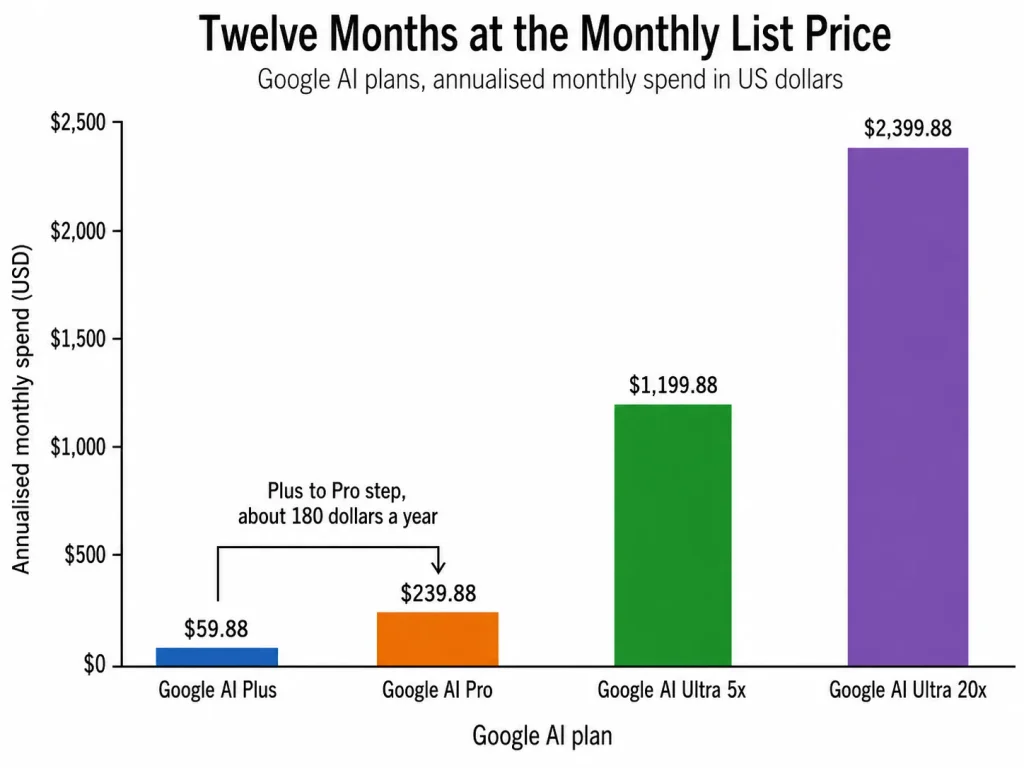
Text fallback for that chart, at monthly list prices held for twelve months: Google AI Plus totals 59.88 dollars and Google AI Pro totals 239.88 dollars.
Google AI Ultra 5x totals 1,199.88 dollars, and Google AI Ultra 20x totals 2,399.88 dollars.
The Four Gemini Billing Surfaces
More pricing confusion comes from this than from any individual number. Google bills Gemini four different ways, and a cost taken from one surface does not belong in a budget built on another.
| Surface | What it is | How it bills | Who it is for |
|---|---|---|---|
| Google AI consumer plans | Gemini Apps on a personal Google Account | Flat monthly subscription per account | Individuals |
| Gemini Developer API | Programmatic model access | Metered per token, separately from any subscription | Developers building on the models |
| Gemini in Google Workspace | Gemini inside Gmail, Docs, Drive, Sheets, Slides, Meet, Chat, Calendar and Vids | Through the Workspace subscription | Existing Workspace customers |
| Gemini Enterprise | A separate business application with connectors and admin controls | Per seat, per month, from $21 | Teams and businesses |
Source: API billing from the Gemini Developer API pricing page, with the Workspace app list from the Gemini in Workspace data documentation. Workspace subscription costs sit in the separate Google Workspace pricing guide.
The API Box, Kept Separate on Purpose
A Google AI Pro subscription at $19.99 per month does not include Gemini Developer API usage. The API is metered, and its published rates carry a scheduled change that any cost model has to account for.
Gemini 3.6 Flash, along with 3.7 Flash and 3.8 Flash, lists paid-tier input at $0.75 per 1M tokens and output at $3.75 per 1M tokens through December 31, 2026.
Gemini 3.6 Flash rates rise to $1.50 per 1M input tokens and $7.50 per 1M output tokens starting January 1, 2027.
Thinking tokens are billed as output tokens, and batch processing runs at half those rates. Grounding with Google Search includes 5,000 free requests per month shared across the Gemini 3.x models, then $14 per 1,000 requests.
That January date is the part worth flagging. An API cost model built on current rates roughly doubles at the turn of the year unless the workload moves to batch or to a different model.
It is also the figure most likely to be wrong in a competing article, because the future rate and the current rate look equally official on the same page.
Which Gemini Plan Should You Choose?
The decision runs in one direction. Start at the bottom, and stop at the first tier that removes an actual blocker.
Stay on Gemini Free when the work fits inside a 32k context window, nothing depends on Daily Brief, video generation or scheduled actions, and capacity has not become an obstacle. Free reaches the same three models as every paid tier, so there is no quality argument for leaving it.
Move to Google AI Plus at $4.99 per month when the blocker is a gated feature or a moderately longer context. A recurring scheduled action, a daily briefing habit or occasional video generation justifies it on its own.
Plus is the right answer for the buyer whose problem is what Gemini is allowed to do rather than how much of it they need.
Move to Google AI Pro at $19.99 per month when the blocker is size or frequency. The 1M context window, the extended media durations, Gemini Spark and credit eligibility all arrive together, and any one of them can carry the decision.
Move to Google AI Ultra at $99.99 per month only when Deep Think is a workflow rather than an experiment, or when Pro’s capacity band has been exhausted repeatedly during real work. Ultra does not widen the context window past Pro.
Choose Gemini Enterprise Business at $21 per seat per month when more than a couple of people need this, when answers have to draw on company data through connectors, or when a security reviewer needs a written data-use commitment.
Add the Gemini Developer API only when something has to call the models programmatically. It is a separate bill, never an inclusion within a consumer subscription.
For a view of what sits behind these prices rather than what they cost, the full Gemini review covers capability.
Which Gemini Plan Should You Avoid?
Google AI Ultra 20x at $199.99 per month is the plan most buyers should rule out first. Its documented advantage over the 5x band is capacity alone, measured relative to Pro, with the same models, the same 1M context window and the same feature set.
Google also states that limits can change without notice for capacity reasons. That makes a 2,399.88 dollar annualised commitment to relative headroom a difficult position to hold in front of finance.
The exception is narrow. An operation that has repeatedly exhausted the 5x band during real production work has evidence the tier below does not fit, and that evidence is the only good reason to pay the difference.
Google AI Plus deserves a warning rather than avoidance. Its weakness is not the price.
It is that a Plus subscriber has no way to buy additional capacity, so a heavy month has no release valve other than upgrading. Buyers with spiky usage patterns are structurally better served by Pro, even at four times the price, because Pro can absorb the spike.
Gemini Pricing vs Competitors
| Product | Entry paid price | Mainstream tier | High-capacity tier | Notes |
|---|---|---|---|---|
| Gemini | Google AI Plus at $4.99 per month | Google AI Pro at $19.99 per month | Google AI Ultra from $99.99 per month | Lowest published entry price of the three |
| ChatGPT | Plus at the twenty-dollar level | Plus at the twenty-dollar level | Pro options at the hundred and two-hundred-dollar levels | No individual tier below ten dollars in the anchor data |
| Claude | Pro at the twenty-dollar level, monthly or annual | Pro at the twenty-dollar level | Max from the hundred-dollar level | Publishes an annual price for its mainstream tier |
Source: Gemini prices from Google’s AI plan list. The ChatGPT and Claude columns describe price levels rather than quoting figures, because those two were not verified first-party in this pass. Exact current numbers sit in the ChatGPT pricing guide and the Claude pricing guide.
Two structural differences matter more than the numbers.
Gemini is the only one of the three with a paid tier below ten dollars a month. Google AI Plus at $4.99 per month is recent enough that pricing pages still quoting an older figure of 7.99 dollars are out of date.
Any comparison built on that stale number understates how cheaply the paid feature gate opens.
Claude publishes an annual price for its mainstream tier. Google’s public plan surfaces do not.
For a buyer who prefers to commit annually and budget once, that is a real difference in purchasing experience, independent of which assistant does the work better.
Switching to Gemini: The Migration and Privacy Cost
The subscription price is not the whole switching cost. Two documented constraints decide whether a move is practical at all.
Google documents an import path that brings memory and full chat history from other AI platforms, with explicit export instructions for ChatGPT and Claude. Chat history moves as ZIP files up to 5 GB each, with up to five ZIP files per day, while memory transfers by copy and paste rather than automatically.
Re-uploading a ZIP adds new conversations and overwrites previously imported ones. An interrupted import can leave chats partially imported, and the documented recovery is to delete the import entry and try again.
The eligibility rules narrow it sharply. Import requires a personal Google Account, is unavailable on work, school and supervised accounts, and is unavailable in the EEA, Switzerland and the United Kingdom.
The privacy boundary is where buyers most often generalise from the wrong document. For Gemini inside Gmail, Calendar, Chat, Docs, Drive, Sheets, Slides, Meet and Vids, Google states that content is not used to train or improve Gemini or other generative AI models.
That protection belongs to Workspace. Google’s own documentation notes that a Workspace user with a personal account who shares data with Gemini Apps or Search services has that data processed under those separate terms.
On the personal import path, Google states directly that imported and continued chats are saved in Activity and that this data is used to improve its services, including training generative AI models.
The practical reading for anyone moving company-adjacent work is short. The personal-account import is a convenience feature for personal history, not a corporate migration path.
Work that carries client or pipeline data belongs on Workspace or on Gemini Enterprise, where the data-use commitments are written down. The difference between those two answers is a compliance question rather than a pricing one.
Is Gemini Worth the Price? The Verdict by Buyer Type
Worth it at Google AI Plus, $4.99 per month, when a gated feature is the blocker. Daily Brief, video generation and scheduled actions cost less here than at any comparable assistant, and 128k is a real step up from 32k for everyday documents.
Worth it at $19.99 per month when documents, transcripts or repositories are the daily material. The 1M context window, one hour of video, three hours of audio and Gemini Spark arrive together, and the tier is competitively priced against ChatGPT Plus and Claude Pro at the same rough level.
Worth it at $21 per seat per month for a team that needs answers grounded in company data. The connector list and the written commitment that customer data is not used for model training are what a business is buying, and neither is available on a stack of personal subscriptions.
Not worth it at Google AI Ultra prices, $99.99 or $199.99 per month, for most buyers. Ultra’s exclusive capability is Deep Think, and everything else it sells is relative capacity that Google reserves the right to change.
Not worth it at any price as a guarantee of accuracy. Independent user sentiment collected on TrustRadius praises Gemini’s research versatility and speed while raising recurring concerns about hallucinations, generic output, basic code generation and integration limits.
That is user sentiment rather than a product fact. Nothing in Google’s documentation suggests a higher tier changes it, so buying more capacity buys more of the same output rather than more reliable output.
How to Avoid Overpaying for Gemini
- Name the blocker before upgrading. Write down the specific thing the current tier will not do: a context window, a gated feature, a media duration, or repeated capacity failures during real work. An upgrade without one of those four is a subscription bought on a feeling.
- Check Settings, then Usage Limits, before assuming a bigger plan is needed. Google documents that screen as the place where limit status appears, along with notifications when an account is close to or at a limit and when it refreshes. Reading it costs nothing and converts a vague sense of constraint into a fact.
- Do not translate multipliers into prompt counts. Usage is compute-sensitive, some features consume more of the allowance, and Google states limits may change without notice. A budget built on an imagined message quota will be wrong in both directions.
- Remember which baseline each multiplier uses. Plus and Pro are stated against Free, and Ultra is stated against Pro. Chaining them together produces a number Google never published.
- Price the team route before stacking personal plans. At five people the two routes sit within about 5 dollars of each other monthly, and only one comes with connectors, admin controls and a written data-use commitment. The 30-day trial on the Business edition makes that comparison cheap to run.
- Keep API spend in its own line item. Consumer subscriptions never include Gemini Developer API usage, and the Flash rates are scheduled to change on January 1, 2027. A model built on the current rate needs the later one beside it.
- Clear Gemini Apps activity storage before blaming the plan. The documented storage ceiling blocks uploads independently of the subscription, and the fix is deletion rather than an upgrade.
- Treat any annual Gemini price found elsewhere as unverified. The public plan surfaces show monthly pricing, and twelve times the monthly figure is arithmetic rather than a discount.
How This Guide Was Researched
Pricing, limits and feature availability come from Google’s own surfaces. Those are the Google AI subscription page for consumer prices and storage, Gemini Apps help documentation for usage bands, context windows, feature gates and file limits, and Google One documentation for AI credit eligibility.
Seat pricing comes from the Gemini Enterprise business page, token rates from the Gemini Developer API pricing page, and data handling from the Workspace and import documentation. Every volatile figure was checked on the date shown beneath the Quick Pricing Verdict table and is stated in US dollars for the United States.
Plans were assessed against the same buyer criteria: what the plan costs, what capacity it provides relative to the tier below, which features it unlocks, which limits can disqualify it, and what a buyer pays beyond the subscription.
Greater weight went to limits and feature gates than to marketing positioning, because those are what force an upgrade or block a workflow. Where a figure changes the shape of a budget, such as the January 2027 API rate change, it is stated with its effective date rather than folded into a current-cost claim.
Claims are held to what the evidence supports. Prices and limits are attributed to the page that publishes them, and arithmetic derived from a published price is labelled as arithmetic.
Scheduled rates are separated from standard rates, and unknowns such as the exact annual plan price, the dollar price of an AI credit pack and the numeric activity storage ceiling are reported as unknown rather than estimated.
FAQ
These are the questions the sections above leave open most often.
Is Google Gemini Free?
Yes. Gemini Free costs $0 per month with a Google Account and includes access to Gemini 3 Flash-Lite, Gemini 3 Flash and Gemini 3 Pro, with a 32k token context window and standard usage limits.
How Much Does Google AI Pro Cost?
Google AI Pro is $19.99 per month in the United States. It provides a 1M token context window, 4x the standard usage band, 5 TB of storage, Gemini Spark and eligibility to purchase additional AI credits.
What Is the Difference Between Google AI Plus and Google AI Pro?
Plus at $4.99 per month provides a 128k context window and 2x standard usage, and switches on Daily Brief, video generation and scheduled actions.
Pro at $19.99 per month raises the context window to 1M tokens and usage to 4x standard, and adds Gemini Spark.
It also extends video uploads to one hour and audio to three hours, and makes the account eligible to buy AI credits, which Plus accounts cannot.
What Do the 5x and 20x Figures on Google AI Ultra Mean?
They describe usage relative to Google AI Pro, not relative to the free tier. Ultra 5x at $99.99 per month and Ultra 20x at $199.99 per month are capacity bands measured against Pro, and neither widens the 1M context window that Pro already provides.
Does Gemini Have an Annual Plan?
The public Google AI plan surfaces displayed monthly pricing, and no annual checkout price was exposed on them.
Twelve months of Google AI Pro at its monthly list price totals 239.88 dollars before tax, which is arithmetic on the monthly price rather than a published annual rate.
Is Gemini API Usage Included With Google AI Pro?
No. The Gemini Developer API bills separately by token.
Gemini 3.6 Flash lists paid-tier input at $0.75 per 1M tokens and output at $3.75 per 1M tokens through December 31, 2026.
Gemini 3.6 Flash rates rise to $1.50 and $7.50 respectively on January 1, 2027, with thinking tokens billed as output.
What Happens When a Gemini Usage Limit Is Reached?
Google states that a subscriber who reaches a limit can continue the conversation with Flash-Lite, wait for the limit to refresh, or upgrade. Limit status and refresh timing appear under Settings, then Usage Limits.
Which Gemini Plan Has Deep Think?
Deep Think is available on Google AI Ultra only and requires the Pro model. Google notes that Deep Think queries can take a few minutes to return a response.
Does Google Train on Data Used With Gemini in Workspace?
For Gemini in Gmail, Calendar, Chat, Docs, Drive, Sheets, Slides, Meet and Vids, Google states that content is not used to train or improve Gemini or other generative AI models.
That protection is specific to Workspace. On the personal-account import path, Google states that imported and continued chats are saved in Activity and used to improve its services, including training generative AI models.
How Much Is Gemini for a Small Team?
Gemini Enterprise Business starts at $21 per seat per month with a 30-day trial and is positioned for teams up to 300 people.
Five seats at the starting price total 105 dollars per month, twenty-five total 525 dollars, and fifty total 1,050 dollars. A real quote can differ from the starting price.
Can ChatGPT or Claude Chats Be Imported Into Gemini?
On an eligible personal Google Account, yes. Chat history imports as ZIP files up to 5 GB each, with a limit of five ZIP files per day, and memory transfers by copy and paste.
Import is unavailable on work, school and supervised accounts, and unavailable in the EEA, Switzerland and the United Kingdom.
Can Google AI Plus Subscribers Buy Extra AI Credits?
No. Google One documentation states that AI credits can be purchased by Google AI Pro and Google AI Ultra members and are not available for purchase on Google AI Plus plans.
A Plus subscriber who runs out of headroom can wait for the refresh or upgrade.
Your Next Step
Pick the lowest Gemini tier that clears an actual blocker rather than the tier that looks most complete.
For most individuals that is Gemini Free until a context window, a gated feature or a media duration gets in the way.
After that it is Google AI Plus at $4.99 per month or Google AI Pro at $19.99 per month, depending on which blocker appeared.
For a team, compare Gemini Enterprise Business seats against stacked personal subscriptions before committing. At five people the costs converge, and only one route carries connectors and a written data-use commitment.
Keep the consumer subscription, the Gemini Developer API and the business seat price in three separate lines of the budget. Confusing consumer subscription fees with API or business billing is what turns a workload that only needed Google AI Plus at $4.99 per month into a bill nobody planned for.
Recheck the prices before purchase. Every figure here was verified on the date shown beneath the Quick Pricing Verdict table, and Google states that limits can change without notice.