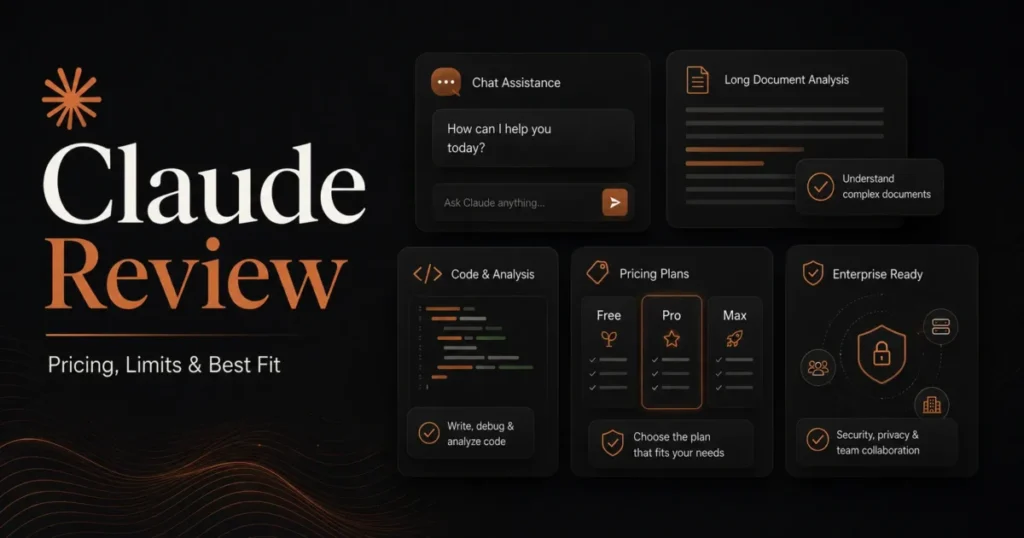
Claude looks like a twenty-dollar decision and behaves like a capacity decision. This Claude review is built around that gap, because the plan you pick sets how long you can keep working and which models bill extra.
My short verdict: Claude is worth paying for when your work runs on long documents, large context, or agentic coding sessions that fit its usage limits, and Pro at $17 per month on annual billing is the right starting point for one person.
The model you should reach for also changed. Anthropic launched Claude Opus 5.5 on September 22, 2026, and its own model guide now says that if you are unsure which model to use, start with Claude Opus 5.5 for most workloads.
Teams that want one bill should buy mixed Team seats, with Premium only for the heavy users. Regulated buyers should settle one Cowork policy before rollout, and the security section below explains which one.
In This Article (16 sections)
Quick Verdict
| Quick verdict | Assessment |
|---|---|
| Best for | Individuals and small teams working with long documents, large repositories, or agentic coding runs |
| Not ideal for | Teams that need a fixed, contractual volume of assistant output |
| Starting price | $0 on Free, or $17 per month for Pro on annual billing ($200 billed up front) |
| Practical plan | Pro for one person, Team with mixed seats for 2 to 150 people |
| Free plan | Chat, web search, file creation, memory, and app connections, with a maximum of five projects |
| Recommended model | Claude Opus 5.5, launched September 22, 2026; Opus is included on every paid individual plan |
| Main strength | A 1M-token context window on Opus 5.5 in chat, Claude Code, and Cowork, plus PDFs up to 1,000 pages (charts and images read only in PDFs of 100 pages or fewer) |
| Main limitation | One usage pool across web, desktop, mobile, and Claude Code |
| Metered trap | Fable models run on pay-as-you-go usage credits on Pro plans and Team Standard seats |
| Best alternative | ChatGPT or Gemini, depending on which ecosystem your team already runs |
Sources: Claude pricing page, Claude Platform pricing, Team plan article, projects article, release notes, model guide, context window article, upload limits, Fable plan rules, and model fallback article, checked September 26, 2026.
The table leaves out what moves the bill most:
- Cache reads decide which comparison matters. Against Opus 5, the new Opus saves most on cache reads, where Opus 5 charges 2.5 times as much; against Fable 5.1 it saves most on input and output, where Fable charges 2.5 times as much, and least on cache reads, where Fable charges 1.25 times as much.
- Safety fallbacks can raise the bill, because the fallback response is charged separately at the older model’s rates, and Opus 5 lists $5 input and $25 output per million tokens against $4 and $20 on Opus 5.5.
This review sits in the same category as the best AI chatbots shortlist.
How This Review Was Researched
The verdicts below rest on one hands-on working session and on Anthropic’s own pricing and documentation.
Methodology for this review
This Claude review draws on one hands-on research session, described in its own section below, plus Anthropic’s official pricing page, help-center articles, model documentation, and release notes, with every volatile fact checked on September 26, 2026. Every number comes from that documentation or from the published session log, or is calculated from them.
The session was an agentic research job on a Max plan. Nothing here rests on a writing test, a Pro-plan test, or a side-by-side with the previous Opus, because none was run.
Claude was assessed against the criteria applied to every assistant on this site: usable entry price, plan-gated workflows, usage ceilings, file and context handling, integration reach, administrative control, and switching cost.
Greater weight went to factors that change a purchase order rather than a feature list: where the advertised price stops matching the practical budget, which workflows stop at a plan boundary, and what a finance or security reviewer will question. Vendor positioning and affiliate relationships did not influence the assessment.
Claims that official sources did not support were excluded, and vendor performance claims are attributed to the vendor. The full process is on the review methodology page.
What Claude Is in September 2026
Claude is Anthropic’s assistant, available as chat on web, desktop, and mobile from the Free plan, with Claude Code, Claude Design, and Claude Science on the Pro plan card. Anthropic also began rolling Cowork into every Claude conversation on September 16, 2026.
That merge is starting with Pro and Max plans on web, desktop, and mobile, so a Team or Enterprise admin should not assume it is live yet.
The lineup moved again this month. Opus 5.5 arrived on September 22, 2026 as the first model in the new Claude 5.5 family, according to Anthropic’s announcement, and the pricing page now lists Opus 5 under legacy models.
That matters for anyone holding a budget from August. The model your team reaches for by default is no longer the model the budget was built around.
What Opus 5.5 changes, and what it costs
The new Opus changes which model to make the default, what Max is still for, and whether Fable spend on a Pro seat makes sense. Anthropic’s pricing page keeps Opus inside every paid individual plan, so the decisions below turn on price and capacity.
According to Anthropic, Opus 5.5 performs at the level of Claude Fable 5.1 on most work and costs 40% less to run than Opus 5. That is the vendor’s claim to test on your own workload, and if it holds, extra capacity becomes the main reason to pay for Max, with included Fable second.
| Decision | What the documentation supports |
|---|---|
| Default Opus for metered work | Opus 5.5, at $4 input and $20 output per million tokens against $5 and $25 on the legacy Opus 5 |
| Cost-led metered jobs that do not need Opus | Price Sonnet 5 first, at $2 input and $10 output per million tokens |
| Default model on Pro and Team Standard | Opus 5.5, because Opus is included and Fable bills usage credits |
| Reason to buy Max or Team Premium | More capacity per session, plus Fable included up to 50% of weekly limits |
Sources: Claude Platform pricing, Claude pricing page, and Fable plan rules, checked September 26, 2026.
The rate card is the part you can verify. On the Claude Platform pricing page, Opus 5.5 costs $4 per million input tokens and $20 per million output tokens, and a cache read costs $0.20 per million tokens, 5% of the input price.
| Rate per million tokens | Opus 5.5 | Opus 5 (legacy) | Fable 5.1 |
|---|---|---|---|
| Input | $4 | $5 | $10 |
| Output | $20 | $25 | $50 |
| Cache write, 5-minute | $5 | $6.25 | $12.50 |
| Cache read | $0.20 | $0.50 | $0.25 |
| Fast mode, input and output | $8 and $40 | $10 and $50 | No fast mode listed |
Source: Claude Platform pricing documentation, checked September 26, 2026.
The cache row is where the two comparisons split. Anthropic says cache reads make up the majority of agentic and coding work costs and prices them 60% below Opus 5, so an agent moved off Opus 5 that re-reads the same repository on every turn collects most of its saving there.
Against Fable the pattern reverses. Fable charges 2.5 times the Opus 5.5 rate on input and output but only 1.25 times on cache reads, so a cache-heavy agent saves less by leaving Fable than the headline rates suggest.
| Model | Cache read rate per million tokens | One billion cache-read tokens |
|---|---|---|
| Opus 5.5 | $0.20 | $200 |
| Fable 5.1 | $0.25 | $250 |
| Opus 5 | $0.50 | $500 |
Source: calculated as one billion cache-read tokens at each model’s published cache-read rate on the Claude Platform pricing page, checked September 26, 2026.
Speed changed too. According to Anthropic, Opus 5.5 generates output more than 30% faster than Opus 5, and fast mode for Opus 5.5 runs at up to 2.5x speed in Claude Code and the Claude Platform.
On context, Opus 5.5 carries a 1M-token context window in Claude chat on paid plans, and the same article lists 1M for it in Claude Code and Cowork.
Keep Fable for jobs where you have evidence it does better than the new Opus.
What Fable 5.1 changed, and what it costs
Fable 5.1 kept the headline rates of Fable 5 and cut the rate Anthropic says dominates agentic costs: cache reads now cost 75% less, at $0.25 per million tokens.
On the Claude pricing page, Fable 5.1 and the legacy Fable 5 both cost $10 per million input tokens, $50 per million output tokens, and $12.50 per million for a cache write. Only the cache read moved, from $1 on Fable 5 to $0.25 on Fable 5.1.
Anthropic puts the saving at around 25% for typical workloads relative to Fable 5, and says it could reach around 45% on complex coding and highly agentic tasks.
I would not treat either number as a budget. On a workload with little cache reuse, Fable 5.1 costs almost exactly what Fable 5 cost, so look at your own cache-read share first.
What Setup and Access Involve
Chat access needs an account and nothing else. The Free plan card covers chat on web, desktop, and mobile, web search, file creation, code execution, memory, app connections, and Artifacts, which makes it usable for a real evaluation.
Free has two gates worth knowing before you build on it. Free users can create a maximum of five projects, and the pricing page lists Opus as unavailable on Free.
Claude Code adds a real setup step, because it runs in the terminal, an IDE, or the desktop app’s Code tab. If you are new to it, my how to use Claude guide covers the first session.
For a switching buyer, I would plan for three manual tasks regardless of plan: rebuilding Projects, re-authorizing every connector, and re-creating organization settings. None of that moves with a chat history.
The 30/90-day adoption check
At the end of the first month, one thing should be true: someone on the team can say which limit they hit first, and how often. If nobody knows, the account is underused or nobody is watching Settings then Usage.
By the end of the first quarter, Projects should hold curated reference material rather than accumulated uploads, and at least one recurring workflow should run through Claude Code or a connector instead of copy and paste. A team still pasting documents into fresh chats at that point bought capacity it is not using.
Basic prompt engineering habits pay off early, because one clear standing instruction in a Project replaces the same paragraph pasted into every chat.
Where the Workflows Hold Up
Each documented workflow below carries a limit from Anthropic’s help center, pricing page, or product documentation, and the research-session subsection adds first-hand readings. Test each limit against your own files before a team depends on the workflow.
Long-document analysis
A single chat accepts files up to 500MB each, up to 20 files, images up to 8,000 by 8,000 pixels, and PDFs up to 1,000 pages, per Anthropic’s upload documentation.
The catch sits inside the PDF number, and the table below sets it out. For non-PDF documents, Claude extracts text only, so images embedded in a DOCX are not read.
| PDF length | Documented handling | Practical consequence |
|---|---|---|
| 1 to 100 pages | Text and visuals analyzed together | Images, charts, and graphics are analyzed with the text |
| 101 to 1,000 pages | Text only, for the whole file | No chart or image is analyzed on any page |
| Above 1,000 pages | Over the documented page limit | Split the file before upload |
Source: Anthropic upload documentation, checked September 26, 2026.
For financial filings or engineering reports, I would split long PDFs into 100-page segments, or export the decisive charts as separate images, before the analysis starts.
How much context you get, and from which model
Context is set mainly by the model and the surface, and Claude Code adds usage-credit gates covered below. Anthropic’s paid-plan context article separates chat, Claude Code, and Cowork, and the same model can carry a different ceiling on each.
| Model and surface | Documented context window |
|---|---|
| Opus 5.5 in Claude chat | 1M tokens |
| Fable 5 in Claude chat | 500K tokens |
| Opus 5.5 in Claude Code and Cowork | 1M tokens |
| Opus 4.7 in Cowork | 1M tokens |
| Opus 4.6 in Cowork | 200K tokens |
| Sonnet 5 in Cowork | 1M tokens, auto-compacts at 500K |
| Models not listed, Claude chat on paid plans | 200K tokens |
Source: paid-plan context window article, checked September 26, 2026.
The credit gates hide in the Claude Code notes. On Pro, the 1M window on claude-opus-4-6 requires usage credits, and the 1M window on claude-sonnet-4-6 requires usage credits except on usage-based Enterprise plans.
A team that standardizes on one model across chat, Claude Code, and Cowork is therefore standardizing on different ceilings. The pricing page’s plan table now reads “up to 1M, varies by model” on every plan, which is accurate and not specific enough to plan around.
Projects as a knowledge base
Projects hold reference material and instructions that persist across conversations. Project files are capped at 30MB each, and file count is unlimited as long as the total fits the context window.
Retrieval is where the Free plan stops. Enhanced project knowledge with RAG is only available on paid plans, and on those plans Claude enables RAG mode near the context limit to expand project capacity by up to 10x.
This reverses a caveat from the earlier edition of this review, when two Anthropic pages disagreed about Free. The RAG article now also says RAG for projects is available on paid plans, so a Free-tier knowledge base built on retrieval is off the table.
If retrieval without a paid Claude plan is the requirement, a dedicated knowledge base tool is the place to look.
Claude Code on a repository
Claude Code is included in all paid plans and shares the same usage limits as the rest of the plan, which is a real cost advantage against buying a separate coding assistant. If you are weighing it against OpenAI’s agent, my Codex vs Claude Code comparison covers that decision.
Because the allowance is shared, a long refactoring session consumes the capacity your afternoon chat work needs.
File creation and connectors
Claude creates Excel spreadsheets, PowerPoint presentations, Word documents, and PDF files, with a maximum of 30MB per file, and you can save them directly to Google Drive.
Connections start on Free, where the plan card lists connecting your apps and tools, and the Pro plan card adds Claude in Chrome and Microsoft 365. My Claude in Chrome guide covers the browser side of that setup.
One Opus 5.5 research session on Max
I ran this review’s research stage on September 26, 2026, as one agentic session in the Claude desktop app’s Code tab, with Opus 5.5 selected and the account on a Max plan. The published session log records the setup, the task counts, and the meter readings below.
The job ran 5 US Google queries and sent 3 parallel subagents to 6 competitor pages, one of which would not load, then captured 28 official Anthropic pages and bound 120 facts to verbatim quotes. Every other step finished.
At the end of the research stage, the session’s context meter read 446,798 of 1,000,000 tokens used (45%), with auto-compact set at 97%. That denominator is the 1M-token Claude Code window Anthropic lists for Opus 5.5, and at the end of the stage the meter sat far below the 97% compaction point.
The account’s usage card read 44% of the five-hour limit, 15% of the weekly all-models limit, and 0% of the weekly Fable limit, with extra usage off. Those are account-wide meters that include other sessions running at the time, so they show where the account stood after the job, not what the job alone cost.
For a buyer, the reading is narrow. A large agentic research job used under half of the Opus 5.5 context window and ran on the included Max allowance, and the session says nothing about writing quality or about Pro, because neither was tested.

Code Review is a separate, metered feature
Code Review is a managed pull-request reviewer inside Claude Code, and buying it is a separate decision from choosing a plan. Code Review is in research preview and available for Team and Enterprise subscriptions, so a Pro or Max subscription does not include it.
On other plans, the documentation points to reviewing a diff locally with the /code-review command instead.
It analyzes GitHub pull requests and posts findings as inline comments, with each finding tagged by severity. Each review averages $15-25 in cost, billed through usage credits outside the plan’s included usage.
| Code Review question | Documented answer |
|---|---|
| Who can use it | Team and Enterprise subscriptions, in research preview |
| What it reviews | GitHub pull requests, with findings posted as inline comments |
| Severity labels | Important, Nit, and Pre-existing |
| Cost per review | $15-25 on average, scaling with PR size and complexity |
| How it bills | Usage credits, separate from the plan’s included usage |
| Trigger that costs the most | After every push, which multiplies cost by the number of pushes |
| Cheaper trigger options | Once after PR creation, or Manual |
Source: Claude Code documentation for Code Review, checked September 26, 2026.
The trigger setting decides the bill. At the documented $15-25 average, 100 reviews a month cost roughly $1,500 to $2,500, and a repository set to review every push can reach that volume quickly.
What Breaks at Scale
Four constraints show up first as usage grows: the shared pool, the two limit clocks, Fable billing by seat, and safeguard fallbacks.
The shared usage pool
Your activity across Claude on web, desktop, mobile, and Claude Code draws from the same pool. Anthropic states this in its pricing FAQ.
Adding Claude Code to an existing chat habit does not add capacity; it divides the same capacity across two demanding uses.
Limits reset on two clocks
Every plan’s usage limits reset on a rolling five-hour session window, and paid plans add weekly limits on top. Hitting a weekly ceiling is a different problem from hitting a session ceiling, because waiting five hours does not fix it.
Anthropic describes capacity as multiples of another plan. Pro gives at least 5x more usage per five-hour session than Free, and Max 5x and Max 20x include five and 20 times the Pro per-session allowance, with a weekly limit across all models.
Team splits the difference by seat type. The Team plan documentation puts Standard seats at 1.25x and Premium seats at 6.25x the Pro per-session allowance, each with one weekly limit across all models.
Opus 5.5 also changed this system. Anthropic is increasing five-hour usage limits on Pro, Max, Team, and seat-based Enterprise plans, and subscription users receive a limit reset they can save and use when they choose.
The reset has rules worth reading before you count on it. Using a limit reset returns either the five-hour session limit or the weekly limit to full right away, it does not refund extra usage already billed, and the button is not available on Claude Mobile or in Claude Code in the terminal or IDE.
That last clause matters for developers. A reset you plan to use during a terminal session has to be triggered somewhere else first.
When a limit lands anyway, paid plans can switch on usage credits. The settings include a monthly spending cap you choose, and Anthropic applies a daily redemption limit of $2,000.
Only the second figure is a published limit; the monthly cap is a control you set, so set it before anyone needs it.
Fable 5.1 bills differently by seat
This is the plan gate most likely to produce an unexpected invoice. On Pro plans and Team Standard seats, Fable 5 and Fable 5.1 run on pay-as-you-go usage credits, while Max plans and Team Premium seats include Fable up to 50% of weekly usage limits at no extra cost.
Opus works the other way. The pricing page’s model table lists Opus as included on every paid individual plan and on Team, and lists Fable as unavailable on Free, so choosing an Opus model on a Pro seat stays inside the subscription.
| Plan or seat | Session capacity | Opus | Fable models |
|---|---|---|---|
| Free | Baseline | Not available | Not available |
| Pro | At least 5x Free | Included | Usage credits |
| Max 5x | 5x Pro | Included | Up to 50% of weekly limits |
| Max 20x | 20x Pro | Included | Up to 50% of weekly limits |
| Team Standard | 1.25x Pro | Included | Usage credits |
| Team Premium | 6.25x Pro | Included | Up to 50% of weekly limits |
Sources: Claude pricing page, Max plan, Team plan, and Fable models on your plan, checked September 26, 2026.
I would set a spending cap before letting a Pro or Team Standard user pick models freely, agree on the new Opus as the team’s everyday choice, and treat Fable as a deliberate, metered one.
When Opus 5.5 hands your request to another model
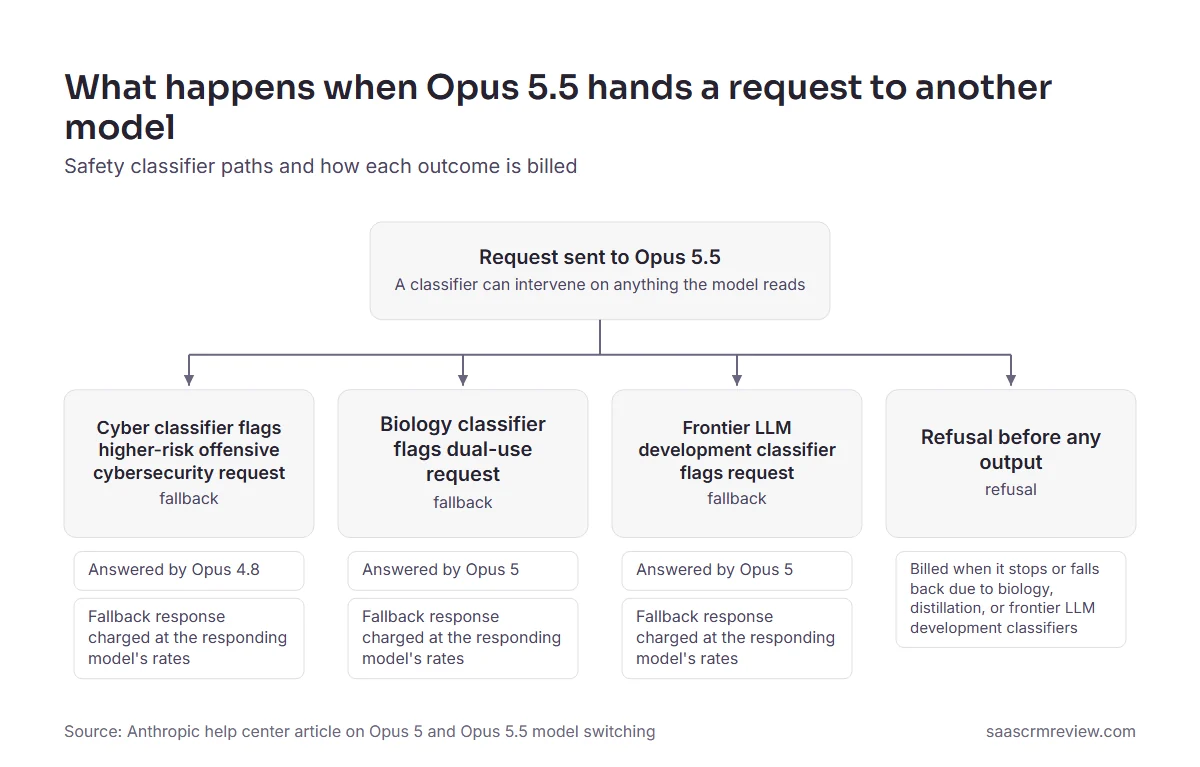
Opus 5.5 runs safety classifiers on everything it reads, including files, connector content, and web results, so a fallback can start from content you did not type. It may fall back to Opus 4.8 when cyber classifiers flag higher-risk offensive cybersecurity requests, while biology classifiers (dual-use virology, toxicology, and molecular design) and frontier LLM development classifiers (such as kernel development for certain ML accelerators) switch it to Opus 5.
Each model bills at its own rates. If a request is blocked midstream, the input and the tokens streamed before the block are charged at Opus 5.5 rates, and the fallback response is then charged separately at the answering model’s rates, with a credit for the cache miss.
Opus 5 lists $5 input and $25 output per million tokens against $4 and $20 on Opus 5.5, so a fallback to Opus 5 costs more per token. Refusals that arrive before any output are billed when they stop or fall back due to biology, distillation, or frontier LLM development classifiers.
Automatic model switching is on by default the first time you select Opus 5 or Opus 5.5, and after a switch the model picker stays on the older model for the rest of the conversation until you change it back. Security research, life-sciences, and ML teams should check the model label on each response before trusting a comparison.
The Pricing Math Nobody Shows You
Published prices are accurate and incomplete. Here is the list as displayed on September 26, 2026, before tax.
| Plan | Monthly billing | Annual billing | Minimum | Usage |
|---|---|---|---|---|
| Free | $0 | $0 | Individual | Baseline allowance |
| Pro | $20 per month | $17 per month, $200 billed up front | Individual | At least 5x Free per session |
| Max 5x | $100 per month | Monthly only | Individual | 5x Pro per session |
| Max 20x | $200 per month | Monthly only | Individual | 20x Pro per session |
| Team Standard | $25 per seat per month | $20 per seat per month | 2 seats, up to 150 | 1.25x Pro per session |
| Team Premium | $125 per seat per month | $100 per seat per month | Mixes with Standard | 6.25x Pro per session |
| Enterprise | Not offered | $20 per seat per month, plus usage at API rates | 20 seats self-serve, 50 sales-assisted | All usage metered |
Sources: Claude pricing page, Max plan article, Team plan article, and Enterprise plan article, checked September 26, 2026. Amounts are displayed in USD; the capture was made from outside the US.
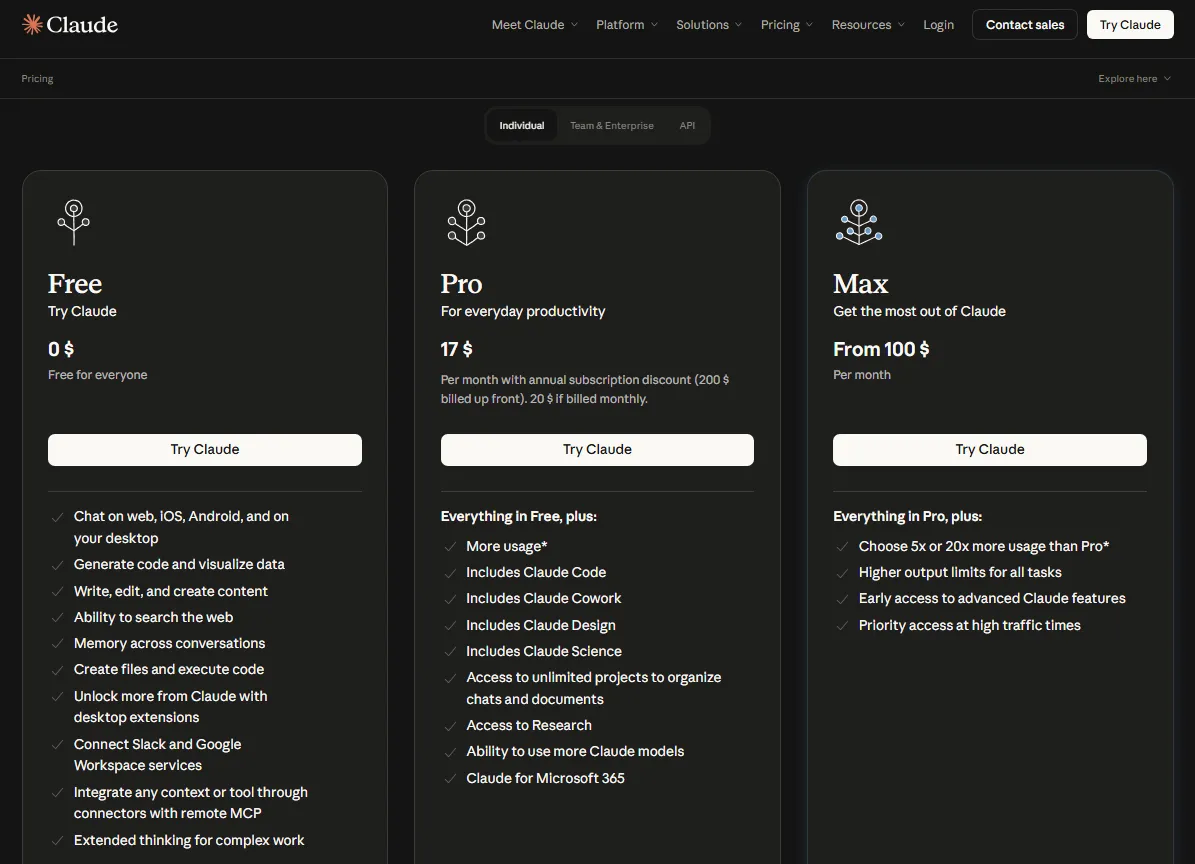
The Team figures match the Team plan article, which states that its prices are for US customers and exclude applicable taxes. Pro annual costs $200 up front against $240 across twelve monthly payments, so annual saves $40 and you pay for the year in advance.
Max is monthly only, and the $200 Max 20x price is stated in the Max help article, because the pricing page shows a single Max card reading from $100 per month. Verify the 20x rate in the account before you build a budget on it.
Over twelve months of monthly billing, Max 5x costs $1,200 and Max 20x costs $2,400. Beyond capacity, the Max card adds higher output limits, early access to advanced features, and priority access at high traffic times.
What ten users cost
The arithmetic for any team decision, before tax, using annual prices where a plan offers them and twelve monthly payments for Max:
| Configuration | Annual cost | Notes |
|---|---|---|
| 10 individual Pro annual plans | $2,000 | Cheapest; no central billing or admin controls, and model training is opt-out per account |
| 8 Pro annual plans plus 2 Max 5x plans | $4,000 | Two heavy users get 5x Pro capacity, still with no central billing |
| 10 Team Standard seats | $2,400 | Adds central billing and team administration |
| 8 Standard plus 2 Premium seats | $4,320 | Two heavy users get 6.25x Pro capacity |
| 10 Team Premium seats | $12,000 | Rarely justified across a whole team |
| Enterprise minimum, 20 seats | $4,800 plus all usage | The 20-seat floor applies even to a 10-person team |
Source: calculated from annual seat prices on the Claude pricing page, the Max 5x price in the Max plan article, and the seat minimum in the Enterprise plan article, checked September 26, 2026. Annual figures exclude tax and metered usage.
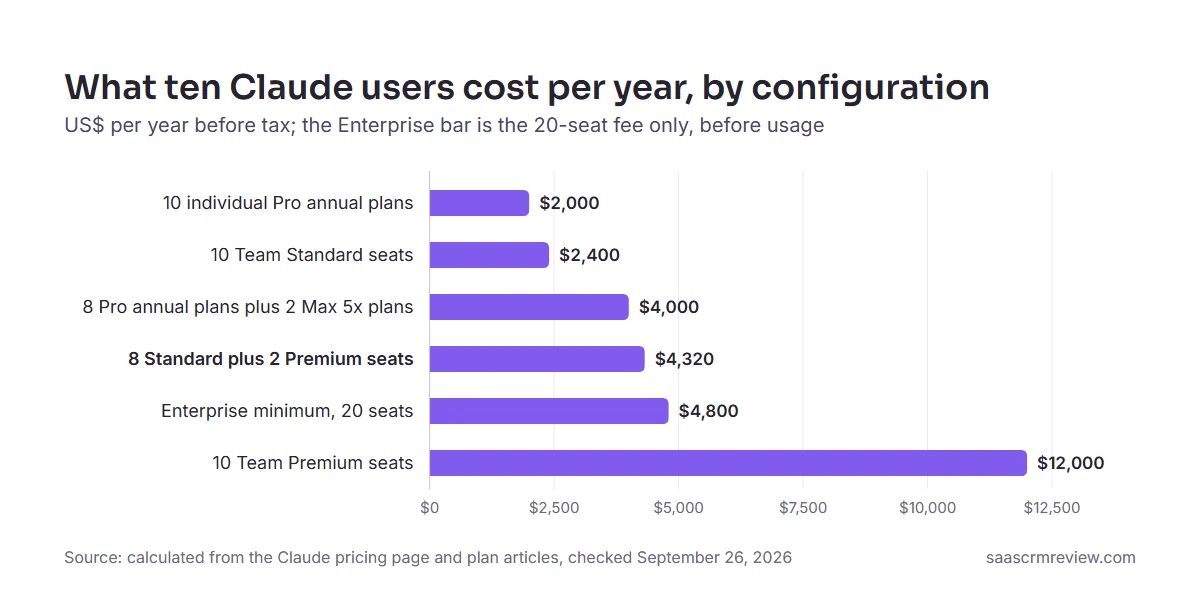
If two people need about six times Pro capacity and the team wants central billing and administration, the mixed Team configuration is the one to buy. Paying Premium rates for all ten people to solve a capacity problem two people have is a $7,680 mistake against it.
The cheaper Pro-plus-Max route saves $320 a year, but each person gets less capacity: 1x and 5x the Pro allowance against 1.25x and 6.25x on Team seats, per the Team plan documentation. It also has no shared Projects, which are Team and Enterprise only, no single bill or admin console, and model training is opt-out on each account instead of off by default, so it suits a loose group of freelancers, not a company.
That $4,800 Enterprise figure is an access floor, not a budget. It buys zero tokens.
The Enterprise number that is not on the pricing page
The seat price is on the pricing page; the usage bill is not. Enterprise charges $20 per seat per month, billed annually, and the seat fee covers access only.
All usage across Claude, Claude Code, and Cowork is billed separately at standard API rates, with no per-seat usage limits and no included token allowance.
There is no automatic per-seat cap, but there is a control. Owners can set spend limits to unlimited, and consumption is still billed, so I would set organization and user limits on day one.
A ten-person team cannot buy it. Self-serve Enterprise requires at least 20 seats and accepts USD only with credits purchased up front, while sales-assisted Enterprise starts at 50 seats, supports multiple currencies, and bills usage monthly in arrears.
On self-serve, everyone draws from one prepaid credit balance, and when it hits zero, usage stops for the whole organization until an Owner buys more. Assign someone to watch and top up that balance before launch.
One more item belongs in any renewal conversation. Legacy Chat-only seats and Standard or Premium Enterprise seats transition to the single Enterprise seat at their next renewal. HIPAA-ready Enterprise organizations are the exception: they keep separate Chat and Chat plus Claude Code seat types.
Modeling metered usage
Enterprise usage bills at these rates, so finance teams should budget from this table. If metered billing is new to your finance team, start with what an API is.
| Model | Input per million tokens | Output per million tokens | Cache read per million tokens |
|---|---|---|---|
| Opus 5.5 | $4 | $20 | $0.20 |
| Fable 5.1 | $10 | $50 | $0.25 |
| Sonnet 5 | $2 | $10 | $0.20 |
| Haiku 4.5 | $1 | $5 | $0.10 |
| Opus 5, legacy | $5 | $25 | $0.50 |
| Fable 5, legacy | $10 | $50 | $1 |
Source: current and legacy model rates on the Claude pricing page, checked September 26, 2026.
Teams that also build on the Claude Platform API should add its price modifiers. US-only inference through the inference_geo parameter carries a 1.1x multiplier on input, output, cache-write, and cache-read tokens, and fast mode for Opus 5.5 costs $8 per million input tokens and $40 per million output tokens, twice its standard rates.
API tool use is metered separately from tokens, and this is where estimates drift. Web search costs $10 per 1,000 searches, code execution includes 50 free hours daily per organization and then $0.05 per hour per container, and Managed Agents cost $0.08 per session-hour of active runtime.
For a search-heavy API workload, price the searches and containers alongside the tokens before you commit to a budget. Team seat fees are fixed, and metered extra usage on Team starts only when someone turns on usage credits.
Anthropic’s plan structure changes often enough that I keep a separate Claude pricing guide current.
The renewal question
Before an Enterprise renewal, a buyer should be able to answer one question with data: what did usage cost per active user last quarter, and which workflow drove it? Without that number, the next contract is a guess with a seat floor attached.
Add a second question this year. If your agentic workloads reuse a large cached context, what share of spend is cache reads, and what does that share cost after moving the default to the new Opus?
Security, Support, and Admin Controls
Team already includes single sign-on, central billing and administration, admin controls for connectors, and usage analytics, per the pricing page comparison, so none of them separates the two plans. The list below is the real gap: every row is a control Team lacks and Enterprise adds.
| Control | On Team | On Enterprise |
|---|---|---|
| Domain capture | Not offered | Both Enterprise options |
| Role-based access | Not offered | Both Enterprise options, with fine-grained permissioning |
| SCIM provisioning | Not offered | Both Enterprise options |
| Audit logs | Not offered | Both Enterprise options |
| Compliance API | Not offered | Both Enterprise options, including Cowork sessions |
| Custom data retention controls | Not offered | Both Enterprise options |
| Inference hooks | Not offered | Both Enterprise options |
| HIPAA-ready configuration | Not offered | Eligible organizations can accept a BAA |
| Network-level access control and IP allowlisting | Not in the Team feature list | Listed on the Enterprise plan card |
| Customer-managed encryption keys | Not in the Team feature list | Eligible Enterprise organizations |
| US-only inference | Not in the Team feature list | Listed as an Enterprise security feature |
Sources: Claude pricing page security comparison, Enterprise plan article, customer-managed encryption keys, and Cowork admin guide, checked September 26, 2026.
This corrects the earlier edition of this review, which listed domain capture and role-based access on Team. The pricing page’s comparison now marks both as Enterprise only.
On Team, your content is not used for model training by default, while Free, Pro, and Max list training as opt-out, so individual accounts used for company work depend on each person opting out. If your security review requires SCIM deprovisioning, role-based access, or audit logs, Team is disqualified.
Support is thinly documented. Anthropic’s Enterprise plan article ties dedicated support to the sales-assisted route, which starts at 50 seats, and sends organizations that need dedicated customer success management to Sales.
The pricing page lists customer success support at certain spend thresholds on sales-assisted Enterprise only. None of the sources reviewed here publishes a response-time commitment for any plan, so ask for one in writing during an Enterprise negotiation.
Cowork moved inside the compliance boundary
This is the change that matters most for a regulated buyer, and it reverses the audit-trail finding of the earlier edition of this review. On Enterprise, Cowork sessions via Claude, Claude Desktop, and Claude Mobile are captured in the Compliance API.
The remaining boundary is local history. For local sessions, Cowork stores conversation history on users’ computers, and admins cannot centrally manage or delete it, although Enterprise admins can retrieve it through the Compliance API.
That leaves Cowork as a scoping decision for a regulated buyer, not a veto. Decide whether local sessions are permitted, configure the Compliance API before the first pilot, and write down who deletes local history when someone leaves.
Anthropic also documents OpenTelemetry monitoring for Cowork, and states plainly that it does not replace audit logging for compliance purposes. Keep it for operational visibility, and keep the Compliance API as the record.
The prompt-injection boundary on file creation
Anthropic’s own file-creation documentation carries a warning that belongs in every security review. It says a bad actor can inconspicuously add instructions via external files or websites that trick Claude into sending information from its context, including projects and connected data, to malicious third parties.
That risk grows with connector reach, whatever the plan costs. Anthropic recommends monitoring Claude while it uses the feature, and notes that disabling network access eliminates the risk, so isolating untrusted documents from connected accounts is a process control worth writing down.
Claude’s Limitations
Pro gives at least 5x more usage per five-hour session than Free, and the same page describes Max as 5x or 20x Pro and Team seats only as more than Pro and 5x Standard, with no message counts, so capacity planning stays an estimate.
Chat, desktop, mobile, and Claude Code share a single allowance on subscription plans, so heavy coding directly reduces available chat capacity.
A long filing loses its charts: for PDFs from 101 to 1,000 pages, Claude processes text only, so every chart in the file goes unread, not only the ones after page 100.
Requests that trip cyber, biology, or frontier LLM development classifiers can be answered by an older Opus model, charged separately at that model’s rates, and left on that model for the rest of the conversation.
For local Cowork sessions, admins cannot centrally manage or delete the history stored on users’ computers, so complete control depends on a deployment policy.
Pros and Cons at a Glance
| Pros | Cons |
|---|---|
| Pro at $17 per month on annual billing bundles Claude Code, Claude Design, Claude Science, and Projects | Chat, desktop, mobile, and Claude Code draw from one usage pool, so coding shortens chat capacity |
| Opus 5.5 costs $4 input and $20 output per million tokens, with cache reads at $0.20 | A safety fallback is charged separately at the older model’s rates, and the picker stays on that model |
| Team mixes $20 Standard and $100 Premium seats on annual billing, so heavy capacity goes only to the people who need it | PDFs from 101 to 1,000 pages lose visual analysis and are read as text only |
| Higher five-hour limits arrived with Opus 5.5, plus a saved limit reset | The limit reset button is not available on Claude Mobile or in Claude Code in the terminal |
| Cowork sessions now reach the Compliance API | Local Cowork history cannot be centrally deleted by admins |
| Documentation publishes exact file, page, and seat thresholds, so fit is testable before purchase | Chat, Claude Code, and Cowork list different context ceilings for different models |
Sources: Claude pricing page, Claude Platform pricing, Opus announcement, model fallback article, limit reset article, upload limits, Cowork admin guide, and context window article, checked September 26, 2026.
Who Should Use Claude
| Buyer | Plan to start on | Deciding fact |
|---|---|---|
| One writer or analyst | Pro | $17 per month on annual billing, with Claude Code and Projects included |
| One developer in heavy daily sessions | Max 5x or Max 20x | 5x or 20x Pro capacity per session, billed monthly |
| Ten-person team with two heavy users | Team, with Premium seats for the heavy users only | Premium gives 6.25x Pro per session, Standard 1.25x |
| Regulated organization of 20 or more people | Enterprise | SCIM, audit logs, and the Compliance API, from a 20-seat self-serve floor |
Sources: Claude pricing page, Max plan article, Team plan article, and Enterprise plan article, checked September 26, 2026.
Individual analysts working with long documents. The documented file, page, and context ceilings are sized for large contract sets and filings, although a filing longer than a hundred pages is read as text only, and Pro is the cheapest route to them.
Developers who want coding and chat on one bill. Claude Code comes with every paid subscription, so for one developer whose volume fits the session limits, Pro can replace a separate agentic coding tool.
Teams moving long agentic jobs off the previous Opus. Cache reads on Opus 5.5 cost $0.20 per million tokens against $0.50 on the legacy Opus 5, and a repository-scale agent that re-reads the same context every turn is the workload that gains most.
Small departments with uneven workloads that want one bill and one admin console. Mixed Team seats put the extra capacity where the usage is, and the ten-user table above prices that choice.
Regulated organizations that can model metered spend. Enterprise adds the controls a security review asks for, and it removes seat-level usage caps in exchange for a metered bill.
Who Should Avoid Claude
Teams that need contractually predictable quotas. Variable session limits and weekly ceilings make a Claude subscription a poor fit for a workflow with a delivery commitment attached, unless you provision API capacity separately as a fallback.
Ten-person companies that need enterprise controls. Self-serve Enterprise requires at least 20 seats, so a small regulated team pays for twice its headcount plus usage to get controls it cannot get on Team at any price.
Organizations that cannot permit locally stored agent history. Enterprise admins can retrieve local Cowork history, but they cannot centrally delete it, so a strict retention policy has to restrict local sessions.
Security and life-sciences teams that need one fixed model for every answer. Classifier fallbacks can hand a request to an older Opus model, which complicates benchmarking and audit narratives, and the model fallback article points affected organizations to the Cyber Verification Program or the Life Sciences Verification Program, noting that Opus 5.5 is not yet in the cyber program.
Claude Alternatives
| Alternative | Choose it if |
|---|---|
| ChatGPT | Your team already runs on OpenAI’s apps and wants to stay with one vendor |
| Google Gemini | Your team standardizes on Google Workspace and wants its assistant from the same vendor |
| Microsoft Copilot | Your organization already licenses Microsoft’s office suite and wants one vendor for licensing |
| Perplexity | The main job is web research rather than drafting or coding |
| GitHub Copilot | Your developers want an assistant inside their editor more than agentic repository work |
This table is editorial routing by ecosystem, not a tested comparison, and competitor plans move independently of Claude’s, so confirm each vendor’s own terms, or see my Claude alternatives guide for a wider list. On the Claude side of that comparison, Claude Code is included in all paid plans, which is the fact to weigh against a separate GitHub Copilot or Cursor seat.
If ChatGPT is the other finalist, the ChatGPT review covers its plan gates, and the ChatGPT pricing breakdown lists what its seats cost. Google Workspace teams should read the Gemini review, and buyers whose main job is web research should read the Perplexity review.
Publishing teams should compare dedicated AI content creation tools before asking one general assistant to cover the whole content workflow.
Final Verdict: Keep It or Kill It?
Keep Claude, with the plan chosen by interruption cost rather than by feature list.
For one person, Pro is the right purchase at $200 a year. It includes Claude Code, Research, Projects, and Opus, and the usual reason to leave it is repeated interruption; Fable access and team administration are the other two.
Move to Max only after documenting how often Pro limits stop the work. At $1,200 or $2,400 a year, Max 5x and Max 20x are rational when a blocked hour costs more than the difference, and irrational as insurance against a limit you hit twice a month.
For a team of 2 to 150 that wants one bill and one admin console, buy Team with mixed seats and assign Premium by measured usage. Ten people with two heavy users cost $4,320 a year, and the same team on uniform Premium seats costs $12,000 for capacity eight of them will not use.
Make Opus 5.5 your default Opus, since at $4 input and $20 output per million tokens it undercuts Opus 5 on every listed rate, except where work regularly trips its biology or frontier LLM development classifiers (Opus 5 does not fall back on those) or runs through the Cyber Verification Program, which Opus 5.5 has not joined. For high-volume metered jobs that do not need Opus, price Sonnet 5 at $2 input and $10 output first, and keep Fable for jobs where your own tests show it does better.
For a regulated organization, treat Enterprise as two purchases: the seat fee for access and governance, plus a metered usage bill you have to model. Set spend limits on day one, and settle the local Cowork history policy and the support commitments in writing before signing.
Kill it in one situation. If your workflow needs a fixed volume of assistant output written into a contract, I would not rely on a Claude subscription for it, and the better answer is API capacity with your own rate management or a different vendor.
Frequently Asked Questions
Answers reflect the documentation checked on September 26, 2026.
Is Claude Opus 5.5 better and cheaper than Opus 5?
Cheaper, yes: Opus 5.5 costs $4 input and $20 output per million tokens against $5 and $25 on Opus 5, and cache reads cost $0.20 against $0.50. On quality, Anthropic says Opus 5.5 performs at the level of Fable 5.1 on most work; that is the vendor’s claim, so test it on your own workload before moving a production job.
What is Claude Fable 5.1, and do I get it on my plan?
Fable 5.1 is the priciest of the four current models on Anthropic’s pricing page, at $10 input and $50 output per million tokens, with cache reads cut to $0.25. Max and Team Premium include Fable up to 50% of weekly limits, Pro and Team Standard pay usage credits, and Free has no access.
Is Claude worth paying for in 2026?
Yes, if your work runs on long documents, research, or coding sessions that fit its session limits. Pro costs $200 a year on annual billing.
Free covers web search, file creation, memory, and app connections, which is enough to test the fit. It leaves out Opus, so trying Opus 5.5 means paying for at least Pro.
What is the difference between Claude Pro and Max?
Mostly capacity. Pro costs $17 per month on annual billing or $20 monthly and gives at least 5x more usage per five-hour session than Free.
Max costs $100 per month for Max 5x or $200 for Max 20x, for five or 20 times Pro capacity per session. Max is billed monthly only, and beyond capacity the pricing page adds included Fable use up to 50% of weekly limits, higher output limits, and priority access at busy times.
Does Claude have a free plan?
Yes. Free covers chat on web, desktop, and mobile, web search, file creation, code execution, memory, app connections, and Artifacts.
It allows up to five projects, and it leaves out Opus, Fable, Research, and enhanced project retrieval.
How many files can Claude analyze, and does it read charts inside PDFs?
A chat accepts up to 20 files at 500MB each, images up to 8,000 by 8,000 pixels, and PDFs up to 1,000 pages. Project files and created files are capped at 30MB.
Text and visuals are analyzed together only in PDFs of 100 pages or fewer, so splitting long documents into 100-page segments restores chart analysis.
How large is Claude’s context window?
It depends mainly on the model and the surface. Opus 5.5 has a 1M-token window in Claude chat and in Claude Code and Cowork, while Fable 5 has 500K in chat.
On paid plans, models the context article does not list get 200K in Claude chat, and on Pro two Claude Code models need usage credits to reach 1M.
Does Claude Team include Claude Code?
Yes. Claude Code comes with every paid subscription, including both kinds of Team membership, and it draws from the same allowance as chat.
Standard seats provide 1.25x Pro session capacity and Premium seats provide 6.25x. Code Review, the managed pull-request reviewer, is a research preview on Team that averages $15-25 per review, billed through usage credits outside the plan’s included usage.
What happens when Claude usage runs out?
You wait for the five-hour or weekly reset, use a saved limit reset, move to a bigger subscription, or switch on usage credits. A saved reset does not refund extra usage already billed.
Anthropic applies a $2,000 daily redemption limit to usage credits, and the monthly cap is yours to set.
How much does Claude Enterprise cost?
$20 per seat per month, billed annually, with all usage billed separately at API rates and no included token allowance. Self-serve requires 20 seats and USD payment, and sales-assisted starts at 50 seats.
Twenty seats therefore cost $4,800 a year before any usage.
Is Claude safe for business data?
It depends on the tier and on how you control connectors and network access. The pricing page lists model training as opt-out on Free, Pro, and Max and as none by default on Team and Enterprise, and Team adds single sign-on.
Enterprise adds the identity, audit, and retention controls in the security comparison: domain capture, role-based access, SCIM, audit logs, the Compliance API, and custom retention. The prompt-injection section above covers the connector risk that no tier removes on its own.
Does Claude remember previous conversations?
Yes. Memory across conversations is part of Free and every paid subscription.
For reference material you want every conversation to see, Projects are the better container, because project knowledge persists across the chats inside that project.
Your Next Step
For one person, choose Pro and give it thirty days before you look at Max. For a team, choose the seat mix first and give Premium seats to the people whose usage you have measured.
If neither answer fits, skip Claude for this workflow and buy an alternative that commits to a fixed volume in writing, then revisit at your next renewal.