Almost every Perplexity AI review answers the wrong question. The useful one is not whether the answers are good, but which of six plans matches your research volume and whether the sticker price is the whole bill.
It is not. Perplexity Pro costs $20 per month, but agentic Computer work runs on a separate credit balance, and API access is billed on its own meter.
A Pro subscriber gets no recurring monthly Computer credits at all once a one-time signup bonus expires.
That single fact reshapes the decision for anyone planning multi-step research tasks. Below is the plan-by-plan cost picture for solo researchers, students, power users, and knowledge teams, built from pricing and limits verified against Perplexity’s own documentation on 7 August 2026.
If you are still mapping the wider category first, the best AI chatbots roundup covers the alternatives, and generative AI explains the underlying technology.
In This Article (25 sections)
Quick Verdict
| Quick verdict | |
|---|---|
| Best for | Researchers, analysts, and consultants who need cited, current web answers daily |
| Not ideal for | Buyers who want branded deck production, exhaustive long-document review, or a single flat bill |
| Starting price | $0 free, $20 per month for Pro |
| Best practical plan | Pro at $200 per year for individuals; Enterprise Pro at $400 per seat per year for teams |
| Free plan / trial | Free plan yes, capped at 3 Pro Searches per day; no Enterprise trial |
| Setup difficulty | Low for individuals, medium for Enterprise seat and connector administration |
| Main strength | Source-visible research with dedicated Research and Pro Search modes |
| Main limitation | Computer credits and API usage sit outside the subscription price |
| Best alternative | ChatGPT for general-purpose work, NotebookLM for closed-corpus document study |
Perplexity AI Pros and Cons
| Pros | Cons |
|---|---|
| Every answer exposes its sources, so a claim can be traced before it enters a client deliverable | Perplexity states that information in answers comes from online sources and may not always be accurate, so citation presence is not verification |
| Research and Pro Search are separate modes with their own quotas, not a single blended chat limit | Consumer Pro and Max quotas are published only as “weekly limits (average use)” with no number a buyer can budget against |
| One $20 subscription includes model choice across OpenAI, Anthropic, and Google families | Pro carries no recurring monthly Computer credit allocation, so agentic work becomes a variable second bill |
| Enterprise organizations can mix Enterprise Pro and Enterprise Max seats instead of upgrading everyone | A single Enterprise Max seat costs $3,250 per year, or $2,850 more than the Enterprise Pro seat it replaces |
| Generated documents, spreadsheets, presentations, and apps export to DOCX, XLSX, PPTX, PDF, and HTML | Applying a specific slide layout or template to a generated presentation is not supported as of 7 August 2026 |
| Enterprise data is never used for AI training, with zero-retention agreements at the model providers | On Free, Pro, and Max the AI training toggle is on by default, and opting out does not remove data already collected |
What Is Perplexity AI?
Perplexity AI, Inc. builds an answer engine rather than a chatbot. A query triggers a live web retrieval, and the response arrives as a synthesized answer with the sources it drew from attached.
Around that core sit four paid layers: search modes with separate quotas, file and connector-based retrieval of your own documents, an asset generator that produces documents and apps, and Computer, an agent that carries multi-step work across web, files, and connected tools.
The commercial structure matters more than the feature list. Six subscription products exist, plus a separately billed developer platform, and the differences between them are quota and governance differences rather than capability differences.
Methodology: How This Perplexity AI Review Was Built
This analysis draws on Perplexity’s official pricing statements, help-center plan documentation, connector and privacy pages, and the public API pricing reference. Prices, plan quotas, and credit allocations were checked on 7 August 2026 against the pages linked throughout.
Each plan was assessed against the same buyer-focused criteria: published usage quotas, feature gates by tier, total cost including usage-metered layers, retrieval and file limits, privacy defaults, administrative controls, and documented product constraints.
Greater weight went to factors that change a purchasing decision rather than a demo impression: the lowest genuinely usable paid tier, the conditions that force an upgrade, the costs that sit outside the subscription line, and the constraints that disqualify a workflow.
Where the documentation contradicts itself or publishes no number, that is stated in place rather than resolved by estimate. Claims that could not be traced to a current official source were excluded.
Perplexity AI Pricing and Plans
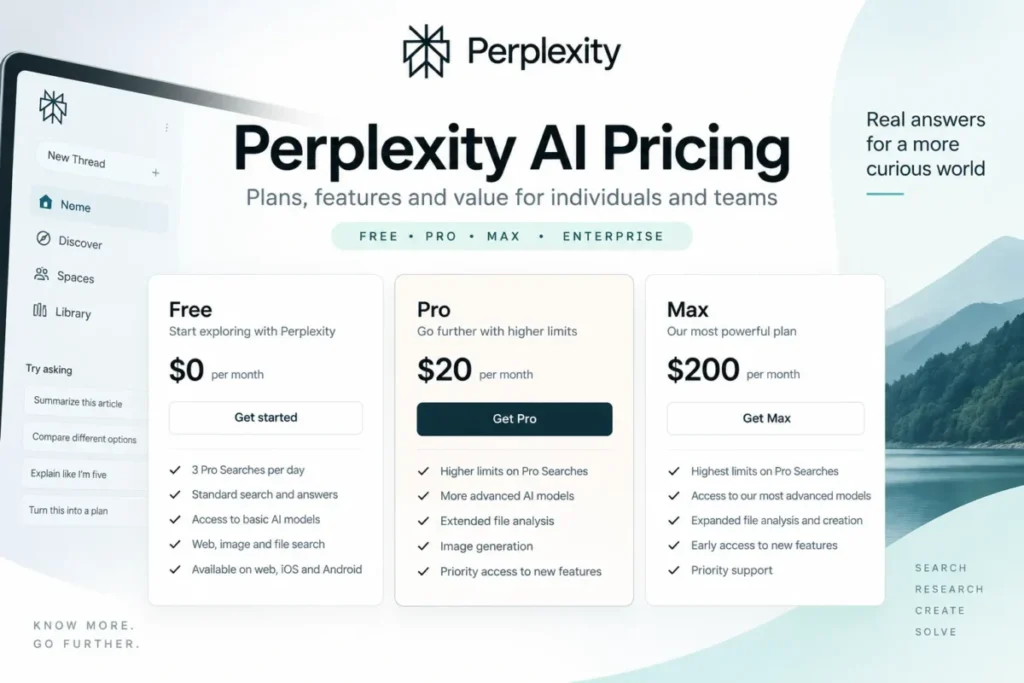
Six plans exist, and the gap between the cheapest paid tier and the most expensive consumer tier is ten times.
| Plan | Monthly | Annual | Billed per | Worth it? |
|---|---|---|---|---|
| Standard (Free) | $0 | $0 | Account | Fine for occasional lookups, not for daily research |
| Pro | $20 | $200 | Account | The practical individual plan |
| Education Pro | $10 | Not published | Verified account | Best value if you clear SheerID verification |
| Max | $200 | $2,000 | Account | Only with sustained Computer and Create volume |
| Enterprise Pro | $40 | $400 | Seat | The practical team plan |
| Enterprise Max | $325 | $3,250 | Seat | Buy selectively, not org-wide |
Eligible educational institutions and nonprofit organizations can obtain Enterprise Pro at $30 per seat per month or $300 per seat per year, after Perplexity validates eligibility. Students cannot request that discount themselves; an IT representative or department head has to apply.
Two billing conditions belong next to the Max price rather than in a footnote. Annual Max billing exists only in the web app, and a web Pro subscriber who upgrades to Max through a mobile app creates a second, separate Max subscription on top of the ongoing Pro one.
That is not a theoretical edge case. Perplexity gives the same warning about payment methods generally: updating billing details through the Google Play Store or Apple App Store creates a new, separate subscription and a new charge.
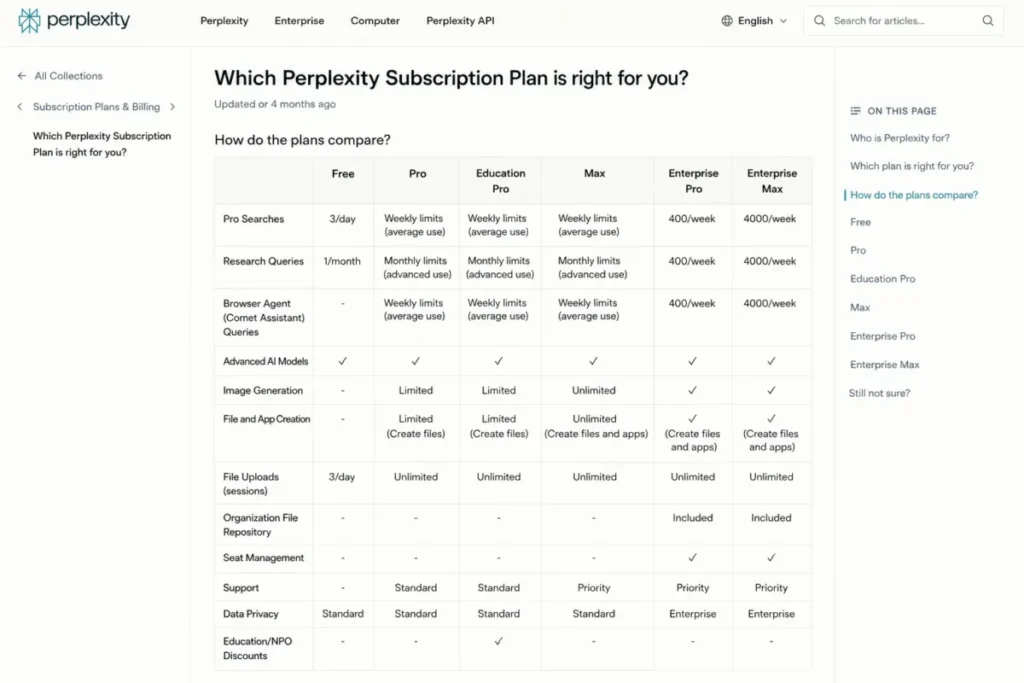
Sources: Perplexity’s plan comparison guide and the published plan starting prices. Also the Perplexity Max billing FAQ and the Enterprise pricing FAQ. All prices and any discount wording above were re-verified on the publish date: 2026-08-07.
What annual billing saves
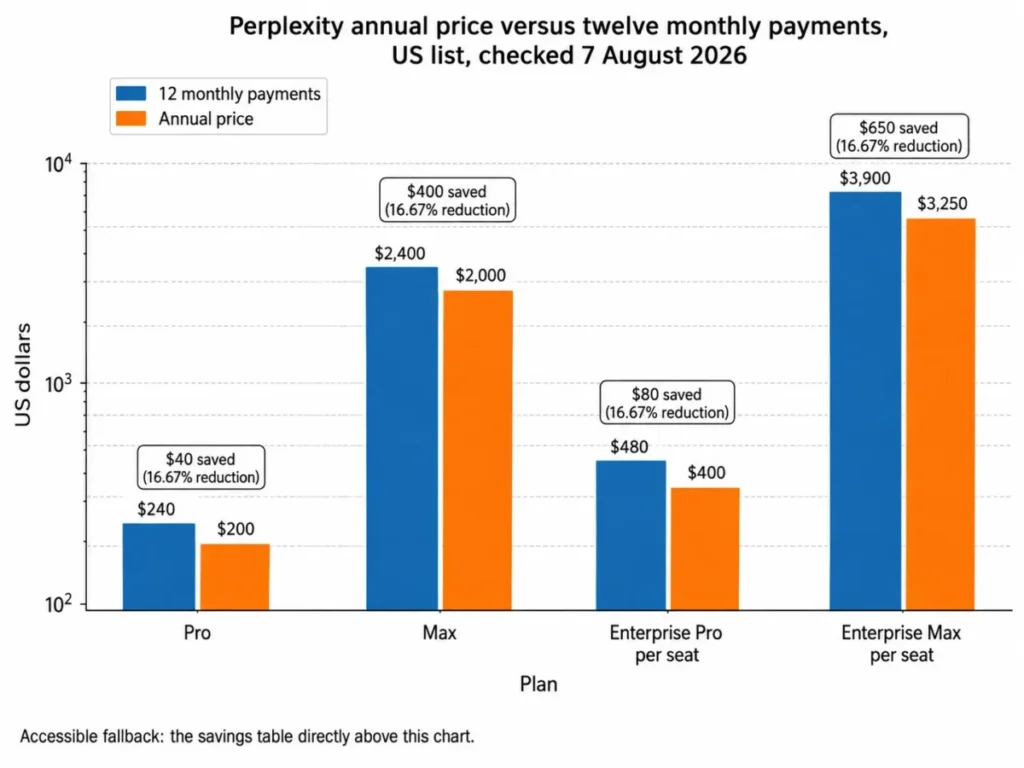
Perplexity describes the Enterprise Pro annual price as a 20% discount versus monthly subscriptions, checked 7 August 2026. The published prices do not produce that figure.
Twelve monthly payments of $40 come to $480, and the annual price is $400. The saving is $80, which is 16.67% of $480 rather than 20%.
Every tier lands on that same 16.67%, because each annual price is exactly ten months of the monthly price.
| Plan | 12 monthly payments | Annual price | You save | Reduction |
|---|---|---|---|---|
| Pro | $240 | $200 | $40 | 16.67% |
| Max | $2,400 | $2,000 | $400 | 16.67% |
| Enterprise Pro (per seat) | $480 | $400 | $80 | 16.67% |
| Enterprise Max (per seat) | $3,900 | $3,250 | $650 | 16.67% |
Calculated from the monthly and annual list prices published on the pages cited above, checked 7 August 2026. The gap between the vendor’s phrasing and the arithmetic is small in dollars and large in what it tells you about reading Perplexity’s pricing copy closely.
What ten seats cost in practice
Perplexity bills Enterprise per active seat, which makes team maths straightforward until governance requirements enter.
| Ten-person configuration | Annual cost | What you get |
|---|---|---|
| 10 individual Pro subscriptions | $2,000 | No seat management, no organization repository, consumer privacy defaults |
| 10 Enterprise Pro seats | $4,000 | Seat management, organization file repository, no AI training on your data |
| 9 Enterprise Pro + 1 Enterprise Max | $6,850 | The above plus organization-wide SCIM, Audit Logs, configurable retention, Insights |
| 10 Enterprise Max seats | $32,500 | The above plus the highest quotas for all ten users |
Calculated from the per-seat annual list prices in the Enterprise pricing FAQ and the governance thresholds in the plan comparison guide, checked 7 August 2026.
The third row is the one most Perplexity reviews never model. I would put it in front of any IT buyer before they price the fourth row.
One more billing rule shapes the first invoice. During the first month of an Enterprise subscription the organization is charged for the seats selected at onboarding, because a 30-day seat commitment applies, so removals only affect billing from month two onward.
After that first month, seat changes take effect immediately and generate a prorated charge or credit. Adjustments are billed weekly on monthly subscriptions and monthly on annual ones, so the invoice lags the change.
There is also no Enterprise trial. Perplexity states plainly that trials are not offered for Enterprise Pro or Enterprise Max, which means a pilot is a paid pilot.
Computer Credits: The Second Bill Behind the Subscription
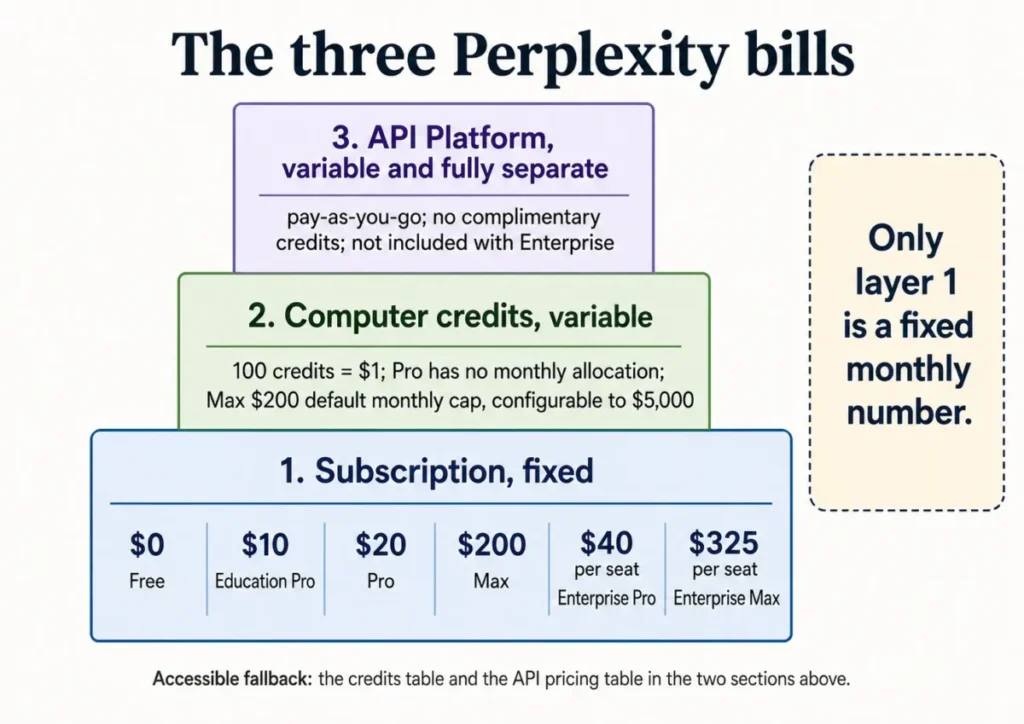
Computer is Perplexity’s agent for multi-step work across web, files, and connectors. It does not run on your subscription quota; it runs on credits, at a published rate of 100 credits per $1.
Ordinary Ask searches consume no credits. Every Computer task does.
| Plan | Monthly credits | Dollar equivalent | One-time signup bonus | Dollar equivalent |
|---|---|---|---|---|
| Pro | None | $0 | 4,000 credits, expire in 30 days | $40 |
| Max | 10,000 | $100 | 35,000 credits, expire in 30 days | $350 |
| Enterprise Pro | 500 | $5 | 8,000 credits, expire in 30 days | $80 |
| Enterprise Max | 15,000 | $150 | 45,000 credits, expire in 30 days | $450 |
Read the Pro row again. The bonus is one per account, it does not repeat if you cancel and resubscribe or switch between monthly and annual billing, and after it expires Pro includes no monthly credits at all.
Enterprise Pro’s 500 monthly credits are worth $5. That is a real allocation, and it is small enough that any team planning routine agent work should treat it as a rounding error rather than a budget.
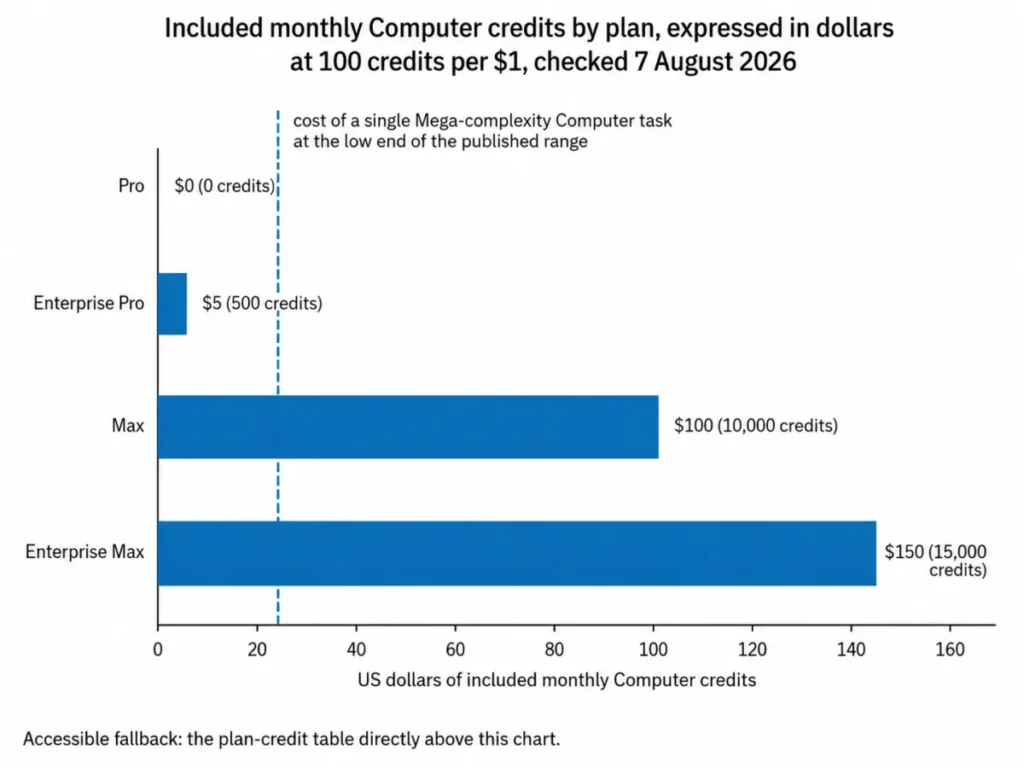
In text: Pro includes $0 of monthly Computer credits, Enterprise Pro $5, Max $100, and Enterprise Max $150, against a single Mega-complexity task that starts at $24.
Source: Perplexity’s credits documentation, checked 7 August 2026. Dollar equivalents are calculated at the published 100-credits-per-$1 rate and describe purchasing equivalence inside Perplexity, not cash value.
What a Computer task costs in dollars
Perplexity publishes a task-complexity table with typical credit ranges. Converted at the published rate, the numbers are large enough to change the Max value calculation.
| Task complexity | Typical credits | Dollar equivalent | Example workload |
|---|---|---|---|
| Light | 100 to 350 | $1.00 to $3.50 | Research threads, summarization |
| Complex | 350 to 950 | $3.50 to $9.50 | Multi-step reports, analysis |
| Heavy | 875 to 2,275 | $8.75 to $22.75 | Complex documents, research and code combined |
| Mega | 2,400 to 9,800 | $24.00 to $98.00 | Large projects, video production, data collection |
Credit ranges from Perplexity’s credits documentation, checked 7 August 2026, converted at the same page’s published rate. Perplexity labels these as examples rather than guarantees, and states that credit pricing, task ranges, and monthly allowances can change.
Treat the Light row with extra caution. The same page carries a quick-summary line stating that light tasks use about 15 to 70 credits, which contradicts the 100 to 350 figure in its own detailed table, so there is no single definitive light-task cost to plan against.
Now put the Mega row against the Max allocation. Max includes $100 of credits per month, and one Mega task at the top of its range costs $98.
A power user running large data-collection or video work is not buying an all-inclusive plan at $200 per month. They are buying a plan with a starter credit balance attached.
What happens when credits hit zero
Active tasks pause rather than cancel, and the work is saved. New credit-consuming tasks are blocked until credits return, and paused tasks resume on their own once they do.
Unused monthly credits do not roll over. Purchased credits behave differently: they stay in the account and expire only after a year without Computer use, and they are consumed last, after bonus and then monthly credits.
Auto-refill exists but is off until you turn it on, triggering at 500 credits for Pro and 2,500 for Max. Every Max account carries a monthly spending cap on credit charges, defaulting to $200 and configurable up to $5,000.
A $5,000 ceiling on a $200 subscription is the clearest available signal about how much variable spend Perplexity expects heavy Computer users to generate. I would set that cap deliberately on day one rather than discovering the default later.
Two smaller rules catch people out. Credits are personal to an account and cannot be transferred or assigned to another user outside limited enterprise circumstances, and all credits are forfeited when a subscription ends except where local law requires otherwise.
If you upgraded to Max through the iOS or Android app, you also have to add a card on the website before you can use Computer at all.
The API Platform Is a Separate Bill
Several 2026 reviews still imply that a paid subscription comes with API credits. Perplexity’s current documentation says the opposite in plain terms: the API Platform is pay-as-you-go, provides no access to Pro features inside the web or app interface, and includes no complimentary API credits.
Enterprise buyers get the same answer. API usage is not included with Enterprise Pro or Enterprise Max, users who need it must purchase credits themselves, and administrators cannot manage API credits on another user’s behalf.
If you are building on top of Perplexity rather than using it, the rates below are the ones that matter. It helps to be clear on how an API works before budgeting against them.
| API component | Price | Billing unit |
|---|---|---|
Agent API web_search | $0.0025 | Per invocation |
Agent API fetch_url | $0.00025 | Per invocation |
Agent API people_search and finance_search | $0.005 each | Per invocation |
Agent API sandbox | $0.03 | Per session, a 20-minute billing window |
| Search API | $5.00 | Per 1,000 successful requests |
| Sonar | $1 input, $1 output | Per 1M tokens, plus a request fee |
| Sonar Pro | $3 input, $15 output | Per 1M tokens, plus a request fee |
| Sonar Deep Research | $2 input, $8 output, $2 citation, $3 reasoning | Per 1M tokens, plus $5 per 1,000 searches |
Source: Perplexity’s API pricing documentation, checked 7 August 2026. Sonar request fees vary by search context size, from $5 to $12 per 1,000 requests on Sonar and $6 to $14 on Sonar Pro.
Feature Gates: What You Get on Each Plan
| Capability | Free | Pro / Education Pro | Max | Enterprise Pro | Enterprise Max |
|---|---|---|---|---|---|
| Pro Searches | 3 per day | Weekly, average use | Weekly, advanced use | 400 per week | 4,000 per week |
| Research queries | 1 per month | Monthly, average use | Monthly, advanced use | 50 per month | 500 per month |
| Browser Agent queries | No | Monthly, average use | Monthly, advanced use | 80 per month | 800 per month |
| File and app creation | No | Monthly, average use | Monthly, advanced use | 50 per month | 500 per month |
| Session file uploads | Limited | Weekly, average use | Weekly, advanced use | 100 per week | 1,000 per week |
| Advanced AI models | No | Yes | Yes | Yes | Yes |
| Organization file repository | No | No | No | Yes | Yes |
| Data used for AI training | On by default | On by default, opt-out available | On by default, opt-out available | Never | Never |
That last point is a genuine gap for individual buyers. You can price Enterprise capacity precisely and you cannot price Pro capacity at all, which means a heavy individual user has to discover their ceiling by hitting it.
Source: Perplexity’s plan comparison guide, checked 7 August 2026. The “average use” and “advanced use” wording is Perplexity’s own; no numeric consumer quota is published.
For Solo Consultants, Analysts, and Marketers
Pro at $200 per year is the right default here, and the reason is quota shape rather than feature count.
Free gives 3 Pro Searches per day and 1 Research query per month. A consultant doing genuine desk research clears the daily allowance before lunch and the monthly Research allowance in a single client brief.
Pro opens advanced model selection, image and video generation, higher file and attachment limits, up to 50 file uploads per project, connector access, and priority support through Discord and Intercom. As of 7 August 2026 Perplexity lists GPT-5.2, Claude Sonnet 4.6, Gemini 3.1 Pro, its own Sonar model, and Grok 4 among the selectable options. Model line-ups change often enough that the list should be rechecked rather than trusted from an article.
The upgrade trigger out of Pro is not feature envy. It is repeat credit purchases: once you are buying Computer credits every month, compare that spend against the $180 monthly gap to Max before you keep topping up.
Skip Max if your work is reading, comparing, and drafting rather than delegating multi-step tasks. The research modes at the centre of that work are already open at $20.
For Verified Students and Educators
Education Pro at $10 per month is the strongest price-to-capability ratio Perplexity offers, and it requires SheerID verification. Perplexity describes it as including everything in Pro, plus Perplexity Computer access, Learn Mode, and education-specific guidance.
One inconsistency deserves flagging. The Education Pro description claims unlimited Pro Searches, while the plan comparison table on the same page lists Education Pro under the same “weekly limits (average use)” wording as Pro. The two statements do not agree, and only the table is directly comparable across tiers.
There is a switching cost worth knowing before you commit an account. Discounted Education Pro subscriptions cannot be self-transferred to another email address, because the SheerID verification record is permanently tied to the original account.
For a student who will graduate into a work email, that means the graduate account starts empty. Build the habit of exporting anything you want to keep.
For Individual Power Users Weighing Max
Max costs $200 per month or $2,000 per year, and it is available only to consumers on Free or Pro. It adds the highest consumer access to advanced models, extended Create files and apps limits, the highest browser-agent limit of any tier, early feature access, and Brain, a memory system in research preview that builds working context for Computer.
The honest framing is that Max is a capacity purchase, not a capability purchase. Pro already opens advanced models, Research, file analysis, connectors, and asset creation.
What Max buys is headroom plus $100 of monthly Computer credits. Set against a Complex task at $3.50 to $9.50 and a Heavy task at $8.75 to $22.75, that allocation covers a working week of moderate agent use, not a month of it.
Buy Max when you are already spending more than roughly $180 per month on Computer credits on top of Pro, or when hitting Pro’s unpublished weekly ceilings is costing you working days. Otherwise the same $2,400 annualized buys a lot of specialist tooling.
Two billing rules protect you at purchase. Upgrade from the web app if you subscribed on the web, and expect a 24-hour refund window on monthly plans or 48 hours on annual ones outside the EU, UK, Turkey, Brazil, and South Korea, where longer statutory windows apply.
For 10 to 49-Person Knowledge Teams
Enterprise Pro at $400 per seat per year is where the product changes character rather than just scale. Ten seats cost $4,000 per year against $2,000 for ten individual Pro subscriptions, and the $2,000 difference buys governance.
The concrete additions are seat management, an organization-wide file repository with internal knowledge search, higher daily file upload limits with organization-level controls, dedicated support, admin-controlled billing and account access, and Projects sized for team collaboration.
Collaboration scale is itself an upgrade trigger. A non-Enterprise Project caps at 5 contributors, while an Enterprise-owned Project supports up to 9,999, so the sixth person on a shared workstream is a licensing event.
The privacy difference is the one procurement will focus on. Enterprise query data is never used to train Perplexity’s models, uploaded files are retained for only 7 days, and Perplexity holds zero-retention and zero-training agreements with the underlying model providers.
Plan seats before onboarding rather than after. That 30-day first-month commitment means an over-provisioned launch is billed in full regardless of how quickly you correct it.
For Security-Sensitive Teams Below 50 Seats
This is the section that changes budgets. SCIM, Audit Logs, configurable data retention, and the Insights dashboard normally require an organization of 50 or more Enterprise Pro seats.
There is a documented second route. An organization with at least one Enterprise Max user gets organization-wide access to that set with no seat minimum.
For a 10-person team that means the choice is not “stay without SCIM” or “buy Enterprise Max for everyone”. It is $4,000 per year without those controls, $6,850 with them via a single upgraded seat, or $32,500 if you upgrade all ten.
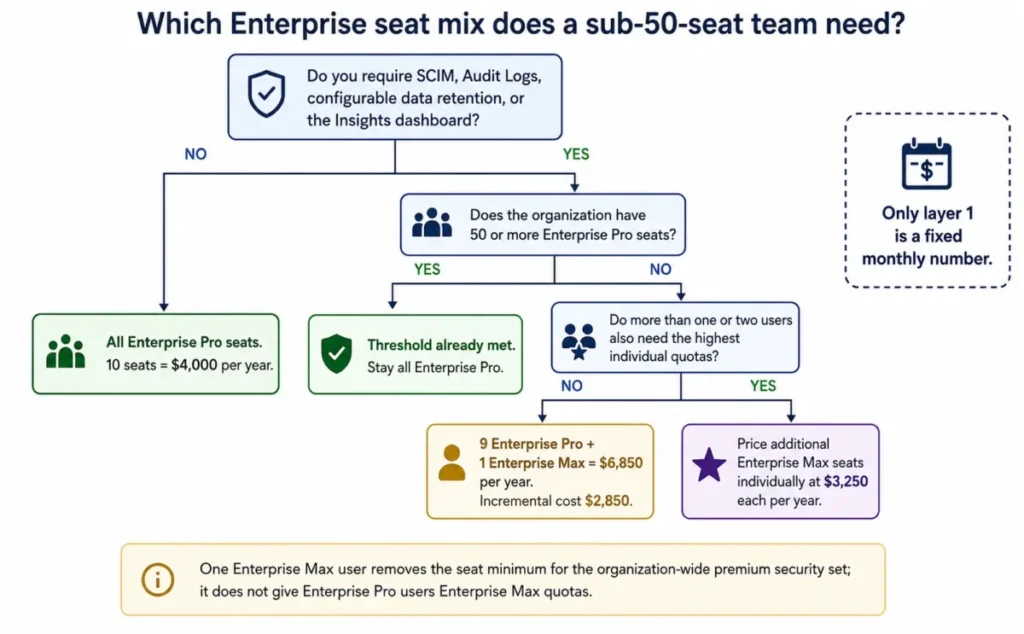
Be precise about what that single seat does and does not do. It removes the seat minimum for those organization-wide controls; it does not raise the other nine users’ Research, Pro Search, or Create quotas.
Key Features and Where Each One Stops
Pro Search and Research
Pro Search handles multi-step reasoning and detailed research, while Research runs autonomous multi-step analysis and returns a longer report. Best mode, which picks a model automatically, is available without quota limits.
The gate is quota, not access. Free gets 1 Research query per month, and Perplexity notes that advanced model access can be limited during weeks of especially heavy usage even on paid plans.
File uploads and document analysis
Uploads run through the Attach control in the search bar, with drag and drop supported for files and folders. Text, code, PDFs, images, audio, and video are accepted, and spoken content in audio and video is transcribed with speaker labels.
Two limits define the workflow. File size is capped at 40 MB for all types, and short files can be analyzed in full while a long file has its most important parts extracted rather than being read end to end.
For due diligence, contract review, or regulatory work, that second limit is disqualifying on its own unless you split documents and verify coverage yourself. Visual scenes in video are also not indexed or searchable, only the transcribed audio.
Create files and apps
Available to Pro, Education Pro, Max, and both Enterprise tiers, this turns a prompt into a DOCX, PDF, XLSX, PPTX, or HTML artifact previewed in a side panel, with follow-up prompts for edits and full version history. Assets export to Google Drive when the connector is attached.
Two constraints keep it short of a production design tool. As of 7 August 2026 Perplexity cannot apply a specific slide layout or template to a generated presentation or document, and citations are included on documents only, not on the spreadsheets, presentations, or apps.
So the honest positioning is research-to-first-draft, then finish in your own template. Teams evaluating this against dedicated AI tools for content creation should test that handoff before committing.
Projects and Brain
A Project is a persistent shared workspace holding sessions, Computer tasks, files, instructions, and connectors, private by default, with Owner, Can edit, and Can view roles. Instructions run up to 8,000 characters, which is enough to encode a house style or a standing output format.
Brain builds ongoing memory for a Project, and it carries a billing rule worth noting: Brain runs are billed to the creator of the project. On a shared team Project, one person’s credit balance absorbs everyone’s memory building unless the setting is switched from automatic to manual.
Connectors
Google Drive, Dropbox, and Slack connectors are open to Pro, Max, and both Enterprise tiers. What differs is retrieval depth rather than availability, which is exactly what a logo list hides.
| Google Drive capability | Pro / Max | Enterprise Pro / Max |
|---|---|---|
| Standard search across the whole Drive | Yes | Yes |
| Sync files to a Project | Yes | Yes |
| Sync files to the personal My Files repository | No | Yes |
| High-Precision Search on selected files | No | Yes |
Standard search queries Drive through Google’s API in real time and only touches files the API returns for your query. High-Precision Search indexes the specific files you upload for deep analysis, and it is Enterprise-only on Google Drive.
Supported types cover Google Docs, Sheets and Slides, DOCX, XLSX, PPTX, PDF, CSV, Markdown, JSON, and TXT. Images, audio, and video are not supported through the connector, so a media-heavy Drive is largely invisible to it.
Source: Perplexity’s Google Drive connector documentation, checked 7 August 2026.
Automation, Model Access, and Usage Reporting
Automation lives in two places with two different meters. Browser Agent queries run against a plan quota, at 80 per month on Enterprise Pro and 800 on Enterprise Max, while Computer tasks run against the credit balance.
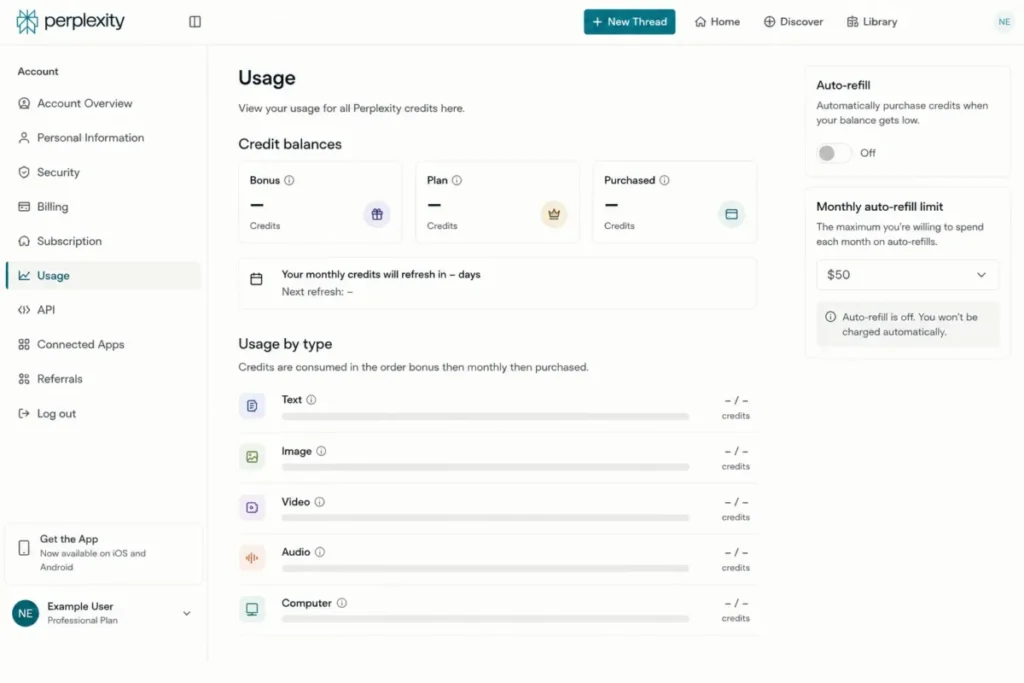
Usage reporting is better than most subscription products offer. The account usage page shows Bonus, Plan, and Purchased balances separately, days until the next monthly refresh, a breakdown by usage type across text, image, video, and audio, and a per-session view through a Usage dropdown inside each thread.
Model access tiers upward rather than switching on and off. Pro opens the advanced model list, Max gets faster access to the newest frontier models with high usage limits, and Enterprise Max is documented as receiving the highest access within Perplexity web only, explicitly excluding the separately billed API.
Perplexity also notes that Enterprise Max users can generate 15 videos per month, each 8 seconds long with audio in 16:9. If video output is core to your workflow rather than incidental, that is a number to check against your actual monthly volume before signing.
Ease of Use and Setup
Setup difficulty is low for an individual and medium for an organization. An individual signs up, picks a search mode, and starts; the learning curve is deciding when to spend a Research query rather than a Pro Search.
The genuinely fiddly part is connector administration. Enabling Google Drive requires granting the connector permission to see and download all your Drive files, plus edit, create, and delete permissions on the specific files it uses to maintain sync metadata. A Google Workspace administrator may also need to adjust OAuth scope settings before it works at all.
Enterprise onboarding adds seat selection, payment authorization, and organization-level permission decisions about which connectors members can enable. Admins can disable a connector for the whole organization, which means an individual’s setup problem is sometimes an administrator’s policy.
Who will find this hard: administrators in locked-down Google Workspace tenants, and teams expecting connector parity across clients. Who will find it easy: anyone using Perplexity as a browser-based research tool for their own account.
Integrations and Connector Limits
The client-support gap is the constraint most integration write-ups miss. To use the Dropbox connector you must be in a web browser, because it is not supported in the Perplexity Windows app, Mac app, or mobile apps.
Perplexity’s own file-management controls carry the same pattern. Deleting an individual file from a session, and downloading an uploaded file or image, are documented as web-only and unavailable in the mobile or desktop apps.
There are two distinct Slack integrations, and they run in opposite directions. The Slack connector brings Slack content into Perplexity as a search source and is open to Pro, Max, and Enterprise; the Perplexity Slack app brings Computer into Slack, requires Computer access, and needs a paid Slack plan to install.
Test the exact client you will work in before you count a connector as available. A capability that exists only in the browser is a real constraint for a team standardized on the desktop app.
Privacy and Data Use
On Free, Pro, and Max, AI Data Retention is enabled by default. Your queries feed model training unless you turn it off at Account, then Preferences, then the AI data retention toggle.
The opt-out has a boundary that matters more than the toggle itself. It applies only to data collected after the opt-out date, and previously collected training data cannot be deleted or removed.
Enterprise sits on a different footing entirely. Enterprise data is never used for AI training, uploaded files are retained for 7 days, and organizations with 50 or more Enterprise Pro seats or one Enterprise Max seat can set custom retention periods and force deletion at any time.
Downgrading reverses that protection. If an organization moves to a Free or non-Enterprise plan, its activity falls under the consumer policy where AI data retention is on by default and has to be switched off manually.
| Data question | Free / Pro / Max | Enterprise Pro / Max |
|---|---|---|
| Used for AI model training | Yes by default, opt-out available | Never |
| Opt-out covers past data | No, future data only | Not applicable |
| Session file retention | 30 days | 7 days |
| Custom retention and forced deletion | Not offered | 50+ Enterprise Pro seats or 1 Enterprise Max seat |
One user action overrides all of it. Uploaded files stay private unless you share the session, and once a session is public anyone with the link can see the attached files.
If you need to share the reasoning without the source document, export the session to PDF instead of publishing the link. Immediate deletion of a file from a session, project, or organization requires submitting a request form rather than a self-service control.
Sources: Perplexity’s data collection documentation and its file upload privacy documentation, checked 7 August 2026.
Security, Support, and Admin Controls
Perplexity documents SOC 2 Type II certification, end-to-end encryption, and granular user access controls for Enterprise organizations, with connected files encrypted in transit and at rest.
Administrative control sits at two levels, and both have to agree. Organization admins enable or disable each connector for all members from organization permission settings, and Enterprise admins also restrict public sharing, external invites, and organization-wide publishing on Projects.
Support tiers by plan: basic help center on Free, priority support via Discord and Intercom for Pro, Education Pro, and Max, and dedicated support for both Enterprise tiers. Perplexity publishes no numeric response-time commitment for any tier, so a specific SLA is something to negotiate rather than assume.
Payment and procurement options widen at the top. Invoice billing is available on annual subscriptions, wire transfer can be selected at checkout, and white-glove invoicing is offered for organizations of 250 or more users, where unquantified discounts may also apply.
Perplexity AI Limitations
Long documents are not read end to end. Perplexity extracts what it judges most important from a long file. Any workflow that depends on complete coverage of a contract, filing, or regulatory document needs an independent check.
Consumer quotas are unpublished. Pro and Max limits appear only as “average use” and “advanced use”. You cannot forecast when you will hit them, which is a real planning problem for anyone billing research time.
Computer is a separate variable cost. Pro carries no recurring monthly allocation, monthly credits never roll over, and work pauses at zero. The subscription line is not the total.
Generated decks cannot use your template. Perplexity produces functional presentations and documents, and as of 7 August 2026 applying a specific layout or template is not supported, so branded output still needs a finishing pass in your own tooling.
Connector capability is not uniform. High-Precision Search and My Files sync on Google Drive are Enterprise-only, media files are excluded from connector retrieval, and the Dropbox connector works only in a browser.
Account data does not follow the subscription. Self-transfer moves a web-purchased Pro or Max subscription to a new email, but threads, collections, and settings stay in the old account permanently and cannot be moved.
Who Should Use Perplexity AI?
Independent consultants, analysts, and market researchers. Daily source-checked synthesis is the exact job this product is shaped around, and Pro at $200 per year is cheaper than the hours it saves on any realistic billing rate.
Verified students, faculty, and academic researchers. Education Pro at $10 per month keeps the full paid research feature set at half the standard price.
Competitive intelligence and strategy teams of 10 to 49 people. Enterprise Pro adds the organization repository, internal knowledge search, seat management, and a no-training data policy for $4,000 per year at ten seats.
Security-sensitive organizations below the 50-seat threshold. The single Enterprise Max seat route opens SCIM, Audit Logs, configurable retention, and Insights for an incremental $2,850 per year rather than a full-fleet upgrade.
Developers building retrieval into their own products. The Search API at $5.00 per 1,000 requests and the Agent API tool rates are usable without any consumer subscription at all.
Who Should Avoid Perplexity AI?
Teams that need branded deliverables straight out of the tool. Template application is not supported, so every deck still needs a design pass, and buying Perplexity as a presentation generator will disappoint.
Legal, compliance, and due-diligence workflows requiring exhaustive review. Selective extraction from long files and the 40 MB ceiling make complete coverage something you have to verify separately.
Buyers who need a single predictable bill. Between Computer credits and separately metered API usage, two of the three cost layers move with usage, and a Max account defaults to a $200 monthly credit cap on top of the $200 subscription.
Anyone replacing Google outright. Perplexity is built for synthesis across sources; navigational lookups, maps, local discovery, and shopping remain jobs a conventional search engine does better.
Teams standardized on the desktop or mobile apps for file work. Browser-only connector support and web-only file deletion and download controls will break a cross-client workflow.
Perplexity AI Alternatives
| Alternative | Better for | Why choose it instead |
|---|---|---|
| ChatGPT | General-purpose work beyond research | Broader creative, coding, and agentic feature set in one subscription |
| Claude | Long-document reasoning and writing quality | Stronger fit when the task is drafting and analysis rather than live retrieval |
| Google Gemini | Google Workspace-native teams | Retrieval and generation sit inside Docs, Sheets, and Gmail already |
| NotebookLM | Closed-corpus study of your own sources | Grounds answers in documents you supply rather than the open web |
ChatGPT
Choose ChatGPT when research is one job among many and you want the same subscription covering drafting, coding, and image work. The ChatGPT review covers where its feature breadth pays off, and ChatGPT pricing sets out the tier structure to compare against Perplexity’s $20 and $200 steps.
Claude
Choose Claude when the bottleneck is reasoning over long text you already have rather than finding new sources. See the Claude review for the workflow fit and Claude pricing for the per-seat comparison.
Google Gemini
Choose Gemini when your documents, mail, and calendar already live in Google Workspace and the retrieval you want is internal rather than web-wide. The Gemini review sets out where that native placement beats a connector.
NotebookLM
Choose NotebookLM when the corpus is fixed and the requirement is grounded answers from your own uploads rather than open-web synthesis. The NotebookLM review explains where that constraint becomes an advantage.
Final Verdict: Is Perplexity AI Worth It in 2026?
Perplexity is worth paying for if your work involves finding, comparing, and citing current information most days. At $200 per year, Pro is the plan I would choose for that, and Education Pro at $10 per month is the better route if you can verify eligibility.
It is not worth paying for if you want one flat bill, exhaustive document review, or a finished branded deliverable. Those are not gaps in polish; they are documented product boundaries.
Choose Enterprise Pro at $400 per seat per year the moment a team needs shared internal knowledge search, seat administration, and a no-training data policy. Add exactly one Enterprise Max seat if SCIM, Audit Logs, configurable retention, or Insights are procurement requirements and you are under 50 seats.
Choose Max only when you can point to repeat Computer credit purchases or a genuine ceiling on Pro. Choose an alternative when writing quality, general-purpose breadth, or closed-corpus grounding matters more than live retrieval with visible sources.
The decision chain behind that verdict is short. The official documentation shows a documented capability set that stops at three points: long files are excerpted rather than read whole, template application is unsupported, and Computer runs on credits rather than the subscription. Because of that, the workflow consequence for a buyer or team is that document review needs a second pass, branded output needs a finishing pass, and agent work needs its own budget line. Those are the trade-offs and plan gates that decide the recommendation, so I recommend Pro when the job is cited research and choose an alternative from my best AI tools when it is not.
The question I would ask before renewal is simple: over the last quarter, how much did this cost including credits and API, and how many decisions did the citations let you defend?
If the second number is high, the price is fair. If you cannot answer the first, you bought the wrong tier.
Frequently Asked Questions
Is Perplexity AI worth it in 2026?
Yes, if you research daily and need sources you can inspect, because Pro at $20 per month or $200 per year opens advanced models, Research mode, file analysis, and connectors. It is poor value if you mainly want creative writing, branded deck production, or complete review of long documents.
How much does Perplexity AI cost?
Free is $0, Pro is $20 per month or $200 per year, Education Pro is $10 per month with SheerID verification, and Max is $200 per month or $2,000 per year. Enterprise Pro is $40 per seat per month or $400 per year and Enterprise Max is $325 per seat per month or $3,250 per year, all checked 7 August 2026.
What is the difference between Perplexity Free and Pro?
Free gives 3 Pro Searches per day and 1 Research query per month, with no advanced model selection, no image generation, and no browser agent. Pro opens all of those, raises file upload limits to 50 per project, adds connectors and asset creation, and includes priority support through Discord and Intercom.
Are Perplexity Computer credits included in my subscription?
Only partly: Max includes 10,000 credits per month and Enterprise Max 15,000, but Pro includes no recurring monthly allocation once its one-time 4,000-credit signup bonus expires after 30 days. At 100 credits per $1, a single large Computer task costs $24 to $98, so heavy agent users should budget a second line.
Is the Perplexity API included with Pro?
No, unless you buy it separately, because the API Platform is pay-as-you-go, includes no complimentary API credits, and is not bundled with Enterprise Pro or Enterprise Max either. Administrators also cannot manage API credits on behalf of other users, so each developer funds their own balance.
Does Perplexity use my data for AI training?
On Free, Pro, and Max, yes by default, and you opt out under Account, then Preferences, then the AI data retention toggle. That opt-out covers only data collected afterward, previously collected training data cannot be removed, and Enterprise data is never used for training at all.
Which Perplexity plan is best for a 10-person team?
Enterprise Pro at $4,000 per year for ten seats, in most cases. If SCIM, Audit Logs, configurable retention, or the Insights dashboard are hard requirements, replace one seat with Enterprise Max for $6,850 per year total rather than upgrading everyone, which would cost $32,500.
Can Perplexity make a presentation in my company template?
No, not as of 7 August 2026. Perplexity generates functional PPTX, DOCX, XLSX, PDF, and HTML files with version history and export, but applying a specific slide layout or template is not supported, so branded formatting still happens in your own software after download.
Can I move my Perplexity subscription to a different email?
Yes, if it is a web-purchased consumer Pro or Max plan, because Education Pro, Enterprise, app-store, and promotional subscriptions are not eligible. The subscription moves but your threads, collections, and settings stay in the old account permanently and cannot be transferred.
Can Perplexity replace Google?
No, unless your searching is almost entirely research, because Perplexity is built for synthesis across multiple sources with citations. Navigational lookups, maps, local business discovery, and shopping are still handled better by a conventional search engine, so most people end up running both.