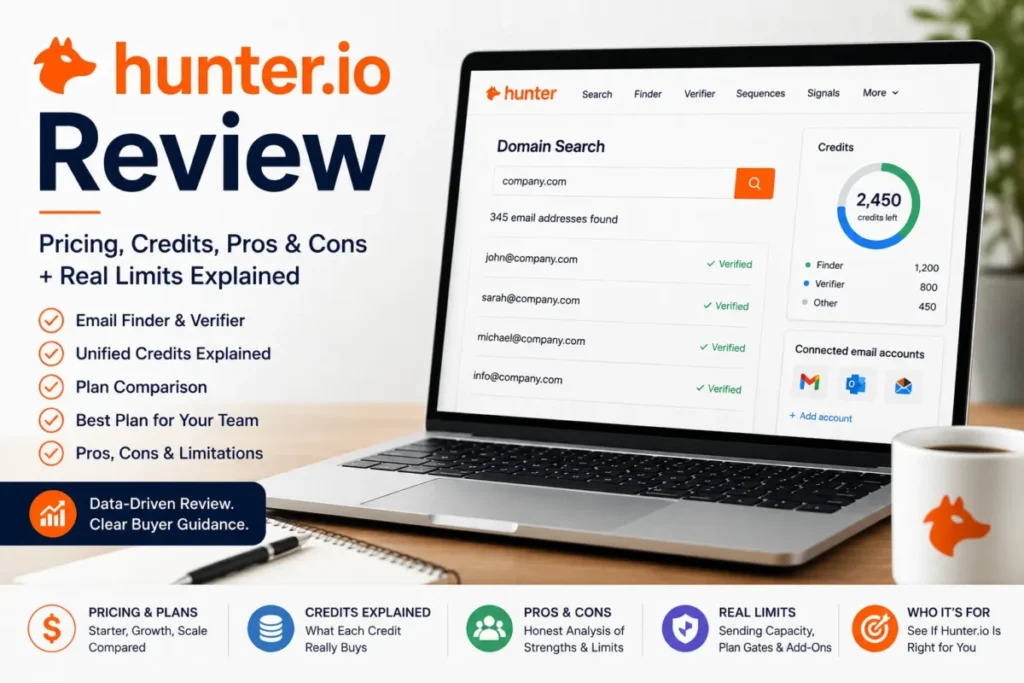
Most buyers arrive at a Hunter.io review with the wrong question. They ask what Hunter costs, when the number that decides the purchase is how fast a credit balance drains against the way their team actually prospects.
Hunter in 2026 runs finding, verification, company discovery, sending and buying-signal monitoring out of one credit pool, with no per-seat charge. That combination changes the math in ways a plan table does not show, and it hides two traps: a plan-family switch that stops live outreach, and a data model whose coverage falls away exactly where small-company prospecting lives.
This review is for founders, SDR and RevOps teams, agencies, recruiters and developers deciding whether Hunter is the right email layer, and which plan to sign. It assumes the pipeline itself already lives somewhere, whether that is a spreadsheet or CRM software for sales teams.
In This Article (18 sections)
Quick Verdict
| Decision point | Where Hunter lands |
|---|---|
| Best for | Email-first prospecting where the target company or person is already known, and the targets have a real public web footprint |
| Not ideal for | Phone-first outbound, large mailbox-fleet cold email operations, and ICPs with almost no public web presence |
| Starting paid price | $408 per year for Starter, listed as an effective $34 per month |
| Practical plan | Growth, at $1,248 per year, once monthly usage passes roughly 2,000 credits or three sender accounts |
| Free plan | Real feature access, 50 credits per month, 1 connected sender account |
| Setup difficulty | Low for finding and verification; sender authentication and warm-up are the real work |
| Main strength | One unified credit pool, unlimited team members, and source transparency on where an address was found |
| Main limitation | Public-web sourcing caps coverage, and Signals cannot be shared across a team |
| Best alternative | A database-first prospecting platform when direct dials matter more than email transparency |
Choose Hunter if the targets are companies you can already name and their addresses sit somewhere on the public web. Avoid it if the motion is dialler-led or the ICP has almost no public footprint.

Hunter Pros and Cons
| Pros | Cons |
|---|---|
| One unified credit pool covers finding and verification, so a found address on Email Finder costs 1 credit with verification already included | Unused monthly credits expire at the end of the billing cycle, so a lumpy prospecting month wastes paid capacity |
| Unlimited team members on every plan, including Free, removes seat count from the budget entirely | Signals are tied to one user account and cannot be shared or transferred, which breaks pooled SDR workflows |
| Bulk Domain Search returns up to 10 emails per domain for 1 credit, which is far cheaper per contact than person-by-person lookup | Coverage depends on what Hunter’s crawler can read, and gaps are more common for smaller companies |
| Discover, Sequences and Signals are included rather than sold as separate products, so a small team runs prospecting and sending in one account | Sending infrastructure is priced separately: managed mailboxes, managed domains and extra connection slots all bill on top of the plan |
| Documented API rate limits and error semantics let an engineer size an integration before writing code | Signals is a UI-only feature, absent from both the API and Data Platform, so event-triggered prospecting cannot be automated |
| Public-web sourcing means each Domain Search result carries where and when the address was found | Accept-all and Unknown verification states still carry send risk, so verified does not mean safe to blast |
What Hunter Is in 2026
Hunter is operated by Hunter Web Services, Inc., and the company dates the product to 2015. It began as an email-finder utility and now describes itself as an all-in-one cold outreach platform covering company discovery, email finding, verification, lead storage, sequences and buying signals.
Leads, its storage layer, is where found contacts sit before they reach a sequence or a CRM, which makes Hunter a front end to lead management workflow rather than a replacement for it.
The important structural fact is that Hunter sells two different products under one brand. All-in-One plans give the web app, Sequences, Signals and Discover; Data Platform plans are an API-and-credits product with a different credit system and a different feature set.
Getting that fork wrong is the most expensive mistake available in this purchase, and the plan-selection section returns to it.
Methodology: How This Hunter Review Was Assessed
This review is based on Hunter’s official pricing page, its help-centre documentation, its API reference, its integrations page, its published security policy, its data processing agreement, and its own description of how its data is sourced. Pricing and plan limits were verified against those pages on 2026-08-26 for the US market in USD.
Hunter was assessed against the criteria that decide an email-tooling purchase: credit cost per real workflow, plan gates, sending capacity, data-coverage boundaries, integration and API ceilings, add-on costs, and switching risk between plan families.
Greater weight was given to factors that survive contact with a live team: how quickly a credit balance drains, what forces a plan upgrade, and what breaks when a plan family changes. Vendor positioning and marketing claims were treated as vendor claims and labelled as such.
Claims that could not be traced to an official page were left out rather than softened. Every price is a list price for annual or monthly billing as stated, and calculated totals are labelled as calculations rather than presented as Hunter offers.
The Three Problems Hunter Solves Well
Three jobs account for most of what a team will actually run in Hunter. Each has its own credit behaviour, and the difference between them is where the budget is won or lost.
Finding one person’s address without paying twice
The most common prospecting job is narrow: a name, a company, and a need for the working address. Hunter’s Email Finder charges 1 credit when an address is found, and the documentation is explicit that verification is already included in the same credit used to find it.
That single detail is worth more than it looks. Tools that bill a find and then bill a verification turn every confirmed contact into 1.5 or 2 units of spend, and at 10,000 contacts a year that gap is the difference between two plan tiers.
No credit is charged when Hunter cannot find a result, so a low-hit-rate list costs nothing except the time to run it.
Turning an account list into contacts at bulk rates
Bulk Domain Search is where Hunter’s economics separate from per-contact pricing. The documented cost is 1 credit for 1 to 10 emails returned per domain, plus 0.5 credits for each address selected for fresh verification.
Run 500 target domains and pull up to 10 contacts each, and the reveal cost is 500 credits for as many as 5,000 addresses. Add in-bulk verification for all of them and the bill rises to 3,000 credits, which is still 0.6 credits per verified contact.
The catch is a workflow gate rather than a price. In-bulk verification is only selectable when the maximum emails per domain is set to 10 or fewer, so the moment a team asks for deep coverage on each domain, verification has to move to a separate step and a separate cost.
Domains also beat company names as input. Hunter states plainly that company-name input produces fewer matches, which matters when a list arrives from a CRM export with no website column.
Starting from an ICP instead of a list
Discover inverts the workflow: instead of supplying companies, a user describes them. It is available on all All-in-One plans including Free, filters on industry, size, location, keywords, funding and technologies, and accepts a plain-language query that sets the filters automatically.
Browsing and filtering companies costs nothing. Credits only start when an address is revealed, which makes Discover usable as a market-sizing tool before any budget is committed.
At the people layer, Discover filters on job title, department and decision-maker status, and can show only results that carry phone numbers or verification status. That last point matters because several current reviews still describe Hunter as having no phone data at all, which is not what the documentation says.
The honest framing is narrower than the correction. Phone fields appear when Hunter has them, and Hunter publishes no direct-dial coverage figure, so this is a filter for opportunistic use rather than a reason to buy.

The Three Problems Hunter Creates
Three constraints do the opposite, and none of them is fixed by moving up a tier. They are worth reading before an annual term is signed rather than after.
Public-web sourcing is the coverage ceiling
Hunter’s data model is the source of both its transparency and its blind spots:
- Hunter states that it crawls more than 30 million public web pages a day, building professional email data from the public web rather than from purchased contact files.
- Domain Search returns where and when each address was found, so any given contact can be traced back to the page it came from.
It is also the source of its blind spots. The documentation lists three reasons a search returns nothing: insufficient public data for that domain, pages the crawler cannot read because of robots.txt, obfuscation or JavaScript rendering, and results hidden by a removal request.
Hunter says the first case is more common for smaller companies, and that a company may send from a different domain than its website. A team prospecting into 15-person local businesses will feel both, and no plan upgrade fixes either.
The buying rule that follows is simple. Sample 200 real target domains on the free plan before committing to an annual term, because the hit rate on your ICP, not the published crawl volume, is what you are actually buying.
Verification reports a status, not a future
Hunter’s verifier returns Valid, Invalid, Accept-all, Disposable and Unknown. The documentation is direct that verification is never 100% certain, because a mailbox can change status at any time after the check.
Accept-all is the state that costs money. Those domains accept every address, so a positive result proves nothing about the individual mailbox, and Hunter’s own guidance is to check the confidence score and prioritise addresses scoring above 85%.
Unknown is cheaper than it looks, because no credit is used when a mail server blocks or ignores the check. The operational cost is a segmentation step: a list that mixes Valid with Accept-all needs two different sending treatments, and teams that skip that step blame the data for a bounce rate they created.
Signals is a personal tool inside a team product
Signals monitors funding and acquisition events, job openings and company updates, and notifies every 48 hours when something new matches. Setting up and monitoring a Signal is free; credits start when an address is revealed from the results.
The design problem is ownership. Signals are tied to an individual account and cannot be shared or transferred to teammates. There is no bulk dismiss, no permanent exclusion rule by company or domain, and the feature is available through neither the API nor a Data Platform plan.
For a solo founder that is fine. For a five-person SDR team it means five separate monitoring setups, duplicate alerts on the same account, and manual one-by-one dismissals with no way to suppress an account permanently.
That is not a reason to reject Hunter. It is a reason to assign Signals to one person and treat it as a research input rather than a shared queue, which is a workflow decision better made before the annual invoice than after.
Hunter.io Pricing, Credits, and Limits
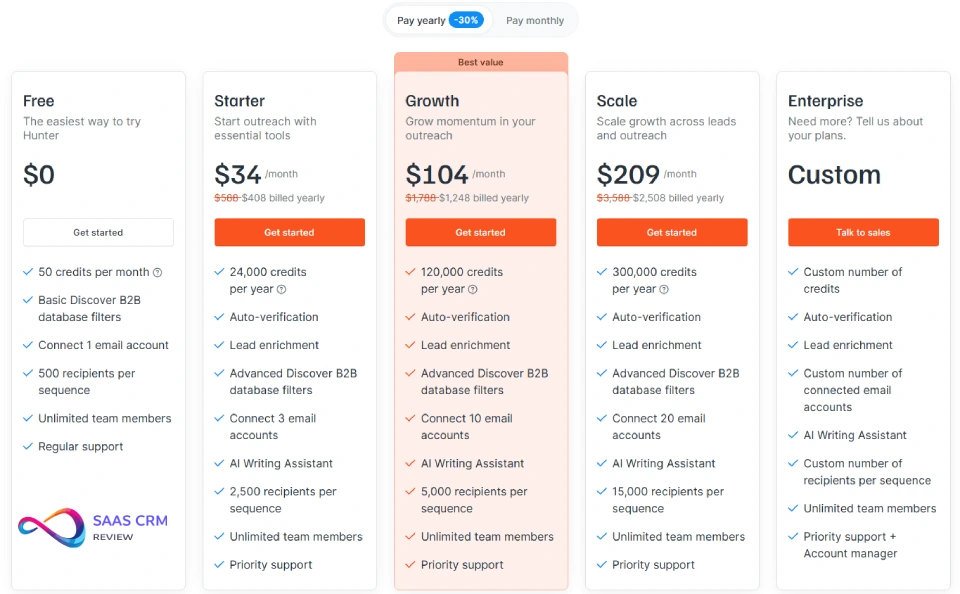
Hunter advertises yearly billing at 30% below monthly, and both prices are visible on the same page, while my Hunter.io pricing guide covers each plan in more detail. The table below carries the annual charge, the monthly list price, and the three capacity numbers that decide which plan a team actually needs.
| Plan | Monthly billing | Annual billing | Credits | Connected sender accounts | Recipients per sequence |
|---|---|---|---|---|---|
| Free | $0 | $0 | 50 per month | 1 | 500 |
| Starter | $49 per month | $408 per year, effective $34 per month | 2,000 per month or 24,000 per year | 3 | 2,500 |
| Growth | $149 per month | $1,248 per year, effective $104 per month | 10,000 per month or 120,000 per year | 10 | 5,000 |
| Scale | $299 per month | $2,508 per year, effective $209 per month | 25,000 per month or 300,000 per year | 20 | 15,000 |
| Enterprise | Custom | Custom | Custom | Custom | Custom |
| Pricing source: Hunter official pricing page, with plan credit allowances from Hunter’s pricing and plans documentation, checked 2026-08-26. US market, USD. |
Prepaying converts that 30% gap into real money. Against twelve monthly payments at list price, Starter saves $180 a year, Growth saves $540, and Scale saves $1,080, which is roughly the cost of a Starter plan recovered by moving Growth onto annual billing.
Cost per included credit tells the same story more sharply. On annual billing the base subscription works out to about $0.0170 per credit on Starter, $0.0104 on Growth, and $0.00836 on Scale, so Growth buys a credit for about 61% of what Starter charges.
Treat those figures as base-plan cost per included credit, not as cost per lead. A real cost per verified contact depends entirely on which workflow produced it, which is the next section.
Three different credit clocks
Credits expire on three different schedules, and mixing them up is how teams lose paid capacity. Monthly plan credits expire at the end of the monthly billing cycle.
Yearly plan credits are released upfront and last the full 12-month period rather than resetting each month. Separately purchased credit packs are valid for three months from purchase.
The yearly release is the operationally useful one. A team with seasonal prospecting can front-load a quarter without watching a monthly balance evaporate, which is a genuine argument for annual billing beyond the discount.
The costs that sit outside the plan price
The plan price covers credits and product access. Sending infrastructure is priced separately, and this is where a Growth budget quietly becomes a Growth-plus budget.
An extra connection slot for an existing mailbox costs $10 per month per account on Starter, Growth and Scale, and is not offered on Free. A Hunter-managed mailbox costs $6 per month per account, with managed domains starting at $16.51 per year, and the managed price already includes the connection slot.
That ordering is counterintuitive and worth planning around. Buying a managed mailbox at $6 per month is cheaper than connecting one of your own at $10 per month, because the slot is bundled into the managed price.
Inbox Protection, the sender-reputation add-on, bills separately per account, and Hunter does not publish its price on the setup page.
A five-mailbox Growth setup therefore lands at $1,248 for the plan plus $360 a year in managed mailboxes, before any domain or Inbox Protection cost. Budget from that figure, not from the $104 effective monthly rate on the pricing page.
All-in-One or Data Platform, and why the answer is one-way
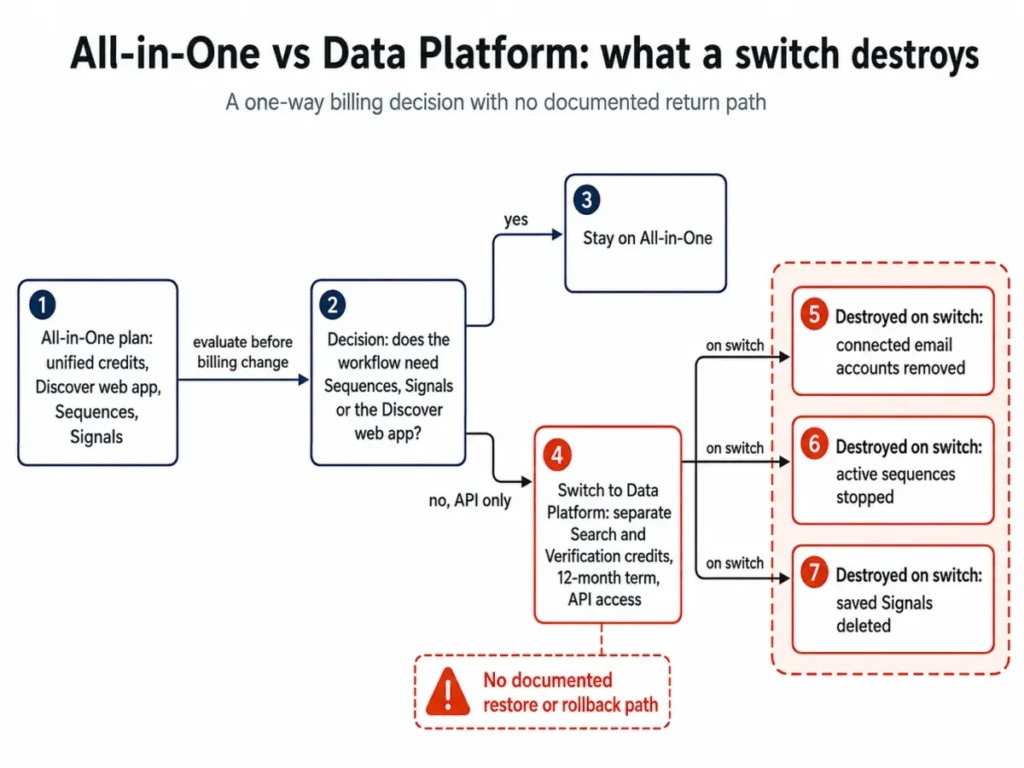
Data Platform is Hunter’s API product. The documented minimum is 1,000 Search credits plus 1,000 Verification credits at $61 per year, and each plan runs 12 months before renewing automatically.
Search and Verification credits sit in separate pools here, rather than in the unified pool the All-in-One family uses.
It excludes Sequences, Signals, credit packs and the Discover web app, though Discover remains reachable through the API. For a team that only needs enrichment inside its own systems, that is a legitimate and much cheaper shape.
The switch is the risk. Moving from All-in-One to Data Platform removes all connected email accounts, stops active sequences and deletes saved Signals, and Hunter does not document a restore path.
Do not treat that as a billing change. Export the sequence copy, the recipient lists and the Signal criteria first, and schedule the switch when no campaign is live.
Credit Economics by Workflow
A credit is not a fixed unit of prospecting. What it buys changes with the tool, and the spread between the cheapest and most expensive path is roughly six to one.
| Workflow | Credit cost | What the credit includes | When it is the right tool |
|---|---|---|---|
| Email Finder, result returned | 1 credit | The address plus verification in the same action | A named person at a known company |
| Email Finder, no result | 0 credits | Nothing charged | Speculative lookups on thin targets |
| Domain Search, per address revealed | 1 credit | The reveal; separate verification later can add cost | Pulling a specific contact off a known domain |
| Bulk Domain Search, 1 to 10 emails per domain | 1 credit per domain | Every address returned in that band | Account lists where several contacts per company are useful |
| Bulk in-bulk verification | 0.5 credits per address | A fresh verification on a selected address | Lists heading straight into a sequence |
| Discover browsing and filtering | 0 credits | Company research with no reveal | Market sizing and ICP definition before spend |
| Signals monitoring | 0 credits | Event monitoring; reveals are charged separately | Watching accounts for a timing trigger |
| Sources: Finder credits, bulk credits, Discover credits, Signals credits. |
Read the two bulk rows together, because that is where the real number lives. A domain that returns 10 addresses and has all 10 freshly verified consumes 1 reveal credit plus 5 verification credits, so 6 credits produce 10 verified contacts.
Against Email Finder at 1 credit each, the same 10 verified contacts cost 10 credits. The bulk path is roughly 40% cheaper per verified contact whenever several useful people sit on one domain.
The inversion matters too. When only one person on a domain is worth contacting, Email Finder is the cheaper tool, because it bundles verification and charges nothing on a miss.
Feature Gates by Plan
| Capability | Free | Starter | Growth | Scale |
|---|---|---|---|---|
| Discover filters | Basic | Advanced | Advanced | Advanced |
| Sequence A/B testing | Not available | Available | Available | Available |
| Extra connection slot at $10 per month | Not available | Available | Available | Available |
| Signals per user | 10 | 20 | 200 | Unlimited |
| Recipients per sequence | 500 | 2,500 | 5,000 | 15,000 |
| Team members | Unlimited | Unlimited | Unlimited | Unlimited |
| Sources: Hunter plan comparison, Sequences A/B testing and account slots and Signals limits by plan. |
Two of these gates have been reported wrongly across current review pages, so they are worth stating plainly. A/B testing exists on paid plans, and a test can be enabled on a step after a sequence has already launched without pausing it, with new recipients split between variants.
Advanced Discover filters are the other real gate. A team with narrow targeting criteria that tests Discover on Free is testing a reduced version of the feature it would be buying.
Sequences and Real Sending Capacity
Sequence capacity has three separate ceilings, and the pricing table only shows one of them. Recipients per sequence is list size, and connected accounts is how many mailboxes can send.
Daily per-mailbox limits are what actually throttles the campaign.
Hunter starts every connected account at 15 emails per day to protect sender reputation. The documented maximums are 400 a day for Gmail and Google Workspace, and 250 a day for Outlook, Microsoft 365, SMTP and IMAP.
Do not multiply those maximums into a promised send volume. A mailbox reaches its ceiling through warm-up, not on day one, and provider-side throttling and reputation both sit outside Hunter’s control.
The planning question is arithmetic against the ramp, not against the ceiling. A Growth plan with 10 Google Workspace mailboxes has a theoretical roof of 4,000 sends a day and a realistic first-fortnight floor of 150. A campaign that has to reach 5,000 people is therefore a scheduling exercise before it is a plan-tier decision.
Accessible fallback for the chart above: at the documented 15-per-day starting default, total daily capacity is 15 sends on Free, 45 on Starter, 150 on Growth and 300 on Scale. At the documented 400-per-day Gmail maximum, the same plans reach 400, 1,200, 4,000 and 8,000, and every figure above the default assumes a fully warmed mailbox.
Integrations, API, and MCP
Hunter’s integrations page lists HubSpot, Salesforce, Pipedrive and Zoho CRM as CRM integrations, with Close and Copper reached through Zapier. That distinction is worth checking before a sync becomes a project, because a Zapier-mediated connection is a different maintenance object from a native one.
Beyond CRM, the page groups Gmail, Outlook and SMTP/IMAP as sending connections, Google Sheets, Airtable and Excel as spreadsheets, Zapier, Make and Clay as automation, Snowflake as a data warehouse, and a remote MCP server for AI clients. If your stack already runs on a CRM in that first list, the sync question is answered; if it runs on anything else, budget for the connector.
A connector-mediated sync is a different maintenance object from a native one, which is worth reading up on in how CRM integration works before a Zapier hop becomes load-bearing.
For engineering teams the useful part is that Hunter publishes its ceilings. Domain Search, Email Finder and enrichment run at 15 requests per second and 500 per minute. The Email Verifier runs at 10 per second and 300 per minute, and Discover at 5 per second and 50 per minute.
The error semantics are equally explicit and easy to get backwards. Hunter’s API reference maps 403 to a reached rate limit and 429 to a reached usage limit, which is the inverse of the convention most engineers expect.
Handle those two codes differently or the integration will fail in the least helpful way. A 403 means back off and retry with a slower cadence; a 429 means the credits are gone and no amount of retrying will help.
Discover’s 5-per-second ceiling is the one to size against, because it is three times tighter than the finding endpoints. A nightly enrichment job that fans out over Discover will hit that wall long before it exhausts a Growth credit balance.
The remote MCP server extends the same account into AI clients including Claude, ChatGPT, Cursor and Codex, authenticating with an API key header or a one-click OAuth flow where the client supports it. Hunter states that existing request limits and credits apply, so MCP is a new interface rather than a new quota, and published tool counts vary by surface and are not worth planning against.
Security, Privacy, and Support
Hunter’s security policy documents hosting on Google Cloud Platform in Belgium, a role-based access-control model with least-privilege principles, and multi-factor authentication for production access.
It also documents logging of high-risk production actions, independent third-party penetration testing of new services, and regular vulnerability scanning.
What the page does not carry is a SOC 2 or ISO-27001 certification claim. For most SMB buyers that is irrelevant; for anyone whose procurement checklist requires an attestation report, it is a question to put to Hunter’s sales team before signing rather than an assumption to make.
On the privacy side, the data processing agreement names Hunter Web Services, Inc. as the processor, defines customer lead data to include names, email addresses and phone numbers of the customer’s prospects, and incorporates the EU Standard Contractual Clauses and the UK International Data Transfer Addendum for transfers outside the EEA and UK. A subprocessor list is published, with 14 days’ notice before a new subprocessor is engaged.
The practical reading is that Hunter has done the paperwork a European or UK buyer will be asked for. None of it transfers outreach compliance to Hunter, and that remains the sending team’s obligation in every market it emails into.
Support tiers run from Regular on Free through to the higher tiers on paid plans, and Hunter does not publish numerical response-time commitments. Treat support level as a plan attribute rather than an SLA.
Hunter Limitations
Six constraints are worth weighing before an annual commitment, and none of them is fixed by spending more.
Coverage is capped by what the crawler can read. Insufficient public data, robots.txt blocks, obfuscated addresses and JavaScript-rendered pages all produce empty results, and Hunter names smaller companies as the more common case.
Accept-all results are not equivalent to Valid. They require their own sending treatment and confidence-score threshold, which is an extra operational step rather than a data flaw.
Monthly credits do not roll over. A team with uneven prospecting months either overbuys or wastes capacity, and only the yearly plan releases the whole balance upfront.
Signals cannot be shared, bulk-dismissed or automated. It is a single-user research tool inside a product that otherwise charges nothing for extra seats.
Bulk verification is gated at 10 emails per domain. Any bulk task configured for deeper per-domain coverage has to verify separately, which changes both the workflow and the credit maths.
Sending infrastructure is a separate line item. Managed mailboxes, managed domains, extra connection slots and Inbox Protection all bill on top of the plan, and Inbox Protection’s price is not published on the setup page.
Who Wins and Who Loses With Hunter
Wins: the one-to-three-person founder or agency working named accounts. Unlimited seats, a free tier with real feature access, and Email Finder’s bundled verification make the cost of being small close to zero.
Wins: the three-to-ten-person SDR or RevOps team on Growth. Ten sender accounts, 5,000 recipients per sequence and a native CRM sync cover an integrated outbound motion without a separate sending platform.
Wins: the GTM engineer embedding finding or verification in internal systems. Published rate limits, explicit error semantics and a Data Platform option priced from $61 a year make Hunter easy to size and cheap to trial. That includes using it as the data layer behind AI SDR tools.
Wins: recruiters, PR and link-building teams working from known companies. These are exactly the targets whose public web footprint Hunter’s model handles best.
Loses: the phone-first sales team. Phone fields appear when Hunter has them, and Hunter publishes no direct-dial coverage claim, so a dialler-led motion should buy a database-first platform and treat Hunter as a supplement.
Loses: the high-volume cold-email operation running dozens of mailboxes. Twenty connected accounts on Scale and per-account add-on pricing make Hunter an expensive way to run a mailbox fleet compared with dedicated sending infrastructure.
Loses: the team prospecting micro-businesses with little public web presence. This is the coverage boundary, and it is the one case where a free-plan sample before purchase is not optional.
Hunter Alternatives
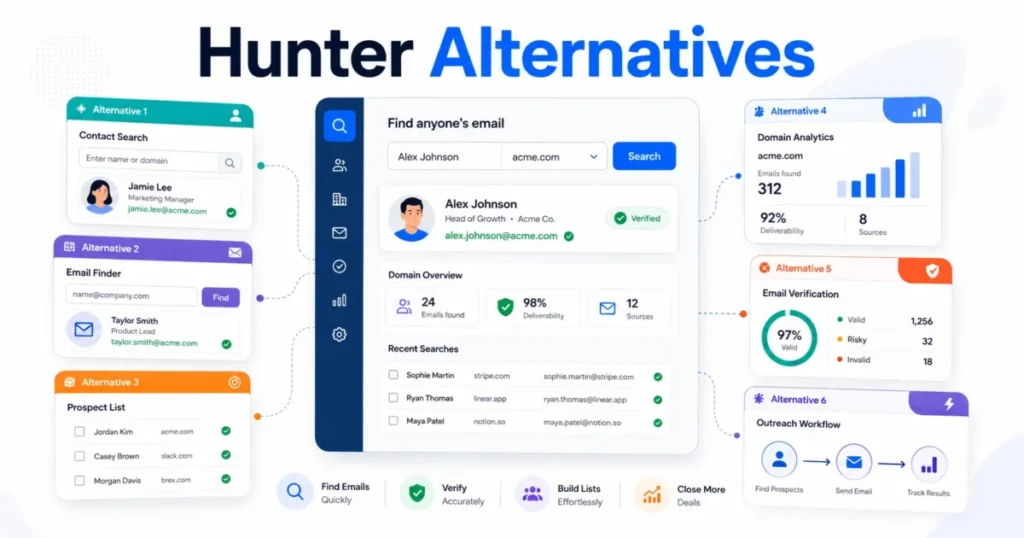
Hunter’s competition splits by what the buyer needs more than email transparency. The table below is organised by that need rather than by brand, because the switching decision is a category decision first.
| If Hunter falls short on | Look at | Choose it if | What you give up |
|---|---|---|---|
| Direct dials and person-level breadth | Database-first prospecting platforms such as Apollo or Cognism | Your motion is dialler-led and multichannel coverage matters more than knowing where an address came from | Source transparency, and a credit model that charges nothing on a miss |
| Mailbox fleet scale and deliverability tooling | Dedicated cold-email platforms such as Instantly or Smartlead | Sending at volume across many mailboxes is the core job rather than a feature of the prospecting tool | The unified credit pool, and finding and sending in one account |
| Waterfall enrichment across many providers | Orchestration platforms such as Clay | You need to chain several data vendors and transform the output before it reaches the CRM | Simplicity, and a single predictable per-workflow credit cost |
| Keeping outreach inside the CRM | Sequence features inside your existing CRM, such as HubSpot or Pipedrive | The team already lives in the CRM and adoption risk outweighs data quality gains | Hunter’s finding and verification depth, which usually still has to be bought separately |
The last row is the one most teams underrate. If outreach is already happening inside the CRM, the honest comparison is Hunter against the sequence features in a HubSpot CRM review, not Hunter against another data vendor.
The same test applies to a lighter pipeline tool, where the Pipedrive CRM review is the better starting point than a second prospecting subscription.
Pricing for these alternatives was not verified for this review, so no figures are published for them here. Treat the table as a direction to investigate rather than a costed comparison, and check current pricing directly before switching.
Which Hunter Plan Should You Choose
Hunter charges nothing per seat, so headcount is the wrong trigger for every upgrade decision. Usage, sender capacity and feature gates are the only ones that matter.
Each trigger below is read off Hunter’s official documentation rather than off a sales page, and each is stated as an operating consequence: the point at which a documented capability stops covering what the team is trying to do.
| Move | Trigger |
|---|---|
| Free to Starter | Recurring need above 50 credits a month, advanced Discover filters, a second sender account, paid A/B testing, or any paid add-on |
| Starter to Growth | Regular use above 2,000 credits a month, more than 3 sender accounts, or more than 2,500 recipients in a single sequence |
| Growth to Scale | Regular use above 10,000 credits a month, more than 10 sender accounts, more than 5,000 recipients per sequence, or more than 200 Signals |
| Scale to Enterprise | Credit or sender-account capacity above the published Scale limits, or a contracting and support arrangement the standard plans do not cover |
| All-in-One to Data Platform | The workflow is API-only and no longer needs Sequences, Signals or the Discover web app, and the switch consequences are accepted |
Growth is the plan most active teams should land on, and the reason is the credit curve rather than the feature list. It multiplies Starter’s monthly credit allowance by five and its sender accounts by a bit over three, while cutting the base cost per included credit by roughly 39%.
Scale earns its price on capacity, not on org chart. Unlimited Signals, 20 sender accounts and 15,000 recipients per sequence are the things it sells, and a 60-person company that runs a light outbound motion belongs on Growth.
The renewal question to ask twelve months in is narrow and answerable. Did the account use more than 60% of its included credits, and did anything ever hit the sender-account or recipient ceiling?
A no to both means the plan below is the right renewal.
Final Verdict: Is Hunter.io Worth It in 2026?
Hunter is worth paying for when the prospecting motion is email-first and the targets have a public web footprint, and it is worth avoiding when either of those is untrue. That is a narrower recommendation than most reviews give, and it is the one the evidence actually supports.
The strongest reasons to buy are structural rather than featural. A unified credit pool that bundles verification into a found address, no per-seat charge at any tier, and published API ceilings together make Hunter unusually easy to budget and to size.
The strongest reasons to hesitate are also structural. Coverage is bounded by a crawler, Signals does not work as a team tool, and sending infrastructure is priced separately in a way that makes the headline plan price an incomplete budget.
Weighing those against each other, the credit model carries the most weight for a buyer at Growth scale, because it is the factor that repeats every month. The Signals limitation matters less than it first appears, since it is a workflow assignment problem rather than a capability gap, and the coverage ceiling matters most of all, since it is the only one that cannot be managed around.
What that costs the reader is a testing step before the money moves. Run 200 real target domains on the free plan, count the hit rate and the Accept-all share, and let those two numbers decide. A plan that is excellent for a software ICP can be poor for a local-services ICP at the same price.
If both numbers hold up, Growth on annual billing is the plan, and $1,248 plus whatever sending infrastructure the team needs is the honest budget.
FAQ – Hunter.io Email Finder & Verifier
These are the questions the body above does not fully close, drawn from how buyers actually phrase them.
Does Hunter charge 1.5 credits for every verified contact?
No, and the answer depends on the tool. Email Finder charges 1 credit for a found address with verification included, while Domain Search charges 1 credit per reveal and adds 0.5 credits if the address is verified as a separate step.
In bulk, a domain returning 10 emails with all 10 verified costs 6 credits in total.
What happens to unused Hunter credits?
Monthly plan credits expire at the end of the billing cycle and do not carry forward. Yearly plan credits are released upfront and last the full 12-month period, and separately purchased credit packs are valid for three months from purchase.
Can Hunter replace a dedicated cold-email sending platform?
For a small team, usually yes; for a mailbox fleet, no. Twenty connected accounts on Scale plus per-account add-on pricing makes Hunter an expensive way to run high-volume sending, and dedicated platforms exist for that job.
Is Hunter good for prospecting local or micro businesses?
This is Hunter’s weakest case. Its own documentation names insufficient public data as more common for smaller companies, so sample your real target list on the free plan before committing.
Does Hunter provide phone numbers?
Sometimes, and not as a coverage guarantee. Discover can filter for results that include phone numbers and bulk exports carry a phone-number column, but Hunter publishes no direct-dial coverage figure and remains an email-first product.
What breaks if I switch Hunter to a Data Platform plan?
Connected email accounts are removed, active sequences stop, and saved Signals are deleted. Export sequence copy, recipient lists and Signal criteria first, and make the change when no campaign is running.
Is Hunter SOC 2 or ISO-27001 certified?
Hunter’s published security policy documents its controls but carries no SOC 2 or ISO-27001 certification claim, so a buyer whose procurement process requires an attestation report should ask Hunter directly rather than assume one exists.