Picking from the best text-to-video AI generators is less about who makes the prettiest single clip and more about what a usable clip costs you after the retries, the plan gates, and the format your team has to deliver. A tool that looks unbeatable in a demo reel can still burn a month of credits on four ten-second shots, cap you at low resolution, or ship silent footage when you needed dialogue.
This guide ranks ten active generative AI video tools as of July 20, 2026, and it separates cinematic scene generators from avatar-led business video, because they are not the same purchase. Runway is our top pick for most creative teams that want a balanced workflow.
Google Flow leads for Veo-powered realism with native audio, Kling for lifelike motion, and Synthesia for governed training video. Below, every pick is tied to a budget, a workflow, and a limit worth checking before you pay.
In This Article (15 sections)
Quick Verdict: Best Text-to-Video AI by Use Case
| Use case | Best pick | Why it fits |
|---|---|---|
| Best for most creative teams | Runway | Balanced model access, reference control, and in-app editing on one plan |
| Best for cinematic realism and audio | Google Flow | Veo 3.1 access with native audio inside a purpose-built studio |
| Best for lifelike motion | Kling AI | Strong human motion and camera control, plus a free evaluation path |
| Best for brand-safe commercial work | Adobe Firefly | Licensed-data positioning plus Adobe editing handoff |
| Best for HDR and post-production | Luma Dream Machine | Keyframes, motion transfer, 16-bit HDR, and EXR export |
| Best budget social effects | Pika | Effect-driven short clips from $8/month (Basic plan) effective on annual billing |
| Best for multi-shot storytelling | OpenArt | Chat-driven storyboards and video up to five minutes |
| Best for avatar marketing | HeyGen | Script, URL, or deck into presenter-led video across languages |
| Best for enterprise training | Synthesia | Presenter video with SCORM, SSO, and predictable minute capacity |
| Best free evaluation | Google Flow | 50 free credits per day with no card required |
Sources: Runway pricing page, Google Flow credit help, Adobe Firefly plans page, Luma pricing page, Synthesia pricing page, checked July 20, 2026.
Prices and limits below were checked on July 20, 2026. These tools change fast, so treat every number as a starting point and re-check the plan you intend to buy.
How We Chose and Ranked These Tools
These rankings are based on verified pricing, official product and model documentation, help-center guidance, current feature pages, and labeled third-party evidence. Pricing and plan limits were checked on July 20, 2026.
Each tool was assessed against the same buyer-focused criteria: workflow fit, creative control, output formats, native audio, commercial-use terms, collaboration, plan restrictions, credit economics, and documented limitations.
Greater weight went to the factors that move a purchase decision, including usable entry pricing, upgrade triggers, resolution and duration caps, and the cost of scaling past an entry plan. Brand popularity and promotional presentation did not influence the ranking.
Claims that could not be verified from reliable evidence were excluded from the scoring. Temporary promotions are labeled separately from standard pricing and verified on the publication date.
Each tool earns its ranking reason from a specific buyer cohort and workflow, and every pick names the plan gate or disqualifier that would rule it out for the wrong team.
The Three Problems Every Text-to-Video Buyer Faces in 2026
Most roundups list ten tools on one scale and let you assume they compete for the same job. They do not.
Before you compare prices, decide which of three problems you are solving.
Problem one is cinematic generation. You need realistic, motion-rich scenes from a prompt, ideally with sound, and your risk is credit burn on shots that miss. Runway, Google Flow, and Kling live here.
Problem two is creative control and production fit. You need brand-safe rights, high-resolution finishing, multi-shot continuity, or fast social effects, not just one strong clip. Adobe Firefly, Luma, Higgsfield, Pika, and OpenArt compete on this ground.
Problem three is presenter-led business video. You need a talking avatar to turn scripts into training or marketing at scale, localized and governed. HeyGen and Synthesia own this, and a cinematic generator will not replace them.
Mixing these categories is the most common buying mistake in this market. A marketing lead who needs 30 localized training minutes a month should not be comparing credit-per-second rates on a film model, and a director chasing a hero shot should not be paying for avatar seats.
A note on Sora before you shortlist it
If an older list still ranks OpenAI’s Sora as a consumer pick, that guidance is stale. OpenAI’s help center states the Sora web and app experiences were discontinued on April 26, 2026, and the Sora API is scheduled to be discontinued on September 24, 2026, per the OpenAI Sora discontinuation notice.
That is why Sora is not ranked here. Anyone who standardized on it needs a replacement, and the ten tools below are where that search should start.
Best Text-to-Video AI for Cinematic Realism and Native Audio
These three solve problem one: turning a written scene into believable motion, and increasingly into sound. The trade-off across all of them is credit economics, because a probabilistic model can spend real money on a shot you throw away.
1. Runway: Best Overall for Balanced Creative Production

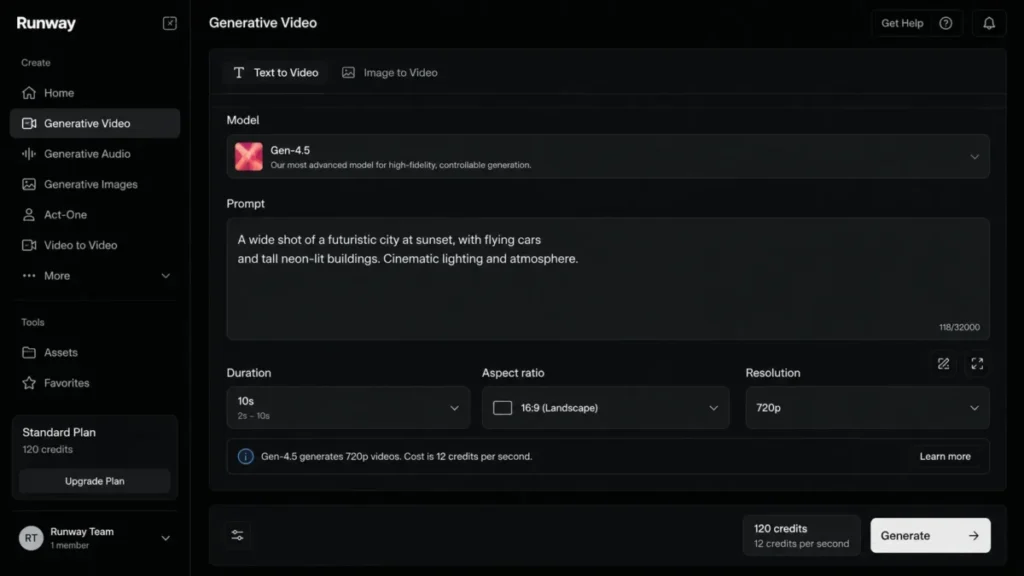
Runway earns the top spot because it does the most jobs well on a single plan. You get current-model text-to-video, image-to-video, reference control, and post-generation editing in one workspace, which is why it fits an independent creative team better than any single-purpose effect tool.
Pricing starts at $15/month on the Standard plan, or $12 effective per month billed annually, and that tier includes 625 monthly credits. The practical tier for a team doing client work is usually Pro at $35/month ($28 annual-effective), because custom voices sit behind Pro and above, and enterprise identity controls such as SSO are Enterprise-only (per the Runway pricing page).
Runway’s current model, Gen-4.5, is where the budget math gets real. It requires Standard or higher, costs 12 credits per second, is limited to clips of 2 to 10 seconds, and outputs at 720p (per the Runway Gen-4.5 documentation).
A single ten-second generation therefore consumes 120 credits, so Standard’s 625 credits fund roughly 52 seconds of finished Gen-4.5 footage before a single retry. Generative video is probabilistic, so plan for the reruns, not just the first attempt (per the Runway pricing page for the credit allowance and the Runway Gen-4.5 documentation for the per-second rate).
Key features worth naming: Gen-4.5 text-to-video and image-to-video, reference-based direction, in-app 4K upscaling, multiple aspect ratios at 24 or 25 fps, and team workspaces on higher tiers. What Runway does better than the pure model plays is keep generation, reference control, and finishing in one place, so a short-form shot does not need a separate editor (per the Runway Gen-4.5 documentation).
Where it falls short is native long-form: 720p output and a 10-second ceiling mean multi-shot stories require segmentation and external assembly, and recurring reviews on G2 flag credit consumption and output variability as real friction (per the Runway Gen-4.5 documentation for the output limits, with recurring sentiment on G2 reviews).
| Pros | Cons |
|---|---|
| Balanced feature set: model access, reference control, and editing on one plan | Gen-4.5 caps at 720p and 10 seconds, so long-form needs stitching |
| Transparent, documented credit rate (12 credits/ | Standard’s 625 credits fund only about 52 seconds of Gen-4.5 before retries |
| In-app 4K upscaling and team workspaces reduce tool sprawl | Custom voices and SSO are gated to Pro and Enterprise |
| Clear plan ladder: Standard $15 to Max $95 per month | Retry cost on missed shots can outrun the subscription fee |
Source: Runway pricing page, checked July 20, 2026.
Avoid Runway if your core need is native multi-minute output or fully predictable per-project cost after heavy iteration. Setup difficulty is Low: prompt, reference, generate, and upscale inside one dashboard.
The hidden cost is credit top-ups, sold with a documented 1,000 credit minimum purchase whose price was not verified on the official Runway pricing page, and the Runway pricing guide breaks the tiers down further. For a fuller look at strengths and limits, see the Runway review.
This assessment is based on official pricing, model documentation, and labeled user sentiment.
Verdict: choose Runway if you want one dependable short-form cinematic platform and you will budget in seconds of output, not clips.
2. Google Flow: Best for Cinematic Realism and Native Audio
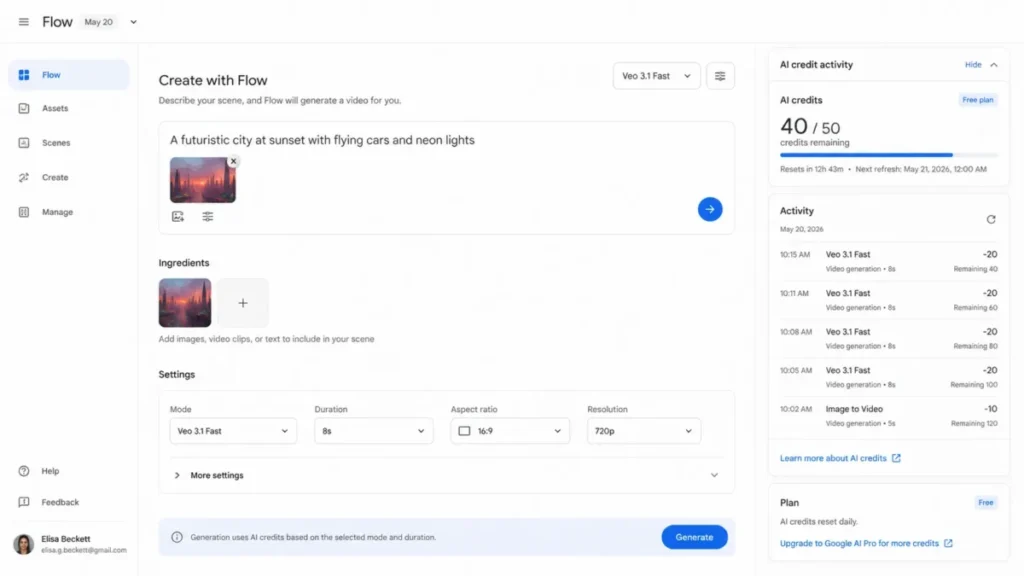
Google Flow is the pick when you want Veo 3.1 realism and generated sound inside a studio built for scenes and stories. It suits filmmakers and creative strategists already inside Google’s AI ecosystem, where native audio can remove a separate sound-design step for some shots.
The entry point is genuinely free: nonsubscribers get 50 Flow credits per day, which is the strongest no-card evaluation path in this ranking. Paid capacity comes through Google AI plans.
Google AI Pro is $19.99/month for 1,000 Flow credits per month, Google AI Ultra runs $99.99/month for 10,000 credits, and the higher Ultra tier is $199.99/month for 25,000 credits. Flow’s creative modes include text-to-video, image ingredients, scene refinement, and Veo 3.1 access with native audio (per the Google AI subscriptions page for plan pricing and the Veo 3.1 announcement for Veo 3.1 native audio).
Here is the catch for budgeting. The exact credit debit varies by generation mode, and Google’s public plan pages do not normalize one fixed cost per clip.
That means a high nominal credit pool does not convert cleanly into a guaranteed number of finished scenes, so you have to track the in-app credit activity rather than multiply one rate. Free credits are also limited to specified Veo modes, do not roll over, and are forfeited when you upgrade, which punishes anyone who banks a free allowance expecting to spend it later.
| Pros | Cons |
|---|---|
| Veo 3.1 access with native audio inside a dedicated creative studio | Per-generation credit debit varies by mode and is not published as one rate |
| Free tier is usable for daily evaluation with no card | Free credits do not roll over and are forfeited on upgrade |
| Large upper-tier pools (10,000 to 25,000 credits) for heavy exploration | No standalone low-cost subscription; capacity is tied to Google AI plans |
| Built-in credit activity history for tracking spend | Team administration is thinner than Runway or Firefly |
Source: Google Flow credit help, checked July 20, 2026.
Avoid Flow if procurement needs a fixed cost per clip or the ability to bank free evaluation credits for a campaign. Setup difficulty is Low to Medium: start a project, prompt, add ingredients, and track credits, though mode-by-mode cost planning takes attention.
The hidden cost is additional AI credits, available to eligible Plus, Pro, and Ultra subscribers in supported regions at a price not verified here. This analysis rests on official Google product, subscription, and credit-help documentation.
Verdict: choose Google Flow if native audio and Veo realism matter more to you than a transparent, fixed per-clip price.
3. Kling AI: Best for Lifelike Motion

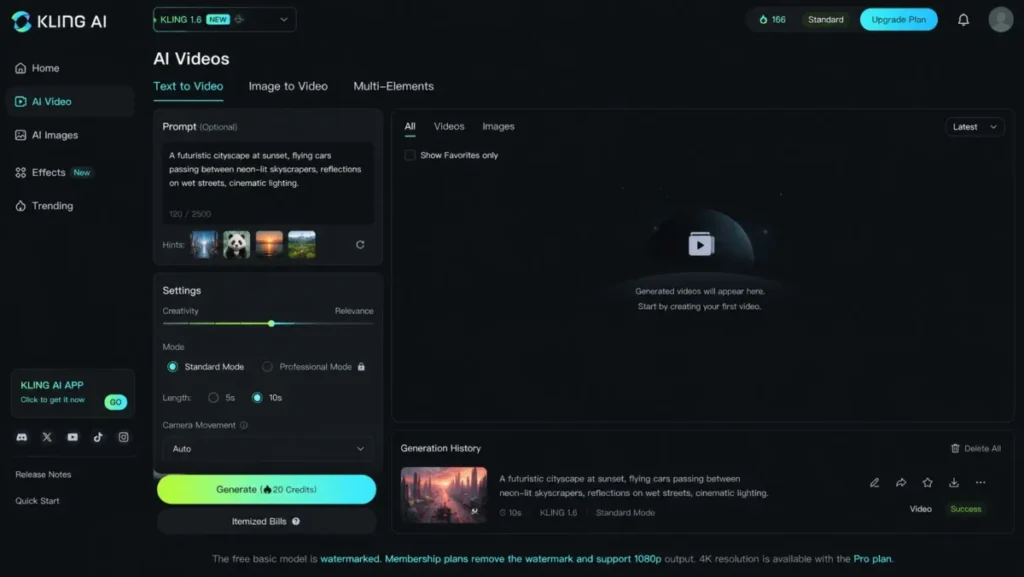
Kling AI is the specialist pick when human movement and camera motion carry the shot. Kuaishou’s model set supports text-to-video, image-to-video, motion control, multi-shot generation, and sequences up to 15 seconds, which is longer than the 5-to-10-second ceiling common on rival models (per the Kling 3.0 model page).
The free tier is a real evaluation path, but it carries a watermark. Paid memberships remove the watermark and support 1080p export, and 4K sits behind the Pro membership (per the Kling AI pricing page).
That gating is the clear part. The unclear part matters for budgeting: the captured official evidence confirms the free-versus-paid output gates but does not expose a stable, complete US consumer price table, and Kling’s API pricing is billed separately from consumer memberships.
So while Kling is strong on motion, its consumer total cost of ownership is less transparent than Runway or Firefly, and we would confirm the current membership price before committing a production workflow to it.
| Pros | Cons |
|---|---|
| Strong motion realism and camera control for human-centered shots | Consumer membership prices are not fully disclosed in captured evidence |
| Sequences up to 15 seconds, longer than many rival single shots | Free output is watermarked, so it is evaluation-only |
| Free tier lets you test motion quality before paying | 4K export is gated to the Pro membership |
| Separate API path for teams that need automation | API and consumer pricing must not be conflated |
Source: Kling AI pricing page, checked July 20, 2026.
Avoid Kling if you need a fully transparent US consumer price table or documented enterprise governance before purchase. Setup difficulty is Low for generation, but Medium for procurement clarity because the plan math needs verification.
The hidden cost is the jump to Pro for 4K plus any API usage billed on its own meter. This assessment draws on Kling’s official product pages and labeled third-party market evidence (per the Kling AI pricing page for the 4K gate and the Kling API pricing for separate API billing).
Verdict: choose Kling if motion quality is your priority and you will verify the current membership price before scaling.
Best Text-to-Video AI for Creative Control and Production Fit
These five solve problem two. The question here is not raw realism but whether the tool gives you the rights, resolution, continuity, or effect toolkit your deliverable needs.
Several also accept a still frame as a starting point, so pairing them with the best AI image generators gives you more control over the opening shot.
4. Adobe Firefly: Best for Brand-Safe Commercial Work
Adobe Firefly is the pick for brand and agency teams that value a clear commercial-safety story and an Adobe production handoff. Adobe says Firefly is designed for commercial safety and is trained on licensed, rights-cleared, or public-domain content, which is vendor positioning rather than a legal guarantee, but it is the clearest such story in this ranking (per the Adobe Firefly commercial-safety page).
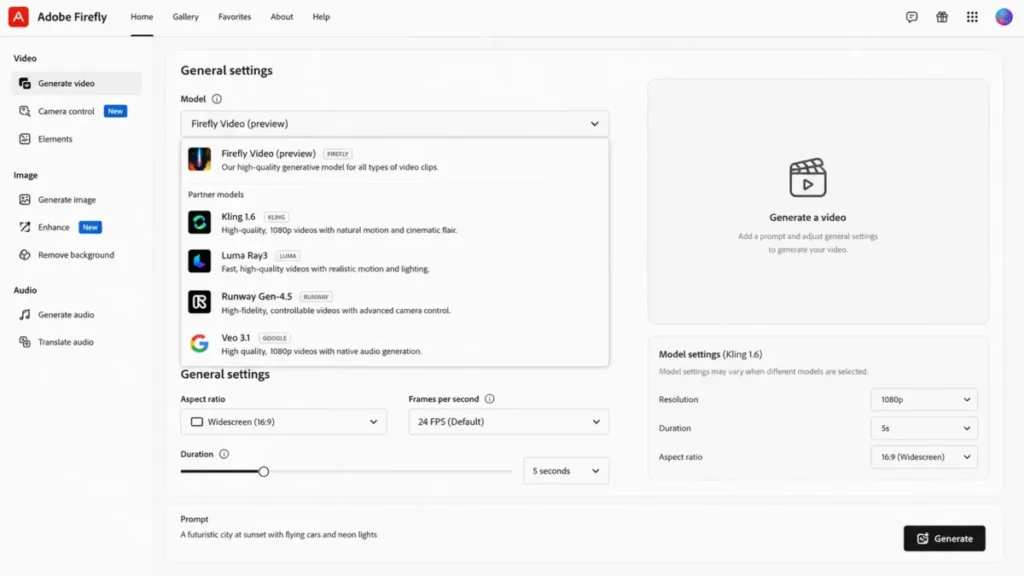
Firefly Standard is $9.99/month with 2,000 generative credits, Pro is $19.99/month with 4,000, Pro Plus is $49.99/month with 10,000, and Premium is $199.99/month with 50,000 credits plus unlimited use of the Adobe Firefly Video Model. The aggregator angle is the real draw: from one dropdown you can generate with partner models including Kling, Luma Ray, Runway Gen-4.5, and Veo, each with its own resolution and duration options (per the Adobe Firefly plans page for plan pricing and the Adobe Firefly partner-models documentation for partner-model options).
Read the Premium line carefully, because it is a common trap. Unlimited access applies only to the Adobe Firefly Video Model, not to every partner model, and partner-model and premium outputs still draw generative credits at model- and resolution-dependent rates.
A heavy multi-model workflow can still hit a credit cap on a $199.99 plan, so the real limit is the premium-credit gate, not the headline price (per the Adobe Firefly plans page and the Adobe generative-credits FAQ).
| Pros | Cons |
|---|---|
| Clearest brand-safe, licensed-data positioning for client work | Commercial-safety positioning is not a legal guarantee |
| One workspace reaches multiple leading partner video models | Partner-model credit cost varies by model, duration, and resolution |
| Native handoff into Adobe editing and Content Credentials | Premium “unlimited” covers only the Adobe Firefly Video Model |
| Four price points ($9.99 Standard to $199.99 Premium) fit different volumes | Aggregator access can expose fewer controls than the native platform |
Source: Adobe Firefly plans page, checked July 20, 2026.
Avoid Firefly if you expected one flat plan to cover unlimited output across every partner model. Setup difficulty is Low for Adobe users, Medium for credit discipline.
The hidden cost is premium-credit burn on high-resolution partner-model runs, and the Adobe Firefly pricing guide maps the credit tiers in detail. The Adobe Firefly review covers its wider creative workflow.
This analysis is based on official Adobe pricing, help, and partner-model documentation.
Verdict: choose Adobe Firefly if brand governance and Adobe integration outweigh the lowest possible per-output price.
5. Luma Dream Machine: Best for HDR and Post-Production
Luma is the choice when finishing matters as much as generation. Its current model, Ray3.2, supports text-to-video, image-to-video, Modify Video V2 up to 20 seconds at 1080p, up to 16 keyframes, Reframe, Motion Transfer, native 16-bit HDR, and EXR export at ACES2065-1 (per the Luma Ray3.2 documentation).
That is a genuine production pipeline, not a prompt-to-clip toy, which is why agencies and VFX teams belong here.
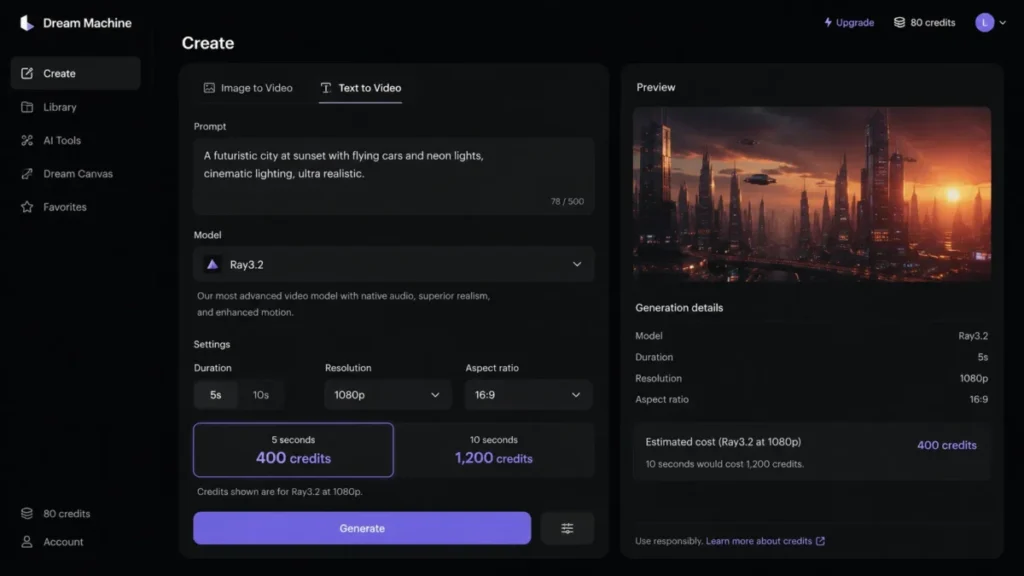
The cost structure is where discipline is required. Ray3.2 at 1080p costs 400 credits for 5 seconds and 1,200 credits for 10 seconds, so ten seconds costs three times the five-second debit and high-resolution iteration gets expensive quickly (per the Luma pricing page).
That credit cost is the main limit to weigh, because it caps how many 1080p reruns a budget can absorb. The subscription plan price was not safely captured in the research evidence, so we would confirm the current web plan cost directly, while the per-generation credit rates above are documented (per the Luma pricing page).
| Pros | Cons |
|---|---|
| Keyframes, Modify Video, Reframe, and Motion Transfer for real continuity control | 1080p iteration is expensive: 1,200 credits for a 10-second clip |
| Native 16-bit HDR and EXR export for grading and VFX pipelines | Subscription plan price was not verified in captured evidence |
| Up to 16 keyframes for deliberate shot planning | Overkill for social-only output that never gets graded |
| Documented modify-video path up to 20 seconds at 1080p | Complex continuity can still need multiple paid iterations |
Source: Luma pricing page, checked July 20, 2026.
Avoid Luma if you need cheap, frequent 1080p iteration or a simple flat subscription to compare. Setup difficulty is Medium: draft at low resolution, then render approved shots at final quality (per the Luma pricing page).
The hidden cost is credit spend on high-resolution reruns. This assessment rests on official Luma model and pricing documentation.
Verdict: choose Luma Dream Machine if HDR, EXR, and keyframe continuity matter more than cheap high-resolution reruns.
6. Higgsfield: Best for Camera Control and Cross-Model Experimentation
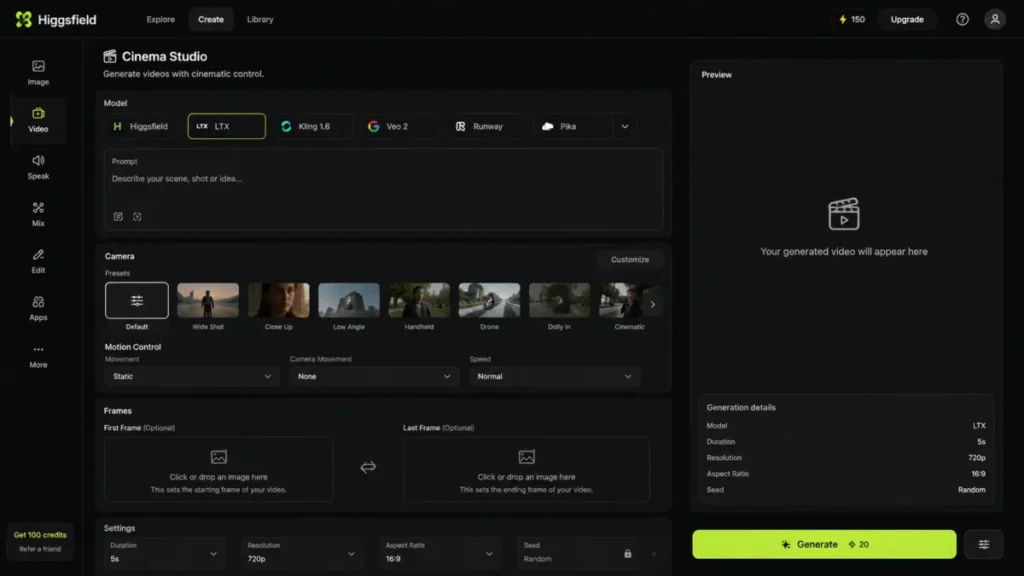
Higgsfield is the practical pick for creators who want one workspace across several models plus unusually accessible camera direction. It documents text and image inputs, camera and motion controls, first-and-last-frame direction, and a multi-model Cinema Studio, so you can test the same shot across models without rebuilding the project on separate sites.
Pricing, per Higgsfield’s own editorial page, is Starter at $15/month with 200 credits and Plus at $49/month unlocking the full model set. Treat those as vendor-stated figures rather than an independently normalized table (per Higgsfield’s Higgsfield AI Video page and its Higgsfield pricing overview).
The weakness is transparency: model-by-model credit debit is not fully exposed in public evidence, so a broad model catalog can hide large cost gaps between one generation and another, and high-volume total cost is harder to forecast than with Runway or Firefly.
| Pros | Cons |
|---|---|
| One workspace spans multiple video models with camera presets | Model-by-model credit debit is not fully published |
| Accessible first-frame, last-frame, and motion controls | Full model set requires the $49 Plus plan |
| Starter at $15 is a low-cost way to evaluate cross-model output | Enterprise governance detail is not documented |
| Reduces subscription sprawl for exploratory work | High-volume cost is harder to forecast than native platforms |
Source: Higgsfield AI Video page and Higgsfield pricing overview, checked July 20, 2026.
Avoid Higgsfield if procurement needs exact model-level pricing and documented admin controls before signing. Setup difficulty is Low for creation, Medium for cost forecasting.
The hidden cost is the Plus upgrade when the model you need is gated. This analysis draws on Higgsfield’s official product pages and vendor-published pricing.
Verdict: choose Higgsfield if cross-model experimentation and camera control outweigh pricing transparency.
7. Pika: Best Budget Social Effects

Pika is the specialist for short, playful social clips built from effects rather than long cinematic prompts. Its toolkit centers on Pikaffects, Pikatwists, Pikaswaps, and Pikascenes, which map neatly to social hooks and short ad variants.
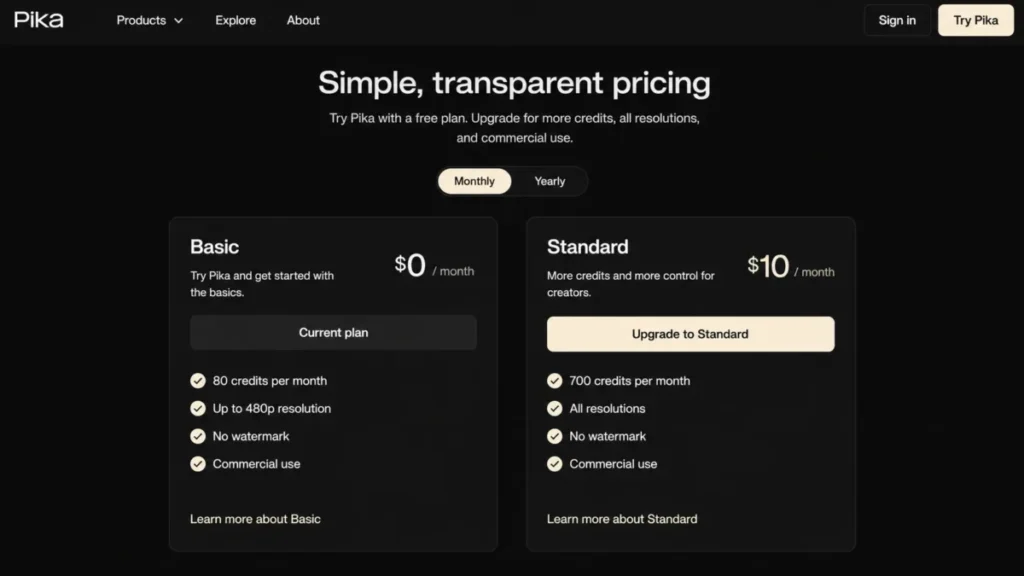
On annual billing, Basic is $8 effective per month with 80 monthly credits at 480p only, Standard is $28 effective with 700 credits and all resolutions, and Fancy is $76 effective with 6,000 credits. Paid plans carry no watermark and include commercial use (per the Pika pricing page).
The budget trap is specific and worth stating plainly: a single Pro-level Pikatwist can cost 80 credits, which is the entire monthly allowance on Basic, and Basic tops out at 480p. That makes Basic an evaluation plan, not a production plan, and Standard is the real starting point for client work (per the Pika pricing page).
| Pros | Cons |
|---|---|
| Fast, effect-driven creation that fits social hooks and ad variants | Basic is 480p only and unusable for HD client delivery |
| Paid plans include no watermark and commercial use | One Pro Pikatwist can consume Basic’s entire 80-credit month |
| Low $8 (Basic) effective entry price for testing | Weak long-form continuity and no enterprise admin |
| Clear credit costs per effect on the pricing page | High-compute effects drain credits quickly |
Source: Pika pricing page, checked July 20, 2026.
Avoid Pika if you need long-form continuity, enterprise controls, or generous high-compute effects at a low price. Setup difficulty is Low: pick an effect, add media, generate.
The hidden cost is buying rollover credit packs when effects drain the pool. See the full Pika review for a deeper look at its effect workflow.
This assessment is based on official Pika pricing and product pages.
Verdict: choose Pika if you produce short social transformations and you start on Standard, not Basic.
8. OpenArt: Best for Multi-Shot Storytelling

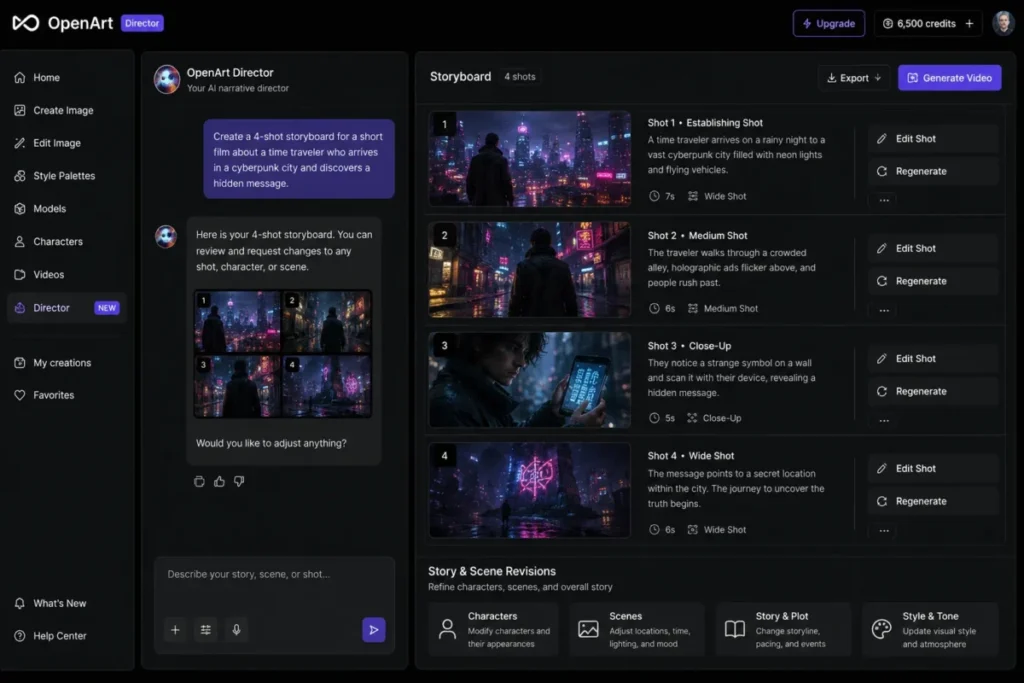
OpenArt earns its spot on one capability the single-clip tools lack: its Director workflow turns a chat brief into a storyboard and multi-shot sequence, with videos positioned as up to five minutes long (per the OpenArt Director page). For a small studio that wants narrative continuity without manually stitching unrelated clips, that is the differentiator.
List prices run Essential at $14 per seat per month with 4,000 credits, Advanced at $29 with 12,000, Infinite at $56 with 24,000, and Wonder at $240 with 106,000 credits (per the OpenArt pricing page).
On July 20, 2026, OpenArt also displayed temporary promotional prices of roughly $12.60 (Essential), $23.20 (Advanced), $43.70 (Infinite), and $175.20 (Wonder) respectively, which are time-limited and should not be treated as standard pricing. The standard price is the list figure above, and these promotional rates were re-verified on the publish date: 2026-07-20 (per the OpenArt pricing page).
The honest limit: Director launched in 2026, and the plan video counts are “up to” estimates that vary by model, so per-minute cost is not fixed and long-form output is not a guarantee.
| Pros | Cons |
|---|---|
| Chat-driven storyboarding and multi-shot continuity in one workspace | Director is new (2026) with limited long-term reliability data |
| Video positioned up to five minutes for narrative work | “Up to” video counts vary by model and are not fixed |
| Scalable credit plans plus a $15 extra-credit add-on on Advanced | Per-minute cost is not predictable across models |
| Parallel generation speeds throughput for studios | Promotional July 2026 prices can expire without notice |
Source: OpenArt pricing page, checked July 20, 2026.
Avoid OpenArt if you need a mature, proven system or a fixed cost per finished minute. Setup difficulty is Medium: brief, storyboard, refine, generate.
The hidden cost is the Advanced-only extra-credit add-on at $15/month for 5,000 credits. This assessment is based on official OpenArt product, pricing, and changelog evidence (per the OpenArt pricing page).
Verdict: choose OpenArt if multi-shot narrative direction matters and you budget from credits, not the maximum video estimate.
Best Text-to-Video AI for Presenter-Led Business Video
These two solve problem three. Neither generates cinematic scenes, and that is the point: they turn a script into a talking presenter, localized and repeatable, which is a different purchase from a film model.
9. HeyGen: Best for Avatar Marketing and Localization

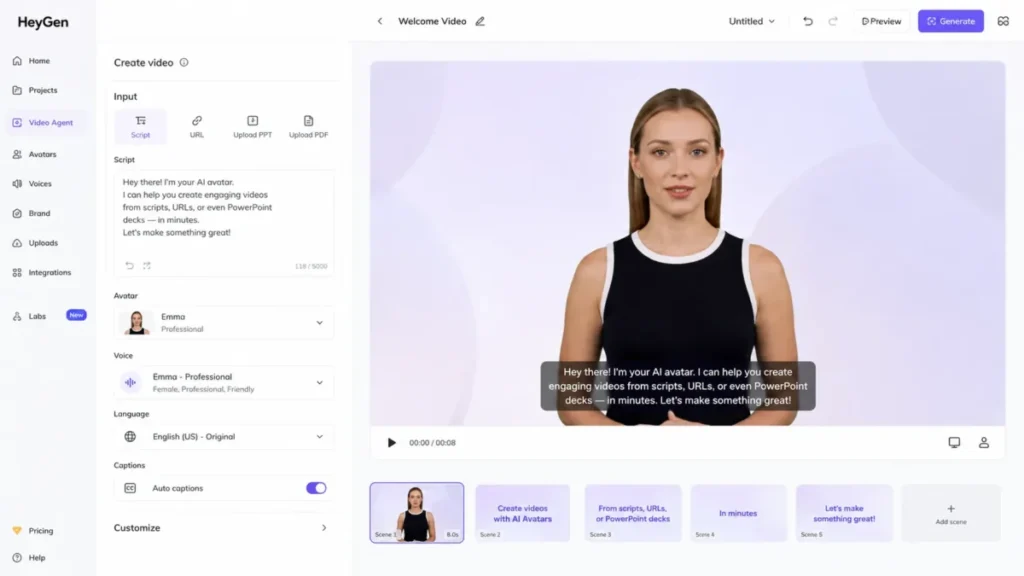
HeyGen is the pick for marketing, sales-enablement, and customer-education teams that turn scripts, URLs, decks, or ideas into presenter-led videos across languages. Its Video Agent assembles a draft with an avatar, voice, B-roll, and captions, which makes it a repeatable content engine rather than a one-off generator.
The Free plan allows up to 3 videos per month, enough for a single proof of concept. Creator is $29/month, or $24 effective per month billed annually, Pro starts at $49/month and scales with included credits, and Business is $149/month plus $20 per additional seat (per the HeyGen pricing page).
The recurring caution from user reviews is credit and premium-avatar complexity: repeated Avatar IV refinements can consume capacity faster than expected, so we would localize an approved master rather than regenerate every variant.
| Pros | Cons |
|---|---|
| Turns scripts, URLs, and decks into presenter video across languages | Credit and premium-avatar usage can be hard to forecast |
| Video Agent automates script, B-roll, voice, and captions | Not a cinematic scene generator |
| Clear plan ladder from free to $149 plus seats | Business collaboration needs the $149 base plus $20 per seat |
| Strong localization for global marketing teams | Emotional nuance is limited per recurring user sentiment |
Source: HeyGen pricing page, checked July 20, 2026.
Avoid HeyGen if you need generative camera motion or abstract scenes rather than a presenter. Setup difficulty is Low: pick a source, avatar, and language, then generate.
The hidden cost is per-seat billing on Business and premium-avatar credit draw. This analysis is based on official HeyGen pricing and product pages plus labeled user sentiment.
Verdict: choose HeyGen if you produce repeatable, localized presenter video and you standardize on one approved master.
10. Synthesia: Best for Enterprise Training and Compliance

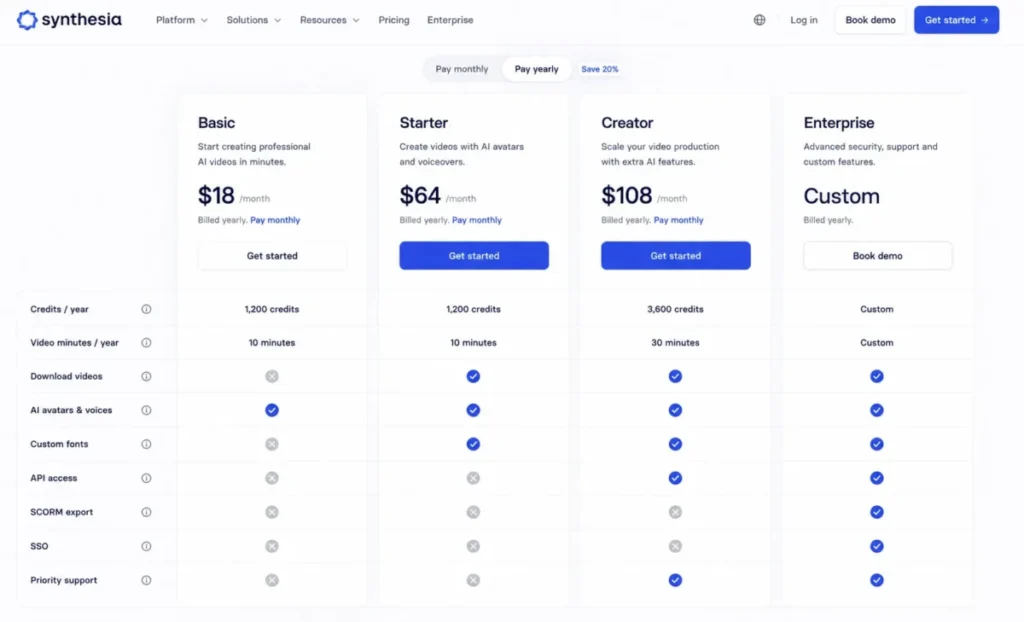
Synthesia is the pick for enterprise learning, compliance, and internal-communications teams that need governed, repeatable presenter video. It offers more than 240 avatars, more than 160 languages, an AI Video Assistant that builds from a prompt, file, or URL, plus API, interactive video, SCORM, and SSO on the right tiers.
Basic is free with 1,200 credits and up to 10 video minutes per month, but it cannot download video. Starter is $29/month with the same 1,200 credits and 10 minutes plus 1 editor and 3 guests, and Creator is $89/month with 3,600 credits and up to 30 video minutes (per the Synthesia pricing page).
Self-service generation costs 2 credits per second, so one minute uses 120 credits, and premium actions cost more: lip sync can use double the rate and a single AI B-roll asset action can cost 96 credits. SCORM, SSO, and unlimited standard minutes require Enterprise (per the Synthesia credits help for the credit rates and the Synthesia pricing page for the plan gates).
| Pros | Cons |
|---|---|
| Deepest governance stack: SCORM, SSO, brand kits, onboarding on Enterprise | Basic cannot download video, so it is preview-only |
| Predictable minute capacity (10 min Starter, 30 min Creator) | Self-service costs 2 credits/ |
| 240+ avatars and 160+ languages for localized training | Not built for cinematic scenes or freeform camera work |
| API and interactive video on Creator for automation and pilots | SCORM and SSO force the custom-priced Enterprise plan |
Source: Synthesia pricing page, checked July 20, 2026.
Avoid Synthesia if you need environmental motion and scene generation rather than a presenter template. Setup difficulty is Low to Medium: script, avatar, generate, translate, deliver.
The hidden cost is premium-action credits and the $1,000-per-year Studio Express-1 custom avatar add-on. This assessment is based on official Synthesia pricing, workflow, and credit documentation plus labeled user sentiment (per the Synthesia pricing page).
Verdict: choose Synthesia if governed training delivery and localization matter more than cinematic realism.
Text-to-Video AI Generators Compared at a Glance
Use this table to place each tool in the right category before you compare price. Model realism and native audio decide the film tools, while inputs and governance decide the presenter tools.
| Tool | Best for | Current model | Native audio | Max clip | Output ceiling |
|---|---|---|---|---|---|
| Runway | Balanced creative production | Gen-4.5 | No native dialogue | 10 seconds | 720p (4K upscale) |
| Google Flow | Cinematic realism + audio | Veo 3.1 | Yes | Mode-dependent | Not fixed in plan page |
| Kling AI | Lifelike motion | Kling 3.0 | Audio on current models | 15 seconds | 4K on Pro |
| Adobe Firefly | Brand-safe commercial work | Firefly Video + partners | Partner-dependent | Model-dependent | Model-dependent |
| Luma Dream Machine | HDR and post-production | Ray3.2 | Not the core strength | 20s modify at 1080p | 1080p + 16-bit HDR/ |
| Higgsfield | Camera control, cross-model | Multiple models | Model-dependent | Model-dependent | Model-dependent |
| Pika | Budget social effects | Pika 2.5 | Effect-dependent | Short-form | 480p Basic, higher on Standard+ |
| OpenArt | Multi-shot storytelling | Director (multi-model) | Model-dependent | Up to 5 minutes | Model-dependent |
| HeyGen | Avatar marketing | Avatar IV | Voice + narration | Presenter-length | 1080p+ |
| Synthesia | Enterprise training | AI Video Assistant | Voice + narration | Presenter-length | 1080p+ |
Sources: Runway Gen-4.5 documentation, Veo 3.1 announcement, Kling 3.0 model page, Luma Ray3.2 documentation, and Synthesia AI video generator page, checked July 20, 2026.
The categories matter more than any single row. The top three are scene generators, the middle five are control and production tools, and the last two are presenter platforms that a film model will not replace.
Pricing Comparison: Starting Price vs Practical Tier
Starting price is the wrong number to budget from in this category. Most of these tools meter output in credits, so the practical tier is the first plan that removes the watermark, unlocks the resolution you deliver, or funds enough generations to survive retries.
| Tool | Starting price | Practical tier | Cost for a 10-person team | Free plan | Hidden costs |
|---|---|---|---|---|---|
| Runway | $15/mo Standard | $35/mo Pro | 10 x $15 (Standard) or 10 x $35 (Pro), per user | Limited free tier | 1,000 credit top-up minimum |
| Google Flow | Free (50/ | $19.99/mo AI Pro | Shared account; scale by credits | 50 credits/ | Extra AI credits; no free rollover |
| Kling AI | Free (watermarked) | Paid membership (price not disclosed) | Shared account; verify plan | Watermarked free tier | 4K needs Pro; API billed separately |
| Adobe Firefly | $9.99/mo Standard | $19.99/mo Pro | 10 x $9.99 (Standard) to 10 x $19.99 (Pro), per user | Free tier | Partner-model premium credits |
| Luma Dream Machine | Credit-based (plan price not verified) | Verify current plan | Shared account; scale by credits | Trial credits | 1,200 credits per 10s at 1080p |
| Higgsfield | $15/mo Starter | $49/mo Plus | Shared account; scale by credits | Evaluation credits | Plus upgrade for full model set |
| Pika | $8/mo Basic (annual) | $28/mo Standard (annual) | Shared account; scale by credits | Free tier | Rollover credit packs |
| OpenArt | $14/ | $29/ | 10 x $14 (Essential) to 10 x $29 (Advanced), per seat | Trial credits | $15/mo extra-credit add-on |
| HeyGen | Free (3 videos) | $29/mo Creator | $149 base + $20 per added seat (Business) | 3 videos/mo | Premium-avatar credit draw |
| Synthesia | Free Basic (no download) | $89/mo Creator | Per editor; extra editors priced separately | 1,200 credits, no download | Premium actions; $1,000/yr Studio Express-1 avatar |
Sources: Runway pricing page, Google Flow credit help, Adobe Firefly plans page, Luma pricing page, Synthesia pricing page, checked July 20, 2026.
The cheapest plan is rarely the right comparison point. For the credit-based film tools, budget in output rather than seats: a Runway 10-second Gen-4.5 clip is 120 credits, a Luma 10-second 1080p clip is 1,200 credits, and a Synthesia minute is 120 credits before any premium action (per the Runway Gen-4.5 documentation, the Luma pricing page, and the Synthesia credits help).
For the seat-based tools, OpenArt, HeyGen Business, and Synthesia, the per-seat or per-editor structure is what scales your bill, so price the team, not the login.
Feature Gate Comparison
The features buyers assume are included are often gated by plan. This table maps the gates that most often force an upgrade or a second tool.
| Tool | Native audio | 4K or high-res | Commercial use | API | Admin / governance |
|---|---|---|---|---|---|
| Runway | No native dialogue | 4K via upscale | On paid plans | Available | SSO on Enterprise |
| Google Flow | Yes (Veo 3.1) | Mode-dependent | On Google AI plans | Via Google API | Thin team admin |
| Kling AI | On current models | 4K on Pro | On paid membership | Separate API pricing | Limited public detail |
| Adobe Firefly | Partner-dependent | Model-dependent | Licensed-data positioning | Adobe ecosystem | Enterprise controls |
| Luma Dream Machine | Not core | 1080p + HDR/ | On paid access | Available | Standard account controls |
| Higgsfield | Model-dependent | Model-dependent | On paid plans | Not documented | Not documented |
| Pika | Effect-dependent | 480p Basic, higher above | Paid plans only | Not core | None |
| OpenArt | Model-dependent | Model-dependent | Advanced and above | Not core | Seat-based |
| HeyGen | Voice + narration | 1080p+ | Paid plans | Yes | Business seats |
| Synthesia | Voice + narration | 1080p+ | Paid plans | Creator and above | SCORM/ |
Sources: Veo 3.1 announcement, Kling AI pricing page, Adobe Firefly commercial-safety page, Synthesia pricing page, and HeyGen product page, checked July 20, 2026.
The pattern to watch is that native audio, high resolution, and commercial use rarely arrive together on an entry plan. Confirm which one your deliverable requires, then price the first tier that unlocks it rather than the headline plan.
Setup and Workflow Difficulty
Generation is easy on all ten. The friction lives in cost forecasting, continuity, and delivery gates, so difficulty here reflects the full workflow, not just the first prompt.
| Tool | Setup difficulty | Why |
|---|---|---|
| Runway | Low | Prompt, reference, generate, and upscale in one dashboard |
| Google Flow | Low to Medium | Simple to start, but mode-by-mode credit planning takes attention |
| Kling AI | Medium | Easy to generate, harder to verify current membership economics |
| Adobe Firefly | Low to Medium | Familiar for Adobe users; partner-model credit discipline required |
| Luma Dream Machine | Medium | Keyframes and HDR add power and planning overhead |
| Higgsfield | Low to Medium | Fast creation, opaque model-level cost forecasting |
| Pika | Low | Pick an effect, add media, generate |
| OpenArt | Medium | Storyboard and refine steps add coordination |
| HeyGen | Low | Source, avatar, language, generate |
| Synthesia | Low to Medium | Simple creation, plus plan gates for download, SCORM, and SSO |
Setup ratings are our editorial assessment of each tool’s documented workflow and plan structure: Runway, Google Flow, Kling AI, Adobe Firefly, Luma, Higgsfield, Pika, OpenArt, HeyGen, and Synthesia, checked July 20, 2026.
Which Text-to-Video Tool Should You Avoid?
None of these ten is a bad product, but each is the wrong purchase for a specific buyer. The avoidance list is a mismatch list.
Avoid Runway if your core deliverable is a multi-minute film, because a 10-second, 720p ceiling forces stitching and external assembly. Avoid Google Flow if finance demands a fixed cost per clip, since the per-mode debit is not published as one rate (per the Runway Gen-4.5 documentation for the Runway limits and the Google Flow credit help for Flow credits).
Avoid Kling if you cannot proceed without a fully documented US consumer price table, because that table is not in the captured public evidence.
Avoid Pika Basic specifically. At 80 credits and 480p, a single Pro-level effect can drain the month and the output is below HD, so it is an evaluation plan sold next to production plans (per the Pika pricing page).
The same logic applies to Synthesia Basic: it cannot download video, which makes it preview-only for any real deliverable.
The broader trap is buying across categories. If you need a talking presenter for training, a cinematic model like Runway or Kling is the wrong tool no matter how good the footage looks, and if you need a hero shot for an ad, an avatar platform like HeyGen will not produce it.
Match the tool to the category first, then argue about price.
How to Choose the Right Text-to-Video AI Generator
Work through these questions in order. The first three eliminate most of the field before price ever enters the decision.
- What is the deliverable? A cinematic scene, a social effect, a multi-shot story, or a talking presenter. This single answer sorts the ten tools into three groups and removes the wrong category immediately.
- Do you need native audio? If synchronized dialogue or sound matters, Google Flow and the avatar platforms lead, while silent-generation tools add a separate audio step.
- What resolution and length must you deliver? Match the model’s documented ceiling to your spec: 720p and 10 seconds on Runway, 1080p and HDR on Luma, 4K behind Kling Pro, or presenter-length on HeyGen and Synthesia (per the Runway Gen-4.5 documentation, the Luma Ray3.2 documentation, the Kling AI pricing page, and the Synthesia pricing page).
- What does a usable clip cost after retries? Budget in output, not headline price. Multiply the documented credit rate by your expected iterations, not by one perfect first attempt.
- Native platform or aggregator? A native vendor gives you every control the model exposes, while an aggregator like Firefly or Higgsfield reduces subscription sprawl at the cost of some controls and less transparent per-model pricing.
- Who needs access, and how? Seat-based tools such as OpenArt and HeyGen Business scale by seat, while credit-based tools share one account, which changes the team math entirely.
- What governance do you need? Commercial-use terms, SSO, and SCORM are gated. If you are in a regulated or brand-controlled workflow, price the tier that unlocks them, not the entry plan.
Answer these and the shortlist usually collapses to two tools, at which point a free tier or trial settles it. Strong prompt engineering also reduces retry cost on whichever tool you choose, because clearer prompts waste fewer credits.
For video work the fields that decide a retry are motion, camera behavior and light source, not adjectives. There are 123 copyable video prompt templates built on exactly those fields.
If video is only one part of your stack, weigh it alongside the wider set of AI tools for content creation before you commit budget.
Common Mistakes When Choosing Text-to-Video AI Software
- Budgeting from the entry price. The practical tier that removes the watermark or unlocks your resolution is the real cost, and it is often two tiers up from the headline number.
- Ignoring retry economics. Generative video is probabilistic, so a low subscription fee means little if four failed ten-second shots drain the month’s credits.
- Confusing categories. Comparing an avatar platform to a film model on one scale leads to buying the wrong tool for the deliverable.
- Trusting “unlimited” at face value. Firefly Premium’s unlimited access covers only the Adobe Firefly Video Model, and partner outputs still spend credits.
- Assuming free means publishable. Kling’s free tier is watermarked and Synthesia Basic cannot download, so a nominal free plan may be evaluation-only.
- Overlooking native audio. A silent generator forces a separate voice and sound workflow, which changes your tool stack and timeline.
- Standardizing on a single model. Sora’s discontinuation is the cautionary tale: a team that built its pipeline on one model had to migrate, so keep an exit path in mind.
Final Verdict
For most creative teams, Runway is the best text-to-video AI generator to standardize on, because it balances current-model access, reference control, and in-app editing on one plan, and its 12-credits-per-second rate is transparent enough to budget against. Start on Standard at $15/month and move to Pro when you need custom voices or higher capacity (per the Runway pricing page for pricing and the Runway Gen-4.5 documentation for the credit rate).
If your priority is cinematic realism with native audio, Google Flow and Veo 3.1 are the stronger choice, provided you can track mode-by-mode credit spend. For lifelike motion, Kling is the specialist, once you verify its current membership price.
Brand and agency teams that need a commercial-safety story should choose Adobe Firefly, and post-production and VFX teams that need HDR, EXR, and keyframes should choose Luma.
The picture changes entirely for business video. If you need presenter-led marketing across languages, HeyGen is the fit, and for governed enterprise training with SCORM and SSO, Synthesia is the clear pick.
Pika and OpenArt round out the specialists, one for budget social effects and one for multi-shot storytelling. Match the tool to your deliverable first, then price the tier that unlocks what you ship.
Frequently Asked Questions
What is the best text-to-video AI generator in 2026?
Runway is the strongest all-round pick for teams that want one balanced platform, because it combines current-model generation, reference control, and in-app editing with a transparent 12-credits-per-second rate. If native audio and cinematic realism matter most, Google Flow with Veo 3.1 is the stronger choice.
Which AI video generator makes the most realistic video?
Google Flow, built on Veo 3.1, is positioned for cinematic realism with native audio, and Kling is strong on lifelike human motion. Realism scores vary by prompt and are not directly comparable across tools, so test your own shot on a free tier before committing to one model.
Is there a free unlimited text-to-video AI generator?
No, unlimited free text-to-video does not exist in this ranking. Google Flow offers the most usable free path at 50 credits per day (per the Google Flow credit help).
The other tools also have free tiers, but each carries watermarks, download limits, resolution caps, or credit limits that make them evaluation-focused rather than production-ready.
Can AI-generated videos be used commercially?
Yes, on paid plans for most of these tools, but the terms differ. Adobe Firefly leans hardest into a licensed-data, commercial-safety position, which the company presents as designed for commercial use rather than a legal guarantee.
Always confirm the current commercial-use terms on the plan you buy.
Which AI video generator creates synchronized audio?
Google Flow with Veo 3.1 generates native audio inside its scenes, and the avatar platforms HeyGen and Synthesia produce synchronized voice narration. Many cinematic tools generate silent footage, so if audio is required, confirm native support or plan a separate sound step.
How long can text-to-video AI clips be?
It varies widely. Runway’s Gen-4.5 caps at 10 seconds, Kling reaches 15 seconds, Luma’s Modify Video handles up to 20 seconds at 1080p, and OpenArt’s Director is positioned for videos up to five minutes (per the Runway Gen-4.5 documentation, the Kling 3.0 model page, the Luma Ray3.2 documentation, and the OpenArt Director page).
Avatar tools produce presenter-length videos limited mainly by your plan’s minutes or credits.
What are the best Sora alternatives after its discontinuation?
The top three cinematic picks in this ranking are the strongest starting points. OpenAI discontinued the Sora web and app on April 26, 2026, with the API scheduled to end September 24, 2026 (per the OpenAI Sora discontinuation notice).
Which one fits depends on whether you prioritize balanced production, native audio, or motion realism.
Is Runway or Kling better for AI video?
Choose Runway if you want a balanced platform with transparent credit pricing, reference control, and in-app editing on one plan. Choose Kling if lifelike human motion is your priority and you can accept less transparent US consumer pricing and a watermark on the free tier.
How many credits does a 10-second AI video use?
It depends on the model. A Runway Gen-4.5 ten-second clip uses 120 credits at 12 credits per second, and a Luma Ray3.2 ten-second clip at 1080p uses 1,200 credits (per the Runway Gen-4.5 documentation and the Luma pricing page).
Google Flow and several others do not publish one fixed rate, so track in-app credit activity instead.
Which AI video generator is best for employee training?
Synthesia is the strongest fit for employee training because it pairs presenter avatars and 160-plus languages with SCORM, SSO, and predictable minute capacity, though SCORM and SSO require its custom-priced Enterprise plan. HeyGen is a good alternative for lighter, marketing-adjacent training video.