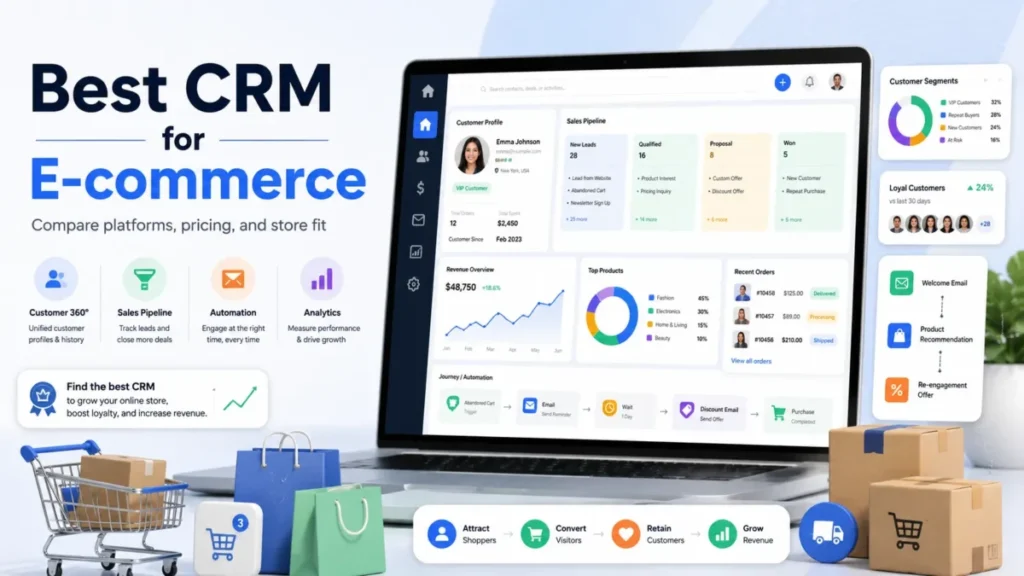
Most e-commerce CRM roundups rank logos. The harder question is which billing unit you are buying, because a tool priced per active profile and a tool priced per sales seat are not the same purchase, even when their starting prices look close.
That single confusion sends stores to the wrong shortlist: a DTC brand that needs abandoned-cart recovery buys a per-seat sales CRM, then finds the lifecycle work it wanted lives in a different product category.
This guide compares 10 CRM software options for US e-commerce teams by the job each one does best. The evidence is official: US pricing pages, help centers, developer documentation, and marketplace listings, all checked on July 20, 2026.
For most Shopify direct-to-consumer teams, Klaviyo is the strongest starting point because behavioral data and lifecycle automation live in one B2C profile model.
HubSpot is the better fit when a store runs mixed retail, wholesale, and service motions from one record. Pipedrive fits high-ticket and wholesale sellers whose orders behave like sales opportunities, and Brevo is the budget entry for email-led stores that can watch their contact tiers.
In This Article (19 sections)
Quick Verdict: Best E-commerce CRM by Use Case
Use this table to eliminate mismatched tools before you compare features. Each pick ties to a selling motion and a billing unit, not a feature count.
| Use case | Best pick | Why it fits |
|---|---|---|
| Best for behavior-led DTC lifecycle | Klaviyo | Shopify behavioral events, segments, and cart flows in one B2C profile model |
| Best for mixed retail, wholesale, and service | HubSpot | One customer and company record shared across sales, marketing, and service |
| Best for automation-heavy retention | ActiveCampaign | Deep e-commerce automation from Shopify and WooCommerce purchase data |
| Best value for configurable sales operations | Zoho CRM | Low per-user prices with omnichannel CRM and a Shopify extension |
| Best low-cost sales-and-marketing bundle | Freshsales Suite | Competitive annual seat price with an included marketing-contact allowance |
| Best for governed enterprise stacks | Salesforce Sales Cloud | Enterprise permissions and a Data 360 Shopify connector for large programs |
| Best simple pipeline for small sales teams | Nutshell | Low per-user pricing, no seat minimum, order-to-lead workflows |
| Best budget email and light CRM | Brevo | Usable free tier and low paid entry for email-centered stores |
| Best for high-ticket and wholesale deals | Pipedrive | Focused deal pipeline for orders that behave like opportunities |
| Best for owner-led store-and-service hybrids | Keap | Combines CRM, automation, payments, invoicing, and follow-up in one account |
Notice that the budget pick, the free-plan pick, and the enterprise pick sit in different pricing models. That is the real decision, and the rest of this guide makes each model concrete.
A quick disambiguation before the rankings. Klaviyo, Brevo, and ActiveCampaign lead the marketing-and-lifecycle job; Pipedrive, Nutshell, and Zoho lead the deal-and-pipeline job; HubSpot, Salesforce, Freshsales, and Keap try to hold both.
Choosing the wrong side of that line is the most expensive mistake in this category, so I put the model decision before the feature comparison.
How I Chose and Ranked These E-commerce CRMs
I evaluated these 10 products against US-facing official evidence: pricing pages, product pages, help centers, developer documentation, and marketplace listings, all checked on July 20, 2026. Third-party review sentiment is used only when it is attributable, and it is never upgraded to a first-person experience claim.
Source: official US pricing pages, product documentation, help centers, and developer documentation, checked July 20, 2026. This analysis draws only on official research. No product account, trial, timing check, support interaction, or benchmark was performed, so the guide avoids first-person usage claims and fabricated performance numbers.
Ranking weighed the things that change an e-commerce buying decision: how each connector moves store data, which plan unlocks the workflow a store needs, what happens at a usage cap, where the real cost appears under each billing unit, and which buyer each tool is wrong for. Where the official evidence stops, I say so instead of guessing.
Rankings reflect fit and evidence quality, not brand size or affiliate payout. Prices are official US list prices at the check date, and dynamic calculators or listed prices can change after that, so treat each figure as a checkpoint to re-verify at purchase.
The Three Problems Every E-commerce CRM Buyer Faces
Strip away the logos and e-commerce CRM shopping reduces to three jobs, whatever a CRM does for a store in general. Almost every product on this list leads at one of them and compromises on the others.
Problem 1: Turning store behavior into repeat revenue. This is the direct-to-consumer lifecycle job: capture browsing and cart events, segment by behavior and value, and run the abandoned-cart, win-back, and post-purchase flows that make up e-commerce marketing automation. The data model here is the customer profile, not the sales deal.
Problem 2: Managing high-ticket, wholesale, and rep-led orders. Here an order behaves like a sales opportunity that a person has to move through stages, quote, and close. The data model is the pipeline, and the reader needs deal management more than cart automation.
Problem 3: Running one customer record across sales, marketing, and service. Hybrid and larger brands sell direct, sell wholesale, and support customers, and they want a shared record so those teams stop working from separate tools. The risk here is cost and implementation, not capability.
The billing units follow the jobs. Profile-based and contact-based pricing (Klaviyo, Brevo, ActiveCampaign) matches Problem 1; per-seat pricing (Pipedrive, Nutshell, Zoho, Freshsales, HubSpot, Salesforce) matches Problems 2 and 3; and account-plus-usage pricing (Keap) sits with owner-led hybrids.
Before the pricing math, here is the whole list in rank order, where each product’s ranking reason is its best-fit cohort rather than a feature count.
Best E-commerce CRM Software at a Glance
| Rank | Product | Best-fit cohort | Billing unit | Starting point (US, checked Jul 20, 2026) | Free plan |
|---|---|---|---|---|---|
| 1 | Klaviyo | Behavior-led DTC lifecycle | Active profiles + channels | $0 up to 250 active profiles | Yes |
| 2 | HubSpot | Hybrid revenue operations | Per seat | $0 Free Tools; Sales Starter $9/seat/mo annual | Yes |
| 3 | ActiveCampaign | Automation-heavy retention | Contacts (+ 1 user on Starter) | From $15/mo under 1,000 contacts | No |
| 4 | Zoho CRM | Value configurable sales ops | Per user | $0 Free; Standard $14/ | Yes |
| 5 | Freshsales Suite | Low-cost sales + marketing | Per user (+ marketing contacts) | $0 up to 3 users; Growth $9/user/mo annual | Yes |
| 6 | Salesforce Sales Cloud | Governed enterprise stacks | Per user | $0 Free Suite; Pro Suite $100/ | Yes |
| 7 | Nutshell | Simple small-team pipelines | Per user | Foundation $13/ | No (14-day trial) |
| 8 | Brevo | Budget email + light CRM | Account + email-volume tier | $0 (300 emails/ | Yes |
| 9 | Pipedrive | High-ticket and wholesale | Per seat | Lite $14/ | No |
| 10 | Keap | Owner-led store + service | Account (2 users incl.) | $299/mo ($2,988/ | No |
Source: official vendor pricing pages and product documentation, checked July 20, 2026; full list in Sources and Official References below. Klaviyo holds the top spot because it solves the most common e-commerce job, behavior-led lifecycle, inside a single model. That does not make it the right pick for a wholesale seller, which is exactly why the sections below route by problem rather than by rank alone.
Products That Solve Problem 1 Best: Store Behavior into Repeat Revenue
These three lead the direct-to-consumer lifecycle job. They price by profiles or contacts, not by sales seats, because the unit of work here is the customer, not the deal.
Klaviyo: Best for Behavior-Led DTC Lifecycle

Klaviyo earns the top spot for one reason: it keeps behavioral customer data and lifecycle automation inside a single B2C profile model instead of bolting a marketing tool onto a sales CRM. For a Shopify direct-to-consumer team of two to ten lifecycle marketers, that is the difference between one system and a fragile integration between two.
The Free plan lists up to 250 active profiles, 500 emails per month, and a $5 monthly mobile-message value, according to Klaviyo’s official pricing checked July 20, 2026. Paid pricing is dynamic, so the real cost scales with active profiles and the channels you turn on rather than a flat seat price.
That billing model creates a lever most roundups miss. Klaviyo’s own sunset-flow documentation says suppressing unengaged profiles stops them counting toward the billing plan and blocks future sends, so profile hygiene is a cost control, not just a deliverability chore.
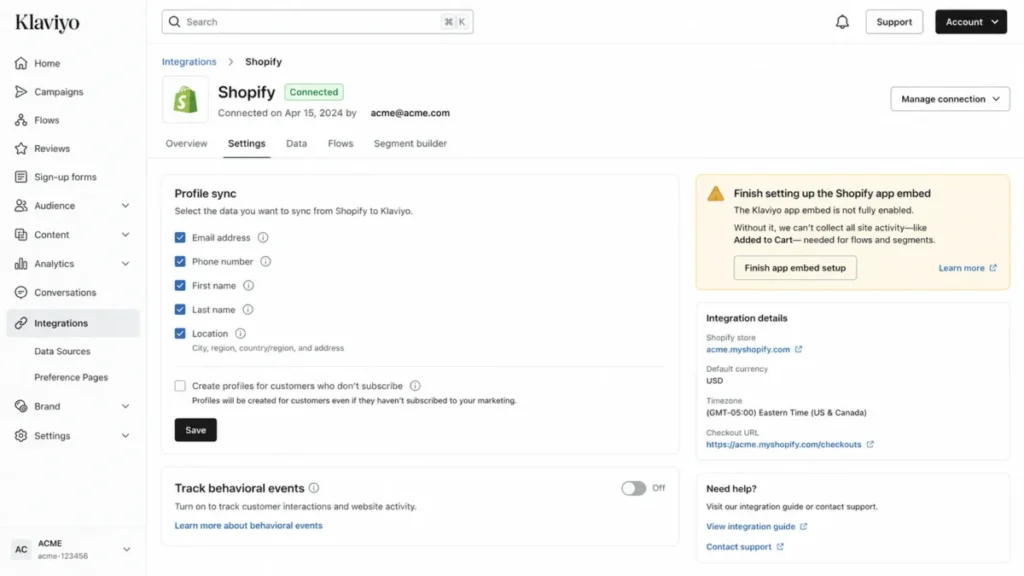
The Shopify workflow is documented in detail. Klaviyo syncs profiles and behavioral events, and the Added to Cart flow requires two preconditions: the Klaviyo app embed enabled in your Shopify theme and Track behavioral events turned on.
The limitation is a category boundary, not a bug. Klaviyo is behavior-led B2C CRM, and wholesale opportunity pipelines, quotes, and rep-led deal stages are a different job it is not built to own.
Setup difficulty is medium. The Shopify connection is documented and guided, but Klaviyo can overwrite synced custom properties on the next sync, so treat Shopify as the source of truth for those fields and validate consent settings before launch.
| Pros | Cons |
|---|---|
| Behavioral data and lifecycle flows in one B2C profile model | Pricing scales with active profiles and channels, so growth raises cost |
| Documented Shopify events power cart, win-back, and post-purchase flows | Not a sales-deal pipeline; wholesale deal management needs another tool |
| Suppression is a documented billing lever, not just list hygiene | Synced Shopify properties can overwrite Klaviyo edits on the next sync |
| Free tier of 250 active profiles is usable for validation | Onsite behavioral tracking depends on consent settings and app embed |
The Klaviyo review breaks down the flow library and the profile-billing math in more depth.
Avoid Klaviyo if your primary CRM job is moving named opportunities through stages. My recommendation: choose Klaviyo when store behavior and retention are the CRM, model your active-profile count and channel mix before picking a paid tier, and build a suppression flow on day one so the bill tracks engaged profiles.
ActiveCampaign: Best for Automation-Heavy Retention

ActiveCampaign is the pick when the depth of your automation logic matters more than owning a full sales CRM. It runs multi-step email journeys off Shopify and WooCommerce purchase, product, and abandoned-cart data without the architecture weight of an enterprise platform.
Pricing starts at $15 per month for fewer than 1,000 contacts, per the official pricing page checked July 20, 2026. The catch sits inside the Starter plan: it lists one user and a cap of five actions per automation.
Source: ActiveCampaign pricing, checked July 20, 2026.
That five-action ceiling is the upgrade trigger nobody prints. A branching abandoned-cart or win-back sequence with a wait, a condition, two messages, and an exit clears five actions quickly, so count the steps in your core journey before you accept the Starter price.
There is a second gate worth pricing in. The word “CRM” here hides an add-on: pipelines, deal and account records, and lead scoring are documented as the Enhanced CRM add-on, and its price was not disclosed on the captured pricing page.
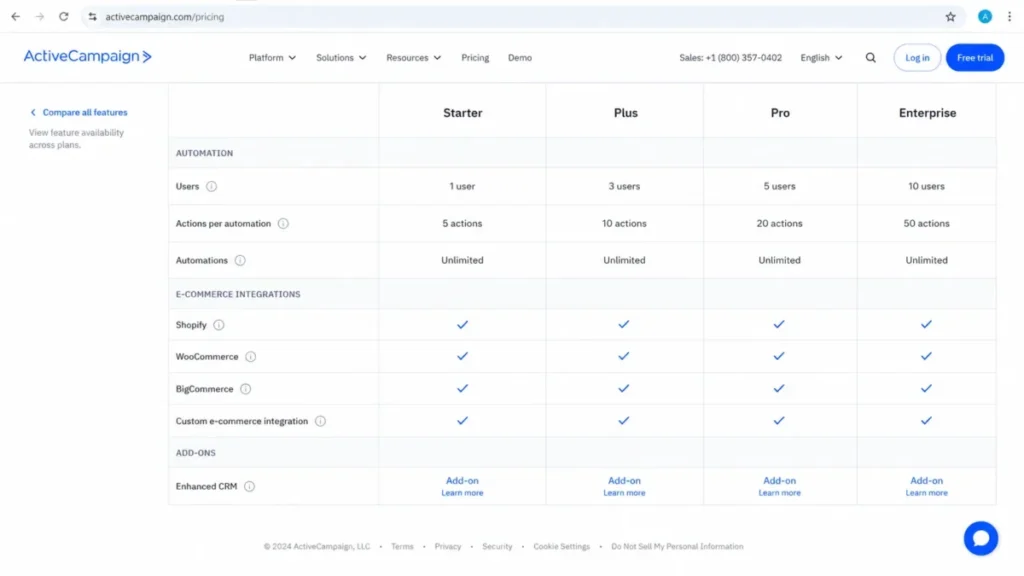
Store platform also decides your tier. The official pricing lists Shopify, WooCommerce, and Square as standard e-commerce integrations, while BigCommerce, Magento, and Shopify Plus sit under premium integrations, so a Shopify Plus store cannot assume the entry tier.
Setup difficulty is medium. Shopify Deep Data is documented and the automation builder is the product’s strength, but guest-versus-logged-in data and consent handling need validation before a first send.
| Pros | Cons |
|---|---|
| Deep automation logic for Shopify and WooCommerce e-commerce events | Starter caps automations at five actions and one user |
| Standard tier covers Shopify, WooCommerce, and Square | Sales pipelines and deals require the paid Enhanced CRM add-on |
| Documented abandoned-cart triggers from Deep Data | Enhanced CRM add-on price is not published, so budgeting needs a quote |
| Lower architecture burden than enterprise CRM suites | Shopify Plus and BigCommerce sit in the premium integration tier |
The automation builder and the add-on trade-offs get fuller treatment in the ActiveCampaign review.
Avoid ActiveCampaign if you assumed the headline marketing plan includes a conventional sales CRM. Choose it when multi-step retention automation is the priority, but price the tier your journey needs and get the Enhanced CRM add-on quoted before you compare it to a seat-based CRM.
Brevo: Best Budget Email and Light CRM

Brevo is the budget entry for an email-centered store that needs light sales organization on the side. The Free plan lists one seat, a 300-email daily send limit, and documented storage up to 100,000 contacts, checked July 20, 2026, which makes it usable for validation rather than a locked trial.
Paid plans start at $9 per month for Starter and $18 for Standard, with contact storage tied to the selected email-volume tier. The daily-send cap is the first real constraint: 300 emails per day cannot carry a same-day campaign to a mid-size list, so the Free plan is a starting point, not a launch plan.
The budget trap is a billing behavior. For the early Starter and Standard contact tiers of 500, 1,500, and 2,500 contacts, Brevo’s help documentation says the account warns at 85% and then automatically upgrades to the next tier when the limit is crossed, which raises the bill without a manual plan change.
There is a compliance point most roundups skip. Brevo’s WooCommerce guidance conditions subscribed status on clear, verifiable consent, so guest-checkout customers must not be imported as marketing subscribers just because they bought something.
| Pros | Cons |
|---|---|
| Free tier and $9 Starter give a low entry for email-led stores | Free plan caps sending at 300 emails per day |
| WooCommerce sync plus documented back-in-stock workflows | Early paid tiers auto-upgrade at the cap and raise the bill |
| Contact storage is generous relative to the price | Contact storage is tied to the email-volume tier, not chosen freely |
| Documented consent handling protects list quality | Not built for governed enterprise deal management |
Source: Brevo pricing, checked July 20, 2026. The email and automation limits are covered in more depth in the Brevo review.
Avoid Brevo if you need governed enterprise deal management or you will not monitor contact-tier upgrades. Choose it when budget and email are the priority, forecast both send volume and stored contacts before you pick a tier, and preserve explicit consent fields when you sync WooCommerce guests.
Products That Solve Problem 2 Best: High-Ticket and Wholesale Deals
When an order behaves like a sales opportunity, the pipeline is the product you are buying. These three price by seat and manage deals, not carts.
Zoho CRM: Best Value for Configurable Sales Operations

Zoho CRM gives the widest process customization at the lowest verified per-user prices on this list. For a value-focused team of 5 to 50 users that wants configurable stages and a Shopify extension alongside broader Zoho apps, it clears the job without enterprise seat costs.
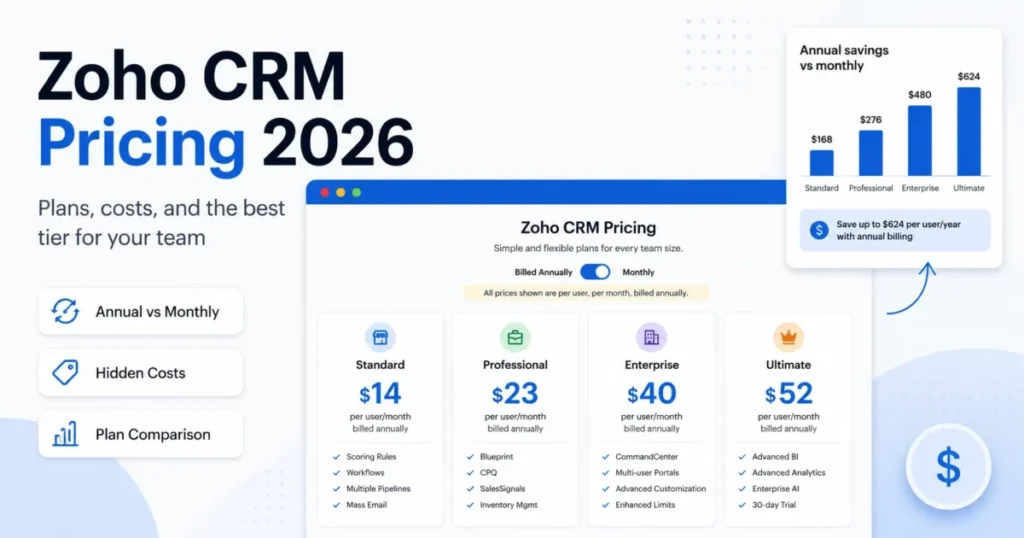
The official pricing checked July 20, 2026 lists Free at $0, Standard at $14 per user monthly billed annually, Professional at $23, Enterprise at $40, and Ultimate at $52, with monthly rates running higher. The Shopify Marketplace extension states it syncs customers, sales, and product details into Zoho CRM.
The place Zoho costs you time is migration, and the official import documentation is specific about the limits. CSV import caps are 5 MB on Free, 10 MB on Standard and Professional, and 25 MB on Enterprise and Ultimate, and more than ten consecutive blank rows can be read as the end of a file.
Migration scope is the real switching risk. Zoho’s generic import path does not cover reports, invoices, quotes, purchase orders, forecasts, sales orders, or templates, so a store moving transactional records needs a separate extension, API, or manual path before cutover.
The recovery net is documented. Imports can match records by record ID, email, or name, and a completed import can be undone within 30 days, which makes a staged migration test safe to run.
| Pros | Cons |
|---|---|
| Low per-user prices with broad process customization | Generic import excludes invoices, sales orders, quotes, and more |
| Shopify extension syncs customers, sales, and product details | Edition-specific 5, 10, and 25 MB file caps force batching |
| Documented 30-day import undo supports safe migration | Blank-row behavior can silently truncate an import file |
| Fits alongside the wider Zoho application suite | Turnkey lifecycle automation is not its native strength |
Source: Zoho CRM pricing, checked July 20, 2026. The configuration depth and module coverage are detailed in the Zoho CRM review.
Avoid Zoho if you expect a one-click migration of every transactional object. Choose it when configuration and price matter more than a turnkey lifecycle engine, and build an object-by-object migration plan with backups before you cut over.
Nutshell: Best Simple Pipeline for Small Sales Teams

Nutshell is the low-friction choice for a small sales team that wants pipelines without administration. Foundation lists at $13 per user monthly billed annually, with no seat minimum and unlimited CRM contacts, checked July 20, 2026.
Read the “unlimited” claim carefully. Unlimited contacts is not unlimited active work, because Foundation is capped at 100 open leads, so a team running more than 100 live opportunities has to close, archive, or move up to Pro.
The integration mechanic is where I correct a common overstatement. Nutshell’s own Shopify and WooCommerce integration pages describe the workflow as AppConnect and Zapier powered, not a first-party native connector, and the WooCommerce route needs a separate Zapier extension.
That matters for budgeting and reliability. The order-to-lead workflow is real and useful, but exact AppConnect execution limits and error handling were not published, so a high-volume store should confirm those limits with Nutshell before rollout.
Add-ons stack onto the seat price. Marketing starts at $49 per month, Engagement at $16 per user, email marketing from $5, and SMS from $15, so the practical bill depends on how many of those you switch on.
Source: Nutshell pricing, checked July 20, 2026.
| Pros | Cons |
|---|---|
| Low per-user entry with no seat minimum | Foundation caps active work at 100 open leads |
| Unlimited CRM contacts and storage | Shopify and WooCommerce run through AppConnect and Zapier, not native |
| Straightforward pipeline adoption for small teams | Exact connector execution limits are not published |
| Optional marketing, engagement, and SMS add-ons | Add-ons raise the real monthly cost quickly |
Avoid Nutshell if you require a first-party, deeply configurable e-commerce connector with published limits, since its store integration runs through a third-party bridge. Choose it for simple order or inquiry follow-up, and get the AppConnect recipe limits in writing before you route production order volume through it.
Pipedrive: Best for High-Ticket and Wholesale Pipelines

Pipedrive is the right tool when each order behaves like a consultative sale that a rep has to move through stages. For wholesale, custom-order, and high-ticket e-commerce teams of 3 to 30 sales users, it is a focused deal engine rather than a lifecycle platform.
Annual pricing lists Lite at $14, Growth at $39, Premium at $59, and Ultimate at $79 per seat per month, which works out to $168, $468, $708, and $948 per seat per year, checked July 20, 2026. Growth is the practical entry point because workflow automation sits above Lite.
The failure mode nobody documents is what happens at the active-deal limit. Pipedrive’s usage documentation says manual additions are blocked at the cap, while imported, API, or automation-created deals can be waitlisted or skipped, and imports can fail partially or completely.
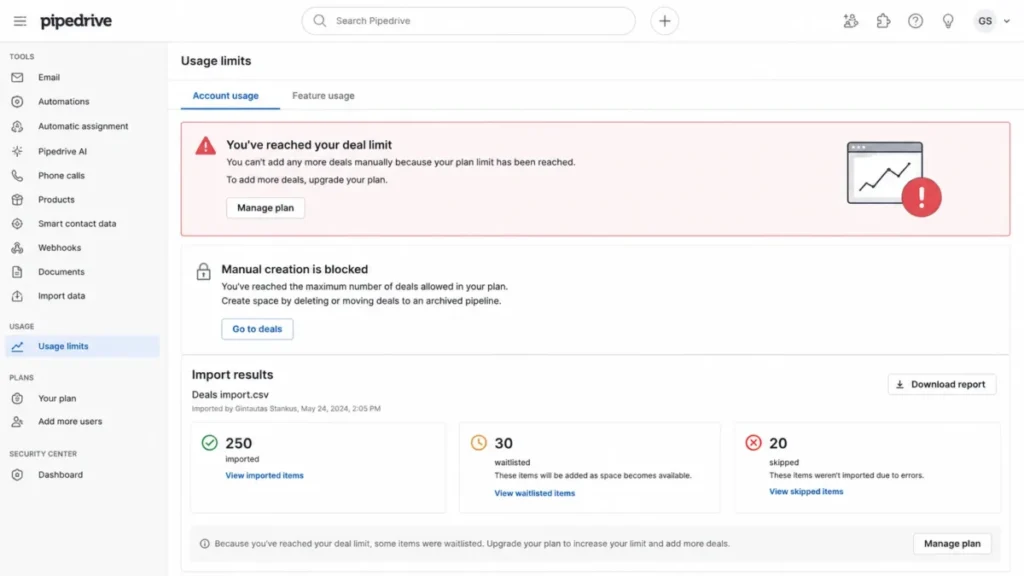
The silent risk is downstream. Waitlisted deals do not trigger their linked automations, so a bulk import that hits the cap can create missing follow-up that no one notices until a deal goes cold.
Setup difficulty is low to medium, and implementation is free on annual plans over $400 per year. LeadBooster starts at $32.50 per month if you need the lead-generation add-on.
| Pros | Cons |
|---|---|
| Focused, visual deal management for rep-led orders | Not a native DTC lifecycle or cart-automation engine |
| Documented import and automation for sales records | At the deal cap, new items are blocked, waitlisted, or skipped |
| Growth-and-up automation fits wholesale follow-up | Waitlisted deals do not trigger their linked automations |
| Free implementation on annual plans over $400/ | Automation is gated above the Lite plan |
Source: Pipedrive pricing, checked July 20, 2026. The pipeline, forecasting, and reporting detail is expanded in the Pipedrive review.
Avoid Pipedrive if you are a pure DTC retention team that needs profile segmentation, product events, and built-in cart journeys. Choose it when orders behave like opportunities, pair it with a lifecycle connector for store events, and check your deal capacity before any bulk import so linked automations still fire.
Products That Solve Problem 3 Best: One Record Across Sales, Marketing, and Service
These four aim to hold a single customer record across teams. The trade you accept is cost and implementation weight in exchange for shared context.
HubSpot: Best for Hybrid Revenue Operations

HubSpot is the strongest fit when a store runs direct sales, wholesale, and service from one record instead of three tools. For a brand of 5 to 25 cross-functional users combining DTC orders with partnerships or consultative sales, a single customer and company record is the reason to pick it.
The official 2026 Sales Hub pricing lists Free Tools at $0 for two users and Starter at $9 per seat per month billed annually, or $15 monthly. Professional jumps to $90 per seat billed annually with a $1,500 one-time onboarding fee, and Enterprise runs $150 per seat with a $3,500 onboarding fee.
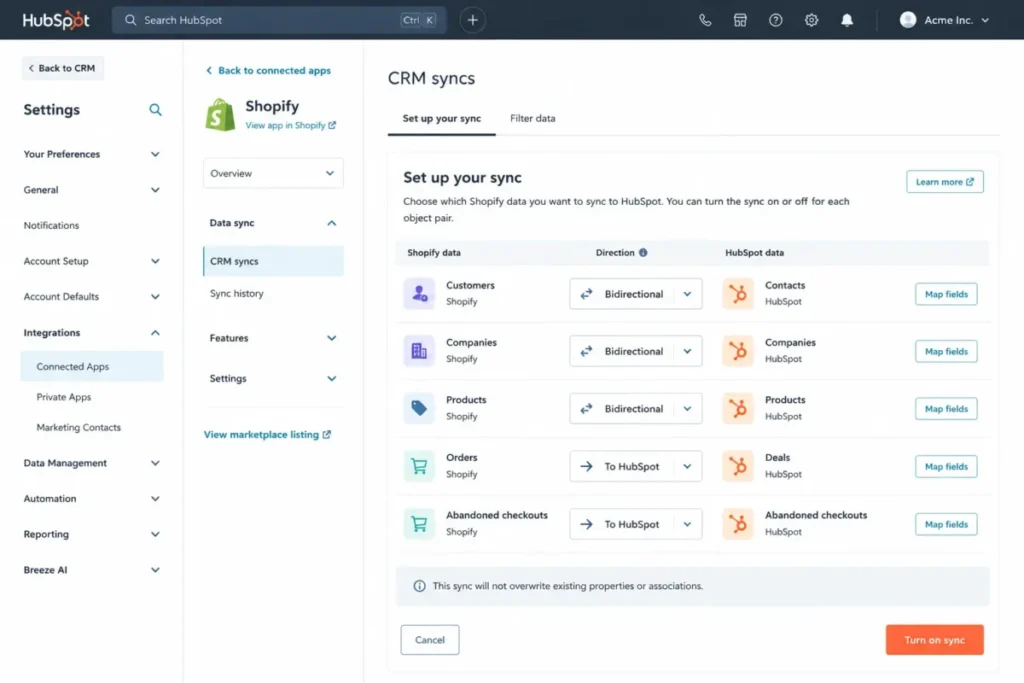
The Shopify connection is documented at the object level, which is what turns an integration badge into an implementation plan. Contacts to customers, companies to companies, and products to products are bidirectional, while orders and carts flow into HubSpot, and post-initial record changes sync within 10 minutes.
Two documented caveats change how you set it up. Custom field mappings require Data Hub Starter or higher, Shopify metafields are not supported in the verified connector, and existing or imported records can duplicate without automatically merging.
One freshness correction matters here, because competitor content still repeats a limitation HubSpot has changed.
Freshness note (checked July 20, 2026): Older web content says HubSpot cannot sync Shopify product variants. A newer 2026 HubSpot document describes syncing variants as individual product records and showing exact variants in carts, so do not reject HubSpot for the stale no-variant claim. Verify against the current variant-sync article at purchase.
Setup difficulty is medium to high. The connector is documented and near real time after the initial sync, but duplicate handling and custom mappings need a deduplication pass before you turn on historical order sync.
| Pros | Cons |
|---|---|
| One shared record for sales, marketing, and service | Professional and Enterprise carry $1,500 and $3,500 onboarding fees |
| Documented object-level Shopify sync with 10-minute updates | Custom field mappings require Data Hub Starter or higher |
| 2026 documentation now supports Shopify product variants | Existing or imported records can duplicate without auto-merge |
| Free Tools and $9 Starter give a low sales-CRM entry | Shopify metafields are not supported in the verified connector |
Source: HubSpot pricing, checked July 20, 2026. For the plan-by-plan breakdown across the hubs, see the HubSpot CRM review.
Avoid HubSpot if you are a pure lifecycle team that wants the lowest-cost profile-based email and SMS engine. Choose it when commerce is only one part of the customer lifecycle, map the workflows that justify Professional before you accept the onboarding fee, and deduplicate existing records before the first historical sync.
Freshsales Suite: Best Low-Cost Sales-and-Marketing Bundle

Freshsales Suite packs CRM, chat, and email sequences with a small marketing-contact allowance at a competitive annual seat price. The official pricing checked July 20, 2026 lists Free for up to three users and annual Growth at $9, Pro at $39, and Enterprise at $59 per user per month, with a 21-day trial.
The seat price is not the whole cost, and the gap is the marketing-contact allowance. Growth caps the included marketing contacts at 500, and additional contacts start at $100 per 5,000 per month, so a high-volume lifecycle audience changes the math well beyond the $9 seat.
Other components stack on top. Freddy AI Agent sessions run $49 per 100, branded documents $19 per user, and conversion-rate optimization $219 per 10,000 monthly unique visitors, so budget the components you will switch on.
The Shopify path has two provenance routes worth separating. Freshworks publishes its own Shopify app for supported Freshsales products, and there is also a third-party Marketplace connector that becomes paid after a 21-day trial and may carry developer charges.
| Pros | Cons |
|---|---|
| Competitive annual seat price bundles sales and marketing | Growth includes only 500 marketing contacts |
| Included chat, sequences, and multiple pipelines | Extra marketing contacts start at $100 per 5,000 per month |
| A Freshworks-published Shopify app exists | Several add-ons raise the real monthly bill |
| 21-day trial before an account is suspended | A separate third-party Shopify connector can add cost |
Source: Freshsales Suite pricing, checked July 20, 2026. The bundled marketing tooling is examined further in the Freshsales evaluation.
Avoid Freshsales if your lifecycle audience will quickly pass the included 500 marketing contacts. Choose it for rep-led e-commerce follow-up with a contained marketing database, and confirm the connector publisher, object list, and price before you install.
Salesforce Sales Cloud: Best for Governed Enterprise Stacks

Salesforce is the pick for a Shopify Plus or multi-brand organization with dedicated admins and enterprise governance. The official pricing checked July 20, 2026 lists Free Suite at $0, Starter Suite at $25, Pro Suite at $100, Enterprise at $175, Unlimited at $350, and Agentforce 1 Sales at $550 per user per month.
The procurement assumption to avoid is that a Sales Cloud license includes a turnkey Shopify connector. The verified Shopify connector is documented inside Data 360 and marked Beta, so it is a separate product dependency, not a Sales Cloud feature.
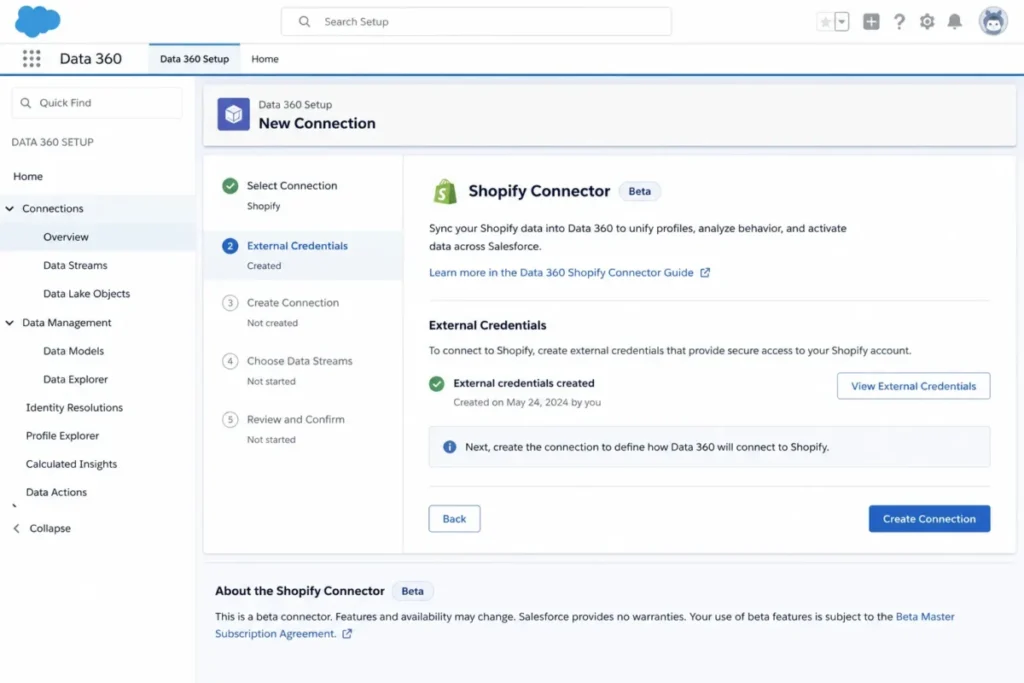
Setup difficulty is high, and the connector documentation is explicit about it. Configuring the Shopify connection requires external credentials and System Administrator or Data Cloud Architect permissions, plus documented Batch and Zero Copy connection methods, so this is an architecture project, not a plug-in.
| Pros | Cons |
|---|---|
| High-governance permissions and extensibility for large programs | The Shopify connector is a Data 360 Beta and not included with Sales Cloud |
| Documented Batch and Zero Copy ingestion methods | Setup needs admin or Data Cloud Architect permissions |
| Fits multi-brand and cross-cloud data programs | Per-user prices run high across Pro, Enterprise, and Unlimited |
| Enterprise reporting and governance depth | Beta status means capabilities and support can change |
The enterprise architecture questions go deeper in the Salesforce CRM review.
Avoid Salesforce if you are a small DTC team that wants a low-complexity Shopify CRM with an included connector. Choose it when governance and extensibility justify the architecture cost, and start procurement with a Data 360 proof of concept and a current SKU map, not a Sales Cloud seat quote.
Keap: Best for Owner-Led Store-and-Service Hybrids

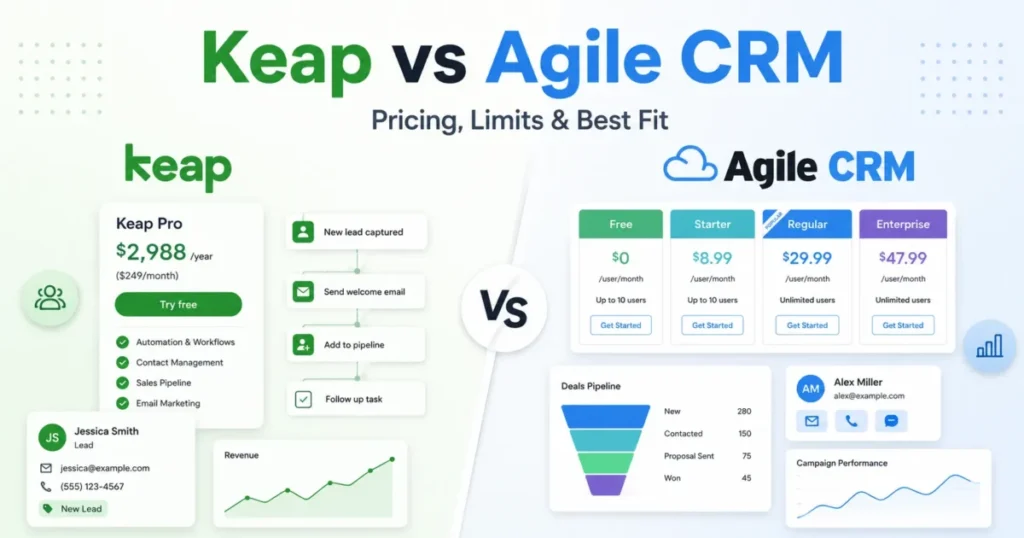
Keap suits an owner-led business that wants CRM, automation, payments, invoicing, and phone-and-text follow-up in one account. The official pricing checked July 20, 2026 starts at $299 per month or $2,988 per year, includes two user licenses, and charges $39 per additional user.
Source: Keap pricing, checked July 20, 2026.
The headline price is not the all-in cost, and that is the whole story with Keap. The official pricing requires a paid implementation package but did not disclose its amount, so a “$299 all-in” assumption is wrong before you even count telecom and connectors.
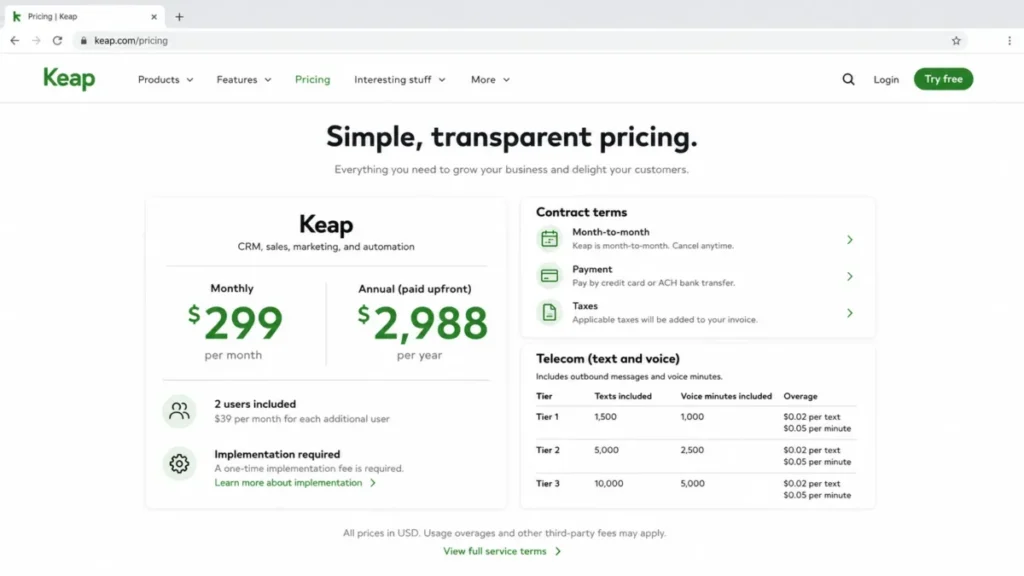
Two more procurement facts belong in the decision. The annual contract carries a $299 early-termination fee with cancellation at least 10 days before the invoice, and telecom runs on a 500-text and 100-voice-minute monthly allowance with $0.015-per-text and $0.01-per-minute overages.
The Shopify path is unresolved, and I will not pretend otherwise. Historical official evidence described a native Shopify integration, while the current marketplace offers a $29-per-month Connect My Sales connector, so confirm the current first-party status in writing before you buy.
| Pros | Cons |
|---|---|
| Combines CRM, payments, invoicing, and follow-up in one account | Required implementation cost is not publicly disclosed |
| Two users included with clear per-user expansion | $299 annual early-termination fee with 10-day cancellation timing |
| Documented text and voice allowances for follow-up | Telecom overages add variable monthly cost |
| Suited to combined store-and-service operations | Current first-party Shopify connector status is unresolved |
The full procurement checklist appears in the Keap CRM review.
Avoid Keap if you need transparent implementation cost, low contract risk, and a verified current Shopify connector. Choose it when operational breadth outweighs setup complexity, and get a written all-in quote covering implementation, connector, telecom, and exit terms before you sign.
Pricing Comparison: Normalize the Billing Unit Before You Compare
The single biggest mistake in this category is comparing starting prices across incompatible billing units. These 10 products bill in four different ways, and a raw price table hides that.
The four models are worth naming. Klaviyo bills by active profiles and channels; ActiveCampaign and Brevo bill by contacts or stored-contact tiers; HubSpot, Zoho, Freshsales, Salesforce, Nutshell, and Pipedrive bill per user seat; and Keap bills by account plus telecom usage.
A profile-priced tool and a seat-priced tool are not the same purchase even when both start at a similar low headline price.
The table below normalizes each product to its billing unit, its included or minimum allowance, its first practical paid tier, and a 10-user annual cost where a per-seat unit makes that math meaningful. All list prices are official US figures checked July 20, 2026.
The 10-user annual cost is calculated from the listed per-seat price at ten seats across a full year and is an editorial estimate, not a separate quote; profile-priced and contact-priced tools show the applicable unit instead.
| Product | Billing unit | Included / minimum | First practical paid tier | 10-user annual cost |
|---|---|---|---|---|
| Klaviyo | Active profiles + channels | 250 profiles free | Dynamic by profiles/ | Not per seat; scales with active profiles |
| HubSpot | Per seat | 2 users free | Sales Starter $9/seat/mo annual | About $1,080 at Starter; $10,800 + $1,500 onboarding at Professional |
| ActiveCampaign | Contacts (Starter 1 user) | Under 1,000 contacts from $15/mo | Plan above Starter for multi-step flows | Contact-priced; Starter is single-user, higher plans add seats |
| Zoho CRM | Per user | Free edition | Standard $14/ | About $1,680 at Standard; $2,760 at Professional |
| Freshsales Suite | Per user (+ marketing contacts) | 3 users free, 500 marketing contacts | Growth $9/user/mo annual | About $1,080 at Growth, before contact add-ons |
| Salesforce | Per user | Free Suite | Pro Suite $100/ | About $12,000 at Pro Suite; $21,000 at Enterprise |
| Nutshell | Per user | No seat minimum, 100 open leads on Foundation | Foundation $13/ | About $1,560 at Foundation; $5,040 at Pro |
| Brevo | Account + email-volume tier | Free 300 emails/ | Starter from $9/mo | Email-priced; extra seats $9/mo each |
| Pipedrive | Per seat | No free plan | Growth $39/ | About $1,680 at Lite; $4,680 at Growth |
| Keap | Account (2 users incl.) | 2 users included | $299/mo ($2,988/ | About $6,732/yr for 10 users, plus required implementation |
Source: official vendor pricing pages and product documentation, checked July 20, 2026; full list in Sources and Official References below. Read the extremes against your model. Salesforce at Pro Suite is roughly ten times a Zoho Standard seat bill for the same ten users, which is defensible only when governance and extensibility are the point.
For a behavior-led store, none of the per-seat figures is the relevant number, because Klaviyo and Brevo cost you by audience, not by staff.
The cheapest headline is rarely the right comparison point. Compare the first tier that unlocks the workflow your store runs: five-plus-action automations on ActiveCampaign, Data Hub Starter mapping on HubSpot, or the marketing-contact add-on on Freshsales.
Feature Gate Comparison for E-commerce Workflows
A feature you need is only real on the plan that includes it. This table maps the workflow each e-commerce team cares about to the plan or add-on that unlocks it.
| Product | Cart / lifecycle automation | Native deal pipeline | E-commerce connector type | Key plan or add-on gate |
|---|---|---|---|---|
| Klaviyo | Documented Shopify cart, win-back, post-purchase flows | No | Native Shopify integration | Added to Cart flow needs app embed + Track behavioral events |
| HubSpot | Cart-based workflows on applicable plans | Yes | Native Shopify Data Sync | Custom field mapping needs Data Hub Starter |
| ActiveCampaign | Deep Data abandoned-cart automation | Add-on only | Native Shopify/ | Sales pipelines require Enhanced CRM add-on |
| Zoho CRM | Via workflows and broader Zoho apps | Yes | Marketplace Shopify extension | Import file caps rise with edition |
| Freshsales Suite | Sequences and journeys on higher tiers | Yes | Freshworks app + third-party connector | Multiple pipelines and sequences favor Pro |
| Salesforce | Via Data 360 and connected products | Yes | Data 360 Shopify connector (Beta) | Connector needs Data 360 + admin permissions |
| Nutshell | Automation on Pro and above | Yes | AppConnect / Zapier | Automation and more pipelines need Pro+ |
| Brevo | Automation and back-in-stock alerts | Light sales tools | WooCommerce plugin, supported platforms | Higher sends and seats need paid tiers |
| Pipedrive | Deal-led automation, not cart journeys | Yes | Import and connectors, no native cart engine | Workflow automation gated above Lite |
| Keap | Owner-led follow-up automation | Yes | Marketplace connector ($29/ | Paid implementation required |
Source: official vendor pricing pages and product documentation, checked July 20, 2026; full list in Sources and Official References below. The pattern is clear once the gates are visible. The behavior-led tools own cart automation but not deal pipelines, the pipeline tools own deals but gate or lack cart journeys, and the hybrids own both at a higher price and a heavier setup.
What Each Connector Actually Moves: Object-Level Integration Matrix
Integration logo walls hide the question that decides your setup: which records move, in which direction, and through what mechanism. This matrix answers it from official documentation, and it uses “unknown” wherever the official evidence did not confirm coverage.
| Product | Customers / contacts | Products / variants | Orders | Carts | Connector and direction | Consent and caveats |
|---|---|---|---|---|---|---|
| Klaviyo | Profiles synced | Via integration | Via integration | Added to Cart events | Native, profile-led | Tracking depends on consent and app embed |
| HubSpot | Contacts to customers, bidirectional | Products bidirectional, variants supported (2026) | Into HubSpot | Into HubSpot | Native Data Sync | Metafields unsupported; duplicates possible |
| ActiveCampaign | Customers synced | Product data synced | Order data synced | Abandoned-cart data | Native Deep Data | Guest and consent handling to validate |
| Zoho CRM | Customers synced | Product details | Sales orders (extension) | Unknown | Marketplace extension | Verify fields and direction in a pilot |
| Freshsales | Customer and order events | Unknown | Order events | Unknown | App or third-party connector | Confirm object list by connector |
| Salesforce | Connector schema objects | Connector-dependent | Connector-dependent | Connector-dependent | Data 360, Batch or Zero Copy | Beta; permissions and SKUs to validate |
| Nutshell | Order becomes a lead | Not core | Order to lead | Not core | AppConnect / Zapier | Exact execution limits unknown |
| Brevo | Contacts and events | Via back-in-stock | Order events | Unknown | WooCommerce plugin | Guest checkout needs verifiable consent |
| Pipedrive | People and organizations | Product catalog, not store sync | Via import or API | No native cart | Spreadsheet or connector | Deal cap affects import |
| Keap | Purchase and lead events | Unknown | Via connector | Unknown | Marketplace or historical native | Current first-party status unresolved |
The takeaway for implementation teams is that “native” is not one thing. HubSpot and Klaviyo move store objects directly, ActiveCampaign moves e-commerce Deep Data, and Nutshell converts orders into leads through a third-party bridge, which is a different reliability and cost profile.
Limits and Overflow: What Happens When You Hit a Cap
A number on a pricing page is only half the story. What the product does when you cross that number is where operational risk lives, and most roundups never say.
| Product | Key cap or limit | What happens at the cap |
|---|---|---|
| Klaviyo | 250 active profiles, 500 emails on Free | Paid configuration required; suppressing profiles removes them from billing |
| HubSpot | Within-10-minute sync after initial sync | Latency, not a quota; imported records can duplicate and do not auto-merge |
| ActiveCampaign | 5 actions per automation, 1 user on Starter | Higher plan or simplified flow required for branching journeys |
| Zoho CRM | 5, 10, 25 MB CSV import by edition | Oversized files must be split; more than 10 blank rows can truncate the file |
| Freshsales | 500 included marketing contacts on Growth | Add-on from $100 per 5,000 contacts per month |
| Salesforce | Shopify connector in Beta | Capabilities and support can change; validate before production |
| Nutshell | 100 open leads on Foundation | Close, archive, or upgrade to keep adding active leads |
| Brevo | 300 emails/ | 85% warning, then automatic upgrade to the next tier and a higher bill |
| Pipedrive | Active-deal cap (numeric not published) | Manual adds blocked; imports and API deals waitlist or skip; linked automations skip waitlisted deals |
| Keap | 500 texts, 100 voice minutes monthly | Priced tier or overage of $0.015 per text and $0.01 per minute |
Source: official vendor pricing pages and product documentation, checked July 20, 2026; full list in Sources and Official References below. Two of these are budget events in disguise. Brevo’s automatic tier upgrade and Freshsales’ contact add-on both raise the bill as data grows, so a store that forecasts only seats will under-budget.
Setup and Migration Difficulty
Setup effort tracks the data model, not the price. Behavior-led tools need tracking and consent work, hybrids need object mapping and deduplication, and enterprise stacks need architecture.
| Product | Setup difficulty | Why |
|---|---|---|
| Klaviyo | Medium | App embed and behavioral tracking required; synced properties can overwrite edits |
| HubSpot | Medium to High | Object mapping and a deduplication pass before historical order sync |
| ActiveCampaign | Medium | Deep Data connection plus guest and consent validation |
| Zoho CRM | Medium to High | Edition-aware file caps and alternate paths for excluded objects |
| Freshsales Suite | Low to Medium | Choose and verify the connector publisher and object list |
| Salesforce | High | Data 360 permissions, Beta connector, and architecture design |
| Nutshell | Low to Medium | AppConnect and Zapier dependency to configure and confirm |
| Brevo | Low to Medium | WooCommerce plugin plus consent-aware contact mapping |
| Pipedrive | Low to Medium | Deal-cap preflight before any bulk import |
| Keap | High | Mandatory implementation and unresolved connector status |
A careful CRM data migration plan matters most here, because two products carry documented traps. HubSpot’s help warns that existing or imported Shopify records can duplicate and do not automatically merge, so deduplicate before you turn on historical sync, then inspect the first batch for exceptions.
Zoho’s constraints are edition-specific. Prepare files within the 5, 10, or 25 MB cap for your edition, strip blank rows so a gap does not truncate the import, and plan a separate extension, API, or manual path for invoices, sales orders, quotes, forecasts, and templates, which the generic import excludes.
Source: Zoho CRM import documentation, checked July 20, 2026.
The 30-day undo makes a staged test the safe way to validate mappings before cutover.
Which E-commerce CRM Should You Avoid?
No product here is bad; each is wrong for a specific buyer. Match your selling motion to this table and cross off the mismatches before you shortlist.
| Avoid | If you are | Because |
|---|---|---|
| Klaviyo | A wholesale or high-ticket seller | It is behavior-led B2C, not a deal pipeline for quotes and stages |
| Pipedrive | A pure DTC retention team | It lacks native profile segmentation, product events, and cart journeys |
| Salesforce | A small DTC store without admins | The Shopify connector is a Data 360 Beta needing architecture and permissions |
| Keap | A budget store needing cost certainty | Implementation price is undisclosed and the Shopify path is unresolved |
| ActiveCampaign | A team expecting a built-in sales CRM | Pipelines and deals live behind the Enhanced CRM add-on |
| Brevo | A governed enterprise deal operation | It is email-led with light sales tools and auto-upgrading contact tiers |
The pattern behind the table is the model mismatch again. Almost every regret in this category comes from buying a tool built for the other selling motion, then paying to bolt on the half it was never designed to do.
The Product Most Stores Do Not Need
For the typical small-to-mid e-commerce store, Salesforce Sales Cloud is the one to skip. Its strengths are real, but they are governance, permissions, and extensibility for large programs, and the verified Shopify connector is a Data 360 Beta that requires admin permissions and an architecture project.
The exception is narrow and honest. A Shopify Plus or multi-brand organization with dedicated admins and a budget for Data 360 is exactly who Salesforce fits, and that buyer should ignore this warning.
Everyone else gets more done, faster and cheaper, with a native connector from Klaviyo, HubSpot, or ActiveCampaign.
How to Choose the Right E-commerce CRM
Work through these questions in order. The first one eliminates more wrong shortlists than any feature comparison.
- What is your selling motion? If it is behavior-led DTC, start with profile-priced lifecycle tools; if it is wholesale or high-ticket, start with deal pipelines; if it is both, look at the hybrids.
- Which billing unit fits your shape? Count active profiles or contacts for a lifecycle store, and count sales seats for a rep-led store, then compare within the matching unit.
- Which plan unlocks your core workflow? Name the one workflow you cannot launch without, then price the tier or add-on that includes it, not the headline plan.
- What does the connector move? Confirm whether customers, products, variants, orders, and carts sync, in which direction, and whether it is native or a third-party bridge.
- What happens at your first cap? Check the overflow behavior for the limit you will hit first, whether that is a contact tier, a deal cap, or an automation-action ceiling.
- What is the real cost at your operating point? Add onboarding, add-ons, contact blocks, telecom, and implementation to the seat or profile price before you compare.
- What is the migration and consent risk? Plan deduplication, object coverage, and consent handling before cutover, especially for guest-checkout records.
Use this decision tree to route the shortlist, then apply the seven questions to the two or three products it leaves you.
If your motion is behavior-led DTC (cart recovery, segmentation, lifecycle flows): Start with Klaviyo for the deepest Shopify behavioral model, ActiveCampaign if automation depth is the priority, or Brevo if budget and email lead the decision.
If your motion is wholesale or high-ticket (rep-led orders, quotes, stages): Start with Pipedrive for a focused deal pipeline, Nutshell for the simplest small-team version, or Zoho CRM for configurable process at a low seat price.
If your motion is hybrid or enterprise (one record across sales, marketing, service): Start with HubSpot for shared context at a mid price, Freshsales for a low-cost sales-and-marketing bundle, Salesforce for governed enterprise scale, or Keap for an owner-led store-and-service business.
Common Mistakes When Choosing E-commerce CRM Software
These are the errors that show up 90 days after purchase, when the tool is live and the workaround budget appears.
Comparing starting prices across billing units. A profile-priced tool and a seat-priced tool are different purchases, and treating them as equal is the root mistake this whole guide is built to prevent.
Buying a sales CRM for a lifecycle job. A DTC store that buys a deal pipeline discovers cart recovery and segmentation live elsewhere, then pays to bolt on a second tool.
Ignoring the plan gate on your core workflow. The Added to Cart flow, the fifth automation action, and custom field mapping all sit behind specific plans or add-ons, so the headline price is rarely the working price.
Treating a purchase as marketing consent. Importing guest-checkout customers as subscribers is a compliance and deliverability risk, and Brevo’s own WooCommerce guidance conditions subscribed status on verifiable consent.
Overlooking overflow behavior. Auto-upgrading contact tiers and waitlisted deals both change outcomes silently, so a store that only reads the cap number misses the operational consequence.
Assuming every connector is native. Nutshell’s Shopify route runs through AppConnect and Zapier, and Salesforce’s runs through a Data 360 Beta, which changes cost, reliability, and setup.
Underbudgeting implementation and onboarding. HubSpot’s onboarding fees and Keap’s required, undisclosed implementation are real line items that never appear in a starting-price table.
Buyer Risk Ledger for E-commerce CRM
Before you sign anything, I would walk this ledger. Each risk ties to a consequence and a mitigation you can action this week.
| Risk | Buyer consequence | Mitigation |
|---|---|---|
| Billing-unit mismatch | You shortlist a tool built for the other selling motion | Normalize to the billing unit before comparing prices |
| Plan-gate surprise | Your core workflow will not launch on the plan you bought | Price the tier or add-on that unlocks the one workflow you need |
| Overflow surprise | The bill rises or follow-up is missed with no alert | Read the overflow behavior and set a usage threshold alert |
| Consent drift | Guest imports create deliverability and legal exposure | Preserve verifiable consent fields and never treat purchase as opt-in |
| Connector assumption | A “native” connector is a Zapier or Beta bridge | Confirm native versus third-party and its documented limits |
| Migration duplication | Dirty records pollute reporting after cutover | Deduplicate and map object coverage before historical sync |
| Implementation opacity | A required fee blows the budget after signing | Get a written all-in quote covering onboarding and implementation |
The 30-day and 90-day test keeps this honest. After 30 days the connector should move the objects you expected without duplicates, and after 90 days the bill should still match your forecast at your real profile, contact, or seat count.
If either is off, the model or the plan was wrong, not the effort.
Final Verdict
For most behavior-led Shopify DTC teams, Klaviyo is the pick, because it keeps store behavior, segmentation, and lifecycle flows in one B2C profile model instead of a fragile two-tool stack. Model your active profiles, turn on suppression early, and the billing unit works with you.
The rest of the field sorts by selling motion. HubSpot is the strongest hybrid when one record must serve sales, marketing, and service, ActiveCampaign wins on automation depth, and Brevo is the budget email entry that rewards contact-tier discipline.
For rep-led orders, Pipedrive is the focused deal engine, Nutshell the simplest small-team pipeline, and Zoho the value option for configurable process. Salesforce earns the enterprise slot only when governance justifies the architecture, Freshsales fits a low-cost sales-and-marketing bundle, and Keap suits an owner-led store-and-service business that accepts its procurement uncertainty.
My one rule for this category: decide your selling motion and billing unit first, then let the plan gates, overflow behavior, and migration risk narrow the last two contenders. That order is what separates a shortlist you can defend from a logo you regret.
Frequently Asked Questions
What is the best CRM for e-commerce?
For behavior-led Shopify direct-to-consumer stores, Klaviyo is the strongest overall pick because it unites behavioral profiles, segmentation, and cart flows in one B2C model. Wholesale and high-ticket sellers are better served by Pipedrive, and brands that need one record across sales, marketing, and service should look at HubSpot.
The right answer depends on your selling motion, not a feature count.
Does Shopify have a built-in CRM?
No, unless you count Shopify’s basic customer records and order history, which store contact and purchase data but do not run segmentation, deal pipelines, or lifecycle automation. Most stores connect a dedicated CRM or lifecycle tool such as Klaviyo, HubSpot, or ActiveCampaign to Shopify to get behavioral segments, abandoned-cart flows, or rep-led deal stages that Shopify alone does not provide.
Is Klaviyo a CRM or just an email platform?
It is both, with a slant. Klaviyo functions as a behavior-led B2C CRM that overlaps with dedicated email marketing platforms: it stores unified customer profiles, tracks Shopify events, and segments by behavior and value, then acts on that data through email and SMS.
What it is not is a sales-deal pipeline, so wholesale opportunity management is a separate job it does not try to own.
Is HubSpot or Klaviyo better for e-commerce?
It comes down to your selling motion. Klaviyo is stronger for pure DTC lifecycle work, where behavioral profiles and cart flows are the CRM.
HubSpot is stronger when a store mixes direct, wholesale, and service and wants one shared record, and it prices per seat rather than per profile. Pick Klaviyo for behavior-led retention and HubSpot for hybrid revenue operations.
What is the best free CRM for Shopify?
Klaviyo’s Free plan is the most useful for a Shopify DTC store, listing up to 250 active profiles and 500 emails per month, which is enough to validate cart and welcome flows. HubSpot’s Free Tools suit a store that needs a shared sales record for two users.
Zoho and Freshsales also offer free editions aimed at small sales teams rather than lifecycle marketing.
Which e-commerce CRM is cheapest for a small online store?
Brevo has the lowest practical entry for an email-led store, with a usable free tier and paid plans from $9 per month. Zoho Standard at $14 per user monthly billed annually and Freshsales Growth at $9 per user are the cheapest per-seat sales CRMs.
The genuinely cheapest option depends on whether you bill by contacts or by seats, so compare within your billing unit and against a broader CRM for a small business shortlist.
Can I use Pipedrive for wholesale e-commerce deals?
Yes, if your orders behave like sales opportunities that a rep moves through stages, quotes, and closes. Pipedrive is a focused deal pipeline, and its automation on Growth and above fits wholesale follow-up well.
Watch the active-deal cap: at the limit, manual adds are blocked and imported deals can be waitlisted, and waitlisted deals do not trigger their linked automations, so preflight capacity before bulk imports.
Which CRM can automate abandoned carts?
Klaviyo, HubSpot, and ActiveCampaign all document abandoned-cart automation, but each has a precondition. Klaviyo’s Added to Cart flow needs the Shopify app embed and behavioral tracking enabled, HubSpot uses cart-based workflows on applicable plans, and ActiveCampaign triggers off Deep Data but caps Starter at five automation actions.
Confirm the plan gate before you assume the entry tier supports a multi-step recovery sequence.
How much does e-commerce CRM software cost?
It ranges from free to enterprise pricing, and the unit matters more than the number. Per-seat CRMs run from about $9 to $175 per user monthly, profile-priced tools scale with active profiles, and Keap starts at $299 per month plus required implementation.
For a real budget, add onboarding, add-ons, contact blocks, and telecom to the headline price at your operating point.
How do I migrate Shopify customer data into a CRM without duplicates?
Deduplicate first. HubSpot’s documentation warns that existing or imported records can duplicate and do not automatically merge, so clean likely duplicate keys before turning on historical sync, then inspect the first batch.
For Zoho, prepare files within the edition file cap, strip blank rows, and use the 30-day undo to test mappings on a staged import before full cutover.