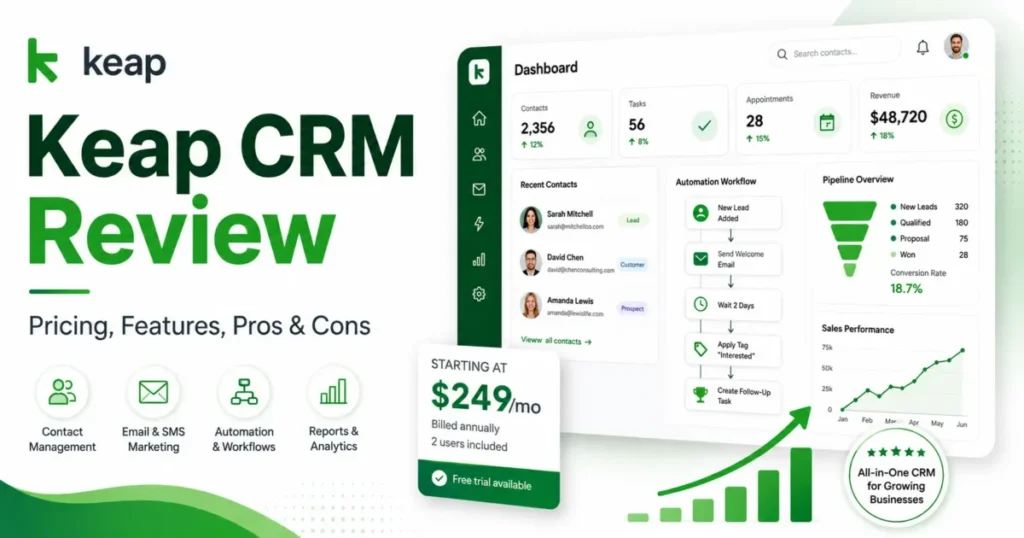
Keap is worth the cost for a small US service business that will actively run automation across lead capture, follow-up, booking, and payments, and it is a weak buy for anyone who just wants a cheap contact database. That is the short answer this Keap CRM review defends with numbers.
The headline price hides the real one. Keap starts at $249 per month on annual billing with two users included, but a required implementation service and a set of variable costs push the first-year base to $3,488 before you send a single campaign.
This Keap CRM review reads the product the way a buyer reads a contract, so it leads with cost and exit risk rather than another feature tour. If you are still deciding your category, the shortlist context lives in the guide to CRM software for small business, and the automation angle is covered in marketing automation.
Best for: two-to-ten-person agencies, coaches, consultants, and home-service teams with higher-value leads. Avoid if: you need a free CRM, run a high-volume low-margin list, or depend on granular reporting.
Pricing was checked on July 24, 2026, using Keap’s official pages and Thryv Support Center documentation.
In This Article (18 sections)
Quick Verdict
| Category | Verdict |
|---|---|
| Best for | 2-10 person US service teams (agencies, coaches, consultants, home services) with higher-value leads |
| Not ideal for | Free-CRM seekers, high-volume low-margin lists, analytics-heavy teams, buyers who need a simple one-file export |
| Starting price | $299 per month (two users included), or $249 per month effective on annual billing |
| Best practical plan | The single consolidated platform on annual billing, plus the required $500 implementation |
| Free plan or trial | No free plan; a 14-day trial capped at 25 emails with no payments or texts |
| Setup difficulty | Medium to high, because implementation is mandatory |
| Main strength | A genuinely integrated CRM, automation, booking, invoicing, and payments stack |
| Main limitation | Variable costs (contacts, seats, messaging) plus a fragmented data export |
| Best alternative | HubSpot for a free entry point, ActiveCampaign for automation value, Pipedrive for a simple pipeline |
Source: Keap official pricing page, keap.com/pricing; checked 2026-07-24. Prices are USD for the US market and may change.
The verdict below the surface is a budgeting problem, not a features problem. Keap does not upsell you between feature plans; it charges you as your contacts, seats, and messages grow.
What Is Keap?
Keap is an integrated CRM and sales and marketing automation platform aimed at small businesses, combining contact records, a visual automation builder, a sales pipeline, appointments, invoicing, and payments in one system. It is now a brand of Thryv, Inc., which closed its acquisition of Keap on October 31, 2024, per Thryv’s investor announcement.
Longtime buyers know Keap by its former name, Infusionsoft. The product kept the automation depth that made Infusionsoft popular, but the packaging and interface have moved on, which matters most when you migrate old automations.
Keap sells lifecycle execution, not just storage. The pitch is that one team can capture a lead, nurture it, book the appointment, send the invoice, and take the payment without stitching four tools together.
How Keap Was Reviewed
This review draws on Keap’s official pricing and product pages, Thryv Support Center documentation for import, export, automation, pipeline, and HIPAA controls, the Keap developer portal, and labeled third-party sentiment from TrustRadius, Capterra, Gartner Peer Insights, and Software Advice. Pricing and plan limits were checked on July 24, 2026.
Keap was assessed against the criteria that decide a CRM purchase: total first-year cost, capacity limits, migration and export fidelity, automation and pipeline behavior, support and compliance scope, and buyer fit by team type.
Greater weight was given to factors that change the budget or the exit path, including required implementation, contact and messaging costs, contract terms, and data portability. Vendor positioning and promotional framing did not influence the assessment.
Claims that could not be verified from reliable sources, such as undisclosed contact-tier prices and payment-processing rates, were excluded rather than estimated. Temporary promotions are labeled separately from standard pricing and re-verified on the publication date.
The Keap Pricing Math Nobody Shows You
Keap’s official pricing page lists a consolidated platform rather than a ladder of feature plans. Monthly billing is $299 per month, and annual billing is $2,988 per year, which works out to $249 per month effective.
Two user licenses are included at that price. Each additional user is $39 per month.
The number most reviews skip is implementation. Keap requires an implementation service for new subscriptions, and the implementation page shows a $500 one-time promotion against a struck-through $1,500 amount.
The $1,500 figure is the standard price, and the $500 is a limited-time promotion, re-verified on the publish date: 2026-07-24. That single line changes the decision, moving Keap from a monthly sticker price into a multi-thousand-dollar first-year commitment.
| Billing option | Headline price | Users included | First-year base (with the $500 setup) |
|---|---|---|---|
| Annual billing | $2,988 per year ($249 per month effective) | 2 | $3,488 |
| Monthly billing | $299 per month | 2 | $4,088 |
| Free trial | $0 for 14 days | Not applicable | Not applicable (25-email cap, no payments or texts) |
Source: Keap official pricing and implementation pages, keap.com/pricing and keap.com/resources/implementation-services; checked 2026-07-24.
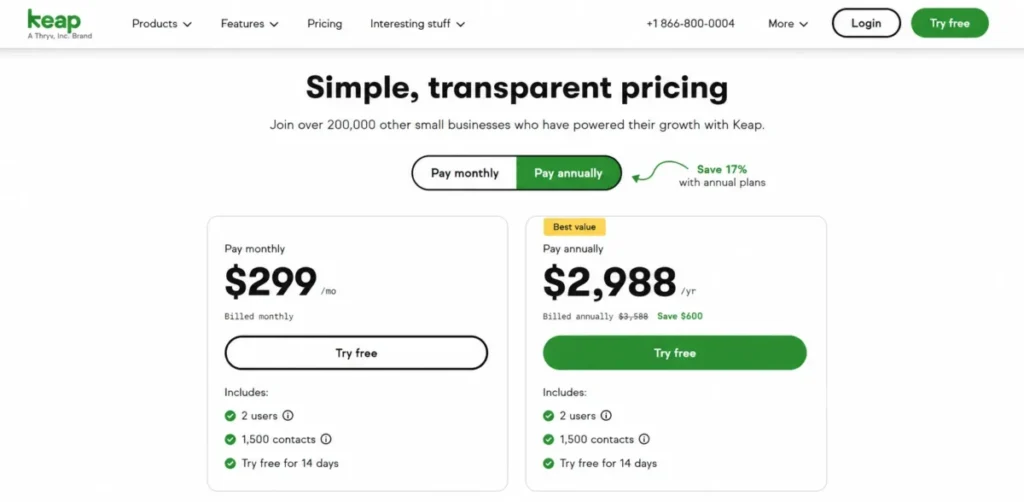
Annual billing saves $600 over twelve monthly payments before any variable fees, because $299 twelve times is $3,588 against $2,988. That saving is worth taking only if the contract terms in the next subsection are acceptable.
Cost at scale: what a real team pays
The two-user headline is not what a growing team pays. Adding seats at $39 per month each is where the budget moves first, before contacts or messages are even considered.
| Team size | Extra-user cost per month | First-year cost (annual billing plus $500 setup) |
|---|---|---|
| 2 users (included) | $0 | $3,488 |
| 5 users | $117 (3 seats) | $4,892 |
| 10 users | $312 (8 seats) | $7,232 |
Source: calculated from Keap official pricing page, keap.com/pricing; checked 2026-07-24. Excludes contact, messaging, and payment-processing costs.
The five-user figure of $4,892 follows directly from the annual base of $2,988, three added seats at $39 for twelve months, and the $500 setup. The ten-user figure extends the same arithmetic with eight added seats.
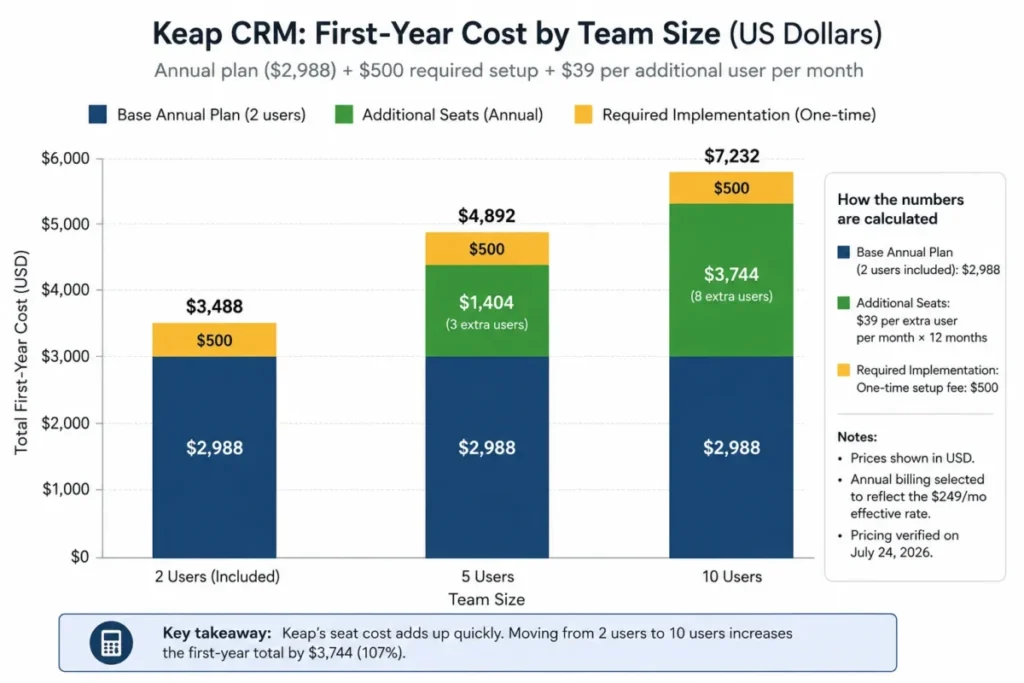
The chart totals the same figures used above: $3,488 for two users, $4,892 for five users, and $7,232 for ten users, all on annual billing with the $500 setup and before variable costs.
Contract terms buyers overlook
The annual contract carries an early-termination fee of $299. Cancellation must be requested by phone at least ten days before the next invoice, according to the pricing FAQ.
Pair that with the $600 annual saving before you sign. The discount is real, but it comes with a phone-only exit and a fee, so a team that is unsure about a twelve-month commitment loses part of the advantage.
Payment processing is billed separately. The pricing page states that standard processor fees apply, and buyers should ask Keap for the exact rate for their transaction mix, because the precise formula was not disclosed in the researched pricing text.
Feature Gates and the Contact Ceiling
Keap’s pricing page states that the platform is no longer divided into feature-based plans; the whole system starts at one price. That is a genuine difference from tools that lock automation or reporting behind a higher tier.
It also means the upgrade trigger is capacity, not features. Cost rises as contacts, seats, and messages grow, not when a new capability is added.
| Capability | Included in the base platform | Where extra cost or a gate appears |
|---|---|---|
| Users | 2 | $39 per additional user per month |
| Contacts | About 1,500 to start (see note) | Allowance can increase automatically next cycle; tier prices by quote |
| Text and voice | Tier 1 (500 texts, 100 minutes) | Paid tiers 2 to 6, overages, and add-ons |
| Payments | Included as a feature | Standard processor fees per transaction |
| HIPAA controls and BAA | Available on all editions | Narrows after-hours support access |
| Implementation | Required for new subscriptions | $500 one-time (promotion) |
Source: Keap official pricing page (keap.com/pricing) and Thryv Support Center limits documentation (learn.thryv.com); checked 2026-07-24.
A note on plan names. Some older reviews still build Keap comparisons around Pro, Max, Basic, or Max Classic labels, and help documentation still uses Pro and Max in places for access context.
A 2026 price table should not be reconstructed from those legacy names. The public pricing page is consolidated, and only an official order form should assign prices to any legacy label.
The contact ceiling is the real pricing trap
Contact-based pricing sounds simple until you hit the threshold. Keap’s limits documentation warns when a manually added contact is within five of your allowance, and when an import or an account-level action reaches within five percent.
If that is not resolved, the subscription contact allowance increases on the next billing date. This is the mechanism behind contact-cost creep, and it works without any feature-plan change.
The catch for forecasting is that the exact additional-contact tier prices did not render in the accessible official pricing text. Independent references consistently describe the starting allowance as 1,500 contacts, but any scale forecast should be treated as unknown until you request a written contact-growth quote.
Communications are a separate cost stack
Text and voice are not an unlimited included feature. They are a tiered system with quotas and overages that campaign-heavy teams will feel.
| Text and voice tier | Monthly price | Messages | Voice minutes |
|---|---|---|---|
| Tier 1 (included) | $0 | 500 | 100 |
| Tier 2 | $24 | 1,000 | 300 |
| Tier 3 | $39 | 2,500 | 500 |
| Tier 4 | $79 | 5,000 | 800 |
| Tier 5 | $139 | 10,000 | 1,000 |
| Tier 6 | $279 | 25,000 | 2,000 |
Source: Keap text and voice tier pricing, keap.com/pricing; checked 2026-07-24. Overages and add-ons billed separately.
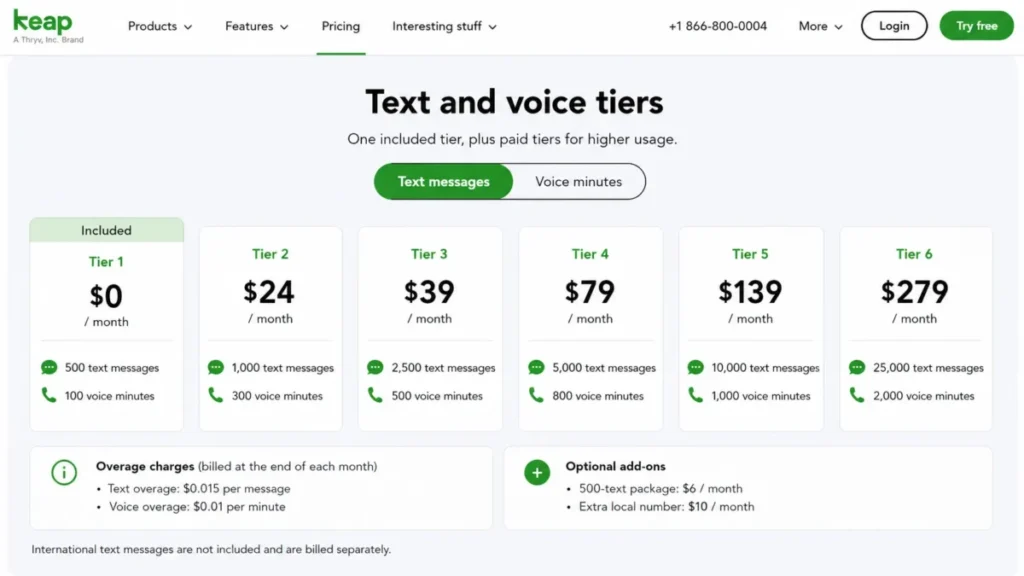
Overages run $0.015 per text message and $0.01 per voice minute above the selected tier. Optional add-ons include a 500-text package at $6 per month and an extra local number at $10 per month.
Setup, Implementation, and Data Migration
Setup difficulty is medium to high, mostly because implementation is not optional. That is a cost, but it is also more concrete than the vague onboarding line most vendors sell.
The implementation page lists business mapping, two launched automations, basic data import, up to 15 migration hours, up to two third-party integrations, and a year-long coaching cadence. The page also says the first automations are usually launched within the first month, which reads as a vendor expectation rather than a guarantee.
That scope is best treated as a deliverable checklist, and the $500 promotion should be confirmed in writing, since its duration and eligibility were not stated. For teams without an internal revenue-operations specialist, a structured launch is worth something.
Broader setup guidance for switchers lives in the CRM implementation guide.
Basic versus paid migration
The included migration is narrower than “migration included” suggests. The basic import service covers contacts, notes, and tags from up to five CSV or Excel files, with each spreadsheet sheet counted as a file. It typically completes in one to two business days after you prepare the data.
If you are leaving a full CRM with tasks, opportunities, or order history, that basic scope will not carry it. The paid import packages accept up to 50 files and cap each attachment at 10 MB, with a Data Team scoping complex mappings.
| Migration factor | Basic import (included) | Paid import |
|---|---|---|
| Files | Up to 5 (each sheet counts as one) | Up to 50 (each sheet counts as one) |
| Objects | Contacts, notes, tags | Broader; tasks, opportunities, orders after scoping |
| Attachments | Not covered | Up to 10 MB each |
| Typical timing | 1 to 2 business days after prep | Scoped by the Data Team |
| Price | Included | Not publicly disclosed (request a quote) |
Source: Keap basic and paid import documentation, learn.thryv.com; checked 2026-07-24.
Paid import prices are not public, so a written, object-level statement of work is worth requesting before contract signature. General migration planning is covered in the CRM migration walkthrough.
One data-hygiene trap during import
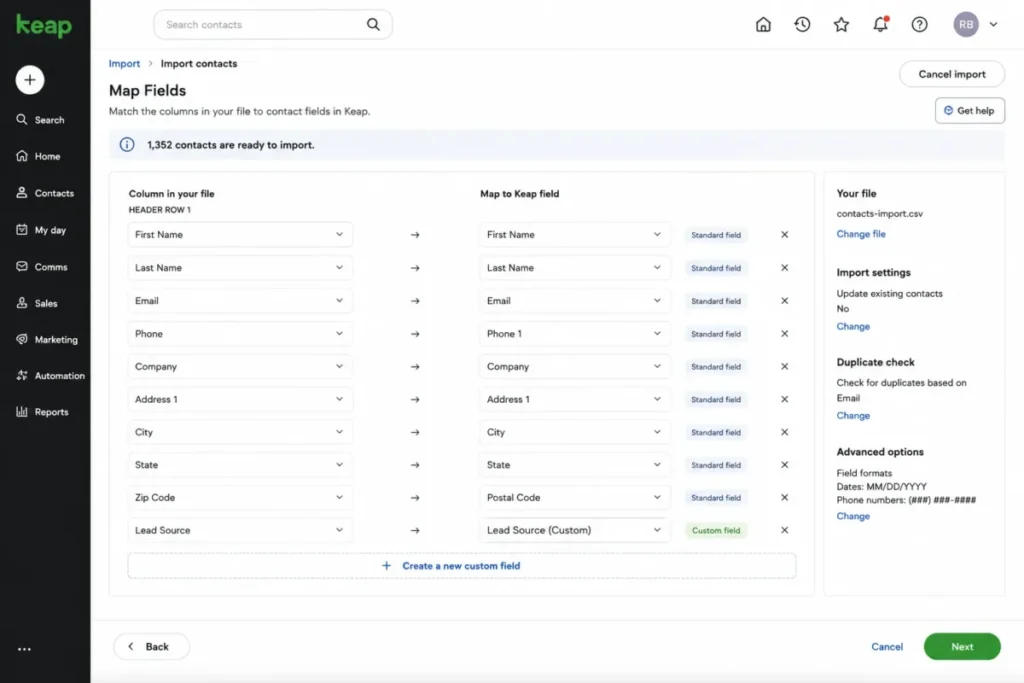
Contact import itself is capable. It accepts CSV, XLSX, and XLS files, supports field mapping and custom-field creation, and checks duplicates primarily by email, according to the import documentation.
Reimporting an existing email can update mapped values, but it does not overwrite email status such as Non-Marketable or Opt-out, which protects your deliverability. The trap comes later, during cleanup.
Keap’s duplicate documentation states that merging duplicate contacts does not merge Deals or Appointments. A routine dedup can therefore detach active sales context, forcing you to re-add the surviving contact to deals and reschedule the affected appointments manually.
Key Features and Where They Stop
Keap’s platform lists CRM records, email and text marketing, automation, pipeline management, appointments, invoices and payments, forms, reporting, an API with webhooks, and a mobile app. The value is in how tightly these connect, so the features that matter are grouped below with their real limits.
Contact records and segmentation
The contact record is the hub, pulling identity, tags, activity, notes, and tasks into one profile. In practice, this is where segmentation for automation lives, so tag hygiene early pays off later.
The main limitation is not the record itself but the export path, covered further down. Tags drive lead scoring and segmentation, yet they leave the system through a separate report.
Appointments, invoices, and payments
Booking, invoicing, and payments are the features that make the single-platform case for service businesses. A team can send a reminder, take a booking, invoice, and collect payment without a second tool.
The limitation is regional and financial. Payments carry separate processor fees, and dedicated phone and one-to-one text are limited to the United States and Canada.
Email and text marketing
Email and text broadcasts run off the same contact and automation layer, which keeps follow-up consistent. This is strongest for higher-value nurture sequences rather than mass low-value blasts.
The limitation is the communications cost stack from the pricing section, plus geography. Text broadcasts and automated text marketing are limited to the United States on Keap’s terms.
Automation, Pipeline, and Reporting
Automation is Keap’s headline strength and its biggest migration risk at once. The Automation Builder uses a visual canvas of When triggers, Then actions, and decision elements, with a Ready toggle that controls whether a sequence is publication-ready.
The friction is legacy compatibility. The builder documentation names several elements that were removed or restricted, which turns a migration from an old Infusionsoft account into rebuild work rather than direct editing.
| Legacy element | Status in the new Automation Builder |
|---|---|
| Fax, Traffic Sources, Voice Broadcast | Removed |
| HTTP POST | Replaced by HTTP Request |
| Legacy drag-and-drop emails | Must be converted before editing |
| Action Sets | Existing ones may run; new ones cannot be created |
Source: Keap Automation Builder documentation, learn.thryv.com; checked 2026-07-24.
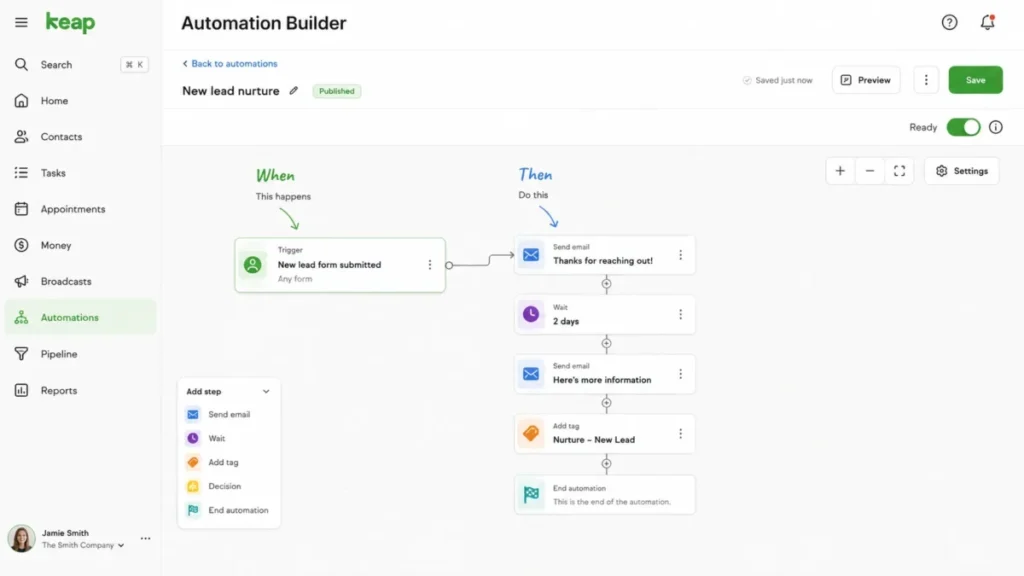
Pipeline automation has a subtle edge case worth designing around. The pipeline documentation shows that a stage can trigger email, tagging, or a notification when a deal enters or exits, and creating a deal directly in a starting stage also fires the enters-stage trigger.
That means a newly created deal can send a customer-facing message if the starting-stage automation assumes only stage movement. Any starting-stage action should be validated with synthetic records during implementation, keeping internal notifications separate from customer messages until the behavior is confirmed.
Reporting is where user sentiment turns cautious. A verified TrustRadius reviewer, a C-level executive at an 11-50 employee firm, wrote that “when you are doing some retroactive reports, the data can get murky,” which signals that analytics-heavy teams should test reporting fit before committing.
Integrations and API
Keap advertises more than 5,000 integrations. That figure is best treated as a vendor claim, because it does not separate native connections from Marketplace apps or Zapier-mediated ones, and a Zapier route adds a separate support owner and another failure point.
For builders, the developer portal documents REST APIs, OAuth, developer accounts, a sandbox request flow, and Marketplace submission. A numeric API rate limit was not verifiable from the accessible portal, so request limits should be confirmed with developer support before architecting a high-volume sync.
The practical takeaway is to classify each integration your workflow depends on as native, official connector, Marketplace, Zapier-mediated, or API before you buy. A logo wall of 5,000 tells you little about the two connections your workflow depends on.
Security, Support, and HIPAA Compliance
Support is advertised as US-based phone, 24/7 chat, email, a dedicated customer success manager, plus an Academy and Community. On paper that is strong for a small-business tool.
On compliance, Keap’s data protection FAQ states support for a DPA and standard contractual clauses, GDPR and CCPA practices, and an annual PCI DSS audit. The reviewed materials do not establish SOC 2 or ISO 27001 certification, so neither should be assumed without asking.
HIPAA is where a generic compliance badge misleads buyers. Keap’s HIPAA documentation offers HIPAA Security Controls across editions and a Business Associate Agreement, but enabling the control does not make a customer compliant on its own.
The tradeoff is support access. After the controls are enabled, only in-house support during regular business hours can access the account, because overflow and after-hours vendors are not HIPAA compliant.
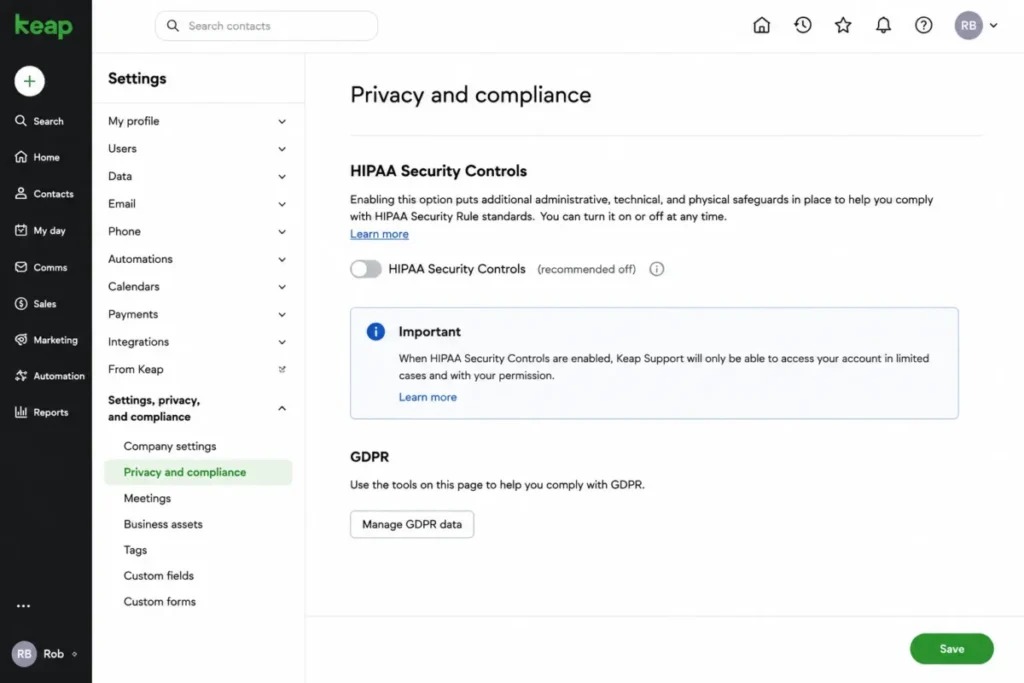
Two more scope limits matter for healthcare buyers. CustomerHub is not HIPAA compatible, and third-party apps are not covered by Keap’s BAA, so every connected service needs its own compliance review.
Data Portability and Exit Risk
This is the section most reviews skip, and it is where buyers should push hardest before signing. A Keap contact export is not a complete portability package, and a Gartner Peer Insights reviewer went as far as calling exporting data for migration “an extreme challenge.”
Start with the mechanics. The export documentation states that exports of 1,000 or fewer contacts generate immediately, while exports of 1,001 or more are delivered by an emailed link that stays valid for 24 hours.
The bigger issue is coverage. The main contact export does not include tags or notes; notes come out through a Task Note Report, and tags come out through a Tag Tracker report that you match back by contact ID.
| Data to export | How it comes out of Keap |
|---|---|
| Core contact fields | Main export (immediate up to 1,000; emailed 24-hour link at 1,001+) |
| Notes | Separate Task Note Report |
| Tags | Separate Tag Tracker report, reconciled by contact ID |
| Deals and Appointments | Not preserved by duplicate merge; plan for manual handling |
Source: Keap export and duplicate documentation, learn.thryv.com; checked 2026-07-24.
The buyer risk here is concrete. A rushed cancellation can lose your segmentation and history, so the safe path is to run and validate a multi-file export, keep contact IDs, and confirm the emailed link before it expires, all before cancelling anything.
Keap Limitations
Keap is strong for integrated service workflows, but several limits matter enough to change a purchase decision. These are standalone constraints, not restated cons.
The first is total cost, not the sticker price. The required implementation and the variable stack of seats, contacts, and messaging mean the budget can grow while the feature entitlement stays flat.
The second is contact-growth exposure. The allowance can increase automatically on the next billing cycle, and the exact tier prices are not public, which makes a twelve-month forecast hard without a quote.
The third is data portability. Tags and notes leave through separate reports, and duplicate merge drops Deals and Appointments, so both migration in and migration out take planning.
The fourth is legacy automation debt. Long-time Infusionsoft users face removed elements and email conversion in the new builder, which can turn a migration into a rebuild.
The fifth is reporting depth. User sentiment repeatedly flags retroactive reporting as murky, so analytics-heavy teams may still need an external reporting layer.
Keap Pros and Cons
| Pros | Cons |
|---|---|
| Genuinely integrated CRM, automation, booking, invoicing, and payments in one system | First-year base cost starts at $3,488 with the required $500 setup, before variable fees |
| Required implementation is a concrete package (mapping, two automations, 15 migration hours, two integrations, coaching) | Contact growth can raise your allowance automatically next cycle, and tier prices are not public |
| Visual Automation Builder with When and Then triggers plus pipeline-stage automation | Text and voice usage is a separate tiered cost with per-message and per-minute overages |
| Contact import preserves Opt-out and Non-Marketable email status on reimport | The main contact export excludes tags and notes, which fragments any migration |
| US-based phone support plus 24/7 chat and a dedicated customer success manager | Duplicate merge does not merge Deals or Appointments |
| Consolidated pricing with no feature-plan upsell | No full free plan, and the trial cannot test payments or texts |
Source: Keap official pricing and product documentation; checked 2026-07-24.
Who Should Use Keap
Small US service teams with higher-value leads are the core fit. An agency, coach, consultant, or home-service firm that can consolidate CRM, follow-up, booking, and payments will get the most from the bundle, especially when one recovered sale is worth real money.
Owner-led businesses without a revenue-operations specialist are a good fit for the implementation model. The structured launch, two automations, and coaching cadence reduce setup risk for a team that would otherwise stall.
Follow-up-heavy operations that live on nurture sequences benefit from the automation depth. If revenue depends on multi-step follow-up rather than one-off blasts, the Automation Builder earns its cost.
Teams already committed to appointments and invoicing in one place gain the clearest simplicity. Replacing a booking tool, an invoicing tool, and a separate CRM is where Keap’s price starts to look reasonable.
Who Should Avoid Keap
Pre-revenue startups and price-sensitive founders should look elsewhere. There is no full free plan, implementation is required, and the first-year base sits above $3,000, so a free CRM software option fits better until automation is economically justified.
High-volume, low-margin lists carry real exposure. Contact thresholds can raise the allowance automatically, messaging has tiered and overage costs, and additional-contact prices are not public, which makes scale cost unpredictable.
Analytics-heavy sales organizations may be frustrated. Retroactive reporting is a recurring complaint, so teams that need granular, trustworthy dashboards should test reporting before buying or plan for an external layer.
Buyers who need simple data portability should think twice. A one-file export does not exist here, and the multi-report exit process raises switching effort more than most tools.
International teams outside the supported regions will hit feature gaps. Text broadcasts are US-only and one-to-one text is limited to the US and Canada, so the communications value drops sharply elsewhere.
Keap Alternatives
Keap is not the only integrated option, and the better choice depends on your cost floor and reporting needs. Each of these is a stronger fit for a specific buyer.
| Alternative | Choose it if | Strongest angle |
|---|---|---|
| HubSpot | You want a free CRM entry point and room to scale marketing later | Free entry and a broad platform |
| ActiveCampaign | Automation depth matters but Keap’s cost floor is too high | Automation value |
| Pipedrive | You need a simple sales pipeline without lifecycle automation | Simple, cheap pipeline |
| Zoho CRM | You want lower-cost scaling and more granular reporting | Budget scaling and reporting |
Full write-ups sit in the HubSpot CRM review, the ActiveCampaign review, the Pipedrive CRM review, and the Zoho CRM review. If the priority is automation rather than a full lifecycle, the roundup of CRM for marketing automation compares the options side by side. Buyers weighing Keap against a leaner platform can also read Keap vs Agile CRM.
Final Verdict: Is Keap Worth the Cost?
Keap is worth it for a two-to-ten-person service business that will actively use automation across lead capture, follow-up, pipeline, booking, and payment, and that can absorb a first-year base near $3,488 plus variable costs. For that buyer, the integrated stack and structured implementation replace several tools and a lot of manual follow-up.
It is not worth it as a passive contact database. If you would buy Keap to store leads and send the occasional email, the cost floor, the contract terms, and the export friction make it the wrong tool.
Choose Keap if lead value and operational consolidation outweigh the cost floor, and if the team will commit to implementation. Choose an alternative if you need free entry, transparent scale pricing, or deep analytics.
Before signing, get five things in writing: the implementation scope and promotion, a contact-growth quote, expected message volume, an object-level migration statement of work, and the cancellation terms. The entry price is the wrong budgeting anchor, and the exit plan deserves as much attention as feature depth.
Frequently Asked Questions
These answers cover the pricing, fit, and migration questions buyers ask most before choosing Keap.
Is Keap a good CRM?
Keap is a good CRM for small US service businesses that want automation, booking, invoicing, and payments in one system and can justify a first-year base above $3,000. It is a poor fit for teams that only need a simple, low-cost contact database, because the required implementation and variable costs make it expensive for basic use.
How much does Keap cost?
Keap costs $299 per month on monthly billing or $2,988 per year on annual billing, which is $249 per month effective, with two users included. A required implementation service shows a $500 one-time promotion, so the first-year base is $3,488 on annual billing before contacts, extra users, and messaging are added.
Does Keap have a free plan?
No, Keap does not have a full free plan. It offers a 14-day free trial that requires DKIM setup, caps sending at 25 emails, and does not allow payments or sending and receiving texts, so the trial cannot validate the payment or messaging workflows that many buyers care about most.
Why is Keap so expensive?
Keap is expensive because the price reflects an integrated platform plus required implementation, not a bare CRM. The bigger driver is variable cost: extra users at $39 per month, contact-based allowances that can increase automatically, and tiered text and voice with overages, which means total cost grows as usage grows.
How many contacts are included with Keap?
Independent references consistently describe the starting Keap subscription as including about 1,500 contacts, though that dynamic figure did not render in the accessible official pricing text. When you approach the allowance, Keap warns you, and if it is not resolved, the contact allowance increases on the next billing date.
Is Keap the same as Infusionsoft?
Yes, Keap is the product formerly known as Infusionsoft, and it is now a Thryv brand after Thryv closed its acquisition on October 31, 2024. The automation heritage remains, but the new builder removes or restricts some legacy elements, so old Infusionsoft automations may need conversion rather than direct editing.
Is Keap HIPAA compliant?
Keap offers HIPAA Security Controls across editions and a Business Associate Agreement, but enabling the controls does not make your business compliant by itself. After you enable them, only in-house support during regular business hours can access the account, CustomerHub is not HIPAA compatible, and third-party apps are not covered by Keap’s BAA.
Does Keap charge per user?
Yes, Keap includes two users in the base subscription and charges $39 per month for each additional user. A five-user team therefore adds three seats, and on annual billing with the $500 setup that pushes the first-year cost to about $4,892 before contacts and messaging.
How hard is it to export data from Keap?
Exporting is more involved than a single download. Core contact fields export immediately up to 1,000 records, or by a 24-hour emailed link at 1,001 or more. Tags and notes are not in that main export and require separate Tag Tracker and Task Note reports, so a clean exit takes multiple files and reconciliation by contact ID.
What are the best Keap alternatives?
The strongest alternatives are HubSpot for a free entry point, ActiveCampaign for automation value at a lower floor, Pipedrive for a simple sales pipeline, and Zoho CRM for cheaper scaling with more granular reporting. The right pick depends on whether you need free entry, transparent scale pricing, or deeper analytics rather than Keap’s full lifecycle bundle.