The hardest part of picking the best email marketing platform is not the feature list. No two vendors bill you for the same thing.
Brevo prices around how many emails you send. Mailchimp, Omnisend and Constant Contact price around how many people sit in your database.
Klaviyo prices around active profiles. HubSpot stacks marketing contacts, seats and credits into one bill, and GetResponse now shows a flat per-tier price with no list-size selector at all.
Put those five starting prices in a row and you learn almost nothing. That is why buyers overspend, or outgrow a platform two quarters early.
ActiveCampaign is the strongest general-purpose pick when the bottleneck is automation depth. Brevo wins on a large list with a calm cadence, and Selzy wins when the list is small and the cadence is not.
Prices, plan gates and send limits below were checked on the official US pricing pages on August 29, 2026.
In This Article (21 sections)
Quick Verdict: Best Email Marketing Software by Use Case
| Use case | Best pick | Why it fits |
|---|---|---|
| Lifecycle automation depth | ActiveCampaign | Branching logic that survives a contact being a lead, a trial user and a customer in one quarter |
| A big list you email rarely | Brevo | Billed on emails sent, so 60,000 stored records cost nothing extra between sends |
| A small list you email often | Selzy | Billed on list size with no send cap at the tier, and 24/7 support on every plan including free |
| B2B teams already on HubSpot Smart CRM | HubSpot Marketing Hub | One shared record removes the marketing-to-sales handoff gap |
| Data-rich ecommerce with a lifecycle owner | Klaviyo | Active-profile model built around product, order and behavioral events |
| Ecommerce without a lifecycle specialist | Omnisend | Email, SMS and web push with prebuilt store flows a generalist can run |
| Beginners and simple newsletters | MailerLite | Shortest path from empty account to sent campaign, with 3 seats at the entry tier |
| Webinars, funnels and course businesses | GetResponse | Webinars, websites and course delivery inside the email subscription |
| Creators monetizing an audience | Kit | Free tier to 10,000 subscribers, unlimited broadcasts and free migrations |
| Familiar interface and template depth | Mailchimp | The interface most marketers already know, with the largest template ecosystem |
| Local organizations that need live support | Constant Contact | Phone and chat access plus event-led campaign tooling |
| Testing a real workflow on a free plan | MailerLite | 3 automations, 2 seats and 2,500 monthly emails on the free tier |
Source: the official pricing pages for all eleven platforms, listed in full under Best Email Marketing Platforms at a Glance below and checked August 29, 2026. Use-case placement is editorial, drawn from the plan limits recorded in the sections that follow.
Each row names a micro-cohort rather than a company size, because the cohort is what decides the ranking reason behind every pick below.
Two picks in that table need a warning attached. Kit’s free plan looks enormous at 10,000 subscribers until you read the automation rows, and Selzy’s $7.50 entry price buys 100 contacts, the smallest entry tier on this page.
That gap between a headline allowance and a workable allowance is what the rest of this guide takes apart. Every platform here is judged on the tier that runs a real program, not the tier on the billboard.
How We Researched and Ranked These Email Marketing Platforms
We evaluated all eleven platforms against the same buyer scenarios rather than treating features as simple yes-or-no checkboxes.
For each platform, we verified the current US pricing structure, billing unit, contact or subscriber definition, monthly send allowance, automation limits, included seats, reporting gates, support access, add-ons, upgrade triggers and documented overage behavior. Pricing and plan limits were checked against official vendor pricing pages, help-center documentation and plan-comparison tables on August 29, 2026.
The evaluation focused on what happens after signup rather than what appears on the pricing card. We mapped the point at which a real email program would hit its first constraint: a second workflow, an additional user, a larger contact database, a higher send cadence or a reporting requirement.
For example, ActiveCampaign Starter allows five actions per automation. A basic lifecycle workflow containing a trigger, wait step, tag, branch and two emails already requires more capacity than that entry tier provides.
That is why Plus, rather than Starter, is treated as the practical tier for teams buying ActiveCampaign primarily for automation.
We applied the same constraint-based analysis to every platform. Mailchimp was evaluated around flow-step, audience, seat and overage limits.
Brevo was evaluated around send volume and the contact ceiling applied to automation. Klaviyo was evaluated around active-profile growth.
HubSpot was evaluated across marketing contacts, seats, credits and onboarding costs rather than its headline monthly price alone.
Where vendor documentation conflicted, we did not silently choose the more favorable number. Brevo, for example, published inconsistent descriptions of its free-plan sending allowance across its own pricing and help pages when checked, so that discrepancy is disclosed in the ranking rather than normalized.
Where documentation alone could not settle a claim, particularly on usability, support experience and deliverability, we reviewed independent published evaluations and attributed each one to the party that produced it. Every such observation carries its source and its date in the section that uses it.
Our rankings therefore give greater weight to:
- the billing unit that determines the real invoice;
- the tier required to run a practical lifecycle program;
- the first automation, seat or send limit a buyer is likely to hit;
- the cost of growing from the starting tier;
- reporting and attribution gates;
- documented hidden costs and add-ons;
- migration and switching constraints;
- independent evidence where direct vendor documentation is insufficient.
Vendor popularity does not determine placement, and affiliate relationships do not affect ranking order. Claims that could not be verified from a reliable source were excluded rather than converted into assumptions.
This approach is designed to answer a more useful question than which platform has the longest feature list: which platform remains the right purchase once your real list size, send frequency, workflows, team size and reporting requirements are applied to the plan limits?
What You Are Actually Billed For
The vocabulary looks interchangeable. It is not, and the billing unit decides more about your invoice than any feature on any comparison page.
| Platform | Billing unit | What that means for your bill |
|---|---|---|
| ActiveCampaign | Contacts, with sends at 10x to 15x the contact tier by plan | List hygiene is a direct cost lever, and a quarterly suppression sweep shows up on the invoice |
| Brevo | Monthly email volume, with contact storage attached to each plan | A large, rarely emailed database is close to free to hold |
| HubSpot Marketing Hub | Marketing contacts, plus seats, plus HubSpot Credits | Three dials move independently, and the contact tier cannot be lowered until renewal |
| Klaviyo | Active profiles, plus email volume and channels | Any profile that can be emailed counts, regardless of consent status |
| Omnisend | Contacts, counting subscribers and non-subscribers who received automated messages | Automated sends to non-subscribers pull records into the billable count |
| MailerLite | Subscribers, counted cumulatively within each billing cycle | An address that was active at any point in the cycle counts even after deletion |
| Kit | Active unique subscribers | A narrower definition than everything stored in the list |
| GetResponse | Flat price per plan tier, with no list-size selector shown | Cost moves when you change plan, not when the list grows |
| Mailchimp | Contacts, audiences, seats, sends and SMS credits | Five dials, which is why Mailchimp invoices surprise people most often |
| Constant Contact | Contacts, with sends at 10x to 24x the contact tier by plan | Overage is priced, not blocked, at $0.002 per extra send |
| Selzy | Contact list size, with sending uncapped at the tier | Campaign frequency is free; only the list size moves the bill |
Source: the official pricing and billing documentation pages for all eleven platforms, listed in full under Best Email Marketing Platforms at a Glance below and checked August 29, 2026. Billing-unit definitions use each vendor’s own wording.
Two rows are worth reading twice. MailerLite’s cumulative counting means a cleanup mid-cycle does not lower that cycle’s bill, and Klaviyo counts a profile as active whether or not it ever consented.
If you sit on Klaviyo, HubSpot, Mailchimp or Omnisend, a quarterly suppression sweep of unengaged records is a line-item saving. On Brevo it barely moves the number, and on Selzy the list is the whole bill while the campaigns are free.
The Three Problems Every Email Marketing Buyer Faces
Almost every bad email marketing purchase traces back to one of three mistakes. Name the one you are making before you read a single price.
Problem 1: You compared prices that were never comparable
A $9 plan, a $13 plan and a $19 plan can each be the most expensive option in the room. The billing unit decides which one, and the shape of your program decides the billing unit.
A 60,000-contact list that gets one email a month is cheap on Brevo’s volume model and punishing on a contact model. Flip it to a 3,000-contact list on eight sends a month and the ranking inverts, because Selzy and GetResponse stop charging for the extra campaigns while Mailchimp’s multiplier starts to bite.
Most comparison tables never normalize those models. That is the first thing this guide fixes, in the cost-at-scale section further down.
Problem 2: You bought automation and got an automation demo
Automation is not a checkbox. It is a depth setting, and every vendor sets the dial differently at the entry tier.
Before you compare plans, get clear on what marketing automation actually covers, because vendors use the word for everything from a single autoresponder to branching lifecycle logic.
ActiveCampaign Starter caps each automation at five actions. GetResponse Starter allows exactly one custom workflow, Mailchimp Essentials allows up to four flow steps, and Constant Contact Lite allows one automation template.
Those four caps block different things. A welcome sequence with a wait, a tag, a split and two branch emails spends ActiveCampaign’s five actions on its own, while GetResponse’s single workflow has no room for a second program at all.
Problem 3: You planned for growth in contacts and got billed for something else
Contacts grow. So do seats, sends, audiences, SMS credits, AI credits and onboarding fees, and each one carries its own ceiling.
Mailchimp Free allows one user and one audience. Constant Contact Lite includes one user, ActiveCampaign Starter includes one, and Kit’s free plan includes one.
If three people touch campaigns, the seat limit forces an upgrade long before your list does. HubSpot goes further: Professional carries a one-time onboarding fee of $3,000 and Enterprise carries $7,000, neither of which appears in a monthly-price comparison.
Best Email Marketing Platforms at a Glance
| Rank | Platform | Best for | Entry price, checked Aug 29, 2026 | Free plan | Key limitation |
|---|---|---|---|---|---|
| 1 | ActiveCampaign | Lifecycle automation depth | $15/mo billed annually at 1,000 contacts (Starter) | No; 14-day trial capped at 100 contacts and 100 emails | Starter allows 5 actions per automation, 1 user, and cannot buy add-ons |
| 2 | Brevo | Large lists, moderate sending | From $9/mo for 5,000 emails (Starter) | Yes, 1 seat; send limit stated inconsistently by Brevo | Automation for unlimited contacts starts on Standard |
| 3 | HubSpot Marketing Hub | B2B teams on HubSpot Smart CRM | Starter list price $20/mo/seat; a new-customer offer showed $7/mo/seat on annual billing when checked Aug 29, 2026 | Free tools: 2 users, 2,000 sends/ | Contacts, seats and credits scale separately; Pro onboarding costs $3,000 |
| 4 | Klaviyo | Data-rich ecommerce | Free to 250 active profiles; paid email from $60/mo | Yes, 250 active profiles and 500 emails/mo | Analytics is a separate $100/mo product, not a plan tier |
| 5 | Omnisend | SMB ecommerce omnichannel | $16/mo at 500 contacts with 6,000 emails (Standard) | Yes, 250 contacts and 500 emails/mo | Unlimited email sending waits for Pro at $59/mo |
| 6 | MailerLite | Beginners and newsletters | $12/mo (Comfort) | Yes, 250 subscribers, 2,500 emails/ | Subscribers are counted cumulatively across a billing cycle |
| 7 | GetResponse | Webinars, funnels, courses | $19/mo monthly, $15.58/mo annually (Starter) | Not listed on the pricing page as of Aug 29, 2026 | Starter allows one custom workflow; revenue reports start on Marketer |
| 8 | Kit | Creators and paid newsletters | $33/mo monthly or $390/ | Yes, 10,000 subscribers, 1 user, unlimited broadcasts | The free plan’s comparison rows show no visual automation builder |
| 9 | Mailchimp | Familiarity and templates | $13/mo for 12 months at 0 to 500 contacts (Essentials) | Yes, 250 contacts, 500/mo or 250/ | Essentials allows up to 4 flow steps; overages are auto-billed |
| 10 | Constant Contact | Local orgs, events, live support | $12/ | No permanent free plan; free trial, no card | Lite includes 1 user and 1 automation template |
| 11 | Selzy | Small lists on a high send cadence | $7.50/mo at 100 contacts (Lite) | Yes, 1,000 emails/mo to 100 contacts | The email quality checker and anti-spam tools start on Standard |
Read that entry-price column as a starting line, not a budget. On nine of these eleven platforms the tier that runs a real lifecycle program sits one step above the price you just read, and the pricing comparison further down puts both numbers side by side.
The 11 Best Email Marketing Platforms in 2026
Each block below carries the same decision fields in the same order, so a price sits in the same place in the eleventh entry as in the first. The ranking reason for each platform names the cohort it serves and the constraint that decides against it.
Depth is allocated by how much the evidence supports, not by rank alone.
1. ActiveCampaign: Best for Lifecycle Automation Depth

- Best for:
- 2 to 15 person growth teams with one to three people who actually build workflows, running multistep lifecycle programs.
- Avoid if:
- nobody owns automation for a few hours a week, or you need SMS and CRM inside the cheapest plan. Brevo or Omnisend fits that team better.
- Starting price:
- $15 per month billed annually at 1,000 contacts on the official ActiveCampaign pricing page. Plus is $49, Pro is $79 and Enterprise is $145 at the same contact tier.
- Practical tier:
- Plus, where unlimited automation actions, standard segmentation and landing pages begin.
- Free plan:
- None. The 14-day trial is capped at 100 contacts and 100 emails.
- First limit that bites:
- the five-action ceiling on each Starter automation.
- Better than Brevo:
- branching logic that holds up when one contact is a lead, a trial user and a customer inside a single quarter.
- Worse than HubSpot Marketing Hub:
- there is no CRM of record underneath it, so someone maintains the connection between the marketing tool and wherever deals live.
- Setup difficulty estimate:
- High, based on the branching-automation surface, the segmentation model and the five-action Starter cap that forces an early workflow redesign.
- Hidden costs:
- SMS, WhatsApp, transactional email, AI Activities, enhanced CRM and custom reporting are add-ons, and Starter cannot purchase any of them.
What we verified: Starter’s five-action automation limit, one-user allowance, 25,000-contact ceiling and add-on restriction were checked against ActiveCampaign’s current pricing page, plan-overview help article and comparison pages on August 29, 2026.
What that means in practice: A welcome workflow using a trigger, wait, tag, split and two branch emails exceeds the entry-tier automation capacity, which is why we price Plus as the working tier rather than Starter. The add-on restriction compounds it, because Starter cannot buy the SMS or CRM capability a team usually discovers it needs next.
Starter carries a second ceiling that rarely appears in comparison tables: it is capped at 25,000 contacts, so the plan has a shelf life even for a team that never needs an add-on.
The send allowance runs the other way. ActiveCampaign gives 10x the contact tier on Starter and Plus, 12x on Pro and 15x on Enterprise, so cadence is almost never what forces the upgrade here.
Revenue and conversion attribution arrives at Pro, which is the number to price if a manager will ask what email earned last quarter. The ActiveCampaign pricing breakdown maps where each of those gates sits.
The setup load is the other half of the decision, and the ActiveCampaign review covers what owning this platform for a quarter asks of a team.
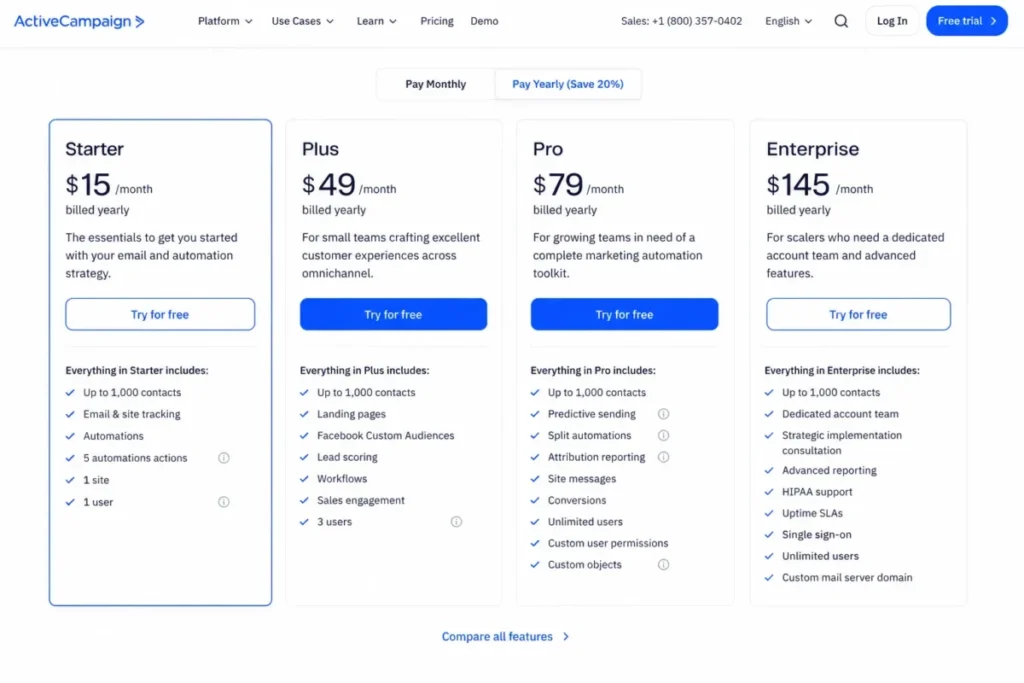 ActiveCampaign’s annual pricing shows Starter at $15 per month for 1,000 contacts, with five automation actions and one included user.
| Pros | Cons |
|---|---|
| Branching automation that survives a real lifecycle program, not a linear autoresponder | Starter caps each automation at five actions, which one welcome sequence exhausts |
| Send allowance runs at 10x to 15x the contact tier, so frequency rarely forces an upgrade | Starter includes one user, so a second marketer triggers a move to Plus at $49 |
| Revenue and conversion attribution available at Pro for teams reporting on pipeline | Starter is capped at 25,000 contacts and cannot purchase any add-on |
| Highest published inbox placement in the last independent seed-list round at 94.2% | SMS, WhatsApp, transactional email and enhanced CRM all sit outside the subscription |
- Verdict:
- Choose ActiveCampaign when lifecycle automation is the reason you are buying software at all, and budget Plus rather than Starter from day one. Skip it when the program is one weekly newsletter, because you will pay the setup cost and collect none of the benefit.
2. Brevo: Best Value for a Large List You Email Rarely

- Best for:
- 1 to 10 person teams holding a large contact database on a moderate monthly send volume.
- Avoid if:
- you need branching automation on day one, or phone support at the entry price. ActiveCampaign is the better buy for the first case.
- Starting price:
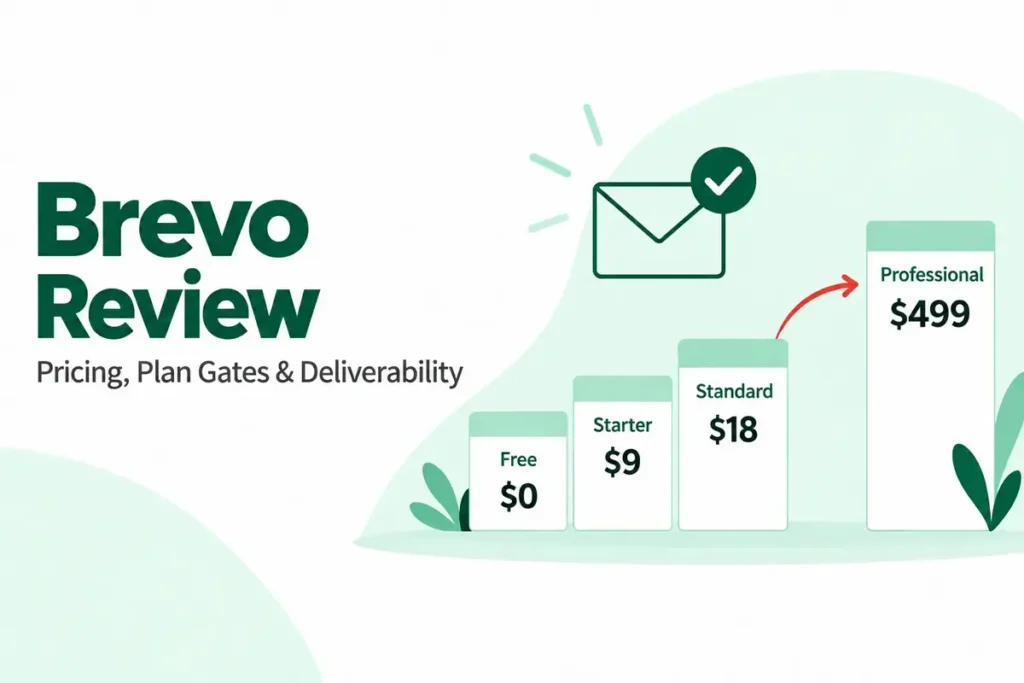
- from $9 per month for 5,000 emails a month on the official Brevo pricing page, with a yearly toggle marked minus 10 percent. Standard starts from $18 and Professional from $499 for 150,000 emails.
- Practical tier:
- Standard, where automation stops being capped by contact count and A/B testing, advanced reporting and AI send-time optimization begin.
- Free plan:
- Yes, with storage for up to 100,000 contacts and one seat.
- First limit that bites:
- the automation contact cap below Standard, long before storage.
- Better than Mailchimp:
- the bill tracks sends rather than stored records.
- Worse than ActiveCampaign:
- automation depth at the entry tier, and there is no published seat count for Starter at all.
- Setup difficulty estimate:
- Low to medium, based on the documented builder, the template library and the extra steps that multichannel and transactional sending add.
- Hidden costs:
- extra seats on Standard cost $9 per month each, logo removal is a paid add-on on Starter, and a dedicated IP sits at Enterprise.
What we verified: Brevo bills primarily around monthly email volume, while automation below Standard is limited to 2,000 unique contacts. Plan prices, the seat allowances and the free-tier discrepancy were checked against Brevo’s pricing page and its pricing help-center article on August 29, 2026.
What that means in practice: A business can store a large database cheaply, but the moment it needs automated journeys across more than 2,000 contacts, the inexpensive entry tier stops being the relevant comparison. Standard at $18 is the number to put against a rival’s entry price, not $9.
The math behind Brevo is simple. Hold 60,000 records and email them monthly and a contact-priced platform bills all 60,000 every month, while Brevo bills the 60,000 sends and forgets the storage between campaigns.
One thing to settle before you sign: Brevo’s pricing page describes the free plan as starting from 5,000 emails per month, its help center describes 300 daily sends, and its transactional page describes 300 a day as 9,000 a month.
Those three official pages disagreed on August 29, 2026, and had already disagreed in July. Get the number you are buying in writing, and treat the free tier as a place to evaluate the builder rather than to run a program.
Professional is where support changes character, adding phone access and three hours a year of deliverability specialist time. The Brevo pricing guide breaks the volume tiers apart for a specific send figure.
The Brevo review covers how the builder and the multichannel side hold up once a program is running.
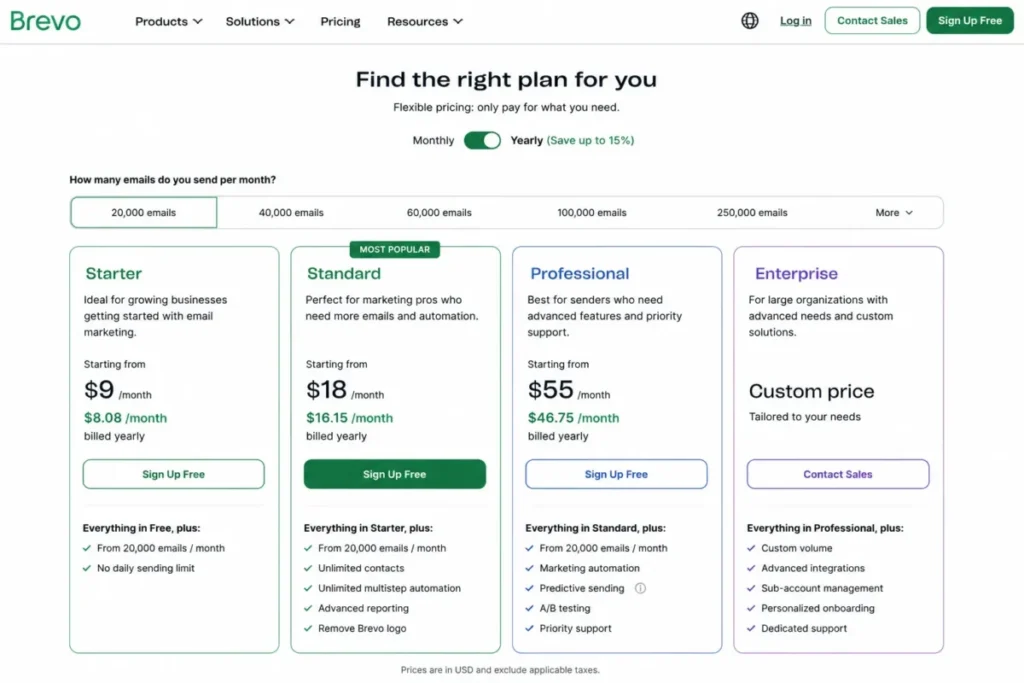 Brevo’s plan comparison is organized around monthly email volume, with Standard carrying the automation, A/B testing and advanced reporting gates.
| Pros | Cons |
|---|---|
| Volume pricing keeps a large, rarely emailed database cheap to hold between campaigns | Automation is capped at 2,000 unique contacts until Standard at $18 per month |
| Transactional email through API or SMTP runs inside the same platform, not as an add-on | Brevo publishes no seat allowance for Starter, so a three-person team cannot budget it |
| Free tier stores up to 100,000 contacts, which is unmatched at zero on this page | The free plan’s send limit is stated three different ways across Brevo’s own pages |
| Professional includes ten seats and three hours a year of deliverability specialist time | Phone support and the deliverability specialist both wait until $499 per month |
- Verdict:
- Choose Brevo when the database is big and the cadence is calm, and confirm the free-tier send limit with the vendor before you rely on it. Skip it when you need branching automation or a documented seat count at the entry price.
3. HubSpot Marketing Hub: Best for B2B Teams Already on HubSpot CRM

- Best for:
- 10 to 100 person B2B revenue teams already running HubSpot Smart CRM, where sales will genuinely open the marketing tool.
- Avoid if:
- you hold a large, low-value contact database, or sales will never touch the platform. You would be paying for an alignment benefit you never collect.
- Starting price:
- Starter lists at $20 per month per seat on the official HubSpot marketing pricing page, with a new-customer promotion running from $7 per seat on annual billing. Professional is $800 per month committed annually or $890 monthly, and Enterprise starts at $3,600.
- Practical tier:
- Professional, where unlimited automated actions and omni-channel automation begin.
- Free plan:
- Free tools rather than Marketing Hub, allowing 2 users, 2,000 email sends a month with HubSpot branding, and 1 automated action.
- First limit that bites:
- Starter’s ten automated actions, closely followed by the per-seat price when a third person needs access.
- Better than ActiveCampaign:
- the customer record and the campaign live in one system, so nobody maintains a sync.
- Worse than Brevo:
- cost per stored contact, by a wide margin.
- Setup difficulty estimate:
- Medium to high, based on the CRM dependency: the configuration load falls where lifecycle stages and properties already exist and rises sharply where they do not.
- Hidden costs:
- additional Core Seats start at $45 per month on Professional and $75 on Enterprise, HubSpot Credits are consumed by AI and data actions, and one-time onboarding is $3,000 on Professional and $7,000 on Enterprise.
What we verified: Professional starts at $800 per month on annual commitment and carries a $3,000 onboarding fee, while marketing contacts, seats and credits scale independently. Every figure, including the 5x to 20x send multipliers and the downgrade restriction, was checked against HubSpot’s marketing pricing page on August 29, 2026.
What that means in practice: The real first-year comparison is not $800 versus a competitor’s monthly price. Professional begins as a $12,600 first-year commitment before additional contact tiers or seats are added.
Multi-touch revenue attribution sits at Enterprise rather than Professional, which is worth confirming before a mid-market team buys Professional expecting funnel attribution.
The downgrade rule deserves a sentence of its own. Once you select a contact tier you cannot move to a lower one until renewal, so a seasonal list spike locks in a higher bill for the rest of the term.
HubSpot’s premium buys organizational alignment rather than email features. The HubSpot pricing guide separates the seat, contact and credit dials so a finance team can model them independently.
Whether that alignment is worth the premium depends on the CRM underneath it, and the HubSpot CRM review covers that half of the purchase.
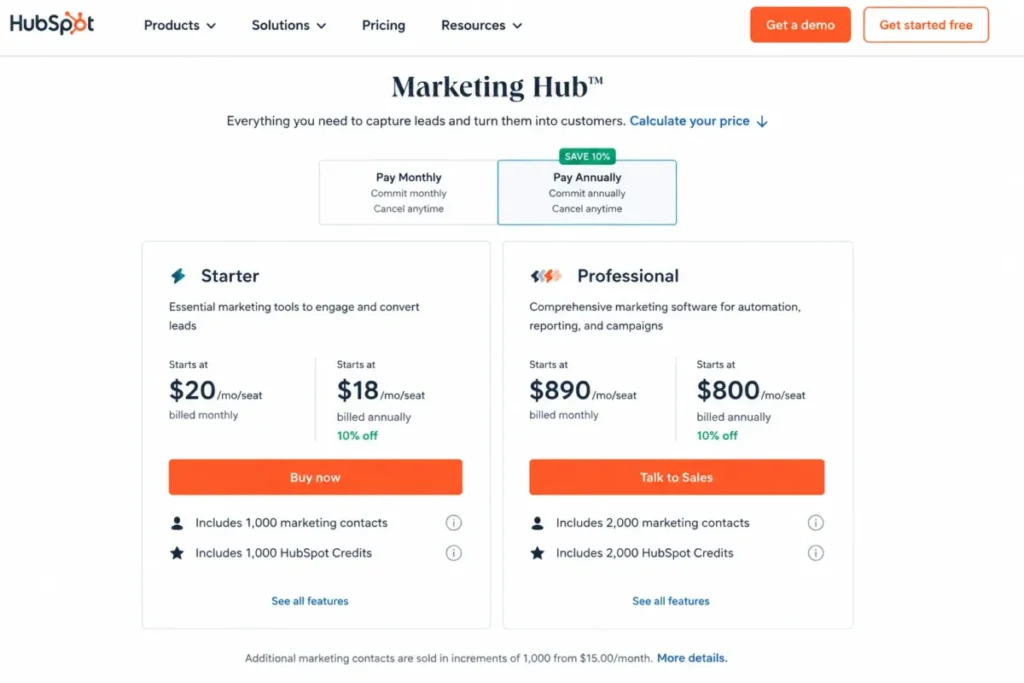 HubSpot Marketing Hub prices Starter per seat and bundles marketing contacts and HubSpot Credits into each edition.
| Pros | Cons |
|---|---|
| Marketing and sales work from one customer record, removing the handoff gap entirely | Professional carries a one-time $3,000 onboarding fee, and Enterprise carries $7,000 |
| Send allowance scales from 5x to 20x the marketing-contact tier as the edition rises | Multi-touch revenue attribution is an Enterprise feature, not a Professional one |
| Free tools give two users and 2,000 monthly sends without a card | The contact tier cannot be downgraded until the contract renews, so a spike is locked in |
| Non-marketing contacts can be stored without entering the billable count | Starter allows ten automated actions, and extra seats add $45 to $75 per month each |
- Verdict:
- Choose HubSpot Marketing Hub when your revenue team already lives in HubSpot and the handoff is the bottleneck you are paying to fix. Skip it when you want an email tool rather than an operating system, and price the onboarding fee into year one before you compare monthly numbers.
4. Klaviyo: Best for Data-Rich Ecommerce Personalization

- Best for:
- established Shopify or direct-to-consumer stores with a named lifecycle marketer and clean product and order data.
- Avoid if:
- you sell no product catalog, or profile growth is outrunning revenue growth. Kit or Omnisend fits those cases better.
- Starting price:
- free to 250 active profiles, with paid email described as starting at $60 per month based on active profiles. Pricing is calculated on a continuous profile curve rather than named tiers, so check the official Klaviyo pricing page for your own count.
- Practical tier:
- whatever the calculator returns for your profile count and channel mix, since there is no plan gate to climb.
- Free plan:
- 250 active profiles and a maximum of 500 emails a month. Sending stops once you exceed the profile limit until you reduce the list or upgrade.
- First limit that bites:
- the profile count, on any store with real traffic.
- Better than Omnisend:
- a data model that segments on product, order and behavioral events rather than a fixed set of store triggers.
- Worse than MailerLite:
- cost predictability at any list size.
- Setup difficulty estimate:
- High, based on the platform’s dependency on catalog and event data quality rather than on the interface itself.
- Hidden costs:
- Marketing Analytics is a separate product from $100 per month for up to 13,500 profiles, Customer Hub starts at $20 and Helpdesk at $10, and SMS is bought in dollar allocations that vary by country.
What we verified: The free tier covers 250 active profiles and 500 monthly emails, any emailable profile counts as active regardless of consent status, and Marketing Analytics is a separate product from $100 per month. These were checked against Klaviyo’s help-center billing documentation on August 29, 2026, because the pricing calculator itself renders in the browser.
What that means in practice: A store carrying 12,000 lapsed subscribers it never mails is still paying for 12,000 active profiles, so list hygiene is a recurring cost lever rather than a tidiness exercise. Automatic tier upgrades mean that cost can rise between billing cycles without anyone approving it.
The downgrade rule is the half worth planning around. Klaviyo drops the plan at the start of a cycle when the profile count qualifies for a lower tier, so a suppression sweep timed before a cycle boundary is worth real money and the same sweep a week later is worth nothing.
Treat the analytics split as part of the price. Revenue reporting is native to the model, but the deeper analytics product is a separate line that a comparison table never shows and a finance team always does.
The Klaviyo review covers how much of that data model a smaller store actually uses.
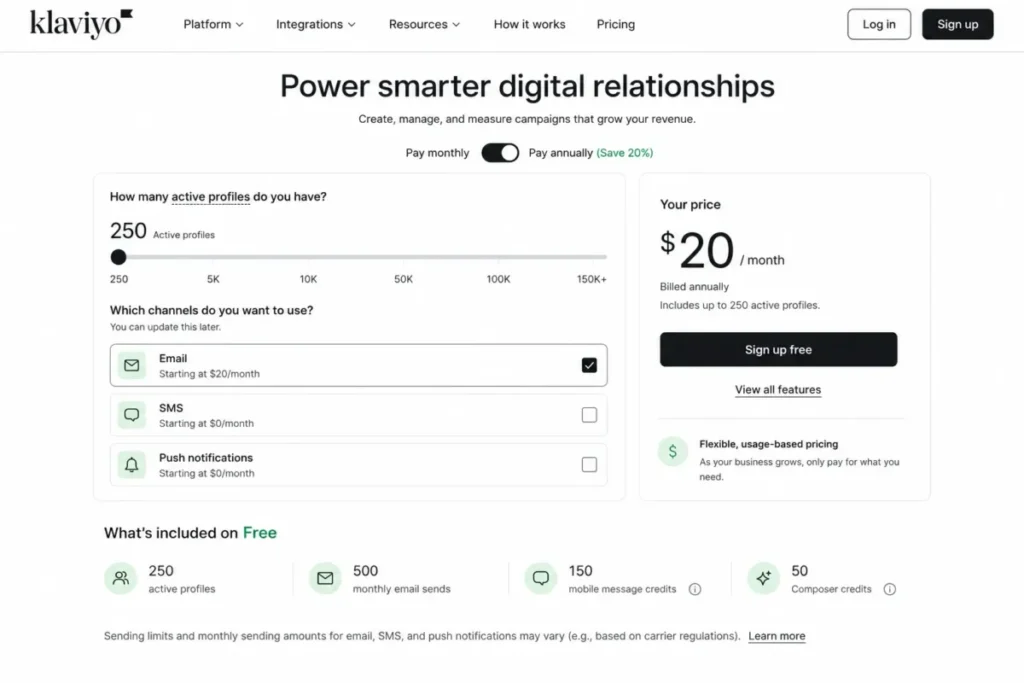 Klaviyo’s configurator prices on active profiles and selected channels, with the free plan covering 250 profiles and 500 monthly email sends.
| Pros | Cons |
|---|---|
| Segments on product, order and browse events rather than a fixed trigger library | Any emailable profile counts as active, so an unmailed list still bills |
| Revenue reporting is native to the model rather than gated behind a reporting tier | Deeper Marketing Analytics is a separate product from $100 per month |
| No plan gates to climb, so features do not appear and disappear as you scale | Automatic tier upgrades mean cost can rise without an approval step |
| Free tier lets a small store build and test flows before committing | Billing is monthly only, with no annual discount published |
- Verdict:
- Choose Klaviyo when a named person owns retention, the catalog and event data are clean, and you will act on browse and purchase behavior. Skip it when profile growth is outpacing revenue, because the bill follows the profiles rather than the sales.
5. Omnisend: Best for SMB Ecommerce Without a Lifecycle Specialist

- Best for:
- 2 to 15 person ecommerce teams who want email, SMS and web push with prebuilt store flows and no dedicated lifecycle hire.
- Avoid if:
- your buyer journey runs through a sales rep rather than a checkout, or your data model has to be custom.
- Starting price:
- $16 per month on the Standard plan at 500 contacts with 6,000 monthly emails, on the official Omnisend pricing page. A 30 percent discount on a three-month prepay was live at the time of checking, showing $11.20 per month.
- Practical tier:
- Pro at $59 per month for 2,500 contacts, where monthly email sending and web push both become unlimited.
- Free plan:
- 250 contacts, 500 monthly emails and 500 web push notifications.
- First limit that bites:
- the 500-email monthly cap on free.
- Better than Klaviyo:
- a store owner who is also the marketer can have cart recovery running this month without a data project.
- Worse than ActiveCampaign:
- branching depth, and there is no published seat allowance on any tier.
- Setup difficulty estimate:
- Low to medium, based on the prebuilt ecommerce flow library that covers most of the first month’s configuration.
- Hidden costs:
- SMS runs on credits at $0.009 per message falling to $0.007 at volume in the US, and a dedicated account expert is included only above $400 per month of spend.
What we verified: Standard is $16 per month at 500 contacts with 6,000 monthly emails, Pro removes the send cap at $59, advanced reporting appears on every tier including free, and billing covers non-subscribers who received automated messages. All were checked against Omnisend’s pricing page on August 29, 2026.
What that means in practice: Free is a demo rather than a test environment, because two campaigns to 250 contacts already spend the 500-email allowance. The contact definition matters more than the price: an order-confirmation flow pulls non-subscribers into the billable count, so the invoice grows with orders rather than with list building.
Putting reporting on every tier removes the upgrade trigger that ActiveCampaign, GetResponse and Mailchimp all carry, which is unusual at this price. The upgrade trigger here is the send cap instead.
The lowest published inbox placement in the last independent seed-list round belonged to Omnisend at 75.1 percent, though that round ran in January 2024 and the deliverability section below explains why that number should not be treated as current.
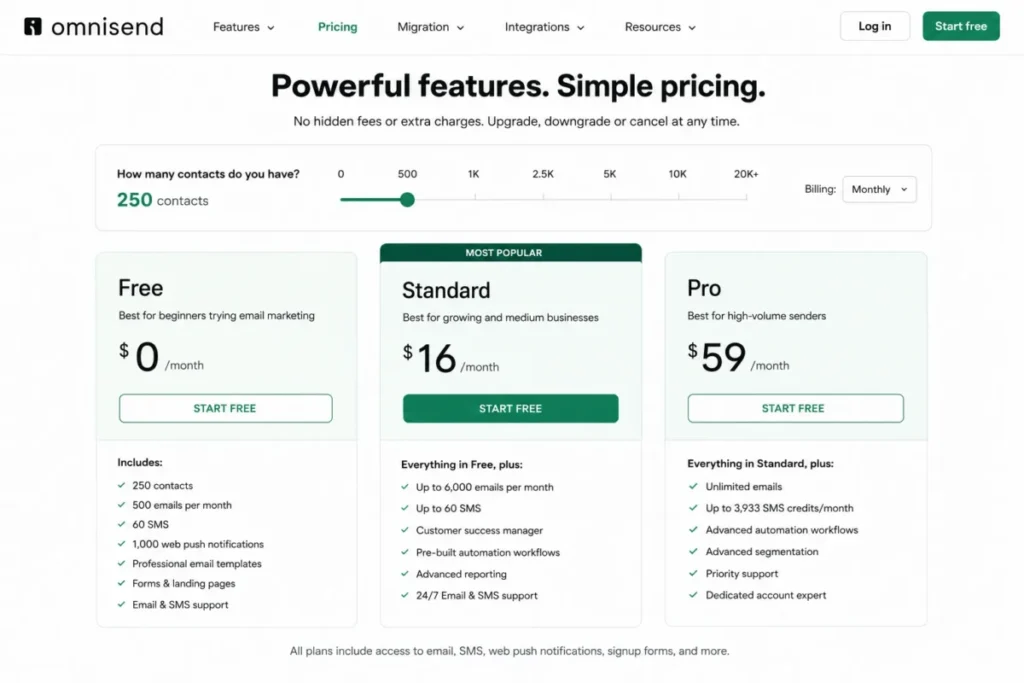 Omnisend’s plan comparison shows a free tier at 250 contacts and 500 emails, Standard at $16 per month, and Pro with unlimited email sending.
| Pros | Cons |
|---|---|
| Prebuilt cart, browse and post-purchase flows work without a lifecycle specialist | Standard’s 6,000 monthly emails at 500 contacts is a 12x multiplier, not unlimited |
| Advanced reporting is available on every tier including free, with no reporting gate | Non-subscribers who received automated messages count toward the billable list |
| Email, SMS and web push sit in one subscription rather than three products | No seat allowance is published on any tier, so a growing team cannot budget access |
| SMS credit rates are published openly, falling from $0.009 to $0.007 at volume | A dedicated account expert requires more than $400 per month in spend |
- Verdict:
- Choose Omnisend when the store owner is also the marketer and cart recovery needs to be live this month. Skip it when your data model must be custom or your buyer talks to a salesperson before they buy.
6. MailerLite: Best for Beginners and Simple Newsletters

- Best for:
- solo operators and 2 to 5 person teams who want a newsletter live this week, with landing pages and a handful of automations.
- Avoid if:
- you manage multiple client accounts or need governed automation across brands. GetResponse or ActiveCampaign handles that better.
- Starting price:
- from $12 per month on the Comfort plan on the official MailerLite pricing page, with a yearly option marked as saving 10 percent.
- Practical tier:
- Comfort for most teams, and Power at $25 per month when automations, seats or monthly emails all need to be unlimited.
- Free plan:
- 250 subscribers, 2,500 monthly emails, 2 seats, 3 automations, 3 signup forms, and one site plus one landing page.
- First limit that bites:
- the 250-subscriber ceiling, which arrives well before the send allowance does.
- Better than Mailchimp:
- three seats at the entry tier rather than three at a higher one, and 50 automations rather than four flow steps.
- Worse than ActiveCampaign:
- branching depth, and Comfort caps active forms and landing pages at ten each.
- Setup difficulty estimate:
- Low, based on the documented configuration surface, the included templates and the entry-tier workflow limits.
- Hidden costs:
- unlimited seats, unlimited automations and 24/7 live chat all require Power, and a dedicated IP sits at Enterprise.
What we verified: Comfort carries 3 seats and 50 automations, and billing uses a cumulative subscriber count within each cycle rather than a point-in-time count. Both were checked against MailerLite’s pricing page on August 29, 2026.
What that means in practice: Deleting unengaged subscribers mid-cycle does not lower that month’s invoice, because an address that was active at any point in the cycle still counts. Cleanup has to happen before a cycle starts to reach the bill at all.
The free tier is the most usable test environment on this page, because three automations and two seats let one person build a welcome-plus-reengagement program and a second person review it before anyone pays.
The send multiplier is calculated from the top of your tier rather than your exact subscriber count. On the up-to-1,000 tier that is 10,000 emails a month, which is comfortable for a weekly newsletter and tight for a daily one.
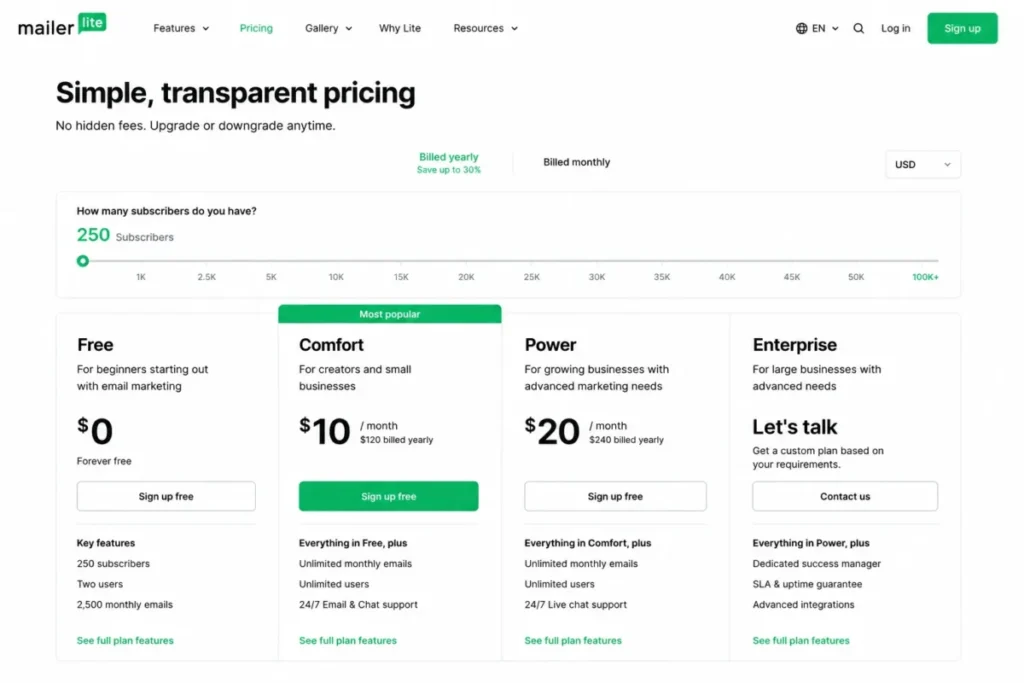 MailerLite’s free plan carries 250 subscribers, 2 seats and 2,500 monthly emails, with Comfort and Power above it.
| Pros | Cons |
|---|---|
| Free tier includes 3 automations and 2 seats, enough to test a real workflow | Free is capped at 250 subscribers, which a modest list passes in weeks |
| Comfort includes 3 user seats at $12, where Mailchimp needs Standard for 5 | Comfort caps active forms and landing pages at ten each |
| Sends run at 10x the ceiling of your subscriber tier, not your exact count | Unlimited automations, seats and emails all wait for Power at $25 |
| 14-day premium trial with no card, so the paid features can be evaluated first | Cumulative subscriber counting means a mid-cycle cleanup saves nothing that cycle |
- Verdict:
- Choose MailerLite when speed to first campaign matters more than lifecycle depth, and when two people need access without an upgrade. Skip it when your program already needs branching logic or client-account separation.
7. GetResponse: Best for Webinars, Funnels and Course Businesses

- Best for:
- coaches, educators and course creators who want email, funnels, webinars and course delivery inside one subscription.
- Avoid if:
- you need three or four live workflows immediately at the entry price. ActiveCampaign Plus or Brevo Standard is the better first purchase.
- Starting price:
- $19 per month, or $15.58 per month billed annually, on the Starter plan on the official GetResponse pricing page. Marketer is $59 monthly or $48.38 annually, and Creator is $69 monthly or $56.58 annually.
- Practical tier:
- Marketer, where unlimited automation workflows and revenue reports begin.
- Free plan:
- none is listed on the pricing page as of August 29, 2026. A free trial is offered without a stated duration.
- First limit that bites:
- the single custom automation workflow on Starter.
- Better than MailerLite:
- webinars, a website builder and course delivery for up to 500 students sit inside the Creator subscription rather than in three separate tools.
- Worse than Mailchimp:
- brand familiarity and template ecosystem breadth, which matters more than it should when a team has to adopt the tool.
- Setup difficulty estimate:
- Medium to high, because the breadth across funnels, webinars and courses widens the configuration surface.
- Hidden costs:
- SMS, mobile push, a dedicated IP and a dedicated sending domain all sit at Enterprise on custom pricing.
What we verified: Starter is $19 per month or $15.58 billed annually with unlimited monthly sends, one custom workflow and three users, and the pricing page carried no list-size selector when checked on August 29, 2026.
What that means in practice: Three people share one automation, so the seat allowance that looks generous is spent before the workflow allowance is. A page with no list-size selector is not the same as a contract with no ceiling, which is why we treat the flat pricing as a question for the vendor rather than a settled fact.
The pricing page has changed shape since earlier in 2026, and the change matters: it turns GetResponse from a list-size model into something close to a flat subscription.
For a high-frequency publisher that is a strong position, and it is worth getting your own list size confirmed by the vendor in writing before you commit.
Starter includes three users, which is more than ActiveCampaign, Mailchimp Free and Constant Contact Lite give at their entry tiers combined.
Revenue reporting and abandoned-cart recovery both start at Marketer, alongside contact scoring and tagging. Price Creator from day one when webinars or courses are the actual revenue engine rather than an add-on you might use.
| Pros | Cons |
|---|---|
| Unlimited monthly email sends on every paid tier, with no send multiplier to manage | Starter allows one custom automation workflow, which blocks a second program |
| Three user seats at $19, against one on ActiveCampaign Starter and Constant Contact Lite | Revenue reports and abandoned-cart recovery both wait for Marketer at $59 |
| Webinars, a website builder and courses for 500 students sit inside Creator at $69 | No free plan appears on the pricing page as of August 2026 |
| Annual billing cuts Starter to $15.58 per month, a published saving of $41 a year | SMS, mobile push and a dedicated IP are Enterprise-only on custom pricing |
- Verdict:
- Choose GetResponse when webinars or courses are core revenue and you want them billed in one place, and price Creator rather than Starter. Skip it when you need several live workflows at the cheapest tier, because one workflow is one workflow.
8. Kit: Best for Creators and Paid Newsletters

- Best for:
- solo educators, authors, coaches and creator businesses earning through digital products, subscriptions or paid newsletters.
- Avoid if:
- you sell a product catalog or run a sales pipeline. Omnisend or HubSpot fits those shapes better.
- Starting price:
- $33 per month, or $390 billed yearly, at 1,000 subscribers on the official Kit pricing page. Pro is $66 monthly or $790 yearly at the same tier.
- Practical tier:
- Creator, because the free plan’s automation rows are empty.
- Free plan:
- up to 10,000 subscribers, 1 user, unlimited broadcasts, unlimited landing pages and forms, tagging and segmentation, and the ability to sell digital products.
- First limit that bites:
- automation, not audience size.
- Better than Mailchimp:
- free migrations, and a free tier that holds 40 times more subscribers.
- Worse than MailerLite:
- free-tier automation, where MailerLite runs three automations at zero.
- Setup difficulty estimate:
- Low, based on a narrow feature surface built around broadcasts and forms, with published free migrations removing most switching work.
- Hidden costs:
- engagement analytics, deliverability reporting, subscriber scoring, A/B subject-line testing and unlimited users all sit on Pro at $66.
What we verified: Free reaches 10,000 subscribers with one user and unlimited broadcasts, and Creator is $33 per month at 1,000 subscribers with two users. The plan-comparison rows for the visual automation builder and automated sequences read as unavailable on the free tier, checked on Kit’s pricing page on August 29, 2026.
What that means in practice: The largest free allowance on this page cannot run a welcome sequence, so 10,000 free subscribers buys a broadcast list rather than a lifecycle program. Anyone planning to migrate onto that free tier for automation should confirm the rows in a live account first, because this is the one entry on this page that changed during 2026.
Earlier in 2026 that free plan carried one visual automation and one sequence, so the rows have moved within the year.
Kit is also the one platform here with no published independent inbox-placement figure, because the last seed-list study could not configure DMARC authentication on Kit’s side. The ConvertKit review covers what the creator monetization side actually delivers.
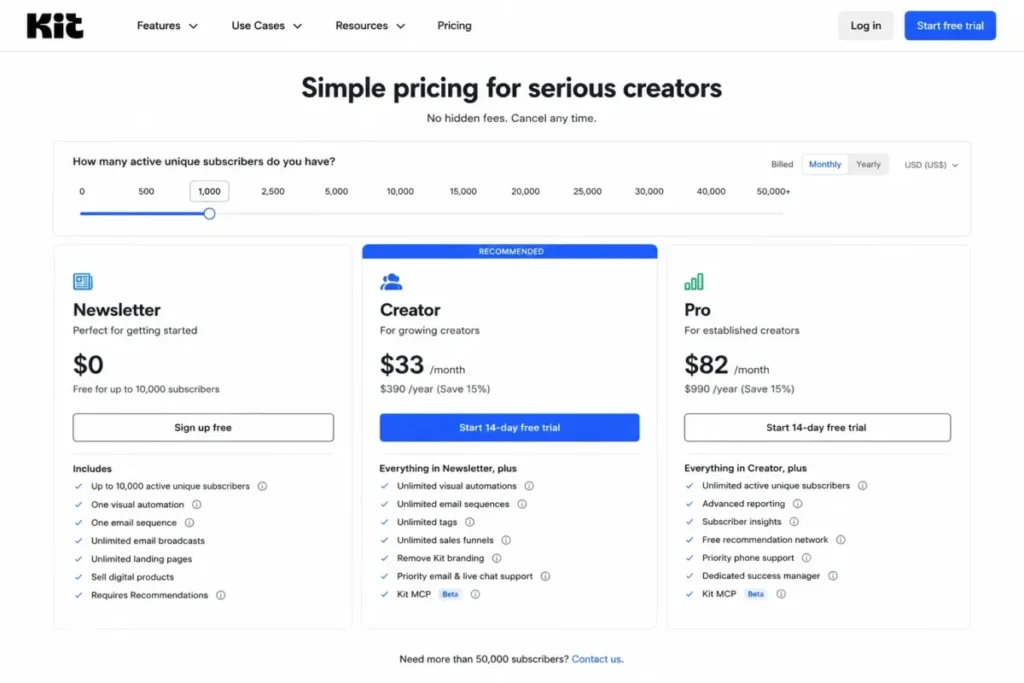 Kit prices on active unique subscribers, with Creator at 1,000 subscribers and the free tier reaching 10,000.
| Pros | Cons |
|---|---|
| Free tier holds up to 10,000 subscribers with unlimited broadcasts and landing pages | The free plan’s comparison rows show no visual automation builder and no sequences |
| Free migrations remove the staff-hour cost that every other platform here passes on | Creator includes two users, and unlimited users wait for Pro at $66 |
| Subscribers are counted as unique and active, a narrower base than stored records | Engagement analytics, scoring and deliverability reporting are all Pro features |
| Digital products, subscriptions and paid newsletters are native rather than bolted on | No independent inbox-placement figure exists, because DMARC could not be configured |
- Verdict:
- Choose Kit when the audience is the business model and you monetize it directly through products or subscriptions. Skip it when you need an automated sequence without paying, or when you sell a catalog.
9. Mailchimp: Best for Familiarity, Templates and a Broad Ecosystem

- Best for:
- 1 to 10 person teams that value a familiar interface, a deep template ecosystem, and a list that is not compounding quickly.
- Avoid if:
- your list is growing fast and your budget is not. Brevo or MailerLite absorbs that growth far more gently.
- Starting price:
- $13 per month for 12 months on Essentials at the 0 to 500 contact tier, on the official Mailchimp plan comparison. Standard is $20 and Premium is $350 at that same starting tier.
- Practical tier:
- Standard, where flows go from four steps to 200 and seats go from three to five.
- Free plan:
- 250 contacts, 500 emails a month or 250 a day, 1 seat, 1 audience, and email support for the first 30 days.
- First limit that bites:
- the single audience and single seat on free, then the four-flow-step ceiling on Essentials.
- Better than Constant Contact:
- three seats at the entry tier rather than one, and a much larger template library.
- Worse than Brevo:
- cost as the list compounds, because every stored contact is billed every month.
- Setup difficulty estimate:
- Low, based on the template ecosystem and the fact that most marketing teams already know this interface.
- Hidden costs:
- SMS and MMS are a credit-based add-on in select countries, and the 15 percent discount applies only above 10,000 contacts.
What we verified: Essentials is $13 per month at 0 to 500 contacts with three seats and up to four flow steps, and Standard is $20 with five seats and up to 200 flows. Overages are billed automatically on paid plans while free accounts have sending paused, checked against Mailchimp’s plan comparison page on August 29, 2026.
What that means in practice: Four flow steps is one wait, one condition and two emails, so the cheapest paid tier runs one basic sequence and nothing beside it. The same overrun costs money on Essentials and stops the program on Free, which is why the free tier is safer to evaluate on than to operate on.
Standard jumps from four flow steps to 200 flows for another $7 a month, which buys more headroom per dollar than any other single upgrade on this page.
Scale pricing is published in a way most rivals avoid: Essentials reaches 50,000 contacts at $385 per month and Standard reaches 100,000 at $800. The Mailchimp pricing tiers guide untangles the six dials behind those numbers.
Familiarity stops paying off at a predictable point, and the Mailchimp review covers where that point sits for a growing list.
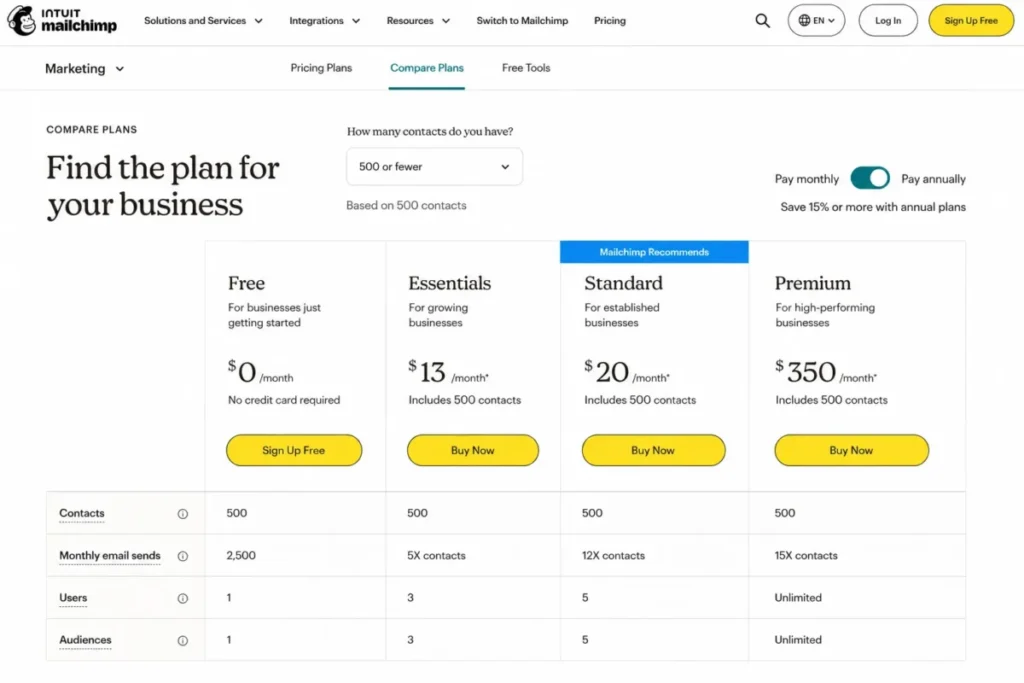 Mailchimp’s plan comparison shows how contacts, monthly sends, seats and audiences expand from Free through Essentials, Standard and Premium.
| Pros | Cons |
|---|---|
| Three seats on Essentials at $13, where several rivals give one at a similar price | Essentials allows up to four flow steps, which one welcome sequence exhausts |
| Contact-tier prices are published up to 100,000, so scale cost can be checked in advance | Overages are billed automatically on paid plans once a limit is crossed |
| Send multipliers rise from 10x to 15x with the plan, published clearly per tier | Free allows one audience and one seat, so segmentation and teamwork both stall |
| A 14-day trial of Standard or Essentials sends up to 100 emails without payment details | The 15 percent annual-style discount applies only above 10,000 contacts |
- Verdict:
- Choose Mailchimp when the team already knows it, the list is stable, and template breadth saves real production time. Skip it when the database is compounding, because every new record is billed every month.
10. Constant Contact: Best for Local Organizations, Events and Live Support
- Best for:
- local nonprofits, associations and event-led businesses that want phone or chat help and guided onboarding.
- Avoid if:
- you are optimizing cost per contact at scale, or nobody on your team will ever pick up the phone. Brevo or MailerLite is cheaper for the same sending.
- Starting price:
- $12 per month on Lite, or $10.20 per month billed annually, on the official Constant Contact pricing page. Standard is $35 monthly or $29.75 annually, and Premium is $80 monthly or $68 annually.
- Practical tier:
- Standard for a team, and Premium when automation templates and user seats both need to be unlimited.
- Free plan:
- none. A free trial is offered without a card, and a 30-day money-back guarantee applies separately.
- First limit that bites:
- the single user seat on Lite, before any list or send limit.
- Better than Mailchimp:
- phone and chat access as part of the purchase rather than a higher tier, and a 24x send multiplier at Premium.
- Worse than Brevo:
- cost per stored contact, and Lite’s one automation template against Brevo’s automation on every plan.
- Setup difficulty estimate:
- Low, based on the guided onboarding and live support included in the purchase.
- Hidden costs:
- SMS starts at $10 per month and is US-only.
What we verified: Lite is $12 per month with one user, one automation template and one custom segment, Standard is $35 with three of each, and sends beyond the allowance are billed at $0.002 each. These were checked against Constant Contact’s pricing page on August 29, 2026, which does not publish the contact tier behind the $12 starting price.
What that means in practice: A two-person team that segments its list at all is shopping at $35 rather than $12, so the entry price describes a solo sender. The published overage rate is the useful number here: a 50,000-send overrun costs $100 and no forced tier change, which is a different risk profile from automatic upgrade billing.
Constant Contact is the one platform here that prices its overage openly rather than describing it as a possibility, which is worth more to a budget owner than a lower headline price.
Nonprofits should ask about the published discount before comparing anything: 20 percent for a six-month prepay and 30 percent for twelve months changes the ranking against MailerLite considerably.
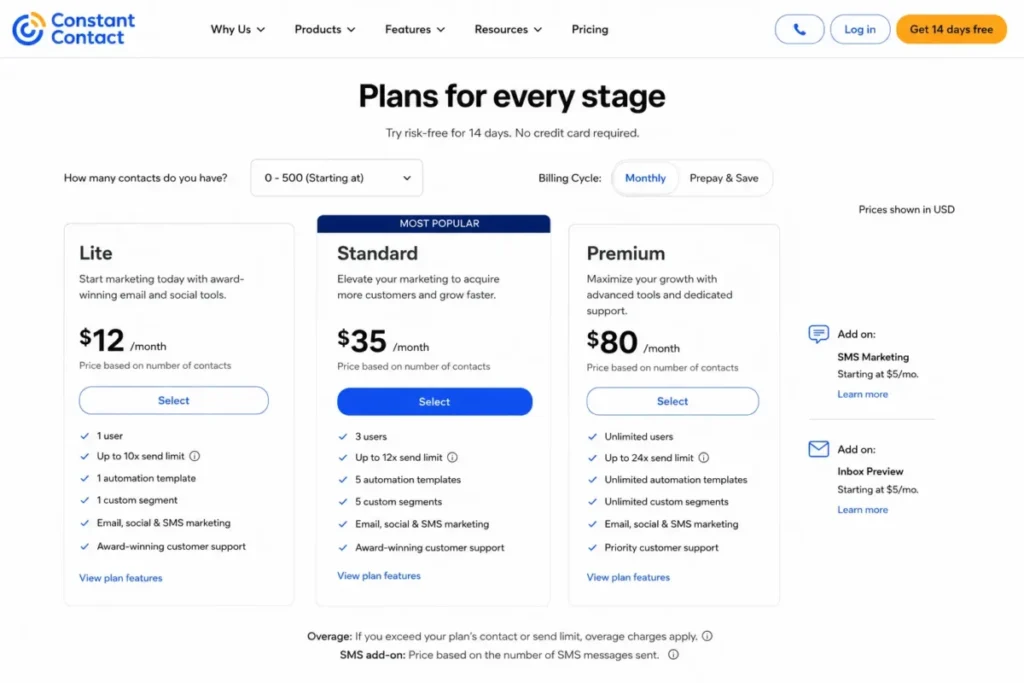 Constant Contact’s plan comparison shows Lite with one user and one automation template, while Premium adds unlimited users and a 24x send multiplier.
| Pros | Cons |
|---|---|
| Overage is published at $0.002 per send rather than left as an unnamed possibility | Lite includes one user, one automation template and one custom segment |
| Phone and chat support are part of the product rather than a higher support tier | The contact tier behind the $12 starting price is not published anywhere on the page |
| Nonprofit prepay discounts reach 30 percent on a twelve-month commitment | No permanent free plan, so evaluation runs on a trial clock |
| Premium sends at 24x the contact tier, the highest multiplier on this page | US-only SMS starts at a separate $10 per month on Lite and Standard |
- Verdict:
- Choose Constant Contact when support access and guided setup matter more than automation depth, and when events drive the calendar. Skip it when you are optimizing cost per contact, because you are paying for a service layer you may never call.
11. Selzy: Best for a Small List You Email Frequently

- Best for:
- 1 to 10 person teams with a modest contact list and a high send cadence, who want segmentation and automation without a configuration project.
- Avoid if:
- you need a CRM of record, a documented integration list, or deliverability tooling at the cheapest tier. ActiveCampaign or HubSpot fits that requirement.
- Starting price:
- $7.50 per month on Lite at the 100-contact tier on the official Selzy pricing page. Standard starts at $15 at the same tier, and the published annual list price for Lite is $90 a year.
- Practical tier:
- Standard, because the email quality checker sits there.
- Free plan:
- 1,000 emails a month to 100 contacts. A 14-day trial raises that to 10,000 emails and 2,000 contacts.
- First limit that bites:
- segmentation, which the free plan does not include at all.
- Better than Brevo:
- the send count never enters the bill, so a daily cadence to 3,000 contacts costs the same as a monthly one.
- Worse than ActiveCampaign:
- ecosystem disclosure, because Selzy publishes neither an integration count nor a per-plan seat allowance.
- Setup difficulty estimate:
- Low, based on a drag-and-drop builder with ready-made templates and no CRM layer to model.
- Hidden costs:
- anti-spam tips, email size and authentication checks, deliverability tips, the subject-line assistant, Telegram chatbots and the certification course all require Standard.
What we verified: Segmentation and A/B testing begin on Lite, and the email quality checker with its anti-spam and authentication checks begins on Standard. The full contact ladder and the plan-comparison feature rows were read from Selzy’s pricing page on August 29, 2026, and the 70-plus segmentation figure is Selzy’s own description on its feature pages.
What that means in practice: The free tier cannot demonstrate the two features that would justify buying, because segmentation and A/B testing sit one tier above it. Anyone buying Selzy for deliverability hygiene is buying Standard at $15, not Lite at $7.50, so the headline entry price describes the cheapest way in rather than the working plan.
Selzy is the only platform in this ranking that bills on stored contacts and then removes the send ceiling, which is the exact mirror of Brevo’s model.
Read the entry price against its tier rather than against the row above it. Lite is $10 per month at 1,000 contacts, $30 at 5,000 and $60 at 10,000, and Standard is $24, $55 and $90 at those same tiers.
Two things sit on every tier including free, which is unusual at this price: the AI assistant with text and image generation, and 24/7 support. No other platform on this page gives round-the-clock support away at zero.
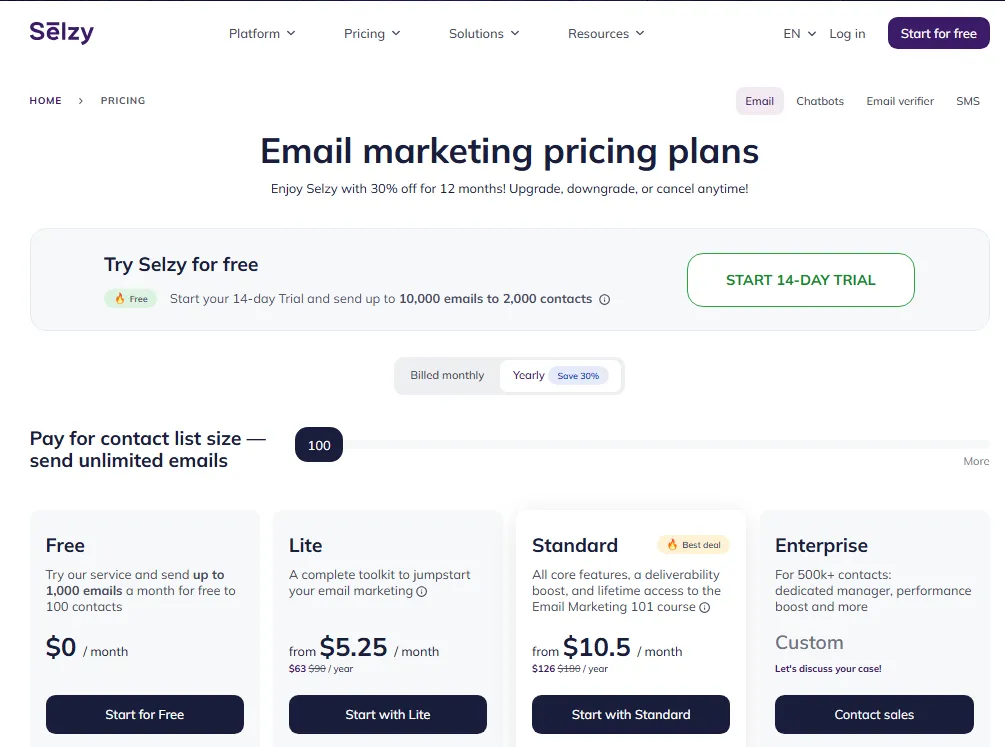
| Pros | Cons |
|---|---|
| Contact-tier pricing with uncapped sending, so campaign frequency never moves the bill | The email quality checker and anti-spam tools start on Standard, not Lite |
| 24/7 support on every plan, including the free one, which no rival here matches | The free plan carries no segmentation and no A/B testing |
| AI writing and image generation on every tier rather than behind a credit system | Neither an integration count nor a per-plan seat allowance is published |
| A published contact ladder from 100 to 30,000, so scale cost is checkable in advance | There is no CRM of record inside the product |
- Verdict:
- Choose Selzy when the list is small, the cadence is high, and you want segmentation and automation at a price that does not scale with sends. Budget Standard rather than Lite when deliverability tooling matters, and skip it entirely when the customer record has to live in the same product.
Pricing Comparison: Starting Price vs the Tier You Will Actually Use
The advertised price and the working price are rarely the same plan. This table separates them, with every figure checked on the official pricing pages on August 29, 2026.
| Platform | Starting price | Practical tier and why | Seats at entry | Billing basis |
|---|---|---|---|---|
| ActiveCampaign | $15/mo annual at 1,000 contacts | Plus at $49, for unlimited automation actions and add-on eligibility | 1 | Contacts |
| Brevo | From $9/mo for 5,000 emails | Standard at $18, for automation beyond 2,000 contacts and A/B testing | Not published at Starter | Email volume |
| HubSpot Marketing Hub | $20/mo/seat list, promo from $7 | Professional at $800/mo annual, plus $3,000 one-time onboarding | Priced per seat | Marketing contacts, seats, credits |
| Klaviyo | Paid email from $60/mo | Whatever the profile curve returns; there is no tier to climb | Not published | Active profiles |
| Omnisend | $16/mo at 500 contacts | Pro at $59, for unlimited email and unlimited web push | Not published | Contacts, including automated non-subscribers |
| MailerLite | $12/mo (Comfort) | Comfort for most; Power at $25 for unlimited seats and automations | 3 | Subscribers, counted cumulatively |
| GetResponse | $19/ | Marketer at $59, for unlimited workflows and revenue reports | 3 | Flat per tier |
| Kit | $33/mo or $390/yr at 1,000 subs | Creator, because the free plan’s automation rows are empty | 2 | Active unique subscribers |
| Mailchimp | $13/mo for 12 months at 0 to 500 | Standard at $20, for 200 flows instead of 4 flow steps | 3 | Contacts, audiences, seats, sends, SMS |
| Constant Contact | $12/ | Standard at $35, for 3 users, 3 automation templates and 10 segments | 1 | Contacts |
| Selzy | $7.50/mo at 100 contacts | Standard at $15, for the email quality checker and anti-spam tools | Not published | Contact list size, sending uncapped |
Source: the same eleven official pricing pages listed under Best Email Marketing Platforms at a Glance, checked August 29, 2026. The practical-tier column is an editorial judgement built from the plan gates in the same row.
Nine of these eleven platforms put the automation, reporting or seat capacity a real program needs one tier above the price they advertise. Klaviyo and Omnisend are the two exceptions, for different reasons: Klaviyo has no feature gates to climb, and Omnisend puts advanced reporting on every tier including free.
Four platforms decline to publish a seat allowance at their entry tier. Count the logins your program actually needs during evaluation, because on Brevo, Klaviyo, Omnisend and Selzy you will be asking a salesperson rather than reading a page.
Cost at Scale: 1,000, 10,000 and 25,000 Contacts
Extrapolating a dynamic price from an entry tier produces a figure that looks authoritative and is wrong. So this table prints real numbers where the vendor publishes a ladder, and says so plainly where it does not.
| Platform | 1,000 contacts | 10,000 contacts | 25,000 contacts |
|---|---|---|---|
| ActiveCampaign | Starter $15/ | Recheck calculator; Starter is capped at 25,000 contacts | Recheck calculator; at the Starter ceiling |
| Brevo | Priced by send volume, not contact count | Priced by send volume, not contact count | Priced by send volume, not contact count |
| HubSpot Marketing Hub | Starter includes 1,000 marketing contacts | Enterprise includes 10,000; Starter and Pro tiers scale separately | Recheck calculator; seats and contact tier move independently |
| Klaviyo | Paid email from $60/ | Recheck calculator; the profile curve is continuous | Recheck calculator |
| Omnisend | Pro is $59/mo at 2,500 contacts | Recheck calculator | Recheck calculator |
| MailerLite | Comfort from $12/ | Recheck calculator | Recheck calculator |
| GetResponse | Starter $19/ | Same flat prices; no list-size selector shown | Same flat prices; confirm your list size with the vendor |
| Kit | Creator $33/mo or $390/yr | Recheck calculator; the free tier reaches 10,000 subscribers | Recheck calculator |
| Mailchimp | Essentials $13/ | Recheck calculator; the 15% discount begins here | Recheck calculator |
| Constant Contact | Lite $12/ | Recheck calculator; no contact ladder is published | Recheck calculator |
| Selzy | Lite $10/ | Lite $60/ | Lite $135/ |
Source: the published contact and profile ladders on the eleven official pricing pages listed under Best Email Marketing Platforms at a Glance, checked August 29, 2026. Cells marked for rechecking are vendors whose calculator renders per session rather than publishing a ladder.
Selzy and GetResponse are the two platforms where a buyer can price their own growth without contacting anyone. Selzy publishes a full contact ladder, and GetResponse showed the same flat price at every list size on the pricing page checked on August 29, 2026.
Mailchimp publishes two useful waypoints that most rivals hide: Essentials reaches 50,000 contacts at $385 per month, and Standard reaches 100,000 at $800. Those two numbers are worth more to a growing list than any entry price on this page.
Run your own three figures before you shortlist: your contact count, your monthly send count and the number of people who need a login. Every platform here prices at least one of the three, and the one it prices hardest decides your renewal.
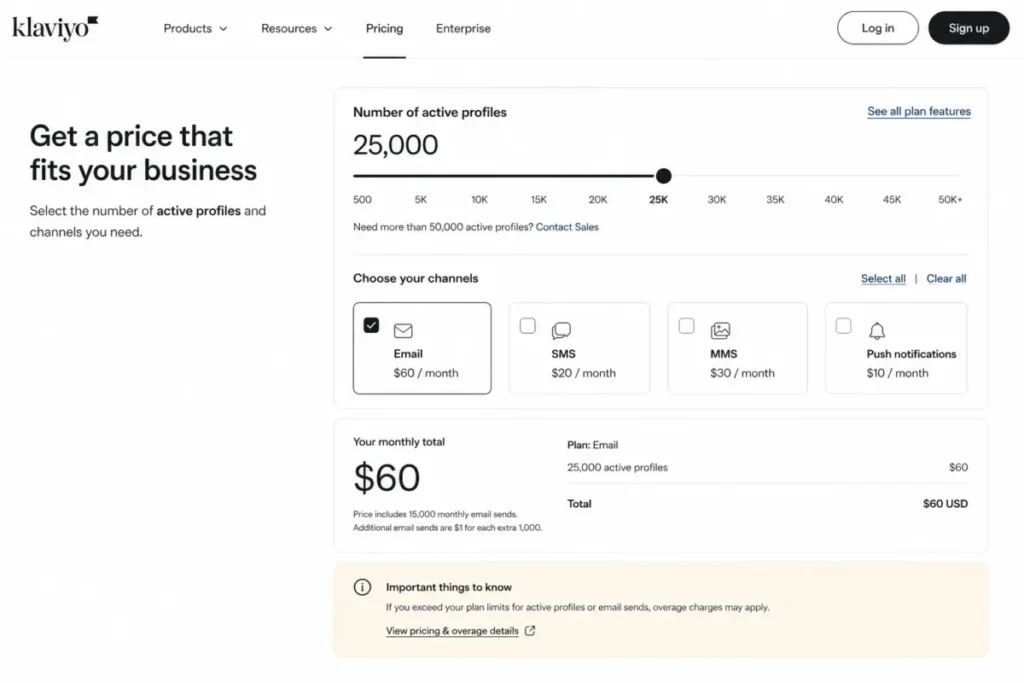 Klaviyo’s configurator recalculates the monthly total as the active-profile tier and marketing channels change, which is why a static price cannot be printed for it.
Send Limits and Multipliers
A plan can fit your list and still refuse your campaign calendar. Send allowance is the second constraint, and most vendors express it as a multiple of the contact tier rather than a number.
| Platform | How sending is limited | Free-tier send cap |
|---|---|---|
| ActiveCampaign | 10x the contact tier on Starter and Plus, 12x on Pro, 15x on Enterprise | No free plan; trial capped at 100 emails |
| Brevo | Email volume is the billing axis itself | Stated inconsistently across Brevo’s own pages; confirm before relying on it |
| HubSpot Marketing Hub | 5x the marketing-contact tier on Starter, 10x on Professional, 20x on Enterprise | 2,000 sends per month on free tools, with HubSpot branding |
| Klaviyo | Free plan capped at 500 emails per month; paid volume scales with the profile tier | 500 emails per month |
| Omnisend | 6,000 emails at 500 contacts on Standard; unlimited email on Pro | 500 emails per month |
| MailerLite | 10x the ceiling of your subscriber tier, not your exact count | 2,500 emails per month |
| GetResponse | Unlimited monthly email sends on every paid tier | No free plan listed as of August 2026 |
| Kit | Unlimited broadcasts within the subscriber tier | Unlimited broadcasts to 10,000 subscribers |
| Mailchimp | 10x contacts on Essentials, 12x on Standard, 15x on Premium | 500 per month or 250 per day |
| Constant Contact | 10x contacts on Lite, 12x on Standard, 24x on Premium | No permanent free plan |
| Selzy | Sending is uncapped at the purchased contact tier | 1,000 emails per month to 100 contacts |
Source: send allowances and multipliers stated on the eleven official pricing and plan-comparison pages listed under Best Email Marketing Platforms at a Glance, checked August 29, 2026.
Three platforms remove the send ceiling entirely inside their tier: GetResponse, Kit and Selzy. That makes them unusually forgiving for a daily newsletter, a launch sequence, or any program where the campaign count is the thing that grows.
Two teams with identical 5,000-contact lists can need different plans. Send weekly and a 10x multiplier is comfortable; send four times a week plus three automations and it is not.
Free Plans Compared: Which Limit You Hit First
Free plans are marketing assets. The useful question is not how big the allowance is, but which limit stops you first.
| Platform | Free contacts or subscribers | Free monthly sends | Free seats | Automation on free | First forced upgrade |
|---|---|---|---|---|---|
| MailerLite | 250 subscribers | 2,500 | 2 | 3 automations | The 250-subscriber ceiling |
| Omnisend | 250 contacts | 500 | Not published | Prebuilt ecommerce flows | The 500-email send cap |
| Klaviyo | 250 active profiles | 500 | Not published | Flows available within the limits | The profile count on any real store |
| Kit | 10,000 active unique subscribers | Unlimited broadcasts | 1 | Comparison rows show none | The first automated sequence |
| Mailchimp | 250 contacts | 500, or 250 per day | 1 | Free preview only | The one-seat, one-audience limit |
| Brevo | Up to 100,000 stored | Stated inconsistently; confirm live | 1 | Capped at 2,000 unique contacts | Automation depth |
| HubSpot | Free tools, not Marketing Hub | 2,000 with HubSpot branding | 2 | 1 automated action | The second automated action |
| Selzy | 100 contacts | 1,000 | Not published | Email automation included | The first campaign needing a segment |
| ActiveCampaign | No free plan | 14-day trial, 100 emails | 1 on Starter | Trial only | The end of the trial |
| GetResponse | No free plan listed | Trial only, duration not stated | 3 on Starter | Trial only | The end of the trial |
| Constant Contact | No permanent free plan | Trial only | 1 on Lite | Trial only | The end of the trial |
Source: free-plan limits published on the eleven official pricing pages listed under Best Email Marketing Platforms at a Glance, checked August 29, 2026. Brevo’s row records a documented inconsistency between that vendor’s own pages.
Rank these by useful runway rather than headline size. Kit gives the largest audience allowance and the smallest automation allowance, MailerLite gives the smallest audience and the most usable automation, and Selzy gives the only free tier with 24/7 support attached.
If you want a free plan to test a real lifecycle workflow rather than a broadcast, MailerLite is the honest answer. Three automations and two seats let one person build a program and a second person review it, which nothing else here allows at zero.
Feature Gate Comparison: Automation, Reporting, AI and API by Plan
Feature checkmarks lie loudest about automation. This table records what the entry tier actually allows, and where the capability stops being the constraint.
| Platform | Automation at the entry tier | Where reporting or attribution begins | AI tools | Transactional or API sending |
|---|---|---|---|---|
| ActiveCampaign | 5 actions per automation on Starter | Pro, for revenue and conversion attribution | AI Activities sold as an add-on, Plus and above | Transactional email is a paid add-on |
| Brevo | Capped at 2,000 unique contacts below Standard | Standard for advanced reporting; Professional for deliverability help | AI send-time optimization from Standard | Included through API or SMTP |
| HubSpot Marketing Hub | Up to 10 automated actions on Starter | Enterprise, for multi-touch revenue attribution | HubSpot Credits fund AI actions, 500 on Starter | Available through the platform APIs |
| Klaviyo | Flows available on every plan including free | Revenue reporting is native; deeper analytics is a $100/mo product | Included in the platform | Available through the API |
| Omnisend | Prebuilt ecommerce flows from free upward | Advanced reporting on every tier, including free | Included in the platform | Available through the API |
| MailerLite | 3 automations on free, 50 on Comfort, unlimited on Power | Comfort adds multivariate testing; Power adds depth | Included in the builder | MailerSend is a separate product |
| GetResponse | 1 custom workflow on Starter | Marketer, for revenue reports and promo codes | AI email and subject-line generation, 3 uses on Starter | Enterprise only |
| Kit | Comparison rows show none on free; unlimited on Creator | Pro, for engagement analytics and deliverability reporting | Included in the editor | Available through the API |
| Mailchimp | Up to 4 flow steps on Essentials, 200 flows on Standard | Standard for predictive features; Premium for predictive segmentation | Included, with usage tied to plan | Available through the API |
| Constant Contact | 1 automation template on Lite, 3 on Standard | Standard for advanced reporting; Premium for dynamic content | Included in the builder | Available through the API |
| Selzy | Email automation on every tier including free | Email analytics on every tier; no separate attribution tier published | AI assistant, text and image generation on every tier | SMTP API for transactional sending |
Source: the plan-comparison tables on the eleven official pricing pages listed under Best Email Marketing Platforms at a Glance, checked August 29, 2026. Where a vendor publishes no separate reporting tier, the cell says so rather than estimating one.
Map the program before you read another price. A welcome series, a lead-magnet delivery, a re-engagement flow and a cart or browse recovery is four workflows, and five entry tiers on this page carry a hard cap that blocks it.
Those five are ActiveCampaign Starter at five actions per automation, GetResponse Starter at one workflow, Constant Contact Lite at one automation template, Mailchimp Essentials at four flow steps, and Kit’s free plan where the automation rows read as unavailable.
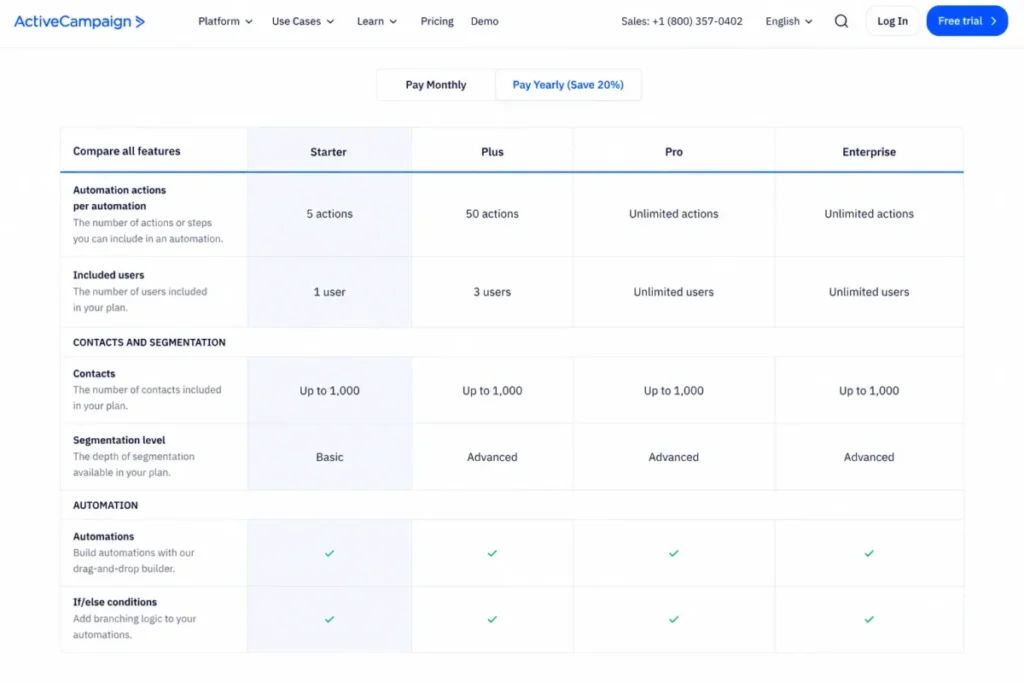 ActiveCampaign’s pricing page shows Starter limited to five automation actions and one user, while higher tiers expand automation capacity, users and segmentation.
Two platforms invert the usual pattern in ways worth naming. Omnisend puts advanced reporting on every tier including free, and Selzy puts AI generation and 24/7 support on every tier including free, which are the two places rivals almost always build a gate.
What Deliverability Evidence Actually Exists
Deliverability is the first thing buyers ask about and the last thing anyone can evidence. Here is the honest state of the public record, because most guides in this category quote a number without saying where it came from or when.
The most cited independent dataset is EmailToolTester’s seed-list study. Its method is sound: roughly 80 seed addresses across 28 ISPs weighted by popularity, SPF, DKIM and DMARC configured on dedicated sender subdomains, all sends on shared IPs inside a half-hour window with identical content.
The problem is the date. The most recent round ran in January 2024, and the publisher has since replaced the seed-list method with a feature-based star rating, stating that the placement tests have not been updated in some time.
| Platform | January 2024 inbox placement | Status of that figure |
|---|---|---|
| ActiveCampaign | 94.2% | Highest in that round; roughly two and a half years old |
| Constant Contact | 91.7% | Same round, same age |
| GetResponse | 90.9% | Same round, same age |
| MailerLite | 89.8% | Same round; also the strongest five-round average at 94.41% |
| Mailchimp | 89.5% | Same round, same age |
| Brevo | 88.3% | Same round, same age |
| HubSpot | 77.7% | Same round, same age |
| Omnisend | 75.1% | Lowest of the platforms on this page in that round |
| Kit | Not tested | DMARC could not be configured on Kit’s side for the study |
| Klaviyo | Not included | Absent from the results table entirely |
| Selzy | Not included | Absent from the results table entirely |
Source: EmailToolTester’s published seed-list deliverability study, January 2024 round, at https://www.emailtooltester.com/en/email-deliverability-test/. No platform on this page is ranked on these figures.
Three of the eleven platforms here have no independent placement figure at all. So any ranking that orders all eleven by deliverability is ordering three of them on nothing.
Treat those percentages as a two-year-old snapshot of shared-IP behavior, not as a current property of the software. Inbox placement is driven by sender reputation, authentication, list quality and content long before it is driven by which vendor sends the mail, and a 94.2 percent platform will still land in spam for a sender with a dirty list.
The practical version of this for a buyer: authenticate your domain with SPF, DKIM and DMARC before your first campaign, warm a new sending domain gradually, and suppress unengaged records quarterly. Those three actions move placement more than any switch between the platforms on this page.
Hidden Costs and Add-Ons
The advertised price covers the platform. It does not cover the capabilities buyers assume are inside it.
| Platform | Costs that sit outside the entry price |
|---|---|
| ActiveCampaign | SMS, WhatsApp, transactional email, AI Activities, enhanced CRM and custom reporting are add-ons, and Starter cannot buy any of them |
| Brevo | Extra Standard seats at $9/mo each, logo removal on Starter, deliverability specialist time at $499/ |
| HubSpot Marketing Hub | One-time onboarding of $3,000 on Professional and $7,000 on Enterprise, Core Seats from $45 to $75/ |
| Klaviyo | Marketing Analytics from $100/ |
| Omnisend | SMS credits from $0.009 to $0.007 per message, and a dedicated account expert only above $400/mo of spend |
| MailerLite | Unlimited seats, unlimited automations and 24/7 live chat all require Power; dedicated IP is Enterprise |
| GetResponse | SMS, mobile push, dedicated IP and a dedicated sending domain are Enterprise-only on custom pricing |
| Kit | Engagement analytics, subscriber scoring, deliverability reporting and unlimited users all require Pro at $66/mo |
| Mailchimp | Automatic overage billing on paid plans, SMS and MMS credits in select countries, and the 15% discount only above 10,000 contacts |
| Constant Contact | US-only SMS from $10/ |
| Selzy | The email quality checker, anti-spam and authentication checks, deliverability tips, the subject-line assistant and Telegram chatbots all require Standard |
Source: add-on, credit and onboarding pricing published on the eleven official pricing pages listed under Best Email Marketing Platforms at a Glance, checked August 29, 2026.
Two words explain most surprise invoices on this page: seats and credits. HubSpot adds a third, onboarding, and it is the largest single hidden number here at $3,000 for Professional.
If text messaging is central to the program rather than incidental, compare dedicated SMS marketing platforms rather than paying email-platform credit rates for it.
Ask the vendor two questions in writing before you sign: what happens on the day a third person needs a login, and what happens on the day you exceed the send allowance.
What Happens When You Cross a Limit
Seven of the eleven vendors leave this undocumented, so the answer arrives on an invoice rather than in a contract. The four that document it differ sharply from each other.
| Platform | Documented over-limit behavior |
|---|---|
| Mailchimp | Paid plans are billed for overages automatically once a contact or send limit is crossed; free accounts have sending paused instead |
| Constant Contact | Additional sends are billed at $0.002 each, which is $2 for every extra 1,000 |
| Klaviyo | Sending stops once free-plan limits are exceeded, until the profile count drops or the plan is upgraded; paid plans auto-upgrade a tier |
| HubSpot Marketing Hub | The contact tier cannot be downgraded until the contract renews, so an overrun is locked in for the term |
| All others | Not clearly disclosed on the pages checked on August 29, 2026; confirm with the vendor before relying on a soft limit |
Source: over-limit wording published on the official pricing and billing documentation pages listed under Best Email Marketing Platforms at a Glance, checked August 29, 2026. Only four vendors publish it.
That last row is the honest one, and it covers seven of the eleven platforms. A soft limit you have not seen in writing is a billing assumption, not a feature.
Klaviyo’s automatic tier upgrade deserves separate attention on a growing store. Cost can rise without anyone approving it, which is a different governance problem from an overage line a finance team can query.
Setup, Migration and Switching Cost
These difficulty ratings are research-based estimates drawn from workflow complexity, published migration resources and documented configuration surface. They describe how much work the platform asks for, not how long a specific team took.
| Platform | Setup difficulty estimate | Basis |
|---|---|---|
| ActiveCampaign | High | Branching automation and segmentation reward configuration time, and the five-action Starter cap forces early workflow redesign |
| Brevo | Low to medium | Approachable builder; multichannel and transactional setup add steps |
| HubSpot Marketing Hub | Medium to high | Straightforward when the CRM is clean, painful when lifecycle stages and properties are not |
| Klaviyo | High | Value depends entirely on catalog and event data quality |
| Omnisend | Low to medium | Prebuilt ecommerce flows carry most of the first month |
| MailerLite | Low | The shortest path here from empty account to sent campaign |
| GetResponse | Medium to high | Breadth across funnels, webinars and courses widens the configuration surface |
| Kit | Low | Broadcasts and forms are fast, and free migrations remove most switching friction |
| Mailchimp | Low | Familiarity is the feature |
| Constant Contact | Low | Guided onboarding and live support are part of the purchase |
| Selzy | Low | Drag-and-drop building with no CRM layer to model |
Source: configuration surface read from the official plan limits and published migration resources listed under Best Email Marketing Platforms at a Glance, checked August 29, 2026. These are editorial estimates of workload, not measured setup times.
Setup effort is a budget line, not a footnote. A $15 platform that needs 20 hours of configuration is not cheaper than a $35 platform that needs three, unless someone on the team has those 20 hours.
Switching costs are where the real number hides. Kit is the only platform on this page that publishes free migrations, and everyone else charges you in staff hours nobody counted: re-importing lists, rebuilding automations by hand, recreating forms and landing pages, and re-warming a new sending domain.
Three switching risks are worth checking before you commit to any platform here. Confirm that contact export includes engagement history and not just email addresses, that subscriber consent status survives the import, and that your new sending domain has a warm-up plan rather than a first-day blast to the full list.
Head-to-Head: The Three Decisions Most Buyers Are Actually Making
Most shortlists collapse to two names, and the same three pairings come up again and again. Each comparison below is decided by the operator you have rather than by which product carries more features.
Klaviyo vs Omnisend for ecommerce
Store maturity decides this, not feature count.
| Dimension | Klaviyo | Omnisend |
|---|---|---|
| Billing basis | Active profiles, including unconsented emailable records | Contacts, including non-subscribers who received automated messages |
| Free allowance | 250 profiles, 500 emails | 250 contacts, 500 emails, 500 web push |
| Data model | Product, order and browse events | Ecommerce events with prebuilt flows |
| Channels | Email, SMS in dollar allocations, mobile messages | Email, SMS on published credit rates, web push |
| Reporting | Revenue native; deeper analytics is a $100/mo product | Advanced reporting included on every tier |
| Operator needed | A dedicated lifecycle marketer | A generalist marketer, or the store owner |
Choose Klaviyo when a named person owns retention, the catalog and event data are clean, and you will act on predicted value and browse behavior. Choose Omnisend when the store owner is also the marketer and cart recovery has to work this month.
The disqualifier runs both ways. Klaviyo is the wrong buy when profile growth outruns revenue growth, and Omnisend is the wrong buy when the data model must be custom.
Buyers weighing where the order and customer record should live can compare the best CRM for ecommerce before locking either in.
HubSpot vs ActiveCampaign for B2B
Both get called marketing automation platforms. They are different operating models with different failure points.
| Question | Choose HubSpot Marketing Hub | Choose ActiveCampaign |
|---|---|---|
| Who owns the customer record? | HubSpot Smart CRM already does | A separate CRM, or none yet |
| Is the sales handoff the bottleneck? | Yes, and marketing context is missing | No, the bottleneck is workflow depth |
| What is the first-year budget? | Price $800/mo plus $3,000 onboarding | Price Plus at $49/mo and the setup hours |
| How large is the low-value database? | Small, because marketing contacts are billed | Large, since contact economics are gentler |
| Where does attribution need to live? | With the deal, and Enterprise is where it lives | Pro-tier conversion attribution is enough |
HubSpot’s premium buys organizational alignment. ActiveCampaign’s discount buys automation freedom, at the cost of maintaining the CRM connection yourself.
If nobody in sales will ever open the marketing tool, you are paying HubSpot for a benefit you will not collect. Teams weighing that trade-off should also look at the best CRM for marketing automation before committing to either.
Kit vs MailerLite for creators
Creators are told to compare free subscriber limits. That comparison hides the decision entirely.
| Dimension | Kit | MailerLite |
|---|---|---|
| Free allowance | 10,000 active unique subscribers, 1 user | 250 subscribers, 2 users |
| Free automation | Comparison rows show none | 3 automations |
| Entry paid tier | Creator, $33/mo at 1,000 subscribers | Comfort, $12/mo |
| Seats at entry paid tier | 2 | 3 |
| Monetization | Digital products, subscriptions, paid newsletters | Digital products and bookings on Power |
| Migration | Free migrations published | Not published as free |
Choose Kit when revenue comes from the audience directly through subscriptions, products or sponsorships, and you will pay for Creator rather than trying to run a program on free. Choose MailerLite when the newsletter supports a business that earns money elsewhere and you want the cheapest competent publishing stack.
The tell is automation on the free tier. If your plan was to run a welcome sequence on Kit’s free plan, check the current plan comparison before you migrate, because that is the row that appears to have changed.
Publishers weighing the wider field can also compare dedicated email newsletter tools.
Platforms Considered and Cut
Eleven platforms made this list. Several well-known names did not, and the reasons are more useful than a longer ranking would be.
| Platform | Why it is not ranked here |
|---|---|
| Beehiiv, Substack, Ghost | Newsletter publishing and subscription businesses rather than lifecycle marketing; no branching automation to compare |
| Moosend, EmailOctopus, Sender | Credible budget senders, but thinner automation and reporting than the entry tiers ranked above |
| AWeber, Campaign Monitor, Benchmark | Long-established broadcast tools whose automation depth sits below the platforms ranked here |
| Zoho Campaigns | Strong inside a Zoho stack, and hard to recommend outside it |
| Drip, Customer.io, Flodesk | Narrower fits: Drip and Customer.io for specific ecommerce and product-led motions, Flodesk for design-led senders |
| Campaigner, Instantly | Outbound and volume-sending motions rather than owned-audience marketing |
Email marketing platform vs transactional email service
Buyers land on the same search wanting three different products, and buying the wrong category is more expensive than picking the wrong vendor inside it.
A newsletter tool sends broadcasts to a list. A lifecycle marketing platform reacts to behavior with multistep automation, segmentation and revenue reporting.
A transactional service sends receipts, password resets and order confirmations triggered by your application. Brevo includes transactional sending through API or SMTP, Selzy provides an SMTP API, ActiveCampaign sells it as an add-on, and GetResponse places it at Enterprise.
None of the eleven platforms above replaces dedicated sending infrastructure when your product fires millions of system emails. If receipts and alerts are the actual problem, Resend, Postmark, SendGrid, MailerSend and Amazon SES are the category to shop, and no ranking on this page will fix a category mismatch.
How to Choose the Right Email Marketing Platform
Work through these seven questions in order. The first one that produces a hard constraint decides more than the other six.
- What is your billing unit exposure? Count stored contacts, monthly sends and logins. Whichever number is largest relative to your budget is the axis to optimize, and the billing table above tells you which platforms price it hardest.
- How many workflows run in month one? Write them out. More than one immediately rules out GetResponse Starter and Constant Contact Lite, and more than four steps rules out Mailchimp Essentials.
- Who needs a login? One user is the entry allowance on ActiveCampaign Starter, Constant Contact Lite, Mailchimp Free and Kit Free. A second marketer is an upgrade trigger before your list ever is.
- What question will your manager ask in 90 days? If it is a revenue question, price the reporting tier rather than the email tier: Pro on ActiveCampaign, Marketer on GetResponse, Enterprise on HubSpot for multi-touch attribution.
- What must it connect to? Verify your exact stack against the vendor’s own integration directory before you buy, because an integration count is a marketing number and a working connector is not.
- Who fixes it at 9pm? If the answer is that someone calls a human, Constant Contact and Brevo Professional answer the phone, and Selzy lists 24/7 support on every tier including free.
- What is the cost of leaving? Kit publishes free migrations. Everyone else charges you in staff hours nobody budgeted, and a new sending domain needs warming regardless of who you leave.
Answer those seven and the shortlist usually collapses to two platforms. That is the point of the exercise.
Common mistakes when choosing email marketing software
Budgeting from the starting price. Nine of the eleven platforms here gate automation, reporting or seats one tier above the advertised number, and HubSpot adds a $3,000 onboarding fee on top.
Treating automation as a yes or no feature. It is a depth setting, and the entry tiers on this page run from one workflow to unlimited actions.
Ignoring the billing unit. The same 20,000 records cost wildly different amounts on send-volume, contact, active-profile and marketing-contact models.
Forgetting seats. A three-person marketing team is an upgrade trigger on four entry plans here, no matter how small the list is.
Believing free-plan headlines. A 10,000-subscriber free plan whose automation rows are empty is a broadcast tool, and a 250-contact free plan with three automations is a better test environment.
Buying deliverability claims. The most-quoted independent placement data in this category is from January 2024 and is no longer being refreshed, so a vendor page citing it is citing history.
Skipping the list-hygiene math. On contact, subscriber, marketing-contact and active-profile models, unengaged records are a recurring invoice rather than a neutral archive.
Buyer Risk Ledger
Five risks decide whether this purchase looks smart at renewal.
| Risk | Who it hits | Consequence | Mitigation |
|---|---|---|---|
| Plan-gate shock | Anyone who budgeted from the entry price | The program stalls in week two and the upgrade is unbudgeted | Price the practical tier, and the onboarding fee, before you sign |
| Billing-unit mismatch | Large lists on low frequency, or the reverse | Cost grows on an axis nobody is managing | Match the model to your shape first, then optimize inside it |
| Seat creep | Teams of three or more | An upgrade triggered by headcount rather than growth | Count logins during evaluation, and ask about seats where no allowance is published |
| Adoption failure | Teams with no automation owner | Paid features go unused and renewal cannot be defended | Assign an owner before purchase, or buy a simpler tool |
| Migration lock-in | Anyone who buys the wrong shape | Switching costs staff hours and a domain warm-up nobody planned | Confirm export scope, consent-status portability and migration support before committing |
The 30/90-day adoption test
At 30 days, one automated workflow should be live and sending, the list should be segmented on at least one real behavior, and you should know your actual monthly bill rather than the advertised one.
At 90 days, a second and third workflow should be running, reporting should answer the revenue or pipeline question your manager asks, and nobody should be exporting to a spreadsheet to get an answer.
If either checkpoint fails, review the tier and the implementation plan before blaming the platform. In most stalled programs the tier was priced correctly and nobody was given the hours.
Final Verdict
ActiveCampaign is the strongest general-purpose pick on this page for a team whose bottleneck is automation depth, because that is the capability most teams underbuy and most regret underbuying. Budget Plus at $49 rather than Starter at $15, and give someone the hours to own it.
Everything after that is a fit decision rather than a quality decision. The winner by scenario, cohort by cohort:
- Large list, calm cadence: Brevo, because it bills sends rather than stored records, once you have the free-tier limits confirmed in writing.
- Small list, high cadence: Selzy, because the bill tracks list size and campaign frequency is free, with Standard budgeted rather than Lite.
- B2B on HubSpot Smart CRM: HubSpot Marketing Hub, when the handoff is worth more than the discount and the $3,000 onboarding is in the first-year number.
- Ecommerce with clean event data and a lifecycle owner: Klaviyo, with the $100 analytics product priced in if you need it.
- Ecommerce without a lifecycle owner: Omnisend, which is also the only platform here with advanced reporting on every tier.
- First newsletter, no configuration appetite: MailerLite, which also has the most usable free plan on this page.
- Webinars and courses as core revenue: GetResponse, priced at Creator from day one.
- Audience is the business model: Kit, on Creator rather than free, and check the free plan’s automation rows before you plan around them.
- Familiar stack, stable list: Mailchimp, with the overage rule understood before the first busy month.
- Local organization that needs a human on the phone: Constant Contact, and ask about the nonprofit prepay discount.
We would not buy any of them from the starting price alone. Price the tier that runs your second workflow, count the logins, and get the vendor’s answer in writing for the day you cross the send allowance.
Teams whose real requirement is a broader automation stack rather than an email tool should compare dedicated marketing automation platforms before shortlisting from this page.
FAQ – Best Email Marketing 2026
These are the questions the sections above do not fully close, phrased the way buyers ask them.
Which email marketing software is best for small businesses?
It depends on your database size and send frequency rather than the words “small business”. A small team with a big list and low send volume gets the best value from Brevo. A small team sending frequently to a modest list pays less on Selzy or GetResponse, because neither charges for extra campaigns, and a small store should look at Omnisend first.
If two or three people need logins, MailerLite Comfort at $12 and GetResponse Starter at $19 are the only entry tiers here that include three seats.
What is the best email marketing software for ecommerce and Shopify?
Klaviyo when a named person owns retention and your product and order data is clean, and Omnisend when the store owner is also the marketer. The split is operator capacity rather than feature depth: Klaviyo’s active-profile model segments on browse and purchase events and rewards a specialist, while Omnisend’s prebuilt cart and post-purchase flows get a generalist to revenue faster.
Price both at your real profile or contact count before deciding, because Klaviyo auto-upgrades tiers as profiles grow.
What is the best alternative to Mailchimp?
Brevo when the problem is cost as the list compounds, because Brevo bills sends rather than stored contacts. MailerLite when the problem is Mailchimp’s seat and audience limits, since Comfort includes three seats at $12 and 50 automations against Essentials’ four flow steps.
ActiveCampaign when the problem is automation depth rather than price.
Is Mailchimp still worth using in 2026?
Yes, for a team that already knows it and holds a stable list, because familiarity removes real production time and the template ecosystem is still the deepest here. It stops being worth it when the database compounds, since every stored contact is billed every month and overages on paid plans are charged automatically rather than blocked.
Check the Essentials four-flow-step limit against your intended program before renewing.
Can I switch email marketing platforms without losing my subscribers?
Yes, but three things travel badly and need checking before you commit. Confirm that the export includes engagement history rather than only email addresses, and that consent status survives the import so you are not mailing records you no longer have permission for. Then confirm you have a warm-up plan for the new sending domain instead of a first-day blast to the full list.
Kit is the only platform on this page that publishes free migrations; everywhere else the cost appears as staff hours.
How much does email marketing software cost per month?
Entry prices on this page run from $7.50 to $33 per month, and the tier that runs a real program usually costs two to four times that. At 10,000 contacts the published figures here range from $60 per month on Selzy Lite to $800 on HubSpot Professional before its $3,000 onboarding fee.
Budget the practical tier, the seats and the add-ons together, because the advertised number is the least useful figure in the comparison.
Which email marketing platform includes CRM features?
HubSpot Marketing Hub is the only platform here built on a CRM of record, which is the reason to pay its premium. ActiveCampaign offers enhanced CRM as a paid add-on that Starter cannot purchase, Brevo and Klaviyo hold customer data without being a sales CRM, and Selzy explicitly is not one.
If the customer record and the campaign have to live in the same system, that requirement narrows this list to one.