Survicate is a customer feedback platform that lets one team run website, in-product, email, link, and mobile surveys, then route the answers into a CRM. If your job is recurring contextual feedback with a follow-up in HubSpot or a similar system, it is worth a shortlist.
The catch shows up in the parts vendors rarely lead with: a partial submission usually burns a paid response, the Free plan stops collecting at 25 responses a month, and the governance controls a regulated buyer needs sit behind Enterprise. Those are the facts that decide whether the advertised price is your real budget.
This is a buyer-risk review of Survicate for US teams, with pricing and documentation checked on 18 July 2026. We read the official pricing page, help center, developer docs, and security materials, then compared them against attributable third-party sentiment.
We did not open a paid account or run a production integration. Every workflow below is documented rather than personally tested.
The short answer: Survicate is a strong buy for product, CX, and lifecycle teams that already own CRM integration and want feedback everywhere in one workflow. It is a weak fit for zero-budget high-volume collection, formal statistical research, and lower-tier compliance buyers.
In This Article (19 sections)
Quick Verdict: Survicate at a Glance
| Decision point | Our read (checked 18 July 2026) |
|---|---|
| Best for | Five-to-fifteen-person product and CX teams running recurring website or in-product NPS/ |
| Not ideal for | Bootstrapped teams needing more than 25 free responses a month, high-volume programs chasing a low predictable cost per response, and formal statistical research teams |
| Starting price | Free at $0; lowest monthly-commitment paid plan (Starter) from $89/ |
| Practical plan | Growth for a continuous multichannel program; it removes the two-survey ceiling and adds AI analysis and branding removal |
| Free plan / trial | Permanent Free plan (25 responses/ |
| Setup difficulty | Low for email and link surveys; higher for website (tracking code), mobile (SDK), and HubSpot (identity plus permissions) |
| Main strength | One survey environment spanning website, in-product, email, link, and mobile, with an identified-response HubSpot loop |
| Main limitation | Advanced logic, APIs, SSO, and HIPAA are plan-gated, and partial responses consume the paid allowance |
| Best alternative | Qualtrics-class tools for formal statistical depth; Hotjar when behavioral context is the point; SurveyMonkey for high-volume standalone surveys |
Prices, plan gates, and limits in this table are explained and sourced in the sections below. Nothing here is an average of external ratings or a vendor score.
What We Verified
We evaluated Survicate using its current US pricing, official product and developer documentation, security resources, verified interface evidence, and recurring feedback patterns from established software-review platforms. Pricing, plan limits, integration requirements, and product availability were last checked on July 18, 2026.
Where official sources showed different values or conditions, we retained the conflict and identified what buyers should confirm before purchasing.
What Survicate Is and the Job It Does
Survicate is a customer feedback and voice-of-customer platform from Survicate S.A., a private company that Gartner lists as founded in 2013 and headquartered in Warsaw, Poland. The official positioning targets CX, Product, Research, and Marketing teams.
The core job is collecting feedback wherever the customer already is, then acting on it. That means NPS, CSAT, and CES surveys delivered on a website, inside a web product, in an email, through a shareable link, or inside a mobile app.
A second job sits on top of collection: consolidation and analysis. Survicate’s Research Hub pulls surveys, reviews, calls, chats, and imported CSV feedback into scoped Research Projects, then generates editable AI reports with references back to the underlying feedback.
For a buyer, the practical framing is simple. Survicate competes less with a single-purpose form builder and more with the patchwork of tools a team otherwise stitches together for web, in-app, email, and mobile feedback.
The differentiator that should drive a shortlist decision is the identified-response CRM loop. When a respondent is known, an answer can update a CRM record and trigger lifecycle follow-up, which is where feedback stops being a report and starts being an operational signal.
What Users Say About Survicate
Because this page answers a “reviews” query, the sentiment layer matters. We compared verified review platforms rather than averaging their scores.
At the checked snapshot on 18 July 2026, G2 displayed a 4.6/5 rating across 205 visible product reviews, Capterra showed 4.6/5 across 99 reviews, and Gartner Peer Insights showed 4.6/5 across 40 ratings. Treat those as dated snapshots that move over time, and note that review samples are self-selected and sometimes vendor-referred or incentivized.
These are third-party reviewer ratings, not a SaaS CRM Review score. We report them as evidence of user sentiment only.
The recurring praise is consistent. Across G2, Capterra, TrustRadius, and a Reddit discussion of free feedback tools, reviewers describe survey creation, onboarding, multichannel delivery, templates, and support as easy or responsive.
The qualifying pattern is where buyers should slow down. Reviewers repeatedly flag limited advanced filtering and cross-analysis, basic or occasionally inaccurate AI reporting, requests for deeper dashboard and design customization, audience-management friction, and mobile-design concerns.
A 2026 G2 reviewer working as a Salesforce business analyst summarized the split well in paraphrase: survey creation and the dashboard felt straightforward, while branding, filtering, and cross-analysis were limited enough to push work back into spreadsheets. A 2025 Gartner Peer Insights reviewer at a software company praised an ActiveCampaign integration but flagged AI-summary accuracy and connected-survey scale.
| Recurring theme | Sentiment | Where it appears | Buyer implication |
|---|---|---|---|
| Fast setup and responsive support | Positive | G2, Capterra, TrustRadius | Low time-to-first-survey for non-technical owners |
| Limited advanced filtering and cross-analysis | Critical | G2, Capterra, Gartner, TrustRadius | Formal research teams may still export to a spreadsheet |
| AI summaries need checking | Critical | G2, Gartner | Treat AI reports as drafts, not conclusions |
| Pricing feels restrictive at scale | Mixed | G2, Capterra, TrustRadius, GetApp | Model response volume before committing |
The one pattern we would not dismiss is the analysis-depth complaint, because it lines up with the plan gates documented below rather than being a one-off opinion.
Survicate Pricing and the Response-Volume Cost Ladder
Survicate prices by response volume and feature tier, not purely by seat, which changes how a buyer should budget. Every price here is US list pricing from the official Survicate pricing page and pricing help center, checked on 18 July 2026.
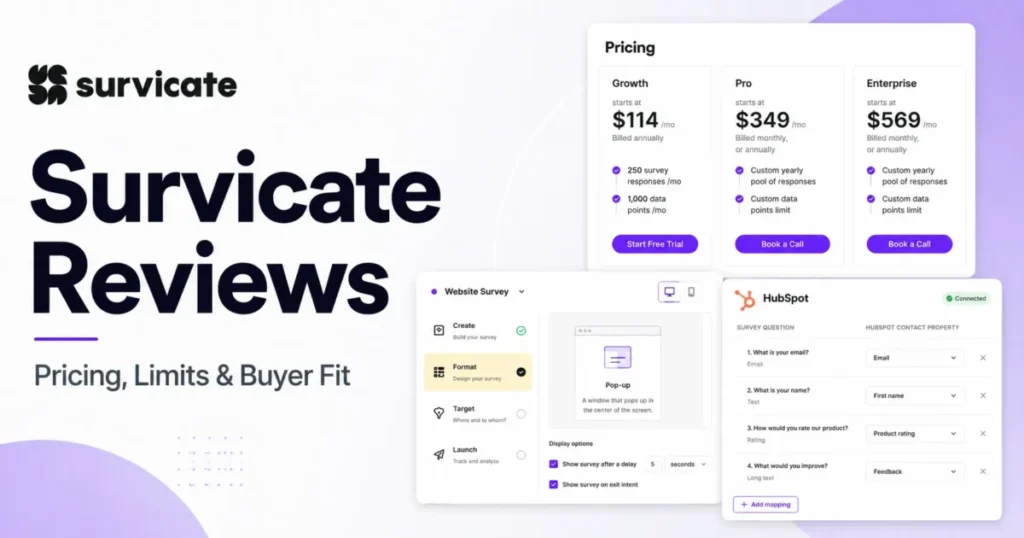
| Plan | Starting price (checked 18 Jul 2026) | Billing basis | Monthly responses | Active surveys | Seats | Retention |
|---|---|---|---|---|---|---|
| Free | $0 | No paid cadence | 25 | Not stated as unlimited; see conflict note | 3 | ~30 days (documented) |
| Starter | From $89/ | Monthly commitment | 100 / 250 / 500 | 2 | 5 | 6 months |
| Growth | From $56/ | Yearly commitment | 100 to 1,500 | Unlimited | 10 | 2 years |
| Pro | From $349/ | See cadence conflict below | Custom pool | Unlimited | Custom | 5 years |
| Enterprise | From $569/ | See cadence conflict below | Custom pool | Unlimited | Custom | 5+ years |
Mobile strategy for this wide table: a pinned-label horizontal scroll keeps the Plan column fixed, with Seats and Retention treated as reduced-priority columns.
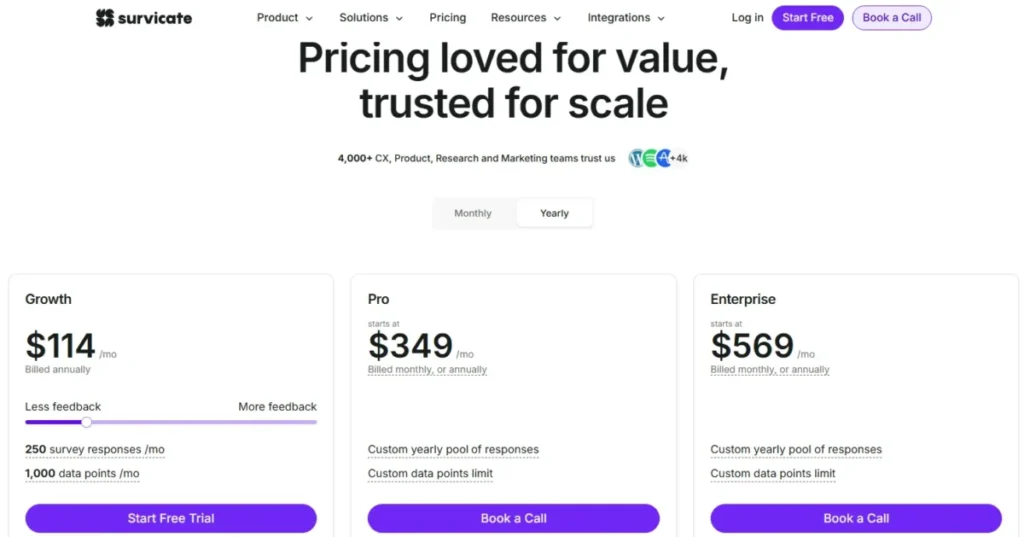
Two numbers on the pricing page need translating. The help center describes Growth starting at $56 per month effective on a yearly commitment, while the live pricing page on 18 July 2026 showed Growth at $114 per month billed annually once we selected 250 responses and 1,000 Research Hub data points.
Both are Growth prices, and they differ because of response volume. The $56 figure is the lowest advertised annual-effective entry, while the $114 figure is the price at a specific, more realistic usage state.
Neither number is stale. They simply answer different slider positions.
There is also an official contradiction worth flagging before signing. The pricing page lists Pro and Enterprise as billed monthly or annually, while the pricing help article describes advanced plans as yearly commitments.
We could not reconcile that from public pages. Confirm the commitment length in the written quote, because it changes cancellation flexibility and purchase risk.
For a 10-person team, the seat math is friendly and the response math is not. Growth bundles 10 teammate seats, so a team that size pays by response volume rather than per user, which is unusual and genuinely useful.
Here are the arithmetic floors, calculated from official starting prices rather than quotes. Twelve months of Starter at $89 is $1,068; Growth at the $56 effective rate is $672 a year and at the checked $114 state is $1,368; Pro at $349 is a $4,188 floor; Enterprise at $569 is a $6,828 floor.
Each figure excludes overages, taxes, discounts, and negotiated terms. Treat them as planning floors, not the number on your order form.
What Counts as a Response, and Why It Changes Your Bill
The response allowance looks like a simple quota. It is not, and this is the single most under-covered cost fact in the current search results.
Per Survicate’s documentation on what counts as a response, most partial submissions count as a full response. For single-question email, link, and other survey types, a submission generally counts whether it is complete or partial.
There are two exceptions worth knowing. A submitted Welcome message where the respondent does not proceed is visible in analysis but not counted, and a one-page survey saves only after all required questions are answered and submitted.
One quiet cost trap: live survey test submissions count toward the limit. A team that tests in production rather than in Preview can spend paid capacity before a single real customer answers.
The practical impact is on cost per usable completion. If abandonment is common in your audience, model expected partials before you pick a Starter allowance, because the headline “100 responses” is not “100 completed responses.”
On the Free plan, the overflow behavior is a hard stop. When the monthly response limit is reached, surveys stop collecting, and the documented recovery path in the Free account guide is to view usage under Settings, then upgrade to restart collection.
That stop behavior is actually a point in Survicate’s favor for budget control: Free does not silently run up an overage. Starter, by contrast, supports optional response overages billed at the end of the period, and the rate varies by allowance.
For the 100-response Starter configuration, a current Survicate-owned article documents overages at $0.89 per response. We would not generalize that figure to the 250- or 500-response Starter states, whose overage schedules are not publicly disclosed; check the live slider before committing.
Feature Gates: What Unlocks on Each Plan
Plan selection at Survicate is driven by workflow gates as much as by response volume. A low-volume team can still be forced up a tier by one required capability.
| Capability | First plan that unlocks it | Locked or limited below | Buyer consequence |
|---|---|---|---|
| CSV/ | Starter | Free (no export) | Free cannot move data to a spreadsheet or preserve a durable dataset |
| Branding removal, AI categorization/ | Growth | Starter | Continuous programs that need analysis and unbranded surveys start at Growth |
| Advanced display logic and visual logic tree | Pro | Starter, Growth | Complex research logic can require Pro even at low volume |
| Custom CSS and custom domain | Pro | Starter (logo only), Growth (branding removal) | Pixel- or domain-level brand control forces Pro |
| Webhooks, custom APIs, Data Export API | Pro | Starter, Growth | Automated raw-data pipelines require a jump to Pro |
| Premium integrations (Braze, Amplitude, Salesforce, data warehouses) | Pro / Enterprise | Growth (25+ core integrations) | A single required connector can decide the plan |
| SAML SSO, access logs, HIPAA, DORA | Enterprise | Starter, Growth, Pro | Regulated or centrally governed buyers must budget for Enterprise |
The most consequential jump is at Pro. Growth can collect continuous multichannel feedback and still lack advanced logic, custom CSS, APIs, and the premium integration families.
Our editorial read is to pick the lowest tier that satisfies the non-negotiable workflow, then size response volume second. A team that buys Growth for the response allowance and later discovers it needs the export API will pay the Pro jump anyway.
Core Workflows and the Features Behind Them
Feedback tools live or die on setup ownership. Survicate’s no-code authoring sits on top of channel-specific prerequisites, and the difference between “easy” and “engineering project” depends entirely on the channel.
Launching a website or in-product survey
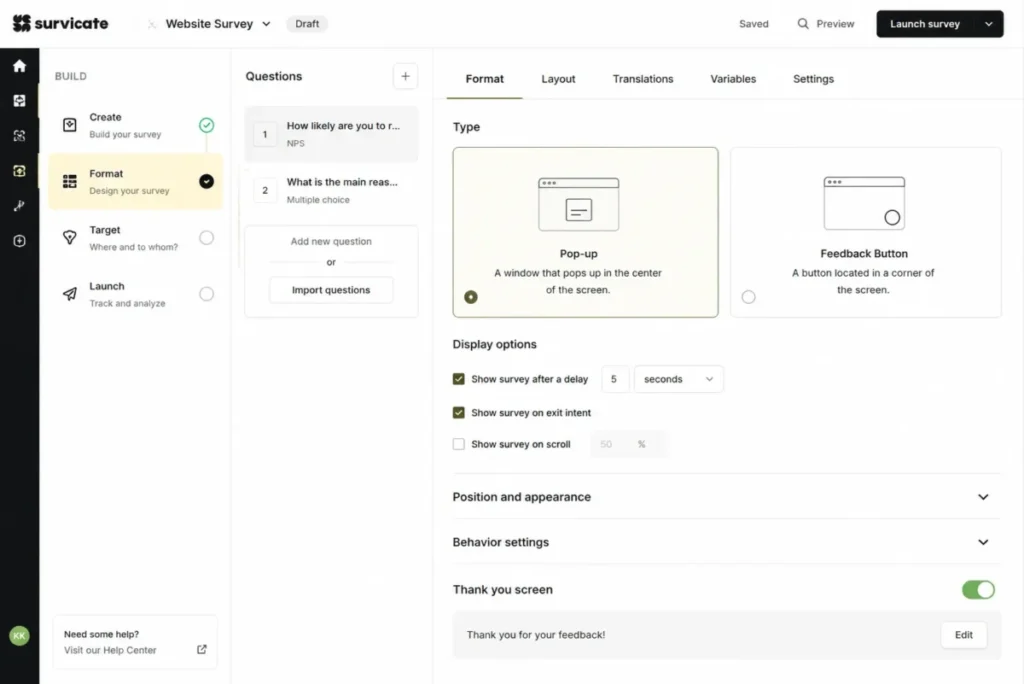
The documented path starts at Create new survey, where a user picks a method (scratch, template, AI, or import) and a channel, then edits questions, logic, and a thank-you state before choosing a pop-up or feedback-button format.
The gate is implementation, not authoring. Website and in-product surveys require a one-time Survicate tracking-code installation per website, through a supported one-click route, manual code, or a package such as GTM or an NPM install.
The official guide documents a browser-console check with a workspaceKey success state and a red error state. That is a job for someone who can edit the site or manage a tag, which affects who owns time-to-value.
One planning constraint we would flag early: survey type usually cannot be changed after creation, aside from a documented website/Braze switch. Choosing the wrong channel means duplicating and rebuilding rather than toggling.
Sending identified responses into HubSpot
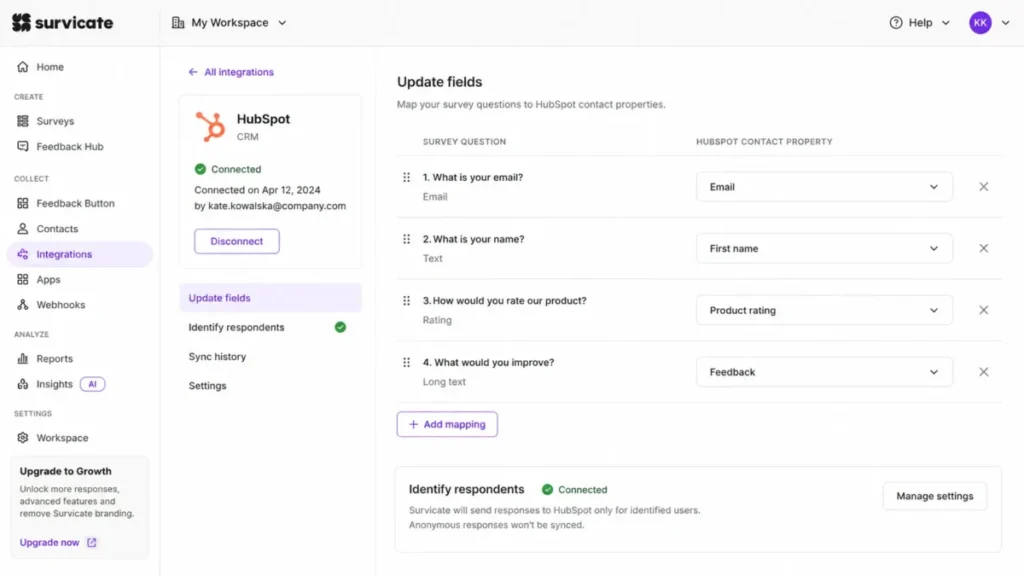
This is the workflow that justifies Survicate over a standalone form builder, and it is also the one buyers most often misconfigure. The documented flow moves from authorization to respondent identification, property mapping, and distribution to a real contact.
The non-negotiable prerequisite is respondent identity. Per the HubSpot integration guide, anonymous responses do not sync to HubSpot, and sending a HubSpot test email is documented as insufficient for respondent recognition.
In practice, a lifecycle team must identify respondents (via email trait, SDK trait, or an identified survey type), authorize the integration with the required HubSpot and Survicate permissions, and map questions to contact properties before answers reach the CRM. Miss the identity step and the feedback loop silently fails.
For revenue operations, that makes this a closed-loop feature when configured correctly and a dead end when it is not. During evaluation, we would exercise the identity path with a known existing contact, not a fresh test email.
That is the same discipline you would apply when validating a HubSpot CRM review claim about survey enrichment. It is also worth checking against HubSpot pricing tiers that gate the properties you plan to write to.
Consolidating feedback in Research Hub
Research Hub is Survicate’s answer to fragmented qualitative feedback. The documented Research Hub workflow runs from Data Sources to a scoped Research Project (One-Time Analysis or Continuous Monitoring) to an editable report with references back to individual feedback pieces, plus Insights and a Research Assistant chat.
The useful nuance is traceability. Because the report cites the feedback behind each point, a researcher can verify an AI conclusion against source comments rather than trusting a summary.
The friction is import preparation, and it is stricter than “upload a CSV.” A file must be under 20 MB, CSV feedback must sit in one column with text fields quoted, the feedback and date fields must be mapped, and a mapped topic column supports at most 200 unique topics.
This is feedback import, not a full survey-platform migration. Historical survey definitions, question logic, automations, attachments, owners, and relationships are not documented as migrating, and duplicate handling and rollback are not publicly specified.
Exporting data manually or through the API
Portability begins on a paid plan. Manual export runs from the Analyze tab as CSV or XLSX with all-versus-filtered scope and an emailed download link, and Free cannot export at all.
One format detail prevents a failed spreadsheet job: because one XLSX sheet holds 65,536 rows, Survicate instructs users to choose CSV when a survey exceeds 65,535 responses.
For automation, the Data Export API v2 requires an eligible Pro or Enterprise subscription and an API key, and it retrieves surveys, questions, responses, attributes, and personal data. The documented ceilings are 5 concurrent requests and 1,000 requests per minute per workspace, and exceeding either returns HTTP 429.
The engineering consequence is real. Data teams must queue requests and handle the documented rate-limit response, and because the docs do not publish a retry formula, the backoff policy is the buyer’s to design.
Deploying a mobile-app survey
Native mobile is not a no-code channel. Mobile-app surveys require installing the Survicate SDK in application code, with documented support for iOS, Android, React Native, Flutter, and Unity.
Targeting can use screens, events, properties, audience, and frequency, but some operators depend on the deployed SDK version, so an old SDK can quietly ignore newer targeting rules. Response-period limits run in GMT, and a survey pauses or stops when a period cap is reached.
For a research team without engineering support, this is a dependency, not a checkbox. We would not promise a mobile launch on a self-serve timeline; the SDK install and version maintenance belong to a developer.
Setup and Ease of Use
Reviewers consistently call authoring easy, and the documentation supports that for the simplest channel. An email or link survey can be built and distributed from the panel with templates or AI-assisted question drafting, which is why non-technical owners report a fast first survey.
The honest picture is that ease of use is not uniform across channels. Setup difficulty rises with each step away from a shareable link.
A website survey adds a one-time tracking-code install and targeting rules, which pulls in whoever manages the site or tag manager. A mobile survey adds an SDK and version maintenance, which is a developer task, not a marketer task.
The CRM loop adds a third owner: whoever holds HubSpot or Salesforce permissions and can map properties. So the practical question is not “is Survicate easy,” but “who on your team owns web code, mobile SDK, and CRM identity.”
Here is the adoption test I would apply. By day 30, a healthy rollout has at least one channel collecting live responses and one identified response reaching the CRM, proving the loop end to end.
By day 90, the risk shifts from setup to discipline: is the team acting on feedback, keeping targeting rules current, and verifying AI summaries against source comments. If those habits are not forming, the tool is running but the purchase is not yet working.
Integrations and the HubSpot Identity Prerequisite
Survicate advertises 25+ integrations on Growth and 40+ or 44+ native integrations on Pro and Enterprise. Documented examples include HubSpot, Salesforce, Zendesk, Intercom, Slack, ActiveCampaign, Braze, Amplitude, Mixpanel, BigQuery, and Zapier.
The buyer trap is assuming breadth equals availability. Premium families such as Braze, Amplitude, Salesforce, and data warehouses are gated to higher tiers in the official comparison, so a required connector can be the real plan selector even when response volume is low.
The pattern from the HubSpot workflow repeats across CRMs: identity and permissions decide whether the loop works. Before committing, confirm the exact plan that unlocks your connector, whether it needs identified respondents, and which objects sync in which direction.
If your stack centers on lifecycle tooling, the same evaluation applies whether the connector you need sits behind Salesforce pricing tiers, Zendesk pricing, an Intercom review, or an ActiveCampaign review. The connector is only as good as its identity prerequisites and its plan gate.
Automation, AI, and Reporting
Survicate’s reporting is competent for operational feedback and thinner for formal analysis. AI categorization and sentiment begin on Growth, dashboards scale from one on Growth to ten on Pro and custom on Enterprise, and Research Hub adds AI-generated reports.
The reviewer sentiment about analysis depth is the signal to respect. Limited cross-analysis and filtering are recurring complaints, which means a team needing cross-tabulation or statistical rigor should expect to export.
On AI specifically, we would treat every Survicate AI report as a draft. Reviewers report occasional inaccurate or misleading summaries, and because the reports cite their source feedback, the correct control is to verify conclusions against those citations before acting.
No independent accuracy benchmark was verified, so any claim that the AI is reliably correct or reliably wrong would overstate the evidence. The safe posture is a mandatory human-review step in the research workflow.
Security, Compliance, and Support
Survicate’s security documentation describes a solid baseline: AWS hosting in Ireland, HTTPS with TLS 1.2 or higher, encryption at rest with AWS KMS, encrypted backups, environment isolation, monitoring, 2FA, and SAML 2.0 support. Product development and maintenance are ISO 27001 certified.
The distinction procurement must hold is between Survicate’s own ISO 27001 certification and AWS’s infrastructure compliance programs, which cover the hosting layer rather than every account configuration. A security page is not a signed agreement.
The commercial gate is the decisive fact for regulated buyers. SAML SSO, access logs, HIPAA, and DORA are documented as Enterprise features, so a healthcare or centrally governed team cannot buy Growth or Pro and expect single sign-on or a HIPAA arrangement.
Support scales with plan. Official materials list chat and email support, with priority chat, calls, a dedicated Success Manager, and 1:1 training appearing at higher tiers.
No public contractual response-time SLA was verified. We would not assume guaranteed response times without confirming them in the contract.
Survicate Limitations Buyers Should Weigh
Every product-led review earns its trust in the limitations section. These are decision-grade, not stylistic gripes.
The first is client-side survey recurrence. Survicate normally stores survey status and respondent state in browser Local Storage, so clearing storage or switching browser or device can retrigger a survey and undercount a returning respondent.
A plan-gated option moves listed data to Session Storage, which improves persistence privacy. It can also reset progress and retrigger event-based surveys, and it does not solve cross-device identity.
The second is analysis depth for formal research. If your central job is advanced cross-tabulation or statistical analysis, the documented scope and reviewer sentiment both point away from Survicate, and you should evaluate a research-grade platform instead.
The third is cancellation fallout, which is an operational event, not a footnote. Survicate’s subscription and refund documentation states no refunds, and after cancellation paid access runs to the end of the cycle, then the account moves to Free, surveys are archived and stop collecting, and paid integrations become unavailable.
Export eligible data and document your integrations before the period ends. There is no documented grace period to recover a collecting survey afterward.
The fourth is the migration ceiling. Research Hub imports feedback under strict CSV rules, but it is not evidenced to migrate survey definitions, logic, automations, or relational history, so a switching team should plan to rebuild those.
The fifth is the response-unit economics already covered: partial and live-test submissions consume the paid allowance, which raises the effective cost per completed response.
Survicate Pros and Cons
| Pros | Cons |
|---|---|
| One survey environment covers website, in-product, email, link, and mobile, so a product team avoids the cost of buying a separate survey tool per channel | Advanced display logic, custom CSS, APIs, and premium integrations are gated to Pro, so low-volume teams can still be forced up a tier |
| Growth bundles 10 teammate seats and unlimited active surveys, so a mid-size team pays by response volume rather than per user | Partial submissions and live test responses count toward the paid allowance, raising cost per usable completion |
| The HubSpot loop supports identified responses updating CRM properties and events, not just a logo-list integration | Anonymous responses do not sync to HubSpot, which blocks the feedback loop until lifecycle teams identify respondents |
| Research Hub cites source feedback inside AI reports, enabling verification rather than blind trust | Reviewers repeatedly flag limited cross-analysis and filtering, so formal research teams often export to a spreadsheet for deeper analysis |
| Free plan stops at the cap instead of billing a surprise overage, aiding budget control | SAML SSO, access logs, HIPAA, and DORA require Enterprise, blocking regulated buyers on lower tiers |
| Documented security baseline (TLS 1.2+, encryption at rest, ISO 27001 product certification, SAML support) | Official pages disagree on Pro/ |
Who Should Use Survicate
Product and CX teams running recurring contextual surveys are the core fit. If you run website or in-product NPS and CSAT on a schedule and route identified answers into a CRM, Survicate concentrates that work in one place.
Lifecycle and revenue-operations teams centered on HubSpot get real value from the identified-response loop, provided they own the identity and permission setup. This is where feedback becomes a trigger rather than a dashboard.
Research and insights teams with fragmented qualitative feedback are a strong secondary fit. Research Hub can consolidate surveys, reviews, calls, and prepared CSV history into scoped projects, as long as AI output is verified against citations.
Mobile product teams with developer capacity can extend the same environment into native apps. The requirement is honest SDK ownership, not a no-code promise.
For teams standardizing a broader stack, Survicate slots in alongside a CRM for marketing automation rather than replacing it.
Who Should Avoid Survicate
Zero-budget teams that need more than 25 responses a month should look elsewhere first. Free stops at the cap and cannot export, so it is an evaluation tier, not a durable system.
High-volume programs chasing a predictable low cost per response will feel the response-unit economics. When partials count and overage rates vary by allowance, a simple cost-per-response comparison can favor a different tool.
Formal research teams needing advanced cross-tabulation or statistical depth should treat Survicate as a collection layer, not an analysis platform. The documented scope and reviewer sentiment agree here.
Regulated buyers unwilling to purchase Enterprise for SAML SSO, access logs, HIPAA, or DORA should price the governance requirement first, because it can make Enterprise the only viable tier regardless of volume. Non-technical mobile teams without SDK support belong on this list too.
Survicate Alternatives by Failed Requirement
Route the alternative by the requirement Survicate fails, not by popularity. Each note below is a directional evaluation path, not a fully sourced feature ranking.
| Alternative | Choose it when Survicate falls short on… | Trade-off to check |
|---|---|---|
| Qualtrics-class research platforms | Formal statistical depth, advanced cross-tabulation, and enterprise research governance | Higher cost and complexity than a contextual-feedback tool |
| SurveyMonkey | Broad standalone survey programs and simple high-volume distribution | Weaker in-product and CRM-loop context |
| Hotjar | Behavior and session context sitting alongside feedback | Less depth as a multichannel survey and CRM tool |
| Typeform | Design-led, conversational standalone forms with flexible distribution | Thinner in-product targeting and feedback consolidation |
| Jotform | General-purpose form workflows and form-based data collection | Not built around voice-of-customer analysis |
None of these tools has a review on our site yet, so confirm current pricing and plan gates on each vendor’s official pages before shortlisting.
Final Verdict: Is Survicate Worth It in 2026?
Worth it for product, CX, and lifecycle teams that need recurring feedback across website, in-product, email, and mobile with an identified-response CRM loop. That is Survicate’s strongest workflow, and few tools cover the same channels in one environment.
Not worth it for zero-budget high-volume collection, formal statistical research, or lower-tier compliance buyers. The weakest workflows are deep cross-analysis and no-code mobile, and the response-unit economics quietly raise the effective price.
Best plan to price first is Growth. It removes the two-survey Starter ceiling, adds AI analysis and branding removal, and bundles 10 seats, which makes it the practical default for a continuous program.
Upgrade to Pro when advanced logic, custom CSS, the export API, webhooks, or a premium integration is non-negotiable. Move to Enterprise when governance requires SSO, access logs, HIPAA, or DORA.
Choose an alternative when your central requirement is formal statistical depth, behavioral session context, or a predictable low cost per response at high volume. Before signing, confirm the Pro/Enterprise billing cadence, the overage rate at your Starter allowance, and the exact plan that unlocks your CRM connector.
My recommendation: shortlist Survicate if contextual multichannel feedback with CRM action is the job, budget from Growth rather than the entry price, and do not import production history until plan, export, and contract terms are confirmed.
Frequently Asked Questions
Is Survicate free?
Yes, Survicate has a permanent Free plan at $0 with no time limit. It includes up to 3 teammates and 25 responses per month, but it cannot export data and stops collecting once the monthly response cap is reached.
New signups also get a separate 10-day trial capped at 25 responses. Free is best treated as an evaluation tier, not a production system.
How much does Survicate cost in 2026?
Checked on 18 July 2026, the lowest monthly-commitment paid plan, Starter, begins at $89 per month for 100 responses. Growth starts at $56 per month effective on a yearly commitment and showed $114 per month billed annually at 250 responses on the pricing page.
Pro starts at $349 per month and Enterprise at $569 per month, both sales-led. Overages and taxes are extra.
What counts as a Survicate response?
Most submissions count as one response whether complete or partial. A submitted Welcome message where the respondent stops is visible in analysis but not counted, and one-page surveys save only after all required questions are submitted.
Live survey test submissions also count toward the limit. Test in Preview to avoid burning paid capacity.
What happens when the Survicate response limit is reached?
On the Free plan, surveys stop collecting once the monthly response limit is hit, and you upgrade to restart collection. Starter supports optional overages billed at the end of the period, at a rate that varies by allowance.
The 100-response Starter configuration is documented at $0.89 per response. Higher-tier overflow terms are not publicly disclosed.
Does Survicate integrate with HubSpot?
Yes, and the integration supports identified responses updating HubSpot contact properties, events, and app cards. The key requirement is respondent identity: anonymous responses do not sync, and a HubSpot test email is not enough to identify a respondent.
Connection also needs specific HubSpot and Survicate permissions. Confirm access and the eligible Survicate plan before relying on the loop.
Is Survicate HIPAA compliant?
HIPAA is documented as an Enterprise feature, alongside SAML SSO, access logs, and DORA. Lower plans include a security baseline such as TLS 1.2 or higher, encryption at rest, 2FA, and SAML support, plus ISO 27001 certification for product development.
Regulated buyers should price Enterprise and confirm a signed agreement. A security page is not a contract.
Does Survicate support mobile app surveys?
Yes, through mobile SDKs for iOS, Android, React Native, Flutter, and Unity. Native in-app surveys require a developer to install and maintain the SDK in application code, so this is not a no-code channel.
Targeting uses screens, events, and properties, but some operators depend on the SDK version. Response-period limits run in GMT.
What are the best Survicate alternatives?
Route by the requirement Survicate misses. Consider Qualtrics-class platforms for formal statistical research, SurveyMonkey for broad standalone surveys, Hotjar when behavioral session context matters, Typeform for design-led forms, and Jotform for general form workflows.
Confirm each vendor’s current pricing and plan gates before shortlisting. These are directional paths rather than ranked recommendations.
Can you export data from Survicate?
Manual CSV and XLSX export is available from the Analyze tab on paid plans, with all-versus-filtered scope and an emailed download link. The Free plan cannot export.
Because one XLSX sheet holds 65,536 rows, Survicate directs users to CSV above 65,535 responses. Automated export via the Data Export API requires Pro or Enterprise and faces documented rate limits.