The hardest part of buying the best customer feedback software is not the feature list. The ten tools below solve four genuinely different jobs, and picking the wrong job wastes a quarter of budget before anyone notices.
Zonka Feedback takes the top spot because it spans collection, analysis and follow-up across more channels than any other tool here. It also quotes rather than publishing a dollar price, which is the trade-off attached to that breadth.
Survicate is the strongest transparent option for SaaS product teams. Canny, Usersnap and UserVoice are specialists, and treating any of them as a survey platform is the most expensive mistake in this category.
This ranking is written for US product, customer experience, support and research buyers who have to defend the spend to finance.
In This Article (10 sections)
Quick Verdict: Best Customer Feedback Tools by Use Case
| Use case | Best pick | Why it fits |
|---|---|---|
| Widest span from collection to closed-loop action | Zonka Feedback | Runs NPS, CSAT and CES across email, SMS, WhatsApp, web, in-app and offline, then routes cases |
| SaaS product research with a public price | Survicate | Multichannel surveys plus a research repository at a published entry price |
| Familiar cross-functional survey administration | SurveyMonkey | Shared assets, roles and a large annual response pool for mixed teams |
| Conversational respondent experience | SurveySparrow | Conversational formats, translation and a durable free plan |
| Feature requests, voting and release comms | Canny | Boards, voting, roadmap and changelog in one product-led workflow |
| Budget pick for a design-led form | Typeform | Lowest published entry price among the design-focused builders |
| Free plan for operational intake forms | Jotform | Starter costs nothing and carries templates, widgets and payment fields |
| Reproducible bug and UX evidence | Usersnap | Annotated screenshots, screen recordings and two-way sync into developer tools |
| Revenue-weighted B2B prioritization | UserVoice | Enriches feedback with account, ARR and contract context before roadmap calls |
| Governed enterprise experience programs | Qualtrics | Survey, workflow, ticketing and dashboard scope under enterprise permissions |
Six of these picks are not substitutes for each other. A team that buys Canny expecting NPS reporting, or Usersnap expecting attitudinal survey data, has bought a working product for the wrong job.
Which Type of Customer Feedback Tool Do You Need?
Start with the question the ranking cannot answer for you: what is the primary source of the feedback you need to act on?
Structured survey responses. Choose a survey platform when the job is measuring NPS, CSAT or CES on a schedule and reporting the trend. Survicate, SurveyMonkey, SurveySparrow and Typeform sit here.
Omnichannel experience programs. Choose a feedback management platform when responses arrive from email, SMS, WhatsApp, web, in-app and offline locations and someone has to own the follow-up. Zonka Feedback and Qualtrics sit here.
Unsolicited product requests. Choose a feature-request portal when customers already tell you what to build and the problem is deduplication, prioritization and telling people when it shipped. Canny and UserVoice sit here.
Reproducible technical evidence. Choose a visual feedback tool when the item that matters is a broken screen, not a sentiment score. Usersnap sits here.
Operational intake. Choose a general form builder when feedback is one of several intake jobs alongside payments, signatures and requests. Jotform sits here.
Coverage matrix: which of these tools compete directly
| Tool | Structured surveys | Feature requests | Visual bug capture | Closed-loop action | Enterprise governance |
|---|---|---|---|---|---|
| Zonka Feedback | Yes | No | No | Yes | Yes |
| Survicate | Yes | No | No | Limited | By plan |
| SurveyMonkey | Yes | No | No | Limited | By plan |
| SurveySparrow | Yes | No | No | By plan | By plan |
| Canny | No | Yes | No | Yes | By plan |
| Typeform | Yes | No | No | Limited | By plan |
| Jotform | Limited | No | No | Limited | By plan |
| Usersnap | Limited | Limited | Yes | Yes | By plan |
| UserVoice | No | Yes | No | Yes | Yes |
| Qualtrics | Yes | No | No | Yes | Yes |
This is an editorial assessment of documented feature scope, not a vendor scorecard, and the cells describe what each product is built to do rather than how well it does it. Survicate, SurveyMonkey, SurveySparrow and Typeform compete directly with each other; Canny competes with UserVoice; Usersnap competes with neither group.
How We Chose and Evaluated the Best Customer Feedback Tools
These rankings are based on official pricing pages, vendor help-center documentation, current product pages and labeled third-party evidence. Pricing and plan limits were checked on August 5, 2026.
Each tool was assessed against the same buyer-focused criteria: primary feedback source, collection breadth, analysis depth, routing and follow-up, plan restrictions, cost structure, implementation burden and documented limitations.
Greater weight was given to factors that change a purchase decision, including usable entry pricing, seat minimums, capacity units, upgrade triggers and the cost of scaling. Brand popularity and affiliate relationships did not influence the ranking.
Claims that could not be verified from reliable evidence were excluded from the ranking. Temporary pricing is labeled separately from standard pricing and re-checked on the publication date.
The full source hierarchy behind this ranking is described on the review methodology page.
Customer Feedback Tool Comparison at a Glance
| Tool | Primary job | Entry state | Practical tier | Capacity unit to watch |
|---|---|---|---|---|
| Zonka Feedback | Omnichannel feedback management | Custom quote | Quoted bundle | Response volume plus AI data credits |
| Survicate | Multichannel surveys and research hub | $114 per month billed annually | Growth, then Pro at $349 per month | 250 responses and 1,000 data points monthly |
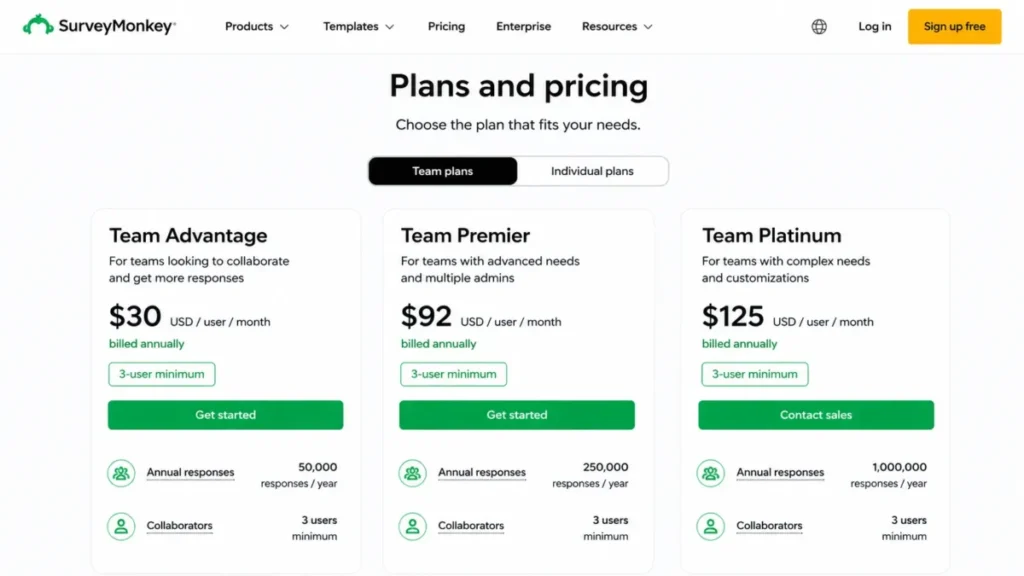
| SurveyMonkey | General-purpose survey platform | $30 per user/month, three-seat minimum | Team Advantage | 50,000 responses per year |
| SurveySparrow | Conversational surveys | Free plan | Business | Plan response allowance |
| Canny | Feature requests and roadmap | Free at 25 tracked users | Pro at $99 per month | Tracked users |
| Typeform | Design-led forms and surveys | $29 per month | Plus | 100 responses per month on Basic |
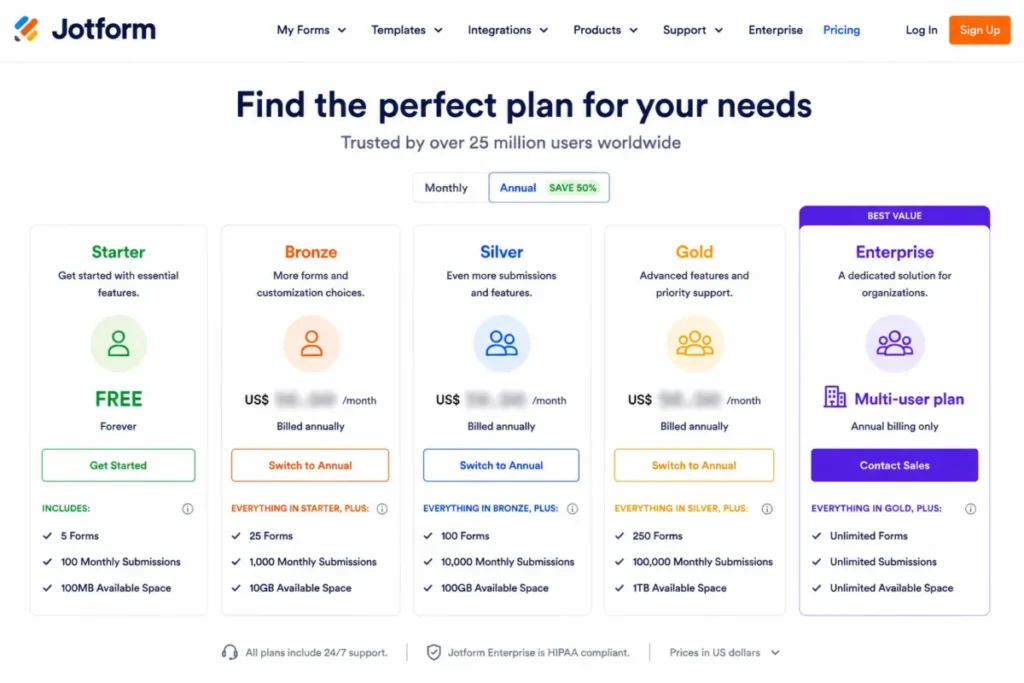
| Jotform | Operational form builder | Free Starter | Paid tier, US amount not verified | Submission and storage limits |
| Usersnap | Visual product and bug feedback | Trial capped at 20 items | US amount not verified | Feedback items |
| UserVoice | B2B product feedback intelligence | Custom quote | Quoted platform | Feedback volume, tools, integrations |
| Qualtrics | Enterprise experience management | Custom quote | Quoted suite | Interactions and licensed products |
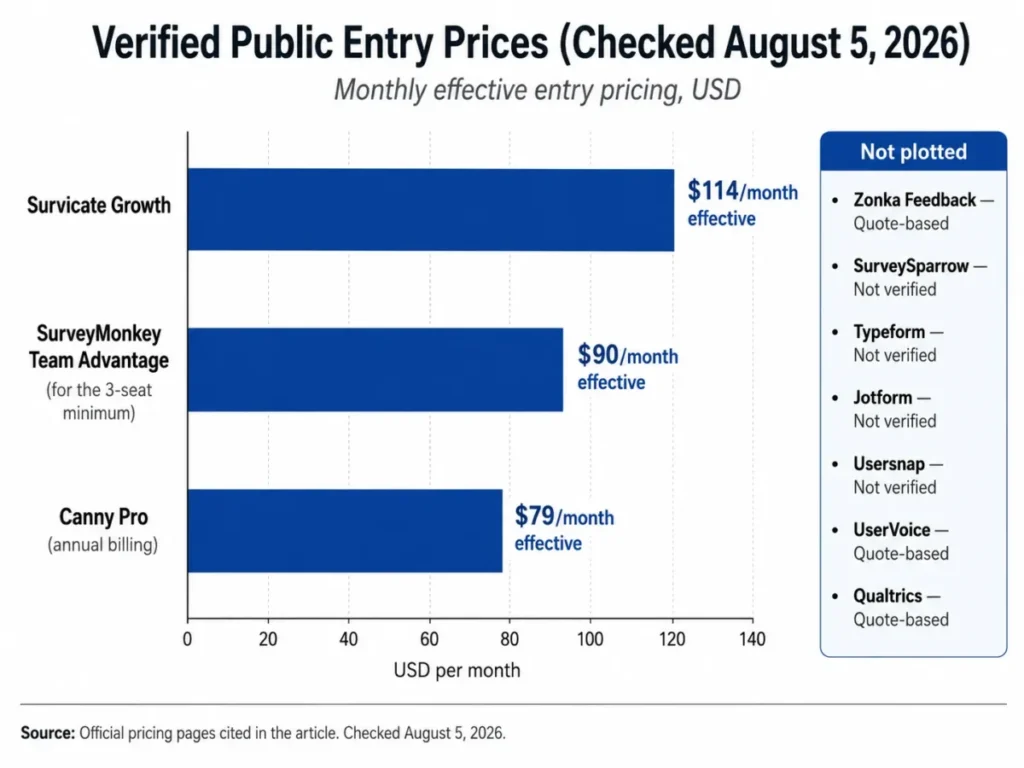
Four of the ten publish no US dollar price at all, and two more did not expose a verifiable US amount on the pages checked. Any comparison that prints a single price column for all ten is inventing six of them.
The 10 Best Customer Feedback Tools in 2026
1. Zonka Feedback: Best Overall for Omnichannel Feedback Programs

- Best for:
- CX and support teams collecting NPS, CSAT and CES across email, SMS, WhatsApp, web, in-app and offline touchpoints, then owning the follow-up
- Avoid if:
- Finance requires a published self-serve price before a sales conversation
- Starting price:
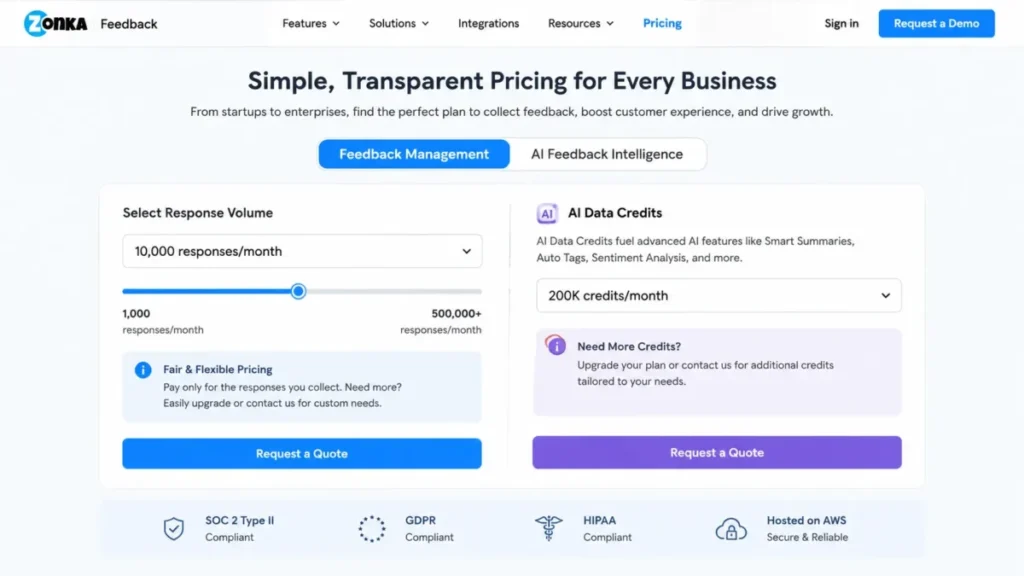
- Custom quote, no public US dollar list price
- Practical tier:
- A quoted bundle of Feedback Management, with AI Feedback Intelligence added when text analysis matters
- Free plan:
- Not published on the pricing page
- First limit that bites:
- Response volume, because Feedback Management pricing is primarily volume-based and AI Feedback Intelligence draws on data credits
- Better than Survicate:
- Channel breadth, since SMS, WhatsApp and offline collection sit inside the same product
- Worse than Qualtrics:
- Depth of enterprise research tooling for very large governed programs
- Setup difficulty:
- Medium, because targeting, throttling, case routing and alerting all need configuring before launch
- Hidden costs:
- AI data credits and any historical data import work sit outside the base response allowance
- Evidence status:
- Official pricing page content covering plan framing, features, integrations, support and compliance, checked August 5, 2026
Most tools in this list stop at collection. The documented Zonka Feedback workflow continues past it: pick the metric, pick the channel, apply targeting and throttling, then review responses in analytics or AI Feedback Intelligence, create or route a case, and send a follow-up.
That last step is the reason it ranks first. A feedback program that produces a dashboard but no owner, no case and no reply to the customer is a reporting exercise, and eight of the other nine tools require a second system to close that loop.
The compliance position is unusually specific for this price band. The Zonka Feedback pricing page lists ISO 27001:2022, GDPR and HIPAA alongside regional data hosting in the US, Europe, Australia and India, which matters for any buyer whose legal team asks where responses are stored.
The cost model is the real risk. Two meters run at once, response volume for Feedback Management and data credits for AI Feedback Intelligence, so a program that scales collection and text analysis together scales both meters together.
I would ask for the quote in two shapes before signing: current volume, and volume at the point the program is working. The gap between those two numbers is the negotiation.
| Pros | Cons |
|---|---|
| Collection, analysis, routing and follow-up in one product | No public US dollar price to budget against |
| SMS, WhatsApp and offline collection included in scope | Two separate meters, response volume and AI data credits |
| Regional data hosting options across four regions | Case routing and throttling need setup before launch |
| Historical data import supported for existing programs | Import field mapping and duplicate handling are not published |
- Verdict:
- Choose Zonka Feedback if the program spans several channels and someone has to act on each response, and accept a sales conversation as the price of that breadth.
2. Survicate: Best for SaaS Product Research With a Public Price

- Best for:
- SaaS product and research teams running website, in-product, email and link surveys who want a research repository without an enterprise rollout
- Avoid if:
- The program is always-on and will burn through 250 responses in the first fortnight of every month
- Starting price:
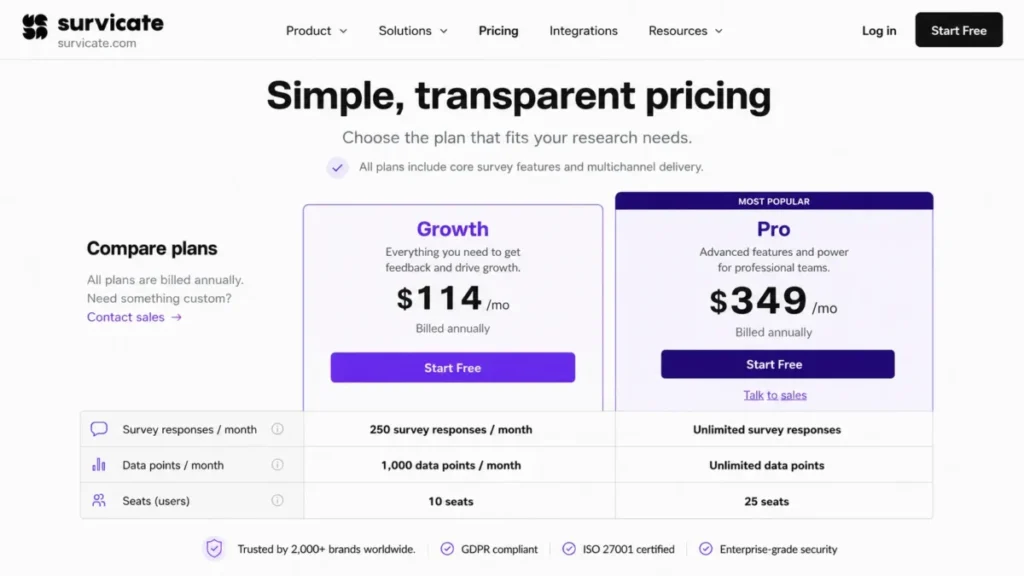
- $114 per month on Growth, billed annually
- Practical tier:
- Growth for a first program, Pro at $349 per month billed annually once logic or dashboards get serious
- Free plan:
- No durable free tier; a 10-day trial provides Growth-level access with a small allowance
- First limit that bites:
- 250 survey responses and 1,000 data points per month on Growth, which are separate meters
- Better than SurveyMonkey:
- In-product targeting by user attribute and event, and a research repository in the same workspace
- Worse than Zonka Feedback:
- No SMS, WhatsApp or offline collection in the same product
- Setup difficulty:
- Low to medium, since website and in-product surveys need a snippet and attribute mapping
- Hidden costs:
- The jump from Growth to Pro is the real budget event, not the entry price
- Evidence status:
- Official pricing page listing plan prices, included responses and data points, trial terms and plan gates, checked August 5, 2026
$114 per month sounds like a small commitment until the capacity units are read properly. Growth includes 250 survey responses and 1,000 data points per month, and those are two different meters that a live program consumes at different rates.
Run one in-product survey on a product with modest traffic and the response pool is gone well before month end. That is the single most useful number on the Survicate pricing page, and it is the number most roundups omit.
What Growth does include is generous in other directions: unlimited multichannel surveys, 10 seats, two teams, one dashboard, 25 or more integrations, webhooks and an export API. For a five-person product team, that seat allowance removes the usual per-user maths entirely.
Pro is where advanced logic, 10 dashboards, custom seat and team configuration and 40 or more native integrations live. Moving there triples the monthly line, so the honest planning question is whether the research program needs branching logic in month one or month nine.
Annual billing at the Growth price is a $1,368 cash commitment, calculated as $114 multiplied by 12 months. For a team that has never run continuous research, I would treat that as the experiment budget rather than the platform budget.
A deeper feature-by-feature read sits in the Survicate review.
| Pros | Cons |
|---|---|
| Published entry price with no seat minimum to work around | 250 monthly responses is thin for an always-on program |
| 10 seats included on the entry plan | 1,000 monthly data points is a second, separate ceiling |
| Website, in-product, email and link surveys in one workspace | Advanced logic and 10 dashboards are reserved for Pro |
| Research Hub keeps findings out of scattered documents | Pro is a three-fold jump from the Growth line |
Response, data-point and seat figures in this table come from the Survicate plan comparison, checked August 5, 2026.
- Verdict:
- Choose Survicate if the team wants a published price and fast multichannel deployment, and model monthly response volume before committing to Growth rather than after.
3. SurveyMonkey: Best Familiar Platform for Cross-Functional Survey Work

- Best for:
- Organizations that want a survey builder several departments already know, with shared assets, roles and a large annual response pool
- Avoid if:
- The team is one or two people, because the advertised per-user price is gated behind a three-seat minimum
- Starting price:
- $30 per user/month on Team Advantage, billed annually, with a minimum of three users
- Practical tier:
- Team Advantage for most teams; Team Premier at $92 per user/month when white labeling or advanced logic is required
- Free plan:
- Limited free access exists, but the annual response economics live on the paid team plans
- First limit that bites:
- 50,000 responses per year, after which each additional response costs $0.15
- Better than Typeform:
- Roles, permissions and shared assets that survive staff turnover
- Worse than Survicate:
- In-product targeting for software teams that need attribute-level or event-level triggers
- Setup difficulty:
- Low, since the builder is the most widely recognized in this list
- Hidden costs:
- The three-seat minimum and per-response overage are both easy to miss at quote stage
- Evidence status:
- Official pricing page covering team plan prices, seat minimums, annual response allowances, overage charge and plan features, checked August 5, 2026
The headline number on the SurveyMonkey pricing page is $30 per user/month, and that is not what a team pays. Team plans carry a three-user minimum, so the practical entry cost is $90 per month effective, or $1,080 a year, calculated as $30 multiplied by three seats.
For a two-person research function, that is a third of the budget spent on a seat nobody uses. For a marketing, HR and support group already sharing surveys, the same minimum is irrelevant and the shared asset library is the reason to buy.
The 50,000 annual response allowance is the largest included pool in this comparison, and the $0.15 per additional response charge is one of only two overage behaviors any vendor here publishes plainly. That combination makes annual budgeting unusually predictable.
Team Premier is the gate to watch. White labeling, advanced logic and multilingual surveys sit there at $92 per user/month with the same three-seat minimum, which changes the conversation from a small line item to a real software decision.
| Pros | Cons |
|---|---|
| 50,000 responses per year included on Team Advantage | Three-seat minimum inflates the true entry cost |
| Overage priced openly per extra response | Team Premier is the gate for white labeling and advanced logic |
| Roles, permissions and shared assets for mixed departments | In-product targeting is weaker than the SaaS-focused tools |
| AI and thematic analysis included at the team tier | Per-seat model gets expensive as casual viewers are added |
- Verdict:
- Choose SurveyMonkey if three or more people genuinely need seats and the program runs at volume, and budget $90 per month effective as the floor rather than $30.
4. SurveySparrow: Best Conversational Survey Experience

- Best for:
- CX and marketing teams that want conversational, multilingual surveys and a durable free plan to start on
- Avoid if:
- Finance needs a verified US dollar figure for every paid tier before approval
- Starting price:
- Free plan, with paid tiers whose US dollar amounts were not exposed on the dynamically rendered pricing page
- Practical tier:
- Business, because workflows and webhooks are the point at which feedback becomes action
- Free plan:
- Yes, a forever free plan, plus a 14-day trial of the paid experience
- First limit that bites:
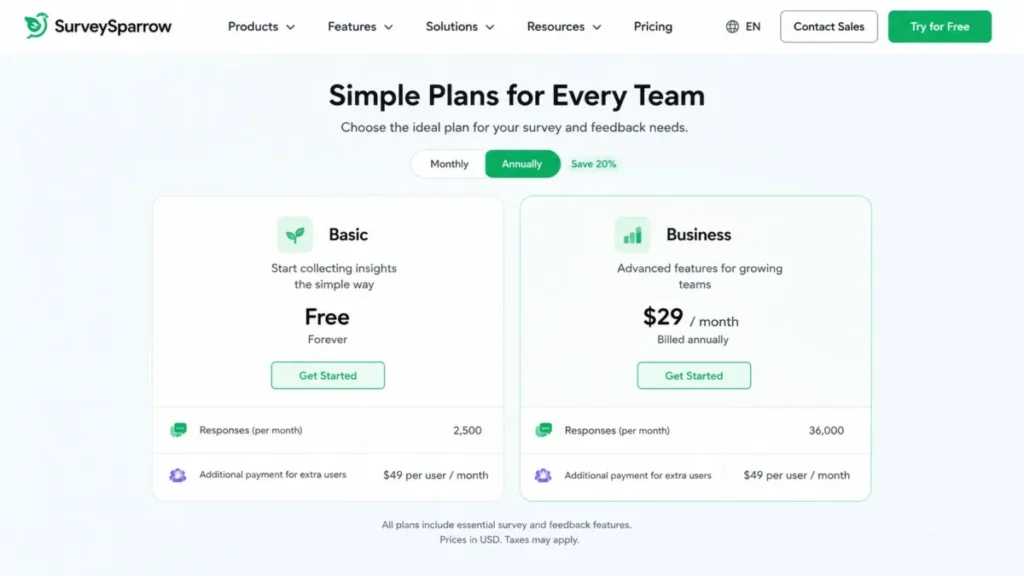
- Response allowances by plan, listed as 2,500 on Basic and 36,000 on Business
- Better than Typeform:
- Included response allowances that are an order of magnitude larger at comparable plan positions
- Worse than Survicate:
- Price transparency, since the paid tiers did not render a verifiable US amount
- Setup difficulty:
- Low for a first survey, medium once translation and workflows are configured
- Hidden costs:
- Extra users are listed at $49 per user/month, and additional responses or API calls route through sales
- Evidence status:
- Official pricing page covering plan names, free plan and trial availability, response allowances and add-on language, checked August 5, 2026
Seat maths is where this one surprises people. Business lists three users, and each additional user is listed at $49 per user/month on the SurveySparrow pricing page.
A ten-person CX team therefore adds seven paid seats on top of a base price that the page did not render in US dollars.
The response allowances tell the opposite story. 2,500 responses on Basic and 36,000 on Business are far above the entry allowances at Survicate and Typeform, which makes this a sensible pick for a high-volume, low-complexity program.
Workflows and webhooks are gated to Business. Below that, responses land in the platform and someone moves them by hand, which is the difference between a survey tool and a feedback operation.
Enterprise adds custom CSS, auto-translation, key-driver analysis and HIPAA availability. That is the tier where regulated buyers should start the conversation rather than trying to retrofit compliance later.
| Pros | Cons |
|---|---|
| Forever free plan plus a 14-day paid trial | Paid US dollar amounts were not verifiable on the rendered page |
| 2,500 responses on Basic, 36,000 on Business | Workflows and webhooks are locked to Business |
| Translation and embedded surveys across tiers | Every user above the plan allowance is charged separately |
| Integration count scales from 5 or more up to 25 or more | Extra responses and API calls require a sales conversation |
- Verdict:
- Choose SurveySparrow if respondent experience and response volume matter more than pricing transparency, and get every paid tier quoted in writing before approval.
5. Canny: Best Feature-Request Portal for Product-Led Teams

- Best for:
- Product-led SaaS teams running public or private boards where customers post, vote and comment
- Avoid if:
- The core requirement is NPS, CSAT or CES measurement rather than request management
- Starting price:
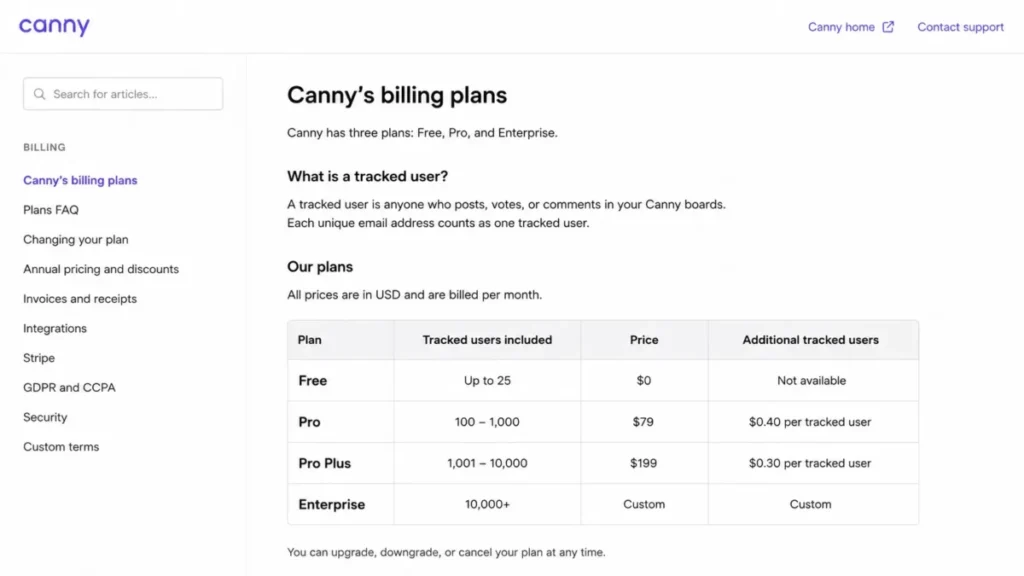
- Free at 25 tracked users; Pro at $99 per month on monthly billing
- Practical tier:
- Pro, which starts at the 100 tracked-user tier
- Free plan:
- Yes, with unlimited boards and posts inside the tracked-user allowance
- First limit that bites:
- Tracked users, defined as anyone who posts, votes or comments
- Better than UserVoice:
- Self-serve adoption with no guided onboarding cycle before the first board goes live
- Worse than UserVoice:
- No account, ARR or contract weighting on the requests themselves
- Setup difficulty:
- Low, since a board can be live the same day
- Hidden costs:
- Tracked-user growth moves billing to the next increment unless a spend limit is set
- Evidence status:
- Official billing documentation covering the June 2026 model, tracked-user thresholds, monthly and annual Pro prices, spend-limit behavior and plan gates, checked August 5, 2026
Here is the mechanic that decides whether this product is cheap or expensive: the bill scales with engagement, not with seats. A tracked user is anyone who posts, votes or comments, so the same customer activity that proves the board is working is the activity that raises the invoice.
The Canny billing documentation is unusually direct about what happens next. Exceed the paid tier and billing rises to the next increment unless a spend limit is set, and once that spend limit is reached, feedback from new users stops being tracked.
That is a genuine fork in the road. One branch costs money without warning, the other silently stops capturing the requests of new customers, and a product team that does not choose deliberately will discover the choice at renewal.
Annual billing is the cheapest lever available. Pro at the 100 tracked-user tier is $99 per month monthly or $79 per month effective annually, a difference of $240 a year, calculated as $99 times 12 months minus $79 times 12 months.
Watch one more gate. CRM integration is reserved for Business, while Pro covers project-management integrations, Zapier and Segment, so any plan to weight requests by customer value inside a CRM changes the tier before it changes the workflow.
| Pros | Cons |
|---|---|
| Free tier is a working product, not a countdown timer | Billing scales with customer engagement, not seats |
| Boards, voting, roadmap and changelog in one workflow | Spend limit stops tracking new users once reached |
| Annual billing is materially cheaper at the Pro tier | CRM integration is reserved for Business |
| Custom roles and custom domain available on Pro | Not a substitute for NPS, CSAT or CES programs |
- Verdict:
- Choose Canny if the job is collecting, ranking and shipping feature requests in public, and set the spend limit deliberately on day one rather than after the first surprise invoice.
6. Typeform: Best Budget Pick for Design-Led Collection

- Best for:
- Marketing, research and product teams whose completion rate depends on how the form looks and behaves
- Avoid if:
- The program collects more than a hundred responses a month on the entry plan
- Starting price:
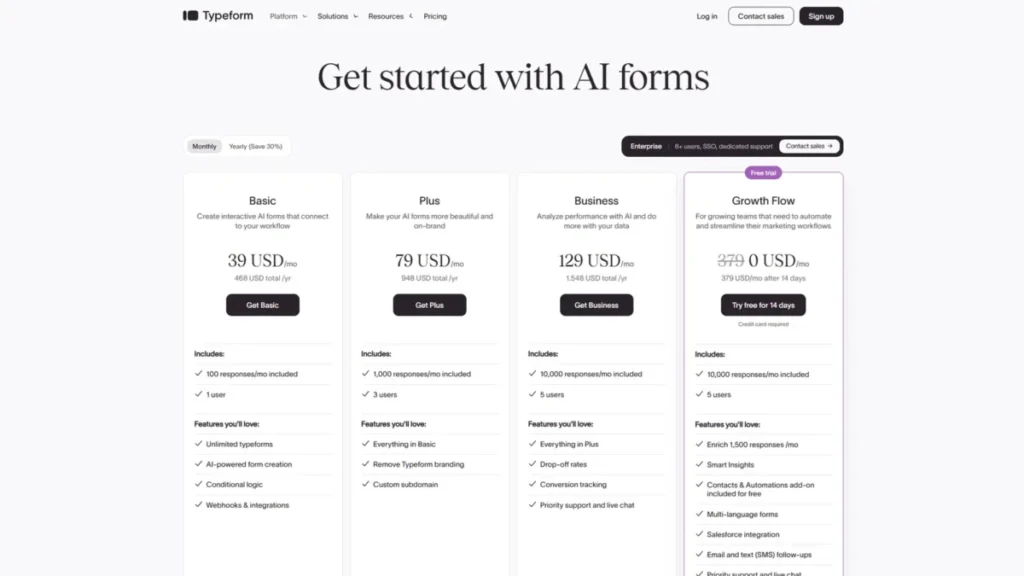
- $29 per month on Basic monthly billing, or $25 per month effective on annual billing
- Practical tier:
- Plus, because branding removal and a custom subdomain sit there
- Free plan:
- Not the plan to build on; the meaningful capability starts at Basic
- First limit that bites:
- 100 responses per month on Basic, with one user
- Better than Jotform:
- Respondent experience on customer-facing surveys
- Worse than SurveySparrow:
- Included response capacity at comparable plan positions
- Setup difficulty:
- Low, with conditional logic available from the entry plan
- Hidden costs:
- Brand removal is a plan upgrade, and the pricing page showed conflicting price variants at the check
- Evidence status:
- Official pricing comparison table covering plan prices, response limits, seats and gates, checked August 5, 2026
100 responses a month is the number that decides this purchase. It is enough for a quarterly research study and nowhere near enough for an always-on feedback widget, and the gap between those two use cases is the whole argument.
What Basic does include is better than the price suggests: unlimited typeforms and questions, conditional logic, webhooks and integrations. Logic on the entry plan is rare in this comparison, and it is the reason a small team can run a branching study without upgrading.
Branding is the upgrade trigger. Removing the Typeform brand and adding a custom subdomain requires Plus, listed at $59 per month monthly or $50 per month effective annually on the comparison table checked.
That turns a $29 tool into a $59 one the moment marketing sees the footer.
One caution on the number itself. The Typeform pricing page displayed conflicting price variants across components at the check, so verify the amount in checkout before it reaches a purchase order.
| Pros | Cons |
|---|---|
| Lowest verified published entry price in this list | 100 responses per month on Basic is restrictive |
| Conditional logic and webhooks from the entry plan | Branding removal requires the Plus plan |
| Unlimited typeforms and questions on every paid tier | Basic covers a single user |
| Drop-off and conversion tracking available on Business | The pricing page showed conflicting variants at the check |
- Verdict:
- Choose Typeform if respondent experience drives completion and volume stays low, and price the Plus plan into the budget from the start if the form carries a brand.
7. Jotform: Best Free Starting Point for Operational Intake

- Best for:
- Operations teams whose feedback forms sit next to payment, signature and request workflows
- Avoid if:
- The requirement is voice-of-customer analytics or low-cost multi-user administration
- Starting price:
- Free Starter plan; paid tier amounts were not exposed on the pricing page as parsed
- Practical tier:
- A paid tier for branding removal and higher limits, with the US amount to be confirmed in checkout
- Free plan:
- Yes, Starter, with standard form features, templates, payment integrations and widgets
- First limit that bites:
- Submission and storage allowances on the free plan
- Better than Typeform:
- Breadth of templates, widgets and payment field types for operational work
- Worse than Zonka Feedback:
- Analysis of feedback once it has been collected
- Setup difficulty:
- Low for a single builder, higher once several people need governed access
- Hidden costs:
- Multi-user administration is positioned at Enterprise rather than the self-serve tiers
- Evidence status:
- Official pricing page covering the Starter, Bronze, Silver, Gold and Enterprise packaging, free-plan status, branding and multi-user positioning, checked August 5, 2026
Treat this one as a form platform that happens to collect feedback, not as a voice-of-customer system. That framing prevents the most common disappointment, which is expecting theme analysis from a tool built for intake.
The free Starter plan is genuinely usable, and the Jotform pricing page keeps templates, widgets and payment integrations inside it. For a small business collecting complaints, refund requests and service feedback through one channel, that is often the entire requirement.
The structural catch is administration. Multi-user access is presented as an Enterprise capability, so a five-person operations team that wants separate logins and permissions has jumped straight from free to a quoted contract with nothing sensible in between.
Paid US dollar amounts were not available on the page as parsed, so treat the Bronze, Silver and Gold tiers as confirm-in-checkout rather than plan-and-budget.
| Pros | Cons |
|---|---|
| Free Starter plan with real form capability | Multi-user administration is positioned at Enterprise |
| Large template and widget ecosystem | Paid US dollar amounts were not verifiable on the page |
| Payment and signature fields alongside feedback fields | Feedback analysis is thin next to the dedicated platforms |
| Branding removal and higher limits available on paid plans | Free plan submission and storage limits arrive quickly |
- Verdict:
- Choose Jotform if forms are one of several operational jobs and the budget starts at zero, and plan for an Enterprise conversation the moment more than one person needs governed access.
8. Usersnap: Best Visual Feedback for UX and Engineering

- Best for:
- Product, UX and QA teams that need annotated screenshots, screen recordings and technical context routed into developer tools
- Avoid if:
- The requirement is an attitudinal program measuring NPS, CSAT or CES
- Starting price:
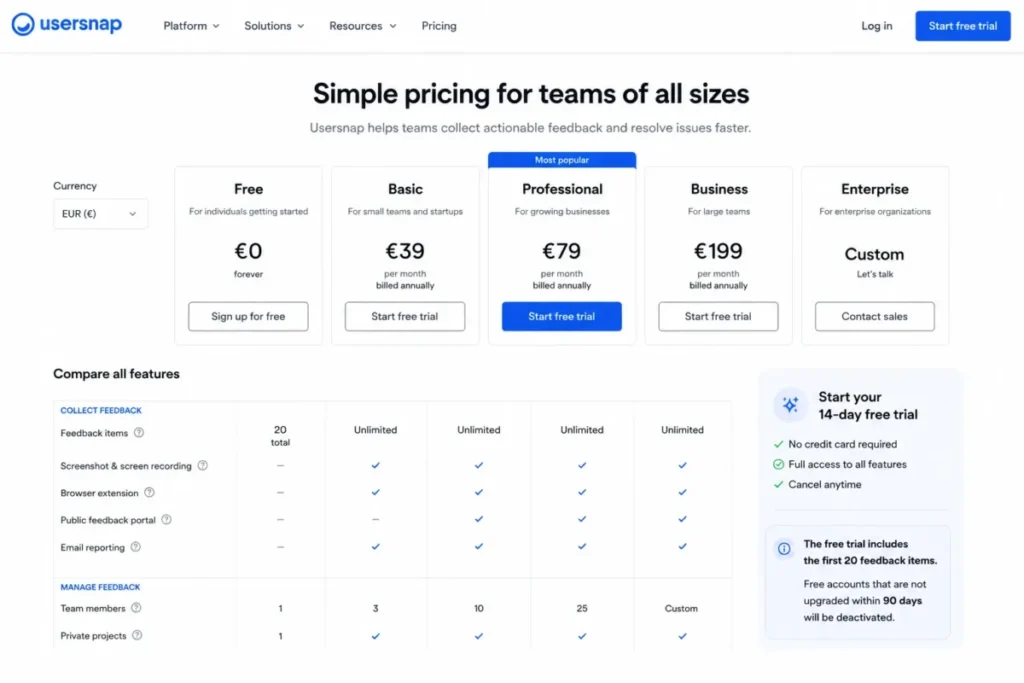
- US dollar self-serve amount not verified; the page checked presented pricing in a non-US currency context
- Practical tier:
- Enterprise for API and single sign-on; lower tiers cover widget capture and routing
- Free plan:
- No durable free tier; the trial covers the first 20 feedback items with no card required
- First limit that bites:
- The 20-item trial ceiling, followed by deactivation of unupgraded free accounts after 90 days
- Better than Canny:
- Reproducible technical evidence attached to each item
- Worse than Survicate:
- Any survey-led measurement of customer sentiment
- Setup difficulty:
- Low to medium, since the widget is a snippet but routing rules need mapping to the destination system
- Hidden costs:
- Mobile SDK, branding, API and single sign-on sit on higher plans
- Evidence status:
- Official pricing page covering trial limits, plan feature positioning and integrations, checked August 5, 2026
A screenshot with browser metadata and an annotation resolves a bug in one pass. A five-star rating on the same screen resolves nothing, and that difference is the entire case for buying this instead of a survey tool.
Integration depth is the second reason. The Usersnap pricing page lists 50 or more integrations with two-way sync into selected development systems including Jira, Asana, Linear, Azure DevOps and Zendesk, so items move without a manual copy step.
Budget planning is the weak point. The self-serve page did not present a verifiable US dollar amount at the check, and the 20-item trial ends long before a real evaluation does.
| Pros | Cons |
|---|---|
| Annotated screenshots, recordings and voice feedback in one widget | No verified US dollar self-serve price |
| Two-way sync with selected developer tools | Trial stops after 20 feedback items |
| 50 or more integrations across support and delivery systems | Unupgraded free accounts deactivate after 90 days |
| Technical metadata captured with each item | Narrow category; needs a survey tool alongside it |
- Verdict:
- Choose Usersnap when the evidence that matters is visual and technical, and pair it with a survey platform rather than expecting it to replace one.
9. UserVoice: Best Revenue-Weighted B2B Product Feedback

- Best for:
- Midmarket and enterprise B2B product organizations that need account, ARR and contract context attached to every request
- Avoid if:
- The team wants to be live this week on a self-serve card payment
- Starting price:
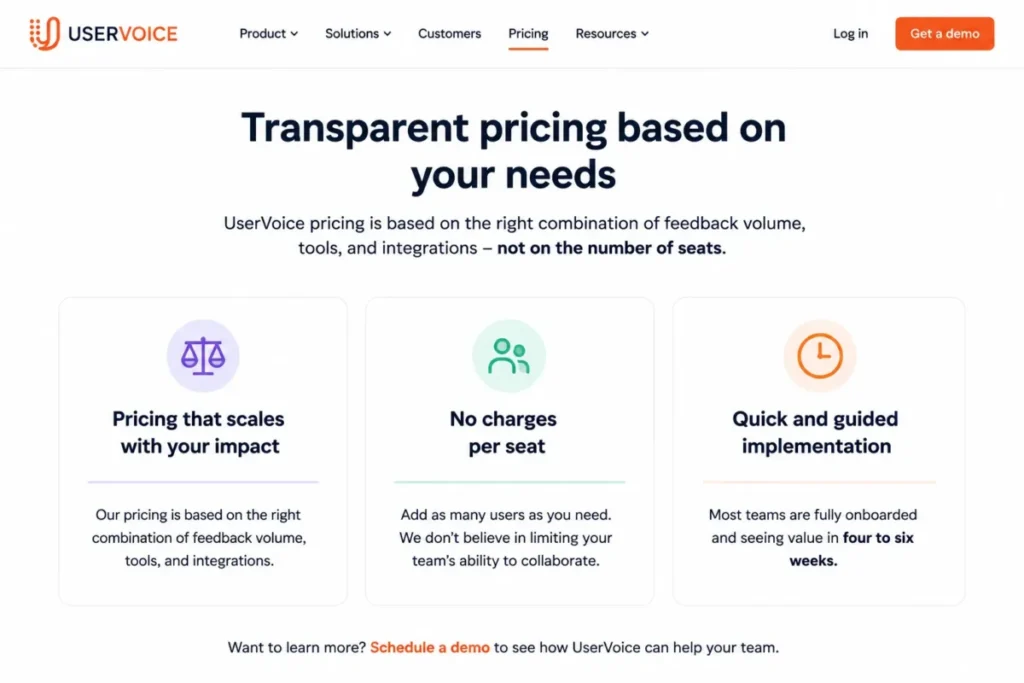
- Custom quote, priced on feedback volume, tools and integrations rather than seats
- Practical tier:
- The quoted platform, scoped by how many source systems connect
- Free plan:
- Not offered
- First limit that bites:
- Implementation time, since most teams are told to expect four to six weeks
- Better than Canny:
- Commercial weighting, because a request from a large account does not count the same as a single vote
- Worse than Canny:
- Time to first value, by a wide margin
- Setup difficulty:
- High, with one to two weeks of technical setup inside the wider onboarding cycle
- Hidden costs:
- Migration effort, since CSV or API imports and complex migrations draw on Technical Success support
- Evidence status:
- Official pricing and product overview pages covering the custom pricing basis, seat-independent model, onboarding duration, support and migration statements, checked August 5, 2026
Vote counts answer the wrong question in B2B. Ten votes from trial users and one request from the account carrying a fifth of revenue look identical on a public board, and the UserVoice product overview is built around fixing exactly that.
The commercial model follows the same logic. Pricing scales on feedback volume, tools and integrations rather than seats, which means adding stakeholders as read-only observers does not inflate the bill the way a per-seat CRM would.
Time is the cost here. The UserVoice pricing page states that most teams take four to six weeks to onboard, including one to two weeks for technical setup, so this is a quarter-planning purchase rather than a sprint decision.
| Pros | Cons |
|---|---|
| Account, ARR and contract context attached to requests | Custom quote with no published entry price |
| Seat-independent pricing keeps stakeholder access cheap | Four to six week onboarding for most teams |
| Connects to CRM, support, call and delivery systems | Object-level migration coverage is not published |
| AI Idea Insights applied to centralized feedback | Too heavy for a small self-serve product team |
- Verdict:
- Choose UserVoice when roadmap decisions must survive a revenue argument, and put the four to six week onboarding in the project plan before the contract is signed.
10. Qualtrics: Best Governed Enterprise Experience Program

- Best for:
- Large organizations running governed multi-channel experience, research and contact-center programs with named administrators
- Avoid if:
- The team wants simple public pricing and a program live inside a month
- Starting price:
- Request pricing, with increasingly interaction-based commercial models
- Practical tier:
- The quoted Customer Experience suite, scoped by product and interaction type
- Free plan:
- Not offered for the customer experience suite
- First limit that bites:
- Licensed permissions, since tabs and capabilities depend on owner and brand administrator settings
- Better than Zonka Feedback:
- Depth of governed enterprise research and contact-center analysis
- Worse than Survicate:
- Speed and simplicity for a small product team that needs one survey live this week
- Setup difficulty:
- High, sales-led and implementation-dependent
- Hidden costs:
- Packaging shifts with interaction types, industry and security requirements, so the quote is a scope negotiation
- Evidence status:
- Official pricing page and survey platform documentation covering the request-pricing model, interaction-based explanation and documented survey workflow, checked August 5, 2026
Ranking this tenth is not a judgment on capability. It is a judgment on fit for the broad market this article serves, and the same characteristics that make it right for a global program make it wrong for a ten-person team.
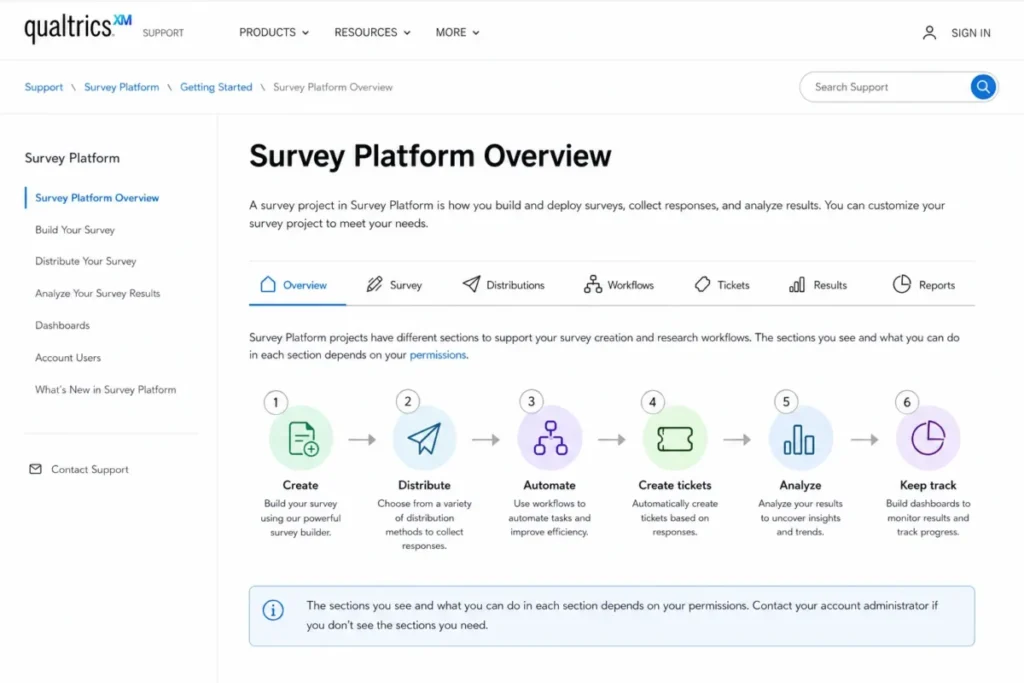
The documented survey workflow is deep: create or import a survey, configure questions, quotas and access, distribute by email, SMS or anonymous link, then automate follow-up, create a ticket, analyze responses and build dashboards. The Qualtrics survey platform documentation is explicit that access to those steps depends on permissions.
Commercially, the Qualtrics pricing page explains that price varies with interaction types, industry, security requirements and selected products. That is a scope conversation, not a price list, and it needs a named internal owner before the first call.
| Pros | Cons |
|---|---|
| Survey, website, app and contact-center feedback in one suite | No public US dollar list price |
| Workflow automation and ticket creation on responses | Packaging changes with industry and security requirements |
| Dashboards, reports and exports for governed reporting | Capability access depends on licensed permissions |
| Distribution across email, SMS and anonymous links | Administratively heavy for small and mid-size teams |
- Verdict:
- Choose Qualtrics when governance, contact-center coverage and multi-product experience management justify a scoped enterprise agreement, and skip it entirely if a focused feedback workflow is the actual requirement.
Pricing, Limits and Hidden Upgrade Triggers
Ten products, five different commercial states. Three publish a verifiable US dollar price, two publish a durable free plan, three quote on request, and two did not expose a usable US amount on the pages checked.
Starting price versus practical tier
| Tool | Starting price | Practical tier | Cost at 10 seats | Free plan or trial | Hidden cost driver |
|---|---|---|---|---|---|
| Zonka Feedback | Custom quote | Quoted bundle | Quote-based | Not published | AI data credits |
| Survicate | $114 per month effective | Growth, then Pro at $349 per month | $114 per month effective, 10 seats included | 10-day trial | Response and data-point ceilings |
| SurveyMonkey | $30 per user/month | Team Advantage | $300 per month effective, calculated | Limited free access | $0.15 per extra response |
| SurveySparrow | Free plan | Business | Base not verified, plus $49 per user/month above the allowance | Free plan and 14-day trial | Extra users, responses and API calls |
| Canny | Free at 25 tracked users | Pro | Not seat-based, $79 per month effective at 100 tracked users | Free plan | Tracked-user increments |
| Typeform | $29 per month | Plus at $59 per month | Seat pricing above Basic not verified | Entry capability is paid | Branding removal on Plus |
| Jotform | Free Starter | Paid tier, US amount not verified | Enterprise quote for multi-user access | Free Starter | Multi-user access is Enterprise |
| Usersnap | US amount not verified | Enterprise | Quote-based | 20-item trial | Mobile SDK, API and SSO on higher plans |
| UserVoice | Custom quote | Quoted platform | Seat-independent | None | Migration and onboarding effort |
| Qualtrics | Custom quote | Quoted suite | Unlimited-user framing | None | Interaction types and security scope |
Sources for this table, ranks 1 to 3: Zonka Feedback plan details, Survicate plan details and SurveyMonkey plan details.
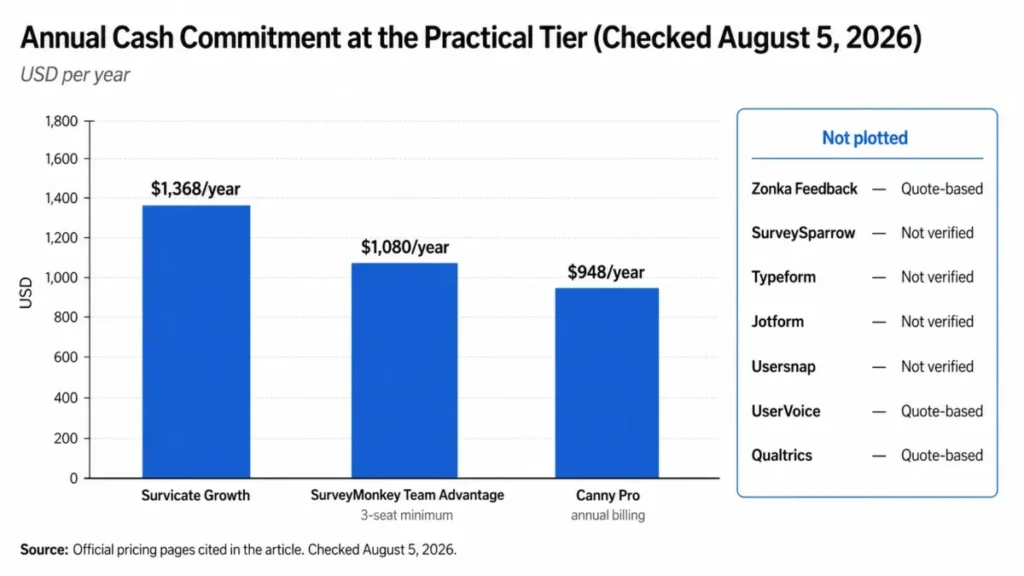
The cheapest headline in this table belongs to Typeform and the cheapest working program probably does not. A team that needs branding removed, a thousand responses a month and three people in the account has left the entry tier of every product here.
Free plan, trial, or quote: three different offers wearing one badge
| Tool | Entry state | What the entry state buys | Boundary |
|---|---|---|---|
| SurveySparrow | Forever free plan | Ongoing collection inside the free allowance | Plan response allowance |
| Jotform | Free Starter plan | Standard form features, templates, widgets and payment fields | Submission and storage limits |
| Canny | Free plan | Unlimited boards and posts | 25 tracked users |
| Survicate | 10-day trial | Growth-level access | Small response and data-point allowance |
| SurveySparrow | 14-day trial | Paid-tier experience | Trial period |
| Usersnap | Item-capped trial | Full capture workflow | First 20 feedback items, then deactivation after 90 days without an upgrade |
| Typeform | Paid entry | Basic plan capability | 100 responses per month |
Basis for this table: SurveySparrow trial terms, Jotform Starter terms and Canny free tier terms.
A twenty-item trial and a forever free plan are not the same offer, and printing both as “Free” in a comparison table is how buyers end up with a deactivated account ninety days into an evaluation.
The capacity unit is not always a response
| Tool and plan | Capacity unit | Included allowance | Reset | Behavior at the ceiling |
|---|---|---|---|---|
| Survicate Growth | Survey responses | 250 | Monthly | Not published |
| Survicate Growth | Data points | 1,000 | Monthly | Not published |
| SurveyMonkey Team Advantage | Responses | 50,000 | Annual | Paid overage at $0.15 per response |
| SurveySparrow Basic | Responses | 2,500 | Plan allowance | Not published |
| Canny Free | Tracked users | 25 | Ongoing | Upgrade required to keep tracking |
| Canny Pro | Tracked users | 100 at the entry tier | Ongoing | Billing moves to the next increment unless a spend limit is set, then new users stop being tracked |
| Typeform Basic | Responses | 100 | Monthly | Not published |
| Usersnap trial | Feedback items | 20 | One time | Trial ends |
Where overflow behavior is not published, it is left unstated rather than assumed.
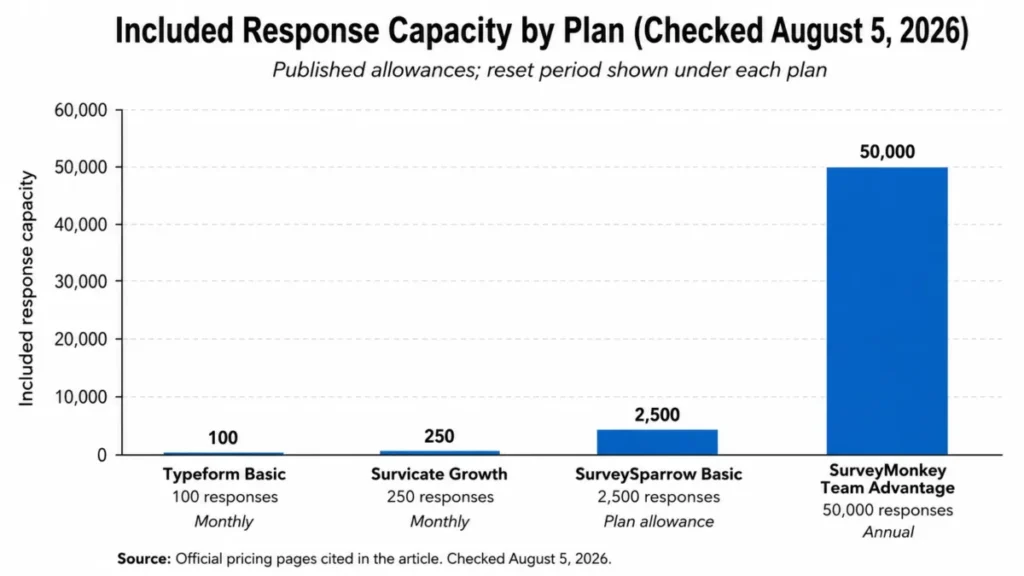
Two vendors publish what happens when the meter runs out and the rest do not. SurveyMonkey charges $0.15 per extra response, Canny moves billing to the next tracked-user increment or stops tracking new users at the spend limit, and for everyone else this is a question to put in writing before signing.
Feature gates that decide which plan you need
| Tool | Gated capability | Plan that opens it | What the lower plan does instead | Verified upgrade cost |
|---|---|---|---|---|
| Survicate | Advanced logic and 10 dashboards | Pro | Standard logic and one dashboard on Growth | $349 per month billed annually |
| SurveyMonkey | White labeling, advanced logic, multilingual surveys | Team Premier | Team Advantage feature set | $92 per user/month, three-seat minimum |
| SurveySparrow | Workflows and webhooks | Business | Collection with manual follow-up | Not verified in US dollars |
| Canny | CRM integration | Business | Project management integrations, Zapier and Segment on Pro | Custom quote |
| Typeform | Branding removal and custom subdomain | Plus | Typeform branding retained on Basic | $59 per month, or $50 per month effective annually |
| Jotform | Multi-user administration | Enterprise | Single-account self-serve tiers | Custom quote |
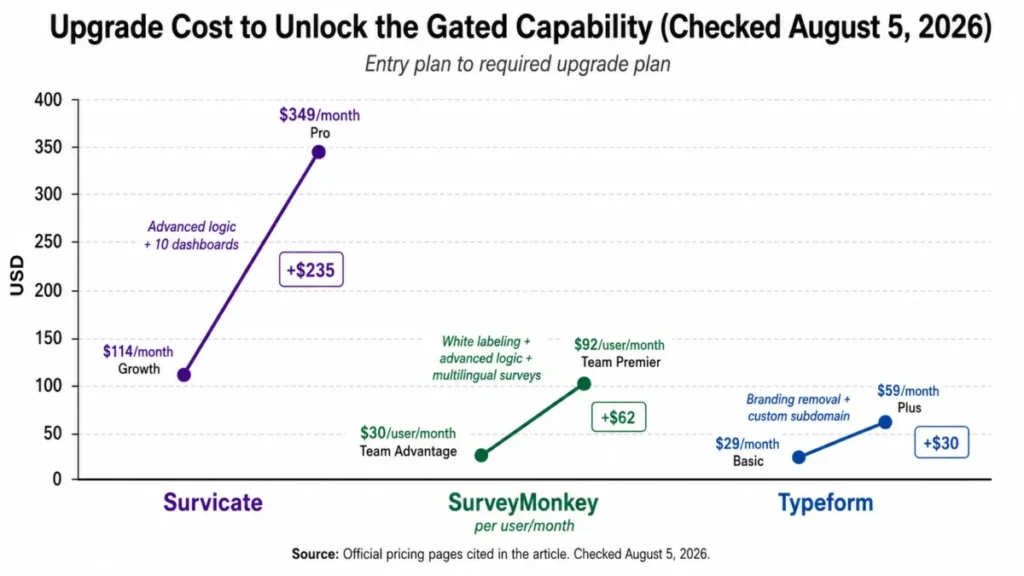
Read that table as a budget document rather than a feature list. In three of six cases the gated capability is something a stakeholder will ask for in the first month, which means the entry plan is a trial with an invoice attached.
What a custom quote scales on
| Tool | What the quote scales on | What to ask before signing |
|---|---|---|
| Zonka Feedback | Response volume for Feedback Management, data credits for AI Feedback Intelligence | Price at current volume and at target volume, and what a data credit consumes |
| UserVoice | Feedback volume, tools and integrations, not seats | Which source systems are in scope, and what the migration covers object by object |
| Qualtrics | Interaction types, industry, security requirements and selected products | Which products the license includes, and which capabilities depend on administrator permissions |
| Usersnap | Enterprise scope including API and single sign-on | A written US dollar quote, since the self-serve page did not present one |
Basis for this table: Zonka Feedback quote basis, UserVoice quote basis, Qualtrics quote basis and Usersnap enterprise scope, checked August 5, 2026.
Custom pricing is four different commercial models in this list. Knowing which meter runs is the difference between a negotiation and a signature.
Setup and Migration Difficulty
| Tool | Setup difficulty | Why |
|---|---|---|
| Zonka Feedback | Medium | Channel setup, targeting, throttling, case routing and alerts all need configuring, and tailored onboarding is part of the commercial package |
| Survicate | Low to medium | Snippet install plus attribute and event mapping for in-product targeting |
| SurveyMonkey | Low | Familiar builder, with roles and shared assets to arrange once |
| SurveySparrow | Low to medium | Fast first survey, more work once translation and workflows are added |
| Canny | Low | A board can be live the same day, with moderation policy the main decision |
| Typeform | Low | Builder and conditional logic are available from the entry plan |
| Jotform | Low | Template-driven, until multi-user governance is required |
| Usersnap | Low to medium | Widget snippet is quick, routing rules into the destination system are not |
| UserVoice | High | Most teams are told to expect four to six weeks, including one to two weeks of technical setup |
| Qualtrics | High | Sales-led and implementation-dependent, with capability access tied to licensed permissions |
Only two vendors here publish anything specific about moving existing data. Zonka Feedback documents historical data import, and UserVoice documents CSV and API migration with Technical Success support for complex cases.
Everything else is unpublished, which is a procurement question rather than a product flaw. Ask each shortlisted vendor, in writing, how attachments, notes, automations and duplicate records are handled and what happens when an import fails partway through.
If the existing feedback lives in a CRM rather than a survey tool, the sequencing advice in the CRM migration guide applies directly to this move as well.
How to Choose Customer Feedback Software
Work through these seven questions in order. Answering them out of order is how teams end up with a beautiful survey builder and no way to act on what it collects.
1. Where does the feedback arrive from? If it arrives as support tickets, in-app prompts and text messages, a form builder will not hold it. If it arrives as feature requests in a shared inbox, a survey platform is the wrong shape.
2. Who owns the response after it lands? Name the person before naming the tool. If nobody owns it, buy the cheapest collection tool and fix the ownership problem first.
3. What is the realistic monthly volume? Multiply expected traffic by an honest response rate, then compare that number against the included allowance rather than the price. Survicate Growth includes 250 responses a month and Typeform Basic includes 100, and both numbers decide the plan before any feature does.
4. Which capability will a stakeholder ask for in month one? Branding removal, workflow routing, CRM enrichment and advanced logic are all gated, and each one moves the plan. Price the tier that contains the answer, not the tier on the pricing page banner.
5. How many people need governed access? Seat minimums and multi-user gates change the entry cost more than the headline rate does. Three seats at SurveyMonkey and Enterprise-only multi-user access at Jotform are the two clearest examples here.
6. What has to connect to it? Map the destination systems before shortlisting, since routing feedback into a helpdesk, a CRM or a delivery tool is where most implementations stall. The fundamentals in CRM integration basics apply directly to feedback data.
7. How long can implementation take? A self-serve trial can be live this afternoon, while a guided rollout at UserVoice is described as a four to six week cycle. Match that to the quarter, not to enthusiasm.
Run the answers back through the coverage matrix near the top of this article. If two shortlisted products sit in different rows of that matrix, they are not competing for the same budget line and should not be compared on price.
Common mistakes when choosing customer feedback software
Treating every tool as survey software. This is the expensive one. Canny, Usersnap and UserVoice are excellent at jobs a survey platform does badly, and buying them for NPS reporting produces a working product that answers no question anyone asked.
Budgeting from the starting price. The advertised figure is a floor, not a forecast. Three seats, one branding upgrade and a workflow requirement move most of these products into a different price band entirely.
Ignoring the capacity unit. Responses, data points, tracked users and interactions are four different meters, and only two vendors here publish what happens when one runs out. A cap with unpublished overflow behavior is a risk to price into the decision.
Confusing a trial with a free plan. A twenty-item trial buys an afternoon of evaluation. A forever free plan buys an ongoing program, and the difference is visible only when someone reads the terms.
Skipping the migration question. Historical feedback is where the patterns live, and object-level import behavior is unpublished for most of this list. Ask about attachments, notes, duplicates and failure recovery before signing, not during onboarding.
Buying analysis before ownership. AI theme detection produces a very convincing summary of feedback nobody is assigned to act on. Fix routing and ownership first, then buy the analysis layer.
Underestimating governance. Data residency, single sign-on and permission models are procurement blockers that arrive late and stop deals dead. If legal will ask where responses are stored, ask the vendor in week one.
Assuming a support tool covers it. Ticket deflection metrics are not voice of customer, and the distinction is set out in customer service software explained. If service quality is the actual question, a comparison of best customer service software is the more useful starting point.
Final Verdict
Zonka Feedback is the pick I would default to for a team that needs collection, analysis and follow-up in one place. It covers more channels than anything else here and it is the only product in this list built around case management as a first-class step, and the price of that is a sales conversation instead of a checkout page.
Survicate is the pick I would recommend to a five-person SaaS product team that wants a number in the budget this week. Model the 250-response and 1,000-data-point ceilings honestly first, because Growth at $114 per month effective is only cheap while the program stays inside them.
SurveyMonkey is the right answer when three or more people across different departments genuinely need seats. Budget $90 per month effective as the floor, not $30, and treat the $0.15 overage as the predictable part of the model rather than the trap.
For specialists, the mapping is clean. Canny for feature requests and release communication, Usersnap when the evidence has to be reproducible and technical, UserVoice when roadmap decisions must survive a revenue argument, and Qualtrics when governance and contact-center coverage justify a scoped enterprise agreement.
Two products I would approach with a specific caution. Typeform is the cheapest verified entry price here and the 100-response ceiling makes it a study tool rather than an always-on program, while Jotform is an excellent free form builder whose multi-user path jumps straight to a quoted contract.
Read the ranking as four connected stages rather than a league table. The cohort comes first, then the workflow that cohort has to run, then the plan gate or disqualifier that blocks it, and only then the ranking reason.
Zonka Feedback wins the top ranking reason because its documented workflow carries a response from collection through to a case and a customer reply. Its disqualifier is the quote-based commercial model shown on the Zonka Feedback pricing page.
If the cohort is a five-person SaaS product team, the winner by scenario changes to Survicate, because the plan gate that matters is response capacity rather than channel breadth.
The renewal question to answer twelve months out is simple. Can you name three decisions that changed because of what this tool collected, and if the answer is no, the problem is ownership rather than software.
Teams arriving here from a wider tooling review will find the adjacent categories in the help desk software comparison and the AI CRM software picks useful for sequencing the rest of the stack.
Frequently Asked Questions
What is the best customer feedback tool overall?
Zonka Feedback is the strongest all-round pick because it spans omnichannel collection, analysis, case management and follow-up in one product. Survicate is the better answer for SaaS product teams that need a published price.
The trade-off is transparency. Zonka Feedback quotes on response volume and AI data credits rather than publishing a self-serve dollar figure, so budgeting requires a sales conversation.
What is the best free customer feedback tool?
Canny and SurveySparrow have the most useful free plans, and they serve different jobs. Canny Free covers unlimited boards and posts within 25 tracked users, which is a working feature-request portal.
SurveySparrow offers a forever free plan for conversational surveys, while Jotform Starter is the better free choice for operational intake forms with payment and signature fields.
What is the cheapest customer feedback software?
Typeform Basic is the lowest verified published entry price at $29 per month on monthly billing, or $25 per month effective on annual billing. That plan includes 100 responses per month and one user.
Cheapest is rarely the practical answer. Branding removal requires the Plus plan, so a customer-facing form usually lands at a higher tier than the entry price implies.
How much does customer feedback software cost?
Verified public entry prices in this comparison run from $29 per month for Typeform Basic to $114 per month effective for Survicate Growth, with SurveyMonkey Team Advantage at $30 per user/month against a three-seat minimum. Four products quote on request instead.
Annual cash commitment is the number worth writing down. Survicate Growth is $1,368 a year, SurveyMonkey Team Advantage is $1,080 a year at three seats, and Canny Pro is $948 a year on annual billing.
Is a free plan enough to run a real feedback program?
Yes, if the program is single-channel and one person owns the follow-up. Canny Free supports a genuine feature-request board, and Jotform Starter supports genuine intake forms.
No free plan here covers multi-channel collection with routing and case management. That combination is a paid capability at every vendor in this list.
Is Qualtrics worth it for a small business?
No, unless the business has a named administrator, a governance requirement and a budget approved for a scoped enterprise agreement. The capability depth is real, and so is the administrative overhead.
A ten-person team that needs one NPS survey live this month will get there faster with Survicate or SurveySparrow, and will spend a fraction of the implementation effort.
What is the difference between survey software and feedback management software?
Survey software collects structured responses and reports the trend. Feedback management software adds routing, ownership, case handling and customer follow-up on top of that collection.
The practical test is what happens to a detractor response. If the tool cannot assign it, escalate it and record the reply, it is a survey platform rather than a feedback management platform.
Which customer feedback tools integrate with Salesforce or Zendesk?
UserVoice documents connections to Salesforce, Zendesk, Gong, Slack, Gainsight, Jira and Azure DevOps as part of its platform. Usersnap lists Jira, Asana, Linear, Azure DevOps and Zendesk among 50 or more integrations with two-way sync into selected systems.
Canny reserves CRM integration for its Business plan, which is a plan decision rather than an availability question. Sequencing advice for connecting these systems sits in the CRM implementation guide.
Which customer feedback platform has AI analysis?
Zonka Feedback offers AI Feedback Intelligence, SurveyMonkey includes AI and thematic analysis on Team Advantage, Survicate provides a Research Assistant inside its research repository, and UserVoice provides AI Idea Insights. Usersnap lists AI processing in beta.
Analysis and action are different capabilities. A theme summary tells you what customers said, and only routing, ticketing or case management turns that into something a customer notices.
How do you close the customer feedback loop?
Assign an owner to each response category, route the response to that owner automatically, resolve it in the destination system, then tell the customer what changed. Zonka Feedback, Qualtrics, Canny and UserVoice each document a version of that chain.
The step teams skip is the last one. A changelog entry, a case reply or a roadmap status update is what converts collected feedback into a reason for the customer to answer the next survey.