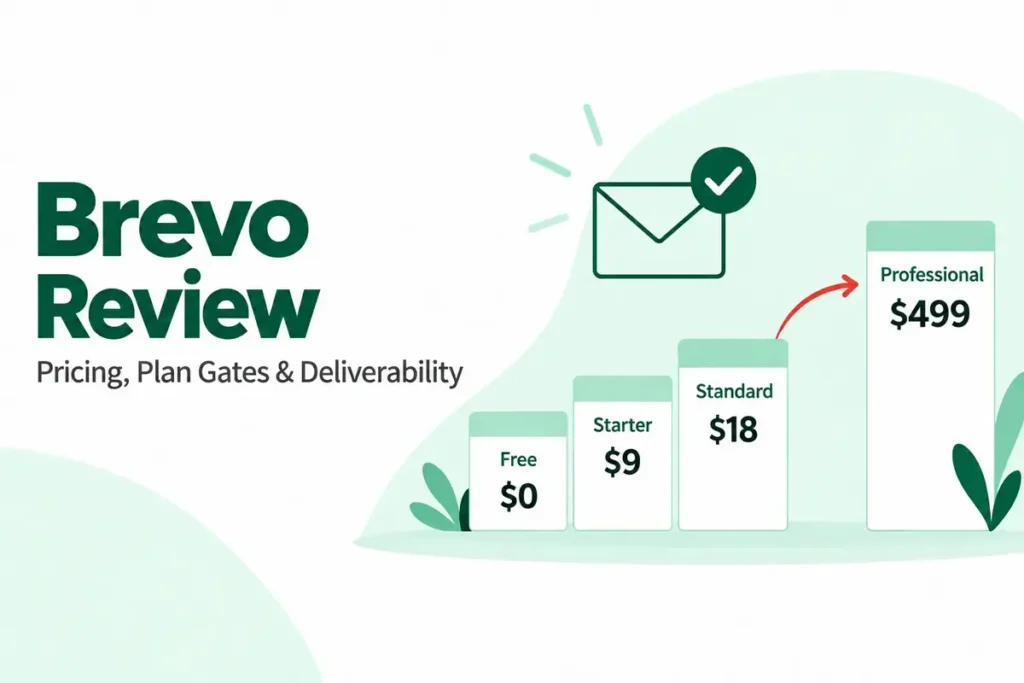
Brevo is worth it in 2026 for small teams that send to a large list a few times a month and want transactional email in the same account. The fit holds as long as three marketing seats are enough.
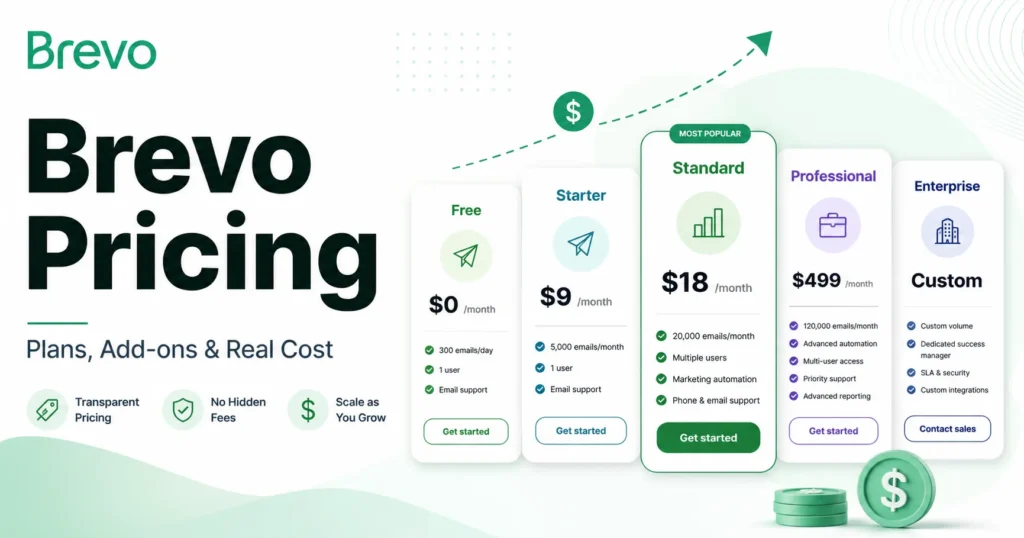
It stops being cheap the moment you need a fourth marketing user, contact scoring, or WhatsApp campaigns, because all three sit on the Professional plan at $499 a month. That jump, from $18 on Standard to $499 on Professional, is the fact I would put in front of any buyer before they sign up for the free plan.
This Brevo review covers current prices at every email volume, the low-tier contact caps that trigger automatic upgrades, what an independent deliverability test measured in August 2026, and what I found setting up a Free account. It ends with the alternative that fits better when Brevo does not.
In This Article (21 sections)
Brevo at a Glance: Quick Verdict
| Question | Short answer |
|---|---|
| Best for | Teams of one to three marketers sending newsletters, promotions, and app or store notifications from one account |
| Not ideal for | Teams needing more than three marketing seats, contact scoring, or deep Shopify revenue analytics without a $499 plan |
| Starting price | Free (300 emails a day); Starter from $9 a month; Standard from $18 a month |
| Practical plan | Standard at the 20,000-email tier ($69 a month), the first tier without a low contact cap |
| Free plan or trial | Free forever, no credit card, 100,000 stored contacts, 300 sends a day |
| Setup difficulty | Low for campaigns; moderate once domain authentication and the API are involved |
| Main strength | Billing by monthly email volume, with marketing and transactional email in one account |
| Main limitation | The gap between Standard and Professional, where seats, scoring, and WhatsApp live |
| Best alternative | Mailchimp for design-led newsletters; ActiveCampaign for deeper automation; Klaviyo for Shopify stores |
Prices are USD with monthly billing, from the official Brevo pricing page, checked September 23, 2026. Annual billing lowers each plan price by 10%.
How This Brevo Review Was Built
This review is based on Brevo’s official pricing page, its help-center plan documentation, its security page, one clearly labeled independent deliverability test, and a documented setup session on a new Brevo Free account. Pricing, plan limits, add-on costs, and the setup session all date from September 23, 2026.
Brevo was assessed against buyer-focused criteria: cost at realistic email volumes, contact limits, seat limits, plan-gated features, transactional sending, deliverability evidence, support access, and security controls.
Greater weight went to factors that change what a team pays after month two: upgrade triggers, seat caps, add-on costs, and the features that force a plan change. Brand popularity and affiliate relationships did not affect the verdict.
Claims that could not be verified from reliable evidence were removed, and workflow descriptions reflect documented product behavior. The full process is on the review methodology page.
What Is Brevo?
Brevo is a marketing, sales, and messaging platform built around email. It began as Sendinblue, so a “Sendinblue review” describes the same product under its former name.
It bundles email campaigns, transactional email over SMTP and API, SMS, WhatsApp, web and mobile push, landing pages, a free sales CRM, and a live-chat inbox. Brevo states on its pricing page that more than 600,000 customers use the platform.
For a buyer, the headline is the pricing model. Paid plans are priced by how many emails you send each month, which is why Brevo keeps appearing on shortlists for teams with big, quiet lists.
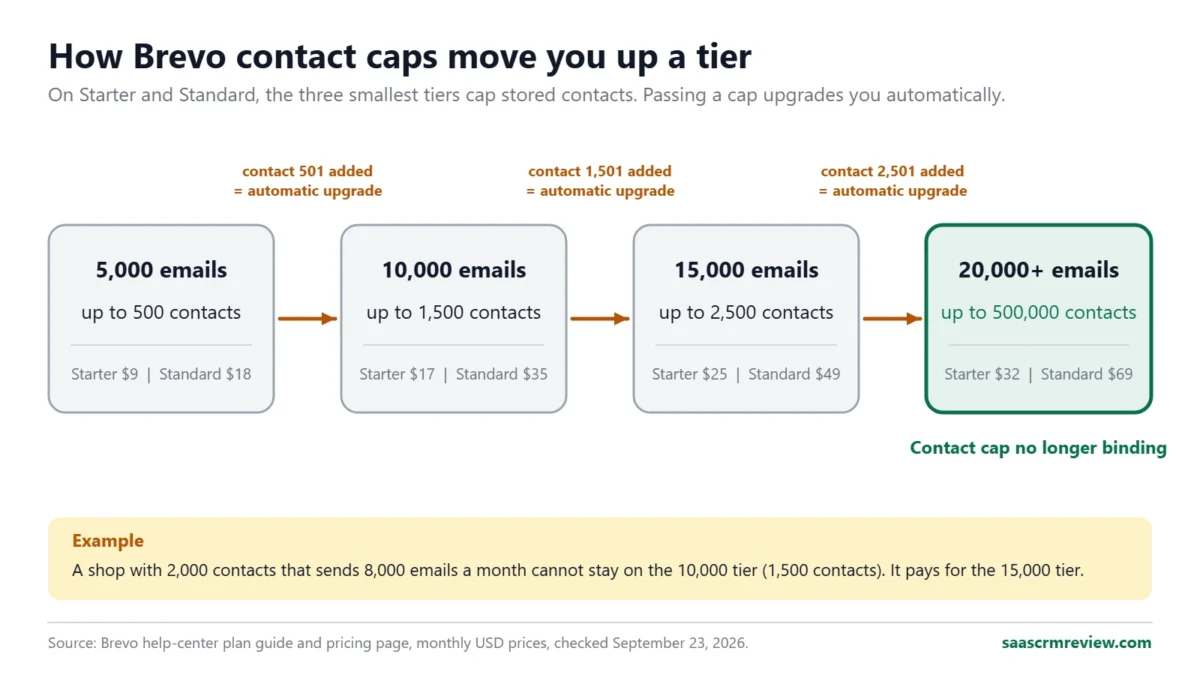
That model needs a closer read than it usually gets. The three smallest Starter and Standard tiers carry contact caps, so “pay per email, not per contact” is only fully true from the 20,000-email tier upward.
Brevo Pros and Cons
| Pros | Cons |
|---|---|
| Free plan stores up to 100,000 contacts with no time limit | Free plan caps sending at 300 emails a day, with no scheduling past the daily cap |
| Paid tiers from 20,000 emails store up to 500,000 contacts | The 5,000, 10,000, and 15,000 tiers cap contacts at 500, 1,500, and 2,500 and auto-upgrade you |
| Marketing and transactional email share one account and one API | Transactional sends count toward the same monthly email volume you pay for |
| Standard adds unlimited automation, A/B testing, and send time optimization for $18 | Standard allows three marketing seats at most; ten seats means Professional at $499 |
| Free sales CRM with a pipeline, meeting scheduling, and live chat | Contact scoring, WhatsApp, and phone support are Professional-only |
| ISO 27001:2022 certification and EU-hosted servers | Removing the Brevo logo on Starter costs $12 a month extra |
Plan limits and prices in this table come from Brevo’s plan guide and the Brevo pricing page, checked September 23, 2026.
The Three Problems Brevo Solves Well
1. A Large List You Email Only a Few Times a Month
Contact-priced tools bill for every stored subscriber whether you email them or not, while Brevo bills for sends. From the 20,000-email tier upward, both Starter and Standard store up to 500,000 contacts.
So a team with 40,000 contacts that sends one newsletter a month buys a 40,000-email tier and nothing more. On Starter that is $46 a month; on Standard, $89.
This is where Brevo is hard to beat. A seasonal business, a membership organization, or a B2B company with a long dormant list pays for activity rather than list size.
The same list on a contact-priced tool keeps costing money in the months nobody hears from you.
2. Marketing and Transactional Email From One Account
Password resets, receipts, and order confirmations need an SMTP relay or an API. Brevo’s pricing FAQ states that every plan includes both, along with outbound webhooks and unlimited log retention.
A SaaS product or a small online store can therefore run its newsletter and its system email from one vendor, one set of DNS records, and one bill. For a two-person team, that removes a second vendor contract and a second deliverability setup.
There is a catch that older reviews miss. Brevo’s plan builder labels the volume you buy as “campaigns & transactional”, so receipts and resets draw down the same monthly allowance as newsletters.
A store sending 6,000 order emails a month needs that volume in its tier on top of its marketing sends. Size the tier from both numbers, or the allowance runs out before the month does.
3. Automation and Testing for Under $20 a Month
Standard costs $18 a month at 5,000 emails and adds unlimited multi-step automation, A/B testing, AI send time optimization, click heatmaps, and web and event tracking. The Free plan runs automation too, but only 2,000 unique contacts can enter active workflows.
Free plan automation limit: Brevo’s Free plan limits article, checked September 23, 2026.
For a one-person marketing function, Standard covers a welcome series, a re-engagement flow, and an abandoned-browse email. Starter does not, because it has no A/B testing and no advanced reporting.
The Two Problems Brevo Creates
The Jump From Standard to Professional
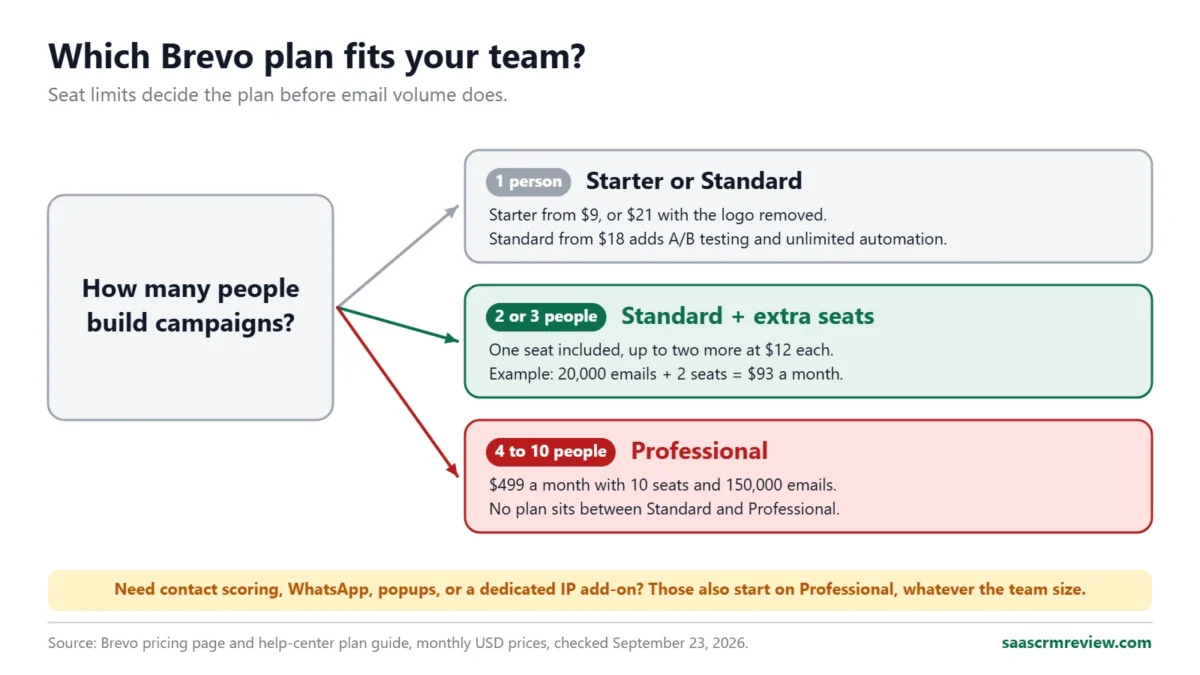
Standard tops out at three marketing seats: one included, plus up to two more at $12 a month each. The next plan, Professional, starts at $499 a month with 150,000 emails and 10 seats.
Nothing sits between them. And Professional also holds the features growing teams ask for next: contact scoring, AI segmentation, WhatsApp campaigns, popups, mobile push, and 10 landing pages instead of one.
Phone support and three hours a year with a deliverability specialist sit there too. A team that needs any one of those, or a fourth marketer, jumps from roughly $70 to $499 a month.
I would not choose Brevo on the Standard price if the team is likely to hire a fourth marketer within a year. Budget from $499, or pick a tool whose seat pricing rises in smaller steps.
Low-Tier Contact Caps That Upgrade You Automatically
On Starter and Standard, your email tier sets your contact limit: 500 contacts at 5,000 emails, 1,500 at 10,000, 2,500 at 15,000, and up to 500,000 from 20,000 emails upward.
When you pass a cap on one of the three lowest tiers, Brevo warns you as you approach it. It then upgrades you to the next tier automatically, and the subscription price rises with it.
Contact caps and the auto-upgrade rule: Brevo’s plan guide, “What is the auto-upgrade process”, checked September 23, 2026.
In practice, list size, not sending, decides your tier at the low end.
A shop with 2,000 contacts that sends 8,000 emails a month cannot stay on the 10,000-email tier, because that tier stores only 1,500 contacts. It pays for the 15,000 tier instead.
Brevo Pricing and Plans in 2026
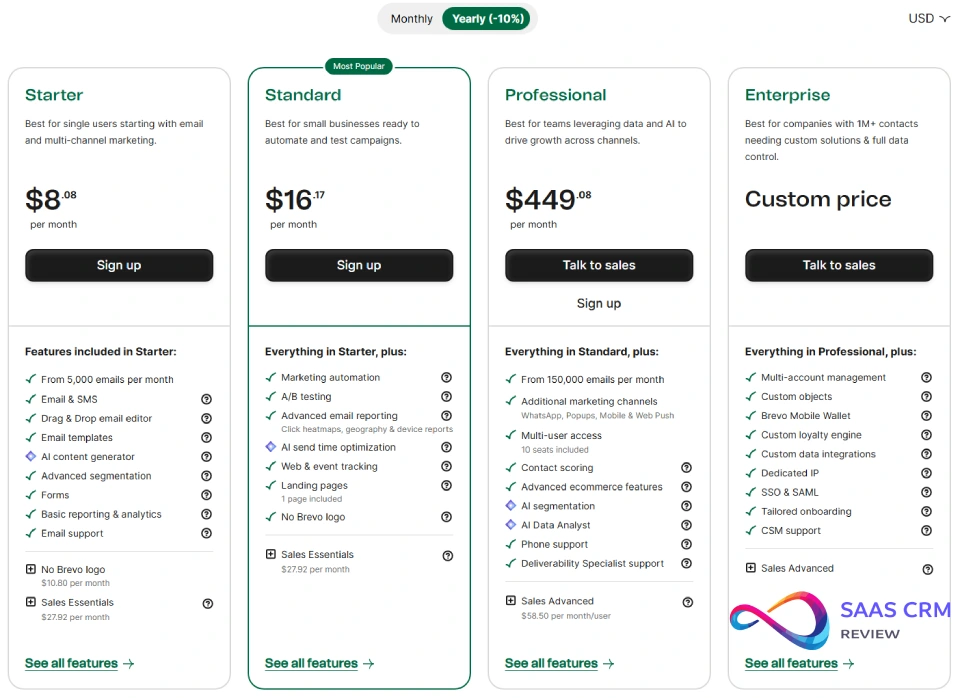
Brevo sells five plans. Prices below are monthly billing in USD; annual billing is 10% cheaper, which brings Starter to $8.08 and Standard to $16.17.
| Plan | Monthly price | Email volume | Contacts stored | Marketing seats |
|---|---|---|---|---|
| Free | $0 | 300 emails per day | Up to 100,000 | 1 |
| Starter | From $9 | From 5,000 per month | 500 to 500,000, set by tier | 1 |
| Standard | From $18 | From 5,000 per month | 500 to 500,000, set by tier | 1, up to 3 with add-on |
| Professional | From $499 | From 150,000 per month | Up to 2 million | 10 |
| Enterprise | Custom | Custom | Unlimited | Unlimited |
Sources: Brevo pricing page and Brevo’s help-center plan guide, both checked September 23, 2026.
Starter vs Standard Price by Monthly Email Volume
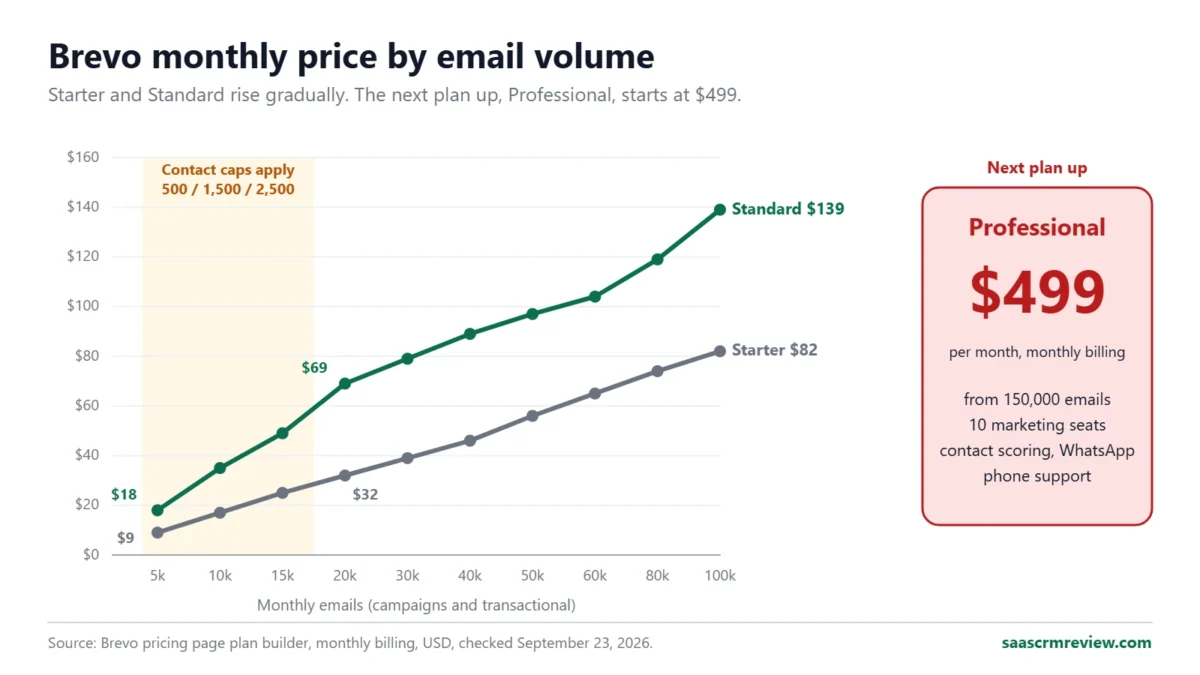
The entry prices hide how fast the two plans separate. At 5,000 emails Standard costs $9 more than Starter; at 100,000 emails the difference is $57.
| Monthly emails | Starter | Standard | Contacts stored |
|---|---|---|---|
| 5,000 | $9 | $18 | Up to 500 |
| 10,000 | $17 | $35 | Up to 1,500 |
| 15,000 | $25 | $49 | Up to 2,500 |
| 20,000 | $32 | $69 | Up to 500,000 |
| 30,000 | $39 | $79 | Up to 500,000 |
| 40,000 | $46 | $89 | Up to 500,000 |
| 50,000 | $56 | $97 | Up to 500,000 |
| 60,000 | $65 | $104 | Up to 500,000 |
| 80,000 | $74 | $119 | Up to 500,000 |
| 100,000 | $82 | $139 | Up to 500,000 |
Source: the plan builder on the Brevo pricing page, monthly billing, USD, checked September 23, 2026. Standard continues to $179 at 150,000 emails and $249 at 250,000.
What a 10-Person Team Actually Pays
Seat limits decide the 10-user cost, not email volume.
If all 10 people build campaigns, Standard is off the table because it stops at three marketing seats. The only self-serve plan with 10 seats is Professional at $499 a month for 150,000 emails, or $449.08 a month billed annually.
That is $5,988 a year on monthly billing before any sales add-on.
If only three of the 10 build campaigns and the rest read reports or handle deals, Standard works. At 20,000 emails that is $69 plus two extra seats at $12 each, or $93 a month.
Sales reps then need the sales tools. The free sales features cover one pipeline and 50 open deals, and Sales Essentials adds unlimited pipelines and deals for $31 a month with one seat included.
The pricing page does not list the per-seat price for additional sales users, so confirm it at checkout before you model seven reps.
My read: a 10-person team pays either about $93 to $124 a month or $499 or more, with almost nothing in between. Decide which side you are on before you import a single contact.
Add-Ons and Costs the Plan Cards Understate
These are the line items I would add to any Brevo budget. Every figure comes from the Brevo pricing page or its help center, checked September 23, 2026.
- Logo removal on Starter. Starter emails carry a “Sent with Brevo” footer unless you add the removal add-on for $12 a month ($10.80 billed annually). A 5,000-email Starter plan with the logo removed costs $21, more than Standard’s $18 entry price.
- Contact-cap upgrades. On the three smallest tiers, list growth moves you up a tier automatically.
- Transactional volume. Receipts and resets use the same monthly allowance as campaigns.
- SMS and WhatsApp credits. These are prepaid and priced by volume and destination country. WhatsApp campaigns require Professional.
- Sales packages. Sales Essentials is $31 a month and Sales Advanced is $65 per user per month on monthly billing, with Sales Advanced listed as a Professional add-on.
- Dedicated IP and SAML SSO. Both are add-ons on Professional and included on Enterprise.
For a plan-by-plan cost breakdown with more scenarios, see the full Brevo pricing guide.
Feature Gates: What You Get on Each Plan
| Feature | Free | Starter | Standard | Professional | Enterprise |
|---|---|---|---|---|---|
| Daily sending cap | 300 per day | None | None | None | None |
| “Sent with Brevo” footer removed | No | Paid add-on | Yes | Yes | Yes |
| Marketing automation | Up to 2,000 contacts | Up to 2,000 contacts | Unlimited | Unlimited | Unlimited |
| A/B testing | No | No | Yes | Yes | Yes |
| Advanced reports, heatmaps | No | No | Yes | Yes | Yes |
| AI send time optimization | No | No | Yes | Yes | Yes |
| Landing pages | 0 | 0 | 1 | 10 | Custom |
| Contact scoring, AI segmentation | No | No | No | Yes | Yes |
| WhatsApp, popups, mobile push | No | No | No | Yes | Yes |
| Marketing seats | 1 | 1 | Up to 3 | 10 | Unlimited |
| Dedicated IP | No | No | No | Add-on | 1 included |
| SAML SSO | No | No | No | Add-on | Included |
| Phone support | No | No | No | Yes | Yes, with SLA |
Sources: Brevo’s Free plan limits article and help-center plan guide, both linked above, plus the Brevo pricing page, checked September 23, 2026. Starter inherits the Free plan’s automation limit, since Brevo’s plan guide lists unlimited automation contacts first on Standard.
The gate that surprises most buyers is contact scoring. Older reviews, including the previous version of this one, place lead scoring on a mid-tier plan.
On the current plans it belongs to Professional. If your nurture program depends on a score threshold, read the lead scoring guide and price Professional from the start.
Key Features With Plan Gates
Email Campaigns and the Editor
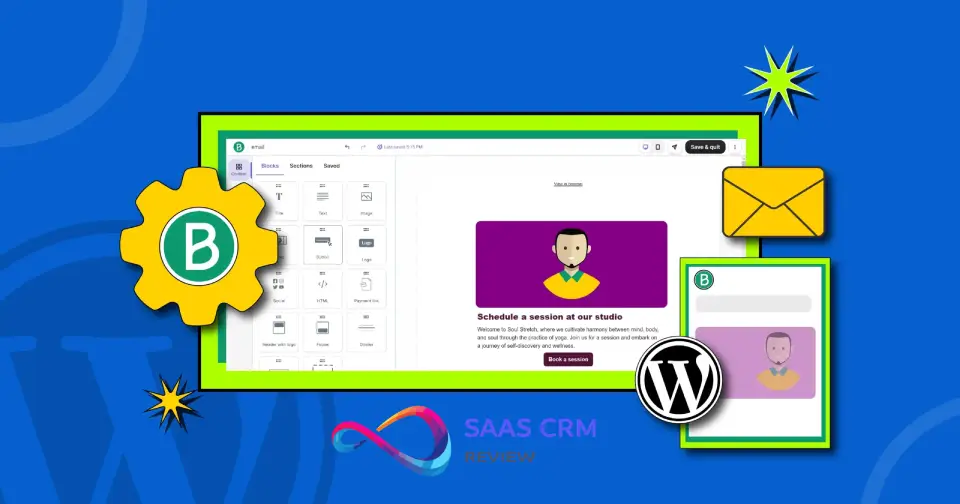
Every plan, including Free, includes the drag-and-drop email editor, custom templates, and reusable sections. Starter adds industry templates, an AI content generator for subject lines and copy, and segmentation by demographics, website activity, campaign engagement, and custom events.
Use case: a weekly newsletter or a monthly sale announcement to a segmented list. Plan: Free works for tests; Starter is the first plan without the 300-a-day cap.
Limitation: once the daily 300 is used, the Free plan cannot schedule a campaign for the next day, and larger sends must be requeued manually each day.
Marketing Automation
Automation is included on every plan, but the Free plan admits only 2,000 unique contacts into active workflows. Brevo emails you at 80% and 100% of that limit; after that, new contacts stop entering while existing ones finish.
Standard removes the contact limit and adds web and event tracking, which lets a workflow start from a page visit or a custom event.
Use case: welcome series, abandoned browse, and win-back flows. Plan: Standard. Limitation: scoring-based branching needs contact scoring, which is Professional-only.
Transactional Email (SMTP and API)
All plans include transactional email over SMTP and a REST API, with outbound webhooks and unlimited log retention. On the Free plan, once the 300-a-day limit is reached, up to 1,000 extra transactional emails wait in a retry queue, and anything beyond that is not delivered.
Use case: receipts, password resets, and account alerts from a web app or store. Plan: any paid plan for production traffic.
Limitation: a production app on the Free plan risks losing password resets on a busy day, so I would treat Free as a staging environment only.
SMS and WhatsApp
SMS campaigns and transactional SMS are available from the Free plan, paid for with prepaid credits priced by country and volume. WhatsApp campaigns and WhatsApp transactional messages are Professional features.
Use case: delivery notifications and flash-sale reminders. Plan: any plan for SMS; Professional for WhatsApp. Limitation: budget credits separately, because no plan includes a message allowance.
Built-In Sales CRM
Every plan includes free sales tools: one pipeline, 50 open deals, meeting scheduling, live chat, forecasting, task reminders, one connected calendar and mailbox, and an AI Conversations agent. Once you hit 50 open deals, you keep them but cannot create new ones.
Use case: a founder or small team tracking inbound deals next to their email list. Plan: free tools on any plan; Sales Essentials for unlimited deals and pipelines.
Limitation: multi-currency deals need Professional plus Sales Advanced. A team with a dedicated sales process will outgrow this faster than a sales CRM such as Pipedrive; see the Pipedrive CRM review.
Landing Pages, Forms, and Push
Brevo lists branded forms among Starter features, with follow-up emails triggered on signup. Standard includes one landing page and Professional ten.
Starter and Standard include web push, with 1,000 and 10,000 targeted subscribers per campaign send respectively.
Use case: list growth for a single offer or event. Plan: Standard. Limitation: one landing page is enough for a lead magnet, not for a campaign calendar; teams running several offers at once pay for Professional or use a separate landing page builder.
What I Found Setting Up a Brevo Free Account
On September 23, 2026, I opened a new Brevo account on the Free plan and ran a documented setup session in the desktop web app. It covered importing contacts, drafting a campaign, generating an automation with Aura, and walking through the domain, SMTP, and CRM setup screens.
The session took about ten minutes. Every automation stayed inactive and no campaign went out, so the deliverability figures in this review come from the independent test in the next section.
Import: Fast Mapping, Then a Consent Gate
I pasted 20 test contacts, all on example.com, a domain reserved for testing, into the copy-paste importer. The importer runs in three steps: paste the data, map the columns, pick a list.
Aura’s AI mapping was switched on by default and matched EMAIL, FIRSTNAME, and LASTNAME to the right contact attributes in about a second. The preview counted the header row too, so 20 contacts showed as “21 lines”.
The final screen asks you to tick an opt-in agreement: every contact gave permission within the last two years, and none were bought, rented, or borrowed. Brevo warns it may suspend campaigns sent to contacts that break those conditions.
I stopped at that screen, because test addresses cannot honestly meet that bar. For a team migrating a list, this is the step to prepare for: have consent records ready before import day.
Campaign Draft: AI Subject Lines Work on Free
Creating an email campaign opens a five-part checklist: sender, recipients, subject, design, and additional settings. The sender came pre-filled with the login email.
In the subject step, “Write with AI” returned three alternatives in two to three seconds. One added a first-name variable with “Friend” as the fallback, which is a sensible default.
The template library listed 48 ready-to-use designs. I opened “Monthly newsletter”, and the editor offered 13 content blocks, from Title and Text to Dynamic content, Product, and HTML, plus six categories of pre-built sections.
Two Free-plan limits showed up within minutes. The A/B Test tab on the campaign screen carried an upgrade marker, and after saving the design Brevo displayed: “To remove the ‘Sent by Brevo’ logo from your footer, please upgrade your plan.”
The design menu offered Reset design, the HTML code, and a plain-text version, but no template swap. Changing templates after you start means resetting the design, so pick the template before writing copy.
Automation: Aura Built the Skeleton in Under a Minute
I asked Aura in plain English for this: when a contact joins a list, send a welcome email, wait two days, then send a second email only to people who did not open the first one.
About 45 seconds later it returned a saved, inactive workflow with the right trigger on the right list, the first email, the two-day wait, a conditional split, and a second email on the “did not open” branch.
The split was broader than what I asked for.
Aura set it to “email not opened: any type of email in the last 6 months” rather than “did not open the welcome email”, so anyone who skipped any email in six months would count as a non-opener. Both email steps also arrived empty.
My read: Aura saves the drag-and-drop work, but treat its build as a draft and check every condition before you activate. The builder puts a Test button beside Activate for exactly that.
Domain, SMTP, and CRM Setup
Domain authentication runs as a four-step wizard: domain, branded subdomain, setup method, and records. Have someone with DNS access ready before you start.
The SMTP page was available on the Free plan from the first login. It lists the relay server, smtp-relay.brevo.com on port 587, with ready-made tabs for SMTP, API, Postfix, and PHP setup, and the password is a separate SMTP key you generate.
The Sales CRM opened on its own onboarding screen with a “Start for free” button. The free pipeline is included, but it has to be switched on before your team can use it.
What the Session Changed in My Verdict
| Observation | Why it matters | What I would do |
|---|---|---|
| Import ends with an opt-in agreement | Migrated lists need proof of consent | Gather consent records before import |
| AI subject lines and AI automation work on Free | You can judge Aura before paying | Use them for drafts, not final logic |
| Aura’s split condition was broader than requested | The wrong contacts could get the follow-up | Rewrite conditions by hand before activating |
| No template swap once a design exists | Switching layouts means rebuilding | Choose the template before writing copy |
| A/B testing and logo removal locked on Free | Starter does not add A/B testing either | Budget for Standard if you plan to test |
| Sales CRM needs switching on | New users miss the free pipeline | Activate it during setup |
Observations come from a Brevo Free account session on September 23, 2026, in the desktop web app. The last column holds my editorial recommendations.
Email Deliverability: What the Independent Data Shows
Deliverability claims in most reviews are opinions. The most useful published number comes from EmailDeliverabilityReport, which sends test emails through each provider and records where they land.
In its August 2026 test period, Brevo placed 78.78% of test emails in the inbox, seventh of the 24 providers listed.
| Provider | Test emails sent | Inbox | Spam | Lost |
|---|---|---|---|---|
| Kit | 10,929 | 80.06% | 18.40% | 1.54% |
| Brevo | 11,025 | 78.78% | 19.24% | 1.98% |
| Mailchimp | 10,906 | 77.68% | 20.53% | 1.79% |
| HubSpot | 11,251 | 77.52% | 20.46% | 2.02% |
| ActiveCampaign | 10,733 | 73.88% | 23.29% | 2.82% |
Source: EmailDeliverabilityReport’s Brevo review, August 2026 test period, checked September 23, 2026. The same page gives Brevo an overall deliverability score of 91 out of 100.
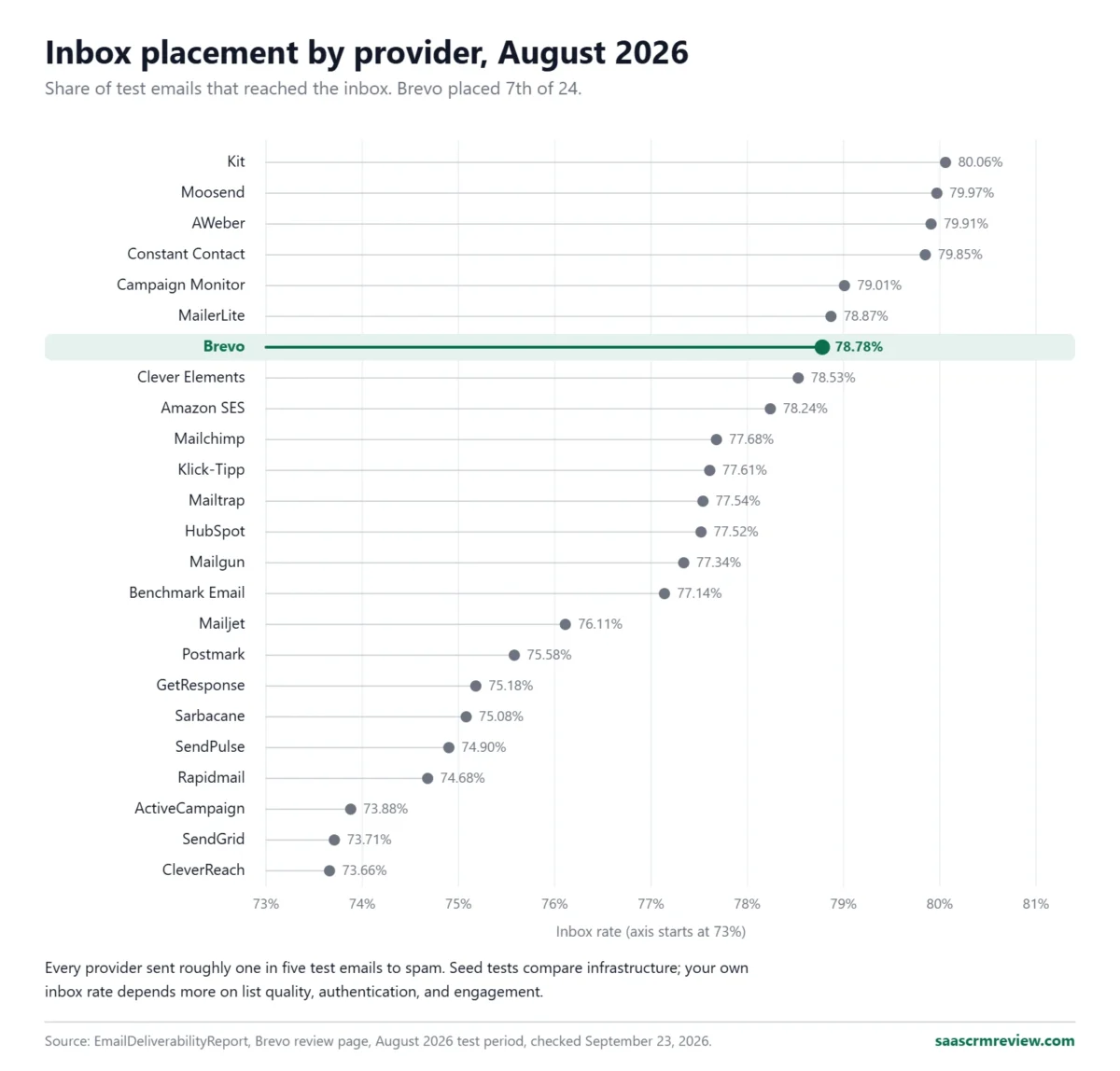
Read those numbers as a comparison, not a forecast. The spread between the top provider and Brevo is 1.28 percentage points, and every provider in the table sent roughly one in five test emails to spam.
Seed tests measure the platform’s infrastructure under identical conditions. Your own inbox rate depends far more on list quality, authentication, and engagement.
What Brevo controls, and where plan tier matters:
- Shared sending on lower plans. Dedicated IPs are an add-on on Professional and included on Enterprise, so Free, Starter, and Standard senders share IP reputation with other customers.
- Human help on Professional. Professional includes three hours a year with a deliverability specialist.
- Account approval. Brevo’s pricing FAQ states that new accounts can send up to 300 emails a day once Brevo approves the account for sending. Plan for that review before a launch date.
What you control, whichever tool you choose: authenticate your sending domain with SPF, DKIM, and DMARC before the first campaign, use double opt-in on public forms, and suppress contacts who have not opened in several months.
On Brevo, suppression also saves money, because every email to an inactive contact counts toward your paid volume.
Automation, AI, and Reporting
Brevo’s AI features are spread across plans, which makes the marketing pages read richer than a Starter account feels. Aura, Brevo’s AI assistant, is on the Free plan, and the AI content generator arrives on Starter.
AI send time optimization is on Standard. AI segmentation and the AI Data Analyst, which answers plain-language questions about your data, are Professional features.
Reporting follows the same staircase. Free and Starter get basic opens and clicks, while Standard adds click heatmaps, geography, and device reports.
Professional adds an analytics studio with dashboards and contact scoring that includes RFM and customer lifetime value.
For a small team, the Standard reporting set answers the questions that drive campaign decisions: who clicked, on which link, from which device. Customer value modeling is where Brevo asks for Professional money, and where an ecommerce-first tool such as Klaviyo deserves a side-by-side check.
If automation depth is your main criterion, the marketing automation comparison ranks the wider field.
Ease of Use and Setup
Signing up needs only an email address and an organization name, with no credit card, according to Brevo’s pricing FAQ. The account starts on the Free plan, so you can import contacts, build templates, and draft automations before paying.
Three steps take real time, and none of them is Brevo-specific:
- Domain authentication. Adding SPF, DKIM, and DMARC records needs someone with DNS access, and the records take time to propagate.
- Account approval. Sending starts only after Brevo approves the account.
- Contact import and consent. Mapping fields and confirming consent status takes longer than building the first email.
My setup difficulty rating is low for a marketer sending campaigns and moderate for a developer wiring transactional email through the API. The best test of fit is a 30-day and 90-day check.
After 30 days, the domain is authenticated, the welcome flow is live, and your monthly volume, including transactional sends, sits comfortably inside your tier.
After 90 days, you know whether your contact count will cross a low-tier cap, whether a fourth marketer is coming, and whether you need contact scoring. If any answer is yes, re-price the account against Professional before renewal.
Integrations and API
Brevo’s developer offer is the strongest part of the product for technical teams. Every plan includes the REST API, SMTP relay, and outbound webhooks, and the pricing FAQ describes API docs with guides, SDKs, libraries, and code recipes.
Inbound webhooks and personalized data feeds are Professional features. Custom data integrations with a data warehouse, POS, or ERP over direct connectors or SFTP are Enterprise features.
For no-code connections, Brevo runs an app marketplace of plugins and integrations. Check that your ecommerce platform and CRM appear there, and whether the connection syncs order data, before relying on product-based automations.
Ecommerce features such as AI product recommendations and back-in-stock alerts sit on Professional, so a store on Standard gets the connection but not those blocks.
If your stack already includes a CRM such as HubSpot, keep the CRM as the system of record and use Brevo for sending. The free Brevo sales tools suit a founder, not a sales team’s daily pipeline work; the HubSpot CRM review covers that side of the stack.
Security, Support, and Admin Controls
Security. Brevo’s security page states that it is ISO 27001:2022 certified, that its servers are in the EU, and that account data is encrypted before backup and backed up across three geographically distinct servers.
The same page lists multi-factor authentication and IP address whitelisting, plus consent records, customizable forms, and data request management that support GDPR, CASL, and CCPA practices. The certificate is downloadable from the Brevo data security page.
Admin controls. Seats are the main admin constraint: one on Free and Starter, three at most on Standard, 10 on Professional, and unlimited on Enterprise. SAML SSO is a Professional add-on and included on Enterprise, along with sub-organization management for multiple brands or business units.
Support. Starter includes email support in six languages, and Standard adds priority email support. Professional adds phone support, digital onboarding resources, a one-hour Customer Success Manager meeting per year on annual billing, and the deliverability specialist hours.
Enterprise adds a Service Level Agreement and a dedicated Customer Success Manager. For an agency or a multi-brand company, sub-organization management is Enterprise-only, which means custom pricing.
Brevo Limitations
These are the limits I would test against your own plan before committing. Each is documented on Brevo’s pricing page or in its help center.
- Three-seat ceiling below $499. Standard stops at three marketing users. There is no mid-priced plan for a four- to nine-person marketing team.
- Contact caps on the smallest tiers. 500, 1,500, and 2,500 contacts on the 5,000, 10,000, and 15,000 tiers, with automatic paid upgrades when you pass them.
- Scoring and WhatsApp are Professional-only. Contact scoring, AI segmentation, WhatsApp, and popups are unavailable on Standard at any volume.
- Shared transactional and marketing allowance. System email competes with campaigns for the same paid volume.
- Free plan throughput. 300 emails a day, no next-day scheduling once the cap is reached, and a 1,000-email retry queue for transactional overflow.
- One landing page on Standard. Enough for a single offer, not for a busy campaign calendar.
Buyer Risk Ledger
| Risk | Who it hits | Consequence | Mitigation |
|---|---|---|---|
| Fourth marketer joins | Growing teams on Standard | Forced move to $499 Professional | Price Professional before signing, or cap campaign builders at three |
| List passes 500, 1,500, or 2,500 contacts | Small lists on the lowest tiers | Automatic tier upgrade and higher bill | Start at the 20,000 tier if the list is near a cap |
| Receipts spike during a sale | Stores and apps | Monthly volume runs out early | Count transactional sends when choosing the tier |
| Nurture depends on lead scores | B2B teams | Scoring unavailable below Professional | Use tags and engagement segments on Standard |
| Shared IP reputation | Free, Starter, Standard senders | Less control over sending reputation | Authenticate your domain and suppress inactive contacts |
Who Should Use Brevo?
- Newsletter senders with big, quiet lists. From 20,000 emails a month you can store up to 500,000 contacts, so infrequent sending to a large list stays cheap.
- SaaS products and small stores needing transactional email. One account covers campaigns, receipts, and resets over SMTP or API.
- One- to three-person marketing teams. Standard gives unlimited automation, A/B testing, and heatmaps for $18 to $139 a month up to 100,000 emails.
- EU-focused businesses. EU-hosted servers and ISO 27001:2022 certification simplify vendor reviews.
- Founders who want a light CRM beside their email. The free sales tools cover one pipeline and 50 open deals.
Who Should Avoid Brevo?
- Marketing teams of four to nine people. You pay $499 a month for Professional or work around the three-seat limit.
- Shopify stores that live on revenue analytics. Product recommendations, back-in-stock alerts, and customer value scoring sit on Professional; price Klaviyo, which is built for ecommerce stores, before paying $499.
- B2B teams whose nurture depends on lead scores. Contact scoring is Professional-only.
- Creators selling paid newsletters. Kit is designed around creator monetization and has a free plan up to 10,000 subscribers.
- Agencies managing many client brands. Sub-organization management is Enterprise-only.
Brevo Alternatives
| Tool | Pricing basis | Entry pricing | Choose it if |
|---|---|---|---|
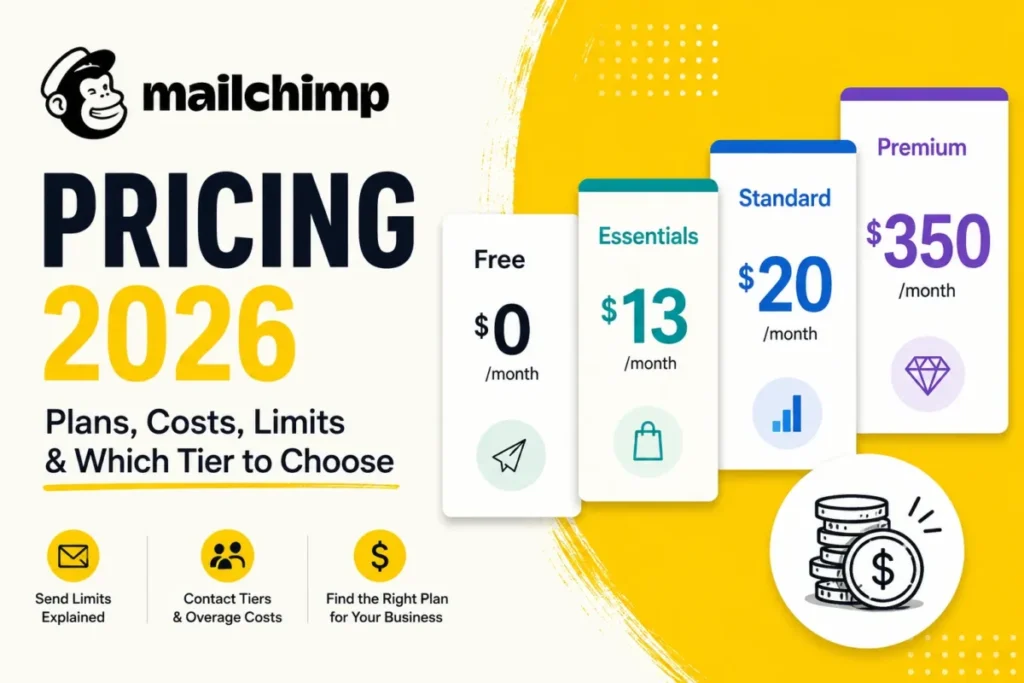
| Mailchimp | Contacts | Free under 250 contacts; Essentials from $13 a month; Standard from $20 a month | You want a familiar editor and send often to a small list |
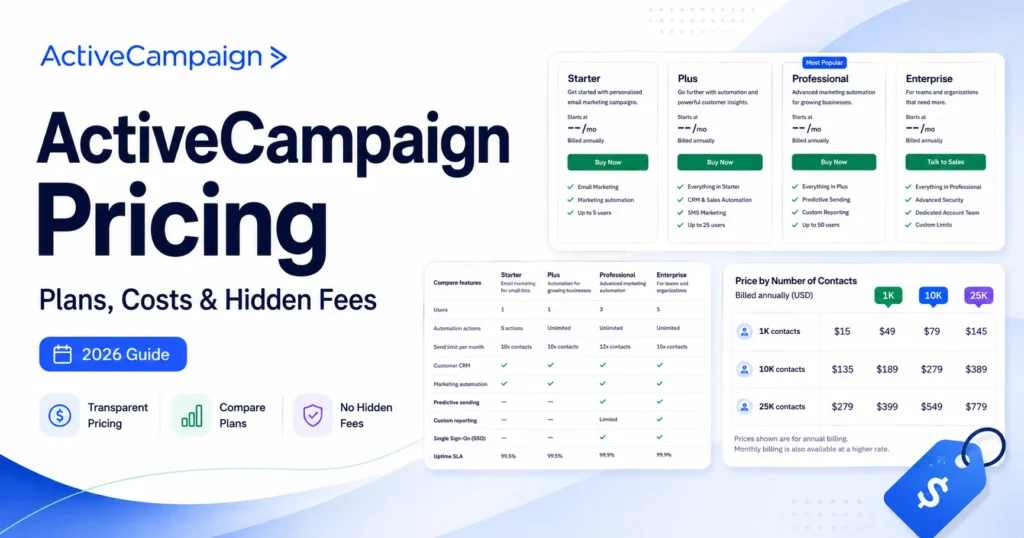
| ActiveCampaign | Contacts | Starter from $15 a month and Plus from $49 a month, billed annually | You need deeper automation logic and CRM-linked workflows |
| Klaviyo | Active profiles | Free up to 250 active profiles; email plan from $20 a month | You run a Shopify store and want revenue-driven segments |
| Kit | Subscribers | Free up to 10,000 subscribers; Creator $33 a month for 1,000 subscribers | You are a creator monetizing a newsletter |
Entry prices apply to the smallest contact or profile tier, checked September 23, 2026, on each vendor’s official pricing page:
- Mailchimp marketing plan pricing
- ActiveCampaign plan pricing
- Klaviyo pricing by active profile
- Kit creator plan pricing
The choice comes down to how your cost grows. Brevo grows with sends, and the other four grow with list size.
If you email a big list once a month, Brevo wins on cost. If you email a small, engaged list several times a week, a contact-priced tool can cost the same or less and gives you more per dollar in design or automation.
For detailed takes, read the Mailchimp review, the ActiveCampaign review, the Klaviyo review, and the Kit (ConvertKit) review. The best email marketing platforms ranking compares Brevo against the wider field.
Switch or stay? Stay on Brevo if you are on Standard with three or fewer marketers and no need for scoring. Switch when a fourth marketer, lead scoring, or WhatsApp becomes a requirement and $499 is more than the rest of your stack costs.
Delay the decision if you are mid-migration. Moving authentication, templates, and transactional integrations twice costs more than a few months on an imperfect plan.
Final Verdict: Is Brevo Worth It in 2026?
Yes, for the right team. Brevo is one of the lowest-cost ways to send to a large list infrequently, and it includes transactional email over SMTP and API on every plan.
Its deliverability sits in the upper third of the August 2026 independent test, within 1.3 points of the leader.
My plan recommendations:
- Solo sender testing the platform: Free, but move to a paid plan before production transactional traffic.
- Newsletter or small store, one person: Starter only if you accept the Brevo footer; otherwise Standard, which costs less than Starter plus logo removal at 5,000 emails and adds A/B testing and unlimited automation.
- Team of two or three marketers: Standard at the 20,000-email tier or above, where the contact cap no longer binds.
- Team of four or more, or needing scoring or WhatsApp: Professional at $499, compared first against ActiveCampaign and Klaviyo.
The renewal question: before you renew, check whether your team still fits in three seats and whether your list still sits above the low-tier caps. If both answers are yes, Brevo is still the right bill to pay.
FAQ
Is Brevo the same as Sendinblue?
Yes. Sendinblue renamed itself Brevo, and the core email product and API carried over; the plan names and structure have changed since.
Does Brevo charge per contact or per email?
Mostly per email. On Starter and Standard you choose a monthly email volume, and that tier sets a contact limit: 500, 1,500, or 2,500 on the three smallest tiers, and up to 500,000 from 20,000 emails.
The Free plan stores up to 100,000 contacts.
Do transactional emails count toward my Brevo plan?
Yes. Brevo’s plan builder counts “campaigns & transactional” together in your monthly email volume.
Can I pause or cancel a Brevo plan?
Brevo’s help-center plan guide, linked in the pricing sections above, says you can pause a monthly subscription for up to three months instead of canceling.
To downgrade, you cancel first, and the cancellation takes effect at the end of the billing period.
Is there a prepaid option instead of a monthly plan?
Yes. Brevo sells prepaid email credits with no daily sending limit and no expiration date, which suits organizations that send rarely.
Prepaid credits do not include phone support.