Most shortlists for the best landing pages rank builders by editor quality and entry price. Both are the wrong number to budget from.
The price that decides your year is the first plan that lets you run a native A/B test, and the second is whatever a winning campaign costs once traffic climbs past the included allowance. Those two numbers move independently of the sticker price, and on some products they move by a factor of five.
This ranking compares ten landing page builders on the cost to publish, the cost to test, what happens at the traffic ceiling, and which buyer each one fits. Every price and plan limit here comes from the vendor’s own pricing or help documentation, checked on 2026-08-12.
If you are assembling a wider stack, our guide to CRM tools for marketing automation covers the layer these pages feed.
In This Article (14 sections)
Quick Verdict: Best Landing Page Builder by Use Case
| Use case | Best pick | Why it fits |
|---|---|---|
| Paid-media and CRO teams of 3 to 15 people | Unbounce | Page building, native experimentation, and campaign-message tooling sit in one product |
| High-traffic lead generation | Leadpages | The vendor states its plans carry no traffic caps and no traffic overage charges |
| Enterprise paid acquisition with heavy ad spend | Instapage | Server-side testing, hypothesis workflow, and collaboration are packaged for large teams |
| Agencies running many pages and domains | Landingi | Active pages, domains, users, and credits are all explicit plan dimensions |
| Cheapest route to testing plus behavior maps | Zoho LandingPage | A/B testing, heatmaps, scroll maps, and attention maps arrive on the Professional plan |
| Mobile-first performance campaigns | Swipe Pages | Traffic tiers and a published per-visit overage rate make campaign budgeting arithmetic |
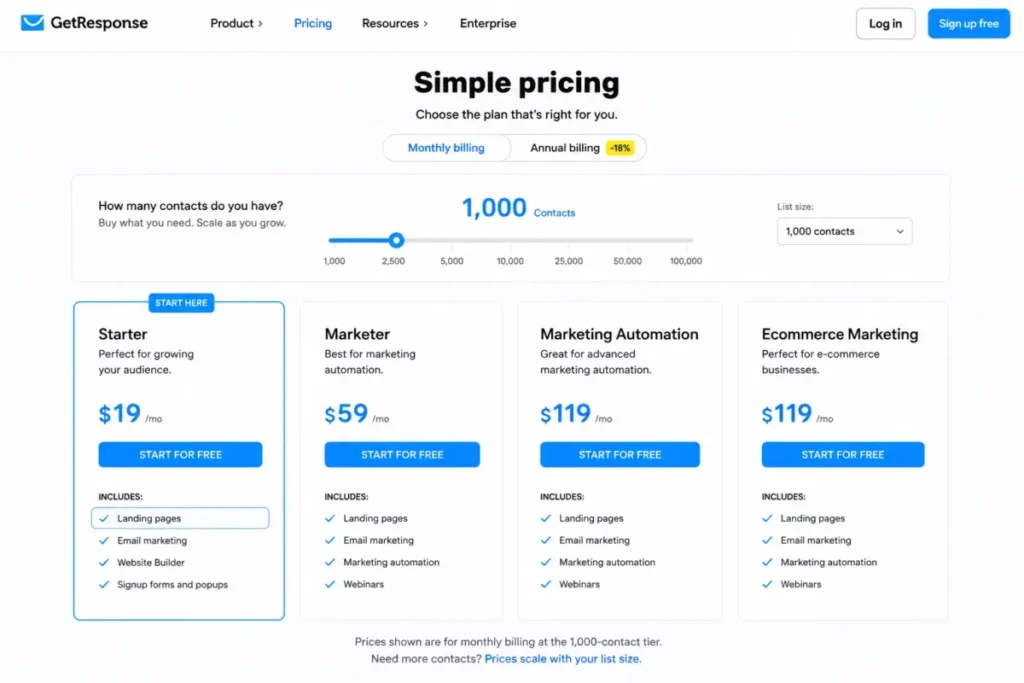
| Email-first list growth | GetResponse | Landing pages, forms, email, and automation sit inside one contact-priced subscription |
| Design-led marketing sites | Webflow | Visual control and CMS depth, with a paid Site plan required to publish on your own domain |
| Existing HubSpot CRM or Marketing Hub teams | HubSpot Landing Pages | Pages, leads, automation, and reporting stay in one CRM record |
| Budget pick and free-plan pick | Carrd for budget, Zoho LandingPage for free | Carrd Pro Standard is the cheapest branded page here; Zoho’s free tier includes a custom domain |
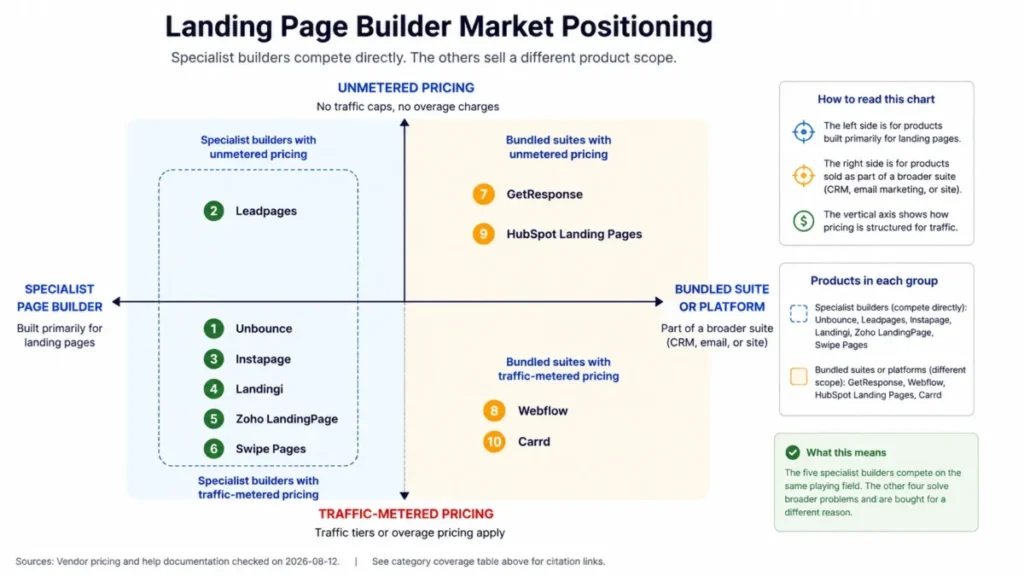
Two picks in that table are not landing page specialists at all, and that distinction matters more than the ranking order. Webflow sells site hosting, GetResponse sells contacts, and HubSpot sells a CRM suite, so their subscriptions cover a different scope than a per-account page builder does.
Buyers weighing a page builder against a wider revenue stack can compare it with our sales and marketing software roundup.
Source: Leadpages traffic terms, Zoho free plan, and Swipe Pages tiers, checked on 2026-08-12.
Where Each Builder Sits: Category Coverage Matrix
| Product | Product category | Native A/B testing | Traffic-metered pricing |
|---|---|---|---|
| Unbounce | Specialist landing page builder | By plan | Yes |
| Leadpages | Specialist landing page builder | By plan | No |
| Instapage | Specialist landing page builder | By plan | Yes |
| Landingi | Specialist landing page builder | By plan | Yes |
| Zoho LandingPage | Specialist builder inside a suite | By plan | Yes |
| Swipe Pages | Specialist landing page builder | Not established here | Yes |
| GetResponse | Email and automation suite | By plan | Conditional |
| Webflow | Website builder and host | Not established here | Yes |
| HubSpot Landing Pages | CRM and marketing suite | By plan | No |
| Carrd | One-page site builder | Not established here | Not applicable |
This matrix is an editorial assessment of documented feature scope, not a vendor scorecard. Unbounce, Leadpages, Instapage, Landingi, and Swipe Pages compete directly with each other, while Webflow, GetResponse, and HubSpot compete for a broader budget line.
Carrd sits outside both groups, competing mainly with a free page on somebody else’s subdomain.
Source: HubSpot content editions, GetResponse plans, and Webflow Site plans, checked on 2026-08-12.
How We Evaluated the Best Landing Page Builders
These rankings are built from official vendor pricing pages, official help-center and plan documentation, published feature gates, and stated usage limits. Pricing and plan limits were checked on 2026-08-12.
Each builder was assessed against the same buyer-focused criteria: the plan that permits native experimentation, included traffic and what happens past it, non-traffic resource ceilings, workflow fit for a named team shape, integration context, and the total cost of scaling a campaign.
Greater weight was given to factors that change a purchase decision rather than a demo impression. Price-to-test, overflow behavior, mandatory onboarding charges, and add-on economics outrank template counts and editor polish.
Claims that could not be verified from official evidence were excluded rather than estimated. Temporary or time-limited pricing is labeled separately from standard list pricing and re-checked before publication.
The Three Problems Every Landing Page Buyer Faces in 2026
Every comparison in this category answers the same easy question, which is what a builder costs to start. The three questions below are the ones that decide whether the purchase survives contact with a real campaign.
Problem 1: The price to publish is not the price to test
A landing page you cannot test is a guess with a custom domain. On five of the ten products here, native A/B testing sits on a tier above the advertised entry price.
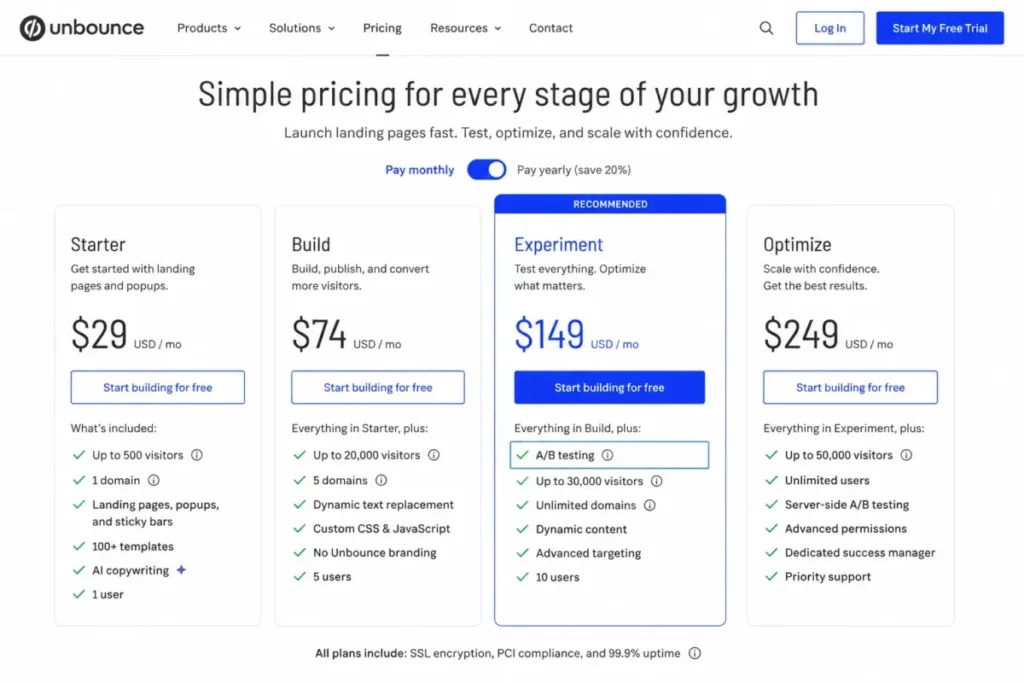
Unbounce’s plan page opens at $29 per month on monthly billing, and native A/B testing arrives on Experiment at $149 per month on monthly billing. That is the real floor for a CRO workflow, and it is five times the number most shortlists quote.
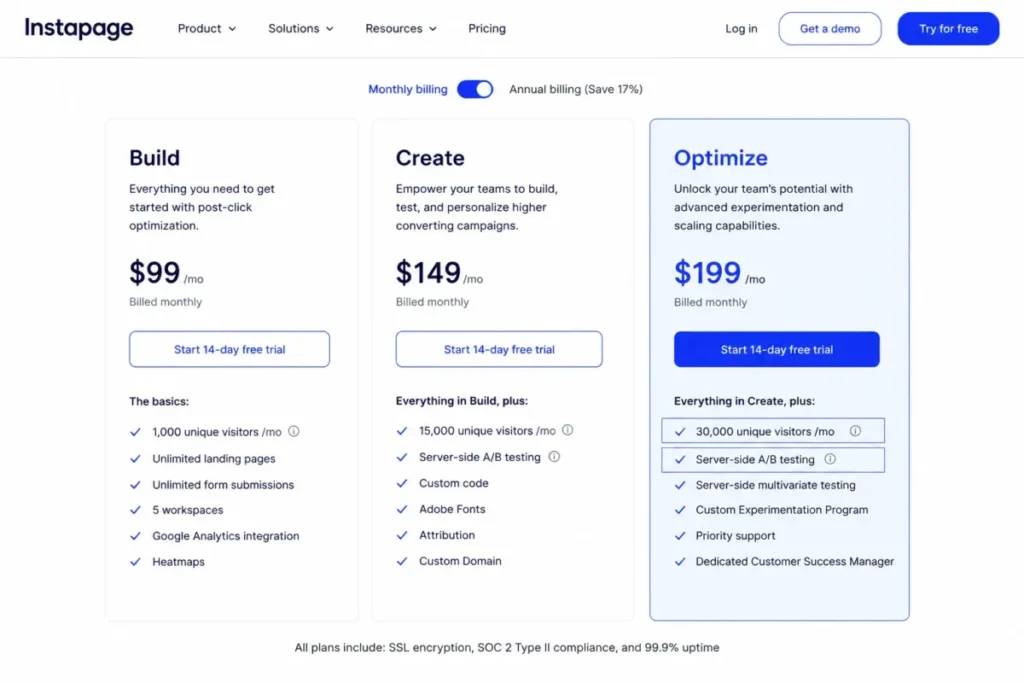
The same pattern repeats with different numbers elsewhere. Instapage’s plan page publishes Create at $99 per month and puts server-side testing on Optimize at $199 per month on monthly billing.
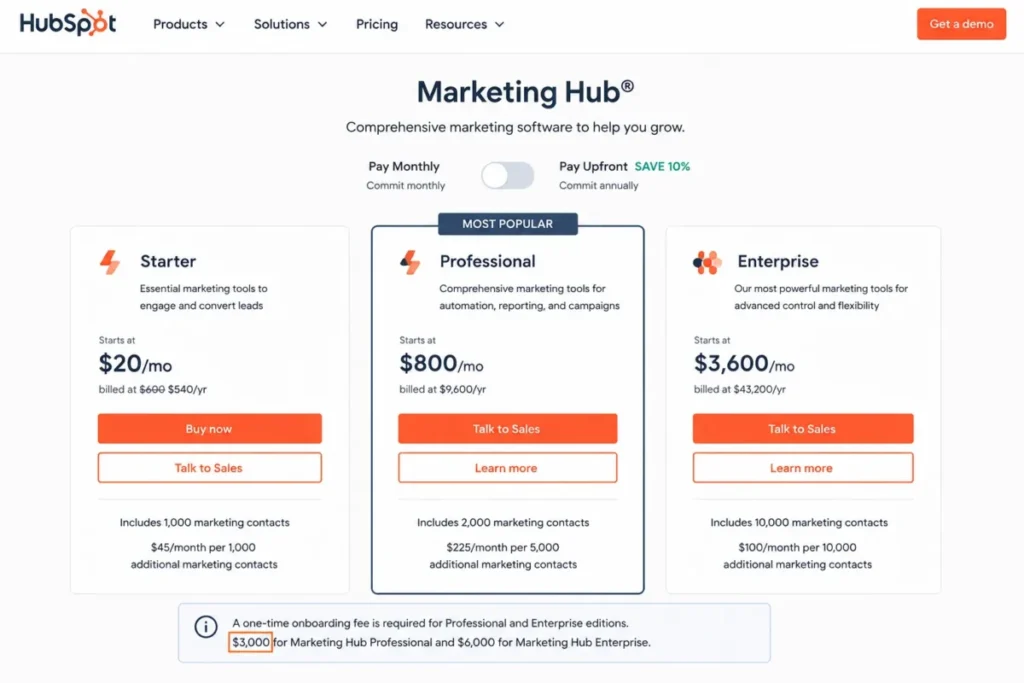
HubSpot inverts the shape without softening it. Landing pages are free on Marketing Hub, and its marketing pricing page puts A/B testing on a Professional tier that starts at $800 per month on annual commitment.
Leadpages is the interesting exception, because its current plan article includes A/B testing on Grow at $99 per month, which is also its entry paid tier. That single packaging decision changes which builder is cheapest for a team whose whole reason for buying is experimentation.
Problem 2: A campaign that works can raise the bill or stop the data
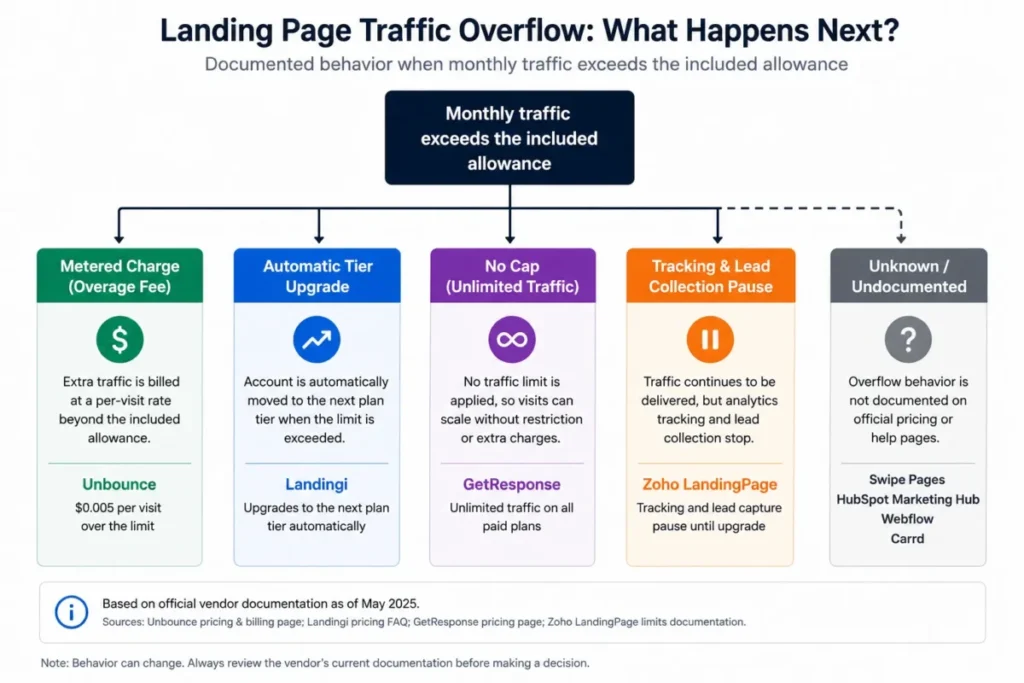
Traffic ceilings are widely reported. What happens after the ceiling almost never is, and the four documented behaviors are not equivalent.
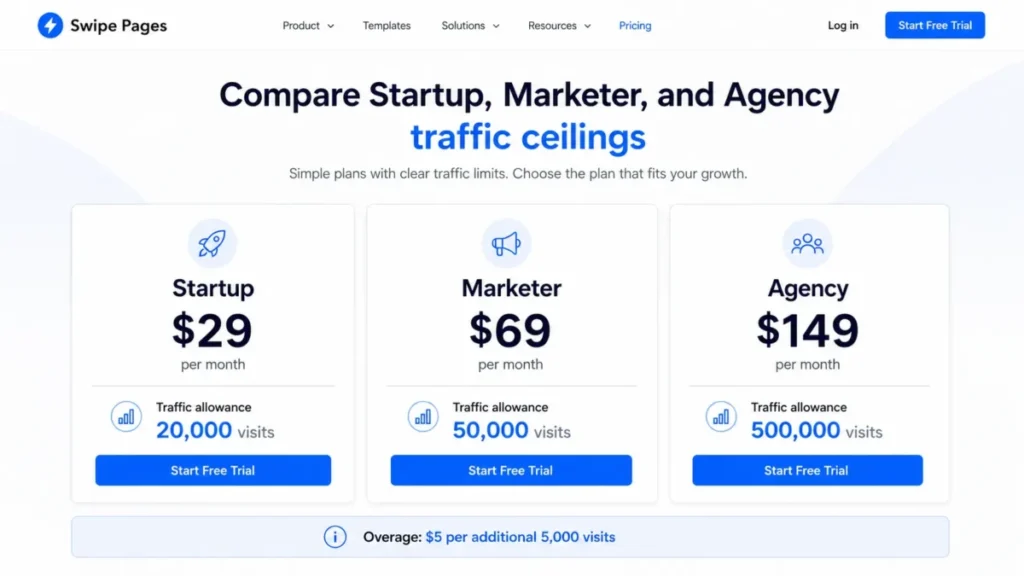
Swipe Pages publishes an overage rate of $5 for each additional 5,000 visits, so a spike there is a line item you can forecast.
Unbounce publishes visitor allowances by plan and states that overage fees can apply, so a spike there is a variable you have to monitor.
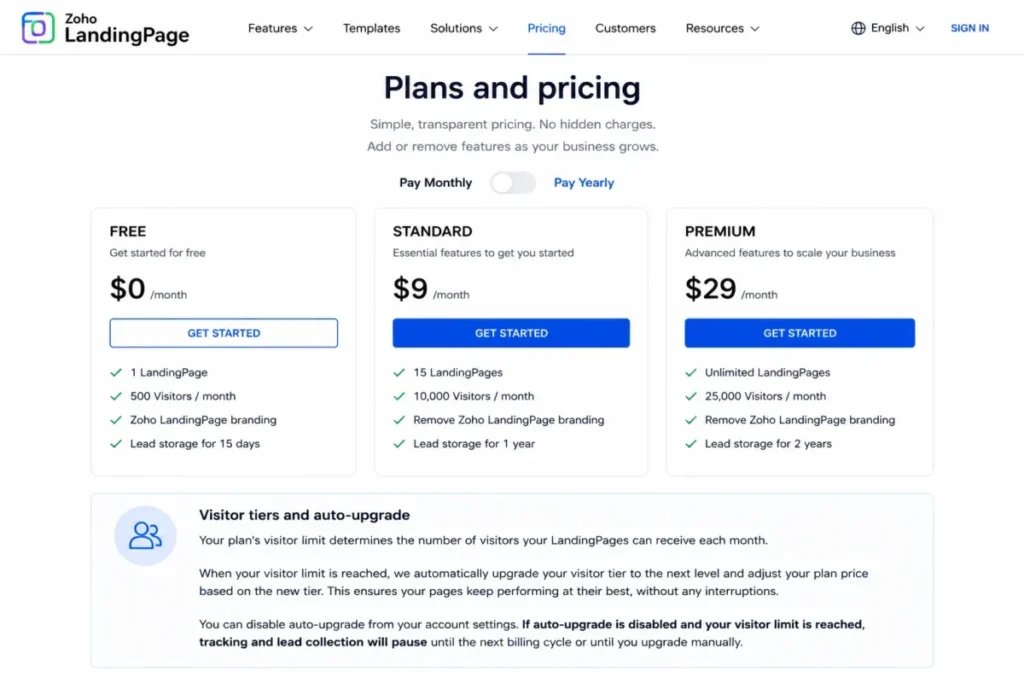
Zoho documents the behavior nobody wants to discover live. Paid plans can auto-upgrade to the next visitor tier, and when auto-upgrade is switched off, visitor tracking and lead collection pause once the limit is reached.
That is a spend control that doubles as a data control. Turning off the surprise bill also turns off the leads, which is a decision a marketing lead should make on purpose rather than inherit from a billing default.
Problem 3: You are not always buying a landing page product
Three of the ten entries here bundle landing pages into something larger, and comparing their entry prices against a per-account page builder produces a misleading answer.
GetResponse prices by contact-list size, so a landing page that converts well raises the subscription through list growth rather than through page traffic. Webflow prices by site, and its practical paywall is custom-domain publishing rather than a testing tier.
HubSpot prices by marketing suite, and its landing pages are free while the testing workflow sits behind the full Professional subscription plus a one-time onboarding charge. None of those three is wrong, but each one is a different purchase from a specialist builder.
Keep that distinction in front of you while reading the rankings below. Two products can look one dollar apart on the entry line and be a different order of magnitude apart on the line that matters.
Best Landing Page Builders Compared at a Glance
Read the fourth column of each table, not the third. Two cells carry no number because the sources used here publish none, and an estimate in that space would be an invention rather than a comparison.
Specialist landing page builders at a glance
| Product | Best-fit buyer | Entry price | Price to run a native A/B test |
|---|---|---|---|
| Unbounce | Paid-media and CRO teams of 3 to 15 | $29 per month, monthly billing | $149 per month on Experiment, monthly billing |
| Leadpages | Lead-generation teams of 1 to 10 | $99 per month on Grow, monthly billing | $99 per month, included on Grow |
| Instapage | Paid-acquisition teams of 10 to 100 or more | $99 per month on Create, monthly billing | $199 per month on Optimize, monthly billing |
| Landingi | Agencies and high-volume page operations | $24 per month on Build, annual-effective | $119 per month on Optimize, annual-effective |
| Swipe Pages | Mobile-first performance marketers | $29 per month on Startup, annual-effective | Plan packaging for testing not established here |
Source: Unbounce plan pricing, Instapage subscription plans, and Landingi plan pricing, checked on 2026-08-12.
Suite and site builders at a glance
| Product | Best-fit buyer | Entry price | Price to run a native A/B test |
|---|---|---|---|
| Zoho LandingPage | Small teams wanting testing plus behavior maps | $0 on the free plan | Professional plan; US list price not published in the sources checked |
| GetResponse | Email-first growth teams | $19 per month at the 1,000-contact tier | $19 per month; A/B testing is available on paid plans |
| Webflow | Design-led marketing teams | $0 on Starter, $25 per month for Basic Site | Not established here |
| HubSpot Landing Pages | Existing HubSpot CRM and Marketing Hub teams | $0 on Marketing Hub Free | $800 per month on Professional, annual commitment |
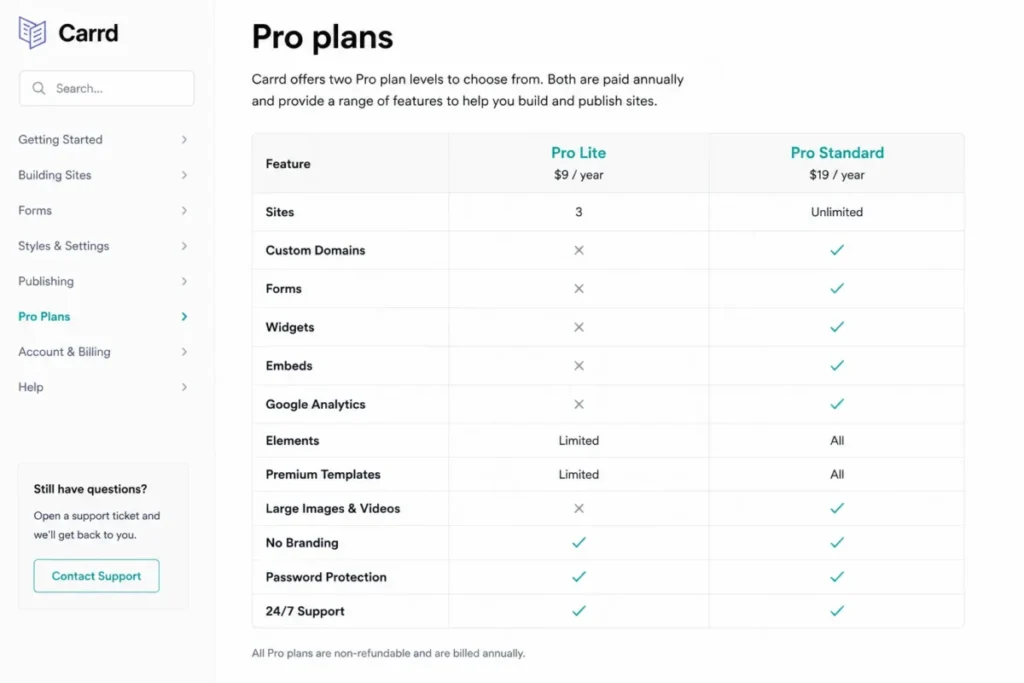
| Carrd | Solo founders needing one branded page | $9 per year on Pro Lite | Not established here |
Source: Zoho plan page, HubSpot marketing editions, and Carrd Pro plan tiers, checked on 2026-08-12.
How to read the two tables together
Three specialist builders ask for two to five times their entry price before a marketer can split traffic between two versions of a page. One suite asks a free customer for $800 per month on the HubSpot Professional edition.
The 10 Best Landing Page Builders in 2026, Ranked
1. Unbounce: Best for paid-media and CRO teams

- Best for:
- paid-media and CRO teams of roughly 3 to 15 people that ship new page variants every week.
- Avoid if:
- the budget cannot clear the testing tier, because native A/B testing does not appear on the two cheapest plans.
- Starting price:
- $29 per month on monthly billing, with $22 per month shown as the annual-effective rate, per the Unbounce pricing.
- Practical tier:
- Experiment at $149 per month on monthly billing, which is where A/B testing and dynamic text replacement sit.
- Free plan:
- not established from the pricing page used here; Starter is the lowest published paid tier.
- First limit that bites:
- the 500 monthly unique visitors included on Starter, which one modest ad flight will clear.
- Better than Leadpages:
- dynamic text replacement and AI traffic optimization are packaged as named plan features for ad-matched pages.
- Worse than Leadpages:
- every plan carries a monthly unique-visitor allowance, and overage fees can apply once that allowance is used.
- Setup difficulty:
- Low to medium. Building a page is drag and drop; the real configuration work is variants, goals, and traffic splitting.
- Hidden costs:
- visitor overages above the plan allowance, plus the upgrade from Build to Experiment bought purely to obtain testing.
- Evidence status:
- plan prices, the Experiment testing gate, and all four visitor allowances are read from the official Unbounce pricing page, checked on 2026-08-12.
The visitor ladder is the part worth memorizing before a renewal conversation. Unbounce includes 500 monthly unique visitors on Starter, 20,000 on Build, 30,000 on Experiment, and 50,000 on Optimize.
Those four numbers do two jobs at once. They set the traffic ceiling, and because A/B testing only appears at the 30,000-visitor tier, they also set the minimum traffic volume the vendor expects an experimenting customer to carry.
A five-person paid-search team that spends real money on Google Ads will land on Experiment almost immediately. That is the honest budget line: $149 per month on monthly billing, not the $29 headline, with 1,000 or more integrations advertised from Build and phone, email, and live chat support listed across the tiers.
What we would ask before signing is the overage rate. The pricing page states that overage fees can apply after the included allowance, and a campaign that works is exactly the campaign that reaches the ceiling.
The 30-day and 90-day adoption test for this product is unusually concrete. At 30 days a paid-media team should have at least one live variant test running, and at 90 days it should be able to name a page whose conversion rate moved because of a specific change.
If neither is true by month three, the Experiment subscription is being used as an expensive page host. That is the renewal question to answer before the invoice arrives, not after it.
| Pros | Cons |
|---|---|
| A/B testing, dynamic text replacement, and page building live in one product, so no second CRO subscription is needed | The testing tier costs roughly five times the advertised entry price |
| Visitor allowances are published per plan, so traffic capacity is a known quantity before purchase | Starter includes only 500 monthly unique visitors, which is a prototype allowance rather than a campaign allowance |
| AI traffic optimization on Optimize gives high-volume advertisers a documented reason to move up | Overage fees can apply above the included allowance, so a successful campaign can raise the invoice |
| Phone, email, and live chat support are all listed, with implementation services on higher plans | Total cost scales with traffic, which penalizes exactly the campaigns a CRO team is paid to produce |
- Verdict:
- Choose Unbounce if experimentation is the job and the team can commit to the Experiment tier before the first test runs.
2. Leadpages: Best for lead generation without traffic overages

- Best for:
- lead-generation teams of 1 to 10 people whose page traffic is unpredictable month to month.
- Avoid if:
- the shortlist is being sorted by lowest entry price, or the account needs more than the resource allowances below.
- Starting price:
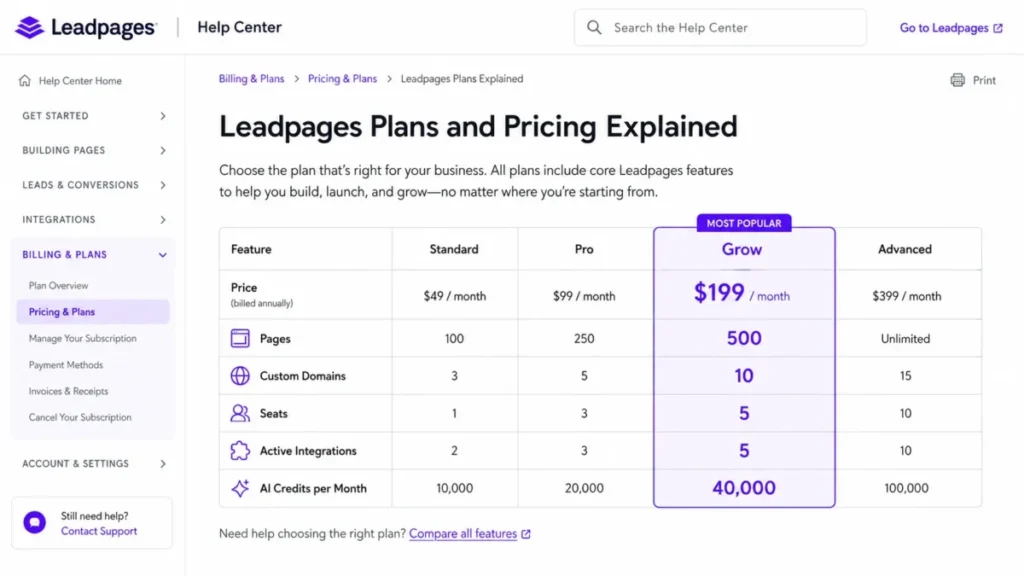
- Grow at $99 per month on monthly billing, or $948 per year, which the documentation shows as $79 per month effective, per the Leadpages plan article.
- Practical tier:
- Grow, because A/B testing is already included there rather than gated to a higher plan.
- Free plan:
- not established from the plan documentation used here; Grow is the entry tier in the current plan article.
- First limit that bites:
- 5 active integrations on Grow, which a stack with CRM, email, ads, analytics, and a webinar tool will exhaust.
- Better than Unbounce:
- Leadpages states that its plans carry no traffic caps and no traffic overage charges.
- Worse than Unbounce:
- the entry price is higher, so a low-traffic team pays more to start.
- Setup difficulty:
- Low. AI page generation and a drag-and-drop editor keep first publication fast.
- Hidden costs:
- upgrades driven by seats, domains, and active integrations rather than by traffic, plus AI credit consumption.
- Evidence status:
- resource allowances and current plan prices come from the current Leadpages plan and pricing article, checked on 2026-08-12.
Removing the traffic meter is a genuine structural difference, and the Leadpages FAQ states plainly that plans have no traffic caps and no traffic overage charges. For a team running a lead magnet that occasionally goes wide, that removes the one cost line nobody can forecast.
It does not remove every ceiling. Grow publishes 500 pages, 10 custom domains, 5 seats, 5 active integrations, and 40,000 AI credits per month.
Those five numbers are the real upgrade triggers on this product. An agency with six clients hits the domain count long before a solo marketer hits anything, and a revenue team with a full stack hits the active-integration count first.
Note also that resources exceeding a lower plan allowance can be deactivated on a downgrade, which makes the seat and domain counts a commitment rather than a soft target.
Run the arithmetic against a real operating plan before choosing a tier. Five seats covers a marketer, a designer, a developer, and two stakeholders, which is exactly the shape of most in-house lead-generation teams and one seat short of the same team plus an agency contact.
The integration count is the tighter constraint in a modern stack. CRM, email platform, ad pixel, analytics, and webinar tool is already five, so a sixth system means a plan change rather than a settings change.
| Pros | Cons |
|---|---|
| A/B testing is included at the entry paid tier, so the price to publish equals the price to test | The entry price is the highest among the specialist builders here |
| No traffic caps and no traffic overage charges are stated by the vendor, which makes viral spikes cost-neutral | Only 5 active integrations on Grow, a hard ceiling for a team running CRM, email, ads, and analytics together |
| 500 pages and 10 custom domains on Grow support multi-brand or multi-campaign operations | AI credits are metered at 40,000 per month, so heavy AI page generation is a consumable, not a flat feature |
| Documentation publishes the resource counts openly, so plan fit can be calculated before purchase | Downgrading can deactivate resources above the lower plan allowance, which raises the cost of getting the tier wrong |
- Verdict:
- Choose Leadpages if traffic is spiky and unpredictable, and treat the integration and seat counts as the numbers that will eventually force an upgrade.
3. Instapage: Best for enterprise paid acquisition

- Best for:
- paid-acquisition teams of 10 to 100 or more people with meaningful ad spend and multiple stakeholders reviewing pages.
- Avoid if:
- the team needs testing or behavioral analytics at a low entry price, because both sit high in this plan structure.
- Starting price:
- Create at $99 per month on monthly billing, or $79 per month at the annual-effective rate, per the Instapage plans.
- Practical tier:
- Optimize at $199 per month on monthly billing, or $159 annual-effective, which is where experimentation begins.
- Free plan:
- not established from the plans page used here; a trial is available and is capped at 2,500 unique visitors.
- First limit that bites:
- the trial ceiling of 2,500 unique visitors, which can end a proof of concept before the data is significant.
- Better than Unbounce:
- experimentation is server-side and comes with a hypothesis workflow, traffic splitting, and scheduling.
- Worse than Unbounce:
- the testing floor sits a full tier higher in monthly cost, and heatmaps are listed under the higher Convert tier.
- Setup difficulty:
- Medium. Reusable blocks and collaboration speed up production, but multi-stakeholder review is a process to design, not a switch.
- Hidden costs:
- visitor-package expansion above the included allowance, and the move to Convert for behavioral analytics.
- Evidence status:
- plan prices, visitor allowances, the trial ceiling, and the Optimize feature list are read from the official Instapage plans page, checked on 2026-08-12.
Server-side testing is the reason a large advertiser looks at this product rather than a cheaper one. Optimize packages server-side A/B testing with hypothesis setting, traffic splitting, scheduling, multi-step forms, and dynamic text replacement.
Visitor allowances follow the same upward shape. Create includes 15,000 monthly unique visitors and Optimize starts at 30,000, which sets a floor on the kind of traffic this pricing assumes.
The trial cap deserves more attention than it usually gets. A 2,500 unique-visitor trial is enough to see the builder, and it is rarely enough to reach a statistically meaningful result on a conversion test.
For a team evaluating seriously, that turns the proof of concept into a paid exercise. Budget one month of Optimize for the evaluation rather than assuming the trial will settle the question.
Stack fit is the second thing to confirm. The plans name HubSpot, Salesforce, Marketo, Google Analytics, WordPress, Drupal, and Zapier among supported integrations, and the distinction between a native connector and a Zapier hop matters once lead routing has an SLA.
The top of the range is sales-led. Convert adds customer-success and professional-service support along with heatmaps, and it carries no published self-serve price, so any plan that depends on behavioral analytics needs a quote before the budget is signed.
| Pros | Cons |
|---|---|
| Server-side A/B testing with a hypothesis workflow suits teams that must document why a test ran | The testing tier is the highest specialist floor in this ranking |
| Create already includes 15,000 monthly unique visitors, well above most entry tiers here | Heatmaps are listed under Convert, so behavioral analytics sits above the testing tier |
| Collaboration and reusable blocks fit multi-stakeholder review cycles that slow other builders down | The trial is capped at 2,500 unique visitors, which can invalidate a serious proof of concept |
| Named integrations include HubSpot, Salesforce, Marketo, Google Analytics, WordPress, Drupal, and Zapier | Convert is sales-led, so the top of the range has no published self-serve price to plan against |
- Verdict:
- Choose Instapage if ad spend is large enough that a documented experiment program pays for the Optimize floor.
4. Landingi: Best for high-volume page operations

- Best for:
- agencies and in-house teams running many pages across campaigns, languages, or client accounts.
- Avoid if:
- the team publishes two pages a quarter, because a page-operations stack is overhead at that volume.
- Starting price:
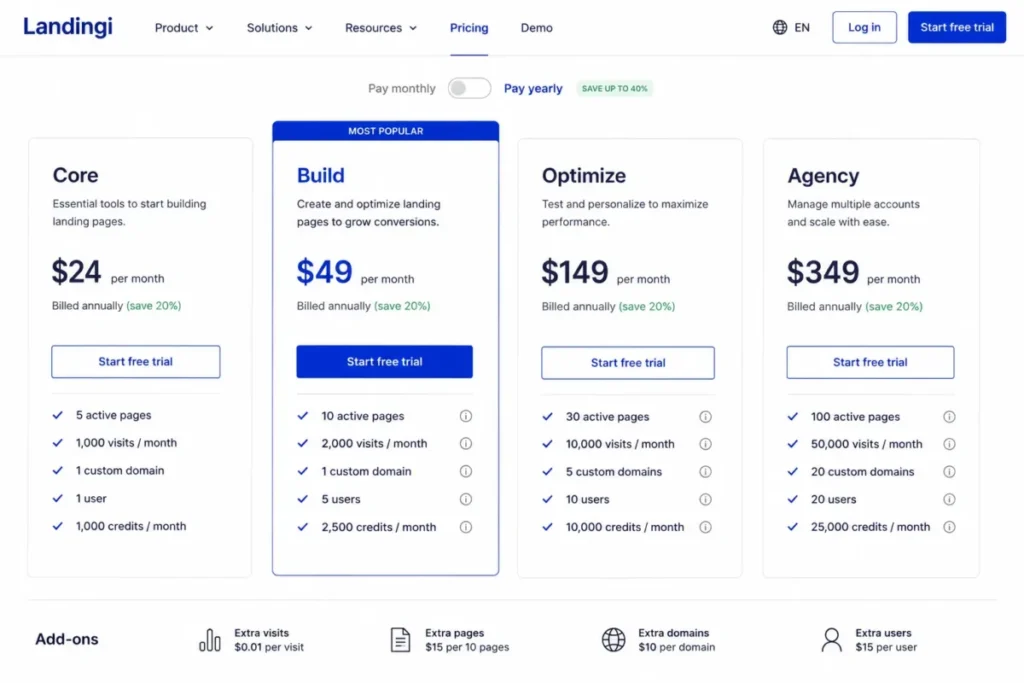
- Build from $24 per month at the annual-effective rate, per the Landingi pricing.
- Practical tier:
- Optimize at $119 per month annual-effective, where server-side A/B testing and EventTracker sit; Scale starts from $229.
- Free plan:
- not established from the pricing page used here; a trial is offered with its own limits.
- First limit that bites:
- 2,000 visits per month on Build, the tightest included traffic figure among the specialist builders ranked here.
- Better than Instapage:
- the entry tier costs a fraction as much, so page production can start before an experimentation budget exists.
- Worse than Instapage:
- four separate plan dimensions can force an upgrade, which makes the bill harder to predict.
- Setup difficulty:
- Medium. Classic Builder and Smart Sections speed up repeat work, and multi-client governance is a setup project.
- Hidden costs:
- extra credits and extra custom domains are separately priced add-ons, and AI or programmatic page generation consumes credits.
- Evidence status:
- plan prices, the four Build allowances, and the add-on structure are read from the official Landingi pricing page, checked on 2026-08-12.
Four numbers define the Build plan, and each one is an independent upgrade trigger: 10 active pages, 2,000 visits per month, 1 custom domain, and 2,500 credits per month, with 5 users included.
That structure is unusual, and for an agency it is the right structure. Client count maps to domains, campaign count maps to active pages, and AI production volume maps to credits, so the plan can be sized from an operations plan rather than a guess.
The risk is that the four dimensions do not move together. A studio producing many variants with Lunar AI can exhaust credits while sitting comfortably inside the page and visit allowances, and buying credits back is an add-on line rather than a plan change.
Anyone weighing a page-operations tool against a broader stack should also look at how those pages hand off downstream, which is where a CRM migration checklist becomes relevant.
| Pros | Cons |
|---|---|
| The lowest specialist entry price in this ranking | The Build visit allowance is a pilot allowance, not a campaign allowance |
| Active pages, visits, domains, users, and credits are published separately, so plan fit is calculable | Four independent ceilings mean four independent ways to trigger an upgrade mid-quarter |
| Server-side A/B testing plus EventTracker on Optimize covers experimentation and behavioral events together | Optimize is roughly a five-fold jump from the entry tier |
| Enterprise includes a dedicated account manager for agencies that need one throat to choke | Extra credits and extra domains are separately priced add-ons rather than plan inclusions |
- Verdict:
- Choose Landingi if page volume, client count, and domain count are the operating constraints rather than raw traffic.
5. Zoho LandingPage: Best low-cost route to testing and behavior maps

- Best for:
- small and mid-size teams that want testing plus behavior analytics without a specialist CRO budget, especially inside the Zoho ecosystem.
- Avoid if:
- the design team needs maximum free-form visual control, or the finance team refuses visitor-based scaling.
- Starting price:
- $0 on the free plan, per the Zoho plan page.
- Practical tier:
- Professional, which is where A/B testing, heatmaps, scroll maps, and attention maps become available. A US list price for that plan is not published in the sources checked here, so no figure is quoted.
- Free plan:
- yes, and it is unusually complete: 5 landing pages, 5,000 visitors, 1 user, 1 custom domain, and unlimited popups and conversions.
- First limit that bites:
- the 5,000-visitor ceiling on the free plan, or the visitor tier on a paid plan.
- Better than HubSpot:
- behavior maps and split testing arrive on a mid-tier plan rather than behind an eight-hundred-dollar suite subscription.
- Worse than Unbounce:
- free-form design control is narrower, and the visitor-tier mechanic introduces a billing behavior buyers must configure deliberately. Setup difficulty: Low. A drag-and-drop builder plus forms and popups gets a first page live quickly.
- Hidden costs:
- automatic visitor-tier upgrades on paid plans, which raise the invoice without a purchase decision.
- Evidence status:
- the free-plan allowances, the Professional feature set, and the visitor-tier overflow behavior are read from the official Zoho LandingPage pricing page, checked on 2026-08-12.
The free tier is the most production-capable free plan in this ranking, because it includes a custom domain. A branded lead-capture page with unlimited conversions at no cost is a real starting position, not a demo.
The overflow behavior is why this product needs a deliberate setup decision. Paid plans can auto-upgrade the visitor tier, and disabling that auto-upgrade pauses visitor tracking and lead collection once the ceiling is reached.
The spend cap and the lead cap are the same switch. Teams that leave auto-upgrade enabled should pair it with whatever budget-monitoring process they already use
Teams already running the vendor’s CRM get the tightest fit here, and our Zoho CRM review covers how that record continuity behaves in practice. Zoho Flow and Zapier are listed alongside the native ecosystem connectors for everyone else.
| Pros | Cons |
|---|---|
| The free plan includes a custom domain, 5 pages, and 5,000 visitors, which makes it genuinely deployable | Turning off automatic visitor-tier upgrades pauses tracking and lead collection at the ceiling |
| Heatmaps, scroll maps, and attention maps sit on the same plan as A/B testing, not a tier above it | A US list price for the Professional plan is not published in the sources checked, so budgeting needs a quote |
| Ecosystem continuity with the vendor’s CRM removes a connector from the stack | Visitor-tier billing means campaign success raises the subscription automatically unless configured otherwise |
| Enterprise adds personalization and a dedicated account manager for teams that outgrow self-serve | Free-form design control is narrower than a design-led builder offers |
- Verdict:
- Choose Zoho LandingPage if the shortlist is being sorted by cost per unit of optimization capability, and set the visitor-tier switch deliberately on day one.
6. Swipe Pages: Best for mobile-first paid campaigns

- Best for:
- performance marketers and agencies whose paid traffic is mostly mobile and whose budgets are forecast per campaign.
- Avoid if:
- the workflow depends on native heatmaps, broad behavioral analytics, or enterprise governance controls.
- Starting price:
- Startup at $29 per month annual-effective, with Marketer at $69 and Agency at $149, per the Swipe Pages pricing.
- Practical tier:
- whichever tier matches forecast traffic, because the plan ladder here is a traffic ladder before it is a feature ladder.
- Free plan:
- not established from the pricing page used here; a trial policy is described on that page.
- First limit that bites:
- the 20,000-visit ceiling on Startup for anyone running sustained paid traffic.
- Better than Landingi:
- included traffic is an order of magnitude higher at a comparable entry price.
- Worse than Landingi:
- the plan packaging for experimentation features was not established from the pricing page used here.
- Setup difficulty:
- Low. AMP delivery and prebuilt funnels are designed for fast campaign turnaround.
- Hidden costs:
- $5 for each additional 5,000 visits beyond the included allowance.
- Evidence status:
- the three annual-effective prices, the three traffic ceilings, and the overage rate are read from the official Swipe Pages pricing page, checked on 2026-08-12.
Traffic economics here are the clearest of any product in this ranking. Included traffic runs 20,000 visits on Startup, 50,000 on Marketer, and 500,000 on Agency, and anything beyond that bills at $5 per additional 5,000 visits.
That turns a spike into arithmetic instead of an unknown. A campaign that runs past the Startup ceiling adds whole 5,000-visit increments, that makes the incremental traffic cost easy to forecast.
Unlimited pages and unlimited conversions on top of that make this the cheapest way in this ranking to run many mobile campaign pages at real volume. Client subaccounts on the higher tier extend the same logic to agencies.
The gap is analytical depth. Behavioral analysis is not part of the packaging established here, so a team that wants heatmaps alongside pages should pair this with a separate analytics tool or pick a builder that includes them.
| Pros | Cons |
|---|---|
| The overage rate is published per block of extra visits, so campaign cost is forecastable | Traffic is capped on every tier, so the meter never fully goes away |
| Included traffic reaches 500,000 visits on the Agency tier, far above the specialist average here | Native behavioral analytics such as heatmaps was not established from the pricing page used here |
| Unlimited pages and unlimited conversions remove two ceilings other builders charge for | Enterprise governance controls are thinner than the large-team products in this ranking |
| Client subaccounts on the higher tier fit agency account separation | Integration coverage was not fully enumerated from the pricing page, so stack fit needs checking |
- Verdict:
- Choose Swipe Pages if mobile paid traffic is the workload and a forecastable per-visit overage beats an open-ended one.
7. GetResponse: Best for email-first growth teams

- Best for:
- growth teams whose landing pages exist to grow an email list rather than to run a standalone CRO program.
- Avoid if:
- the requirement is specialist experimentation independent of a contact database.
- Starting price:
- Starter at $19 per month on monthly billing, or $15.58 per month annual-effective, at the 1,000-contact tier, per the GetResponse pricing. Practical tier: the paid Starter tier, because that is where landing pages stop being visitor-capped and A/B testing becomes available.
- Free plan:
- yes, with landing pages limited to 1,000 unique visitors per month.
- First limit that bites:
- contact-list growth, which moves the whole subscription up rather than a page-level allowance.
- Better than Carrd:
- email, automation, forms, and pages sit in one subscription, so a converted visitor enters a sequence without a connector.
- Worse than Unbounce:
- experimentation depth is a feature of an email suite rather than the product’s reason to exist.
- Setup difficulty:
- Low. Templates and an AI creator get a first page live quickly, and the automation build is the longer job.
- Hidden costs:
- subscription escalation driven by contact count, not by page traffic.
- Evidence status:
- the entry price, the contact-tier pricing model, the free-plan visitor cap, and paid-plan A/B availability are read from the official GetResponse pricing page, checked on 2026-08-12.
The pricing model is the whole story. Paid plans list unlimited landing pages and unlimited visitors, so the page layer stops metering entirely once a subscription starts.
The meter moves to the contact database instead. A page that converts at a high rate grows the list, the list moves the tier, and the invoice follows, which is a different risk shape from a traffic overage.
That trade suits a list-building team and penalizes a CRO team. Pages that feed sequences make one subscription replace two, while pages that test offers at high traffic against a small list pay for a database nobody is using.
Google Analytics, Google Tag Manager, and Meta Pixel are supported for measurement. For teams weighing this against a dedicated sender, our roundup of the best email marketing tools is the better starting point.
| Pros | Cons |
|---|---|
| Paid plans list unlimited landing pages and unlimited visitors, removing the traffic meter | The free tier caps landing pages at 1,000 unique visitors per month, which is prototype-only |
| The lowest paid entry among the suites here | Subscription cost scales with contact count, so list growth is the hidden escalator |
| A/B testing is available on paid plans without a separate CRO subscription | Experimentation depth is shallower than the specialist builders ranked above |
| Google Analytics, Tag Manager, and Meta Pixel support covers the paid-media measurement path | A team with a small list and high page traffic pays for a database it is not using |
- Verdict:
- Choose GetResponse if the landing page is the front door to an email program, and price it against the list you expect in twelve months rather than the one you have now.
8. Webflow: Best for design-led marketing teams

- Best for:
- design-led marketing teams that want visual control, interactions, and a CMS behind their campaign pages.
- Avoid if:
- built-in landing page testing and behavioral analytics need to sit in the same subscription.
- Starting price:
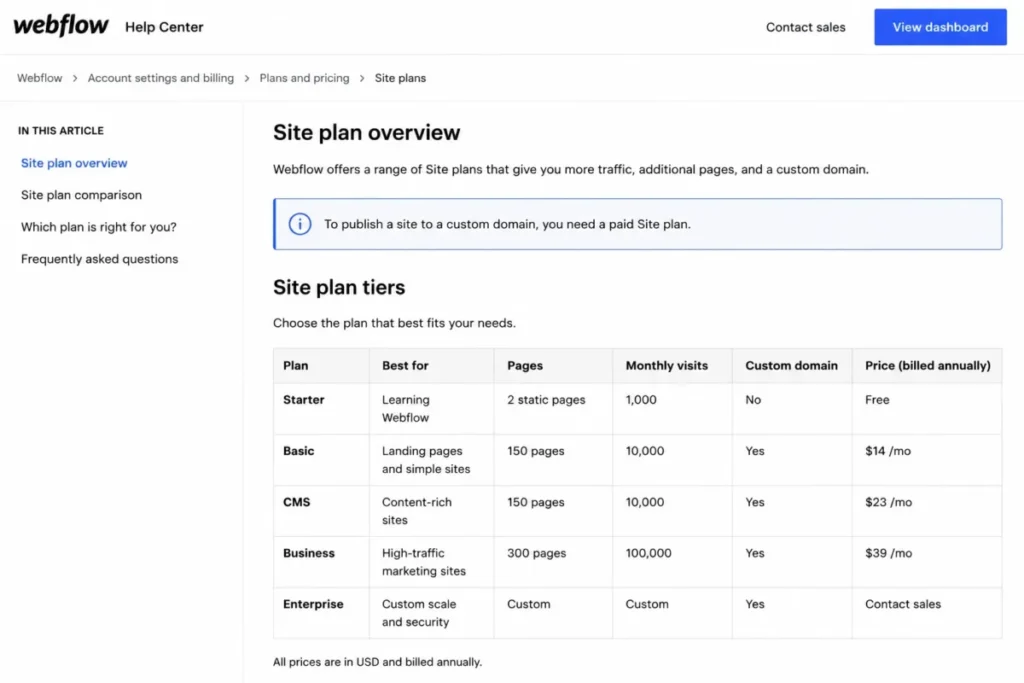
- $0 on Starter, with Basic Site at $25 per month monthly or $15 annual-effective, per the Webflow pricing update.
- Practical tier:
- Basic Site or higher, because a paid Site plan is required to publish to a custom domain.
- Free plan:
- yes, on a webflow.io subdomain, capped at 1,000 monthly visits, 50 CMS items, and 2 static pages.
- First limit that bites:
- the two-page Starter ceiling, which a single campaign with a thank-you page already exceeds.
- Better than Carrd:
- CMS-backed pages, custom code on paid Site plans, and interaction control put this in a different design class.
- Worse than Unbounce:
- native landing page experimentation was not established from the sources used here, so that layer needs confirming with the vendor. Setup difficulty: Medium to high. The visual builder rewards design skill and expects a working understanding of layout systems.
- Hidden costs:
- the external testing and analytics stack a CRO workflow needs on top of the Site plan.
- Evidence status:
- Basic Site pricing comes from the Webflow May 2026 pricing update. Starter limits come from the Webflow Site plan guide, checked on 2026-08-12.
Several 2026 roundups still quote an older, lower Basic price, which is worth correcting before a budget goes to finance. The current figures are $25 per month on monthly billing and $15 per month annual-effective.
The paywall here is not a testing tier. It is custom-domain publishing, which means a Starter prototype cannot become a branded campaign page without a paid Site plan.
| Pros | Cons |
|---|---|
| Design and interaction control exceed every specialist builder in this ranking | Native landing page A/B testing was not established from the sources used here |
| A CMS and custom code on paid Site plans support campaign pages that outlive one flight | Starter allows only 2 static pages and 1,000 monthly visits, so it is a prototype tier |
| The annual-effective Basic Site rate is cheap for a hosted branded page | A paid Site plan is required before any custom-domain publishing happens |
| One platform can cover the marketing site and the campaign pages together | CRO tooling becomes a separate subscription, which raises the true stack cost |
- Verdict:
- Choose Webflow if the page is a design asset first and a test surface second, and budget separately for the experimentation layer.
9. HubSpot Landing Pages: Best for existing HubSpot teams

- Best for:
- teams already paying for HubSpot CRM or Marketing Hub that value native lead, automation, and reporting continuity.
- Avoid if:
- the requirement is standalone landing pages, because the testing workflow arrives attached to a full marketing suite.
- Starting price:
- $0, since Marketing Hub has a free edition, per the HubSpot marketing editions.
- Practical tier:
- Marketing Hub Professional, which starts at $800 per month on annual commitment and carries a $3,000 one-time onboarding fee.
- Free plan:
- yes, with up to 30 landing pages on the Free and Starter editions.
- First limit that bites:
- the absence of A/B and adaptive testing below Professional, which caps the CRO workflow rather than the page count.
- Better than Leadpages:
- pages, contacts, automation, and attribution reporting stay on one CRM record with no connector to maintain.
- Worse than Leadpages:
- the price of adding native testing is roughly eight times a specialist builder’s testing tier.
- Setup difficulty:
- Medium to high, and Professional onboarding is a paid, scheduled engagement rather than a self-serve switch.
- Hidden costs:
- the $3,000 Professional onboarding fee, rising to $7,000 at Enterprise.
- Evidence status:
- edition pricing and onboarding fees come from the HubSpot marketing pricing page. Page counts and testing gates come from the HubSpot content plan packaging, checked on 2026-08-12.
Free landing pages make this look like the cheapest entry in the ranking, and for publishing alone it is. Up to 30 pages on Free and Starter, rising to 10,000 on Professional and Enterprise, is generous packaging.
The testing workflow is the expensive part, because A/B and adaptive testing plus smart content all sit on Professional. That is rational for a company already committed to the suite and irrational for a team that only wants a tested landing page.
Anyone comparing editions should read our HubSpot pricing guide alongside the vendor page.
| Pros | Cons |
|---|---|
| Landing pages are free on Marketing Hub, with a generous page allowance on Free and Starter | A/B and adaptive testing require the Professional edition on an annual commitment |
| Pages, leads, automation, and reporting share one CRM record, removing connector risk | Professional adds a mandatory one-time onboarding fee that rises again at Enterprise |
| Professional and Enterprise raise the page allowance to 10,000, which covers programmatic volume | Buying the suite for landing page testing alone is the most expensive route in this ranking |
| Professional and Enterprise add phone support on top of the email support included at Starter | Smart content is gated to Professional, so personalization follows the same expensive jump |
- Verdict:
- Choose HubSpot Landing Pages if the CRM decision is already made, and never choose the suite to obtain a split test.
10. Carrd: Best ultra-budget one-page option

- Best for:
- solo founders and very small teams needing one branded page for a lead magnet, event, profile, or portfolio.
- Avoid if:
- the plan involves systematic A/B testing, multi-page campaign operations, or CRO analytics.
- Starting price:
- Pro Lite at $9 per year, per the Carrd Pro plans. Practical tier: Pro Standard at $19 per year, which is the real floor for a marketing page.
- Free plan:
- not established from the Pro plan documentation used here; both Pro tiers below are paid.
- First limit that bites:
- Pro Lite itself, which excludes custom domains, forms, widgets, embeds, and analytics.
- Better than Webflow:
- the annual cost is lower than most competitors charge per month, and a page ships in an afternoon.
- Worse than Webflow:
- no CMS, no multi-page campaign structure, and no experimentation layer.
- Setup difficulty:
- Low. A responsive one-page builder with premium templates needs no configuration project.
- Hidden costs:
- none identified in the plan documentation used here beyond the step from Pro Lite to Pro Standard.
- Evidence status:
- both Pro tier prices and the feature split between them are read from the Carrd Pro plans documentation, checked on 2026-08-12.
The $9 headline is accurate and misleading at the same time. Pro Lite excludes custom domains, forms, widgets, embeds, and analytics, which are the four things a lead-generation page needs.
Pro Standard at $19 per year restores all of them plus meta tags. That is still an order of magnitude below every other product here, and it is the number a founder should compare against.
| Pros | Cons |
|---|---|
| A branded page with forms and analytics for a yearly fee undercuts every other option here | No native A/B testing is documented in the plan pages used here, so optimization stays manual |
| Custom domains, embeds, widgets, and meta tags are all included at Pro Standard | One-page structure rules out multi-step campaign funnels |
| Setup is fast enough that a founder can ship a lead magnet page the same day | No behavioral analytics, so page diagnosis depends on external tools |
| The pricing is transparent and annual, so there is no usage meter to monitor | Pro Lite omits the features that make a page usable for marketing |
- Verdict:
- Choose Carrd Pro Standard if the requirement is one branded page at the lowest defensible annual cost, and accept that optimization will happen somewhere else.
Pricing Comparison: Entry Price Versus the Price to Test
Two axes decide the real bill: the plan that permits a test, and the resource that runs out first.
Specialist builders: entry price against the price to test
| Product | Entry price | Practical tier for testing | What the upgrade buys |
|---|---|---|---|
| Unbounce | $29 per month, monthly | Experiment, $149 per month, monthly | A/B testing, dynamic text replacement, 30,000 visitors |
| Leadpages | $99 per month, monthly | Grow, no upgrade needed | A/B testing already included at the entry paid tier |
| Instapage | $99 per month, monthly | Optimize, $199 per month, monthly | Server-side testing, hypothesis workflow, 30,000 visitors |
| Landingi | $24 per month, annual-effective | Optimize, $119 per month, annual-effective | Server-side A/B testing and EventTracker |
| Swipe Pages | $29 per month, annual-effective | Plan packaging for testing not established here | Higher traffic ceilings and client subaccounts |
Source: Unbounce plan and visitor tiers, Instapage plan comparison, and Landingi plan ladder, checked on 2026-08-12.
Suites and site builders: entry price against the price to test
| Product | Entry price | Practical tier for testing | What the upgrade buys |
|---|---|---|---|
| Zoho LandingPage | $0 free plan | Professional, US list price not published in the sources checked | A/B testing, heatmaps, scroll maps, attention maps |
| GetResponse | $19 per month at 1,000 contacts | Paid Starter, no upgrade needed | Unlimited pages and visitors, plus A/B testing |
| Webflow | $0 Starter | Basic Site, $25 per month, monthly | Custom-domain publishing, not a testing tier |
| HubSpot Landing Pages | $0 Marketing Hub Free | Professional, $800 per month, annual commitment | A/B testing, adaptive testing, smart content |
| Carrd | $9 per year on Pro Lite | Pro Standard, $19 per year | Custom domains, forms, widgets, embeds, analytics |
Source: Zoho LandingPage plans, HubSpot edition pricing, and Carrd Pro documentation, checked on 2026-08-12.
Specialist builders: what scales the bill
| Product | Seats or users included | Free tier | First hidden cost to watch |
|---|---|---|---|
| Unbounce | Not published in the sources checked | Not established here | Visitor overage above the plan allowance |
| Leadpages | 5 seats on Grow | Not established here | A sixth seat, an eleventh domain, or a sixth active integration |
| Instapage | Not published in the sources checked | Trial only, capped at 2,500 unique visitors | Visitor-package expansion and the move to Convert for heatmaps |
| Landingi | 5 users on Build | Not established here | Extra credits and extra custom domains, both priced as add-ons |
| Swipe Pages | Not published in the sources checked | Not established here | $5 per additional 5,000 visits |
Source: Leadpages plan allowances and Swipe Pages traffic pricing, checked on 2026-08-12.
Suites and site builders: what scales the bill
| Product | Seats or users included | Free tier | First hidden cost to watch |
|---|---|---|---|
| Zoho LandingPage | 1 user on the free plan | Yes, 5 pages and 5,000 visitors | Automatic visitor-tier upgrades on paid plans |
| GetResponse | Not published in the sources checked | Yes, pages capped at 1,000 unique visitors | Contact-list growth moving the whole subscription tier |
| Webflow | Not published in the sources checked | Yes, 2 static pages and 1,000 monthly visits | A separate testing and analytics stack |
| HubSpot Landing Pages | Not published in the sources checked | Yes, up to 30 landing pages | $3,000 Professional onboarding, $7,000 at Enterprise |
| Carrd | Not published in the sources checked | Not established in the Pro plan documentation used here | The step from Pro Lite to Pro Standard |
Source: Zoho free-plan allowances and HubSpot onboarding pricing, checked on 2026-08-12.
Reading both cost axes
A ten-seat cost comparison is the wrong instrument for this category, and inventing one would mean inventing numbers. These products are priced per account and metered by traffic, credits, contacts, or sites, so seat count is a secondary allowance rather than the billing unit.
Where a seat allowance is published it appears above, and where it is not, no figure has been supplied in its place.
The one first-year total worth calculating is the most expensive path. Using the figures on HubSpot’s marketing pricing page, Professional at $800 per month across a twelve-month commitment comes to $9,600.
The one-time onboarding fee adds $3,000, for a first-year outlay of $12,600 before any media spend.
The pattern the paired bars expose is simple. Sorting this category by entry price puts Landingi, GetResponse, and Carrd on top, while sorting it by the cost of a first split test reorders the list entirely.
Feature Gate Comparison
| Product | Native A/B testing gate | Behavior maps or heatmaps | Personalization or dynamic text |
|---|---|---|---|
| Unbounce | Experiment plan | Not established here | Dynamic text replacement on Experiment |
| Leadpages | Grow plan | Not established here | Dynamic text replacement listed |
| Instapage | Optimize plan | Heatmaps listed under Convert | Dynamic text replacement on Optimize |
| Landingi | Optimize plan | EventTracker on Optimize | Personalization listed |
| Zoho LandingPage | Professional plan | Heatmaps, scroll maps, attention maps on Professional | Personalization on Enterprise |
| Swipe Pages | Not established here | Not established here | Not established here |
| GetResponse | Paid plans | Not established here | Not established here |
| Webflow | Not established here | Not established here | Not established here |
| HubSpot Landing Pages | Professional and Enterprise | Not established here | Smart content on Professional |
| Carrd | Not established here | Not established here | Not established here |
“Not established here” means the sources used for this comparison do not document that capability at that tier, which is not the same as the capability being absent. Treat those cells as questions for the vendor rather than as findings.
Read the first two columns together and one product separates from the field. Zoho LandingPage is the only builder in this ranking where split testing and three kinds of behavior map arrive on the same plan.
That is a different value shape from paying for testing on one tier and analytics on the tier above.
Source: Unbounce plan features, Instapage Optimize packaging, and Zoho feature gates, checked on 2026-08-12.
What Happens When You Hit the Traffic Limit
Traffic ceilings are widely published. What happens after the ceiling almost never is.
Specialist builders at the traffic ceiling
| Product | Included traffic on the named plan | Documented behavior past the limit |
|---|---|---|
| Unbounce | 500 on Starter, 20,000 on Build, 30,000 on Experiment, 50,000 on Optimize | Overage fees can apply after the included allowance |
| Leadpages | No traffic cap stated | No traffic overage charges stated by the vendor |
| Instapage | 15,000 on Create, from 30,000 on Optimize | Not documented in the sources checked; treat as a question for the vendor |
| Landingi | 2,000 visits per month on Build | Not documented in the sources checked; treat as a question for the vendor |
| Swipe Pages | 20,000 on Startup, 50,000 on Marketer, 500,000 on Agency | $5 for each additional 5,000 visits |
Source: Unbounce visitor tiers, Leadpages traffic policy, and Swipe Pages overage terms, checked on 2026-08-12.
Suite and site builders at the traffic ceiling
| Product | Included traffic on the named plan | Documented behavior past the limit |
|---|---|---|
| Zoho LandingPage | 5,000 visitors on the free plan | Paid plans auto-upgrade the visitor tier, or pause tracking and lead collection when auto-upgrade is off |
| GetResponse | 1,000 unique visitors per month on the free tier | Paid plans list unlimited visitors |
| Webflow | 1,000 monthly visits on Starter | Not documented in the sources checked; treat as a question for the vendor |
| HubSpot Landing Pages | No landing page traffic cap stated | Page count, not traffic, is the published constraint |
| Carrd | Not published in the sources checked | Not documented in the sources checked |
Source: Zoho visitor-tier behavior, GetResponse plan inclusions, and Webflow Starter limits, checked on 2026-08-12.
The four documented outcomes, and the missing ones
Four documented outcomes appear in those columns and they carry different risks. A published overage rate is a budget line, an automatic tier upgrade is a silent invoice increase, no cap at all is a non-event, and a tracking pause is a data outage dressed as a cost control.
Notice how many cells say the behavior is not documented. That absence is itself a finding, because a limit without a stated consequence is the hardest thing to plan around.
The practical move is to ask one question in the sales call. What happens on the day traffic exceeds the allowance, and is the answer a charge, an upgrade, a throttle, or a stop?
Can You Run a Real Campaign on the Free Tier?
A free tier is only useful if it can carry a branded page on your own domain.
Free tiers that can carry a branded page
| Product | Free tier | Custom domain on the free tier | Campaign-ready without paying? |
|---|---|---|---|
| Zoho LandingPage | 5 pages, 5,000 visitors, 1 user | Yes, 1 custom domain included | Yes, for a small branded lead-capture campaign |
| HubSpot Landing Pages | Up to 30 landing pages on Free | Not established here | Publishing yes, testing no |
| GetResponse | Landing pages capped at 1,000 unique visitors per month | Not established here | Prototype only |
| Webflow | 2 static pages, 50 CMS items, 1,000 monthly visits | No, a paid Site plan is required | Prototype only |
Source: Zoho free-plan allowances, GetResponse free-tier cap, and Webflow Starter tier, checked on 2026-08-12.
Free tiers that cannot
| Product | Free tier | Custom domain on the free tier | Campaign-ready without paying? |
|---|---|---|---|
| Carrd | Not established in the Pro plan documentation used here | No, custom domains start at Pro Standard | No |
| Instapage | Trial only, capped at 2,500 unique visitors | Not established here | No, and the cap can end a proof of concept early |
| Unbounce, Leadpages, Landingi, Swipe Pages | Free tier not established in the sources checked | Not established here | Not established here |
Source: Instapage trial ceiling and Carrd Pro plan tiers, checked on 2026-08-12.
What the free tiers actually prove
One free tier in this ranking can carry a real campaign, and it is not the one from the largest company. Zoho LandingPage includes a custom domain on the free plan, which is the single feature that separates a deployable page from a demo on somebody else’s subdomain.
Webflow and Carrd both withhold custom domains until a paid tier, so their free plans are prototyping environments by design. HubSpot publishes generously and gates the testing workflow instead, which is a different bargain rather than a better one.
The trap to avoid is treating a trial as a free tier. A 2,500 unique-visitor trial ceiling will not produce a significant result on a conversion test, so an evaluation budget should assume one paid month rather than a free proof.
Setup Difficulty Compared
| Product | Setup difficulty | Why it lands there |
|---|---|---|
| Carrd | Low | One page, premium templates, no configuration project |
| Swipe Pages | Low | AMP delivery and prebuilt funnels are designed for fast campaign turnaround |
| Leadpages | Low | AI page generation plus a drag-and-drop editor shortens first publication |
| Zoho LandingPage | Low | Drag-and-drop building with forms and popups, plus native ecosystem connectors |
| GetResponse | Low | Templates and an AI creator get a page live; the automation build is the longer job |
| Unbounce | Low to medium | Page building is simple; variants, goals, and traffic splitting are the configuration work |
| Landingi | Medium | Smart Sections and Classic Builder speed up repeat work, and multi-client governance is a project |
| Instapage | Medium | Reusable blocks help, but multi-stakeholder review is a process to design |
| Webflow | Medium to high | The visual builder expects a working understanding of layout systems |
| HubSpot Landing Pages | Medium to high | Professional onboarding is a paid, scheduled engagement rather than a self-serve switch |
Setup difficulty here is an editorial assessment built from documented feature scope. No timeline is claimed, because none of these sources publishes one.
The line worth drawing is between products where setup is a task and products where setup is a purchase. Only one entry in this ranking attaches a mandatory paid onboarding engagement to the tier that carries testing.
That fee belongs in the same budget conversation as the subscription.
Source: Unbounce plan documentation, Landingi feature tiers, and HubSpot onboarding terms, checked on 2026-08-12.
How to Choose the Right Landing Page Builder
Work through these seven questions in order. The first three eliminate more of the shortlist than the last four combined.
Every ranking reason in this article ties back to one operating constraint, so start by naming the buyer cohort you belong to and the workflow that has to survive the purchase.
- Will you run split tests? If yes, the entry price is irrelevant and the plan gate that carries testing is your real price. Sort the shortlist by the fourth column of the comparison tables above, which are drawn from each vendor’s official pricing documentation.
- What is your realistic monthly traffic in twelve months, not this month? Match that number against the included allowance, then check what the vendor documents happening past it.
- Are you buying a page builder or a suite? A contact-priced or site-priced subscription covers a wider scope, so compare it against your whole stack rather than against a per-account builder.
- How many domains, pages, seats, and integrations does the operation need? For agencies these ceilings bite before traffic does, and Leadpages and Landingi publish them openly enough to calculate.
- Do you need behavior maps as well as split tests? Very few builders package both on one plan, and pairing a cheap builder with a separate analytics tool is often the higher total cost. Teams grading form submissions before handoff should also read our primer on lead scoring basics.
- What must the page hand off to? CRM, email platform, ad pixels, and warehouse all matter, and an active-integration ceiling can cap that before a feature does. If routing captured leads is part of the job, start from lead management fundamentals.
- What happens at renewal? Confirm the overage mechanism, the downgrade behavior for resources above a lower plan allowance, and any onboarding fee before the first invoice, not after.
Answer one through three and the ten-product list usually collapses to two or three. Questions four through seven then decide the plan, and the plan is what determines whether the tool survives its first year.
Common Mistakes When Choosing Landing Page Software
Budgeting from the entry price. On three specialist builders the tier that permits a split test costs two to five times the advertised starting price. On HubSpot it moves a free customer to the Professional edition, so a budget built on the headline number gets revised in month two.
Treating a traffic cap as the whole risk. Leadpages removes the traffic meter and keeps five other ceilings, so an agency can hit a domain or integration limit while nowhere near a traffic limit.
Switching off automatic tier upgrades to control spend. On Zoho LandingPage that same switch pauses visitor tracking and lead collection once the ceiling is reached, so the cost control silently becomes a data outage.
Validating a product inside a capped trial. A 2,500-visitor trial may be too small to reach a statistically useful result for many conversion tests, especially when expected lifts are modest.
Comparing a suite against a specialist on entry price alone. A contact-priced or site-priced subscription buys a different scope, and the honest comparison is stack against stack.
Ignoring credit meters. AI page generation on credit-metered plans is a consumable, and buying credits back is an add-on line rather than a plan change.
Assuming an undocumented limit is a soft limit. Where a vendor publishes a ceiling but not a consequence, that is the question to put in writing before signing, not after the campaign spikes.
Final Verdict
Unbounce takes the top position because it is the most complete specialist workflow in this ranking. Page building, native experimentation, dynamic text replacement, and traffic optimization sit in one product, and the visitor allowances are published in enough detail to plan against.
It is not the cheapest, and that limitation is part of the verdict rather than a footnote. The honest budget line is the Experiment plan rather than the entry tier, and traffic growth carries its own cost.
Leadpages ranks second on a different logic. Testing at the entry paid tier plus a stated absence of traffic caps and traffic overage charges makes it the more predictable purchase for a lead-generation team whose volume swings.
Instapage is third for large advertisers who need server-side testing with a documented hypothesis workflow, and who can absorb its Optimize floor. Landingi is the pick where page count, domain count, and client count are the binding constraints instead of raw traffic.
By buyer type, the short version runs like this. A three-person paid-search team should look at Unbounce, a spiky lead-generation team at Leadpages, and an agency at Landingi.
A cost-sensitive team that wants heatmaps and split tests together should look at Zoho LandingPage, a mobile performance marketer at Swipe Pages, and a list-building team at GetResponse.
A design-led team should look at Webflow, an existing suite customer at HubSpot, and a solo founder at Carrd Pro Standard.
Two recommendations we would put in writing. Never buy a marketing suite to obtain a split test, and never switch off a visitor-tier auto-upgrade without first confirming what stops when the ceiling arrives.
FAQ
What is the best landing page builder overall?
For teams whose job is paid acquisition and conversion testing, Unbounce is the strongest fit in this ranking because page building and native experimentation live in one product. The cost to make that true is $149 per month on monthly billing for the Experiment plan, per its published plan table.
If experimentation matters but traffic is unpredictable, Leadpages is the better answer, since A/B testing is included at its entry paid tier.
Which landing page builder is best for paid ads?
Unbounce for small and mid-size paid-media teams, and Instapage for large advertisers that need server-side testing with a hypothesis workflow and multi-stakeholder review. Both package dynamic text replacement so page copy can match ad copy.
Swipe Pages is the alternative when the traffic is mostly mobile and the budget is forecast per campaign, because its published overage rate is $5 per additional 5,000 visits.
What is the cheapest landing page builder?
Carrd Pro Standard at $19 per year is the lowest defensible price for a branded page with forms and analytics, according to its Pro plan documentation. The $9 Pro Lite tier is cheaper and excludes custom domains, forms, widgets, embeds, and analytics.
Among the specialist builders, Landingi opens at $24 per month at the annual-effective rate, though its Build plan includes only 2,000 visits per month.
Which landing page builders include A/B testing?
Leadpages includes it on Grow, Unbounce on Experiment, Instapage on Optimize, Landingi on Optimize, Zoho LandingPage on Professional, and HubSpot on Professional and Enterprise. GetResponse makes A/B testing available on paid plans.
For Swipe Pages, Webflow, and Carrd, native testing was not established from the sources used for this comparison.
Can I build landing pages for free?
Yes, if the campaign is small. Zoho LandingPage’s free plan includes 5 landing pages, 5,000 visitors, one user, one custom domain, and unlimited popups and conversions, which is enough for a real branded lead-capture page.
HubSpot also publishes free landing pages, and Webflow’s free Starter tier stops at 2 static pages on a webflow.io subdomain with no custom domain.
Is Unbounce better than Leadpages?
No, unless your priority is experimentation depth rather than predictable traffic economics. Unbounce packages dynamic text replacement and AI traffic optimization for ad-matched pages, and it meters visitors on every plan.
Leadpages can produce a more predictable annual cost for high-traffic teams because it states that its plans have no traffic caps or traffic overage charges.
Is Webflow good for landing pages?
Yes, if the page is a design asset and testing happens elsewhere. Webflow gives more visual and interaction control than any specialist builder here, and its May 2026 pricing update puts Basic Site at $25 per month on monthly billing or $15 annual-effective.
No, if the requirement is built-in CRO tooling, because native landing page testing was not established from the Webflow sources used here.
Does HubSpot offer landing page A/B testing?
Yes, on Marketing Hub Professional and Enterprise, alongside adaptive testing and smart content. Free and Starter editions publish up to 30 landing pages without those testing features.
The cost of that answer is the point. Its marketing edition pricing puts Professional at $800 per month on annual commitment plus a $3,000 one-time onboarding fee.
Do landing page builders charge for traffic?
Most of them do, in one of three ways: a hard visitor allowance per plan, a per-visit overage rate, or an automatic move to a higher visitor tier.
Swipe Pages publishes $5 per additional 5,000 visits.
Unbounce states that overage fees can apply above its included allowance.
Leadpages is the clearest exception, stating no traffic caps and no traffic overage charges on its plans.
What happens when a landing page exceeds its traffic limit?
It depends on the vendor, and the four documented outcomes are not equivalent. A metered overage adds a forecastable charge, an automatic tier upgrade raises the subscription, an uncapped plan does nothing, and Zoho LandingPage pauses visitor tracking and lead collection when automatic tier upgrades are switched off.
Several vendors publish a ceiling without publishing a consequence. Where that is true, get the answer in writing before the campaign launches.
Whichever landing page builder you choose, pick the minimum plan that supports the workflow your team actually runs rather than the cheapest plan the buyer can approve.