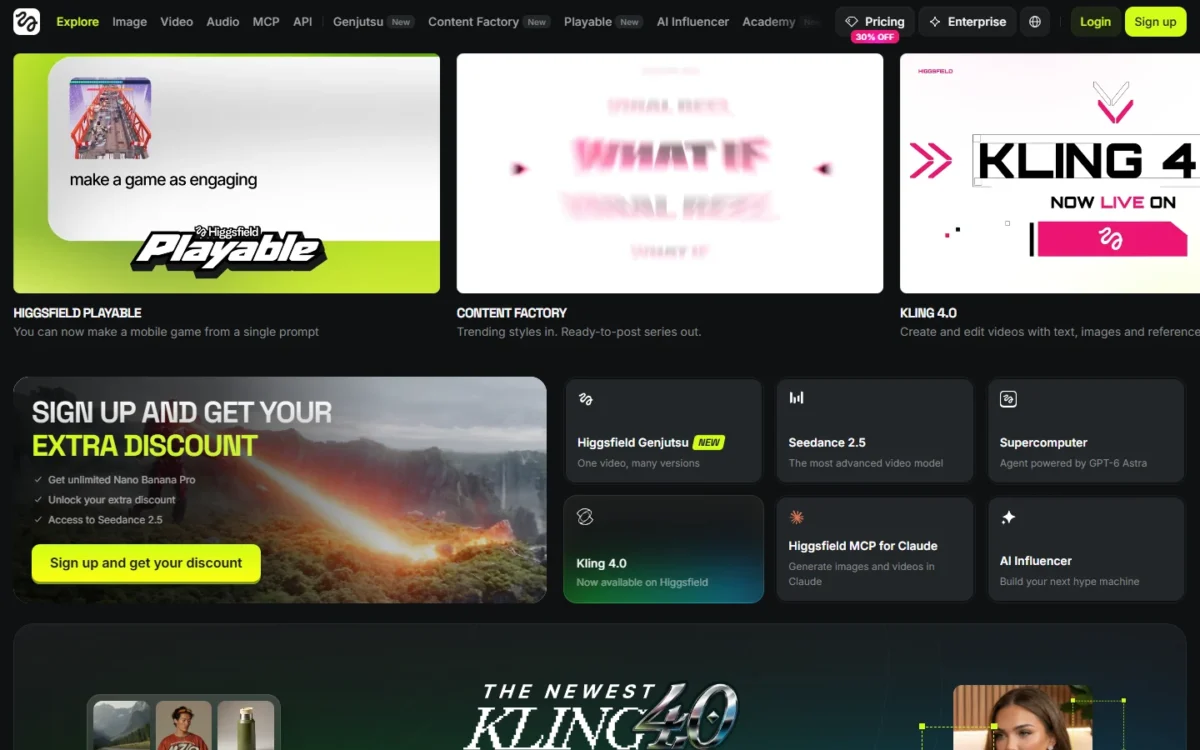
Higgsfield AI is worth paying for if you want one end-to-end production workflow with Higgsfield’s own tool for each step: Soul ID for consistent characters, Cinema Studio for directed shots and Marketing Studio for finished ads. All three run on the same credit balance as Kling, Seedance and Veo.
In this Higgsfield AI review, Plus is the plan I would buy first: $39 a month billed annually or $49 billed monthly, for 1,000 credits a month.
Skip it if you use one model, expect unlimited video for the whole month, or need client content kept out of model training without an Enterprise contract. Credits reset every cycle, and Unlimited covers named models only, and on Nano Banana 2, Nano Banana Pro and Kling 3.0 it lasts 7 days.
Quick verdict
- Worth it for: creators who switch between Kling, Seedance, Veo and Nano Banana, or who build one recurring character with Soul ID.
- Skip it if: you use one model, expect truly unlimited video, generate through MCP or scripts, or need client content kept out of training below Enterprise.
- Main strength: many models and Higgsfield’s own studios priced in one currency, with the credit cost shown on the button before you confirm.
- Biggest limit: subscription credits expire at every reset, every 30 days even on annual plans, and Unlimited on Nano Banana 2 and Kling 3.0 ends 7 days after activation.
- Price basis: Starter $15 a month for 200 credits; Plus $39 a month billed annually or $49 monthly for 1,000; Ultra $99 or $129 on the same bases for 3,000. USD before tax, checked October 27, 2026.
In This Article (14 sections)
Higgsfield AI at a Glance
Higgsfield is a generative platform for creative production, with paid plans from $15 a month. Every plan, seat price and billing rule is in my guide to Higgsfield AI pricing and subscription plans.
Soul ID, Cinema Studio and Marketing Studio sit beside Seedance, Kling, Veo, Sora 2 and Nano Banana.
- Category: AI image and video creation platform, used on the web at higgsfield.ai
- Best for: creators and small ad teams who work across several video models
- Starting price: Starter, $15 a month on monthly or annual billing, 200 credits a month
- Practical plan: Plus, $39 a month billed annually or $49 billed monthly, 1,000 credits a month
- Free plan or trial: no trial period; a free tier with a limited set of models and a visible watermark
- Unlimited: model by model on each plan card; most included models get 365 days, the newest flagships shorter windows such as 7 days, and Starter has none of the 7-day ones
- Main limitation: subscription credits reset every cycle and do not roll over
The free tier is a look around, not a trial. With no trial period, the first real test of a paid model costs a subscription, which is why the refund rule later in this review matters so much.
Higgsfield AI Pros and Cons
The trade is plain: many models and Higgsfield’s own studios behind one balance, paid for with credits that expire and an Unlimited that is narrower than its name.
Pros
- One balance prices Kling, Seedance, Veo, Wan, Minimax, Nano Banana and Soul, each with a printed rate, so a creator who switches models pays one bill.
- The credit cost shows on the Generate or Recreate button before you confirm, and failed generations usually return their credits.
- Paid plans export without a visible watermark, and Higgsfield claims no ownership of your outputs or limit on their commercial use.
- Soul ID keeps one trained face across Soul images and Seedance video, the core job of AI-influencer and UGC creators.
- Cinema Studio 4.0 takes up to 50 references and directs clips up to 30 seconds with native audio.
- Upgrades apply at once and count the unused value of your current plan, so starting small costs little.
Cons
- Subscription credits reset every cycle, every 30 days even on annual plans, so a light month wastes the balance.
- Unlimited on Nano Banana 2, Nano Banana Pro and Kling 3.0 lasts 7 days from activation, not the month, and no plan card lists Kling 4.0.
- Unlimited and free generations work only on higgsfield.ai, so MCP, CLI, Canvas and Supercomputer users pay credits for everything.
- Starter runs only Seedance 2.0 Fast and 2.0 Mini, two parallel videos, and no Start & End Frame control or Speak.
- Your inputs and outputs may train Higgsfield’s models unless you are on an Enterprise agreement.
- Refunds end once one credit is spent, renewals are never refunded, and a service fee of up to 6% applies.
Higgsfield AI Features
Four features and the model catalog decide whether Higgsfield is worth its price. Soul ID keeps a face, Cinema Studio 4.0 directs shots, Marketing Studio builds template ads and Kling 4.0 holds long takes, all billed from one credit balance.
One Workflow From Character to Finished Ad
The workflow runs in three Higgsfield tools: Soul ID keeps one trained face across Soul images and Seedance video, Cinema Studio 4.0 directs shots, and Marketing Studio builds image and video ads from a template or a product link.
A character trained in Soul ID can be cast in Cinema Studio scenes, where clips run up to 30 seconds with up to 50 references and native audio.
Every step bills from one credit balance that also prices the outside models, and the Higgsfield pricing page prints rates for dozens of them. A Kling 3.0 clip at 720p costs about 7 credits per 5 seconds, Seedance 2.0 at 720p about 22, and Veo 3.1 Fast at 720p about 16 credits per 4 seconds.
Images cost far less: Nano Banana Pro is 2 credits an image and Higgsfield Soul 2.0 is 0.12 credits an image. The model you pick moves the bill more than the plan you are on.
Resolution moves it just as hard. Seedance 2.0 at 4K costs about 110 credits per 5 seconds, five times its 720p rate, and Kling 3.0 jumps from about 7 credits at 720p to about 30 at 4K.
The gate sits on Starter, whose card lists “Access to selected models only & features” and, for Seedance, only 2.0 Fast and 2.0 Mini. Plus and Ultra list access to all models and features.
Soul ID: One Face Across Images and Video
Yes, Soul ID keeps one character’s face across your content once you train it on 20 or more photos of one person, up to 80. Training takes a few minutes, and the trained character carries into Seedance video as an Element.
The limits are specific. A Soul ID holds one person, so a two-character scene needs Elements. The identity is not exportable as a file, and Higgsfield sets the expectation at “clearly the same person” rather than a pixel-identical face.
For an AI-influencer or UGC account, that is the feature that makes a recurring persona possible. The training set must be your own face or one whose owner agreed to its use. For a talking short built from one portrait and a script, my Higgsfield Shorts Studio review covers the other route.
The Character row of the compare table allows 1, 3 and 3 concurrent jobs and up to 6, 33 and 100 generations a cycle on Starter, Plus and Ultra (Monthly view). The Plus plan picker adds 5,000 free Soul 2.0 generations, so Soul images cost close to nothing next to video.
Cinema Studio 4.0: Directed Shots up to 30 Seconds
Cinema Studio 4.0 is Higgsfield’s directed-video workspace: it runs on Seedance 2.5, takes up to 50 references and makes clips up to 30 seconds with native audio. Its Cinema Studio guide lists the controls.
The Director’s Panel sets genre, era (60s to 2020s), tempo, camera body (35mm Film, 8mm Film, DV Camcorder and others), lens and aperture. It adds camera moves such as POV, Robot Arm and Helicopter Shot, 50+ color grading templates and 6 lighting presets, the kind of control my cinematic AI video generators ranking compares.
Two modes matter for editing. Forward or Backward Extend continues an uploaded clip of up to 30 seconds, and Edit Video changes an object or a face without regenerating the whole clip.
The pricing page lists no Cinema Studio rate; the studio’s Generate button shows the cost. Starter’s card lists Seedance 2.0 Fast and 2.0 Mini only, so I would budget Cinema Studio 4.0 on Plus or Ultra.
Marketing Studio: Ads From a Template or a Product Link
Yes, Marketing Studio makes product ads without a shoot, as long as a template format fits. You pick a template by task (Product Shot, Motion, UGC, TikTok, Ads, Posters or Marketplace), add your product image, and the Recreate button shows the credit cost first.
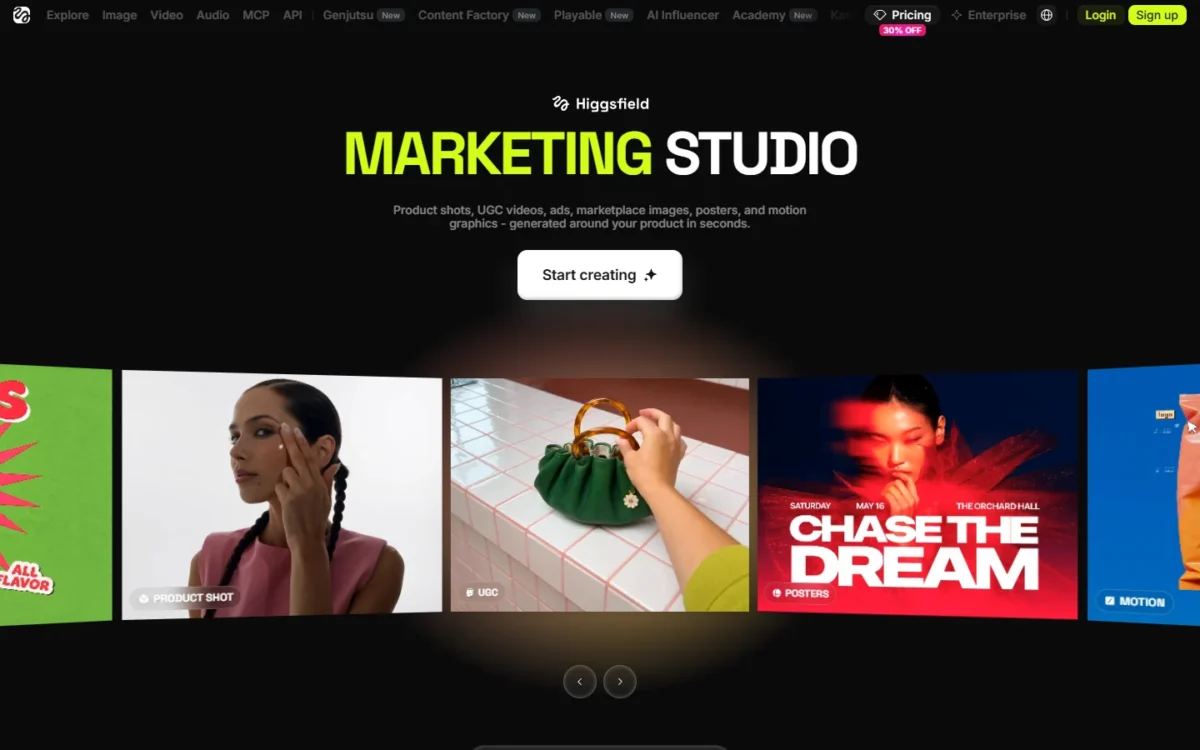
Three categories output images (Product Shot, Ads, Marketplace) and three output video (UGC, Motion, TikTok). The Product Link tool turns a product page link into a video ad for TikTok, Reels and Shorts. The Ad Reference tool rebuilds a reference ad around your product.
The Marketing Studio guide names its own limits. UGC voiceover and pacing vary by generation, and a video result cannot be edited, only generated again.
The UGC builder is not included on Starter, and the full template library runs only on the website. A small brand testing UGC ad angles should plan on Plus or above.
Kling 4.0 on Higgsfield
Kling 4.0 is live on Higgsfield on “the same credits”. It adds up to 30 seconds in one take, up to 10 keyframes and up to 15 references in one generation, and it outputs 720p, 1080p and 4K, with 10-bit HDR at 1080p and 4K and 21:9 ultrawide.
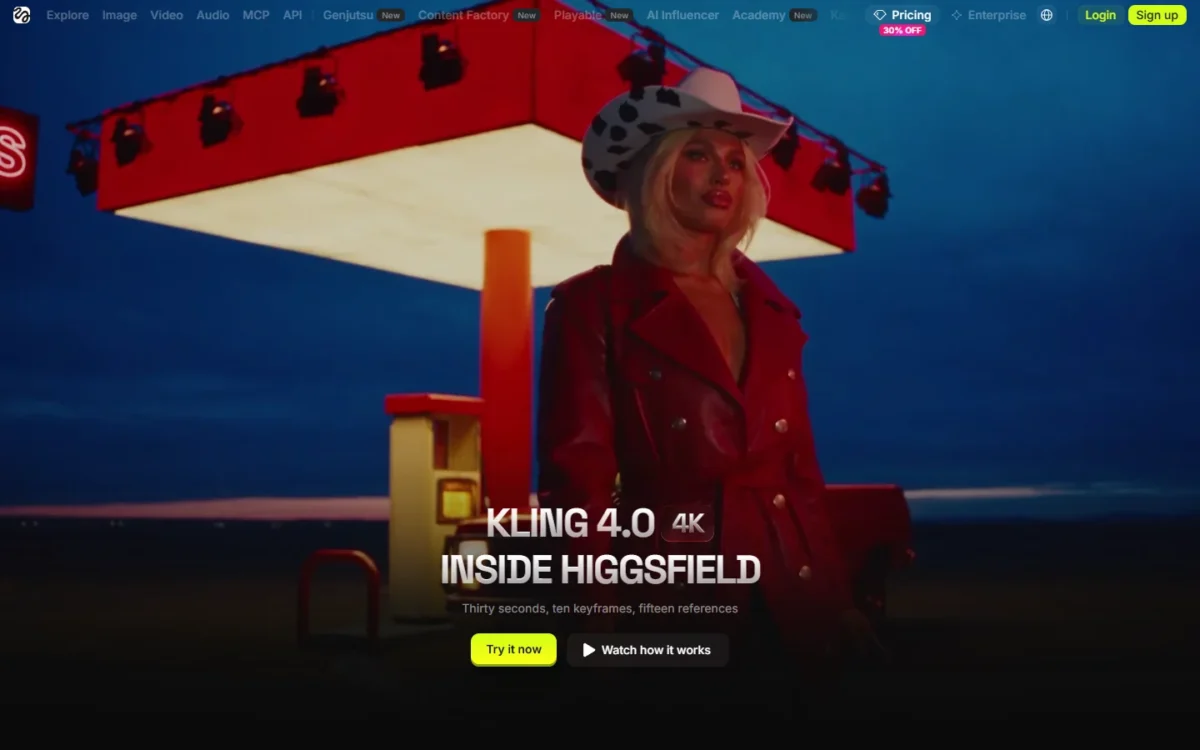
The jump from Kling 3.0 is real: 3.0 stops at 15 seconds with only a start and an end frame. On the Kling 4.0 page, an uploaded clip extends to 2 minutes and dialogue covers 9+ languages.
The catch is the meter. The visible rows of the pricing table print no Kling 4.0 rate, and no plan card lists Kling 4.0 under Unlimited, only Kling 3.0. Draft on Kling 4.0 Flash (720p, up to 20 seconds) and read the Generate button before the full render.
Plan access is not stated per model either. Higgsfield notes that new models may reach users on a rolling basis, so a Kling 4.0 buyer should expect it on Plus or Ultra, which list all models.
Higgsfield AI Ease of Use
The generator and Marketing Studio’s templates need no filmmaking skill, while Cinema Studio and Soul ID reward preparation. A first generation takes a text prompt and, if you want, a reference image, and a Marketing Studio template needs no prompt at all. My guide on how to use Higgsfield walks through camera-motion prompts and a first workflow.
Cinema Studio 4.0 loads by default, and its Director’s Panel asks for decisions a newcomer may not know: era, tempo, camera body, lens and aperture. Soul ID needs a prepared set of 20 or more well-lit photos of one person before training starts.
The Unlimited toggle appears only when the selected model is covered, so a missing toggle means the run will cost credits. Manage Account → Subscription lists each active Unlimited model with its start date, expiry date and status.
One control is hard to find: the downgrade option sits in the detailed comparison section of the pricing page, not on the plan cards. Upgrading, by contrast, takes effect immediately.
For drafts, Higgsfield points Kling users to Turbo variants and Kling 4.0 users to Kling 4.0 Flash, so the full render goes only to a prompt that already works. Tight AI video prompts save credits the same way, because every re-roll is billed.
What Independent Tests Measured
Three published Higgsfield reviews put a clock on generation, and none states conditions that hold for every plan or model. PicLumen sells its own AI image and video generator, and Zeely sells an AI advertising platform that its page recommends for paid ads, so read those two results as coming from sellers of their own AI creative tools.
PicLumen’s review, dated July 2026 and checked Nov 2026, timed a Kling 3.0 product-demo clip at about 2.5 minutes, with no plan or resolution stated. PicLumen’s page also says a five-video Soul ID lookbook built from one headshot took 35 minutes, again with no plan or model, and without separating the writer’s prompting from render time.
Cybernews’s review, last updated March 2026 and checked Nov 2026, spent a few minutes on account setup, about 5 minutes on a first prompt and 2 to 4 minutes on the render, on a plan it calls Basic. That name is not among the Starter, Plus and Ultra cards above.
Zeely’s review, published Nov 4, 2026, generated one 5-second vertical 1080p clip in Cinema Studio 4.0 from a single product image. Zeely’s clip took about 3.5 minutes and used 80 credits in the writer’s account Usage history. Zeely’s page names no plan, and with one attempt that is one run: the 80 credits is what that clip consumed, not an allowance of any plan.
Set side by side, PicLumen’s 2.5-minute and Zeely’s 3.5-minute single-clip timings sit inside the 2 to 4 minute render range Cybernews reports, so in these runs a render took minutes, not seconds. The conditions stop the comparison there, because Cybernews gives a range from its own experience, not a timing for one clip. The models differ (PicLumen’s Kling 3.0, Cybernews’s unnamed Cinema Studio model, Zeely’s Cinema Studio 4.0), and Cybernews’s March run predates the August 2026 Cinema Studio 4.0 announcement that Zeely cites, so it cannot have used that version.
PicLumen’s and Zeely’s pages do not say whether model, clip length or load explains the gap between 2.5 and 3.5 minutes. PicLumen’s 35-minute lookbook is a different task, five clips from a locked Soul ID character built from one headshot, and stays outside that comparison.
What none of them measured is the number that sets a monthly bill: how many attempts a usable clip takes. Zeely stopped at one, and Cybernews reports that getting to a polished result often means regenerating scenes several times, which burns through credits, but it never counts those regenerations.
Zeely’s 80 credits in its Usage history show that its run used credits, and Higgsfield says credit-based generations run in the priority queue, so the 3.5 minutes is a priority-queue time. Higgsfield says Unlimited runs in the standard queue, where speed can vary during peak hours. PicLumen, Cybernews and Zeely did not time Kling 4.0 or Seedance 2.5.
In your first month, ideally on Plus billed monthly, take the one model you expect to use most and read the credit cost on its Generate button. Time the render, count the attempts until a clip is usable, and confirm the spend in Manage Account → Usage. Credits per attempt times attempts is your cost per usable clip, and Plus’s 1,000 credits divided by it is your monthly output.
Higgsfield AI Plans and Credits at a Glance
Higgsfield sells three individual plans in US dollars before tax: Starter at $15 a month for 200 credits, Plus at $49 billed monthly or $39 a month billed annually for 1,000, and Ultra at $129 or $99 for 3,000. Plus is the first plan with every model. Business seats start at $65 per seat a month, billed annually.
For yearly totals, team seat counts and a plan calculator, see my guide to Higgsfield plans and billing.
On annual billing, Plus saves $120 and Ultra $360 a year against monthly billing, while Starter costs the same either way. Ultra’s prices below are for its 3,000-credit level; the card also offers 6,000 and 9,000-credit levels.
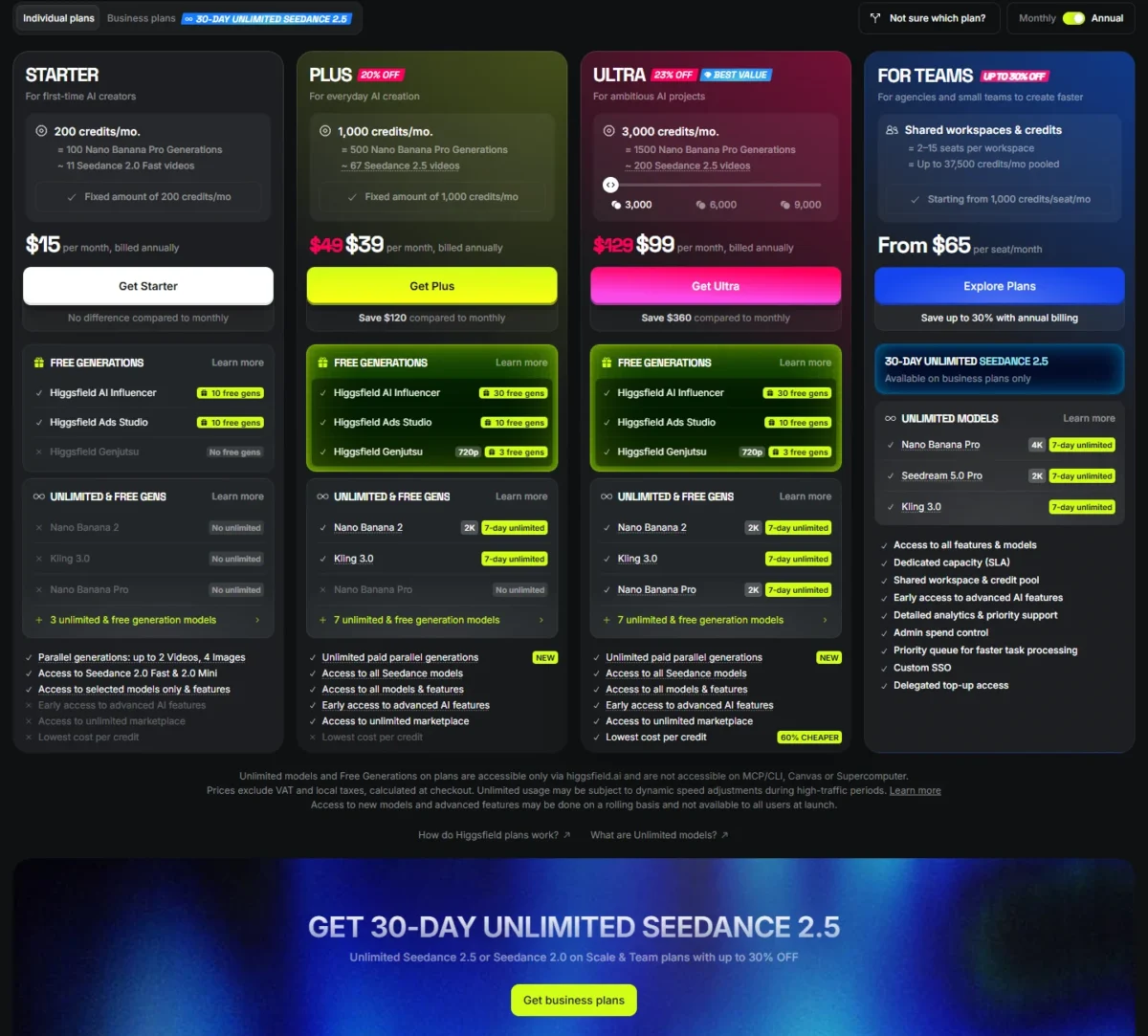
| Plan | Billed monthly | Billed annually, per month | Credits a month | Model access and parallel videos | 7-day Unlimited models |
|---|---|---|---|---|---|
| Starter | $15 | $15 | 200 | Seedance 2.0 Fast and 2.0 Mini, selected models; 2 | None of the 7-day models; the card lists 3 unlimited & free generation models |
| Plus | $49 | $39 | 1,000 | All models and features; 6 | Nano Banana 2; Kling 3.0 on annual billing |
| Ultra | $129 | $99 | 3,000 | All models and features; 8 | Nano Banana 2, Nano Banana Pro; Kling 3.0 on annual billing |
| Team | $79 per seat | $65 per seat | 1,000 per seat | 2 to 9 members, shared workspace | Nano Banana Pro, Seedream 5.0 Pro |
| Scale | $169 per seat | $150 per seat | 2,500 per seat | 5 to 15 members, shared workspace | Nano Banana Pro, Seedream 5.0 Pro; Kling 3.0 on annual billing |
| Enterprise | Let’s talk | Let’s talk | Custom per seat | Custom model access, unlimited seats | Not listed on the pricing page |
Sources: Higgsfield pricing page, Individual and Business plans in Monthly and Annual views, US prices excluding VAT and local taxes, checked October 27, 2026.
My pick is Plus, started on monthly billing: one $49 cycle shows which models you actually use before you commit to a year.
What Each Plan Unlocks
Starter lacks the full Seedance 2.0 model, Start & End Frame control, Higgsfield Speak, the UGC builder and priority access to new models, all of which Plus and Ultra include. The compare table on the pricing page shows the gates plan by plan.
| Plan gate | Starter | Plus | Ultra |
|---|---|---|---|
| Credits per cycle | 200 | 1,000 | 3,000 |
| Seedance 2.0 720p clips per cycle | Not included | 44 videos | 133 videos |
| Kling 3.0 720p clips per cycle | 26 videos | 133 videos | 400 videos |
| Concurrent video jobs | 2 | 6 | 8 |
| Start & End Frame control | Not included | Included | Included |
| Higgsfield Speak | Not included | Included | Included |
| UGC builder | Not included | Included | Included |
| Priority access to new models | Not included | Included | Included |
| Commercial use | Included | Included | Included |
Sources: Compare features table on the Higgsfield pricing page, Monthly view, checked October 27, 2026.
Starter is a different product, not a cheaper Plus: 26 Kling 3.0 clips a cycle suit testing ideas, not a weekly content calendar. Anyone who chose Higgsfield for full Seedance 2.0 starts on Plus.
What a Month of Higgsfield Really Costs
A Higgsfield credit costs between $0.033 and $0.075 depending on the plan and billing, and a 720p clip costs between about $0.25 and $1.11. The table divides each printed price by its credits and by the compare table’s clip counts.
| Plan and billing | Price a month | Credits | Cost per credit | Per Seedance 2.0 720p clip | Per Kling 3.0 720p clip |
|---|---|---|---|---|---|
| Starter, either billing | $15 | 200 | $15 / 200 = $0.075 | Not included | $15 / 26 = $0.58 |
| Plus, billed monthly | $49 | 1,000 | $49 / 1,000 = $0.049 | $49 / 44 = $1.11 | $49 / 133 = $0.37 |
| Plus, billed annually | $39 | 1,000 | $39 / 1,000 = $0.039 | $39 / 44 = $0.89 | $39 / 133 = $0.29 |
| Ultra, billed monthly | $129 | 3,000 | $129 / 3,000 = $0.043 | $129 / 133 = $0.97 | $129 / 400 = $0.32 |
| Ultra, billed annually | $99 | 3,000 | $99 / 3,000 = $0.033 | $99 / 133 = $0.74 | $99 / 400 = $0.25 |
Sources: prices from the Higgsfield pricing page and clip counts from its compare table (Monthly view), before VAT and local taxes, checked October 27, 2026.
The clip costs assume every credit goes to one model and no clip is re-rolled. A project that needs three attempts per usable shot pays three times these figures, because re-rolls spend credits like any generation.
Starter buys the most expensive credit of the individual plans, more than double the Ultra annual rate. Ultra’s cheap credit only helps if you spend it: a creator who uses 1,500 of Ultra’s 3,000 credits pays $99 / 1,500 = $0.066 a credit, more than Plus at full use.
A creator posting about 40 Seedance 2.0 720p clips a month fits Plus, which covers 44 a cycle. That costs $39 x 12 months = $468 a year billed annually, against $49 x 12 months = $588 billed monthly.
Ultra on the same basis costs $99 x 12 months = $1,188 a year billed annually or $129 x 12 months = $1,548 monthly. Moving from Plus to Ultra on annual billing adds $99 – $39 = $60 a month for 2,000 more credits and two more parallel video jobs.
Upgrade Triggers and Business Plans
Move from Starter to Plus when you need full Seedance, Start & End Frame control, Speak or more than two parallel videos. Move from Plus to Ultra when 1,000 credits run out before the reset, which happens past 44 Seedance 2.0 720p or 133 Kling 3.0 720p clips a cycle.
Move to a business plan when two or more people need one credit pool and shared Assets. Team covers 2 to 9 members on the standard queue, with 16 image and 16 video jobs in parallel.
Scale covers 5 to 15 members and adds the priority queue and 32 image and 32 video jobs in parallel. It also adds basic SSO and admin spend control, which lets an admin pause a member’s credit use. Enterprise adds custom SSO, SOC 2 and legal indemnification, no training on your data, a dedicated account manager and volume rollover credits.
How Higgsfield Credits Work
Subscription credits are spent first and expire at each reset: at every paid renewal on monthly plans, and every 30 days on annual plans. If you subscribe on an annual plan on May 11, your next reset lands on June 10, not on the 11th.
| Credit type | Where it comes from | Expires | If you cancel |
|---|---|---|---|
| Subscription credits | Your plan | At each reset, unused credits lost | Usable to the end of the paid period, then gone |
| Credit Pack credits | One-time purchase, needs an active subscription | 90 days from purchase | Stay usable on the free plan’s models |
| Auto-Refill credits | Automatic top-up below your threshold | 90 days from purchase | Stay usable on the free plan’s models |
| Promo credits | Promocodes or compensation | On the date shown when issued | Stay usable until that date |
| Boost Credits | Concurrency Boost packs | 90 days from purchase | Stay usable on the free plan’s models |
Sources: Higgsfield help center articles on how credits work and top-up expiry and cancellation, checked October 27, 2026.
After subscription credits, the system spends whichever balance expires soonest. Credits are deducted for every generation on the web, MCP, CLI, Canvas and Supercomputer, including re-rolls and upscaling.
Failed generations usually return their credits within minutes, though some models may not refund a failure. Manage Account → Usage logs each deduction and each return, which is where to confirm one.
Credit Packs come in fixed sizes of 100, 200, 500, 1,000, 2,000 and 4,000 credits, or 5,000 to 25,000 in 1,000-credit steps. Their prices appear only at checkout, so a top-up cannot be priced against an upgrade in advance.
The practical rule follows from the expiry dates. A pack bought late in a cycle survives the reset; the plan’s own credits do not. Concurrency Boost packs add +4, +8, +12 or +16 parallel jobs with their own Boost Credits, for a batch week that outgrows the plan’s limit.
How Higgsfield Unlimited Works
Unlimited on Higgsfield means named models that deduct no credits for a set period, and the period depends on the model. Most included models come with 365-day Unlimited access, while the newest flagship models may have shorter windows, such as 7 days.
On the October 2026 plan cards, those 7-day models are Nano Banana 2 on Plus, Nano Banana Pro added on Ultra, and Kling 3.0 on the annual Plus and Ultra cards.
Starter is not without Unlimited: its card lists 3 unlimited & free generation models, but none of the 7-day ones. The Plus and Ultra cards each list 7, so a Starter buyer gets some free generations but waits for annual Plus to run Kling 3.0 without credits.
Higgsfield’s own pricing explainer names the 365-day models: Seedream 5.0 Lite and FLUX.2 Pro (1K) on Starter. Higgsfield lists a full set for Plus and Ultra: Seedream 5.0 Lite, FLUX.2 Pro, Seedream 4.5, Nano Banana, Kling O1 Image and GPT Image. The same Higgsfield explainer says business plans don’t include the 365-day set.
| Plan | 7-day Unlimited, annual billing | 7-day Unlimited, monthly billing | One-time free generation pools |
|---|---|---|---|
| Starter | None of the 7-day models | None of the 7-day models | AI Influencer 10, Ads Studio 10 |
| Plus | Nano Banana 2 (2K) and Kling 3.0, 7-day each | Nano Banana 2 (2K), 7-day | AI Influencer 30, Ads Studio 10, Genjutsu 720p 3 (annual) or 2 (monthly) |
| Ultra | Nano Banana 2 (2K), Kling 3.0 and Nano Banana Pro (2K), 7-day each | Nano Banana 2 and Nano Banana Pro (2K), 7-day each | AI Influencer 30, Ads Studio 10, Genjutsu 720p 3 (annual) or 2 (monthly) |
| Team | Nano Banana Pro and Seedream 5.0 Pro (2K), 7-day; 14-day Unlimited Seedance 2.0 | Nano Banana Pro and Seedream 5.0 Pro (2K), 7-day; 7-day Unlimited Seedance 2.0 | Not listed |
| Scale | Nano Banana Pro (4K), Seedream 5.0 Pro (2K) and Kling 3.0, 7-day; 30-day Unlimited Seedance 2.5 | Nano Banana Pro and Seedream 5.0 Pro (2K), 7-day; 7-day Unlimited Seedance 2.5 | Not listed |
Sources: plan cards on the Higgsfield pricing page, Individual and Business plans in both billing views, checked October 27, 2026. The business Seedance offers start on the day you purchase and require business verification.
The Unlimited models guide sets the rules behind the cards:
- Unlimited is a one-time grant for the period stated, not a recurring monthly allowance.
- The period runs from activation and does not restart at renewal.
- It works only while a subscription is active, and it stops if you downgrade to a plan without it.
- It applies only on higgsfield.ai, never through MCP, CLI, Canvas or Supercomputer.
- Unlimited runs in the standard queue; credit generations run in the priority queue.
- It is for personal, human use: automation, scripting, credential sharing and reselling are prohibited.
The card in the billing view you buy is the one to trust: its Unlimited & Free Gens section shows every included model with its Unlimited period.
Fair use sits in Section 10.6 of the Terms of Use, which lets Higgsfield throttle or slow usage that is automated or “materially exceeds typical individual use”. Higgsfield publishes no threshold for that.
No individual plan card lists Kling 4.0, Seedance 2.5, Veo or Cinema Studio under Unlimited. Seedance 2.5 Unlimited is a business-plan offer; a solo buyer who mainly wants Seedance should compare Seedance’s own pricing first.
More Unlimited can be bought outside the plan. The Unlimited Models Marketplace sells per-model bundles priced by resolution tier, with video bundles limited to one generation at a time and up to 15 seconds. The pricing FAQ also names a separate 365 Unlimited promo.
My reading: the 365-day set runs all year, while a 7-day window on Nano Banana 2 or Kling 3.0 is one production sprint, not a month of free generations.
Is Higgsfield AI Safe to Pay For?
Yes, as a self-serve subscription with published terms, if you accept two catches. Refunds end once one credit is spent, and your inputs and outputs may train Higgsfield’s models unless you are on Enterprise.
Higgsfield, Inc. runs the service. Its About page says it launched in 2025, is headquartered in San Francisco and is backed by Accel, Menlo Ventures, GFT Ventures and AI Capital Partners.
| Purchase | Refundable? |
|---|---|
| Initial subscription | Yes, within 7 days (longer where local law requires), with zero credits used and a service fee of up to 6% |
| Subscription renewals | No |
| Credit Packs and Auto-Refill charges | Yes, within 7 days, with zero credits from that purchase used |
| Offers that add Unlimited access, upgrades or priority | No, once the access is granted |
Sources: Higgsfield refund guide and Section 9.3 of the Terms of Use, checked October 27, 2026.
Free and Unlimited generations do not count as credit use, so they keep you eligible. An approved refund cancels the subscription at once, and consumers in the EEA and UK have a 14-day withdrawal right that ends early once they spend credits or generate.
Cancelling turns off auto-renewal and keeps access until the paid period ends. The path is Manage Account → Subscription → Plan Settings → Manage Subscription → Show → Cancel Subscription, and it does not delete your account or your generations.
Ownership is buyer-friendly. Under Section 4.4, Higgsfield claims no ownership of your inputs or outputs and does not restrict commercial use. Your rights in exported outputs survive cancellation and can pass to clients.
Paid plans add no visible watermark, but Higgsfield may embed invisible machine-readable markers that flag content as AI-generated. Upgrading does not remove those markers.
The data terms are the catch. The same Section 4.4 lets Higgsfield use your content, inputs and outputs to train its models; only an Enterprise agreement excludes them. Deleting content stops future training use, but content already in trained models cannot be removed.
Security commitments sit at the top tier. SOC 2 and legal indemnification are Enterprise-only, while the team-plan page describes Higgsfield as “SOC2 & ISO42001 aligned” and “GDPR compliant”, which is the vendor’s claim. Workspace admins on any business plan can access members’ content.
The Terms of Use were last updated on October 23, 2026. Section 18 sends disputes to binding arbitration with a class action and jury trial waiver, unless you opt out within 30 days under Section 18.10.
Who Should Use Higgsfield AI?
Higgsfield fits creators who rotate between models, build one recurring character, or turn products into template ads. Skip it if you use one model, need unlimited volume all month, automate through MCP or scripts, or must keep client content out of training below Enterprise.
Best for
- Creators who rotate Kling, Seedance, Veo and Nano Banana and want one bill with a printed rate per model
- AI-influencer and UGC makers who need one trained face across Soul images and Seedance video
- Small brands turning product images or links into template ads, on Plus or above for the UGC builder
- Directors who want Cinema Studio 4.0 shots of up to 30 seconds with up to 50 references
- Teams of 2 to 15 who need pooled credits and shared Assets on Team or Scale
Not ideal for
- One-model users, who pay for a catalog they will not touch
- Anyone expecting a month of unlimited video, when Kling 3.0 Unlimited on the annual Plus and Ultra cards lasts 7 days
- MCP, CLI or scripted workflows, where Unlimited and free generations never apply
- Agencies that must keep client content out of model training without an Enterprise agreement
- Buyers who want a free trial: there is no trial period
The deciding question is how many models you use in a month. One Higgsfield subscription covers Seedance, Kling, Veo and Soul ID on one bill with a printed rate per model; a creator who uses one model pays for a catalog that sits idle.
Higgsfield AI vs Competitors
Runway is the closest like-for-like rival: a multi-model credit subscription that also sells Kling 4.0, with a free plan and a $12 a month entry price billed annually. For a buyer who only wants Kling models, Kling AI itself is the direct option to weigh.
| Software | Best for | Starting price | Key difference | Main trade-off |
|---|---|---|---|---|
| Higgsfield AI | Creators who switch models and want Soul ID, Cinema Studio and Marketing Studio | Starter $15 a month, 200 credits | Own studios on the same credits as Kling, Seedance and Veo | Credits reset every cycle; Kling 3.0 Unlimited lasts 7 days, on annual Plus and Ultra |
| Runway | Creators who want a free start and rollover on the top plan | Free $0 with 125 one-time credits; Standard $12 a month billed annually, 625 credits | Lists Kling 4.0 generations at 25% off until November 30 | Standard and Pro credits reset each cycle; only Max rolls over 1 month |
Sources: Higgsfield pricing page and Runway pricing page, checked October 27, 2026.
Credits are not one currency across vendors, so no per-clip comparison holds. Runway prices Gen-4.5 at 60 credits per 5 seconds and Kling 4.0 at 1080p at 118 credits per 5 seconds before its discount. The visible rows of Higgsfield’s rate list show no Kling 4.0 rate.
Runway’s case against Higgsfield is its free plan and its top-up credits, which never expire on Runway; Higgsfield’s Credit Packs last 90 days. My Runway review covers its workflow in depth.
Runway’s plans and credit allowances show what Pro and Max add over Standard. Higgsfield’s case is its own studios: Soul ID, Cinema Studio and Marketing Studio share one balance with the outside models.
Higgsfield AI Alternatives
If Higgsfield is not the right buy, the better alternative is usually one model bought directly, or a wider shortlist if you are still choosing a model. A ranked list belongs elsewhere: my guide to the best AI video generators compares the main options by job and budget.
If Veo is the model you want, buying it through Google is the direct route, and my Google Flow review covers that path.
For a narrower list built around text prompts, the text-to-video generators compared page sets the models side by side.
How I Evaluated Higgsfield AI
I built this review from Higgsfield’s pricing page in its Individual and Business views, each in Monthly and Annual billing, read on October 27, 2026. Its help center, its Terms of Use (October 23, 2026 version) and its product pages filled in credits, Unlimited, refunds and each feature.
Runway’s pricing page supplied the competitor prices. All prices are in US dollars before VAT and local taxes.
Facts, plan gates and terms are quoted from those vendor pages. The plan fit, the cost per credit and per clip, and the upgrade triggers are my own analysis of the printed numbers.
The published reviews this page cites are those of PicLumen, Cybernews and Zeely, each named and linked in the ease-of-use section where its result appears.
Higgsfield’s pricing page lists no Cinema Studio rate (the studio’s Generate button shows the cost), Credit Pack prices appear only at checkout, and Section 10.6 of the Terms gives no threshold for its fair-use rule. Output quality and Soul ID likeness depend on your own prompts and photos, so judge them on Plus monthly before committing to a year.
FAQ
Is Higgsfield AI censored?
Higgsfield blocks generations its content protection reads as a real face or protected IP, with the message “May contain protected content”. The fix is to remove the face or copyrighted reference from the prompt and references and retry. Separately, the Terms forbid using another person’s image without their permission.
Which is better, Higgsfield or Kling?
For a Kling-only buyer, Kling AI itself comes first, without a catalog you will not use. Higgsfield is the better buy once you also use Seedance, Veo or Soul ID, and its annual Plus and Ultra cards add 7-day Unlimited on Kling 3.0.
Does Higgsfield offer a free trial?
No, and the free tier does not stand in for one. Anything you make there keeps its watermark after you upgrade, because subscribing does not clean earlier files. Regenerate those clips on the paid plan, and use the free tier only to learn the interface.
Final Verdict: Is Higgsfield AI Worth It?
Yes, for a creator who uses several models or Higgsfield’s own studios and budgets credits per model, on Plus. No, for one-model users, MCP and script automators, and agencies that need a no-training term below Enterprise.
The biggest trade-off is time. Subscription credits vanish at each reset, even every 30 days on annual plans, and Unlimited on Nano Banana 2 and Kling 3.0 lasts 7 days, so Higgsfield rewards a creator who plans production in bursts.
Before you pay, check three things: the model’s cost on its Generate button, the Unlimited list on your plan card in the billing view you will buy, and the refund rule that ends at your first spent credit. Then start with one month of Plus at $49 and move to annual once your model mix is clear.