The fastest way to overpay for AI voice is to buy on a voice-count headline and discover the download, the commercial license, or the character quota lives two plans up. This guide ranks 15 text to speech tools by what actually changes a buying decision: cost per usable minute, commercial rights, quota behavior, and whether you need a creator studio or a developer API.
The research-based pick for the widest range of buyers is ElevenLabs, because it balances expressive multilingual output with a production API on one account. If you produce recurring business voiceovers, Murf AI is the cleaner studio fit. If you need licensed corporate voices with governance, WellSaid Studio is the safer choice. If you are wiring a real-time voice agent, Cartesia Sonic and the hyperscale APIs matter more than any studio.
One scope note before the list. This guide separates creator studios (a no-code editor for finished audio) from developer APIs (speech synthesis you call from code), because those two buyers evaluate completely different things. The methodology, evidence boundaries, and every price date are stated in the section directly below the quick verdict.
In This Article (17 sections)
Quick verdict: best text to speech tool by use case
Use this table to jump straight to the pick that matches your workflow. Every recommendation is expanded, priced, and qualified further down.
| Use case | Best pick | Why it fits |
|---|---|---|
| Best overall creator plus API balance | ElevenLabs | Expressive multilingual output and a streaming API on one account |
| Marketing and e-learning voiceovers | Murf AI | Collaborative studio with clear commercial-use upgrades |
| High-volume solo creator credits | Speechify Studio | Large monthly credit allowance and a deep voice catalog |
| Licensed corporate narration | WellSaid Studio | Licensed voices, pronunciation control, and enterprise SSO |
| Commercial narration with model choice | NaturalReader Commercial | Commercial rights plus several voice-model providers |
| Voiceover inside video and podcast edits | Descript | Text-based editing with AI speech in the same timeline |
| Real-time voice agents | Cartesia Sonic | Low-latency streaming with concurrency-based plans |
| Broad API voice catalog for developers | PlayHT | Mature API and SDK workflow with a large voice library |
| YouTube and training video creators | LOVO Genny | Voiceover, subtitles, scripts, and video editing together |
| Pay-as-you-go without a subscription | Narakeet | Nonexpiring top-up credits for occasional projects |
| Podcast publishing plus TTS | Listnr AI | Voice generation with hosting, storage, and commercial exports |
| Prompt-controlled speech in an app | OpenAI GPT-4o mini TTS | Instruction-controlled delivery inside an existing stack |
| Model and price-tier choice | Google Cloud Text-to-Speech | The widest documented range of model families |
| AWS-native application back ends | Amazon Polly | Predictable per-character pricing and cached playback |
| Microsoft-centric enterprise stacks | Azure AI Speech | Neural TTS with Azure identity and compliance controls |
| Budget entry with commercial rights | Speechify Studio ($19) or NaturalReader | Low-cost paid studio entry with commercial output |
| Free plan to preview quality | Free tiers on ElevenLabs, Murf, Speechify | Preview only; verify commercial terms before publishing |
Budget pick: Speechify Studio Starter at $19 per month, or Narakeet if you would rather not hold a subscription at all. Enterprise pick: WellSaid Studio or Azure AI Speech, depending on whether you buy a studio or a governed API. Free-plan pick: use the free tiers on ElevenLabs, Murf, or Speechify to preview voices, then confirm the commercial terms before you ship anything.
How we chose and ranked these 15 tools
This is a research-led comparison based on official pricing pages, product documentation, terms, help centers, and verified interface evidence. We did not conduct controlled listening, latency, pronunciation, or output-quality tests unless explicitly stated, so no tool here is ranked on subjective voice quality.
Source: official vendor pricing pages and product documentation, checked 2026-07-18, for every price, plan gate, and usage limit cited below. Where a current US price was not publicly visible on the official page, the number is marked unverified rather than guessed.
The ranking rubric is the same across all 15 tools: buyer-workflow fit, pricing transparency, practical cost at scale, commercial rights, usage limits and overflow behavior, voice and language breadth, editing and pronunciation control, API limits and concurrency, collaboration and governance, export options, and evidence-backed disqualifiers. A tool ranks higher when its documented workflow matches a clear buyer and its costs are forecastable, not when it lists the most voices.
This guide focuses on tools that turn text into speech for content, product, and accessibility work. It does not primarily rank speech-to-text transcription, music generation, or general AI content creation tools that only mention voice as a side feature.
One more boundary. Voice-count and language-count figures below are vendor claims, dated and attributed, not independent quality measurements. Do not assume a free plan includes commercial rights: verify the applicable product terms before publishing.
The cost-unit problem: credits, characters, tokens, and minutes
Before the list, decode the billing unit, because it is where most buyers misjudge cost. These tools price in four incompatible units, and comparing them without normalizing is how a plan that looks cheap becomes the expensive one.
Creator studios usually sell credits or included minutes. ElevenLabs Creator includes 121,000 credits, roughly 121 minutes of speech, for $22 per month, while Speechify Studio Starter includes 7,200 credits for $19 per month. Credits are not interchangeable across vendors, so a credit total tells you nothing until you know that vendor’s conversion.
Developer APIs price per character or per token. Google Cloud and Amazon Polly both charge $16 per one million characters for their neural voices, but Google counts spaces, line breaks, and most SSML tags as billable characters, which inflates a marked-up script. OpenAI prices GPT-4o mini TTS at $0.60 per one million input text tokens plus $12 per one million output audio tokens, a unit that does not map cleanly onto per-minute budgeting at all.
The practical rule: a headline price is only comparable after you convert it to your own unit of finished audio. For a script-heavy workflow, characters and credits favor short, clean text; for a conversational agent, token and concurrency limits matter more than any monthly figure. If you are new to how these services are called, the basics of what an API is explain why the developer tools bill so differently from the studios.
Creator studios for narration and voiceover
These five studios and one editor share a buyer: someone who wants finished, downloadable audio without writing code. Rank order reflects workflow breadth, commercial-rights clarity, and how forecastable the cost is, not a voice-quality score.
1. ElevenLabs – Best Overall for expressive multilingual narration and API scale

ElevenLabs earns the top spot because one account covers two jobs that usually force two vendors: a no-code studio for long-form narration and a streaming API for developers. The official platform advertises more than 5,000 voices, support for over 70 languages, instant and professional voice cloning, and MP3, WAV, PCM, and telephony output formats.
The buyer this fits is a media or product team that starts a project in the editor and later needs the same voice delivered through code. That path removes the usual re-recording step when a marketing asset becomes an in-app prompt, which is where teams shipping generative AI features tend to get stuck with studio-only tools.
The Creator plan lists at $22 per month (the first month is reduced to $11) and includes 121,000 credits, roughly 121 minutes of speech. The documented generation limits matter for long-form work: the Turbo v2.5 model accepts up to 40,000 characters per request, and the platform allows up to two free regenerations when the text and settings are unchanged.
The main friction is cost forecasting. Credits are metered by model, so the same script can cost different amounts depending on the voice engine, which is harder to budget than a flat per-minute plan. For an audiobook or a course with hours of narration, price the specific model in the account before committing to an annual seat.
| Pros | Cons |
|---|---|
| Studio and streaming API on one paid account, so a team can prototype in the editor and ship the same voice through code without re-recording | Credit consumption is metered per model, so finance cannot forecast cost from the monthly price alone |
| 40,000 character Turbo v2.5 request limit supports long-form narration without heavy chunking for audiobook and course workflows | Voice cloning and higher credit volumes require a paid plan, so the free tier is preview-only for commercial buyers |
| Up to two free regenerations on unchanged text lets a creator fix a pronunciation without spending fresh credits | Model-specific character costs mean a cloning-heavy workflow can outrun the 121,000-credit Creator allowance faster than expected |
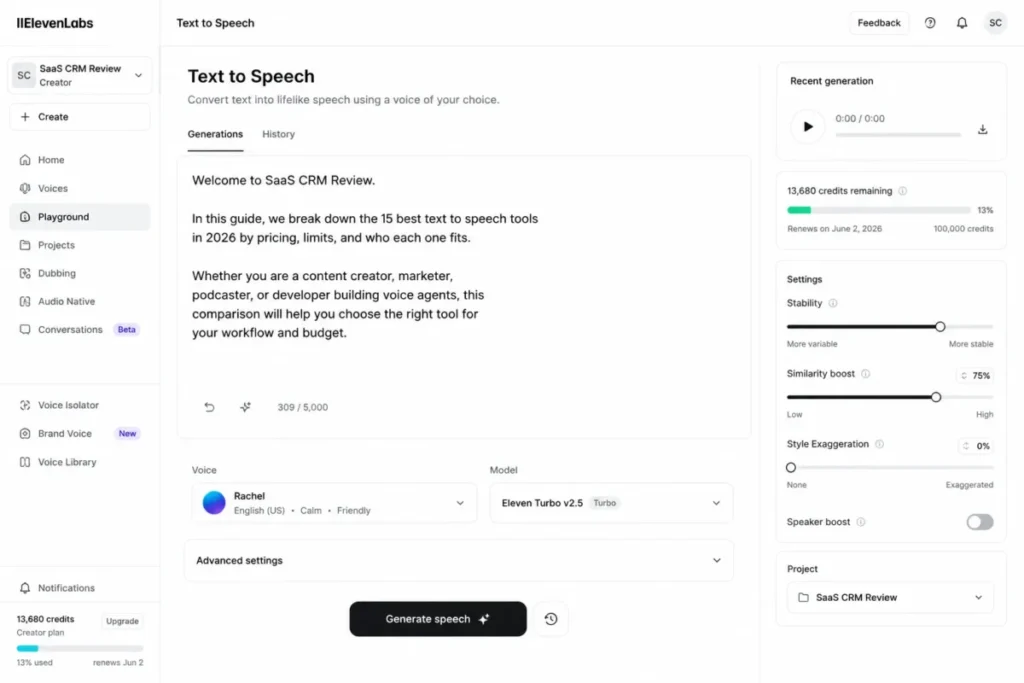
My recommendation: ElevenLabs is the best fit when a buyer needs both a studio and an API and can price the model before scaling. I would avoid it as a first pick only when a team needs a single flat per-minute bill for finance to approve without variance.
Sources checked: ElevenLabs Text to Speech and pricing, ElevenLabs Text to Speech documentation. Last checked 2026-07-18.
2. Murf AI – Best for marketing and e-learning voiceover studios

Where ElevenLabs spans creators and developers, Murf AI concentrates on the business voiceover workflow: a collaborative studio built for marketing and learning teams that reproduce commercial audio on a schedule. The pricing page advertises more than 200 voices, over 30 languages, AI dubbing, and a voice changer inside team workspaces.
The reason this ranks second among studios is the clarity of its commercial-use ladder. Murf Creator costs $19 per month billed annually at $228 and includes 24 hours of generation per year, while Business costs $66 per month billed annually at $792 with 96 hours per year.
The gate a buyer must read carefully sits on the free plan. Murf Free includes 10 minutes but blocks downloads and commercial rights, and the advanced emphasis, variability, and Say It My Way controls appear on Business rather than Creator.
That gating changes who should buy which tier. A solo marketer producing occasional videos fits Creator, but a team that needs nuanced delivery control or heavier annual volume is pushed to Business, so budget from the plan that includes the controls you actually use, not the entry price.
| Pros | Cons |
|---|---|
| Creator at $228 per year includes 24 hours of generation with commercial rights, which suits a marketing team producing recurring campaign voiceovers | The free plan blocks downloads and commercial rights, so it works only as a preview and not a production workflow |
| Team workspaces and AI dubbing keep a learning team’s localized narration in one collaborative studio rather than scattered files | Advanced emphasis and variability controls are gated to Business at $792 per year, so nuanced delivery forces an upgrade |
| Annual hour allowances (24 on Creator, 96 on Business) make cost predictable for a team planning a content calendar | A 24-hour annual cap can be consumed unevenly across campaigns, leaving a team short in a heavy quarter |
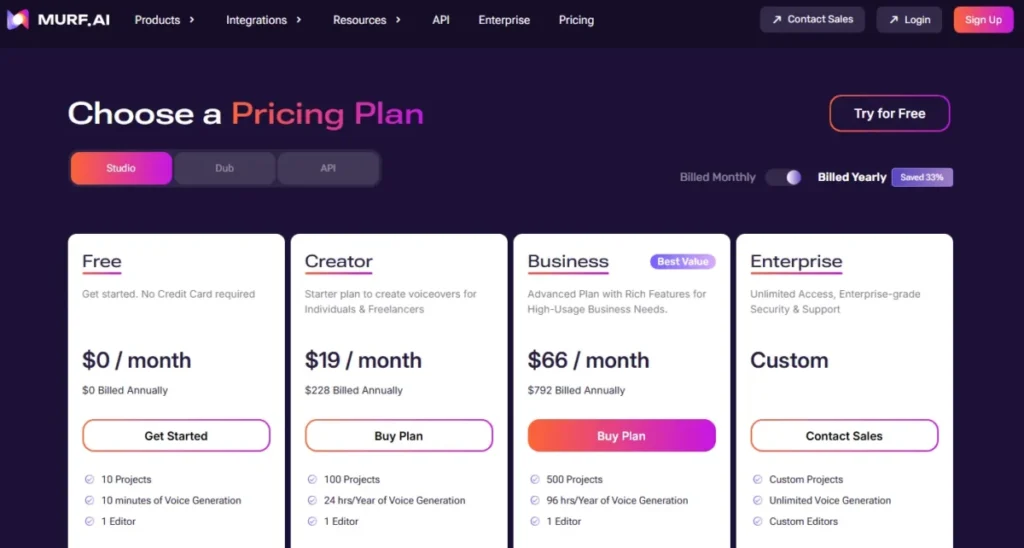
My recommendation: choose Murf for a marketing or learning team that will publish commercial audio regularly and wants collaboration in one studio. I would not start on the free plan expecting production output, because downloads and rights only arrive with a paid tier.
Sources checked: Murf pricing, Murf API documentation. Last checked 2026-07-18.
3. Speechify Studio – Best for solo creators who need large monthly credit allowances
Speechify Studio takes third among studios on allowance size and catalog depth. The product page advertises more than 1,000 voices, over 60 languages, voice cloning, dubbing, AI avatars, and granular pronunciation and pacing controls aimed at a solo content operation.
The pricing is straightforward at the entry point. Studio Starter is $19 per month with 7,200 credits, and Creator is $49 per month with 28,800 credits, so a heavy month of production has a clear upgrade path without a custom quote.
The trap to flag is not the price, it is the product boundary. Speechify Reader and Speechify Studio are separate subscriptions, and the free Studio plan includes 600 credits but excludes voice cloning and commercial rights, so buying the reading app does not open the production studio.
For a solo creator, that split changes the math: budget the Studio subscription on its own, and treat credits, not calendar days, as the real limit on how much finished audio a month buys.
| Pros | Cons |
|---|---|
| Creator at $49 per month includes 28,800 credits with cloning and commercial rights, which suits a solo creator scaling monthly output | Speechify Reader and Speechify Studio bill separately, so a buyer who owns the reader still pays again for production |
| A catalog of more than 1,000 voices plus dubbing and avatars keeps a one-person video workflow inside a single studio | The free Studio plan excludes cloning and commercial rights, so its 600 credits are for evaluation only |
| A clear Starter-to-Creator credit jump (7,200 to 28,800) gives a growing creator a forecastable upgrade path | Credit consumption, not a minute allowance, governs usable output, so a long script can exhaust a plan sooner than expected |
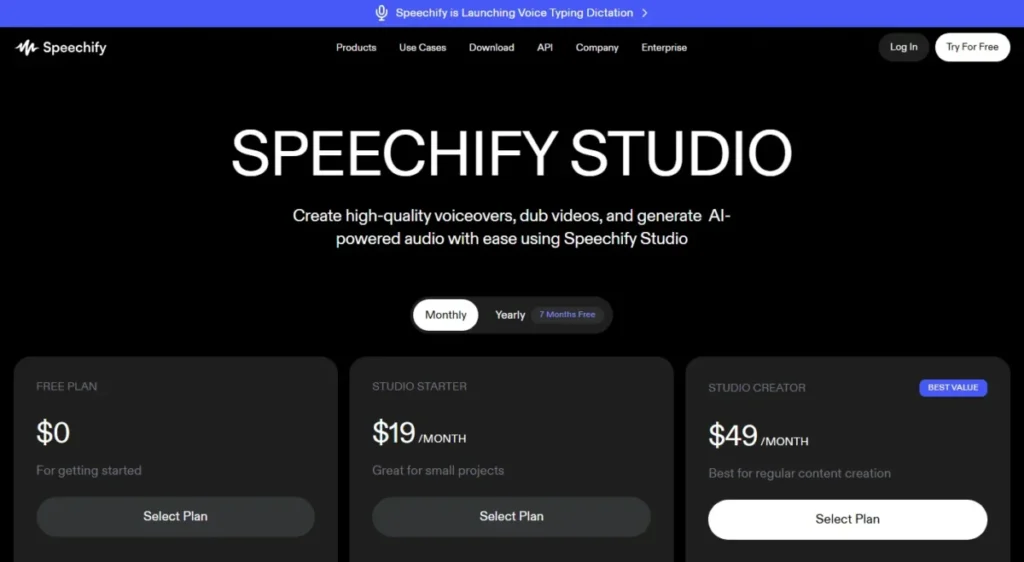
My recommendation: Speechify Studio is a strong fit for a solo creator who wants a big catalog and a large monthly allowance in one paid studio. I would verify that you are buying Studio, not Reader, before entering card details, because the two are billed and gated separately.
Sources checked: Speechify Studio pricing, Speechify Studio AI voice generator. Last checked 2026-07-18.
4. WellSaid Studio – Best for licensed corporate narration and brand governance

WellSaid Studio trades catalog size for a different kind of safety: licensed voice talent and enterprise controls that reduce brand and rights risk. The pricing page lists more than 120 licensed voices, pronunciation libraries, team collaboration, multiple audio formats, and enterprise SSO.
For a brand or enablement team, the value is governance rather than novelty. Pro costs $49 monthly, or $33 per month billed annually at $396, and includes 180 download minutes per month or 2,160 minutes per year, so a training team can plan narration volume against a known allowance.
Two gates decide fit. Paid plans cap downloadable minutes and unused minutes do not roll over, and the Starter and Pro tiers export MP3 only, while lossless formats, collaboration, and full language access concentrate on higher tiers up to Enterprise.
That structure rewards a specific buyer. If reporting-clean brand consistency and identity controls matter more than a huge voice library, WellSaid is the calmer choice; if you need broad multilingual output below Enterprise, it will feel narrow.
| Pros | Cons |
|---|---|
| Licensed voices plus enterprise SSO reduce the rights and brand risk a corporate enablement team carries when it publishes narration at scale | Downloadable minutes are capped and do not roll over, so an underused month is lost budget for a training team with uneven volume |
| Pronunciation libraries keep product and brand names consistent across a team’s course narration on the Pro plan | Starter and Pro export MP3 only, so a buyer needing WAV or OGG must upgrade to a higher tier |
| Annual Pro at $396 provides 2,160 download minutes up front, which helps a team forecast a full year of narration | Broad language access is concentrated in Enterprise, so a multilingual team below that tier is constrained |
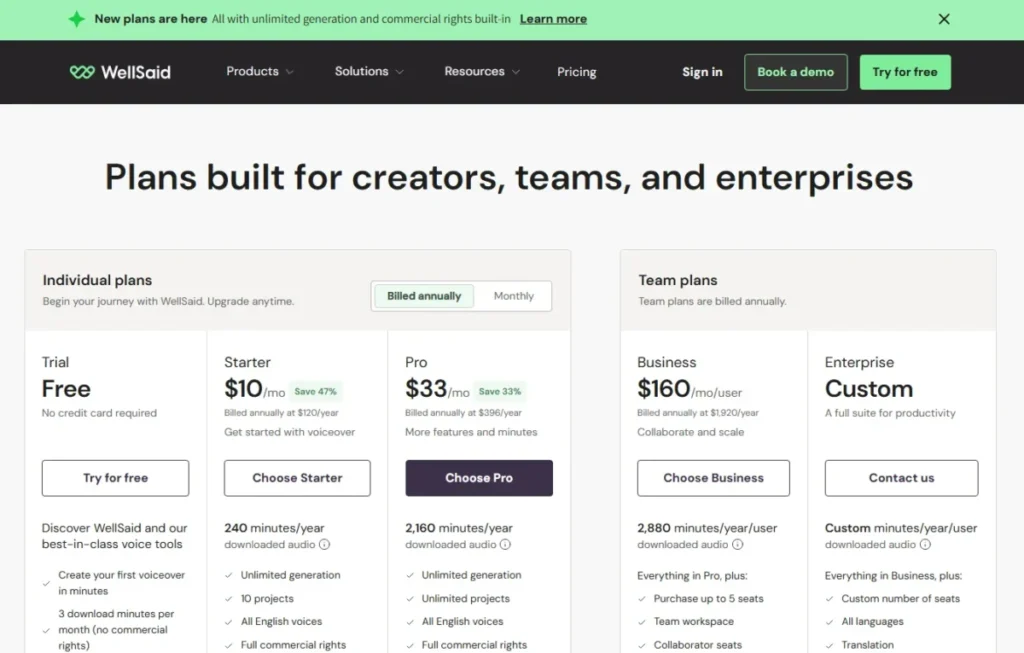
My recommendation: WellSaid is the best fit for a governed corporate narration workflow where licensing and consistency outrank catalog size. I would avoid it for a multilingual team that needs broad language coverage without paying for Enterprise.
Sources checked: WellSaid Studio pricing, WellSaid API limits. Last checked 2026-07-18.
5. NaturalReader AI Voice Generator (Commercial) – Best for freelancers who need commercial rights and model choice

NaturalReader’s commercial product stands out for one reason a freelancer cares about: it combines commercial licensing with access to several voice-model providers in one workspace. The help documentation lists commercial usage rights, models from multiple providers, more than 90 languages, prompt-based delivery control, up to four cloned voices, and 44.1 kHz MP3 and WAV export.
The buyer here is an agency or freelancer delivering client audio who wants a choice of voice engines without juggling separate accounts. Creator costs $49 per month or $297 per year (about $24.75 per month) and includes 2,000,000 credits per month.
The caveat sits in how credits burn. Credit consumption varies by the selected voice provider, and the Personal reading product and the Commercial product are separate subscriptions, so identical scripts can cost different amounts depending on the model you pick.
For a client workflow, that means you should test a short sample on each provider before committing a long project, and keep personal reading and commercial production on their correctly licensed products.
| Pros | Cons |
|---|---|
| Commercial rights plus several model providers let a freelancer match a client’s tone without opening separate vendor accounts | Credit consumption varies by provider, so two scripts of equal length cost different amounts and complicate an agency’s client quote |
| Up to four cloned voices with 44.1 kHz MP3 and WAV export supports an agency delivering branded narration to spec | Personal and Commercial are separate paid plans, so buying the reading app does not cover an agency’s client production |
| Creator at $297 per year (about $24.75 per month) includes 2,000,000 credits, a large allowance for an independent producer | Prompt-based delivery control depends on the chosen provider, so a freelancer risks inconsistent delivery across the model catalog |
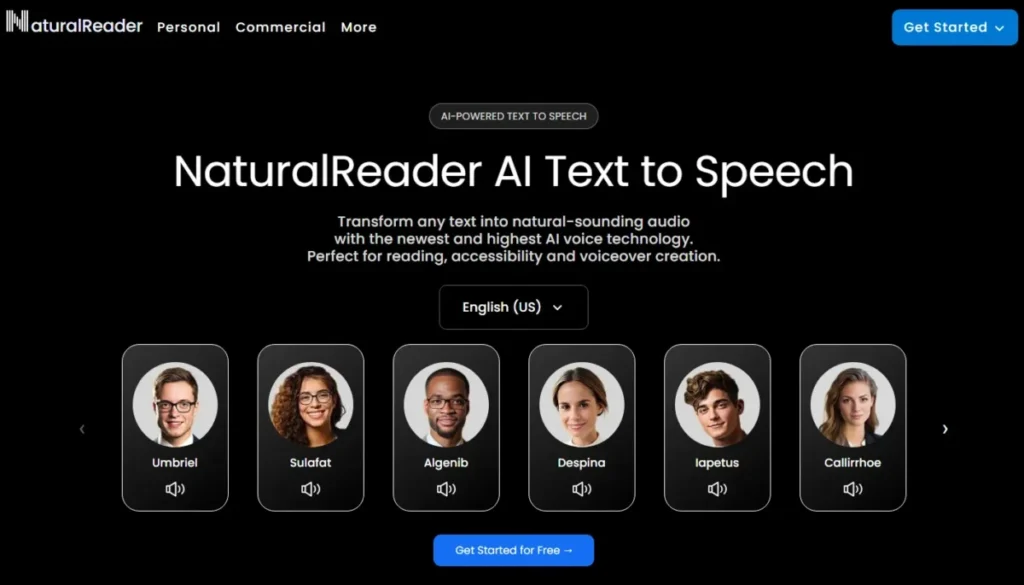
My recommendation: NaturalReader Commercial is worth it for a freelancer who values model choice and clear commercial rights in one place. I would test each provider on a short sample first, because provider-dependent credits make blind long-project commitments risky.
Sources checked: NaturalReader commercial plans, NaturalReader commercial credits. Last checked 2026-07-18.
6. Descript – Best for podcast and video editors who narrate inside the timeline
Descript is the odd one in this group because text to speech is not the whole product, it is a feature inside a text-based audio and video editor. The platform combines AI speech and voice cloning with editing, recording, captioning, translation, and a collaborative publishing workflow.
The fit is a podcaster or video team that wants to fix a line by editing text rather than re-recording. Descript starts free, with paid plans from $16 per month (the parsed pricing page did not expose the exact plan label for that starting price, so treat the tier name as unverified).
The limitation to plan around is the AI-speech allowance. Descript’s help documentation states that after the Regenerate allowance is exhausted, regenerated speech becomes unusable filler rather than corrected audio, so a heavy correction pass can stall mid-edit.
That behavior shapes how to use it. Reserve Regenerate for final corrections instead of drafting, and record human pickups when the allowance is tight, so an editing deadline does not collide with a quota wall.
| Pros | Cons |
|---|---|
| AI speech and cloning live inside a text-based editor, so a podcaster fixes a flubbed line by editing text instead of re-recording | AI speech is plan-limited, and once the Regenerate allowance is spent the output turns to unusable filler mid-edit |
| Captioning, translation, and publishing in one timeline keep a video team from stitching four tools together for one episode | The parsed pricing page did not expose the plan label at the $16 starting price, so the entry tier name is unverified |
| A free starting tier lets an editor test the text-based workflow before committing budget to a paid plan | Standalone voice quotas are less transparent than a dedicated TTS API, so heavy narration users cannot forecast cleanly |
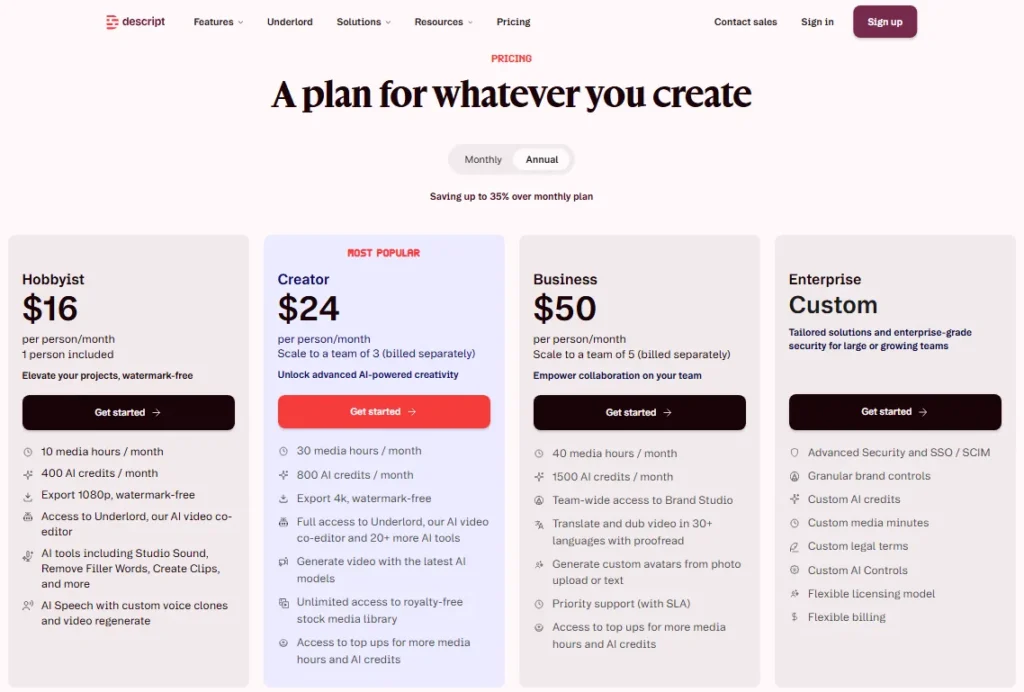
My recommendation: choose Descript when TTS is one step inside a podcast or video edit, not the main deliverable. I would not buy it as a standalone TTS API, because its voice quotas are less transparent than a dedicated speech service.
Sources checked: Descript pricing, Descript AI Speech and Regenerate help. Last checked 2026-07-18.
Developer and real-time voice APIs
These two products are for engineers, not editors. What matters here is latency posture, concurrency, and how transparent the quota is, because a voice agent fails at peak load, not in a demo.
7. Cartesia Sonic – Best for developers building real-time voice agents

Cartesia Sonic is positioned as a low-latency, streaming text to speech platform for interactive applications, and its plans are built around concurrency rather than editor seats. For a team shipping AI chatbots and voice agents, that framing is the point: you are buying simultaneous sessions, not finished files.
The pricing is unusually legible for an API. Pro costs $5 per month with 100,000 credits, an estimated 133 minutes of speech, and three concurrent requests, while Startup costs $49 with 1.25 million credits, about 1,667 minutes, and five concurrent requests.
Concurrency is the gate that decides production readiness. It rises from two on Free to three on Pro, five on Startup, and fifteen on Scale, and commercial licensing plus instant cloning require a paid tier, so a real deployment cannot sit on the free plan.
The buyer impact is capacity planning. Monthly credits tell you total volume, but concurrency tells you how many callers can talk at once, and for a voice agent the second number is the one that drops calls.
| Pros | Cons |
|---|---|
| Credit-to-minute estimates plus published concurrency tiers let a developer size a real-time deployment before launch | The product is API-first, so a nontechnical creator gets no studio for finished video or podcast production |
| A $5 Pro plan with three concurrent requests gives a small team a cheap path to prototype a voice agent | Commercial rights and higher concurrency require paid tiers, so the free plan cannot carry a live deployment |
| Concurrency scales to 15 on Scale, which suits a team growing past a handful of simultaneous callers | Peak load is governed by concurrency, not monthly credits, so under-planning drops calls even with volume left |
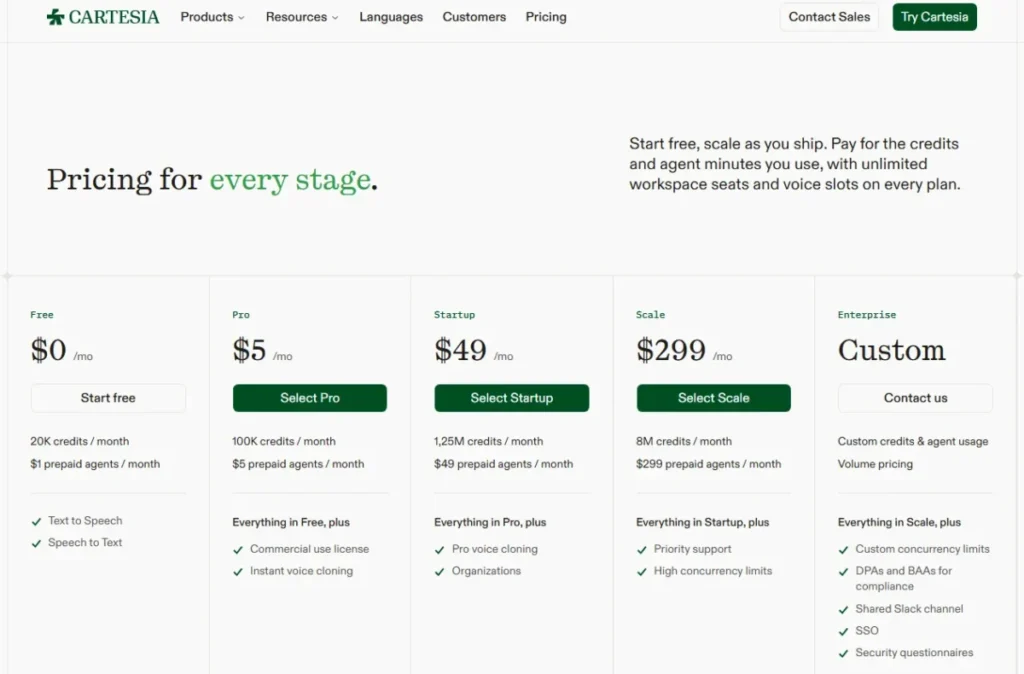
My recommendation: Cartesia is the best fit for a developer who needs low latency and predictable concurrency for a live voice agent. I would not choose it for a nontechnical creator who wants a full video or podcast studio, because it ships as an API.
Sources checked: Cartesia pricing. Last checked 2026-07-18.
8. PlayHT – Best for developers testing a broad API voice catalog

PlayHT is a mature developer workflow: an API, SDK quickstarts, a large prebuilt voice library, cloning, and streaming synthesis. For a team comparing many pretrained voices behind code, that breadth is the draw.
The honest limitation is transparency. The accessible official documentation confirms that rate limits vary by API and plan and can be enforced by requests per minute or characters per minute, whichever threshold is reached first, but it does not expose a complete current public US pricing and quota table.
That gap changes procurement, not capability. The synthesis workflow is real and documented, but a buyer who needs itemized US pricing and numeric quotas before evaluation has to obtain them from sales rather than a public page.
For a developer who can prototype first and confirm limits later, PlayHT is a reasonable shortlist entry; for a procurement team that requires public numbers up front, it is a harder sell than a hyperscale API.
| Pros | Cons |
|---|---|
| A mature API with SDK quickstarts and a large voice library lets a developer compare pretrained voices quickly in code | The accessible documentation does not expose a complete current public US pricing and quota table for procurement |
| Streaming synthesis and cloning cover both real-time and produced-audio workflows for an engineering team | Rate limits vary by API and plan without public numeric values, which complicates peak-load planning |
| Documented API-key and request flow gets a developer’s first synthesis call working without a studio onboarding | A procurement team that requires itemized US pricing before evaluation must go through sales rather than a public page |
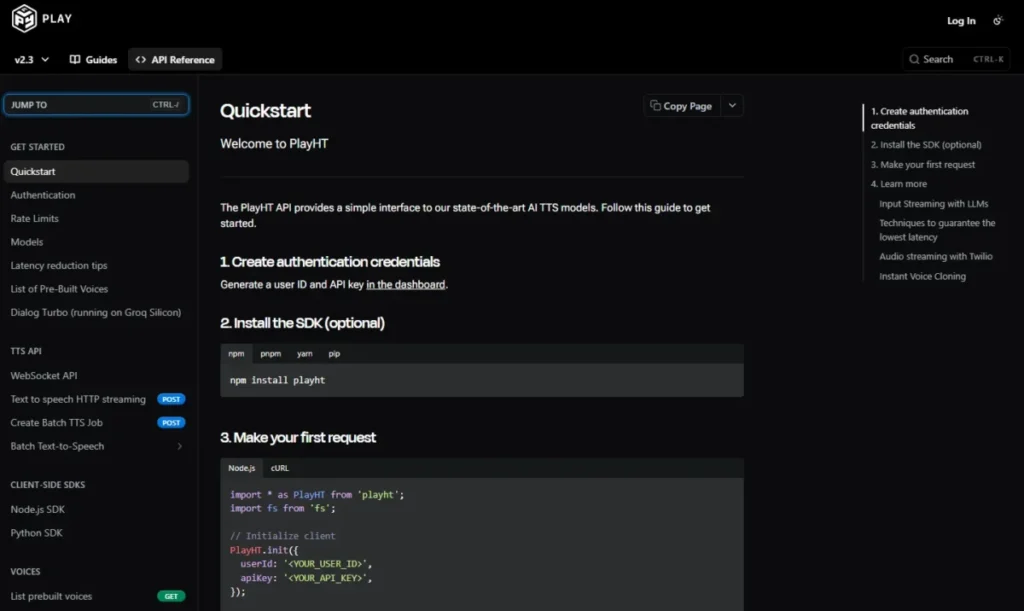
My recommendation: shortlist PlayHT when a developer wants to trial a broad voice catalog through an API and can confirm quotas with the vendor. I would compare it against a hyperscale API when public, forecastable pricing is a hard requirement.
Sources checked: PlayHT API getting started, PlayHT rate limits. Last checked 2026-07-18.
All-in-one creator apps that pair voice with video
This cohort bundles voiceover with video, subtitles, hosting, or publishing. The tradeoff is that voice is one line item among several, so the caps that bind first are often not the speech hours.
9. LOVO Genny – Best for YouTube and training creators who edit video and voice together

LOVO Genny bundles narration with production: the product advertises more than 500 voices, 100 languages, a video editor, subtitles, an AI script writer, and voice cloning. For a creator who also builds AI video generators style content, keeping voice and video in one app removes a handoff.
The caution is pricing transparency and caps. Official help documents Basic, Pro, Pro+, and Enterprise access, but current US dollar prices were not exposed in the checked help pages, so treat the plan prices as unverified.
The documented limits are the real planning risk. LOVO records two generation hours per month on Basic, five on Pro, and twenty on Pro+, plus project caps, no credit rollover, and a requirement to upgrade or contact sales when a limit is reached.
For a creator with uneven output, no rollover means a light month is lost capacity and a heavy month forces an upgrade. Historically, some Capterra reviewers also complained about voice removal and plan transparency, so verify current pricing and voice availability before an annual commitment.
| Pros | Cons |
|---|---|
| Voiceover, subtitles, scripts, and a video editor in one app remove a handoff for a YouTube or training creator | Current US dollar plan prices were not exposed in the checked help pages, so the entry cost is unverified |
| Documented hour tiers (two on Basic, five on Pro, twenty on Pro+) give a creator a clear volume ladder | Credits do not roll over, so a light month is lost capacity and a spike forces an upgrade |
| 100 languages and cloning support a creator localizing training or marketing video in-house | Project caps and forced upgrades at the limit can interrupt production during a heavy month |
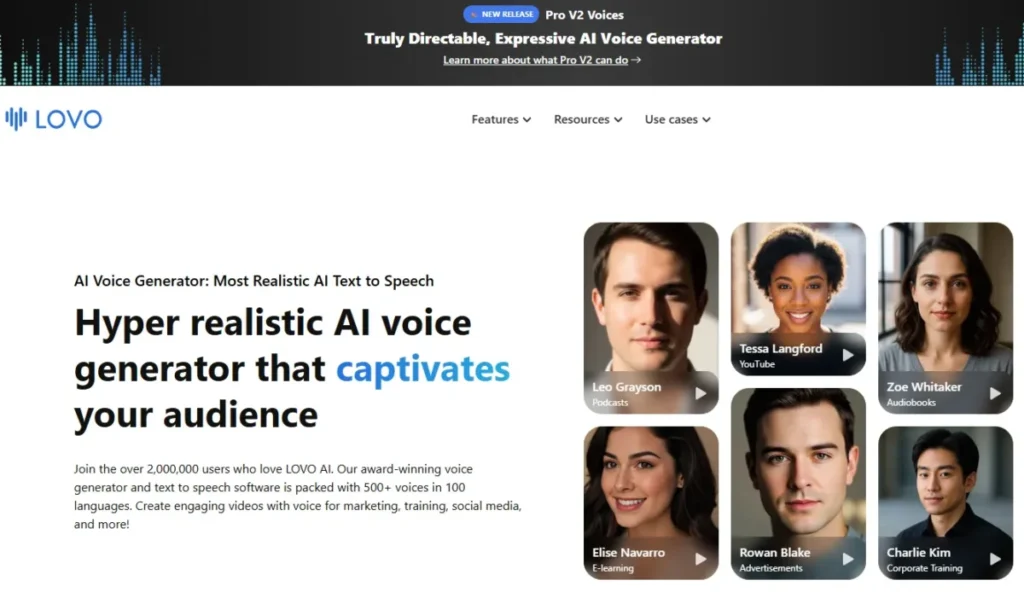
My recommendation: LOVO Genny fits a creator who wants voice and video in one place and will verify current pricing first. I would not commit annually until you confirm the US price and that the voices you rely on are still available.
Sources checked: LOVO Genny, LOVO subscriptions and billing help. Last checked 2026-07-18.
10. Narakeet – Best for occasional producers who prefer pay-as-you-go credits

Narakeet is the one tool here that avoids a subscription entirely. It advertises 900 voices in 100 languages for text-to-audio and text-to-video work, with PowerPoint and script workflows, and it sells nonexpiring top-up credits instead of a monthly plan.
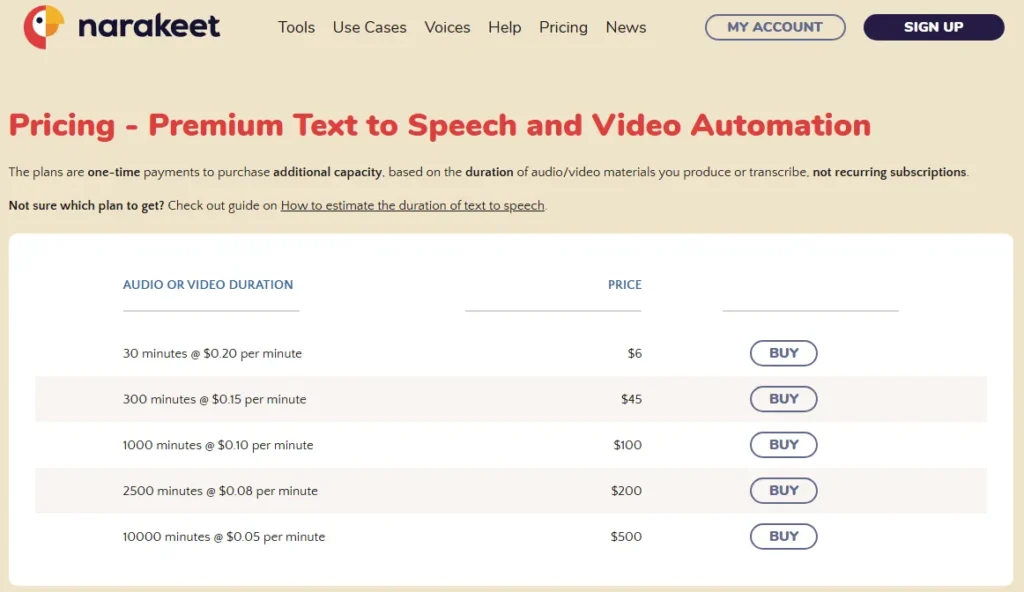
The pricing model is the selling point for intermittent work. A 30-minute top-up costs $6, about $0.20 per minute, and purchased credits do not expire, so a producer who makes a few explainers a quarter does not pay in the quiet months.
The behavior to watch is how builds consume credit. Every full build consumes credit even when it is not downloaded, and free use is capped at 20 conversions with a 1 KB audio-script limit, while commercial access raises the script limit to 1,024 KB and adds SSML, batch, and API access.
For someone who rebuilds long scripts repeatedly, that charge-on-build rule adds up, so preview before you commit a full render and split very long scripts deliberately.
| Pros | Cons |
|---|---|
| Nonexpiring $6 top-ups at about $0.20 per minute suit an occasional producer who does not want a monthly subscription | Every full build consumes credit even when it is not downloaded, so an occasional producer’s repeated rebuilds waste money |
| Commercial access adds SSML, batch, and API on a pay-as-you-go basis for a producer, cheaper than holding a monthly plan | Free use is capped at 20 conversions with a 1 KB script limit, so it is a preview tier, not a production one |
| PowerPoint and script workflows fit a trainer converting decks to narrated video without a full studio | Credit-per-build metering means a heavy revision cycle costs more than a flat monthly plan would |
My recommendation: choose Narakeet when production is occasional and a subscription would sit idle most months. I would monitor chargeable rebuilds, because full builds consume credit whether or not you download them.
Sources checked: Narakeet pricing and usage limits, Narakeet text to speech. Last checked 2026-07-18.
11. Listnr AI – Best for solo podcasters who publish and host in one place

Listnr AI bundles TTS with the surrounding publishing stack: it advertises more than 1,000 voices, over 142 languages, voice cloning, podcast hosting, text-to-video, and MP3 and WAV exports. For a solo podcaster, the appeal is doing generation, hosting, and distribution without three separate tools.
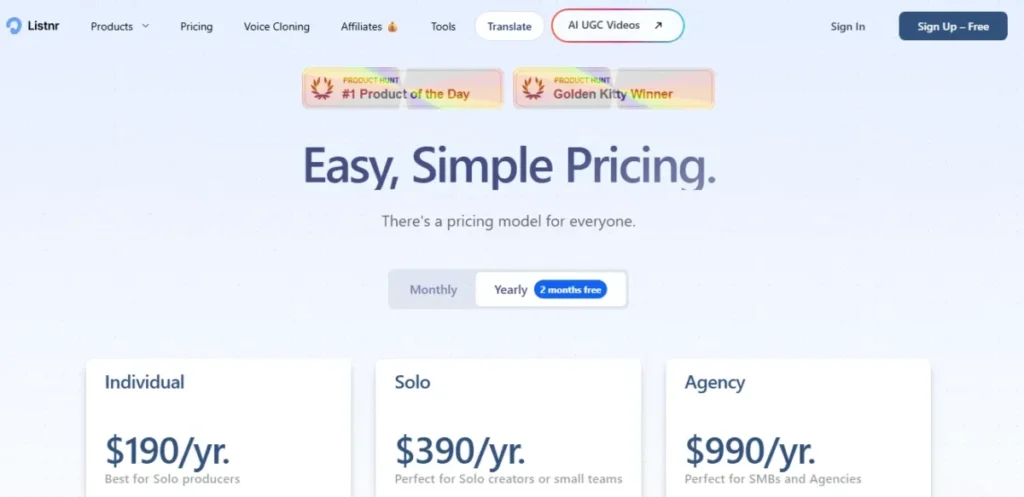
Pricing is annual and tiered by bundle capacity. Individual is $190 per year with 20,000 credits per month (about two voice-generation hours), Solo is $390 per year with 50,000 credits, and Agency is $990 per year with 250,000 credits.
The bundled limits are where the real gate hides. Plan caps include 50, 150, and 250 videos per month and 50 GB, 100 GB, and 250 GB storage across Individual, Solo, and Agency, so a video-heavy month can force an upgrade before speech hours run out.
Because credits translate to approximate hours rather than guaranteed output and detailed API-throttle numbers are limited, treat the hour figures as estimates and watch which bundled cap binds first.
| Pros | Cons |
|---|---|
| TTS plus hosting, storage, and commercial exports keep a solo podcaster’s whole pipeline in one annual plan | Credits translate to approximate hours, not guaranteed output, so a long episode can exhaust a plan early |
| Tiered bundles (Individual, Solo, Agency) scale storage and video caps alongside voice credits for a growing show | A video-heavy month can hit the 50 or 150 video cap before speech hours run out and force an upgrade |
| More than 142 languages and cloning support a podcaster producing localized or branded episodes | Detailed API-throttle numbers are limited, so a developer cannot forecast programmatic capacity cleanly |
My recommendation: Listnr fits a solo podcaster who wants generation and publishing in one annual plan. I would start on Individual and upgrade when the video or storage cap binds, not when speech credits run low.
Sources checked: Listnr pricing, Listnr AI voice generator. Last checked 2026-07-18.
Hyperscale and prompt-controlled speech APIs
The last cohort is for engineering teams standardizing on a cloud stack. Prices here are per token or per character, model choice drives cost more than plan choice, and the free tiers are generous but the paid math needs a calculator.
12. OpenAI GPT-4o mini TTS – Best for developers who want prompt-controlled delivery
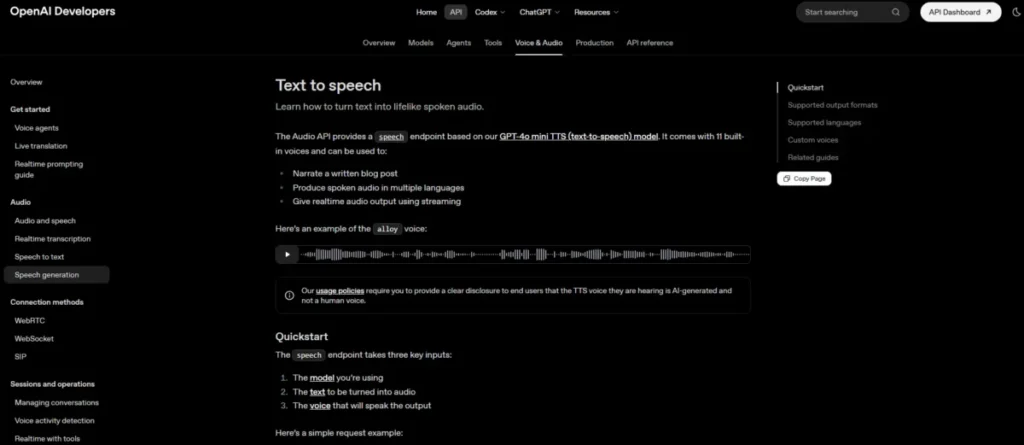
OpenAI’s GPT-4o mini TTS is a developer component, not a studio. It provides 13 built-in voices, streaming output, MP3, Opus, AAC, FLAC, WAV, and PCM formats, and natural-language instructions that steer accent, emotion, intonation, speed, tone, and whispering. If you already understand prompt engineering, the delivery-by-instruction model will feel familiar.
The delivery control is the differentiator. Instead of a separate studio UI, you describe how a line should sound in the request, which suits an app that generates speech dynamically rather than from a fixed script.
Pricing is token-based: $0.60 per one million input text tokens plus $12 per one million audio-output tokens, which does not translate cleanly to a per-minute budget. The documented limits also shape long-form work, with a 2,000 input tokens as a model limit and a 4,096 character input cap per speech request, so long narration must be chunked and reassembled.
For a team already inside OpenAI’s stack, this is the low-friction option; OpenAI’s consumer side is covered separately in our ChatGPT review, but the TTS endpoint is API-first and English-optimized, so a no-code creator will find it bare.
| Pros | Cons |
|---|---|
| Natural-language instructions steer accent, emotion, and pacing per request, which suits a developer generating speech dynamically | It is API-first and English-optimized, so a no-code creator gets no studio, project management, or voice marketplace |
| Streaming output across MP3, WAV, PCM, and four other formats fits a developer wiring speech into an existing product | Token billing ($0.60 input, $12 output per one million) does not map to a per-minute budget without conversion work |
| Sitting inside the OpenAI stack lowers integration friction for a team already using its models | A 4,096-character request cap forces chunking and reassembly for long-form narration |
My recommendation: choose GPT-4o mini TTS when a developer wants instruction-controlled delivery inside an existing OpenAI integration. I would avoid it for a creator who needs a no-code studio or long-form project management.
Sources checked: OpenAI text-to-speech guide, OpenAI API pricing, GPT-4o mini TTS model reference. Last checked 2026-07-18.
13. Google Cloud Text-to-Speech – Best for engineering teams choosing among model families
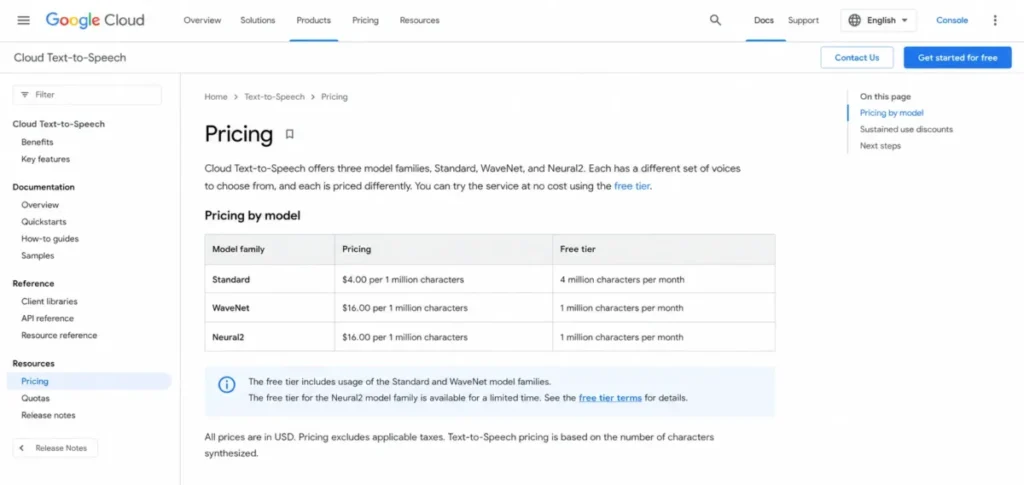
Google Cloud Text-to-Speech wins on breadth of model choice. It offers Standard, WaveNet, Neural2, Studio, Chirp, and Gemini model families with SSML support and client libraries, so a team can pick a cost and quality point per workload rather than accept one voice engine.
The buyer is an engineering team that wants to tune spend against model. Neural2 is priced at $16 per one million characters after a one-million-character free allowance, while Standard and WaveNet are $4 per one million after four million free characters, so the same text can cost four times as much depending on the model.
The billing detail that surprises teams is what counts as a character. Google counts spaces, line breaks, and most SSML tags as billable characters, and other Google Cloud resources used with the service can add separate charges beyond the per-character rate.
For a cloud team, that means model selection and clean markup are cost levers, not afterthoughts. Prototype on a lower-cost model, then validate the premium family only where the workload needs it.
| Pros | Cons |
|---|---|
| Six model families let an engineering team set a cost and quality point per workload instead of one fixed voice engine | Billing units vary by model, so the same text costs four times more on Neural2 than on Standard without a quality guarantee |
| Free allowances (one million Neural2, four million Standard characters) let a team prototype before paying | Spaces, line breaks, and most SSML tags count as billable characters, which inflates the cost for an engineering team |
| SSML and client libraries fit a team’s existing Google Cloud deployment and integration with IAM and billing | Other Google Cloud resources used alongside TTS can add cost for an engineering team beyond the per-character rate |
My recommendation: Google Cloud Text-to-Speech is the best fit when a team wants to tune cost against model family on its own cloud. I would not hand it to a nontechnical creator who expects a ready-made narration studio.
Sources checked: Google Cloud Text-to-Speech pricing, Cloud Text-to-Speech documentation. Last checked 2026-07-18.
14. Amazon Polly – Best for AWS-native application back ends

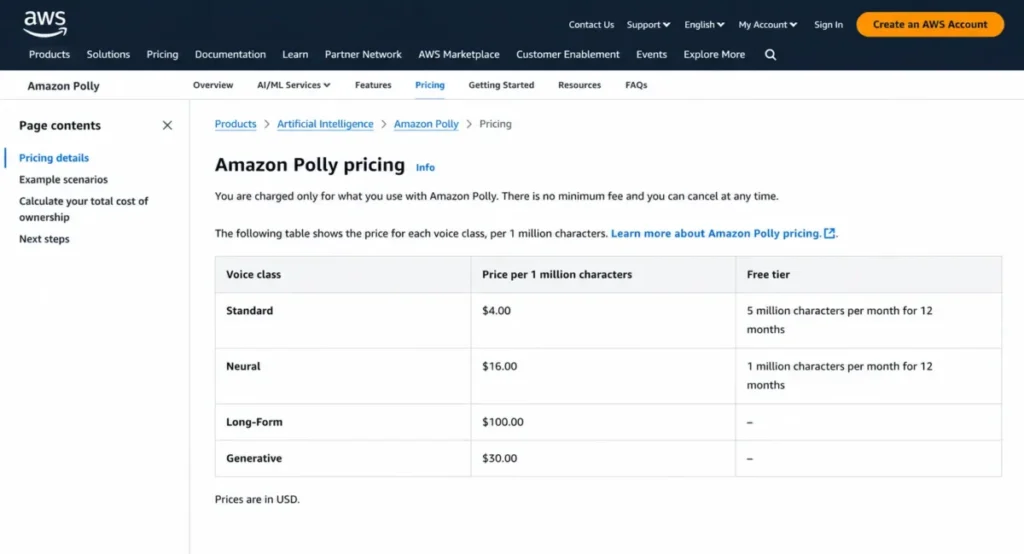
Amazon Polly is the straightforward choice for a team already on AWS. It provides Standard, Neural, Long-Form, and Generative voices through AWS APIs, SSML and lexicons, streaming, and a rule that cached replay does not incur a repeat synthesis charge.
The pricing is legible per character but spreads sharply by model. Polly charges $4 per one million Standard characters, $16 per one million Neural characters, $100 per one million Long-Form characters, and $30 per one million Generative characters, so the model class can multiply the bill many times over.
The operational gates are quotas, not a paywall. The AWS free tier for eligible new accounts lasts twelve months with monthly model-specific character allowances, and documented request and concurrency quotas can throttle high-concurrency workloads.
For an AWS engineering team, Polly deploys cleanly into an existing back end, but the cost outcome depends on choosing the lowest suitable model class and caching output where playback repeats.
| Pros | Cons |
|---|---|
| Per-character pricing plus AWS-native deployment fits an engineering team wiring speech into an existing back end | Model classes range from $4 to $100 per one million characters, so a wrong class choice multiplies the bill |
| Cached replay avoids a repeat synthesis charge, which cuts cost for a team serving the same audio many times | Service quotas can throttle high-concurrency workloads, so peak load needs a quota-increase request |
| A twelve-month free tier with model-specific character allowances lets a team validate before paying | Deployment assumes AWS IAM, quotas, and billing knowledge, so a no-code creator gets no visual editor |
My recommendation: Amazon Polly is the best fit for an AWS-native back end that needs predictable per-character speech. I would not choose it for a creator team that wants visual editing and project management.
Sources checked: Amazon Polly pricing, Amazon Polly quotas. Last checked 2026-07-18.
15. Azure AI Speech Text to Speech – Best for Microsoft-centric enterprise stacks

Azure AI Speech closes the list as the natural pick for organizations already standardized on Microsoft. It provides neural text to speech, SSML, a Speech SDK and REST API, custom and personal voice programs, and Azure identity, networking, and compliance controls.
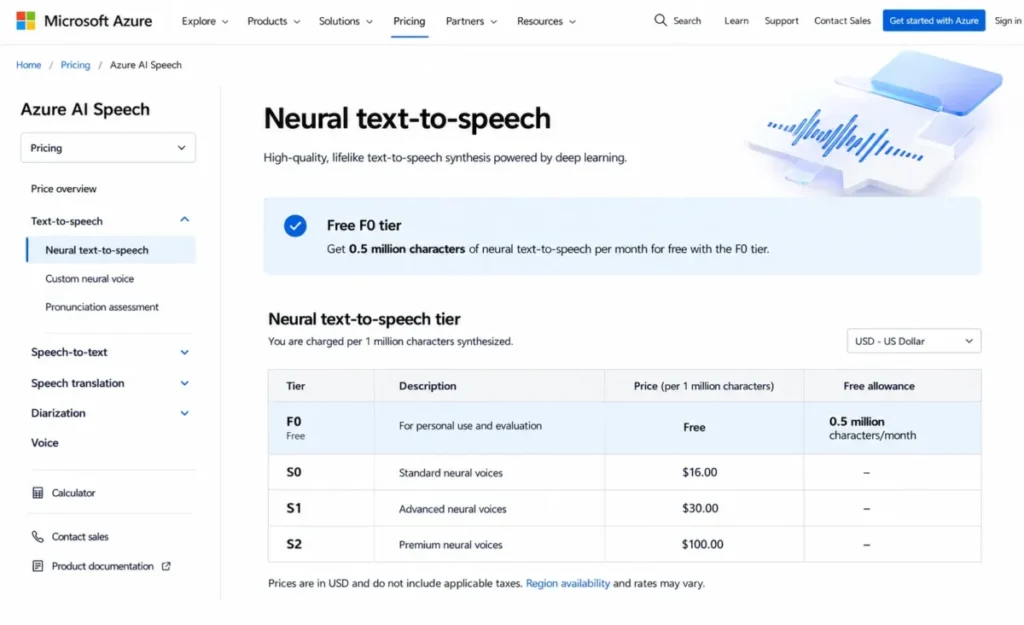
The fit is governance and integration rather than a self-service studio. The free F0 tier includes 0.5 million neural characters per month, but the checked US pricing page did not render a stable paid per-character rate, so treat the paid rate as unverified and confirm it in the regional calculator.
The gates that shape a project are access and provisioning. Custom and personal voice programs require limited-access approval, and quota or tier changes may take hours to become effective, so a launch timeline has to include governance review.
For a regulated or Microsoft-centric enterprise, those controls are the value; for a small team that wants an instant custom voice and a public paid rate, they are friction.
| Pros | Cons |
|---|---|
| Neural TTS with Azure identity, networking, and compliance controls fits an enterprise already governed on Microsoft | The checked US pricing page did not render a stable paid per-character rate, so paid cost must be confirmed in the calculator |
| A 0.5 million character monthly free tier lets a team validate before committing to paid volume | Custom and personal voices require limited-access approval, so a branded voice cannot be self-served instantly |
| SSML plus a Speech SDK and REST API integrate cleanly into an enterprise’s existing Azure deployment | Quota or tier changes may take hours to take effect, so a launch plan must include provisioning lead time |
My recommendation: Azure AI Speech is the best fit for a Microsoft-centric enterprise that values governance and identity integration. I would not pick it for a small team that needs a public paid rate and an instant self-service custom voice.
Sources checked: Azure AI Speech pricing, Azure Speech service quotas and limits. Last checked 2026-07-18.
Text to speech tools at a glance: side-by-side comparison
This table is for shortlisting by type and rights, not for final pricing. Read the pricing section below for practical-tier cost and the at-scale math.
| Tool | Type | Starting price | Commercial rights | Best-fit buyer |
|---|---|---|---|---|
| ElevenLabs | Studio plus API | $22/mo | Paid plans | Creators and developers who need both |
| Murf AI | Voiceover studio | $19/mo (annual) | Creator and up | Marketing and e-learning teams |
| Speechify Studio | Voice studio | $19/mo | Starter and up | Solo creators scaling output |
| WellSaid Studio | Enterprise studio | $33/mo (annual) | Paid plans | Governed corporate narration |
| NaturalReader Commercial | Commercial studio | $24.75/mo (annual) | Commercial product | Freelancers and agencies |
| Descript | Editor with AI speech | From $16/mo | Paid plans | Podcast and video editors |
| Cartesia Sonic | Real-time API | $5/mo | Paid tiers | Voice-agent developers |
| PlayHT | Voice API | Not publicly disclosed | Plan-dependent | Developers testing voices |
| LOVO Genny | Creator app | Price not verified | Paid plans | YouTube and training creators |
| Narakeet | Pay-as-you-go | $6 per 30-min top-up | Commercial access | Occasional producers |
| Listnr AI | Studio plus hosting | $190/yr | Paid plans | Solo podcasters |
| OpenAI GPT-4o mini TTS | Token API | Usage-based | API terms | App developers |
| Google Cloud Text-to-Speech | Cloud API | $16 per 1M chars (Neural2) | Cloud terms | Cloud engineering teams |
| Amazon Polly | Cloud API | $16 per 1M chars (Neural) | AWS terms | AWS-native teams |
| Azure AI Speech | Cloud API | F0 free tier | Azure terms | Microsoft enterprises |
The split down the middle of this table is the real decision. The studios in the top half sell finished audio and commercial rights by plan; the APIs in the bottom half sell synthesis by character or token and leave licensing to your own terms review.
Pricing comparison: starting price versus practical tier
Starting prices mislead here because the usable plan is often one tier up. Below is the practical tier for each studio, followed by the at-scale math for a small team.
| Tool | Starting plan | Practical tier | What the upgrade buys |
|---|---|---|---|
| ElevenLabs | Creator $22/mo | Creator or higher | Cloning, more credits, production rights |
| Murf AI | Creator $19/mo (annual) | Business $66/mo (annual) | Advanced delivery controls, 96 hours/yr |
| Speechify Studio | Starter $19/mo | Creator $49/mo | 28,800 credits, cloning, commercial rights |
| WellSaid Studio | Pro $33/mo (annual) | Pro or Enterprise | 2,160 minutes/ |
| NaturalReader | Creator $24.75/mo (annual) | Creator and up | Commercial rights, 2,000,000 credits/mo |
| Cartesia Sonic | Pro $5/mo | Startup $49/mo | 1.25M credits, five concurrent requests |
| Listnr AI | Individual $190/yr | Solo $390/yr | 50,000 credits, higher video and storage |
Now the at-scale reality, stated as labeled calculations rather than vendor prices. For a five-seat WellSaid Pro team, budget is calculated from the listed $33 annual seat price: $33 x 5 = $165 per month before any add-on minutes. For a Murf Business team of five editors, cost is calculated from the listed $66 seat price: $66 x 5 = $330 per month, and the 96-hour annual pool is shared, not per seat.
The API side does not scale by seat at all. Google Cloud Neural2 and Amazon Polly Neural both bill $16 per one million characters, so a one-million-character month (roughly a long audiobook of clean text) costs about $16 on either after the free allowance, while Polly Long-Form at $100 per one million characters would turn the same job into a far larger bill. The lesson: on APIs, the model class is the price lever; on studios, the seat count and the upgrade tier are.
Hidden costs live in the gaps. WellSaid unused minutes do not roll over, Narakeet charges for every full build even when undownloaded, and Google can bill spaces and SSML tags as characters, so the sticker price is rarely the whole bill.
Commercial rights and export by plan
This is the table competitors skip, and it decides whether output is legally usable and technically deliverable. Software access and vendor terms do not automatically establish that you own or have cleared every legal right for a specific use, especially for cloned or replica voices.
| Tool | Commercial rights gate | Export formats | Cloning access |
|---|---|---|---|
| ElevenLabs | Paid plans, subject to terms | MP3, WAV, PCM, telephony | Instant and professional (paid) |
| Murf AI | Creator and up | Download on paid plans | Voice changer; paid |
| Speechify Studio | Starter and up | Standard studio export | Starter and up |
| WellSaid Studio | Paid plans | MP3 on Starter/ | Not the core model |
| NaturalReader | Commercial product only | 44.1 kHz MP3 and WAV | Up to four cloned voices |
| Descript | Paid plans | Editor export | Voice cloning included |
| Cartesia Sonic | Paid tiers | API audio output | Instant (Pro), professional (Startup) |
| Narakeet | Commercial access | Audio and video export | Not the core model |
| Listnr AI | Paid plans | MP3 and WAV | Voice cloning included |
Two rules follow from this table. First, a free plan is a preview, not a license: do not assume a free plan includes commercial rights, and verify the applicable product terms before publishing. Second, for voice cloning, get consent from the voice owner and treat high-risk commercial or advertising use as a question for a professional, because vendor access alone does not clear publicity, copyright, or consent rights.
For cloned and replica voices specifically, keep a signed consent record for the source voice, and recommend professional legal advice before using a cloned voice in advertising or any regulated context.
Feature gates and quota-overflow behavior
Two products with the same voice count can behave very differently when you hit a limit. This table maps what happens at the ceiling, which is where a deadline breaks.
| Tool | Key limit | Documented overflow behavior |
|---|---|---|
| ElevenLabs | 121,000 Creator credits; 40,000 chars/ | Capacity limited by credits; exact warning sequence not documented |
| Murf AI | 24 hours/yr on Creator | Beyond allowance needs upgrade; exact overflow UI not documented |
| WellSaid Studio | 180 download minutes/mo | Downloads stop at cap; no rollover; add-on or upgrade |
| Descript | Plan-based AI-speech allowance | Regenerate output becomes unusable filler once spent |
| Cartesia Sonic | Three concurrent requests (Pro) | Above concurrency handled by client design; vendor behavior not fully documented |
| LOVO Genny | Five hours/mo (Pro); project caps | Upgrade or contact sales at the limit; no rollover |
| Narakeet | 20 free conversions; 1 KB free script | Free stops at cap; paid builds consume credit per build |
| OpenAI GPT-4o mini TTS | 4,096 characters/ | Request must be chunked when input exceeds the cap |
| Google Cloud | 1M free Neural2 characters | Usage billable after the free allowance |
| Amazon Polly | Request and concurrency quotas | Throttling when a quota is exceeded |
Where a vendor does not document the exact overflow, this guide leaves it unknown rather than guessing a queue, discard, or delete behavior. The one to flag hardest is Descript: its help notes that spent Regenerate output turns to unusable filler, so a correction workflow can fail mid-edit rather than simply pause.
Setup and integration difficulty
Setup effort tracks the studio-versus-API split more than the price. Here is the honest difficulty per tool and why.
Low effort, no code: Murf AI, Speechify Studio, WellSaid Studio, NaturalReader, LOVO Genny, Listnr, and Narakeet are browser studios where a nontechnical user produces audio the same day. Descript is also low, though its editor has a steeper first-session learning curve because it doubles as a video tool.
Medium effort: ElevenLabs sits in the middle because the studio is simple but the API and credit-model choices require a technical decision before scaling.
High effort, code required: Cartesia Sonic, PlayHT, OpenAI GPT-4o mini TTS, Google Cloud Text-to-Speech, Amazon Polly, and Azure AI Speech all assume you can authenticate an API, handle keys, and manage quotas. Azure adds the most overhead because custom voices need limited-access approval and provisioning can take hours.
Which text to speech tools to approach with caution
No tool here is a scam, but several are the wrong purchase for specific buyers, and naming that is more useful than a fake warning.
Avoid PlayHT and LOVO Genny as blind annual commitments for a procurement team, because current public US pricing was not verifiable on the checked pages, so you cannot forecast cost before signing. Verify the live price and, for LOVO, the availability of the voices you depend on first.
Avoid the hyperscale APIs (Google Cloud, Amazon Polly, Azure) if you are a nontechnical creator, because they deliver synthesis, not a studio, and the cost outcome depends on model and quota choices a creator should not have to make.
Avoid buying Speechify Reader when you actually need Speechify Studio, and avoid assuming a Descript plan gives unlimited AI speech, because both mistakes surface as a surprise gate after you have paid.
How to choose the right text to speech tool
Work through this decision path in order; the first fork removes half the market.
First, decide studio or API. If you want finished audio with no code, stay in the studio half; if you are calling speech from an application, go to the API half. This single choice invalidates most cross-tool comparisons.
Second, confirm commercial rights on the exact plan you would buy, not the product in general, because rights and cloning are gated by tier.
Third, translate the price into your own unit. Convert credits, characters, or tokens into finished minutes for your typical script length, and price the specific model if the vendor meters by model.
Fourth, check the ceiling before the price. Read the usage limit, whether it rolls over, and what happens at overflow, since a cheap plan with a hard monthly cap can cost more in stalled work.
Fifth, for APIs, size concurrency and quotas for peak load, not average volume, because a voice agent fails when many callers arrive at once.
Sixth, for teams, confirm export formats, collaboration, and governance (SSO, approval, data terms) on the tier you can afford.
Seventh, run a short trial on the exact voices and script you will ship, and keep the evidence, because this guide does not measure subjective voice quality and your ear is the final test.
Common mistakes when choosing text to speech software
These five errors account for most buyer regret in this category.
Buying on voice count. A 1,000-voice catalog does not help if the two voices you need are locked behind a higher tier or a limited-access program.
Comparing incompatible units. Putting a credit plan next to a per-character API without converting both to finished minutes produces a meaningless comparison.
Ignoring the free-plan license. A free tier that previews beautifully may block downloads or commercial use, so audio you love is unusable until you pay.
Forgetting overflow behavior. Teams budget the monthly price and forget what happens at the cap, then lose a deadline to a quota wall or, in Descript’s case, to filler output.
Skipping the cloning-consent question. Treating vendor access as legal clearance for a cloned or replica voice is the highest-risk mistake, especially in advertising or regulated use.
Final Verdict
The best overall pick is ElevenLabs, and it is the best fit for a buyer who needs both a no-code studio and a production API on one account. Its strongest workflow is moving a voice from the editor into code without re-recording; its main limitation and biggest risk is credit metering that makes cost harder to forecast, so I would price the specific model before an annual commitment and upgrade when cloning volume outgrows the 121,000-credit Creator allowance.
For a marketing or e-learning team, choose Murf AI on the Creator plan and buy Business only when you need advanced delivery controls or more than 24 annual hours. For governed corporate narration, WellSaid Studio is the safer buy, with the caveat that a multilingual team will outgrow it below Enterprise. For a freelancer who wants commercial rights and model choice, NaturalReader Commercial is worth it once you test each provider’s credit cost on a short sample.
On the developer side, the recommendation splits by job. Choose Cartesia Sonic to build a real-time voice agent and size concurrency for peak load; choose Google Cloud or Amazon Polly for a cloud-native back end and select the lowest suitable model class; choose OpenAI GPT-4o mini TTS when instruction-controlled delivery inside your stack matters more than a studio; and choose Azure AI Speech when Microsoft governance is the deciding factor. A poor fit in every case is the opposite buyer: do not buy an API for a no-code creator, and do not buy a studio when you need production concurrency.
The buy-or-compare rule: shortlist two tools from the correct half of the market, verify commercial rights and overflow behavior on the exact plan, run a short trial on your real script, and only then commit. Where a current US price was not verifiable (PlayHT, LOVO, and the Azure paid rate), confirm it live before you sign.
Frequently asked questions
What is the most realistic text to speech tool?
This guide does not crown a most-realistic tool, because that requires controlled listening tests we did not run. Realism is subjective and varies by language and voice, so the practical move is to trial two or three tools (ElevenLabs and Murf are common starting points) on your exact script and judge with your own ear before buying.
Which text to speech tools allow commercial use?
Commercial rights are gated by plan, not granted by the product. ElevenLabs paid plans, Murf Creator and up, Speechify Studio Starter and up, WellSaid paid plans, NaturalReader’s Commercial product, and Listnr paid plans include commercial use, but free tiers often do not. Always verify the terms on the specific plan you intend to buy before publishing.
Is ElevenLabs better than Murf?
They fit different buyers. ElevenLabs suits a team that needs both a studio and a production API and can manage credit-based cost, while Murf suits a marketing or e-learning team that wants a collaborative studio with clear commercial-use tiers. Choose ElevenLabs for range and API access; choose Murf for a focused business voiceover workflow.
What is the best free text to speech software?
For previewing quality, the free tiers on ElevenLabs, Murf, and Speechify are reasonable starting points, and Narakeet offers 20 free conversions. Treat all of them as evaluation only: free plans frequently block downloads or commercial rights, so confirm the applicable terms before you use any free output in a published project.
Which text to speech API has the lowest latency?
This guide does not rank latency, because we did not run timed tests. Cartesia Sonic is positioned specifically for low-latency real-time use and prices by concurrency, which is the relevant signal for a voice agent, but you should benchmark shortlisted APIs against your own workload before committing.
How much does AI voiceover cost per minute?
It depends on the billing unit. Narakeet is explicit at about $0.20 per minute on a $6 top-up, while ElevenLabs Creator includes roughly 121 minutes for $22 per month. API tools price per character or token instead, so convert their rates to your typical script length before comparing them to a per-minute studio plan.
Can I legally clone a voice for commercial use?
Vendor access does not by itself make a cloned voice legally safe to use. Ownership, consent, publicity rights, and copyright are separate from software terms, so get documented consent from the voice owner and seek professional legal advice before using a cloned or replica voice in advertising or any regulated context.
What is the difference between a TTS studio and a TTS API?
A studio is a no-code web app that produces finished, downloadable audio; an API is speech synthesis you call from your own code. Studios (Murf, Speechify, WellSaid) suit creators and marketers; APIs (Cartesia, Google Cloud, Polly, Azure, OpenAI) suit developers who embed speech into a product. Some tools, like ElevenLabs, offer both.
Do text to speech credits roll over?
Often they do not. WellSaid states that unused download minutes do not roll over, and LOVO documents that credits do not carry to the next month. Because a light month becomes lost capacity under these rules, check the rollover policy before choosing an annual plan, and size your plan to a typical month rather than a peak one.
Which text to speech tool is best for YouTube?
For a creator who edits video and voice together, LOVO Genny keeps narration, subtitles, and video in one app, though you should verify its current price first. If you already edit elsewhere, ElevenLabs or Speechify give a broad voice catalog with commercial rights on paid plans. Match the tool to whether you want an all-in-one app or just the voice layer.