Two sales teams can run the same pipeline and still hit completely different walls. One runs out of automation slots.
The other watches automatically created leads get thrown away because the account sat at its record ceiling.
That gap is the honest difference between HubSpot Sales Hub and Pipedrive in 2026, and it never appears on a feature checklist.
Both platforms move deals through stages, sync email, run sequences, and report on a pipeline. What separates them is where each one stops, what it charges to keep going, and what the stop actually looks like when a team reaches it.
This comparison works through three operational workflows, prices the tier each platform needs to run them, then resolves the choice by team profile rather than by a single score. If neither name is locked in yet, the wider best CRM software shortlist is the better starting point.
In This Article (28 sections)
Quick Verdict: HubSpot vs Pipedrive
| Category | Winner | Why |
|---|---|---|
| Permanent free entry | HubSpot | Free tier at no cost for up to two users, against a trial-only path on the Pipedrive side |
| Lowest paid pipeline seat | Pipedrive | Lite lands below HubSpot Starter on the verified annual-effective figure |
| Cost of the sales-automation tier | Pipedrive | Growth reaches full email sync and automation at a far lower seat price than the HubSpot tier that carries workflows |
| Outbound sequence throughput evidence | HubSpot | Per-user daily send ceilings are documented as numbers; Pipedrive publishes sequence counts, not throughput |
| Automation failure behavior | Pipedrive | Execution ceilings, stopped runs, ignored runs, and failed email actions are all documented |
| Record capacity at scale | Depends | Pipedrive caps leads and deals but not contacts; HubSpot caps import and export operations instead |
| Published integration count | HubSpot | A larger marketplace, though breadth is not proof that a named app is supported |
| API capacity model | Incomparable | Burst plus daily account calls on one side, seat-scaled token budgets and top-ups on the other |
| Custom permissions and visibility | Depends | HubSpot puts custom permission sets at Enterprise; Pipedrive publishes counted capacities at its upper tiers |
| Mobile access | Tie | Both ship iOS and Android apps, so this decides nothing on its own |
| Migration out of HubSpot | Depends | Object mapping is documented, but marketing-contact status and duplicate deals need deliberate cleanup |
| Overall | No single winner | Pipedrive takes the focused sales cohorts on cost and capacity transparency; HubSpot takes free entry and cross-functional consolidation |
Sources behind these rows: HubSpot Sales Hub plans and gates, Pipedrive plan limits and ceilings.
HubSpot vs Pipedrive at a Glance
| Dimension | HubSpot Sales Hub | Pipedrive |
|---|---|---|
| Free entry | Free plan at $0 per month for up to 2 users | 14-day trial, no permanent free version |
| Entry paid plan | Starter, per seat, no extra seat minimum for new accounts | Lite, per seat, billed whether the seat is assigned or not |
| Automation tier | Professional carries customized workflows | Growth carries automations and nurturing sequences |
| Automation capacity | 300 workflows on Professional, 1,000 on Enterprise | 50 automations on Growth, 150 on Premium, 250 on Ultimate |
| Outbound email ceiling | 500 sequence emails per user per day on Professional | 40 automated email actions per minute across the whole company |
| Record ceiling | No published contact cap; import and export operations are capped | 2,500 to 20,000 leads and deals per seat by plan, 300,000 absolute per company |
| Extra capacity | Paid workflow and API packs sold as monthly add-ons | Usage top-ups for tokens, records, reports, and automations from Growth up |
| Mandatory implementation fee | Required one-time onboarding on Professional and Enterprise | None published |
| Published integrations | 2,000+ | 500+ |
| Compliance posture published | SOC 2 Type II and SOC 3 through the Trust Center | GDPR, SOC 2, SOC 3, ISO/ |
Sources: HubSpot Sales Hub pricing, HubSpot workflow limits, Pipedrive usage limits, Pipedrive plan and seat pricing.
How We Compared
This comparison is built from official vendor sources: the Sales Hub pricing page, the product and services catalog, developer platform documentation, and both help centers’ limit articles.
Pricing, plan limits, and feature gates were checked on August 19, 2026.
Both platforms were assessed against the same buyer criteria: automation capacity, outbound email throughput, record and API ceilings, plan gates, governance controls, migration behavior, and total cost at a fixed seat count.
Greater weight went to the factors that change a purchase decision: the tier required for real sales automation, mandatory onboarding fees, documented behavior at each usage ceiling, and the price of adding capacity without upgrading.
Claims that could not be verified against a current official page were excluded. Where official Pipedrive pages published conflicting figures for the same plan, no figure was adopted, and the conflict is stated in the pricing section below.
Workflow One: Building and Running Sales Automation
Automation is where the two platforms stop being interchangeable, because they meter completely different things.
HubSpot meters objects. Sales Hub Professional supports up to 300 customized workflows, and Enterprise up to 1,000.
That number counts the automations you have built, not how often they run.
Pipedrive meters both objects and execution. Lite carries no automations at all, Growth carries 50, Premium 150, and Ultimate 250, and a separate layer caps how fast those automations are allowed to fire.
That second layer is the part most comparisons skip. Pipedrive limits automation frequency to 10,000 executions per company within any 10 minutes, and 5,000 executions for a single automation in the same window.
Hitting either ceiling does not produce a queue. Executions triggered by a bulk edit can be stopped outright, and executions caught in a loop or a chain can be ignored, with the outcome recorded in automation history.
There is a third ceiling underneath both. Automated email actions are capped at 40 per minute across the entire company account, and a run that trips a rate limit or a mail-provider limit is marked Failed rather than retried indefinitely.
For a small sales team, none of that matters.
For a team that imports a list, bulk-edits 4,000 deals, and expects an automation to fire on every one of them, it matters a great deal. I would put that exact scenario in front of the vendor before signing rather than discover it in month three.
HubSpot’s exposure runs the other way. The workflow count is generous at Professional.
Once a team crosses it, the fix is a purchase: the Workflows Limit Increase costs $200 per month for 100 additional workflows, against a documented ceiling of 10,000 workflows per account.
Two teams can therefore be on the same HubSpot plan with very different bills. A RevOps team that builds one workflow per lifecycle stage per segment reaches 300 faster than it expects, and every 100 after that is a recurring line item rather than a one-time cost.
Verdict: Depends, and the variable is which ceiling your motion hits first. A team with many distinct automations and modest volume is exposed to HubSpot’s workflow count. A team with few automations and spiky bulk volume is exposed to Pipedrive’s execution frequency.
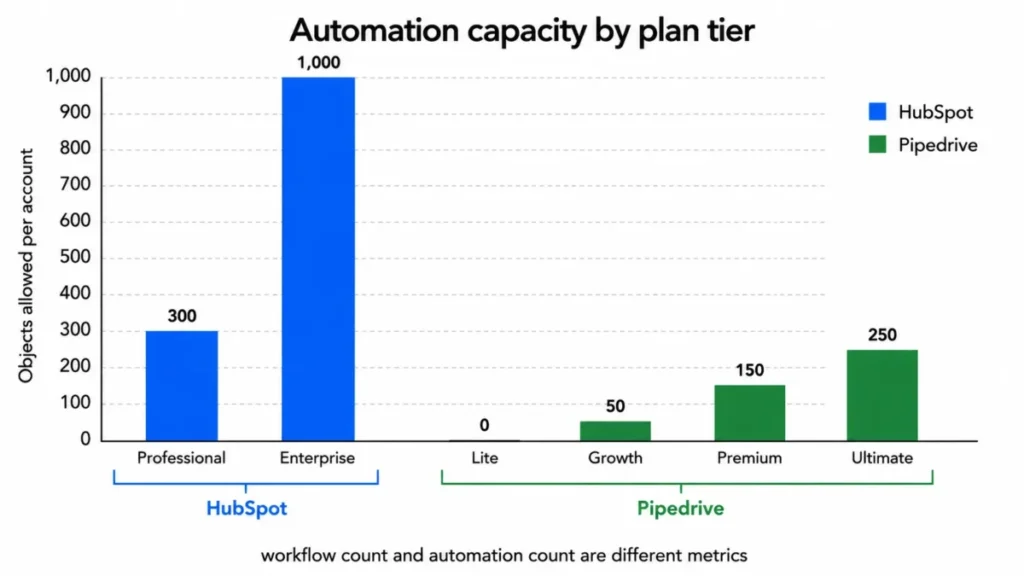
Accessible fallback for the chart above, in words. HubSpot allows 300 workflows on Professional and 1,000 on Enterprise.
Pipedrive allows 0 automations on Lite, 50 on Growth, 150 on Premium, and 250 on Ultimate. The two scales count different objects and are shown side by side for context rather than as a single ranking.
Workflow Two: Running Outbound Email at Volume
Both platforms sell sequences. Only one of them publishes what a seat can actually send.
HubSpot documents throughput directly: 500 sequence emails per user per day on Professional and 1,000 on Enterprise, measured on a rolling 24-hour basis rather than resetting at midnight. The connected mailbox provider’s own sending limits still apply on top of that.
The rolling window is the operational detail. A rep who burns the daily allowance at 4pm does not get a fresh allowance at 9am the next morning, which changes how an outbound cadence should be scheduled.
Pipedrive publishes a different number for a different thing. Its plans carry 5 sequences on Growth, 25 on Premium, and 50 on Ultimate, which counts how many nurturing sequences can exist, not how many emails a seat may send per day.
The closest published throughput constraint on the Pipedrive side is the company-wide cap of 40 automated email actions per minute. That is a rate ceiling on the whole account rather than a per-seat daily allowance, so the two figures cannot be lined up and compared.
Verdict: Incomparable as metrics, HubSpot ahead on evidence. A team running high-volume outbound can size a HubSpot tier from published numbers and cannot size a Pipedrive tier the same way, which is a planning advantage even before either product is used.
If daily send volume per rep is the constraint that decides your purchase, ask Pipedrive for a written per-seat figure before signing. I would treat the absence of a published number as a question for the vendor, not as evidence of a lower limit.
Workflow Three: Holding Data at Scale Without Hitting a Wall
Pipedrive’s capacity model is the single most misunderstood thing in this comparison, and it is misunderstood in a way that costs money.
Pipedrive does not cap contacts. It caps leads and deals on a per-seat allowance that scales with the plan: 2,500 per seat on Lite, 5,000 on Growth, 15,000 on Premium, and 20,000 on Ultimate.
A hard company ceiling of 300,000 combined leads and deals applies regardless of how many seats are bought.
So a database-heavy team with modest deal flow is fine. A team that creates a deal for every inbound enquiry, or that runs high-volume lead capture, consumes the allowance far faster than seat count suggests.
What happens at the ceiling is the part worth reading twice.
| Ceiling reached | What Pipedrive does | Buyer consequence |
|---|---|---|
| Manual deal or lead creation | Blocked | A rep cannot log new business until capacity is freed or bought |
| Deals created by automation, LeadBooster, or API | Moved to a deals waitlist | Pipeline value exists in the account but is not in the pipeline |
| Deals created by spreadsheet import | Written to an import skip file | The import reports success while rows silently did not land |
| Deals left on the waitlist for one year | Deleted | Unrecovered records disappear without a further action |
| Leads created automatically | Discarded, not waitlisted | Inbound capture is lost outright rather than parked |
Source: Pipedrive usage limit behavior.
The discard rule is the one I would put in front of finance. Automatically created leads are not queued for later recovery, so an account sitting at its ceiling during a campaign is losing capture, not deferring it.
Pipedrive does offer a route that is neither staying nor upgrading. From Growth upward it sells usage top-ups, including +25,000 leads and deals, +250,000 API tokens, +50 reports, and +50 automations per pack, each with a documented maximum quantity.
The checked source does not publish the dollar price of those packs, so price them with the vendor before assuming a top-up beats an upgrade.
HubSpot’s constraints sit somewhere else entirely. There is no published contact ceiling of the Pipedrive kind; the documented limits govern how much data you can move in and out per day.
Paid HubSpot accounts can import files up to 512 MB and run 500 imports per rolling 24 hours. The same page documents 10,000,000 rows per day through the standard importer, up to 80,000,000 through the imports API, and three concurrent imports before the rest queue.
Exports are tighter: 300 record exports per rolling 24 hours and three concurrent jobs, with additional exports queued.
The export ceiling is the one that bites a specific team. An operations group that pulls per-owner or per-pipeline extracts on a schedule, or a business preparing to leave the platform, runs into 300 jobs a day sooner than a team that exports once a quarter.
Verdict: Depends on which object you are scaling. A large contact database with controlled deal creation favors Pipedrive; a high-frequency data-movement operation with automated extracts favors HubSpot.
What each platform meters
- No published contact cap
- Import ceiling: 512 MB per file
- 500 imports per rolling 24 hours
- Export ceiling: 300 jobs per rolling 24 hours
- Three concurrent operations
- Contacts uncapped
- Leads and deals capped per seat
- 300,000 per company
- API tokens capped at an absolute maximum
- Top-ups available from Growth upward
Feature and Plan Gate Comparison
Feature checklists flatten this decision because almost every row comes back “yes on both”. The rows that decide anything are the ones where a capability exists on both sides but sits behind a different gate, or is measured in a different unit.
Every row below uses the same buyer criterion: what the documented behaviour costs a team in money, capacity, or admin work. Each row states the evidence for the first product and the evidence for the second product on the same basis, then names the practical difference.
That is why the last column gives a winner by scenario instead of a global champion. Where the evidence is not symmetric, the row says so and no side is credited.
| Dimension | HubSpot Sales Hub | Pipedrive | Outcome |
|---|---|---|---|
| Cheapest tier with sales automation | Professional | Growth | Pipedrive, on cost of the tier |
| Automation unit | Workflows built, counted per account | Automations built, plus execution frequency per company | Incomparable units |
| Automation headroom purchase | Paid monthly workflow pack | Usage top-up pack from Growth up | Depends on whether the pack price beats the upgrade |
| Sequence measurement | Emails per user per day | Sequences that may exist | HubSpot, on planning clarity |
| Behavior at a hard ceiling | Queueing on data operations, 429 on API | Blocked, waitlisted, discarded, stopped, ignored, or Failed | Pipedrive, on documentation depth |
| Contact capacity | No published contact cap | No usage limit on contacts | Tie |
| Deal and lead capacity | No published cap | Capped per seat, 300,000 per company | HubSpot, for high-volume deal creation |
| Custom permission sets | Enterprise | Premium and Ultimate, counted | Pipedrive, on the tier where it appears |
| Mandatory implementation fee | Required on Professional and Enterprise | None published | Pipedrive |
| Permanent free tier | Yes, up to 2 users | No | HubSpot |
| Published marketplace size | 2,000+ | 500+ | HubSpot, subject to per-app verification |
| Mobile apps | iOS and Android | iPhone and Android | Tie |
| Everyday usability | Not compared | Not compared | No symmetric evidence exists, so no winner is declared |
Sources: HubSpot workflow and permission entitlements, Pipedrive plan capacities.
The last row is deliberate. Usability verdicts in this category are usually asserted rather than evidenced, and an unevidenced ease-of-use score would carry more weight with a reader than it deserves.
Plan gate matrix
Included, add-on, or unavailable by tier
| HubSpot | Pipedrive | |||||||
|---|---|---|---|---|---|---|---|---|
| Capability | HubSpot Free | Starter | Professional | Enterprise | Pipedrive Lite | Growth | Premium | Ultimate |
| Sales automation | unavailable | unavailable | included | included | unavailable | included | included | included |
| Nurturing sequences | unavailable | unavailable | included | included | unavailable | included | included | included |
| Saved custom permission sets | unavailable | unavailable | unavailable | included | unavailable | unavailable | included | included |
| Custom visibility groups | unavailable | unavailable | unavailable | included | unavailable | unavailable | included | included |
| Lead capture tooling | included | included | included | included | add-on | add-on | included | included |
| Documents and projects | included | included | included | included | add-on | add-on | included | included |
Reporting and Analytics
Reporting is the one dimension in this comparison where the evidence is not symmetric, and saying so is more useful than manufacturing a verdict.
Pipedrive publishes reporting as a metered resource. Report capacity is bounded by plan, and additional capacity is sold in packs of 50 reports from Growth upward, which tells a buyer that a reporting-heavy operation has a countable ceiling to plan around.
No equivalent per-plan reporting ceiling was verified on the HubSpot side for this comparison. That is an absence of verified evidence, not evidence of an absence, and the two are different facts.
Outcome: not compared. If reporting depth is a primary buying criterion, ask both vendors for the report-count and custom-dashboard entitlements on the exact tier you are pricing, and get it in writing rather than from a comparison page.
Pricing and Value per Dollar
HubSpot wins the entry decision and loses the automation-tier decision. Both statements are true at the same time, and treating them as one question is how buyers end up on the wrong platform.
Free and entry tiers. HubSpot’s Free plan costs $0 per month and covers up to two users.
The official Pipedrive pricing page offers a 14-day trial and lists no permanently free tier.
For a founder and one salesperson, that is a genuine zero-cost path on one side and a countdown on the other.
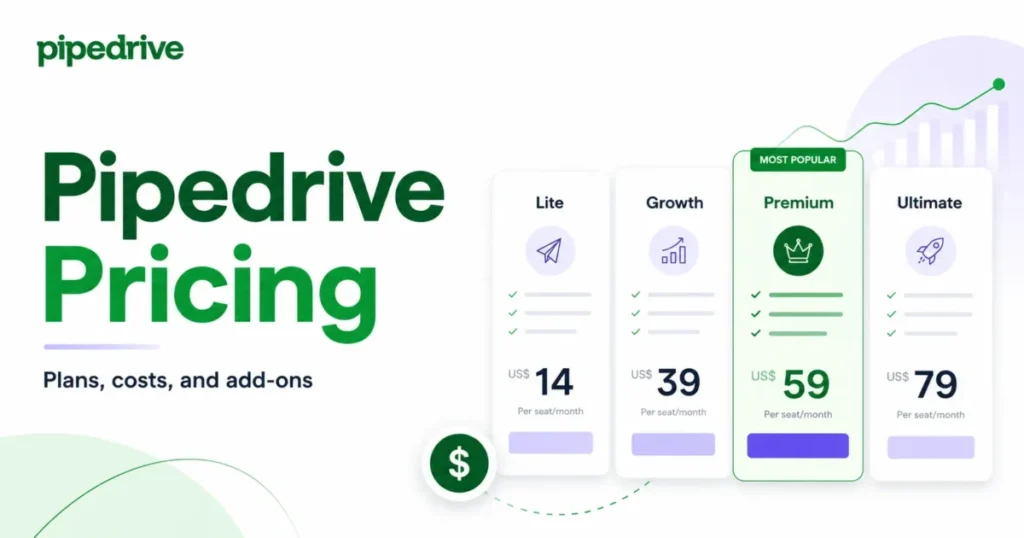
Once you pay, the order flips. Pipedrive Lite lists at $14 per user per month billed annually, or $24 billed monthly, against HubSpot Starter at $20 per seat per month on monthly billing.
The automation tier is where the money is. Pipedrive Growth lists at $39 per user per month billed annually, or $49 monthly, and carries full email sync, automations, and nurturing sequences.
HubSpot’s equivalent automation capability sits at Professional, displayed at $90 per seat per month billed annually and $100 billed monthly, with a required one-time onboarding fee of $1,500.
These two plans are workflow-automation floors, not feature twins. Professional buys a broader customer platform and a deeper data model alongside its workflows, while Growth buys a focused sales toolset.
The comparison below prices the cheapest tier on each side that runs a real sales-automation motion, and nothing more than that.
| Scenario | HubSpot Sales Hub Professional | Pipedrive Growth | First-year difference |
|---|---|---|---|
| 3 seats, monthly billing | 3 x $100 x 12 + $1,500 onboarding = $5,100 | 3 x $49 x 12 = $1,764 | $3,336 |
| 3 seats, annual billing | 3 x $90 x 12 + $1,500 onboarding = $4,740 | 3 x $39 x 12 = $1,404 | $3,336 |
| 10 seats, monthly billing | 10 x $100 x 12 + $1,500 onboarding = $13,500 | 10 x $49 x 12 = $5,880 | $7,620 |
| 10 seats, annual billing | 10 x $90 x 12 + $1,500 onboarding = $12,300 | 10 x $39 x 12 = $4,680 | $7,620 |
Pricing sources: HubSpot Sales Hub plans and onboarding, Pipedrive plan and seat pricing. Figures are US list prices before optional add-ons or negotiated discounts.
The arithmetic hides a clean rule. The per-seat gap between the two automation tiers is $51 per month on either cadence, so the first-year difference is $612 per seat plus HubSpot’s $1,500 onboarding fee, whichever way you bill.
That rule is worth keeping because it scales linearly. At 25 seats the same formula puts the first-year gap at $16,800, which is a hiring decision rather than a software line item.
Enterprise and upper tiers. HubSpot Enterprise is displayed at $150 per seat per month billed annually with a required one-time onboarding fee of $3,500. Pipedrive Ultimate lists at $79 per user per month billed annually, or $99 monthly.
First-year cost at 3 seats and 10 seats
Workflow-automation floors, not feature-equivalent plans
workflow-automation floors, not feature-equivalent plans
One Pipedrive price is unresolved, and I am not going to guess it. Official Pipedrive pages checked on August 19, 2026 published conflicting figures for the Premium plan, so no Premium price appears anywhere in this article.
Read that tier’s price off the live pricing selector with the US region set before budgeting it, because a stale Premium figure would break every downstream calculation a buyer makes from it.
Hidden costs sit in different places on each side. HubSpot’s are recurring capacity purchases and a mandatory implementation fee. Pipedrive’s are entitlement gaps.
| Cost item | HubSpot Sales Hub | Pipedrive |
|---|---|---|
| Implementation | Required onboarding on Professional and Enterprise, one-time | None published |
| Extra automation capacity | $200 per month per 100 additional workflows | Top-up packs of +50 automations, price not published |
| Extra API capacity | $500 per month per pack, maximum two packs | Top-up packs of +250,000 tokens, price not published |
| Lead capture tooling | Included in the platform | LeadBooster is an add-on on Lite and Growth, included on Premium and Ultimate |
| Documents and projects | Included in the platform | Smart Docs and Projects are add-ons on Lite and Growth, included on Premium and Ultimate |
| Email marketing and visitor tracking | Sold through other Hubs | Campaigns and Web Visitors stay add-ons on all four plans |
| Unassigned seats | Per-seat billing, no extra seat minimum for new accounts | Billed per seat whether the seat is assigned or not |
Sources: HubSpot product and services catalog, Pipedrive billing and add-on structure.
The add-on rows change the real Pipedrive comparison more than most buyers expect. A Growth team that needs chatbots, web forms, quotes, and project delivery is buying three add-ons on top of $39 per user.
At that point the arithmetic against Premium deserves a fresh look rather than a reflex.
Upgrade triggers, stated plainly. On HubSpot, the moves that force a higher plan are crossing the workflow ceiling, needing more sequence throughput per user per day, and needing saved custom permission sets.
On Pipedrive, they are running out of per-seat lead and deal capacity, needing more automations, needing more nurturing sequences, and needing custom visibility groups.
Integrations, API Capacity, and Stack Fit
HubSpot publishes 2,000+ integrations against Pipedrive’s 500+ marketplace listings. That is a real breadth difference and a weak decision input on its own.
A marketplace count tells you nothing about whether your billing system, your data warehouse, or your specific dialer is supported natively, at the depth you need, on the plan you are buying. Write down the six tools your revenue motion actually depends on and check each one by name against both marketplaces before the count influences anything.
The capacity question underneath integrations is more decisive, and the two vendors answer it in different currencies.
HubSpot governs private apps with a burst limit plus a daily account allowance. Free and Starter accounts get 100 requests per app per 10 seconds and 250,000 calls per account per day.
Professional raises that to 190 requests per 10 seconds and 625,000 calls per day, and Enterprise to 190 per 10 seconds and 1,000,000 per day. Excess requests return 429 errors.
More headroom is purchasable: the API Limit Increase costs $500 per month, adds 1,000,000 daily calls, raises the burst ceiling to 250 requests per 10 seconds, and is capped at two packs.
Pipedrive governs API access with a seat-scaled token budget, topped by an absolute maximum of 100 million tokens per company, and sells additional tokens in packs from Growth upward.
Verdict: Incomparable, and the answer depends on your integration shape. A stack with a few high-frequency sync jobs cares about burst limits and 429 handling; a stack with many low-frequency jobs cares about the daily or token budget. Model your actual call pattern against both documents rather than picking the bigger number.
Support, Security, Admin Controls, and Mobile
Governance is the quiet upgrade trigger. Teams usually discover it after an auditor, a regional sales manager, or a partner-data question forces the issue.
HubSpot ships permission-set templates on Professional and reserves the ability to build and save custom permission sets for Enterprise. That is a two-tier jump in list price, not a small step, and it is worth checking against your actual access requirements before settling on Professional.
Pipedrive publishes counted capacities instead of a template-versus-custom split. Premium includes up to 15 custom visibility groups and 15 custom permission sets per company, and Ultimate includes up to 25 of each before any eligible top-up.
| Governance need | HubSpot tier that satisfies it | Pipedrive tier that satisfies it |
|---|---|---|
| Standard role separation | Professional, using permission-set templates | Growth, using standard roles |
| Saved custom permission sets | Enterprise | Premium, up to 15 per company |
| Custom visibility groups at scale | Enterprise | Ultimate, up to 25 per company |
Sources: HubSpot permission-set entitlements, Pipedrive permission and visibility capacities.
On compliance, both vendors publish mature material. HubSpot states that SOC 2 Type II and SOC 3 reports are available through its Trust Center.
Pipedrive publishes GDPR, SOC 2, SOC 3, ISO/IEC 27001, and ISO 27701 posture.
Neither position proves control-by-control equivalence, so a regulated buyer should request the actual reports rather than reading the badge row.
Mobile is a tie and should be treated as one. HubSpot provides iOS and Android apps and Pipedrive provides iPhone and Android apps.
Availability is parity, and anyone claiming a mobile winner without symmetric workflow evidence is guessing.
Setup and Migration Difficulty
Migration between these two platforms is documented, feasible, and full of small semantic traps that only show up after the data has landed.
Pipedrive publishes the object mapping for a HubSpot move, and most of it is clean.
| HubSpot object | Pipedrive destination | Cleanup risk |
|---|---|---|
| Deal | Deal | Duplicates, because there is no duplicate identifier for deals on import |
| Contact | Person | Low, with standard duplicate handling available |
| Company | Organization | Low |
| Task or Activity | Activity | Low for open work, higher for historical activity you expect to update later |
| Custom property | Custom field | Type and picklist mismatches need checking before the run |
| Marketing contact | Contact, with no direct distinction | Marketing status needs a separate field or process on the Pipedrive side |
Sources: Pipedrive HubSpot migration mapping, HubSpot import behaviour for existing activities.
The marketing-contact row is the one that quietly breaks downstream work. A HubSpot marketing contact carries a billing and segmentation meaning that Pipedrive does not reproduce, so a team that lands its database and then wonders why campaign eligibility is unclear has found the mismatch rather than a bug.
Deal duplication is the second trap, and it is worse because it looks like success. Pipedrive has no duplicate identifier for deals during a spreadsheet import, so five deals named “Acme renewal” all import as five deals.
Pipeline value and forecast both inflate, and nobody notices until a board deck disagrees with the CRM.
Moving in the other direction has its own boundary. HubSpot import cannot update existing emails, meetings, notes, or tasks, so anyone planning to repair historical activity through a CSV needs a different method before committing to the plan.
| Migration path | Difficulty | The work that actually decides it |
|---|---|---|
| HubSpot to Pipedrive | Medium | Deduplicate deals before import, design a replacement for marketing-contact status, confirm the destination for historical activity |
| Pipedrive to HubSpot | Medium to High | Model the first-year cost including required onboarding, identify the minimum tier that unlocks the workflows in use, validate unique identifiers and associations in a test import |
Sources: HubSpot Sales Hub onboarding requirement, Pipedrive duplicate handling on import.
HubSpot to Pipedrive object migration map
The two warning paths require additional cleanup before migration. All other rows show the documented direct object mapping.
Before either move, run a pre-import checkpoint, and the sequencing in this CRM migration guide is a reasonable default. Deduplicate deals by name and close date in the export file, decide where marketing status is going to live, and test a 200-row sample against the real field mapping.
That single step removes most of the cleanup cost that makes CRM migrations feel expensive.
The Buyer Risk Ledger
Every CRM purchase carries risks that surface after the invoice, not before it. These are the ones the documented evidence actually supports for these two platforms.
| Risk | Who it hits | Consequence | Mitigation before signing |
|---|---|---|---|
| Workflow count creep on HubSpot | RevOps teams that build one automation per segment per stage | A recurring monthly add-on appears on top of seat cost | Count the workflows in your current stack and project 12 months of growth against the tier ceiling |
| Execution throttling on Pipedrive | Teams that bulk-edit large record sets | Automation runs are stopped or ignored rather than queued | Test a bulk edit at your real record volume during the trial |
| Record ceiling on Pipedrive | Inbound-heavy teams creating a deal per enquiry | Manual creation blocked, automated leads discarded | Divide expected annual deal and lead creation by seat count and compare with the plan allowance |
| Onboarding fee on HubSpot | Small teams budgeting from the seat price alone | Year-one cost is higher than the plan page suggests at low seat counts | Add the fee to the first-year model before comparing anything |
| Export throttling on HubSpot | Operations teams running scheduled extracts, and teams preparing to leave | Extraction jobs queue once the daily ceiling is reached | Count your scheduled export jobs per day against the documented ceiling |
| Add-on entitlement gaps on Pipedrive | Growth-tier teams needing chatbots, quotes, or project delivery | The real invoice exceeds the seat price | Price the add-ons alongside Premium before committing to Growth |
| Duplicate deals after migration | Anyone importing a deal export into Pipedrive | Pipeline value and forecast inflate silently | Deduplicate in the source file, then test a 200-row sample |
| Governance tier jump | Teams that discover access requirements late | An unplanned move to a higher tier across every seat | Write down the required permission and visibility behavior before choosing a tier |
Sources: HubSpot capacity-increase products, Pipedrive ceiling behaviour and top-ups.
The two rows I would treat as urgent are the Pipedrive record ceiling and the HubSpot onboarding fee, because both are knowable in advance and both are routinely discovered after the decision.
What Should Be True After 30 and 90 Days
A CRM purchase is working or failing long before renewal, and the signals are the same on either platform.
After 30 days, every active deal should live in the CRM rather than a spreadsheet, email sync should be running for every seat, and at least one automation should be firing reliably without a human restarting it. If any of those is untrue, the problem is process rather than product, and the sequencing in a CRM implementation guide will help more than a tier change.
After 90 days, the numbers matter. On Pipedrive, check actual leads and deals created per seat against the plan allowance and extrapolate to twelve months.
On HubSpot, check the workflow count and the peak daily sequence volume per rep against the tier ceilings.
If either check lands above 60 percent of the ceiling at 90 days, the upgrade or top-up conversation belongs in this quarter’s budget rather than next year’s.
Where HubSpot Wins
Zero-cost entry that does not expire. Two users on the Free plan pay nothing, and that is a different proposition from a 14-day countdown for a founder still validating whether a CRM is needed at all. My full HubSpot CRM review goes deeper into what the free tier does and does not cover.
Published outbound throughput. Per-user daily sequence limits are stated as numbers, so an outbound team can size the tier against its own send volume before buying rather than after.
Cross-functional consolidation. When sales, marketing, and service need one customer record, one data model, and one governance path, the broader platform is the reason to accept the higher automation-tier cost. That is an organizational argument, not a feature argument, and it is the only version of it I find persuasive.
Ecosystem breadth. A larger published marketplace raises the odds that an unusual tool in the stack has a listing, which matters most for teams that add software faster than they retire it.
Data movement at volume. Import ceilings measured in millions of rows per day suit operations teams that reload segments, enrich in batches, or sync from a warehouse on a schedule.
Where Pipedrive Wins
Cost of the automation tier. The same $612 per seat per year gap holds on both billing cadences, and HubSpot’s required onboarding fee sits on top of it. For a sales-only motion, that difference funds a headcount decision.
Capacity transparency. Very few vendors publish what happens after a limit is reached. Pipedrive documents the waitlist, the one-year deletion, the discard rule for automatically created leads, the stopped and ignored automation states, and the Failed email action, which is exactly the material a RevOps lead needs to plan. The Pipedrive CRM review works through those ceilings plan by plan.
Uncapped contacts. Teams with large databases and disciplined deal creation get room that a per-contact model does not give them.
A third scaling option. Top-ups let a team add records, tokens, reports, or automations without moving every seat to a higher plan, which changes the marginal economics of growth once the pack prices are known.
No mandatory implementation fee. Nothing published requires an onboarding purchase, so the entry cost is the seat cost.
Who Should Choose HubSpot?
Choose HubSpot if sales has to operate inside the same customer platform as marketing or service, and the shared data model is the point rather than a bonus.
Choose HubSpot if you are a one- or two-person team that wants a permanent free CRM instead of a trial, and you would rather grow into a paid tier than migrate later. The best CRM for startups shortlist covers the other free-entry options worth checking first.
Choose HubSpot if outbound send volume per rep is your binding constraint and you need a published number to plan against.
Choose HubSpot if your integration stack is unusual and marketplace breadth genuinely reduces the risk of a custom build.
Who Should Choose Pipedrive?
Choose Pipedrive if the motion is sales-only, marketing lives in a separate tool, and you have no plan to consolidate those functions in the next two years.
Choose Pipedrive if the automation-tier price difference is material to your budget at your seat count, and you can confirm your record volume fits inside the per-seat allowance.
Choose Pipedrive if you need to know in advance exactly how the system behaves at each ceiling, because that documentation is genuinely better on this side.
Choose Pipedrive if your database is large but your deal creation is controlled, since contacts do not consume the capped allowance.
Who Should Avoid Both?
Avoid both if your record volume is heading past 300,000 combined leads and deals and you also need the broader platform, because you are buying against Pipedrive’s absolute company ceiling and HubSpot’s upper-tier economics at the same time.
Avoid both if you need heavy custom object modeling, complex CPQ, or approval routing as a core requirement rather than an edge case. Neither of these is positioned as that product, and forcing it produces admin overhead that outlives the purchase.
Avoid both if your real blocker is data discipline rather than software. A CRM does not fix a pipeline nobody updates, and paying $12,300 in year one to formalize an unmaintained spreadsheet is the most expensive way to learn that.
Alternatives to HubSpot and Pipedrive
If the fit is wrong, the direction of the miss tells you where to look rather than which logo to pick.
| If the blocker is | Look toward | Why this direction |
|---|---|---|
| HubSpot’s automation-tier cost with the platform breadth still needed | Broader suites with different seat economics | Same consolidation argument, different pricing shape |
| Pipedrive’s record ceiling or governance capacity | Mid-market sales CRMs with per-account rather than per-seat capacity | Removes the per-seat allowance as the growth constraint |
| Both platforms feeling heavier than the motion requires | Lightweight pipeline tools | Lower admin overhead when the only job is stage tracking |
Sources for the two blockers named above: HubSpot Sales Hub tier pricing, Pipedrive record and governance ceilings.
Two shortlists on this site cover the specific candidates in each direction: HubSpot CRM alternatives for the first row, and Pipedrive alternatives for the second.
Verdict by Scenario
There is no single winner here, and any article that declares one is compressing two different purchases into one recommendation.
For a focused sales team of three to ten seats that needs full email sync and automation while marketing stays elsewhere, Pipedrive Growth is the stronger buy. The first-year gap shown in the cost table above is decisive at both seat counts. Confirm first that your lead and deal volume fits inside the per-seat allowance, and that your automation pattern stays under the execution ceilings.
For a one- or two-person team that wants a CRM at no cost, HubSpot is the stronger start, because a permanent free tier beats a countdown.
For a revenue team consolidating sales, marketing, and service around one customer platform with one governance path, HubSpot is the stronger buy, and the higher automation-tier cost plus onboarding fee is what that consolidation costs.
For a governance-heavy team, neither answer is automatic. Map your required permission and visibility behavior to the exact tier that unlocks it on each side, then compare those two prices rather than the headline plans.
If you are still holding both options, the deciding question is not which platform has more features. It is whether sales is a department buying a tool or a function inside a platform the whole revenue team will share.
Answer that, then check the shortlist in best CRM for sales teams to confirm nothing better fits the same brief.
Which CRM for which team
Pipedrive Premium and Ultimate
Compare pricing, limits, and migration fit.
FAQ
Four questions survive the body above, and each one changes a decision rather than restating a fact already established.
Is HubSpot’s free plan enough to run a two-person sales team?
For stage tracking, contact management, and basic deal hygiene, yes. It stops being enough the moment the team needs workflow automation or sequence throughput, both of which sit on paid tiers, so treat the free plan as a way to prove the process rather than as the destination.
Can Pipedrive top-ups replace a plan upgrade?
Sometimes, and only for capacity. Top-ups add records, tokens, reports, and automation slots from Growth upward, but they do not move a plan-gated feature onto a lower tier.
A team that needs custom visibility groups or more nurturing sequences is still looking at an upgrade rather than a pack.
Which platform is safer if we are not sure how fast we will grow?
HubSpot, on capacity shape rather than price. Its exposure at growth is a recurring add-on purchase you can see coming in the invoice; Pipedrive’s exposure is a hard ceiling where new records are blocked, waitlisted, or discarded, which is harder to notice and harder to reverse after the fact.
Do we still pay HubSpot’s onboarding fee if we only use Sales Hub for pipeline?
Yes. Onboarding is a required one-time fee on Professional and Enterprise regardless of how narrowly the platform is used, so budget it as part of the entry cost rather than as an optional service.
Your Next Step
Choose HubSpot or Pipedrive on the cohort that matches your team, then choose the minimum viable tier for that team’s actual workflow, team size, and scale requirements rather than the tier the plan page leads with.
Write down three numbers before you sign: seats today, deals or leads created per seat per year, and the number of automations the team already runs. Those three requirements decide the tier on either platform, and they are the only inputs that change the answer.