Choosing a business messaging platform is mostly a question about what your company already pays for. A 30-person agency on Microsoft 365 and a defense contractor on an air-gapped network are not shopping in the same market.
So this ranking starts with cohorts, budgets, and deployment constraints instead of feature counts.
Slack takes the top position for teams whose work already runs through many third-party tools. Microsoft Teams and Google Chat are usually the better economic choice when the suite is already on the invoice, and Pumble is the cheapest hosted option that still keeps every message searchable.
Every price and documented limit below was checked against official pages on August 3, 2026. Re-verify before you sign anything.
If your shortlist is mostly about meetings and task tracking rather than channels, the wider set of team collaboration tools fits better.
In This Article (13 sections)
Quick Verdict: The Best Business Messaging Platform for Each Team
| Use case | Best pick | Why it fits |
|---|---|---|
| Integration-heavy cross-functional teams | Slack | Full history, group huddles, no-code workflows, and unlimited app integrations all open on one paid tier |
| Companies already paying for Microsoft 365 | Microsoft Teams | Essentials lists at $4.00 per user per month, the lowest suite-adjacent entry price here |
| Companies already standardized on Google Workspace | Google Chat | Chat is included in the Workspace subscription rather than bought separately |
| Work that starts in a video meeting | Zoom Workplace | Team Chat, Docs, Whiteboard, and Clips sit beside the meeting instead of in a second product |
| Enterprises with Cisco calling and conferencing | Webex Suite | Documented capacity of 5,000 members per team or space |
| Regulated or mission-critical self-hosting | Mattermost | Self-hosted and single-tenant cloud deployment with sales-led licensing |
| Sovereign, end-to-end encrypted rooms | Element | Matrix-based federation and E2EE with a self-hosting and air-gapped path |
| Air-gapped or defense-grade deployment | Rocket.Chat | Defense plan covers air-gapped and SCIF-ready environments |
| Lowest predictable seat cost, and the most usable free plan | Pumble | Pro lists at $2.99 per seat per month, and the free plan keeps unlimited message history |
| SMBs of 20 to 100 that want chat plus polls, reminders, and to-dos | Flock | Light process tools are native, and Starter is free while a team is still under 20 |
Sources, checked August 3, 2026: Teams Essentials, Pumble plans, Webex capacities.
Also: Slack plans, Flock plans.
Each pick is evidenced in full in its own ranked section below.
Two of those rows are the ones that most often flip a decision. Pumble is the only hosted platform here that documents unlimited message history on its free plan, and Microsoft Teams Essentials is the only paid entry tier under $5 that comes from a suite vendor.
Where These Ten Platforms Overlap and Where They Do Not
A ranked list hides the fact that these products do not all solve the same job. The matrix below is an editorial assessment of documented feature scope, not a vendor scorecard, and every cell uses one of five values: Yes, Limited, No, By plan, or Not verified here.
| Platform | Sold inside a productivity suite | Meetings or calls in the same product | Deployment control documented | Public list price |
|---|---|---|---|---|
| Slack | No | By plan | No | Yes |
| Microsoft Teams | Yes | Yes | No | Yes |
| Google Chat | Yes | Yes | No | Yes |
| Zoom Workplace | No | Yes | No | Yes |
| Webex Suite | No | Yes | No | Yes |
| Mattermost | No | Limited | Yes | No |
| Element | No | Yes | Yes | No |
| Rocket.Chat | No | Not verified here | Yes | No |
| Pumble | No | By plan | No | Yes |
| Flock | No | By plan | No | Limited |
Sources, checked August 3, 2026: Slack, Teams, Workspace.
Also: Zoom, Webex, Mattermost.
And: Element, Rocket.Chat, Pumble, Flock.
Deployment and suite classifications are editorial assessments built from those pages.
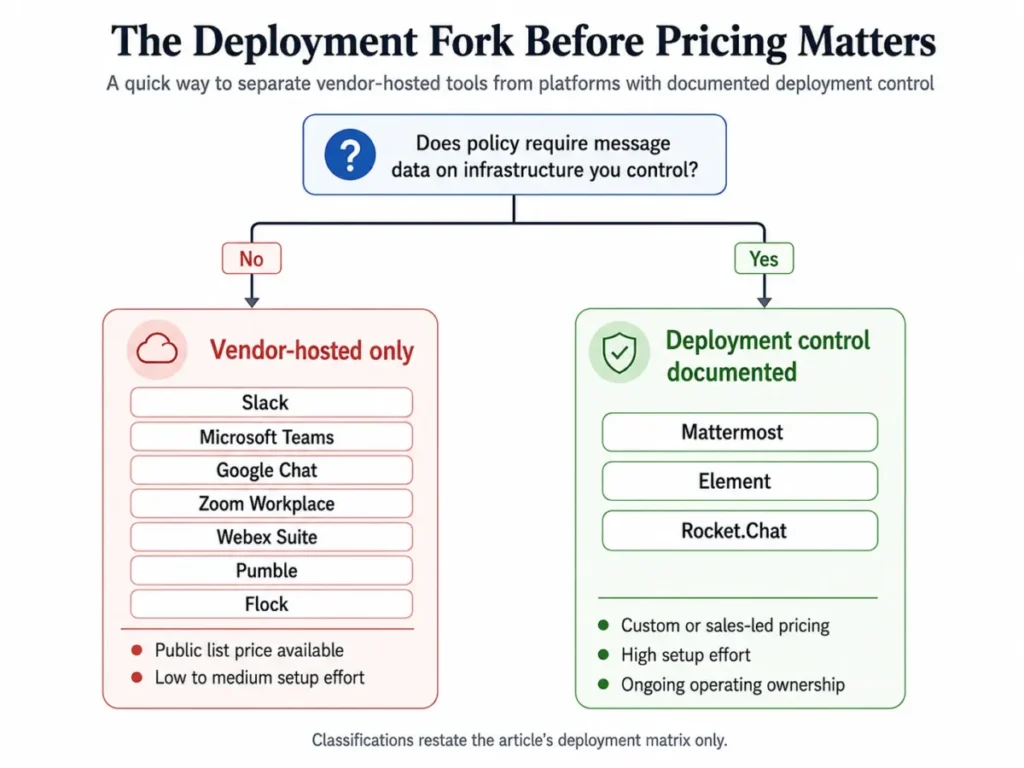
Slack, Pumble, and Flock compete directly as standalone channel tools. Microsoft Teams and Google Chat compete for that same buyer only while the suite decision is still open.
Mattermost, Element, and Rocket.Chat compete with each other rather than with any hosted option. Their buyer is choosing an operating model before choosing a chat app.
That deployment column is the real fork in the road. Seven of the ten are only available as a vendor-hosted SaaS subscription, so if your compliance team requires data to sit on infrastructure you control, seven products leave the shortlist before pricing is even discussed.
How We Chose and Evaluated These Business Messaging Platforms
These rankings are based on verified pricing, official product documentation, help-center capacity pages, and current plan-comparison pages. Pricing and plan limits were checked on August 3, 2026.
Each platform was assessed against the same buyer-focused criteria: message organization, history and search, meetings and calls, integrations, administration and security, deployment flexibility, onboarding effort, and cost structure.
Greater weight was given to factors that change a purchase decision, including the practical entry tier, documented plan ceilings, upgrade triggers, and the cost of adding seats. Brand familiarity, vendor marketing language, and affiliate relationships did not influence the ranking.
Claims that could not be verified from official sources were excluded rather than estimated. Where a vendor publishes no numeric price, the pricing status is labeled as custom instead of being modeled.
Quick Comparison: All Ten Platforms Side by Side
| Platform | Best-fit cohort | Entry paid price | Documented limit that bites first |
|---|---|---|---|
| Slack | 10 to 200-person cross-functional teams with many third-party tools | $8.75 per active user/month monthly, $7.25 annual | Free keeps 90 days of searchable messages and up to 3 apps |
| Microsoft Teams | 25 to 300-person Microsoft 365 organizations | $4.00 per user/month, paid yearly | A chat-originated video or audio call supports up to 20 people |
| Google Chat | 5 to 300-person Google Workspace teams | $7 per user/month on annual commitment | Business Starter, Standard, and Plus cap out at 300 users |
| Zoom Workplace | 5 to 250-person meeting-led distributed teams | $15.99 per user/month monthly | Basic group meetings stop at 40 minutes and 100 participants |
| Webex Suite | 500 to 5,000-person Cisco enterprises | $25 per user/month | 5,400 characters per message and 10 files per message |
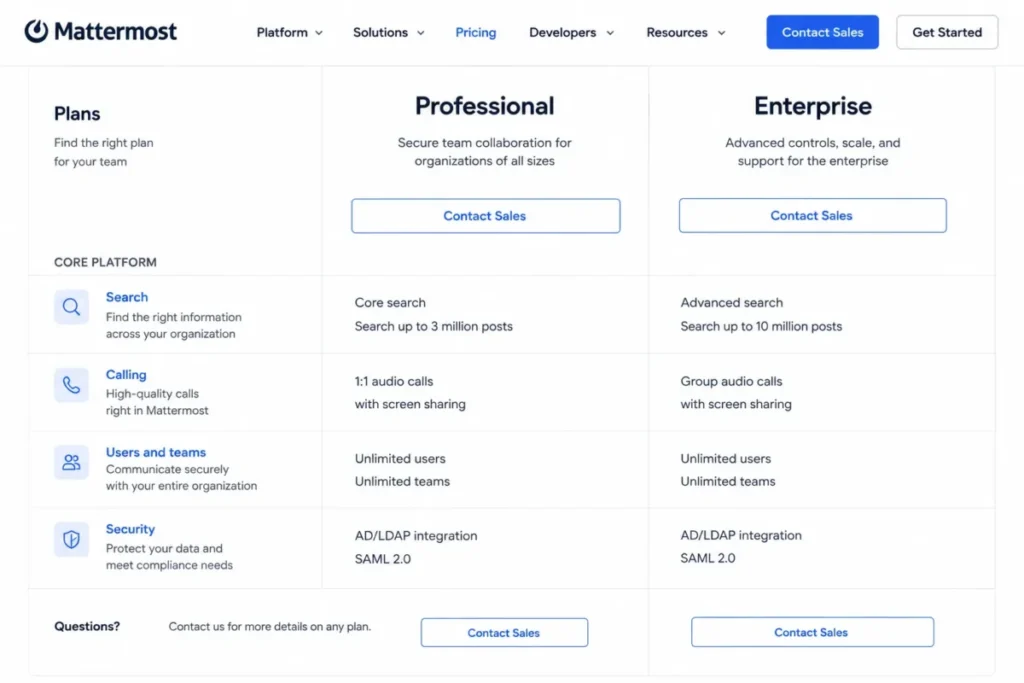
| Mattermost | 50 to 5,000-person regulated and engineering teams | Custom, prepaid annual per activated-user seat | Professional core search covers up to 3 million posts |
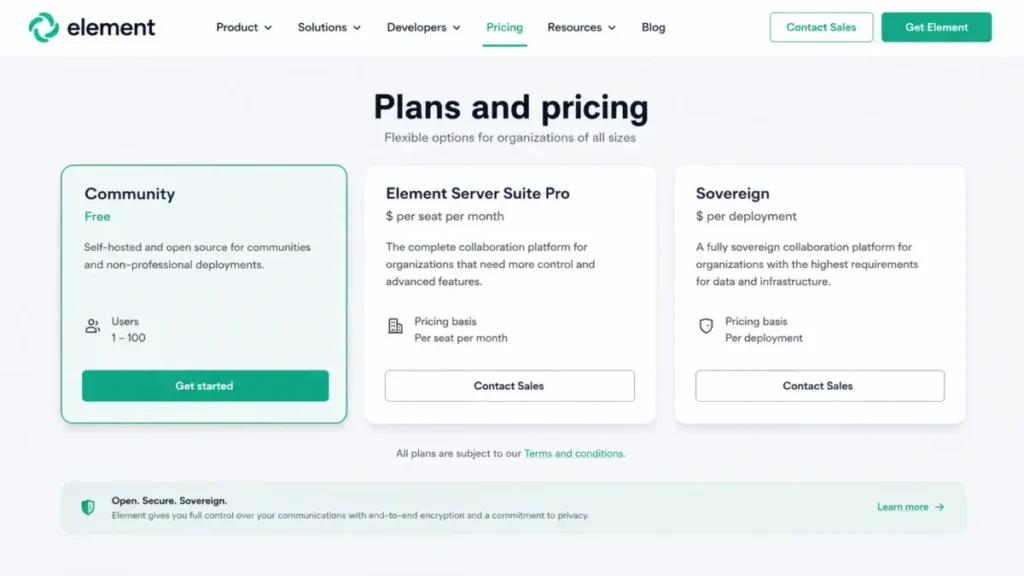
| Element | 100+ seat sovereign and public-sector teams | Custom per seat, or per deployment for Sovereign | Community is listed for 1 to 100 users and non-professional use |
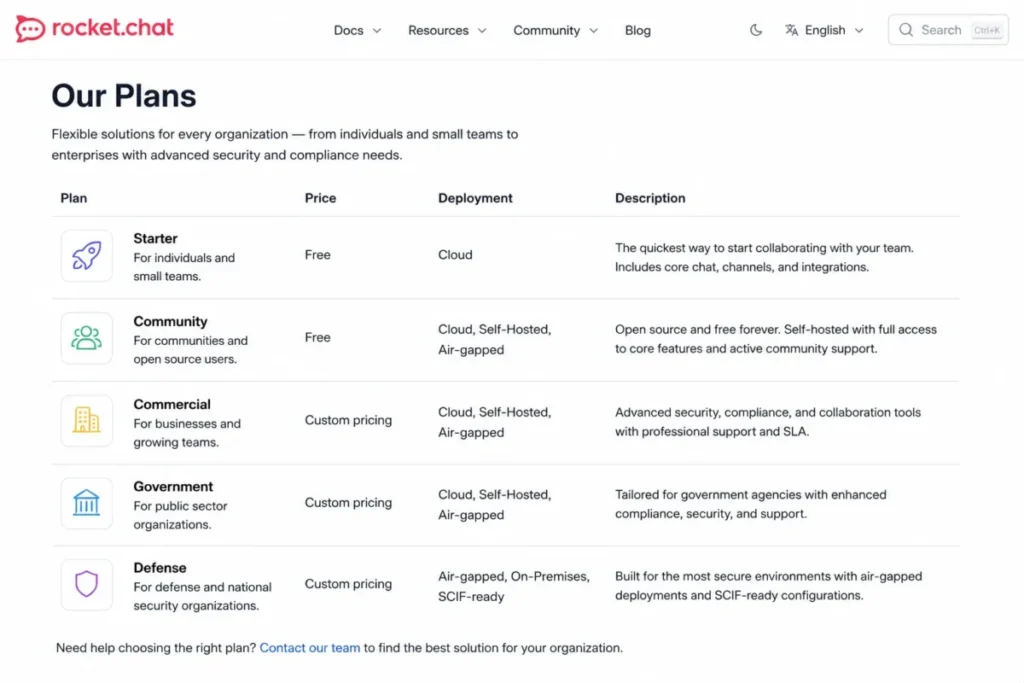
| Rocket.Chat | 100+ seat security-engineering organizations | Custom by deployment posture | Exact user counts and prices are not published |
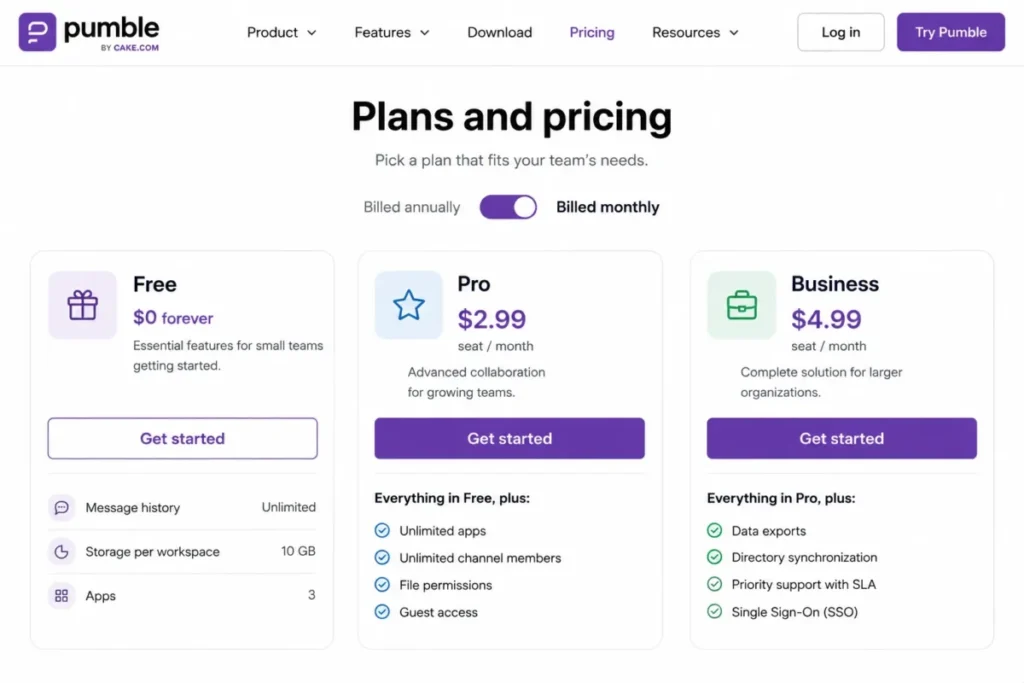
| Pumble | 5 to 200-person cost-sensitive teams | $2.99 per seat/month monthly, $2.49 annual | Free caps storage at 10 GB per workspace and apps at 3 |
| Flock | 20 to 100-person SMBs wanting light process tools | Not published on the official pricing page | Starter stops at 10,000 searchable messages and 10 public channels |
Cohort and price columns, checked August 3, 2026: Slack Free plan, Teams business options.
Continued: Workspace plan page, Zoom collaboration tools, Webex Suite cart.
Custom-price rows: Mattermost licensing, Element tiers, Rocket.Chat postures.
Low-cost rows: Pumble plan page, Flock plan page.
Limit rows also draw on the Teams limits documentation and Webex capacities.
Read that last column before the price column. Four of these ceilings arrive as a hard stop rather than a gradual squeeze: Slack’s 90-day free history and Zoom’s 40-minute free meeting are time-based, while Flock’s 10,000-message Starter cap and Google Workspace’s 300-user purchase limit bind on volume and headcount.
Business Messaging Platform Reviews and Rankings
Each entry below states the same four things in the same order, so the blocks can be compared rather than just read. The micro-cohort it suits, the workflow it changes, the plan gate that decides the practical entry tier, and the ranking reason that puts it in this position.
Because the plan gate usually costs more than the headline price, every ranking reason here is conditional. A platform wins for a named cohort when that cohort’s workflow matches, and loses when the gate lands on a capability that cohort needs daily.
Every price and limit in these blocks carries its official source and the August 3, 2026 checked date.
1. Slack: Best for Integration-Heavy Teams
- Best for:
- 10 to 200-person cross-functional SaaS, agency, and product teams that route notifications, approvals, and alerts from many third-party tools into channels.
- Avoid if:
- you are optimizing for the lowest per-seat price, or your security policy requires full self-hosting.
- Starting price:
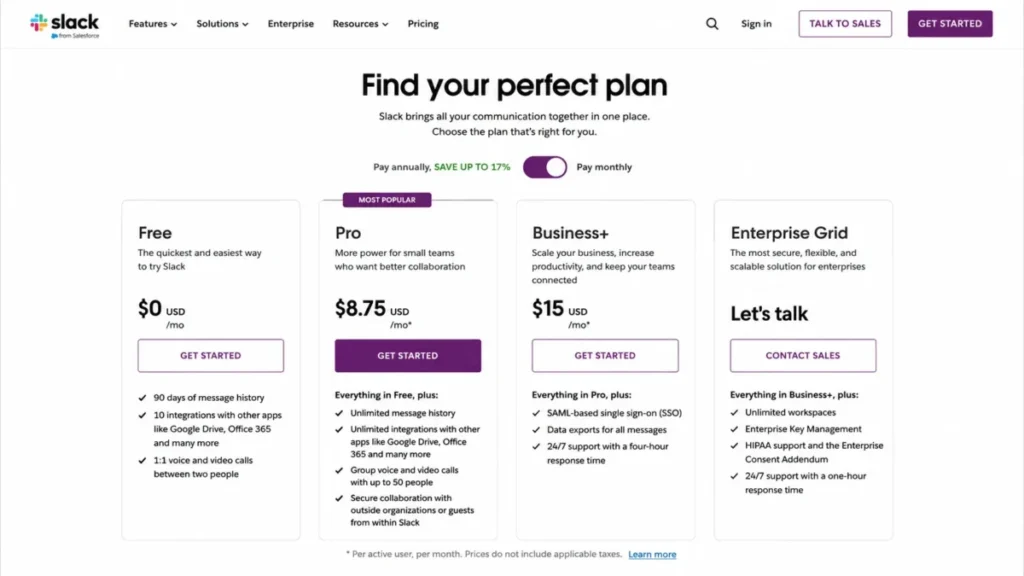
- free plan, then Pro at $8.75 per active user per month on monthly billing.
- Practical tier:
- Pro at $7.25 per active user per month on annual billing, because full message history, group huddles, no-code workflows, Slack Connect, and unlimited app integrations all live there.
- Free plan:
- yes, with 90 days of searchable messages and up to 3 apps.
- First limit that bites:
- the 90-day searchable history on Free, which quietly deletes the institutional memory a channel-based team builds in its first quarter.
- Better than Microsoft Teams:
- a 2,600+ app directory and no-code workflows make Slack the stronger hub when the tools generating your notifications are not Microsoft products.
- Worse than Pumble:
- Pumble’s free plan keeps unlimited message history, so a small team choosing Slack Free is paying nothing and losing more.
- Setup difficulty:
- low to medium. Channel creation and membership are self-service; the medium part is governance, naming conventions, and deciding which apps may post.
- Hidden costs:
- Slack bills per active user, so a workspace with dormant accounts costs less than a headcount-based estimate, but app subscriptions behind the integrations are separate line items.
- Evidence status:
- documentation-verified against Slack’s pricing page and its dedicated Free-plan page, checked August 3, 2026.
Slack’s ranking rests on a specific claim: it is the strongest standalone chat product when the rest of your stack is not owned by one vendor. Channels, threads, and search are the ergonomic baseline other tools are measured against, and the app directory is the reason a support alert, a deploy notification, and a signed contract can all land in the same place.
The 90-day free history limit is worth treating as a migration deadline rather than a feature gate. A team that runs six months on Slack Free has already lost the first three months of decisions, and no upgrade brings them back.
Slack Connect is the other line item that changes the shortlist. If a meaningful share of your work happens with agencies, contractors, or clients, external collaboration is a Pro-tier capability rather than a bolt-on, and that pushes the practical budget to Pro on day one rather than month six.
Group huddles sit on the same tier. Teams that expected the free plan to cover ad-hoc voice conversations across a squad find that it covers one-to-one only, which is a common and avoidable budgeting surprise.
Our fuller assessment of the product’s workflow depth and admin controls sits in the Slack review.
| Pros | Cons |
|---|---|
| Full message history, Slack Connect, no-code workflows, and unlimited apps all open on one tier | Free plan deletes searchable history after 90 days, which is a hard stop for institutional memory |
| 2,600+ app directory makes it the strongest neutral hub for a multi-vendor stack | Pro at $8.75 per active user monthly is roughly double Microsoft Teams Essentials at $4.00 |
| Per-active-user billing means dormant accounts do not carry full cost | Group huddles and external Slack Connect channels are not available on Free |
| Annual billing drops the listed seat price to $7.25 per active user | No documented self-hosting path for organizations with data-residency mandates |
- Verdict:
- choose Slack if your notifications come from more than a handful of non-Microsoft tools and you can commit to Pro from the start; the free plan is a trial, not a plan.
2. Microsoft Teams: Best for Microsoft 365 Organizations

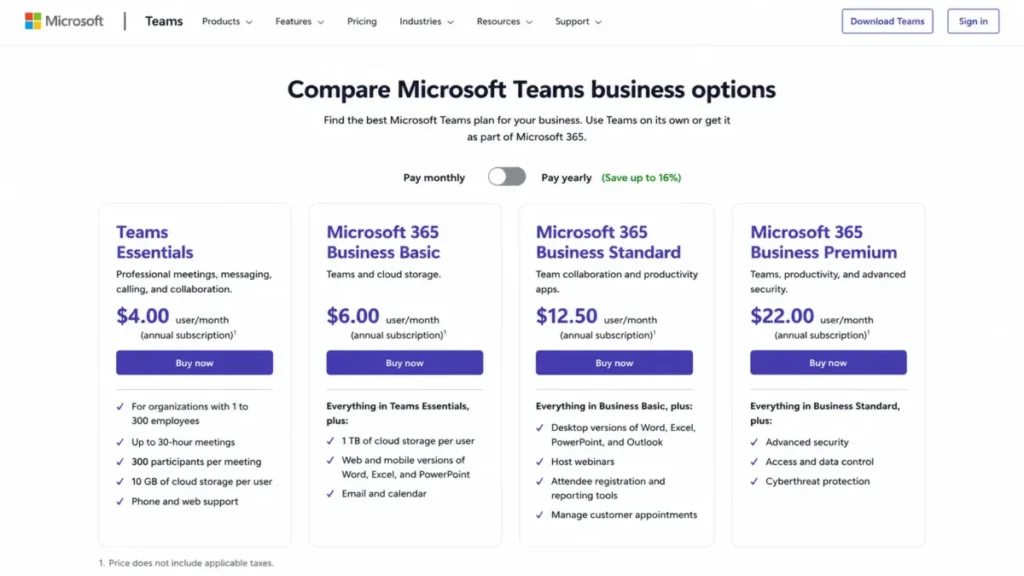
Microsoft Teams wins on arithmetic before it wins on features. At $4.00 per user per month paid yearly, Essentials is the cheapest suite-adjacent entry tier in this ranking, and for a company already licensed for Microsoft 365 the marginal cost of the chat layer is often zero.
- Best for:
- 25 to 300-person organizations already paying for Microsoft 365 and organizing work by department.
- Avoid if:
- your stack sits outside Microsoft and you want a lighter, chat-first product without the governance surface.
- Starting price:
- Teams Essentials at $4.00 per user per month, paid yearly, for organizations with 1 to 300 employees.
- Practical tier:
- Essentials covers chat, meetings, collaboration, and 10 GB of cloud storage per user; a Microsoft 365 bundle becomes the practical tier the moment you also need email, Office apps, and larger storage.
- Free plan:
- not documented in the sources used here, which cover Essentials as the entry business tier and the Microsoft 365 bundles above it.
- First limit that bites:
- a video or audio call started from a chat supports up to 20 people, while a business-tier meeting supports up to 300.
- Better than Slack:
- the price gap is large and the file collaboration path into SharePoint and Office is native rather than integrated.
- Worse than Slack:
- the app ecosystem outside Microsoft is thinner, so a non-Microsoft toolchain generates more integration work.
- Setup difficulty:
- low inside Microsoft 365, medium once governance is involved. Teams and channels provision quickly; retention, guest policy, and naming standards are where implementation time goes.
- Hidden costs:
- the Essentials plan ceiling is 300 employees, so growth past that number is a licensing conversation, not a settings change.
- Evidence status:
- documentation-verified against Microsoft’s Teams business plan comparison and the Teams limits and specifications documentation, checked August 3, 2026.
The 20-person cap on chat-originated calls is the detail most buyers discover after rollout. Departments that build the habit of escalating a chat thread into a call hit that ceiling at exactly the moment a conversation gets important enough to need everyone.
Treat it as a workflow rule rather than a defect. Anything above 20 participants is scheduled as a meeting, and teams that document that rule during onboarding avoid the awkward mid-incident failure.
The 300-employee ceiling on Essentials is the second planning point. A 250-person company growing 20 percent a year should budget for the bundle transition inside 12 months rather than treating Essentials as a permanent line item.
The Microsoft Teams review covers the administration surface in more depth.
| Pros | Cons |
|---|---|
| Essentials at $4.00 per user per month is the lowest suite-vendor entry price in this ranking | Chat-originated calls support only 20 people against 300 for a business-tier meeting |
| Chat, meetings, files, and Office collaboration sit in one Microsoft work graph | Essentials is sold only to organizations with 1 to 300 employees |
| 10 GB of cloud storage per user is included at the Essentials tier | Email, Office apps, and larger storage require a Microsoft 365 bundle, not Essentials |
| Provisioning is near-zero effort when Microsoft 365 identities already exist | Governance work, not setup, is where the real implementation time goes |
- Verdict:
- choose Microsoft Teams if Microsoft 365 is already on the invoice and your team count sits comfortably under 300; buy the bundle rather than Essentials if email and Office apps are also in scope.
3. Google Chat: Best for Google Workspace Organizations

- Best for:
- 5 to 300-person Google Workspace teams whose work already lives in Gmail, Drive, Docs, and Meet.
- Avoid if:
- you want the strongest standalone chat platform on its own merits and are not buying Workspace anyway.
- Starting price:
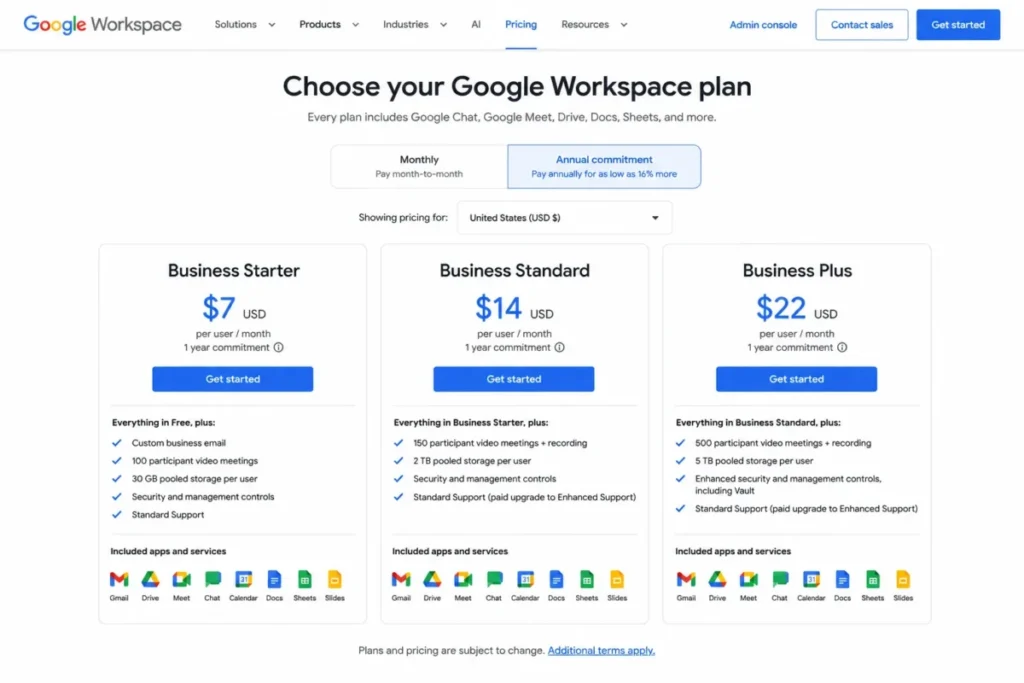
- Google Workspace Business Starter at $7 per user per month on the annual commitment shown for the US market, with Chat included.
- Practical tier:
- Business Standard or Plus becomes practical when you need more storage, meeting recording, Vault, or advanced admin controls.
- Free plan:
- Chat is not sold separately, so the entry point is a Workspace subscription rather than a free chat tier.
- First limit that bites:
- Business Starter, Standard, and Plus can each be purchased for a maximum of 300 users, and inline-threaded spaces carry reply limits.
- Better than Slack:
- the Drive, Gmail, and Meet handoffs are native, and the chat layer costs nothing extra once Workspace is purchased.
- Worse than Slack:
- the app ecosystem and workflow automation depth are narrower, which matters for teams routing many third-party alerts.
- Setup difficulty:
- low inside Workspace. Spaces are self-service and admin enablement is a single policy decision.
- Hidden costs:
- none at the chat layer, because the cost is the Workspace seat; the real budget pressure is the tier upgrade that storage and Vault force.
- Evidence status:
- documentation-verified against Google Workspace pricing, the Google Chat known-limitations page, and the Google Chat message-history documentation, checked August 3, 2026.
Google Chat’s value is almost entirely a bundling argument, and that is not a criticism. A 120-person company already paying $7 per user per month for Business Starter is choosing between a chat tool it already owns and a second $8.75 per-seat invoice for Slack. At that headcount the gap is $1,050 a month, which makes it a budget decision rather than a feature debate.
Group conversations support up to 400 participants, so the conversation ceiling is not what constrains most buyers. The 300-user purchase ceiling on Business Starter, Standard, and Plus is the constraint, and it arrives as a procurement problem rather than a product one.
Retention is the second planning point. History and retention can be administered at the Workspace level, so the answer to “how long do our messages last” often sits with your own administrator rather than with a plan tier. That is either reassuring or alarming depending on who holds the role.
Teams weighing the wider suite can start with the Google Workspace review.
| Pros | Cons |
|---|---|
| Chat is included in the Workspace subscription rather than billed as a second per-seat product | Business Starter, Standard, and Plus can only be purchased for up to 300 users |
| Native Gmail, Drive, Docs, and Meet handoffs remove the integration work Slack requires | Weaker app ecosystem and automation depth than a dedicated channel platform |
| Storage, recording, Vault, and advanced controls provide a clear upgrade path inside one vendor | Inline-threaded spaces carry documented reply limits |
| Admin-level retention control means governance is centralized, not per-workspace | Not a compelling purchase for a team that is not buying Workspace anyway |
- Verdict:
- choose Google Chat if Workspace is already your system of record; if you would be buying Workspace only to get the chat tool, price Pumble or Slack instead.
4. Zoom Workplace: Best for Teams That Center Work on Meetings

The pitch here is sequencing rather than features. Zoom Workplace assumes work begins in a meeting and then needs somewhere to continue, which is the inverse of how Slack and Google Chat are designed.
- Best for:
- 5 to 250-person distributed teams whose work starts in video meetings and needs asynchronous follow-through.
- Avoid if:
- your team rarely meets and needs deep asynchronous channel organization above everything else.
- Starting price:
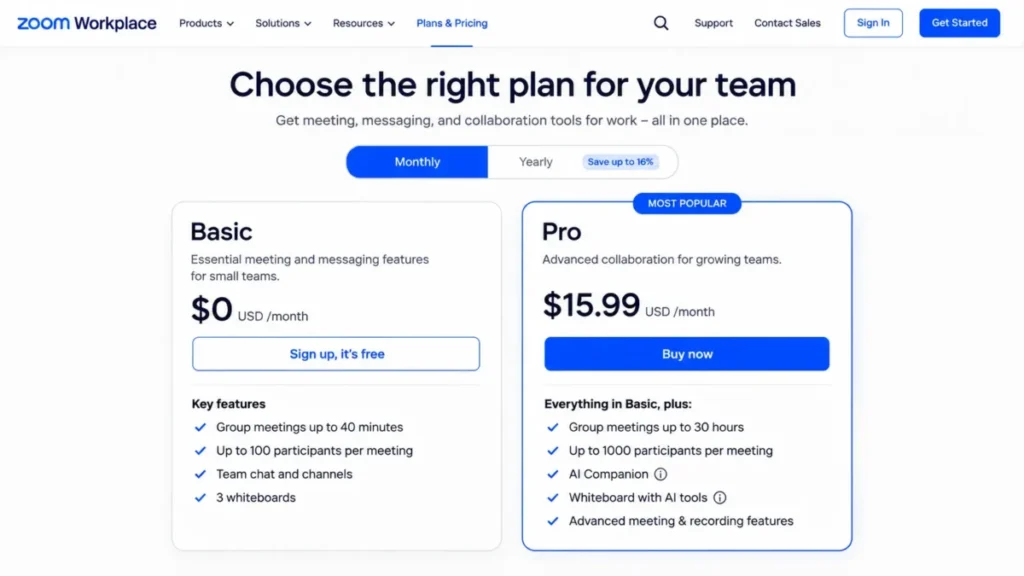
- Basic is free; Pro lists at $15.99 per user per month on monthly billing.
- Practical tier:
- Pro, because Basic caps group meetings at 40 minutes while Pro supports meetings up to 30 hours.
- Free plan:
- yes. Basic supports group meetings of up to 100 participants for 40 minutes.
- First limit that bites:
- the 40-minute cap on Basic group meetings, which lands in the middle of the working sessions it is most needed for.
- Better than Webex Suite:
- the entry price is $15.99 against $25 per user per month, and the meeting-to-follow-up path is a single product rather than a suite assembly.
- Worse than Slack:
- channel organization and third-party workflow automation are not the design center, so a notification-heavy team gets less structure.
- Setup difficulty:
- low. Most organizations already have Zoom accounts and habits in place, so adoption is largely a matter of turning on Team Chat.
- Hidden costs:
- AI Companion and extended meeting features require an eligible paid plan, so the useful configuration is not the free one.
- Evidence status:
- documentation-verified against the Zoom Workplace Pro product page and the Zoom Workplace collaboration tools page, checked August 3, 2026.
Zoom Workplace bundles Team Chat, Meetings, Docs, Whiteboard, Clips, Tasks, Mail, Calendar, and AI Companion on eligible paid plans. That breadth is the argument: a decision made in a meeting can become a note, a clip, and a task without leaving the product.
The 40-minute Basic limit deserves a specific warning, because it is not evenly annoying.
Standups survive it and planning sessions do not, so the free plan works until the moment your team does the work that justifies buying software.
At $15.99 per user per month, Zoom Workplace is the second-most expensive option here. That is defensible for a team whose meeting load is genuinely high, and hard to defend for a team that meets twice a week and mostly needs channels.
The Zoom Workplace review goes deeper on how the modules fit together.
| Pros | Cons |
|---|---|
| Team Chat, Meetings, Docs, Whiteboard, Clips, Tasks, Mail, and Calendar ship as one product | Basic group meetings stop at 40 minutes, which breaks planning sessions specifically |
| Pro supports meetings up to 30 hours, removing duration as a planning constraint | $15.99 per user per month is the second-highest entry price in this ranking |
| Existing Zoom habits make adoption close to zero-training | AI Companion and extended meetings require an eligible paid plan |
| Meeting artifacts stay available for asynchronous follow-up rather than living in a recording folder | Channel organization is shallower than a chat-first platform |
- Verdict:
- choose Zoom Workplace if meetings are your dominant collaboration object and you want the follow-up to live beside them; choose a chat-first tool if most decisions happen in writing.
5. Webex Suite: Best for Enterprise Communications and Cisco Environments

- Best for:
- 500 to 5,000-person enterprises with Cisco calling, conferencing, and centralized IT governance.
- Avoid if:
- you are a small team on a tight budget with no existing Cisco footprint.
- Starting price:
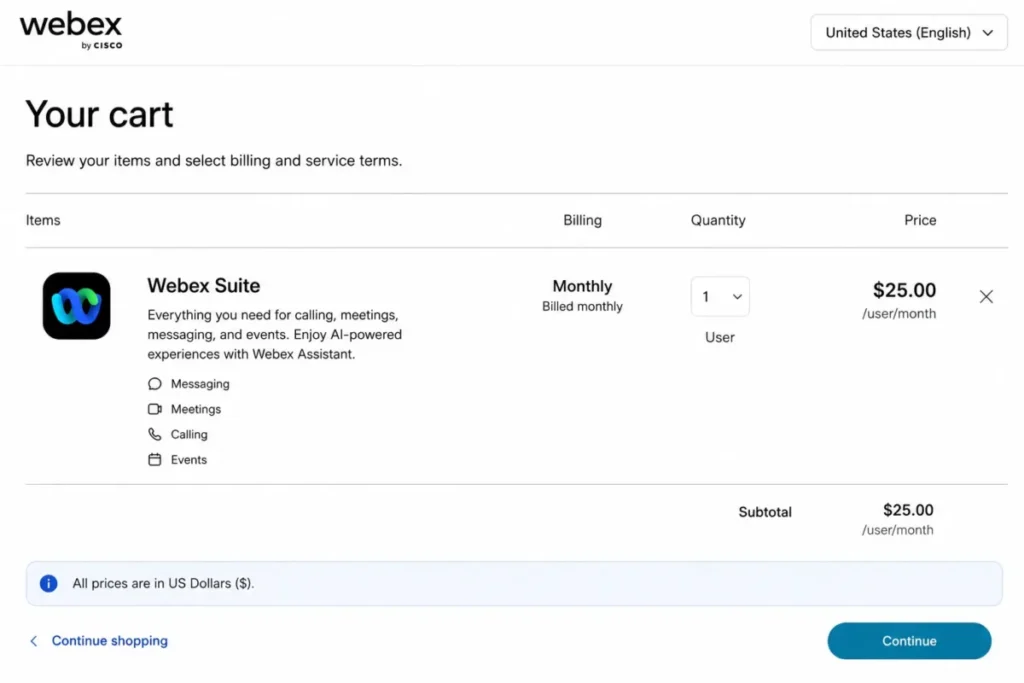
- $25 per user per month on the US monthly cart page.
- Practical tier:
- the Webex Suite itself, which combines messaging, calling, and meetings rather than splitting them into separate purchases.
- Free plan:
- not the relevant entry point for this cohort; the suite is a licensed enterprise purchase.
- First limit that bites:
- 5,400 characters per message and 10 files per message on most platforms, which shapes how teams post long incident updates.
- Better than Mattermost:
- capacity, pricing, and packaging are documented publicly, so procurement can model cost without a sales cycle.
- Worse than Slack:
- the entry price is nearly three times Slack Pro on monthly billing, and the onboarding effort is materially higher.
- Setup difficulty:
- medium to high. Organization policy, licensing, and retention administration are all part of the rollout rather than afterthoughts.
- Hidden costs:
- the administrative effort itself, since retention policy and space governance are applied centrally rather than by team leads.
- Evidence status:
- documentation-verified against the Webex Suite US cart pricing page and the Webex App capacities documentation, checked August 3, 2026.
Webex earns its place on capacity rather than price. Teams and spaces support up to 5,000 members, files up to 2 GB, and 10 files per message, which is the kind of ceiling that only matters once an organization is large enough for it to matter.
The 5,400-character message limit is the most practical constraint on that list. Incident commanders and release managers who paste long status blocks into a channel will hit it, and the workaround is a file attachment or a linked document rather than a longer message.
At $25 per user per month, this is the most expensive option ranked here, and the comparison that matters is not against Slack. It is against the combined cost of the calling, conferencing, and messaging products a Cisco enterprise would otherwise buy separately.
| Pros | Cons |
|---|---|
| Up to 5,000 members per team or space supports genuinely large managed communities | $25 per user per month is the highest entry price in this ranking |
| Messaging, calling, and meetings arrive as one licensed suite rather than three purchases | 5,400 characters per message constrains long-form status updates |
| Files up to 2 GB and 10 files per message suit engineering and media-heavy workflows | Setup difficulty is medium to high because governance is centralized |
| Public list pricing lets procurement model cost without a sales cycle | Little reason to choose it without an existing Cisco calling or conferencing footprint |
- Verdict:
- choose Webex Suite if Cisco calling and conferencing are already standard and central IT owns the governance; almost nothing recommends it to a 30-person company.
6. Mattermost: Best for Regulated and Mission-Critical Self-Hosting

- Best for:
- 50 to 5,000-person engineering, public-sector, defense, and operations teams that need controlled deployment.
- Avoid if:
- you are a small non-technical team that wants instant SaaS onboarding and a price you can read off a page.
- Starting price:
- no public numeric price. Professional and Enterprise use sales-led pricing.
- Practical tier:
- Professional, which is where core search across up to 3 million posts and 1:1 audio calls with screen sharing are described.
- Free plan:
- not documented in the sources used here; the paid licenses are prepaid annual subscriptions billed on activated-user seats.
- First limit that bites:
- the 3 million post search ceiling described for Professional core search, which a high-volume incident-response organization can reach faster than expected.
- Better than Slack:
- deployment control. Self-hosted and single-tenant cloud options put message data on infrastructure your organization governs.
- Worse than Pumble:
- there is no public price, so budgeting requires a sales conversation before you can even compare.
- Setup difficulty:
- high. This is a deployment project with infrastructure, upgrades, backups, and monitoring attached, not a signup.
- Hidden costs:
- the operating burden. Prepaid annual seat licensing is only part of the number; the rest is the engineering time to run it.
- Evidence status:
- documentation-verified against the Mattermost pricing page, checked August 3, 2026.
Mattermost is the incident-response choice on this list. Channel messaging, threads, file sharing, and 1:1 calls run across web, desktop, iOS, and Android inside an environment your own team controls. That is what a regulated organization needs when an outage conversation carries material it cannot send to a third party.
The 3 million post search ceiling is the number to plan against. Search is what turns a chat archive into an operational record, and a busy 500-person engineering organization generates posts fast enough that “up to 3 million” should be modeled rather than assumed to be effectively unlimited.
Sales-led pricing is a real procurement cost, not just an inconvenience. Budget an evaluation cycle, because you cannot put a number in a spreadsheet the way you can for Slack or Pumble.
| Pros | Cons |
|---|---|
| Self-hosted and single-tenant cloud deployment keeps message data on governed infrastructure | No public numeric pricing, so every budget requires a sales cycle first |
| Professional includes 1:1 audio calls with screen sharing alongside channel messaging | Core search on Professional is described as supporting up to 3 million posts |
| Web, desktop, iOS, and Android clients cover distributed and field teams | Setup difficulty is high and the operating burden is ongoing |
| Prepaid annual activated-user seat licensing gives finance a predictable renewal shape | Not a sensible choice for a small team without engineering capacity |
- Verdict:
- choose Mattermost if a compliance or sovereignty requirement makes vendor-hosted chat a non-starter and you already run infrastructure; if the requirement is only a preference, the operating cost will outweigh it.
7. Element: Best for Sovereign, Decentralized, End-to-End Encrypted Messaging

- Best for:
- 100+ seat sovereign, public-sector, healthcare, and cross-organization teams that require federation or end-to-end encryption.
- Avoid if:
- you have no infrastructure team or Matrix expertise and no sovereignty requirement driving the decision.
- Starting price:
- Element Community is free and self-hosted; Element Server Suite Pro is priced per seat per month and Sovereign is priced per deployment, both without published numbers.
- Practical tier:
- Enterprise. Community is positioned for non-professional deployments and evaluations, so a business rollout starts on a paid tier.
- Free plan:
- yes, Community, with a listed user range of 1 to 100.
- First limit that bites:
- the positioning of Community itself. A production deployment outgrows its intended use before it outgrows any technical ceiling.
- Better than Rocket.Chat:
- Matrix federation lets separate organizations collaborate in shared rooms without either side joining the other’s tenant.
- Worse than Slack:
- onboarding effort is high, and there is no published per-seat number to compare against a hosted alternative.
- Setup difficulty:
- high. Deployment, account provisioning, and device verification are all part of the rollout.
- Hidden costs:
- infrastructure and the specialist knowledge to operate a Matrix homeserver, neither of which appears on a pricing page.
- Evidence status:
- documentation-verified against the Element plans and pricing page, checked August 3, 2026.
Element is the answer to a governance question rather than a productivity one. End-to-end encrypted messaging, threads, read receipts, files, polls, voice, and video run over Matrix, which means two organizations can share an encrypted room without either one becoming a guest in the other’s workspace.
That federation model is genuinely different from guest access. Slack Connect and guest seats invite an outsider into your tenant; Matrix federation lets two sovereign deployments meet in the middle, which is why cross-government and cross-hospital collaboration keeps landing here.
The air-gapped deployment option matters for the same buyer. If your requirement is that message data never traverses a network you do not control, the shortlist is short, and Element is on it.
| Pros | Cons |
|---|---|
| Matrix federation enables cross-organization rooms without guest seats in either tenant | Community is positioned for non-professional deployments and evaluations, not production |
| End-to-end encryption covers messaging and calls rather than being an add-on mode | No published per-seat price for Server Suite Pro, so cost modeling needs a sales conversation |
| Self-hosting and an air-gapped deployment option satisfy strict data-residency mandates | Onboarding difficulty is high and assumes Matrix operating knowledge |
| Threads, read receipts, files, polls, voice, and video cover normal daily work, not just secure messaging | The listed Community range of 1 to 100 users limits its use as a low-cost production path |
- Verdict:
- choose Element if sovereignty, federation, and open standards outrank the convenience of a hosted workspace; if none of those words appear in your requirements document, this is more platform than you need.
8. Rocket.Chat: Best for Customizable Secure Self-Managed Deployments

- Best for:
- 100+ seat organizations with security engineering resources and strict deployment customization requirements.
- Avoid if:
- your team cannot operate and govern a self-managed communications stack.
- Starting price:
- free Starter and Community entry points; Commercial, Government, and Defense plans use custom pricing.
- Practical tier:
- whichever paid plan matches your deployment posture, since the plan structure varies by posture rather than by feature count.
- Free plan:
- yes, through the Starter and Community entry points.
- First limit that bites:
- the absence of published user counts and prices, which stalls procurement before a technical evaluation begins.
- Better than Element:
- the plan structure maps directly onto commercial, government, and defense postures, with Defense covering air-gapped and SCIF-ready environments.
- Worse than Pumble:
- nothing about the buying process is fast, and nothing about the price is knowable in advance.
- Setup difficulty:
- high. Provisioning, role configuration, approved external channels, backups, and upgrades are all owned by your team.
- Hidden costs:
- ongoing operational ownership, which is the recurring cost that self-managed deployments most often underestimate.
- Evidence status:
- documentation-verified against the Rocket.Chat plans documentation, checked August 3, 2026.
Rocket.Chat sits closest to Mattermost in intent and differs in emphasis. Where Mattermost leads with mission-critical operations, Rocket.Chat leads with deployment customization, and the Defense plan covering air-gapped and SCIF-ready environments is the clearest expression of that.
Self-managed and isolated deployment patterns with desktop and mobile clients cover the practical requirement, which is that people in restricted environments still need a phone app that works. Channel integrations extend the same environment without pushing data outward.
The custom pricing is the honest constraint to plan around. Exact user counts and prices are not published, so any total-cost model you build before contacting sales is guesswork rather than analysis.
| Pros | Cons |
|---|---|
| Plan structure maps to commercial, government, and defense deployment postures | Exact user counts and prices are custom, so procurement cannot model cost independently |
| Defense plan supports air-gapped and SCIF-ready environments | High setup difficulty with permanent operational ownership attached |
| Free Starter and Community entry points allow a technical evaluation before procurement | Meeting and calling capability is not documented in the sources used here |
| Desktop and mobile clients keep restricted-environment users functional on a phone | Little advantage over Mattermost for a buyer whose driver is operations rather than customization |
- Verdict:
- choose Rocket.Chat if deployment customization and an isolated environment are the requirement and you have the security engineering to own it; choose Mattermost instead if incident operations, not customization, is the driver.
9. Pumble: Best Low-Cost Hosted Slack Alternative

Price is the entire argument, and it is a strong one. Pumble Pro lists at $2.99 per seat per month on monthly billing or $2.49 billed annually, which is roughly a third of Slack Pro on the equivalent cadence.
- Best for:
- 5 to 200-person startups, agencies, nonprofits, and service teams prioritizing low predictable cost.
- Avoid if:
- you need the deepest compliance tooling, data loss prevention, eDiscovery, or the largest app ecosystem.
- Starting price:
- free plan, then Pro at $2.99 per seat per month monthly or $2.49 billed annually.
- Practical tier:
- Pro for most teams, and Business at $4.99 monthly or $3.99 annually once external guests are involved, because the plan page lists guest access from Business upward.
- Free plan:
- yes, and it keeps unlimited message history.
- First limit that bites:
- 10 GB of storage per workspace and a cap of 3 apps on the free plan, which file-heavy teams reach long before they miss any feature.
- Better than Slack:
- the free plan keeps unlimited message history rather than deleting it after 90 days.
- Worse than Slack:
- the integration ecosystem is far smaller, so a team routing many third-party alerts will do more manual work.
- Setup difficulty:
- low. Workspace creation, channel structure, and invitations are self-service.
- Hidden costs:
- storage expansion and the paid tiers that carry guest access, SSO, and retention controls.
- Evidence status:
- documentation-verified against the Pumble pricing page and the Pumble subscription plans help documentation, checked August 3, 2026.
The free plan is the headline, because unlimited message history changes what “free” means. A 15-person nonprofit on Slack Free is losing its record every quarter; the same team on Pumble Free is not, and the constraint it hits instead is 10 GB of workspace storage, which is a solvable problem rather than a permanent loss.
Paid tiers cover the features a growing team eventually needs, with group meetings, screen sharing, annotations and permissions on the lower paid plans, guest access from Business upward, and SSO and retention controls on Enterprise.
That is a reasonable ladder for a company between 20 and 200 people, provided the governance features are budgeted at the tier that actually carries them.
The honest limit is ecosystem depth. If your alerting, deployment, and support tools all expect a Slack app, choosing Pumble converts an integration into a manual process, and that labor cost can exceed the seat savings.
| Pros | Cons |
|---|---|
| Free plan documents unlimited message history, which no other hosted free plan here does | Free storage is capped at 10 GB per workspace and apps at 3 |
| Pro at $2.99 per seat monthly is the lowest paid entry price in this ranking | Integration ecosystem is far smaller than Slack’s app directory |
| A clear ladder: group meetings and permissions on the paid tiers, guest access from Business upward | SSO and retention controls are listed on Enterprise, not on Pro or Business |
| Annual billing at $2.49 per seat keeps a 50-person workspace under $125 per month | Teams migrating from Slack will rebuild rather than port their integration layer |
- Verdict:
- choose Pumble if seat cost is the binding constraint and your integration needs are modest; if half your workflow arrives through Slack apps, the savings will not survive contact with the migration.
10. Flock: Best for Small Teams That Want Chat Plus Light Process Tools

- Best for:
- 20 to 100-person SMBs that want messaging plus polls, reminders, and to-dos without adopting a large app marketplace.
- Avoid if:
- you need transparent pricing, large meetings, or advanced compliance export below the Enterprise tier.
- Starting price:
- Starter is free for teams of 1 to 20. The current official pricing page does not expose a numeric Pro price, and Enterprise is quote-based.
- Practical tier:
- Pro, because Starter’s history, channel, storage, and administration caps are all low enough to bind quickly.
- Free plan:
- yes, Starter, for 1 to 20 people.
- First limit that bites:
- 10,000 searchable messages on Starter, which an active 15-person team passes in weeks rather than months.
- Better than Slack:
- polls, reminders, to-dos, and simple process templates are built in rather than assembled from third-party apps.
- Worse than Pumble:
- Pumble publishes its paid prices, so a small team can budget without a sales conversation.
- Setup difficulty:
- low. Channels, polls, and reminders are self-service and need no administrator.
- Hidden costs:
- unknown at the Pro tier, because the price is not published; treat the upgrade as an unbudgeted item until you have a quote.
- Evidence status:
- documentation-verified against the Flock pricing page, checked August 3, 2026.
Flock’s proposition is consolidation at small scale. A 40-person services company that would otherwise run chat plus a poll tool plus a task list gets all three in one product, and for that specific team the reduced tool count is worth more than app-directory depth.
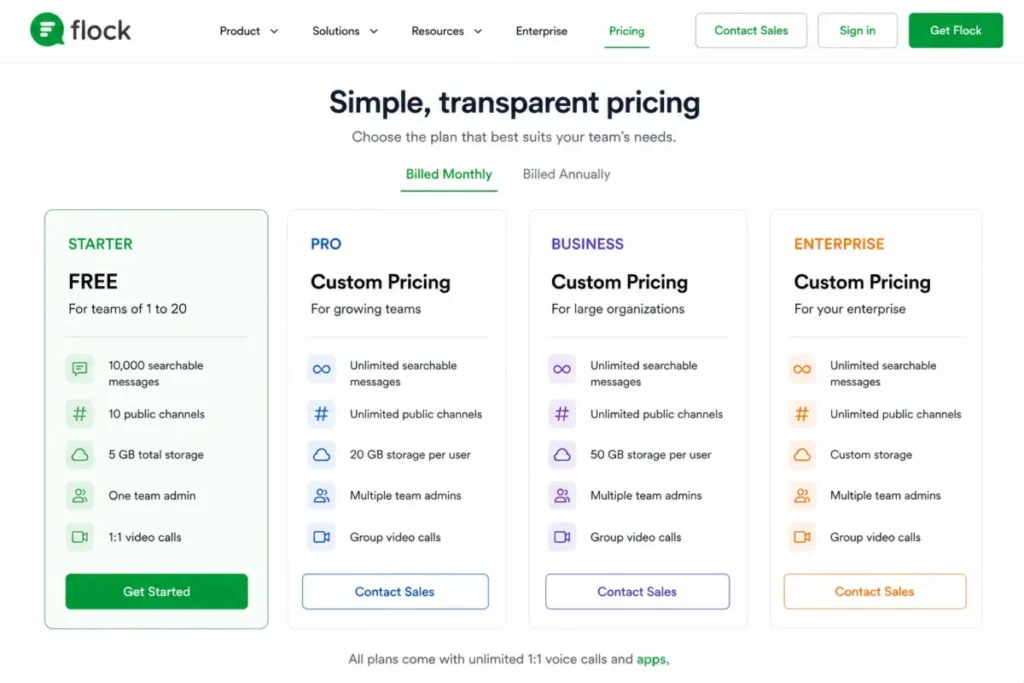
Starter is where the plan reads worse than it looks. 10,000 searchable messages, 10 public channels, 5 GB of total storage, one team admin, and 1:1 video calls together describe a trial rather than an operating plan. For an active team every one of those caps arrives inside the first quarter.
Pro removes most of them, adding unlimited searchable messages and channels, 10 GB of storage per member, multiple admins, group video, screen sharing, and priority support. The blocker is that the official pricing page does not publish a Pro number, so the upgrade cannot be modeled in advance the way Slack’s or Pumble’s can.
| Pros | Cons |
|---|---|
| Polls, reminders, to-dos, and process templates are native rather than third-party apps | The official pricing page does not publish a numeric Pro price |
| Starter is genuinely free for 1 to 20 people with no per-seat charge | Starter stops at 10,000 searchable messages and 10 public channels |
| Pro adds unlimited searchable messages and channels plus 10 GB of storage per member | Starter allows only one team admin and 1:1 video calls |
| Low setup difficulty suits SMBs with no dedicated administrator | Advanced compliance export sits at the quote-based Enterprise tier |
- Verdict:
- choose Flock if you are a 20 to 100-person SMB that wants chat plus light process tools in one place, and treat Starter as free runway while the team is still under 20.
Get the Pro quote before committing, because the number that decides the whole case is not published.
Pricing and Plan Limits: Entry Price vs Practical Tier
| Platform | Entry paid price | Practical tier | 10-seat monthly | 25-seat monthly | Free plan |
|---|---|---|---|---|---|
| Pumble | $2.99 per seat/month | Pro | $29.90 | $74.75 | Yes, unlimited history |
| Microsoft Teams | $4.00 per user/month, yearly | Essentials | $40.00 | $100.00 | Not documented here |
| Google Chat | $7 per user/month, annual | Business Starter | $70.00 | $175.00 | Included in Workspace only |
| Slack | $8.75 per active user/month | Pro | $87.50 | $218.75 | Yes, 90-day history |
| Zoom Workplace | $15.99 per user/month | Pro | $159.90 | $399.75 | Yes, 40-minute meetings |
| Webex Suite | $25 per user/month | Webex Suite | $250.00 | $625.00 | Not the relevant entry point |
| Mattermost | Custom, annual per seat | Professional | Custom | Custom | Not documented here |
| Element | Custom, per seat or deployment | Enterprise | Custom | Custom | Yes, Community, 1 to 100 |
| Rocket.Chat | Custom by posture | Commercial and above | Custom | Custom | Yes, Starter and Community |
| Flock | Not published | Pro | Not published | Not published | Yes, Starter, 1 to 20 |
Sources, checked August 3, 2026: Pumble Pro, Teams Essentials, Workspace Starter.
Also: Slack Pro, Zoom Pro, Webex Suite.
And: Mattermost, Element, Rocket.Chat, Flock.
The 10-seat and 25-seat columns are editorial arithmetic on each published entry rate, not vendor-quoted totals.
The Teams and Workspace figures rest on annual-commitment rates and the other four on monthly-billing rates, so the totals compare monthly spend rather than contract shape.
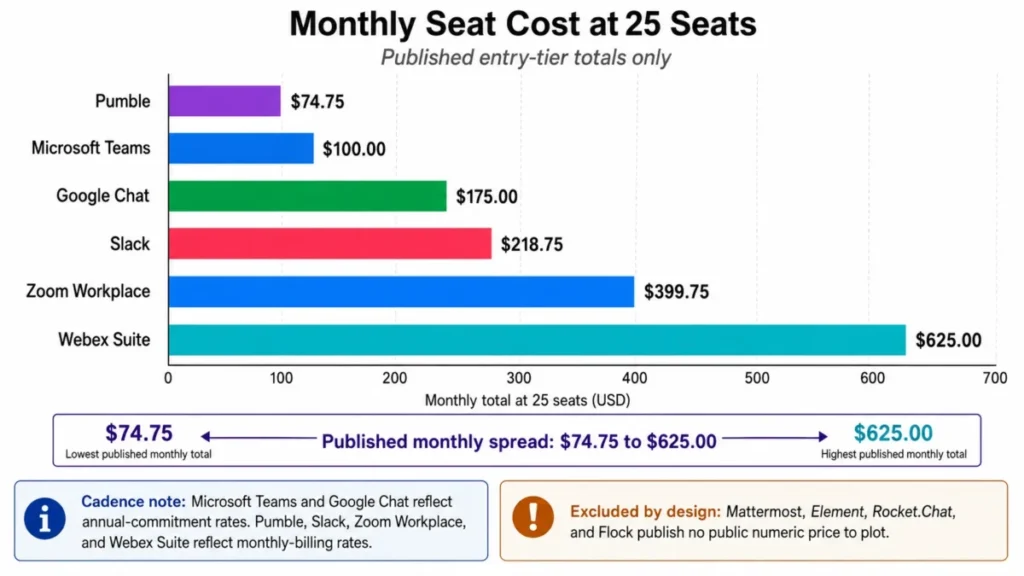
The arithmetic is worth writing out, because seat math is where messaging budgets go wrong. At 25 seats, Slack Pro on monthly billing costs 25 × $8.75 = $218.75 per month, while Microsoft Teams Essentials costs 25 × $4.00 = $100.00 and Pumble Pro costs 25 × $2.99 = $74.75.
That $144 monthly gap between Slack and Pumble is $1,728 a year at 25 seats. It is real money for a small company, and it is also less than one engineer-week, which is roughly what rebuilding a Slack-native alerting workflow can cost.
Webex Suite at 25 × $25.00 = $625.00 per month is the extreme of the published range. Nobody buys Webex to save money on chat, and comparing it against Slack on seat price misreads what the purchase is.
Four platforms cannot be placed on that scale at all. Mattermost, Element, and Rocket.Chat publish no numeric per-seat price, and Flock’s official pricing page does not expose a Pro figure, so any total-cost comparison involving them starts with a sales conversation rather than a spreadsheet.
Teams building a Slack budget in detail should start from the Slack pricing plans breakdown, since the annual and monthly rates diverge enough to change a 12-month forecast.
What the free plans cover before they stop
| Platform | What the free plan gives you | The hard stop that ends it |
|---|---|---|
| Pumble | Unlimited message history and core channel messaging | 10 GB of storage per workspace and a cap of 3 apps |
| Slack | Full channel and thread functionality | 90 days of searchable messages and up to 3 apps |
| Zoom Workplace | Group meetings for up to 100 participants | 40 minutes per group meeting |
| Flock | Chat plus polls, reminders, and to-dos for 1 to 20 people | 10,000 searchable messages, 10 public channels, 5 GB total storage, one admin |
| Element | Self-hosted Community deployment | Listed for 1 to 100 users and positioned for non-professional use and evaluation |
| Rocket.Chat | Starter and Community entry points for evaluation | Paid posture-based plans carry the production features, at custom prices |
Free-tier sources, checked August 3, 2026: Pumble free, Slack Free, Zoom Basic.
Also: Flock Starter, Element Community, Rocket.Chat Starter.
Free plans are not comparable as a category, and treating them as one is the most expensive mistake in this article. Pumble Free and Slack Free look similar in a feature list and behave completely differently over 18 months, because one keeps your record and one deletes it.
Run this test before you standardize on any free tier: name the month in which your team hits the documented cap. If you can name it, the free plan is a trial, and you should price the paid tier now rather than migrate under pressure later.
Teams that genuinely need a zero-cost stack should compare this list against the wider set of free collaboration tools before committing.
Where external guests and cross-company work add cost
External collaboration is priced in three different ways here, and the differences are larger than the seat prices. Slack Connect sits on Pro, so working with agencies or clients moves you off Free immediately rather than gradually.
Pumble’s plan page lists guest access from Business upward, so an agency’s practical tier is Business at $4.99 per seat monthly rather than Pro at $2.99.
That is a $2.00 per-seat difference for a capability many agencies treat as mandatory, and SSO and retention controls sit higher still, on Enterprise.
Element solves the same problem with a different shape entirely. Matrix federation lets two organizations meet in a shared encrypted room without either one issuing guest seats, which removes the per-guest cost question rather than answering it.
One consequence buyers rarely anticipate: when your conversation lives in another organization’s tenant, that organization’s retention policy governs it. Ask a prospective partner what their retention setting is before you agree to run a joint project in their workspace.
What the Entry Paid Tier Opens
| Platform | Entry paid tier | What that tier opens | What stays outside it |
|---|---|---|---|
| Slack | Pro at $8.75 per active user/month | Full message history, group huddles, no-code workflows, Slack Connect, unlimited app integrations | Free users keep 90 days of searchable messages and up to 3 apps |
| Microsoft Teams | Essentials at $4.00 per user/month yearly | Chat, meetings, collaboration, 10 GB cloud storage per user | Email, Office apps, and larger storage need a Microsoft 365 bundle |
| Google Chat | Business Starter at $7 per user/month annual | Chat alongside Gmail, Drive, and Meet | More storage, recording, Vault, and advanced controls sit on higher tiers |
| Zoom Workplace | Pro at $15.99 per user/month | Meetings up to 30 hours | Basic caps group meetings at 40 minutes and 100 participants |
| Webex Suite | Webex Suite at $25 per user/month | Messaging, calling, and meetings in one environment | Capacities still cap 5,000 members per space and 5,400 characters per message |
| Mattermost | Professional, custom annual per activated-user seat | Core search across up to 3 million posts, 1:1 audio calls with screen sharing | Public numeric pricing is not disclosed |
| Element | Server Suite Pro, custom per seat | E2EE messaging, threads, files, polls, voice and video, self-hosting | Community is listed for 1 to 100 users and non-professional deployments |
| Rocket.Chat | Commercial, Government, or Defense, custom | Self-managed and isolated deployments, air-gapped and SCIF-ready on Defense | Exact user counts and prices are not published |
| Pumble | Pro at $2.99 per seat/month | Paid channel features above the free workspace, including group meetings, screen sharing, annotations, and permissions | Guest access is listed from Business upward, SSO and retention controls sit on Enterprise, and Free caps storage at 10 GB per workspace and apps at 3 |
| Flock | Pro, price not published | Unlimited searchable messages and channels, 10 GB storage per member, multiple admins, group video, screen sharing | Starter stops at 10,000 messages, 10 public channels, 5 GB storage, one admin |
Entry-tier evidence, checked August 3, 2026: Slack plan page, Teams business options.
Bundled tiers: Workspace plan page, Zoom Workplace Pro, Webex capacity limits.
Sales-led entries in this table draw on Mattermost’s pricing page, Element’s plans page, and the Rocket.Chat plan list.
Low-cost tiers: Pumble plan page, Flock plan page.
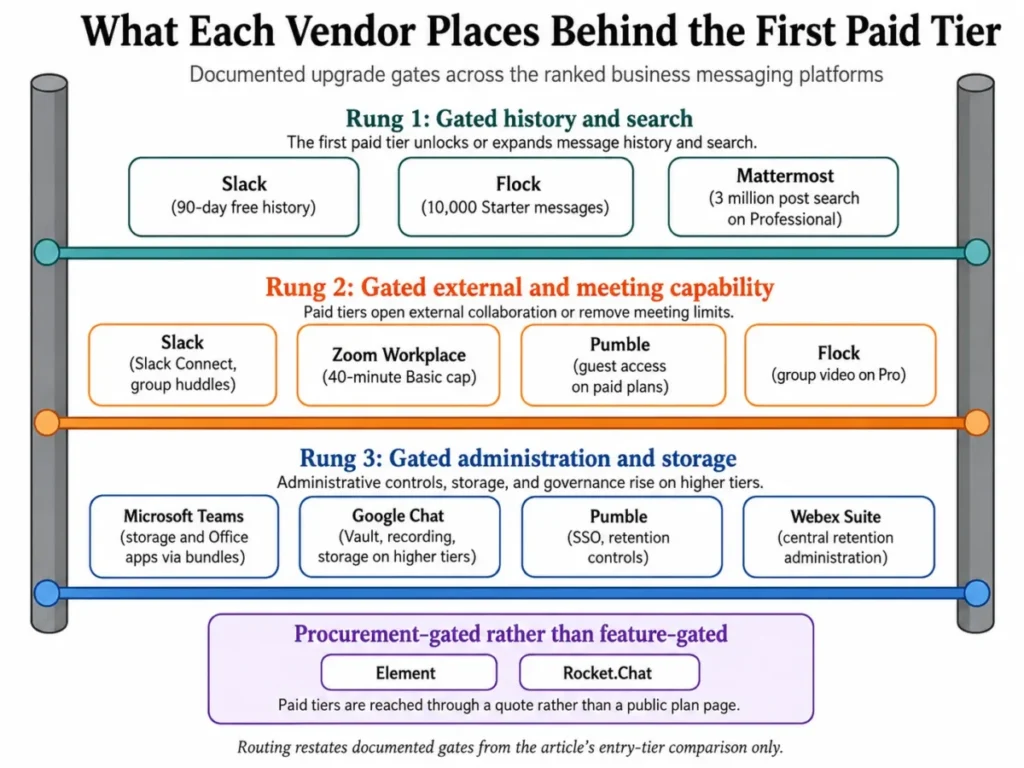
Two patterns fall out of that table. The suite vendors gate storage and compliance tooling rather than core chat, while the standalone products gate history, external collaboration, and administration, which is why a Slack or Pumble free plan feels generous and then suddenly does not.
The self-hosted three gate nothing in the usual sense. Their equivalent of a feature gate is a procurement cycle, and the practical question is not which plan opens a feature but how long it takes to find out what it costs.
Administration is the gate most buyers under-plan. SSO, retention controls, permissions, and recordings sit on paid tiers across Pumble and require Workspace tier upgrades or Microsoft 365 bundles elsewhere, so a security review after rollout tends to produce an unbudgeted upgrade rather than a settings change.
Message History, Search, and Retention
| Platform | Documented history or search boundary | What that means for institutional memory |
|---|---|---|
| Slack | Free retains 90 days of searchable messages; Pro adds full message history | A team on Free permanently loses each quarter as it ages out |
| Pumble | Free keeps unlimited message history; storage capped at 10 GB per workspace | The record survives; attachments are what force the upgrade |
| Flock | Starter caps searchable messages at 10,000; Pro makes them unlimited | Search stops working long before the team stops growing |
| Mattermost | Professional core search is described as supporting up to 3 million posts | High-volume operations teams should model the ceiling, not assume it away |
| Webex Suite | 5,400 characters per message, 10 files per message, files up to 2 GB | Long incident updates become attachments rather than searchable message text |
| Google Chat | History and retention can be administered at the Workspace level | An internal admin policy, rather than a plan tier alone, can decide how long the record lasts |
History and search sources, checked August 3, 2026: Slack Free, Pumble plans, Flock plans.
Also: Mattermost plans, Webex capacities, Google Chat history.
Search is the feature nobody evaluates and everybody depends on. The question a shortlist should answer is not whether search reaches back but how far. Five of the six rows above carry a documented boundary: a time window on Slack, a message count on Flock, a post count on Mattermost, a message length on Webex, and a storage cap on Pumble.
Webex’s character limit changes behavior rather than blocking it. Once status updates move into attachments to fit inside 5,400 characters, they stop appearing in message search, which quietly degrades the archive even though no limit was technically exceeded.
Google Chat’s Workspace-level retention control is the case that cuts both ways. Centralized control is exactly what a compliance team wants and exactly what a project team discovers too late, so agree the retention setting before the first project rather than after the first audit.
Those controls, along with Vault and additional storage, arrive with higher Google Workspace pricing tiers.
Setup and Migration Difficulty
| Platform | Setup difficulty | Why it lands there |
|---|---|---|
| Pumble | Low | Self-service workspace, channels, and invitations with no administrator required |
| Flock | Low | Channels, polls, and reminders configure themselves; one admin is the Starter default |
| Zoom Workplace | Low | Most organizations already hold Zoom accounts, so Team Chat is an enablement step |
| Slack | Low to medium | Channels are self-service; governance, naming, and app approval are the real work |
| Google Chat | Low inside Workspace | Spaces are self-service once an administrator enables Chat |
| Microsoft Teams | Low inside Microsoft 365, medium for governance | Provisioning is instant; retention and guest policy are the project |
| Webex Suite | Medium to high | Licensing, organization policy, and central retention administration precede rollout |
| Mattermost | High | A deployment project with infrastructure, upgrades, backups, and monitoring attached |
| Element | High | Deployment, account provisioning, and device verification all sit with your team |
| Rocket.Chat | High | Provisioning, role configuration, approved integrations, backups, and upgrades are yours |
Deployment sources, checked August 3, 2026: Pumble, Flock, Zoom.
Also: Slack, Workspace, Teams.
And: Webex, Mattermost, Element, Rocket.Chat.
Difficulty ratings are editorial assessments of documented setup requirements.
Migration deserves more caution than most rankings give it. Import capability differs by product, and the sources used here do not document full-fidelity migration for every platform. Treat any claim that private channels, threads, files, guests, and app history all transfer intact as something to get from the vendor in writing.
The practical sequence that survives contact with reality: export first, confirm what the export contains, pilot with one team for a full month, and only then move the rest. Teams that reverse the last two steps discover the gaps at the worst possible moment.
What Self-Hosting Costs to Operate
Self-hosting is not a cheaper version of a hosted plan, and reading Mattermost, Element, or Rocket.Chat as the budget option is the most common error in this part of the market. The licence is one line; the operating model is the rest.
Budget for infrastructure, storage growth, version upgrades, backup and restore testing, monitoring, and the administrator time that all of it consumes. None of that appears on a pricing page, and all of it recurs annually.
There is a second cost that is easy to miss. Sales-led pricing at Mattermost, Element, and Rocket.Chat means a longer evaluation cycle and less budget certainty, so a decision that would take two weeks for a hosted product can take a quarter here.
The rule worth applying: choose self-hosting when a compliance, sovereignty, or air-gap requirement makes vendor-hosted messaging genuinely unacceptable. Choosing it as a preference converts a $75 to $220 monthly line item into an ongoing engineering commitment.
Sovereignty and Security Are Not the Same Purchase
The word “secure” covers at least four different products here, and conflating them produces a bad shortlist. End-to-end encryption, data residency, self-hosting, federation, and enterprise compliance tooling solve different problems for different threat models.
Element’s answer is cryptographic and architectural: end-to-end encryption across messaging and calls, Matrix federation, self-hosting, and an air-gapped deployment path. That fits an organization whose requirement is that no third party can read the content, ever.
Mattermost and Rocket.Chat answer a control question instead. Message data sits on infrastructure your organization operates, which satisfies data-residency and jurisdiction requirements even where end-to-end encryption is not mandated.
The suite vendors answer a governance question. SSO, retention policy, permissions, Vault-style eDiscovery, and central administration are what a regulated enterprise usually needs, and they are available without giving up a hosted operating model.
Work out which of those three requirements is written in your policy before you shortlist. A team that needs eDiscovery and buys end-to-end encryption has made its compliance job harder, not easier.
Which Platform Should You Choose?
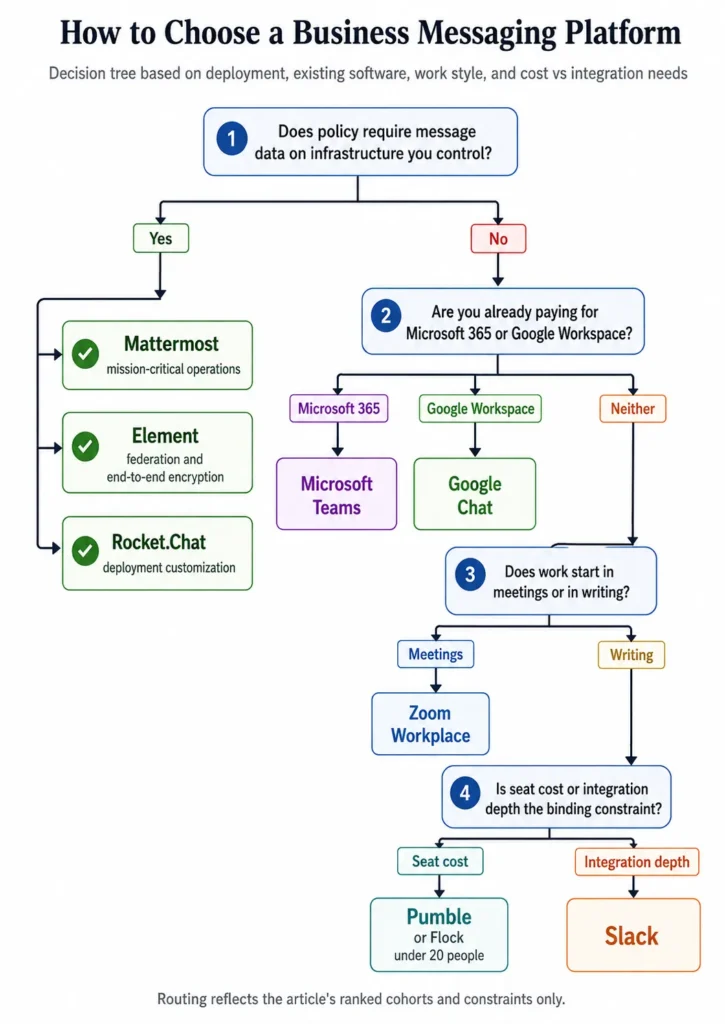
Work through these seven questions in order. The first three eliminate more options than the rest combined.
- Does a policy require message data on infrastructure you control? If yes, your shortlist is Mattermost, Element, and Rocket.Chat, and pricing is a later conversation. If no, skip to question two and ignore all three.
- Are you already paying for Microsoft 365 or Google Workspace? If yes, the incumbent chat tool is free at the margin, and any alternative has to justify a full second per-seat invoice against zero.
- How many people need access now, and how many in 12 months? Microsoft Teams Essentials and Google Workspace Business Starter, Standard, and Plus are each sold for up to 300 users, so a company approaching that number is planning a licensing change, not just a rollout.
- Does your work start in meetings or in writing? Meeting-led teams get more from Zoom Workplace at $15.99 per user monthly; writing-led teams get more from Slack or Pumble.
- How much of your workflow arrives through third-party apps? A notification-heavy stack justifies Slack’s app directory; a light one makes Pumble’s price the better trade.
- Do you work with external companies weekly? If yes, price the tier that carries guest access or external channels from day one, because Slack puts it on Pro and Pumble lists it from Business upward.
- What is the total at your real seat count? Multiply the monthly rate by seats and compare it against the migration work you would avoid or create; at 25 seats the published spread here runs from $74.75 to $625.00.
That produces a short recommendation map. Microsoft 365 shops take Teams, Workspace shops take Google Chat, multi-vendor stacks take Slack, and cost-driven teams take Pumble.
Meeting-led teams take Zoom Workplace and Cisco enterprises take Webex. Anyone with a sovereignty mandate takes Mattermost, Element, or Rocket.Chat, depending on whether the driver is operations, encryption, or deployment customization.
Buyers stuck between the two largest options can work through the dedicated Slack vs Microsoft Teams analysis, which is usually the last decision left on the table.
Common mistakes when choosing a business messaging platform
Budgeting from the entry price. Slack Pro rather than Free, a paid Pumble plan rather than the free workspace, and a Microsoft 365 bundle rather than Essentials are the tiers most teams end up on. Each is a different number from the one on the landing page.
Treating free plans as comparable. Unlimited history on Pumble Free and 90-day history on Slack Free are not variations of the same offer, and the difference compounds every month you stay.
Paying twice for the same capability. A company already licensed for Microsoft 365 or Google Workspace that buys Slack is running two messaging platforms, and adoption usually splits rather than migrates.
Ignoring the meeting limits inside a chat plan. A 20-person cap on chat-originated Teams calls and a 40-minute cap on Zoom Basic group meetings both fail at the moment they matter most.
Assuming self-hosting is the cheaper path. Infrastructure, upgrades, backups, monitoring, and administrator time are recurring costs that no pricing page displays.
Skipping the guest-access question. External collaboration sits on a paid tier in every hosted product here, so an agency that plans around the entry price is planning around the wrong number.
Assuming migration is lossless. Import coverage for private channels, threads, files, guests, and app history varies by product, and the sources used here do not document full-fidelity migration for every platform.
Final Verdict
Slack takes the top position because it remains the most complete standalone chat product across channels, search, external collaboration, integrations, huddles, and no-code workflows. That is a conditional win rather than a universal one, and the condition is that your stack is not already owned by Microsoft or Google.
For a Microsoft 365 organization under 300 people, Microsoft Teams at $4.00 per user monthly is the stronger economic choice.
The same logic carries over to Google Chat, which is already included in a Workspace subscription at $7 per user monthly.
For cost-sensitive teams between 5 and 200 people, Pumble is the value pick, and it is the only hosted platform here that documents unlimited message history on a free plan. For meeting-led teams, Zoom Workplace at $15.99 per user monthly puts chat next to the artifacts meetings produce.
For enterprises with Cisco calling, Webex Suite at $25 per user monthly buys documented capacity of 5,000 members per space rather than a cheaper seat. For anyone with a sovereignty or air-gap mandate, the choice narrows to Mattermost for mission-critical operations, Element for federation and end-to-end encryption, and Rocket.Chat for deployment customization.
Flock stays on the list for one specific team: a 20 to 100-person SMB that wants chat plus polls, reminders, and to-dos in a single product, with Starter free while headcount is still under 20. Get the Pro quote before committing, because the number that decides that case is not published.
The renewal question worth writing into your calendar now: 11 months from purchase, can you still search the conversation where the decision was made? If the answer depends on a plan tier, you bought the wrong tier.
Teams that also need to fix how work is tracked, not just how it is discussed, should pair this shortlist with the best project management software comparison.
Frequently Asked Questions
These answers repeat the figures from the sections above rather than adding new ones, so a reader who skipped to the end still gets the sourced version.
What is the best business messaging platform for most teams?
Slack is the strongest general-purpose pick for teams whose work runs through many third-party tools, because full history, group huddles, Slack Connect, no-code workflows, and unlimited integrations all open on Pro at $8.75 per active user monthly.
Companies already paying for Microsoft 365 or Google Workspace usually get better value from the chat tool they already own.
What is the best free business messaging platform?
Pumble, because its free plan keeps unlimited message history rather than deleting it. Slack Free stops searchable history at 90 days, Zoom Basic caps group meetings at 40 minutes, and Flock Starter stops at 10,000 searchable messages.
Pumble’s own constraint is 10 GB of storage per workspace and a cap of 3 apps, which is a storage problem rather than a lost record.
What is the cheapest business messaging platform per user?
Pumble Pro at $2.99 per seat per month on monthly billing, or $2.49 billed annually. Microsoft Teams Essentials is next at $4.00 per user per month paid yearly, though it is sold only to organizations with 1 to 300 employees.
At 25 seats that is $74.75 and $100.00 per month respectively.
Which business messaging platform is best for small businesses?
Pumble for teams that want the lowest predictable cost with unlimited history, and Flock for 20 to 100-person SMBs that want polls, reminders, and to-dos built in. A small business already on Microsoft 365 should use Teams instead, since the marginal cost of the chat layer is effectively zero once the suite is paid for.
Which business messaging platform is best for enterprise teams?
Webex Suite at $25 per user per month suits large Cisco environments, with documented capacity of up to 5,000 members per team or space. Regulated enterprises that need deployment control should look at Mattermost or Rocket.Chat instead, both of which use custom pricing and require an internal team to operate the deployment.
Can business messaging software be self-hosted?
Yes, if you pick from a short list. Mattermost documents self-hosted and single-tenant cloud deployment, Element supports self-hosting with an air-gapped option, and Rocket.Chat covers self-managed and isolated deployments including air-gapped and SCIF-ready environments on its Defense plan.
The other seven platforms here are vendor-hosted services.
Is Google Chat included with Google Workspace?
Yes. Chat is part of the Google Workspace subscription rather than a separate product, so a team on Business Starter at $7 per user per month on the annual commitment already has it.
Business Starter, Standard, and Plus can each be purchased for a maximum of 300 users, which is the ceiling to plan against.
How much does business messaging software cost per month?
Published per-seat prices in this ranking run from $2.99 to $25 per user per month. At 25 seats that is $74.75 for Pumble Pro and $625.00 for Webex Suite, a spread of more than eight times.
Mattermost, Element, Rocket.Chat, and Flock’s Pro tier have no published numeric price, so those require a quote.
What happens when the Slack free plan history expires?
Messages older than 90 days stop being searchable on the free plan. Slack Pro adds full message history, so upgrading restores access going forward, but a team that runs six months on Free has already lost visibility into its first quarter of decisions.
Treat the 90-day window as a migration deadline rather than a feature comparison.
Do I need a separate video conferencing tool alongside business messaging?
No, unless your meeting requirements exceed what the chat plan covers. Teams, Google Chat via Meet, Zoom Workplace, and Webex all include meetings, Slack covers huddles on Pro, and Pumble and Flock put group video on paid tiers.
If meetings are the main event rather than a follow-up, compare dedicated video conferencing software instead.