Slack and Microsoft Teams both ship channels, calls, files, and an app directory. The purchase still splits cleanly, and it splits on billing model and meeting scale rather than on feature count.
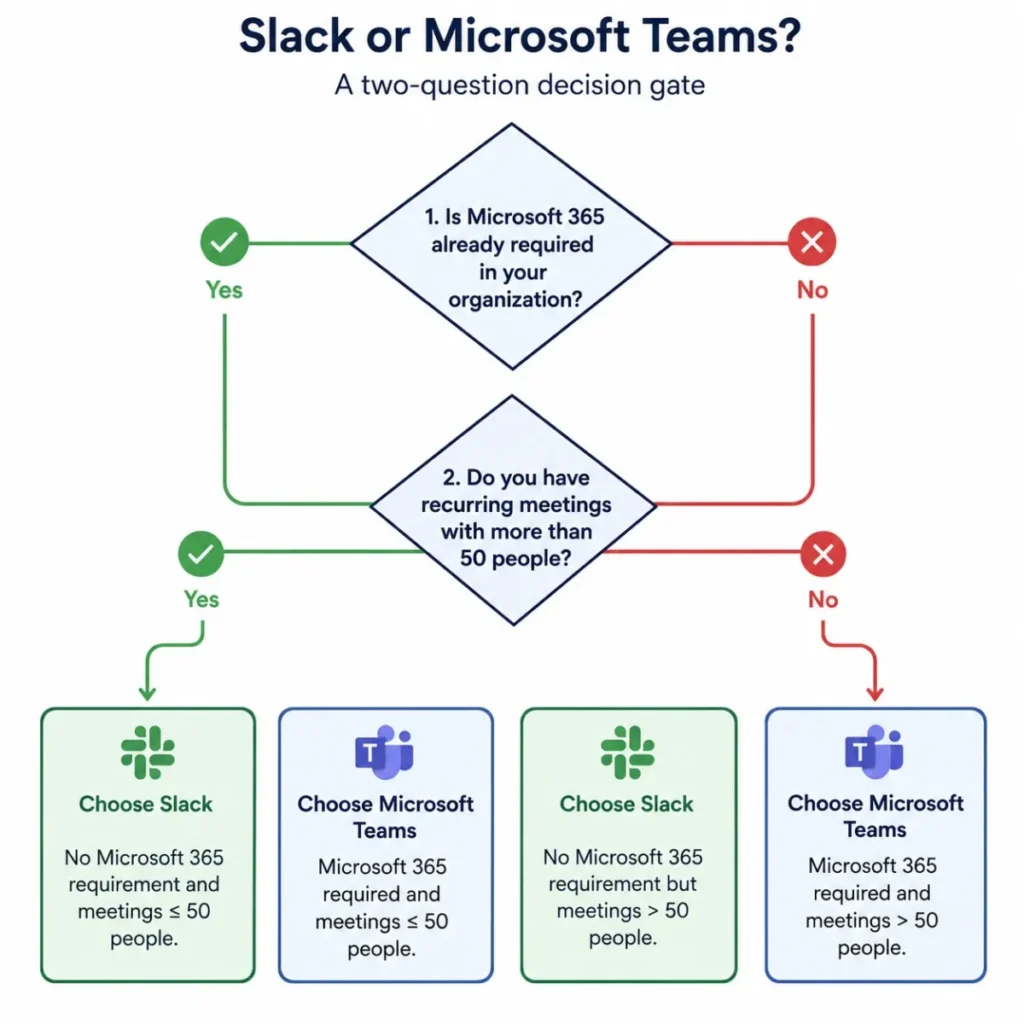
Choose Slack if messaging is the operating system of the company, if the software stack is mixed, and if outside clients or partners need a shared channel without an identity project first.
Choose Microsoft Teams if Microsoft 365 is already a required line item, if recurring meetings run past 50 people, or if a central IT group owns identity, retention, and compliance.
Every price and limit below was read from the two vendors’ own pages on 2026-07-27. One of those pages disagrees with another page from the same vendor, and that conflict is flagged rather than resolved, because a free rollout can be planned around the wrong number.
Start with the best team collaboration tools hub if the shortlist is still open.
In This Article (18 sections)
Slack vs Microsoft Teams: Quick Verdict
| Category | Winner | Why |
|---|---|---|
| Business free tier | Slack | Slack Free is a workspace plan with a 90-day search window; Teams Free caps group meetings at 60 minutes |
| Entry paid price | Microsoft Teams | Teams Essentials lists at $4.00 per user/month paid yearly against Slack Pro at $7.25 |
| Cost inside Microsoft 365 | Microsoft Teams | Business Basic with Teams lists $1.60 per user/month above the no-Teams version |
| Variable or seasonal headcount | Slack | Billing follows active members and unused time returns as a prorated credit |
| Messaging depth and searchable context | Slack | Full history, Workflow Builder, and Lists all start at the Pro plan |
| Formal meetings and scale | Microsoft Teams | Business plans carry 300 attendees; paid Slack huddles stop at 50 |
| Client and partner channels | Slack | One Slack Connect channel holds up to 250 organizations |
| Governed external access | Microsoft Teams | External access, guest access, and shared channels each have a separate resource boundary |
| Regulated use below enterprise | Microsoft Teams | Slack HIPAA support requires an Enterprise plan and a signed agreement |
| Automation ownership risk | Slack | Teams Workflows belong to individual user owners and can be left without one |
Sources: Slack plan and pricing documentation and Microsoft Teams plan and limits documentation, checked 2026-07-27. Each figure is cited again in its own section.
Every row applies one decision criterion to the first product and then to the second product, records the practical difference, and names the winner by scenario, because a criterion with no documented difference cannot settle a purchase. Choose the row that matches your own constraint when the others feel close.
Eight of those ten rows are decided by structure rather than by polish. Slack wins where the conversation itself is the asset, and Microsoft Teams wins where the tenant is the asset.
The rows that flip a decision fastest are meeting scale and the Microsoft 365 bundle. A team that already pays for Business Basic is arguing about $1.60 per user per month, not about $7.00.
Both products fail specific buyers outright, so the disqualifiers are worth reading before the pricing math.
| Do not choose | When this is true | Evidence trigger |
|---|---|---|
| Slack | Recurring all-hands or training sessions run past 50 people | Paid huddles support 50 participants with 25 video feeds |
| Slack | Protected health information must sit inside the collaboration tool | HIPAA support is limited to an Enterprise plan with a signed agreement |
| Slack Free | Institutional knowledge must survive past a year | Free content older than one year may be deleted on a rolling basis |
| Microsoft Teams Free | The buyer is a company rather than one person | The free tier caps group meetings at 60 minutes and 100 participants |
| Microsoft Teams | Partner channels must open without touching identity settings | External shared channels need cross-tenant configuration on both sides |
Sources: Slack huddle limits, Slack HIPAA eligibility, and Microsoft Teams shared-channel prerequisites, checked 2026-07-27.
Slack vs Microsoft Teams at a Glance
| Dimension | Slack | Microsoft Teams |
|---|---|---|
| Best for | Messaging-first teams, mixed software stacks, client channels | Microsoft 365 organizations, meeting-heavy teams, IT-governed rollouts |
| Free plan | Workspace plan, 90-day searchable history, two-person huddles | One-person product, 60-minute group meetings, 100 participants, 5 GB |
| Entry paid plan | Pro at $7.25 per active user/month billed annually | Teams Essentials at $4.00 per user/month paid yearly |
| Practical tier for most teams | Pro, then Business+ when AI or private-channel export is needed | Microsoft 365 Business Basic, because storage and email come with it |
| Meeting ceiling | 50 participants in a huddle, 25 on video | 300 on business plans, 1,000 on eligible enterprise plans |
| Billing basis | Active members, with credits for deactivated members | Licensed users on an annual subscription |
| Setup difficulty | Low | Medium |
| Main strength | Channel context that stays searchable and shareable outside the company | Meetings, documents, identity, and compliance under one tenant |
| Main watch-out | Export scope and AI features are gated above the entry plan | Add-ons and channel-type restrictions appear after rollout |
Source: Slack Pro plan pricing and Microsoft Teams business plan comparison, checked 2026-07-27.
Two rows in that table carry most of the decision: the meeting ceiling and the practical tier.
Setup difficulty is the one row that a feature table usually gets wrong. Slack is low because a workspace, a few channels, and an app install cover the first week.
Microsoft Teams is medium because the useful configuration lives in the tenant: guest policy, external access, channel types, retention, and workflow ownership. That work is not hard, but it belongs to an administrator rather than a team lead.
Methodology: How We Compared
This comparison is based on official pricing pages, vendor plan comparisons, product help-center articles, and Microsoft Learn technical documentation. Prices, plan gates, and usage limits were checked on 2026-07-27.
Both products were assessed against the same buyer-focused criteria: entry and practical cost, billing basis, message history and search, meeting capacity, automation and AI gates, external collaboration, administration and compliance, and migration effort.
Greater weight was given to factors that change a budget or block a workflow: plan gates, participant ceilings, export scope, identity prerequisites, and add-on licensing. Vendor positioning and brand familiarity carried no weight.
Claims that could not be verified against a vendor page were left out of the tables, and temporary offers are separated from standard list pricing. Where two official pages state different values, both values are shown with the conflict labeled.
Pricing and Total Cost at 10, 25, and 50 Users
List price answers almost nothing here. Slack charges for active members, Microsoft charges for licensed users, and one of the two prices is a bundle that includes email and storage.
Slack list pricing and the active-member rule
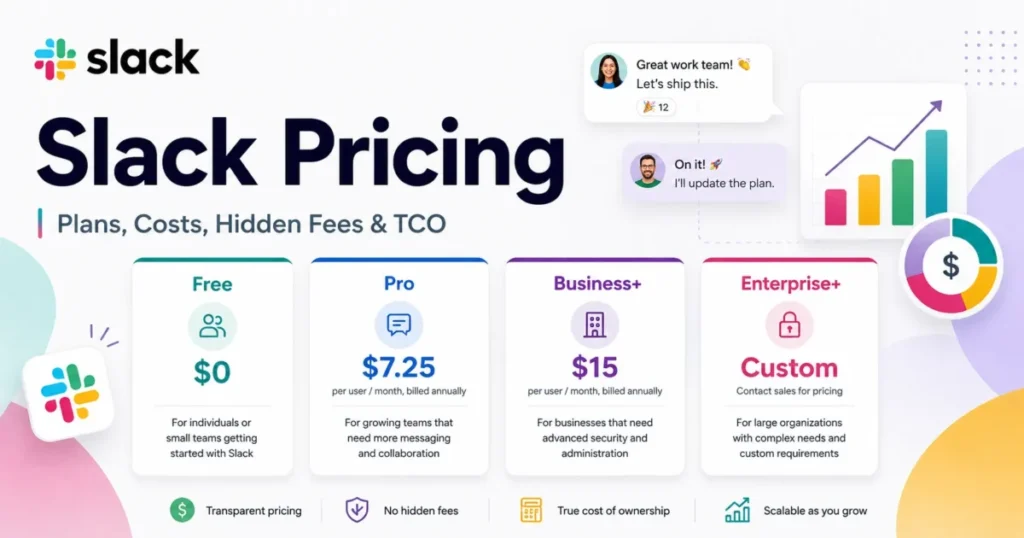
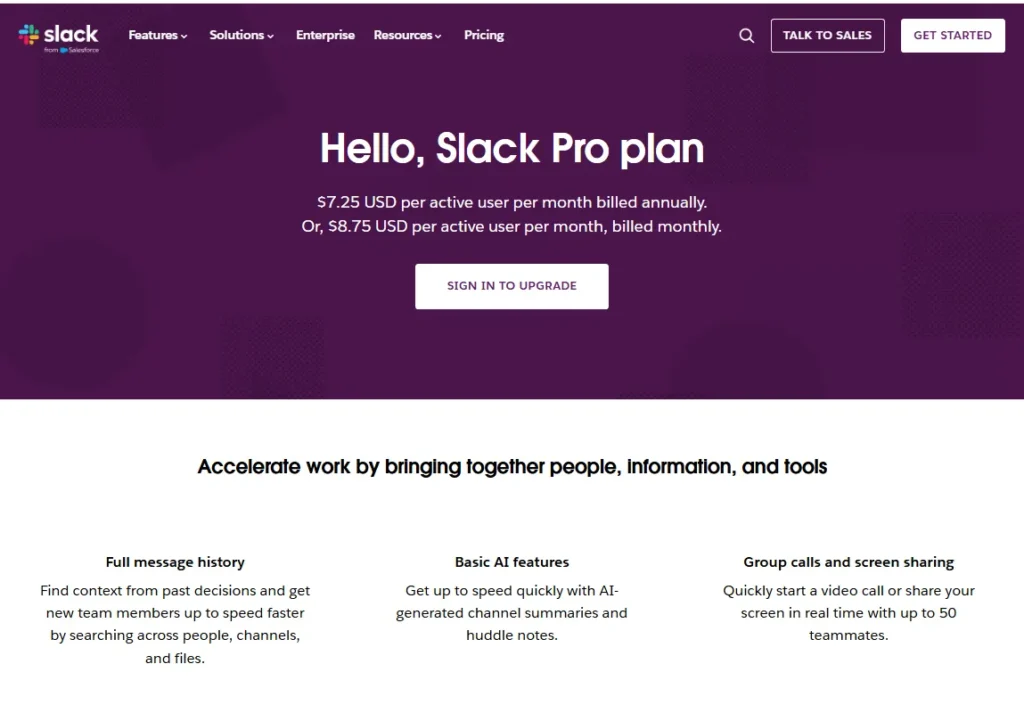
Slack Pro lists at $7.25 per active user per month billed annually, or $8.75 per active user per month on monthly billing.
Source: Slack Pro pricing page, checked 2026-07-27.
Slack Business+ lists at $15 per active user per month billed annually, or $18 per active user per month on monthly billing.
Source: Slack Business+ pricing page, checked 2026-07-27.
The billing basis matters more than either number for teams with contractors, seasonal staff, or a long tail of rarely active accounts. Slack states that a workspace is billed for members who are actively using Slack, and that deactivating a member adds a prorated credit for the unused time to the next statement.
Single-channel guests and bots are not charged, while multi-channel guests are. A workspace can add up to five free single-channel guests for every paid active member, and a paid plan applies to the whole workspace rather than to one person.
Sources: Slack Fair Billing Policy and Slack workspace upgrade documentation, checked 2026-07-27.
For a 40-person agency where 12 people are client-side collaborators in one channel each, that guest ratio is the difference between 40 paid seats and 28. Model the roster by role before comparing headline prices.
Microsoft pricing and the marginal cost of Teams
Microsoft sells Teams three ways, and only one of them is a fair comparison with a Slack subscription.
| Microsoft plan | List price, paid yearly | What it includes beyond chat |
|---|---|---|
| Microsoft Teams Free | $0 | 60-minute group meetings, 100 participants, 5 GB storage |
| Microsoft Teams Essentials | $4.00 per user/month | 30-hour meetings, 300 participants, 10 GB storage per user |
| Microsoft 365 Business Basic | $7.00 per user/month | Web and mobile Office apps, business email, 1 TB storage per user |
| Microsoft 365 Business Basic without Teams | $5.40 per user/month | The same bundle with the Teams license removed |
| Microsoft 365 Business Standard | $14.00 per user/month | Adds desktop Office applications |
Source: Microsoft Teams business plan comparison and Microsoft Teams plan and download page, checked 2026-07-27.
The last two rows are the pair that matters, because they isolate the Teams license from the rest of the bundle.
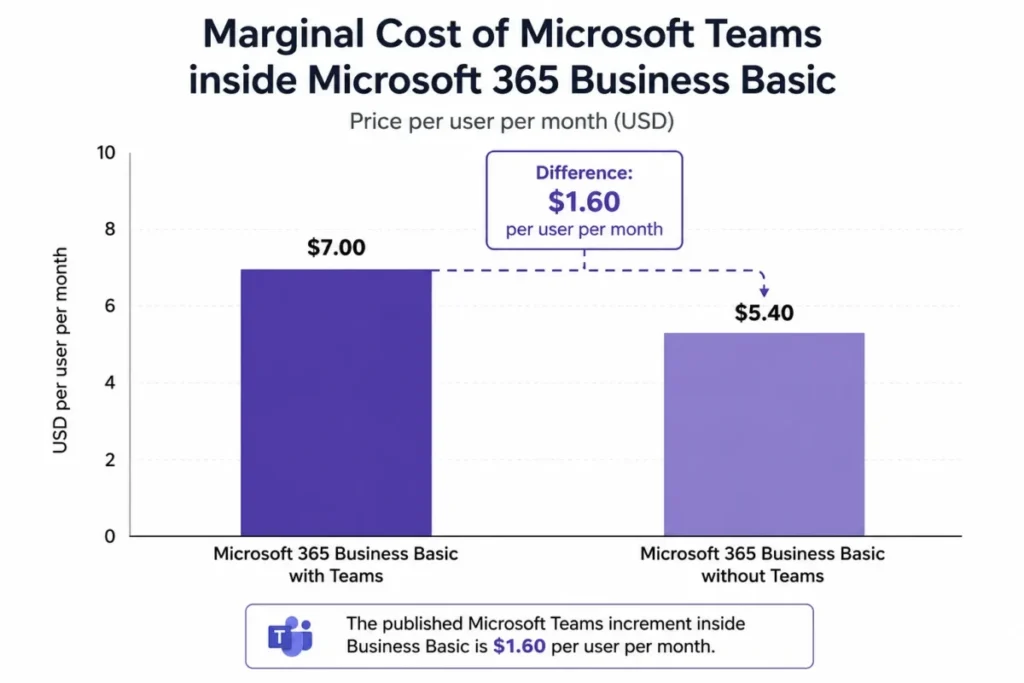
The gap between the two Business Basic rows is the honest number to argue about. Teams adds $1.60 per user per month to a bundle a Microsoft-dependent company was going to buy anyway.
Source: Microsoft 365 Business Basic plan cards with and without Teams, checked 2026-07-27.
That comparison only holds when Business Basic is genuinely required for email and storage. A company on Google Workspace is not choosing between $7.25 and $1.60, it is choosing between $7.25 and $7.00 plus a second email migration.
Annual cost at 10, 25, and 50 users
| Configuration | 10 users | 25 users | 50 users |
|---|---|---|---|
| Slack Pro, billed annually | $870 | $2,175 | $4,350 |
| Slack Business+, billed annually | $1,800 | $4,500 | $9,000 |
| Microsoft Teams Essentials | $480 | $1,200 | $2,400 |
| Microsoft 365 Business Basic with Teams | $840 | $2,100 | $4,200 |
| Microsoft 365 Business Basic without Teams | $648 | $1,620 | $3,240 |
| Teams increment inside Business Basic | $192 | $480 | $960 |
| Teams Premium add-on, on top of a base license | $1,200 | $3,000 | $6,000 |
Calculated from the list prices cited above: published monthly amount multiplied by 12 months and by the user count. Sources: Slack Pro list price, Slack Business+ plan pricing, and Microsoft Teams Premium pricing, checked 2026-07-27.
Read the bottom two rows as budget lines rather than plan prices, because both are add-on math on top of a base subscription.
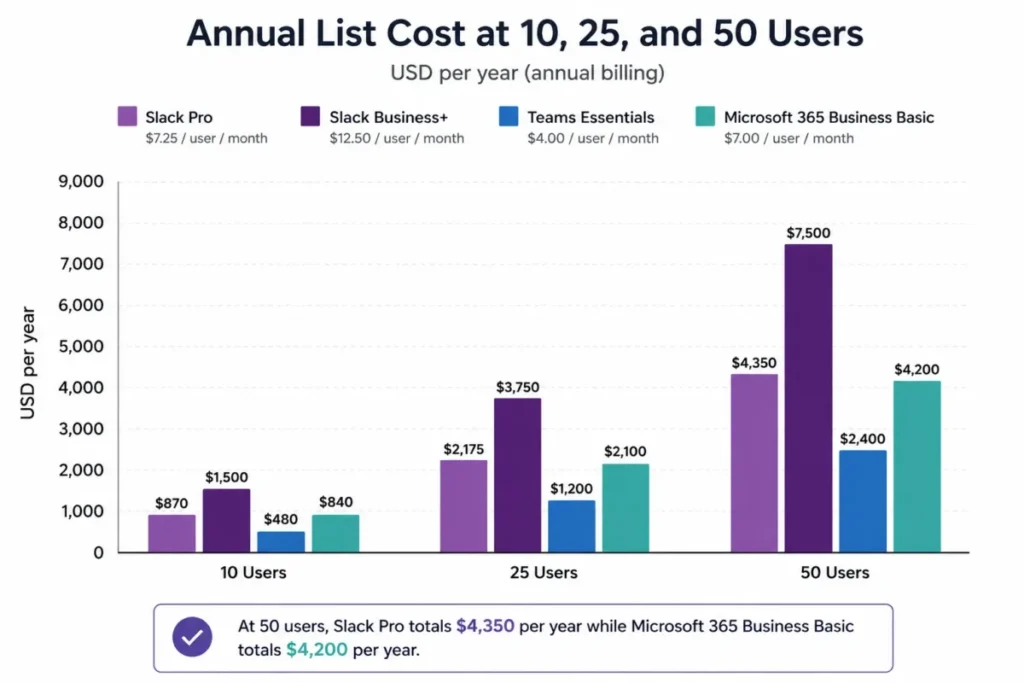
Slack Pro at 50 users costs $4,350 a year and Microsoft 365 Business Basic costs $4,200 for the same headcount, which makes the raw subscription close to a tie. The bundle wins on inclusions and Slack wins on seat elasticity, so the tiebreaker is how stable the roster is.
Slack Business+ is the row that changes the conversation. At 50 users it costs $9,000 a year, roughly double Business Basic, and the reason a team lands there is usually AI features or private-channel export rather than messaging itself.
Add-ons that move the budget after signature
Teams Premium lists at $10.00 per user per month paid yearly and requires a Teams license underneath it. Microsoft states that Teams Premium licenses are not a replacement for Teams licenses and that users need both for the features to work.
Source: Microsoft Teams Premium plan page and Microsoft Teams add-on licensing documentation, checked 2026-07-27.
Priced that way, Teams Premium adds $120 per licensed user per year on top of whatever the base plan costs. For 25 people that is $3,000 a year before the base license, which is more than the entire Business Basic subscription for the same group.
Microsoft 365 Copilot Business is a separate license again. The standard price is $21.00 per user per month paid yearly, and the same page showed a first-year offer at $18.00 per user per month.
Re-verified on the publish date: 2026-07-27. A budget should assume the account renews at the standard price in year two.
Source: Microsoft 365 Copilot Business pricing on the Teams comparison page, checked 2026-07-27.
The upgrade trigger on the Slack side is different in kind. Nothing is sold as an add-on, so the workflow that forces a move is the one that sits on the Business+ plan: message recaps, translations, file summaries, AI search answers, and export of private channels.
The two free plans are not the same product
Slack Free is a workspace plan with a 90-day searchable message window and no listed subscription price.
Source: Slack Free plan page, checked 2026-07-27.
Microsoft Teams Free is presented for personal use, with 5 GB of cloud storage, group meetings capped at 60 minutes, and 100 participants.
Source: Microsoft Teams free plan details, checked 2026-07-27.
Putting those two in the same row of a comparison table is the most common error in this category. The fair business comparison is Slack Free against paid Teams Essentials, because that is the cheapest Microsoft configuration a company can run on.
One more contract detail belongs in the free-plan decision. Microsoft states that a converted account cannot revert to the free version using the same email address, and that all users in the organization must be upgraded together.
Source: Microsoft Teams plan upgrade conditions, checked 2026-07-27.
Messaging, Channels, and Search
Slack gates message history at the plan line rather than inside the product. Free workspaces get a 90-day window, and Pro and above get full history along with Workflow Builder and Lists.
Source: Slack plans and features comparison, checked 2026-07-27.
The free-plan detail that decides rollouts is not the search window, it is deletion. Slack documents that free workspaces can view and search the last 90 days, and that customer data older than one year may be deleted on a rolling basis from free workspaces.
Visibility and retention are two different risks. A team that treats the 90-day limit as “hidden but recoverable” will discover at month 14 that the decision thread backing a customer commitment is gone.
That same documentation page states that a free workspace can add up to 10 third-party or custom apps.
Source: Slack usage limits for free workspaces, checked 2026-07-27.
Slack’s own Free pricing page states a different number, “Up to 3 apps”, on the same checked date of 2026-07-27. Both statements are official and they do not agree, so neither belongs in a table as the enforced cap.
The practical instruction is narrow: if a free rollout depends on more than three integrations, confirm the enforced limit inside the workspace before committing, because the difference between 3 and 10 apps decides whether alerting, ticketing, and CI notifications all fit.
Microsoft Teams organizes the same job differently, and the sharp edge is channel type rather than plan. Bots, connectors, and messaging extensions are available in standard channels and are not supported in private channels or shared channels.
Source: Microsoft overview of teams and channels, checked 2026-07-27.
That asymmetry is an architecture decision disguised as a settings choice. A team that builds its incident workflow in a private channel and then adds a bot will be rebuilding the channel, not troubleshooting the bot.
Slack takes the messaging round for teams whose decisions live in threads and need to be found later. Microsoft Teams takes it for teams whose work product is a document that several people edit inside the same tenant.
Meetings and Calls
Slack huddles are built for escalation inside an existing conversation rather than for scheduled sessions. On the free plan a huddle holds two participants, and on paid plans it holds up to 50 participants with 25 able to enable video at once.
Huddles run in the Slack desktop and mobile apps and in supported browsers including Google Chrome and Firefox.
Source: Slack huddles documentation, checked 2026-07-27.
Microsoft Teams meetings are the opposite shape. Business plans including Teams Essentials, Business Basic, Business Standard, and Business Premium support up to 300 people, and eligible enterprise plans support up to 1,000.
Source: Microsoft Teams limits and specifications, checked 2026-07-27.
| Session type | Slack | Microsoft Teams |
|---|---|---|
| Two-person call from a channel | Yes, including on the free plan | Yes |
| Team stand-up of 12 to 25 people | Yes, on a paid plan | Yes |
| Department session of 50 people | At the documented huddle ceiling | Yes |
| Training or all-hands of 300 people | Not supported by huddles | Yes on business plans |
| Company event of 1,000 people | Not supported by huddles | Yes on eligible enterprise plans |
Source: Slack huddle limits and Microsoft Teams meeting limits as cited immediately above, checked 2026-07-27.
Microsoft Teams wins meetings, and the margin is not close for anything that gets a calendar invite. The caveat is that its own ceilings show up at exactly the sizes a training team cares about.
A Teams meeting recording stops at 4 hours or 1.5 GB, whichever arrives first, and then restarts. Breakout rooms can only be created in meetings with fewer than 300 attendees, and creating breakout rooms limits the meeting to 300.
Source: Microsoft Teams recording and breakout room limits, checked 2026-07-27.
A full-day onboarding session therefore produces several recording files rather than one, and a 300-person workshop cannot be split into rooms. Both are planning constraints rather than blockers, but both are easier to design around before the first cohort than after.
AI and Automation
Slack retired its separate AI add-on and redistributed the features across paid plans. The add-on is no longer available to purchase, and customers who bought it keep access until their first renewal after 2025-08-17.
Source: Slack update on plan feature availability and pricing, checked 2026-07-27.
| AI or automation capability | Slack Free | Slack Pro | Slack Business+ |
|---|---|---|---|
| Conversation and thread summaries | Not available | Included | Included |
| Huddle notes | Not available | Included | Included |
| Recaps, translations, file summaries | Not available | Not available | Included |
| AI search answers | Not available | Not available | Included |
| Workflow Builder and Lists | Not available | Included | Included |
Source: Slack plan feature matrix, checked 2026-07-27.
The plan gate is the buying decision here, not the model quality. A team that wants channel recaps and translated messages is choosing a $15 per active user per month plan, which is double the Pro price and roughly the cost of two Microsoft 365 Business Basic seats.
Workflow Builder is available on paid plans, works from templates or from scratch, and its connector steps require authenticating the third-party account, sometimes with extra approval or configuration.
Source: Guide to Slack Workflow Builder, checked 2026-07-27.
Microsoft’s automation story is broader and carries a governance risk that feature tables never mention. Workflows are linked only to specific users, described by Microsoft as owners of the workflow, and not to a Teams team or channel.
Workflows can become orphan flows when an owner leaves and no co-owners were assigned, and administrators are advised to add co-owners to keep the process running. Actionable messages are accessible only to users with an Exchange Online license.
Source: Microsoft documentation on Workflows and incoming webhooks for Teams, checked 2026-07-27.
That is a leaver-process problem, not an IT preference. Any Teams workflow that pages an on-call rota, posts deploy status, or routes an approval needs a named co-owner and an entry in the offboarding checklist, or it dies quietly on someone’s last day.
Slack takes automation ownership because a workflow published in a channel does not depend on one person’s account remaining active. Microsoft takes automation reach because a Teams workflow can pull the rest of the Microsoft estate into the same channel.
External Collaboration
This is the section where the two products stop resembling each other. Slack shares a channel between companies, and Microsoft shares an identity boundary between tenants.
A Slack Connect channel can host up to 250 organizations including your own, the capability sits on paid plans, and administrators on either side may need to approve the invitation.
Source: Slack Connect documentation, checked 2026-07-27.
Microsoft offers three different external models, and picking the wrong one is the usual cause of a stalled partner rollout.
| External model | Who it fits | Resource boundary |
|---|---|---|
| Teams external access | Chat, calls, and meetings with another organization | No access to Teams resources and no file sharing |
| Teams guest access | A contractor who needs team files and channels | Added to your Microsoft Entra ID as a B2B collaboration user |
| Teams shared channels | A named partner organization working alongside your team | Requires cross-tenant access settings in Microsoft Entra ID on both sides |
| Slack Connect | Many clients or partners at once | Channel-scoped sharing across up to 250 organizations |
Sources: Microsoft guidance on communicating with other organizations, Microsoft shared channels documentation, and the Slack Connect page cited above, checked 2026-07-27.
Microsoft states that guests, including guests converted to members, cannot be added to a shared channel, and that external participation runs through Microsoft Entra B2B direct connect instead. Each organization you want to share channels with has to complete the cross-tenant configuration as well.
For an agency running 30 client channels, the difference is a scheduling problem, not a preference. Slack needs an invitation and an approval, while Teams needs a matching configuration inside a partner’s identity system that the agency does not control.
Slack takes external collaboration for volume and speed. Microsoft Teams takes it for governed, long-running partnerships where the security team wants a defined boundary per relationship rather than a channel that anyone can extend.
Integrations, Apps, and Platform Limits
Owning Microsoft 365 does not settle this comparison, because Slack documents its own Microsoft integrations. The published set covers the Outlook email add-in, the Outlook Calendar app, OneDrive and SharePoint file sharing, Azure Active Directory for member identity, Azure Boards, Azure Pipelines, Azure Repos, Microsoft Flow templates, and starting Teams calls from a Slack workspace.
Source: Microsoft products for Slack, checked 2026-07-27.
That list will not replace document co-authoring, and it is not meant to. It does mean a Microsoft-heavy company can keep Slack as the messaging layer without stranding Outlook, OneDrive, or Azure DevOps notifications.
Platform limits are where an alerting or bot workload runs into a wall, and the two vendors publish them in different shapes. Slack documents rate limits per API method, per workspace, and per app, so a high-volume integration is constrained method by method.
Microsoft publishes a global limit of 50 requests per second per app per tenant for Teams bots, with per-thread ceilings of 7 operations per second, 8 per 2 seconds, 60 per 30 seconds, and 1,800 per hour.
Source: Microsoft Teams bot rate limit documentation, checked 2026-07-27.
The per-thread numbers are the ones to design around. A deployment bot that posts one message per service into a single channel thread will hit the 30-second ceiling long before it approaches the tenant limit, so batching belongs in the first version rather than the second.
Security, Compliance, and Administration
Compliance logos hide plan gates in both products, and the gates sit in different places.
Slack limits HIPAA-oriented use to an Enterprise plan, requires an executed business associate agreement, and states that Slack does not maintain the designated record set and should not be the system of record for health information.
Source: Slack and HIPAA documentation, checked 2026-07-27.
For a 30-person clinic or a healthcare vendor that cannot buy an Enterprise plan, that single line settles the decision before any feature is compared.
Microsoft Teams provides single sign-on through Microsoft Entra ID, two-factor authentication, encryption of data in transit and at rest, retention policies, data loss prevention, eDiscovery and legal hold, audit log search, sensitivity labels, information barriers, and Customer Key. Microsoft states that Microsoft 365 and Office 365 subscriptions and the associated standalone licenses determine which of those features are available.
Source: Microsoft Teams security and compliance overview, checked 2026-07-27.
Standard encryption applies to Teams communications by default and needs no configuration. End-to-end encryption is a separate capability for one-to-one calls and for meetings configured to require it, and meeting support for it is a Teams Premium feature.
Source: Microsoft Teams encryption documentation, checked 2026-07-27.
The buying instruction is the same for both vendors and rarely written down. Ask which exact plan or license carries the specific control the auditor asked about, and get the answer in the order form rather than in a capability list.
Administration effort splits the same way as setup. Slack concentrates governance in workspace settings and export policy, while Microsoft spreads it across the tenant, and each approach suits a different sized IT function.
| Administrative task | Slack | Microsoft Teams |
|---|---|---|
| Identity and sign-in | Workspace and organization settings | Microsoft Entra ID with Conditional Access |
| Retention and legal hold | Workspace retention policy, export scope by plan | Retention policies, eDiscovery, and legal hold, license dependent |
| External participants | Slack Connect approvals and guest roles | External access, guest access, and cross-tenant settings |
| Regulated workloads | Enterprise plan plus a signed agreement for HIPAA | Purview capabilities determined by the subscription |
Source: Slack HIPAA and export documentation with the Microsoft Teams security and compliance overview cited above, checked 2026-07-27.
Ease of Use, Setup, and Admin Effort
Slack reaches useful in an afternoon. A workspace, a channel naming convention, and two or three app installs cover the first week, and the plan upgrade decision can wait until history or export becomes a problem.
Microsoft Teams reaches useful in an afternoon as well, but reaches correct several weeks later. Guest policy, external access, channel types, retention, and workflow ownership all have defaults that work for a small team and cause rework at 100 people.
| Setup dimension | Slack | Microsoft Teams |
|---|---|---|
| Day-one difficulty | Low | Low |
| Correct configuration difficulty | Low to medium | Medium |
| Who owns the rollout | A team lead | An identity or tenant administrator |
| Decision to make first | Which plan, because history and export are gated | Which channel type, because bots and connectors need standard channels |
| Most common rework | Upgrading the workspace to recover export scope | Rebuilding a private channel that needs a connector |
Source: Slack plan and export documentation with Microsoft channel-type and workflow documentation, checked 2026-07-27.
After 30 days a healthy Slack rollout looks like channels that map to real workstreams rather than to the org chart. After 90 days it looks like a searchable record that new hires use instead of asking.
After 30 days a healthy Teams rollout looks like meetings and files in the same place as the chat. After 90 days it looks like an external access model that the security team signed off on, with no shadow tenant of guest accounts nobody owns.
Migration and Switching Risks
Microsoft publishes an official Slack to Teams migration tool, which makes one direction of this switch far better documented than the other.
The tool migrates public and private Slack channels, channel messages including threading and standard reactions, channel file attachments, channel membership for owners and members, and canvas and list content converted to HTML and JSON attachments inside the Teams channel.
Source: Microsoft Slack to Teams migration tool documentation, checked 2026-07-27.
Read the prerequisites before promising a date. The documented requirements start with permission to export the Slack workspace and an Azure Blob Storage account with the right Azure roles.
They continue with a Microsoft 365 administrator role such as Migration Administrator or SharePoint Administrator, plus one-time consent from a Global Administrator for the migration app. A set of Microsoft Graph permissions and a full mapping of every Slack user and channel to a Teams destination complete the list.
Two properties of the tool reduce the risk. Migration runs incrementally across multiple passes, and Microsoft states that no data is deleted from Slack during the process, so the source workspace can stay readable during cutover.
Source: Microsoft guidance on incremental Slack migration, checked 2026-07-27.
The tool migrates new root messages and their replies on later passes, and does not migrate edits or deletions of previously migrated messages. Duplicate handling and failure recovery under load are not something a documentation page can settle, so a pilot channel with a reconciliation count belongs in the plan.
The upstream constraint is the Slack export itself, and it is plan-dependent. Public-channel messages and file links can be exported on every plan, while private channels and direct messages can only be exported on Business+ and Enterprise, and that access has to be applied for with approval from the workspace primary owner.
Source: Slack workspace export documentation, checked 2026-07-27.
Exports carry links to files rather than the files themselves, and a free workspace can only export links from the last 90 days. A migration plan that assumes attachments travel with the archive will be short a file-retrieval step and a storage budget.
Going the other way is the harder project. Microsoft’s Teams Export APIs cover one-to-one chats, group chats, meeting chats, and channel messages, but they are an application-permission API with two licensing models rather than a self-service download.
Source: Microsoft Teams Export APIs documentation, checked 2026-07-27.
Treat a move away from Teams as a build, not an export. The same reasoning applies to any platform switch, and the sequencing lessons in a structured CRM migration guide transfer directly: pilot, reconcile, keep the source readable, and cut over by team rather than by date.
Where Slack Wins
Slack takes the decision when the conversation is the durable asset and the company does not want an identity project attached to every partner.
| Pros | Cons |
|---|---|
| Active-member billing with prorated credits for deactivated members | AI recaps, translations, and search answers start at $15 per active user/month |
| Five free single-channel guests per paid active member | Private-channel and direct-message export needs Business+ or Enterprise plus approval |
| One Slack Connect channel spans up to 250 organizations | Paid huddles stop at 50 participants with 25 video feeds |
| Full message history and Workflow Builder from the Pro plan | HIPAA-oriented use requires an Enterprise plan and a signed agreement |
| Documented Microsoft integrations, so the stack does not have to move | Official pages disagree on the free-plan app cap, so a free rollout needs verification |
Sources: Slack Business+ list price, Slack export eligibility by plan, and Slack Connect organization limits, checked 2026-07-27.
Five situations that point to Slack without a long evaluation:
- An agency or consultancy running persistent client channels, where Slack Connect replaces a shared inbox and the client does not have to configure anything in their identity system.
- A product or engineering team on a mixed stack, where alerting, ticketing, and deployment notifications all land in channels and Workflow Builder handles the routine handoffs.
- A company with seasonal or contractor-heavy staffing, where active-member billing and free single-channel guests cut the paid roster.
- A distributed team that works asynchronously, where a searchable decision thread is worth more than a scheduled meeting.
- A team that has already standardized on Google Workspace and has no reason to buy a second productivity bundle.
Where Microsoft Teams Wins
Microsoft Teams takes the decision when the tenant is the durable asset and meetings are a scheduled, recurring part of the operating rhythm.
| Pros | Cons |
|---|---|
| Business plans carry 300-person meetings, enterprise plans carry 1,000 | Teams Premium costs $10.00 per user/month on top of a required base license |
| Teams costs $1.60 per user/month more inside Microsoft 365 Business Basic | Bots, connectors, and messaging extensions do not work in private or shared channels |
| Identity, retention, DLP, eDiscovery, and audit logs in one administrative stack | Compliance features depend on which Microsoft 365 license was purchased |
| An official, documented migration path from Slack | External shared channels need cross-tenant configuration on both organizations |
| Encryption in transit and at rest by default with no configuration | Workflows belong to user owners and become orphan flows when an owner leaves |
Sources: Microsoft Teams Premium pricing, Microsoft Teams meeting limits, and Microsoft Teams channel-type capabilities, checked 2026-07-27.
Five situations that point to Microsoft Teams without a long evaluation:
- A company that already pays for Microsoft 365 and would otherwise carry two subscriptions for one job.
- A training, enablement, or customer-success team that regularly runs sessions above 50 attendees.
- Any organization where document co-authoring in Word, Excel, and PowerPoint is the daily work rather than an occasional attachment.
- A regulated business that needs retention, eDiscovery, and audit controls administered from the same place as identity.
- A partner-heavy enterprise that wants a defined cross-tenant boundary per relationship instead of an open channel invitation.
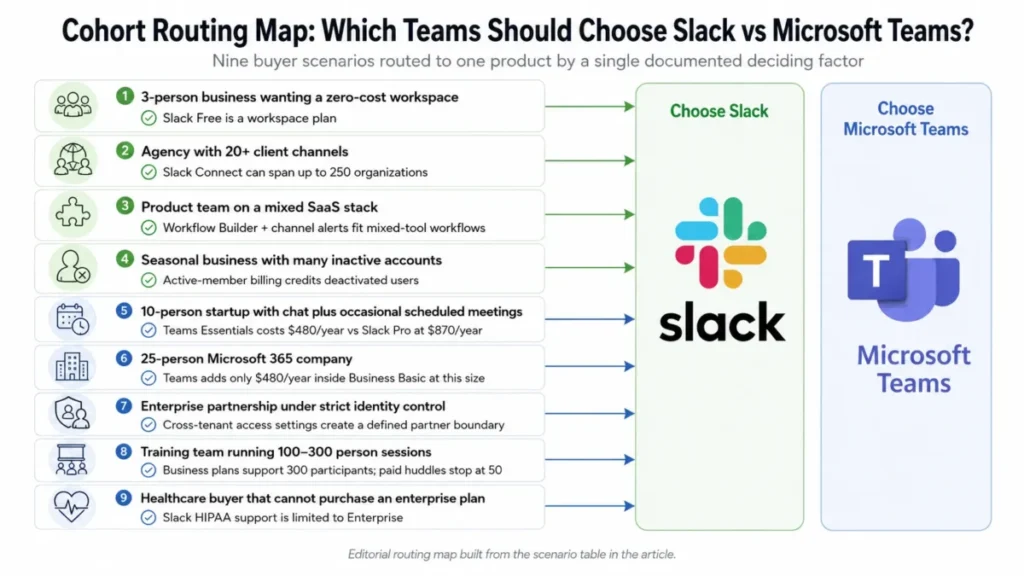
Which Tool Wins by Scenario
| Team scenario | Winner | Deciding factor | Watch-out |
|---|---|---|---|
| Three-person business wanting a zero-cost workspace | Slack | Slack Free is a workspace plan; the Teams free tier is presented for personal use | Verify the enforced free app cap before relying on more than three integrations |
| Ten-person startup, chat plus occasional scheduled meetings | Microsoft Teams | Teams Essentials costs $480 a year against $870 for Slack Pro | Essentials has no email or Office bundle, so compare against real requirements |
| Twenty-five-person Microsoft 365 company | Microsoft Teams | The Teams increment inside Business Basic is $480 a year at that size | Only valid if Business Basic would be purchased regardless |
| Agency with 20 or more client channels | Slack | One Slack Connect channel spans up to 250 organizations | Admin approvals still apply on both sides |
| Enterprise partnership under strict identity control | Microsoft Teams | Cross-tenant access settings give a defined boundary per partner | Both tenants must complete the configuration |
| Training team running 100 to 300 person sessions | Microsoft Teams | Business plans support 300 participants; paid huddles stop at 50 | Breakout rooms stop working at the 300 threshold |
| Product team on a mixed SaaS stack | Slack | Workflow Builder, channel alerts, and documented Microsoft integrations | Advanced AI sits on Business+ at double the Pro price |
| Healthcare buyer that cannot purchase an enterprise plan | Microsoft Teams | Slack HIPAA support is limited to an Enterprise plan with a signed agreement | Confirm which Microsoft license carries the exact control required |
| Seasonal business with many inactive accounts | Slack | Active-member billing with prorated credits for deactivated members | Model the guest and member mix before comparing list prices |
Sources for the scenario grid: Slack plan feature matrix, Slack Connect organization limits, and Microsoft Teams business plan pricing, checked 2026-07-27.
Who Should Choose Slack
- Messaging is the primary coordination surface and the searchable thread is the record the company relies on.
- Outside collaborators are frequent and the company cannot wait on a partner’s identity team for each one.
- The active roster moves month to month, which makes active-member billing and free single-channel guests worth real money.
- The software stack is deliberately mixed, and channel-level alerts from many tools matter more than document co-authoring.
Who Should Choose Microsoft Teams
- Microsoft 365 is already required, which turns the collaboration decision into a $1.60 per user monthly increment rather than a new subscription.
- Scheduled meetings above 50 people are a normal part of the week.
- A central IT or security function owns identity, retention, and audit, and wants those controls administered in one stack.
- The daily work product is an Office document that several people edit together.
Who Should Avoid Both
- A two-person or three-person team that only needs a group chat and a video call, where a free consumer tool covers the job without either subscription. The free collaboration tools roundup covers the realistic options.
- A company whose real problem is task tracking rather than conversation, which is a project management software decision wearing a chat-tool costume.
- An organization whose meeting requirements are webinar-shaped, with registration, moderation, and audience controls, where a dedicated meeting platform is the better fit.
- A regulated buyer that needs the collaboration tool to be the system of record, which neither product is designed to be.
Alternatives to Slack and Microsoft Teams
| Alternative | Choose it if | Trade-off to accept |
|---|---|---|
| Google Workspace with Chat and Meet | Email, documents, and meetings already run on Google and a second bundle is hard to justify | Channel-based messaging is thinner than Slack for high-volume teams |
| Zoom Workplace | Meetings are the center of the operating model and chat is secondary | Document collaboration still lives in another suite |
| A dedicated project tool plus a light chat app | The real bottleneck is work tracking rather than conversation | Two tools to administer and two places to search |
Details on the first two sit in the Google Workspace review and the Zoom Workplace review, and the bundle math is broken out in the Google Workspace pricing guide.
Final Verdict
There is no single winner here, and any article that names one is comparing the wrong things. The decision turns on two facts that a buyer already knows before reading a feature table.
If Microsoft 365 is a required purchase and meetings are a scheduled part of the week, Microsoft Teams is the stronger fit. The incremental cost inside Business Basic is $1.60 per user per month, the meeting ceiling is 300 on business plans, and identity, retention, and audit sit in one administrative stack.
Budget separately for Teams Premium at $10.00 per user per month if premium meeting features are required, and put workflow co-ownership in the offboarding checklist on day one.
If messaging is the operating system, the stack is mixed, or client and partner channels are constant, Slack is the stronger fit. Pro at $7.25 per active user per month covers full history, Workflow Builder, and Lists, and the active-member billing rule keeps a fluctuating roster honest.
Move to Business+ only when recaps, translations, AI search answers, or private-channel export become genuine requirements, because that step doubles the per-seat cost.
The renewal question is worth writing down before signing either contract. For Slack, can the team show that searchable history and external channels changed how decisions get made?
For Microsoft Teams, can IT show that guest accounts, channel types, and workflow owners are still under control at the current headcount?
Deeper single-product detail sits in the Slack review and the Microsoft Teams review, and plan-by-plan cost modeling is broken out in the Slack pricing guide.
Slack vs Microsoft Teams FAQ
These are the questions buyers ask after the shortlist is down to two, answered from the same official pricing pages and documentation used above.
Is Slack better than Microsoft Teams?
Slack is better for messaging-first teams, mixed software stacks, and frequent external channels. Microsoft Teams is better for Microsoft 365 organizations, scheduled meetings above 50 people, and centrally governed identity and compliance.
Neither wins on feature count, and the deciding factors are meeting scale and whether Microsoft 365 is already a required purchase.
Is Microsoft Teams cheaper than Slack?
Yes, if you compare entry plans or already pay for Microsoft 365. Teams Essentials lists at $4.00 per user per month paid yearly against $7.25 for Slack Pro, and inside Microsoft 365 Business Basic the Teams increment is $1.60 per user per month.
The gap narrows once contractors and inactive accounts get credited under Slack’s active-member billing.
Can a small business use Microsoft Teams for free?
No, unless the requirement is genuinely one person. Microsoft presents Teams Free for personal use, with 5 GB of storage, group meetings capped at 60 minutes, and 100 participants.
A company comparing free options should put Slack Free against paid Teams Essentials, because Essentials is the cheapest configuration a business can operate on.
What happens to Slack messages after 90 days on the free plan?
Free workspaces can view and search the last 90 days of messages and files, and older content becomes hidden. Slack also documents that customer data older than one year may be deleted on a rolling basis from free workspaces.
Visibility and deletion are separate risks, so export anything that matters before the workspace ages past a year.
How many apps can a free Slack workspace connect?
Slack’s own pages disagree on the checked date of 2026-07-27. The Free pricing page states up to 3 apps and the free-workspace limits article states up to 10 third-party or custom apps.
Confirm the enforced number inside the workspace before planning a free rollout around more than three integrations.
What is the difference between Slack Connect and Teams shared channels?
Slack Connect shares a channel between companies and can span up to 250 organizations, subject to plan eligibility and admin approval. Teams shared channels require cross-tenant access settings in Microsoft Entra ID configured by both organizations, and guests cannot be added to them at all.
Slack optimizes for speed and volume, Microsoft for a defined identity boundary.
Can you migrate Slack messages to Microsoft Teams?
Yes, using Microsoft’s official migration tool, and it is a project rather than an import. It moves public and private channels, threaded messages, reactions, attachments, and membership, but it needs an Azure Blob Storage account, elevated Microsoft 365 roles, Global Administrator consent, Graph permissions, and full user and channel mapping first.
Does Slack still work if the company runs on Microsoft 365?
Yes. Slack documents integrations for Outlook email and calendar, OneDrive and SharePoint file sharing, Azure Active Directory, Azure Boards, Pipelines and Repos, Microsoft Flow, and starting Teams calls from Slack.
That covers notification and file-sharing workflows, though it does not replace document co-authoring inside the Microsoft suite.
Which one handles large company meetings better?
Microsoft Teams, and it is not close. Business plans support up to 300 participants and eligible enterprise plans up to 1,000, while paid Slack huddles stop at 50 participants with 25 video feeds.
Plan around the Teams ceilings too: recordings stop at 4 hours or 1.5 GB, and breakout rooms are unavailable at 300 attendees.
Should we switch from Slack to Microsoft Teams to save money?
Only if Microsoft 365 is already required and the roster is stable. The saving is the $1.60 per user monthly increment inside Business Basic, which is $960 a year at 50 users, against a migration project with real administrative cost.
Weigh that against Slack’s credits for deactivated members and the loss of low-friction external channels.