Choosing payroll software is less about features—and more about risk, time, and long-term fit.
Gusto is often positioned as an “easy all-in-one” payroll and HR solution for small businesses. But is it actually worth using in real-world scenarios, or does it start to break down as your company grows?
In this Gusto review, I’ll evaluate the platform from a practical, consultant’s perspective—looking at how Gusto performs in day-to-day payroll operations, tax compliance, employee benefits, and basic HR workflows. You’ll see who Gusto is genuinely a good fit for, where its limitations start to matter, and when choosing an alternative like ADP, Paychex, Rippling, or QuickBooks Payroll makes more sense.
In This Article (9 sections)
Quick Summary – Gusto Review
| Category | Summary |
|---|---|
| 🧩 What is Gusto? | An all-in-one payroll & HR software for US-based small and mid-sized businesses |
| 🎯 Best for | Small businesses (5–200 employees) that want simple payroll, automated tax compliance, and integrated benefits |
| 🚫 Not ideal for | Large enterprises, global teams, or companies with complex payroll & HR workflows |
| 💰 Pricing | Transparent base fee + per-employee pricing; affordable for small teams, less cost-efficient at scale |
| ⚙️ Key strengths | Easy payroll processing, automated tax filing, strong benefits integration, clean UX |
| ⚠️ Main limitations | Limited scalability, basic HR tools, no global payroll support |
| 🆚 Top alternatives | ADP (enterprise & global), Paychex (compliance support), Rippling (HR + IT), QuickBooks Payroll (accounting-centric) |
| ⭐ Overall verdict | A reliable, low-friction payroll solution for US SMBs that value simplicity over customization |
Who Should Use Gusto (And Who Shouldn’t)
Gusto works exceptionally well for:
Small businesses with 5-75 employees that pay workers on consistent schedules (W-2 employees primarily). If you’re running a growing SaaS startup, professional services firm, retail shop, or small manufacturing operation with straightforward payroll needs, Gusto delivers excellent value. The platform shines when your team is concentrated in a handful of states and you want benefits administration without hiring a benefits broker.
Companies transitioning from manual payroll or basic tools like QuickBooks Payroll will appreciate Gusto’s combination of automation and usability. I’ve seen businesses cut their payroll processing time from 3-4 hours per pay period to under 30 minutes after switching to Gusto, primarily because tax calculations, filings, and payment distributions happen automatically.
Businesses that value employee experience also benefit significantly. Gusto’s employee-facing interface for accessing pay stubs, tax documents, and benefits information is genuinely well-designed—something that matters more than many business owners initially realize when it comes to reducing HR support tickets.
Gusto is NOT the right choice for:
Companies with complex, multi-state contractor payments or significant international payroll needs. While Gusto handles 1099 contractors, businesses paying dozens of contractors across multiple countries will find the platform limiting. International payments require third-party integrations that add friction.
Enterprises with 200+ employees or those requiring deep customization in approval workflows, complex job costing, or industry-specific compliance (construction-certified payroll, union reporting, etc.) will outgrow Gusto quickly. The platform optimizes for simplicity over flexibility, which becomes a constraint at scale.
Businesses with highly variable pay structures—commission-heavy sales teams with complex calculation rules, or companies with multiple earning codes and elaborate overtime policies—may find Gusto’s capabilities insufficient. While it handles basics competently, advanced compensation structures require workarounds that defeat the platform’s simplicity advantage.
Companies that already use Rippling should particularly evaluate whether switching makes sense, as Rippling’s broader IT management and app provisioning capabilities often provide more comprehensive value for tech-forward companies, despite higher costs.

Key Features Explained (With Real-World Context)
Payroll Processing
Gusto’s payroll engine handles the fundamentals reliably: calculating gross-to-net pay, withholding taxes correctly, and distributing payments via direct deposit or paper check. The system supports multiple pay schedules simultaneously, which matters if you pay salaried office staff bi-weekly but hourly warehouse workers weekly.
In practice, running payroll takes about 15-20 minutes once you’re familiar with the system. You review hours (if applicable), approve any off-cycle adjustments like bonuses or reimbursements, preview the payroll register, and submit. Gusto processes payments and handles all tax deposits automatically—which is exactly what you’re paying for.
The real value emerges during year-end processing. W-2 and 1099 generation happens automatically, and Gusto files these forms electronically with federal and state agencies. For businesses that previously spent days reconciling spreadsheets and coordinating with accountants, this automation alone justifies the software cost.
However, if you need to make corrections after payroll runs, Gusto’s reversal process can be cumbersome. Off-cycle payments and corrections require careful attention to avoid tax filing complications, and the system doesn’t always provide clear guidance on the implications of adjustments made after the fact.
Tax Filing & Compliance
Gusto automatically calculates, deposits, and files federal, state, and local payroll taxes. This includes quarterly 941 forms, annual 940 filings, state unemployment taxes, and state income tax withholding. The platform monitors due dates and handles filings without requiring you to track compliance calendars.
For businesses operating in multiple states, Gusto registers you with state agencies and manages the complexity of varying state requirements. This is genuinely valuable—state payroll tax compliance is tedious and error-prone when done manually. I’ve worked with clients who received penalty notices from state agencies due to missed filings or incorrect calculations; Gusto eliminates most of these risks.
That said, Gusto assumes responsibility for tax compliance only when you use their system correctly. If you enter incorrect employee addresses, misclassify workers, or fail to respond to agency notices forwarded through the platform, compliance breakdowns still occur. The software provides guardrails, not guarantees.
Additionally, businesses with employees in cities with local income taxes (New York City, Philadelphia, etc.) should verify that Gusto properly handles these jurisdictions. While the platform supports most local taxes, there are edge cases where additional manual intervention is required.
Employee Benefits
Gusto’s benefits administration is where the platform differentiates itself from basic payroll processors. You can offer health insurance, dental, vision, life insurance, 401(k), HSAs, FSAs, and commuter benefits—all managed through the same interface.
The benefits enrollment experience is streamlined. Employees compare plans, make elections, and upload dependent information through their Gusto account. Deductions automatically sync with payroll, eliminating the error-prone process of manually updating spreadsheets each pay period.
For health insurance specifically, Gusto partners with brokers and carriers to present plan options directly within the platform. This integration simplifies open enrollment significantly compared to coordinating between your broker, insurance carrier, and payroll system separately. Businesses with 5-50 employees particularly benefit because Gusto provides access to small group plans that might otherwise require extensive broker negotiations.
The 401(k) offering, powered by Guideline or Vestwell depending on your plan, provides a low-cost retirement benefit option. Setup takes a few hours, contribution elections integrate with payroll automatically, and employees gain access to a straightforward investment platform. For small businesses that want to offer retirement benefits but find traditional 401(k) providers prohibitively complex or expensive, this is a legitimate advantage.
However, businesses that already have established relationships with specific insurance carriers or retirement plan providers may find Gusto’s partnerships limiting. If you’re happy with your current 401(k) provider and don’t want to switch, you’ll need to manage that benefit outside Gusto or work through less-integrated connections.
HR Tools & Onboarding
Gusto includes basic HR functionality: employee onboarding workflows, document storage, PTO tracking, and org chart visualization. These aren’t comprehensive HRIS features, but they handle foundational needs for smaller businesses.
The onboarding experience is genuinely good. New hires complete I-9 verification, W-4 forms, direct deposit setup, and benefits enrollment through guided workflows before their first day. Documents auto-populate where possible, reducing errors. For companies hiring regularly, this saves 2-3 hours per new employee compared to paper forms and manual data entry.
PTO tracking works adequately for simple accrual policies but becomes limiting if you have complex rules—different accrual rates by tenure, unlimited PTO that requires manager approval tracking, or separation between vacation and sick time banks with different state regulations. The system handles basics but not edge cases elegantly.
Document storage provides a centralized location for signed offer letters, performance reviews, and policy acknowledgments. This is useful for compliance purposes, though it’s not a full document management system with version control and advanced permissions.
Integrations
Gusto integrates with popular accounting software (QuickBooks, Xero), time tracking tools (TSheets, When I Work), and expense management platforms. These integrations primarily sync payroll data to your accounting system and import hours from time tracking tools.
The QuickBooks integration works reliably for most businesses—payroll expenses, liabilities, and payments sync to appropriate accounts automatically. This eliminates duplicate data entry and ensures your financial statements reflect accurate labor costs. However, businesses with complex job costing requirements or project-based accounting may need to supplement with manual journal entries.
Time tracking integrations function adequately but occasionally require troubleshooting. If employees clock in/out inconsistently or your time tracking tool has custom fields that don’t map to Gusto’s payroll categories, expect some manual cleanup before each payroll run.
Pricing Analysis: Is Gusto Really “Affordable”?
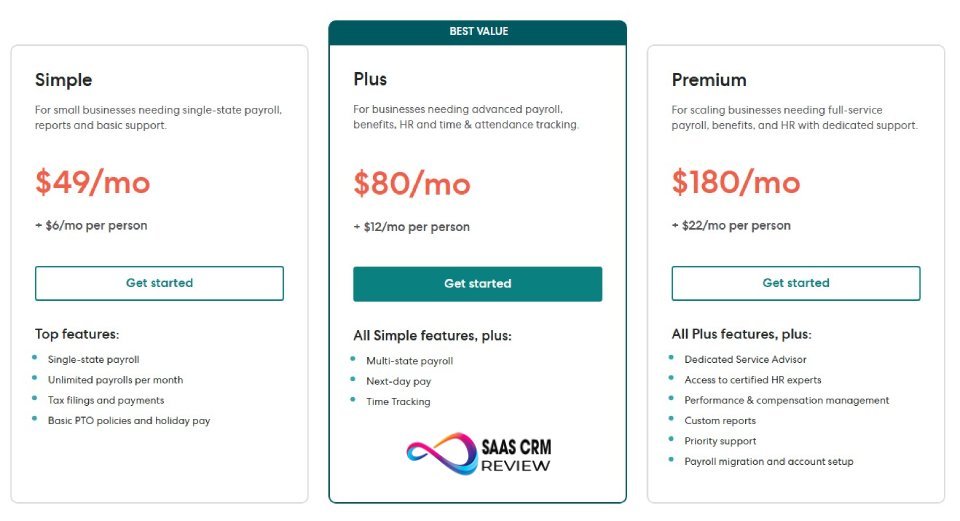
Gusto’s pricing structure is transparent compared to legacy payroll providers, but “affordable” depends heavily on your company size and which plan you choose.
Simple Plan: $49/month base + $6/employee per month. This includes basic payroll, tax filing, and employee self-service. For a 10-person company, that’s $100/month or $1,200 annually.
Plus Plan: $80/month base + $12/employee per month. Adds time tracking, PTO management, and more robust HR tools. For 10 employees: $200/month or $2,400 annually.
Premium Plan: $180/month base + $18/employee per month. Includes dedicated support, HR resource center, and compliance alerts. For 10 employees: $360/month or $4,320 annually.
For small businesses with under 15 employees, Gusto is competitively priced against alternatives. A $120-150/month all-in cost for full-service payroll with tax filing represents reasonable value, especially considering that mistakes in manual payroll typically cost more than this in penalties and accountant cleanup fees.
However, as headcount grows, costs scale linearly. A 50-person company on the Plus plan pays $680/month ($8,160 annually), and at 75 employees, you’re at $980/month. At this scale, you should evaluate whether Gusto’s feature set justifies the cost versus enterprise platforms that may offer more sophisticated capabilities at similar or lower per-employee rates.
Hidden costs to consider:
Year-end processing (W-2 filing) is included, but some state-specific filings may incur additional fees. Workers’ compensation insurance administration, if you purchase through Gusto, adds costs. Benefits administration through Gusto’s partners may include broker fees or administrative charges not immediately obvious during initial pricing discussions.
The most common pricing surprise occurs when businesses realize that robust reporting or advanced features require the Premium tier. If you need custom reports, dedicated implementation support, or compliance guidance, the $180/month base becomes mandatory—a significant jump from the entry-level plan.
Value assessment:
For businesses that previously spent 3-5 hours per pay period on payroll and paid an accountant $200-300 monthly for tax filing support, Gusto typically delivers positive ROI. The time savings alone—assuming even $30/hour internal labor costs—justifies the expense.
For companies that need benefits administration and would otherwise pay a PEO 2-8% of payroll, Gusto provides substantially better value. You maintain control of your company while accessing benefits infrastructure typically available only through co-employment arrangements.
Conversely, very small businesses (under 5 employees) with simple payroll may find basic tools like QuickBooks Payroll or Wave Payroll sufficient at lower costs. And larger organizations with complex needs may find Gusto’s pricing competitive with basic ADP offerings but lacking the sophistication that justifies enterprise-tier investments.
Gusto Pros and Cons (Balanced & Critical)
| Category | Pros (Strengths) | Cons (Limitations) |
|---|---|---|
| Usability | – Intuitive interface minimizes learning curve – Clean, logical payroll workflows – Easy employee self-service portal | – Limited advanced configuration options – Can feel simplistic for complex internal workflows |
| Payroll Automation | – Reliable automated payroll processing – Predictable tax calculations and filings – Handles multi-state payroll smoothly | – Less flexible for complex pay structures – Occasional need for manual adjustments |
| Compliance & Taxes | – Automates federal, state, and local tax filings – Minimizes compliance risk for small businesses | – Employer still responsible for correct setup – Not ideal for highly regulated industries |
| Benefits | – Integrated health & retirement benefits – Centralized deduction management – Simplifies benefits admin without separate brokers | – Benefits choices may be more limited than working with independent brokers – Not ideal for highly customized benefit packages |
| HR Tools | – Essential HR functions like onboarding, PTO tracking – Digital forms (I-9, W-4) and onboarding checklists – Employee documentation stored centrally | – Basic HR features — not a full HRIS – Lacks advanced performance or career management tools |
| Integrations | – Connects with mainstream accounting & time tools – Seamless sync with QuickBooks, time tracking apps | – Limited ecosystem compared to enterprise platforms – Gaps with niche or bespoke systems |
| Support & Trust | – Responsive support for typical SMB issues – Transparent pricing and documentation | – Support not as deep as high-end enterprise services – No dedicated account management in lower tiers |
| Scalability | – Excellent fit up to ~200 employees – Processes payroll reliably as team grows | – Not built for large enterprise complexity – Lacks advanced workflow automation |
User Experience & Ease of Use
Gusto’s interface reflects modern web application design: clean layouts, intuitive navigation, and workflows that guide users step-by-step through processes. The dashboard provides at-a-glance visibility into upcoming payroll deadlines, pending tasks, and important alerts.
Running payroll involves a linear process: enter or approve time, review calculations, submit for processing. Each step includes clear explanations, and the system prevents common errors (duplicate payments, missing tax forms, etc.) through validation checks. Administrators without payroll expertise can successfully operate the system with minimal training.
The employee-facing interface similarly prioritizes simplicity. Workers log in to view pay stubs, download tax forms, update direct deposit information, and modify benefits elections. The mobile app replicates this functionality well, which matters for employees who don’t regularly access computers.
However, ease of use comes with tradeoffs. Power users accustomed to comprehensive ERP systems may find Gusto’s simplified interface constraining. There’s no advanced mode with additional options—the platform shows everyone the same streamlined workflows. This design philosophy works brilliantly for small businesses but frustrates users who need granular control.
Setup complexity deserves specific attention. While Gusto markets itself as quick to implement, establishing proper payroll infrastructure takes time:
- State tax registrations require providing specific business information and verifying employer account numbers
- Historical payroll data migration, if you’re switching from another provider mid-year, involves careful spreadsheet work to ensure year-to-date totals are accurate
- Benefits setup requires coordinating with insurance brokers and retirement plan providers to ensure information flows correctly
- Employee data import and validation takes longer than anticipated when historical records contain inconsistencies
Businesses should allocate 2-3 weeks for thorough implementation, even if the software technically allows same-day setup. Rushing implementation leads to errors that create complications later.
The learning curve for administrators is gentle. Most users become comfortable running payroll within 2-3 pay cycles. However, understanding tax implications of various decisions—how to properly handle bonuses, reimburse expenses, process termination pay—requires additional learning that Gusto’s interface doesn’t always make explicit.

Gusto vs Competitors
| Aspect | Gusto | ADP | Paychex | Rippling | QuickBooks Payroll |
|---|---|---|---|---|---|
| Best For | Small to mid-sized US businesses seeking simple, all-in-one payroll + HR | Businesses of all sizes needing deep compliance, scalability & global payroll | Small to mid-sized firms needing payroll + bundled HR/benefits support | Companies wanting payroll + IT + HR in unified system | Small businesses already in QuickBooks ecosystem |
| Ease of Use | ⭐⭐⭐⭐ – Highly intuitive and simple to manage | ⭐⭐ – Robust but steeper learning curve | ⭐⭐⭐ – Traditional interface, functions well | ⭐⭐⭐⭐ – Modern UI, but complexity increases with modules | ⭐⭐⭐ – Easier than big HCM, simpler than some competitors |
| Payroll Processing | Automated, multi-state payroll with tax filing | Powerful payroll with advanced features | Solid payroll + tax services | Automated payroll as part of broader platform | Good payroll with strong accounting link |
| HR & Compliance | Basic HR tools + benefits | Full HR suite + compliance support | Strong compliance guidance, retirement/ | Comprehensive HR + automation | Limited native HR tools |
| Benefits Administration | Yes — health, 401(k), workers’ comp | Yes — extensive benefit features | Yes — bundled HR + payroll | Yes — integrated with HR + IT management | Yes — with add-ons |
| Scalability | ⭐⭐⭐ – Good up to ~200 employees | ⭐⭐⭐⭐ – Scales to enterprise & global needs | ⭐⭐⭐ – Solid for midsize growth | ⭐⭐⭐⭐⭐ – Extremely scalable across functions | ⭐⭐ – Best for small/ |
| Global Payroll | ❌ – US only | ✅ – Extensive global support | Limited/ | Yes – global options | No |
| Cost Transparency | Transparent published pricing | Variable quote-based pricing | Semi-transparent | Flexible but modular costs | Simple transparent pricing |
Gusto vs ADP
ADP offers more comprehensive features and deeper customization but at significantly higher cost and complexity. Businesses with 50+ employees and complex payroll requirements (union reporting, certified payroll, advanced job costing) may need ADP’s capabilities. However, companies with under 75 employees typically find ADP’s sales process opaque, pricing confusing, and interface dated compared to Gusto.
If your business has dedicated HR staff who can manage sophisticated software, ADP’s additional capabilities may justify the investment. If you’re a small business owner handling payroll yourself, Gusto’s simplicity delivers better value.
Gusto vs Paychex
Paychex competes directly with ADP in the legacy payroll provider space. Similar to ADP, Paychex offers extensive features but suffers from complex pricing, dated technology, and customer service that varies dramatically based on your assigned representative.
Small businesses switching from Paychex to Gusto consistently report improved user experience and time savings, even if Paychex’s enterprise features exceed Gusto’s capabilities. Unless you specifically need Paychex’s HR outsourcing services or industry-specific solutions, Gusto represents a better choice for small to mid-sized businesses.
Gusto vs Rippling
Rippling is Gusto’s most sophisticated competitor in the modern payroll software space. Rippling combines payroll, benefits, and HR with comprehensive IT management—laptop provisioning, app access control, and device management integrated into a single platform.
For tech-forward companies that want to automate employee onboarding beyond just payroll and HR documents, Rippling offers compelling advantages. A single system that provisions email accounts, assigns software licenses, ships laptops, and processes payroll provides efficiency gains that exceed what Gusto delivers.
However, Rippling costs more—typically 30-50% higher than equivalent Gusto plans. The additional investment makes sense for companies that value IT automation and have the budget for premium software. Companies that don’t need IT management capabilities or want to minimize software costs should choose Gusto.
Gusto vs QuickBooks Payroll
QuickBooks Payroll integrates seamlessly with QuickBooks accounting, which is its primary advantage. Businesses already using QuickBooks extensively may prefer keeping payroll in the same ecosystem to avoid integration complications.
However, QuickBooks Payroll lacks Gusto’s benefits administration capabilities and provides a less sophisticated employee experience. The interface feels more utilitarian than Gusto’s polished design. For businesses that need comprehensive benefits management or prioritize employee self-service functionality, Gusto delivers better value despite requiring integration rather than native QuickBooks connectivity.
- Xero Review 2026: Honest Pros, Cons, and Pricing Breakdown
Data Security, Compliance & Trustworthiness
Payroll data includes sensitive personal information: Social Security numbers, bank account details, health information, salary data. Evaluating Gusto’s security practices is essential before entrusting them with this information.
Gusto maintains SOC 2 Type II certification, which verifies that their security controls meet industry standards for protecting customer data. They use encryption for data at rest and in transit, implement multi-factor authentication, and conduct regular security audits. These are baseline expectations for any credible payroll provider.
From a compliance perspective, Gusto assumes responsibility for calculating and filing payroll taxes accurately, which represents significant liability. They provide a tax guarantee: if their calculations result in penalties, Gusto pays the penalties and interest charges. This guarantee matters because payroll tax mistakes can result in substantial fines.
However, business owners must understand that compliance is a shared responsibility. Gusto files taxes based on the information you provide. If you incorrectly classify employees as contractors, misreport employee addresses, or fail to update wage garnishments, compliance breakdowns occur. The software provides guardrails, not immunity from poor data management.
For businesses subject to industry-specific regulations (healthcare privacy, financial services reporting, etc.), verify that Gusto’s platform supports your compliance requirements. The system handles standard payroll compliance well but isn’t designed for specialized regulatory environments.
Trust signals that matter to buyers: Gusto has processed billions of dollars in payroll for over 300,000 companies. They’re backed by reputable venture capital firms and have operated since 2011 without major security breaches becoming public. While no software vendor is immune to security incidents, Gusto’s track record suggests they take data protection seriously.
- Intercom Review 2026: Features, Pricing, Pros & Cons – Is It Worth It?
Final Verdict: Is Gusto Worth It in 2025?
Gusto delivers excellent value for small to mid-sized businesses with straightforward payroll needs who want to consolidate payroll, benefits, and basic HR into a single, well-designed platform.
Choose Gusto if you:
- Employ 5-75 people primarily as W-2 employees in the United States
- Want benefits administration integrated with payroll without using a PEO
- Value intuitive software that doesn’t require dedicated HR staff to operate
- Need reliable tax compliance without managing filing calendars manually
- Appreciate good employee-facing technology that reduces administrative support requests
Choose something else if you:
- Need complex customization, advanced reporting, or industry-specific compliance features
- Have significant international payroll or contractor payment requirements
- Already use comprehensive HRIS/IT platforms like Rippling and are satisfied with their payroll capabilities
- Require immediate phone support without paying premium pricing
- Run a very small business (under 5 employees) where basic tools like Wave or QuickBooks Basic Payroll suffice
The honest assessment: Gusto isn’t the most sophisticated payroll platform, the most customizable, or the most affordable in all scenarios. It is, however, the best combination of usability, features, and value for its target market. Small businesses that would struggle with ADP’s complexity or can’t afford Rippling’s premium pricing find Gusto to be exactly what they need.
The platform’s limitations become apparent at scale or in edge cases, but within its intended use case—growing businesses with standard payroll needs—it performs admirably. If your business fits Gusto’s target profile, it’s worth the investment. If you’re pushing the boundaries of that profile, carefully evaluate alternatives before committing.