Xero fits a US small business that sends more than 20 invoices a month and wants every staff member and its accountant in the books for one price. Skip it if you need a support phone line or expect US payroll inside the plan price.
This Xero review covers the three US plans: $27, $59 and $97 a month per organization, billed monthly, with unlimited users on each.
Xero’s US plans page, read on October 21, 2026, gives new customers 90% off for 6 months until November 2, 2026. Xero Payroll, powered by Gusto, now runs inside Xero.

Quick verdict
- Worth it for: single-company US businesses past 20 invoices a month that want staff and their accountant in Xero at no per-user cost.
- Skip it if: you need an inbound support phone line or one bill that covers several companies. Past 4,000 tracked stock items, skip it too unless Inventory Plus at $39 a month or an App Store app covers them.
- Main strength: unlimited users on every plan.
- Biggest limit: Early stops at 20 invoices and 5 bills a month, and multi-currency, projects and expense claims sit on Established alone.
- Price basis: $27, $59 or $97 a month per organization, billed monthly; Xero Payroll adds $36 a month plus $6 per employee or contractor.
In This Article (12 sections)
Xero at a Glance
Xero is cloud accounting software for small businesses, and its US plans differ by invoice volume, automation and three advanced features rather than by seats.
- Category: cloud accounting software (invoicing, bills, bank reconciliation, sales tax, W-9 and 1099 management)
- Best for: US small businesses with several people in the books
- Starting price: $27 a month per organization (Early), billed monthly
- Free trial: one month free on any Xero plan
- Users: unlimited on every plan, at no extra cost
- Payroll: optional add-on, $36 a month plus $6 per employee or contractor
- Main limitation: Early caps you at 20 invoices and 5 bills a month
This review covers the US plans only, priced in USD.
Xero Pros and Cons
Xero’s main disadvantages are Early’s invoice cap, three features locked to Established, no inbound phone support and payroll at extra cost. Its strengths are unlimited users and included ACH bill payments.
Pros
- Xero includes unlimited users on every plan, so adding a bookkeeper or another user never changes the plan price
- Standard USD ACH bill payments are included on all three plans, which helps firms that pay many suppliers
- JAX auto-reconciles the bank matches it is highly confident about on Growing and Established, which cuts daily matching on busy feeds
- Xero Payroll runs US pay runs and payroll tax filings inside Xero on any plan, for teams that want one login
- Free onboarding from a product specialist for the first 90 days helps first-time switchers connect banks and set up invoices
Cons
- Early saves invoice 21 and bill 6 of the month as drafts, which stalls any firm past 20 invoices
- Multi-currency, projects and expense claims sit on Established alone, so importers and agencies pay $97 a month
- No inbound support phone line, which hurts teams that want voice help on closing day
- Payroll costs $36 a month plus $6 per person on top of the plan, which surprises teams that expect it in the plan price
- Native stock tracking stops at 4,000 finished items, so growing product sellers outgrow it
Most of the cons are plan gates, so the features below say which plan holds what.
Xero Features
Yes, Xero carries invoicing, bills and bank reconciliation on every plan. Automated matching starts on Growing, multi-currency, projects and expense claims sit on Established, and payroll is a paid add-on on all three.
Invoicing, bills and ACH payments
Every plan sends quotes and online invoices with a payment service attached, and tracks bills you owe. Early stops at 20 invoices and 5 bills a month. Xero applies that limit to both approving and sending invoices, and it does not publish whether an invoice approved and then sent counts once or twice.
The counting rule is the trap. Transactions initiated by app partners may count toward Early’s invoice limit, so a connected store or billing app can use the allowance without anyone pressing Send.
Standard ACH bill payments in USD are included on all three plans. Same-day ACH, cross-border and international payments carry fees, international payments need Established, and online invoice payments carry payment fees.
For a firm paying 30 suppliers a month by ACH, that removes a per-payment cost, but Early’s 5-bill ceiling sends it to Growing first.
Xero’s bill tools schedule payments and pay suppliers in a batch. When bills pass through several approvers, a payment automation platform such as Plooto adds custom approval chains and a two-way sync with your accounting software.
Bank feeds and reconciliation
JAX, Xero’s AI feature, reconciles a bank line on its own only when it is highly confident; otherwise it suggests a match for you to accept. Its four methods are Rule, Match, Memory and Prediction.
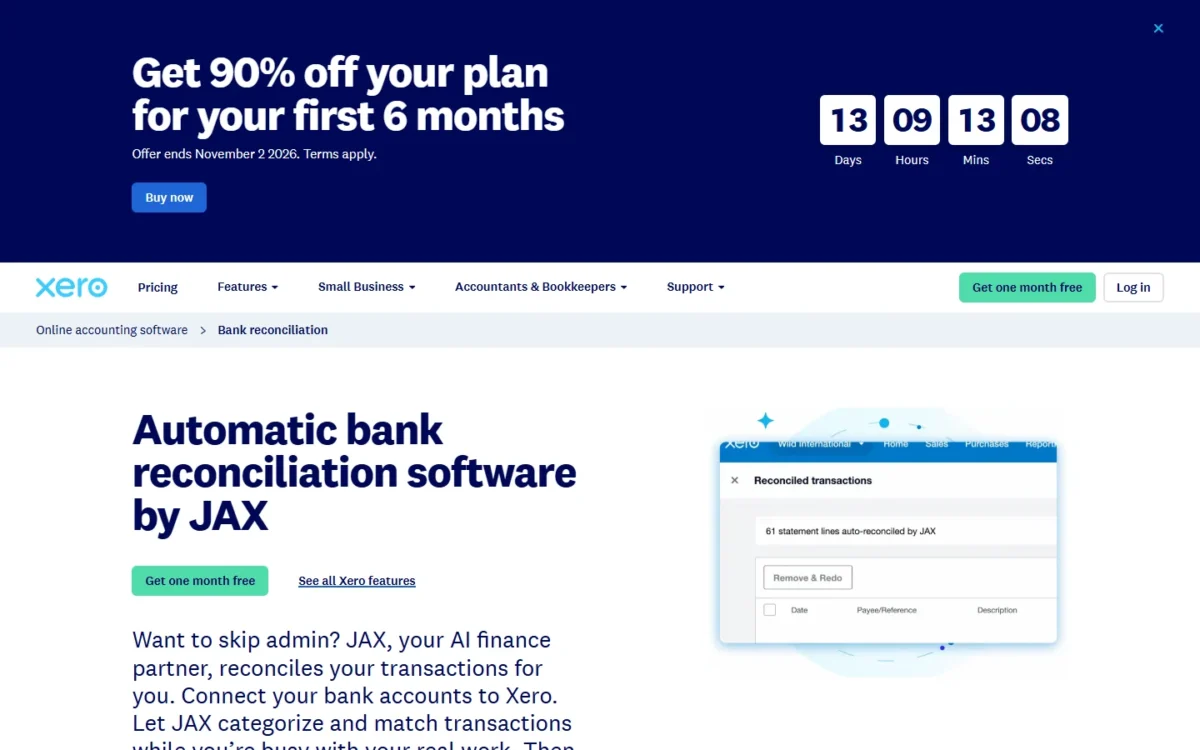
Auto-reconcile is included on Growing and Established; Early lists it as an optional add-on at $5.00 per month.
You can reject any of JAX’s matches and turn its automation off per bank account, as the reconciliation page shows. If your bank does not connect, you import statement data by hand, so connect your own bank in the free month.
Xero Payroll, powered by Gusto
Yes. Xero Payroll is an optional add-on on all three plans at $36 a month plus $6 per employee or contractor, with two months free. Pricing counts the people paid each month, so a seasonal worker costs nothing in months you do not pay them.
Xero Payroll pays weekly, bi-weekly, semi-monthly or off cycle in all 50 states at no extra cost. It files payroll taxes, W-2s and 1099s, and needs no separate Gusto login.
Gusto runs the engine underneath, and my Gusto review judges that payroll product on its own. Xero Payroll is not available to Xero’s US mobile subscribers.
For a 5-person team, payroll is the $36 base plus 5 x $6 = $30 for the people paid, together more than the $59 Growing plan. Budget the two together.
Established-only: multi-currency, projects and expense claims
The main reasons to pay for the $97 Established plan are invoicing or paying in another currency, tracking job time and margin, and reimbursing staff expenses. Those three sit on Established alone, together with KPIs and ratios, an industry benchmark and international bill payments.
Multi-currency tracks gains and losses automatically and refreshes exchange rates hourly. An importer crosses the line on its first foreign-currency bill.
Xero Projects quotes a job, logs time with a timer and shows margin on a profitability dashboard. For an agency billing by the job, that replaces a margin spreadsheet.
Expense claims let staff capture, submit and get reimbursed for costs, so a firm that repays mileage monthly needs Established for that alone.
Inventory
Xero handles simple stock: it tracks up to 4,000 finished items, with quantity on hand, stock value and best- and worst-selling items. You import items from a CSV template and export the full list to PDF or CSV on the stock control page.
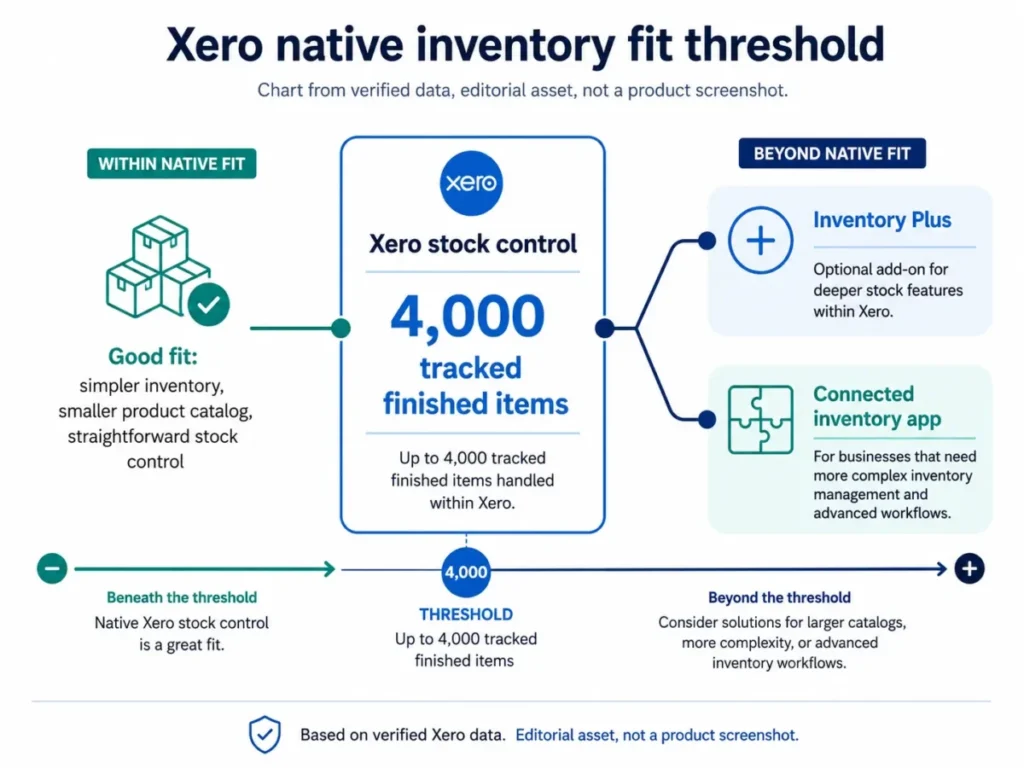
Past that, Inventory Plus is optional on Growing and Established at $39 per month for up to 10,000 orders per month. It syncs sales orders from several channels, so a multichannel seller on Growing pays $59 + $39 = $98 a month.
Reporting and forecasting
Real-time reports and Syft visual analytics come with every plan. The cash-flow forecast is the clearest gate: 30 days on Early, 60 on Growing and 180 on Established.
Custom dashboards, financial health scorecards and budgets with smart suggestions start on Growing. A seasonal business planning two quarters ahead needs the 180-day view.
Whether the features fit is one question; the work to get them running is the next.
Xero Ease of Use
Setup is assisted: a Xero Coach sets up new subscribers, connects their banks and readies the dashboard, free for the first 90 days. QuickBooks data moves in through one of three documented routes.
Xero runs anywhere with an internet connection or mobile phone signal, and you invite admin staff, your accountant or your bookkeeper as users.
Use the free month to connect your bank feed, count a month of invoices against Early’s 20, and open one support case to see how the reply arrives.
Moving from QuickBooks
Xero’s QuickBooks conversion guide lists three routes:
- Jet Convert, Xero’s conversion partner, moves your current and prior fiscal year free in 20 minutes to five business days; older data may cost a fee.
- A fresh start brings in your most recent balances only and takes a few hours.
- The Xero Conversion Toolbox imports history from CSV files and needs an accountant or bookkeeper.
All three carry over your chart of accounts and contacts. With more than 6,000 items or several years of data, Xero asks you to contact it first: a scoped project, not a weekend job.
Xero Pricing
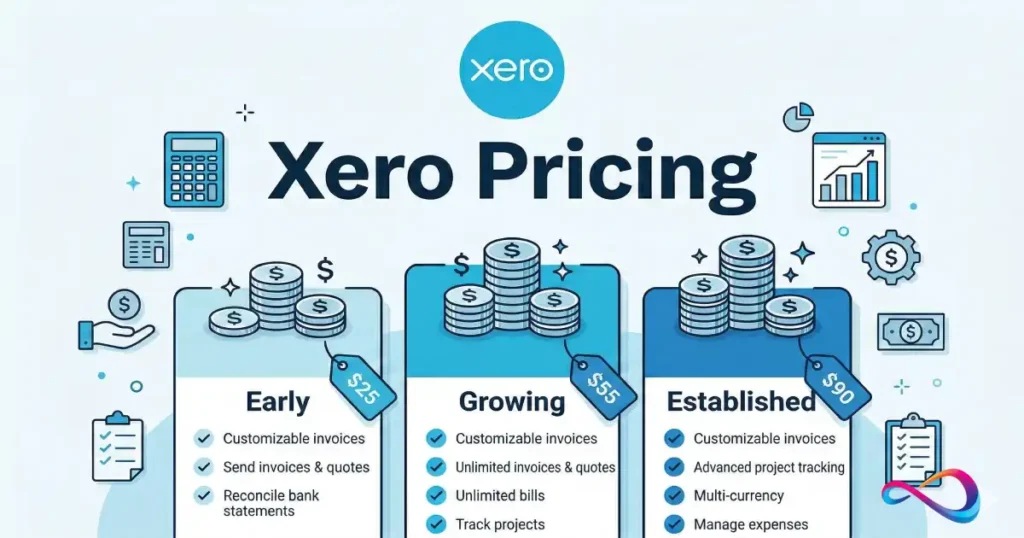
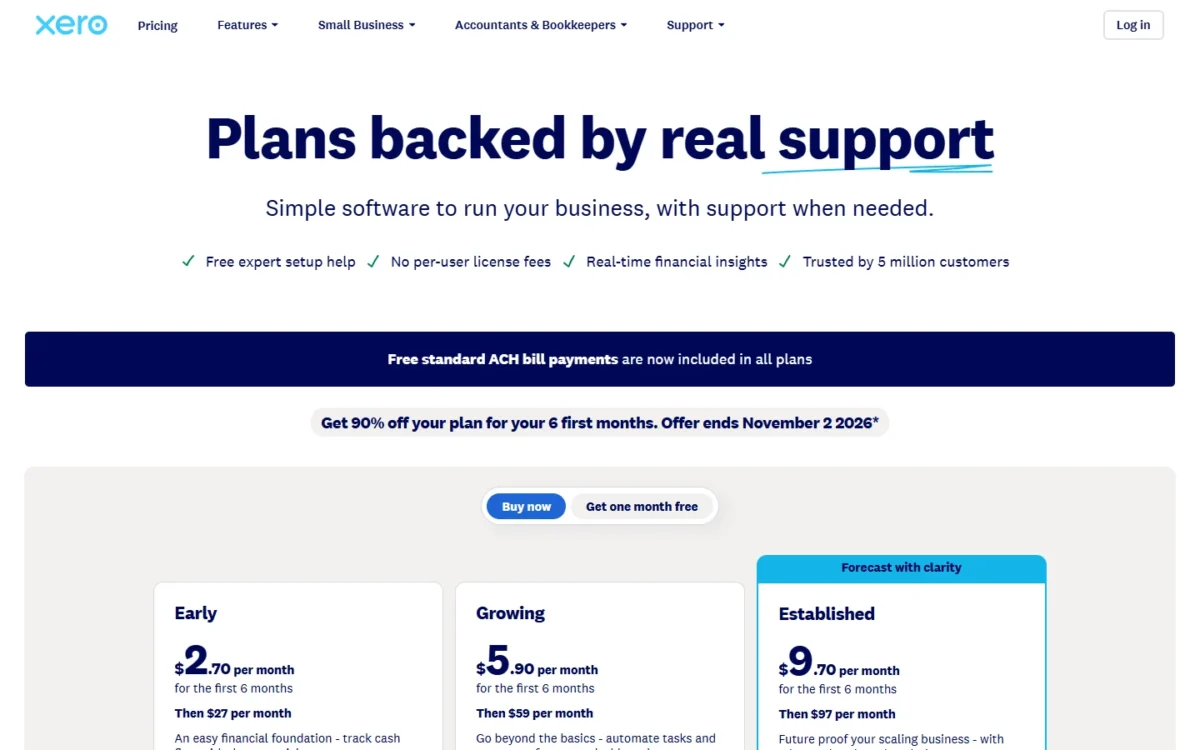
Xero’s three US plans cost $27, $59 and $97 a month per organization, billed monthly, with taxes added at checkout. Xero points teams past 20 invoices to Growing.
Each plan auto-renews monthly until cancelled; payroll, Inventory Plus and Early’s auto-reconcile cost extra.
| Plan | Price | Billing | Key limit |
|---|---|---|---|
| Early | $27 per month per organization | Monthly, auto-renews | 20 invoices and 5 bills a month; 30 day forecast |
| Growing | $59 per month per organization | Monthly, auto-renews | No 20-invoice or 5-bill cap; 60 day forecast |
| Established | $97 per month per organization | Monthly, auto-renews | Adds multi-currency, projects, expense claims; 180 day forecast |
| Xero Payroll (add-on, any plan) | $36 a month + $6 per employee/ | Monthly | Billed on people paid each month |
| Inventory Plus (add-on) | $39 per month | Monthly | Growing and Established; up to 10,000 orders per month |
| Auto-reconcile (Early add-on) | $5.00 per month | Monthly | Included on Growing and Established |
Sources: Xero US pricing plans and Xero’s common questions, checked October 2026.
New US customers buying their first organization get 90% off the base plan for the first 6 months: $2.70, $5.90 or $9.70 a month, then the regular price.
Offer deadline
The 90% offer ends at 11:59pm UTC on November 2, 2026. It covers the base plans only, not add-ons such as Xero Payroll, usage or payment fees.
The price also leaves out sales tax, payment fees, App Store subscriptions and usage charges such as a chargeable direct bank feed. Every add-on beyond this decision is in Xero’s full plan-by-plan pricing.
What Xero costs at real team sizes
A Xero bill depends on the plan, payroll headcount and the offer, not on logins:
| Team | Plan and add-ons | Monthly math | Yearly math |
|---|---|---|---|
| Solo consultant, under 20 invoices a month | Early | $27 | 12 x $27 = $324 |
| 8-person service firm paying 8 people through Xero | Growing + Xero Payroll | $59 for the plan; payroll $36 + 8 x $6 = $84 | 12 x $59 = $708 for the plan; payroll 12 x $36 + 96 x $6 = $1,008 (8 people x 12 months) |
| 10-person agency billing in two currencies | Established | $97 | 12 x $97 = $1,164 |
| New customer, first year on Growing with the offer | Growing | $5.90 for 6 months, then $59 | 6 x $5.90 + 6 x $59 = $389.40 |
Sources: Xero US pricing plans and Xero Payroll, checked October 2026. Excludes sales tax, payment fees, apps and Inventory Plus. Payroll figures are list prices for all 12 months, without the two free months.
For the 8-person firm, payroll costs more than the accounting plan. The 10-person agency pays the same $97 whether 3 or 10 people log in, which is where per-organization pricing pays off.
What forces an upgrade
Early breaks at invoice 21 or bill 6 in a month: extra invoices and bills save as drafts until you upgrade or the next month starts. Moving to Growing adds $59 – $27 = $32 a month.
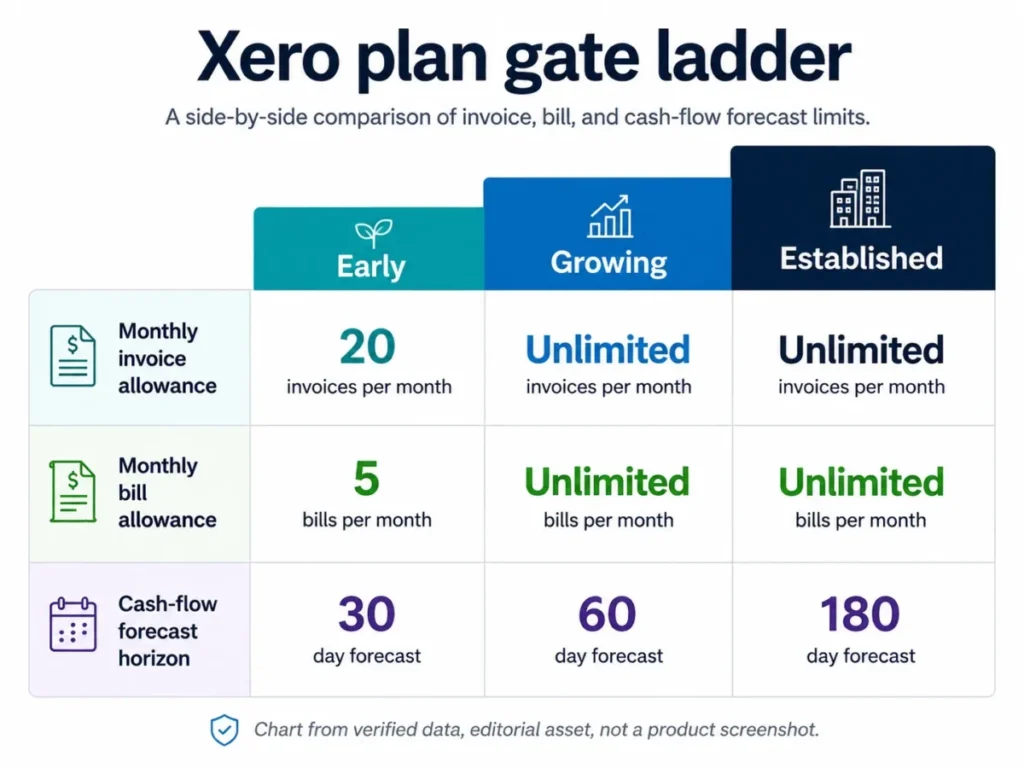
Growing breaks at the first foreign-currency invoice, the first request for job costing or the first expense claim. Each of those costs $97 – $59 = $38 a month more on Established.
Two rules make upgrades sticky. You can move back to a cheaper plan 1 month after upgrading. A second company needs its own plan, discounted by an amount Xero does not publish.
Integrations, API and Scalability
Xero connects with more than 1,000 apps, and every plan includes unlimited users, so headcount is never the scaling limit. Custom syncs are bounded instead: 60 API calls a minute and 5,000 a day per connection.
The Xero App Store sorts apps by industry, such as retail, and by business function, such as payments or inventory.
| API limit | Published ceiling |
|---|---|
| Concurrent calls per connection | 5 calls in progress at one time |
| Calls per minute per connection | 60 calls per minute |
| Calls per day per connection | 5,000 calls per day |
| App-wide calls per minute | 10,000 calls per minute |
Source: Xero developer limits FAQ, checked October 2026.
The limits are the same for every app, so a higher plan buys no API headroom. A sync that goes over gets an HTTP 429 response, so ask your integrator how it batches; Xero suggests about 50 invoices per request.
A nightly sync of a few thousand records fits inside 5,000 calls a day. A store that sends more than 5,000 requests a day goes over, and on Early its app-created invoices can also count toward the cap.
Xero Customer Service, Security and Reliability
Xero support is free, unlimited and online, and there is no inbound phone number. You ask from Xero Central, get a reply by email, and Xero phones you when a call helps.
QuickBooks Online, by contrast, includes phone support with its paid plans. Xero publishes no response time, and its support page calls any number claiming to be Xero support a scam.
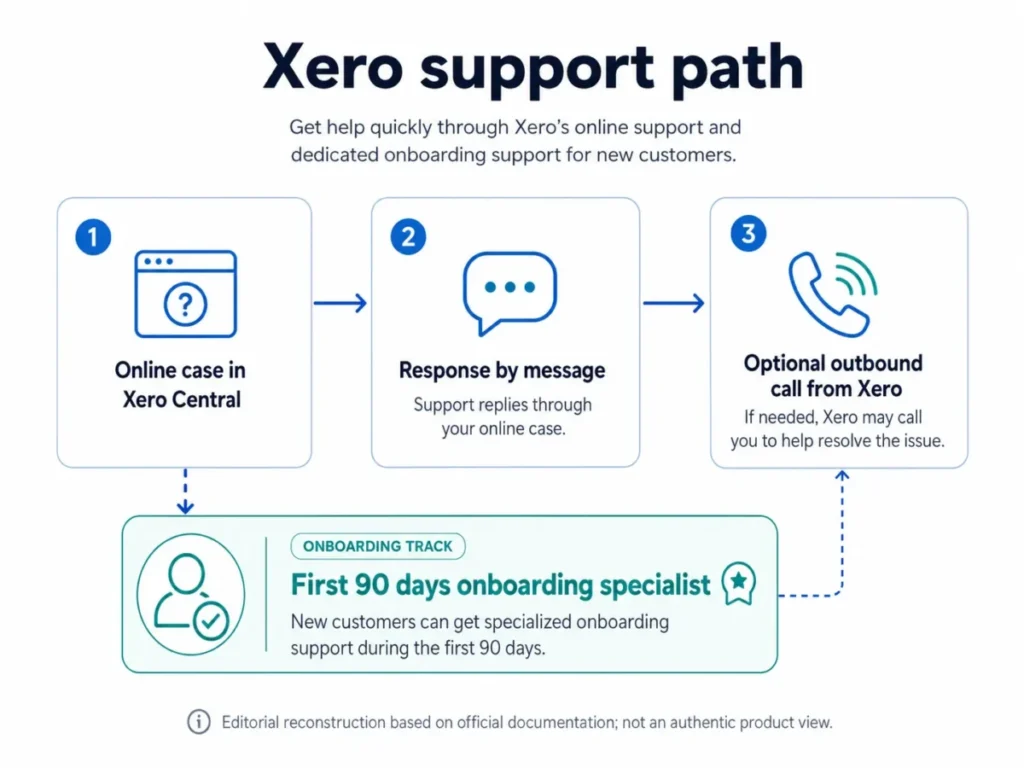
For a close process that depends on reaching a person by phone within minutes, that rules Xero out, and no plan upgrade changes it.
On security, Xero states it uses industry-standard encryption, multi-factor authentication, data replication between data centers and regular security audits. The 99.9% uptime figure on its data protection page is Xero’s own statement.
Who Should Use Xero?
Xero fits a single-company US business with several people in the books, more than 20 invoices a month and simple stock. It does not fit teams that need phone support, more than 4,000 tracked items with no Inventory Plus or app to carry them, or one bill across several companies.
Best for
- Single-company teams with several people in the books, since every plan includes unlimited users
- Firms sending more than 20 invoices or 5 bills a month, on Growing at $59
- Agencies that need job costing and project margin, on Established at $97
- Businesses that invoice or pay in a second currency, on Established
- Small teams that want payroll in the same login, at $36 a month plus $6 per person paid
Not ideal for
- Teams that want phone help at month-end close: QuickBooks Online includes phone support with paid plans
- Product sellers past 4,000 tracked items, unless Inventory Plus at $39 a month or an App Store app covers them
- Groups that want one bill for several companies, since each organization needs its own plan
- Solo freelancers who want a free plan: Zoho Books Free or Wave Starter costs $0
- Service firms billing 5 clients or fewer: FreshBooks Lite costs $23 a month for 5 billable clients
For readers on the not-ideal side, the rivals below fix those limits at a price.
Xero vs Competitors
Xero includes unlimited users on every plan. QuickBooks Online adds phone support but caps users per plan, FreshBooks caps billable clients, and Zoho Books and Wave start free.
| Software | Best for | Starting price | Key difference | Main trade-off |
|---|---|---|---|---|
| Xero | Single-company teams with many users | $27 a month per organization (Early) | Unlimited users on every plan | No inbound phone support; Early caps 20 invoices |
| QuickBooks Online | Teams that want phone support | $38 a month (Simple Start, 1 user) | Phone support included with paid plans | Users capped at 1, 3, 5 or 25 by plan |
| FreshBooks | Invoice-led firms with few clients | $23 a month (Lite) | Plans priced by billable clients | Lite bills 5 clients, Plus 50 |
| Zoho Books | Micro businesses on a budget | $0 (Free) | Free plan for 1 user plus 1 accountant | Free only while revenue stays under $50K |
| Wave | The smallest firms starting free | $0 (Starter) | Pro costs $19 a month | Starter cards cost 2.9% + $0.60 each |
Sources: QuickBooks Online pricing (Internet Archive copy of October 18, 2026), FreshBooks pricing, Zoho Books pricing, Wave pricing and Xero vs QuickBooks, checked October 2026.
QuickBooks Online is the rival to pick when a phone line matters. Its user caps cut the other way: Plus holds 5 users, so a 10-person team needs Advanced at $340 a month.
Any Xero plan holds those 10 people, and Growing costs $59. The QuickBooks Online review covers the rival in full.
FreshBooks suits a service firm that invoices a few clients: Lite costs $23 a month for 5 billable clients and Plus $43 for 50. Xero prices by organization, not by client.
Zoho Books is the budget choice: Standard costs $20 a month, or $15 billed annually, for 3 users. Wave Pro costs $19 a month or $190 a year once its free Starter plan runs short.
How I Evaluated Xero
I built this review from Xero’s US pricing, plan, payroll, reconciliation, stock, projects, support and security pages, read on October 21, 2026. Its developer limits FAQ and QuickBooks conversion guide, read the same day, fill in the API and migration facts.
Rival prices come from the FreshBooks, Zoho Books and Wave pricing pages, read the same day, and the Internet Archive’s copy of QuickBooks Online’s pricing page from October 18, 2026. The yearly table and plan calls are my own analysis of the list amounts.
Xero does not publish support response times, the size of its multi-organization discount or an annual billing option for its US plans. How well your bank’s feed connects is what the free month settles.
Xero Review FAQ
Is Xero better than QuickBooks Online?
For a team that wants many people in the books, yes: every Xero plan includes unlimited users, while QuickBooks Online caps Plus at 5. QuickBooks Online is better when phone support decides. It counts accountants apart from users: Simple Start includes access for 2 accountants.
Can Xero handle several companies?
Yes, as separate subscriptions: one Xero account holds as many organizations as you like, each on its own plan. Xero discounts them automatically when they share a subscriber email address, and it does not publish the discount’s size.
Do nonprofits get a discount on Xero?
Yes. A registered nonprofit charity, trust or society saves 25% on its Xero subscription, as Xero’s common questions state. Xero applies the discounted rate after you buy the subscription and it confirms your nonprofit status, so expect the saving after purchase rather than at checkout.
Can I export my data if I leave Xero?
Yes. You can export your data from Xero at any time, and the stock control feature exports the full item list to PDF or CSV. Run a complete export before you cancel, and keep the files with your tax records.
Final Verdict: Is Xero Worth It?
Yes, Xero is actually good for a single-company US business past 20 invoices a month that wants everyone in the books. Start on Growing at $59 a month.
Pick Established at $97 when you invoice in a second currency, cost jobs or reimburse staff expenses: those are the main reasons to pay the extra $38 a month.
Pick QuickBooks Online instead when a phone line to support decides the purchase, and Zoho Books or Wave when a free plan does. Look elsewhere when one bill must cover several companies, since each Xero organization needs its own plan.
Before the free month ends, check three things: that your bank’s feed connects, how many invoices you send against Early’s 20, and what payroll adds at $6 per person paid.