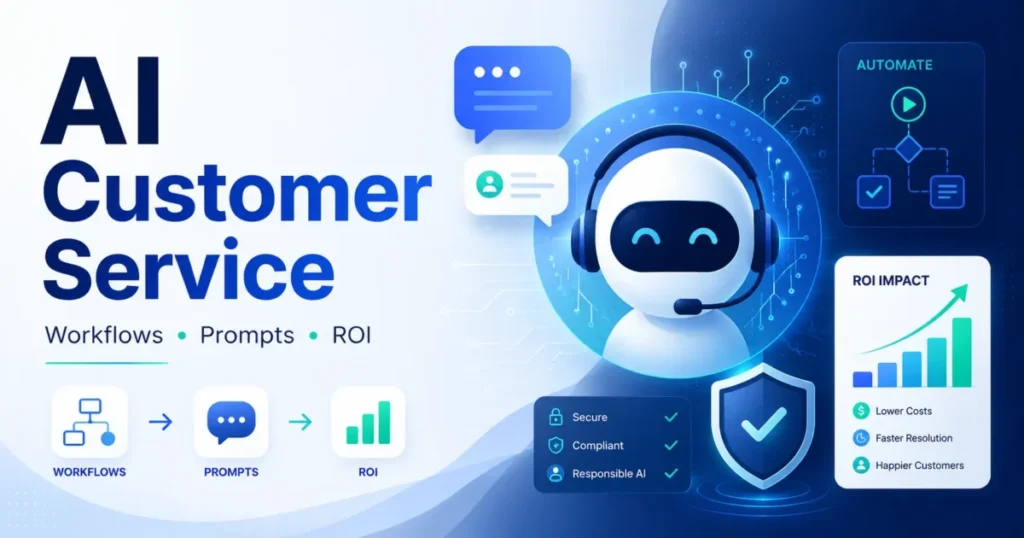
Most AI customer service projects do not fail because the model writes a bad sentence. They fail because nobody decided, in writing, what the AI is allowed to do when it is not sure.
This is the operating kit I would hand a support manager before a single ticket touches a model. It holds a readiness checklist, a four-level permission matrix, and a human escalation matrix. It also holds 25 workflow prompts grouped by ticket type, an accuracy scoring rubric, a routing flow from CRM to human agent, an ROI calculator, and a workbook you can open in Excel or Google Sheets.
It is written for support and CX operations owners running an existing help desk or CRM stack, not for teams shopping for customer service software options from scratch. Work through it in order and you finish with one workflow scoped, permissioned, prompted, accuracy-tested, and costed.
In This Article (28 sections)
Quick Copy: The 15-Point AI Customer Service Readiness Checklist
Copy this table into your project doc and fill the right column before you write a single prompt. Any row you cannot answer is a row that will surface later as a customer complaint.
| # | Readiness check | You pass when |
|---|---|---|
| 1 | Workflow named and scoped | One repeatable ticket type, not “support” |
| 2 | Authoritative source identified | One system of record owns the answer |
| 3 | Source freshness rule set | You know how stale is too stale |
| 4 | Autonomy level assigned | Answer-only, recommend-only, approval, or human-only |
| 5 | Minimum input fields listed | Only the customer data the task needs |
| 6 | Prohibited actions written down | Money, account, identity, legal are named |
| 7 | Authentication path defined | The app authenticates, never the conversation |
| 8 | Escalation triggers defined | Written before the prompt, not after |
| 9 | Human handoff packet specified | The agent receives context, not a transcript dump |
| 10 | Baseline metrics captured | Volume, handle time, resolution, repeat contact |
| 11 | Accuracy rubric agreed | Six dimensions, pass bar per dimension |
| 12 | Evaluation set built | Normal, ambiguous, missing-data, adversarial cases |
| 13 | Prompt and policy versioned | You can trace a bad answer to a version |
| 14 | Rollback path tested | You can turn it off in one step |
| 15 | Cost model built | Variable, fixed, QA, and rework all counted |
Every row maps to a section below. Rows 4, 6, 8, and 11 are the ones teams skip, and they are the ones that decide whether the deployment survives its first bad week.
Everything in This Guide, in One Workbook
The whole kit ships as a spreadsheet so you can work in it rather than copy out of a web page. Open it in Excel, or import it straight into Google Sheets with File then Import.
| Tab | What it does |
|---|---|
| Read me | How to run the kit and in what order |
| Readiness checklist | The 15 rows above, with a status column |
| Workflow library | All 25 workflows by ticket type, with permission level and metric |
| Prompt library | The complete prompt text for all 25, ready to paste |
| Permission matrix | The four autonomy levels and their approval rules |
| Escalation matrix | Trigger, AI action, receiving queue, handoff payload |
| Workflow scorecard | Six weighted criteria with a live total and threshold |
| ROI calculator | All thirteen inputs with live formulas and payback |
| Accuracy log | Per-conversation scoring across six dimensions, live pass rate |
| Metrics tracker | The six separated metrics, month by month |
| Rollout ladder | Four phases plus the day-31 action gate, with exit criteria and sign-off |
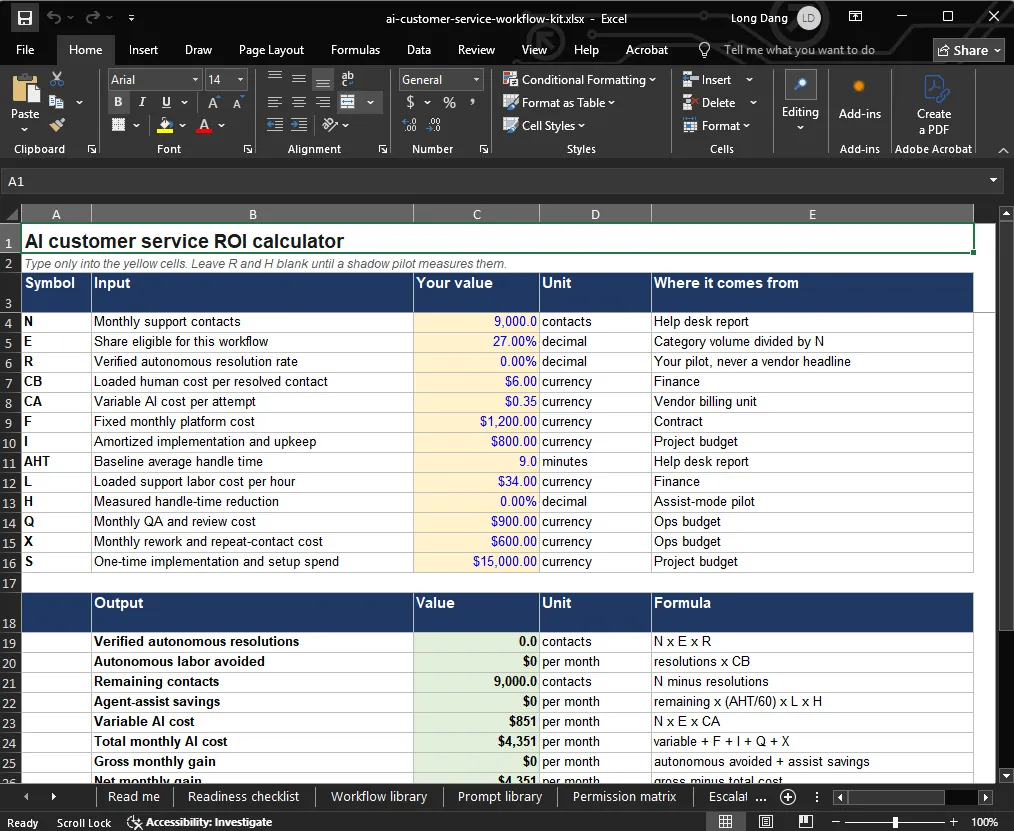
The scorecard, ROI and accuracy tabs carry live formulas rather than static text. Type your own numbers into the input cells and the totals, thresholds and pass rates recalculate.
How to Use This Kit
Every template in this library is built around the same six-part shape, and reading it once here saves rereading it 25 times below.
The use case. One repeatable ticket type with a single owner, such as order status or refund eligibility, because a workflow scoped to “support” cannot be tested or measured.
The required input. The named fields the workflow reads, and nothing more. If a field is not in the required input list, the prompt must not ask for it, because every extra field widens the permission and privacy surface without improving the answer.
The template itself. The ten-field prompt below, with the source sufficiency gate pasted in. According to the OpenAI Presence overview, a deployment can carry guardrails, permissions and approval steps, which is why the template encodes them rather than leaving them to the model.
How to customize it. Replace the bracketed brand name and the CAPITALISED source names with your own systems, then set the escalation triggers from your written policy rather than from the example list.
The example output. Each workflow states the shape it must return, so an agent or a system can check the result mechanically. If the output does not carry the named fields, treat the run as a failure even when the prose reads well.
The common error, and the tool workflow around it. The recurring failure is a model that answers confidently when its source is missing or stale, which is why the gate fires before the reply rather than after. The tool workflow that catches it is the accuracy log in Step 6, sampled weekly per workflow.
Then work the kit in this order:
Step A. Pick one owner. Support operations owns the checklist, engineering owns the integration, and legal or compliance signs off on rows 6 and 7.
Step B. Score one workflow at a time. Run a single ticket type through Steps 1 to 7 below and score it before you add a second.
Step C. Assign an autonomy level before you write the prompt. The permission decision constrains the prompt, not the other way round.
Step D. Reject on must-have failure. A workflow that fails any must-have control in Step 2 is rejected regardless of how attractive its volume looks.
Step E. Score accuracy on six dimensions, not one. A reply can be perfectly worded, correctly toned, and still wrong on policy.
Step F. Measure the outcome, not the deflection. Log verified resolution and repeat contact separately from the day you switch on.
Step G. Re-score quarterly. Policy changes, product changes, and knowledge decay all move a workflow’s score down over time.
Step 1: Define the Workflow Goal and Use Case
Fill this before anything else. A vague goal produces a vague prompt, and a vague prompt is what invents policy.
| Field | What to record | Example entry |
|---|---|---|
| Business problem | The ticket type consuming the most agent time | Order status contacts flood the queue after shipping delays |
| Target outcome | The customer result, not the text output | Customer knows the verified state and the next step |
| Volume | Monthly contacts of this type | 2,400 of 9,000 total |
| Team | Agents affected and who owns the change | 12 agents, ops lead owns |
| Budget ceiling | Monthly all-in spend you can defend | Set by finance before the pilot |
| Deadline | The date the pilot decision is due | End of the second month |
| Current workflow | The exact steps an agent takes before AI | Look up order, check carrier, reply from macro |
The volume row is the one that decides everything downstream. As a working rule I treat roughly a hundred contacts a month as the floor, because below that a workflow rarely repays the evaluation and QA work needed to run it safely.
Step 2: Separate Must-Have Controls From Nice-to-Have Features
Vendors sell features. Deployments survive on controls.
Split them, then apply the reject rule.
| Requirement | Type | Reject if missing? |
|---|---|---|
| Scoped permissions per connected system | Must-have | Yes |
| Human escalation path that reliably routes | Must-have | Yes |
| Approval step before any consequential action | Must-have | Yes |
| Session and action history you can review | Must-have | Yes |
| Pre-release evaluation and simulation | Must-have | Yes |
| Controlled rollout and rollback | Must-have | Yes |
| Citations back to the source of an answer | Must-have | Yes |
| Sentiment scoring | Nice-to-have | No |
| Multilingual output | Nice-to-have | No |
| Voice channel | Nice-to-have | No |
| Suggested-reply ranking | Nice-to-have | No |
Reject rule: a workflow missing any must-have control stays at recommend-only, even if the model handles the content perfectly. Capability is not authorization.
Six of those seven must-have controls come from vendor documentation rather than editorial preference. OpenAI’s documentation for its governed agent platform lists six controls that a deployment can include. They are simulations and evaluations before release, guardrails, permissions, approval steps, session records and action histories, human escalation paths with structured context, and controlled rollout with rollback, according to the OpenAI Presence overview.
Before You Automate: The Four-Level AI Permission Matrix
This is the single decision that most AI customer service guides skip. Every workflow gets exactly one level, and the level is set by consequence, not by model capability.
| Level | The AI may | Approval | Typical ticket types |
|---|---|---|---|
| 1. Answer-only | State verified facts to the customer | None needed | FAQ, order status, invoice explanation |
| 2. Recommend-only | Propose an action for a human | Human sends or acts | Eligibility checks, triage, reply drafts |
| 3. Execute-with-approval | Perform a scoped action after sign-off | Named approver and audit log | Refunds, cancellations, booking changes |
| 4. Mandatory-human | Nothing beyond routing | Human owns end to end | Suspected compromise, legal, fraud, safety |
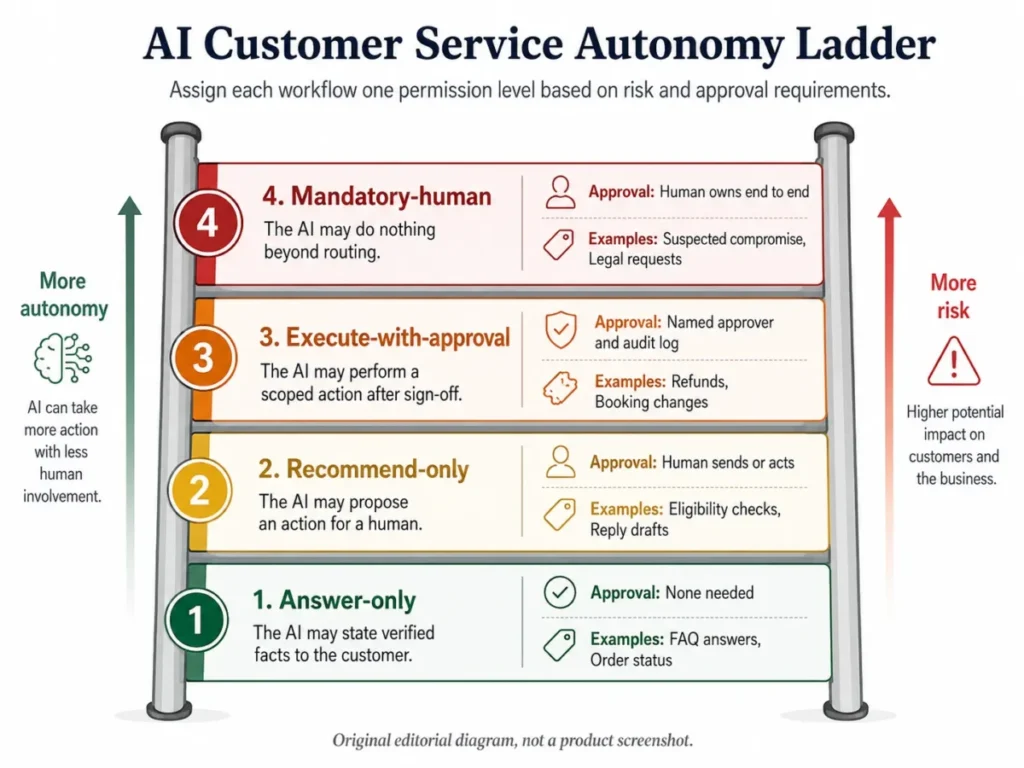
Score a workflow up a level only when all five risk dimensions are low: reversibility, financial impact, privacy impact, account-security impact, and regulatory impact.
A booking change is reversible and low-value, so it reaches level 3 quickly. A payout is not reversible, so it stays at level 3 with a named approver no matter how confident the model is.
The evidence that capability and authorization are different sits in OpenAI’s own support channel. Its AI phone support is documented as intended to help with routine questions about ChatGPT and other OpenAI products. That scope covers product questions, account support and general troubleshooting.
The same page documents four things it cannot do. It cannot submit a report or request, connect the caller to a live agent, initiate an escalation or account review, or guarantee a follow-up, per the AI phone support help article.
That is a vendor deliberately fencing its own automated channel. If OpenAI keeps account review and live-agent transfer outside the bot, a support team with a fortnight of prompt work should be at least as conservative.
The AI-to-Human Escalation Matrix
Escalation is usually described as a feature and almost never specified as a workflow. This matrix is the specification: every row is a trigger, the action the AI takes the moment it fires, the queue that receives the conversation, and the payload that queue must be handed.
| Trigger | AI action at the trigger | Receiving queue | Handoff payload must add |
|---|---|---|---|
| Customer asks for a person | Stop, acknowledge, route | Front-line human queue | Verified facts and the unresolved question |
| Required source missing or stale | Stop, state it cannot verify | Front-line human queue | The source it looked for and could not use |
| Two approved sources conflict | Stop, surface both | Knowledge owner plus front line | Both policy references and the conflict |
| Second misunderstanding in a row | Stop the loop, offer the fallback | Front-line human queue | Transcript plus the failed interpretations |
| Repeated failure on the same issue | Stop, do not retry | Senior or escalations queue | Prior contact IDs and what was attempted |
| Threat to cancel or churn language | Continue answering, flag in parallel | Retention or account owner | The verbatim signal and account context |
| Legal threat or legal request | Stop all automation | Legal intake process | Timestamp, verbatim request, no advice given |
| Safety or self-harm signal | Stop, follow the approved script | Designated human process | Immediate handoff, no delay for context building |
| Suspected account compromise | Stop, request nothing secret | Security or account recovery | Reported symptoms only, no credentials |
| Fraud or chargeback signal | Stop, take no financial action | Fraud or risk queue | Transaction IDs and the signal that fired |
| Amount above the approval ceiling | Propose only, never execute | Named approver | Proposed amount, policy basis, eligibility trace |
| Vulnerable-customer signal | Stop, use plain confirming language | Trained human queue | Observable language only, no inferred diagnosis |
| Regulated-topic request | Stop, no interpretation | Compliance-owned process | The request scope and the routing decision |
Two design rules make this matrix work. Twelve of the thirteen triggers stop the automation before the reply is sent, and every stop carries the payload rather than a bare transfer.
The churn signal is the deliberate exception. It flags the retention owner in parallel while the AI keeps answering, because interrupting a customer mid-answer to transfer them is itself a churn risk.
The customer-request row is the one teams argue about and the one they should concede fastest. Forcing another bot loop after somebody has typed “agent” converts a solvable ticket into a complaint about the bot.
The Routing Flow: CRM to AI Agent to Helpdesk to Human Agent
Support AI does not sit in front of your stack. It sits inside it, between the record that knows who the customer is and the queue that knows who answers.
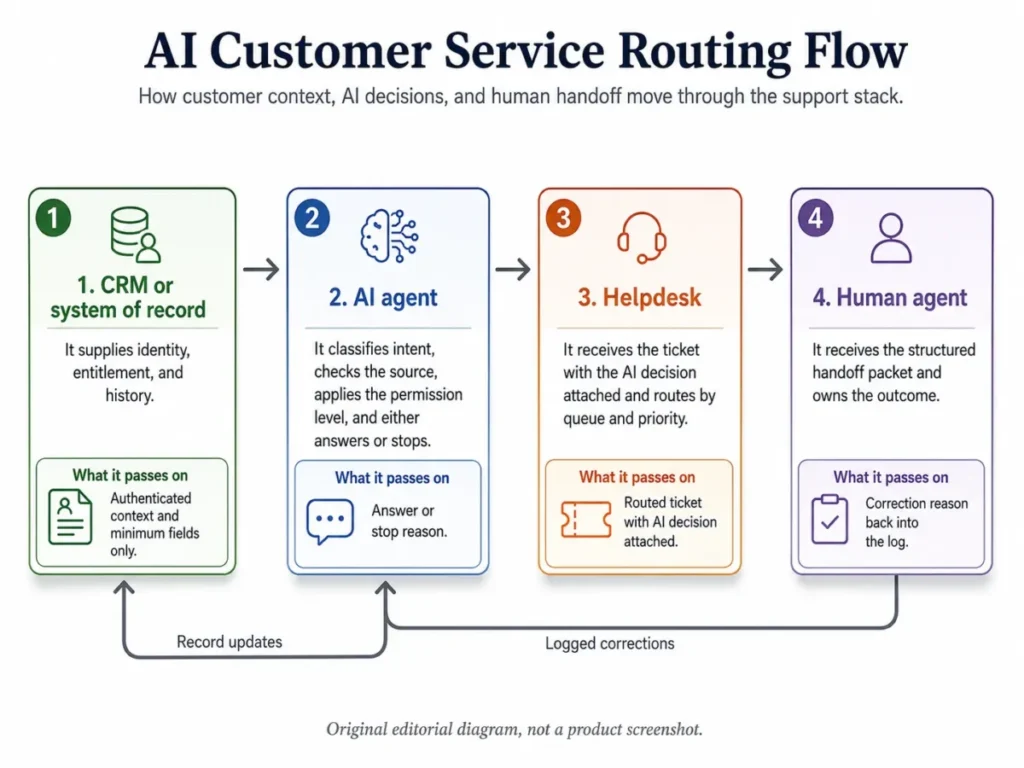
| Stage | What it owns | What it passes on | What must stop here |
|---|---|---|---|
| CRM or system of record | Identity, entitlement, order and account history | Authenticated context, minimum fields only | Anything the workflow does not need |
| AI agent | Intent, source check, permission level, draft or answer | Answer, or a stop with its reason | Any action above its permission level |
| Helpdesk | Queue, priority, SLA, audit trail | Ticket with the AI decision attached | Silent closure of an unresolved contact |
| Human agent | The outcome and the customer relationship | Correction reason back into the log | Repeating a question the packet answered |
Three details decide whether this flow works in practice. Authentication happens at stage 1 and is never inferred at stage 2, the AI decision travels with the ticket into stage 3 rather than being discarded, and stage 4 corrections return as logged reasons rather than as private frustration.
The return arrow from the human agent is the part most teams never build. Without it you can see that accuracy is falling but you cannot see why, and the prompt version that caused it stays in production.
The Universal AI Customer Service Prompt Framework
Every template below uses the same ten fields. The wording changes per workflow, but the architecture never does, because the architecture is what keeps the model inside policy.
| Field | The job it does |
|---|---|
| ROLE | Narrows the function to one support job |
| GOAL | States the customer outcome, not the text to produce |
| VERIFIED SOURCES | Names the approved knowledge and data fields |
| CUSTOMER CONTEXT | Supplies only the fields the task needs |
| ALLOWED ACTIONS | Lists what the model may do |
| PROHIBITED ACTIONS | Lists what it must never do |
| DECISION RULES | Encodes policy checks and source precedence |
| ESCALATION TRIGGERS | Defines when human judgment is mandatory |
| OUTPUT FORMAT | Fixes the reply shape or structured object |
| QA CHECK | Forces source, policy, tone, and action validation |
Two fields carry most of the safety weight. The first is VERIFIED SOURCES combined with a source sufficiency rule, and the second is PROHIBITED ACTIONS.
Paste this gate into every customer-facing prompt in the set:
SOURCE SUFFICIENCY GATE
If the required policy or record is missing, outside its freshness
boundary, or contradicted by another approved source, do not infer a
value. Ask one clarifying question or escalate with the reason.
Never present an unverified statement as policy.
Grounding on connected company data is workable, and it is also gated on setup that teams underestimate. OpenAI documents that ChatGPT company knowledge searches connected apps and returns an answer with citations and links. The same page states that it requires at least one eligible enabled app-powered plugin with search and fetch. It also states that installing a plugin by itself is not enough if its required app is not enabled and connected on ChatGPT Business or Enterprise and Edu, in the company knowledge documentation.
Read that as a data-plumbing warning rather than a feature note. A grounded support prompt is only as good as the connector behind it, and a half-connected source is the fastest route to a confident wrong answer about your own policy.
Keep CUSTOMER CONTEXT minimal for the same reason a database role is minimal. Name the exact fields the workflow needs and omit everything else, because more context is not automatically better once permissions and sensitivity enter the picture.
The Four Prompts Worth Getting Exactly Right
Refund, complaint, order status and escalation carry more risk than the other 21 combined. Money moves, tempers move, expectations get set, and a missed trigger turns a recoverable ticket into a lost customer.
These four are written out in full across all ten fields. The remaining 21 in the library below carry the compact core prompt, because their risk sits in the source rather than in the action.
Full prompt 1: Order status
ROLE: Order-status assistant for [brand] support.
GOAL: The customer knows the verified state of their order and the
  next step, without being given an invented date.
VERIFIED SOURCES: order record, fulfillment record, carrier status
  feed, shipping policy. No other source is authoritative.
CUSTOMER CONTEXT: order_id, order_state, ship_date, carrier_state,
  verified_delivery_estimate. Do not request or use payment details.
ALLOWED ACTIONS: read the records, explain the state, give the
  approved tracking step, offer the policy-defined next step.
PROHIBITED ACTIONS: estimating a delivery date, blaming a carrier,
  promising a refund, replacement or credit, changing any record.
DECISION RULES: if verified_delivery_estimate is absent, say the date
  is not confirmed. If order_state and carrier_state disagree, treat
  the conflict as unresolved. If the delay exceeds the policy
  threshold, route to the remedy path rather than reassuring.
ESCALATION TRIGGERS: missing order_id, insufficient authentication,
  system conflict, delay past threshold, customer asks for a person.
OUTPUT FORMAT: one short paragraph with the verified state, then the
  next step as a single sentence, then the tracking reference.
QA CHECK: before sending, confirm every date and state in the reply
  appears in the supplied records, and that no remedy was promised.
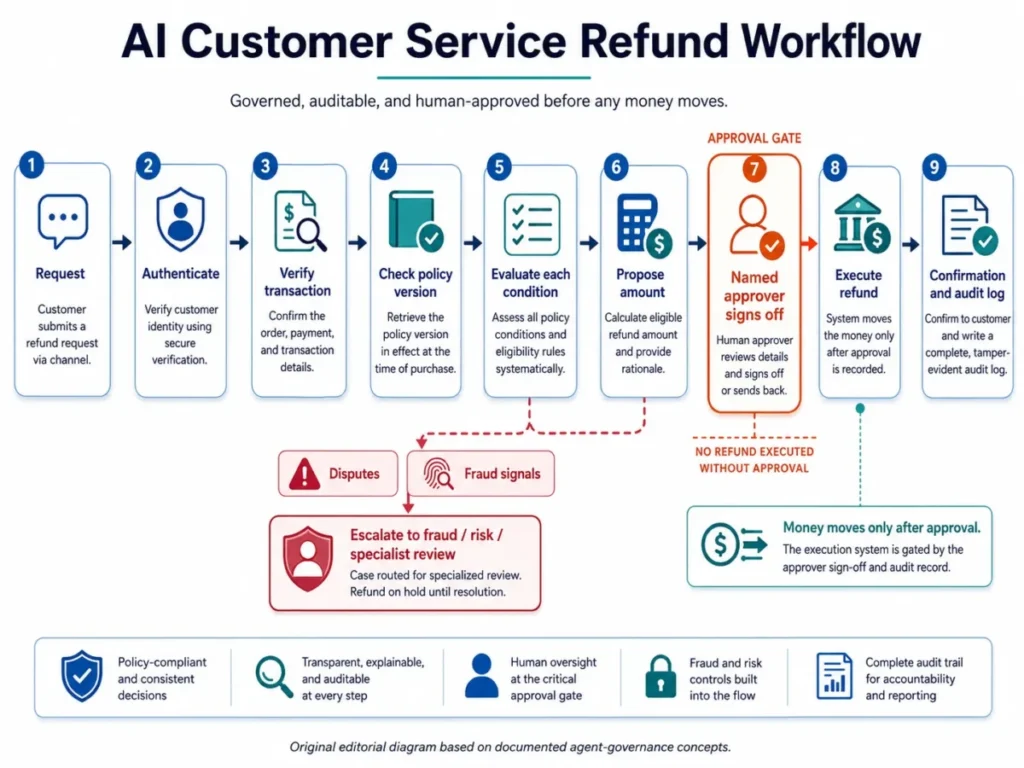
Full prompt 2: Refund request
ROLE: Refund eligibility assessor for [brand] support.
GOAL: Produce a defensible eligibility decision and a proposed action
  for a named approver, not a completed refund.
VERIFIED SOURCES: transaction record, refund policy version in force
  on the purchase date, prior refund history, approval ceiling table.
CUSTOMER CONTEXT: authenticated_customer_id, transaction_id, amount,
  purchase_date, reason_given. No stored card or bank data.
ALLOWED ACTIONS: check each policy condition, show which conditions
  pass, calculate the proposed amount, write the eligibility trace.
PROHIBITED ACTIONS: executing a refund, promising money movement,
  stating a timeline for funds, approving an exception, or telling the
  customer the refund is approved.
DECISION RULES: apply the policy version in force at purchase. A
  condition that cannot be verified counts as failed, never as passed.
  Any amount above the approval ceiling is proposal-only regardless of
  eligibility.
ESCALATION TRIGGERS: disputed transaction, fraud signal, policy
  ambiguity, exceptional amount, second refund on the same order.
OUTPUT FORMAT: structured object with eligibility_status,
  conditions_passed, conditions_failed, proposed_amount, policy_basis,
  approver_required, and customer_safe_summary.
QA CHECK: confirm no sentence states or implies that a refund has been
  issued, and that the proposed amount traces to the transaction record.
The customer-safe summary field matters more than it looks. It gives the agent something to send that describes the assessment without committing the company to an outcome nobody has approved yet.
Full prompt 3: Complaint de-escalation
ROLE: First-response complaint handler for [brand] support.
GOAL: The customer feels heard, knows what is verified, and has one
  concrete next step, without the company admitting unproven fault.
VERIFIED SOURCES: conversation history, case record, prior contacts on
  this issue, applicable policy, approved remedy list.
CUSTOMER CONTEXT: case_id, issue_summary, prior_contact_count,
  verified_facts, outstanding_commitments.
ALLOWED ACTIONS: acknowledge the specific problem, restate what is
  verified, give the next available step, offer only listed remedies.
PROHIBITED ACTIONS: admitting fault that the record does not show,
  inventing compensation, arguing, matching hostile tone, minimising,
  or promising a callback time that no queue guarantees.
DECISION RULES: acknowledge the specific failure, not a generic
  apology. If prior_contact_count is above one, treat the issue as a
  repeat failure and escalate rather than restart. Never offer a remedy
  outside the approved list.
ESCALATION TRIGGERS: repeat failure, threat to cancel, legal threat,
  vulnerable-customer signal, severe dissatisfaction, request for a
  person, any remedy outside the approved list.
OUTPUT FORMAT: acknowledgement sentence, one line on what is verified,
  one line on the next step, one line on who owns it and by when.
QA CHECK: confirm no fault admission, no invented remedy, no promised
  time the queue cannot meet, and that the specific issue is named.
Full prompt 4: Escalation detection
ROLE: Escalation classifier reading a support conversation.
GOAL: Route the conversation correctly the first time, using only the
  written escalation policy.
VERIFIED SOURCES: escalation policy, queue definitions, priority
  rules. The conversation itself is evidence, not policy.
CUSTOMER CONTEXT: full conversation text, prior_contact_count,
  account_tier if the policy uses it.
ALLOWED ACTIONS: classify, cite the language that triggered the rule,
  name the receiving queue, set urgency, write the handoff reason.
PROHIBITED ACTIONS: diagnosing emotional or medical state beyond
  observable language, inferring customer value from unsupported
  attributes, creating a queue that does not exist, suppressing a
  trigger because the conversation seems to be going well.
DECISION RULES: a trigger fires on observable language, not on tone
  guessing. An explicit request for a person fires immediately and
  overrides every other classification. When two triggers fire, take
  the higher-severity queue.
ESCALATION TRIGGERS: this workflow is the trigger detector, so its own
  failure mode is silence. Return needs_review when no rule matches
  but the conversation shows repeated failure.
OUTPUT FORMAT: trigger_found, evidence_from_conversation, urgency,
  recommended_queue, handoff_reason, rules_considered.
QA CHECK: confirm every trigger cites verbatim conversation evidence,
  and that no queue outside the definitions list was used.
The rules_considered field is the one that makes this auditable. When a critical escalation is missed you can see which rules the classifier weighed and which it never reached.
25 AI Customer Service Workflows and Prompt Templates
The library is grouped by ticket type, because that is how support queues are organised in practice. Each entry names its permission level, its minimum inputs, its escalation trigger, and the metric that tells you whether it is working.
Start with the order and product groups. They have a single system of record, a working fallback, and no action to reverse.
Order and fulfillment tickets
Workflow 1: Order status (answer-only). Inputs: authenticated customer context, order status, carrier data. Full ten-field prompt above.
Escalates on missing identifier or conflicting system state. Metric: repeat contacts on order status.
Workflow 2: Shipping delay (recommend-only). Inputs: order status, carrier status, shipping policy.
Explain the verified delay and the available next steps. Do not
manufacture a delivery estimate or blame a carrier without source data.
If a replacement, credit or refund may apply, state it only as a
policy-based option and route to approval.
Escalates past the policy-defined delay threshold. Metric: resolved delay contacts.
Workflow 3: Damaged item claim (recommend-only). Inputs: customer description, damage policy, order record.
Collect only the information the damage-claim policy requires, summarize
the verified facts, and identify the approved remedy path. Do not promise
a replacement or refund until eligibility and authorization are confirmed.
Escalates when required claim evidence is absent. Metric: first-pass complete claims.
Workflow 4: Return eligibility check (recommend-only). Inputs: purchase date, item status, return policy.
Evaluate the request against RETURN_POLICY. Show which verified
conditions are satisfied and which are unresolved. Never authorize the
return yourself. Output eligibility_status, policy_basis,
missing_information and recommended_step only.
Escalates on any unverifiable condition. Metric: eligibility classification accuracy.
Workflow 5: Appointment rescheduling (execute-with-approval). Inputs: authenticated customer, current booking, available slots, reschedule policy.
Offer only verified available slots that comply with the rescheduling
policy. Confirm the selected slot with the customer, then hold the change
until the named approver signs off and the action is written to the audit
log. If the change carries fees, restrictions or no availability, disclose
only verified information and ask for confirmation or escalate.
Escalates on fee disputes and unavailable windows. Metric: reschedules completed without correction.
Order status and shipping delay are the two highest-return starting points in this group. Both are high volume, both have one system of record, and both are already handled by macros that agents paste without reading.
A help desk software stack that already stores carrier state gives you workflow 1 almost for free.
Billing, refund and subscription tickets
Workflow 6: Billing question (answer-only). Inputs: authenticated billing record, plan terms, invoice fields.
Explain the charge using only the supplied invoice and plan terms.
Separate recurring subscription, usage, tax, credits and adjustments
where those fields exist. Do not infer why a charge occurred if the
billing record does not show it. Escalate disputed charges.
Escalates on any disputed or unexplained charge. Metric: billing repeat-contact rate.
Workflow 7: Invoice explanation (answer-only). Inputs: invoice, approved billing definitions.
Translate the invoice into plain English. For each line item give the
label, amount, billing period and verified reason. Do not alter the
invoice or promise a credit. Flag any field that cannot be reconciled
from the supplied data.
Escalates on an unreconcilable line item. Metric: clarification follow-up rate.
Workflow 8: Refund request (execute-with-approval). Inputs: authenticated customer, transaction, refund policy, approval rules. Full ten-field prompt above.
Escalates on disputes, fraud signals, policy ambiguity and exceptional amounts. Metric: approved refund accuracy plus rework rate.
Workflow 9: Subscription cancellation (execute-with-approval). Inputs: authenticated account, subscription state, cancellation policy.
Identify the subscription, the effective cancellation rule, remaining
obligations and any verified consequences. Confirm intent, then hold the
change until the named approver signs off and the action is written to
the audit log. Do not invent refund eligibility or retention offers. If
authorization is unclear, stop before mutation.
Escalates on unclear authorization. Metric: cancellations completed without a repeat contact.
This is the group where the permission matrix earns its keep. Two of the four sit at execute-with-approval, and neither of those two should ship until the two answer-only workflows above them have run clean for a full measurement cycle.
Product, how-to and incident tickets
Workflow 10: FAQ answer (answer-only). Inputs: customer question, approved knowledge set.
Answer using only APPROVED_KNOWLEDGE. Do not invent policy, pricing,
eligibility, timelines or product behavior. If the answer is missing,
ambiguous or contradictory, say you cannot verify it and route to the
defined fallback. Direct answer first, then the minimum explanation.
Escalates when the knowledge set has no match or two articles disagree. Metric: verified resolution rate.
Workflow 11: Agent reply draft (recommend-only). Inputs: conversation, verified context, policy.
Draft a concise reply for a human agent to review. Use verified customer
and policy context only. List unresolved facts separately rather than
guessing. Never state that an action has been taken unless the source
record confirms completion.
Escalates by leaving the unresolved list non-empty. Metric: agent edit rate by reason code.
Workflow 12: Multilingual support draft (recommend-only). Inputs: customer message, verified answer, target language.
Produce a faithful response in TARGET_LANGUAGE using the verified answer
and policy terms supplied. Preserve product names, amounts, dates and
policy meaning. If a term is ambiguous or legally sensitive, flag it for
human review rather than improvising.
Escalates on legally sensitive terminology. Metric: translation correction rate.
Workflow 13: Proactive incident update (answer-only). Inputs: verified incident record, affected scope, approved update text.
Generate an update using only the verified incident record. State what
is affected, what is known, what customers should do, and the next
confirmed update point if one exists. Do not invent restoration
estimates, causes or affected regions.
Escalates when scope or cause is unconfirmed. Metric: avoidable incident-related contacts.
Complaint, escalation and retention tickets
Workflow 14: Complaint de-escalation (answer-only). Inputs: conversation, verified case context, escalation rules. Full ten-field prompt above.
Escalates on the defined emotional, financial, legal or repeat-failure trigger. Metric: escalation quality and later repeat contact.
Workflow 15: Urgency and escalation detection (recommend-only). Inputs: conversation, escalation policy. Full ten-field prompt above.
Fires on every row of the escalation matrix. Metric: escalation precision and missed-critical-case rate.
Workflow 16: Human handoff summary (internal, answer-only). Inputs: conversation, system actions, policy checks.
Create a handoff packet: customer_goal, authentication_state,
verified_facts, steps_already_attempted, actions_completed,
policy_consulted, unresolved_question, customer_requested_outcome,
urgency_signal, prohibited_or_pending_action, recommended_human_step.
Never omit a failed attempt.
This is the workflow that decides whether escalation feels like help or like starting over. Metric: customer repetition after transfer.
Workflow 17: Account access triage (recommend-only). Inputs: reported problem, approved security process.
Classify the access problem without requesting passwords, secret keys,
full payment credentials or any other secret. Provide only approved
recovery steps. Suspected compromise, unauthorized access, identity
uncertainty or anything outside the standard recovery workflow must be
routed to the designated security path.
Escalates on any compromise signal. Metric: correct secure routing rate.
Workflow 18: Churn-risk escalation (recommend-only). Inputs: conversation, verified account context, retention rules.
Identify explicit cancellation or dissatisfaction signals and summarize
the reason. Do not invent a churn probability or offer unapproved
discounts. Route to the retention or support owner when the defined
trigger is met.
Escalates on an explicit cancellation signal. Metric: correct retention routing.
Workflow 16 is the one that quietly decides whether the whole deployment is judged a success. Every minute the AI saves upstream is given back if the customer has to explain the problem twice.
Triage, routing and channel tickets
Workflow 19: Ticket classification (recommend-only). Inputs: ticket text, approved taxonomy.
Assign the ticket to the closest category in APPROVED_TAXONOMY. Do not
create a new category. Return category, subcategory, confidence_reason
and missing_information. Use needs_review when the taxonomy does not fit.
Workflow 20: Priority scoring (recommend-only). Inputs: ticket, approved priority rules.
Apply PRIORITY_RULES exactly. Do not infer customer value, legal risk or
urgency from unsupported attributes. Return priority, matched_rule,
evidence and escalation_required.
Escalates when no rule matches. Metric: priority classification accuracy.
Workflow 21: Duplicate ticket clustering (internal, recommend-only). Inputs: ticket set, similarity rules.
Group tickets that appear to represent the same underlying issue.
Preserve individual customer records. Return cluster_label,
included_ticket_ids, common_issue and uncertainty. Do not merge or close
records automatically.
Escalates a cluster above the incident threshold. Metric: cluster precision.
Workflow 22: Voice support triage (recommend-only). Inputs: transcribed intent, approved voice workflow, fallback rules.
Identify the caller's goal, confirm consequential details by repeating
them back, and route only within the approved voice workflow. After two
misunderstandings or a low-confidence transcription, stop the loop and
offer the defined alternative path. Never treat an uncertain
transcription as verified authorization.
Escalates after the second misunderstanding. Metric: successful routing without a repeat call.
Classification and priority scoring pair naturally with whatever ticketing systems already hold your queue rules, because both read a taxonomy you have already written rather than inventing one.
Internal quality and knowledge tickets
Workflow 23: Conversation summary (internal, answer-only). Inputs: conversation history.
Summarize into: customer_goal, verified_facts, actions_completed,
promises_made, unresolved_items, sentiment_signals, next_owner,
next_step. Do not add facts absent from the transcript or record.
Escalates when promises_made cannot be tied to a record. Metric: summary correction rate.
Workflow 24: Knowledge base gap detection (internal, recommend-only). Inputs: unresolved conversations, current knowledge index.
Identify recurring questions that lack a clearly authoritative answer in
the current knowledge set. Cluster similar questions, cite representative
issue types, identify the missing policy or content, and draft a backlog
item. Do not create the missing policy yourself.
Escalates the drafted item to the knowledge owner. Metric: validated gaps closed per month.
Workflow 25: Support QA and coaching (internal, recommend-only). Inputs: conversation, QA rubric, applicable policy.
Evaluate the interaction only against the supplied QA rubric. For every
failed criterion, identify the interaction behavior, explain the rule,
and propose a coaching action. Separate objective rule violations from
subjective style suggestions.
Escalates a disputed score to a human reviewer. Metric: agreement rate with human auditors.
Workflow 24 is the one that compounds. Every other workflow handles the tickets already in the queue, while gap detection reduces next quarter’s.
It pairs naturally with whatever knowledge base software already holds your public articles.
Across all 25, only three reach execute-with-approval and none reach unattended execution. That distribution is the honest answer to “which tickets are safe to automate”, and it holds even as models improve, because the constraint is authorization rather than capability.
Step 3: Score a Workflow Before You Build It
Use this on any workflow, including ones not in the 25 above. Score each criterion from 1 to 5, multiply by the weight, and add the results.
| Criterion | Weight | Score guide | Evidence |
|---|---|---|---|
| Volume and repeatability | 20% | 5 if high volume and stable phrasing | Ticket counts by category |
| Source authority | 20% | 5 if one system owns the answer | Named system of record |
| Action risk | 20% | 5 if read-only, 1 if irreversible | Permission level assigned |
| Escalation path | 15% | 5 if a human queue receives context | Handoff packet tested |
| Measurable outcome | 15% | 5 if verified resolution is loggable | Metric defined in the tool |
| Build and QA effort | 10% | 5 if reusing an existing integration | Engineering estimate |
Worked example for order status, using the scores a well-instrumented ecommerce team would record: (5 x 0.20) + (5 x 0.20) + (5 x 0.20) + (4 x 0.15) + (4 x 0.15) + (4 x 0.10) = 4.60.
Decision thresholds: 4.2 and above means build it now, 3.5 to 4.1 means pilot it in shadow mode, 3.0 to 3.4 means build only if the volume is severe, and below 3.0 means reject. A must-have control failure from Step 2 rejects the workflow regardless of the weighted total.
Step 4: The AI Customer Service ROI Calculator
Deflection rate is a vanity metric because it counts contacts that left the queue, not problems that were solved. This model counts verified resolutions and then subtracts the cost of the ones that came back.
| Symbol | Input | Where it comes from |
|---|---|---|
| N | Monthly support contacts | Help desk report |
| E | Share eligible for this workflow | Category volume divided by N |
| R | Verified autonomous resolution rate | Your pilot, never a vendor headline |
| CB | Loaded human cost per resolved contact | Finance |
| CA | Variable AI cost per attempt | Vendor billing unit |
| F | Fixed monthly platform cost | Contract |
| I | Amortized implementation and upkeep | Project budget |
| AHT | Baseline handle time in minutes | Help desk report |
| L | Loaded support labor cost per hour | Finance |
| H | Measured handle-time reduction | Assist-mode pilot |
| Q | Monthly QA and review cost | Ops budget |
| X | Monthly rework and repeat-contact cost | Ops budget |
| S | One-time implementation and setup spend | Project budget |
The formulas, in order:
verified_autonomous_resolutions = N * E * R
autonomous_labor_avoided        = verified_autonomous_resolutions * CB
remaining_contacts              = N - verified_autonomous_resolutions
agent_assist_savings            = remaining_contacts * (AHT / 60) * L * H
variable_ai_cost                = N * E * CA
total_monthly_ai_cost           = variable_ai_cost + F + I + Q + X
net_monthly_gain = autonomous_labor_avoided + agent_assist_savings
                   - total_monthly_ai_cost
ROI_percent      = (net_monthly_gain / total_monthly_ai_cost) * 100
payback_months   = S / (net_monthly_gain + I)
Two engines, not one. Autonomous resolution removes labor, and assist mode compresses it.
Blending them is how a business case survives a spreadsheet review and then misses by half.
The interactive calculator on this page runs these exact formulas, and the workbook carries them as live spreadsheet formulas. Both leave R and H empty on purpose, because a resolution rate borrowed from a vendor headline is the fastest way to build a case that misses.
AI customer service ROI calculator
Counts verified resolutions rather than deflected contacts, separates autonomous savings from agent-assist savings, and subtracts QA review and rework.
Your inputs
Result
Gain against cost, per month
Both bars share one scale. Hover a bar for its components.
Full breakdown
| Line | Value | How it is calculated |
|---|
Add I back inside the payback line because it is the monthly amortization of S, and counting both would charge the same spend twice. If net monthly gain is zero or negative, there is no payback period under your inputs.
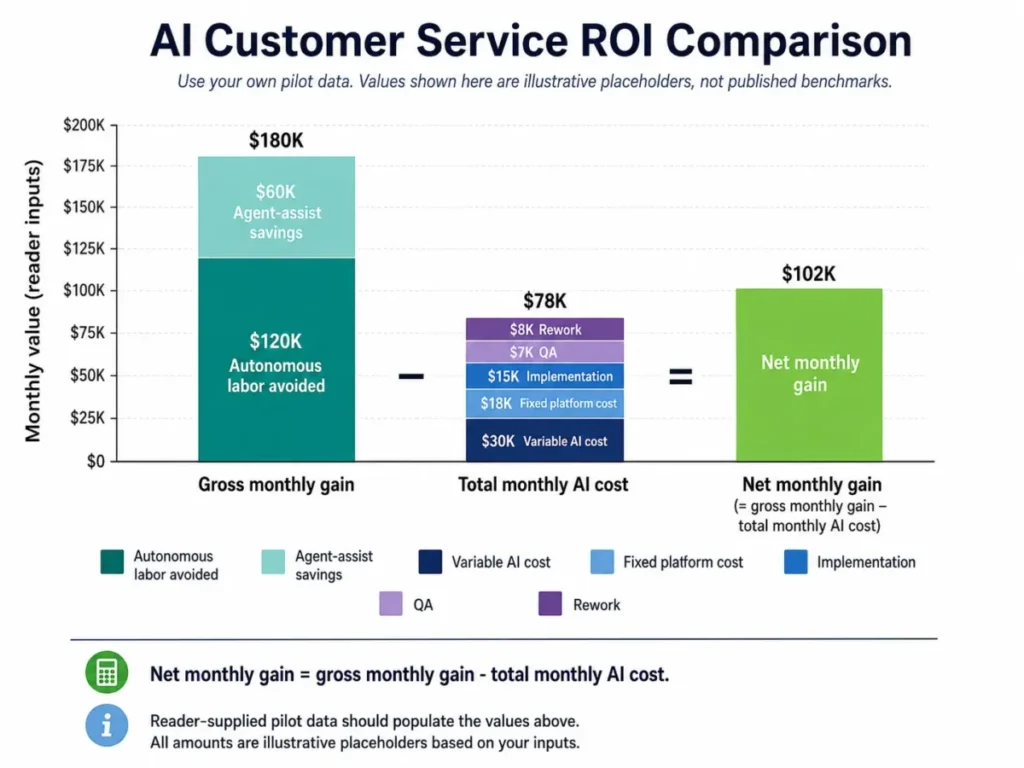
Add I back inside the payback line because it is the monthly amortization of S, and counting both would charge the same spend twice.
Four rules decide whether the number is defensible. Enter CA using the vendor’s actual billing unit rather than assuming per-resolution billing, and take R and H from your own shadow-mode pilot. Set agent-assist savings to zero until a handle-time effect is measured, and count rework and repeat contacts in X rather than treating them as noise.
If net monthly gain is zero or negative under your own inputs, there is no payback period. That result is a finding, not a failure, and it usually points at E being smaller than the category report suggested.
Step 5: Check Data Sources, Permissions, Security, and Support
Run this before the first customer-facing reply, not after the first incident.
| Check | Pass condition | Fail action |
|---|---|---|
| System of record connected | The app is enabled and authenticated | Stay at answer-only from static knowledge |
| Permissions scoped per system | Read and write scopes are separate | Block all write actions |
| Minimum data fields enforced | Prompt names only the fields it needs | Trim the context package |
| Training and retention terms known | You can state where conversation data goes | Escalate to legal before launch |
| Admin and audit controls available | Your plan includes the governance features you need | Reprice the plan or reduce scope |
| Rollback tested | One switch reverts to the previous version | Do not go customer-facing |
The admin row is where plan gating bites. OpenAI’s business comparison page lists six administration controls as unavailable on Business and available on Enterprise. They are SCIM, enterprise key management, role-based access controls, the compliance API logs platform, IP allowlisting, and the listed data-residency regions, according to the OpenAI Business pricing comparison.
If your support workflow needs audit logs or role-based access to satisfy an internal control, that requirement chooses your plan before your feature list does. Budget for the tier that carries the governance control, not the tier that carries the chat feature.
On the data side, OpenAI states that ChatGPT Business workspace data is excluded from training by default and is encrypted in transit and at rest. The same page states that data export is not available in a Business workspace, in the ChatGPT Business data and privacy article.
Both halves matter to a support team. The training exclusion answers the question legal will ask, and the export limit matters if the plan was to pull workspace conversation data out of ChatGPT itself for an audit trail.
Source: OpenAI Business pricing and administration comparison, plus ChatGPT Business data and privacy documentation. Checked: 2026-08-07.
Step 6: The AI Customer Service Accuracy Checklist
Accuracy is not one number. A reply can be fluent, correctly toned, and still cite a policy that was replaced last quarter, so score every sampled conversation on six independent dimensions.
| Dimension | It fails when | Pass bar before autonomy |
|---|---|---|
| Groundedness | A statement cannot be traced to an approved source | 100% on customer-facing claims |
| Policy correctness | The right rule was found but the wrong version applied | 100% on eligibility and money |
| Action correctness | A completed action is claimed without record confirmation | 100%, no exceptions |
| Escalation correctness | A trigger did not fire, or fired on the wrong queue | 100% on safety, legal, security |
| Completeness | The customer’s actual question was left unanswered | Your service standard |
| Data and safety | A prohibited field was requested or over-shared | 100%, no exceptions |
Five of the six sit at 100%. That is deliberate, because a groundedness failure and an action-claim failure are not degrees of quality, they are the two ways a support bot creates a liability rather than a ticket.
How to sample. Pull a random 100 handled conversations per week per workflow, never a curated set, and never only the escalated ones. Have two reviewers double-score 20 of the 100 and report reviewer agreement alongside the score.
How to calculate. Conversation accuracy is a conversation passing every one of the six dimensions, not an average across them. Workflow accuracy is passing conversations divided by conversations sampled.
An average hides exactly the failure you care about. A conversation that scores well on five dimensions and invents a refund policy on the sixth is a failure, not an 83.
Build the evaluation set from these case types before the first customer sees an answer:
| Case type | What it proves | Minimum cases |
|---|---|---|
| Normal request | The happy path resolves | 10 |
| Ambiguous phrasing | The model asks instead of guessing | 5 |
| Missing data | The source gate fires | 5 |
| Conflicting policy | The model surfaces the conflict | 3 |
| Outdated source | Freshness rules hold | 3 |
| Adversarial phrasing | Prohibited actions stay prohibited | 5 |
| Explicit human request | Escalation routes immediately | 3 |
| Consequential action request | The approval gate holds | 5 |
Structured evaluation is a first-class capability rather than a manual chore. OpenAI’s API exposes an endpoint to create the structure of an evaluation that can be used to test a model’s performance. It is built from testing criteria and a data source configuration, per the OpenAI evals API reference.
Run the 39-case set on every prompt version and every policy change, and store the results next to the version number. A failure you cannot reproduce is a failure you will ship twice.
Step 7: Final Decision Rules
| Result | Decision | Next action |
|---|---|---|
| Score 4.2+, all must-haves pass, accuracy bars met | Deploy at the assigned level | Move to the rollout ladder |
| Score 3.5 to 4.1 | Pilot in shadow mode | Re-score after 30 days of logged comparisons |
| Any must-have control missing | Reject or downgrade | Hold at recommend-only until the control exists |
| Escalation path untested | Reject | Build and test the handoff packet first |
| Any 100% accuracy dimension missed | Reject | Rewrite the prompt, then rerun the full set |
| Net monthly gain negative | Hold | Re-check eligible share before spending more |
Example Filled-In Scorecard: A 12-Person Ecommerce Support Team
An illustrative worked example rather than a measured deployment. Picture a team handling 9,000 monthly contacts across 12 agents, with order status at 2,400 of those contacts and a mature carrier integration already feeding the help desk.
| Line | Entry |
|---|---|
| Workflow | Order status, answer-only |
| Weighted score | 4.60, above the 4.2 build threshold |
| Must-have controls | All seven present |
| Eligible share (E) | 0.27 |
| Assumed R for planning | Left blank until the shadow pilot reports |
| Evaluation set | 39 cases, two failures on conflicting carrier state |
| Decision | Shadow mode for 30 days, then re-score |
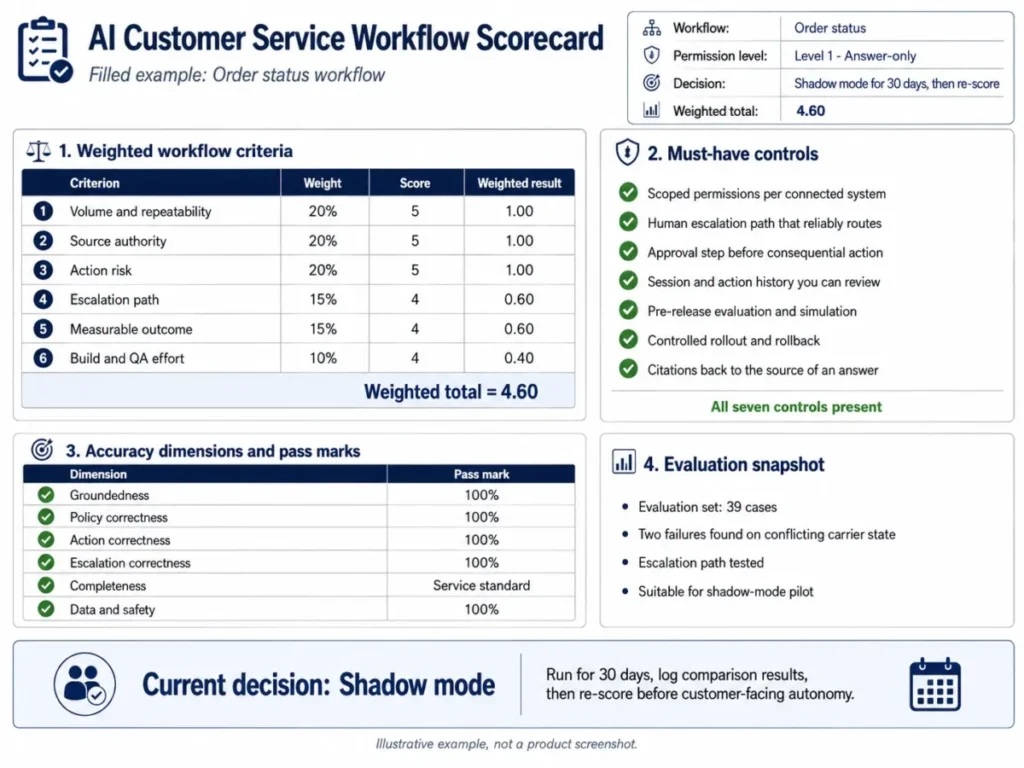
The instructive row is the blank one. A team that refuses to enter a resolution rate before measuring it is writing a business case rather than a wish.
Evaluation failures on conflicting carrier state are the ones worth pausing for, because those are the cases that produce a confident wrong delivery promise.
How the Kit Changes by Industry
The 25 workflows do not change. The permission ceiling, the escalation triggers, and the accuracy bars do.
| Industry | Dominant ticket types | Safe starting workflows | Permission ceiling |
|---|---|---|---|
| Ecommerce | Order status, delivery, returns, refunds | 1, 2, 10, 13 | Level 3 on returns and bookings |
| SaaS | Billing, how-to, incidents, cancellation | 6, 7, 10, 13 | Level 3 on plan changes only |
| Healthcare | Appointments, coverage, records, billing | 13, 19, 23, 24 | Level 1 to 2 for most teams |
| Financial services | Transactions, disputes, access, statements | 7, 19, 20, 23 | Level 1 to 2 for most teams |
Ecommerce
Volume is concentrated in a handful of ticket types with one clean system of record each, which is why ecommerce reaches useful autonomy faster than any other category here. Order status, shipping delay and FAQ answers alone often cover the majority of the queue.
The specific risk is the delivery promise. A model that fills a missing delivery date because the pattern looks obvious converts one support ticket into a refund request and a review, so the source sufficiency gate matters more here than the prompt wording.
Returns and refunds are where the ceiling belongs. Eligibility assessment at recommend-only is safe, execution behind a named approver is defensible, and unattended refunds are not.
Teams running on a CRM for ecommerce teams usually already hold the order and entitlement data these workflows need.
SaaS
The queue splits between billing questions, how-to questions and incident traffic, and each has a different source of truth. Billing lives in the billing system, how-to lives in the knowledge base, and incidents live in the status record, so three separate source gates are needed rather than one.
The specific risk is plan and entitlement drift. A how-to answer that is correct on the top tier and wrong on the plan the customer bought is a support failure that reads as a product failure.
Cancellation is the workflow to gate hardest. Retention offers must come from the approved list rather than from the model, and the change itself belongs behind sign-off.
Incident updates are the fastest win in this category, because the record is authoritative and the update is read-only.
Healthcare
Most healthcare support teams should keep the customer-facing ceiling at answer-only or recommend-only and put the early value into internal workflows. Conversation summary, ticket classification and knowledge gap detection deliver real time savings without putting a model between a patient and a clinical or coverage answer.
The specific risk is that a plausible answer about coverage, eligibility or records carries consequences a retail refund does not. Anything touching clinical content, records access or coverage determination belongs in a process a qualified person owns.
Requirements for handling patient data vary by jurisdiction, organisation and use case, so treat the data and permission checks in Step 5 as the starting point for a compliance review rather than a substitute for one. Teams evaluating a CRM for healthcare teams should confirm the governance controls sit on the plan they are buying, not the tier above it.
Financial services
The pattern matches healthcare more than ecommerce. Statement explanation and transaction lookup can work at answer-only against an authoritative record, while disputes, access recovery and anything touching money movement stay with a person or behind explicit approval.
The specific risk is that a wrong answer about a transaction or a dispute right creates a regulatory exposure rather than a refund. The escalation matrix rows for fraud signals, legal requests and suspected compromise carry more weight here than anywhere else in this guide.
Internal triage is where the return is. Classification, priority scoring and conversation summary reduce handle time without asserting anything to a customer, and they leave the judgment where the regulator expects it.
Metrics That Actually Matter
Most AI customer service reporting collapses into one number that no two teams define the same way. Split it into six.
| Metric | Definition | Why it is separate |
|---|---|---|
| Attempted automation rate | Contacts the workflow tried, over eligible contacts | Measures coverage, not success |
| Verified resolution rate | Resolutions confirmed with no follow-up in the window | The only number that belongs in ROI |
| Escalation rate | Contacts routed to a person by trigger | High is healthy early on |
| Customer-requested escalation rate | Contacts where the customer asked for a person | Rising values mean the bot is in the way |
| Repeat-contact rate | Same customer, same issue, inside the window | Catches false resolutions |
| Accuracy pass rate | Sampled conversations passing all six dimensions | Catches confident wrong answers |
Report verified resolution and repeat contact on the same slide. A resolution rate that climbs while repeat contact climbs with it is not an improvement.
It is a queue moving the problem downstream.
The 30-Day Rollout Ladder
Four phases, each with an exit criterion. No phase is skipped because the previous one looked fine.
| Phase | What runs | Exit criterion |
|---|---|---|
| Days 1 to 7: baseline | Nothing customer-facing | Volume, handle time, resolution, repeat contact logged |
| Days 8 to 14: shadow | Outputs generated, never sent | Accuracy pass rate hits your bar on the full case set |
| Days 15 to 24: approved replies | Agents accept or edit each reply | Edit reasons logged and trending down |
| Days 25 to 30: scoped autonomy | Answer-only workflows go live | Escalation path proven under real volume |
Scoped actions come after day 30, and only for workflows with a named approver and an audit trail. OpenAI describes a comparable managed sequence that typically starts by defining business outcomes, success criteria, and the initial workflows. The same sequence then connects systems, encodes policies and permissions, completes review, runs simulations and evaluations, and stages a controlled rollout with monitoring, in its Presence deployment overview.
The same documentation states plainly that a Presence agent does not become production-ready simply by ingesting documents, and that each such deployment requires scoping, integration, testing, review, and approval before launch. That single sentence invalidates the most common support-team plan, which is to point a model at the help center and call it a launch.
Red Flags That Should Stop an AI Customer Service Rollout
- No single system of record owns the answer the workflow gives.
- Two internal documents disagree and there is no precedence rule.
- The escalation queue exists on paper but nobody is staffed to receive it.
- The handoff arrives as a raw transcript with no verified facts.
- Authentication is inferred from what the customer typed rather than the app.
- The vendor bills per interaction but the business case assumes per resolution.
- Write permissions are granted at the same scope as read permissions.
- Nobody can name the prompt version behind a bad answer.
- There is no rollback that a support lead can trigger without engineering.
- The pilot reports deflection but not repeat contact or accuracy.
- Autonomous execution is enabled before the read-only band has run clean.
- The governance control your compliance team requires sits on a plan you did not budget for.
Any two of these together justify pausing the rollout. Items 3, 5, 9, and 11 justify pausing on their own.
Common Mistakes and How to Prevent Them
| Mistake | Prevention |
|---|---|
| Loading documents and calling it deployed | Define permissions, evaluations, escalation, monitoring, and rollback first |
| Writing a broad “be helpful” prompt | Use the ten-field framework with prohibited actions named |
| Counting every deflected contact as a win | Track verified resolution and repeat contact separately |
| Reporting accuracy as one averaged score | Score six dimensions and require a pass on all of them |
| Letting the model guess when policy is missing | Make missing or conflicting sources an escalation state |
| Automating money or account changes early | Keep them at execute-with-approval until read-only proves out |
| Passing the whole customer record into every prompt | Name the minimum fields per workflow and enforce them |
| Escalating without context | Send the structured handoff packet from workflow 16 |
| Using one configuration for every task | Match the configuration to the task |
The last one has vendor evidence behind it. OpenAI’s Decagon customer story quotes the company’s co-founder saying that different models have different strengths. It reports that Decagon fine-tuned one model to rewrite customer queries before they enter retrieval-augmented generation workflows, and that another handles complex decision-making tasks, in the Decagon customer story.
Treat those as one company’s reported configuration rather than a target to copy. The transferable point is that retrieval rewriting, judgment, and action-taking are different jobs and rarely deserve identical settings.
When Not to Use Autonomous AI Customer Service
Keep a workflow with a human when the request touches suspected account compromise, unauthorized access, fraud, a legal or privacy request, a safety concern, or a high-value financial dispute. The same applies when authorization is unclear, when two authoritative policies conflict without a precedence rule, or when the action falls outside explicitly granted system permissions.
Two structural cases also disqualify a workflow regardless of its content. The first is no functional escalation path for failure cases, and the second is no ability to measure corrections, repeat contacts, or customer outcomes.
An automation you cannot measure is an automation you cannot defend at renewal, which is the conversation this whole exercise exists to win.
How It Was Evaluated
This guide is built from official product documentation, help-center guidance, vendor-published customer material, and an accessible review of the pages ranking for this query on 2026-08-07. Product capability and governance facts carry that same checked date.
Every workflow was assessed against the same buyer-focused criteria: whether an authoritative source exists, what the model is permitted to do, which actions are prohibited, when human judgment becomes mandatory, what output the workflow returns, and which metric proves it worked.
Greater weight was given to factors that change deployment risk rather than demo quality: reversibility of the action, financial and privacy impact, escalation design, and the cost of correcting a wrong answer. Vendor performance headlines carried no weight in the permission assignments.
Claims that could not be verified against a named official source were excluded, and vendor-published outcomes are attributed to the vendor rather than presented as expected results.
What to Do After You Finish the Checklist
If your score lands above 4.2 with every must-have control present, build the workflow at its assigned permission level and start the 30-day ladder tomorrow.
If your score lands between 3.5 and 4.1, the gap is almost always source authority or escalation design, and both are fixable before you spend anything on tooling.
If the blocker is that no clean source exists, fix the knowledge layer first, since workflow 24 and a better article set will lift every other score on the list.
If the blocker is channel coverage rather than content, compare the live chat software already in your stack before adding another vendor.
Then check what AI chatbots for support can reach through your existing integrations.
For background on the category itself, what customer service software does covers the ticketing, routing, and knowledge foundations these workflows depend on, and prompt engineering basics covers the structural side of the ten-field framework.
FAQ
What is AI customer service, in plain terms?
It is the use of language models inside support workflows, in three distinct modes: answering customers directly, assisting human agents with drafts and summaries, and taking scoped actions in connected systems. The modes carry very different risk, which is why this guide assigns a permission level per workflow rather than treating them as one capability.
Which support tickets are genuinely safe to automate?
Tickets with a single authoritative source, stable phrasing, high volume, and no irreversible action. Order status, invoice explanation, FAQ answers, and incident updates qualify quickly.
Anything touching money, account security, identity, or legal process stays behind an approval gate or with a person.
Can AI issue a refund on its own?
Treat eligibility assessment and money movement as two different jobs. The model can check the request against policy and propose an amount.
Execution belongs behind an explicit permission grant, a named approver, and an audit log, because a wrong refund is not reversible by apologising.
How do I stop an AI support bot from confidently stating the wrong policy?
Put a source sufficiency gate in every customer-facing prompt. If the required policy is missing, stale, or contradicted by another approved source, the model must ask a clarifying question or escalate instead of inferring a value.
How do I measure the accuracy of an AI customer service agent?
Sample 100 random handled conversations per workflow per week and score each on groundedness, policy correctness, action correctness, escalation correctness, completeness, and data safety. A conversation counts as accurate only if it passes all six, because averaging lets a single invented policy hide behind five good scores.
When should the AI hand a customer to a person?
On any row of the escalation matrix: an explicit request for a person, a missing or conflicting source, repeated failure, a legal threat, a safety signal, a suspected compromise, a fraud signal, or an amount above the approval ceiling. Send the structured handoff packet with the escalation so the customer does not repeat themselves.
A threat to cancel is the one trigger that flags a human in parallel rather than handing the conversation over.
How do I measure AI customer service ROI honestly?
Count verified autonomous resolutions rather than deflected contacts, calculate assist-mode handle-time savings separately, then subtract variable cost, fixed platform cost, amortized implementation, QA review, and rework. If the net is negative under your own numbers, the eligible share was probably overstated.
Is deflection rate hiding repeat contacts?
Frequently, yes. A deflected contact that returns two days later as the same issue has cost you two interactions and one annoyed customer.
Log verified resolution and repeat-contact rate on the same report, and never quote one without the other.
Does this work the same way in healthcare or financial services?
The 25 workflows are the same, but the permission ceiling drops. Most regulated teams should keep customer-facing workflows at answer-only or recommend-only and take the early value from internal triage, summary and knowledge workflows, then run the data and permission checks past a qualified compliance reviewer before going further.
Can I use the workbook in Google Sheets?
Yes. Download the Excel file, then use File and Import inside Google Sheets, which preserves the live formulas on the scorecard, ROI and accuracy tabs.
Nothing in the kit depends on a specific vendor or platform.
Your Next Move
Choose the low-risk customer-service workflows your queue actually repeats, adapt the supplied prompt templates to your own sources, and define the escalation and approval gates before a single reply is sent.
Then measure a baseline for a week and run one controlled AI support pilot in shadow mode. That sequence, in that order, is the whole recommendation.