The hardest part of buying a chatbot platform in 2026 is not picking the smartest model. It is working out what one vendor is charging you for.
Ten platforms on this list bill in seven different units: a resolved outcome, a resolved conversation, an automated resolution, an AI session, an agent seat, a monthly active contact, and a message credit. Two of them stop working when the meter runs out, and one bills the overage automatically.
That is why an entry price of $19 and an entry price of $95 tell you almost nothing on their own. This guide normalises all ten platforms to the same six questions, and every price below carries its own official source and a checked date of 2026-08-04.
If you want the wider category context first, the best AI chatbots roundup covers assistants aimed at individuals rather than deployable business platforms.
In This Article (12 sections)
Quick Verdict: Best Chatbot Platform by Buyer Job
| Buyer job | Best pick | Why it fits |
|---|---|---|
| AI support inside one service platform | Intercom Fin | AI agent, inbox, ticketing, and help center ship as one system |
| Small ecommerce and service teams | Tidio Lyro | No-code AI agent with live chat and ticketing at the lowest entry commitment |
| Teams standardising on a full service suite | Zendesk AI Agents | AI agents sit inside seat-based ticketing, messaging, and telephony |
| Revenue teams already on a CRM | HubSpot Customer Agent | The agent reads CRM context across chat, email, voice, and social |
| Lowest seat price with optional AI | Freshchat with Freddy AI Agent | The cheapest published per-agent seat before any AI session spend |
| Governed enterprise omnichannel | Ada | One reasoning layer across voice, chat, email, SMS, in-app, and social |
| Flat workspace pricing with included seats | Crisp | One workspace fee covers 10 seats plus a monthly AI credit balance |
| Instagram, WhatsApp, and DM automation | Manychat | Billing and workflows are built around social contacts, not tickets |
| A knowledge-trained agent for a product or site | Chatbase | Trains on sites, documents, and Notion with API access for embedding |
| A packaged no-code agent plus service desk | ChatBot.com | AI agent, inbox, ticketing, and Shopify selling in one per-user plan |
- Source, checked 2026-08-04: Fin scope, Lyro scope, Zendesk suite, HubSpot agent, Freshchat product
- Also verified on 2026-08-04: Ada channels, Crisp AI, Manychat plans, Chatbase training, ChatBot.com bundle
Read that table as ten different jobs, not ten grades. Intercom Fin leads because it carries the widest service workload on one system, and it is still the wrong answer for a buyer who needs a predictable flat AI bill.
Coverage Matrix: Which of These Platforms Actually Compete
| Platform | Ticketing and inbox | Social and DM automation | Voice channel | Embeddable or API agent |
|---|---|---|---|---|
| Intercom Fin | Yes | By plan | By plan | Yes |
| Tidio Lyro | Yes | Limited | No | Limited |
| Zendesk AI Agents | Yes | Yes | Yes | Yes |
| HubSpot Customer Agent | Yes | Yes | Yes | Limited |
| Freshchat with Freddy AI Agent | Yes | Yes | By plan | Limited |
| Ada | Conditional | Yes | Yes | Yes |
| Crisp | By plan | Yes | No | Yes |
| Manychat | Limited | Yes | No | Limited |
| Chatbase | Limited | Limited | By plan | Yes |
| ChatBot.com | Yes | Yes | No | Yes |
- Sources, checked 2026-08-04: Intercom pricing, Tidio pricing, Zendesk pricing, HubSpot pricing, Freshchat pricing
- Also verified on 2026-08-04: Ada platform, Crisp AI page, Manychat pricing, Chatbase pricing, ChatBot.com pricing
This matrix is an editorial assessment of documented feature scope, not a scored benchmark, and each cell reflects what the vendor’s own product and pricing pages describe.
Buyers who are still deciding whether they need a bot or a queue should read what customer service software covers before shortlisting.
Intercom Fin, Zendesk AI Agents, Freshchat, and Crisp compete directly for the same support-operations budget. Manychat and Chatbase do not compete with them at all, because one is a social-messaging automation tool and the other is an embeddable knowledge agent.
How We Chose and Evaluated the Best Chatbot Platforms
These rankings are based on verified pricing pages, official product documentation, and help-center guidance for all ten platforms. Pricing, plan gates, and usage limits were checked on 2026-08-04.
Each platform was assessed against the same buyer-focused criteria: billing unit, included allowance, overflow behavior, channel coverage, human handoff, plan prerequisites, and documented limitations.
Greater weight was given to the factors that change a purchase decision, including the true unit of consumption, the first limit that forces an upgrade, and the cost of scaling past the entry tier. Brand popularity and affiliate relationships did not influence the ranking.
Claims that could not be verified from official sources were excluded from the scoring, and every published figure carries its own source and checked date.
The Three Problems Every Chatbot Platform Buyer Faces
Ranked lists usually fail buyers in the same three places. Each one is a cost or governance problem rather than a feature problem.
Problem 1: The billing units are not comparable
A seat, an outcome, a resolution, a session, an active contact, and a message credit are six different products wearing the same dollar sign. Intercom bills a Fin outcome, HubSpot bills a resolved conversation, Freshworks bills an AI session, Manychat bills a monthly active contact, and Chatbase bills a message credit.
Comparing entry prices across those units is arithmetic without a shared denominator. The only honest comparison is cost at a stated monthly volume, which is what the pricing section below builds.
Problem 2: The definition of a billable event is buried in the help center
HubSpot counts a resolution when support was provided and the conversation was not handed to a human representative for 72 hours, according to HubSpot’s outcome-pricing announcement, checked 2026-08-04.
Zendesk applies a 72-hour evaluation window before an eligible interaction is tagged as an automated resolution, per Zendesk’s resolution documentation, checked 2026-08-04.
Both rules assume an escalation path exists, which is a good reason to understand how a ticketing system works before configuring an agent.
Those two rules mean an aggressive escalation policy lowers your AI bill, and a passive one raises it. That is a workflow decision with a direct cost consequence, and almost no roundup mentions it.
Problem 3: What happens when the meter runs out
Three behaviors exist in this list, and they are not interchangeable. Manychat bills overage automatically at $0.05 per additional active contact and can eventually pause automations, Chatbase makes the agent unavailable when message credits are exhausted, and Crisp lets unused monthly AI credits expire.
Automatic overage protects the customer experience and surprises finance. A hard stop protects the budget and surprises the customer.
Decide which failure you can live with before you sign anything.
Quick Comparison: The 10 Best Chatbot Platforms at a Glance
| Platform | Billing unit | Entry price | Practical starting point | Best-fit buyer |
|---|---|---|---|---|
| Intercom Fin | Resolved Fin outcome | $0.99 per outcome | Fin on an existing helpdesk with a monthly minimum | SaaS support teams consolidating AI and human service |
| Tidio Lyro | Lyro AI conversation | $32.50 per month | Lyro AI Agent at 50 conversations per month | Small ecommerce and service teams |
| Zendesk AI Agents | Agent seat plus automated resolution | $55 per agent per month | Suite Team billed yearly | Organisations standardising on one service suite |
| HubSpot Customer Agent | Resolved conversation | $0.50 per resolution | Professional or Enterprise subscription plus credits | Revenue teams already committed to HubSpot |
| Freshchat with Freddy AI Agent | Agent seat plus AI session | $19 per agent per month | Growth billed annually plus session packs | Support teams that want AI as an optional add-on |
| Ada | Conversation, contract-defined | Custom quote only | Enterprise contract after a volume model | High-volume enterprises with governance requirements |
| Crisp | Workspace fee plus AI credits | $95 per workspace per month | Essentials with 10 seats and monthly AI credits | Small and mid-sized teams that want flat seat costs |
| Manychat | Monthly active contact | $29 per month | Pro billed annually at 2,500 active contacts | Creators and social-commerce brands |
| Chatbase | Message credit | $32 per month | Hobby billed annually at 700 message credits | Product teams embedding a knowledge agent |
| ChatBot.com | User seat plus AI resolution | $19 per user per month | Essential billed annually plus resolution packs | Small teams that want one packaged workspace |
- Official pricing, checked 2026-08-04: Intercom plans, Tidio plans, Zendesk plans, HubSpot agent, Freshchat plans
- Also verified on 2026-08-04: Ada quote path, Crisp plans, Manychat plans, Chatbase plans, ChatBot.com plans
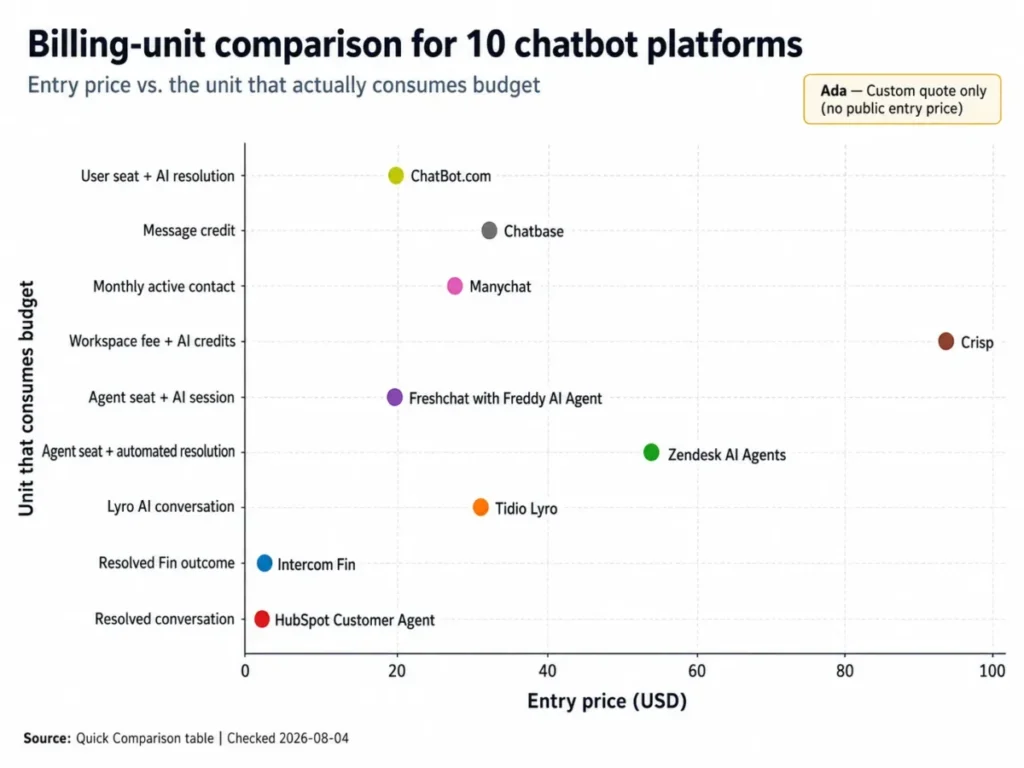
Two columns in that table matter more than the price column. The billing unit tells you what your team has to forecast, and the practical starting point tells you what the first real invoice looks like.
The 10 Best Chatbot Platforms in 2026
Every block below carries the same decision fields in the same order, so the price sits in the same place in platform one and platform ten. Depth is tiered by how much of the buying decision each platform carries.
1. Intercom Fin: Best for AI support inside one service platform

- Best for:
- SaaS and subscription support teams that want the AI agent, the human inbox, ticketing, and the help center under one roof.
- Avoid if:
- finance needs a flat monthly AI line item and cannot absorb a bill that moves with resolution volume.
- Starting price:
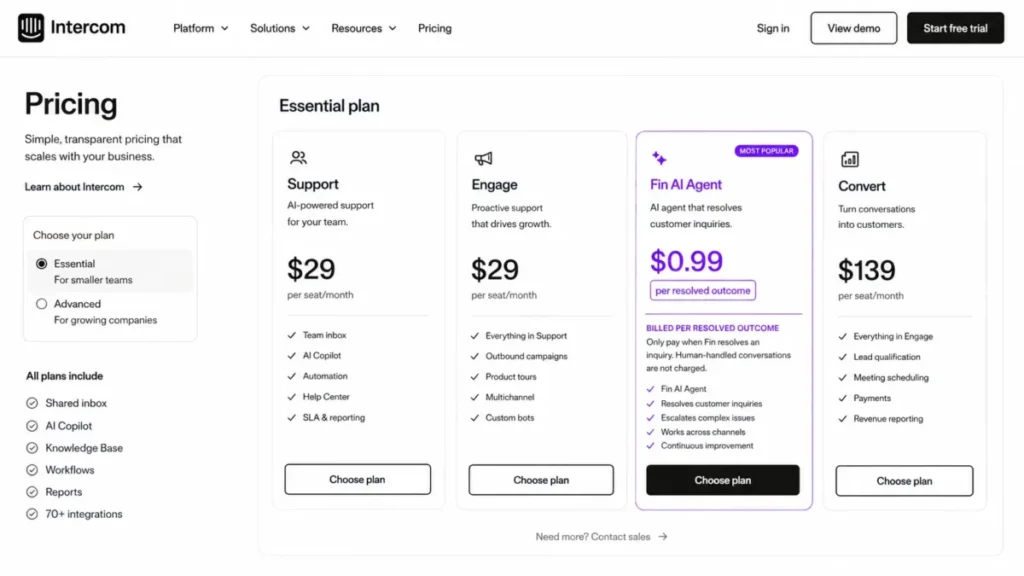
- $0.99 per resolved Fin outcome, per Intercom’s pricing page, checked 2026-08-04.
- Practical tier:
- Fin running on an existing helpdesk, which carries a minimum monthly commitment.
- Free plan:
- No published free tier for Fin outcomes; a trial path is offered through the pricing page.
- First limit that bites:
- the outcome meter itself, because every additional resolved conversation is a line on the invoice.
- Better than Zendesk AI Agents:
- the AI agent, Messenger, inbox, ticketing, help-center content, and workflow procedures are documented as one product rather than a suite you assemble.
- Worse than Crisp:
- there is no flat workspace fee that caps what a busy month can cost.
- Setup difficulty:
- Medium, because the agent can run on top of an existing helpdesk instead of replacing it.
- Hidden costs:
- seat pricing varies by plan, and WhatsApp, SMS, email campaigns, and phone can each add usage charges on top of Fin outcomes.
- Evidence status:
- pricing, outcome definition, and platform scope are documented on Intercom’s own pricing and help pages.
Intercom earns the top slot on scope rather than price. All current Intercom plans include Fin AI Agent, and the same product carries Messenger, a shared inbox, ticketing, help-center content, and workflow automation, which is why a support leader can consolidate three tools into one contract.
Source: Intercom Fin outcome documentation, official documentation page, checked 2026-08-04.
The cost model is the trade. Fin is charged per resolved outcome at $0.99, so a month with 500 resolutions produces $495 in Fin usage before any seat or channel charge, and a quiet month costs less.
That variability is a feature for a seasonal ecommerce brand and a problem for a team defending a fixed annual budget. Cost here is not only seat-based, because Fin, WhatsApp, SMS, email campaigns, and phone can all add usage, so any buyer above roughly 1,000 monthly conversations needs a volume model before signing.
The deployment path matters more than most roundups admit. Because Fin can sit on an existing helpdesk, a team can pilot AI resolution without migrating ticket history first, which removes the single largest switching risk in this category.
If you want the wider product context, the Intercom platform review covers the inbox and messaging side in more depth.
| Pros | Cons |
|---|---|
| AI agent, inbox, ticketing, and help center documented as one platform | Outcome billing makes the monthly total move with support volume |
| Fin can run on an existing helpdesk, so ticket history does not have to move first | A minimum monthly commitment applies in the existing-helpdesk deployment |
| Workflow procedures and pre-built reports ship with the same product | Messaging channels such as WhatsApp, SMS, and phone add separate usage charges |
| No separate AI vendor contract to negotiate or renew | Seat pricing sits on top of outcome usage rather than replacing it |
- Verdict:
- Intercom Fin is the stronger choice for a support team consolidating AI and human service into one system, provided the finance owner accepts a bill that tracks resolution volume.
2. Tidio Lyro: Best for small ecommerce and service teams

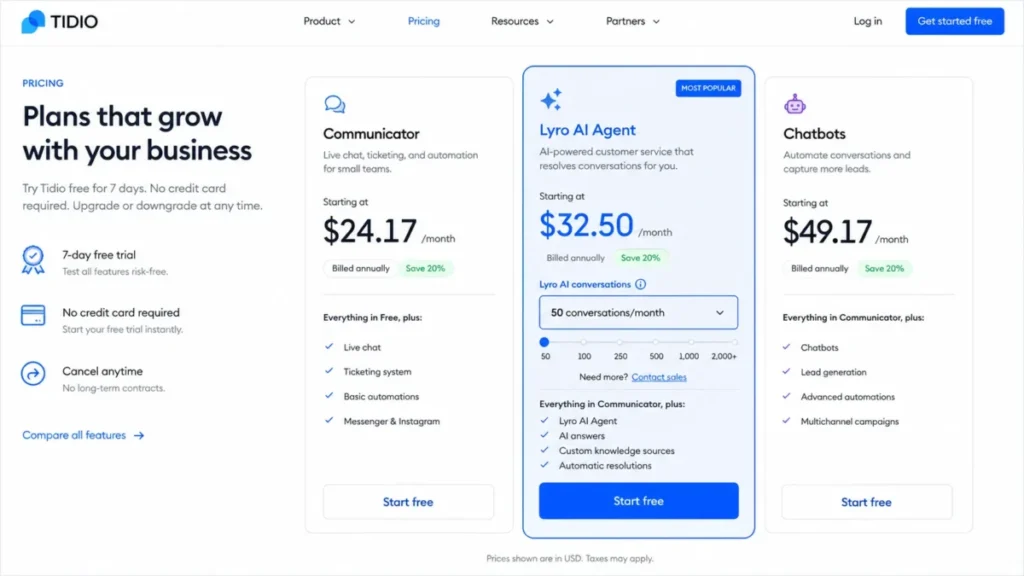
Price is the reason this one sits second. Tidio lists Lyro AI Agent from $32.50 per month for 50 Lyro AI conversations, which is the lowest committed entry point among the platforms here that bundle an AI agent with live chat and ticketing.
- Best for:
- small ecommerce and service teams that want a no-code AI agent alongside live chat and a light ticket queue.
- Avoid if:
- the organisation needs enterprise governance and does not want to move up to the sales-led Plus or Premium plans.
- Starting price:
- $32.50 per month for the Lyro AI Agent at 50 conversations, per Tidio’s pricing page, checked 2026-08-04.
- Practical tier:
- Lyro AI Agent sized to a realistic monthly conversation count, not the entry quota.
- Free plan:
- 50 one-off Lyro conversations on every account, which do not refresh.
- First limit that bites:
- the free allowance, because it is a one-time grant rather than a monthly quota.
- Better than Freshchat:
- the AI agent is the headline product rather than a metered add-on bolted to a seat price.
- Worse than Ada:
- channel coverage stops well short of voice and governed enterprise deployment.
- Setup difficulty:
- Low, because Lyro answers from a knowledge base with a configurable communication style and no code.
- Hidden costs:
- Plus starts at $300 per month plus usage, and Premium is quoted rather than listed.
- Evidence status:
- the quota-refresh rule is stated in Tidio’s own help-center article on the Lyro limit.
The trial mechanics are where buyers get caught out. Every account starts with 50 one-off Lyro conversations, and a paid Lyro or Plus plan is required before that quota refreshes monthly, so a pilot that goes well stops there.
Source: Tidio Lyro conversation limit, official help documentation, checked 2026-08-04.
Lyro answers from a knowledge base, uses a configurable communication style, hands conversations to humans, and runs either standalone or with Tidio Help Desk. For a five-person Shopify support team, that combination covers order status, returns policy, and product questions without a developer.
The upgrade cliff is real and worth planning for. Between the entry Lyro tier and Plus at $300 per month there is a large step, so a brand growing past a few hundred AI conversations a month should model that jump before the pilot rather than after.
| Pros | Cons |
|---|---|
| Lowest committed entry price among the AI-plus-live-chat platforms listed here | The 50 free Lyro conversations are a one-time grant, not a monthly allowance |
| No-code knowledge-base training with a configurable communication style | The step from the entry Lyro tier to Plus at $300 per month is steep |
| Human handoff and Tidio Help Desk are part of the same product | Premium is quoted rather than published, so enterprise cost is opaque |
| Runs standalone or attached to the help desk, so the pilot is reversible | Channel breadth stops short of voice and governed enterprise deployment |
- Verdict:
- Pick Tidio Lyro if a small ecommerce or service team needs AI, live chat, and ticketing on one low entry commitment, and plan the Plus jump before volume forces it.
3. Zendesk AI Agents: Best for teams standardising on one service suite

- Best for:
- support organisations that are already consolidating ticketing, messaging, telephony, and knowledge management in one suite.
- Avoid if:
- the requirement is a cheap standalone website bot and nobody wants to pay for agent seats.
- Starting price:
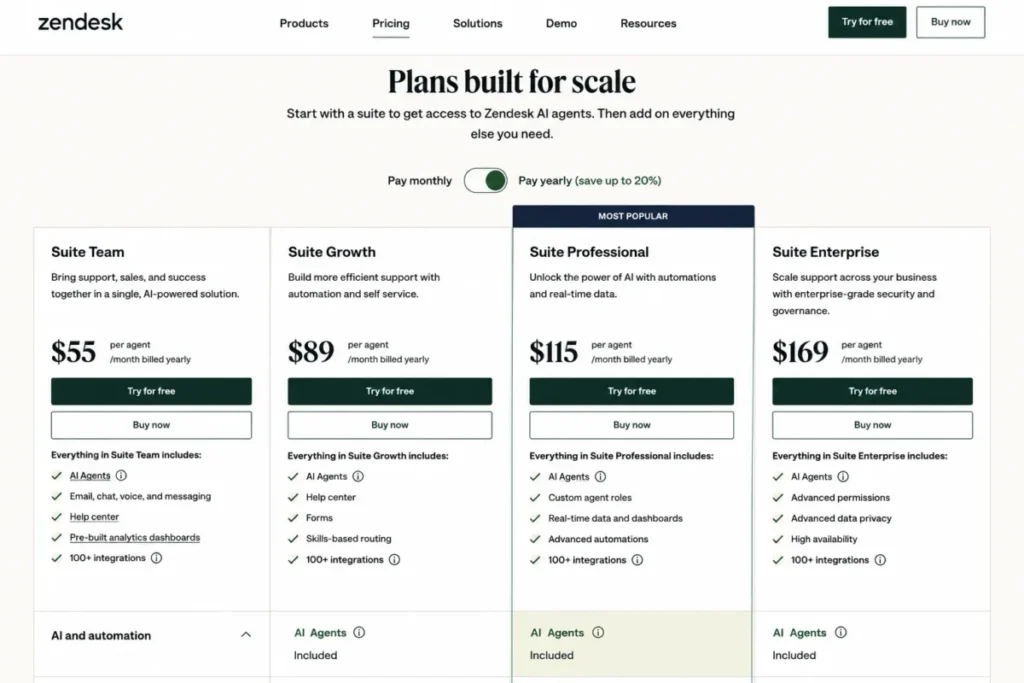
- $55 per agent per month on Suite Team when paid yearly, per Zendesk’s plan page, checked 2026-08-04.
- Practical tier:
- Suite Team as the seat baseline, with automated-resolution volume negotiated separately.
- Free plan:
- No free tier at the suite level; trial access is offered from the plan page.
- First limit that bites:
- the automated-resolution allocation, which is contracted rather than published as a universal rate.
- Better than Tidio Lyro:
- telephony, omnichannel routing, and Action Builder come from the same vendor rather than a partner stack.
- Worse than Chatbase:
- an embedded product agent is a much heavier lift here than in a purpose-built knowledge tool.
- Setup difficulty:
- High, because omnichannel routing, knowledge, and action workflows all need configuration and an owner.
- Hidden costs:
- AI-agent usage is metered in automated resolutions on top of the seat price, and the allocation belongs in the contract review.
- Evidence status:
- the resolution definition and its evaluation window are documented in Zendesk’s own support article.
Suite Team is listed at $55 per agent per month when paid yearly and includes AI Agents, which is the cleanest way to compare it with a seat-priced competitor. The same plan unifies AI Agents, a knowledge base, Action Builder, omnichannel routing, messaging, live chat, and telephony.
Source: Zendesk automated resolutions, official support documentation, checked 2026-08-04.
The measurement rule deserves a slow read. Zendesk meters AI-agent usage in automated resolutions and applies a 72-hour evaluation window before an eligible interaction is tagged as one, so the number your finance team sees lags the number your support team feels.
A per-resolution overage rate is not published as a universal US figure, which is exactly why this belongs in a contract conversation rather than a spreadsheet estimate. Ask for the allocation, the overage rate, and the true-up cadence in writing before the seat count is finalised.
For a 40-seat support organisation, the seat line alone is $2,200 per month at 40 agents times $55, and the AI line sits on top of that. That is the honest shape of the cost, and it is why this platform suits teams that need the whole suite rather than teams that only need a bot.
The Zendesk suite review covers the ticketing and routing side for buyers weighing the wider platform.
| Pros | Cons |
|---|---|
| AI Agents, knowledge base, Action Builder, routing, messaging, and telephony in one plan | Seat cost scales with headcount before any AI usage is counted |
| A published per-agent price makes seat budgeting straightforward | The per-automated-resolution overage rate is contract-specific rather than public |
| Action Builder supports workflow actions instead of answer-only deflection | The 72-hour evaluation window delays when usage becomes visible |
| One vendor for voice, chat, and ticketing reduces integration surface | Configuration depth means a named admin owner is effectively required |
- Verdict:
- Choose Zendesk AI Agents if the buying decision is fundamentally a service-suite decision, and treat the automated-resolution allocation as a contract term rather than a footnote.
4. HubSpot Customer Agent: Best for revenue teams already on the CRM

- Best for:
- marketing, sales, and service teams that want one agent reading the same CRM record across every channel.
- Avoid if:
- the company is not on HubSpot and has no appetite for a Professional or Enterprise subscription dependency.
- Starting price:
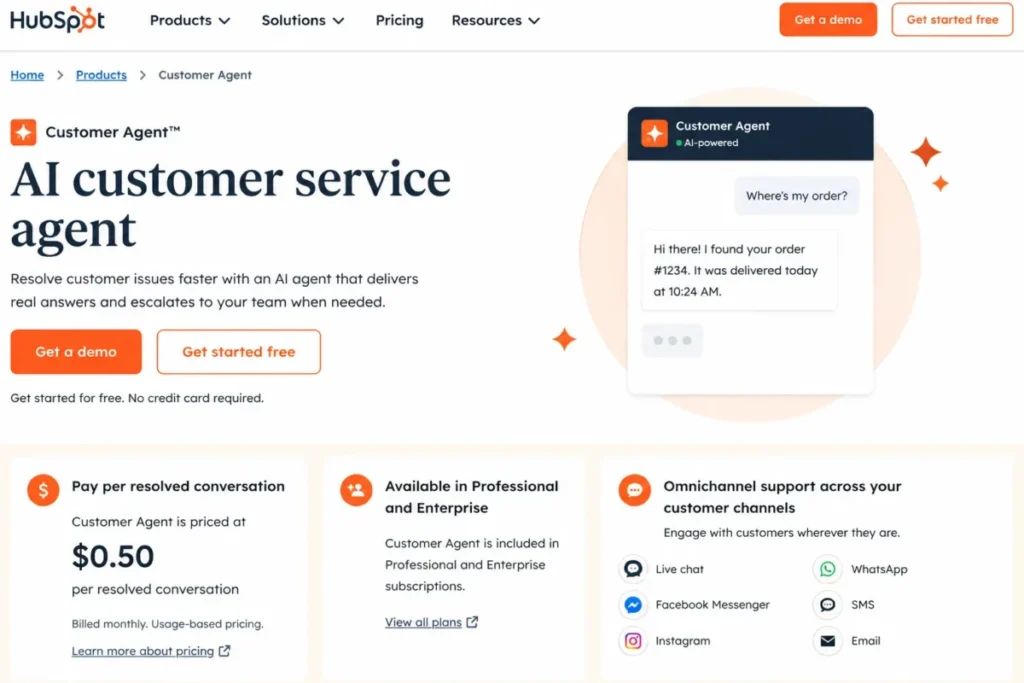
- $0.50 per resolved conversation, per HubSpot’s Customer Agent page, checked 2026-08-04.
- Practical tier:
- a Professional or Enterprise subscription plus credit-funded resolutions.
- Free plan:
- Not offered for Customer Agent, which is included only in the two upper subscription tiers.
- First limit that bites:
- the subscription prerequisite, which sets the real floor well above the per-resolution price.
- Better than Manychat:
- the agent works from CRM context rather than a contact list, so answers reflect the account record.
- Worse than Ada:
- governance and channel breadth are narrower than a purpose-built enterprise deployment layer.
- Setup difficulty:
- Medium, since the CRM and content sources exist already but knowledge scoping still needs work.
- Hidden costs:
- resolutions draw on HubSpot Credits, and the required subscription tier is the larger number.
- Evidence status:
- the unit price, subscription requirement, and resolution rule come from HubSpot’s own product and company-news pages.
HubSpot prices Customer Agent at $0.50 per resolved conversation and includes it in Professional and Enterprise subscriptions, with the outcome model in effect from April 14, 2026. At 500 resolutions that is $250 of usage, which is the smaller half of the bill for most buyers.
Source: HubSpot Customer Agent, official product page, checked 2026-08-04.
The counting rule is the part worth writing into your escalation policy. A resolution is counted when support was provided and the conversation was not handed to a human representative for 72 hours, so a team that escalates quickly pays less and a team that lets threads go quiet pays more.
Customer Agent answers questions, qualifies leads, resolves tickets, and draws on CRM data plus supplied business content across chat, email, voice, and social. For a revenue team, the useful part is that the same agent can book a meeting and close a ticket without a second integration.
Buyers comparing subscription tiers should read the HubSpot pricing guide before modelling the resolution spend, because the subscription is the dominant cost.
| Pros | Cons |
|---|---|
| One agent works across chat, email, voice, and social from the same CRM record | Availability is gated to Professional and Enterprise subscriptions |
| Outcome pricing means unresolved conversations do not generate a charge | Resolutions are funded through HubSpot Credits rather than a simple invoice line |
| Lead qualification and ticket resolution share one configuration | The 72-hour no-handoff rule ties billing to escalation behaviour |
| CRM context removes a separate data integration project | Buyers outside HubSpot inherit a large platform dependency |
- Verdict:
- HubSpot Customer Agent is the stronger fit for a team already paying for Professional or Enterprise, where the marginal cost of adding CRM-aware AI is genuinely small.
5. Freshchat with Freddy AI Agent: Best for a low seat price with optional AI
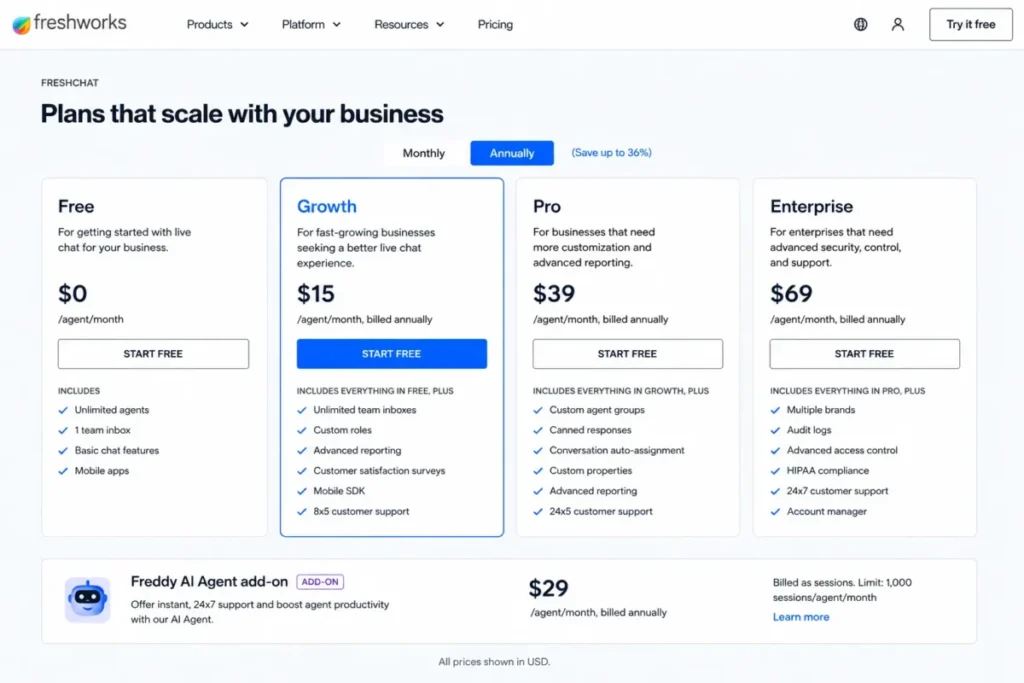
Starting the budget conversation at $19 changes what a small team can pilot. Freshchat Growth is listed at $19 per agent per month billed annually, and Freddy AI Agent is $49 per 100 sessions after the first 500 included sessions.
- Best for:
- growing support teams that want a capable shared inbox first and metered AI second.
- Avoid if:
- the expectation is unlimited AI usage bundled into the seat price.
- Starting price:
- $19 per agent per month billed annually on Growth, per Freshchat’s pricing page, checked 2026-08-04.
- Practical tier:
- Growth seats plus a realistic monthly Freddy session pack.
- Free plan:
- Freddy includes 500 sessions before session packs begin.
- First limit that bites:
- the 500 included AI sessions, after which each 100-session pack is a separate charge.
- Better than ChatBot.com:
- the included AI session allowance is far larger before metered charges start.
- Worse than Intercom Fin:
- the AI agent is an add-on to a chat product rather than the centre of the platform.
- Setup difficulty:
- Low to Medium, because the inbox and channels configure quickly while AI scoping takes longer.
- Hidden costs:
- higher-tier routing, multilingual support, SLA controls, and advanced reporting all sit above Growth.
- Evidence status:
- plan scope and the Freddy add-on model are described on Freshworks’ own product and pricing pages.
Freshchat combines web and mobile chat, a shared inbox, email, social messaging, reporting dashboards, and the optional Freddy AI Agent. For a ten-agent team, the seat line is $190 per month at 10 agents times $19, which is the cheapest seat baseline in this list.
Source: Freshchat product overview, official product page, checked 2026-08-04.
The session meter is where the entry price stops telling the whole story. A team resolving 1,000 AI sessions a month consumes the 500 included sessions and then buys five packs, so the AI line alone reaches $245 before anyone counts seats.
Routing depth, multilingual support, SLA controls, and advanced reporting all live above Growth, which means the upgrade trigger here is rarely AI volume. It is usually the first time a manager asks for an SLA report the entry plan cannot produce.
| Pros | Cons |
|---|---|
| The cheapest published per-agent seat price among the suite-style platforms here | AI is metered by session, so the seat price understates automation cost |
| 500 included Freddy sessions give a real pilot before metered charges begin | Routing depth, multilingual support, and SLA controls sit above the entry plan |
| Web chat, mobile chat, email, and social messaging share one inbox | Advanced reporting is an upgrade trigger rather than an entry feature |
| AI can stay switched off while the inbox proves its value | The AI agent is an add-on rather than the platform’s centre of gravity |
- Verdict:
- Freshchat suits a growing team that wants the inbox working first and AI switched on deliberately, provided the session packs are budgeted alongside the seats.
6. Ada: Best for governed enterprise omnichannel deployment
- Best for:
- high-volume enterprises that need one governed AI layer across voice, chat, email, messaging apps, SMS, in-app, and social.
- Avoid if:
- the team needs self-serve signup and a published entry price to start a pilot this quarter.
- Starting price:
- Custom quote only, with no published self-serve entry price, per Ada’s pricing consultation page, checked 2026-08-04.
- Practical tier:
- an enterprise contract sized after modelling conversation or resolution volume.
- Free plan:
- Not offered; access begins with a sales consultation.
- First limit that bites:
- the procurement calendar, because nothing starts until a quote exists.
- Better than Crisp:
- channel breadth and shared policy governance extend to voice and regulated workflows.
- Worse than Tidio Lyro:
- there is no route to a working agent without a sales cycle.
- Setup difficulty:
- High, since deployment is a governed programme rather than a widget install.
- Hidden costs:
- total cost cannot be compared until volume assumptions are agreed with the vendor.
- Evidence status:
- the architecture and the conversation-based pricing model are described on Ada’s own platform page.
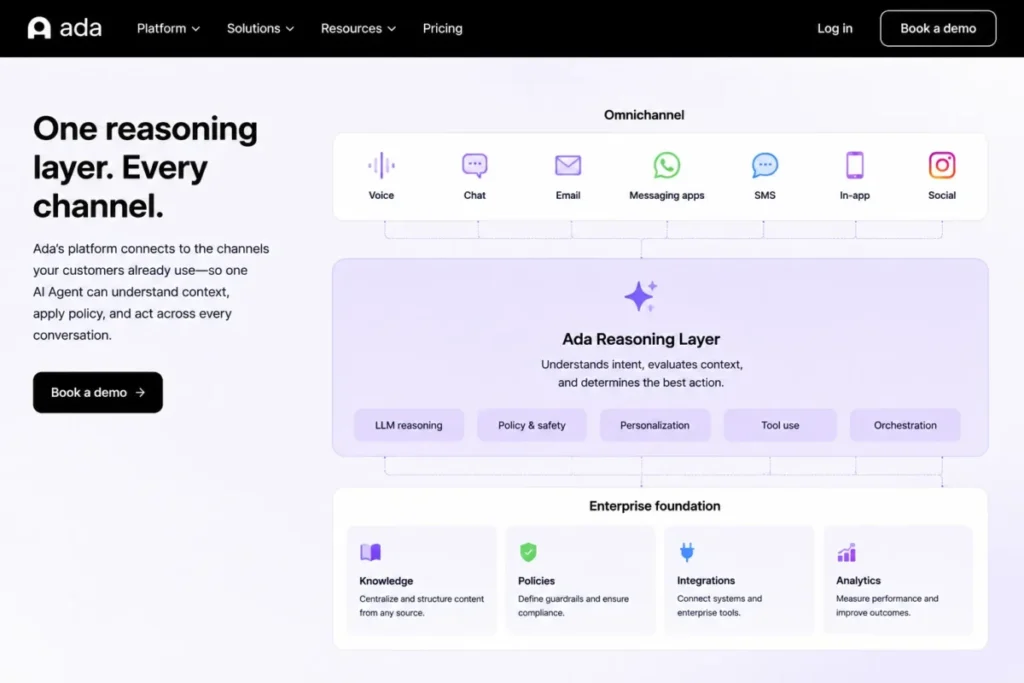
Ada runs one reasoning layer across voice, chat, email, messaging apps, SMS, in-app, and social, with shared context, policies, knowledge, and API-connected actions. For a regulated enterprise, that shared policy layer is the point, because a rule written once applies on every channel.
Source: Ada enterprise platform, official product page, checked 2026-08-04.
Pricing is conversation-based as the standard model, with a resolution-based option for specific enterprise needs, and no public dollar figure exists. Any buyer comparing this against a published per-resolution price is comparing a quote to a list price, which is not a comparison at all.
That opacity is the trade for governance depth. Take a modelled monthly conversation volume, a target containment rate, and a channel list into the first call, because the quote will be shaped by those three numbers whether or not you supply them.
| Pros | Cons |
|---|---|
| One reasoning layer covers voice, chat, email, SMS, in-app, and social | No published entry price, so budgeting requires a sales cycle first |
| Shared policies and knowledge apply the same rule across every channel | Self-serve evaluation is not available to smaller teams |
| API-connected actions support resolution rather than answer-only deflection | Total cost cannot be compared until volume assumptions are agreed |
| Governance depth suits regulated and high-volume operations | Deployment is a programme with an owner, not a widget install |
- Verdict:
- Ada is the stronger fit when cross-channel consistency and policy governance outrank price transparency, and it is the wrong starting point for a team that needs to pilot next week.
7. Crisp: Best for flat workspace pricing with included seats

- Best for:
- small and mid-sized support teams that want predictable seat economics and an integrated inbox, help center, and AI workflow builder.
- Avoid if:
- AI volume is high enough that a credit ceiling would interrupt service mid-month.
- Starting price:
- $95 per workspace per month on Essentials, per Crisp’s pricing page, checked 2026-08-04.
- Practical tier:
- Essentials for teams up to 10 seats, then Plus at $295 per workspace when ticketing or scale arrives.
- Free plan:
- Not published at the Essentials level; the plan includes seats rather than a free tier.
- First limit that bites:
- the monthly AI credit balance, because unused credits expire rather than roll forward.
- Better than Zendesk AI Agents:
- ten seats are included in one workspace fee instead of billed per agent.
- Worse than Ada:
- there is no voice channel and no enterprise governance layer.
- Setup difficulty:
- Low to Medium, following a documented train, build, test, deploy, and measure workflow.
- Hidden costs:
- AI usage is credit-metered, so heavy months consume the balance faster than the headline conversation estimate suggests.
- Evidence status:
- seat count, credit balance, and the approximate conversation figures come from Crisp’s own pricing page.
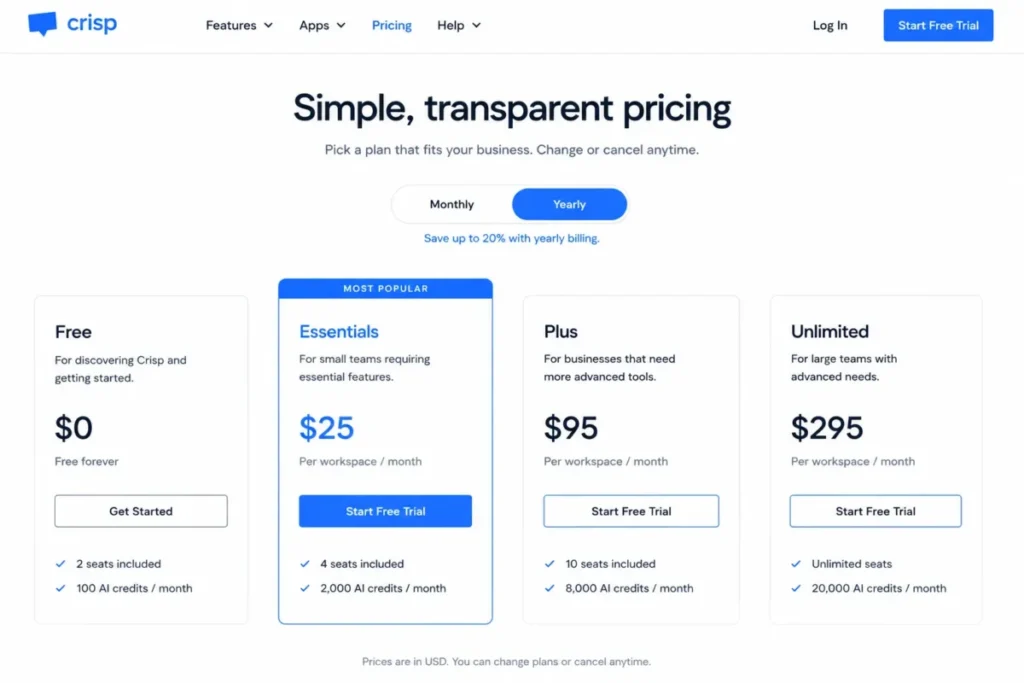
Crisp Essentials is $95 per workspace per month and includes 10 seats, roughly 450 automated conversations, and $25 in monthly AI credits. Read the conversation figure as an estimate rather than a guarantee, because actual credit consumption varies with workload and model behaviour.
Source: Crisp AI product page, official product page, checked 2026-08-04.
Essentials combines an omnichannel inbox, a knowledge base, a visual workflow builder, and a no-code omnichannel AI chatbot, and Crisp documents a workflow for training, building, testing, deploying, and measuring the agent. That preview-and-test step is the part most no-code tools skip.
The upgrade trigger is specific and easy to plan for. Plus at $295 per workspace adds 20 or more seats, ticketing, task automations, white labeling, higher limits, and roughly 1,350 automated conversations, so the move usually happens when ticketing or seat count arrives rather than when AI volume does.
Flat workspace pricing solves seat sprawl and does not solve AI capacity. Those are two different risks, and a team that reads the $95 as unlimited AI will be disappointed in its first busy month.
| Pros | Cons |
|---|---|
| One workspace fee covers 10 seats, so headcount growth does not reprice the plan | Monthly AI credits expire, so a quiet month does not fund a busy one |
| Inbox, knowledge base, workflow builder, and AI agent ship together | Published automated-conversation counts are labelled approximate, not fixed |
| A documented preview and test step exists before the agent goes live | Ticketing, white labeling, and higher limits require the Plus tier |
| The Plus upgrade path is published rather than quoted | No voice channel and no enterprise governance layer |
- Verdict:
- Crisp is the stronger fit for a team under 10 seats that wants predictable seat costs, as long as monthly AI credit consumption is watched rather than assumed.
8. Manychat: Best for Instagram, WhatsApp, and DM automation

- Best for:
- creators, ecommerce brands, and social teams whose conversations start in DMs, comments, and messaging campaigns.
- Avoid if:
- the real requirement is complex ticketing, knowledge governance, or long-form service workflows.
- Starting price:
- $29 per month on Pro with annual billing, per Manychat’s pricing page, checked 2026-08-04.
- Practical tier:
- Pro sized to a realistic monthly active-contact count.
- Free plan:
- Entry tiers exist below Pro, with narrower channel and automation scope.
- First limit that bites:
- the 2,500 included Active Contacts, after which overage begins automatically.
- Better than Chatbase:
- native social and messaging channel coverage is far broader.
- Worse than Intercom Fin:
- there is no service-desk depth for escalation-heavy support work.
- Setup difficulty:
- Low, because templates and channel connections do most of the work.
- Hidden costs:
- overage is $0.05 per additional Active Contact and is billed without asking first.
- Evidence status:
- the contact definition, reset cycle, overage rate, and pause behaviour are documented in Manychat’s own help article.
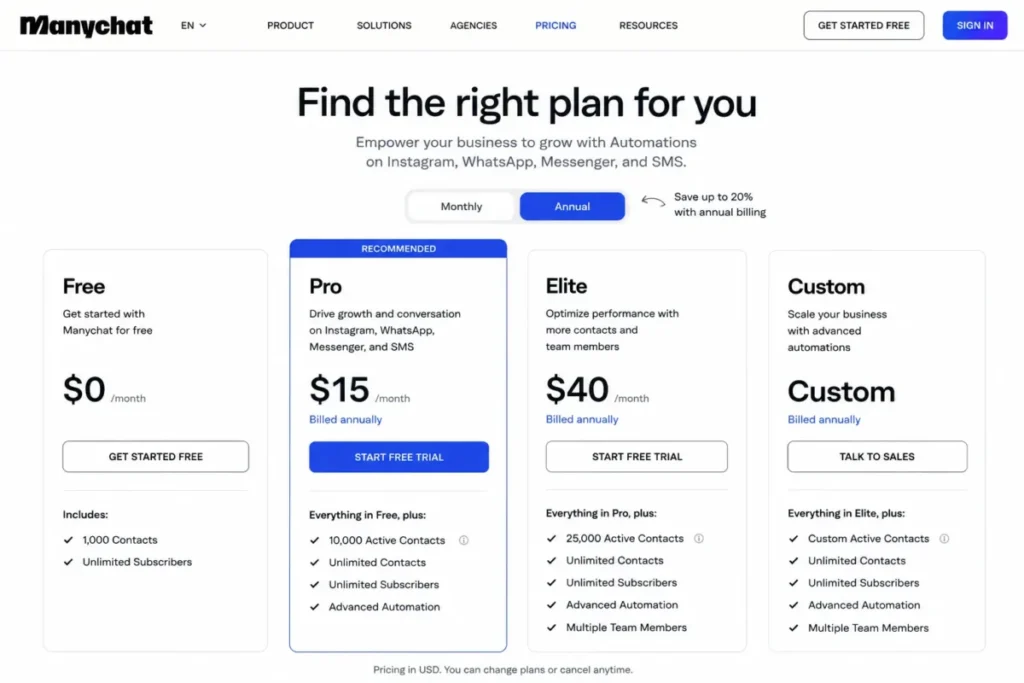
Pro starts at $29 per month on annual billing with 2,500 Active Contacts included, and adds three connected channels, advanced automations, broadcasts, and AI-powered conversations. The billing unit is a contact, not a conversation, which is why this platform cannot be compared to a per-resolution product on price alone.
Source: Manychat Active Contacts, official help documentation, checked 2026-08-04.
Overage runs at $0.05 per additional Active Contact, so a campaign that pulls 1,000 extra contacts in a month adds $50 without a prompt. Automations can eventually pause if usage grows far beyond the plan cap without an upgrade, which turns a billing problem into a delivery problem.
One eligibility detail belongs in any evaluation: accounts created before March 2, 2026 may not yet be eligible for the newer pricing model, so an older workspace can show different plan mechanics than the public page.
| Pros | Cons |
|---|---|
| Native coverage of Instagram, Messenger, WhatsApp, SMS, and email in one workspace | Active-contact billing does not map to support conversation volume |
| Templates and broadcasts make campaign automation fast to launch | Overage is billed automatically rather than prompting for approval |
| Pro adds three connected channels plus advanced automations | Automations can pause if usage runs far past the plan cap |
| Entry pricing is low enough for a single creator to start | Older accounts may sit on different plan mechanics than the public page |
- Verdict:
- Manychat is the right pick when the conversation starts in a DM or a comment, and the wrong pick when it needs to end in a governed ticket.
9. Chatbase: Best for a knowledge-trained agent on a product or site

- Best for:
- small product and support teams that want an agent trained on their own content and embedded through an API.
- Avoid if:
- a hard stop when credits run out would be unacceptable on a customer-facing page.
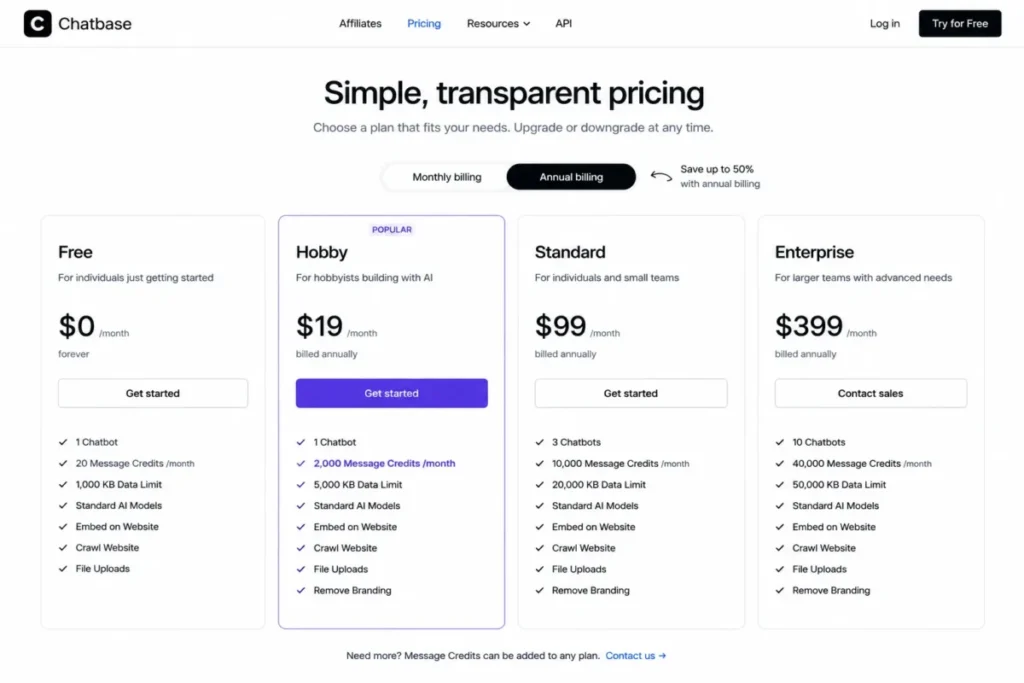
- Starting price:
- $32 per month on Hobby, billed annually, per Chatbase’s pricing page, checked 2026-08-04.
- Practical tier:
- Hobby for a pilot, then a higher credit tier once real traffic arrives.
- Free plan:
- Not published at the Hobby level; the tier includes a fixed monthly credit allowance.
- First limit that bites:
- the 700 message credits, which do not stretch across a busy support week.
- Better than Manychat:
- training on websites, documents, text, question-and-answer pairs, and Notion is far deeper.
- Worse than Zendesk AI Agents:
- there is no ticketing layer, routing engine, or telephony.
- Setup difficulty:
- Low, because no-code training plus an API keeps the build small.
- Hidden costs:
- auto-recharge credits run at $40 per 1,000, and branding removal and enterprise controls cost extra.
- Evidence status:
- credit consumption, reset behaviour, and the exhaustion state are documented in Chatbase’s own FAQ.
Hobby is $32 per month billed annually and includes 700 message credits, two members, integrations, attachments, and basic analytics. Chatbase trains agents on websites, documents, text, question-and-answer pairs, and Notion, with no-code deployment plus API access for a custom embed.
Source: Chatbase documentation FAQ, official documentation, checked 2026-08-04.
The credit mechanics are the buying decision. Message-credit consumption varies by model, credits reset monthly, and the agent displays an unavailable message when credits run out, which means a nominal 700 credits is not 700 conversations.
Pick a cheaper model and the same allowance stretches further. That is a genuine lever, and it is also why a credit count on a pricing page is not a capacity promise.
| Pros | Cons |
|---|---|
| Trains on websites, documents, text, question-and-answer pairs, and Notion | Credit consumption varies by model, so allowances are not conversation counts |
| API access supports a real product embed rather than only a website widget | The agent becomes unavailable once credits are exhausted |
| No-code setup keeps the first working agent small and fast | No ticketing, routing, or telephony layer |
| Published credit tiers make a pilot budget easy to approve | Branding removal and enterprise controls sit outside the entry tier |
- Verdict:
- Chatbase suits a product team that wants a knowledge agent live quickly, provided someone owns credit forecasting and the model choice behind it.
10. ChatBot.com: Best for a packaged agent plus service desk

- Best for:
- small teams that want an AI agent, inbox, ticketing, workflow automation, and human takeover in one per-user plan.
- Avoid if:
- sustained AI volume is expected, because the included resolution allowance is very small.
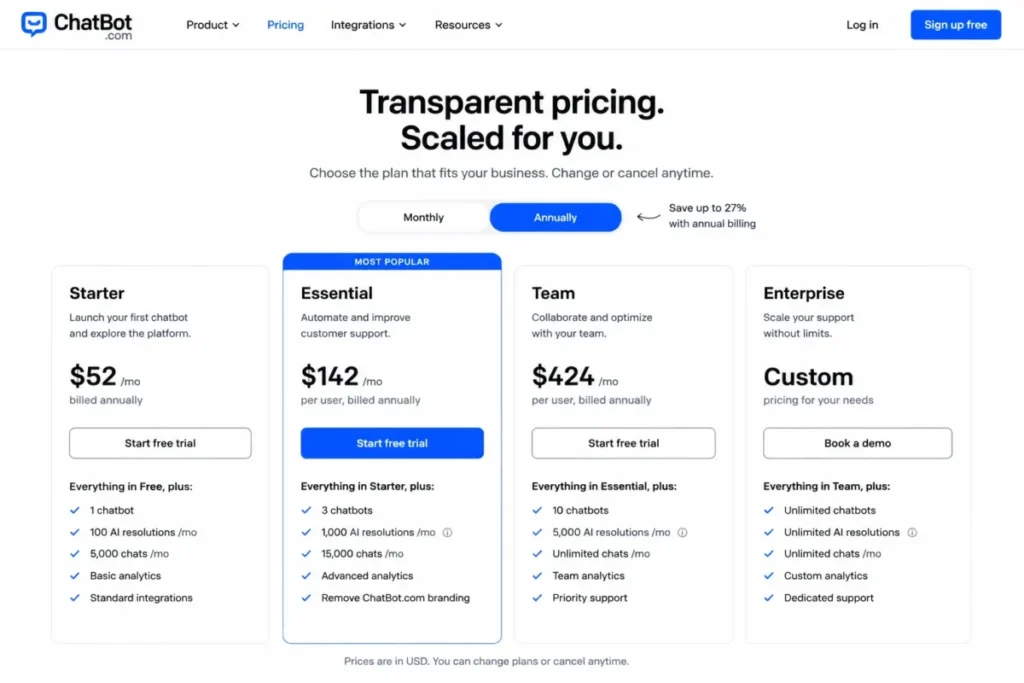
- Starting price:
- $19 per user per month on Essential, billed annually, per ChatBot.com’s pricing page, checked 2026-08-04.
- Practical tier:
- Essential plus a resolution refill sized to actual monthly volume.
- Free plan:
- Not published at Essential; the plan includes one AI Agent and a fixed resolution allowance.
- First limit that bites:
- the 10 included AI resolutions per month, which a single busy day can exhaust.
- Better than Chatbase:
- ticketing, human takeover, and Shopify selling are part of the same product.
- Worse than Crisp:
- there is no flat workspace fee, so both seats and resolutions scale the bill.
- Setup difficulty:
- Low, since the agent, inbox, and channels are packaged rather than assembled.
- Hidden costs:
- extra AI resolutions are $0.99 each or $49.50 per 50-pack.
- Evidence status:
- plan inclusions and the resolution overage rate come from ChatBot.com’s own pricing and product pages.
Essential is $19 per user per month billed annually and includes one AI Agent and 10 AI resolutions. The platform bundles that agent with live chat, an inbox, ticketing, workflow automation, business channels, Shopify support, and human handoff.
Source: ChatBot.com product overview, official product page, checked 2026-08-04.
The allowance is the catch, and it is a large one. Extra AI resolutions cost $0.99 each or $49.50 per 50-pack, so the low entry price understates cost badly for any team running sustained automation.
At 500 monthly resolutions the arithmetic is unforgiving: $19 for the seat plus 490 additional resolutions at $0.99 each produces $504.10 for a single user. That is a fine number for a boutique brand handling a handful of AI answers a day and a poor one for a support queue.
| Pros | Cons |
|---|---|
| AI agent, inbox, ticketing, and workflow automation ship in one packaged plan | Only 10 AI resolutions are included per month on the entry plan |
| Shopify selling and human takeover are built in rather than integrated | Extra resolutions at $0.99 each dominate cost at real support volume |
| Per-user pricing is simple to approve and simple to forecast | Both seats and resolutions scale the bill independently |
| Setup is packaged, so a small team can go live without a specialist | No flat workspace option to cap a busy month |
- Verdict:
- ChatBot.com works for a small team with modest, predictable AI volume, and it stops making sense the moment resolutions run into the hundreds.
Pricing and Usage Limits: What the Entry Price Hides
Entry prices in this category are not comparable, because no two platforms sell the same unit. This section normalises them three ways: by billing unit, by what happens at the ceiling, and by cost at a stated monthly volume.
The billing-unit matrix. Read the middle column first, because it defines what your team has to forecast every month.
| Platform | Billing unit | What counts as one unit | Behaviour at the ceiling |
|---|---|---|---|
| Intercom Fin | Resolved Fin outcome | A conversation Fin resolves | Each additional outcome is charged |
| Tidio Lyro | Lyro AI conversation | An AI conversation inside the plan quota | Quota refreshes only on a paid Lyro or Plus plan |
| Zendesk AI Agents | Automated resolution plus agent seat | An eligible interaction after a 72-hour evaluation window | Allocation and overage are contract-defined |
| HubSpot Customer Agent | Resolved conversation | Support provided with no human handoff for 72 hours | Resolutions draw on HubSpot Credits |
| Freshchat with Freddy AI Agent | AI session plus agent seat | One Freddy AI session | Session packs are purchased after the included allowance |
| Ada | Conversation, contract-defined | Defined in the enterprise agreement | Set by the negotiated contract |
| Crisp | Workspace fee plus AI credits | One AI credit drawn from the monthly balance | Unused credits expire at the month end |
| Manychat | Monthly Active Contact | A contact that interacts inside the billing month | Overage bills automatically, and automations can pause |
| Chatbase | Message credit | One response, weighted by the model used | The agent becomes unavailable when credits are exhausted |
| ChatBot.com | AI resolution plus user seat | One AI resolution | Extra resolutions are charged individually or in packs |
- Pricing and limit sources, checked 2026-08-04: Fin outcomes, Lyro limit, Zendesk resolutions, HubSpot resolutions, Freshchat detail
- Also verified on 2026-08-04: Ada consultation, Crisp detail, Active Contacts, Chatbase credits, ChatBot.com detail
Three ceiling behaviours appear here, and they carry different operational risk. Charged overage keeps the agent answering and moves the invoice, a hard stop protects the invoice and drops the customer, and expiring credits quietly waste whatever a quiet month did not use.
Cost at a stated volume. The only fair way to compare an outcome price against a credit tier is to fix the volume and run the arithmetic, so every figure below assumes 500 AI conversations in one month.
| Scenario | Formula | Monthly result |
|---|---|---|
| Intercom Fin at 500 resolved outcomes | 500 outcomes x $0.99 | $495 before seats and channel usage |
| HubSpot Customer Agent at 500 resolutions | 500 resolutions x $0.50 | $250 in resolution usage, on top of the required subscription |
| ChatBot.com Essential at 500 resolutions for one user | $19 seat + 490 additional resolutions x $0.99 | $504.10 for a single user |
| Manychat Pro with 1,000 contacts above the plan cap | 1,000 contacts x $0.05 | $50 in automatic overage |
Source: official pricing pages, checked 2026-08-04. Intercom outcome pricing, HubSpot agent price, ChatBot.com resolution pricing, Manychat overage rate.
Those four rows change the ranking for a cost-led buyer. HubSpot is the cheapest per unit of the outcome-priced options, and the packaged low-seat product is the most expensive at volume, which is the opposite of what the entry prices suggest.
The seat baseline. Three platforms here still price seats, and a ten-person team makes the difference visible.
| Platform | Seat basis | Ten-agent monthly seat cost | What the seat cost excludes |
|---|---|---|---|
| Zendesk AI Agents | $55 per agent per month, paid yearly | $550 at 10 agents x $55 | Automated-resolution usage |
| Freshchat with Freddy AI Agent | $19 per agent per month, billed annually | $190 at 10 agents x $19 | Freddy AI sessions beyond the included allowance |
| ChatBot.com | $19 per user per month, billed annually | $190 at 10 users x $19 | AI resolutions beyond the included allowance |
| Crisp | $95 per workspace per month | $95 flat, with 10 seats included | AI credits beyond the monthly balance |
Source: official plan pages, checked 2026-08-04. Zendesk seat pricing, Freshchat seat pricing, ChatBot.com seat pricing, Crisp workspace pricing.
Crisp is the outlier by design, because a workspace fee that includes ten seats removes headcount from the pricing conversation entirely. That advantage stops at the AI credit line, and it is why flat seat economics should never be read as unlimited AI.
The plan prerequisite trap. Two platforms here gate the AI behind something other than AI spend, and both catch buyers who budget from the unit price.
HubSpot Customer Agent is included only in Professional and Enterprise subscriptions. The $0.50 unit price therefore sits on top of a subscription that costs far more than the resolutions will, per HubSpot’s agent availability page, checked 2026-08-04.
Tidio grants 50 one-off Lyro conversations that do not refresh, which means a successful free pilot ends rather than continues, per Tidio’s Lyro limit article, checked 2026-08-04.
For a quoted platform there is no shortcut, only a better question list. Take a modelled monthly conversation volume, a target containment rate, a channel list, and a required governance standard into the first vendor call, and ask for the overage rate and true-up cadence in the same conversation.
Feature Gate Comparison: What Opens at Which Plan
| Platform | AI agent available at | Human handoff | Ticketing | API or embed |
|---|---|---|---|---|
| Intercom Fin | All current plans | Included | Included | Included |
| Tidio Lyro | Lyro plan or Plus | Included | Included | Limited |
| Zendesk AI Agents | Suite Team and above | Included | Included | Included |
| HubSpot Customer Agent | Professional and Enterprise only | Included | Included | Included |
| Freshchat with Freddy AI Agent | Growth plus session packs | Included | Included | By plan |
| Ada | Enterprise contract | Included | Conditional | Included |
| Crisp | Essentials and above | Included | Plus and above | Included |
| Manychat | Pro and above | Unified inbox | Limited | Limited |
| Chatbase | Hobby and above | By integration | Not offered | Included |
| ChatBot.com | Essential and above | Included | Included | Included |
- Plan-gate sources, checked 2026-08-04: Fin inclusions, Tidio inclusions, Zendesk inclusions, HubSpot availability, Freshchat inclusions
- Also verified on 2026-08-04: Ada scope, Crisp inclusions, Manychat inclusions, Chatbase inclusions, ChatBot.com inclusions
Teams weighing a full service desk against a lighter widget can compare options in the help desk software shortlist.
Two gates matter more than the rest. The AI availability column tells you whether the agent is the product or an upsell, and the ticketing column tells you whether an escalated conversation has anywhere sensible to land.
Setup and Migration Difficulty
| Platform | Setup difficulty | Why it lands there |
|---|---|---|
| Intercom Fin | Medium | Fin can run on an existing helpdesk, so ticket history does not have to move first |
| Tidio Lyro | Low | Knowledge-base training and a configurable style need no code |
| Zendesk AI Agents | High | Routing, knowledge, and action workflows all need configuration and a named owner |
| HubSpot Customer Agent | Medium | CRM context exists already, but knowledge scoping still takes real work |
| Freshchat with Freddy AI Agent | Low to Medium | Inbox and channels configure quickly while AI scoping takes longer |
| Ada | High | Deployment is a governed programme with policy and channel design |
| Crisp | Low to Medium | A documented train, build, test, deploy, and measure sequence guides the work |
| Manychat | Low | Templates and channel connections carry most of the setup |
| Chatbase | Low | No-code training plus an API keeps the first build small |
| ChatBot.com | Low | The agent, inbox, and channels arrive packaged rather than assembled |
- Setup sources, checked 2026-08-04: Fin deployment, Lyro setup, Zendesk config, HubSpot scope, Freshchat scope
- Also verified on 2026-08-04: Ada model, Crisp workflow, Manychat setup, Chatbase sources, ChatBot.com setup
Buyers weighing the two largest suites side by side can read the Zendesk and Intercom comparison for the ticketing detail.
Setup difficulty and switching risk are different problems. The platforms that overlay an existing helpdesk carry the lowest switching risk, because a pilot that fails costs configuration time rather than a migration project.
Migration depth deserves the most caution here. Object-level mapping, duplicate handling, attachment coverage, and rollback behaviour are not documented consistently across these vendors, so treat any move of ticket history as a scoped project with its own owner rather than an import button.
How to Choose a Chatbot Platform
Seven questions, in this order. The order matters, because answering the cost question before the channel question produces a shortlist that cannot do the job.
- Which channel does the conversation start on: a website widget, a DM, an email thread, or a phone call?
- Does the resolved conversation need to become a ticket, or does it end where it started?
- What is a realistic monthly AI conversation volume, counted from the current queue rather than the vendor’s example?
- Which billing unit does each shortlisted vendor charge for, and can your team forecast that unit?
- What happens at the ceiling: charged overage, a hard stop, or expiring credits?
- Which plan does the AI agent appear on, and what else does that plan force you to buy?
- Can the agent hand off to a human with context intact, and who owns the conversation after that?
Question five separates a budget risk from a customer-experience risk, and only one of those shows up in a spreadsheet. Question six is the plan gate, and it is the most common disqualifier on this list.
Each platform’s ranking reason sits in its own block above, so a shortlist built here can be checked against the winner by scenario in the final verdict.
Teams whose conversations start in campaigns rather than support queues should also review marketing automation fundamentals, and social-first brands can scan the business messaging apps roundup.
The micro-cohort grid. Company size is a poor selector in this category, because three ten-person teams with different channels need three different platforms.
| Buyer cohort | Shortlist first | Skip for now |
|---|---|---|
| Five-person Shopify support team | Tidio Lyro or Crisp | Ada and Zendesk AI Agents |
| Revenue team already on a CRM subscription | HubSpot Customer Agent | ChatBot.com and Manychat |
| Creator or social-commerce brand | Manychat | Zendesk AI Agents and Ada |
| SaaS support team consolidating tools | Intercom Fin | Chatbase and Manychat |
| Product team embedding an in-app agent | Chatbase | Zendesk AI Agents and Manychat |
| Regulated enterprise with a voice channel | Ada | Tidio Lyro and Chatbase |
- Cohort sources, checked 2026-08-04: Fin platform, Lyro modes, Zendesk suite plans, HubSpot channels, Freshchat channels
- Also verified on 2026-08-04: Ada governance, Crisp workspace, Manychat social, Chatbase embed, ChatBot.com packaged
That grid is an editorial reading of the documented product scope in the sections above, not a scored benchmark.
Human handoff is a workflow, not a checkbox. Before signing, confirm whether the full conversation transcript transfers and whether the customer record follows it.
Then confirm who owns the thread after escalation, and whether an escalated conversation still counts as a billable AI resolution.
That last point is where cost and workflow collide. On two of these platforms an escalation inside 72 hours changes whether the interaction is billed at all.
Common Mistakes When Choosing a Chatbot Platform
Budgeting from the entry price. The entry price is a unit price on most of these platforms, and the invoice is the unit price multiplied by a volume nobody has forecast yet.
Treating a free allowance as a monthly quota. One platform here grants a one-time allowance that never refreshes, which turns a successful pilot into a purchase decision made under pressure.
Ignoring what happens at the ceiling. A hard stop on a customer-facing page is an outage, and automatic overage on a campaign month is a finance conversation nobody scheduled.
Comparing a general assistant to a deployment platform. A consumer chat assistant and a customer-facing agent solve different jobs, and ranking them side by side produces a shortlist that cannot be deployed.
Buying a suite when the job is a widget. A full service suite priced per agent is the wrong answer for a team that needs one website bot and has no ticket queue.
Skipping the handoff test. An agent that answers well and escalates badly moves the workload rather than removing it.
Trusting a vendor-authored ranking. Several of the highest-ranking guides in this category are published by vendors that place their own product first, which is a reason to check the source of any ranking before trusting its order.
Final Verdict: Which Chatbot Platform to Shortlist First
Intercom Fin takes the top position because it carries the widest service workload on one platform: the AI agent, the inbox, ticketing, help-center content, and workflow procedures. That is a scope verdict, not a price verdict, and the per-outcome bill is a real trade for a team that needs a fixed number.
For a small ecommerce or service team, Tidio Lyro is the lower-risk starting point, and the Plus step deserves modelling before the pilot rather than after. For a team already paying for a CRM subscription, HubSpot Customer Agent is the cheapest way to add a CRM-aware agent, because the marginal cost is genuinely $0.50 per resolved conversation.
A seat-priced suite deserves its own budget check, and the Zendesk pricing breakdown covers the plan ladder in detail.
Crisp is the pick when predictable seat economics matter more than channel breadth, and Ada is the pick when governance across voice and chat matters more than a published price. Manychat and Chatbase should be judged against a different question entirely, since neither is trying to be a service desk.
The shortlisting rule is short. Pick the platform whose billing unit your team can forecast, confirm what happens when that unit runs out, and only then compare the headline prices.
Frequently Asked Questions
Ten recurring buyer questions, answered from the same sourced evidence used in the rankings above.
What is the best chatbot platform for business in 2026?
There is no single answer, because these platforms bill in different units and solve different jobs. Intercom Fin fits a SaaS support team consolidating AI and human service, Tidio Lyro fits a small ecommerce team, HubSpot Customer Agent fits a revenue team already on the CRM, and Manychat fits a social-commerce brand working in DMs.
How much does an AI chatbot platform cost?
Published entry points on this list run from $19 per user per month to $95 per workspace per month, plus usage-priced options at $0.50 and $0.99 per resolved conversation. The honest answer is that cost depends on volume, so fix a monthly conversation count first and multiply, using the official pricing pages linked throughout this guide.
Do chatbot platforms charge per message or per resolution?
Both models exist here, plus four more. This list includes per-outcome billing, per-resolved-conversation billing, automated-resolution billing on top of seats, AI session packs, monthly active contacts, message credits, and flat workspace fees with an AI credit balance.
Can a chatbot hand a conversation to a human?
Yes, if the platform includes an inbox or ticket queue for the conversation to land in. Every platform in this guide documents some form of human handoff, but the depth varies sharply, and a social automation tool routing to a unified inbox is not the same as a service suite routing to an owned ticket.
Which chatbot platform works best with Zendesk?
Zendesk AI Agents, because it is the same vendor and sits inside the seat-based suite alongside routing, messaging, and telephony. A team already running Zendesk avoids a second contract, and the trade is that automated-resolution allocation and overage economics belong in a contract review.
Which chatbot platform works best with HubSpot?
HubSpot Customer Agent is the natural choice for teams already using a Professional or Enterprise subscription. For companies outside HubSpot, the subscription prerequisite makes it a much less economical starting point.
What is the best chatbot platform for a small business?
For a small ecommerce or service team, Tidio Lyro has the lowest committed entry point among the platforms here that bundle AI with live chat and ticketing. Crisp is the stronger choice when the team is closer to ten people, because one workspace fee covers ten seats instead of pricing each one.
What is the best chatbot for Instagram and WhatsApp?
Manychat, because its billing, templates, and automations are built around social contacts rather than support tickets. The trade is that active-contact billing does not map to support volume, and overage is charged automatically rather than prompting for approval.
Which chatbot platform is the easiest to set up?
Tidio Lyro, Manychat, Chatbase, and ChatBot.com all land in the low-difficulty band, because each one trains or connects without code. Setup speed is a weak selector on its own, though, since the platforms that are fastest to launch are also the ones with the tightest usage ceilings.
How do I compare chatbot platforms without getting misled by entry prices?
Normalise every candidate to the same monthly conversation volume, then compare the total. Write down the billing unit, the included allowance, what happens at the ceiling, and which plan the AI agent appears on, because those four fields explain almost every pricing surprise in this category.