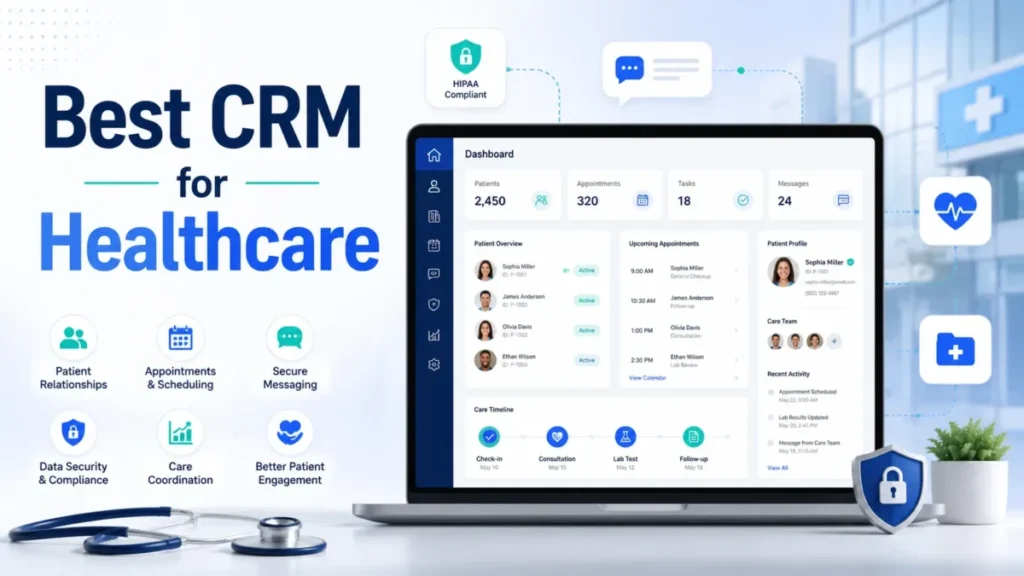
Picking the best CRM for healthcare is less about feature lists and more about one question. Will this system touch protected health information, and will the vendor sign a contract that says it can.
That single decision splits the market into tools you can safely put patient data into and tools you cannot. Everything else, from price to integrations, comes second.
For large health systems and payers, Salesforce Health Cloud is my top overall pick. It ships healthcare-specific data models and care management rather than a generic contact database.
Practice operators who mainly need scheduling, reminders, and intake are usually better served by a patient-engagement platform that syncs to their record system. Marketing and patient-acquisition teams that already know best CRM software can stay on a familiar platform, provided they buy the tier that supports a business associate agreement.
This guide ranks ten healthcare CRM software options by BAA availability, HIPAA-related controls, EHR or practice-management integration, real cost, and buyer fit. Pricing was checked on the official pages on 2026-07-23.
In This Article (16 sections)
Quick Verdict: Best CRM for Healthcare by Buyer Type
The right tool depends on your organization size, your system of record, and whether protected health information sits inside the CRM or stays in the EHR.
| Buyer need | Best pick | Why it fits |
|---|---|---|
| Large health system or payer | Salesforce Health Cloud | Healthcare data model, care management, enterprise governance |
| Microsoft-standardized enterprise | Microsoft Dynamics 365 for Healthcare | Reuses Dataverse, Azure, and Microsoft 365 investments |
| High-volume patient acquisition | LeadSquared | Built for inquiry-to-appointment routing and follow-up |
| Marketing and growth teams | HubSpot Smart CRM Enterprise | Familiar campaigns and service, with an Enterprise PHI path |
| Lowest public price with PHI controls | Zoho CRM Enterprise | Low per-user price and documented PHI settings |
| No-code workflow design | Creatio | Composable process design for nonstandard operations |
| EHR-synced scheduling and intake | NexHealth | Online booking, forms, and messaging tied to the record |
| Independent practice bundle | Tebra | EHR, billing, and engagement under per-provider pricing |
| CRM-to-project services work | Insightly | Transparent pricing and opportunity-to-project handoff |
| Patient messaging and recall | Solutionreach | Reminders, recall, and secure documents by practice |
How We Chose and Ranked These Healthcare CRMs
These rankings are based on official pricing pages, product and help documentation, security and legal pages, and guidance from the HHS Office for Civil Rights. Prices and plan limits were checked on 2026-07-23.
Each tool was assessed against the same buyer-focused criteria. Those criteria are BAA availability by plan, documented PHI controls, the EHR or practice-management integration path, workflow depth, cost structure, and stated limits.
Greater weight went to factors that change a purchase, including the plan gate for PHI, the billing unit, quantified limits, and migration risk. Brand popularity and marketing presentation did not affect the ranking.
Claims that could not be verified from official evidence were excluded, and quote-only pricing is labeled as custom rather than estimated. Every material number traces to an official source and a checked date.
The Three Problems Every Healthcare CRM Buyer Faces
Most buyers arrive at this category with one word, “CRM,” and three different jobs hiding behind it. Naming the job first prevents the most expensive mistake, which is buying the wrong category and paying to integrate around it.
The first job is enterprise care coordination. Health systems and payers need a clinical-adjacent data model, care plans, and member views that a generic sales CRM cannot hold without heavy customization.
The second job is patient acquisition and growth. Multi-location groups, digital-health teams, and marketing departments care about routing inquiries into appointments, nurturing leads, and measuring conversion.
That second job is closer to a configurable sales-and-marketing CRM than to a clinical system. Strong lead routing matters more than a care-plan object.
The third job is practice-level patient engagement. Independent clinics want online booking, reminders, recall, and secure messaging that write back to the record they already run.
A tool that leads at one job is often a poor fit for the other two. Salesforce Health Cloud is overbuilt for a three-provider clinic, and NexHealth will not run a payer’s care-management program.
The ranking below groups the ten tools by which job they solve. That lets you shortlist against your real problem instead of a feature list.
CRM, EHR, or Patient Engagement: Which System You Actually Need
A healthcare CRM is not a system of record for clinical care. It complements the EHR or practice-management system unless the product bundles those functions, as Tebra does.
Use this grid to route yourself before you shortlist. The wrong category creates duplicate records and integration work no discount can offset.
| If your core need is | You need | Examples in this guide |
|---|---|---|
| Clinical charting and orders | An EHR or EMR, not a CRM | Not covered here; keep your record system |
| Care coordination and member management | An enterprise healthcare CRM | Salesforce Health Cloud, Microsoft Dynamics 365 |
| Lead capture, nurture, and conversion | A configurable growth CRM | LeadSquared, HubSpot, Zoho, Creatio, Insightly |
| Booking, reminders, and intake tied to the EHR | A patient-engagement layer | NexHealth, Solutionreach |
| One vendor for records, billing, and outreach | A bundled practice suite | Tebra |
If you are still deciding what a relationship system is versus a record system, what CRM software is sets the baseline. The compliance boundary then matters as much as the feature boundary.
Under HHS guidance, a covered entity or business associate must have a signed business associate agreement with any cloud service that creates, receives, maintains, or transmits electronic PHI.
Source: HHS Office for Civil Rights guidance on HIPAA and cloud computing.
No vendor is HIPAA certified, because no government HIPAA certification exists. Compliance is a shared responsibility between the vendor and your team.
The vendor supplies capable controls and a contract. Your team configures access, classifies PHI fields, restricts exports, and governs the channels that carry patient data.
Before you sign, put the shared-responsibility items on one checklist:
- A signed BAA for the exact plan and channels you will use.
- Minimum-necessary access and role design for PHI.
- PHI field classification, encryption, and export restrictions.
- Audit-log retention that meets your policy, not just the default window.
- Approved integrations and consent rules for every messaging channel.
A vendor’s controls cannot compensate for weak configuration on your side.
BAA eligibility by plan
The most under-reported fact in this category is simple. A business associate agreement is usually tied to a specific plan, not to the product as a whole.
A free or entry tier that looks identical in the demo may sit outside the compliant boundary. That is where buyers get caught.
| Product | Plan that supports PHI/ | BAA path |
|---|---|---|
| Salesforce Health Cloud | Health Cloud editions | Enterprise agreement |
| Microsoft Dynamics 365 | Licensed Dynamics plus Dataverse | Microsoft agreement |
| LeadSquared | Healthcare CRM, HIPAA controls | Vendor agreement, quote-based |
| HubSpot Smart CRM | Qualifying Enterprise only | Sensitive-data setup plus signed BAA |
| Zoho CRM | Enterprise with HIPAA settings | BAA requested through legal contact |
| Creatio | Licensed platform plus CRM product | Vendor agreement |
| NexHealth | Practice plan | Vendor agreement, quote-based |
| Tebra | Practice subscription | Vendor agreement |
| Insightly | Paid plans, scope confirmed in writing | Vendor agreement, AI scope separate |
| Solutionreach | Practice package | Vendor agreement |
Source: official vendor HIPAA and product documentation.
How the 10 Healthcare CRMs Compare at a Glance
This table maps each tool to its buyer model, its record-system role, and its pricing transparency. Use it to cut the list to two or three before reading the deep dives.
On mobile, this wide table uses horizontal scroll with a pinned label column so the product name stays visible.
| Product | Buyer model | Record-system role | Pricing model |
|---|---|---|---|
| Salesforce Health Cloud | Enterprise care coordination | Complements or integrates the EHR | Public list, per user |
| Microsoft Dynamics 365 | Microsoft-centered enterprise | Complements the EHR via Dataverse | Public base, dependencies custom |
| LeadSquared | High-volume acquisition | Connects to EHR and billing | Custom quote |
| HubSpot Smart CRM | Marketing and growth | Connects via API or partner | Public list, per seat |
| Zoho CRM | Value-focused growth | Connects to the record system | Public list, per user |
| Creatio | No-code operations | Connects via configured integration | Public list, composable |
| NexHealth | Practice patient experience | Syncs to the EHR or PMS | Custom quote |
| Tebra | Independent practice bundle | Includes the EHR | Per provider |
| Insightly | Healthcare services teams | Complements the EHR | Public list, per user |
| Solutionreach | Practice engagement | Connects to the PMS | Custom quote |
Two patterns stand out from this map. The enterprise tools publish per-user prices but hide the real cost inside implementation and dependencies, while the practice tools mostly hide the price entirely behind a quote.
Enterprise Care Coordination CRMs for Health Systems and Payers
These two platforms hold clinical-adjacent data and care-management workflows that a generic CRM cannot. Both reward organizations with implementation capacity and punish those expecting a self-service setup.
#1 Salesforce Health Cloud: Best for Enterprise Care Coordination

Salesforce Health Cloud is the strongest all-round healthcare CRM in this ranking, and it is also the one most likely to be overbought. It earns the top spot on healthcare-specific depth, not on price.
The platform ships FHIR-aligned healthcare data models, integrated care management, and unified patient or member views. Care teams work from one record instead of stitching together a sales CRM.
That depth is the reason a large provider, payer, or life-sciences organization shortlists it first. It is also the reason a small practice should not.
Care management is the part a generic CRM cannot fake. Health Cloud links care plans, goals, tasks, and care-team members to the patient record, so a coordinator works one queue instead of a spreadsheet.
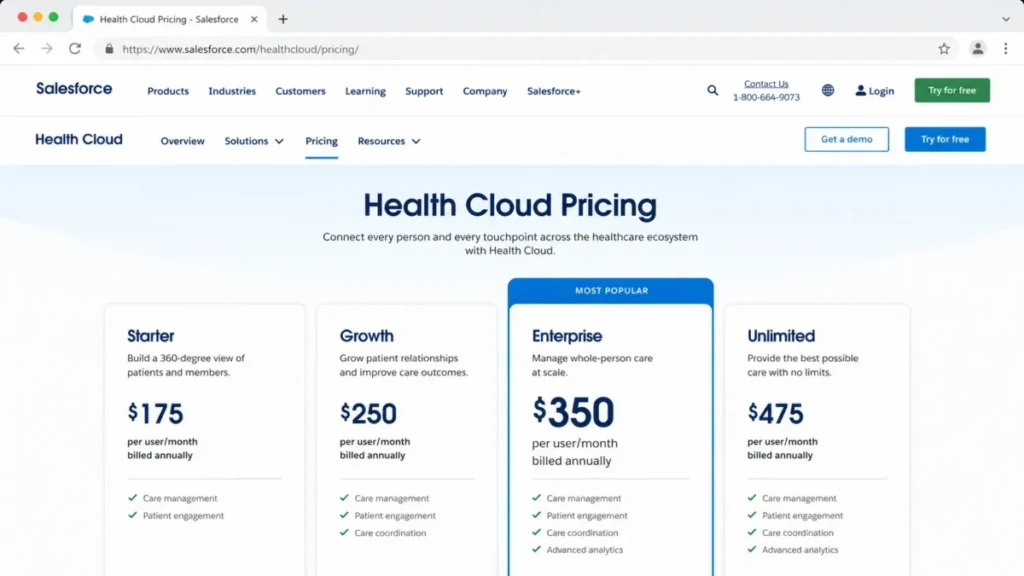
Health Cloud Enterprise lists at $350 per user per month, billed annually. Unlimited runs $525, and the Agentforce 1 editions list at $750 per user per month.
The pricing trap is capacity, not the sticker. The official datasheet shows Enterprise includes 20 MB of data storage per user against 120 MB on Unlimited.
Enterprise also caps OmniStudio at 100,000 calls per organization each month against 1,000,000, and Business Rules Engine at 10,000 requests against 50,000. A full sandbox is included on Unlimited and Agentforce 1 but not on Enterprise, so a complex release program can force an edition upgrade long before seat count does.
| Pros | Cons |
|---|---|
| Purpose-built healthcare data model and care management | Enterprise starts at $350 per user monthly, billed annually |
| Explicit, current US pricing and enterprise governance | Capacity limits can trigger an early edition upgrade |
| Deep automation through Flow, OmniStudio, and Next Best Action | Implementation needs partners or in-house architects |
Avoid Salesforce Health Cloud if you are a single-location practice that needs fast setup and a low per-user price. The configuration burden outweighs the benefit at that scale.
Choose it when healthcare-specific data models and enterprise customization matter more than deployment effort. Read the full Salesforce CRM review before you budget from the entry edition.
Setup difficulty: High.
#2 Microsoft Dynamics 365 for Healthcare: Best for Microsoft-Centered Health Systems

Start with the license stack, because the Dynamics seat price is not the price of the solution. Microsoft for Healthcare assembles capabilities across Dynamics 365, Dataverse, Power Platform, and optional Microsoft 365, Customer Insights, Fabric, and Azure services.
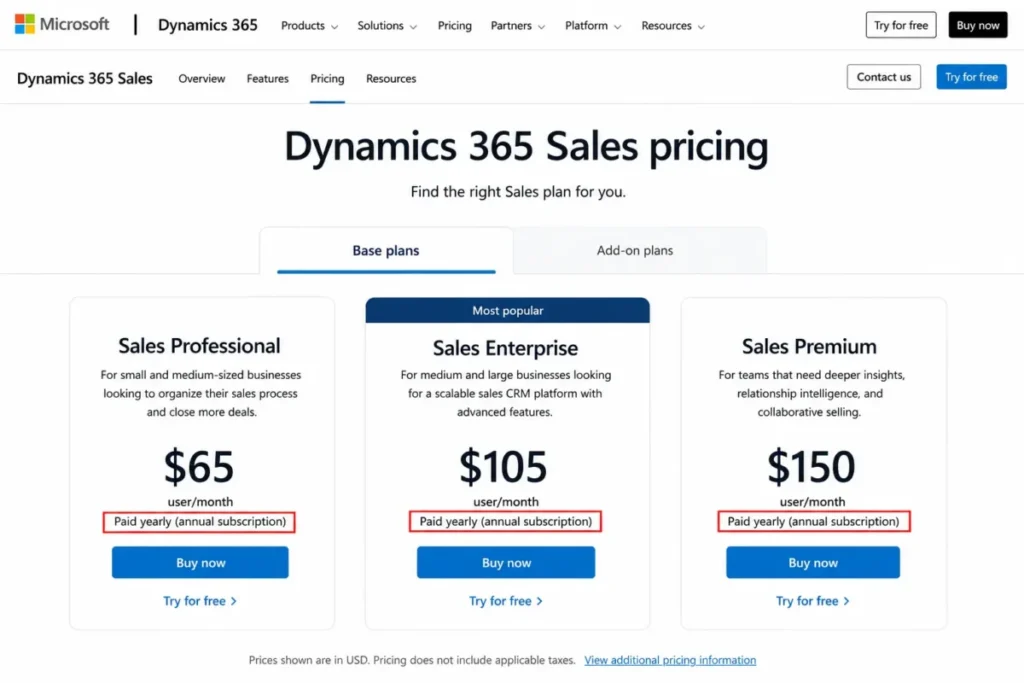
Dynamics 365 Sales lists at $65 per user per month for Professional, $105 for Enterprise, and $150 for Premium, each paid yearly.
Those figures cover the base CRM license only. The healthcare capabilities are not included in that seat price.
The care scenarios, including unified patient and member views, care management, FHIR-based data ingestion, and patient outreach, depend on a Dataverse environment in a supported region and separately licensed apps.
Source: Microsoft Learn licensing and deployment documentation for Microsoft for Healthcare.
The strength is reuse. An organization already standardized on Microsoft 365, Azure, and the Power Platform can build patient journeys on identity, data, and analytics it already owns.
| Pros | Cons |
|---|---|
| Broad healthcare data and workflow architecture | Total cost depends on several licenses and services |
| Reuses existing Microsoft identity, data, and analytics | Not a single simple CRM subscription |
| FHIR-based ingestion and unified patient views | Deployment needs solution architects and environment design |
Avoid Dynamics 365 for Healthcare if you want one clean CRM subscription without architecture work. Read the Microsoft Dynamics 365 Sales review for the base product detail.
Choose it when the existing Microsoft stack is a genuine asset rather than a seat price that only looks low. Ask for a scenario-specific bill of materials before you compare it to anything.
Setup difficulty: High.
Healthcare Growth and Patient Acquisition CRMs
These four are configurable sales-and-marketing CRMs adapted for healthcare. They win on lead routing, engagement, and price, and they lose when a buyer expects a clinical record system inside the box.
Most of them lean on marketing automation workflows to move inquiries toward appointments. The differences show up in PHI controls and integration depth.
What breaks first in this group is usually reporting on protected data, not lead capture. Once PHI fields are encrypted or gated, segmentation and dashboards behave differently than the sales demo suggested.
#3 LeadSquared Healthcare CRM: Best for High-Volume Patient Acquisition

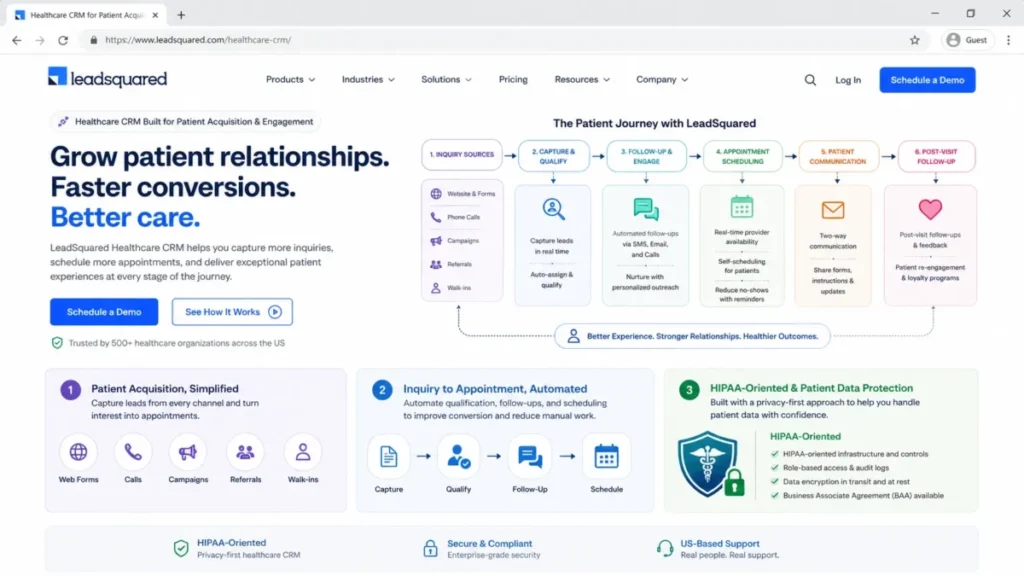
LeadSquared is the tool I would shortlist first when the core problem is inquiry volume rather than clinical data. It is built around capturing patient inquiries from web, call, campaign, and referral sources, then routing them to owners and follow-up.
The documented workflow runs from inquiry capture through qualification, appointment scheduling, patient communication, and post-visit follow-up. A mobile CRM extends that to distributed teams.
Source: LeadSquared healthcare CRM product documentation.
Pricing is the friction. LeadSquared does not publish a fixed US price, and its official flow requires a quote based on team size, industry, and use case.
| Pros | Cons |
|---|---|
| Strong inquiry-to-appointment routing and follow-up | US pricing is quote-based, not public |
| HIPAA-oriented controls and mobile CRM | EHR and EMR object coverage varies by implementation |
| Segmentation and automation for growth operations | Not a clinical record or care-management system |
The integration caveat matters for buyers who assume a logo means a full connector. LeadSquared promotes connections to EHR, EMR, and billing systems, but supported objects and write-back depend on the implementation.
Require an object-level map in the statement of work. Avoid it if you need a public self-service price or a longitudinal clinical model, and choose it when patient-acquisition throughput is the job.
Setup difficulty: Medium.
#4 HubSpot Smart CRM Enterprise: Best for Healthcare Marketing and Growth Teams

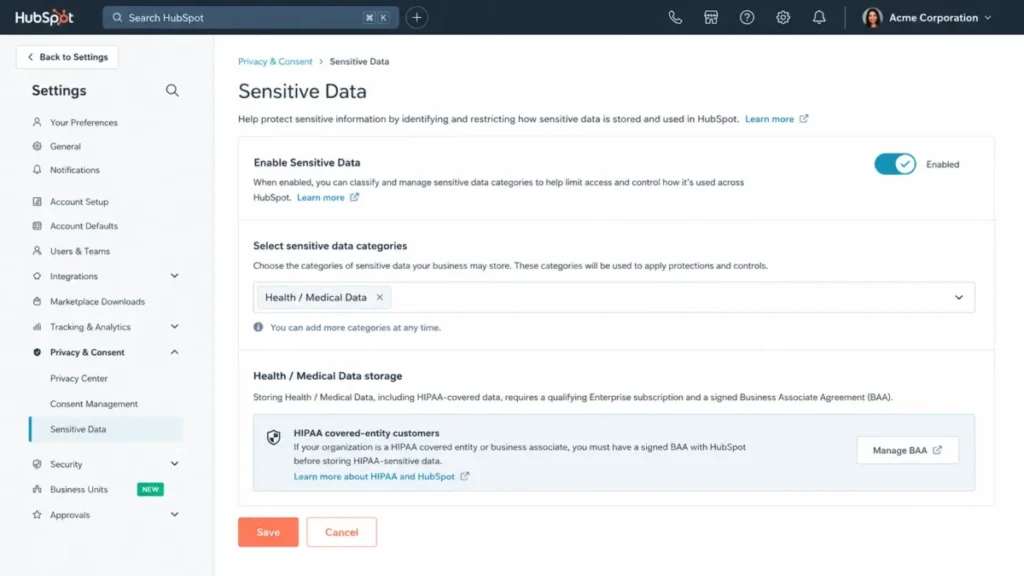
The old blanket claim that HubSpot cannot hold health data is out of date, but the correct statement is narrow. HubSpot permits qualifying Enterprise customers to store HIPAA-covered sensitive data after enabling the sensitive-data settings and accepting a business associate agreement.
That path is Enterprise-only. Smart CRM Enterprise starts at $75 per seat per month, and the free or lower tiers are not a compliant home for PHI.
For a marketing, acquisition, or service team that already runs campaigns, sales, and service in one place, the appeal is keeping that operating model while governing patient data. HubSpot describes EHR connectivity through APIs and third-party partners rather than a universal native connector, so plan for integration work.
| Pros | Cons |
|---|---|
| One platform across marketing, sales, and service | PHI handling is an Enterprise-only configuration and contract |
| Documented sensitive-data settings and BAA path | EHR connectivity relies on API or partner connectors |
| Familiar workflows lower change-management risk | HIPAA-protected Snowflake shares are region-limited |
One lifecycle risk sits outside most reviews. HubSpot limits HIPAA-protected Snowflake data shares to the AWS US_EAST_1 and EU_CENTRAL_1 regions, and downgrading an Enterprise account with sensitive data carries its own caveats.
Document downgrade behavior before you buy, and read the HubSpot CRM review for the wider platform view. Teams weighing HubSpot against an enterprise suite can also see the HubSpot vs Salesforce comparison.
Avoid HubSpot if you expect the free CRM to be the compliant option, and choose it when growth tooling matters and Enterprise is in budget.
Setup difficulty: Medium.
#5 Zoho CRM Enterprise: Best Value for Configurable PHI Controls

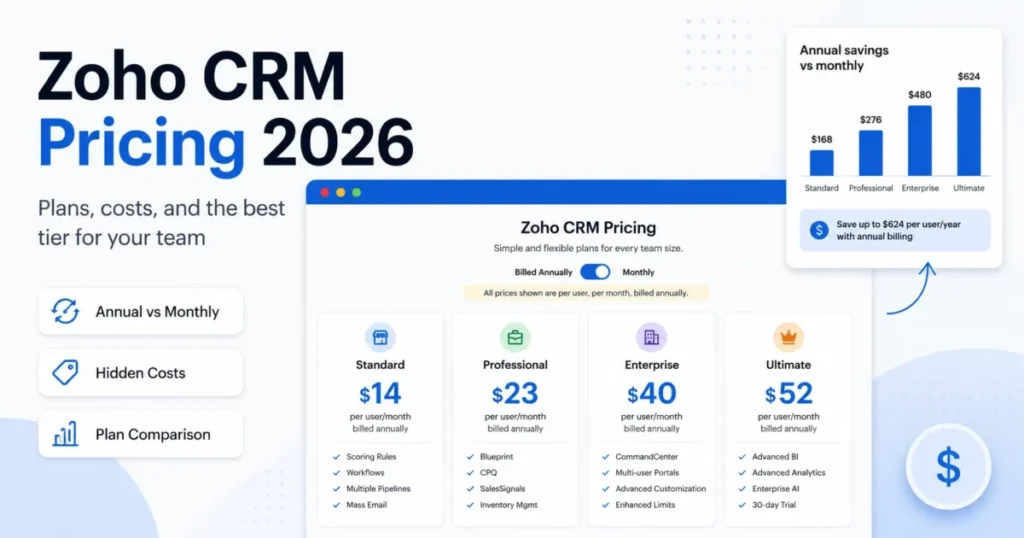
Zoho is the value pick, and its documentation is unusually specific about what the value costs you in data-model flexibility. Enterprise lists at $40 per user per month billed annually, or $50 billed monthly.
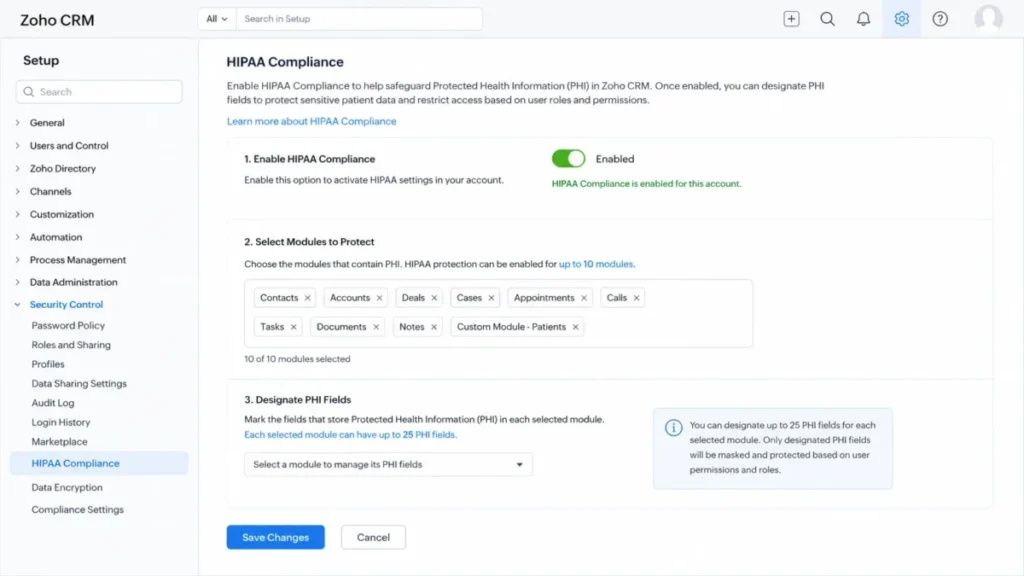
The reason to read the fine print is the PHI model. Zoho’s HIPAA settings allow a maximum of 10 modules to be marked as containing personal health data, and a maximum of 25 PHI fields inside each of those modules.
Audit logs are available for 60 days by default, and the business associate agreement is requested through Zoho’s legal contact process.
Source: Zoho CRM HIPAA FAQ.
Field encryption changes daily work. Zoho documents that encrypted fields lose partial search, advanced filters, criteria search, and sorting, so segmentation and reporting on protected fields will not behave the way an admin expects.
| Pros | Cons |
|---|---|
| Low public price relative to enterprise CRMs | HIPAA settings cap PHI at 10 modules and 25 fields per module |
| Unusually detailed, documented PHI controls | Audit logs available 60 days by default, so exports must be scheduled |
| Broad customization and automation | Encrypted fields lose search, filter, and sort behaviors |
Avoid Zoho if your front-office PHI needs more than 10 modules, more than 25 protected fields per module, or unrestricted search on encrypted data. That forces a schema redesign a low seat price will not offset.
Choose it when a capable admin can design within those limits, and see the Zoho CRM review for the wider platform. Prototype the full PHI schema before you commit.
Setup difficulty: Medium.
#6 Creatio: Best for No-Code Healthcare Workflow Design

Creatio sells process flexibility rather than a fixed healthcare template, so its value shows up when your workflows do not match anyone else’s. The platform pairs no-code process design with modular CRM products for sales, marketing, and service.
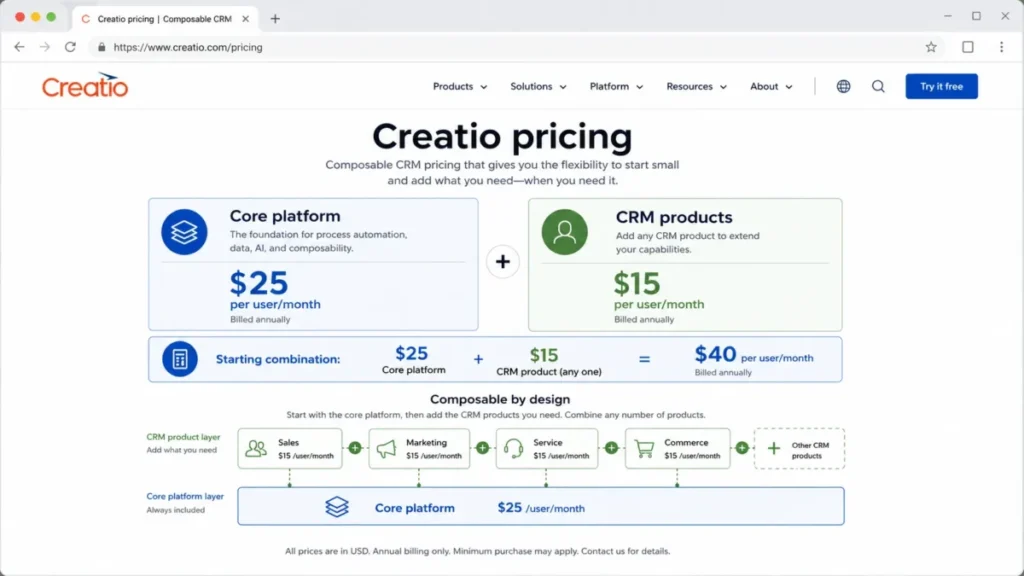
The 2026 pricing model is where older articles go wrong. Creatio’s composable structure starts at $25 per user per month for the core platform plus $15 per user per month for each CRM product.
That is a $40 combination before implementation, and it is a floor rather than a finished quote.
The model changed on 1 May 2026, when Creatio introduced a new enterprise pricing approach. Any comparison built on older per-user summaries needs a fresh quote.
Source: Creatio pricing announcement.
| Pros | Cons |
|---|---|
| No-code design fits nonstandard healthcare workflows | Starting price combines platform and CRM product layers |
| Modular purchase of sales, service, or marketing | Healthcare implementation and Unlimited terms are sales-led |
| Current composable pricing published openly | No-code still requires process design and governance |
The buyer risk is treating $40 as a finished cost, since it excludes implementation and any add-on products. Selected CRM products, implementation scope, and new Unlimited packaging all change the total.
Avoid Creatio if you want a preconfigured practice suite with minimal design work. Choose it when workflow differentiation is strategic and a scoped implementation is acceptable.
Setup difficulty: High.
Practice Operations, Patient Engagement, and Services CRMs
These four sit closest to the front desk. Three run patient engagement tied to the record system, and one is a general services CRM for referral and delivery teams.
Fit here is binary. The tool either supports your practice system or it does not.
#7 NexHealth: Best for EHR-Synced Scheduling and Intake

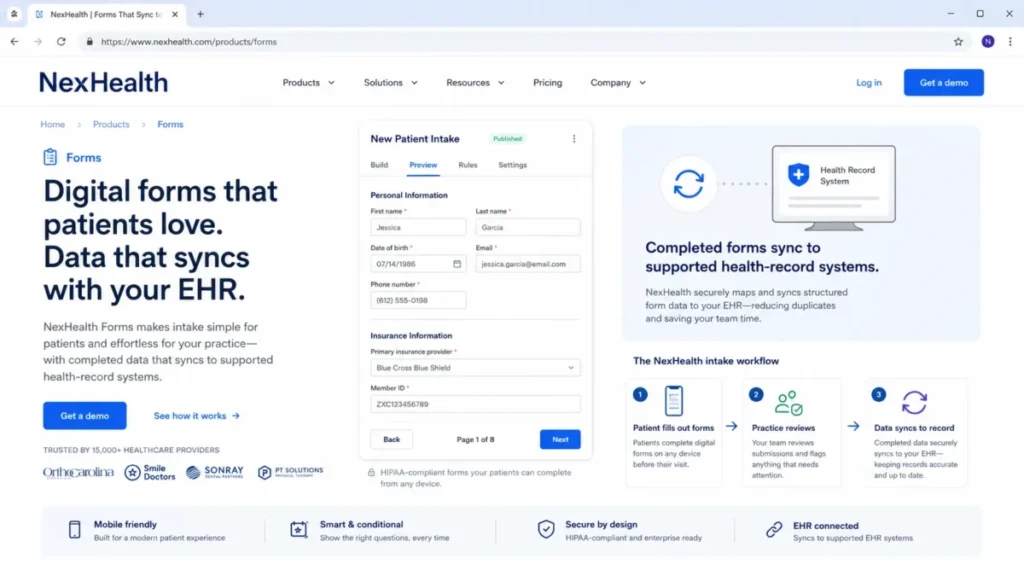
NexHealth is the pick when you want to modernize patient access without replacing the clinical system. It focuses on online booking, digital forms, secure messaging, and payments that synchronize with your existing EHR or practice-management system.
The documented value is the write-back. Completed NexHealth forms can sync to supported health-record systems, and booking, messaging, and reminders keep the record schedule aligned rather than creating a second calendar.
Pricing is sales-led, with no public list figure. The trust portal lists HIPAA, SOC 2, multifactor authentication, and audit controls.
Source: NexHealth pricing and trust documentation.
| Pros | Cons |
|---|---|
| Purpose-built booking, forms, and messaging | Pricing is custom, with no public figure |
| Syncs patient workflows to supported record systems | Value depends on exact system compatibility |
| Published HIPAA and SOC 2 trust controls | Not a broad enterprise CRM for complex segmentation |
The disqualifier is system fit, not features. A connector can exist without supporting the exact appointment type, form field, or write-back your practice needs.
Make connector compatibility the first buying gate, and require a connector-specific acceptance test. Choose NexHealth when a supported EHR or PMS is in place and front-office friction is the problem.
Setup difficulty: Medium.
#8 Tebra: Best Bundled Practice Suite for Independent Practices

Tebra is the one entry that includes the EHR, so it competes with your record system rather than complementing it. It bundles clinical charting, billing, telehealth, online booking, intake, reminders, and patient messaging for independent medical and behavioral-health practices.
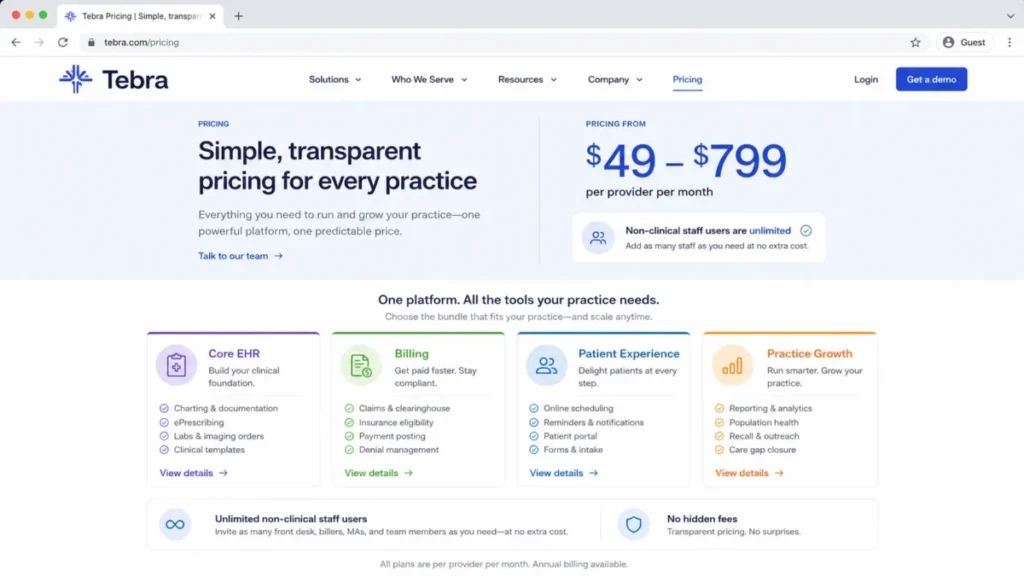
Its economics differ from every per-seat CRM here. Tebra prices per provider, generally from $49 to $799 per provider per month depending on the selected solution and configuration, and it states that non-clinical staff users are unlimited.
That billing unit can favor staff-heavy practices. A clinic with one or two providers and many front-desk and billing users pays by provider, not by seat.
Put numbers on it. A one-provider clinic with five staff pays for a single provider, while a five-provider group with fifteen staff pays for five providers, and the extra staff seats add nothing to either bill.
| Pros | Cons |
|---|---|
| Bundles EHR, billing, and engagement in one vendor | Broad $49 to $799 per-provider range needs a quote |
| Unlimited non-clinical staff users in the published model | Overkill when you only need a standalone CRM layer |
| Documented role-based access, audit trails, and 2FA | Migration spans clinical, billing, and communication data |
The trade-off is scope. A team that already runs a preferred EHR and only needs outreach will find the suite larger than the job requires.
Choose Tebra when consolidating records, billing, and engagement under one vendor is the goal. Request an itemized per-provider quote before comparing it to a CRM.
Setup difficulty: Medium.
#9 Insightly CRM: Best for CRM-to-Project Services Work

Insightly is the outlier in this group, a general CRM for healthcare services and referral teams rather than a patient-engagement layer. Its differentiator is continuity, because a won opportunity or accepted referral converts into a delivery project inside the same platform.
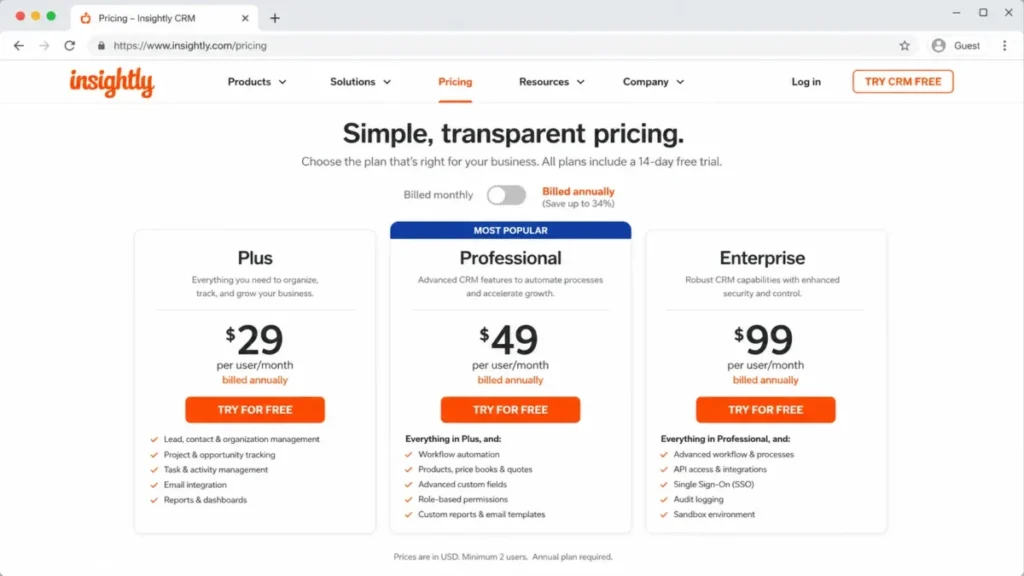
Pricing is transparent, which is rare in this list. Plus lists at $29, Professional at $49, and Enterprise at $99 per user per month billed annually.
Two gates shape the real choice. Workflow automation sits on Professional and above, not on the entry Plus plan, so an automation-heavy team should budget at least Professional.
Source: Insightly pricing and product pages.
| Pros | Cons |
|---|---|
| Transparent mid-market pricing | Automation is gated above the entry Plus plan |
| Opportunity-to-project handoff is uncommon here | Not a clinical care-coordination system |
| Workflow automation and AppConnect integrations | AI Copilot scope for PHI must be confirmed in writing |
The compliance nuance is the reason to slow down. Insightly’s own healthcare guidance cautions that AI Copilot features may sit outside the HIPAA-compliant elements of a deployment.
Confirm the BAA and the enabled features in writing before staff put PHI near AI, and read the Insightly CRM review for the wider product. Choose Insightly for referral and services operations while clinical data stays in the EHR.
Setup difficulty: Medium.
#10 Solutionreach: Best for Patient Messaging, Recall, and Revenue Outreach

Solutionreach is a focused patient-engagement platform, not a full CRM, and that focus is the point. It centers on appointment reminders, two-way messaging, recall, secure documents, and payment outreach for medical, dental, and vision practices.
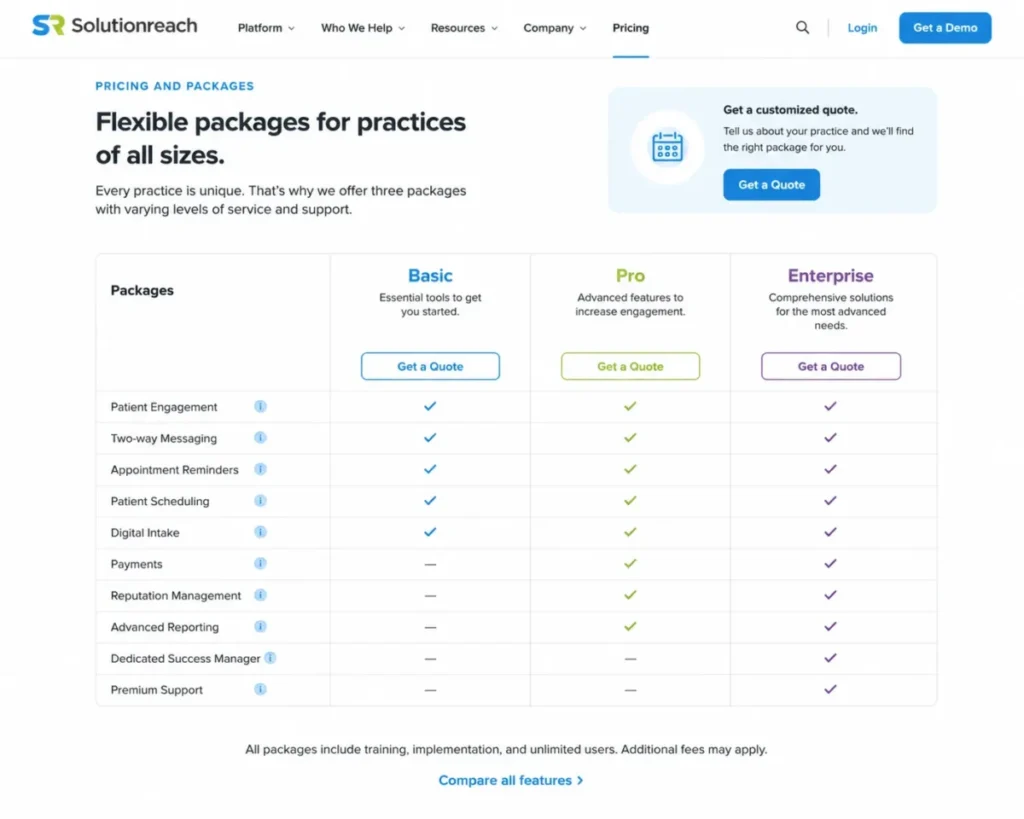
The platform ships Basic, Pro, and Enterprise packages, but it does not publish fixed US prices. Budgeting starts with a quote.
Capability is gated by package. Custom API access and Data Hub analytics are Enterprise-level, so a multi-location group that needs custom data flows should price Enterprise, not the entry package.
Source: Solutionreach enterprise page.
| Pros | Cons |
|---|---|
| Focused reminders, recall, and secure messaging | Prices are not published; every tier is quote-based |
| Enterprise APIs and Data Hub for multi-location groups | Custom API and Data Hub are Enterprise-gated |
| Broader than a plain SMS tool | Implementation time depends on the practice-management system |
The buyer risk is the connection, not the feature set. Implementation timing and available data flows depend on the connected practice-management system, so require a PMS-specific integration map before signing.
Choose Solutionreach when patient messaging, recall, and outreach define success rather than opportunity management or care orchestration.
Setup difficulty: Medium.
Pricing Comparison: List Price vs Real Cost at 10 Users
Starting price is the wrong comparison point in this category, because the billing unit and the dependencies differ across tools. The table below shows public per-user list prices and a 10-user annual cost only where every input is public.
The 10-user math is simple and reproducible. It is the list price per user per month, multiplied by 10 users, multiplied by 12 months, at the annual-billing rate, with implementation and dependencies excluded and called out separately.
| Product | Practical plan | List price | 10-user annual cost | Pricing status |
|---|---|---|---|---|
| Salesforce Health Cloud | Enterprise | $350 per user, annual billing | $42,000 | Public |
| Microsoft Dynamics 365 Sales | Enterprise | $105 per user, annual billing | $12,600 base only | Public base, custom stack |
| LeadSquared | Healthcare CRM | Quote required | Not public | Custom |
| HubSpot Smart CRM | Enterprise | From $75 per seat | From $9,000 | Public start |
| Zoho CRM | Enterprise | $40 per user, annual billing | $4,800 | Public |
| Creatio | Platform plus one CRM product | $40 per user | $4,800 before implementation | Public start |
| NexHealth | Practice plan | Quote required | Not public | Custom |
| Tebra | Practice subscription | $49 to $799 per provider | Provider-based, not per user | Range |
| Insightly | Enterprise | $99 per user, annual billing | $11,880 | Public |
| Solutionreach | Practice package | Quote required | Not public | Custom |
Source: official vendor pricing pages, checked 2026-07-23. Quote-based tools are labeled custom rather than estimated.
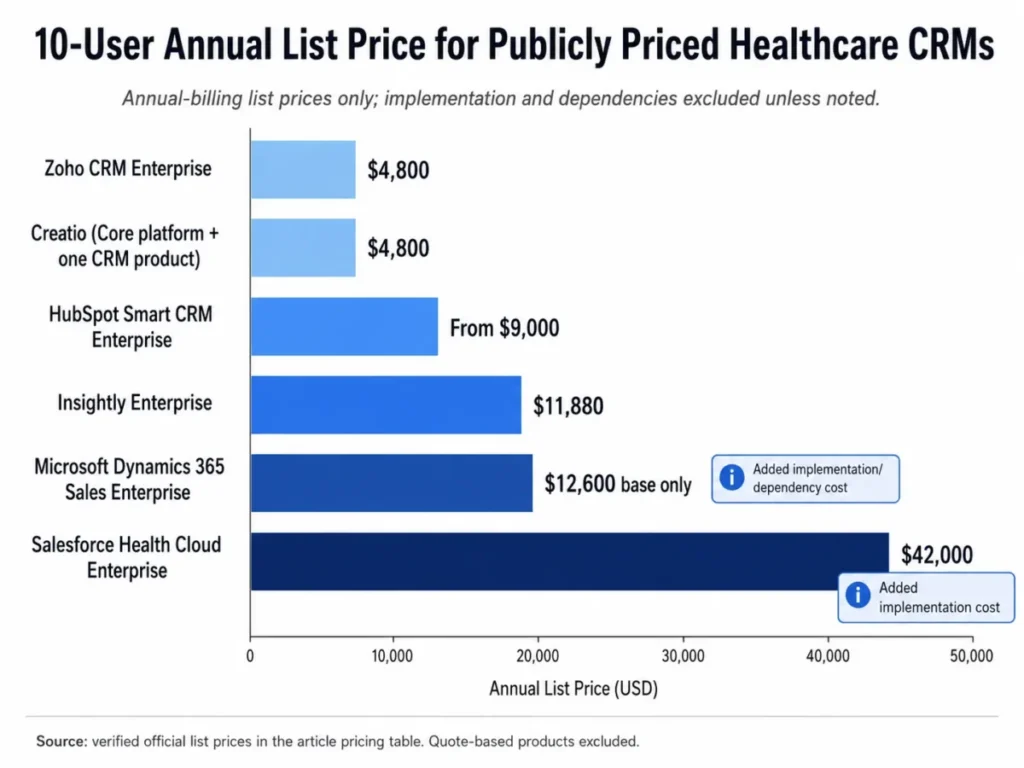
Two adjustments change these numbers in practice. Salesforce and Microsoft add implementation and, for Microsoft, dependent licenses that the base figure excludes, while Tebra’s per-provider model can beat a per-seat CRM for a clinic with few providers and many staff.
For quote-only tools, ask for a line-item proposal covering users or providers, implementation, integration, and support before you compare. The Salesforce pricing breakdown shows how enterprise editions scale.
HIPAA, BAA, and Feature-Gate Comparison
Compliance readiness is a plan decision as much as a product decision. This table maps the plan that unlocks PHI handling, the automation gate, and the integration path so you can see where a cheaper tier is a false economy.
On mobile, this wide table uses horizontal scroll with a pinned product column.
| Product | PHI-eligible plan | Automation or workflow gate | EHR/ |
|---|---|---|---|
| Salesforce Health Cloud | Health Cloud editions | Flow and OmniStudio by edition capacity | Native models plus integration |
| Microsoft Dynamics 365 | Licensed Dynamics plus Dataverse | Power Platform, license-dependent | FHIR ingestion via Dataverse |
| LeadSquared | Healthcare CRM | Included in platform | Connects, implementation-specific |
| HubSpot Smart CRM | Enterprise only | Enterprise workflows | API or partner connector |
| Zoho CRM | Enterprise with HIPAA settings | Included, within field limits | Connects to record system |
| Creatio | Licensed platform plus product | No-code, requires design | Configured integration |
| NexHealth | Practice plan | Product-defined workflows | Syncs to supported systems |
| Tebra | Practice subscription | Included by module | Includes the EHR |
| Insightly | Paid plans | Professional and above | AppConnect and API |
| Solutionreach | Practice package | Included by package | Custom API on Enterprise |
Source: official vendor HIPAA, pricing, and product documentation.
The gate that catches buyers most often is HubSpot’s Enterprise requirement for sensitive data and Insightly’s automation and AI boundaries. In both cases, the plan that looks affordable in a demo is not the plan that carries PHI or the automation a healthcare team needs.
Setup and Migration Difficulty
Setup effort tracks the buyer model. Enterprise care-coordination platforms carry the heaviest configuration, growth CRMs sit in the middle, and patient-engagement tools depend on the practice-management connection.
| Product | Setup difficulty | Why |
|---|---|---|
| Salesforce Health Cloud | High | Healthcare data model, capacity planning, partner-led build |
| Microsoft Dynamics 365 | High | Dataverse environment, licensing, and architecture design |
| LeadSquared | Medium | Source connectors and routing need configuration |
| HubSpot Smart CRM | Medium | Enterprise sensitive-data setup and connector work |
| Zoho CRM | Medium | PHI schema must fit module and field limits |
| Creatio | High | Process design and governance for no-code build |
| NexHealth | Medium | Depends on the supported EHR or PMS connector |
| Tebra | Medium | Clinical, billing, and communication data migration |
| Insightly | Medium | Pipeline and project setup, BAA scope confirmation |
| Solutionreach | Medium | Timing depends on the practice-management system |
Migration is the risk most lists skip. For every tool here, confirm which records carry over beyond contacts, including activity history, notes, attachments, owner mapping, relationships, consent, and automations.
Public product pages rarely publish rollback and downtime behavior. Require an object-level migration map and a nonproduction acceptance test in the contract, and use the CRM migration checklist to validate the objects before cutover.
Which Healthcare CRM to Avoid
No tool here is bad, but several are wrong for specific buyers. Matching the wrong category to your problem is the costliest error in this market.
Avoid Salesforce Health Cloud and Microsoft Dynamics 365 if you run a small practice that needs outreach and reminders. You would pay for enterprise data models and implementation you cannot staff, when a patient-engagement platform solves that job at a fraction of the effort.
Avoid NexHealth, Tebra, and Solutionreach if you need enterprise care coordination, broad segmentation, or a payer-grade member model. Those platforms are built around the front office, not longitudinal care management.
Avoid putting PHI into HubSpot’s free CRM, Zoho without HIPAA settings and a signed agreement, or Insightly’s AI features without written scope confirmation. In each case the product can be compliant on the right plan, but the tempting entry path is not the compliant one.
The product nobody should buy on price alone is any quote-only tool whose proposal omits integration and migration scope. A quote that lists only user or package cost hides the work that determines time-to-value.
How to Choose the Right Healthcare CRM
Start from the compliance and record-system questions, not the feature list. Those two answers eliminate most of the shortlist for you.
- Will the CRM store PHI, and will the vendor sign a business associate agreement on the exact plan you will buy?
- What is your system of record, and does this tool complement the EHR or try to replace it?
- Is your core job care coordination, patient acquisition, or practice-level engagement?
- Which plan unlocks the automation, PHI fields, and integrations you need?
- What is the real cost at your team or provider count, including implementation and dependencies?
- Which exact EHR or practice-management objects must sync, and are they supported and tested?
- What migrates beyond contacts, and what is the rollback plan if cutover fails?
Map the answers to the buyer models above. Care coordination points to Salesforce or Microsoft, acquisition points to LeadSquared, HubSpot, Zoho, Creatio, or Insightly, and practice engagement points to NexHealth, Tebra, or Solutionreach.
Once the shortlist is set, the CRM implementation guide walks through the rollout and the adoption checkpoints that matter after go-live.
The 30-Day and 90-Day Adoption Check
A healthcare CRM only pays off if the team uses it. By day 30, front-desk or intake staff should be working real records in the tool, not running a parallel spreadsheet.
By day 90, the signal to watch is data quality, including duplicate patients, missing consent, and stalled follow-ups. If those are climbing, the problem is adoption and governance, not features, and no upgrade will fix it.
Common Mistakes When Choosing Healthcare CRM Software
These are the mistakes that most often derail healthcare CRM purchases.
Buying by starting price. The entry tier rarely carries the plan gate for PHI, the automation, or the capacity a healthcare team needs, so the practical tier is the real budget line.
Assuming a HIPAA badge means the whole product is compliant. Compliance is tied to a plan, a signed agreement, and your own configuration, not to a logo.
Confusing a CRM with an EHR. A relationship and outreach system does not chart care, so treating it as a record system creates duplicate data and audit gaps.
Trusting a logo-level integration. A named EHR connector can still miss the appointment type, field, or write-back your practice depends on, so validate objects during the demo.
Ignoring the billing unit. Per-user, per-seat, and per-provider models produce very different totals, and the cheapest headline can be the most expensive at your staffing mix.
Skipping migration due diligence. Notes, activities, attachments, owners, and consent do not always survive a move, and an incomplete migration fragments the patient journey.
Overlooking downgrade and renewal risk. Sensitive-data features and integrations may not persist after a downgrade, so plan the exit before you sign.
Final Verdict: The Best CRM for Healthcare in 2026
There is no single winner, because the three buyer jobs need different systems. The honest answer is a verdict by buyer type, tied to the evidence in this guide.
For a large provider, payer, or life-sciences organization, Salesforce Health Cloud is my top pick. Budget for the practical edition and the implementation rather than the $350 entry price.
If your enterprise already runs on Microsoft, Dynamics 365 for Healthcare is the stronger fit. It reuses infrastructure you already own instead of standing up a new platform.
For patient acquisition at volume, choose LeadSquared. For marketing-led growth on a familiar platform, choose HubSpot Smart CRM Enterprise with the sensitive-data path configured.
Zoho CRM Enterprise is the value choice when a capable admin can design within its PHI limits. Creatio suits teams that need to build nonstandard workflows without code.
For practice-level engagement, NexHealth is the pick when a supported EHR is in place, and Tebra is the pick when you want records, billing, and outreach from one vendor. Solutionreach is the pick when reminders and recall define success, and Insightly is the choice for healthcare services and referral teams that keep clinical data in the EHR.
Whichever you shortlist, get the business associate agreement, the plan gate, the integration object map, and the migration plan in writing before you sign. That paperwork, not the feature demo, decides whether the best CRM for healthcare still works after month two.
Frequently Asked Questions
What is the best CRM for healthcare?
For most large healthcare organizations, Salesforce Health Cloud is the strongest healthcare CRM because it ships healthcare-specific data models and care management. For practices, a patient-engagement platform such as NexHealth or a value CRM such as Zoho often fits better.
The best choice depends on whether the tool holds PHI and on your record-system role.
Which CRM systems are HIPAA compliant?
No CRM is HIPAA certified, because no government certification exists. Salesforce Health Cloud, Microsoft Dynamics 365, Zoho CRM Enterprise, and HubSpot Smart CRM Enterprise can each support HIPAA workflows on the right plan with a signed business associate agreement and correct configuration.
Compliance is a shared responsibility between vendor and customer.
Does a healthcare CRM replace an EHR?
No, unless the product bundles clinical records, as Tebra does. A healthcare CRM manages relationships, acquisition, and engagement, while the EHR remains the clinical system of record.
Most tools in this guide complement the EHR through integration rather than replacing it.
Does HubSpot sign a BAA?
Yes, for qualifying Enterprise customers. HubSpot lets qualifying Enterprise accounts store HIPAA-covered sensitive data after enabling the sensitive-data settings and accepting a business associate agreement.
The free and lower tiers are not a compliant home for PHI, so the Enterprise plan is the requirement.
Is Zoho CRM HIPAA compliant?
Zoho CRM Enterprise can support HIPAA workflows once HIPAA settings are enabled and a business associate agreement is signed. The settings allow up to 10 modules and 25 PHI fields per module, and audit logs run 60 days by default.
A capable admin must design the data model within those documented limits.
How much does Salesforce Health Cloud cost?
Salesforce Health Cloud Enterprise lists at $350 per user per month billed annually, Unlimited at $525, and the Agentforce 1 editions at $750, checked on 2026-07-23. Those figures exclude implementation, and edition capacity limits can force an upgrade before seat count does.
Budget the practical edition, not the entry price.
Can a CRM integrate with Epic or other EHRs?
Yes, through supported connectors, APIs, or middleware, but coverage varies by system. Purpose-built tools such as NexHealth sync scheduling and forms to supported record systems, while general CRMs connect through APIs or partners.
Validate the exact objects and write-back for your EHR before you buy, since a logo does not guarantee full support.
What should a healthcare CRM include?
A healthcare CRM should include a business associate agreement path, role-based access, audit logging, PHI field controls, and a documented EHR or practice-management integration. Growth teams also want lead routing and campaign tools, and practices want booking, reminders, and recall.
The right mix depends on your buyer model.
How do medical practices migrate patient data to a CRM?
Practices migrate through an object-level plan that maps contacts, activities, notes, attachments, owners, relationships, and consent, then validates the result in a nonproduction environment before cutover. Require the vendor to document rollback and downtime behavior.
Keep clinical records in the EHR and move only approved relationship data into the CRM.
Which healthcare CRM is best for patient reminders?
For reminders and recall, Solutionreach and NexHealth are the strongest fits because they are built for patient communication tied to the practice schedule. Tebra also covers reminders inside its bundled suite.
A general CRM can send reminders, but a purpose-built engagement platform handles consent, recall, and two-way messaging more directly.