Picking the best CRM for nonprofits rarely goes wrong on features. It goes wrong on the second invoice, the module you did not know was a paid add-on, and the donation history that did not survive the import.
Most nonprofit teams do not need the longest feature list. They need a system whose price stays predictable as the donor file grows, whose workflows match how the organization operates, and whose migration keeps every gift and note intact.
Choosing a nonprofit CRM usually goes wrong for one of three reasons: the real cost appears only after add-ons and contact growth, the platform does not match the organization’s operating model, or historical gifts and notes are lost during migration.
We compared ten nonprofit CRM platforms using verified US pricing, plan restrictions, contact limits, and documented migration rules, checked July 23, 2026. The quick verdict below identifies the strongest option for each operating model, while the detailed reviews explain the costs and limitations behind each recommendation.
In This Article (13 sections)
Quick Verdict: Best Nonprofit CRM by Use Case
The right pick depends less on organization size and more on your operating model and how your donor file will grow. This table maps the common nonprofit situations to the tool that fits, with the ranked reviews and pricing math that follow as proof.
| Use case | Best pick | Why it fits |
|---|---|---|
| Strongest for donor-centric nonprofits | Bloomerang | Donor CRM, reporting, email, and journeys with unlimited users in one stack |
| Best for memberships and events | Neon CRM | Membership, event, and volunteer modules built around a donor CRM |
| Best value for small teams | Little Green Light | Transparent contact-tier pricing, unlimited users, no contract |
| Best for complex multi-program work | Salesforce Nonprofit Cloud | Fundraising, programs, outcomes, and volunteers on one data model |
| Best for fundraising operations | DonorPerfect | Batch entry, scheduled reports, and vendor-assisted migration |
| Best free fundraising pick | Givebutter | $0 subscription with unlimited contacts, campaigns, and email |
| Best for responsive automation | Virtuous CRM+ | Donor journeys, pipeline, and analytics for growth-stage teams |
| Best for large advancement teams | Blackbaud Raiser’s Edge NXT | Deep gift-batch, audit, and specialized fundraising reporting |
| Best for advocacy and federated groups | EveryAction | Fundraising plus organizing, email, and SMS for national bodies |
| Best for simple donor outreach | Keela | Published contact-tier prices up to 10,000 contacts |
How We Chose and Ranked These Tools
These rankings are based on verified US pricing pages, official product and help documentation, current feature pages, and labeled third-party review evidence. Pricing and plan limits were checked on July 23, 2026.
Each tool was assessed against the same buyer-focused criteria: nonprofit workflow fit, core donor features, plan restrictions, contact and reporting limits, migration rules, cost structure, and documented limitations.
Greater weight was given to factors that change a purchasing decision, including the practical tier most teams need, module or add-on costs, contact ceilings, and the cost of scaling the donor file. Brand popularity, marketing presentation, and affiliate relationships did not influence the ranking.
Claims that could not be verified from reliable evidence were excluded. Custom-priced platforms are labeled as custom and never estimated, and temporary promotions are separated from standard pricing and verified on the publication date.
Three Risks to Check Before Choosing
Before comparing products, verify three things. First, calculate the practical cost rather than the advertised starting price, including modules, contact tiers, transaction fees, and implementation. Second, match the CRM to the operating model: donor stewardship, memberships, advocacy, and program delivery require different systems. Third, confirm migration at the object level, including gifts, notes, pledges, relationships, and attachments.
The comparisons below use these three risks as the basis for ranking each product.
The 10 Best Nonprofit CRMs at a Glance
This table normalizes the ten tools on the facts that move a decision: entry pricing state, the practical cost driver, contact scale, and the buyer each one fits. Custom-priced platforms are marked as custom because their totals depend on a quote, not a public tier.
| Rank | Tool | Starting price (US) | Practical cost driver | Best-fit buyer |
|---|---|---|---|---|
| 1 | Bloomerang | $125/mo CRM, billed annually | Fundraising is a required add-on | Donor-centric teams, 3-25 users |
| 2 | Neon CRM | From $99/ | Membership, event, volunteer modules | Member and event organizations |
| 3 | Little Green Light | $45/mo up to 2,500 records | Contact-tier ladder, 200,000 max | Budget-first small teams |
| 4 | Salesforce Nonprofit Cloud | $60/ | Implementation and admin | Multi-program organizations |
| 5 | DonorPerfect | From $99/mo | Practical suite is Plus or Pro | Fundraising operations teams |
| 6 | Givebutter | $0 Free plan | Donor-tip setting drives fees | Free-first small teams |
| 7 | Virtuous CRM+ | Custom | Implementation and scope | Responsive-fundraising teams |
| 8 | Blackbaud Raiser’s Edge NXT | Custom | Implementation, training, support | Large advancement teams |
| 9 | EveryAction | Custom | Channel volume and scope | Advocacy and federated groups |
| 10 | Keela | $134/mo effective up to 1,000 contacts | Custom above 10,000 contacts | Small donor-outreach teams |
Sources: Bloomerang, Neon One, Little Green Light, Salesforce, DonorPerfect, Givebutter, Virtuous, Blackbaud, Bonterra, and Keela official pricing pages, The full pricing math sits in the pricing comparison further down.
The 10 Best Nonprofit CRMs in 2026
Products appear in ranked order. Only Bloomerang holds the overall recommendation, and even that is conditioned on a donor-centric operating model, while every other tool wins a specific cohort.
Bloomerang: Best Overall for Donor-Centric Nonprofits
Bloomerang is the strongest all-round choice for a nonprofit whose core job is raising money from individual donors and stewarding them well. Its official pricing page lists donor management, predictive giving insights, reporting and analytics, email marketing, automated supporter journeys, duplicate management, and mobile access, with unlimited users included.
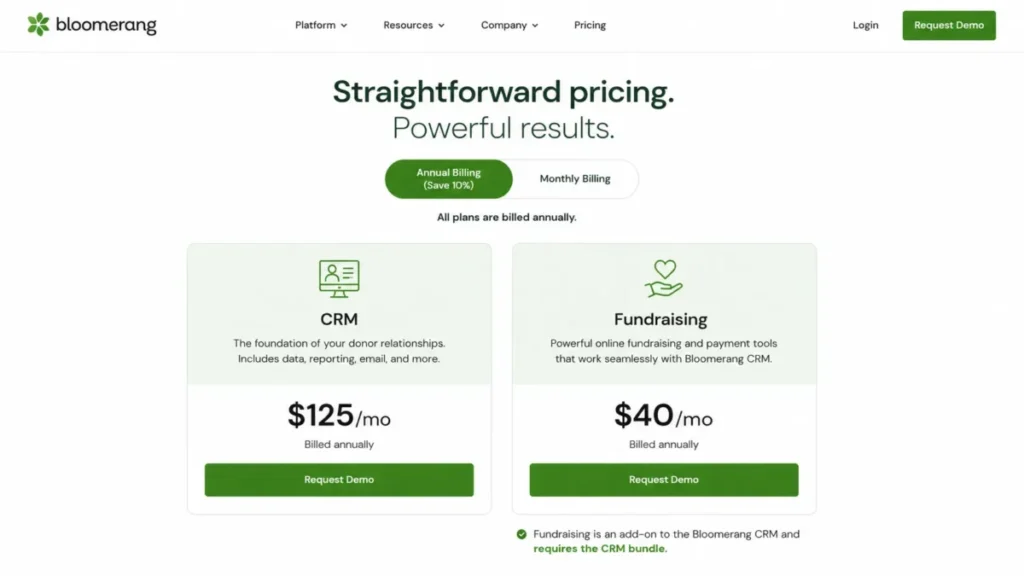
Bloomerang CRM starts at $125 per month, billed annually, according to Bloomerang’s pricing page, The unlimited-user model matters for cross-functional teams: adding a development coordinator, a communications manager, and an executive director does not raise the license cost the way a per-seat tool would.
The documented donor workflow holds together end to end. Reports can be built conversationally or manually, scheduled for delivery, or converted into a group for outreach, and constituent emails can be previewed, tested, sent or scheduled, and then locked with an interaction recorded on each recipient’s timeline.
There is a caveat on price, though. Bloomerang Fundraising starts at $40 per month, but it is not a standalone product: it must be bought with Bloomerang CRM, so the real entry floor for online fundraising is the $40 add-on on top of the $125 CRM, both billed annually.
A second constraint shows up in the field. The mobile app can add and edit constituents, but membership creation and management require the web application, so a team that expects to run memberships from a phone at events will hit a wall.
On migration, plan for staged imports. Constituents can be created or updated by import, but donations, interactions, and notes can be created and not updated afterward, so the documentation’s advice to test one or two rows before a full import is worth following.
| Pros | Cons |
|---|---|
| Unlimited users, so team growth does not raise license cost | Fundraising requires the CRM bundle, so $40 is not the true entry price |
| Donor CRM, reporting, email, and journeys in one documented stack | Membership management is web-only, not available in the mobile app |
| Import supports both create and update for constituents | Donations, interactions, and notes cannot be updated by import after creation |
| Predictive giving insights and duplicate management included | Standard pricing is annual, so monthly-budget teams pay ahead |
- Best for:
- donor-centric nonprofits with roughly 3 to 25 fundraising and communications users who want CRM, reporting, email, and journeys in one mainstream system.
- Avoid if:
- you need to buy online fundraising without the CRM bundle, or your staff must run membership tasks entirely from a mobile app.
- Setup difficulty:
- Medium. Self-service import with clear controls, but object-specific update rules mean gift and note history must be staged carefully.
We would shortlist Bloomerang first for any organization that is primarily a fundraising shop and can accept annual billing plus the required fundraising add-on. The verdict changes only when memberships, advocacy, or multi-program delivery move to the center of the work.
Neon CRM: Best for Memberships and Events
Neon CRM earns its rank for organizations whose operating model runs on memberships, events, and volunteers as much as donations. Associations, museums, and arts groups get a donor CRM with the operational modules those groups use, rather than a fundraising tool bolted onto a separate membership system.
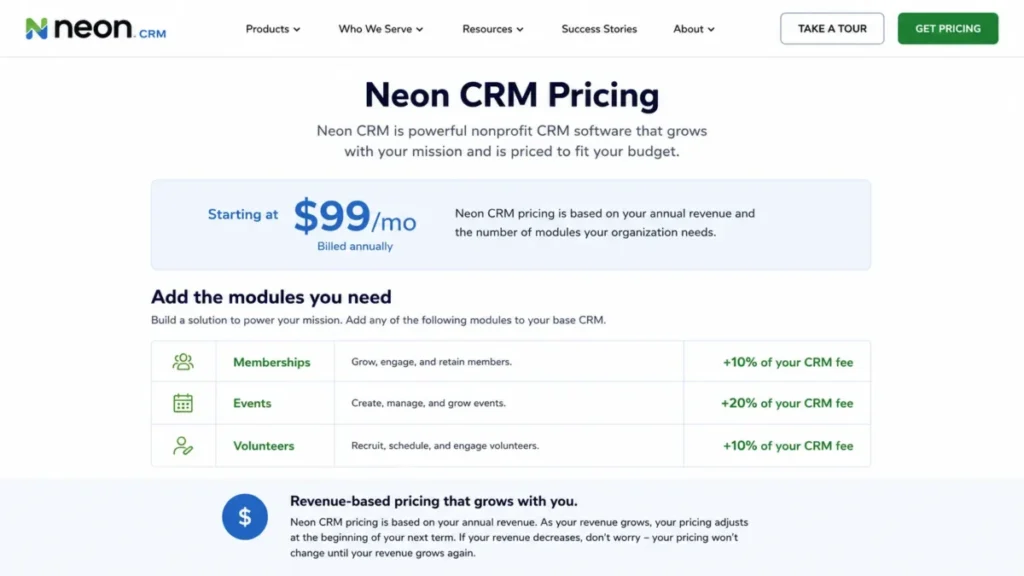
Neon CRM starts at $99 per month and prices the CRM by organizational revenue rather than by record count, according to Neon One’s pricing page. The $99 figure is a floor, not a quote, so the real base depends on annual revenue.
The modules are where budgeting gets specific. Memberships add 10 percent of the CRM fee, Events add 20 percent, and Volunteers add 10 percent, so a group that needs all three is looking at roughly 1.4 times the base CRM fee, not the headline $99.
That percentage stack is the buyer’s main risk here. Events is the largest single module at 20 percent, and because the base is revenue-based, a larger organization pays more for the same event tooling than a smaller one would.
The capability coverage is broad. The product page lists supporter profiles, reporting and dashboards, automated workflows, campaigns and forms, recurring gifts, stewardship journeys, and a donor portal, with live chat, email, and phone support listed as included.
On migration, scope it in writing. The public support path for detailed import behavior sits behind a login, so a written migration workbook covering accounts, gifts, memberships, events, and attachments should be a condition of purchase rather than an afterthought.
| Pros | Cons |
|---|---|
| Membership, event, and volunteer modules built around one donor CRM | The $99 starting price is not enough to budget from, because the base is revenue-based |
| Chat, email, and phone support listed as included | Each module is a paid add-on at 10%, 20%, or 10% of the CRM fee on top of the base |
| Broad workflow coverage: forms, recurring gifts, journeys, donor portal | Full object-level migration behavior is not public |
| Directly fits associations, museums, and arts organizations | Larger revenue means a higher base for the same tooling |
- Best for:
- member-led nonprofits, associations, museums, and arts organizations that need donor management plus membership, event, and volunteer operations in one place.
- Avoid if:
- you want a single fixed public price before sharing your revenue, or you do not want percentage-based module costs stacked on the base fee.
- Setup difficulty:
- Medium to High. Module configuration and a revenue-based quote mean the buy involves sales and implementation scoping.
Choose Neon when these modules replace separate tools and the percentage stack still beats running membership or event software alongside a cheaper donor CRM. Model each module as a percentage of the quoted base before you sign.
Little Green Light: Best Value for Small Teams

Little Green Light wins on transparency and total cost for small teams that want a real donor database without a sales call. The pricing ladder, user policy, import path, and export path are all published, which is unusual in this category and removes most of the budgeting guesswork.
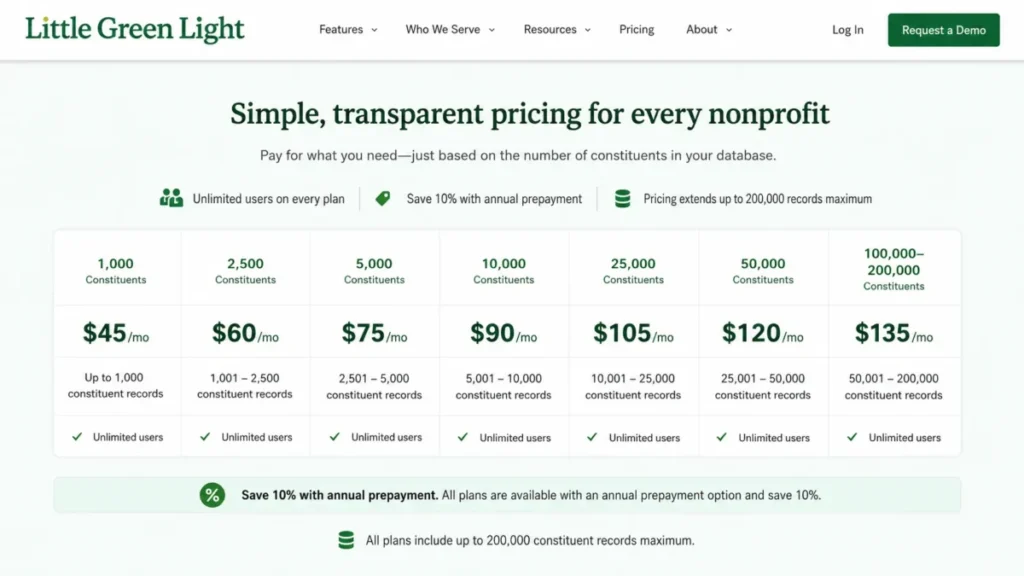
Pricing runs by constituent count: $45 per month up to 2,500 records, $60 up to 5,000, $75 up to 10,000, and on up to $135 for 50,000, according to Little Green Light’s pricing page. Every tier includes unlimited users, there is no setup fee or contract, and annual prepayment costs 10 percent less than paying monthly.
The economics stay clean as you grow, within limits. Above 50,000 constituents, LGL adds $15 per month for each additional 10,000 records, up to a hard maximum of 200,000 constituents.
That ceiling is the main constraint. An organization heading toward enterprise-scale data needs to plan a platform review before it reaches 200,000 records, because there is no published tier beyond it.
Migration is self-service and reviewable, which cuts services cost but shifts responsibility to your data prep. The Flex Importer takes CSV or Excel files under 1 MB, walks through prepare, map, and commit with a preview, and can create or update records.
One import rule deserves attention before go-live. The importer can overwrite some fields but cannot delete or remove data, so a bad import is cleaned up manually rather than rolled back, which makes a small test file and a preserved source export cheap insurance.
Data ownership is a genuine strength. A full export runs from the Reports area, so a nonprofit can back up or move its data without a support ticket.
| Pros | Cons |
|---|---|
| Transparent contact tiers from $45 to $135/mo with no contract or setup fee | Hard database ceiling of 200,000 constituents with no published tier above it |
| Unlimited users at every tier and 10% lower pricing for annual prepayment | Importer cannot delete data, so bad imports need manual cleanup |
| Self-service Flex Importer with a preview before commit | Excel imports must be under 1 MB, so larger files need CSV or splitting |
| Documented full-database export for data ownership | Lighter on native journey automation than pricier platforms |
- Best for:
- small nonprofit teams with roughly 2,500 to 50,000 constituent records that value transparent pricing, unlimited users, and self-service import and export.
- Avoid if:
- you need more than 200,000 constituent records, or you want sophisticated native journey automation without adding another tool.
- Setup difficulty:
- Low to Medium. Self-service migration keeps services cost down, but it puts data preparation and validation on your team.
Little Green Light is the value pick because the price, the user policy, and the import and export paths are all explicit. We would choose it whenever transparent economics and data portability outrank advanced automation, as long as the 200,000-record ceiling stays ahead of the donor file.
Salesforce Nonprofit Cloud: Best for Complex Multi-Program Organizations
Salesforce Nonprofit Cloud is the pick when the work extends well beyond fundraising into programs, outcomes, and volunteer management on one data model. Its broader platform is detailed in our Salesforce CRM review, and its nonprofit breadth is the reason a multi-program organization would take on the implementation.
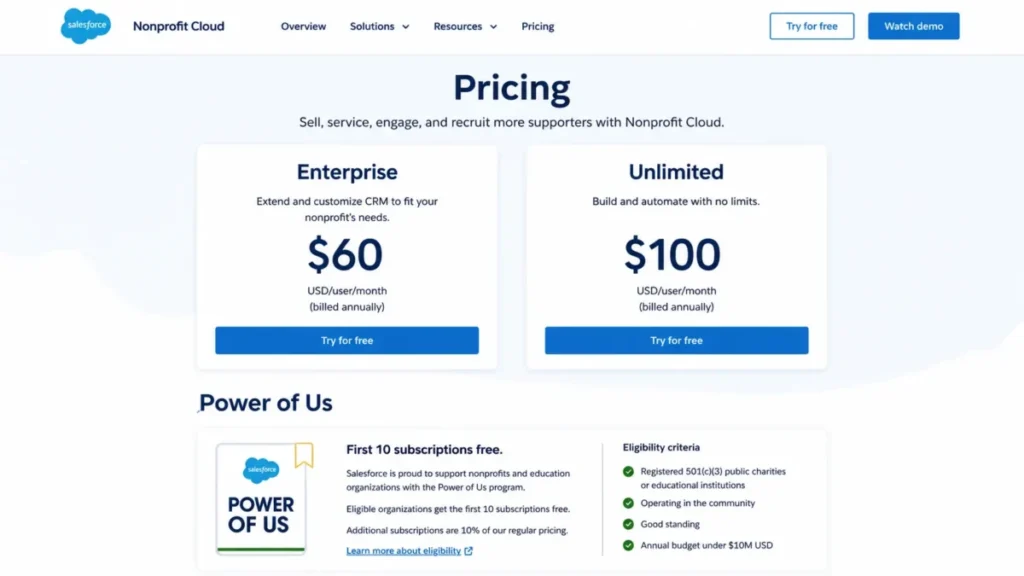
Pricing is per user: Enterprise is $60 per user per month and Unlimited is $100 per user per month, both billed annually, according to Salesforce’s nonprofit pricing page, checked July 23, 2026. Eligible nonprofits receive the first 10 subscriptions free through the Power of Us program, with additional licenses discounted.
The free-license headline is where budgets go wrong. Ten free subscriptions reduce software cost, but the official Power of Us guidance strongly recommends identifying a system administrator and a consulting partner before requesting the product, and it warns that a 30-day trial org does not convert to production.
Read together, those facts mean implementation is a project, not a switch. License savings can sit next to real spend on migration, partner services, training, and ongoing administration, none of which Salesforce publishes as a standard figure.
The upside is genuine reach. A nonprofit can connect donor, program, outcome, and volunteer records in one system, which a donor-only CRM cannot do, and the platform’s automation and reporting scale with configuration.
| Pros | Cons |
|---|---|
| One data model spans fundraising, programs, outcomes, and volunteers | Free-license headline hides implementation, migration, and admin cost |
| First 10 eligible subscriptions free through Power of Us | The 30-day trial org does not convert to production |
| Deep platform automation and reporting that scale with configuration | Official guidance recommends an admin and consulting partner |
| Extensible for organizations that outgrow a donor-only CRM | Per-seat cost beyond the free 10, and overkill for a small grants or donor shop |
- Best for:
- multi-program nonprofits with dedicated administration or an implementation partner that need fundraising, programs, outcomes, and volunteer work on one extensible platform.
- Avoid if:
- you want a turnkey donor database with minimal configuration, or you cannot fund ongoing administration and a migration project.
- Setup difficulty:
- High. Production setup involves the data model, a migration plan, sandbox testing, and cutover, typically with a partner.
We would budget Salesforce as licenses plus services, never as licenses alone. Choose it when process complexity, not simplicity, is the requirement, and when someone owns the system after go-live.
DonorPerfect: Best for Fundraising Operations

DonorPerfect fits development operations teams that want a customizable fundraising suite with vendor-assisted migration, forms, batch entry, and scheduled reporting. It is a working operations tool rather than a lightweight database, and the practical decision is which suite you need.
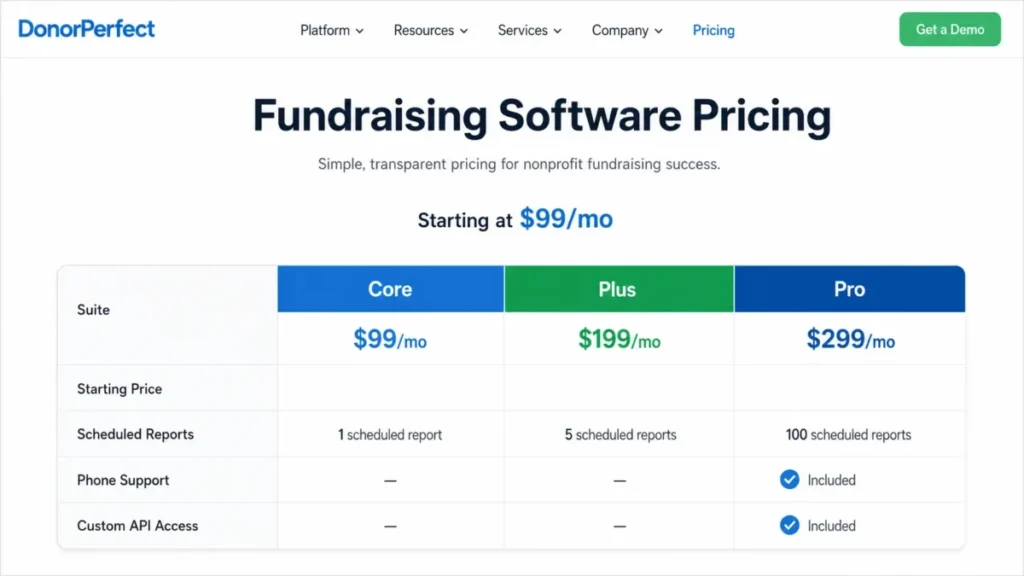
The pricing guide says the software starts at $99 per month and presents Core, Plus, and Pro suites, with exact suite prices requiring a quote, according to DonorPerfect’s pricing guide, checked July 23, 2026. All three suites include dashboards, online forms, and email marketing.
The $99 figure is not a plan you can budget from until you map the gates. Plus adds QuickBooks integration, batch gift entry, moves management, automated tasks, and scheduled reports, while Pro adds enterprise segmentation, enterprise reports, custom API access, and phone support.
One limit can force a tier change before the headline features do. The comparison lists 5 scheduled reports on Plus and 100 on Pro, so an operations team with many recurring board, finance, and campaign reports can hit the Plus cap and need Pro for capacity alone.
Support tier is a second quiet driver. Phone support sits on Pro in the captured comparison, so a team that requires phone escalation may move up regardless of feature needs.
Migration assistance is a real advantage here. DonorPerfect states that data transfers from most CRMs are free and describes mapping, matching, pledges, and custom fields, though the included and excluded objects remain quote-dependent.
| Pros | Cons |
|---|---|
| Batch entry, moves management, and scheduled reports for real operations | Exact Plus and Pro prices are not public and require a quote |
| Vendor states data transfers from most CRMs are free | Practical suite is Plus or Pro, so $99 is not the working budget |
| QuickBooks integration and online forms that sync to donor and gift records | Scheduled reports capped at 5 on Plus, forcing Pro for reporting volume |
| Dashboards, forms, and email included on every suite | Phone support is a Pro feature, not available lower down |
- Best for:
- development operations teams that want donor management, batch entry, scheduled reporting, accounting integration, and vendor-assisted migration.
- Avoid if:
- you need an exact public price for the practical Plus or Pro suite before you talk to sales.
- Setup difficulty:
- Medium. Vendor-assisted migration lowers self-service risk, but suite selection and object scope need a quote.
Inventory your scheduled reports, support channel, QuickBooks, API, and segmentation needs before requesting a quote. The right suite, not the $99 floor, is the number that matters.
Givebutter: Best Free Fundraising CRM

Givebutter is the strongest free starting point for a small team that wants fundraising, contacts, segments, and email without a subscription. The Free plan is genuinely $0 and includes unlimited users and contacts, campaigns, email blasts, and saved donor segments, which is rare in this category.
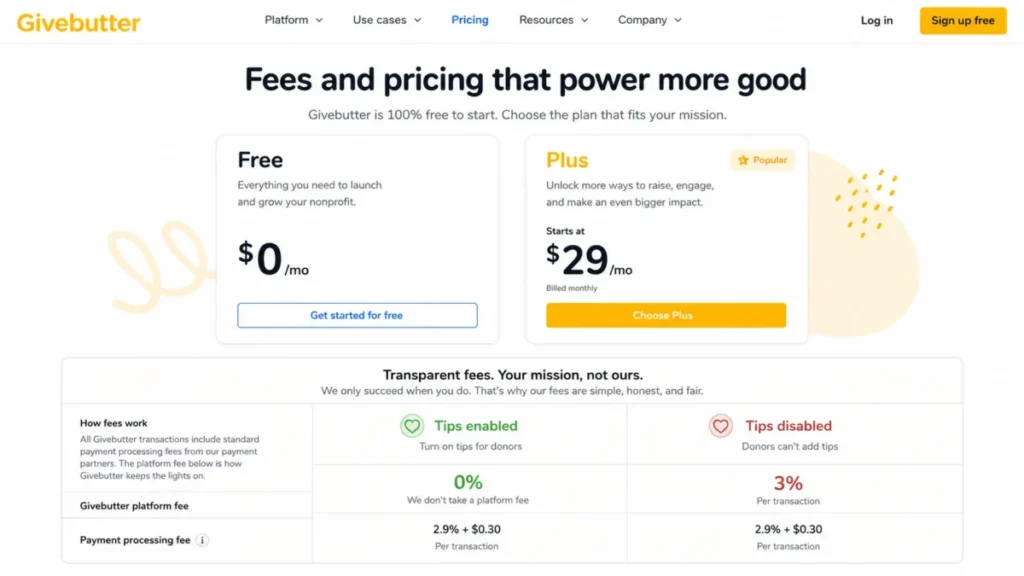
The cost is in the transaction model, not the subscription. With optional donor tips enabled, Givebutter states a 0 percent platform fee and no processing fees paid by the nonprofit, but with tips disabled the nonprofit pays a 3 percent platform fee plus 2.9 percent and $0.30 processing, according to Givebutter’s pricing page.
That single setting changes the economics. A team that cannot rely on donors leaving a tip should budget the tips-disabled fees as its real cost, because the free software does not mean free transactions.
Operational maturity, not contact count, drives the upgrade. Givebutter Plus starts at $29 per month and is required for advanced workflow automation, task management, and native QuickBooks Online, so a team moving from campaigns to structured operations is the one that outgrows Free.
Two smaller limits are worth knowing before migration. Plus contact overages are added in 100-contact increments, though the per-increment price is not public in the captured evidence, and a contact needs a first and last name before a transaction can be logged or imported against it.
| Pros | Cons |
|---|---|
| Free plan with unlimited users and contacts, campaigns, and email | Transaction fees depend on the donor-tip setting, not a fixed rate |
| Default LYBUNT, SYBUNT, recurring, and retained donor segments included | Workflow automation and native QuickBooks Online require paid Plus |
| Migration guidance for contacts, transactions, and recurring donors | Plus contact-overage price is not public in the captured evidence |
| Genuinely low entry barrier for early-stage nonprofits | Transactions need a named contact, so incomplete records block imports |
- Best for:
- small nonprofit teams that want free fundraising campaigns, unlimited contacts and users, donor segments, and email before paying for automation.
- Avoid if:
- you cannot use donor tips and need a predictable transaction cost, or you need advanced workflows and known contact-overage pricing at scale.
- Setup difficulty:
- Low. Free core and documented imports, though source-data hygiene, especially donor names, still decides migration quality.
Model both the tips-on and tips-off fees before you commit, and treat Plus as the point where automation and accounting become necessary. Free software is not the same as zero total cost.
Virtuous CRM+: Best for Responsive Fundraising Automation

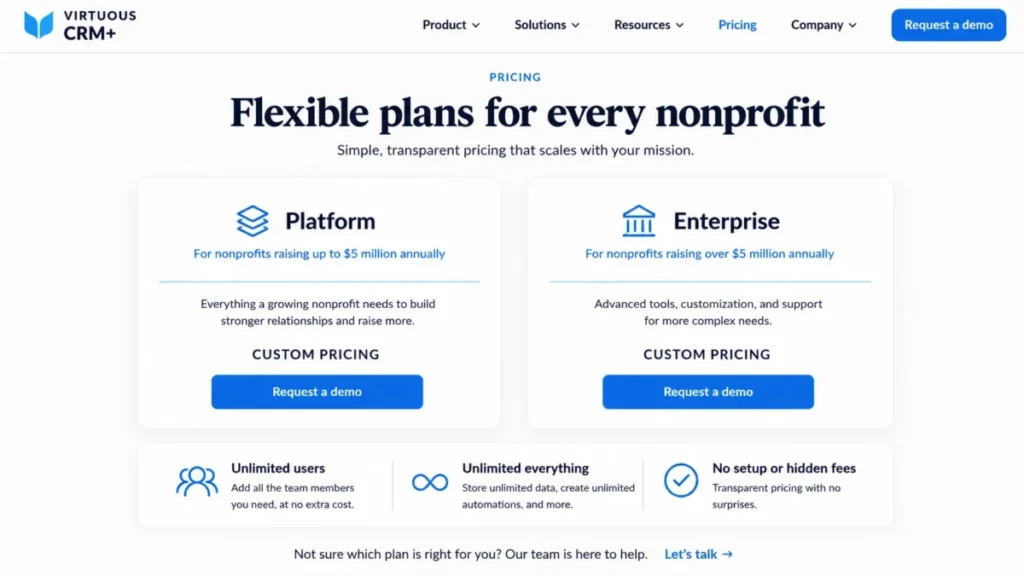
Virtuous CRM+ suits growth-stage fundraising teams that want donor journeys, pipeline management, analytics, and an integration marketplace, with unlimited users. Its value comes from orchestration rather than from a transparent sticker price.
Virtuous uses custom pricing and does not publish a dollar amount, according to the Virtuous pricing page, checked July 23, 2026. The page positions its Platform for nonprofits with up to $5 million in annual fundraising and Enterprise above $5 million, which is a procurement signal even without public numbers.
The included scope is broad. Virtuous lists donor and pipeline management, marketing and communications, events, reporting and analytics, workflow and journey automation, and an app marketplace, and it states that CRM+ includes unlimited users.
The buyer risk is the flip side of custom pricing. Subscription cost, implementation scope, automation limits, and migration coverage are not public, so a normalized comparison is impossible until a quote and a statement of work exist.
Because the value depends on using journeys and analytics rather than just storing contacts, the fit is real only for a team that will operate that machinery. A group that needs a basic donor database will pay for capability it does not use.
| Pros | Cons |
|---|---|
| Donor journeys, pipeline, and analytics for responsive fundraising | Custom pricing with no public dollar figure to compare |
| Unlimited users included in CRM+ | Implementation, automation limits, and migration scope are not public |
| App marketplace across solution, technology, and service categories | Value depends on using journeys, so it is overkill for basic needs |
| Positioned around a $5 million annual-fundraising threshold | Requires a quote and statement of work before any real comparison |
- Best for:
- growth-stage fundraising teams that want donor journeys, pipeline management, analytics, and marketplace integrations with unlimited users.
- Avoid if:
- you need a public subscription price, published automation limits, or a lightweight self-service setup.
- Setup difficulty:
- High. A sales-led implementation with a scoped statement of work, not a self-service signup.
Use a written quote checklist and keep the price marked as custom in any comparison, since the implementation scope and automation limits are not public. Virtuous is worth it when the team will run journeys and analytics, not merely store records.
Blackbaud Raiser’s Edge NXT: Best for Large Advancement Teams
Blackbaud Raiser’s Edge NXT is built for midsize and large advancement teams with complex gift processing, major gifts, and formal reporting and audit needs. Blackbaud positions it for organizations with dedicated development teams, and the depth is the point.
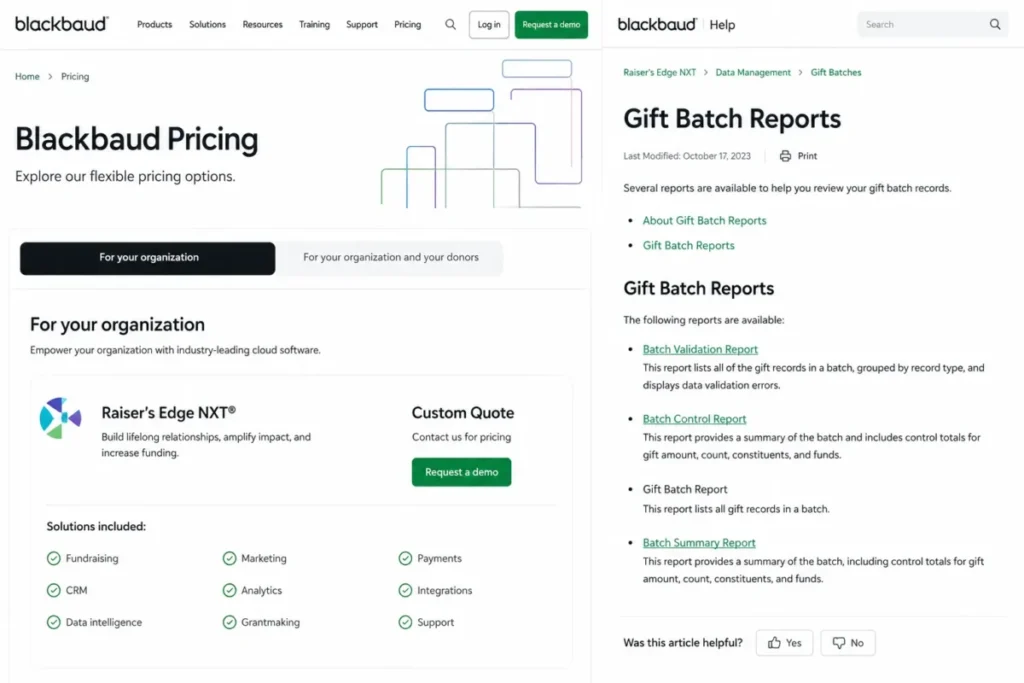
Pricing is custom, based on organization size, goals, and selected solutions, and Blackbaud states that its tailored pricing typically includes implementation, training, and ongoing support, according to Blackbaud’s pricing page. Exact amounts require a quote.
The operational depth is where it earns the rank. The documentation covers a Batch Validation Report before or after approval and a Batch Control Report for audit, along with report categories including LYBUNT, SYBUNT, gift, pledge, and appeal reports.
One governance detail matters for data quality. Custom fields are supported across record types, but required fields set in the database view are not enforced for records created in the web view, so a system administrator should document where required data is enforced.
| Pros | Cons |
|---|---|
| Deep gift-batch, audit, and specialized reporting for advancement teams | Pricing is fully custom with no public figure |
| Validation and control reports support review and audit workflows | Required-field enforcement differs between database and web views |
| Report categories include LYBUNT, SYBUNT, gift, pledge, and appeal | Implementation and training make it heavy for a small shop |
- Best for:
- midsize and large advancement teams with complex gift processing, major gifts, specialized reporting, and audit requirements.
- Avoid if:
- you want transparent public pricing, a simple implementation, or a lightweight donor database.
- Setup difficulty:
- High. Deep data structures and view-specific behavior increase validation and training needs.
We would only shortlist Raiser’s Edge NXT when depth and governance outweigh simplicity, and when a dedicated team is in place, because organizations with complex deployments will generally benefit from a dedicated system administrator or implementation partner.
EveryAction: Best for Advocacy and Federated Organizations

EveryAction, part of Bonterra, fits national, federated, advocacy-heavy, and dual 501(c)(3)/501(c)(4) organizations that need fundraising and organizing in one platform. This is a different category from a donor-only CRM, and that is exactly its advantage.
Pricing is customized, and Bonterra does not publish a fixed US dollar plan price, according to the EveryAction pricing page. That keeps a normalized comparison off the table until a quote exists.
The scope covers both fundraising and movement work. EveryAction combines nonprofit CRM, targeted email and SMS, automated workflows, advanced segmentation, fundraising forms, and advocacy and organizing tools, with a data model that lists households, split gifts, and moves management.
The buyer risk is discovery cost. Pricing, channel limits, migration rules, and cross-entity governance are not public, so a federated or dual-entity buyer must resolve consent, chapter ownership, and message volume through procurement.
| Pros | Cons |
|---|---|
| Fundraising plus advocacy, organizing, email, and SMS in one platform | Pricing, channel limits, and migration rules are not public |
| Fits national, federated, and dual c3/c4 operating models | High discovery cost before any real comparison |
| Advanced segmentation and a broad supporter data model | Overkill for a small donor-only nonprofit |
- Best for:
- national, federated, advocacy-heavy, and dual 501(c)(3)/501(c)(4) organizations that want fundraising, organizing, email, and SMS together.
- Avoid if:
- you are a small donor-only nonprofit or you require public self-service pricing.
- Setup difficulty:
- High. Federated and dual-entity migrations create complex consent, ownership, and reporting requirements.
Require an entity-by-entity data, channel-volume, and implementation scope in the quote. EveryAction is worth it only when advocacy and federated operations are core, not occasional.
Keela: Best for Small Teams Needing Simple Donor Outreach

Keela is the pick for small teams up to 10,000 contacts that want published contact-tier prices and common donor features without a sales call. Its transparency, like Little Green Light’s, removes most budgeting guesswork below the ceiling.
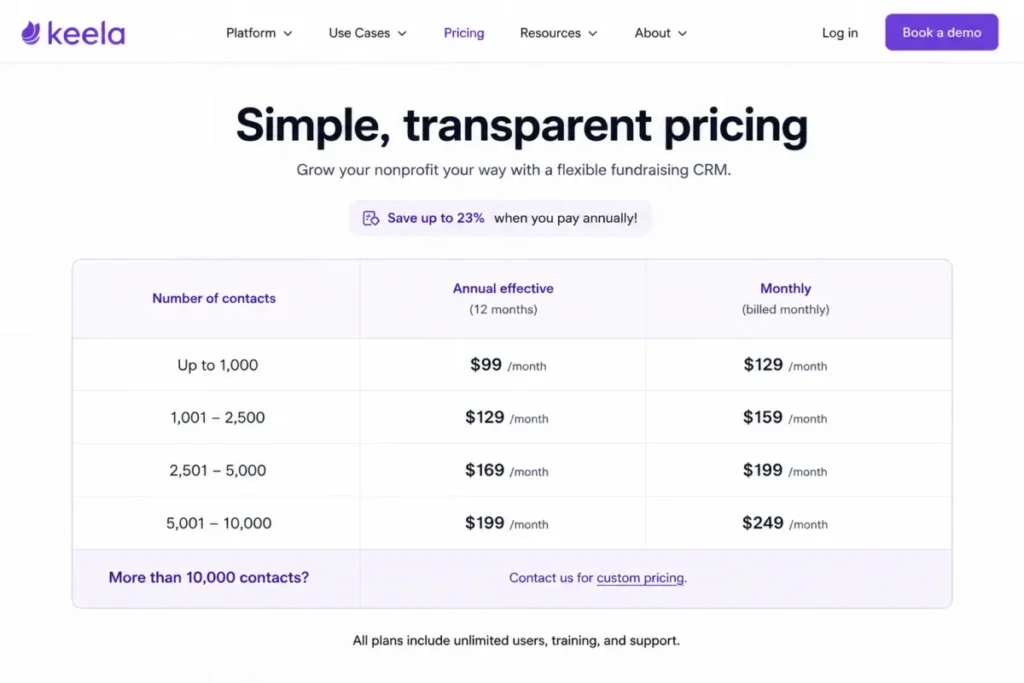
Annual-effective pricing runs $134 per month up to 1,000 contacts, $209 up to 2,500, $274 up to 5,000, $329 up to 7,500, and $379 up to 10,000, according to Keela’s pricing page, checked July 23, 2026. Monthly billing runs higher, from $160 up to $430 across the same bands, and Keela advertises up to 23 percent savings on annual billing.
The ceiling is the constraint. Organizations above 10,000 contacts must request custom pricing, so a fast-growing list needs a quote earlier than the transparent tiers suggest.
The included features cover common needs. Every plan includes donor and volunteer management, email marketing, reporting and analytics, unlimited email support, and membership and project management, and Keela adds no transaction fee beyond the 2.2 percent plus $0.30 processing.
| Pros | Cons |
|---|---|
| Published monthly and annual-effective contact tiers up to 10,000 contacts | Public pricing ends above 10,000 contacts, moving growth to a quote |
| Donor and volunteer management, email, and reports on every plan | Full migration specification was not verified in the researched pages |
| No Keela transaction fee beyond standard processing | Annual savings require prepaying for the year |
- Best for:
- small nonprofit teams with up to 10,000 contacts that want published contact-tier prices, donor and volunteer management, email, and common reports.
- Avoid if:
- you are above 10,000 contacts and need a public price, or you require a fully verified complex-migration contract before buying.
- Setup difficulty:
- Low to Medium. Common features and clear tiers, though import scope should be tested before cutover.
Keela is the choice when predictable pricing and common donor outreach matter more than depth. Forecast your contact growth and get a quote before you cross 10,000.
Pricing Comparison: Starting Price vs Practical Tier
The cheapest plan is rarely the right comparison point. For each tool, the number that matters is the first tier that unlocks what the team needs, plus the add-on, module, or per-user cost that follows.
| Tool | Starting price | Practical-tier driver | 10-user cost | Free plan or trial | Hidden or added cost |
|---|---|---|---|---|---|
| Bloomerang | $125/mo CRM, annual | + $40/mo Fundraising add-on (required) | Same as base (unlimited users) | No free plan stated | Fundraising cannot be bought alone |
| Neon CRM | From $99/ | Modules add 10%/ | Same as base (per organization) | No free plan stated | Revenue-based base plus module percentages |
| Little Green Light | $45/mo (2,500) to $135/mo (50,000) | Contact tier, then +$15/mo per 10k | Same as base (unlimited users) | 30-day no-fee period | 200,000-record maximum |
| Salesforce Nonprofit Cloud | $60/ | Users beyond 10, plus implementation | 10 free, then $60/ | 30-day trial (does not convert) | Implementation, migration, admin |
| DonorPerfect | From $99/mo | Plus or Pro suite | Not publicly per-user | Not stated in captured evidence | Exact suite price by quote |
| Givebutter | $0 Free | Plus from $29/mo for automation | $0 (unlimited users) | Free plan | Tips-off fees, plus contact overage |
| Virtuous CRM+ | Custom | Platform vs Enterprise scope | Custom (unlimited users) | Not stated | Implementation and migration scope |
| Blackbaud Raiser’s Edge NXT | Custom | Selected solutions and scale | Custom | Not stated | Implementation, training, support |
| EveryAction | Custom | Channel volume and entities | Custom | Not stated | Channel and implementation scope |
| Keela | $134/mo effective (1,000) to $379/mo (10,000) | Contact tier | Same as base (per organization) | Not stated in captured evidence | Custom pricing above 10,000 contacts |
Per-product pricing pages, checked July 23, 2026: Bloomerang fundraising pricing, Neon CRM pricing, Little Green Light plans, Salesforce nonprofit plans, DonorPerfect pricing guide, Givebutter fees, Virtuous plans, Blackbaud pricing, Bonterra fundraising pricing, and Keela plans.
Two patterns stand out for budgeting. Most of these tools price per organization with unlimited users, so growing the team from 5 to 25 people does not raise the license cost, and Salesforce is the exception because it charges per user beyond its 10 free Power of Us subscriptions.
Cost at Scale: Three Worked Scenarios
Public prices let you check a few real totals before committing. Each scenario below uses only published inputs and shows the formula so you can reproduce it.
Little Green Light at 10,000 records, annual. $75 per month is the listed tier, and annual prepayment removes 10 percent, so $75 x 12 x 0.90 = $810 per year, or $67.50 per month effective. Source: Little Green Light pricing.
Keela at 5,000 contacts, annual versus monthly. Annual-effective is $274 per month, so $274 x 12 = $3,288 per year, while monthly billing at $315 per month is $315 x 12 = $3,780 per year. Choosing annual saves $492 per year at this tier. Source: Keela pricing.
Salesforce at 15 users under Power of Us. The first 10 subscriptions are free and the next 5 at Enterprise cost 5 x $60 x 12 = $3,600 per year in licenses, before quote-required implementation, migration, and admin. Sources: Salesforce nonprofit pricing and Power of Us.
Neon’s total cannot be reduced to one number because the base is revenue-based, but the module math is fixed: a base CRM fee that adds Memberships, Events, and Volunteers becomes the base x 1.40, since the three modules add 10, 20, and 10 percent of the CRM fee. Source: Neon One pricing.
Feature Gate Comparison
The feature that decides a nonprofit CRM is usually the one locked behind a module, a suite, or a custom quote. This table maps the operational capabilities to where each one unlocks.
| Tool | Memberships / events | Automation & journeys | Reporting depth | API / integrations | Support channels |
|---|---|---|---|---|---|
| Bloomerang | Membership web-only | Automated journeys included | Reports, scheduling, groups | Integrations available | Included |
| Neon CRM | Memberships +10%, Events +20% | Automated workflows, journeys | Reports and dashboards | Integrations available | Chat, email, phone included |
| Little Green Light | Not a core module focus | Lighter native automation | Reports and full data export | Integrations available | Included |
| Salesforce Nonprofit Cloud | Via configuration | Platform automation | Platform reporting | Full platform API | Via plan and partner |
| DonorPerfect | Event and auction on Plus | Automated tasks on Plus | 5 scheduled reports (Plus), 100 (Pro) | Custom API on Pro | Phone support on Pro |
| Givebutter | Campaigns and events | Workflows on Plus | Segments and reporting | Native QuickBooks on Plus | Included |
| Virtuous CRM+ | Events included | Journey automation included | Analytics and dashboards | App marketplace | Via plan |
| Blackbaud Raiser’s Edge NXT | Membership and events | Configurable | Specialized and audit reports | Integrations available | Implementation and support |
| EveryAction | Advocacy and organizing | Automated workflows | Segmentation and reporting | Integrations available | Via plan |
| Keela | Membership included | Included | Reporting and analytics | Integrations available | Unlimited email support |
Feature evidence comes from each vendor’s official product, pricing, and help pages: Bloomerang, Neon CRM, Little Green Light, Salesforce Nonprofit Cloud, DonorPerfect, Givebutter, Virtuous, Blackbaud, EveryAction, and Keela. Some cells describe availability without a public plan gate, and those are stated as available rather than assigned to a tier.
The gates that most often force a decision are Neon’s percentage modules, DonorPerfect’s 5-versus-100 scheduled-report split between Plus and Pro, and Givebutter’s Plus requirement for workflow automation and native QuickBooks Online. Each one turns a feature bullet into a concrete upgrade cost.
Setup and Migration Difficulty
Setup cost in this category is mostly migration risk. A donor file carries years of gifts, pledges, notes, and relationships, and the object rules decide what survives the move.
| Tool | Setup difficulty | Why |
|---|---|---|
| Bloomerang | Medium | Self-service import with preview, but donations, interactions, and notes cannot be updated after import |
| Neon CRM | Medium to High | Revenue-based quote and module configuration, and full import behavior is not public |
| Little Green Light | Low to Medium | Self-service Flex Importer with preview, but the importer cannot delete data |
| Salesforce Nonprofit Cloud | High | Data model, migration plan, sandbox, and cutover, typically with a partner |
| DonorPerfect | Medium | Vendor-assisted transfer, but object scope is quote-dependent |
| Givebutter | Low | Documented imports, though transactions require a named contact |
| Virtuous CRM+ | High | Sales-led implementation with a scoped statement of work |
| Blackbaud Raiser’s Edge NXT | High | Deep data structures and view-specific field behavior |
| EveryAction | High | Federated and dual-entity consent and ownership mapping |
| Keela | Low to Medium | Clear tiers, but import scope should be tested before cutover |
Migration difficulty draws on each vendor’s official import and help documentation where available, checked July 23, 2026: Bloomerang imports, Neon CRM, Little Green Light Flex Importer, Salesforce Power of Us, DonorPerfect, Givebutter migrations, Virtuous, Blackbaud, EveryAction, and Keela. Where object-level behavior is not public, the difficulty reflects the need to scope migration in the contract.
Migration Object Rules to Confirm Before You Switch
Generic “easy migration” claims hide the rules that matter. These are the documented behaviors worth confirming for any donor system before you commit.
- Bloomerang: constituents can be created or updated by import, but donations, interactions, and notes can only be created, so historical gift and note updates need a separate plan.
- Little Green Light: the Flex Importer previews records and can create or update, but it cannot delete, so a bad import is cleaned up manually rather than rolled back.
- Givebutter: a contact needs a first and last name before a transaction can be logged or imported against it, so incomplete donor records block gift migration.
- DonorPerfect: transfers from most CRMs are described as free, but the included and excluded objects remain quote-dependent, so ask for a written object list.
- Neon, Salesforce, Virtuous, Blackbaud, EveryAction, and Keela: full object-level migration behavior is not public in the researched pages, so require a written migration workbook and acceptance test.
Before any switch, export the source data, clean IDs, names, and dates, test one or two rows, reconcile record counts, and confirm what the importer cannot undo. That five-step check is cheaper than a corrupted donor file.
A full CRM migration plan is worth building before cutover, not after.
Which Nonprofit CRM Should You Avoid?
None of these tools is a bad product, but each one is the wrong purchase for a specific buyer. The fastest way to shortlist is to eliminate the mismatches first.
Avoid Salesforce Nonprofit Cloud and Blackbaud Raiser’s Edge NXT if you are a small donor-only shop without administration capacity, because both carry implementation and governance weight that a lean team cannot absorb. Avoid Neon if you refuse percentage-based module costs, and avoid Virtuous or EveryAction if you need a public price before a sales call.
Avoid Bloomerang if you must run memberships from a mobile app or buy fundraising without the CRM bundle. Avoid Givebutter if you cannot use donor tips and need a fixed transaction rate, and avoid Keela or Little Green Light if you are already past their public contact ceilings of 10,000 and 200,000.
The product nobody needs is a second system bought to patch the first. A team that buys an enterprise platform for a donor-only workflow, then adds a lightweight tool because the enterprise one is too heavy to adopt, has paid twice to solve one problem.
Match the tool to the operating model the first time, and the anti-recommendation takes care of itself.
How to Choose the Right Nonprofit CRM
Work through these questions in order. The answers narrow ten tools to two or three faster than any feature comparison.
- What is your operating model? Donor-only points to Bloomerang, Little Green Light, or Keela, memberships and events point to Neon, advocacy and federated work to EveryAction, and multi-program delivery to Salesforce.
- How big is your donor file now, and where will it be in 24 months? Little Green Light caps at 200,000 records and Keela’s public tiers stop at 10,000 contacts, so forecast growth before you pick a transparent tier.
- Which features are must-have, and which plan or module unlocks them? Price the practical tier, not the starting price, including Neon’s module percentages and DonorPerfect’s suite gates.
- How many users need access, and does the tool charge per seat? Most tools here are per organization with unlimited users, and Salesforce is the per-user exception beyond its 10 free subscriptions.
- What must migrate intact? Confirm the object rules for gifts, notes, pledges, and relationships, and require a written migration scope for any custom-priced platform.
- Can you fund and staff CRM implementation? Salesforce, Blackbaud, Virtuous, and EveryAction expect administration or a partner, while Little Green Light, Keela, and Givebutter are closer to self-service.
- What will finance ask at renewal? Be able to answer cost at your team and contact size, adoption after 90 days, and reporting value before the contract renews.
If you want a fast route: memberships and events go to Neon, advocacy and federated to EveryAction, multi-program with admin capacity to Salesforce, large advancement to Blackbaud, free-first to Givebutter, transparent small-team value to Little Green Light or Keela, responsive journeys to Virtuous, and a broad donor stack to Bloomerang.
Teams weighing general-purpose systems too can cross-check our best CRM for small business shortlist for adjacent options.
Common Mistakes When Choosing Nonprofit CRM Software
The same avoidable errors show up across nonprofit software buys. Each one has a cheap fix if you catch it before signing.
- Budgeting from the starting price. Neon’s $99 and DonorPerfect’s $99 are floors, not the practical tier, and Bloomerang’s $40 fundraising line requires the $125 CRM.
- Treating a free plan as zero cost. Givebutter’s fees depend on the donor-tip setting, and free software still carries transaction and upgrade costs.
- Reading “10 free licenses” as free implementation. Salesforce’s Power of Us saves license cost but not the migration, partner, admin, and training spend around it.
- Comparing custom-priced tools without a common scope. Virtuous, Blackbaud, and EveryAction quotes are not comparable until you standardize subscription, implementation, migration, support, and renewal in the request.
- Ignoring the contact ceiling. Little Green Light stops at 200,000 records and Keela’s public tiers stop at 10,000 contacts, so growth can force a quote or a platform change.
- Assuming migration keeps everything. Object rules differ, and gifts, notes, or transactions can fail to import cleanly without preparation.
- Skipping the operating-model question. A donor-only CRM cannot run chapter advocacy, and a membership platform is wasted on a small grants shop.
Buyer Risk Ledger
The risks that derail a nonprofit CRM purchase are predictable. Naming them, and the mitigation, is the difference between a defensible decision and a surprise at renewal.
| Risk | Who it hits | Mitigation |
|---|---|---|
| Module or add-on cost stacks on the base | Neon, Bloomerang buyers | Price the practical tier, including module percentages and required add-ons |
| Contact ceiling forces a quote or switch | Little Green Light, Keela buyers | Forecast the donor file 24 months out before choosing a tier |
| Free-license or free-plan cost is understated | Salesforce, Givebutter buyers | Budget implementation, admin, and transaction fees, not just licenses |
| Custom quotes are not comparable | Virtuous, Blackbaud, EveryAction buyers | Standardize the quote scope across every custom-priced vendor |
| Migration loses gift or note history | Every switching team | Confirm object rules, test rows, and reconcile counts before cutover |
Final Verdict
Bloomerang is the best overall choice for donor-centric nonprofits that want CRM, reporting, email, and automated journeys with unlimited users. Neon CRM is the stronger fit for membership and event organizations, while Little Green Light offers the clearest value for small teams that prioritize transparent pricing and data portability.
Before choosing, match the CRM to the organization’s operating model, calculate the practical tier rather than the advertised starting price, and confirm migration rules for gifts, notes, pledges, and relationships. Those three checks matter more than the length of the feature list.
Frequently Asked Questions
What is the best CRM for nonprofits overall?
Bloomerang is our best overall pick for donor-centric nonprofits because it combines constituent management, reporting, email, and automated journeys with unlimited users. Neon CRM is a better fit when memberships and events are central, while Salesforce suits complex multi-program organizations.
What is the best free CRM for a nonprofit?
Givebutter leads our free CRM software pick for nonprofits. Its Free plan is $0 per month with unlimited users and contacts, campaigns, email, and saved donor segments, according to its pricing page.
The cost sits in transactions: with donor tips disabled, the nonprofit pays a 3 percent platform fee plus 2.9 percent and $0.30 processing, so budget the fee model before treating free software as zero cost.
How much does nonprofit CRM software cost?
Nonprofit CRM pricing ranges widely, from about $45 per month for a small transparent tier to custom enterprise quotes. Each product’s exact price and source sit in the pricing comparison table above.
The practical tier, modules, and contact count usually matter more than the starting price. Transparent per-organization tools publish their tiers, while Virtuous, Blackbaud, and EveryAction quote custom pricing.
Is Salesforce free for nonprofits?
Eligible nonprofits can receive 10 free subscriptions through Salesforce’s Power of Us program. Additional licenses, implementation, migration, administration, and training may still create significant costs, so the program should not be treated as a free implementation.
What is the difference between donor management software and a nonprofit CRM?
The terms overlap, but the scope differs. A donor management system centers on gifts, receipts, and stewardship, while a nonprofit CRM can extend to memberships, events, advocacy, programs, and outcomes depending on the product.
Bloomerang and Little Green Light lean donor-centric, Neon adds membership and event modules, and EveryAction and Salesforce reach into organizing and multi-program work.
Which nonprofit CRM is easiest to migrate to?
Little Green Light and Givebutter provide relatively accessible self-service import paths. Migration difficulty still depends on the source data and object rules, so test gifts, notes, relationships, and recurring donations before full cutover.
Which nonprofit CRM supports memberships and events?
Neon CRM is the clearest fit, with membership, event, and volunteer modules built around its donor CRM, though each adds a percentage of the CRM fee. Blackbaud Raiser’s Edge NXT and Salesforce also handle memberships and events through configuration.
Bloomerang supports memberships too, but management requires the web app rather than mobile.
Which CRM is best for advocacy nonprofits and chapters?
EveryAction is the strongest fit for advocacy-heavy and federated organizations. It combines nonprofit CRM, fundraising, targeted email and SMS, and advocacy and organizing tools, and Bonterra positions it for national, federated, and dual 501(c)(3)/501(c)(4) groups.
Pricing is custom, so consent, chapter ownership, and channel volume should be scoped in the quote.
Do nonprofit CRMs charge per user?
Most do not. Bloomerang, Little Green Light, Givebutter, Virtuous, Neon, and Keela price per organization, so adding staff does not raise the license cost.
Salesforce Nonprofit Cloud is the main per-user exception, at $60 or $100 per user per month beyond its 10 free Power of Us subscriptions.
What features should a nonprofit CRM include?
At minimum, constituent and gift records, donation tracking, email, reporting, and a clear import and export path. Beyond that, match features to your model: recurring gifts and journeys for stewardship, membership and event modules for member organizations, moves management and batch entry for major-gift operations, and advocacy tools for organizing.
Confirm which plan or module unlocks each one before budgeting.