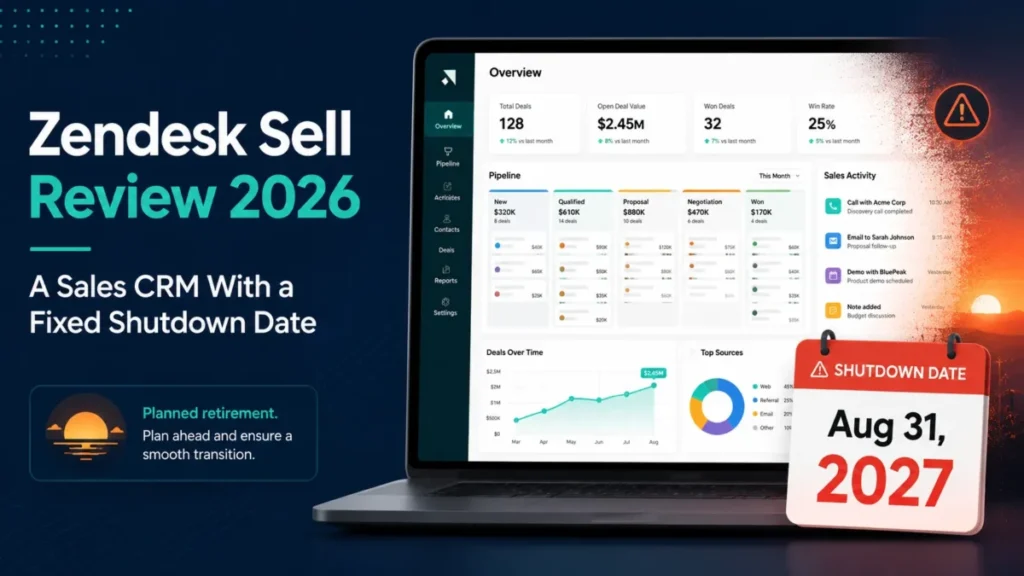
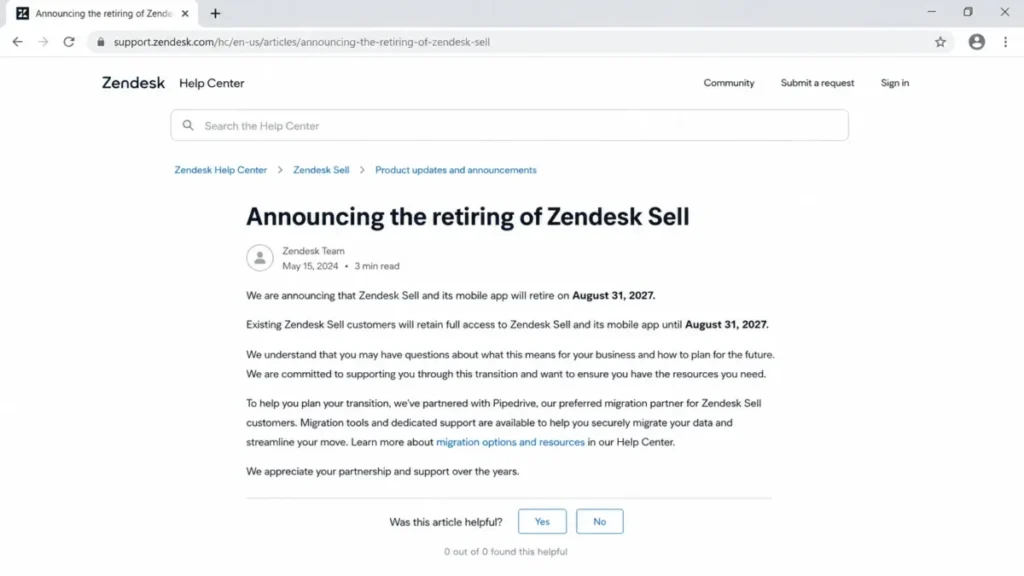
Zendesk Sell now has an end date. Zendesk has announced that Sell and its mobile app retire on August 31, 2027, and that existing customers keep full access until then.
That single fact reorders every other question. This Zendesk Sell review treats the retirement as the decision itself, not as a closing note after a feature tour, and it separates what an existing customer should do from what a new buyer should do.
The short version: no new team should deploy Sell in 2026, and an existing team can reasonably keep it as a funded bridge if export validation starts now. If you are still mapping the category, the wider set of CRM software options is the better starting point.
Source: Zendesk’s announcement of the Sell retirement. Checked: 2026-08-03.
In This Article (20 sections)
Quick verdict on Zendesk Sell
| Category | Verdict |
|---|---|
| Best for | Existing 5 to 20 person sales teams already running Zendesk Support, using Sell as a bridge while a funded migration runs |
| Not ideal for | Any team choosing a first CRM, and marketing teams that need more than one branded capture form |
| Starting price | $19 per user per month on the legacy Team plan, published as a legacy reference price. Current purchase eligibility is not verified |
| Best practical plan | Growth, the first legacy tier that carries the native lead-capture form and documented Zapier access |
| Free plan or trial | Not established by the official pages checked for this review |
| Setup difficulty | Medium: CSV import is open on every plan, but ownership and stage cleanup are documented consequences |
| Main strength | Ticket-to-sales context inside Zendesk Support, matched against the requester record |
| Main limitation | The native account export omits activity history, appointments, emails, call logs, and documents |
| Best alternative | Pipedrive, which Zendesk names as its preferred Sell migration partner |
Sources: Zendesk Sell retirement announcement, the legacy Sell product page, and the Sell lead-capture and Zapier help articles, checked 2026-08-03 for the US market in USD on a per user, per month billing basis.
What Zendesk Sell is, and what changed in 2025
Zendesk Sell is the sales CRM and sales-force-automation product from Zendesk, Inc., sold alongside the company’s better-known support suite. It handles leads, contacts, deals, pipeline activity, email, calling, and reporting for sales teams rather than support agents.
Zendesk’s legacy feature page describes email integration, sequences, a task player, calls and texts, smart lists, templates, a power dialer, bulk outreach, triggers, the Support integration, marketplace apps, APIs, mobile apps, subscriptions, forecasting, and reporting.
Source: the Zendesk Sell features page, a vendor claim, checked 2026-08-03.
What changed is lifecycle, not capability. Zendesk announced the retirement of Sell and its mobile app for August 31, 2027, named Pipedrive as its preferred migration partner, and published what the export covers and when deletion begins.
Treat Sell as a CRM in run-out, then judge it. Readers new to the category will get more from a plain explanation of what CRM software does before comparing end-of-life products.
How we reviewed Zendesk Sell
This review draws on Zendesk’s official retirement announcement, the legacy Sell product and feature pages, the current Zendesk pricing page, help-center billing and workflow documentation, developer API references, the service-specific terms, the data deletion policy, and the Zendesk Trust Center. Pricing and plan limits were checked on 2026-08-03 for the US market in USD.
Sell was assessed against the same buyer criteria applied to every CRM covered here: lifecycle risk, published plan economics, feature gates, documented workflow limits, integration coverage, API and event constraints, security and admin controls, support access, and export completeness.
Greater weight was given to factors that change a renewal or migration decision, including the published retirement date, export coverage, plan gates that block a required workflow, and cost at real seat counts. Vendor positioning and marketplace logo counts carried no weight.
Claims the evidence does not support were excluded rather than softened. Figures published on the legacy Sell product page are labeled as legacy reference prices with their purchase status stated beside them.
Zendesk Sell retirement: what the August 31, 2027 shutdown means for buyers and existing customers
Zendesk’s announcement fixes three things a buyer can plan against: the retirement date, the access period, and the deletion trigger. Existing customers keep full access until August 31, 2027, and data deletion begins at subscription end or that date, whichever comes first, and is permanent.
From August 3, 2026 to August 31, 2027 there are 393 calendar days. Calculation: day count between the two cited official dates, using the retirement date published in the Zendesk announcement.
That number is the planning unit for the rest of this review. A CRM migration that touches pipeline data, engagement history, reporting, and integrations rarely fits into the last quarter of a contract, and 393 days is a working runway rather than a comfortable one.
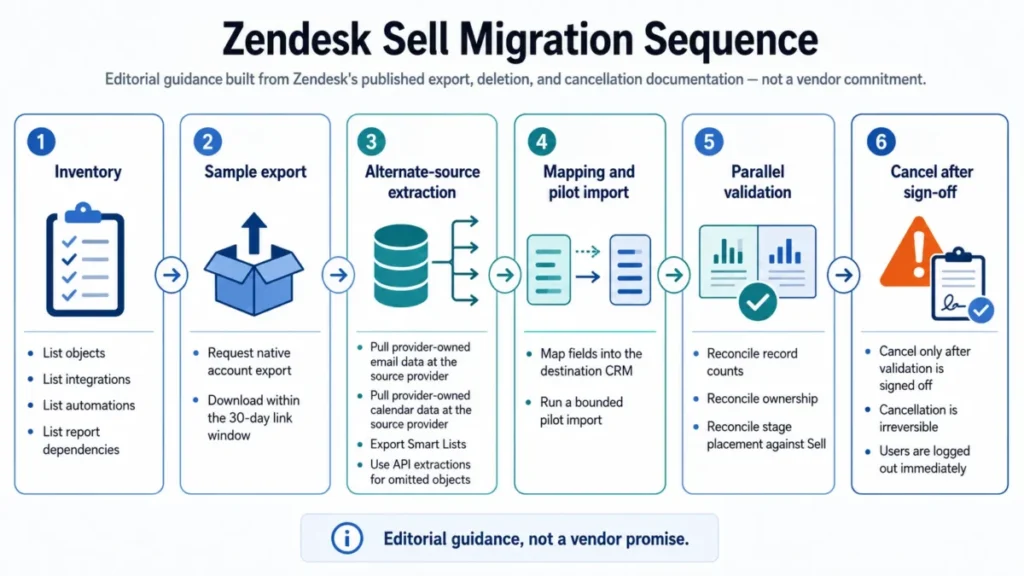
Linear text equivalent of the diagram above: inventory, sample export, alternate-source extraction, mapping and pilot import, parallel validation, then cancellation after sign-off.
The renewal question worth answering before anything else is whether the next contract term is being bought as CRM capability or as migration time. Those are different purchases with different acceptance criteria.
The buyer risk ledger
| Risk | Who it hits | Documented trigger | Mitigation |
|---|---|---|---|
| Permanent data loss | CRM admin, privacy owner | Deletion begins at subscription end or 2027-08-31, whichever is first | Export early, validate the archive, keep source access until sign-off |
| Incomplete history transfer | RevOps, sales management | Native account export omits activity history, appointments, emails, call logs, and documents | Extract omitted objects through Smart Lists, the API, and the source email or calendar provider |
| Silent budget creep | Finance, CRM owner | Every user in one Sell account must be on the same plan, and downgrades apply only after the current billing period | Fix the plan before the renewal date, not after headcount changes |
| Broken event sync | Integration engineer | Firehose exposes 72 hours of event history | Persist stream position durably and reconcile from another extraction path |
| Cancellation shock | CRM admin | Cancellation is irreversible and logs users out immediately when processed | Complete and verify every export before the cancellation request |
| Automation rebuild | Sales operations | No official source checked here confirms that sequences, triggers, or automations transfer | Inventory every automation manually and budget rebuild time in the destination CRM |
Sources for this ledger: the Zendesk Sell retirement announcement, Sell plans and billing, the Firehose API overview, and Cancelling your Sell account, all checked 2026-08-03. The automation row is recorded as an unknown rather than a verified fact.
The ledger is the reason a feature-by-feature score would mislead here. Sell’s capability set is not what will cost a team money in the next 393 days.
Setup and first-run configuration: importing data without creating cleanup work
CSV import for leads, contacts, and deals is available on all Sell plans, which is unusual and genuinely useful. Files should use UTF-8 or UTF-16 encoding with a header row and no line breaks inside records.
The documentation is specific about batch size: do not exceed 3,000 contacts in a single import, and the article states no total-contact or file-count limit.
Source: Creating a CSV file to import leads, contacts, or deals in Sell, checked 2026-08-03.
Three documented behaviors decide how much cleanup follows. An existing deal contact may merge during import, deals arriving without a stage land in the initial stage, and imported deals are assigned to the importing user before any reassignment.
That last one is the trap. Import 4,000 deals as an admin and every one of them is owned by the admin until somebody reassigns them, which distorts pipeline reporting and forecast ownership from day one.
The documented sequence that avoids most of it runs in seven steps:
- Clean and normalize the source file.
- Build a small sample file and verify headers, encoding, and required values.
- Import the sample and read the emailed summary.
- Inspect merges, initial-stage placement, and ownership on the sample records.
- Correct the mapping or the source data.
- Import the remaining batches, keeping contact batches at or below 3,000.
- Reassign imported deals away from the importing user before anyone runs a forecast.
Setup difficulty lands at medium. Nothing here is technically hard, but duplicate precedence and rollback behavior are not documented in that article, so a team that skips the sample import has no published guarantee about what a bad file will do.
Teams running this as part of a wider rollout will find the sequencing questions covered in more depth in our CRM implementation guide.
The workflows Zendesk Sell runs, and where each one stops
Five workflows carry most of the buying decision. Each one is described here from Zendesk’s own documentation, with the plan it needs and the boundary it hits.
Ticket-to-sales context inside Zendesk Support
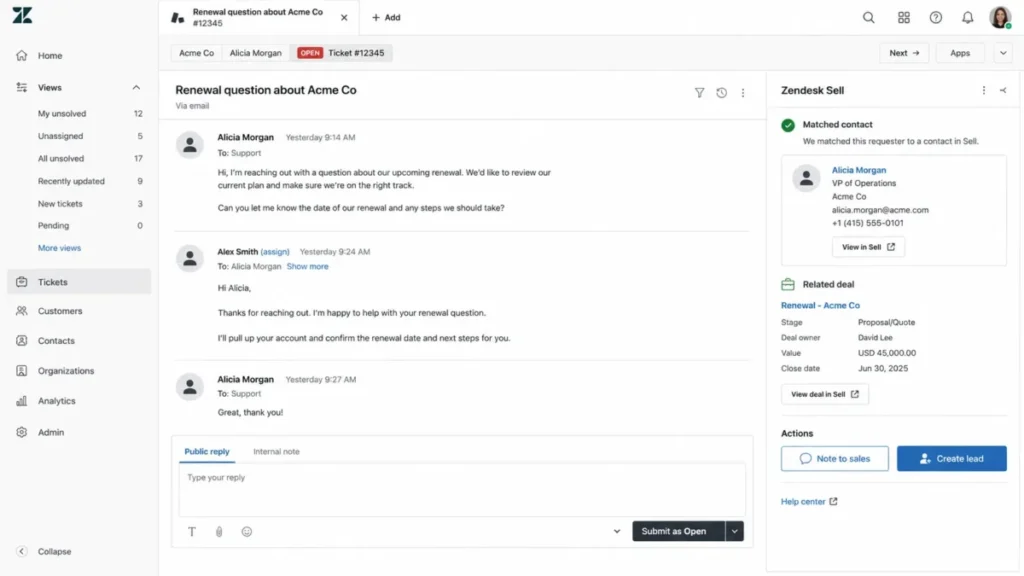
The Sell app in Zendesk Support matches a ticket requester against the first 50 email or phone identifiers, shows contact, deal, and owner context, sends a note to sales, or creates a lead when no match exists.
Source: Working with the Zendesk Sell app in Support, checked 2026-08-03.
This is the strongest remaining reason to keep Sell rather than replace it early. It is also the workflow with the most prerequisites, because it needs both a Sell and a Support subscription plus admin setup, and configuration or permissions can block it entirely.
The first-50 boundary matters for organizations with messy identity data. A long-lived account with dozens of aliases and shared inboxes can push the correct identifier past the search window, and the agent sees a no-match state on a customer who is very much in the CRM.
Native lead capture
The Sell lead-capture form is available on Growth and above and requires admin access to configure. Setup runs through Settings, Data, Lead capture, then Lead capture form, with field selection, a required Full name field, owner and language selection, and publication by hosted link or embed code.
Three documented limits decide whether this feature is usable. Sell supports only one published form version, provides no native color or design styling, and Content Security Policy settings on the host site can block the form.
Source: Setting up and publishing the lead capture form, checked 2026-08-03.
One form version is the disqualifier for marketing-led teams. A company running a webinar form, a demo-request form, and a partner-referral form cannot serve all three natively, which pushes the work to an external form builder and a connector.
Email and mobile outreach
The iOS Sell app can send and track email and use templates and merge tags on all Sell plans. Sharing email templates is not supported from the mobile app.
Source: Sending an email from the iOS Sell app, checked 2026-08-03.
For a field team, that split is workable. A rep can send a templated follow-up from a car park, but template governance stays a desktop job, so the template library has to be maintained by someone at a laptop.
Marketing handoff through Zapier
Zapier is documented as available on the three highest Sell plans, which corresponds to Growth and above. The documented Mailchimp workflow triggers on a new Sell contact, pulls samples, maps to Mailchimp’s Add or Update Subscriber action, tests the step, then activates the Zap.
Source: Adding Sell contacts to MailChimp using Zapier in Sell, checked 2026-08-03.
This is a connector workflow, not a native integration, and the difference is a cost and reliability difference. It needs two external accounts, a Sell plan at Growth or higher, and someone who owns the mapping when a field changes.
Event-driven sync for external systems
Zendesk documents Core, Sync, Firehose, and Search APIs for Sell, authenticated with OAuth 2.0. The Firehose API exposes up to 72 hours of event history, requires clients to persist their stream position, and returns 1 to 100 events per response with a default of 25.
The recovery window is the part most reviews skip. A consumer that stops for a long weekend and does not persist position can fall outside the retained history, and there is no documented way to replay what it missed from the stream alone.
Feature gates: what each legacy Sell plan unlocks
| Capability | Team | Growth | Professional | Enterprise |
|---|---|---|---|---|
| CSV import of leads, contacts, deals | Yes | Yes | Yes | Yes |
| SAML and JWT single sign-on | Yes | Yes | Yes | Yes |
| Sell app inside Zendesk Support | Yes, with a Support subscription | Yes, with a Support subscription | Yes, with a Support subscription | Yes, with a Support subscription |
| Mobile email with templates and merge tags | Yes | Yes | Yes | Yes |
| Native lead-capture form | Not offered | Yes | Yes | Yes |
| Zapier integration | Not offered | Yes | Yes | Yes |
| Advanced permissions and custom roles | Not offered | Not offered | Yes | Yes |
Sources: Understanding advanced permissions in Sell, Setting up Single Sign-On for Sell accounts, the lead-capture and Zapier articles cited above, and the CSV import article. Checked: 2026-08-03.
Two thresholds fall out of that grid. Growth is the first legacy tier where inbound capture and connector automation both exist, and Professional is the first tier where access can be governed by hierarchy and custom roles.
Single sign-on being open on every plan is the pleasant surprise, and it is worth naming because most CRMs at this price point reserve it for a higher tier. The legacy setup table does note that Single Logout is not supported, which matters to a security team running a strict session-termination policy.
Automation and reporting after the Explore dataset removal
Zendesk’s removal log records the retirement of Explore Sell datasets and dashboards on January 16, 2024, alongside earlier removals of the detailed hierarchy view, mobile reports, native Mailchimp, Harvest, HubSpot, Xero, and Exchange contact sync.
Source: What is being removed, checked 2026-08-03.
That list is the most useful freshness check available for this product. Any review still describing Sell reporting through Explore, or listing native Mailchimp as an integration, is describing a version of the product that no longer exists.
The removals also read as a trajectory. Reporting depth and native connectors were being withdrawn well before the retirement announcement, which is a reasonable input into how much a team should invest in configuring what remains.
Sell’s legacy feature page still describes triggers, sequences, forecasting, and reporting as part of the product. Those are vendor descriptions of the capability set, and none of the official pages checked here publishes an automation count, a branching depth, or a report-object limit that a buyer could plan against.
The practical consequence: treat automation depth as an item to confirm inside an existing account rather than a specification to buy against.
Integrations and ecosystem: native, removed, or connector-based
| Integration path | Status in the documentation | Sell plan needed | Buyer consequence |
|---|---|---|---|
| Zendesk Support app | Documented and current | All Sell plans, plus a Support subscription | Best-supported workflow, limited by first-50 identifier matching |
| Microsoft Outlook | Documented with named limits | Not gated in the source checked | One account per user, no CC support, attachments copied but not inline images |
| Microsoft Exchange contact sync | Not supported | Not applicable | Contact synchronization must be solved elsewhere |
| Mailchimp | Native integration removed | Growth and above, through Zapier | Adds an external subscription and an owner for field mapping |
| HubSpot, Harvest, Xero | Native integrations removed | Not applicable | Any review listing these as native is stale |
| Sales CRM APIs (Core, Sync, Firehose, Search) | Documented with published limits | OAuth access required | Viable extraction path, constrained by rate and history limits |
Sources: the Sell apps and integrations documentation index, the Zendesk for Microsoft Outlook integration setup article, the removal log, the Zapier and Mailchimp article, and the Sales CRM API introduction. Checked: 2026-08-03.
Outlook deserves a closer look because email-heavy teams assume more than the documentation supports. The integration copies attachments but not inline images, supports one account per user, does not support CC, and does not let users change or add ticket fields from Outlook.
Each of those is small on its own. Together they describe a mail integration that a two-inbox account manager or a CC-driven sales process will fight with daily.
Teams evaluating whether that gap is tolerable should first be clear on how CRM integration works in a sales stack, then check each connection against the removal log rather than a logo wall.
The Zendesk ecosystem argument is also narrower than it sounds. Sell’s adjacency to the support suite is real, but it is a single app-level workflow, and buyers weighing it should read our Zendesk review for what the support side adds.
API and event limits: the 72-hour recovery window
| Limit | Documented value | Overflow behavior |
|---|---|---|
| Core API, hourly | 36,000 requests per hour per access token | HTTP 429 until reset |
| Core API, burst | 10 requests per second per access token | HTTP 429 until reset |
| Firehose event history | 72 hours | Events older than the retained history are unavailable through the stream |
| Firehose page size | 1 to 100 events per response, default 25 | Behavior outside the documented range is not specified in the source |
Sources: Sales CRM API rate limits and the Firehose API overview, checked 2026-08-03, evidence status verified fact.
A resilient consumer design follows from those four numbers. Authenticate with OAuth, request events from the last persisted position, process a bounded page, and persist the returned position only after downstream processing succeeds.
Then handle 429 responses with a pause until reset, and reconcile against a full or Sync-based extraction whenever the consumer falls behind. The premium entitlement question sits outside this review, because none of the pages checked establishes what the API costs or which contracts include it.
Teams without an integration engineer on staff should read the limits above alongside a plain explanation of what an API is before scoping the work.
For a team running a warehouse sync off Sell, the 72-hour figure is the one to write into the runbook. It converts an ordinary outage into a data-integrity incident if nobody notices for three days.
The pricing math behind Zendesk Sell’s published legacy plans
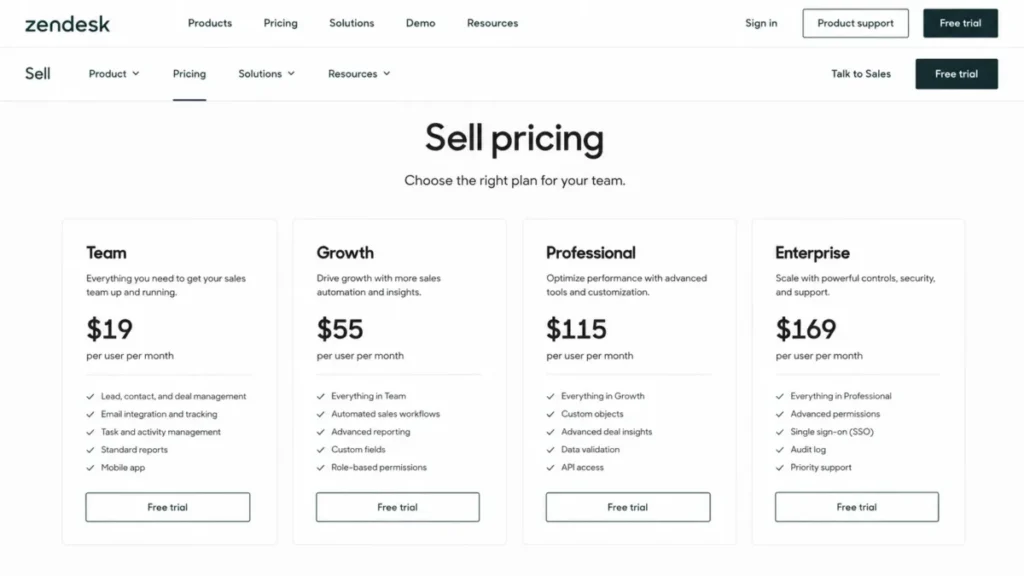
Zendesk’s current primary pricing page does not list Sell among its active pricing categories. The legacy Sell product page still publishes four per-user monthly prices, so those figures are treated here as legacy reference values rather than as a verified offer to a new customer.
| Plan | Published legacy price | Purchase eligibility | Practical read |
|---|---|---|---|
| Team | $19 per user per month | Not verified | Cheapest published tier, but no native lead capture and no Zapier |
| Growth | $55 per user per month | Not verified | First tier where inbound capture and connector automation both exist |
| Professional | $115 per user per month | Not verified | Governance tier: advanced permissions and custom roles start here |
| Enterprise | $169 per user per month | Not verified | Highest published tier, and no additional gate in the sources checked justifies it for most teams |
Sources: the legacy Zendesk Sell product page for the four published prices, and the Zendesk pricing page for the absence of Sell among active categories, both checked 2026-08-03. Region: US, currency USD, billing basis per user per month, evidence status vendor claim with purchase eligibility unresolved.
What those legacy prices total at real seat counts
| Plan | 5 seats per month | 10 seats per month | 25 seats per month | 25 seats annualized |
|---|---|---|---|---|
| Team | $95 | $190 | $475 | $5,700 |
| Growth | $275 | $550 | $1,375 | $16,500 |
| Professional | $575 | $1,150 | $2,875 | $34,500 |
| Enterprise | $845 | $1,690 | $4,225 | $50,700 |
Calculation: published legacy per-user monthly price multiplied by seat count, then by 12 for the annualized column, using inputs from the legacy Sell product page cited above. The figures exclude taxes, calling usage, external connector subscriptions, migration labor, negotiated terms, and any contract effect, so they are an editorial cost model rather than a quote.
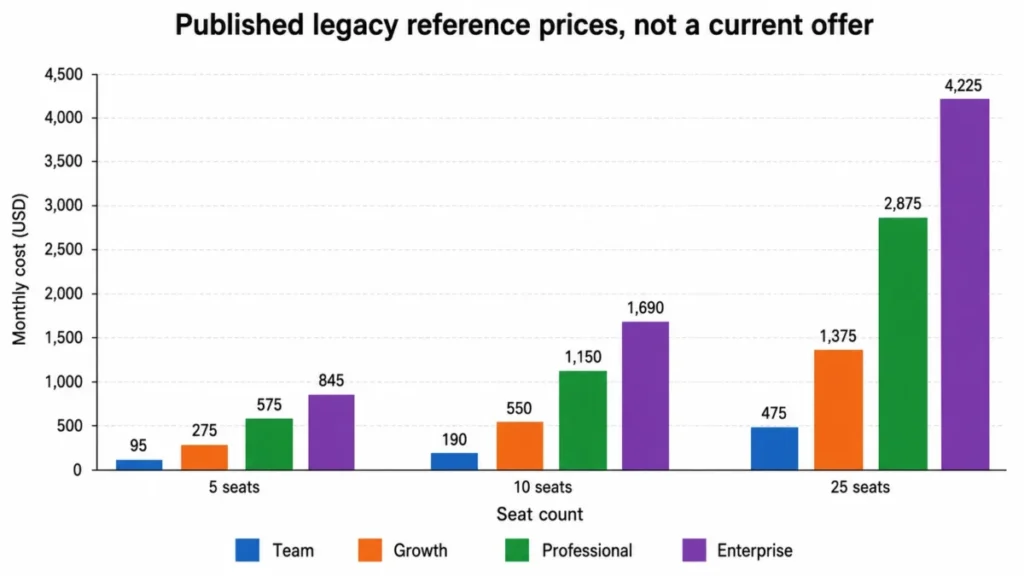
Two things fall out of the arithmetic. The Team to Growth step is $36 per user per month, and the Growth to Professional step is another $60 per user per month.
The same-plan rule turns both of those into account-wide decisions rather than seat-level ones. Every user in one Sell account must be on the same plan, so a single manager who needs hierarchy-based permissions moves all 25 seats to Professional, which is the difference between $16,500 and $34,500 a year at the published references.
Billing mechanics that do not move in your favor
| Action | Documented timing | Budget consequence |
|---|---|---|
| Plan upgrade | Immediate, with proration | Cost rises the moment the need appears |
| Plan downgrade | After the current billing period ends | A wrong plan is carried to the period boundary |
| Add a seat | Prorated | Predictable and immediate |
| Remove a seat | Requires an empty seat, applies next billing cycle | Headcount reductions do not cut cost the same month |
| Self-service seat changes | Sales-assisted accounts cannot add or remove seats through the self-service flow, while online-assisted accounts can add but not remove | Enterprise-style accounts route seat changes through the vendor |
| Nonpayment | Account may be automatically canceled 30 days after renewal | Cancellation risk sits on the finance calendar, not the admin calendar |
Sources: the Sell plans and billing article, Adding and removing Sell licenses, and the Sell cancellation article. Checked: 2026-08-03.
Upgrades are instant and downgrades wait. That asymmetry is normal in SaaS contracts, but it deserves attention in a run-out year, because a team shrinking a Sell footprint during migration will keep paying for the shape it had at the last billing boundary.
Two costs sit outside the seat price entirely. Zendesk’s service-specific terms state that Sell Voice may incur usage-based or other charges, and that a substantially underused phone number may be disabled after 30 days or when the subscription is suspended, terminated, or canceled.
Source: Zendesk service-specific terms, checked 2026-08-03.
No US rate table for Sell Voice was verified for this review, so calling cost is an open line item rather than a number. Buyers comparing the wider portfolio can start from published Zendesk pricing and then request Sell-specific figures directly.
Security, support, and admin controls
Zendesk’s Trust Center lists platform-level ISO 27001:2022, ISO 27017:2015, ISO 27018:2019, and ISO 27701:2019 certifications, and makes a SOC 2 Type II report available on request under NDA.
Source: the Zendesk Trust Center, a vendor claim, checked 2026-08-03.
Those are platform-level certifications, and they are not a compliance audit of one Sell tenant. A security reviewer still owns identity configuration, role design, data residency questions, and the integrations attached to the account.
On identity, Zendesk documents SAML and JWT single sign-on for Sell accounts on all Sell plans. The legacy setup table states that Single Logout is not supported, which is the specific gap to raise with an IT team that terminates sessions centrally.
Access governance is the plan-gated piece. Advanced permissions with hierarchy-based view, add, update, and delete controls plus custom roles are available on Professional and above, so segmented teams below that tier manage access through simpler account-wide roles and process discipline.
Support is documented through messaging, callback, signed-in web requests, and a US phone line available 8:00 a.m. to 6:00 p.m. Eastern Time, Monday through Friday, excluding holidays, in English.
Source: Contacting Zendesk customer support, checked 2026-08-03.
No Sell-specific response-time or uptime commitment was verified for this review. Channels and hours are documented facts, but a service level is a contract question to put in writing before a renewal that spans a retirement.
Migration and data portability: what the native export leaves behind
This is the section that should decide a renewal. Zendesk publishes exactly what the native account export covers, and the omissions are larger than most teams assume.
| Data | Native account export | Where else it can come from |
|---|---|---|
| Leads, contacts, deals | Included | Native export |
| Notes and tasks | Included | Native export, and the individual JSON export can also include notes and tasks |
| Smart lists and full account data | Included | Native export |
| Total Sales report | Included | Native export |
| Parent Company ID | Not included | Smart List export |
| Activity history and appointments | Not included | Requires a separate extraction path, such as the API |
| Emails, call logs, documents | Not included | Individual JSON export covers calls, documents, notes, tasks, and texts for one person, and bulk coverage is not established |
| Provider-owned email and calendar data | Not exportable through Sell | Export at the connected source provider |
| Sequences, triggers, automations, Zap configuration | Not established by any source checked here | Manual inventory and rebuild |
Sources: the Zendesk Sell retirement announcement for native export coverage and omissions, and Complying with privacy and data protection law in Zendesk Sell for the individual JSON export and the provider-owned data boundary. Checked: 2026-08-03.
Read the bottom four rows together and the picture changes. A team that downloads one ZIP file and cancels has kept its records and lost its engagement history, its documents, and every automation it spent two years tuning.
The individual JSON export is a privacy-request tool, not a migration tool. It can include calls, documents, notes, tasks, and texts for one individual, and nothing in the sources checked establishes that it scales to a full-account history transfer.
Export links stay accessible for 30 days, which is the operational deadline sitting inside the strategic one. A team that leaves the archive check to the final month has no slack left if a download fails.
Deletion then begins at subscription end or August 31, 2027, whichever comes first. Zendesk’s deletion policy gives 40-day completion windows after deletion begins across categories including domain objects, call recordings, emails, documents and attachments, and account or agent data.
Source: Zendesk service data deletion policy, checked 2026-08-03.
Cancellation has its own sequence risk. It is irreversible, takes effect at the end of the billing cycle, and logs users out immediately when processed, which means anything not already exported and verified is gone from the team’s reach at that moment.
The order that survives an audit is simple. Export, verify the downloads, pull provider-owned data at the source, validate the destination import, document the contract date, then cancel, and never the other way round.
Teams building that sequence out in full will find the object-by-object worksheet in our CRM migration checklist useful alongside this article.
Zendesk names Pipedrive as its preferred Sell migration partner and says migration tools and support are available. The scope, price, and service level of that migration path were not established by the announcement, so treat partner status as a starting point for a quote rather than as a completed plan.
Zendesk Sell pros and cons
| Pros | Cons |
|---|---|
| Existing customers keep full documented access until August 31, 2027, so one more term can be bought deliberately as migration time | Retirement is fixed for August 31, 2027, and deletion begins at subscription end or that date, whichever is first |
| CSV import for leads, contacts, and deals is open on every plan rather than gated behind an upgrade | The native account export omits activity history, appointments, emails, call logs, and documents |
| SAML and JWT single sign-on are documented on all Sell plans, not reserved for a top tier | Native lead capture allows only one published form version and offers no native color or design styling |
| The Support-side app matches a ticket requester and can create a lead without leaving the ticket | Lead capture and Zapier both start at Growth, a full tier above the published Team reference |
| Core, Sync, Firehose, and Search APIs are documented with published rate limits, which makes an extraction plan designable | Advanced permissions start at Professional, and the same-plan rule lifts the entire account to reach them |
| The retirement notice names the exact objects the export covers, so migration scope can be planned rather than guessed | Native Mailchimp, HubSpot, Harvest, and Xero integrations and the Explore Sell reporting datasets were removed before retirement |
Every item above traces to a source cited elsewhere in this review. The pros are real and none of them outweighs the first entry in the cons column for a buyer with a multi-year horizon.
Zendesk Sell limitations that should change a renewal decision
Export omissions are the expensive one. Activity history, appointments, emails, call logs, and documents fall outside the native account export, and Parent Company ID needs a Smart List export to come across at all.
One lead-capture form is a hard ceiling. A team running separate branded forms for campaigns, business units, or partners cannot do it natively, and Content Security Policy settings on the host site can block the embedded form outright.
The Firehose 72-hour window is an operational cliff. A consumer that falls behind by more than three days, or fails to persist its position, has no documented replay path from the stream and needs a reconciliation route designed in advance.
Microsoft integration coverage is thinner than the logo suggests. Exchange contact sync is not supported, and the Outlook integration supports one account per user, does not support CC, and does not carry inline images.
Cost control runs one way. Upgrades are immediate and prorated, downgrades wait for the billing boundary, seat removal needs an empty seat and applies next cycle, and sales-assisted accounts cannot change seats through the self-service flow at all.
Configuration migration is an open unknown. No official source checked here confirms that sequences, triggers, automations, custom integration state, or Zap configuration transfer to another CRM, so that work should be inventoried and budgeted as a rebuild.
Who should use Zendesk Sell in 2026?
Existing 5 to 20 person sales teams already running Zendesk Support. The ticket-to-sales workflow is genuinely useful and hard to replicate cheaply, so keeping Sell through a planned migration window is defensible when the export work is already funded and scheduled.
Existing RevOps teams with working API integrations. If Firehose positions are persisted durably, 429 handling is in place, and someone owns reconciliation, the integration surface is stable enough to carry through the run-out period.
Support-led organizations that need ticket-to-sales context through 2027. This is the narrowest legitimate case, and it justifies keeping Sell rather than starting with it.
Compliance-sensitive teams already on Professional or above. Hierarchy-based permissions, custom roles, and single sign-on cover the governance basics, provided the security team accepts platform-level certifications plus its own tenant configuration review.
Every one of these is a conditional fit with the same condition attached: migration planning has already started, with a named owner and a date.
Who should avoid Zendesk Sell?
Any team choosing its first CRM. A fixed retirement date and unverified current purchase availability turn a new deployment into avoidable migration work inside two years.
Marketing-heavy teams running multiple branded forms. One published form version and no native styling is a structural mismatch, and routing around it means paying for an external form layer plus a connector.
Teams that assume a full CRM history export. If engagement history, call logs, and documents have to survive a move, the native export does not deliver it and the alternate paths are partly unestablished.
Teams expecting native Mailchimp or Exchange contact sync. Those paths were removed or are unsupported, and the documented Mailchimp route now needs Zapier on Growth or above.
Buyers who need a written quote and a published roadmap before evaluating. Sell is absent from the current Zendesk pricing categories and its end date is announced, so neither is available on the usual terms.
Zendesk Sell alternatives
| Alternative | Consider it when | Verify before switching |
|---|---|---|
| Pipedrive | You want the migration path Zendesk itself points at | Migration scope, price, and service level, none of which the retirement notice publishes |
| HubSpot Sales Hub | Native forms, marketing alignment, and lifecycle breadth matter more than Zendesk adjacency | Current seat minimums and the automation tier your workflow requires |
| Freshsales | You want an actively developed all-in-one sales CRM with built-in communications | Current plan gates on sequences, calling, and reporting |
| Close | Calling volume is central and Sell Voice usage was already a live cost | Current calling economics and how they compare with your Sell Voice spend |
| Salesforce Sales Cloud | Governance, customization, and multi-team hierarchy are the binding constraints | Implementation cost and admin capacity, which usually dominate the licence line |
Basis for this table: Zendesk names Pipedrive as its preferred Sell migration partner in the retirement announcement. The other four rows are editorial shortlist candidates based on the fit patterns described in this review, and none of them carries a verified price or feature comparison here, so each needs its own current research before a decision.
Pipedrive earns first look on partner status alone, and our Pipedrive CRM review covers where its pipeline model fits a team leaving Sell. Teams that valued Sell’s built-in calling and sequences usually shortlist an all-in-one option too, which is where our Freshsales review is the more useful comparison.
Final verdict: is Zendesk Sell worth it in 2026?
For a new buyer, no. Zendesk Sell retires on August 31, 2027, its prices are absent from the current Zendesk pricing categories, and its native export leaves engagement history behind, which together turn a new deployment into paid-for rework.
For an existing customer, conditionally yes, for one more term at most. Sell is worth keeping when sales workflows are stable, the Support-side integration is doing real work, and export validation plus destination mapping are already funded with an owner and a date.
Choose Growth if the account genuinely needs the native lead-capture form or the documented Zapier route, and accept that this is a legacy tier rather than a current offer. Move to Professional only when hierarchy-based permissions or custom roles are required, remembering that the same-plan rule lifts every seat in the account.
Choose an actively developed alternative if the horizon extends past August 2027, if more than one branded capture form is needed, or if a complete sales history has to survive the move. The switch-or-stay test is not about features at this point.
Answer one question before the next renewal: is this contract buying CRM capability, or is it buying migration time? If the honest answer is the second, price it that way and put the export deadline in the same calendar entry as the renewal date.
Frequently asked questions
Is Zendesk Sell being discontinued?
Yes. Zendesk has announced that Zendesk Sell and its mobile app retire on August 31, 2027.
Existing customers keep full access until that date, and data deletion begins at subscription end or the retirement date, whichever comes first. Zendesk also names Pipedrive as its preferred migration partner, checked 2026-08-03.
Can you still buy Zendesk Sell in 2026?
That is not something the official pages checked for this review establish. Zendesk’s primary pricing page does not list Sell among its active pricing categories, while the legacy Sell product page still publishes four plan prices.
Treat those figures as legacy reference values and confirm any purchase path with Zendesk directly, checked 2026-08-03.
How much does Zendesk Sell cost?
The legacy Sell product page publishes Team at $19, Growth at $55, Professional at $115, and Enterprise at $169 per user per month, checked 2026-08-03. At 10 seats that works out to $190, $550, $1,150, and $1,690 a month before taxes, calling usage, and connector subscriptions.
Purchase eligibility for those figures is not verified.
What does a Zendesk Sell export include?
The native account export covers leads, contacts, deals, notes, tasks, smart lists, full account data, and the Total Sales report. It does not include activity history, appointments, emails, call logs, or documents, and Parent Company ID comes only through a Smart List export.
Download links stay accessible for 30 days, so the archive has to be pulled and checked well before the contract ends.
Is there a free plan or free trial for Zendesk Sell?
No, unless Zendesk confirms one directly. The official pages checked on 2026-08-03 do not establish a free plan or a trial for Sell, and the product is absent from the active pricing categories on the main Zendesk pricing page.
Ask Zendesk before assuming any entry-level access exists.
What happens to our data after the Zendesk Sell shutdown?
Deletion begins at subscription end or August 31, 2027, whichever comes first, and it is permanent. Zendesk’s deletion policy then gives 40-day completion windows after deletion begins for categories including domain objects, call recordings, emails, documents and attachments, and account or agent data.
Does Zendesk Sell integrate with Zendesk Support?
Yes, if you hold both subscriptions and an admin configures the app. The Sell app in a Support ticket matches the requester against the first 50 email or phone identifiers, then shows contact, deal, and owner context.
Agents can also send a note to sales or create a lead when no match is found, though configuration or permission gaps can block the panel entirely.
Does Zendesk Sell have an API?
Yes. Zendesk documents Core, Sync, Firehose, and Search APIs for Sell using OAuth 2.0.
The Core API allows 36,000 requests per hour and 10 per second per access token, returning HTTP 429 beyond that. Firehose exposes 72 hours of event history and returns 1 to 100 events per response, with a default of 25.
Which plan did teams need for Zapier and lead capture?
Growth. Both the native lead-capture form and the documented Zapier integration start at Growth on the legacy plan structure, which is $36 per user per month above the published Team reference.
Advanced permissions sit one tier higher again, at Professional. Purchase eligibility for those legacy prices is not verified.
What are the best Zendesk Sell alternatives?
Zendesk points to Pipedrive as its preferred migration partner, which makes it the first candidate to price. Teams leaving Sell also shortlist HubSpot Sales Hub for marketing alignment and Salesforce Sales Cloud for governance at scale.
Calling-heavy teams should read the Close CRM review before deciding, and every candidate needs its own current pricing check.