

Pick Streak if your team wants its pipeline inside Gmail with no contact cap. Pick Copper if it wants leads, people, companies, opportunities and projects as separate records at a lower price per seat.
At the first plan with workflow automation, Copper Professional costs $59 per seat per month and Streak Pro+ $69 per user per month, both billed annually. The catch is Copper’s 15,000-contact limit on Professional.
Below, the Copper vs Streak plan gates sit side by side, with year-one costs for 5 and 10 seats and what a switch takes in each direction.
Quick verdict
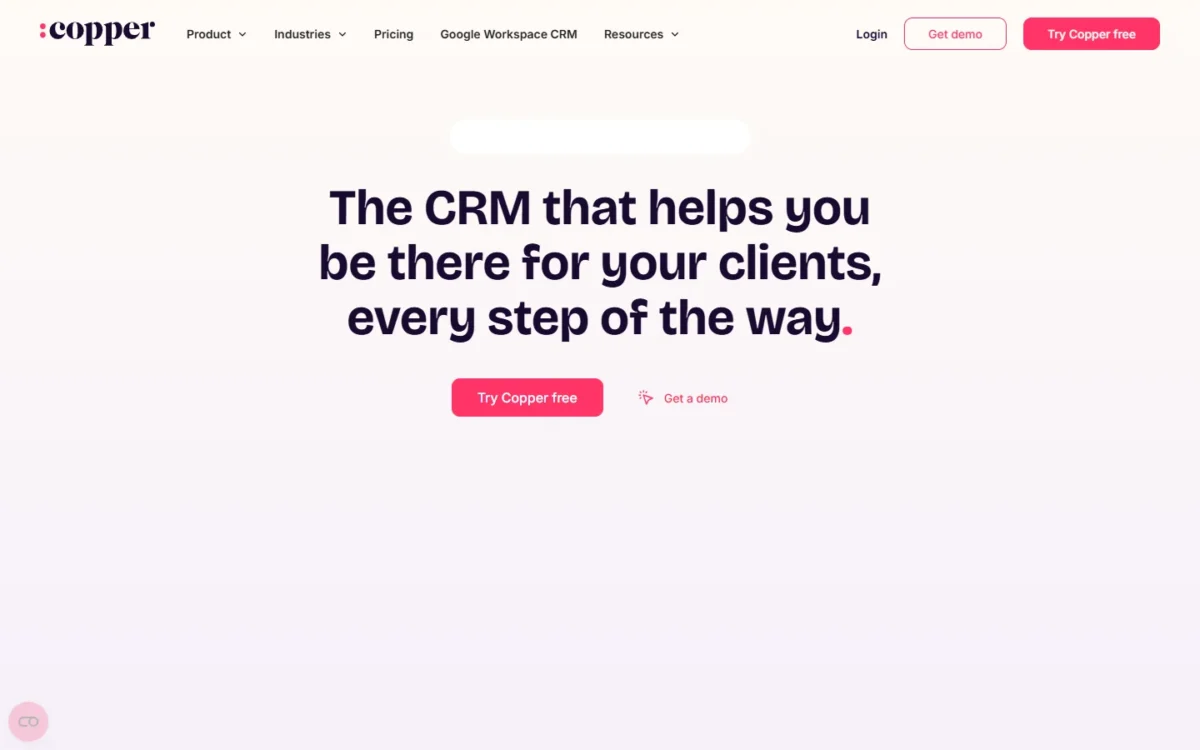
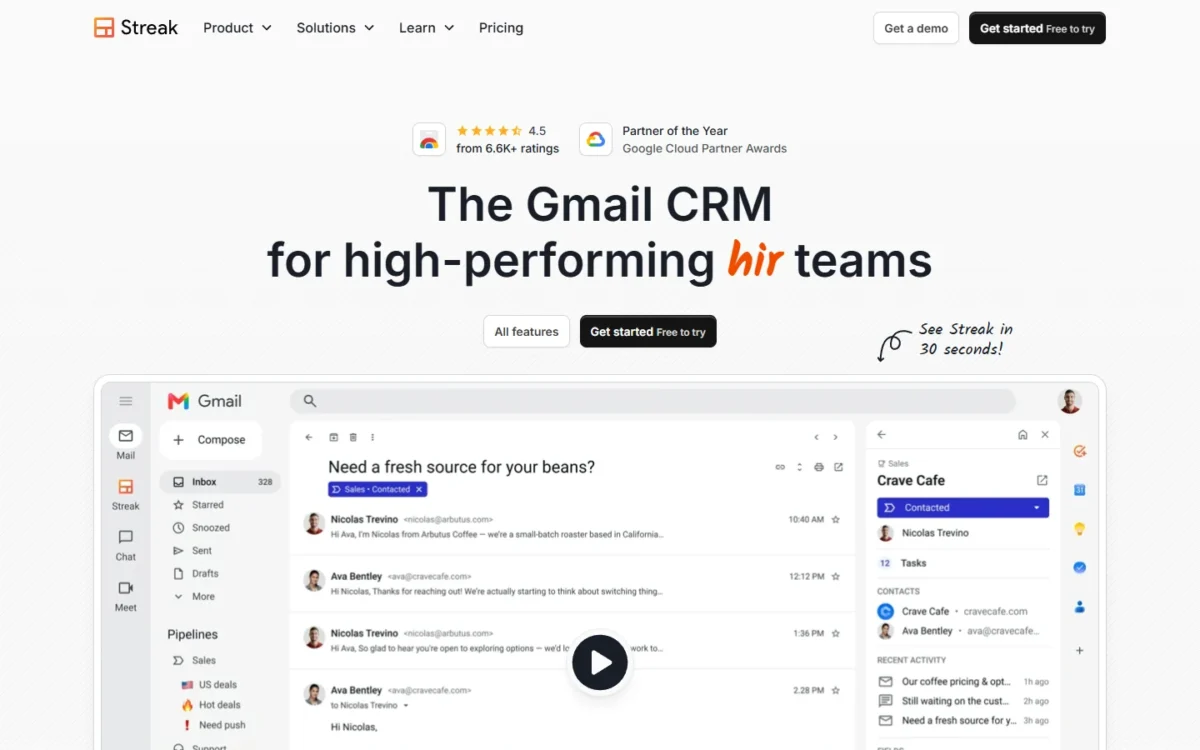
Streak is a CRM layer inside Gmail with unlimited records on every paid plan. Copper is a CRM workspace that shows up in Gmail through a Chrome extension, with typed records, project pipelines and lower seat prices, but contact limits below Business.
Copper fits service teams that turn won deals into client projects and stay under 15,000 contacts. Streak fits inbox-first teams and teams that run hiring or dealflow as pipelines.
The trade-off is Copper’s lower seat price against Streak’s uncapped records and included onboarding.
In This Article (11 sections)
Copper vs Streak at a Glance
Both are Gmail CRMs priced per seat, but Streak runs inside Gmail with unlimited records, while Copper caps contacts by plan and costs less at each tier.
| Attribute | Copper | Streak |
|---|---|---|
| Best for | Service teams that want opportunities and projects as separate records | Teams that want the CRM inside Gmail, for sales or other pipelines |
| Where it runs | Copper workspace plus a Chrome extension in Gmail and Google Calendar | Gmail is the primary interface |
| Starting price | Basic, $23 per seat per month, billed annually | Pro, $49 per user per month, billed annually |
| Workflow automation plan | Professional, $59 per seat per month, billed annually | Pro+, $69 per user per month, billed annually |
| Contact limit | 2,500 (Basic), 15,000 (Professional), Unlimited (Business) | Unlimited on every paid plan |
| Main limitation | Contact caps below Business; Basic marks Leads and Sales opportunities Not included | Automations and Zapier start at Pro+ |
Sources: Copper pricing page, Copper homepage, Streak pricing page, Streak security page, checked October 2026.
Key Differences Between Copper and Streak
Four differences decide most choices: the record model, how each plan caps growth, what the entry plan leaves out, and who helps with setup.
- Record model: Streak tracks sales, hiring or dealflow as pipelines of boxes; Copper keeps leads, people, companies, opportunities and projects as separate records.
- Growth limits: Copper caps contacts at 2,500 on Basic and 15,000 on Professional; Streak’s paid plans have no contact cap.
- Entry plans: Copper Basic lacks reports, team permissions and bulk email; Streak Pro lacks automations and Zapier.
- Setup help: Streak includes onboarding on every paid plan; Copper lists personal onboarding as Not included.
My Copper CRM review judges Copper on its own terms.
The full Streak CRM review does the same for Streak.
Copper vs Streak: Features Compared
The fair pairing is Copper Professional against Streak Pro+, the first plan of each with workflow automation; the matrix shows the first plan that includes each feature.
| Criterion | Copper | Streak |
|---|---|---|
| Project pipelines | Basic | Not listed on Streak pricing page |
| Workflow automation | Professional | Pro+ |
| Bulk email or mail merge | Professional | Pro |
| Email series or follow-ups | Business | Limited: mail merge follow-ups |
| Pipeline reports | Professional | Pro (Standard), Pro+ (Advanced) |
| Permissions | Professional | Pro (six roles), Enterprise (custom) |
| Zapier | Basic | Pro+ |
| API | Professional | Pro, webhooks from Pro+ |
| Single sign-on | Business (Okta) | Not listed on Streak pricing page |
Sources: Copper pricing page, Streak pricing page, checked October 2026.
The pattern: Copper gates reports, permissions and bulk email at Professional, while Streak puts them on Pro and holds automations and Zapier for Pro+.
Where the CRM Lives: Inside Gmail or in Its Own Workspace
Streak’s primary interface is Gmail itself, while Copper keeps records in its own workspace and brings them into Gmail and Google Calendar through a Chrome extension.
In Streak, pipelines and deal tags appear in the inbox, and each deal’s email history is shared with the team automatically. Copper’s extension adds contacts from Gmail and shows reminders and tasks beside the inbox; imports, exports and settings run in the Copper account.
The deeper split is the record model a CRM uses to organize customer data: Streak has one flexible unit, the box, and Copper has five typed records.
Verdict: where the CRM lives
Depends on use: Streak for a team that wants the inbox to be the CRM, Copper for one that wants opportunities and projects as separate records. Settle it in each 14-day trial with your own pipeline.
Pipelines, Records and Contact Limits
Copper limits contacts to 2,500 on Basic and 15,000 on Professional and removes the limit only on Business; Streak lists unlimited records, pipelines and contacts on every paid plan.
Copper’s limit is the one to plan around: a team past 15,000 contacts moves from Professional at $59 to Business at $99 per seat per month, billed annually. Custom fields climb the same ladder, 25 on Basic, 50 on Professional and unlimited on Business.
Copper’s project pipelines are on every plan, so delivery gets its own board even on Basic.
Verdict: contact limits
Depends on contact count: under 15,000 contacts on Professional (2,500 on Basic) Copper’s caps cost nothing extra, and past 15,000 Streak Pro+ is the cheaper uncapped plan.
Workflow Automation and Email Outreach
Copper unlocks workflow automation, bulk email and open tracking on Professional and email series on Business; Streak puts mail merge on every paid plan but automations only on Pro+.
Copper’s pipeline automations send emails or reminders when an opportunity changes stage. Streak’s automations create tasks, update boxes or email customers, triggered by Calendly, Typeform, Google Forms or a webhook.
Streak’s mail merge sends templated emails with automatic follow-ups, up to 1,500 a day on Google Workspace accounts and 400 on a gmail.com account. Copper does not publish a daily cap for bulk email.
Verdict: automation and email
Comparable at the automation tier, where Copper’s seat costs less. Streak fits better for outreach on the entry plan, since Pro sends mail merge with automatic follow-ups, while Copper keeps email series for Business.
Reporting and Permissions: Who Sees Which Deals
Streak gives each pipeline a reports dashboard and six access roles from Pro, while Copper adds pipeline and activity reports and team permissions on Professional, and custom reports on Business.
Streak’s Assignee role sees and edits only assigned boxes, and a pipeline can be closed to new team members by default. Its reports include Time in Stage, Stage Flow and Close Rate, with Standard dashboards on Pro and Advanced on Pro+.
Copper Basic has no reports, and Copper does not publish what its team permissions restrict. A sales lead whose reps guard their own clients should ask Copper’s live chat before buying Professional.
Verdict: reporting and permissions
Streak fits better on the entry plan, where Pro has dashboards and the Assignee role. At the automation tier there is not enough evidence on Copper’s permission scope.
Integrations and API
Copper includes Zapier and LinkedIn on every plan and adds native integrations and its API on Professional; Streak has a REST API and LinkedIn on Pro, but Zapier, direct integrations and webhooks only on Pro+.
Copper Professional adds Mailchimp, DocuSign, QuickBooks, PandaDoc, JustCall, RingCentral, Slack and Zendesk. Streak Pro covers Gmail, Calendar, Drive, Sheets, Chat and dialers; Calendly, Typeform and Slack arrive with Pro+.
Copper’s AI email template generator and re-writer start on Professional. Streak includes 20, 150 or 500 AI credits per user per month on Pro, Pro+ and Enterprise, and extra packs start at 1,000 credits for $100 a month.
Verdict: integrations
Copper fits better below the automation tier: a team on Basic at $23 per seat per month can build Zapier flows, while Streak needs Pro+ at $69 per user per month, both billed annually.
Copper vs Streak Pricing
Copper Professional costs $59 per seat per month billed annually ($69 billed monthly), against $69 per user per month billed annually ($89 billed monthly) for Streak Pro+.
| Plan and tier | Billed annually | Billed monthly |
|---|---|---|
| Copper Basic (entry) | $23 | $29 |
| Streak Pro (entry) | $49 | $59 |
| Copper Professional (automation) | $59 | $69 |
| Streak Pro+ (automation) | $69 | $89 |
| Copper Business (top) | $99 | $134 |
| Streak Enterprise (top) | $129 | $159 |
Sources: Copper pricing page, Streak pricing page, checked October 2026.
Copper prices each seat in USD, before taxes and fees where they apply. Streak prices each user in USD, requires everyone on a team to be on the same plan, and has no view-only pricing.
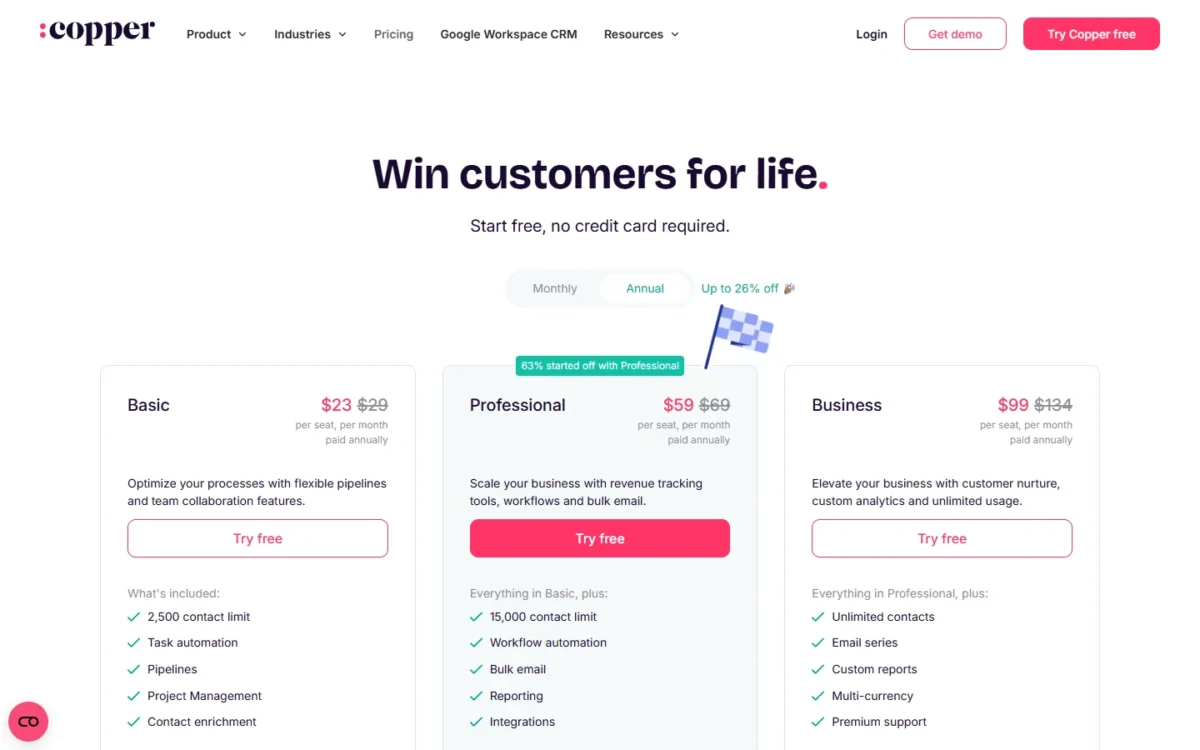
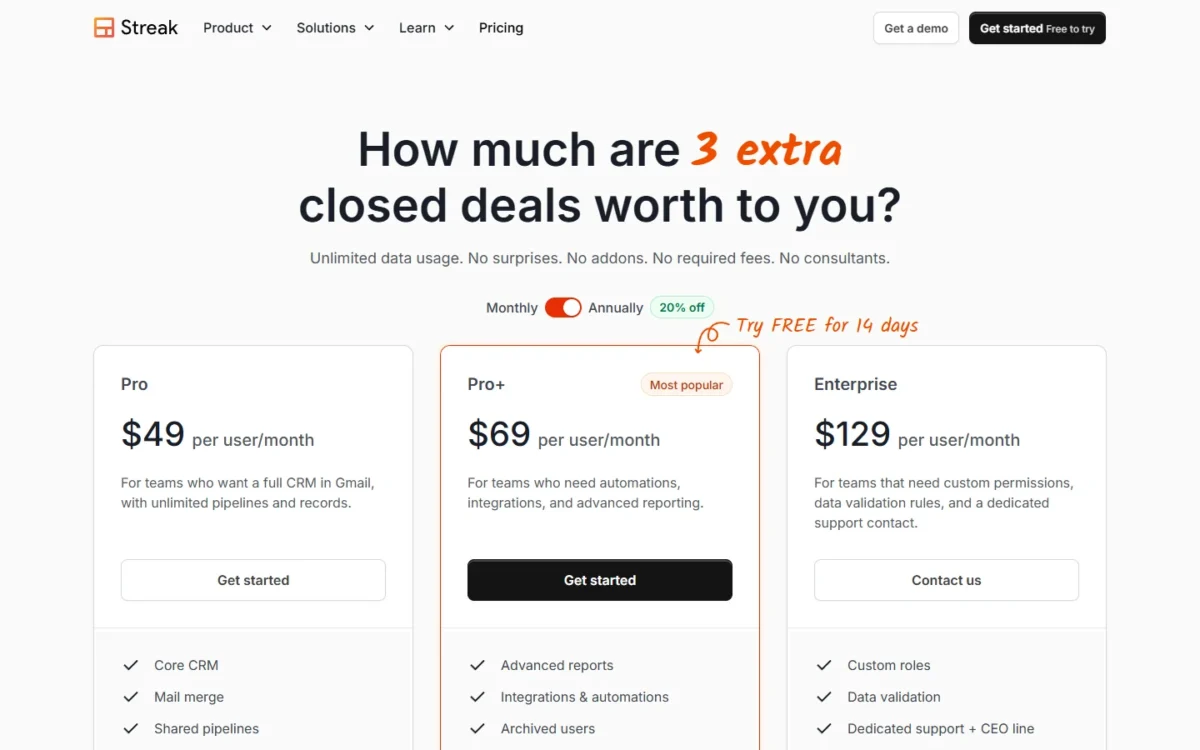
Copper’s upgrade triggers are contacts and features: reports, team permissions and workflow automation need Professional. Streak’s are features only: automations, Zapier and scheduled exports need Pro+.
What Copper’s two plan pages say
This page follows the Compare Features table on Copper’s pricing page: Sales opportunities and Leads Not included on Basic, Okta single sign-on on Business, Premium support Not included on any plan.
Copper’s help center lists Opportunity Pipelines and SAML single sign-on on Basic, plus a Starter tier the pricing page does not show. The pricing page’s Business card also lists Premium support.
Copper Basic is the cheapest seat here, but its gates matter more than its price; Copper’s plans and fees in detail covers each one.
Cost for a 5- and 10-Person Team
A 5-person team pays $3,540 a year on Copper Professional ($59 x 5 x 12) and $4,140 a year on Streak Pro+ ($69 x 5 x 12), both billed annually.
| Team and plan tier | Copper | Streak |
|---|---|---|
| 5 seats, entry plans, annual | Basic: $23 x 5 x 12 = $1,380 | Pro: $49 x 5 x 12 = $2,940 |
| 5 seats, automation tier, annual | Professional: $59 x 5 x 12 = $3,540 | Pro+: $69 x 5 x 12 = $4,140 |
| 5 seats, automation tier, monthly | Professional: $69 x 5 x 12 = $4,140 | Pro+: $89 x 5 x 12 = $5,340 |
| 10 seats, automation tier, annual | Professional: $59 x 10 x 12 = $7,080 | Pro+: $69 x 10 x 12 = $8,280 |
| 5 seats, over 15,000 contacts, annual | Business: $99 x 5 x 12 = $5,940 | Pro+: $69 x 5 x 12 = $4,140 |
| 10 seats, over 15,000 contacts, annual | Business: $99 x 10 x 12 = $11,880 | Pro+: $69 x 10 x 12 = $8,280 |
Sources: Copper pricing page, Streak pricing page, checked October 2026. Assumptions: list prices in USD; every user is a paid seat; tax, Streak AI credit packs and Streak’s advanced implementation fee excluded.
Under 15,000 contacts, Copper Professional is the cheaper automation plan at both team sizes, though billed monthly it costs the same $4,140 for 5 seats as Streak Pro+ billed annually.
Past 15,000 contacts the answer flips. The entry row is not like for like either: Copper Basic is cheaper but lacks Streak Pro’s reports, roles and mail merge.
Free Plan and Trials
Streak’s free plan still exists, but it holds only Gmail email tools (tracking, snippets, 50 mail merges a day) and no CRM pipelines.
Both paid CRMs have a 14-day trial: Streak’s covers Pro+ with 1,000 AI credits, and Copper’s needs no credit card and runs on Business. Copper’s pricing page lists no free plan.
A team that needs pipelines at no cost should start with free CRMs that include pipelines instead.
Support, Onboarding and Data Security
Streak includes onboarding and training on every paid plan, while Copper lists personal onboarding as Not included on all three plans. On security, Copper runs outside vulnerability scans and penetration tests, while Streak goes through Google’s yearly OAuth review and keeps its own safeguards.
Streak’s onboarding covers pipeline setup, data import help and team training, and support rises from live chat on Pro to dedicated support on Enterprise. Copper gives every plan live chat, office hours and webinars; its homepage says eligible annual plans get personal onboarding.
Is Streak safe? Streak stores data on Google Cloud Platform in the United States, does not store email bodies, and goes through Google’s OAuth API review every year. Copper encrypts data in transit and at rest and runs outside penetration tests.
Verdict: support and security
Streak fits better on onboarding, which comes with Pro. On security there is not enough evidence to prefer either; ask each vendor for its audit reports if your IT team needs them.
Copper vs Streak: Pros and Cons
Copper’s edge is seat price and typed records, Streak’s is the inbox; their weak spots are contact caps and Pro+ gates.
Copper pros and cons
Pros
- Lower list price per seat at each tier, from $23 per seat per month, billed annually
- Separate records for leads, opportunities and projects, with project pipelines on every plan
- Zapier and LinkedIn on Basic
- Imports from Excel, CSV, Salesforce, Pipedrive and Zendesk Sell, and an import can be reverted
Cons
- Contacts capped at 2,500 on Basic and 15,000 on Professional
- Basic marks Leads and Sales opportunities Not included, a problem for a sales team
- Reports and team permissions start at Professional
- Personal onboarding listed as Not included on every plan
Streak pros and cons
Pros
- Works inside Gmail, so reps manage boxes without leaving the inbox
- No contact cap, so a growing list does not force an upgrade
- Mail merge, report dashboards and six pipeline roles on the entry plan
- Onboarding and training included on every paid plan
Cons
- Automations, Zapier and webhooks only from Pro+
- Every member on the same plan, with no cheaper view-only seats
- Exports leave email threads, files and comments behind
- AI credits capped per plan; extra packs start at $100 a month
Which Is Better for Your Needs?
Pick by your top priority: the matrix names the better fit for each and the trade-off you accept with it.
| Your priority | Better fit | Reason | Trade-off |
|---|---|---|---|
| Work stays inside Gmail | Streak | Gmail is Streak’s primary interface | Records are boxes, not typed projects |
| Cheapest automation, under 15,000 contacts | Copper | Professional is $59 per seat against $69 for Pro+, billed annually | The 15,000-contact limit |
| More than 15,000 contacts | Streak | Pro+ at $69 has unlimited records; Copper needs Business at $99, billed annually | Automations still need Pro+ |
| Reps see only their own deals, entry plan | Streak | Assignee role on Pro; Copper Basic has no team permissions | Streak Pro has no automations |
| Zapier on the cheapest plan | Copper | Zapier on Basic; on Streak from Pro+ | Basic caps contacts at 2,500 |
| Client projects after the sale | Copper | Project pipelines on every plan | Contact caps still apply |
| Setup help included | Streak | Onboarding on every paid plan | Advanced implementation costs extra below Enterprise |
| Security assurance | Insufficient evidence | Copper’s security page describes outside vulnerability scans and penetration tests; Streak’s describes Google’s yearly OAuth review and its safeguards | Ask each vendor |
Sources: Copper pricing page, Streak pricing page, checked October 2026.
A service business that sells and then delivers should pick Copper, unless its contact list nears 15,000. An inbox-first team should pick Streak, unless it needs Zapier without paying for Pro+.
If Copper stays on your shortlist but Streak does not, open Nimble vs Copper for a different match-up.
Who Should Skip Each One
Skip Copper if you have more than 15,000 contacts and no budget for Business, want to work only inside the inbox, or need personal onboarding included.
Skip Streak if you need Zapier or automations at the Pro price of $49 per user per month, billed annually, want cheaper seats for view-only members, or track client work as projects with their own records.
Switching Between Copper and Streak
Both directions run through a spreadsheet: Streak exports to Google Sheets and imports Sheets, CSV or Excel files, while Copper imports Excel or CSV files and exports Excel files.
Neither help center lists the other product among its importers: Copper’s import page names Salesforce, Pipedrive and Zendesk Sell, and Streak’s takes Google Sheets, CSV and Excel files. I would therefore plan either move as a spreadsheet migration, with a CRM implementation guide for the rollout.
A reader still unsure that Copper is the right destination can compare Insightly vs Copper first.
Moving from Streak to Copper
- Export boxes, contacts and organizations to a Google Sheet; email threads, files and comments stay behind, since Gmail stores the email.
- Import companies first, then people, then opportunities, in files up to 3MB; Copper can revert an import.
Moving from Copper to Streak
- Export people, companies, opportunities, projects, tasks and leads as Excel files; activities need a one-time export from Copper Support.
- Import each file into a Streak pipeline, where each row becomes a box.
Neither export guide lists automations, reports or permissions among the data it moves, so plan to rebuild those by hand.
How I Compared Copper and Streak
I built the comparison from both vendors’ pricing pages, plan comparisons, help centers and security pages, read on October 21, 2026. I paired the plans that do the same job: Copper Professional with Streak Pro+, then the entry and top plans.
Costs are list prices multiplied by seats and months. The vendors do not publish Copper’s bulk-email cap, the scope of Copper’s team permissions, or what Streak’s Advanced reports add. For security, I rely on the checks each vendor names, which are the outside tests and the OAuth review above.
FAQ
Is Copper CRM good?
Yes, for a Google Workspace team that wants leads, opportunities and projects as separate records and stays under 15,000 contacts on Professional, at $59 per seat per month billed annually. Teams past that limit pay $99 per seat per month, billed annually, for Business.
A sales team should skip Basic, which marks Leads and Sales opportunities Not included. The Copper CRM review gives the full verdict.
Can I use Streak with a personal Gmail account?
Yes, but mail merge drops to 400 emails a day on a gmail.com account, against 1,500 a day on Google Workspace accounts, because Google sets a lower limit for personal accounts. Streak’s quota also runs separately from Gmail’s own sending limit, so watch both before a large send.
Final Verdict: Copper or Streak?
Copper is the pick for a service team under 15,000 contacts that wants typed records, projects and automation at $59 per seat per month, billed annually. Streak is the pick for an inbox-first team, a team past that contact limit, or one that runs non-sales pipelines.
Choose Copper if
- Won deals turn into client projects with their own pipelines
- You need Zapier on the entry plan, or QuickBooks, DocuSign or Slack on Professional
- Your team stays under 15,000 contacts and wants automation at the lower seat price
Choose Streak if
- You track hiring, dealflow or other processes as pipelines beside sales
- You expect more than 15,000 contacts
- You want onboarding, mail merge and pipeline roles from the entry plan
Copper’s lower seat price comes with contact caps and a thin Basic plan; Streak holds automations and Zapier back until Pro+ and bills every member on the same plan.
When Neither Fits
A team that does not run on Google Workspace should look past both. Start with Copper alternatives if Copper’s record model appeals but its caps do not.
For a wider shortlist, the guide to the best CRM software for small teams compares the field.
If Copper is still the product you want, see Zoho CRM vs Copper to set it against another rival.






Pingback: Zoho CRM vs Copper (2026): Pricing, Gmail Fit and Verdict
Pingback: HubSpot vs Copper (2026): Pricing, Gmail Fit and Verdict