

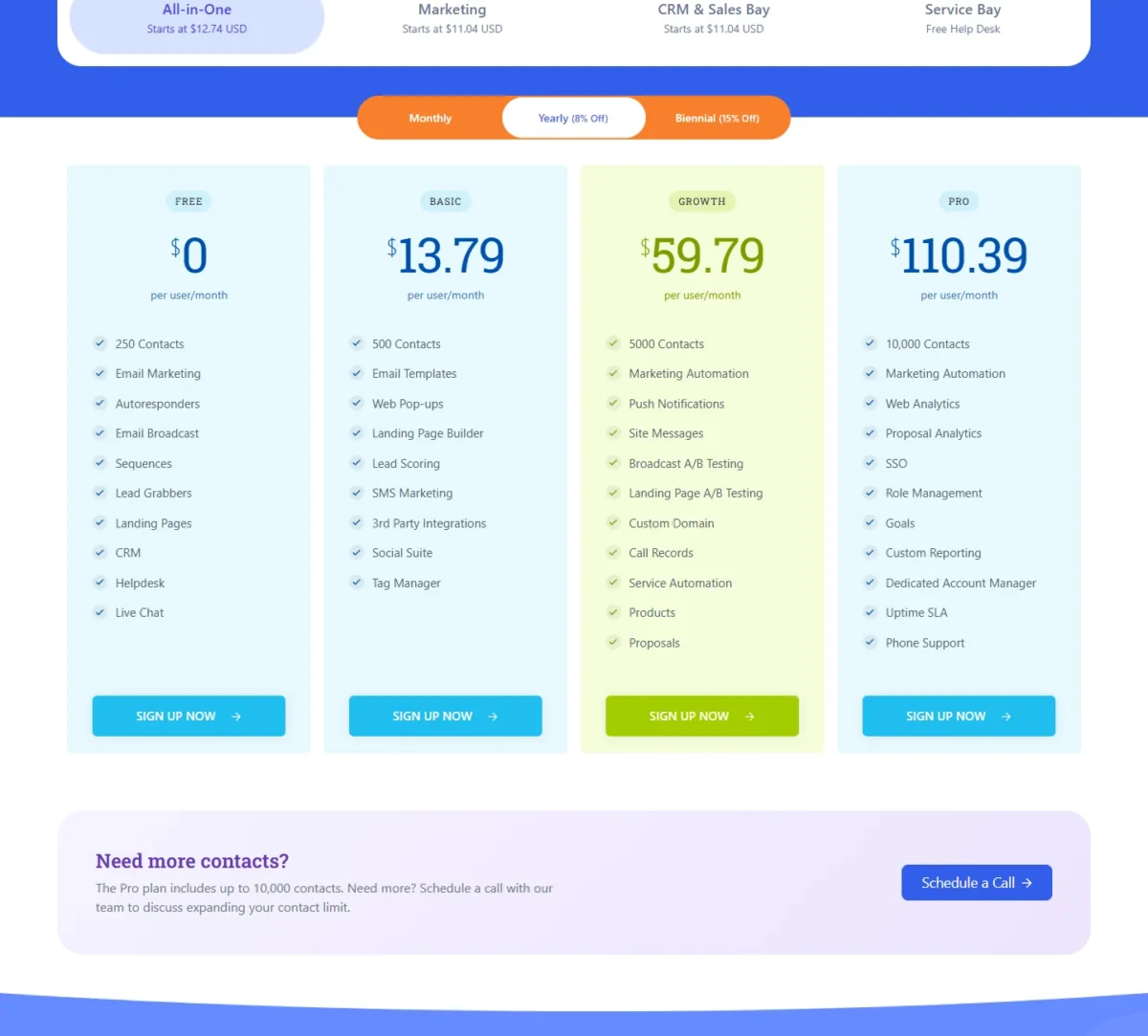
EngageBay is the better buy for a small team that wants marketing, sales and service automation under one per-user price: All-in-One Growth costs $59.79 per user per month on the Yearly toggle, with no onboarding fee.
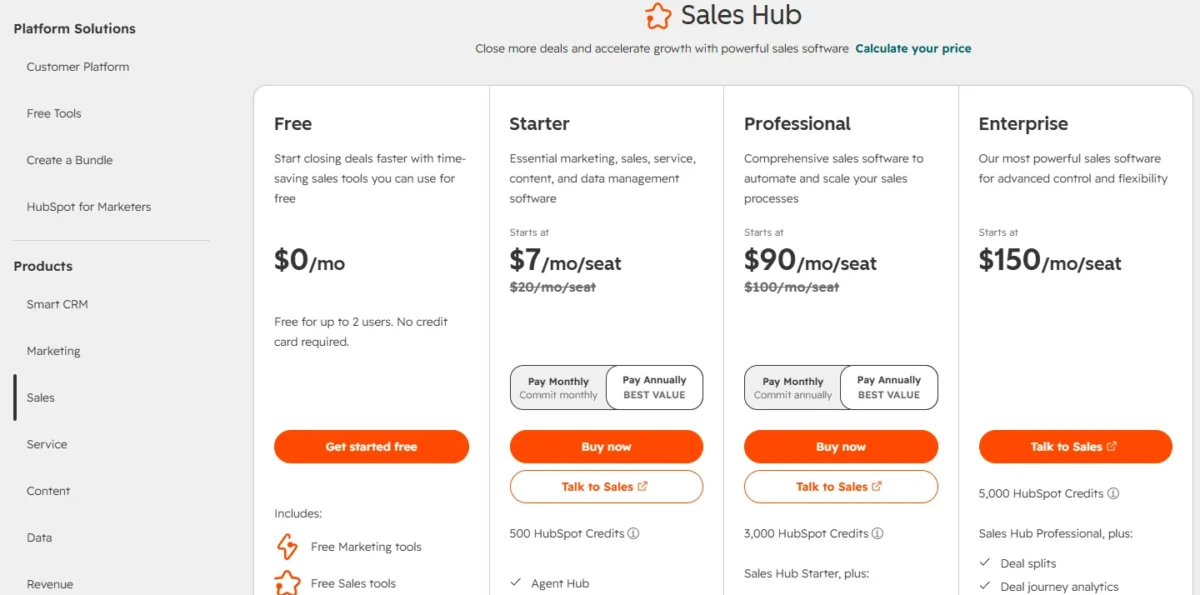
HubSpot fits teams that need a SOC 2 report or want sequences and workflows inside Sales Hub Professional. Sales Hub Professional costs $90 per seat per month plus a required $1,500 onboarding fee.
For five users, EngageBay Growth costs $59.79 x 5 x 12 = $3,587.40 in year one. HubSpot’s seats cost $90 x 5 x 12 = $5,400, before that onboarding fee. That gap is the core of the EngageBay vs HubSpot decision; the rest of this page shows where it narrows.
Quick verdict
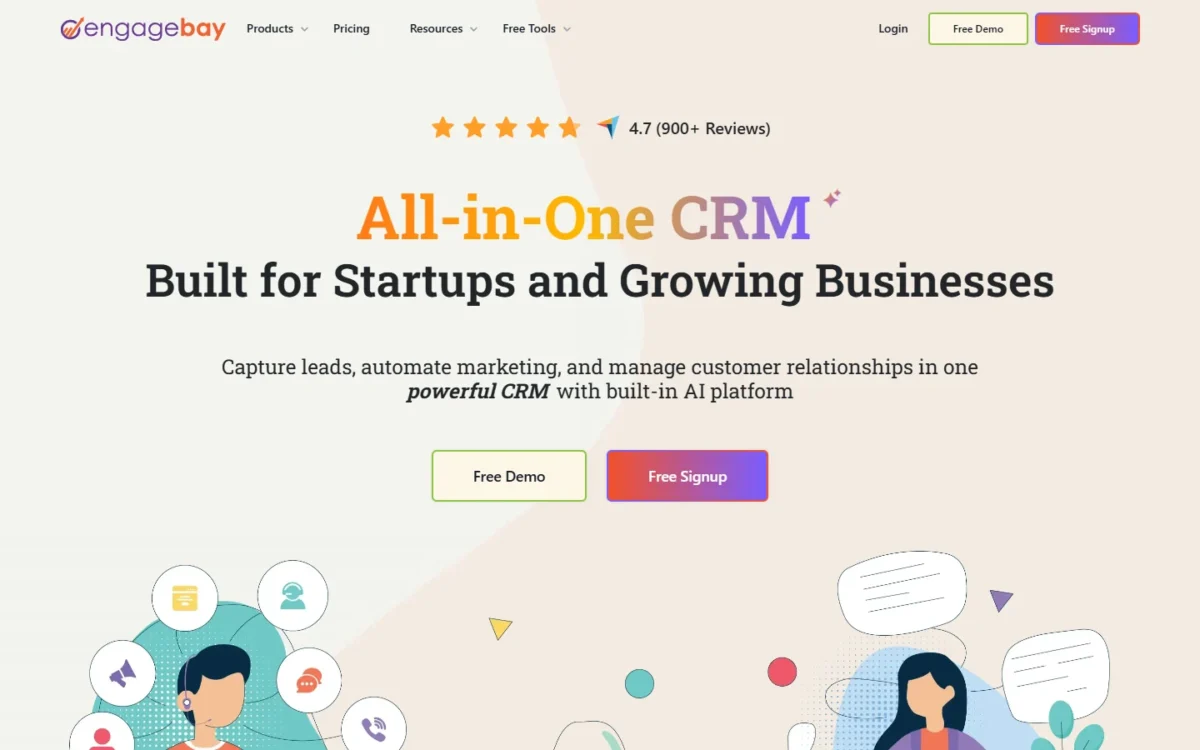
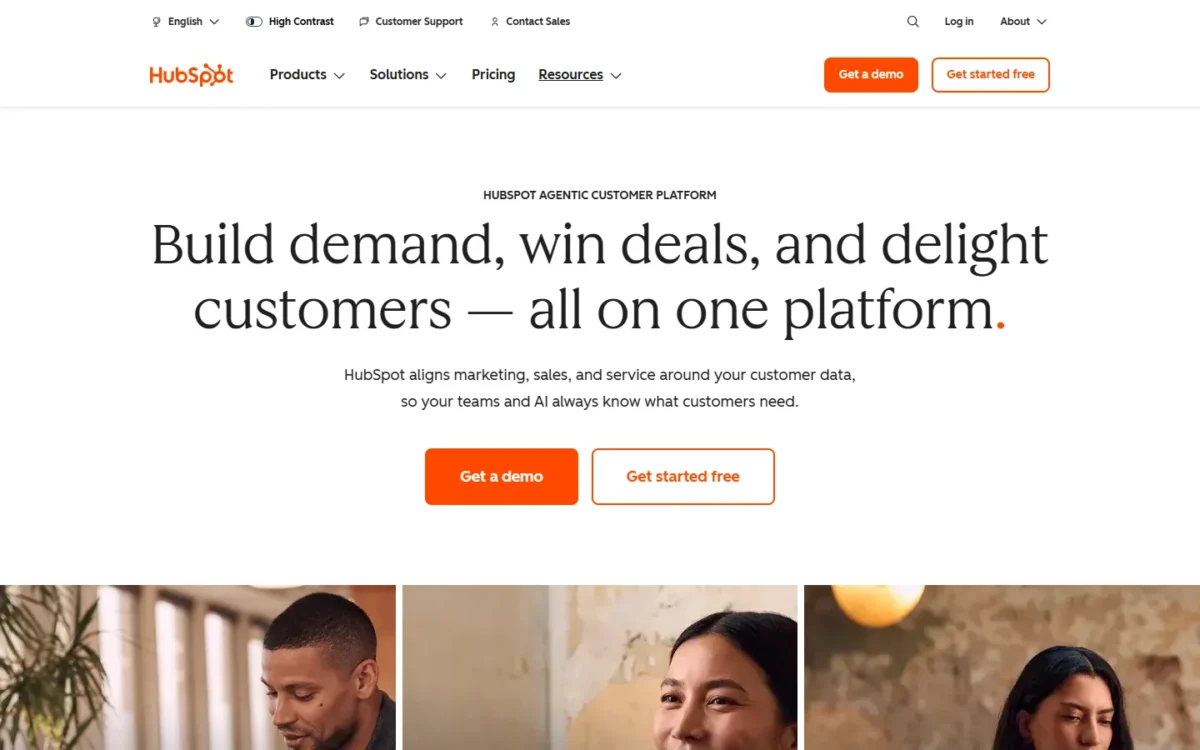
The deciding difference: EngageBay sells marketing, sales and service in one per-user plan with free onboarding sessions, while HubSpot sells Professional hubs separately and charges a required one-time onboarding fee on Sales Hub Professional and Marketing Hub Professional.
EngageBay fits a 2-10 person team on a budget that wants email sequences and marketing automation without a five-figure first year.
HubSpot fits a team that needs a SOC 2 Type 2 report for procurement, or plans to buy marketing and sales Professional features as separately priced hubs. A team that outgrows Growth’s 10 workflows can stay on EngageBay: Pro ($110.39 per user per month, Yearly toggle) holds 100 workflows and lists phone support.
The trade-off: EngageBay Growth stops at 10 workflows and 5,000 contacts, while HubSpot’s Professional tier adds $1,500 (Sales Hub) or $3,000 (Marketing Hub) before the first month is paid.
Choose EngageBay if
- Your budget for automation is under $60 per user per month, billed yearly
- More than 2 people need free access while you trial (EngageBay Free covers 15 users)
Choose HubSpot if
- Procurement asks for a SOC 2 Type 2 report before signing
- Your sales team wants sequences with 3,000 shared calling minutes per account
In This Article (13 sections)
EngageBay vs HubSpot at a Glance
On annual list prices, EngageBay is the cheaper suite at the entry tier ($13.79 per user per month against HubSpot Starter’s $20 per seat).
It is also cheaper at the automation tier: $59.79 per user per month for EngageBay Growth against $90 per seat per month for HubSpot Sales Hub Professional on Pay Annually. A $7 new-customer offer undercuts Basic.
HubSpot offers SOC 2 Type 2 and SOC 3 reports and a free plan that holds 1,000 contacts against EngageBay’s 250.
| Attribute | EngageBay | HubSpot |
|---|---|---|
| Best for | Small teams that want one per-user price for marketing, sales and service | Teams that will grow into separately priced Professional hubs |
| Free plan | Free for 15 users, 250 contacts | Free for up to 2 users, 1,000 contacts |
| Entry paid price | Basic: $13.79 per user per month, Yearly toggle | Starter: $20 per seat per month, Pay Annually ($7 new-customer offer) |
| Where automation starts | Growth: $59.79 per user per month, Yearly toggle | Sales Hub Professional: $90 per seat per month plus $1,500 onboarding |
| Main strength | Sequences from Free; marketing automation on Growth | Professional workflows, phone support, SOC 2 Type 2 report |
| Main limitation | Growth caps workflows at 10, with 15 nodes each | Onboarding fee on Professional; sequences need Sales Hub Professional |
Sources: EngageBay pricing, HubSpot Sales Hub pricing, HubSpot free CRM, checked October 2026.
The price gap is real, but it comes from how each vendor packages the product. Four differences decide which package suits your team.
Key Differences Between EngageBay and HubSpot
The four differences that change the decision are packaging, onboarding fees, the shape of the free plan, and the plan where sequences and workflows begin.
- Packaging: EngageBay’s All-in-One plans bundle marketing, CRM and service per user; HubSpot’s Starter seat bundles five Starter hubs, but Professional features are bought hub by hub.
- Onboarding fee: EngageBay lists free onboarding sessions and a free migration service; HubSpot requires one-time onboarding of $1,500 on Sales Hub Professional and $3,000 on Marketing Hub Professional.
- Free plan shape: EngageBay Free covers 15 users and 250 contacts; HubSpot’s free CRM covers 2 users and 1,000 contacts.
- Where automation starts: EngageBay includes 2 email sequences on Free and adds marketing automation on Growth; HubSpot puts sequences and full workflows on Professional.
Packaging matters most for a team that does all three jobs. A five-person EngageBay team on Growth gets marketing automation, sales sequences and service automation in one seat price. The same team on HubSpot buys Sales Hub Professional for sequences and workflows, and Marketing Hub Professional is a separate purchase at $800 a month.
The free plans pull in opposite directions. A team of six can run EngageBay Free together, but only 250 contacts fit. Two founders whose prospect list runs past 250 contacts fit HubSpot’s free CRM better, since it holds 1,000.
If HubSpot itself is still an open question, my HubSpot CRM review weighs it on its own terms. Here, automation is where both vendors push buyers up a plan, so the features come next.
EngageBay vs HubSpot: Features Compared
Sequences and workflows are the two features a small team feels first, and the plans that carry them differ.
EngageBay includes sequences on every plan, up to 100 on Basic ($13.79 per user per month, Yearly toggle). HubSpot sequences need Sales Hub Professional at $90 per seat per month on annual billing.
For workflows, EngageBay Growth ($59.79 per user per month, Yearly toggle) includes 10. HubSpot Starter’s sales automation allows up to 50 workflows with restricted triggers and actions, at a $20 per seat list price ($7 with the new-customer offer). On workflow count alone, Starter costs less than Growth, and full workflows wait for a Professional hub.
| Feature | EngageBay | HubSpot |
|---|---|---|
| Marketing automation | Growth (10 workflows, 15 nodes each) | Professional hubs; Starter Limited: up to 10 automated email actions |
| Email sequences | Free (2); Basic (100); Growth (500) | Sales Hub Professional or Enterprise |
| Calling | 15 calling credits on every plan | Starter: 500 minutes; Professional: 3,000 minutes per account |
| Custom reporting | Pro | Professional |
| Help desk and live chat | Free | Free tools; Starter removes HubSpot branding |
| Single sign-on | Pro | SAML SSO at Enterprise |
| AI allowance | 20 to 500 AI conversations a month | 500 to 5,000 HubSpot Credits a month |
Sources: EngageBay pricing, HubSpot free tools and Starter limits, HubSpot product catalog, checked October 2026.
Marketing automation and email
EngageBay starts marketing automation on its Growth plan, capped at 10 workflows of 15 nodes each. HubSpot Starter allows up to 10 automated email actions, and full workflows need a Professional hub such as Marketing Hub Professional.
EngageBay Pro raises the cap to 100 workflows of 50 nodes. HubSpot’s Marketing Hub Professional costs $800 a month on Pay Annually with 3 Core Seats, plus its onboarding fee. For a small team, that makes EngageBay the cheaper route to the first nurture workflow.
On email volume, EngageBay Growth includes 25,000 branded emails and 5,000 contacts, while Marketing Hub Professional includes 2,000 marketing contacts. HubSpot charges only for marketing contacts, not for non-marketing contacts.
HubSpot Starter sends up to 5 times its 1,000 included marketing contacts each month, or 5 x 1,000 = 5,000 sends. A team that mails its full list more than five times a month hits that Starter ceiling.
Verdict: Marketing automation
EngageBay fits a small team that needs a handful of nurture workflows: Growth includes them at a per-user price with no onboarding fee. HubSpot fits a marketing team that will outgrow 10 workflows and wants them inside Marketing Hub Professional, at the cost of its monthly fee and a one-time onboarding charge.
Teams weighing more marketing platforms than these two can compare the CRMs built for marketing automation on the same criteria.
Sales tools: pipelines, sequences and calling
EngageBay puts email sequences on every plan, from 2 on Free to 100 on Basic and 500 on Growth. HubSpot sequences require Sales Hub Professional or Enterprise, so a rep on Starter cannot run one.
That gate is expensive for a small sales team. Sales Hub Professional costs $90 per seat per month on Pay Annually plus onboarding, against EngageBay Basic at $13.79 per user per month with 100 sequences.
Calling is harder to compare. EngageBay lists 15 calling credits on every All-in-One plan. HubSpot Starter includes 500 calling minutes and 15 pipelines.
HubSpot Professional shares 3,000 minutes per account per month. Credits and minutes are different units, so I give no verdict on calling.
A team that only sells can look at EngageBay CRM & Sales Bay, the sales-only edition, whose pricing page shows Basic starting at $11.04 per user per month.
Verdict: Sales sequences
EngageBay fits a budget sales team: sequences start on Free and reach 500 on Growth. HubSpot fits a team that wants sequences inside Sales Hub Professional with 3,000 shared calling minutes and phone support, and accepts the seat price and onboarding fee.
Reporting and dashboards
Custom reporting sits on EngageBay Pro and on HubSpot Professional, so the two are comparable at the top. Below that, EngageBay Free lists a limited reporting dashboard, while HubSpot gives 10 dashboards of 50 reports on Free and 30 dashboards on Starter.
For a team that only needs standard pipeline and campaign reports, HubSpot’s free dashboards go further on paper. Neither vendor’s lower plan replaces custom reports.
Help desk and live chat
Both products bundle service tools at entry. EngageBay’s Free plan lists a helpdesk and live chat, and Basic allows up to 10 ticket views, 10 macros and 10 canned responses. HubSpot’s Starter seat includes Service Hub Starter with ticketing, and its free live chat carries HubSpot branding until Starter removes it.
A support team that lives in tickets will hit EngageBay’s caps first: Growth raises them to 50 ticket views and 50 macros.
Users, seats and permissions
EngageBay prices every user on paid plans and keeps Free open to 15 users. HubSpot prices Core, Sales or Service seats, and its product catalog gives View-Only seats at no additional cost.
That free view-only access helps a team where managers read reports but never edit records. Role management sits on EngageBay Pro, while HubSpot’s CRM page lists permission sets on Starter and field-level permissions on Enterprise.
Plan gates decide which tier each team needs. The next question is what that tier costs.
EngageBay vs HubSpot Pricing
EngageBay costs less at the entry and automation tiers on annual billing: $13.79 against $20 at entry, and $59.79 per user against $90 per seat plus onboarding at the automation tier.
| Plan tier | EngageBay (All-in-One, Yearly toggle) | HubSpot (Pay Annually) |
|---|---|---|
| Free | $0, free for 15 users, 250 contacts | $0, free for up to 2 users |
| Entry suite | Basic: $13.79 per user per month | Starter: $20 per seat per month ($7 new-customer offer) |
| Automation, sales-led | Growth: $59.79 per user per month | Sales Hub Professional: $90 per seat per month, plus $1,500 one-time onboarding |
| Automation, marketing-led | Growth: $59.79 per user per month, 5,000 contacts | Marketing Hub Professional: $800 per month with 3 Core Seats and 2,000 marketing contacts, plus $3,000 one-time onboarding |
| Upper tier | Pro: $110.39 per user per month | Sales Hub Enterprise: $150 per seat per month, plus $3,500 one-time onboarding |
Sources: EngageBay pricing, HubSpot Sales Hub pricing, HubSpot Marketing Hub pricing, checked October 2026.
The billing basis differs. EngageBay’s toggle has Monthly, Yearly (8% Off) and Biennial (15% Off) views; Growth shows $64.99 on Monthly, $59.79 on Yearly and $55.24 on Biennial, all per user per month.
HubSpot’s Starter card pairs Pay Monthly with “Commit monthly”, while Professional pairs Pay Monthly with “Commit annually”. A Professional buyer who pays monthly still commits to a year; a Starter buyer who pays monthly does not.
Pricing note
HubSpot’s pricing pages show “Save up to 65% on Starter” for new customers, with Starter at $7 per seat per month against $20. HubSpot says select offers are available for a limited time and publishes no end date, so the cost math below uses $20.
HubSpot’s other hubs, add-ons and credit packs sit outside this comparison; the full breakdown of HubSpot’s plans and fees covers them.
List prices hide HubSpot’s onboarding fee, so the honest comparison is the bill for a real team’s first year.
Year-one cost for a 5- and 10-person team
A five-person team pays $59.79 x 5 x 12 = $3,587.40 in year one on EngageBay Growth. On HubSpot Sales Hub Professional the seats alone cost $90 x 5 x 12 = $5,400, and the $1,500 onboarding fee comes on top.
| Team and tier | EngageBay year one | HubSpot seats, year one | HubSpot one-time onboarding |
|---|---|---|---|
| 5 users, entry suite | Basic: $13.79 x 5 x 12 = $827.40 | Starter: $20 x 5 x 12 = $1,200 | None on Starter |
| 5 users, sales automation | Growth: $59.79 x 5 x 12 = $3,587.40 | Sales Hub Professional: $90 x 5 x 12 = $5,400 | $1,500 |
| 10 users, sales automation | Growth: $59.79 x 10 x 12 = $7,174.80 | Sales Hub Professional: $90 x 10 x 12 = $10,800 | $1,500 |
| 5 users, past Growth’s 10 workflows | Pro: $110.39 x 5 x 12 = $6,623.40 | Sales Hub Professional (sales side only): $90 x 5 x 12 = $5,400 | $1,500 |
| 5 users, marketing automation | Growth: $59.79 x 5 x 12 = $3,587.40 | Marketing Hub Professional: $800 x 12 = $9,600 for 3 seats, plus $45 x 2 x 12 = $1,080 for 2 more | $3,000 |
Sources: EngageBay pricing, HubSpot Sales Hub pricing, HubSpot Marketing Hub pricing, checked October 2026.
Assumptions: annual billing on both (EngageBay Yearly toggle, HubSpot Pay Annually) and list prices read on October 21, 2026. HubSpot’s 2 extra Core Seats are priced at the “start at” $45 per month. Excluded: tax, extra HubSpot Credits, contact tiers above those included, add-ons and the $7 Starter offer.
The marketing-led row shows the widest gap. HubSpot’s onboarding fee alone covers most of a five-person EngageBay Growth year. For a sales-led team of ten, HubSpot’s seats cost more than EngageBay Growth before the onboarding fee is even added.
Paying monthly raises EngageBay Growth to $64.99 x 5 x 12 = $3,899.40 for five users.
When the cheaper plan is not the better value
EngageBay’s low price stops paying off when a team passes 10 workflows or 5,000 contacts on Growth. Either limit pushes the team to Pro at $110.39 per user per month on the Yearly toggle.
At that tier the per-seat gap closes. EngageBay Pro costs $110.39 per user per month for marketing, sales and service. HubSpot Sales Hub Professional costs $90 per seat plus onboarding but covers the sales side only, so a sales-only team on HubSpot can pay less per seat after year one.
A team that needs marketing workflows past Growth compares Pro with Marketing Hub Professional at $800 per month with 3 Core Seats plus $3,000 onboarding. A buyer who is looking at SugarCRM beside HubSpot can compare HubSpot vs SugarCRM.
HubSpot’s Starter has its own trap. Its sales automation allows up to 50 workflows with restricted triggers and actions, and sequences are missing, so a team that needs either moves to Professional and pays the onboarding fee.
Skip EngageBay if: you need more than 100 workflows or more than 10,000 contacts, the Pro limits before a sales call.
Skip HubSpot if: five people need sequences and marketing automation in year one and the budget is under $5,000.
Ease of Setup and Onboarding
EngageBay lists free onboarding sessions on its plans and a “Completely FREE Migration Service from Any Other Platform”, while HubSpot makes onboarding a paid, required step on Professional ($1,500 for Sales Hub, $3,000 for Marketing Hub).
HubSpot’s lower plans start without that fee. Its multi-object import works on all plans, and new users can run a self-service transfer of existing CRM data. Importing association labels needs a Professional or Enterprise subscription.
EngageBay’s contact import takes a CSV file and asks you to match its columns to EngageBay fields before importing.
Neither vendor publishes a setup time. The cheapest way to judge ease of use is your own data: import a sample of contacts into each free plan (EngageBay free for 15 users, HubSpot for 2) and build one email sequence on EngageBay Free before you pay. Setup also depends on what each tool connects to.
Integrations, API and Security
EngageBay lists integrations with Zapier, Shopify, Stripe, Slack, Xero, QuickBooks and Salesforce, and its integrations page is titled “Connect 500+ Apps”. HubSpot says its free CRM connects to over 2,000 business apps, and its marketplace lists a Zapier app that reaches 8,000+ apps.
Counts are each vendor’s own claim, so the deciding question is whether your accounting, store and calendar apps appear in each directory. EngageBay adds third-party integrations from Basic.
API access differs in what is published. EngageBay caps API calls at 500 a month on Free, 25,000 on Basic, 50,000 on Growth and 75,000 on Pro. HubSpot’s pricing pages and product catalog list no API call limit, so check its developer documentation if volume matters.
Security documentation is where HubSpot pulls ahead. HubSpot’s security page offers SOC 2 Type 2 and SOC 3 reports, two-factor authentication, “Sign in with Google” for all customers, and SAML SSO at the enterprise tier. EngageBay’s legal page lists a GDPR policy and a Data Processing Agreement, and SSO appears on the Pro card.
Verdict: Security documentation
HubSpot fits a buyer whose procurement or clients ask for a SOC 2 Type 2 report. EngageBay’s legal page lists a GDPR policy and a DPA, but no SOC 2 report, so a regulated buyer should ask EngageBay for its audit documents before signing.
When something breaks, the plan you bought decides who answers.
Support by Plan
HubSpot’s free tools get the knowledge base and community only, Starter adds chat and email, and Professional adds phone and call-back. EngageBay’s Pro card lists phone support and a dedicated account manager.
| Plan level | EngageBay | HubSpot |
|---|---|---|
| Free | Not published by plan | Knowledge base and community |
| Entry paid | Not published by plan; free onboarding sessions | Plus chat and email support |
| Upper paid | Pro: phone support, dedicated account manager, uptime SLA | Professional and Enterprise: plus phone and call-back |
Sources: EngageBay pricing, HubSpot support channels, checked October 2026.
HubSpot adds a seat rule: in accounts created on or after March 5, 2024, a user needs a Core, Sales or Service seat to reach chat, email or phone support. A View-Only user on a free seat therefore cannot open a support chat.
EngageBay’s pricing page names its support rows but does not publish which lower plans include each one, so confirm chat and email coverage for Free and Basic with EngageBay before you rely on it.
EngageBay vs HubSpot: Pros and Cons
Support, price and plan gates add up to a clear set of strengths and weaknesses for each product.
EngageBay
Pros
- One per-user price covers marketing, sales and service, from $13.79 on Basic (Yearly toggle)
- Email sequences start on Free (2) and reach 500 on Growth
- Free plan covers 15 users, so a whole small team can trial it
- No onboarding fee; free onboarding sessions and a free migration service
Cons
- Free plan holds only 250 contacts, a quarter of HubSpot’s 1,000
- Growth stops at 10 workflows of 15 nodes, which a busy marketing team outgrows
- No SOC 2 report on its legal page, a problem for procurement-led buyers
- Paying monthly raises Growth from $59.79 to $64.99 per user per month
HubSpot
Pros
- SOC 2 Type 2 and SOC 3 reports for buyers with security reviews
- Free CRM holds 1,000 contacts, four times EngageBay Free
- Phone and call-back support on Professional and Enterprise
- View-Only seats cost nothing, so read-only managers add no seat cost
Cons
- Required onboarding fee: $1,500 on Sales Hub Professional, $3,000 on Marketing Hub Professional
- Sequences need Sales Hub Professional at $90 per seat per month
- Marketing and sales Professional features are separate purchases
- Free plan allows only 2 users
Which strengths matter depends on your team’s first priority.
Which Is Better for Your Needs?
EngageBay is the better fit when budget and bundled automation lead the decision, and HubSpot is the better fit when security documentation, contact volume on a free plan or Professional-grade workflows lead.
| Your priority | Better fit | Reason | Trade-off |
|---|---|---|---|
| Lowest year-one cost with automation | EngageBay | Growth bundles automation per user with no onboarding fee | 10-workflow cap on Growth |
| Sales sequences on a budget | EngageBay | Sequences start on Free; HubSpot needs Sales Hub Professional | No HubSpot-style 3,000 shared calling minutes |
| Free plan for more than 2 people | EngageBay | Free for 15 users | Only 250 contacts |
| Free plan with a larger contact list | HubSpot | Free CRM holds 1,000 contacts | Only 2 users |
| SOC 2 report for procurement | HubSpot | SOC 2 Type 2 and SOC 3 reports offered | Professional tiers carry onboarding fees |
| Calling capacity | Insufficient evidence | Credits and minutes are different units | Ask each vendor for a per-minute rate |
| Integration breadth | Depends | Both directories are vendor claims | Check your own apps in each |
Sources: EngageBay pricing, HubSpot free CRM, HubSpot security, checked October 2026.
A budget-led team of 2-10 people should start on EngageBay and only reconsider when Growth’s 10 workflows run out. A team that expects a security review, or already lives in HubSpot’s free CRM, should stay with HubSpot and budget the onboarding fee into year one. If ActiveCampaign is also on your shortlist, open HubSpot vs ActiveCampaign.
If neither fits, my ranking of the best CRM software for small teams widens the shortlist.
Budget buyers who also searched Zoho can see how HubSpot compares with Zoho CRM.
Switching Between EngageBay and HubSpot
Moving in either direction runs through CSV files: HubSpot imports multiple objects on all plans and exports to CSV, XLS or XLSX, and EngageBay imports and exports contacts as CSV.
From EngageBay to HubSpot, EngageBay’s export sends the selected contacts as a CSV file by email to the account’s admin or owner. HubSpot’s self-service transfer and multi-object import then bring the records in; the onboarding fee still applies if you buy Professional.
From HubSpot to EngageBay, HubSpot’s export allows up to 300 exports in a rolling 24-hour window. EngageBay advertises a free migration service from any platform, and its importer maps your CSV columns to its fields.
A HubSpot export carries the property values and associations of records. Count your workflows, sequences, email templates and report definitions before you plan a move, because neither vendor’s export help page describes a way to move them. If you are weighing Nimble against HubSpot instead, read HubSpot vs Nimble.
How I Compared EngageBay and HubSpot
I read both vendors’ official pricing pages on October 21, 2026 in US dollars, on annual billing: EngageBay’s Yearly toggle, viewed toggle by toggle, and HubSpot’s Pay Annually view. HubSpot’s product catalog, knowledge base and security page supplied the seat, credit, support and import facts.
For EngageBay, the plan comparison table, integrations directory, legal page and help center articles on import and export supplied the rest. I compared EngageBay All-in-One against HubSpot’s Starter seat, Sales Hub Professional and Marketing Hub Professional on the same criteria: price at a team size, automation gates, sequences, reporting, support, security and switching.
Some facts neither vendor publishes. HubSpot gives no end date for its Starter offer, and EngageBay does not say whether contact limits count per user or per account.
FAQ
What is EngageBay CRM?
EngageBay is an all-in-one CRM that bundles email marketing, sales pipelines and a help desk in one per-user plan. It also sells separate Marketing and CRM & Sales Bay editions. If the category itself is new to you, here is what a CRM does for a small business.
Do EngageBay or HubSpot offer a free trial of paid plans?
Neither pricing page lists a free trial of its CRM plans. Both lean on free plans instead: EngageBay Free covers 15 users and HubSpot’s free CRM covers 2 users, with no credit card required on either. Test your own contacts there before committing to a year.
Is EngageBay’s $12.74 starting price the monthly bill?
No. The “Starts at $12.74” headline is Basic on the Biennial (15% Off) toggle. Basic shows $13.79 per user per month on the Yearly toggle and $14.99 on the Monthly toggle, where the card still prints “paid yearly”.
Final Verdict: EngageBay or HubSpot?
There is no overall winner. EngageBay is the pick for a small, budget-led team that wants automation now. HubSpot is the pick for a team that needs a SOC 2 Type 2 report or plans to grow into separately priced Professional hubs.
Choose EngageBay if
- 2 to 10 people need free access while you set up (Free covers 15 users)
- You want marketing and sales automation in one Growth seat, with 5,000 contacts
- A one-time onboarding fee would break your first-year budget
- Your reps need sequences on a low budget (100 on Basic)
Choose HubSpot if
- Clients or procurement require a SOC 2 Type 2 report
- You plan to run sales workflows and sequences in Sales Hub Professional
- Two users and 1,000 contacts on a free CRM cover your start
- You expect to grow into HubSpot’s separate Professional hubs
The main trade-offs stay the same at any size. EngageBay’s savings shrink once you need Pro, and HubSpot’s fees fall hardest in year one. Readers who want to leave HubSpot without moving to EngageBay can compare other HubSpot alternatives.






Pingback: 10 Best Freshsales Alternatives 2026: Prices & Plan Gates
Pingback: HubSpot vs Nimble (2026): Pricing, Features & Verdict