

In the Insightly vs Copper choice, Copper is my pick for a small team that works in Gmail and Google Calendar and wants month-to-month billing. Insightly fits a team that needs more records and reports from the entry plan and custom objects from Professional, and accepts annual billing.
On the automation plans, five seats cost $49 x 5 x 12 = $2,940 a year on Insightly Professional and $59 x 5 x 12 = $3,540 on Copper Professional, both billed annually. Insightly’s bundle table also labels two service fees “required”, which can reverse that order.
Quick verdict
The deciding difference: Copper runs inside Gmail and Google Calendar on every plan, while Insightly holds more data and reports from its entry plan.
Insightly fits teams that need custom objects or Microsoft 365. Copper fits Google Workspace teams that want monthly billing.
The trade-off: Insightly bills annually and may add $1,500 onboarding plus a $3,000-minimum support plan; Copper Basic caps contacts at 2,500 and has no leads or opportunities.
In This Article (11 sections)
Insightly vs Copper at a Glance
Copper is a Google Workspace CRM sold monthly or annually; Insightly is a customizable CRM sold on annual billing, with paid add-ons.
| Attribute | Insightly | Copper |
|---|---|---|
| Best for | Custom data, reports, Microsoft 365 | Teams working in Gmail and Google Calendar |
| Starting price | $29 per user per month, billed annually (Plus) | $23 per seat per month, billed annually (Basic) |
| Monthly billing | Not published | Every plan |
| First plan with workflow automation | Professional, $49 per user per month, billed annually | Professional, $59 per seat per month, billed annually |
| Entry-plan data limit | 100,000 records | 2,500 contacts |
| Main limitation | Annual billing; fees labelled “required” | No leads or opportunities on Basic |
| Mobile apps | Mobile app with business card scanning | iOS and Android on every plan |
| Free trial | 14 days, no credit card | 14 days, no credit card |
Sources: Insightly pricing page and Copper pricing page, checked October 2026.
Key Differences Between Insightly and Copper
Four differences decide this choice, and only one of them is the seat price.
- Where the CRM lives: Copper’s Chrome extension and Gmail, Calendar, Contacts and Drive sync come with every plan; Insightly lists Google and Microsoft 365 integrations on every plan.
- Data volume: Insightly Plus holds 100,000 records and 50 custom fields; Copper Basic holds 2,500 contacts and 25 custom fields.
- Billing: every Insightly CRM plan is billed annually; Copper sells every plan monthly or annually.
- Extra fees: Insightly prices Guided onboarding at $1,500 and Premier support from $3,000 a year; Copper publishes no onboarding or support fee.
The inbox difference matters most to a team that answers clients from Gmail; my full Copper CRM review weighs Copper’s inbox design against its plan limits.
The data difference matters to an agency with years of client history; my Insightly CRM review covers Insightly’s data model in depth.
Project handoff does not separate them: Insightly converts won opportunities to projects, and Copper includes project pipelines, both on every plan.
Insightly vs Copper: Features Compared
Workflow automation is level, because both start it on Professional; Copper leads on Gmail and Calendar work, and Insightly on records, customization and entry-plan reporting.
Both store contacts and deals as records and move deals through pipelines, the core of how CRM software works; the matrix shows which plan unlocks each piece.
| Feature | Insightly | Copper |
|---|---|---|
| Workflow automation | Plan-dependent: Professional | Plan-dependent: Professional |
| Lead management | All plans | Plan-dependent: Professional |
| Sales opportunities | All plans | Plan-dependent: Professional |
| Projects | All plans | All plans |
| Reports and dashboards | All plans | Plan-dependent: Professional |
| Custom fields | 50 / 100 / 200 | 25 / 50 / Unlimited |
| Custom objects | Plan-dependent: Professional | Not listed on copper.com/ |
| Permissions | Limited: 2 roles on Plus | Plan-dependent: Professional |
| Bulk email | 2,500 / 5,000 / 10,000 per day | Plan-dependent: Professional |
| Email series | Email marketing automation: Insightly Marketing (separate product) | Plan-dependent: Business |
| API | All plans; webhooks on Professional | Plan-dependent: Professional |
| Single sign-on | Plan-dependent: Enterprise | Plan-dependent: Business |
Sources: Insightly pricing page and Copper pricing page, checked October 2026.
Google Workspace and email: where each CRM lives
Copper includes its Chrome extension and Gmail, Calendar, Contacts and Drive sync on every plan, with leads and opportunities from Professional, while Insightly names “Google, MS 365 integrations” without saying what they cover.
Copper’s Chrome extension, Gmail sync, Calendar sync and Drive integration all sit on the $23 Basic plan; Professional adds Google Sheets and Looker Studio. Insightly syncs email in both directions on every plan, so open Gmail during its 14-day trial to see how far that reaches.
Verdict: Google Workspace and email
Copper fits a Google Workspace team better, with the inbox integration on its cheapest plan. Insightly fits a Microsoft 365 team better, since Copper’s pricing page lists no Microsoft integration.
Pipelines, leads and projects
Insightly Plus covers leads, contacts, opportunities and project management, while Copper Basic has pipelines, deal management and projects but marks Leads and Sales opportunities “Not included”.
Qualifying inbound leads before creating deals works on Insightly’s $29 plan but needs Copper Professional at $59, both per seat per month billed annually. Copper Basic suits a services team that mainly runs client projects.
Automation: which plan runs workflows
Both start workflow automation on Professional: $49 per user per month on Insightly and $59 per seat on Copper, billed annually.
Copper Basic already includes task automation, and Copper Business adds email series, so a nurture sequence stays inside the CRM. Insightly adds webhooks on Professional, but marketing email automation is a separate product, Insightly Marketing, from $99 per account per month, billed annually. Neither vendor’s CRM plan list shows a cap on workflow runs.
Verdict: Automation
Comparable at Professional. Copper fits better for email series on Business; Insightly fits better for pushing CRM events to other systems through webhooks.
Reporting and dashboards
Insightly includes advanced reports and pre-built dashboards on Plus and adds 100 insight cards on Professional, while Copper starts activity and pipeline reports on Professional and keeps custom reports for Business.
For a manager on a budget, the first report costs $29 per user per month on Insightly and $59 per seat on Copper, billed annually.
Verdict: Reporting
Insightly fits better for reporting on a budget, because its entry plan reports and Copper’s does not.
Customization, records and permissions
Insightly holds more data on the entry and automation plans: custom objects from Professional, and 100,000 records on Plus against 2,500 contacts. Field counts are less settled: Insightly Professional holds 100 custom fields, while Copper Professional shows 50 in its pricing matrix and Unlimited in its help center.
Copper allows 15,000 contacts on Professional and unlimited contacts and custom fields on Business. Insightly Plus allows 2 role-based permissions, while Copper has no team permissions until Professional.
Verdict: Customization
Insightly fits better when your data goes beyond contacts and deals. Records and contacts are different units, so count your own export first.
Insightly vs Copper Pricing
Insightly’s CRM plans cost $29, $49 and $99 per user per month, billed annually; Copper’s cost $23, $59 and $99 per seat per month, billed annually. Neither lists a free plan, and both offer a 14-day free trial.
| Plan tier | Insightly (billed annually) | Copper (billed annually) |
|---|---|---|
| Entry | Plus: $29 per user per month | Basic: $23 per seat per month |
| Automation | Professional: $49 per user per month | Professional: $59 per seat per month |
| Top | Enterprise: $99 per user per month, Contact sales | Business: $99 per seat per month |
| Billed monthly | Not published | Basic $29, Professional $69, Business $134 per seat |
Sources: Insightly pricing page and Copper pricing page (Annual and Monthly views), checked October 2026.
The cheaper seat depends on the tier. Copper Basic undercuts Insightly Plus by $29 – $23 = $6 per seat per month, but lacks leads and opportunities. At the automation tier the order flips: Insightly Professional is $59 – $49 = $10 cheaper per seat per month.

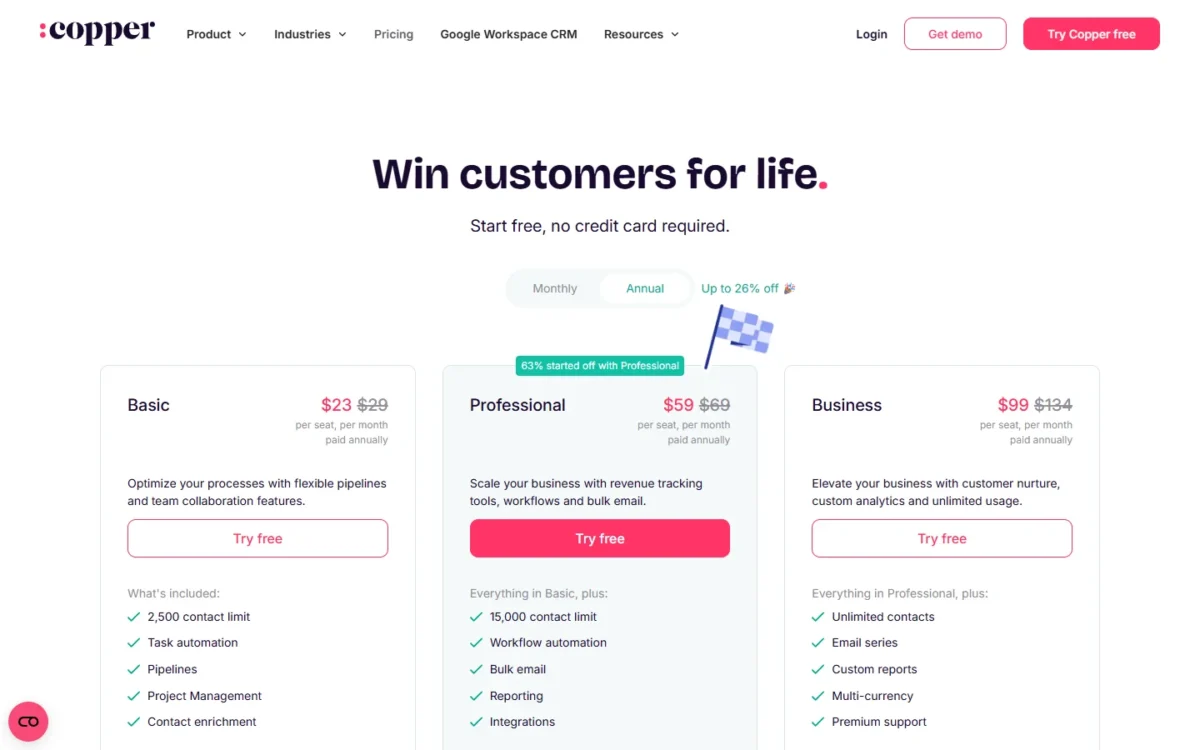
Copper charges for flexibility: monthly billing adds $69 – $59 = $10 per seat per month on Professional and $134 – $99 = $35 on Business. Every Copper plan and fee is covered in Copper’s plans and billing in detail.
Year-One Cost for 5 and 10 Seats
Both teams below are example sizes; every price comes from each vendor’s pricing page. On licenses alone, Insightly Professional is the cheaper automation plan at both team sizes; Insightly’s two labelled fees can reverse that.
| Team | Insightly Professional | Insightly labelled fees | Copper Professional, annual | Copper Professional, monthly |
|---|---|---|---|---|
| 5 seats | $49 x 5 x 12 = $2,940 | $1,500 + $3,000 = $4,500 | $59 x 5 x 12 = $3,540 | $69 x 5 x 12 = $4,140 |
| 10 seats | $49 x 10 x 12 = $5,880 | $1,500 + $3,000 = $4,500 | $59 x 10 x 12 = $7,080 | $69 x 10 x 12 = $8,280 |
Sources: Insightly pricing page, Insightly Premier Support and Success and Copper pricing page, checked October 2026.
Assumptions: list prices in USD, before tax; Premier at its $3,000 annual minimum, because 20% of either license total is lower; no AppConnect, Insightly Marketing or Copper add-ons.
Insightly’s pages support two readings. Its All-in-One bundle table marks Guided product onboarding and Premier support and success “required”. Its CRM FAQ says every user gets phone and email support and can “upgrade” to Premier.
Without the fees, Insightly saves $59 x 5 x 12 – $49 x 5 x 12 = $600 at five seats. With them, $1,500 + $3,000 = $4,500 outweighs that saving, and Copper’s annual plan is cheaper. At ten seats the saving is $59 x 10 x 12 – $49 x 10 x 12 = $1,200, which $4,500 also outweighs.
Ask Insightly’s sales team which reading your quote follows. On Copper the choice is billing: five Professional seats paid monthly cost $69 x 5 x 12 – $59 x 5 x 12 = $600 more a year.
What each plan gates and when you upgrade
Copper’s first upgrade arrives sooner for a sales team, because Basic lacks leads and opportunities; Insightly’s is driven by automation and roles.
| Move | Upgrade when you need |
|---|---|
| Copper Basic to Professional | Leads, opportunities, workflow automation, reports or more than 2,500 contacts |
| Copper Professional to Business | More than 15,000 contacts, custom reports, email series or Okta single sign-on |
| Insightly Plus to Professional | Workflow automation, lead routing, custom objects, more than 2 permission roles or more than 100,000 records |
| Insightly Professional to Enterprise | Sandboxes, quotes, SAML single sign-on, audit logging or more than 250,000 records |
Sources: Insightly pricing page and Copper pricing page, checked October 2026.
Copper Basic is a contact-and-project tool, so most sales teams should budget for Professional.
Integrations, Support and Security
Copper connects LinkedIn and Zapier on every plan, and Zapier links it to 5,000+ other apps; Mailchimp, DocuSign, QuickBooks, PandaDoc and Slack join from Professional.
Insightly lists Google, Microsoft 365, PandaDoc, QuickBooks and Xero integrations and a REST API on its CRM plans. Its AppConnect builder is a separate product at $249 per account per month, billed annually, plus a required $3,000 technical setup.
Every Insightly user gets phone support (Monday to Friday, 9 a.m. to 4 p.m. PT) and email, with responses typically within 24 hours. Every Copper plan includes live chat, a help center, office hours and webinars.
Where Copper’s own pages disagree, here is what each states:
- Premium support: on the Business card; “Not included” in the plan matrix.
- Personal onboarding: “Not included” in the matrix; “on eligible annual plans” on the homepage.
- Single sign-on: Okta on Business in the matrix; SAML Single Sign-On (Okta) on Basic in the help center plan guide.
- Custom fields: 50 on Professional in the matrix; Unlimited on Professional in the help center.
Insightly’s security and compliance page names a SOC 2 Type II report and HIPAA compliance as a Business Associate. Copper’s security page states encryption in transit and at rest, but names neither.
Verdict: Security documentation
A team that needs a SOC 2 report or HIPAA Business Associate compliance should favor Insightly, or ask Copper’s sales team first.
Insightly vs Copper: Pros and Cons
Each point holds at the plan named.
Insightly pros and cons
Pros
- 100,000 records on Plus, against 2,500 contacts on Copper Basic
- Custom objects and 100 custom fields from Professional
- Advanced reports and dashboards on the $29 Plus plan
- Microsoft 365 integration listed on every plan
Cons
- Annual billing only
- $1,500 onboarding and Premier support labelled “required” in the bundle table
- Workflow automation starts on Professional, not Plus
- Only 2 role-based permissions on Plus
Copper pros and cons
Pros
- Gmail, Calendar, Contacts and Drive sync on every plan
- Monthly billing on every plan
- Email series on Business, with no separate marketing product
- No published onboarding or support fee
Cons
- 2,500-contact cap on Basic
- Leads and sales opportunities “Not included” on Basic
- Custom reports only on Business
- No Microsoft 365 integration listed on the pricing page
Which Is Better for Your Needs?
Match your first priority to a row. If Copper stays on your list beside a different CRM, open HubSpot vs Copper.
| Your priority | Better fit | Reason | Trade-off |
|---|---|---|---|
| Team lives in Gmail and Calendar | Copper | Gmail and Calendar sync on Basic | Leads need Professional |
| Team runs on Microsoft 365 | Insightly | MS 365 listed on every plan | Annual billing only |
| Custom objects or complex data | Insightly | Custom objects from Professional | Calculated fields need Enterprise |
| Lowest year-one automation cost | Depends | Insightly’s license is cheaper | The labelled fees reverse it |
| Month-to-month billing | Copper | Monthly price on every plan | Costs more than annual billing |
| Built-in email sequences | Copper | Email series on Business | Business is the top plan |
| Reports on the cheapest plan | Insightly | Advanced reports on Plus | Insight cards need Professional |
Sources: Insightly pricing page and Copper pricing page, checked October 2026.
Skip Insightly if you need monthly billing or cannot absorb $1,500 + $3,000 in first-year fees. Skip Copper if you need a Microsoft 365 integration listed on the pricing page or need leads on the $23 plan.
Leaning toward Copper but want one more matchup? Compare Copper vs Streak before you decide.
Switching Between Insightly and Copper
Moving either way means exporting files and importing them; into Copper, import Companies, then People, then Opportunities. The guides below name the limits: Insightly’s export guide lists what does not export, and Copper’s says activities need a one-time export request to Copper Support.
From Insightly to Copper
- An admin grants export permission, then each object exports to CSV. Attachments, events, comments and saved emails do not export (Insightly export guide).
- Create custom fields in Copper first, then import Companies, People and Opportunities in that order, in files up to 3MB. Revert Import undoes a bad run (Copper import guide).
From Copper to Insightly
- An admin exports people, companies, opportunities, projects, tasks and leads as Excel files; activities need a one-time export from Copper Support (Copper export guide).
- Import the files into Insightly, up to 25,000 records per import on Plus. Insightly updates existing records by Record ID, never by name (Insightly import guide).
Leaving Insightly loses saved emails, and leaving Copper needs a support request for activities, so run every export before the old subscription ends. Still unsure about leaving Insightly? Read HubSpot vs Insightly first.
How I Compared Insightly and Copper
I read both vendors’ pricing pages, plan matrices, import and export help articles, integrations pages and security pages on October 21, 2026. I compared the first plan with workflow automation on each side, Professional on both, and built the year-one totals from list prices.
The cost math and verdicts are my analysis. Neither vendor’s CRM plan list shows a workflow run limit, Insightly publishes no month-to-month billing price, and Copper publishes no daily bulk-email cap.
FAQ
Does Insightly or Copper have a free plan?
No. Neither pricing page lists a free plan, and both offer a 14-day free trial with no credit card. Copper’s trial runs on its Business plan, so it shows custom reports and email series that Basic and Professional buyers do not keep.
What is Copper most similar to?
Copper is a CRM for relationship-focused service businesses that runs inside Google Workspace, so its closest rivals are inbox-centered CRMs. My ranked list of CRMs that compete with Copper sorts them by why teams leave Copper.
Final Verdict: Insightly or Copper?
There is no overall winner. Copper is the pick for a team that works in Gmail and Calendar and wants monthly billing. Insightly is the pick for a team that needs records, custom objects and reports at a lower annual seat price, and accepts annual billing and the $1,500 + $3,000 fees if its quote includes them.
Choose Insightly if
- You need custom objects and 100 custom fields at $49 per user per month, billed annually
- A manager needs reports and dashboards on the $29 Plus plan
- Your team works in Microsoft 365
Choose Copper if
- Your team lives in Gmail and Google Calendar
- You want monthly billing, at $69 per seat on Professional
- You want email series inside the CRM on Business
Neither suits a team that needs a free plan; my ranked list of CRM software widens the shortlist.






Pingback: Salesforce vs Copper (2026): Price, Gmail Fit & Verdict