

Keap fits a service business that wants its CRM, deal pipeline, invoices, payments and US texting in one plan, with 2 users and a required done-for-you setup. ActiveCampaign fits a team whose main job is email marketing automation: Starter costs $15 a month for 1,000 contacts, billed yearly.
The price gap in this Keap vs ActiveCampaign decision is large. Keap’s single plan starts at $299 a month, billed monthly, in the Internet Archive’s October 5, 2026 copy of its pricing page. ActiveCampaign Pro covers 3 seats for $149 a month at 2,500 contacts, billed yearly.
Quick verdict
The deciding difference: Keap sells one all-in-one plan with a pipeline, quotes, invoices and payments built in, plus a required implementation package. ActiveCampaign sells four email-first plans priced by contact band and adds the pipeline as an Enhanced CRM add-on.
Pick Keap if you bill clients from your CRM and want the setup built for you. Pick ActiveCampaign if email campaigns and automation are the work and the budget is tight.
The trade-off: Keap costs more from day one, and leaving an annual contract early costs $299. ActiveCampaign’s low entry price leaves out the pipeline, SMS and extra seats, which carry no printed price.
In This Article (12 sections)
Keap vs ActiveCampaign at a Glance
Keap and ActiveCampaign package the same CRM job in opposite ways: one plan with everything included against four plans that add features as you climb.
| Attribute | Keap | ActiveCampaign |
|---|---|---|
| Best for | Service businesses that sell, invoice and get paid in one tool | Teams that run email marketing automation |
| Starting price | $299 a month, billed monthly (archived October 5, 2026) | $15 a month for 1,000 contacts, billed yearly (Starter) |
| Users included | 2; extra users $39 a month each | 1 on Starter and Plus, 3 on Pro, 5 on Enterprise |
| Deal pipeline | Included | Add-on: Enhanced CRM, Plus and higher |
| Payments and invoicing | Quotes, invoices, checkout forms, recurring payments | Ecommerce integrations; recurring payments on Pro and higher |
| Setup | Required paid implementation package | Free onboarding, no setup fee |
| Main limitation | High entry price and a $299 early termination fee on an annual contract | Pipeline, SMS and extra seats cost extra |
Sources: Keap pricing page, ActiveCampaign pricing page and ActiveCampaign plan overview, checked October 2026.
Two pricing philosophies sit behind those rows, so the next question is which difference changes the choice for a small team.
Key Differences Between Keap and ActiveCampaign
Four differences decide most choices between the two, and each favors a different kind of business.
- Plan structure: Keap sells the whole platform as one plan; ActiveCampaign splits features across Starter, Plus, Pro and Enterprise.
- Sales and billing tools: Keap includes the pipeline, quotes, invoices and payments; ActiveCampaign adds the pipeline as an add-on and connects ecommerce platforms.
- Setup: Keap requires a paid implementation package; ActiveCampaign has no setup cost.
- Seats: Keap includes 2 users; ActiveCampaign includes 1, 3 or 5 seats depending on the plan.
Keap’s one-plan model removes the plan-gate question: a solo coach gets the same features as a ten-person agency. The bill moves with users, contacts and texting, plus the required implementation package. My full Keap review covers that plan on its own.
ActiveCampaign’s tiers work the other way: you pay for the depth you use, with landing pages from Plus and predictive sending from Pro. The ActiveCampaign review with its plan gates walks through each tier.
Keap vs ActiveCampaign: Features Compared
Keap covers sales and billing jobs on its one plan, while ActiveCampaign goes deeper on email automation as you move up its plans.
| Feature | Keap | ActiveCampaign |
|---|---|---|
| Multi-step automation | Included (Keap plan) | Included from Starter |
| Actions per automation | No limit listed on keap.com/ | Limited: 5 on Starter; unlimited from Plus |
| Predictive sending | Not listed on keap.com/ | Pro and higher |
| Conditional content | Not listed on keap.com/ | Pro and higher |
| Lead scoring | Included | Add-on: Pipelines, Plus and higher |
| Deal pipeline | Included | Add-on: Enhanced CRM, Plus and higher |
| Quotes and invoices | Included | Not listed on activecampaign.com/ |
| Recurring payments | Included | Pro and higher |
| Text messaging | Included: Tier 1, US only | Add-on: SMS, Plus and higher |
| Landing pages | Included | Plus and higher |
| Custom user permissions | Included | Plus and higher |
| Single sign-on (SSO) | Not listed on keap.com/ | Enterprise |
Sources: Keap pricing page and ActiveCampaign pricing page, checked October 2026.
The matrix tilts toward Keap on sales rows and toward ActiveCampaign on marketing rows; the criteria below say which rows matter to whom.
Marketing automation
ActiveCampaign Starter caps each automation at 5 actions, Plus removes the cap, and Pro adds predictive sending, conditional content and automation A/B tests. Keap ships preset Easy Automations and an Advanced Automations builder with lead scoring on its one plan.
The 5-action cap is the first wall a Starter user hits: any longer sequence needs Plus. Starter also stops at 5 lists and 25,000 contacts.
Keap’s builder aims at the whole customer lifecycle: form-to-appointment follow-up, appointment reminders, new deals from new leads and invoice reminders. That suits a service business more than an email marketer. My guide to how marketing automation works explains the trigger-and-action idea.
Verdict: marketing automation
ActiveCampaign Pro fits a marketing-led team that wants send-time optimization and one email with a version for each contact. Keap fits a team whose automations end in a booked call or a paid invoice. The caveat: Starter caps each automation at 5 actions, so any longer sequence needs Plus.
CRM and sales pipeline
Keap includes multiple customizable pipelines, automations triggered by pipeline stages and reports such as deal revenue forecasting. ActiveCampaign sells the pipeline as the Pipelines or Sales Engagement Enhanced CRM add-on on Plus, Pro and Enterprise.
ActiveCampaign Starter has no route to a deal pipeline, because the add-ons need Plus, and lead scoring sits inside the Pipelines add-on too. The add-on carries no printed price, so the cost of ActiveCampaign as a sales CRM stays open until you ask.
Verdict: CRM and sales pipeline
Keap fits teams that sell one-to-one: the pipeline, lead scoring and forecasting reports are in the plan you already pay for. ActiveCampaign fits teams that track a handful of deals and accept an add-on price they have to request.
Payments, invoicing and text messaging
Keap includes quotes, one-time and recurring invoices, checkout forms, order bumps, promo codes, its own US payment processor and processors such as PayPal, Stripe and Eway. ActiveCampaign connects ecommerce platforms instead: Shopify, Square and WooCommerce on every plan, PayPal and Stripe from Plus, recurring payments from Pro.
That split decides the choice for a consultant who bills monthly retainers. In Keap, a quote turns into an invoice and billing automation chases past-due payments. ActiveCampaign lists no quotes or invoices, so a retainer business keeps a separate billing tool.
Texting follows the same pattern. Keap includes Tier 1 (500 messages and 100 voice minutes) for US users, with higher tiers from $24 to $279 a month. ActiveCampaign sells SMS as an add-on on Plus and higher.
Verdict: payments and texting
Keap fits service businesses that bill clients and text them in the US. ActiveCampaign fits online stores that already take payments in Shopify or WooCommerce and want email to follow the order.
Email marketing and deliverability
ActiveCampaign sets a monthly send allowance per plan: 10 times your contact limit on Starter and Plus, 12 times on Pro and 15 times on Enterprise. Keap prints no send cap and includes an email deliverability health dashboard that flags spam issues.
ActiveCampaign adds inbox preview by plan: 5 previews a month on Plus and Pro, unlimited on Enterprise, none on Starter. Keap’s missing cap is a question for its sales team before a heavy-sending business signs.
Integrations and API
Both products ship an API, webhooks and a Zapier connection, so the real question is native connectors. ActiveCampaign lists 1,000+ apps and integrations and App Studio for low-code builds. Keap counts its reach through its native Zapier integration, over 4,000 apps.
The two counts are not built the same way. Keap’s 4,000+ is its reach through Zapier. ActiveCampaign says its 1,000+ apps and integrations include many native integrations, and that most integrations connect through its native connections or Zapier.
Check that the two or three apps you rely on connect natively before choosing on a number.
Verdict: integrations
Comparable for most small teams. ActiveCampaign includes its Calendly & Eventbrite and Slack connections on Plus and higher; Keap’s reach runs through its Zapier integration, over 4,000 apps. Salesforce and Microsoft Dynamics connectors sit on ActiveCampaign Enterprise.
With the features settled, the bill decides: what each one costs at your contacts and seats.
Keap vs ActiveCampaign Pricing
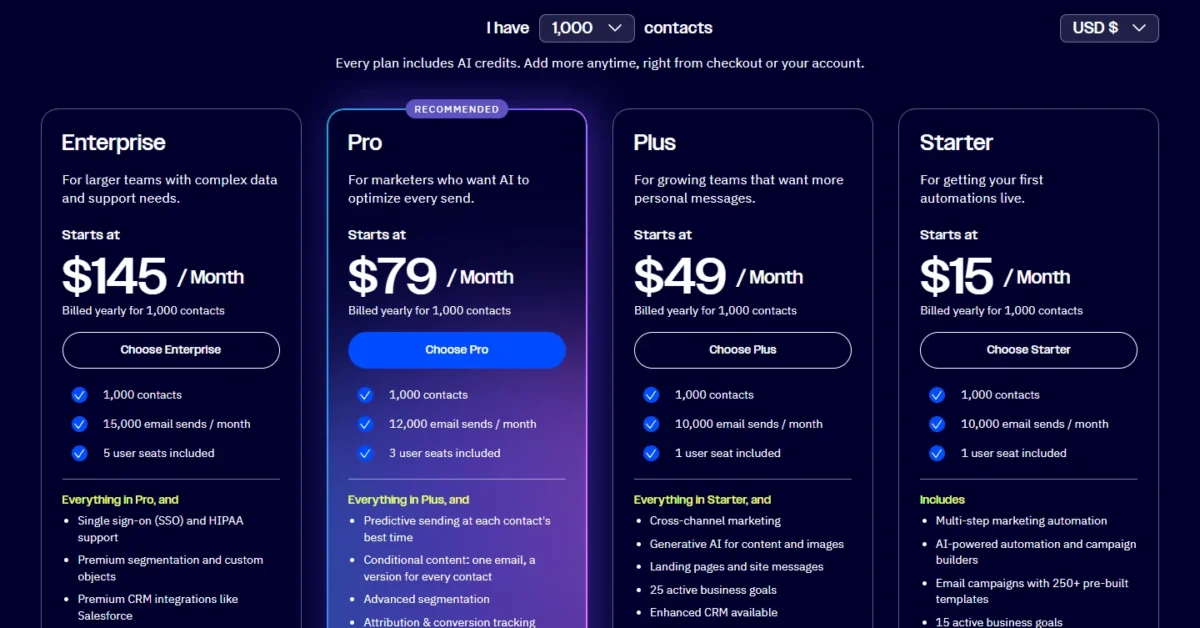
ActiveCampaign starts at $15 a month for 1,000 contacts on Starter, billed yearly, with Plus at $49, Pro at $79 and Enterprise at $145. Keap’s one plan starts at $299 a month, billed monthly, adds $39 a month per user after the first 2, and requires an implementation package.
The billing bases differ. Keap prints a monthly-billed starting price and also sells annual contracts.
ActiveCampaign prints yearly-billed prices, though monthly plans exist. I label the basis of every price below.
| Plan tier | Keap | ActiveCampaign |
|---|---|---|
| Entry price | From $299 a month, billed monthly (archived October 5, 2026) | Starter $15 a month at 1,000 contacts, billed yearly |
| First plan with a pipeline option | Keap plan, pipeline included | Plus: $49 at 1,000, $95 at 2,500, $145 at 5,000, $189 at 10,000 contacts, plus the add-on |
| First plan with 3 users | Keap plan plus 1 extra user at $39 a month | Pro: $79 at 1,000, $149 at 2,500, $205 at 5,000, $375 at 10,000 contacts |
| Plan with SSO and HIPAA support | Not listed on keap.com/ | Enterprise: $145 at 1,000, $255 at 2,500, $375 at 5,000, $589 at 10,000 contacts |
| Extra user | $39 a month per user | Not published on the pricing page |
| Setup | Required implementation package; price not published on keap.com/ | Free onboarding, no setup fee |
| Free trial | 14 days, no card; 25 emails, no payments or texts | 14 days, no card; 100 contacts and 100 emails |
Sources: Keap pricing page (starting price from the Internet Archive’s copy of October 5, 2026), ActiveCampaign pricing page (US view, monthly prices billed yearly, read October 21, 2026), ActiveCampaign FAQ, checked October 2026.
Sticker prices mislead here. ActiveCampaign’s cheapest plan has no pipeline option and one seat, while Keap’s starting price already includes the pipeline, payments and two users. My breakdown of every ActiveCampaign plan and contact band covers the larger bands.
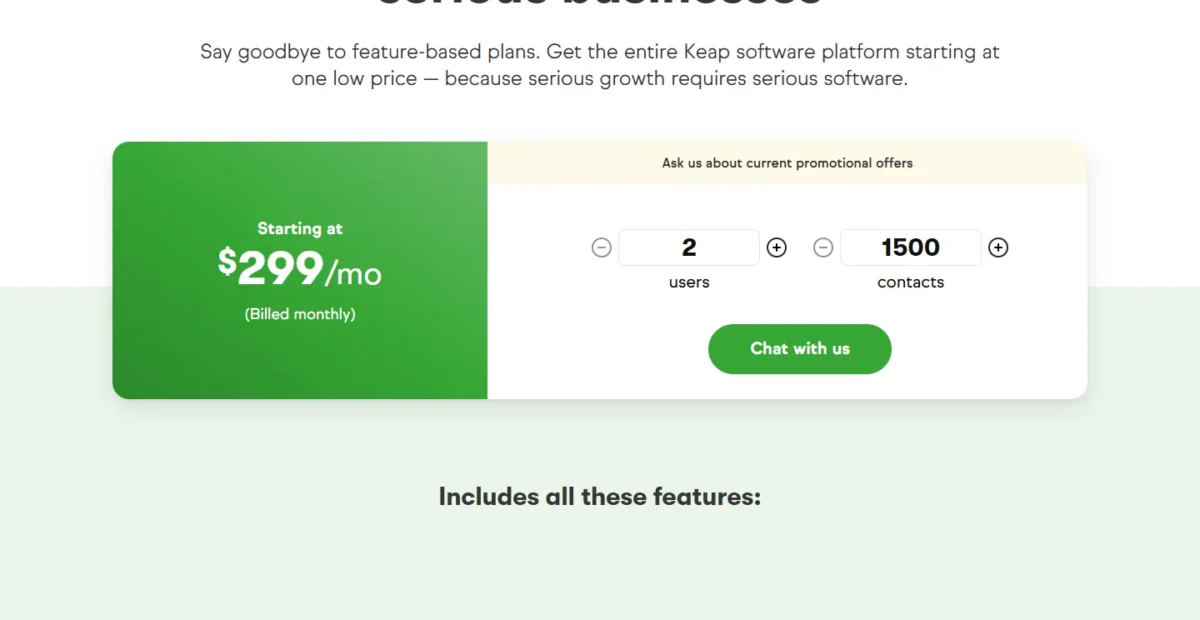
Keap prices larger lists in tiers on a contact selector, with the cost per contact falling as the list grows. A team above the starting tier should run its own count through that selector before comparing.
What a 3-user team pays in the first year
A 3-user team pays at least $299 + $39 = $338 a month on Keap, against $149 a month on ActiveCampaign Pro at 2,500 contacts, billed yearly.
| Cost line | Keap (3 users, at least: starting price) | ActiveCampaign Pro (2,500 contacts, 3 seats) |
|---|---|---|
| Plan price | From $299 a month, billed monthly | $149 a month, billed yearly |
| Third user | $39 a month | Included in 3 seats |
| First year of plan and seats | At least $299 x 12 = $3,588 plus $39 x 12 = $468, which is at least $4,056 | $149 x 12 = $1,788 |
| One-time setup | Required implementation package, price not published on keap.com/ | Free onboarding |
| Deal pipeline | Included | Add-on, price not published on the pricing page |
| Texting | Tier 1 included, US only | SMS add-on, price not published on the pricing page |
Sources: Keap pricing page and ActiveCampaign pricing page, checked October 2026. Assumptions: 3 users, US list prices in USD, Keap at its starting price as a floor (larger contact tiers cost more), ActiveCampaign at 2,500 contacts billed yearly, no texting overage, tax, add-ons or promotions.
Even at its starting price, Keap’s first year costs more than twice ActiveCampaign Pro’s $1,788, before the implementation package. That gap buys the pipeline, quotes, invoices and texting that Pro either does not list or sells as add-ons.
For a team that would otherwise pay for a billing tool and a pipeline add-on, the real gap is smaller than the sticker gap.
When the cheaper bill is not the cheaper choice
ActiveCampaign’s low entry price holds only inside Starter’s limits: 5 actions per automation, up to 5 lists and 1 seat, with 1 more seat to buy. Landing pages, custom permissions and any pipeline add-on need Plus.
Plus still includes 1 seat, so a second marketer means buying seats at an unprinted price or moving to Pro. ActiveCampaign also does not raise your contact limit automatically: you raise it in Billing & Upgrade.
Keap’s cost moves on three levers. Each user past 2 adds $39 a month, each larger contact tier raises the plan price, and texting past Tier 1 costs $0.015 per message and $0.01 per voice minute.
Keap’s contract is the line to read before signing: cancelling an annual contract before the year ends triggers a $299 early termination fee. ActiveCampaign instead offers a 30-day money-back guarantee.
The price gap is clear; the next question is how much work each takes to get running.
Setup and Ease of Use: Keap vs ActiveCampaign
Keap requires a paid implementation package, while ActiveCampaign has no setup cost and includes free onboarding with every paid plan. Which feels easier depends on whether you want the build done for you.
Keap’s package includes a business mapping session with an automation expert, done-for-you automations, automation templates, data import, migration services and strategy calls. Its price is not on keap.com/pricing, which links to the packages instead. Keap’s own comparison page says its support includes 15 hours of migration services.
ActiveCampaign’s onboarding runs as a live 1:1 session or an AI course, depending on the plan, and most sessions are 60 minutes. Every plan also includes 950+ automation recipes to start from.
Keap says you can build an automation in “as little as 3 minutes”. ActiveCampaign says you can launch campaigns “within days”. Treat both as marketing claims and run your own sequence in each trial.
Keap’s trial sends at most 25 emails, takes no payments or texts, and needs DKIM set up first. ActiveCampaign’s trial covers 100 contacts and 100 emails with Professional-tier features.
Once each tool is running, the next question is who helps when something breaks.
Support, Security and Contracts
Keap’s one plan includes US-based phone support during weekday business hours, 24/7 chat and a dedicated Customer Success Manager. ActiveCampaign gives chat and ticket support on every plan, priority email and chat on Pro, and a dedicated account team with an uptime SLA on Enterprise.
For a small team, Keap’s phone line and named success manager are the bigger support promise at the entry price. ActiveCampaign reaches a dedicated team only on Enterprise, at $145 a month for 1,000 contacts, billed yearly.
On security, ActiveCampaign Enterprise includes single sign-on and HIPAA support, and custom user permissions start on Plus. Keap includes custom user roles, groups and permissions, and lists no SSO on keap.com/pricing.
Cancelling Keap takes a phone request at least 10 days before the next invoice. ActiveCampaign bills annual plans as one yearly payment and prorates a plan upgrade made mid-cycle.
Keap vs ActiveCampaign: Pros and Cons
Keap’s strengths are bundled sales and billing tools; ActiveCampaign’s are a low entry price and email depth.
Keap pros and cons
Pros
- Quotes, invoices, recurring payments and checkout forms on the one plan, so a service business can drop a billing tool
- Pipelines with stage-triggered automations and revenue forecasting, with no add-on to price
- 2 users included, enough for an owner and an assistant
- US phone support, 24/7 chat and a dedicated Customer Success Manager
Cons
- A required implementation package with no price on keap.com/pricing
- $39 a month for each user past 2, so every hire raises the bill
- A $299 early termination fee on an annual contract
- Text broadcasts and automated texts work in the US only
ActiveCampaign pros and cons
Pros
- $15 a month for 1,000 contacts on Starter, billed yearly, the lower entry point of the two
- Pro adds predictive sending, conditional content and automation A/B tests for marketing-led teams
- Free onboarding plus free migration of up to 10 objects on qualifying plans
- SSO and HIPAA support on Enterprise for regulated teams
Cons
- The deal pipeline is a paid add-on from Plus, with no printed price
- Starter stops at 5 actions per automation and 5 lists
- Starter and Plus include 1 seat, so a two-person team buys seats or moves to Pro
- Quotes and invoices are not listed among its features
Which Is Better for Your Needs?
Keap is better for invoicing, a built-in pipeline and done-for-you setup; ActiveCampaign is better for a low entry price, email personalization and SSO.
| Your priority | Better fit | Reason | Trade-off |
|---|---|---|---|
| Invoicing and payments inside the CRM | Keap | Quotes, invoices and recurring payments are in the one plan | Required implementation package |
| Lowest entry price for a small list | ActiveCampaign | Starter is $15 a month at 1,000 contacts, billed yearly | 5 actions per automation, 1 seat |
| Send-time optimization and per-contact email versions | ActiveCampaign | Pro includes predictive sending and conditional content | Pipeline is an add-on |
| Deal pipeline without add-ons | Keap | Pipelines and forecasting reports are included | $39 a month per user after 2 |
| Setup done for you | Keap | Implementation includes done-for-you automations and migration | Paid package |
| SSO or HIPAA support | ActiveCampaign | Enterprise lists both | $145 a month and up at 1,000 contacts, billed yearly |
| Integration breadth | Tie | Both offer an API, webhooks and Zapier | Native catalogs differ |
Sources: Keap pricing page and ActiveCampaign pricing page, checked October 2026.
A coach or consultant who sends proposals and bills retainers should pick Keap. Pick ActiveCampaign instead if billing already lives in Shopify, Stripe or an accounting tool.
If Keap is your front-runner but another CRM is still on your list, see Zoho CRM vs Keap.
A newsletter-led creator or a small marketing team should pick ActiveCampaign Plus or Pro. Pick Keap instead once you track deals one by one and want the pipeline without a quote request.
Reading ActiveCampaign against HubSpot as well? Open HubSpot vs ActiveCampaign next.
If Keap’s starting price is the obstacle but you still want a sales CRM, the Keap vs Agile CRM comparison weighs Keap against a different option.
Switching Between Keap and ActiveCampaign
ActiveCampaign exports all contacts to a CSV file; the bullets below list what each direction moves and what it leaves out.
Keap to ActiveCampaign:
- ActiveCampaign names Keap among the platforms its onboarding team migrates from, and migrates the first 10 objects free on qualifying plans.
- Its help guide, “Migrating contacts from Keap (Infusionsoft)”, exports a CSV from Keap’s contacts view and imports it with column mapping.
- Lead scoring, tasks and notes, email history, reporting data and automation steps with no matching function are not migrated.
- Recurring payments need Pro and deals need the Enhanced CRM add-on, so a Keap billing setup is rebuilt elsewhere.
ActiveCampaign to Keap:
- ActiveCampaign exports all contacts to a CSV file with custom fields, tags and lead scores as columns; contact notes cannot be exported.
- Keap’s required implementation includes data import and migration services, so the import is part of the package.
- The same package lists done-for-you automations and integration of third-party tools.
Plan the move around ActiveCampaign’s limits: its migration service leaves out lead scoring, tasks and notes and email history, and its contact notes cannot be exported. Keep a copy of what you need from the old account before you cancel.
How I Compared Keap and ActiveCampaign
I built this comparison from both vendors’ own pages, read in October 2026 for a US visitor in US dollars. For Keap: the pricing page, its starting price from the Internet Archive’s copy of October 5, 2026, plus the automation, pipeline, payments and comparison pages.
For ActiveCampaign: the pricing page at 1,000, 2,500, 5,000 and 10,000 contacts, read on October 21, 2026, plus the plan overview, FAQ, apps, onboarding and help center pages. I set Keap’s one plan against ActiveCampaign Plus and Pro, with Starter as the budget entry and Enterprise for SSO and HIPAA.
The criteria were automation depth, pipeline, payments and texting, email sending, integrations, setup, support and contract terms. Not published: ActiveCampaign’s add-on prices, extra seat price and monthly-billed prices, and Keap’s implementation price and email send cap.
One correction for readers comparing older pages: ActiveCampaign’s own comparison page still prints Plus at $79 a month with 1,000 contacts. The current pricing page shows $49, the figure used here.
FAQ
What happened to Keap?
Keap was acquired by Thryv and is now part of Thryv. ActiveCampaign’s pages still call it “Keap (formerly Infusionsoft)”, so older guides may use either name. Keap’s acquisition FAQ says current subscriptions, service plans and billing remain unchanged, and logins stay the same.
Thryv products are sold separately through a Thryv subscription, and Keap customers get free access to Thryv Academy training.
Does Keap or ActiveCampaign have a free plan?
Neither has a free plan; both offer a 14-day free trial with no credit card. ActiveCampaign says plainly that it offers no free plan, only the two-week trial. Keap sells one paid plan, and its trial caps email at 25 sends with no payments or texts.
Can I use ActiveCampaign as my only CRM?
Yes, on Plus or higher with an Enhanced CRM add-on, which adds deals, pipelines and lead scoring. Starter keeps contact profiles, tags and up to 5 lists but cannot take the add-on. If you want the pipeline in the base price, Keap includes it.
Final Verdict: Keap or ActiveCampaign?
Keap is the pick for a service business that bills clients and wants setup done for it. ActiveCampaign is the pick for an email-led team that wants a low entry price and automation depth.
Choose Keap if
- You invoice clients and collect recurring payments in the CRM
- You want a done-for-you build through the required implementation package
- Two people need logins from day one, both included in the plan
- You rely on US texting and a dedicated business line
Choose ActiveCampaign if
- Email campaigns and automation are the main job
- Your list starts near 1,000 contacts and $15 a month on Starter, billed yearly, fits the budget, with sequences of 5 actions or fewer (longer ones need Plus)
- You need predictive sending or conditional content (Pro)
- You need SSO or HIPAA support (Enterprise)
Skip Keap if: you send newsletters to a list and never invoice, because you would pay for a pipeline and billing tools you do not use.
Skip ActiveCampaign if: you need quotes and invoices in the CRM, since its features list neither.
The main trade-off is money now against tools later. Keap costs more from the first month but bundles the sales and billing stack. ActiveCampaign starts cheap and grows by plan, seat and add-on.
When Salesforce is the other name beside Keap on your shortlist, read Salesforce vs Keap before you decide.
Neither fits if you need a free plan, since both stop at a 14-day trial. A wider shortlist of other CRMs with built-in marketing automation covers that case.
For ActiveCampaign alternatives beyond Keap, my ranking of marketing automation platforms compared adds more options.





