

In the Zoho CRM vs Keap choice, a sales-led US team of 1 to 10 users pays less on Zoho CRM, whose Professional edition costs less than Keap at every size from 1 to 10 users. Professional costs $23 per user per month billed annually, or $35 billed monthly.
Keap starts at $299 a month, billed monthly, for 2 users as of October 5, 2026. New Keap customers also pay a one-time $1,500 implementation charge.
Keap earns that price for an owner-led business that wants email and text marketing, invoices and payments in one plan, with setup done for it.


Quick verdict
The deciding difference: Zoho CRM is a per-user sales CRM you configure edition by edition, while Keap is one marketing, texting and payments plan with setup done for you.
Zoho CRM fits a sales-led team of 1-10 users on cost. For 5 users, Professional costs $23 x 5 x 12 = $1,380 a year, billed annually.
Keap fits an owner-led service, coaching or online business that sells by email and text. For 5 users, the Keap subscription costs $299 x 12 = $3,588 plus $39 x 3 x 12 = $1,404, which is $4,992 a year, before the one-time $1,500 implementation.
The trade-off: Zoho buyers climb editions or add apps for nurture email and payments, while Keap buyers pay that larger bill up front.
In This Article (11 sections)
Zoho CRM vs Keap at a Glance
Zoho CRM charges for every user across four paid editions plus a Free edition. Keap sells one plan per account with 2 users and a required setup package, so the price gap comes from the model, not a discount.
| Attribute | Zoho CRM | Keap |
|---|---|---|
| Best for | Sales-led teams that want per-user pricing and a configurable pipeline | Owner-led businesses that market by email and text and take payments online |
| Pricing model | Per user, by edition | One plan per account, 2 users included |
| Entry paid price | Standard: $14 per user per month billed annually, $20 billed monthly | $299 a month, billed monthly (as of October 5, 2026) |
| Plan compared | Professional: $23 per user per month billed annually, $35 billed monthly | The single Keap plan |
| Free plan or trial | Free for 3 users; 15-day trial, no credit card | 14-day trial, no credit card; 25 emails, no payments, no texts |
| Main limitation | Auto-responders start on Enterprise; invoices start on Professional | No published annual price; extra users and contacts cost more |
Sources: Zoho CRM pricing page, Zoho CRM features page, Keap pricing page and Keap automation page, checked October 2026; Keap’s $299 price from the Internet Archive copy of keap.com/pricing dated October 5, 2026.
Zoho’s bill moves with headcount; Keap’s starts high and then climbs with seats and contacts. Four design choices explain why.
Key Differences Between Zoho CRM and Keap
Four differences decide this choice for a 1-10 person business: how each prices seats, how far its marketing reaches, how it collects money and who does the setup.
- Pricing model: Zoho CRM bills each user at the edition rate. Keap bills the account with 2 users included and charges $39 a month per added user, so a solo owner pays for two seats.
- Marketing reach: Keap’s one plan holds broadcasts, newsletters, landing pages, funnels and U.S. text marketing. Zoho CRM sends mass email and campaigns from Standard and lists Zoho Campaigns and Mailchimp as its email marketing integrations, but auto-responders and customer segmentation wait for Enterprise.
- Collecting money: Keap sends quotes and recurring invoices and takes payments through Keap Pay, its native U.S. processor. Zoho CRM invoices from Professional and lists finance integrations such as PayPal and QuickBooks.
- Setup: Keap requires an implementation package covering data import, migration and automations; the Keap CRM review judges Keap on its own. Zoho CRM gives you a migration wizard, CSV import and a bulk-load API; the Zoho CRM review weighs Zoho alone.
Pricing is the widest of these gaps, so the next question is what your team size pays on each.
Zoho CRM vs Keap Pricing
A 5-user team pays $23 x 5 x 12 = $1,380 a year for Zoho CRM Professional billed annually, or $35 x 5 x 12 = $2,100 billed monthly.
On Keap, the same 5 users cost $299 x 12 = $3,588 plus $39 x 3 x 12 = $1,404 in subscription, plus the $1,500 implementation, in year one.
Keap’s smallest bill, for 2 users, comes to $299 x 12 = $3,588 plus the $1,500 implementation, which is $5,088 in year one.
Keap costs more than Zoho CRM Professional at every team size from 1 to 10 users. Keap’s pricing page tells buyers to “Say goodbye to feature-based plans” and sells one platform plan.
Comparable plans side by side
Set Keap’s single plan against Zoho CRM Professional, the first Zoho edition with quotes, invoices and Blueprint process automation next to mass email and marketing campaigns. Zoho Standard is the cheaper fit when a team needs only pipelines, workflows, cadences and forecasting.
| Plan tier | Zoho CRM | Keap |
|---|---|---|
| Entry paid plan | Standard: $20 per user per month billed monthly, $14 billed annually | One plan: $299 a month billed monthly, 2 users included |
| Plan compared | Professional: $35 per user per month billed monthly, $23 billed annually | The same single plan |
| Upper plans | Enterprise $50 or $40, Ultimate $65 or $52 per user per month (monthly or annual billing) | None: one platform plan |
| Each extra user | The edition’s per-user price | $39 a month per user beyond 2 |
| Annual billing | “Save up to 34%” | Not published |
| Required setup | Not listed on zohocrm-pricing.html | Implementation package, required for new customers |
Sources: Zoho CRM pricing page, monthly and annual views, checked October 2026; Keap pricing page, checked October 2026, with the $299 price from its Internet Archive copy of October 5, 2026.
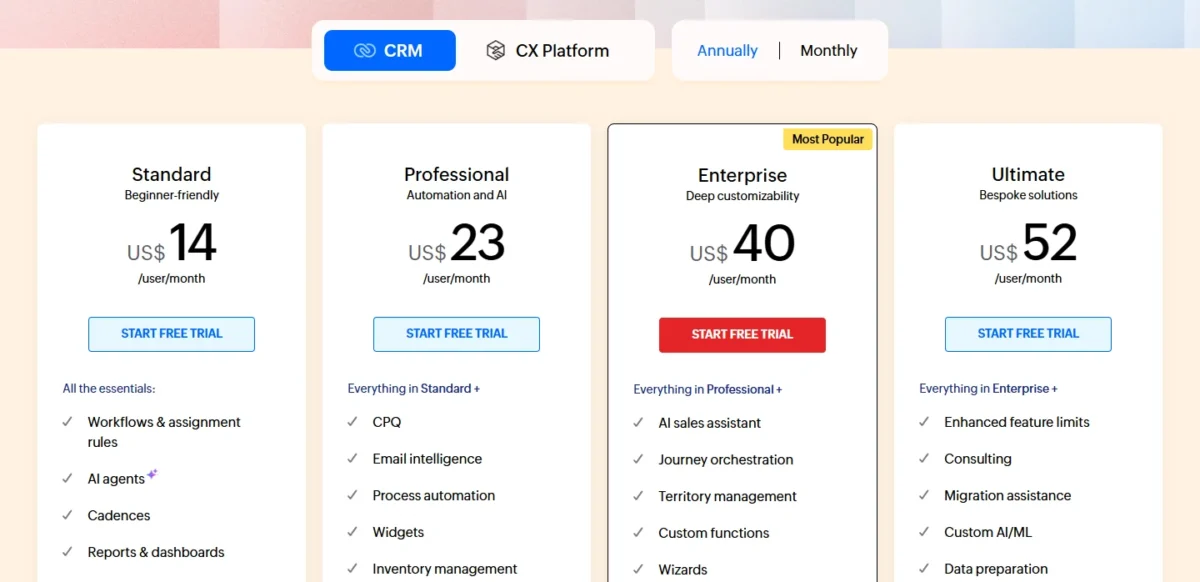
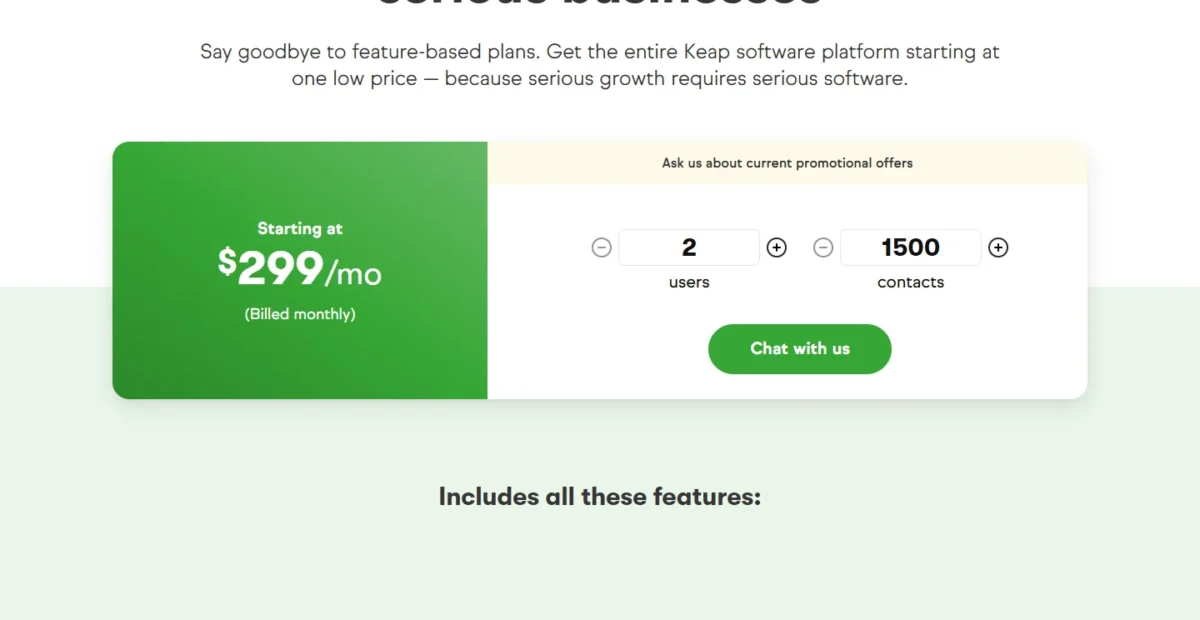
Put plainly, $299 a month buys Keap’s 2 seats, while $35 x 8 = $280 a month covers 8 Zoho CRM Professional users billed monthly. Zoho Professional’s lower price leaves out auto-responders and customer segmentation, which start on Enterprise, while Keap’s plan includes contact segmentation by tags and takes payments through Keap Pay.
What a 2-, 5- and 10-user team pays in year one
Zoho CRM’s year-one cost is the per-user price times users times 12 months:
| Team size | Standard, billed annually | Professional, billed annually | Professional, billed monthly |
|---|---|---|---|
| 2 users | $14 x 2 x 12 = $336 | $23 x 2 x 12 = $552 | $35 x 2 x 12 = $840 |
| 5 users | $14 x 5 x 12 = $840 | $23 x 5 x 12 = $1,380 | $35 x 5 x 12 = $2,100 |
| 10 users | $14 x 10 x 12 = $1,680 | $23 x 10 x 12 = $2,760 | $35 x 10 x 12 = $4,200 |
Sources: Zoho CRM pricing page, monthly and annual views, checked October 2026.
Keap’s year one is 12 months of the plan, plus $39 a month for each user beyond the 2 included, plus the one-time implementation package:
| Team size | Users beyond the 2 included | 12 months of subscription | One-time implementation | Year-one total |
|---|---|---|---|---|
| 2 users | 0 | $299 x 12 = $3,588 | $1,500 | $299 x 12 + $1,500 = $5,088 |
| 5 users | 3 | $299 x 12 = $3,588 plus $39 x 3 x 12 = $1,404, which is $4,992 | $1,500 | $299 x 12 + $39 x 3 x 12 + $1,500 = $6,492 |
| 10 users | 8 | $299 x 12 = $3,588 plus $39 x 8 x 12 = $3,744, which is $7,332 | $1,500 | $299 x 12 + $39 x 8 x 12 + $1,500 = $8,832 |
Sources: Keap pricing page, checked October 2026, with the $299 price from its Internet Archive copy of October 5, 2026; Keap vs. HubSpot page for the implementation charge, checked October 2026.
Assumptions: list prices in US dollars, with Keap texting at the included Tier 1. Zoho list prices exclude local taxes. Keap prices added contacts in tiers, set by the contact count you enter on its pricing page.
Excluded: payment processing fees, Zoho Campaigns, Keap’s larger contact and text tiers, and any promotion.
Even before implementation, Keap’s 10-user subscription costs more than Zoho CRM Professional for 10 users billed monthly. Each Keap user beyond the second costs $39 a month. That is $39 – $35 = $4 more than a Professional user billed monthly, and $39 – $23 = $16 more than one billed annually.
A solo owner still pays Keap’s 2-user price, because the plan starts with 2 user licenses. On Zoho, that owner pays $23 x 1 x 12 = $276 a year for Professional billed annually, or nothing on the Free edition for up to 3 users.
The cheaper product stops being the better value when the business runs on campaigns. A Zoho buyer who also wants auto-responders, an SMS app and a payment app is pricing an Enterprise upgrade or extra tools that these tables leave out.
Upgrade triggers differ too. On Zoho, quotes, invoices, Blueprint or more than 10 custom fields per module push a team from Standard to Professional. Custom modules, auto-responders and Journey orchestration push it to Enterprise.
On Keap, the bill rises with each extra user and each larger contact tier.
Keap’s implementation fee, extra seats and contract terms
Keap adds four costs to its base plan. They are a required implementation package, $39 a month per user beyond the 2 included, contact tiers and an early termination fee on annual contracts.
Keap requires a personalized implementation package for all new customers, a one-time charge of $1,500. The package covers:
- A business mapping session with an automation expert
- Done-for-you automations and Proven Automation Templates
- Data import and migration services
- Weekly, monthly and quarterly strategy calls with an expert
- Integration of third-party tools
That is good value for an owner with no time to build automations, and money spent twice for a team whose follow-up sequences already exist. Keap also invites buyers to ask how to save on implementation by chat or phone, so ask before you sign.
Contacts cost extra, priced in tiers where the cost per contact falls as volume rises. The pricing page text does not list how many contacts the $299 price includes, so get that figure for your list size in writing.
Keap publishes no annual price either; an annual contract appears only in its cancellation terms. Cancel one before the one-year term ends and Keap charges a $299 early termination fee, and any cancellation needs a call at least 10 days before the next invoice date.
On Keap, texting beyond the included Tier 1 (500 messages, 100 voice minutes) costs $24 to $279 a month by tier. Overages run $0.015 per message and $0.01 per voice minute.
Zoho annual vs monthly billing
Pay Zoho CRM annually once your seat count is stable. Professional billed monthly costs $35 x 12 = $420 per user per year, against $23 x 12 = $276 billed annually, the 34% case behind Zoho’s “Save up to 34%” label.
Standard drops from $20 to $14 per user per month on annual billing, and Enterprise from $50 to $40.
For Enterprise, Ultimate and the add-ons left out here, the full Zoho CRM pricing breakdown prices every edition.
The price gap only matters if Zoho CRM can do the job, which raises the next question: which Zoho edition matches what Keap includes?
Zoho CRM vs Keap: Features Compared
Zoho CRM Professional covers Keap’s sales side, meaning pipelines, quotes, invoices and process automation, for less money. Keap’s one plan includes landing pages and nurture automation, while Zoho places auto-responders on Enterprise, reaches texting through integrations and lists PayPal and QuickBooks among its finance integrations.
| Feature | Zoho CRM | Keap |
|---|---|---|
| Mass email and campaigns | Standard; Zoho Campaigns and Mailchimp listed as email marketing integrations | Included: broadcasts and newsletters |
| Auto-responders | Enterprise | Included: Easy and Advanced Automations |
| Landing pages and funnels | Not listed on zoho.com/ | Included |
| Text marketing | Through integrations | Included: U.S. only, Tier 1 |
| Quotes and invoices | Professional | Included |
| Native payment processing | Finance integrations: PayPal, QuickBooks, PayU | Included: Keap Pay, U.S. |
| Multiple pipelines | Standard | Included |
| Sales forecasting | Standard | Included: deal revenue forecasting report |
| Process automation | Professional: Blueprint, 3 active | Included: Advanced Automations builder |
| Custom modules | Enterprise: 100 modules | Not listed on keap.com/ |
Sources: Zoho CRM edition comparison, Zoho CRM integrations page, Keap pricing page, Keap automation page and Keap sales pipeline page, checked October 2026.
To match Keap’s plan, a Zoho buyer needs Enterprise for auto-responders and an integration for texting; on payments, Zoho’s row names finance integrations.
Marketing automation and email
Keap is the better fit for a business whose sales start with email campaigns. Its plan includes Easy Automations, the Advanced Automations builder for nurture sequences, broadcasts, newsletters, landing pages, multi-page funnels and lead scoring.
Zoho CRM sends mass email and marketing campaigns from Standard and integrates with Zoho Campaigns and Mailchimp for email marketing. Auto-responders, customer segmentation and marketing attribution start on Enterprise, at $40 per user per month billed annually, where Journey orchestration also sits.
Zoho also caps workflow email notifications at 100 per user license and 5,000 a day on Standard, whichever is lower. Professional raises that to 200 and 10,000.
Keap’s pricing page shows no send limit for its paid plan. Its trial stops at 25 emails and needs DKIM authentication first.
If marketing automation outranks every other need, my list of CRMs built for marketing automation widens the field beyond these two.
Verdict: Marketing automation
Keap fits an owner who sells through nurture sequences, newsletters and funnels, because all three sit in its one plan. Zoho CRM fits a team whose email is sales follow-up and occasional campaigns. The caveat: Zoho’s auto-responders need Enterprise.
Sales pipeline and process automation
Zoho CRM fits a team that wants a structured sales process. Multiple pipelines, sales forecasting and cadences start on Standard, and Blueprint process automation starts on Professional with 3 active Blueprints, rising to 50 on Enterprise.
Blueprint maps a sales process into structured, easy-to-follow steps, which suits a team with several reps and a defined handoff between them. Professional also adds macros and SalesSignals.
Keap’s pipeline is drag-and-drop, with multiple customizable pipelines and automations triggered by pipeline stages. Its reports include deal conversions by stage, average time in stage and deal revenue forecasting, enough for a funnel run by an owner and one or two helpers.
Verdict: Sales process
Zoho CRM Professional fits a team of 3 to 10 sellers that needs a defined process and forecasting, because Blueprint and cadences sit in its edition gates. Keap’s pipeline fits a simple funnel. The caveat: Blueprint is not on Zoho Standard.
Customization and data limits
Zoho CRM scales by edition, while Keap does not publish limits. Zoho Standard holds 100,000 records (200 MB) and 10 custom fields per module.
Zoho Professional holds about 5 million records in 10 GB, with 155 custom fields per module and 5 validation rules per layout. Custom modules start on Enterprise, with 100 modules at 2 per user license.
Keap’s plan includes custom fields on the contact or company record and custom user roles, groups and permissions; its custom-fields line states no number.
On Keap, the number that changes the bill is your contact count. On Zoho, it is the edition, because a growing custom field list outgrows Standard’s 10 per module.
Quotes, invoices and payments
Keap handles quoting, invoicing and payment collection inside its one plan; Zoho CRM needs Professional for quotes and invoices and lists finance integrations such as PayPal and QuickBooks.
Prospects accept a Keap quote at the touch of a button, and the quote turns into an invoice. Keap’s plan adds one-time or recurring invoices, checkout forms, order bumps, promo codes, Keap Pay as its native U.S. processor, and PayPal, Stripe and Eway.
Keap also automates past-due reminders and credit card expiration reminders, which protects subscription revenue. Each processor, Keap Pay included, charges its standard fee per payment.
Zoho CRM Professional adds sales quotes, sales orders, invoices and price books. For payment, Zoho lists finance integrations such as PayPal, QuickBooks and PayU.
Verdict: Payments
Keap fits a coach, consultant or online seller whose clients pay invoices or subscriptions, because collection runs inside the CRM. Zoho CRM fits a team that invoices from Professional and already reconciles payments in QuickBooks. The caveat: processor fees apply on both.
Texting and calling
Keap includes U.S. text marketing and a business phone line; Zoho CRM reaches SMS and calling through integrations.
Keap’s Tier 1 includes 500 messages and 100 voice minutes, and paid tiers start at $24 a month. Text broadcasts and automated texts work in the U.S. only, while 1:1 texts and the dedicated phone line work in the U.S. and Canada.
Zoho connects SMS and WhatsApp through its integrations, and lists telephony integrations such as Ring.io, Amazon Connect and Zoho PhoneBridge, plus 106 others.
A coach on Keap’s base plan can text follow-ups to US clients, and clients who book an appointment get scheduled reminders automatically. A Zoho team adds an SMS or telephony app with its own account.
Setup, Support and Integrations
Keap does the setup for you and charges for it; Zoho CRM is self-serve, with a migration wizard and support tiers that rise by edition.
Keap’s subscription includes U.S.-based phone support during business hours Monday to Friday, 24/7 chat and a dedicated Customer Success Manager. It also includes Keap Academy courses and free access to Thryv Academy’s live training events.
For work beyond the package, the Keap Marketplace lists Certified Partners who build campaigns, pipelines, integrations and email templates.
Zoho CRM includes Basic support on every edition and Classic support from Standard, with Premium and Enterprise support as paid tiers. Consulting and migration assistance are listed for Ultimate, at $52 per user per month billed annually.
A team running its own rollout can follow my CRM implementation guide instead of paying for a vendor package.
On integrations the two are comparable. Zoho lists 1,100+ ready-to-use app integrations, while Keap connects to over 4,000 apps through its native Zapier integration and adds an open API with webhooks; Zoho’s webhooks start on Professional.
Zoho CRM vs Keap: Pros and Cons
The downsides of Zoho CRM for a small business are its edition gates: nurture email waits for Enterprise and invoices for Professional. Keap’s downsides are first-year cost and limits it does not publish.
Zoho CRM pros and cons
Pros
- Free edition for up to 3 users, plus a 15-day trial with no credit card
- Professional at $23 per user per month, billed annually, includes quotes, invoices and Blueprint
- Standard holds 100,000 records and Professional about 5 million
- 1,100+ ready-to-use app integrations
Cons
- Auto-responders and customer segmentation start on Enterprise
- Standard caps custom fields at 10 per module
- Workflow email notifications stop at 5,000 a day on Standard
- Premium and Enterprise support cost extra
Keap pros and cons
Pros
- Broadcasts, newsletters, landing pages, funnels and lead scoring in one plan
- U.S. text marketing with 500 messages and 100 voice minutes included
- Quotes, recurring invoices and Keap Pay without a separate payment app
- Dedicated Customer Success Manager, U.S. phone support and 24/7 chat
Cons
- $299 a month, billed monthly, covers only 2 users; each extra user is $39 a month
- Keap requires a one-time $1,500 implementation package for new customers
- No published annual price, and a $299 early termination fee on annual contracts
- Trial capped at 25 emails, with no payments and no texts
Which Is Better for Your Needs?
Pick by the job the CRM must do first: Zoho CRM for selling at the lowest seat cost, Keap for marketing, texting and payments in one plan.
| Your priority | Better fit | Reason | Trade-off |
|---|---|---|---|
| Lowest year-one cost for 1-10 users | Zoho CRM | Professional is $23 per user per month, billed annually | Nurture email and texting need Enterprise or other tools |
| Newsletters, funnels and nurture in one plan | Keap | Broadcasts, newsletters, landing pages and Advanced Automations are in the plan | $299 a month before extra users and contacts |
| Texting U.S. leads and clients | Keap | Tier 1 includes 500 messages and 100 voice minutes | Text marketing works in the U.S. only |
| Invoicing and online payments | Keap | Quotes, recurring invoices, checkout forms and Keap Pay | Processor fees apply per payment |
| Structured sales stages | Zoho CRM | Blueprint starts on Professional with 3 active | Not on Standard |
| Custom objects | Zoho CRM | Custom modules start on Enterprise with 100 modules | Enterprise is $40 per user per month, billed annually |
| Free start for up to 3 users | Zoho CRM | The Free edition covers 3 users | Free has no mass email or campaigns |
| Done-for-you setup and a named success manager | Keap | Implementation and a dedicated Customer Success Manager | The package is required, not optional |
| Connecting other apps | Tie | Zoho lists 1,100+ integrations; Keap reaches 4,000+ apps via Zapier | Each extra app can carry its own subscription |
Sources: Zoho CRM pricing page, Zoho CRM edition comparison and Keap pricing page, checked October 2026.
A sales-led team of 3 to 10 sellers should pick Zoho CRM Professional, and move to Keap only if campaigns become the main source of deals.
An owner-led coaching, consulting or online business that sells by email and text and bills clients online should pick Keap. A buyer still weighing Keap’s all-in-one model against another small-business CRM can read my Keap vs Agile CRM comparison before committing.
Open Keap vs ActiveCampaign if campaigns are the reason Keap is on your shortlist.
A team of 1 to 3 people testing whether a CRM sticks should start on Zoho’s Free edition, since Keap’s 14-day trial sends only 25 emails.
Switching Between Zoho CRM and Keap
Moving into Keap, data import and migration are part of the required implementation package. Moving into Zoho CRM, you load data yourself with the migration wizard, CSV import or the Bulk Write API.
Zoho imports 10,000 records per batch on Standard and 20,000 on Professional, and every edition exports module data, so a later move out of Zoho stays in your hands.
Moving into Keap, the package’s done-for-you automations and Proven Automation Templates cover the automation build. Moving into Zoho CRM, the wizard, CSV import and Bulk Write API import data, so check which automations, email templates and payment settings you will rebuild yourself.
Leaving Keap needs timing. Call to cancel at least 10 days before the next invoice date, and check whether an annual term triggers the early termination fee.
A reader planning to leave Keap for a different CRM can compare HubSpot vs Keap before choosing where to go.
How I Compared Zoho CRM and Keap
I built this comparison from both vendors’ official pages, read in October 2026. For Zoho: the US-dollar pricing page in its monthly and annual views, the edition comparison, and the features, integrations and migration pages.
For Keap: the pricing page read on October 21, 2026 and its Internet Archive copy of October 5, 2026, which supplies the starting price. I also read Keap’s automation, payments, pipeline, marketplace and HubSpot comparison pages.
The live page sells one platform plan (“Say goodbye to feature-based plans”), prices additional users at $39 a month, charges a $299 early termination fee on annual contracts and lists “Required implementation services”.
I set Zoho CRM Standard and Professional against Keap’s one plan on year-one cost, marketing, payments, sales process, customization, texting, setup and support. Prices and plan gates come from those pages; the cost tables and fit calls are my analysis.
Keap does not publish its annual price, the contact count at $299, a send limit for paid plans or custom-field limits. For a wider shortlist, see my best CRM software list.
FAQ
Is Keap a good CRM?
Yes, for an owner-led business that sells online and wants email marketing, U.S. texting, invoices and payments in one plan. Keap is a weak fit for a budget-first sales team, because the plan covers only 2 users and every new customer must buy the implementation package.
Does Zoho CRM have a free plan?
Yes. Zoho CRM’s Free edition is free forever for 3 users, with leads, deals, workflows, reports and the mobile app.
It leaves out mass email, marketing campaigns and sales forecasting, and it holds 5,000 records. A growing team moves to Standard once it needs any of those.
Can I avoid Keap’s implementation fee?
No, not as a new customer, because Keap requires an implementation package from everyone who signs up. Keap does invite buyers to ask how to save on implementation by chat or phone. Raise it with sales before you sign, and get any reduced price in writing.
Final Verdict: Zoho CRM or Keap?
Zoho CRM is the pick for a sales-led team of 1-10 users that wants the lower first-year cost and a configurable sales process. Keap is the pick for an owner-led service, coaching or online business that wants the setup done for it. Its revenue should run on email and text campaigns and in-CRM payments.
Choose Zoho CRM if
- You have 1 to 10 sellers and the seat price decides: Professional is $23 per user per month, billed annually
- You want to start on the Free edition with up to 3 users
- You need Blueprint on Professional or custom modules on Enterprise
- Campaign email is a small job you can run on Standard or in another tool
Choose Keap if
- Email broadcasts, newsletters and U.S. text marketing drive your sales
- Clients pay invoices or subscriptions online through Keap Pay
- You want done-for-you setup and a dedicated Customer Success Manager
- Your team is 2 people or a few more, and the budget covers $299 a month plus extra users and Keap’s one-time $1,500 implementation
The main trade-off is money against bundling. Zoho CRM costs a fraction of Keap at every team size compared here, but a campaign-led business pays for Enterprise or other apps to match Keap’s marketing and payments.
If Zoho falls short on campaigns and Keap on price, these other CRMs to consider instead of Zoho cover the middle ground.
See Zoho CRM vs Insightly if Zoho CRM stays on your list and you want another rival to measure it against.






Pingback: Keap vs ActiveCampaign (2026): Price, CRM and Automation