


Kommo is the WhatsApp CRM I would pick for a team that sells inside WhatsApp chats. HubSpot fits teams already on Marketing Hub or Service Hub Professional, Zoho CRM’s WhatsApp integration works on its cheapest paid edition, and respond.io connects WhatsApp to a CRM you keep.
Most CRMs on the WhatsApp Business Platform carry two bills: the CRM seat fee and Meta’s fee per delivered message. Since October 1, 2026, Meta also bills service replies after the first 1,000 per business number each month.
A WhatsApp CRM logs WhatsApp chats on the records a CRM keeps: leads, contacts and deals. I ranked these ten from each vendor’s pricing, help and integration pages, read in October 2026.
Quick verdict
For owners and sales or support leads of small teams that sell or support customers on WhatsApp:
- Kommo is the pick for WhatsApp-led selling: official Cloud API access with no Kommo integration fee, on a 6-month minimum term.
- HubSpot is the pick if you run Marketing Hub or Service Hub Professional, the hubs that include its WhatsApp integration; Sales Hub alone does not.
- Zoho CRM’s WhatsApp integration works in every paid edition, from $14 per user per month billed annually.
- respond.io connects a WhatsApp inbox to your current CRM and adds no markup to Meta’s rates.
- The trade-off: the seat fee is fixed, while Meta’s message fee grows with the templates you send outside a free window.

Kommo
Best for: WhatsApp-led sales teams
Official Cloud API access, no integration fee, and a lead card for every incoming chat.
Limit: no monthly payment; the minimum term is 6 months

HubSpot
Best for: WhatsApp inside a marketing and service platform
Chats start from contact, deal or ticket records, and coexistence keeps the Business app number.
Limit: needs Marketing Hub or Service Hub Professional

Zoho CRM
Best for: native WhatsApp on a low per-seat budget, integrated into Zoho CRM
Zoho CRM integrates WhatsApp in every paid edition, and templates fire from workflow rules and Blueprint.
Limit: templates go only to leads and contacts

respond.io
Best for: adding WhatsApp to the CRM you already run
The respond.io platform connects WhatsApp to the CRM you already run, syncs every conversation to it and adds no markup to Meta’s rates.
Limit: not a CRM, so you pay for two tools
| Software | Best for | Starting CRM price | WhatsApp connection | Plan with WhatsApp | Messaging fee |
|---|---|---|---|---|---|
| Kommo | WhatsApp-led sales teams | $25 per user per month, 6-month term | Official Cloud API, built in | Base | Meta’s rates, no Kommo fee |
| HubSpot | Marketing and service teams on HubSpot | $0 free CRM, without WhatsApp | Official API, built in | Service Hub Professional, $100 per seat per month (Pay Monthly) | Not listed on HubSpot’s help article; 1,000 templates a month cap |
| Zoho CRM | Native WhatsApp on a budget | $14 per user per month, billed annually | Official API, built in | Standard and every paid edition | Prepaid credits in Zoho CRM |
| respond.io | Keeping your current CRM | $948 a year, billed yearly, 5 users | WhatsApp inbox that syncs every conversation to your CRM | Not named per plan; Starter covers all channels | Meta’s rates, no markup |
| Pipedrive | Pipeline-first sales teams | $14 per seat per month, billed annually | Official API, built in (beta) | Growth, $24 per seat per month billed annually | Meta’s rates, no Pipedrive fee |
| Freshsales | One vendor for CRM and WhatsApp | $9 per user per month, billed annually | Freshworks’ integration, as an official provider | Free, Growth, Pro or Enterprise | Meta’s cost plus 20%, per Freshworks’ Freshdesk help |
| WATI | Broadcasts and chatbots | $39 a month, billed annually, 3 users | WhatsApp inbox synced to your CRM | Growth; HubSpot sync on Pro | WATI rate card |
| NetHunt CRM | Selling from app accounts | $24 per user per month, billed annually | Connects the WhatsApp app account | Basic Plus, $34 per user per month billed annually | Not listed on NetHunt’s pricing page |
| Bitrix24 | Flat pricing for a whole team | $49 per organization per month, billed annually, 5 users | Your Twilio or edna account | Basic and other commercial plans | Twilio, about $0.005 per session message |
| Salesforce | Enterprise service teams | $25 per user per month for Starter Suite; $195 for Core, the CRM for service, billed annually | Digital Engagement channel | Digital Engagement purchase | Not published on the pricing page |
Sources: Kommo pricing, HubSpot Service pricing, Zoho CRM pricing, respond.io pricing, Pipedrive pricing, Freshsales Suite pricing, Freshworks’ WhatsApp markup, WATI pricing, NetHunt pricing, Bitrix24 pricing and Salesforce Service Cloud pricing, checked October 2026.
In This Article (17 sections)
Native WhatsApp Integration or Connector: How Each CRM Connects
Kommo’s WhatsApp CRM guide splits WhatsApp integrations into native ones, built by the CRM provider, and third-party ones, built by external providers to connect WhatsApp with a CRM. NetHunt’s integration adds a third kind: it connects a personal WhatsApp account or a WhatsApp Business app account.

| Software | Connection type | Who supplies WhatsApp access | Where your team replies |
|---|---|---|---|
| Kommo | Native, official Cloud API | Kommo’s own integration | Kommo’s unified inbox and lead card |
| HubSpot | Native, official API | HubSpot, with a WhatsApp Business account | Conversations inbox or the record |
| Zoho CRM | Native, Business API | Zoho CRM, set up by an admin | Messages module |
| Pipedrive | Native, in beta | Pipedrive’s own integration | Sales Inbox or the deal view |
| Freshsales | Native, vendor as provider | Freshworks, an official Business Solution Provider | Freshchat |
| Salesforce | Messaging channel that integrates Twilio and WhatsApp | Digital Engagement, with your own number | Service Console |
| Bitrix24 | Third-party provider account | Twilio or edna | Contact Center |
| respond.io | Messaging platform that connects WhatsApp and syncs chats to a CRM | The respond.io platform, an official WhatsApp Business Solution Provider | respond.io inbox |
| WATI | Messaging platform synced to a CRM | WATI | WATI team inbox |
| NetHunt CRM | App-account connector | The WhatsApp app account itself | NetHunt Chats section |
Sources: HubSpot WhatsApp help, Zoho CRM WhatsApp help, Pipedrive WhatsApp help, Freshworks WhatsApp overview, Bitrix24 WhatsApp help, NetHunt WhatsApp help and Salesforce WhatsApp FAQ, checked October 2026.
The connection type decides more than setup. A native or provider connection uses the Business Platform, so templates, the 24-hour service window and Meta’s per-message fees apply. NetHunt’s app-account integration works differently: on a personal WhatsApp account, only the account’s owner can reply.
Your number decides the shortlist. HubSpot cannot connect a personal WhatsApp account but connects a Business app number through coexistence, while Zoho CRM’s integration accepts only numbers no other WhatsApp product uses. That connection also decides who sends the message bill, which is the next question.
What WhatsApp Really Costs: The CRM Fee and the Messaging Fee
A WhatsApp CRM costs two separate amounts: the seat fee for the plan that includes WhatsApp, and Meta’s fee for each delivered message, plus any markup the provider adds.
How Meta charges after October 1, 2026
Meta charges per delivered message, by message category and the recipient’s country code, and never for messages customers send you. As of October 1, 2026, Meta again charges service replies after 1,000 free per business phone number each month, with no roll-over.
Utility templates sent inside an open customer service window are billable again from the same date. Two exceptions remain free. A reply to a customer who messaged from an ad that clicks to WhatsApp is not charged and opens a free entry point window.
Meta’s October 2026 documentation keeps that window open for up to 7 days, with no charge for marketing, utility, authentication or service messages. The free monthly tier of service replies is the second exception.
| Message | Meta rate per delivered message | When Meta charges nothing |
|---|---|---|
| Marketing template | $0.0250 | Inside a free entry point window |
| Utility template | $0.0034, lower above 80,000 a month | Inside a free entry point window |
| Authentication template | $0.0034, lower above 100,000 a month | Inside a free entry point window |
| Meta Business Agent reply | $2.00 per 1M tokens, about 4 to 5 cents | Never |
Sources: WhatsApp Business Platform pricing, North America market in USD, and Meta’s pricing documentation, checked October 2026.

US and Canadian numbers share Meta’s North America market. Meta may change rates only on January 1, April 1, July 1 or October 1, so a budget set now holds until January at the earliest.
The CRM fee for a five-person team
| Pick | Plan for 5 users | CRM fee for 12 months | Who bills the messages |
|---|---|---|---|
| Kommo | Advanced | $35 x 5 x 12 = $2,100 | Meta, no Kommo fee |
| HubSpot | Service Hub Professional, Pay Monthly | $100 x 5 x 12 = $6,000, plus $1,500 onboarding | Not listed on HubSpot’s help article; 1,000 templates a month cap |
| Zoho CRM | Standard, billed annually | $14 x 5 x 12 = $840 | Zoho credits |
| respond.io | Starter, 5 users included | $948, plus your CRM | Meta, no markup |
| Pipedrive | Growth, billed annually | $24 x 5 x 12 = $1,440 | Meta, no Pipedrive fee |
| Freshsales | Suite Growth, listed on Freshworks’ WhatsApp overview, billed annually | $9 x 5 x 12 = $540 | Meta’s cost plus a 20% markup that Freshworks adds |
| WATI | Pro, 5 users included | $79 x 12 = $948, plus your CRM | WATI rate card |
| NetHunt CRM | Basic Plus, billed annually | $34 x 5 x 12 = $2,040 | Not listed on NetHunt’s pricing page |
| Bitrix24 | Basic, 5 users included | $49 x 12 = $588 | Twilio |
| Salesforce | Service Cloud Core | $195 x 5 x 12 = $11,700, plus Digital Engagement | Not published on the pricing page |
Sources: Kommo pricing, HubSpot Service pricing, Zoho CRM pricing, respond.io pricing, Pipedrive pricing, Freshsales Suite pricing, Freshworks’ WhatsApp markup, WATI pricing, NetHunt pricing, Bitrix24 pricing and Salesforce Service Cloud pricing, checked October 2026.
For Kommo, Pipedrive and respond.io, the messaging line is monthly templates x Meta’s rate; Freshworks adds its 20% markup on top. A team sending 1,000 marketing templates a month to US numbers pays 1,000 x $0.0250 = $25.00 to Meta, or 1,000 x $0.0250 x 1.2 = $30.00 through Freshworks.
At that volume the CRM fee dominates, so price the seats first. The table leaves out tax, extra numbers and add-ons; HubSpot’s onboarding stays in because HubSpot calls it required.
How I Chose These WhatsApp CRMs
Two must-haves decided which tools made the list: WhatsApp messages must reach a CRM record, and the vendor must publish a price. The tools that missed a must-have sit under Also Considered.
I ranked the ten on five criteria: how WhatsApp connects, whether chats land on a deal or lead, the plan needed for WhatsApp, the markup on Meta’s rates, and automation. Each fact comes from the vendor’s pricing, help and integration pages, read in October 2026.
| Software | Plan with the WhatsApp integration | Chats on a deal or lead | Templates from the CRM | Markup on Meta’s rates |
|---|---|---|---|---|
| Kommo | Base | Lead card for every incoming message | Yes, plus Flows, catalogs and carousels | No Kommo fee |
| HubSpot | Marketing or Service Hub Professional | Started from contact, deal or ticket records | Yes, 1,000 a month | Not listed on HubSpot’s help article |
| Zoho CRM | Standard and up | Templates sent to leads and contacts | Yes, in workflow rules and Blueprint | Prepaid credits |
| respond.io | Not named per plan; Starter covers all channels | Synced to your CRM | Not listed on respond.io’s pages | None |
| Pipedrive | Growth (beta) | Linked to deals, persons, leads and projects | Yes, text only | No Pipedrive fee |
| Freshsales | Free, Growth, Pro or Enterprise | Not listed on the help pages | Marketing templates | 20%, per Freshworks’ Freshdesk help |
| WATI | Growth; HubSpot sync on Pro | Through the HubSpot sync | Sent from WATI | WATI rate card |
| NetHunt CRM | Basic Plus | Linked to the record timeline | Not listed on the help pages | Not listed on NetHunt’s pricing page |
| Bitrix24 | Basic | Phone numbers added to CRM records | Not listed on the help page | Twilio, about $0.005 per session message |
| Salesforce | Digital Engagement | Answered in the Service Console | Up to 250 per account | Not published on the pricing page |
Sources: Kommo pricing, HubSpot WhatsApp help, Zoho CRM WhatsApp help, respond.io pricing, Pipedrive WhatsApp help, Freshworks WhatsApp overview, Freshworks’ WhatsApp markup, WATI pricing, NetHunt pricing, Bitrix24 WhatsApp help and Salesforce WhatsApp FAQ, checked October 2026.
Delivery speed and inbox comfort depend on your own contacts, so send a template and a reply to your own phone during the trial. Then check that the chat lands on the deal or contact timeline before you pay.
Trials run 14 days at Kommo, Pipedrive and NetHunt, 15 at Bitrix24, 21 at Freshsales and 7 at respond.io and WATI. For a CRM chosen on grounds other than WhatsApp, my full CRM shortlist ranks the wider field.
1. Kommo: Best for WhatsApp-Led Sales Teams

- Best for: sales teams that quote and close inside WhatsApp chats
- Starting price: $25 per user per month on Base, billed $150 per user for 6 months
- Trial: 14 days with full feature access
- WhatsApp connection: official WhatsApp Cloud API through Kommo’s own integration
- Integrations: more than 100 on Kommo’s marketplace, all usable from Base
For a team whose sales conversation happens in WhatsApp rather than email, Kommo fits best. Its integration connects to Meta’s official Cloud API, Kommo charges no fee for it, and every incoming message creates a lead card in the pipeline. The catch is commitment: Kommo bills six months at a time and offers no monthly payment.
In-chat selling tools are the reason to pick it over Pipedrive. Kommo’s plans, which connect to the official WhatsApp Business Platform, list WhatsApp templates, Flows, catalogs, carousels, list messages and reply buttons, so a rep can show products and take a choice without sending a web form.
Automation sits on Advanced, which adds pipeline automation, broadcasting and no-code bots; Kommo’s guide places chatbots for its WhatsApp integration there too. A team that wants Salesbot to qualify leads should budget for Advanced, and a business with a number per store will want its 3 included numbers.
Choose Kommo if most deals start and close in chat and a six-month term is acceptable.
Advanced, the plan with bots and broadcasting, costs $35 per user per month, billed $210 per user for 6 months. Five reps on Advanced pay $210 x 5 = $1,050 per six-month bill, and Meta bills the messages separately.
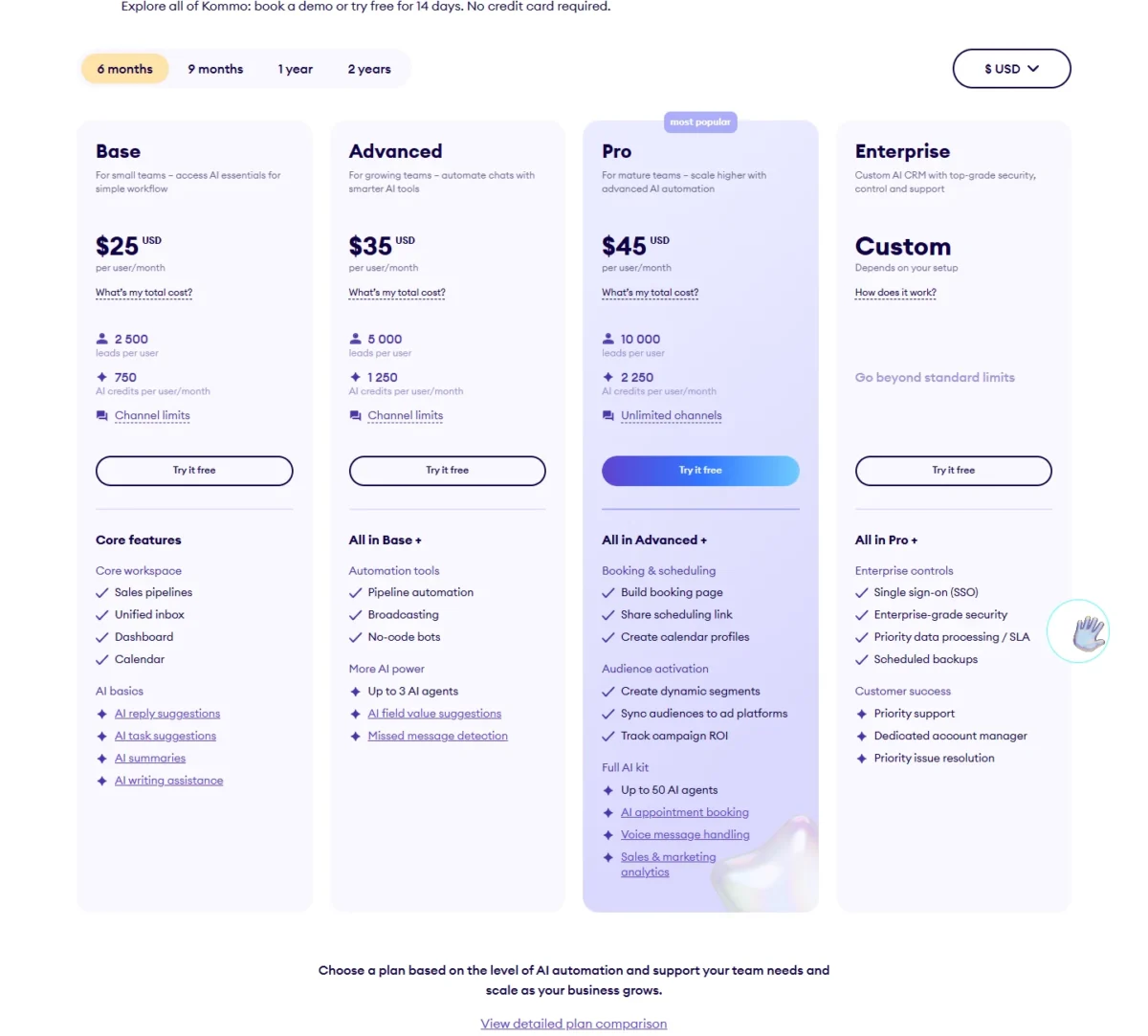
| Plan | Price | Billing | WhatsApp numbers you can connect |
|---|---|---|---|
| Base | $25 per user per month | $150 per user for 6 months | 1, plus 1 per added user |
| Advanced | $35 per user per month | $210 per user for 6 months | 3, plus 1 per added user |
| Pro | $45 per user per month | $270 per user for 6 months | Unlimited |
Sources: Kommo pricing and Kommo’s WhatsApp CRM guide, checked October 2026.
Pros
- Official Cloud API access with no Kommo integration fee
- A lead card for every incoming WhatsApp message
- Templates, Flows, catalogs and carousels sent from the CRM
- Pro connects unlimited WhatsApp numbers
Cons
- No monthly payment; the minimum term is 6 months
- Bots and broadcasting start on Advanced, not Base
- Base covers 1 number until you add users
- Skip it if:
- you need month-to-month billing; Zoho CRM bills monthly, and its WhatsApp integration works from the Standard edition.
2. HubSpot: Best for WhatsApp Inside a Marketing and Service Platform

- Best for: marketing and service teams already running HubSpot
- Plan with the WhatsApp integration: Marketing Hub or Service Hub, Professional or Enterprise
- Starting price: Service Hub Professional, $100 per seat per month on Pay Monthly, plus $1,500 one-time onboarding
- Free plan or trial: free CRM for up to 2 users, without the WhatsApp integration
- Template limit: 1,000 template messages per month across connected accounts
HubSpot makes sense when WhatsApp is one more channel in a platform the team already pays for, beside email, tickets and marketing. The gate is steep: HubSpot lists its WhatsApp integration only for Marketing Hub and Service Hub Professional or Enterprise, so a team on Sales Hub alone pays for a second hub to get it.
Coexistence is the feature most buyers overlook. HubSpot’s coexistence article, updated October 20, 2026, connects a number registered in the WhatsApp Business app to HubSpot, syncs messages both ways and imports the last 180 days of history. Without it, HubSpot syncs only new messages, and they stop showing in the phone app.
The record view decides the fit. With the WhatsApp integration connected, a rep can open a conversation from a contact, company, deal, ticket or custom object record, so a support lead sees the chat beside the ticket.

The template cap is shared by every connected account, so a team that sends reminders or campaigns at volume reaches it first. respond.io and WATI both sync to HubSpot and can carry bulk sends instead.
Service Hub Professional costs $100 per seat per month on Pay Monthly, plus a required $1,500 onboarding fee. Marketing Hub Professional costs $890 a month with 3 Core Seats; five people need 2 more seats at $50 each, so $890 + $50 x 2 = $990 a month. The HubSpot pricing breakdown covers the seat math beyond WhatsApp.
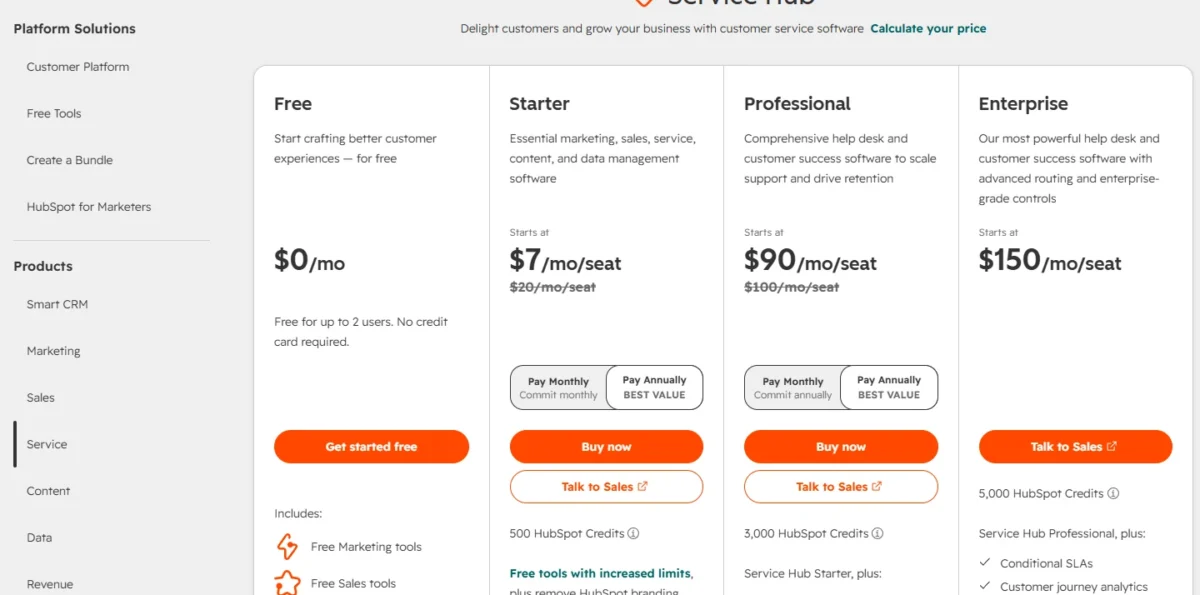
| Plan | Price on Pay Monthly | Seats | Required onboarding |
|---|---|---|---|
| Service Hub Professional | $100 per seat per month | Per seat | $1,500 one time |
| Marketing Hub Professional | $890 per month | 3 Core Seats; more from $50 a month | $3,000 one time |
Sources: HubSpot Service pricing, HubSpot Marketing pricing and HubSpot’s coexistence article, checked October 2026.
Pros
- Chats start from contact, company, deal and ticket records
- Coexistence keeps the Business app number and imports 180 days of history
- Connects up to 25 numbers per WhatsApp Business Account
- Replies from the desktop inbox or the HubSpot mobile app
Cons
- No WhatsApp integration on Sales Hub alone or the free CRM
- Template sends capped per month for the whole account
- Required onboarding: $1,500 for Service Hub, $3,000 for Marketing Hub
- Skip it if:
- you only pay for Sales Hub or use the free CRM; Pipedrive’s WhatsApp integration starts on Growth, and respond.io connects WhatsApp to HubSpot.
3. Zoho CRM: Best for Native WhatsApp on a Low Per-Seat Budget
- Best for: budget teams that want WhatsApp inside the CRM itself
- Starting price: Standard at $14 per user per month billed annually, $20 billed monthly
- Free plan or trial: Free edition for 3 users, without the WhatsApp integration; the free trial supports it
- WhatsApp connection: WhatsApp Business API, connected by an administrator
- Messaging fee: paid from credits bought inside Zoho CRM
A native WhatsApp integration without a plan ladder to climb first is Zoho CRM’s case. The integration is supported in the free trial and every paid edition. The limits are real: templates go only to leads and contacts, and the integration connects only a number no other WhatsApp product uses.
Automation is the strength. A template can be an action in Workflow Rules, Blueprint, Journey Builder or Wizards, so a rule sends a confirmation when a lead changes status. Standard already lists workflows and assignment rules, so the cheapest paid edition covers this.
Records are narrower than Pipedrive’s. Zoho sends templated messages only to a lead or a contact, and replies land in the Messages module; Pipedrive links chats to deals. Setup needs an unused or migrated number, and credits are bought once the number is active.
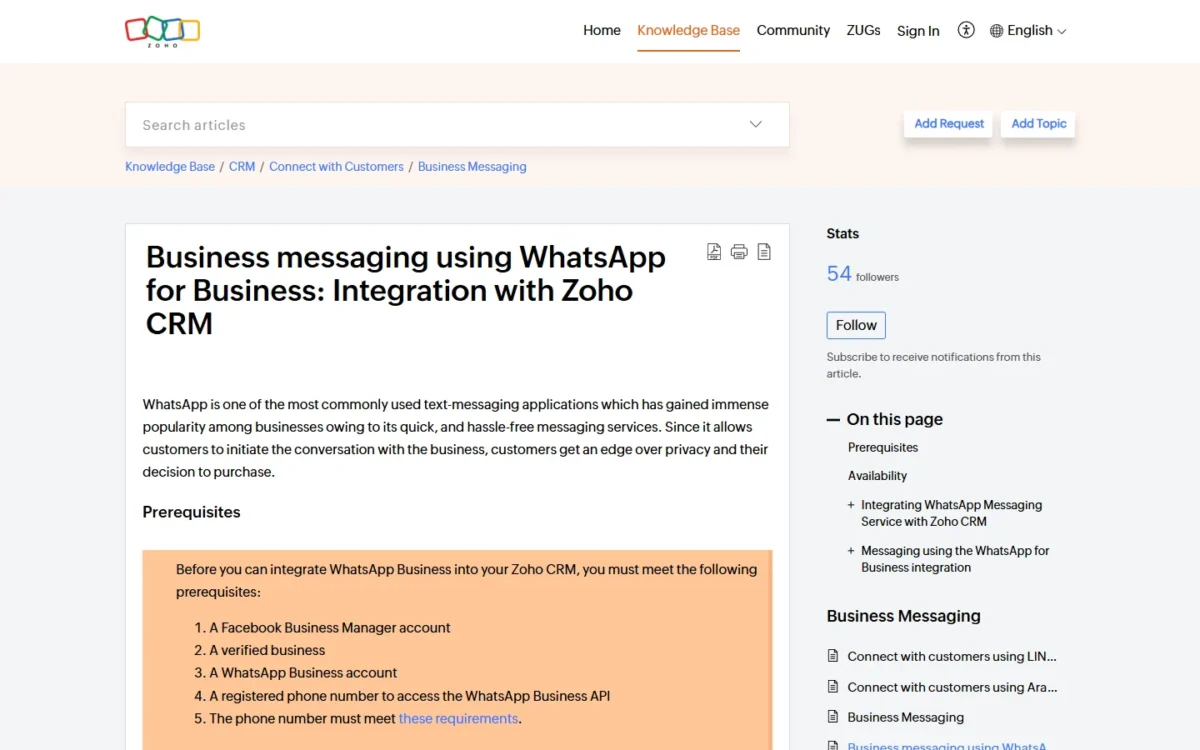
That puts the WhatsApp integration on Zoho’s entry paid edition, where HubSpot asks for a Professional hub. My Zoho CRM review covers the editions beyond WhatsApp.
Standard costs $14 per user per month billed annually or $20 billed monthly, and the WhatsApp integration already works on it. Five users pay $14 x 5 x 12 = $840 a year. Zoho’s help page lists no per-credit price.

| Edition | Billed annually | Billed monthly |
|---|---|---|
| Standard | $14 per user per month | $20 per user per month |
| Professional | $23 per user per month | $35 per user per month |
| Enterprise | $40 per user per month | $50 per user per month |
| Ultimate | $52 per user per month | $65 per user per month |
Sources: Zoho CRM pricing and Zoho CRM WhatsApp help, checked October 2026.
Pros
- WhatsApp integration supported in every paid edition and in the trial
- Templates as actions in Workflow Rules and Blueprint
- Monthly billing from $20 per user on Standard
- More numbers can be added to one account
Cons
- Not in the Free edition
- Templates go only to leads and contacts
- Needs an unused or migrated number; no published credit price
- Skip it if:
- your team must keep the number on the WhatsApp Business app; HubSpot and Pipedrive work with coexistence, and NetHunt’s integration connects the app account itself.
4. respond.io: Best for Adding WhatsApp to the CRM You Already Run
- Best for: teams keeping HubSpot, Salesforce or Zoho and adding a WhatsApp inbox
- Starting price: Starter at $948 a year, billed yearly, with 5 users
- Free plan or trial: 7-day trial with Growth features for 5 users, no credit card
- WhatsApp connection: respond.io’s own WhatsApp inbox, synced to your CRM
- Integrations: HubSpot, Salesforce, Zoho and Pipedrive through native integrations, Zapier, Make or the API
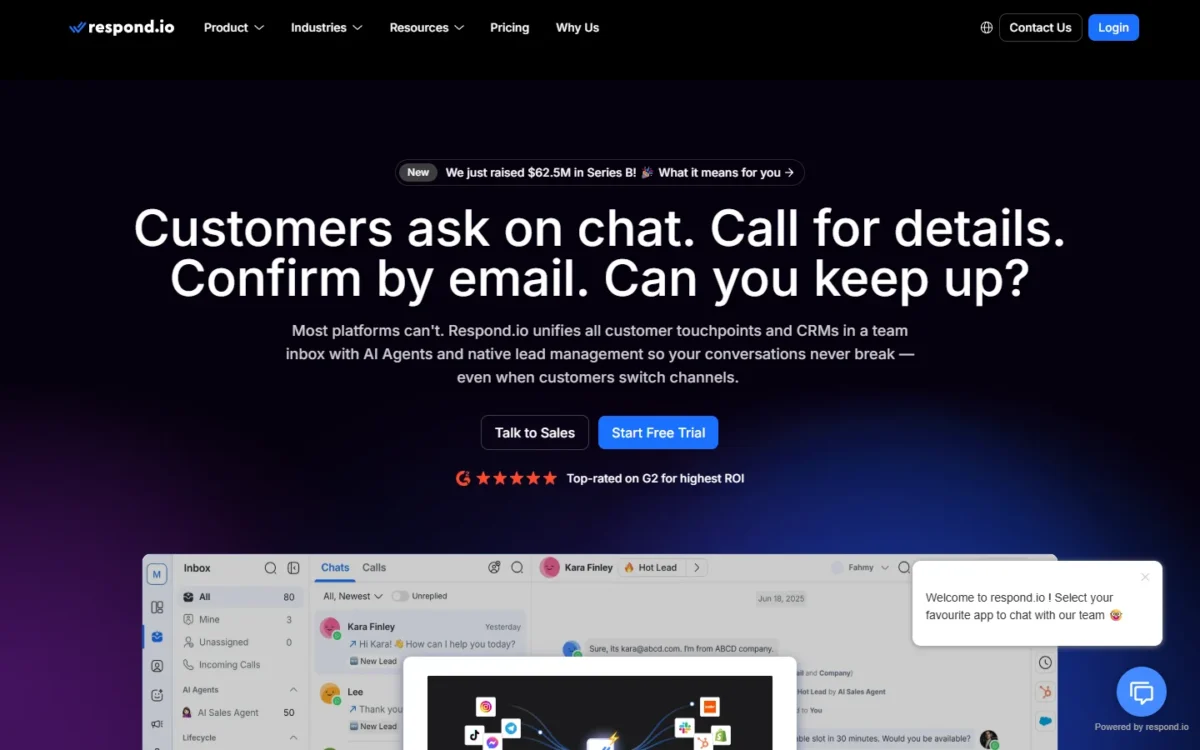
When the CRM is not the problem, respond.io is the pick. By its own description it is not a CRM: it runs WhatsApp conversations, AI Agents and broadcasts, then syncs contacts, messages and lead stages to the CRM you keep. You pay for a second tool, so it fits when WhatsApp volume outgrows the CRM’s own inbox.
No markup is the cost argument. respond.io connects your WhatsApp Business API account without adding a markup to Meta’s rates, and its subscriptions leave WhatsApp fees out, so Meta’s rate card is the whole message bill. Freshsales, by comparison, adds 20% to Meta’s cost.
Growth carries the automation. Broadcasts, workflow automation, AI Agents and the Zapier and Make integrations start on Growth; Starter is a shared inbox with AI Assist and basic reports.
Billing also follows Monthly Active Contacts, anyone who messaged or called the team that month, so a team with many one-off contacts should price the tier, not only the plan. Choose respond.io over WATI when a published no-markup rule and native Salesforce sync matter more than the lowest subscription.
It ranks above Pipedrive because Pipedrive’s WhatsApp integration is still a beta that is not available to all customers yet.
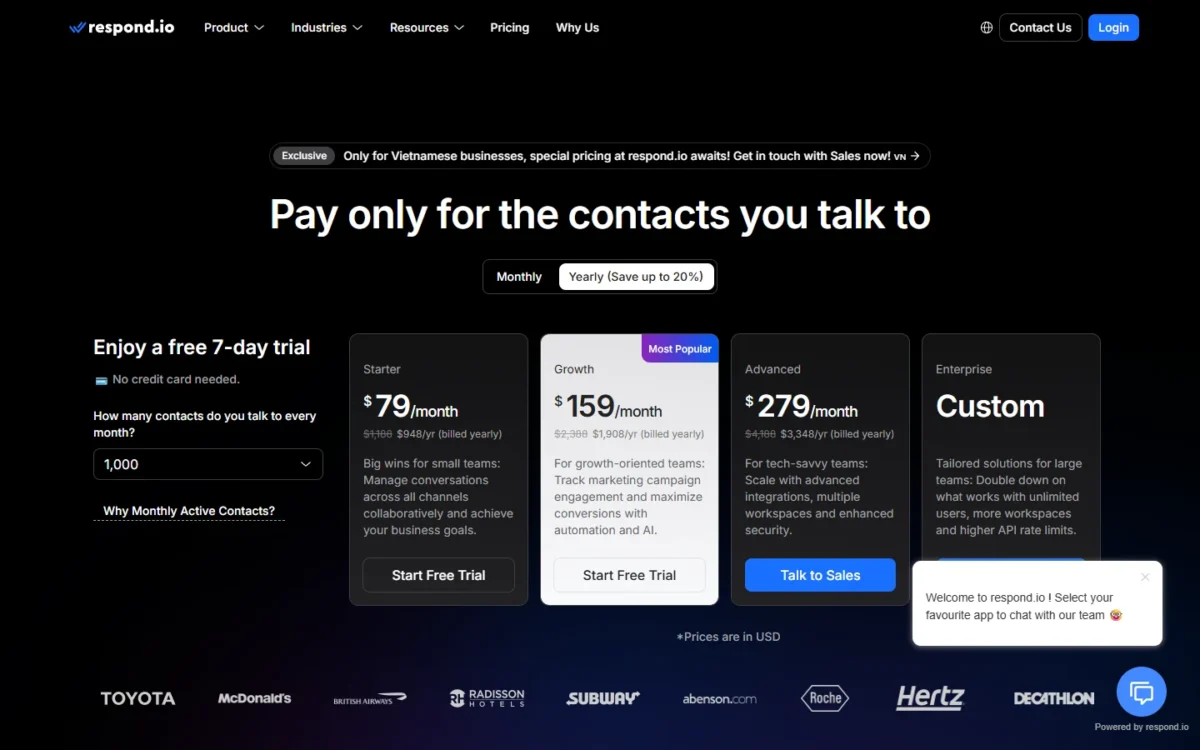
Starter costs $948 a year billed yearly ($79 a month) and includes 5 users; Growth, the plan with workflows and broadcasts, costs $1,908 a year with 10 users. Add your CRM’s own seat fee to either.
| Plan | Price, billed yearly | Users included | Extra user |
|---|---|---|---|
| Starter | $948 a year | 5 | $12 a month |
| Growth | $1,908 a year | 10 | $20 a month |
| Advanced | $3,348 a year | 10 | $24 a month |
Sources: respond.io pricing and respond.io’s WhatsApp CRM page, checked October 2026.
Pros
- No markup on Meta’s WhatsApp rates
- Native HubSpot and Salesforce integrations
- AI Agents, workflows and broadcasts on Growth
- 5 users included on Starter
Cons
- Not a CRM, so a CRM subscription stays on the bill
- Monthly Active Contact tiers add a usage dimension
- Broadcasts and workflows need Growth
- Skip it if:
- you have no CRM yet; Kommo connects WhatsApp to its own pipeline in one subscription.
5. Pipedrive: Best for Pipeline-First Sales Teams
- Best for: sales teams that run their day from the deal pipeline
- Starting price: Lite at $14 per seat per month billed annually; the WhatsApp integration needs Growth
- Trial: 14 days, and co-workers can join it
- WhatsApp connection: Pipedrive’s own WhatsApp Business integration, in beta
- Integrations: 500+, including the TimelinesAI WhatsApp app for every plan
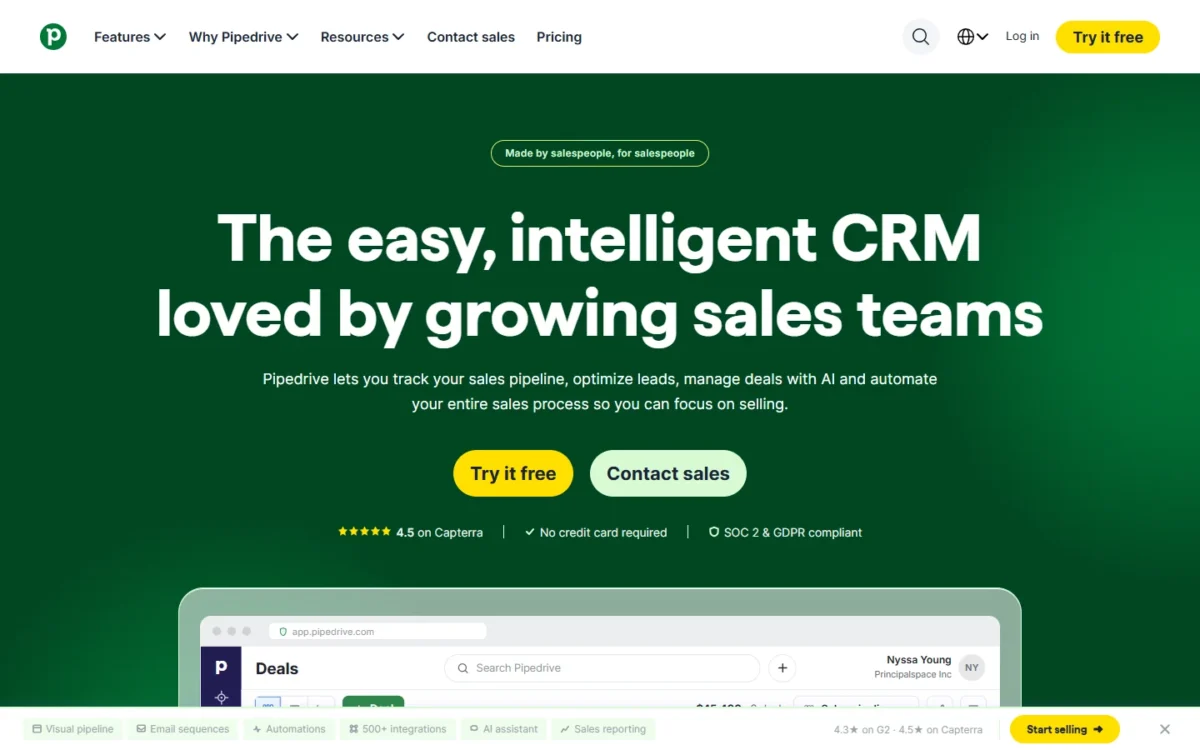
Pipedrive’s WhatsApp integration connects chats where pipeline-first teams already work: on the deal. Its integration links each chat to the matching person and their open deal, and reps reply from the Sales Inbox or the deal view. Two caveats come first: it needs Growth or above, and Pipedrive still calls it a beta that is not available to all customers.
Auto-linking saves the filing work. Pipedrive matches an incoming number to a person, then attaches the chat to their most recent open deal, falling back to a deal they joined or one closed in the last 6 months. Each number can link up to 50 conversations per entity.
The integration also works with a WhatsApp account configured for coexistence, and Pipedrive then shows a link that opens the conversation in the WhatsApp app.
Templates are text-only for now. Pipedrive supports a text body and an optional text header; image, video and document headers and buttons are not available. Kommo, by contrast, sends catalogs and carousels.
Automation is announced, not shipped: Pipedrive’s page on its WhatsApp integration describes a message sent when a deal stage changes, but marks automation features as available soon. Lite users have a route in the TimelinesAI marketplace app, which links WhatsApp accounts by QR code on every plan. My Pipedrive review covers the pipeline itself.
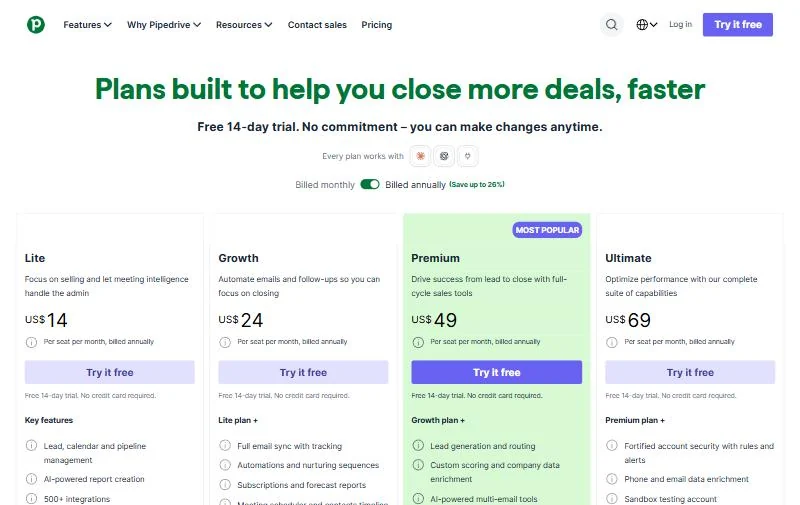
Growth costs $24 per seat per month billed annually or $34 billed monthly. Five reps on annual billing pay $24 x 5 x 12 = $1,440 a year. Pipedrive charges nothing extra for the integration on plans that include it; Meta bills each delivered message.
| Plan | Billed annually | Billed monthly | WhatsApp integration |
|---|---|---|---|
| Lite | $14 per seat per month | $19 per seat per month | Not included; TimelinesAI app works |
| Growth | $24 per seat per month | $34 per seat per month | Included, beta |
| Premium | $49 per seat per month | $64 per seat per month | Included, beta |
| Ultimate | $69 per seat per month | $89 per seat per month | Included, beta |
Sources: Pipedrive pricing, Pipedrive WhatsApp help and Pipedrive’s WhatsApp CRM page, checked October 2026.
Pros
- Chats link to persons and their open deal automatically
- Replies from the Sales Inbox or the deal view
- Monthly billing available on every plan
- TimelinesAI covers Lite through the marketplace
Cons
- Beta, not available to all customers
- Growth plan or above
- Text-only templates; stage-change automation not yet live
- Skip it if:
- you need WhatsApp on Lite without a connector or want rich templates; Zoho CRM includes it in Standard, and Kommo sends catalogs.
6. Freshsales: Best for Buying CRM and WhatsApp From One Vendor
- Best for: small teams that want the CRM vendor to supply WhatsApp too
- Starting price: Freshsales Suite Growth at $9 per user per month billed annually, $11 billed monthly, with 500 marketing contacts
- Trial: 21 days
- WhatsApp connection: Freshworks acts as an official WhatsApp Business Solution Provider
- Messaging fee: Meta’s cost plus a 20% Freshworks markup
One vendor for the CRM and the WhatsApp account is what Freshsales sells. Freshworks integrates WhatsApp as an official WhatsApp Business Solution Provider, so the WhatsApp account and the CRM come from one company.
That convenience has a price: Freshworks’ help article on its Freshdesk WhatsApp integration states a 20% markup on the total WhatsApp cost billed from Meta.
Selling tools run through Freshchat. Freshworks’ overview of its WhatsApp integration lists marketing templates with images and video, catalogs customers can browse and order from, and chatbots that answer common questions without an agent.
Freshworks’ WhatsApp integration overview does not say whether a chat lands on the Freshsales contact or deal, so test it in the 21-day trial.
Against respond.io, the trade is simplicity for margin: Freshworks adds a 20% markup to the WhatsApp cost billed from Meta, while respond.io adds none but is a second subscription. My Freshsales review covers the CRM beyond WhatsApp.
Suite Growth costs $9 per user per month billed annually or $11 billed monthly, so five users pay $9 x 5 x 12 = $540 a year. The markup scales with every template Meta bills, so it matters more as campaigns grow than at a few reminders a day.

| Plan | Billed annually | Billed monthly |
|---|---|---|
| Growth | $9 per user per month | $11 per user per month |
| Pro | $39 per user per month | $47 per user per month |
| Enterprise | $59 per user per month | $71 per user per month |
Sources: Freshsales Suite pricing and Freshworks’ WhatsApp markup, from the Freshdesk help article, checked October 2026.
Pros
- CRM and WhatsApp account from one vendor
- Entry price of $9 per user per month, billed annually
- Catalogs and chatbots on WhatsApp
- Official Business Solution Provider, so the account comes from the CRM vendor
Cons
- 20% markup on Meta’s cost for the WhatsApp integration
- Plan prices include 500 marketing contacts; more cost extra
- Chatbots run through Freshchat
- Skip it if:
- you send high marketing volume; respond.io adds no markup to Meta’s rates.
7. WATI: Best for Broadcasts and Chatbots on a Small Budget
- Best for: small businesses that run WhatsApp campaigns and chatbots
- Starting price: Growth at $39 a month billed annually, $49 billed monthly, for 3 users
- Free trial: 7 days, with zero setup fees
- WhatsApp connection: official WhatsApp API inbox with CRM syncs
- Integrations: 2 Commerce or CRM integrations on Growth, 5 including HubSpot on Pro, unlimited including Salesforce on Business
Campaigns on a small budget are WATI’s job on this list. It runs a WhatsApp inbox on the official API, with campaigns, chatbots and click-to-WhatsApp lead capture, and it syncs both ways with HubSpot from Pro. It is not a pipeline CRM, and its message rates live in your account rather than on a public page.
Broadcasts are the volume lever. Growth allows 15k broadcasts a month at standard rates, and Pro has no broadcast cap. A shop sending weekly offers fits Growth; a team with daily campaigns needs Pro.
The HubSpot sync is two-way. On Pro and Business, WATI’s HubSpot integration syncs deal stages, contact properties and notes both ways, and it applies HubSpot ownership rules to route WhatsApp leads. For a team whose HubSpot plan lacks WhatsApp, that sync puts threads beside deals.
Automation triggers are metered: Growth includes 1,000 free a month and Pro 2,000, and beyond that replies go manual unless you buy more. Keeping your number also has a cost: to connect an existing number, WATI asks you to delete the WhatsApp account on it first, and it cannot import chat backups.
Pro, the plan with the HubSpot sync and 5 users, costs $79 a month billed annually or $99 billed monthly. Each extra WhatsApp number you connect costs $29 a month, and messages follow WATI’s rate card.
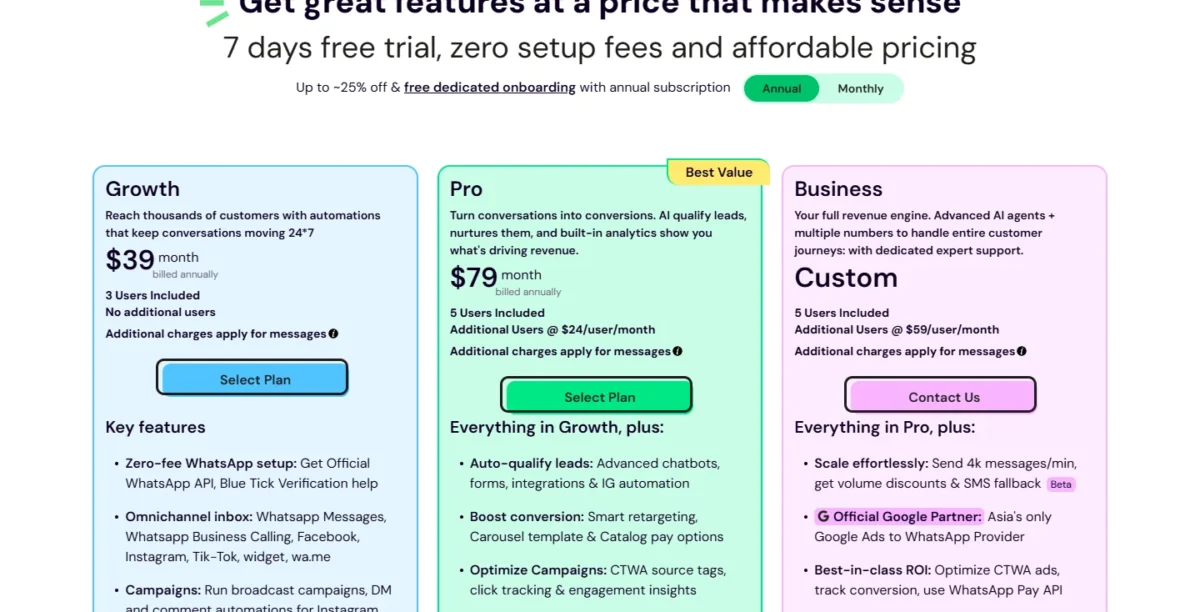
| Plan | Billed annually | Billed monthly | Users |
|---|---|---|---|
| Growth | $39 a month | $49 a month | 3, no additional users |
| Pro | $79 a month | $99 a month | 5, extra at $24 per user per month |
Sources: WATI pricing, WATI’s HubSpot integration page and WATI’s message pricing help, checked October 2026.
Pros
- Official API setup with no setup fee
- Two-way HubSpot sync on Pro
- Broadcasts and chatbots from Growth
- Extra numbers at $29 a month each
Cons
- Growth caps at 3 users with no additions
- Message rates shown only inside the account
- An existing number must be deleted from WhatsApp first
- Skip it if:
- you need deal pipelines in the same tool; Kommo combines broadcasts with a sales pipeline.
8. NetHunt CRM: Best for Teams Selling From WhatsApp App Accounts
- Best for: sales teams whose reps sell from their own WhatsApp
- Starting price: Basic Plus, the plan that lists the WhatsApp integration, at $34 per user per month billed annually, $42 billed monthly
- Free plan or trial: 14-day trial with no user limit
- WhatsApp connection: personal WhatsApp and WhatsApp Business app accounts, Business in beta
- Messenger accounts per workspace: 3 on Basic Plus, 7 on Business, 15 on Business Plus
Reps who sell from WhatsApp on their own phones are NetHunt’s audience. Its integration connects personal WhatsApp accounts and WhatsApp Business app accounts, and links chats to the record timeline. On a personal account only its owner can reply, so it suits rep-owned numbers more than a shared support line.
Group chats set NetHunt apart. It captures WhatsApp group conversations along with one-to-one chats, which matters when a deal involves several people on the buyer’s side. When the integration connects a WhatsApp Business account, still in beta, the owner can also give managers or roles access to reply.
Cost sits in seats, not messages. Meta’s per-message rate card covers the Cloud API and the Marketing Messages API, so I read NetHunt’s app-account link as outside it.
Basic Plus costs $34 per user per month billed annually or $42 billed monthly, so five reps pay $34 x 5 x 12 = $2,040 a year. Basic, at $24 billed annually, lists 1 messenger account but not the WhatsApp integration.

| Plan | Billed annually | Billed monthly | Messenger accounts per workspace |
|---|---|---|---|
| Basic | $24 per user per month | $30 per user per month | 1 |
| Basic Plus | $34 per user per month | $42 per user per month | 3 |
| Business | Contact sales | $60 per user per month | 7 |
| Business Plus | Contact sales | $84 per user per month | 15 |
Sources: NetHunt pricing, NetHunt WhatsApp help and NetHunt WhatsApp Business help, checked October 2026.
Pros
- Connects personal and Business app accounts
- Captures WhatsApp group chats
- Chats linked to the record timeline
Cons
- Only the owner replies on a personal account
- WhatsApp Business connection still in beta
- 8 MB limit per file
- 3 messenger accounts per workspace on Basic Plus
- Skip it if:
- several agents must answer one shared number; Kommo or HubSpot connect that number through the official API.
9. Bitrix24: Best for Flat Per-Organization Pricing

- Best for: larger teams that want one flat price per organization
- Starting price: Basic at $49 per organization per month, billed annually, with 5 users
- Free plan or trial: free plan for 1-2 users and a 15-day trial; the WhatsApp integration on commercial plans only
- WhatsApp connection: your own Twilio or edna account, connected in Contact Center
- Messaging fee: billed by Twilio, about $0.005 per session message, or by edna
Bitrix24 wins on seat math, not on how easily WhatsApp connects. Its plans charge per organization, so Standard covers 50 users for one price. Bitrix24 connects WhatsApp through a separate Twilio or edna account that you open, verify and pay, which adds a second vendor and a setup project.
Twilio is the default route. Bitrix24 charges nothing for the integration; Twilio bills session messages, typically around $0.005 each, and requires a paid plan with a minimum $20 balance and a rented or transferred number.
Instant WhatsApp is the lightweight option: a website widget that connects without registering your company on WhatsApp and starts a chat. The customer arrives as Guest, with no name or phone number passed, and agents must answer within 24 hours.
Flat pricing beats per-seat picks as headcount grows. Twenty Pipedrive Growth seats cost $24 x 20 = $480 a month billed annually, against $99 a month for Bitrix24 Standard with 50 users, which adds WhatsApp marketing to Basic’s WhatsApp integration.
My Bitrix24 CRM review covers the rest of the suite.
Basic’s five included users fit a small team. Past five people, Standard’s 50-user allowance is the plan to price, at about $1.98 per user on annual billing, plus Twilio’s message fees.
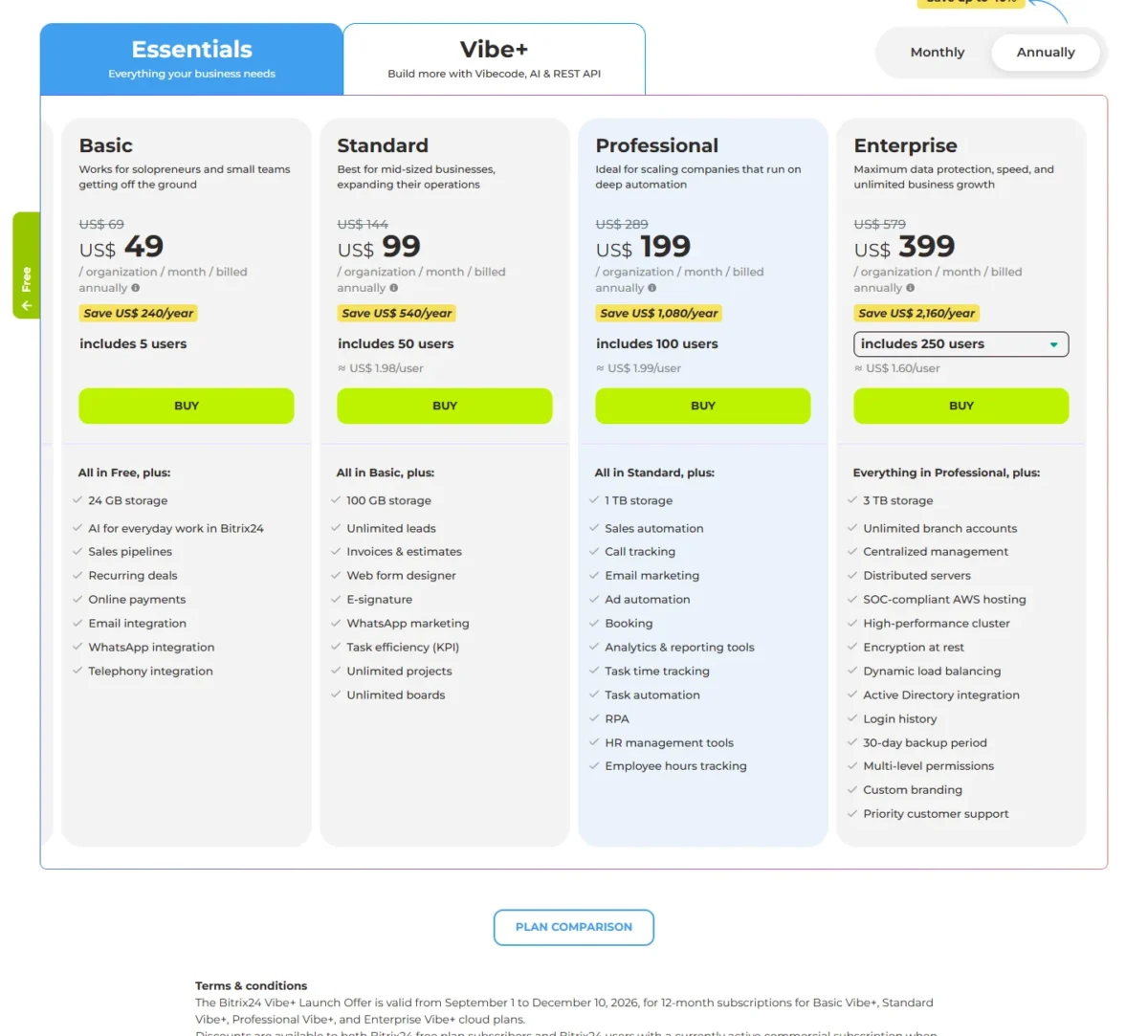
| Plan | Price | Billing | Users included |
|---|---|---|---|
| Basic | $49 per organization per month | Billed annually | 5 |
| Standard | $99 per organization per month | Billed annually | 50 |
| Professional | $199 per organization per month | Billed annually | 100 |
Sources: Bitrix24 pricing, Bitrix24 WhatsApp help and Bitrix24 Instant WhatsApp help, checked October 2026.
Pros
- Flat price per organization, 5 users on Basic and 50 on Standard
- No Bitrix24 fee for the WhatsApp integration
- Instant WhatsApp widget needs no WhatsApp registration
- WhatsApp marketing on Standard
Cons
- A separate Twilio or edna account to open and pay
- Twilio needs a paid plan and a $20 minimum balance
- Instant WhatsApp guests arrive without a name or number
- Skip it if:
- you want WhatsApp without a second vendor account; Zoho CRM connects it inside the CRM.
10. Salesforce: Best for Enterprise Service Teams on Service Cloud

- Best for: enterprise service teams already running Salesforce
- Starting price: $25 per user per month for Starter Suite; Core, the CRM for service, is $195 per user per month, billed annually
- WhatsApp connection: a messaging channel of Salesforce’s Digital Engagement purchase
- Number: bring your own; Salesforce-provided numbers are SMS-only
- Templates: up to 250 per connected WhatsApp Business Account
Salesforce belongs on this list for the team that already runs service in it, not for a team choosing a WhatsApp CRM from scratch. WhatsApp arrives as one channel of Digital Engagement, answered from the Service Console next to cases.
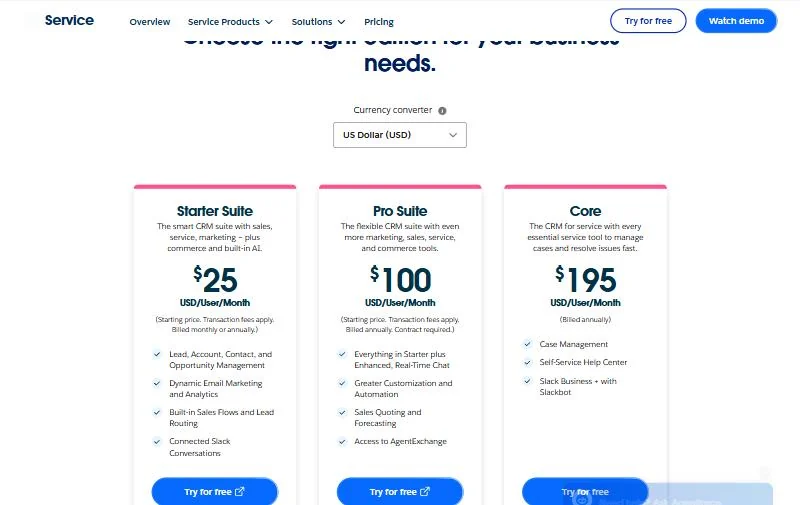
Core, which Salesforce calls the CRM for service, costs $195 per user per month billed annually; Starter Suite and Pro Suite below it bundle sales, service and marketing.
Number rules are strict. Salesforce’s Digital Engagement numbers are SMS-only, so you connect your own number, and it must never have been used on the WhatsApp Business API. Meta reviews the business account, and the FAQ says Salesforce cannot appeal a rejection for you.
Templates serve notifications. The FAQ lists templates judged marketing or promotional among rejection reasons, so plan campaigns in another tool.
Ask Salesforce which item carries WhatsApp for your edition before you sign; my Salesforce CRM review covers the rest of the platform.
Core costs $195, Advanced $395 and Max $550 per user per month, all billed annually; Max lists digital channels in its contact center line. Five agents on Core pay $195 x 5 x 12 = $11,700 a year before any messaging add-on.
| Edition | Price | Billing |
|---|---|---|
| Starter Suite | $25 per user per month | Billed monthly or annually |
| Pro Suite | $100 per user per month | Billed annually, contract required |
| Core | $195 per user per month | Billed annually |
| Advanced | $395 per user per month | Billed annually |
| Max | $550 per user per month | Billed annually |
Sources: Salesforce Service Cloud pricing and Salesforce WhatsApp FAQ, checked October 2026.
Pros
- WhatsApp answered in the Service Console beside cases
- Up to 250 templates per connected WhatsApp Business Account
- Max includes digital channels in its contact center line
Cons
- Digital Channels are sold separately on the lower editions
- Bring your own number, never used on the Business API
- Templates judged marketing or promotional are rejected
- Skip it if:
- you are not already on Salesforce Service Cloud; HubSpot Service Hub Professional includes the WhatsApp integration at $100 per seat per month on Pay Monthly.
How to Choose a WhatsApp CRM
Choose in three steps: the connection your number allows, where chats must land, then the two-line monthly cost.
- Number: if it must stay on the Business app, HubSpot and Pipedrive work with coexistence, Kommo connects the Business app on up to 5 devices, and NetHunt connects the app account itself. Zoho CRM connects only an unused or migrated number, and Salesforce only a number never used on the WhatsApp Business API.
- Records: chats on deals point to Pipedrive or Kommo, chats on tickets to HubSpot or Salesforce, and a CRM you keep to respond.io or WATI.
- Budget: compare the plan that carries the WhatsApp integration, not the entry plan, and add your monthly templates x Meta’s rate plus any markup.
| Software | Automated sends | Broadcasts | Several numbers connected | Keeps a Business app number |
|---|---|---|---|---|
| Kommo | Advanced | Advanced | Advanced: 3; Pro: unlimited | Yes, Business app on up to 5 devices |
| HubSpot | Yes, workflow templates | Not listed | Up to 25 per account | Yes, coexistence |
| Zoho CRM | Yes, Standard | Not listed | Yes | No, unused or migrated number |
| respond.io | Growth | Growth | Not listed | No, the respond.io platform connects only a Business API account |
| Pipedrive | Announced, not live | Not listed | Several numbers under one account | Yes, with coexistence |
| Freshsales | Yes, templates and bots | Marketing templates | Up to 25 through Freshworks’ integration | Not listed |
| WATI | Growth | Growth | $29 a month per number | Coexistence listed; FAQ says delete an existing number’s account first |
| NetHunt CRM | Not listed | Not listed | Basic Plus: 3 accounts | Yes, Business app in beta |
| Bitrix24 | Not listed | WhatsApp marketing on Standard | Several Edna.io channels, one Open Channel each; count set by plan | Not listed; Twilio route uses a number rented or transferred in Twilio, Edna.io route a WhatsApp Business API channel via edna Pulse |
| Salesforce | Not listed | Not listed | Not listed | Number never used on the API |
Sources: Kommo pricing, HubSpot WhatsApp help, Zoho CRM WhatsApp help, respond.io pricing, Pipedrive WhatsApp help, Freshworks WhatsApp overview, Freshworks’ WhatsApp markup, WATI pricing, NetHunt pricing, Bitrix24 WhatsApp help and Salesforce WhatsApp FAQ, checked October 2026.
The matrix shows why no single pick wins every row: automation and broadcasts favour Kommo, respond.io and WATI, while keeping a Business app number favours HubSpot, Pipedrive, Kommo and NetHunt.
Common mistakes cost more than the plan difference:
- Connecting a number still active on the phone app where the CRM needs an unused one.
- Buying a free tier: Zoho CRM’s Free edition and HubSpot’s free CRM leave out the WhatsApp integration.
- Buying HubSpot Sales Hub alone, which does not include the WhatsApp integration.
- Pricing Pipedrive’s Lite plan, which sits below the Growth requirement.
Industry pages repeat these same three questions. A real estate or travel team that negotiates in chat has the needs of any WhatsApp-led sales team, and Kommo or Pipedrive fits it the same way. A travel advisor who also needs trips and commissions on the client record may prefer a travel agency CRM.
Also Considered
These five came close; each line names the fact that kept it out of the ten.
- Zendesk: connects WhatsApp channels to the Agent Workspace on every Suite plan, from Suite Team at $55 per agent per month paid yearly, but chats become support conversations rather than deals.
- Trengo: a shared inbox sold by a yearly conversation allowance, 6,000 conversations a year with 10 users on Boost; a help desk inbox rather than a CRM with deals.
- WAPlus: a Chrome extension that calls itself a WhatsApp CRM built into WhatsApp Web; it syncs contacts and chats with HubSpot, Salesforce or Zoho and creates deals in that connected CRM, so you still need one.
- WhatZCRM: a platform with a built-in CRM that integrates with the WhatsApp Business API; its homepage offers Start Free Trial and Contact Us buttons.
- TimelinesAI: a QR-linked WhatsApp connector that works on every Pipedrive plan, including Lite; covered in the Pipedrive section.
Sources: Zendesk pricing, Zendesk WhatsApp help, Trengo pricing, annual view in US dollars, WAPlus, WhatZCRM and TimelinesAI on the Pipedrive Marketplace, checked October 2026.
FAQ
Is the WhatsApp Business app a CRM?
No. A CRM adds the lead, contact and deal records that chats attach to. To get chats onto those records, connect the number through the Business Platform, as Kommo, HubSpot and Zoho CRM do, or link the app account with NetHunt.
Is there a free WhatsApp CRM?
Not on the free plans covered here. Zoho CRM’s Free edition is left out of its WhatsApp integration, HubSpot’s free CRM lacks it, and Bitrix24 keeps WhatsApp to commercial plans. Kommo, Freshsales, respond.io and WATI offer trials instead, and Meta still bills business-initiated templates per delivered message.
Can I keep my existing WhatsApp number?
It depends on the connection. HubSpot’s coexistence runs the number in the Business app and HubSpot at once, Pipedrive works with accounts set up for coexistence, Kommo connects a Business app number on up to 5 devices, and NetHunt connects the app account itself.
Zoho CRM’s integration needs an unused or migrated number, WATI asks you to delete the WhatsApp account before you connect the number, and Salesforce needs a number never used on the Business API.
Final Verdict
By job, Kommo is my pick for teams that sell inside WhatsApp and Pipedrive for teams that live in the deal pipeline. HubSpot fits marketing or service teams on its Professional hubs, and Salesforce fits service teams already on Service Cloud.
Pipedrive’s WhatsApp integration is still a beta that is not available to all customers yet, so confirm it appears in your account before you commit.
By budget: Freshsales Suite Growth starts at $9 and Zoho CRM Standard at $14 per user per month, both billed annually. Bitrix24 Basic covers 5 users for $49 a month billed annually, before Twilio’s fees.
By special need, choose respond.io when the CRM stays and WhatsApp volume grows, and WATI when broadcasts matter more than pipelines. NetHunt is the one for reps who sell from their own app accounts.
Whichever two you shortlist, run one template through each trial to your own phone and price the second bill with Meta’s US rates before you commit.






Pingback: Zoho CRM vs Keap 2026: Year-One Cost for 1-10 Users