

Keap is the better fit for a US service business of about two users that wants email and text automation, quotes, invoices and phone support in one plan. HubSpot is the better fit for a team that wants to start free, and for a sales team that needs sequences and forecasting.
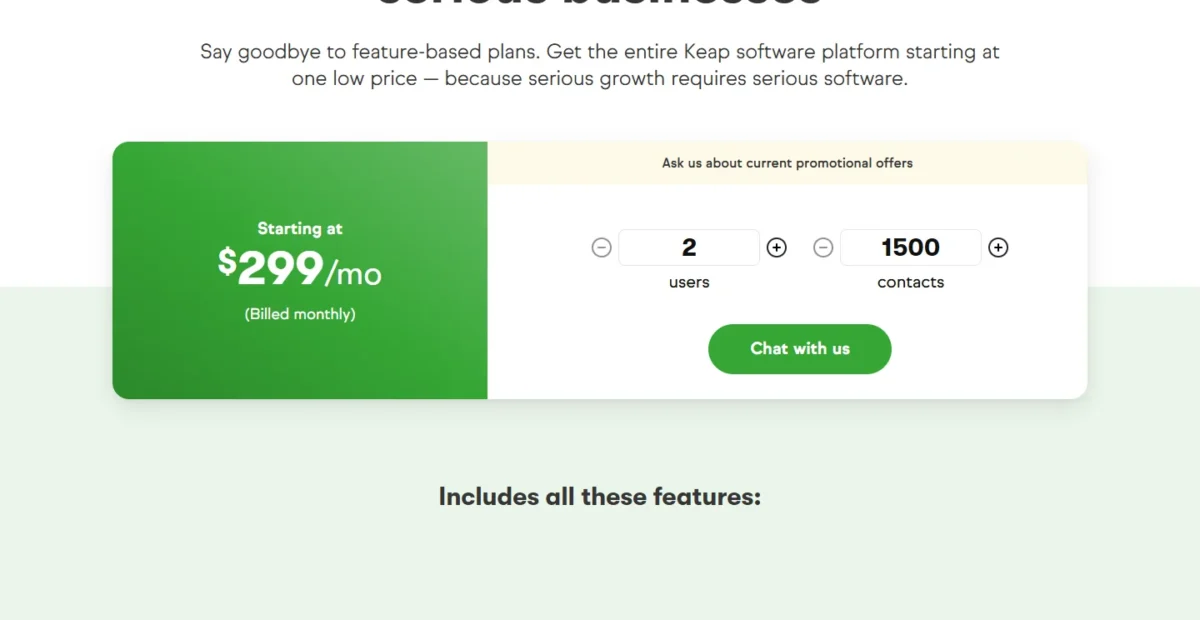
The deciding difference in HubSpot vs Keap is where automation sits in the price. Keap includes its automation builder in a plan that starts at $299 a month, billed monthly (as of October 5, 2026). HubSpot’s unlimited email-automation actions (up to 300 workflows) start with Marketing Hub Professional at $800 a month, billed annually, plus a $3,000 onboarding fee.
Quick verdict
Pick Keap if multi-step email and text follow-up is the job and two users run it: one plan holds the automation builder, US texting, quotes, invoices and phone support.
Pick HubSpot to start free with up to 2 users, or for a sales team that needs sequences and forecasting on Sales Hub Professional.
The trade-off: Keap requires an implementation package from $1,500. HubSpot prints its automation, send and workflow limits for each edition, but its unlimited email-automation actions (up to 300 workflows) start on Marketing Hub Professional.
Choose HubSpot if
- You want to start at $0 with up to 2 users and grow into paid Hubs
- Five or more reps need sequences, forecasting and 3,000 calling minutes
Choose Keap if
- You want multi-step email and text automation below HubSpot Professional pricing
- You quote, invoice and collect recurring payments inside the CRM in the US
In This Article (12 sections)
HubSpot vs Keap at a Glance
HubSpot sells free tools plus per-seat Hubs whose automation rises by edition. Keap sells one platform price with 2 users, tiered contacts and a required implementation package. HubSpot calls its base layer Smart CRM: the record system behind what a CRM does, included with any paid HubSpot subscription.
| Attribute | HubSpot | Keap |
|---|---|---|
| Best for | Teams that start free, and sales teams that need sequences and forecasting | US service businesses that want automation, texting and billing in one plan |
| How it is priced | Per seat by Hub and edition; Marketing Hub Professional includes 3 Core Seats | One platform price with 2 user licenses; extra contacts priced in tiers |
| Starting price | $0 for up to 2 users; Starter at $20 per seat per month list | $299 a month, billed monthly |
| Plan for full automation | Marketing Hub Professional (unlimited email-automation actions), $800 a month billed annually | The same $299 plan, with the full automation builder (Easy and Advanced Automations) |
| Required one-time fee | Professional Onboarding: $3,000 on Marketing Hub, $1,500 on Sales Hub | Implementation package, required |
| Free option | Free tools, no credit card | 14-day trial, no credit card, 25-email cap |
| Main limitation | Automation depth rises with edition and price | Automation, send and report limits not published |
Sources: HubSpot Marketing Hub pricing, HubSpot Sales Hub pricing, Keap pricing page (Keap’s price from the Internet Archive’s copy of October 5, 2026), Keap vs HubSpot page, checked October 2026.
HubSpot charges more at each edition; Keap charges one price, then adds users and contacts. The differences that change the decision sit in four places.
Key Differences Between HubSpot and Keap
The biggest difference is where automation sits in the price: HubSpot gates it by edition, while Keap puts its whole builder in the one plan.
- Automation gate: HubSpot caps email automation at 1 action on the free tools and 10 on Starter, and lifts the cap on Professional. Keap includes Easy Automations and the Advanced Automations builder in its single plan.
- Pricing unit: HubSpot bills seats by Hub and edition. Keap bills one platform price with 2 users, then $39 a month per extra user and tiered contact pricing.
- Required fees: HubSpot charges Professional Onboarding on Sales Hub and Marketing Hub. Keap requires an implementation package from every new customer.
- Support: HubSpot Starter includes email support, and Professional adds phone. Every Keap subscription includes US phone support, 24/7 chat and a Customer Success Manager.
For a two-person office, the automation gate decides most of the budget: HubSpot’s lower tiers are cheap because their automation is thin. My HubSpot CRM review covers the rest of that edition ladder.
Keap flips the risk: you pay for the full platform and guided setup on day one. My Keap CRM review covers what that plan holds and where it stops.
If an older guide prices “Keap Pro” or “Keap Max”, note that Keap’s pricing page now says “Say goodbye to feature-based plans.”
HubSpot vs Keap: Features Compared
Keap covers automation, texting and billing in its one plan, while HubSpot covers sales execution (sequences, forecasting, calling) and adds depth with each edition.
| Feature | HubSpot Starter | HubSpot Professional | Keap |
|---|---|---|---|
| Email automation | Limited: up to 10 automated actions (Marketing Hub) | Unlimited actions (Marketing Hub) | Easy and Advanced Automations; limit not published |
| Workflows | Limited: up to 50 in Sales Hub, restricted triggers and actions | Up to 300 (Sales Hub and Marketing Hub) | Not published |
| Monthly email sends | 5x the marketing contact tier (Marketing Hub) | 10x the marketing contact tier (Marketing Hub) | Not published |
| Sequences | Higher plan: Professional | Up to 500 email sends per user per day (Sales Hub) | Not listed on keap.com/ |
| Forecasting | Higher plan: Professional | Default and custom forecasting (Sales Hub) | Deal revenue forecasting report |
| Pipelines | Up to 15 (Sales Hub) | Up to 100 (Sales Hub) | Multiple pipelines; count not published |
| Calling minutes | 500 (Sales Hub) | 3,000 (Sales Hub) | 100 voice minutes in text Tier 1 (US) |
| Text marketing | Not listed on HubSpot’s pricing pages | Not listed on HubSpot’s pricing pages | 500 messages in Tier 1 (US only) |
| Payments | Plan-dependent: Starter and up | Included | Quotes, one-time and recurring invoices, checkout forms |
| Dashboards | 30 (Sales Hub and Marketing Hub) | 75 (Sales Hub and Marketing Hub) | Customizable dashboard; limit not published |
Sources: HubSpot Sales Hub pricing, HubSpot Marketing Hub pricing, Keap pricing page, Keap sales pipeline page, checked October 2026.
Most HubSpot rows grow with the edition; on Keap, most rows sit in the one plan with no published cap.
Marketing automation and lead follow-up
Marketing Hub Professional is the first HubSpot edition with unlimited email automation actions, omni-channel marketing automation and up to 300 workflows; Starter stops at 10 automated actions. On Keap, deeper automation adds no plan step: the one plan already carries the advanced builder.
The Keap automation page covers text and email follow-up when a lead fills in a form, new deals from new leads and invoice reminders. HubSpot Starter’s ten actions leave little room for a long nurture, and Sales Hub Starter’s 50 workflows carry restricted triggers and actions.
Verdict: marketing automation
Keap fits a team of about two that wants multi-step email and text follow-up without paying for HubSpot Professional. HubSpot fits once the team needs published workflow limits and the omni-channel marketing automation of Marketing Hub Professional. Caveat: Keap publishes no automation cap, so build your longest sequence during its 14-day trial.
Email marketing and send limits
HubSpot ties sends to the marketing contact tier: Starter sends 5 times its tier per calendar month and Professional 10 times. On the included tiers that is 5 x 1,000 = 5,000 sends a month on Starter and 10 x 2,000 = 20,000 on Professional.
Keap publishes no send limit; its plan covers broadcasts, newsletters, automated emails and an email deliverability health dashboard. Without Keap’s figure there is no verdict on volume, so a list above 20,000 monthly sends should get Keap’s cap in writing.
Sales pipeline management, sequences and calling
HubSpot Sales Hub Professional is built for a team that sells by phone and email. It adds sequences with up to 500 email sends per user per day, forecasting, 3,000 calling minutes and up to 100 pipelines. Keap offers multiple pipelines with stage automation, a deal revenue forecasting report and 100 voice minutes in text Tier 1.
Keap’s follow-up runs through shared automations rather than a per-rep sequences tool, so five reps with their own cadences fit HubSpot better. A team whose pipeline is the whole job can also weigh HubSpot against Pipedrive for sales teams.
Verdict: sales execution
HubSpot fits a sales team of five or more on Sales Hub Professional, at $90 per seat per month billed annually. Keap fits an owner-led team whose deals move through automations. Caveat: HubSpot Professional commits you for a year, even on monthly billing.
Payments, quotes and invoicing
Both can quote, invoice and collect payments inside the CRM; the better pick depends on how you bill and where buyers are. Keap includes quotes that turn into invoices, recurring invoices, checkout forms, order bumps, promo codes, a native US processor, and PayPal, Stripe or Eway.
HubSpot opens payments to Starter and higher editions, with credit, debit and ACH, card payments in 130+ currencies from buyers outside the US, and QuickBooks Online sync. Keap adds billing automation for past-due reminders. Neither pricing page prints processing rates.
Verdict: payments
Depends on billing and buyer country. Keap fits a US business that sells packages through checkout forms with order bumps and promo codes. HubSpot fits a business with buyers abroad, or one that runs QuickBooks, NetSuite, Xero, Stripe or Chargebee.
Text messaging
Keap includes text Tier 1 (500 messages and 100 voice minutes) in every subscription, for US text marketing only. Higher tiers run from $24 a month for 1,000 messages to $279 a month for 25,000, and overage costs $0.015 per text.
HubSpot’s sales and marketing pricing pages list no SMS price, though its product catalog explains its SMS segment rules. WhatsApp sits on Marketing Hub Professional, at up to 1,000 messages a month.
Verdict: text messaging
Keap fits a US business that wants automated texts without a second vendor. HubSpot’s SMS cost is not on its pricing pages, so get a quote before planning text campaigns on it.
Reporting
HubSpot publishes its reporting limits, the same on Sales Hub and Marketing Hub: 30 dashboards on Starter and 75 on Professional, each holding 50 reports, plus up to 100 custom reports on Professional. Keap lists reports, a reporting hub, a customizable dashboard and pipeline reports such as deal conversions by stage, with no published limits.
That leaves no fair verdict on depth. If reporting decides it, rebuild the report you read every Monday in HubSpot’s free tools and in Keap’s trial.
Features decide fit, but the plan that holds each feature decides the bill.
HubSpot vs Keap Pricing
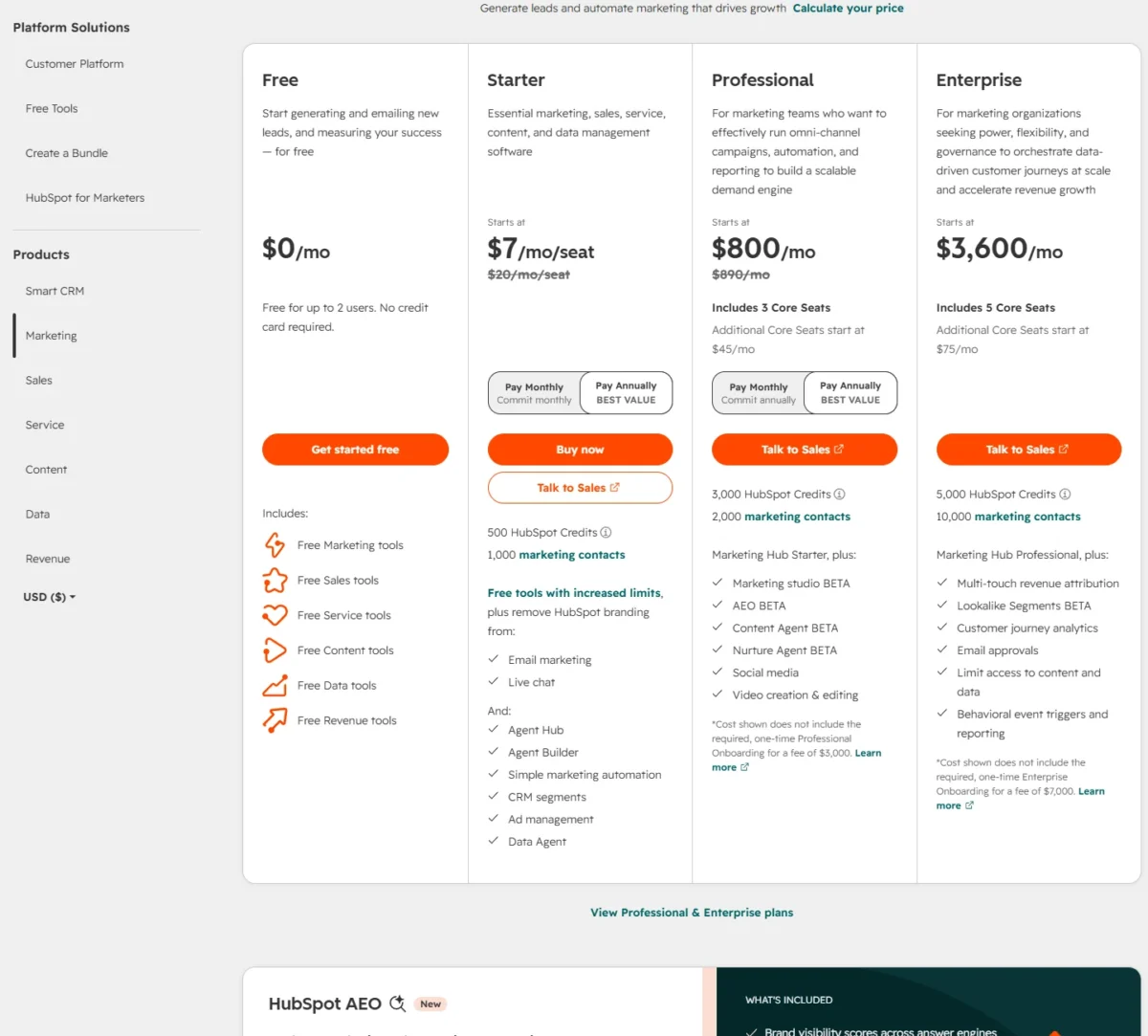
Keap starts at $299 a month, billed monthly, for the whole platform with 2 users (as of October 5, 2026), plus an implementation package from $1,500. HubSpot’s comparable automation plan, Marketing Hub Professional, costs $800 a month billed annually or $890 billed monthly, includes 3 Core Seats and adds $3,000 onboarding.
Two details on HubSpot’s pages, as read on October 21, 2026, change older comparisons. HubSpot shows new customers a Starter offer of $7 per seat per month paying annually or $10 paying monthly, against the $20 list price, available for a limited time.
Paid HubSpot editions also include monthly HubSpot Credits for AI features: 500 on Starter and 3,000 on Professional.
| Plan tier | HubSpot | Keap |
|---|---|---|
| Entry paid plan | Starter: $20 per seat per month list; new customers $7 paying annually or $10 paying monthly | One platform plan: $299 a month, billed monthly, with 2 users |
| Full automation | Marketing Hub Professional (unlimited email-automation actions): $800 a month billed annually, $890 billed monthly, 3 Core Seats | The full automation builder is in the $299 plan |
| Sales plan with sequences | Sales Hub Professional: $90 per seat per month billed annually, $100 billed monthly | No sequences tool by that name; automations instead |
| Extra user | Marketing Hub Professional Core Seat: $45 a month billed annually, $50 billed monthly | $39 per user per month |
| Required one-time fee | Professional Onboarding: $3,000 on Marketing Hub, $1,500 on Sales Hub | Implementation package: required |
| Commitment | Professional commits annually, even paying monthly; Starter can commit monthly | Annual contract: $299 early termination fee |
Sources: HubSpot Marketing Hub pricing, HubSpot Sales Hub pricing, Keap pricing page, Keap vs HubSpot page, checked October 2026.
HubSpot’s annual figures are the lower prices in the pricing page’s default Pay Annually view, which prints the higher monthly-billing price beside each one. Keap’s archived page prints only the monthly-billed price. For every Hub, add-on and fee beyond these rows, see HubSpot’s full price list by Hub.
HubSpot’s upgrade trigger is follow-up that needs more than 10 automated actions, or reps who need sequences. Keap’s trigger is headcount and list size: each user past two adds $39 a month, and contacts past the starting tier move you up its contact pricing.
Year-one cost for 2 and 5 users
For a 2-user team that wants full automation, Keap’s year one costs less than half of Marketing Hub Professional’s once both required setup fees are in.
| Plan and billing | Team | Subscription, year one | One-time fee | Year-one total |
|---|---|---|---|---|
| Keap, billed monthly | 2 users | $299 x 12 = $3,588 | From $1,500 | $5,088 |
| Keap, billed monthly | 5 users | $299 x 12 = $3,588 plus $39 x 3 users x 12 = $1,404, so $4,992 | From $1,500 | $6,492 |
| HubSpot Marketing Hub Professional, billed annually | 2 users | $800 x 12 = $9,600 | $3,000 | $12,600 |
| HubSpot Marketing Hub Professional, billed annually | 5 users | $800 x 12 = $9,600 plus $45 x 2 users x 12 = $1,080, so $10,680 | $3,000 | $13,680 |
| HubSpot Sales Hub Professional, billed annually | 2 users | $90 x 2 users x 12 = $2,160 | $1,500 | $3,660 |
| HubSpot Sales Hub Professional, billed annually | 5 users | $90 x 5 users x 12 = $5,400 | $1,500 | $6,900 |
| HubSpot Starter, list price | 2 users | $20 x 2 users x 12 = $480 | Not required | $480 |
| HubSpot Starter, list price | 5 users | $20 x 5 users x 12 = $1,200 | Not required | $1,200 |
Sources: Keap pricing page, HubSpot Marketing Hub pricing, HubSpot Sales Hub pricing, checked October 2026.
Assumptions: list prices in US dollars. Keap is on monthly billing, the only subscription price its archived pricing page prints (as of October 5, 2026). Keap’s implementation fee runs from $1,500, and the Keap rows use that starting fee.
The HubSpot rows above use the Pay Annually prices: $800 for Marketing Hub Professional, $90 a seat for Sales Hub Professional. The monthly-basis figures below use the monthly-billing prices, $890 and $100 a seat.
A 2-user team on Marketing Hub Professional still pays for its 3 included Core Seats.
On the same monthly basis as Keap, Marketing Hub Professional costs more. For 2 users it is $890 x 12 = $10,680 plus $3,000 onboarding, $13,680, still on an annual commitment. Sales Hub Professional for 2 users is $100 x 2 users x 12 = $2,400 plus $1,500 onboarding, $3,900.
Contacts: HubSpot includes 1,000 (Starter) or 2,000 (Marketing Hub Professional) marketing contacts. Keap’s pricing page prints no contact count for its $299 starting price, so confirm that tier with Keap before you compare.
Excluded: tax, payment processing, extra contacts, HubSpot Credits beyond the allowance, Keap text tiers above Tier 1, and HubSpot’s new-customer Starter offer.
The Keap and Marketing Hub Professional 2-user rows are the clearest case for Keap: the HubSpot edition that matches Keap’s automation costs more than twice as much in year one.
Sales Hub Starter and Sales Hub Professional cost less at 2 users. Sales Hub Starter already includes 500 calling minutes and up to 50 workflows with restricted triggers and actions.
Sales Hub Professional adds sequences, forecasting, conversation intelligence, deal progression and deal plans, and raises calling to 3,000 minutes. The 10-automated-action cap belongs to Marketing Hub Starter.
At 5 users on annual billing, Sales Hub Professional costs $90 x 5 users x 12 = $5,400 plus $1,500 onboarding, $6,900.
Keap costs $299 x 12 = $3,588 plus $39 x 3 users x 12 = $1,404, so $4,992, plus the implementation fee from $1,500; the table’s 5-user Keap row adds them up. At 5 users Keap stays slightly cheaper: $6,492 against $6,900.
Starter is the budget path, and it makes sense only while 10 automated email actions cover your follow-up. If Keap’s starting price is the obstacle, how Keap compares with Agile CRM weighs it against another small-business CRM.
Fees outside the sticker price
Beyond the required fees in the tables, each side has costs that grow after month one.
- HubSpot: marketing contacts beyond the included tier, and a tier that cannot drop until the contract renews
- HubSpot: HubSpot Credits beyond the monthly allowance at $0.010 per credit, with no rollover
- Keap: contacts beyond the starting tier, priced in tiers that cost less per contact as you add more
- Keap: text tiers above Tier 1 and overage at $0.015 per text and $0.01 per voice minute
- Both: each payment processor’s standard fee per transaction
Keap’s text tiers are the cost that creeps. A business that sends 2,500 texts a month moves to Tier 3 at $39 a month, or $39 x 12 = $468 a year.
Fees are one cost of fit; the other is the work of getting set up.
Setup, Onboarding and Support
Keap makes guided setup mandatory, while HubSpot lets you start alone on the free tools or Starter and charges onboarding on Professional and Enterprise. Keap’s package covers business mapping, done-for-you automations, data import, migration services, strategy calls and third-party integrations.
For an owner with no time to build campaigns, that package is the value. For a team that already knows its workflows, it is help it may not need, and Keap invites buyers to ask how to save on implementation.
Support splits the same way. Keap’s phone line runs on weekdays during US business hours, with 24/7 chat and the success manager beside it; HubSpot holds phone support for Professional.
Test before paying. Keap’s 14-day trial needs no card but caps email at 25 sends and leaves out payments and texts.
HubSpot’s free tools need no card, and its marketing automation page offers a 14-day free trial. Build your longest follow-up sequence in both.
Integrations, API and Scalability
HubSpot lists over 2,000 apps and holds up to 15 million objects when Marketing Hub and HubSpot’s CRM share one database. Keap connects through a native Zapier integration (over 4,000 apps through Zapier), API and webhooks, and v1 and v2 REST APIs.
An app that Keap reaches only through Zapier needs Zapier in the chain. For this reader the links that matter are email, calendar and money. Keap syncs Gmail and Outlook email and calendars; HubSpot syncs payments to QuickBooks Online and connects them to NetSuite, Xero, Stripe and Chargebee.
On scale, a HubSpot CRM Contact Record Limit Increase raises the database to 50 million contact records. Keap publishes no contact maximum and prices extra contacts in tiers.
Verdict: integrations and scale
HubSpot fits a business that expects to add reps, Hubs or many native integrations. Keap fits a business whose stack is email, calendar, payments and a few Zapier connections. Caveat: Keap does not publish a count for its own app marketplace.
HubSpot vs Keap: Pros and Cons
HubSpot’s main strength is a free start with limits printed for each edition; its main limit is that unlimited email-automation actions (up to 300 workflows) are a Professional-tier purchase. Keap’s strength is automation, texting and billing in one price; its limit is a required setup fee and caps it does not publish.
HubSpot
Pros
- Free tools for up to 2 users, no credit card
- Starter at $20 per seat per month list, with no onboarding fee on Marketing Hub Starter
- Sequences, forecasting and 3,000 calling minutes on Sales Hub Professional
- Over 2,000 apps and published limits for every edition
Cons
- Unlimited email-automation actions (up to 300 workflows) need Professional, with $3,000 onboarding on Marketing Hub
- Professional editions commit annually, even when paid monthly
- Text marketing has to be priced with HubSpot directly
- Email-only support until Professional
Keap
Pros
- Easy and Advanced Automations included in the one plan
- Text Tier 1 (500 messages, 100 voice minutes) included for US users
- Quotes, recurring invoices, checkout forms and billing reminders built in
- A dedicated Customer Success Manager with every plan, not only at a top tier
Cons
- No free plan; the 14-day trial caps email at 25 sends
- Implementation package required, though Keap invites buyers to ask how to save on it
- $299 early termination fee on an annual contract
- No published automation, send or report limits; text marketing is US only
Skip HubSpot Professional if: two people run the business and $3,000 of onboarding would buy features nobody will staff.
Skip Keap if: you need to start at $0, text customers outside the US, or want every limit in writing before you sign.
Which Is Better for Your Needs?
Decide on the job you automate most, then on team size.
| Your priority | Better fit | Reason | Trade-off |
|---|---|---|---|
| Multi-step email and text follow-up on a small budget | Keap | The builder is in the $299 plan; HubSpot needs Professional at $800 a month, billed annually | Unpublished limits and required implementation |
| Starting at $0 with 1-2 users | HubSpot | Free tools for up to 2 users, no credit card | Free email automation stops at 1 action |
| Sales team of 5+ with sequences and forecasting | HubSpot | Sales Hub Professional at $90 per seat per month, billed annually | Onboarding fee and an annual commitment |
| Quotes, invoices and recurring billing in the CRM | Depends | Keap builds them in with a US processor; HubSpot takes cards in 130+ currencies | Neither prints processing rates |
| Included phone support and a success manager | Keap | Phone support and a success manager come with every Keap subscription | Phone hours are US weekdays |
| Many native integrations and room to scale | HubSpot | Over 2,000 apps; up to 15 million objects | Cost rises with each edition |
| Lowest year-one cost with full automation at 2 users | Keap | Under half of Marketing Hub Professional’s year one, fees included | Price as of October 5, 2026; more contacts cost more |
Sources: HubSpot Marketing Hub pricing, HubSpot Sales Hub pricing, Keap pricing page, checked October 2026.
A coach, consultant or agency with one assistant should start with Keap, and move to HubSpot once a second sales hire needs sequences. A team still testing its offer should start on HubSpot’s free tools, and look at Keap once follow-up outgrows Starter’s 10 automated actions, before it would need Marketing Hub Professional’s unlimited actions.
If neither shape fits, my list of the best CRM software widens the shortlist.
A reader who leans toward HubSpot but wants another rival to test it against can open HubSpot vs Nimble.
Switching Between HubSpot and Keap
Records move by import in both directions; I would plan to rebuild automations, forms, pipelines and payment setups in the new tool.
Keap to HubSpot:
- Import contacts, companies, deals and activities from a file or a pasted spreadsheet; one file can hold several objects.
- Existing emails, meetings, notes and tasks cannot be updated by import, so clean them before the move.
- Association labels import only on a Professional or Enterprise subscription.
- Rebuild Keap automations as HubSpot workflows on the edition that holds them.
HubSpot to Keap:
- Keap’s required implementation includes data import and migration services.
- Rebuild HubSpot workflows in Keap’s automations, and move payments to Keap’s native processor or to PayPal, Stripe or Eway.
Time the move to the contract. HubSpot Professional commits you for a year, and a HubSpot contact tier cannot drop until renewal. Keap charges $299 to leave an annual contract early and needs a phone call at least 10 days before the next invoice.
If Keap is the tool you would keep, Salesforce vs Keap shows how it fares against a different rival before you commit.
How I Compared HubSpot and Keap
I compared both vendors’ US-dollar pricing pages, plan tables, feature pages and help articles, read on October 21, 2026. Keap’s prices come from its pricing page as the Internet Archive saved it on October 5, 2026; Keap’s plan terms come from the live page read on October 21.
I set HubSpot’s free tools, Starter, Sales Hub Professional and Marketing Hub Professional against Keap’s single plan. The criteria are automation, email, sales, payments, texting, reporting, setup, support, integrations and year-one cost; the analysis and verdicts are mine.
Some facts are not published: Keap gives no automation, send, report or contact caps, HubSpot lists no SMS price on its pricing pages, and neither prints payment processing rates.
FAQ
Is Keap a good CRM?
Keap is a good CRM for a US small business of about two users that wants automation, texting and invoicing in one plan, with a success manager on call. It is a weaker fit for a team that needs a $0 start, published limits, or texting outside the US.
Does Keap have a free plan?
No. Keap sells one paid plan and a 14-day free trial with no credit card. The trial also requires DKIM authentication before you send any email, so set up your sending domain on day one. HubSpot’s free tools, by contrast, are a $0 plan for up to 2 users.
Is HubSpot cheaper than Keap?
HubSpot is cheaper at the entry level and dearer at the automation level. Starter costs $20 x 2 users x 12 = $480 a year for two users at list price. Marketing Hub Professional, the edition that matches Keap’s automation, costs $800 x 12 = $9,600 plus $3,000 onboarding, $12,600 in year one.
Keap’s year one for two users, billed monthly, is $299 x 12 = $3,588 plus an implementation package from $1,500, so $5,088 at the starting fee.
Final Verdict: HubSpot or Keap?
Choose Keap if automation-led follow-up and billing are the job and about two people run it. Choose HubSpot if you start free or on Starter, or run a sales team that needs sequences, forecasting and room to grow.
Choose HubSpot if
- You want to start at $0 with up to 2 users and pay per seat as you grow
- Your follow-up fits within Starter’s 10 automated email actions
- Five or more reps need sequences, forecasting and calling on Sales Hub Professional
- You need many native integrations or expect to move up to Enterprise
Choose Keap if
- You want multi-step email and text automation without paying $800 a month, billed annually, for HubSpot Professional
- You quote, invoice and take recurring payments through the CRM in the US
- You want phone support, 24/7 chat and a Customer Success Manager included
- A 2-user plan with required, guided setup suits how you work
The main trade-offs: Keap asks you to accept caps it does not publish and to pay for setup up front. HubSpot prints its limits for each edition, then charges for each step up. If neither balance works, other HubSpot alternatives are worth a look before you sign.
Should HubSpot stay on your shortlist while Keap drops off, the next comparison to read is HubSpot vs Insightly.






Pingback: Zoho CRM vs Keap 2026: Year-One Cost for 1-10 Users