

Keap fits an owner-run US service business that wants campaigns, texts, invoices and payments in one plan. Salesforce fits a sales team that wants the lowest seat price now and forecasting as it grows. That is the Salesforce vs Keap answer for a small business.
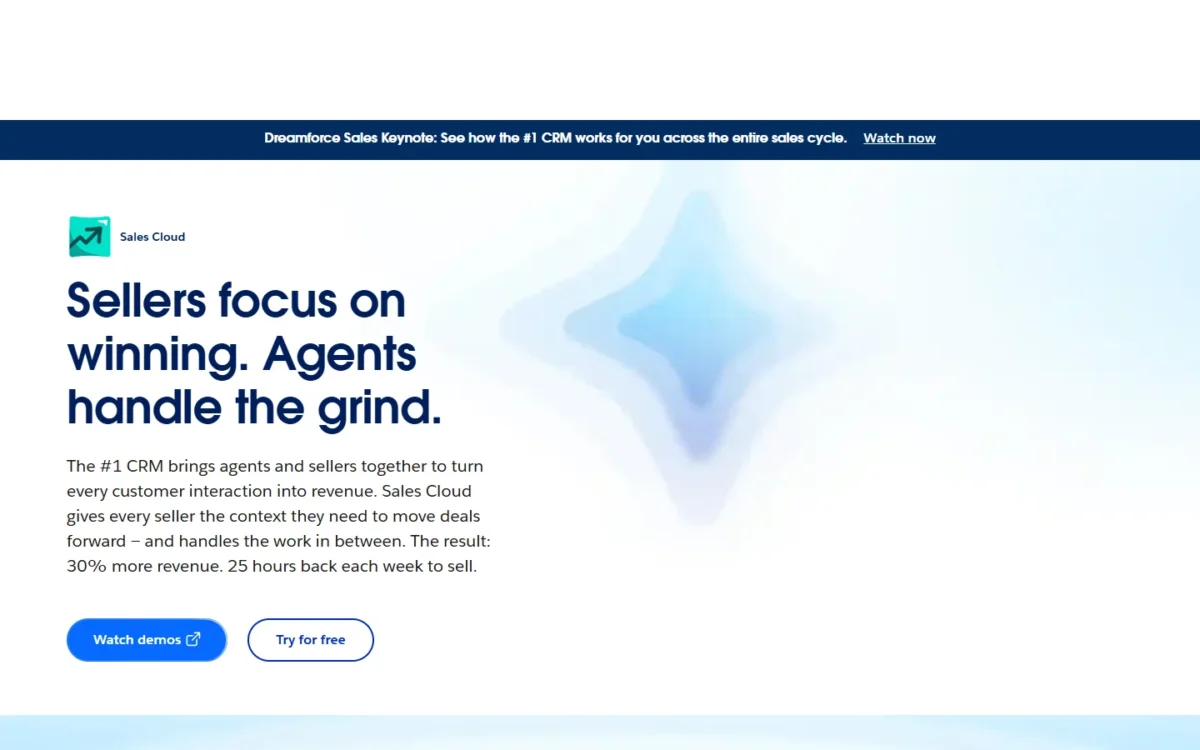
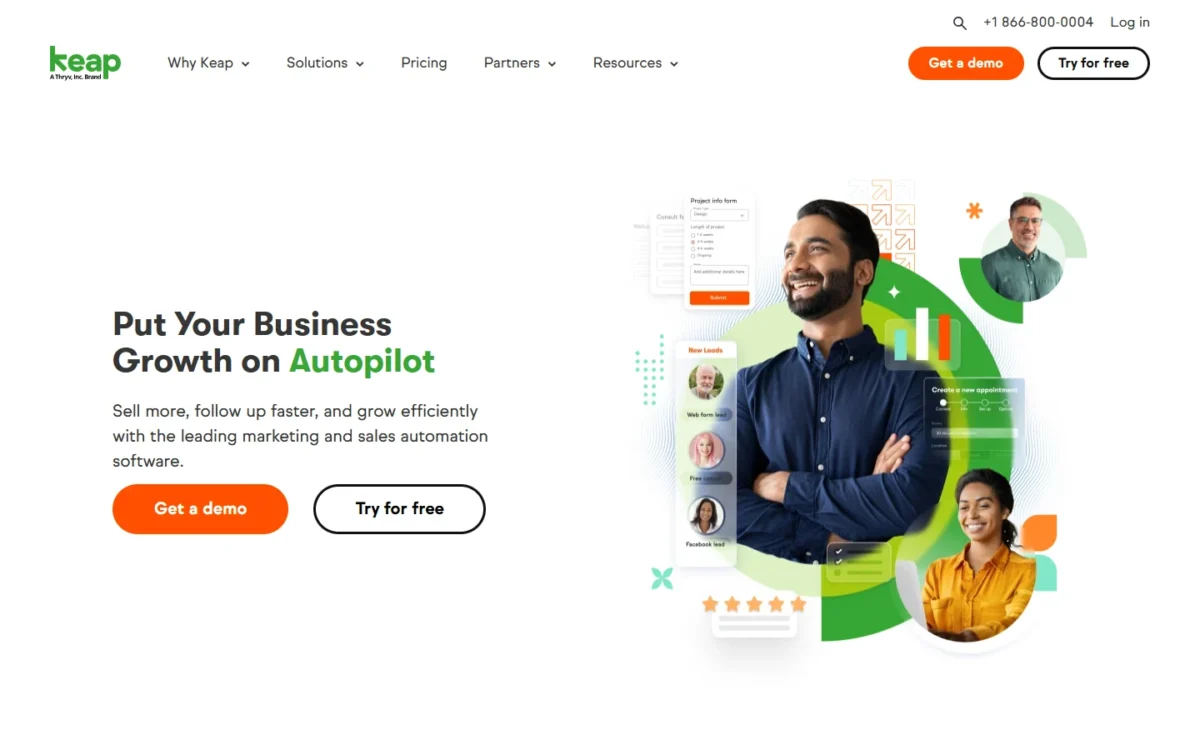
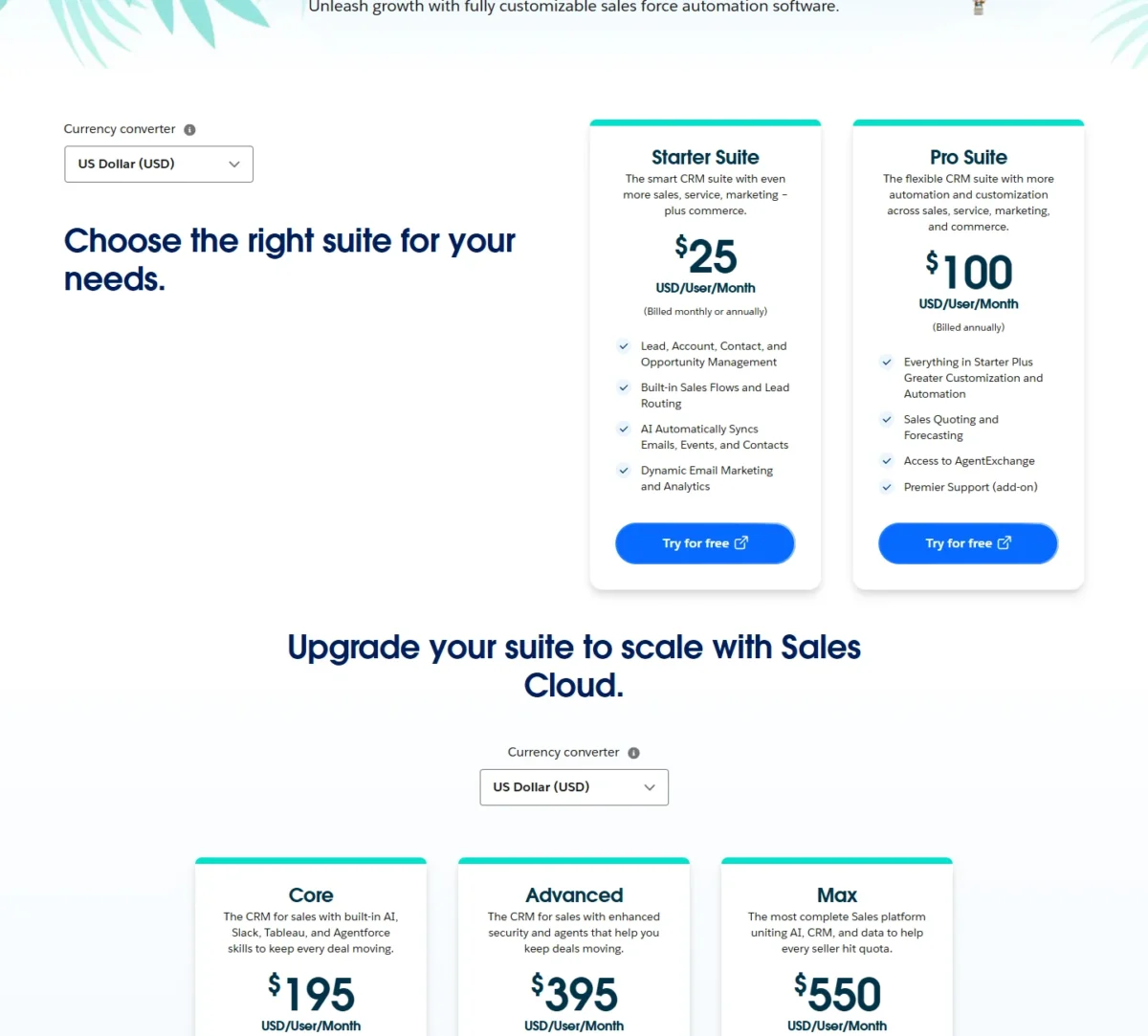
Keap starts at $299 a month, billed monthly, with 2 users included (its pricing page as of October 5, 2026). Salesforce Starter Suite costs $25 per user per month, and Pro Suite costs $100 per user per month, billed annually under a contract.
Quick verdict
Keap sells one all-in-one plan priced per account; Salesforce sells sales suites priced per user. Keap suits an owner who runs campaigns and billing. Salesforce suits a sales-led team that wants cheap seats now (Starter Suite) or forecasting later (Pro Suite).
At 5 users, Salesforce costs $25 x 5 x 12 = $1,500 a year on Starter Suite and $100 x 5 x 12 = $6,000 on Pro Suite.
Keap’s base plan with implementation from $1,500 costs $3,588 + $1,500 = $5,088 in year one. Three extra users add $39 x 3 x 12 = $1,404, so 5 users pay $5,088 + $1,404 = $6,492 at least.
In This Article (11 sections)
Salesforce vs Keap at a Glance
Keap prices one plan per account with 2 users included, while Salesforce prices each suite per user, so the cheaper product changes as the team grows.
| Attribute | Salesforce | Keap |
|---|---|---|
| Best for | Sales teams that want cheap seats now and forecasting later | Owner-run service businesses running campaigns and billing |
| Starting price | Starter Suite: $25 per user per month, billed monthly or annually | $299 per month, billed monthly, as of October 5, 2026 |
| Automation plan | Pro Suite: $100 per user per month, billed annually, contract required | The same single plan |
| Users included | Priced per user; no user maximum on Starter Suite | 2 users; each extra user $39 per month |
| One-time fees | Not listed on the pricing page | Implementation package required |
| Free plan or trial | Free Suite at $0; 30-day trial, no credit card | 14-day trial, no credit card; 25 emails, no payments, no texts |
| Main strength | Quoting and forecasting on Pro Suite | Landing pages, texting, invoices and payments in one plan |
| Main limitation | Account Engagement priced separately, from $1,250 per month, billed annually | Forecasting not listed on the pricing page |
Sources: Salesforce Sales Cloud pricing, Salesforce small-business pricing, Keap pricing page, Keap vs. Salesforce page, checked October 2026.
Keap’s floor is a full plan even for a team of one, while Salesforce prices each seat, so headcount and the jobs you need decide which model wins.
Key Differences Between Salesforce and Keap
Four differences decide this purchase: how each bills, where marketing automation lives, whether payments and texting are built in, and how far each scales.
Pricing model. Salesforce bills every seat; Keap bills the account, with 2 users included and each extra user at $39 a month. Small sales teams pay less on Salesforce, and larger teams on an automation plan pay less on Keap after the setup year.
Marketing automation. Keap’s one plan includes landing pages, multi-page sales funnels, forms, triggered emails and a library of Proven Automations. Salesforce Starter Suite includes Dynamic Email Nurture Campaigns and Lead Scoring, and Account Engagement is priced on its own, from $1,250 a month, billed annually. An owner who builds funnels gets them in Keap’s base price.
Payments and texting. Keap includes one-time and recurring invoices, checkout forms, a native US payment processor and text broadcasts in the US. Salesforce’s suites include Direct Payment Links, with transaction fees. A service business that bills clients and texts leads gets both jobs in one Keap bill.
Scale and customization. Salesforce Starter Suite has no user maximum, and the editions continue past Pro Suite to Core, Advanced and Max.
Keap’s pricing page lists custom fields and custom user roles; custom objects are not listed on it. A team planning to hire sellers or model a custom process has more room in Salesforce, which my Salesforce CRM review covers on its own.
Salesforce vs Keap: Features Compared
Keap covers more marketing and billing jobs in its single plan, while Salesforce covers more of the sales process once you reach Pro Suite.
| Job | Salesforce Starter Suite | Salesforce Pro Suite | Keap |
|---|---|---|---|
| Sales automation | Sales Flows, Lead Routing | Greater customization and automation | Pipeline automation |
| Email marketing | Dynamic Email Marketing | Included | Broadcasts, triggered emails |
| Landing pages and funnels | Not listed on the pricing pages | Not listed on the pricing pages | Landing pages, multi-page funnels |
| Quotes | Higher plan: Pro Suite | Sales Quoting | Quotes that convert to invoices |
| Forecasting | Higher plan: Pro Suite | Included | Not listed on the pricing page |
| Invoices and payments | Direct Payment Links; transaction fees apply | Direct Payment Links; transaction fees apply | Invoices, checkout forms, Keap Pay (US) |
| Text messaging | Not listed on the pricing pages | Not listed on the pricing pages | Limited: Tier 1 included, broadcasts US only |
| Custom objects | Higher plan: Pro Suite | Included | Not listed on the pricing page |
| Integrations | Higher plan: Pro Suite (AgentExchange) | AgentExchange access | API, webhooks, native Zapier |
| AI | AI email, event and contact sync | AI email, event and contact sync | AI Content and Automation Assistants |
Sources: Salesforce Sales Cloud pricing, Salesforce small-business pricing, Keap pricing page, checked October 2026.
Keap leads on campaigns, billing and texting; Salesforce leads once quotes, forecasts and custom objects matter. The sections below show what each gap means for a real team.
Marketing automation and email
Keap fits better for owner-run campaigns, because its single plan holds the pages, forms, emails and automations a campaign needs. Its forms trigger automation, its emails fire on contact activity, and its automation history shows where each contact sits in a sequence.
The Proven Automations library starts from ready-made campaigns such as a lead magnet offer, a webinar and a review request. For a coach without a marketer, that is the difference between building a funnel and copying one.
Salesforce Starter Suite covers the sales side of email: nurture campaigns, lead scoring, a drag-and-drop email builder and campaign analytics. Its small-business page marks Marketing Email Sends with “Add-on available”, so check send volume before planning newsletters on Starter Suite.
Bigger nurture programs move to Account Engagement, whose Growth edition starts at $1,250 a month for up to 10,000 contacts, billed annually. That is $1,250 x 12 = $15,000 a year, more than double Keap’s 10-user subscription. My list of CRMs built around marketing automation widens the field if this job comes first.
Verdict: Marketing automation
Keap fits better for an owner who builds funnels, forms and nurture emails, because all of them sit in one plan. Salesforce Starter Suite is enough for a sales team that sends nurture emails and scores leads. The caveat for Keap: contact pricing runs in tiers, so a large list raises the price.
Sales pipeline, quoting and forecasting
Salesforce fits better for a team that forecasts. Starter Suite manages leads, accounts, contacts and opportunities with built-in Sales Flows and Lead Routing. Pro Suite adds Sales Quoting and Forecasting, the two jobs a sales manager reports on.
Keap tracks leads in a sales pipeline, automates next steps at each stage, books calls through its appointment scheduler and sends quotes a prospect can accept and turn into an invoice. A service owner who quotes and books calls is covered; a manager who must commit a quarterly number is not.
Verdict: Pipeline and forecasting
Salesforce Pro Suite fits better for a team that needs quotes and forecasts in one place, at $100 per user per month on an annual contract. Keap covers quotes and a pipeline for an owner-led sales process. The caveat: Salesforce forecasting starts at Pro Suite, not Starter Suite.
Payments, invoicing and checkout
Keap fits better for getting paid from the CRM. Its plan includes one-time and recurring invoices, checkout forms, order bumps and promo codes, with payments through Keap Pay in the US or through PayPal, Stripe and Eway.
Keap also automates past-due reminders and warns before a client’s card expires, which matters for any business on monthly retainers. Each processor still charges its standard fee per payment, Keap Pay included.
Salesforce’s suites add Pay Now to their Direct Payment Links, and transaction fees apply. A team that bills from an accounting tool will not miss Keap’s billing features; a coach selling recurring programs will.
Verdict: Payments and invoicing
Keap fits better for a service business that invoices clients and runs recurring billing, because checkout, invoices and past-due reminders sit in its one plan. Salesforce offers Direct Payment Links in its suites. The caveat: processing fees apply on both.
Texting and the business phone line
Keap includes text marketing, and neither Salesforce pricing page lists text messaging. Keap’s Tier 1 includes 500 messages and 100 voice minutes; higher tiers run from $24 to $279 a month, and overages cost $0.015 per text message.
Text broadcasts, automated texts and reply handling work in the US only, while 1:1 texts and the dedicated business phone line also work in Canada.
A US business sending 1,000 texts a month has three paths on Keap’s pricing page. The 500-text add-on costs $6 x 12 = $72 a year, and overage on the extra 500 costs $0.015 x 500 x 12 = $90 a year.
Tier 2 holds 1,000 messages and 300 voice minutes at $24 x 12 = $288 a year, so for texts alone the add-on is the cheapest path.
Customization, integrations and AI
Salesforce fits better for a custom sales process. Pro Suite adds greater customization and automation plus access to AgentExchange, and custom objects, process automation with Flows and a sandbox for testing and training are included on Pro Suite, not Starter Suite.
For systems without a built-in integration, Salesforce points buyers to MuleSoft licenses, integration partners or AgentExchange apps. Keap connects through API and webhooks and a native Zapier integration, and its developer portal documents v2 REST, v1 REST and XML-RPC APIs.
Neither pricing page gives an exact integration count, so look up your three must-have apps in both directories before you buy.
AI pricing splits the two sharply. Keap’s plan includes an AI Content Assistant for emails and an AI Automation Assistant for campaigns.
Salesforce lists AI email, event and contact sync on Starter Suite and Pro Suite. Agentforce for Sales can be added to Core and above from $125 per user per month. An Agentforce-equipped seat therefore starts at $195 + $125 = $320 per user per month.
Verdict: Customization
Salesforce Pro Suite fits better for a team that needs custom objects, Flows and a sandbox. Keap fits an owner who needs custom fields and Zapier links, not a custom data model. On integration breadth there is not enough evidence to call it.
Salesforce vs Keap Pricing
On a 2-10 user budget, the comparable plans are Keap’s single plan, Salesforce Starter Suite for pipeline-only teams and Pro Suite as the like-for-like automation tier. As of October 21, 2026, Salesforce also sells Core at $195, Advanced at $395 and Max at $550 per user per month, billed annually; the full Salesforce pricing breakdown covers those editions.
| Plan tier | Salesforce | Keap |
|---|---|---|
| Free option | Free Suite, $0 per user per month | 14-day trial, no credit card |
| Entry paid plan | Starter Suite: $25 per user per month, billed monthly or annually | Keap: $299 per month for 2 users, billed monthly |
| Automation tier | Pro Suite: $100 per user per month, billed annually, contract required | The same Keap plan |
| Extra user | The suite’s per-user price | $39 per month per user |
| One-time setup | Not listed on the pricing page | Implementation package, required |
| Annual terms | Pro Suite billed annually only | $299 early termination fee on an annual contract |
Sources: Salesforce Sales Cloud pricing, Salesforce small-business pricing, Keap pricing page, checked October 2026.
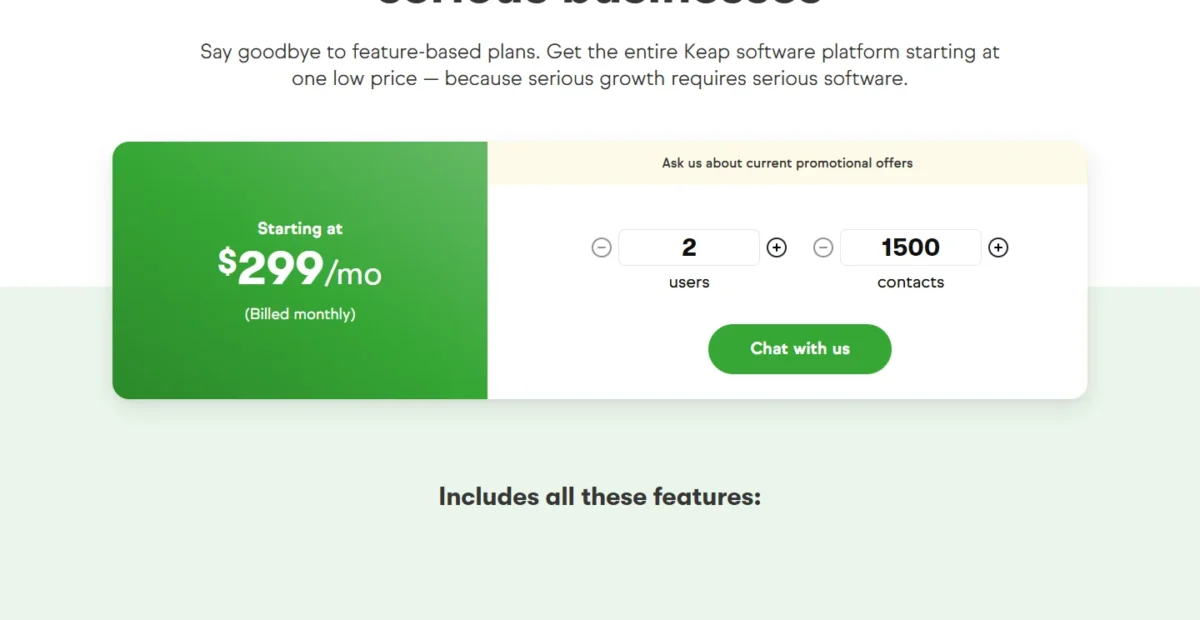
Keap requires a personalized implementation package for all new customers, a one-time charge from $1,500 (Keap’s implementation terms). Keap’s package covers a business mapping session, done-for-you automations, data import, migration and strategy calls, and Keap invites buyers to ask how to save on it.
The billing bases differ. Keap’s $299 is the monthly-billing price, and Keap also sells an annual contract. Salesforce charges Starter Suite the same $25 monthly or annually, but Pro Suite only on an annual contract.
Year-One and Year-Two Cost by Team Size
Salesforce Starter Suite is the cheapest option at every team size below, and Keap’s subscription costs less than Pro Suite from 4 users.
| Team size | Salesforce Starter Suite | Salesforce Pro Suite | Keap subscription, any year |
|---|---|---|---|
| 2 users | $25 x 2 x 12 = $600 | $100 x 2 x 12 = $2,400 | $299 x 12 = $3,588 |
| 5 users | $25 x 5 x 12 = $1,500 | $100 x 5 x 12 = $6,000 | $299 x 12 = $3,588 plus $39 x 3 x 12 = $1,404, which is $4,992 |
| 10 users | $25 x 10 x 12 = $3,000 | $100 x 10 x 12 = $12,000 | $299 x 12 = $3,588 plus $39 x 8 x 12 = $3,744, which is $7,332 |
Sources: Salesforce Sales Cloud pricing, Keap pricing page, checked October 2026.
Assumptions: list prices; Keap on monthly billing with 2 users included and $39 per extra user; Salesforce suites at their per-user prices for 12 months. Excluded: taxes, Keap contact tiers, text tiers above Tier 1, processing fees, Premier Success, Agentforce and Account Engagement.
Keap’s first year adds the required implementation, from $1,500:
- 2 users: $299 x 12 = $3,588, and $3,588 + $1,500 = $5,088 at least in Keap’s first year
- 5 users: $3,588 + $1,500 = $5,088, plus $39 x 3 x 12 = $1,404 for 3 extra users, so $5,088 + $1,404 = $6,492 at least in Keap’s first year
- 10 users: $3,588 + $1,500 = $5,088, plus $39 x 8 x 12 = $3,744 for 8 extra users, so $5,088 + $3,744 = $8,832 at least in Keap’s first year
Against Pro Suite, Keap’s subscription wins from 4 users: $299 x 12 = $3,588 plus $39 x 2 x 12 = $936 is $4,524, against $100 x 4 x 12 = $4,800. At 3 users it loses, $4,056 against $3,600.
Keap’s first year at 6 users is $3,588 + $1,500 = $5,088 plus $39 x 4 x 12 = $1,872 for 4 extra users, so $5,088 + $1,872 = $6,960 at least. Pro Suite at 6 users costs $100 x 6 x 12 = $7,200, so 6 users is where Keap’s first year comes out lower.
For 2-3 sellers who need a pipeline and email, Starter Suite is the budget answer by a wide margin. For 5-10 people who need automation, Keap’s per-account price beats Pro Suite’s per-seat price once the setup year is paid.
Contract terms and add-ons that change the bill
Keap’s bill grows with contacts, texts and users. Contact pricing runs in tiers, and an extra 500 texts cost $6 a month.
Cancelling Keap’s annual contract before the one-year term ends costs a $299 early termination fee. That equals one month at the monthly-billing price, so in my view the annual contract carries limited exit risk.
Salesforce’s bill grows with seats and add-ons. Pro Suite requires a contract, Premier Success costs 30% of net license fees, and Agentforce for Sales starts at $125 per user per month on Core and above.
The upgrade triggers differ too. On Salesforce, needing quotes or forecasts moves every seat from $25 to $100, a step of $100 – $25 = $75 per user per month. On Keap, the plan never changes; users, contacts and texts move the price.
Setup, Support and Onboarding
Keap builds onboarding into the purchase, while Salesforce includes self-guided help and sells hands-on support as an add-on. That decides who does the setup work.
Every Keap subscription includes a dedicated Customer Success Manager, US-based phone support on weekdays, 24/7 chat and Keap Academy courses. The implementation package adds strategy calls and done-for-you automations, so Keap’s team builds much of the first setup with you.
Salesforce includes the Standard Success Plan in all licenses: documentation, Trailhead and the Trailblazer Community. Premier Success costs 30% of net license fees and adds expert guidance, health checks and 24/7 support for business-stopping issues.
Salesforce also lists Guided Onboarding for its suites and sells Professional Services without a published price. Core bundles Premier Success into its $195 per user price, so a team weighing Pro Suite plus Premier should price Core too.
Use each trial as your own test. Salesforce offers 30 days without a credit card. Keap offers 14 days without one, capped at 25 emails with no payments or texts, so test Keap’s automation builder in the trial, not its billing.
Salesforce vs Keap: Pros and Cons
Each strength holds for a specific buyer, and each weakness hurts a specific one.
Salesforce pros and cons
Pros
- Starter Suite costs $25 per user per month with no user maximum, the lowest paid seat here for 2-3 sellers
- Pro Suite adds quoting and forecasting for a manager who reports a pipeline
- Editions continue to Core, Advanced and Max on the same platform
- A 30-day trial without a credit card, plus a $0 Free Suite
Cons
- Account Engagement starts at $1,250 a month, billed annually, for nurture programs past Starter’s email tools
- Pro Suite requires an annual contract
- Premier Success costs 30% of net license fees for 24/7 critical support
- Text messaging not listed on the Starter Suite or Pro Suite pricing pages, for teams that text leads
Keap pros and cons
Pros
- Landing pages, funnels, text marketing, invoices and payments sit in one plan
- 2 users included, and each extra user costs $39 a month
- A Customer Success Manager, US phone support and 24/7 chat come with every subscription
- Data import and migration services come with the required implementation package
Cons
- A $299 monthly floor, even for a one-person business
- A required implementation package for every new customer
- Forecasting and custom objects not listed on Keap’s pricing page, for a manager who models a sales process
- Text broadcasts and automated texts work in the US only
Which Is Better for Your Needs?
Pick by your main priority: the matrix gives the better fit for six common ones and the trade-off you accept.
| Your priority | Better fit | Reason | Trade-off |
|---|---|---|---|
| Lowest cost for 2-3 sellers | Salesforce | Starter Suite costs $25 per user per month | Texting and landing pages not listed |
| Campaigns, texts and payments in one plan | Keap | All three sit in the single plan | Implementation fee and a $299 monthly floor |
| Quotes and forecasts for a sales manager | Salesforce | Pro Suite holds Sales Quoting and Forecasting | $100 per user per month, annual contract |
| 6-10 users on an automation plan | Depends | Keap’s per-account price undercuts Pro Suite at this size | Keap’s contact tiers can close the gap |
| Onboarding done with you | Keap | Success manager, US phone support and 24/7 chat included | Paid implementation required |
| Integration breadth | Insufficient evidence | Neither pricing page gives an exact integration count | Check your must-have apps in each directory |
Sources: Salesforce Sales Cloud pricing, Keap pricing page, checked October 2026.
Is Salesforce overkill for a small business? Not on Starter Suite: $25 per user per month, billed monthly or annually, with no user maximum, is a light commitment. It becomes heavy when a team signs Pro Suite’s annual contract for quoting and forecasting it never uses.
Skip Keap if you sell alone and need only a pipeline: the $299 monthly floor buys marketing tools you will not use.
Skip Salesforce if one owner runs marketing, texting and billing, because texting and landing pages are not listed for Starter Suite and Pro Suite.
If neither fits, my roundup of Salesforce alternatives for smaller teams covers lighter options.
To weigh Salesforce against a different rival, open Salesforce vs Microsoft Dynamics.
Switching Between Salesforce and Keap
Switching applies both ways: Salesforce imports and exports CSV files, and on the Keap side the required implementation package covers data import and migration services.
Keap to Salesforce. Salesforce’s Data Import Wizard imports accounts, contacts, leads, campaign members and custom objects from CSV files, up to 50,000 records at a time, in all editions except Database.com. Keap’s landing pages and text campaigns have no listed home in Starter Suite or Pro Suite, so plan where they will live.
Before you sign with Keap, ask your Customer Success Manager how a full export works, because Keap’s pricing and compare pages cover moving data in, not out.
Salesforce to Keap. Salesforce’s Data Export produces zip archives of CSV files, each up to about 512 MB. Monthly export works in all editions except Database.com, and weekly export only in Enterprise, Performance and Unlimited.
Two details catch teams out: the zip files are deleted 48 hours after the notification email, and formula and roll-up summary fields are always left out of the export.
On the Keap side, data import and migration services come with the required implementation package, and Keap’s ActiveCampaign comparison promises 15 hours of migration services. Keap’s pricing page does not list forecasting, so a team that relies on Salesforce forecasts should plan where that report will live.
If Keap stays on your list but Salesforce does not, read Keap vs ActiveCampaign.
How I Compared Salesforce and Keap
I read Salesforce’s Sales Cloud and small-business pricing pages on October 21, 2026, plus its help article on the Data Import Wizard. The export facts come from its guide to backup data export.
Keap’s prices come from its pricing page as archived by the Internet Archive on October 5, 2026, and its pricing FAQ read on October 21, 2026. Keap’s compare pages supplied the implementation fee and migration hours.
I set Keap’s single plan against Pro Suite, the first Salesforce suite with quoting, forecasting and greater automation, with Starter Suite as the budget option. The criteria were marketing automation, pipeline and forecasting, payments, texting, customization, onboarding help, the yearly bill by team size, and switching.
Every fact comes from the vendors’ own pages; the cost math, break-even counts and verdicts are my analysis. Claims that one vendor’s compare page makes about the other are not used as sources here.
Keap shows its contact pricing only after you enter a count, and Salesforce does not publish Free Suite’s limits. For a wider shortlist, my best CRM software list applies the same method to other tools.
FAQ
Does Salesforce have a free version?
Yes. Salesforce lists Free Suite at $0 per user per month beside its paid suites, without publishing its limits, so treat it as a pilot. To try Starter Suite or Pro Suite features, Salesforce also offers a 30-day trial with no credit card and no installations.
Can I cancel Keap’s annual contract early?
Yes, but Keap charges a $299 early termination fee if you cancel before the end of the one-year term. Keap asks you to start the cancellation at least 10 days before your next invoice date, by calling Customer Support and speaking with a Keap representative.
Is Keap a good CRM for a small business?
Keap is a good fit for a small service business that wants marketing, texting and billing in one tool and accepts a $299 monthly floor plus a required implementation. It is a poor fit for a solo seller who needs only a pipeline. My Keap CRM review weighs it on its own.
Final Verdict: Salesforce or Keap?
Buy Keap if you run an owner-led US service business that wants campaigns, texting and payments in one plan and will pay for guided setup. Buy Salesforce if you lead a sales team: Starter Suite for the lowest seat price now, Pro Suite once quotes, forecasts and custom processes matter.
Choose Salesforce if
- Two or three sellers need a pipeline and email at $25 per user per month
- Your manager needs Sales Quoting and Forecasting (Pro Suite)
- You expect custom objects, Flows and a sandbox
- You plan to grow past 10 users without a user maximum
Choose Keap if
- You run email and text campaigns, landing pages and invoices yourself
- You want a Customer Success Manager and implementation done with you
- You take one-time and recurring payments from clients
- Your growing team wants one automation plan priced per account, not per seat
If you are still weighing Salesforce against another all-in-one suite, see how Salesforce compares with HubSpot.
If Keap’s $299 monthly floor is the sticking point, my comparison of Keap against Agile CRM looks at an alternative.
Buyers who like Keap but want a different CRM beside it can compare Zoho CRM vs Keap.





