

Close fits a calling-heavy inside-sales team better than HubSpot Sales Hub, while HubSpot fits teams whose leads come from HubSpot marketing or whose managers need forecasting. The HubSpot vs Close split comes down to the phone: Close puts a power dialer on Growth and bills calls per minute, while HubSpot gives each account a fixed monthly pool of minutes.
Cost follows the same line. Five reps on HubSpot Professional pay $90 x 5 x 12 = $5,400 a year plus a one-time $1,500 onboarding fee; on Close Growth they pay $99 x 5 x 12 = $5,940 before calling usage. I checked both vendors’ US pricing pages on October 21, 2026.
Quick verdict
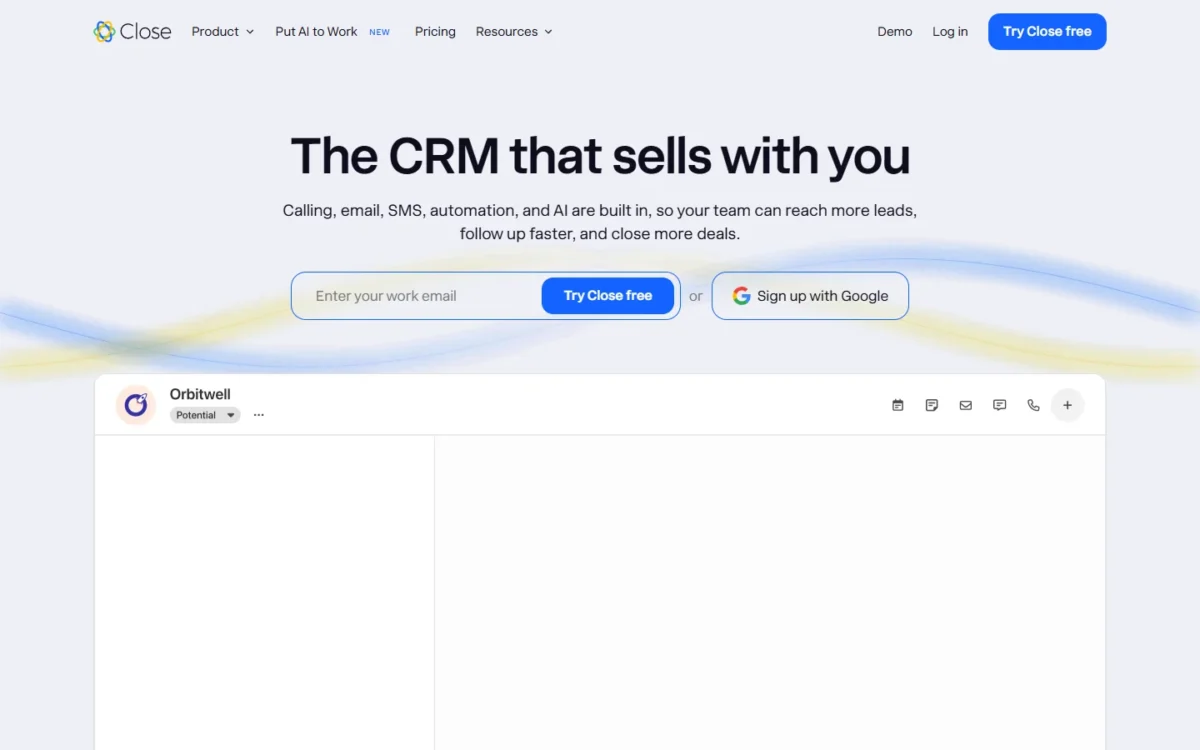
Pick Close if your reps work through call lists most of the day. The power dialer starts on Growth, the predictive dialer on Scale, SMS is on every plan, and calls are billed per minute at cost instead of drawing on a shared pool.
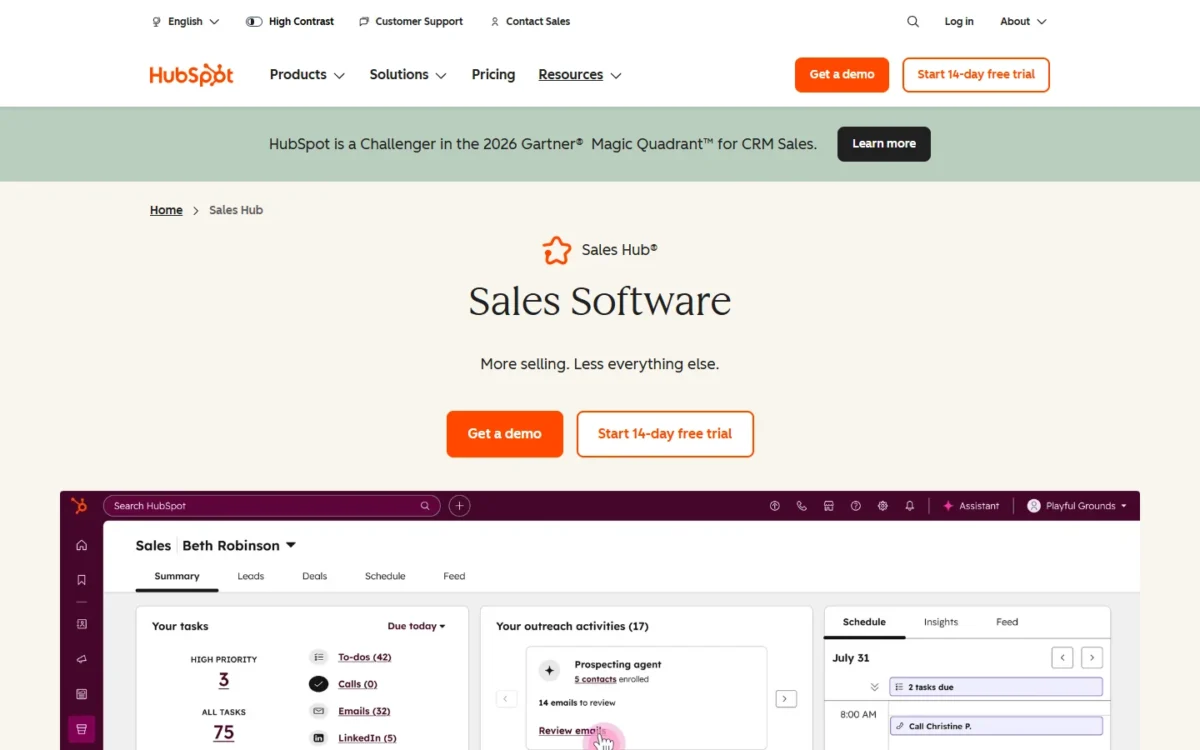
Pick HubSpot Sales Hub if marketing already runs in HubSpot or a manager needs forecasts. Forecasting and sequences arrive on Professional, on the same database as Marketing Hub, and the free plan covers 2 users.
The trade-off: HubSpot Professional adds a required $1,500 onboarding fee and an annual commitment, and new calls stop once the account’s 3,000 monthly minutes run out. Close lists no free plan and bills calling and texting on top of the seat price.
In This Article (10 sections)
HubSpot vs Close at a Glance
Close is a sales CRM built around calling, SMS and email for inside-sales teams, while HubSpot Sales Hub is the sales layer of a platform that also runs marketing and service. Both keep contacts, deals and call history in one record, which is what a CRM does at its core; they part ways on the phone and on marketing.
| Attribute | HubSpot Sales Hub | Close |
|---|---|---|
| Best for | Teams fed by HubSpot marketing; managers who forecast | Inside-sales teams that call and text through lead lists |
| Free plan or trial | Free tools at $0 for up to 2 users and 1,000 contacts | Free plan not listed; 14-day trial with $5 of calling and enrichment credits |
| Entry team plan | Starter: starts at $7 per seat per month billed annually, $10 paying monthly | Essentials: $35 per user per month billed annually, $49 monthly |
| Automation plan | Professional: $90 per seat per month billed annually, $100 paying monthly, plus $1,500 one-time onboarding | Growth: $99 per user per month billed annually, $109 monthly |
| Included calling | 500 (Starter), 3,000 (Professional), 12,000 (Enterprise) minutes per account per month | Usage passed through at cost; most outbound calls around $0.02 per minute |
| Dialers | Power and predictive: Not listed on the Sales Hub pricing page | Power dialer on Growth; predictive dialer on Scale |
| Main limitation | No new calls after the minute limit until the 1st of next month | Calling and SMS billed on top of the seat price |
| Support | Starter: email; Professional and Enterprise: email and phone | Email support and a 24/7 knowledge base |
| Security | Not listed on the Sales Hub pricing page | SOC 2 Type 2, two-factor authentication, Google SSO (as Close lists them) |
Sources: HubSpot Sales Hub pricing, HubSpot free tools FAQ, HubSpot calling help, Close pricing, checked October 2026.
At the Professional and Enterprise tiers the seat prices sit close together ($90 against Growth’s $99, $150 against Scale’s $139); what each product charges for calling and outreach is what changes the choice.
Key Differences Between HubSpot and Close
Four differences decide this choice, and each one favors a different kind of team:
- Calling: HubSpot includes a monthly pool of minutes per account (500 on Starter, 3,000 on Professional) and blocks new calls once it runs out; Close bills each call per minute at cost. The pool suits light callers; per-minute billing suits a floor that dials all day.
- Automation tier: HubSpot sequences start on Professional; Close workflows start on Growth and put SMS in the same cadence as email and calls. Email-led teams get published sequence limits on HubSpot (5,000 sequences and 500 sends per user per day on Professional); call-and-text teams get Close’s channel mix.
- Buying process: HubSpot Professional carries a required one-time onboarding fee and commits annually even when paid monthly. Close is self-serve, and its monthly plans can be canceled anytime, which suits a team that wants a trial quarter first.
- Marketing: HubSpot runs Marketing Hub on the same Smart CRM database; Close reaches HubSpot through a free two-way sync that HubSpot built and manages. Marketing-led companies keep one record; sales-led ones can sell in Close and still feed HubSpot.
HubSpot’s case rests on that platform breadth rather than on calling, which is why my full HubSpot CRM review judges it as a suite. For an inside-sales floor, the calling difference is the one felt first, so the feature comparison starts there.
HubSpot vs Close: Features Compared
Close lists a power dialer on Growth, a predictive dialer on Scale, SMS on every plan and per-minute calling; HubSpot lists forecasting from Professional, Marketing Hub on the same Smart CRM database and over 2,000 apps.
| Criterion | HubSpot Sales Hub | Close |
|---|---|---|
| Built-in calling | Starter: 500 min; Professional: 3,000 min; Enterprise: 12,000 min per account per month | All plans, billed per minute |
| Inbound calls in the app | Starter and up, HubSpot-provided number | All plans |
| Power dialer | Not listed on the Sales Hub pricing page | Growth and Scale |
| Predictive dialer | Not listed on the Sales Hub pricing page | Scale |
| SMS | Not listed on the Sales Hub pricing page | All plans; in workflows from Growth |
| Outreach automation | Sequences: Professional and Enterprise | Workflows: Growth and Scale |
| Forecasting | Professional and Enterprise | Not listed on the Close pricing page |
| Custom reports | Professional: 100; Enterprise: 500 | Custom graphs (Explorer) listed |
| Call transcripts | Professional: 750 hours; Enterprise: 1,500 hours per account per month | Add-on: Call Assistant |
| Call recording retention | Not listed on the Sales Hub pricing page | 30 days (Solo, Essentials); 90 days (Growth); unlimited (Scale) |
| Native integrations | Over 2,000 apps | Over 100 apps; Zapier for 2,000+ |
Sources: HubSpot Sales Hub pricing, HubSpot product catalog, Close pricing, checked October 2026.
Each criterion below compares both products at the same tier, starting with the phone.
Built-in calling and dialers
Close fits list dialing better: its power dialer starts on Growth, its predictive dialer comes with Scale, and every call is billed per minute. HubSpot includes 500 minutes on Starter and 3,000 on Professional per account per month, rings inbound calls in the browser, and has no power or predictive dialer on its Sales Hub plan list.
Close’s power dialer calls the next contact the moment the last call ends; its predictive dialer rings several numbers at once and connects a rep only when a person answers.
HubSpot’s minutes belong to the account, not to each rep, so the pool thins as the team grows:
| Team | HubSpot plan | Minutes per account per month | Minutes per rep per month |
|---|---|---|---|
| 3 reps | Starter | 500 | 500 / 3 = about 167 |
| 5 reps | Professional | 3,000 | 3,000 / 5 = 600 |
| 10 reps | Professional | 3,000 | 3,000 / 10 = 300 |
| 10 reps | Enterprise | 12,000 | 12,000 / 10 = 1,200 |
Sources: HubSpot Sales Hub pricing, HubSpot product catalog, checked October 2026.
Take an illustrative month with 20 working days. A rep with 600 minutes gets 30 minutes of talk time a day, and a rep with 300 minutes gets 15.
Two HubSpot rules make the cap bite sooner. A rep who hits the limit mid-call can finish it, but nobody starts a new call until the first day of the next month. Calling from a registered phone instead of the browser uses twice as many minutes, because HubSpot places two calls.
HubSpot’s calling help page lists a third-party calling provider as an option, beside a HubSpot-provided number and a registered outbound number. Inbound calls ring in the browser from Starter up on a HubSpot-provided number; Safari is not supported, and a call with no available user goes to voicemail.
Close handles inbound with group numbers that ring several phones at once, call forwarding, and phone menus with round-robin routing to reps. Its recordings stay 30 days on Solo and Essentials, 90 days on Growth and indefinitely on Scale. Transcripts cost extra through Call Assistant: $50 a month per organization plus $0.02 per minute.
HubSpot Professional includes 750 hours of call transcription per account per month, so coaching from transcripts costs nothing extra there. My Close CRM review covers the rest of Close’s phone setup.
Verdict: calling
Close fits teams whose reps dial lists all day: the power dialer on Growth and per-minute billing replace a shared monthly pool. HubSpot fits teams whose calls stay inside 3,000 minutes per account a month on Professional, or that place calls through a third-party calling provider.
Sequences and workflow automation
Both vendors hold outreach automation back for the middle tier: HubSpot sequences start on Professional, and Close workflows start on Growth. The channel mix decides: HubSpot sequences send emails and create call reminders, while Close workflows trigger SMS, email and call follow-up when a lead meets your criteria.
For an email-led cadence, HubSpot Professional allows 5,000 sequences per account and up to 500 email sends per user per day, 1,000 on Enterprise. Each sequence holds at most 10 email templates, and every user who builds one needs a Sales or Service Seat.
A call step in a HubSpot sequence is a task reminder to dial manually, not an automatic call. LinkedIn steps need a Sales Navigator subscription on top. HubSpot caps workflows at 50 on Starter, with restricted triggers and actions, then 300 on Professional and 1,000 on Enterprise.
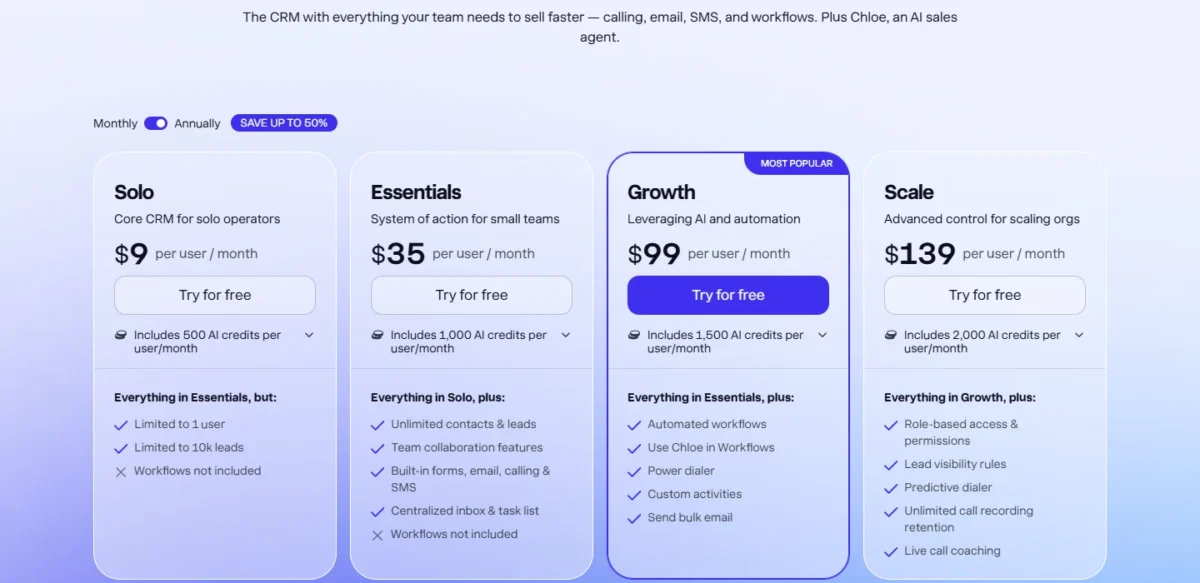
Close’s Growth workflows put SMS in the same cadence as email and calls, can use Chloe, Close’s AI agent, and honor blackout dates that stop automated email and SMS on holidays. Solo and Essentials include no workflows, so a Close team that wants automated follow-up pays Growth’s $99 per user per month billed annually.
Verdict: outreach automation
Depends on your channel mix: a team that texts as part of its cadence fits Close Growth, where SMS sits inside the workflow. A team running email-first sequences on HubSpot marketing data fits HubSpot Professional.
Reporting, forecasting and AI
HubSpot fits a manager who forecasts: Professional adds default and custom forecasting with up to 100 custom reports, and Enterprise adds forecasting across team hierarchies with up to 500. Close lists activity dashboards, an opportunity funnel report, a leaderboard, workflow performance and custom graphs, and no forecasting tool.
HubSpot dashboards scale from 30 on Starter to 75 on Professional and 100 on Enterprise. Close’s funnel report tracks conversion rates, time to close and sales velocity, which suits a manager who coaches activity more than one who commits a number to finance.
AI usage is metered in different units, so the two allowances cannot be set side by side. HubSpot includes 500, 3,000 or 5,000 HubSpot Credits a month on Starter, Professional and Enterprise, and extra credits cost $0.010 each.
Close includes 1,000 to 2,000 AI credits per user per month on its team plans, pooled up to 10,000, 15,000 or 20,000 on Essentials, Growth and Scale.
Verdict: reporting and AI
HubSpot fits better for forecasting, since Close lists no forecasting tool.
On AI there is not enough evidence to pick a side. HubSpot’s Credits Rate Sheet sets what each AI action uses, and Close pairs its per-user AI credits with usage rates such as enrichment at $0.05 per field.
Integrations and running both together
HubSpot lists over 2,000 apps and Close over 100, plus a Zapier connection to 2,000+ more, and the two also connect to each other. HubSpot built and manages a free two-way integration that syncs Close leads (HubSpot companies), contacts, opportunities (deals), calls, emails and tasks.
The HubSpot-to-Close sync leaves gaps a sales team will notice. SMS and meetings do not sync, notes, custom objects and custom activities are not supported, and Close lead statuses reach HubSpot only one way.
By default, Close’s HubSpot integration syncs only contacts with a valid email address. A HubSpot contact with no associated company is a common sync error, because in Close a contact cannot exist without its lead.
Field mapping is where the extra cost sits: editing the default mappings or adding custom ones needs Operations Hub Starter or higher. Close’s HubSpot integration page pitches this exact setup, Close as the dialer and HubSpot as the main CRM, and Close’s help center says the integration needs an active Close and HubSpot account, so budget for two subscriptions.
If the larger question is whether HubSpot can carry an enterprise sales org at all, my HubSpot vs Salesforce comparison weighs that move.
HubSpot vs Close Pricing
HubSpot Starter starts at $7 per seat per month billed annually against $35 per user for Close Essentials, and HubSpot Professional costs $90 billed annually against $99 for Close Growth. Two costs outside the seat price split the totals: HubSpot’s one-time onboarding fee and Close’s usage bill for calls and texts.
| Plan tier | HubSpot Sales Hub (per seat per month) | Close (per user per month) |
|---|---|---|
| Free or solo | Free: $0 for up to 2 users | Solo: $9 billed annually, $19 monthly; 1 user |
| Team entry | Starter: starts at $7 billed annually, $10 monthly; $20/mo/seat also printed | Essentials: $35 billed annually, $49 monthly |
| Automation | Professional: $90 billed annually, $100 monthly; $1,500 one-time onboarding | Growth: $99 billed annually, $109 monthly |
| Top tier | Enterprise: starts at $150, Talk to Sales; $3,500 one-time onboarding | Scale: $139 billed annually, $149 monthly |
| Calling | Included minutes per account: 500, 3,000, 12,000 | Usage at cost: about $0.02 per outbound minute, numbers from about $1 a month |
| Commitment | Starter on monthly billing: commit monthly; Professional: commit annually on either billing | Monthly plans cancel anytime; annual plans downgrade at term end |
Sources: HubSpot Sales Hub pricing (Pay Annually and Pay Monthly views), HubSpot product catalog, Close pricing (Annually and Monthly views), checked October 2026.
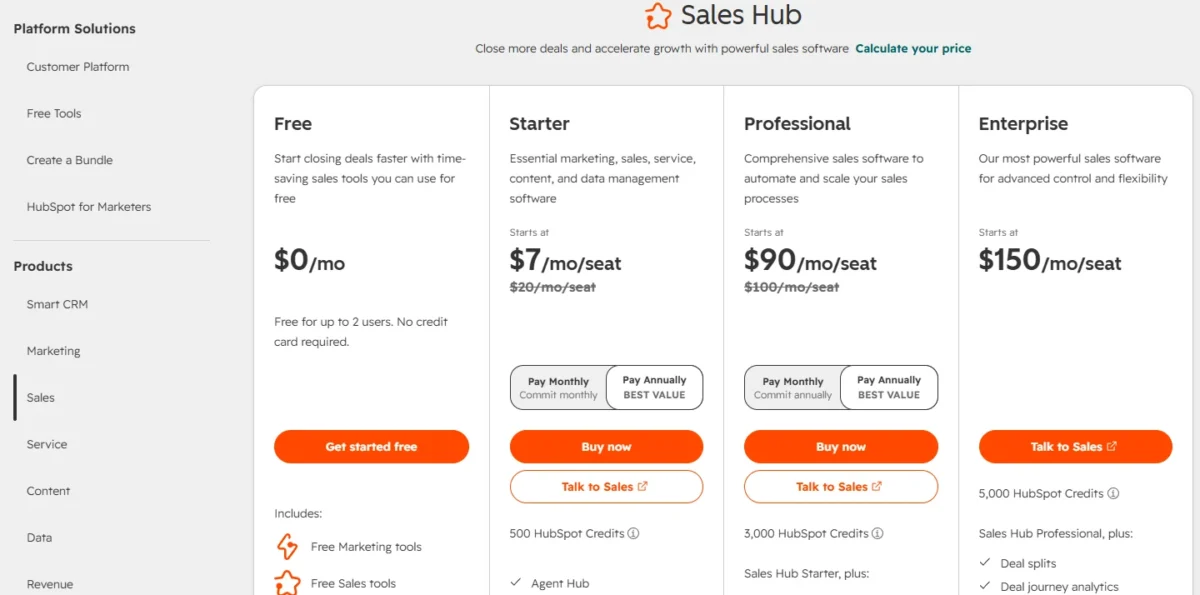
HubSpot prints $20/mo/seat beside Starter’s starting price in both billing views, the same $20 a month its product catalog lists for a Starter Core Seat. The page does not say how long the $7 or $10 figure applies, so I would budget Starter at $20 per seat.
Marketing Hub, Operations Hub and add-ons sit outside this comparison; my guide to every HubSpot plan and fee prices them.
Each product has one wall that forces the upgrade. HubSpot’s sequences, forecasting and conversation intelligence start on Professional; Close’s workflows and power dialer start on Growth, with the predictive dialer, custom roles and lead visibility rules on Scale.
The smaller walls are user counts. HubSpot Free stops at 2 users and 1,000 contacts; Close Solo stops at 1 user and 10,000 leads, so any second seller moves to Essentials.
The cheaper seat is not always the better value. HubSpot Starter costs a fraction of Close Essentials per seat, but its 500 minutes leave a 3-rep team about 167 minutes each a month and no sequences. A team that calls all day on Starter hits the cap long before the savings matter.
What calling really costs on each
HubSpot’s minutes are included in the seat price but capped per account; Close’s calls are never included but are passed through at cost. Most outbound calls on Close run around $0.02 a minute and phone numbers start at about $1 a month.
Close bills calls at Twilio’s pay-as-you-go rates and rounds each call up to the next minute, so a 70-second call counts as 2 minutes. To match HubSpot Professional’s 3,000 minutes on Close, a team pays about $0.02 x 3,000 = $60 a month, or $0.02 x 3,000 x 12 = $720 a year.
Close’s usage pricing carries edge charges a calling floor runs into:
- A forwarded call is billed as two calls: the inbound leg and the outbound leg to the forwarding number.
- An internal transfer is at least three calls, and the charges repeat each time the call moves again.
- Texting US numbers needs A2P 10DLC registration: a one-time $4 brand fee under 6,000 messages a day ($44 above that), a one-time $15 campaign verification fee, then $1.50 a month.
- US MMS costs $0.03 per outgoing message.
HubSpot’s risk runs the other way: the minutes cost nothing until they run out. Its pricing page and product catalog publish no price for minutes beyond the plan’s pool, so a team that outgrows 3,000 minutes should price Enterprise’s 12,000 or a third-party provider before it signs.
Cost for a 5- and 10-rep team
On the automation tier billed annually, Close Growth is cheaper than HubSpot Professional in year one for 5 or 10 reps before calling usage, and HubSpot is cheaper from year two.
| Team and plan | Billing | Year one | Year two | Assumptions |
|---|---|---|---|---|
| 5 reps, HubSpot Professional | Annual | $90 x 5 x 12 = $5,400 plus $1,500, which is $6,900 | $90 x 5 x 12 = $5,400 | Onboarding paid once; calls within 3,000 minutes per account |
| 5 reps, Close Growth | Annual | $99 x 5 x 12 = $5,940 | $99 x 5 x 12 = $5,940 | Calling and SMS usage extra |
| 10 reps, HubSpot Professional | Annual | $90 x 10 x 12 = $10,800 plus $1,500, which is $12,300 | $90 x 10 x 12 = $10,800 | 3,000 minutes shared by 10 reps |
| 10 reps, Close Growth | Annual | $99 x 10 x 12 = $11,880 | $99 x 10 x 12 = $11,880 | Calling and SMS usage extra |
| 5 reps, HubSpot Professional | Monthly, annual commitment | $100 x 5 x 12 = $6,000 plus $1,500, which is $7,500 | $100 x 5 x 12 = $6,000 | Cannot cancel mid-term |
| 5 reps, Close Growth | Monthly | $109 x 5 x 12 = $6,540 | $109 x 5 x 12 = $6,540 | Cancel anytime; usage extra |
| 3 reps, HubSpot Starter | Annual | $20 x 3 x 12 = $720 at the $20 rate; $7 x 3 x 12 = $252 best case at the starting price | $20 x 3 x 12 = $720 at the $20 rate | Term of the starting price not stated; 500 minutes per account |
| 3 reps, Close Essentials | Annual | $35 x 3 x 12 = $1,260 | $35 x 3 x 12 = $1,260 | No workflows; usage extra |
Sources: HubSpot Sales Hub pricing, Close pricing, checked October 2026. Assumptions: US list prices, tax, add-ons, HubSpot extra minutes, Close usage and A2P fees excluded.
The year-one gap is Close’s room for calling. Close Growth costs $9 more per seat per month ($99 against $90).
HubSpot’s $1,500 onboarding minus the $9 x 5 x 12 = $540 that five reps pay extra on Close leaves $960 of headroom for Close usage in year one.
With a $1,500 onboarding fee and seats at $99 against $90, the seat gap is $9 x 5 x 12 = $540, so $1,500 – $540 = $960, and $960 / $0.02 = 48,000 outbound minutes at around $0.02 each.
Even if those five reps used all 3,000 minutes HubSpot Professional includes, Close stays below HubSpot’s first-year total. Its year one would be $99 x 5 x 12 = $5,940 plus $0.02 x 3,000 x 12 = $720, which is $6,660.
The headroom shrinks as the team grows. At 10 reps, $9 x 10 x 12 = $1,080 leaves $420; from 14 reps, $9 x 14 x 12 = $1,512 already exceeds the onboarding fee, so HubSpot Professional is cheaper in year one before Close bills a single minute.
From year two, HubSpot Professional is the cheaper seat at any size, as long as the team’s calls fit the 3,000-minute pool. That condition is the real budget question for an inside-sales floor.
HubSpot vs Close: Pros and Cons
Each product’s strengths and weaknesses land on a specific team.
HubSpot Sales Hub
Pros
- Free plan for up to 2 users and 1,000 contacts with no time limit, so a founder can pilot before paying
- Marketing Hub shares the Smart CRM database, so campaign leads land in the sales pipeline without a sync
- Forecasting and up to 100 custom reports on Professional for managers who commit a number
- Over 2,000 listed app integrations for a team with a wide stack
- Inbound calls ring in the browser from Starter on a HubSpot-provided number
Cons
- Calling capped at 500 or 3,000 minutes per account a month, with new calls blocked at the cap
- No power or predictive dialer is listed on the Sales Hub plan list, a gap for reps who work through call lists
- Professional requires a $1,500 one-time onboarding fee and an annual commitment even when paid monthly
- Every user who builds sequences needs a Sales or Service Seat
Close
Pros
- Power dialer on Growth and predictive dialer on Scale, built into the CRM
- SMS on every plan, and inside automated workflows from Growth
- Monthly plans can be upgraded, downgraded or canceled anytime, and setup needs no sales call
- Close’s Lead Importer runs assisted imports from HubSpot CRM through Import2, usually at no cost when started inside Close
Cons
- No free plan on the pricing page; the trial lasts 14 days
- Workflows not included on Solo or Essentials, so automation starts at $99 per user per month billed annually
- Calling and SMS billed on top of seats, plus A2P 10DLC fees for texting US numbers
- Over 100 native integrations against HubSpot’s 2,000+, so niche apps may need Zapier
- No forecasting tool on the pricing page for a manager who commits a number
These strengths weigh differently by team, so the matrix below sorts them by situation.
Which Is Better for Your Needs?
Close is the better fit when the phone drives the pipeline, and HubSpot is the better fit when marketing or forecasting does; two situations depend on details below.
| Your priority | Better fit | Reason | Trade-off |
|---|---|---|---|
| Reps dial lists most of the day | Close | Power dialer on Growth, predictive on Scale, per-minute calling | A usage bill on top of seats |
| Leads come from HubSpot marketing | HubSpot | Marketing Hub runs on the same Smart CRM database | 3,000 calling minutes per account on Professional |
| Managers need forecasts | HubSpot | Forecasting on Professional, team hierarchies on Enterprise | $1,500 onboarding and an annual commitment |
| No annual commitment | Close | Monthly plans cancel anytime | $109 instead of $99 per user per month on Growth |
| 1 or 2 sellers, no budget | HubSpot | Free plan for up to 2 users and 1,000 contacts | Calling minutes start on Starter |
| Keep HubSpot marketing, sell in Close | Depends | Close’s free HubSpot integration syncs leads, contacts, opportunities, calls, emails and tasks | No SMS, meeting or note sync; custom mappings need Operations Hub Starter |
| Lowest seat price for manual follow-up | Depends | HubSpot Starter starts at $7 billed annually; Close Essentials is $35 | HubSpot Starter has up to 50 workflows with restricted triggers and actions and no sequences; Close Essentials has no workflows |
Sources: HubSpot Sales Hub pricing, Close pricing, HubSpot-to-Close sync, checked October 2026.
A team that dials through lead lists should pick Close Growth, unless its managers report a forecast upward every month; then HubSpot Professional’s forecasting outweighs the dialer. Anyone weighing Close against a different CRM can open Salesforce vs Close next.
A marketing-led company should stay on HubSpot unless its reps dial lists all day or text leads as part of the cadence. In that case, Close’s free HubSpot integration lets Close run sales while HubSpot keeps marketing, at the cost of two subscriptions. A reader still undecided about HubSpot itself may want Freshsales vs HubSpot as a second matchup.
A pipeline-first team that cares less about calling than about deal stages may find a better HubSpot rival in my HubSpot vs Pipedrive comparison. If the answer here is the product you do not use today, the next question is what the move takes.
Switching Between HubSpot and Close
Into Close, the move is assisted: Close’s partner Import2 runs a migration from HubSpot CRM from the Lead Importer, in most cases at no cost when the import starts inside Close. Moving from Close to HubSpot is a file route: Close exports records as CSV or JSON, and HubSpot imports files for several objects at once.
From HubSpot to Close
- Close’s import guide has an Admin open the Lead Importer, choose Import from a CRM and pick HubSpot CRM from the Which CRM? dropdown. Only one user should start it, because one import moves the whole team’s data.
- Connect the HubSpot account, then map fields and create opportunity pipelines and statuses in the field mappings.
- Run the sample migration Import2 offers; a large sample can take a few hours.
- Check the sample records in Close, correct the mappings, then start the full import.
The objects change names on the way. A HubSpot company becomes a Close lead, a deal becomes an opportunity, and properties become custom fields. In Close a contact or opportunity cannot exist without its lead.
From Close to HubSpot
- Export leads, contacts and opportunities from Close’s Leads page as CSV, or as JSON for activities: JSON is the only format that carries emails, calls, SMS and notes.
- Pull templates, phone numbers, notes and custom fields with Close’s support export tools, which need a Close API key.
- Import the files into HubSpot, which can import companies, deals and activities such as calls and meetings and associate them in one pass.
- Load activities once: HubSpot cannot update existing emails, meetings, notes or tasks by import.
In either direction, the automation does not travel. Rebuild HubSpot sequences as Close workflows (or the reverse), recreate call scripts and reports, and plan the phone numbers: a Close number whose user is removed is not renewed and cannot be retrieved after a short grace period.
Running both for a quarter is the lower-risk move. Close’s free HubSpot integration keeps leads, contacts, opportunities, calls, emails and tasks matched while reps switch, as long as nobody relies on SMS or meeting history crossing over.
How I Compared HubSpot and Close
I compared HubSpot Sales Hub and Close from both vendors’ US pricing pages, read in both billing views on October 21, 2026, plus HubSpot’s product catalog and knowledge base and Close’s help center.
Plans were paired tier for tier at the same seats and billing: Starter and Essentials, Professional and Growth, Enterprise and Scale. The criteria are the ones a calling team buys on: dialing, minutes and usage cost, automation, forecasting, the marketing link and switching.
Every price, limit and plan gate comes from those vendor pages; the cost tables and minutes per rep are my own arithmetic on list prices.
Some numbers the vendors do not publish: HubSpot’s price for minutes beyond the plan pool, whether its phone-number limits apply per user or per account, and how long Starter’s starting price lasts.
Call quality and connect rates depend on your own list, so run the same list through Close’s 14-day trial, with its $5 of calling credit, and through HubSpot Starter’s 500 monthly minutes.
FAQ
Does Close have a free plan?
No. Close’s pricing page lists Solo, Essentials, Growth and Scale and no free plan. It offers a 14-day trial with no credit card and $5 of calling and enrichment credits, and after purchase a 30-day money-back guarantee. When the trial ends without a plan, the account pauses and data stays for a limited period.
Can HubSpot’s free CRM make calls?
Not with HubSpot’s built-in calling. HubSpot’s calling help page lists Sales Hub Starter, Professional and Enterprise, and the Sales Hub pricing page starts calling minutes at 500 per account a month on Starter. The free tools cover up to 2 users and 1,000 contacts, enough to pilot the pipeline before paying for calls.
Why do sales teams move from HubSpot to Close?
For calling teams, the pricing pages show three pushes: HubSpot caps calling minutes per account and lists no dialer, and its sequences need Professional with a $1,500 onboarding fee and an annual commitment. Close answers with a power dialer on Growth and monthly billing. Teams leaving for other reasons can weigh other HubSpot alternatives.
Final Verdict: HubSpot or Close?
Buy Close if your team is an inside-sales floor that lives on the phone; buy HubSpot Sales Hub if your pipeline starts in HubSpot marketing or your managers forecast. If you already pay for HubSpot marketing and your reps dial lists all day or text leads, run both through Close’s free HubSpot integration.
Choose HubSpot if
- Your marketing already runs in HubSpot and leads should land in the same database
- A manager needs forecasting and custom reports, which start on Professional
- One or two sellers need a free CRM for now (up to 2 users, 1,000 contacts)
- The team’s calls fit within 500 or 3,000 minutes per account a month
Choose Close if
- Reps work through call lists most of the day (power dialer on Growth, predictive dialer on Scale)
- Texting is part of the cadence: SMS on every plan, in workflows from Growth
- You want monthly billing with no onboarding fee
- You want to keep HubSpot for marketing and sell in Close through Close’s free HubSpot integration
Skip HubSpot Sales Hub if: your reps dial lists all day and their calls would outrun 3,000 minutes per account a month.
Skip Close if: a manager must forecast, or marketing already runs in HubSpot and your reps neither dial lists all day nor text leads.
HubSpot asks for an onboarding fee, an annual commitment on Professional and a hard minute cap; Close asks for a usage bill on every plan and Growth’s seat price for any automation. Another contender for the HubSpot seat is covered in HubSpot vs Copper.
If neither fits, for example because the team needs neither heavy calling nor HubSpot’s marketing suite, my ranking of the best CRM software for small teams widens the shortlist.






Pingback: HubSpot vs Insightly (2026): Pricing, Projects and Verdict
Pingback: HubSpot vs Copper (2026): Pricing, Gmail Fit and Verdict