


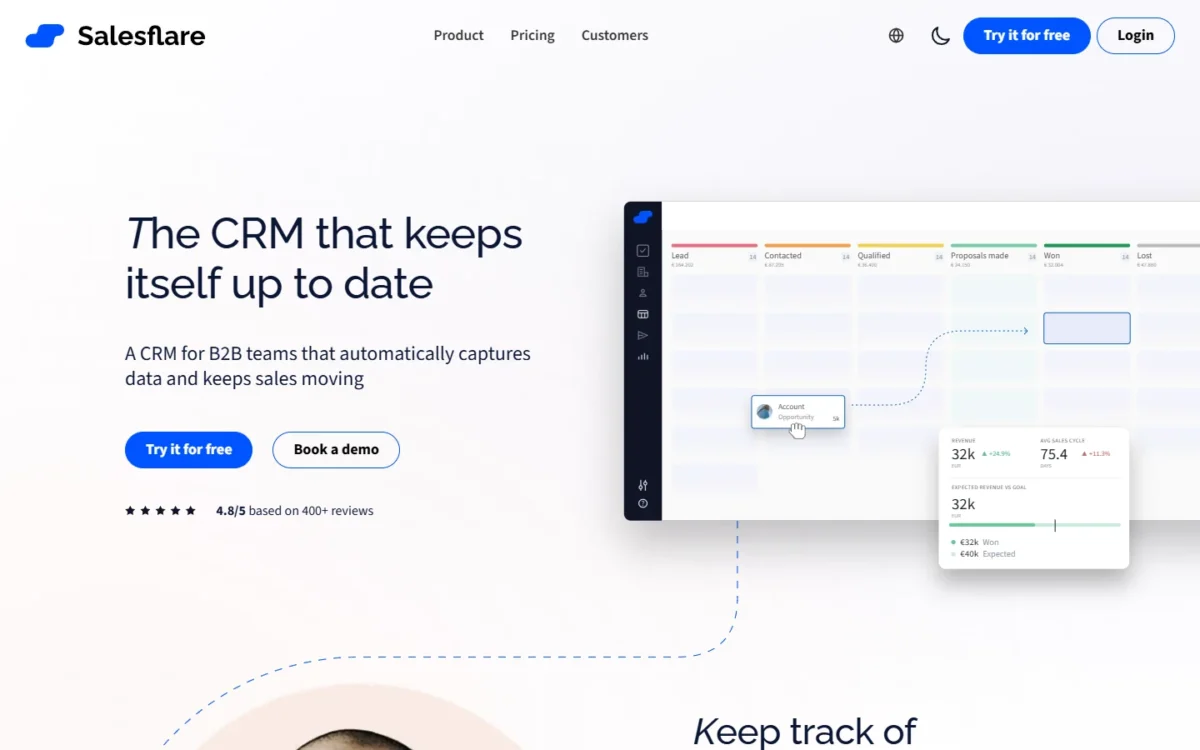
Pick Salesflare if your B2B reps sell from Gmail, Outlook and LinkedIn and want the CRM to fill itself. Pick Pipedrive if you want a structured pipeline with sequences and if/else automation on its Growth plan.
On price, Pipedrive vs Salesflare starts close: Growth costs $24 per seat per month on Pipedrive and $29 per user on Salesflare, both billed annually. Five annual seats cost $24 x 5 x 12 = $1,440 a year against $29 x 5 x 12 = $1,740.
Pipedrive Premium and Salesflare Pro cost the same $49 x 5 x 12 = $2,940.

Quick verdict
The deciding difference: Salesflare fills the CRM from the inbox, while Pipedrive gives a manager more control over the pipeline and its automation.
- Salesflare suits B2B reps who live in their inbox and LinkedIn: capture, tracking, campaigns and a LinkedIn sidebar come on Growth.
- Pipedrive suits teams that want sequences, if/else automation and a forecast view on Growth.
- The trade-off: Salesflare’s multi-email workflows wait for Pro at $49, and Pipedrive sells website-visit tracking as an add-on.
In This Article (11 sections)
Pipedrive vs Salesflare at a Glance
Both bill per user per month and neither pricing page lists a free plan; the split that decides is automatic data capture against pipeline and automation control.
| Attribute | Pipedrive | Salesflare |
|---|---|---|
| Best for | Teams that run sequences, branching automation and forecasts | B2B reps who sell from the inbox and LinkedIn |
| Entry plan with email in the CRM | Growth: $24 per seat per month billed annually, $34 billed monthly | Growth: $29 per user per month billed annually, $39 billed monthly |
| Plan with permissions | Premium: $49 billed annually | Pro: $49 billed annually |
| Free trial | 14 days, no credit card | 30 days, no credit card |
| Main limitation | Per-company caps, such as 5 sequences on Growth | Multi-email workflows and permissions wait for Pro |
Sources: Pipedrive pricing page, Pipedrive usage limits, Salesflare pricing page, checked October 2026.
The entry email plans sit $5 apart per seat per month ($29 – $24), so the real choice is how each product behaves in a rep’s day.
Key Differences Between Pipedrive and Salesflare
Four differences decide this pair: how the CRM gets filled, where multi-step email sits, what is bundled, and which caps exist.
- Getting data in: Salesflare Growth gathers contact details from emails, signatures and social profiles; Pipedrive keeps email sync for Growth and above.
- Multi-step email: Pipedrive puts sequences on Growth; Salesflare holds workflows of multiple emails for Pro.
- Bundled or bought: Salesflare Growth tracks website visits; Pipedrive sells that as the Web Visitors add-on, from $41.
- Caps: Pipedrive Growth allows 5,000 leads and deals per seat; Salesflare states no limits on contacts, custom fields, workflows or pipelines.
The first difference weighs most for a buyer still learning what a CRM does: a pipeline nobody updates forecasts nothing.
Pipedrive vs Salesflare: Features Compared
Salesflare packs more inbox work into its entry plan, while Pipedrive packs more structured follow-up and reporting into Growth.
| Feature | Pipedrive | Salesflare |
|---|---|---|
| Email sync or capture | Growth | Growth |
| LinkedIn sidebar | Not listed on the plan features page | Growth |
| Open and click tracking | Growth | Growth |
| Website-visit tracking | Add-on: Web Visitors | Growth |
| Multi-step email | Growth, Limited: 5 sequences | Pro |
| If/else branching | Growth, Limited: 3 per automation | Not listed on the feature list |
| Forecasting | Growth (forecast view) | Not listed on the feature list |
| Dashboards | Insights dashboard on every plan; multiple Insights dashboards from Premium | Custom dashboards on Pro |
| Permissions | Premium | Pro |
Sources: Pipedrive plan features, Salesflare feature list, checked October 2026.
Getting data into the CRM
Salesflare needs less typing on its entry plan: Growth gathers contact and company info from emails, signatures and social profiles, and logs meetings and calls. Pipedrive reserves email sync for Growth and higher plans.
Pipedrive Lite still has Smart Bcc and contact and calendar sync with Google and Microsoft. Nova, included in all plans, records and transcribes calls. So Pipedrive adds call recording and transcripts on every plan, and Salesflare adds capture from the inbox on Growth.
Verdict: getting data in
Salesflare fits better for reps who sell from email and LinkedIn. Both descriptions are the vendors’ own, so connect your real inbox during Salesflare’s 30-day trial and see which records it fills.
Email follow-up and sequences
Pipedrive gives multi-step follow-up on Growth at $24 per seat per month, billed annually; Salesflare needs Pro at $49 per user per month, billed annually. Pipedrive Growth allows 5 sequences per company, each up to 15 steps and 500 deals or leads.
Five sequences cover a few playbooks; a team with separate flows per segment hits the cap early. Salesflare sets no limit on workflows, but sending follows inbox quotas: a Google Workspace inbox sends up to 2,000 emails a day, custom SMTP 200.
Verdict: email sequences
Pipedrive fits better on price, since sequences start on Growth. Salesflare Pro suits a team that needs many flows more than a low seat price.
Automation and pipeline control
Pipedrive goes further: Growth runs up to 50 active automations with 3 if/else conditions each, and Premium adds required, formula and pipeline-specific fields. Salesflare lists trigger-based automations and multiple pipelines, and its feature list names no if/else branching.
For a team with defined stages and routing rules, that structure is the reason to choose Pipedrive, as my full Pipedrive review argues.
Verdict: automation
Pipedrive fits better for teams that branch follow-up by conditions; Salesflare fits a team whose automation stops at triggers and email flows.
Reporting and forecasting
Pipedrive gives a manager a forecast view from Growth and multiple Insights dashboards from Premium. Salesflare Growth uses the standard Insights dashboards, Pro adds custom dashboards, and forecasting is not on its feature list.
Verdict: forecasting
Pipedrive fits better for a manager who has to call the month’s revenue.
Permissions and team control
Both put permissions on the $49 tier, billed annually. Pipedrive Premium allows 15 custom permission sets and 15 visibility groups per company. Salesflare Pro uses four roles, data scopes and pipeline access by user group.
Verdict: permissions
Comparable at $49. Custom permission sets and custom visibility groups start on Pipedrive Premium, and Salesflare permissions start on Pro, so that control costs $49 per user per month, billed annually, on either.
Pipedrive vs Salesflare Pricing
Comparable plans cost close to the same: Pipedrive Growth is $24 per seat per month billed annually against $29 per user for Salesflare Growth, and the permission tiers both cost $49. If Close is on your shortlist instead, my Pipedrive vs Close cost comparison puts per-seat prices side by side.
| Plan tier | Pipedrive | Salesflare |
|---|---|---|
| Cheapest plan | Lite: $14 billed annually, $19 billed monthly; no email sync | Growth is the entry plan |
| Entry plan with email | Growth: $24 billed annually, $34 billed monthly | Growth: $29 billed annually, $39 billed monthly |
| Permissions tier | Premium: $49 billed annually, $64 billed monthly | Pro: $49 billed annually, $64 billed monthly |
| Top plan | Ultimate: $69 billed annually, $89 billed monthly | Enterprise: $99 billed annually, $124 billed monthly; minimum of 5 users |
Sources: Pipedrive pricing page, Salesflare pricing page, checked October 2026.
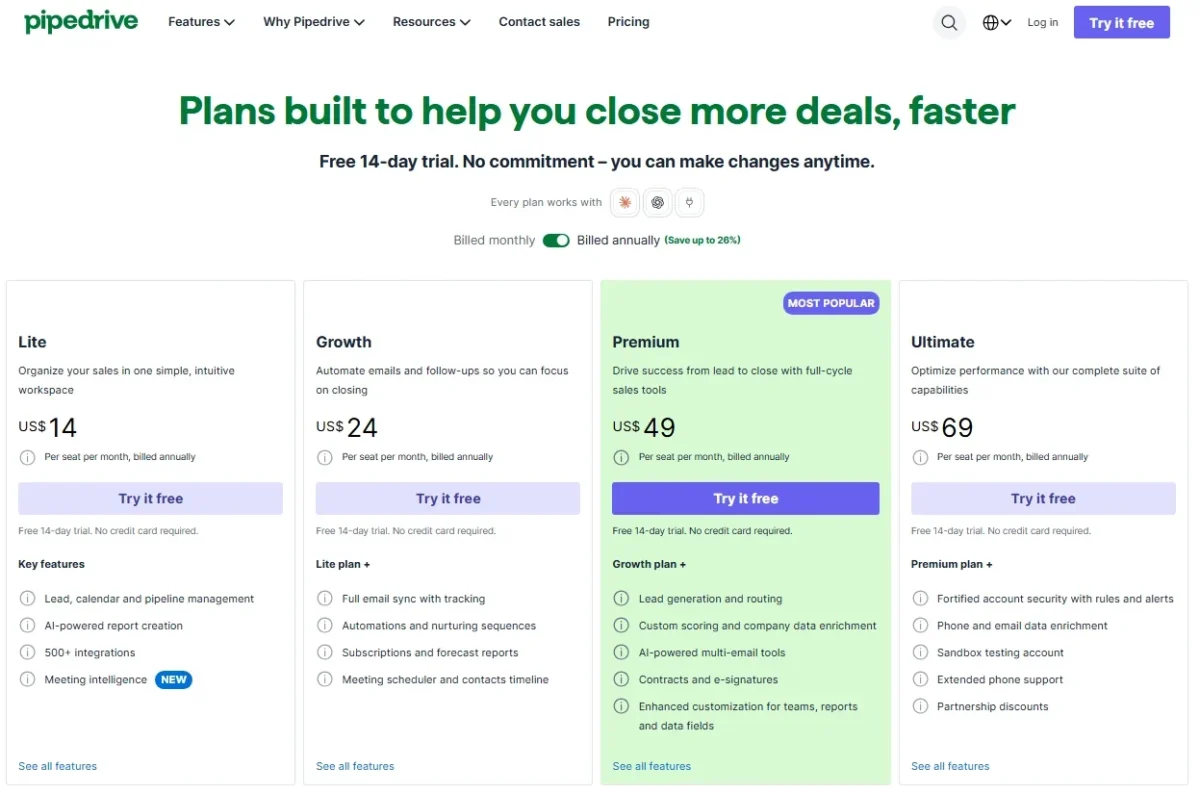

Pipedrive bills per seat, whether it is assigned to a user or not. Salesflare stops charging as soon as you cancel. Every Pipedrive add-on is in Pipedrive’s full plan and add-on pricing.
Cost for a 5-person and a 10-person team
At ten annual seats, Pipedrive Growth costs $24 x 10 x 12 = $2,880 a year and Salesflare Growth $29 x 10 x 12 = $3,480.
| Team and billing | Pipedrive Growth | Salesflare Growth | Pipedrive Premium or Salesflare Pro |
|---|---|---|---|
| 5 seats, billed annually | $24 x 5 x 12 = $1,440 | $29 x 5 x 12 = $1,740 | $49 x 5 x 12 = $2,940 |
| 10 seats, billed annually | $24 x 10 x 12 = $2,880 | $29 x 10 x 12 = $3,480 | $49 x 10 x 12 = $5,880 |
| 5 seats, billed monthly | $34 x 5 x 12 = $2,040 | $39 x 5 x 12 = $2,340 | $64 x 5 x 12 = $3,840 |
Sources: Pipedrive pricing page, Salesflare pricing page, checked October 2026.
Assumptions: US list prices read on October 21, 2026; every seat assigned; tax, add-ons, extra lead credits and top-ups excluded. Salesflare onboarding is free of charge.
The cheaper plan is not always the better value. A Salesflare team that needs sequences moves to Pro, $25 more per seat per month than Pipedrive Growth ($49 – $24). A Pipedrive team that wants website tracking adds Web Visitors, priced “starting from $41” with no seat unit printed.
What forces an upgrade
Pipedrive Growth runs out at the 6th sequence, the 51st active automation, the 101st custom field or 5,000 leads and deals times your seats. Salesflare Growth runs out at the first multi-email workflow, permission need or custom dashboard.
The usage limits page, updated October 12, 2026, says every account trades its open-deals limit for a leads-and-deals limit by October 2026. Won and lost deals count too unless archived, so a long deal history hits the cap sooner.
At the cap, Pipedrive keeps existing records but blocks manual adds. A top-up of 25,000 leads and deals is sold from Growth.
Past the cap, deals that automations, LeadBooster or the API create go to a waitlist and are deleted after one year there. Imported deals go to the import skip file, and automatically created leads are discarded.
Salesflare sets no record limits, and its lead credits (5 a month on Growth) top up in packs, such as 250 for $39.
Integrations, API, Security and Support
Pipedrive’s Marketplace lists 500+ integrations on every plan, while Salesflare counts 11,304 apps reached natively or through Zapier and Make.
Salesflare marks Gmail, Outlook, Google Calendar, ChatGPT and Claude as native and does not publish its native count. A team without a Zapier budget leans to Pipedrive. If marketplace breadth decides it, see how Pipedrive compares with HubSpot.
Both expose an API: Pipedrive includes API access and webhooks on all plans, and Salesflare runs a REST API with keys from Settings > API keys.
Pipedrive states AES-256 encryption and full SOC 2 compliance, with SSO and 2FA on all plans. Salesflare encrypts data at rest and in transit, is CASA Tier 2 verified, and stores data on Google Cloud in Belgium. Its SOC and ISO listings belong to that server infrastructure.
Support on Pipedrive runs chatbot on all plans, live chat from Growth and phone from Premium. Salesflare answers through chat and adds a dedicated account manager on Enterprise.
Pipedrive vs Salesflare: Pros and Cons
Each product’s strengths sit in a different plan, so every line names its plan or condition.
Pipedrive’s strengths start on Growth, and its weak spots are caps and add-ons:
Pros
- Sequences and if/else automation on Growth at $24 per seat per month, billed annually
- A forecast view from Growth
- 500+ Marketplace integrations, API and webhooks on every plan
- Nova call recording and transcripts on every plan
Cons
- Lite at $14 has no email sync
- Growth caps the company at 5 sequences and 50 active automations
- Website-visit tracking is a paid add-on
- Every seat is billed, assigned or not
Salesflare’s strengths sit in its entry bundle, and its weak spots one plan up:
Pros
- Growth captures contacts from emails and signatures and logs meetings and calls
- LinkedIn sidebar and website-visit tracking on Growth
- No limits on contacts, custom fields, workflows or pipelines
- A 30-day trial without a credit card
Cons
- Multi-email workflows and permissions need Pro at $49 per user per month, billed annually
- Growth costs $5 more per user per month than Pipedrive Growth on annual billing ($29 – $24)
- Forecasting is not on its feature list
- Enterprise requires a minimum of 5 users
Which Is Better for Your Needs?
Salesflare is better for inbox- and LinkedIn-led selling; Pipedrive is better for structured follow-up, branching automation and forecasting.
| Your priority | Better fit | Reason | Trade-off |
|---|---|---|---|
| Reps who sell from Gmail, Outlook and LinkedIn | Salesflare | Capture and a LinkedIn sidebar on Growth | Multi-email workflows wait for Pro |
| Sequences at the lowest seat price | Pipedrive | Sequences start on Growth at $24 billed annually | 5 sequences per company on Growth |
| Branching automation | Pipedrive | If/else steps on Growth | 3 if/else conditions per automation, 50 active automations on Growth |
| Website-visit tracking in one plan | Salesflare | Included on Growth | Pipedrive needs an add-on |
| Manager permissions on a budget | Tie | Premium and Pro both cost $49 billed annually | Pipedrive caps Premium at 15 permission sets |
| Many native integrations | Pipedrive | 500+ Marketplace integrations | Salesflare’s 11,304 count includes Zapier and Make |
| EU data hosting | Salesflare | Google Cloud in Belgium | SOC and ISO listings are the infrastructure’s |
| Revenue forecasting | Pipedrive | Forecast view on Growth | Multiple dashboards need Premium |
Sources: Pipedrive pricing page, Salesflare pricing page, checked October 2026.
A team of three that lives in Gmail should start on Salesflare Growth. A five-person team with a defined stage process should start on Pipedrive Growth. If Pipedrive is the one you keep coming back to, see Pipedrive vs Nutshell before you commit.
Who should skip each
Skip Pipedrive if your reps will not log emails by hand and the budget only stretches to Lite, or you want website tracking without an add-on; my other Pipedrive alternatives cover those cases.
If you are leaving Pipedrive for a different CRM, open Pipedrive vs Copper as a second opinion.
Skip Salesflare if you need sequences for less than $49 a seat, a forecast view, which its feature list does not name, or a native marketplace with a published count like Pipedrive’s 500+. A two-person team should skip Enterprise, which bills a minimum of 5 users.
If Salesflare is the product you are not ready to drop, read Close vs Salesflare next.
Switching Between Pipedrive and Salesflare
Pipedrive to Salesflare follows a documented CSV route; moving back uses Salesflare’s Excel or CSV export and Pipedrive’s spreadsheet import.
Pipedrive to Salesflare, per Salesflare’s migration guide:
- Export People, Organizations and Deals separately, preferably as CSV.
- Set dates to YYYY-MM-DD and create stages and pipelines in Salesflare first.
- Import Organizations as accounts, then People as contacts, then Deals as opportunities.
Salesflare to Pipedrive:
- Export accounts, contacts and opportunities from each page’s 3-dot menu.
- Import into Pipedrive as XLS, XLSX or CSV, up to 200,000 rows per file.
- A global admin can revert the import within 48 hours.
Neither guide covers automations, sequences, permissions or dashboards, so rebuild them by hand in both directions. Salesflare Enterprise includes data migration done for you.
How I Compared Pipedrive and Salesflare
I read both vendors’ US pricing pages and help-center articles on plans, limits, permissions, migration and security on October 21, 2026. I compared Growth with Growth and Premium with Pro, weighting data capture, follow-up, automation, forecasting, permissions and cost at 5 and 10 seats.
Pipedrive prints no seat unit for its add-on prices, so confirm what an add-on costs at your team size before you buy. Capture quality depends on your own inbox, so run it through a trial before you buy.
FAQ
Does Pipedrive or Salesflare have a free plan?
No. Neither pricing page lists a free plan; Pipedrive gives a 14-day trial and Salesflare a 30-day trial, both without a credit card. Pipedrive lets you invite as many coworkers as you want into the trial, and Salesflare keeps your trial data when you start paying.
What are the disadvantages of Pipedrive compared with Salesflare?
Pipedrive’s main drawbacks here are caps and add-ons. The less obvious risk is the leads-and-deals limit: What forces an upgrade, above, explains what happens to automated deals, imports and leads past it.
Is Salesflare only for B2B teams?
Salesflare describes itself as a CRM for B2B teams, and its capture works from email threads and signatures. A consumer business with thousands of one-off buyers fits it poorly: Salesflare says it may step in when an account adds more contacts than a sales CRM needs.
Final Verdict: Pipedrive or Salesflare?
Choose by selling style, not a winner: Salesflare for inbox- and LinkedIn-led B2B reps, Pipedrive for teams that want structured pipelines, cheaper sequences and forecasting.
Choose Pipedrive if
- You want multi-step sequences on Growth at $24 per seat per month, billed annually
- Deals should branch through if/else automation
- Managers need a forecast view
- Nova should record and transcribe calls on any plan
Choose Salesflare if
- Reps work in Gmail or Outlook and LinkedIn and should not retype contacts
- Website-visit tracking should come in the entry plan
- You want a vendor that says it has no hidden limits on custom fields or workflows
- You want a vendor that states EU hosting (Google Cloud in Belgium)
The main trade-off is price for follow-up against price for tracking. If your team needs a free CRM tier, neither fits, so widen the search with the wider CRM shortlist.





