

Pipedrive is the cheaper way to automate follow-ups for a pipeline-led sales team, while Nutshell puts inbox sync, web forms and light email marketing on every plan. In Pipedrive vs Nutshell terms, the first plan with sales automation costs $24 per user per month on Pipedrive Growth and $42 on Nutshell Pro, both billed annually.
For ten sellers that is $24 x 10 x 12 = $2,880 a year against $42 x 10 x 12 = $5,040. The entry plans cost almost the same ($14 vs $13), so the choice turns on which plan gate your team hits first.
Quick verdict
The deciding difference: Pipedrive starts automations and sequences on Growth at $24 per user per month (annual), while Nutshell holds sales automation back until Pro at $42.
Pipedrive fits a sales-only team that wants automated follow-ups, several pipelines and single sign-on without a top tier. Nutshell fits a small team that sells and runs light marketing, with email sync, forms, landing pages and 150 free marketing sends a month on every plan.
The trade-off: Pipedrive sells email marketing and, below Premium, web forms as add-ons; Nutshell charges more per seat for automation.
In This Article (11 sections)
Pipedrive vs Nutshell at a Glance
Both tools charge about the same for an entry seat. Sales automation starts one step above the entry plan on Pipedrive and two on Nutshell: Growth at $24, Pro at $42, per user per month billed annually. If the category is new to you, start with what a CRM does for a sales team.
| Attribute | Pipedrive | Nutshell |
|---|---|---|
| Best for | Sales-only teams that live in the pipeline | Small teams running sales plus light marketing |
| Plans | Lite, Growth, Premium, Ultimate | Foundation, Growth, Pro, Business, Enterprise |
| Entry price | Lite: $14 annual, $19 billed monthly | Foundation: $13 annual, $19 billed monthly |
| First plan with sales automation | Growth: $24 annual, $34 billed monthly | Pro: $42 annual, $49 billed monthly |
| Email marketing and web forms | Add-ons (forms included from Premium) | Included with every plan |
| Free trial | 14 days, no credit card required | 14 days, no credit card required |
Sources: Pipedrive pricing page, Nutshell pricing page, Nutshell vs Pipedrive page, checked October 2026. Prices are per user per month.
Key Differences Between Pipedrive and Nutshell
Four plan gates separate these CRMs. Pipedrive’s line-up is also new: its plan-features article, last updated September 3, 2026, lists the Lite, Growth, Premium and Ultimate tiers beside the older Essential-to-Enterprise plans.
- Automation and email sync: Pipedrive turns on email sync, automations and sequences together on Growth; Nutshell syncs email and calendar on every plan but lists sales automation from Pro.
- Marketing and web forms: Nutshell includes a form builder, landing pages, webchat and email marketing capabilities with every subscription; Pipedrive sells Campaigns separately and includes LeadBooster forms only from Premium.
- Pipelines: Pipedrive lists customizable pipelines on all four plans; Nutshell lists 5 custom pipelines on Pro, 10 on Business and unlimited on Enterprise.
- Single sign-on: Pipedrive includes SSO and two-factor authentication on every plan; Nutshell reserves SAML single sign-on for Sales Enterprise.
An inbox-only team pays less on Nutshell Foundation; an automation-first team pays less on Pipedrive Growth. The Pipedrive side is covered in my full Pipedrive review.
Pipedrive vs Nutshell: Features Compared
Nutshell’s cheapest plan carries email sync, a form builder, landing pages and an AI chatbot, while Pipedrive unlocks automation one tier earlier and at a lower seat price.
| Feature | Pipedrive | Nutshell |
|---|---|---|
| Sales pipelines | Customizable pipelines on all plans | Limited: 5 custom on Pro, 10 on Business, unlimited on Enterprise |
| Email sync | Growth and higher | All plans (email and calendar sync) |
| Automations | Growth and higher | Pro and higher (sales automation) |
| Email marketing | Add-on: Campaigns, from $13.33 | All plans: 150 free sends a month |
| Web forms | Add-on on Lite and Growth; Premium and higher | All plans (form builder and landing pages) |
| Forecasting and reports | Insights all plans; forecast view Growth | Activity reports and quotas Growth; advanced reporting Pro |
| Permissions and teams | Permission sets and visibility groups Premium | Additional teams and territories Business |
| Single sign-on | All plans (with 2FA) | Enterprise |
| AI | Nova meeting intelligence Lite; AI email tools Premium | 10 to 150 AI outcomes a month by plan |
Sources: Pipedrive plan features, Pipedrive pricing page, Nutshell pricing page, Nutshell security page, checked October 2026.
Pipelines and deal tracking
Pipedrive gives every plan customizable pipelines, while Nutshell’s pricing page attaches a pipeline count only from Pro upward: 5 on Pro, 10 on Business, unlimited on Enterprise. It lists no custom-pipeline count for Foundation or Growth.
A team with separate pipelines for new business and renewals fits Pipedrive Lite at $14; on Nutshell the first plan that names multiple custom pipelines is Pro at $42.
Verdict: pipelines
Pipedrive fits better for a small team that needs several pipelines on a low plan. Nutshell’s first plan with a custom-pipeline count is Pro, at $28 more per user per month than Pipedrive Lite ($42 vs $14 annual).
Sales automation and email
The two split one job at different plans: Pipedrive bundles sync with automation on Growth, Nutshell separates them. Pipedrive Growth caps a company at 50 active automations and 5 sequences; Premium raises that to 150 and 25. Nutshell does not publish an automation count per plan.
Verdict: automation and email
Depends on the job. Inbox sync on a budget points to Nutshell Foundation, because Pipedrive Lite has no email sync. Automated follow-up sequences on a budget point to Pipedrive Growth at $24 against $42 for Nutshell Pro, billed annually.
Marketing and lead capture
Nutshell includes a form builder, landing pages, webchat, an AI chatbot and 150 free marketing sends a month with every CRM plan. Pipedrive sells email marketing as the Campaigns add-on, starting from $13.33, and LeadBooster web forms as an add-on starting from $32.50 on Lite and Growth.
LeadBooster (chatbot, live chat, web forms, Prospector) comes included on Pipedrive Premium and Ultimate. Nutshell’s Email Marketing add-on starts at $5 a month, and 1,000 marketing contacts cost $25 a month with 8,000 sends.
Verdict: marketing and lead capture
Nutshell fits better for a team that sends small newsletters and captures web leads without a second tool. Pipedrive’s add-on prices say “starting from” without a billing unit, so price both add-ons in the trial before comparing totals.
Reporting, forecasting and permissions
Pipedrive adds a forecast view on Growth, while Nutshell adds sales quotas on Growth and advanced reporting on Pro. Control over what reps see comes later: Pipedrive permission sets start on Premium ($49 annual), Nutshell teams and territories on Business ($59 annual).
AI features
Pipedrive puts Nova meeting intelligence (meeting briefs, call transcripts) on Lite and keeps AI email writing for Premium and up. Nutshell meters “AI outcomes” from a shared monthly bucket: 10 on Foundation, 20 on Growth, 40 on Pro, 100 on Business, 150 on Enterprise.
Neither vendor’s page settles output quality, so run the same call summary on both trials before AI decides the choice.
Pipedrive vs Nutshell Pricing
Pipedrive bills annual plans as one payment per seat per year and says annual billing saves up to 26%; Nutshell’s Annual view says it saves 15%.
| Plan tier | Pipedrive | Nutshell |
|---|---|---|
| Entry plan | Lite: $14 annual, $19 billed monthly | Foundation: $13 annual, $19 billed monthly |
| First plan with sales automation | Growth: $24 annual, $34 billed monthly | Pro: $42 annual, $49 billed monthly |
| Full-cycle plan | Premium: $49 annual, $64 billed monthly | Business: $59 annual, $67 billed monthly |
| Top plan | Ultimate: $69 annual, $89 billed monthly | Enterprise: $79 annual, $89 billed monthly |
Sources: Pipedrive pricing page (Billed annually and Billed monthly views), Nutshell pricing page (Annual and Monthly views), Nutshell vs Pipedrive page, checked October 2026.
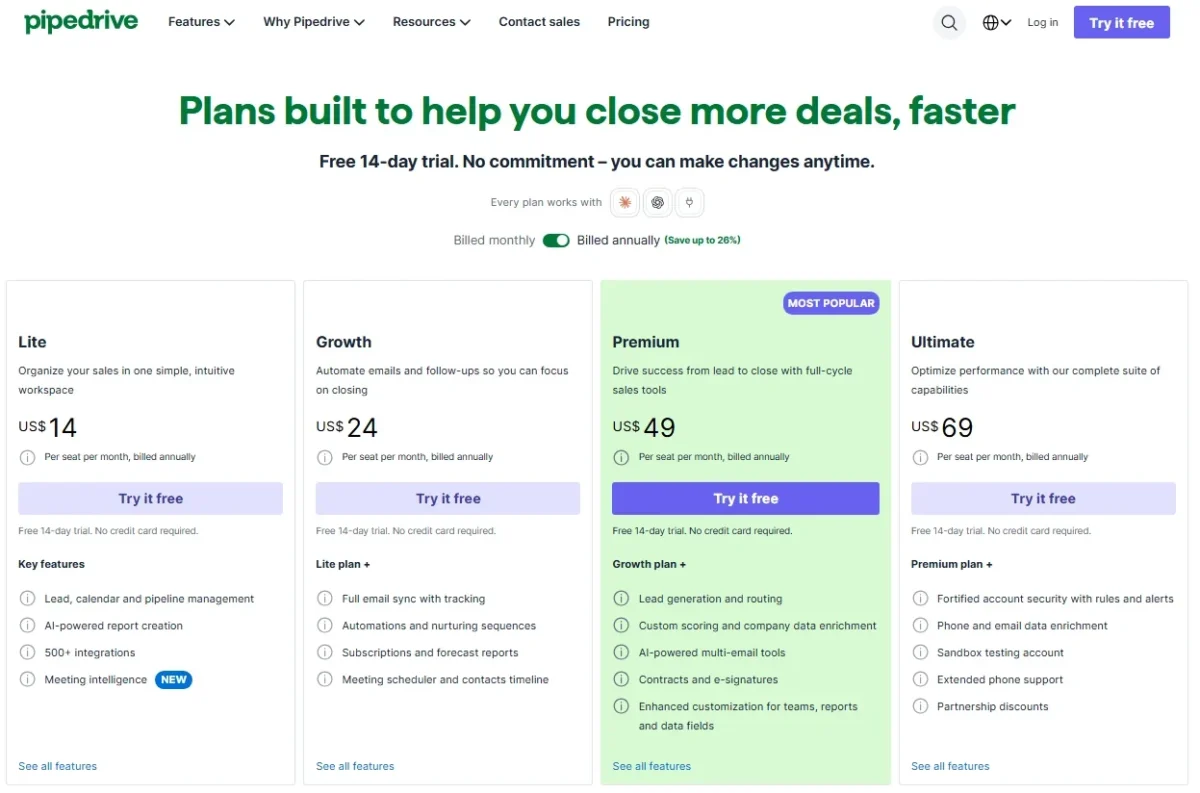
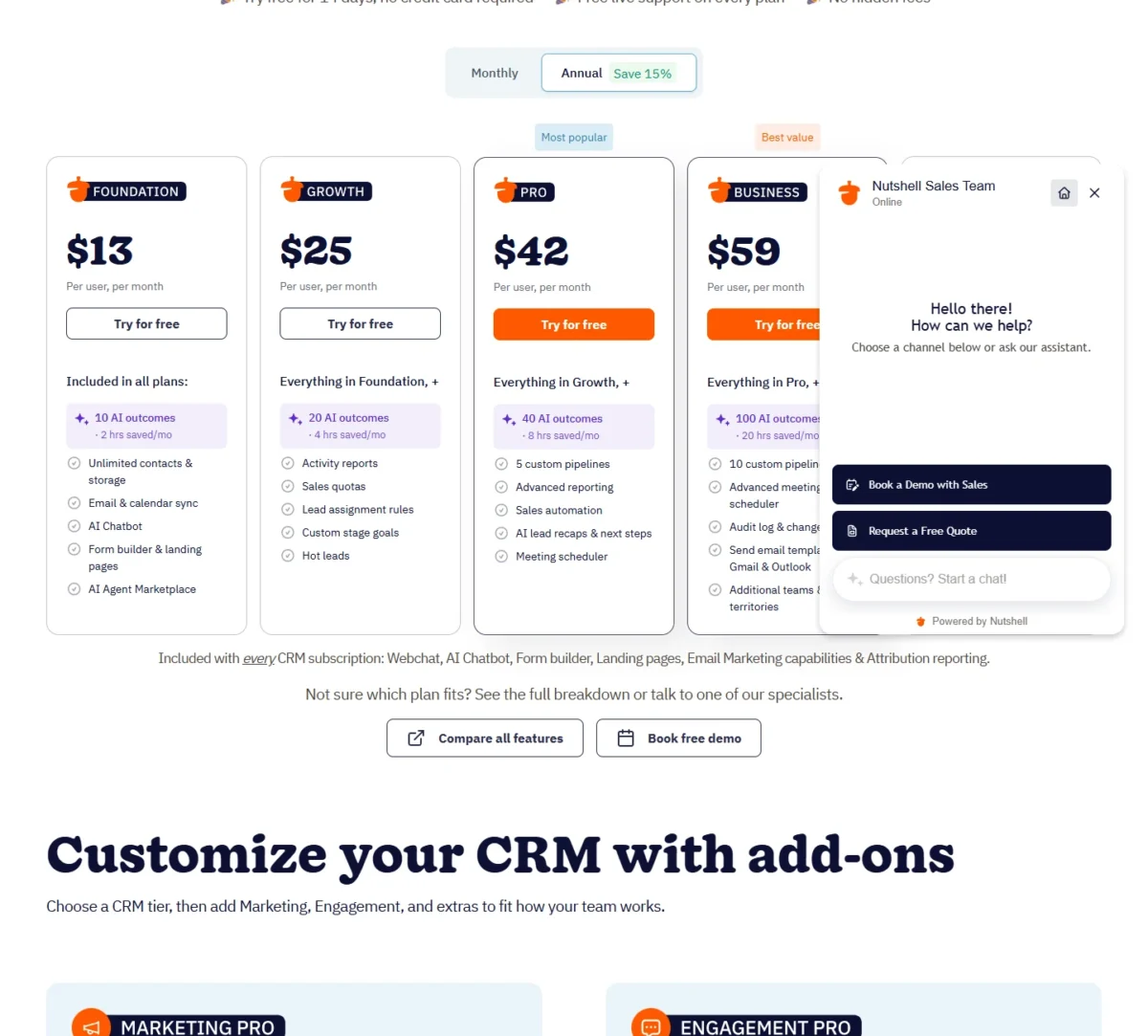
Paying monthly costs more on both. From the automation plan up, the premium is larger on Pipedrive: $10 a seat on Growth ($34 vs $24) against $7 on Nutshell Pro ($49 vs $42).
A Growth seat paid monthly for a year is $34 x 12 = $408 against $24 x 12 = $288 on annual billing; a Nutshell Pro seat is $49 x 12 = $588 against $42 x 12 = $504.
Add-ons change the comparison. Pipedrive lists Campaigns from $13.33 and LeadBooster from $32.50. Every Pipedrive tier and add-on is in my full breakdown of Pipedrive’s plans and add-ons.
Nutshell lists the Marketing suite (A/B testing, SMS marketing) at $49 a month and Engagement at $16 per user per month. Both are separate from the email marketing add-on from $5 a month that the 150 free sends lead into.
Pipedrive says implementation is free on a plan over $400 a year; Nutshell says it charges no setup fees.
Cost for a 5- and 10-person team
A 10-person team pays $2,880 a year for Pipedrive Growth and $5,040 for Nutshell Pro on annual billing, the first plan with sales automation on each.
| Team and billing | Pipedrive Growth | Nutshell Pro |
|---|---|---|
| 5 users, annual billing | $24 x 5 x 12 = $1,440 | $42 x 5 x 12 = $2,520 |
| 10 users, annual billing | $24 x 10 x 12 = $2,880 | $42 x 10 x 12 = $5,040 |
| 5 users, billed monthly | $34 x 5 x 12 = $2,040 | $49 x 5 x 12 = $2,940 |
| 10 users, billed monthly | $34 x 10 x 12 = $4,080 | $49 x 10 x 12 = $5,880 |
Sources: Pipedrive pricing page, Nutshell pricing page, checked October 2026. Assumptions: US list prices read on October 21, 2026, seats only; excluded are tax or VAT, add-ons (Campaigns, LeadBooster, Nutshell Marketing beyond the 150 free sends) and any overage.
Without automation the order flips: ten seats cost $14 x 10 x 12 = $1,680 a year on Pipedrive Lite and $13 x 10 x 12 = $1,560 on Nutshell Foundation. Foundation syncs email, which Pipedrive Lite does not, as long as the team stays under its limit of 100 open leads.
Nutshell’s own cost example adds add-ons to the total, which is fair only if your team would buy them.
What forces an upgrade on each
On Pipedrive, Lite runs out first on email, because email sync, automations and sequences start on Growth. Lite also caps a company at 30 custom fields and 2,500 leads and deals per seat, against 100 fields and 5,000 per seat on Growth.
Growth pushes a team to Premium ($49 annual) when it needs lead routing, LeadBooster without the add-on, permission sets, phone support or more than 50 active automations.
On Nutshell, Foundation has a limit of 100 open leads, so a team past it leaves Foundation; sales quotas and lead assignment rules start on Growth ($25 annual). Sales automation starts on Pro ($42 annual), the first plan that lists a custom-pipeline count (5).
Nutshell Enterprise ($79 annual) is the step for single sign-on, SQL data access, phone support and unlimited custom fields. A team that needs SSO pays $79 per user per month on Nutshell against $14 on Pipedrive Lite, both billed annually.
Integrations, Support and Security
Pipedrive states 500+ integrations with API access and webhooks on every plan, while Nutshell gives no single count (“hundreds” on one page, “thousands” on another). Nutshell lists an open API and a one-click MCP connection for ChatGPT and Claude.
Neither count proves your stack connects, so check the three apps your team cannot drop. For Pipedrive against a bigger suite, see how Pipedrive compares with HubSpot.
Support splits by plan. Pipedrive adds live chat on Growth and phone support on Premium, with longer phone hours on Ultimate. Nutshell gives every plan free live support and lists phone support on Enterprise.
On security, Pipedrive says it adheres to SOC 2, SOC 3 and ISO/IEC 27001:2013 with its ISO 27701:2019 extension. Nutshell says it has received a successful SOC 2 audit and encrypts data at rest. Both name SOC 2; Nutshell states a successful audit, and Pipedrive also names ISO certifications.
Pipedrive vs Nutshell: Pros and Cons
Pipedrive’s main downsides are add-on costs once marketing joins sales and no email sync on Lite; Nutshell’s are a pricier automation tier and SSO only on Enterprise.
Pipedrive
Pros
- Automations and sequences start on Growth at $24 per seat (annual)
- Customizable pipelines on all four plans, Lite included
- Sign-in controls (SSO, 2FA) without a top-tier upgrade
- 500+ integrations, with API access and webhooks on every plan
Cons
- Lite has no email sync, templates or open tracking
- Email marketing is the paid Campaigns add-on on every plan
- Web forms need the LeadBooster add-on below Premium
- Phone support starts on Premium ($49 annual)
Nutshell
Pros
- Email and calendar sync, a form builder and landing pages on every plan
- 150 free marketing sends a month before any email add-on
- No setup fees, and free live support on every plan
- Unlimited contacts and storage on every plan
Cons
- Sales automation starts on Pro at $42 per user (annual)
- Custom pipeline counts start on Pro (5); Foundation and Growth list none
- Single sign-on only on Enterprise ($79 annual)
- Foundation is capped at 100 open leads
Which Is Better for Your Needs?
Pipedrive is the better fit for a sales-only team that wants automation and SSO cheaply; Nutshell is the better fit for a team that wants inbox sync, forms and campaigns on the entry plan. If monday is on your shortlist next to Pipedrive, see monday vs Pipedrive before you pick.
| Your priority | Better fit | Reason | Trade-off |
|---|---|---|---|
| Cheapest automated follow-ups | Pipedrive | Growth includes automations and sequences at $24 (annual) | Email marketing stays an add-on |
| Inbox sync on the cheapest plan | Nutshell | Foundation syncs email and calendar at $13 (annual) | No sales automation until Pro |
| Campaigns and web forms without add-ons | Nutshell | Forms, landing pages and 150 free sends on every plan | Pro costs $42 for automation |
| Several pipelines on a low plan | Pipedrive | Customizable pipelines on Lite and up | Lite has no email sync |
| SSO for a small team | Pipedrive | SSO and 2FA on every plan | Phone support starts on Premium |
| Cheapest seat with no automation | Tie | Lite $14 vs Foundation $13 (annual) | Foundation caps open leads at 100 |
Sources: Pipedrive pricing page, Nutshell pricing page, checked October 2026.
A pipeline-only team of five to ten should start on Pipedrive Growth and add Campaigns only if newsletters become a habit. Weighing another budget sales CRM? See Pipedrive against Freshsales.
A team where one person sells and also sends the newsletter should start on Nutshell Foundation and move to Pro when follow-ups need automating. If neither fits, my ranked list of CRM software widens the shortlist.
Switching Between Pipedrive and Nutshell
Data moves both ways through spreadsheets. Moving into Nutshell, sales automations and workflow rules need to be set up again. Anyone still weighing Pipedrive against Salesflare can compare Pipedrive vs Salesflare before moving any data.
From Pipedrive to Nutshell:
- Export from Pipedrive as XLSX or CSV (admins and users with export permission).
- Use Nutshell’s Import2 transfer, which Nutshell says copies companies, contacts, notes, pipelines and custom fields, or import a CSV.
- Rebuild automations in Nutshell, which offers free import help to all users.
From Nutshell to Pipedrive:
- An admin creates a full Nutshell export: a .ZIP of CSV files with accounts, contacts, leads, activities, notes, products and tasks.
- Import into Pipedrive from XLS, XLSX or CSV files of no more than 200,000 rows and under 50 MB.
- Check the plan’s leads and deals limit first; deals over it go to a skip file. A global admin can revert an import within 48 hours.
How I Compared Pipedrive and Nutshell
I built this comparison from both vendors’ US pricing pages in both billing views, read on October 21, 2026, plus Pipedrive’s plan-features, usage-limits, import and security pages and Nutshell’s security, integrations and export pages.
I compared the plan where sales automation starts on each, then where email sync, pipelines, forms and SSO start. Nutshell publishes no single integration count, and Pipedrive’s add-on prices carry no billing unit.
FAQ
Does Pipedrive or Nutshell have a free plan?
Neither pricing page lists a free plan. Both offer a 14-day free trial without a credit card. Pipedrive lets you invite as many people as you want to the trial, and Nutshell ends its trial automatically with no charge.
Do Pipedrive and Nutshell have mobile apps?
Yes. Pipedrive lists Android and iOS apps on every plan, and Nutshell offers free iPhone and Android apps. Nutshell also runs in the browser on tablets such as an iPad or Surface.
Does Pipedrive include email marketing?
No plan includes it: Pipedrive sells email marketing as the Campaigns add-on, starting from $13.33. Growth and higher do include group emailing and open and click tracking for sales email.
Final Verdict: Pipedrive or Nutshell?
Pipedrive is my pick for a sales-only team that wants automated follow-ups cheaply, and Nutshell is my pick for a small team that wants sales and light marketing in one bill. If Close is the rival you are weighing against Pipedrive, open Pipedrive vs Close to read that pair.
Choose Pipedrive if
- Follow-up automation matters more than marketing, at $24 per seat on Growth
- The team runs several pipelines on a low plan
- SSO must cover every user from day one
- You already pay for an email marketing tool, or do not need one
Choose Nutshell if
- Reps need inbox and calendar sync on the cheapest seat
- You want campaigns, forms and landing pages without add-ons
- You value free live support on every plan
- Your team stays under 100 open leads on Foundation, or is ready to leave Foundation
Who should skip each: skip Pipedrive if your team needs newsletters and web forms on a Lite or Growth budget; skip Nutshell if you need SSO below Enterprise. If Pipedrive is out, other Pipedrive alternatives compared by price covers its main competitors.






Pingback: Pipedrive vs Copper 2026: Plans, Gmail Fit and Real Cost
Pingback: Pipedrive vs Salesflare 2026: Pricing, Features and Fit