

Zoho CRM charges per seat for a sales CRM, while Bitrix24 charges one flat price per organization for a workspace that bundles its CRM with tasks, chat and video calls. That split decides most Zoho CRM vs Bitrix24 choices.
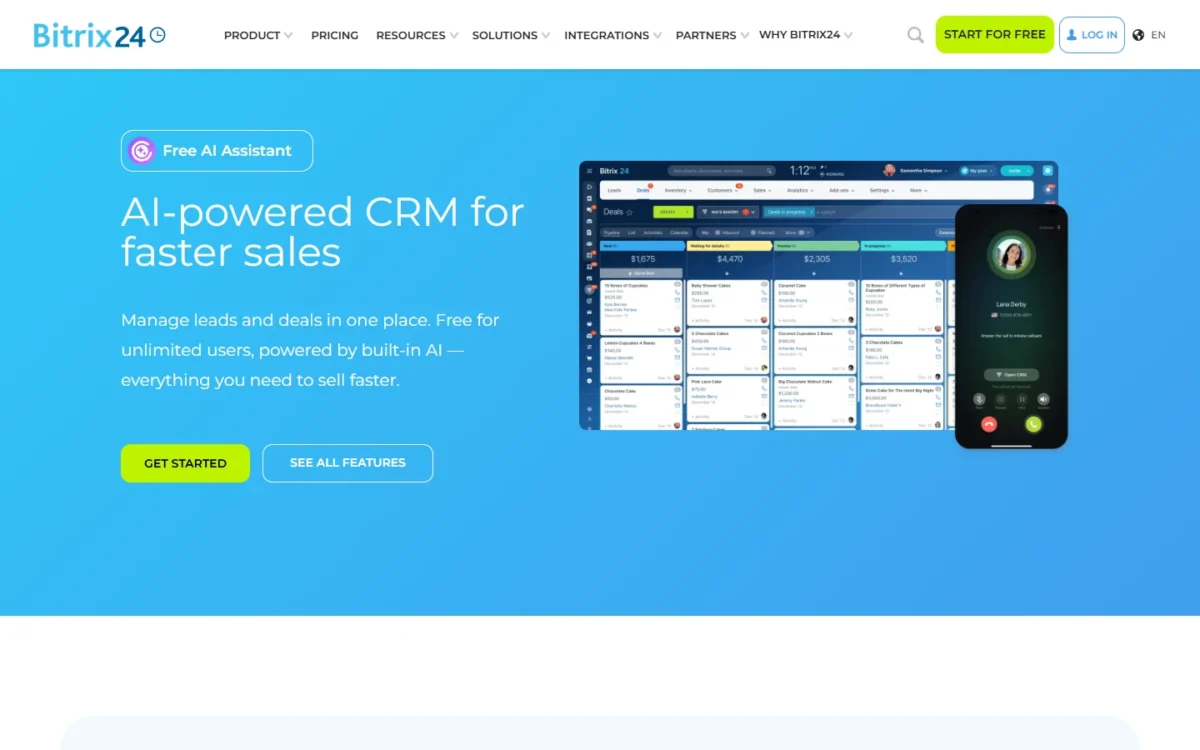
For 10 users on annual billing, Zoho CRM Standard costs $14 x 10 users x 12 months = $1,680 a year. Bitrix24 Standard costs $99 x 12 months = $1,188 but has no sales automation. Once you need it, Bitrix24 Professional costs $199 x 12 months = $2,388.

Quick verdict
Pick Zoho CRM for a sales team under 15 users that needs automated deal steps now: Standard includes workflows and assignment rules, and Blueprint starts on Professional.
Pick Bitrix24 when 15 to 100 people should share deals, tasks, chat and video at one flat price: Standard covers 50 users and Professional covers 100.
The catch with Bitrix24 is that sales automation first appears on Professional, at $199 per organization per month, billed annually. The catch with Zoho CRM is a bill that grows with every seat.
In This Article (11 sections)
Zoho CRM vs Bitrix24 at a Glance
The pricing unit is the real split: Zoho CRM charges per user, and Bitrix24 charges per organization up to a user limit.
| Attribute | Zoho CRM | Bitrix24 |
|---|---|---|
| Best for | Sales teams of 3-14 that need automation | Teams of 15-100 that want one workspace |
| Pricing unit | Per user per month | Per organization per month, with a user limit |
| Entry paid plan | Standard: $14 per user per month, billed annually | Basic: $49 per organization per month, billed annually, 5 users |
| First paid plan listing pipeline automation | Standard: $14 per user per month | Professional: $199 per organization per month, 100 users |
| Free plan | 3 users, 5,000 records | 1–2 users on the plan card, 5 GB |
| Main limitation | Cost grows with every seat | Sales automation starts on Professional |
Sources: Zoho CRM pricing, Zoho CRM edition comparison, Bitrix24 pricing, checked October 2026.
Key Differences Between Zoho CRM and Bitrix24
Zoho CRM sells a sales system by the seat, and Bitrix24 sells a whole workspace by the company; three differences follow from that.
- Pricing unit: Zoho CRM bills every user. Bitrix24 charges one price up to 5, 50 or 100 users, so a new hire costs nothing until the cap.
- Scope: Bitrix24 wraps tasks with Kanban and Gantt views, calendars, chat, video calls and a website builder around its CRM. Zoho CRM stays a sales tool, with Zoho Projects and Zoho Desk as separate apps.
- Hosting: Bitrix24 runs its cloud on AWS in Virginia or Frankfurt and sells a self-hosted On-Premise edition. Zoho CRM’s edition comparison lists no self-hosted edition.
Teams weighing Bitrix24’s bundle against a marketing suite can also check how Bitrix24 compares with HubSpot.
Zoho CRM vs Bitrix24: Features Compared
Zoho CRM puts more sales-process control on its lower plans, and Bitrix24 puts more team tools on every plan, Free included.
| Criterion | Zoho CRM | Bitrix24 |
|---|---|---|
| Multiple pipelines | Standard and up | Limited: 1 on Free, 5 on Basic, 10 on Standard, 20 on Professional |
| Pipeline automation | Standard (workflows and assignment rules) | Professional (sales automation) |
| Guided sales process | Professional: 3 active Blueprints | Professional: RPA |
| Quotes and invoices | Professional | Standard (invoices and estimates) |
| Custom modules | Enterprise: 100 modules | Not listed on the pricing page |
| API and apps | Standard: 100,000 API credits a day | Limited: 4 Market apps on Standard |
| Tasks, chat, video | Limited: feeds, direct messages, groups | Every plan, Free included |
| AI assistant | Enterprise: Zia prediction and conversational AI | Limited on classic plans; Unlimited from Standard Vibe+ |
Sources: Zoho CRM pricing, Zoho CRM edition comparison, Bitrix24 plan comparison, checked October 2026.
Pipelines and sales automation
Zoho CRM Free already automates up to 5 workflow tasks, and Standard adds assignment rules, while Bitrix24 holds sales automation back until Professional. Zoho CRM Standard includes workflows and assignment rules at $14 per user per month, billed annually.
Zoho’s edition table, last updated June 4, 2022, still lists assignment rules from Professional; I follow the current pricing page.
Bitrix24 gives every plan pipelines and adds recurring deals on Basic, but Professional is the first card to list sales automation, RPA and task automation.
For enforced stages, Zoho CRM Professional brings 3 active Blueprints and 5 validation rules per layout. Bitrix24 publishes no per-plan count for its automation rules.
Verdict: pipelines and sales automation
Depends on team size. Zoho CRM Standard automates deals for less up to 14 users: $14 x 14 users = $196 a month, billed annually. From 15 users, Bitrix24 Professional costs less and adds RPA.
Customization and data limits
Zoho CRM publishes a record cap per edition, while Bitrix24 publishes storage but no customization caps. Zoho CRM holds 5,000 records on Free and 100,000 on Standard, then 10 GB, about 5 million records, from Professional. Enterprise adds 100 custom modules, an approval process and a sandbox.
Bitrix24 counts file storage instead, from 5 GB on Free to 1 TB on Professional, and lists custom fields with no per-plan number.
Verdict: customization and data limits
Zoho CRM fits better for a team that needs a written limit before it buys. Its limits table is dated June 4, 2022, so confirm the record cap with Zoho before a large import.
Collaboration and communication
Bitrix24 includes the tools a whole office uses, while Zoho CRM covers communication about deals. Bitrix24 Free already includes Kanban and Gantt tasks, shared calendars, chat and video calls, and its Contact Center turns form, email, chat and messenger messages into leads.
Zoho CRM gives every edition feeds and direct messages, adds groups from Standard, and connects to Slack and Microsoft Teams.
Verdict: collaboration
Bitrix24 fits better for a team that wants one workspace for sales and the work around it. A team already paying for Slack or Teams gives up less by choosing Zoho CRM.
Integrations and API
Zoho rations integrations by API credits, and Bitrix24 by the number of installed apps. Zoho CRM grants 100,000 API credits a day per organization on Standard and 500,000 on Professional. It lists Zapier, Microsoft 365 and telephony options such as Ring.io and Amazon Connect.
Bitrix24’s pricing page counts 750+ Market apps, and the Market itself shows 840+. Classic plans cap installs at 2 on Basic, 4 on Standard, 7 on Professional and 10 on Enterprise, so the app count can force an upgrade before headcount does. Vibe+ plans lift the cap, and Free gets no Market apps.
Verdict: integrations
Depends on plan. A Bitrix24 team that needs five or more Market apps should price Professional or a Vibe+ plan; a Zoho team that syncs heavily should watch its daily API credits on Standard.
If HubSpot is also on your shortlist, weigh Zoho CRM against HubSpot before you settle the integrations question.
AI assistants
Neither vendor publishes usage limits that let me rank the two AI tools on the plans compared. Zoho lists AI agents on Standard and puts Zia’s conversational AI on Enterprise and Ultimate. Bitrix24’s CoPilot writes texts, transcribes calls and fills deal fields.
Verdict: AI assistants
Not enough evidence. Run the same deal through both 15-day trials before you pay for an AI tier.
Zoho CRM vs Bitrix24 Pricing
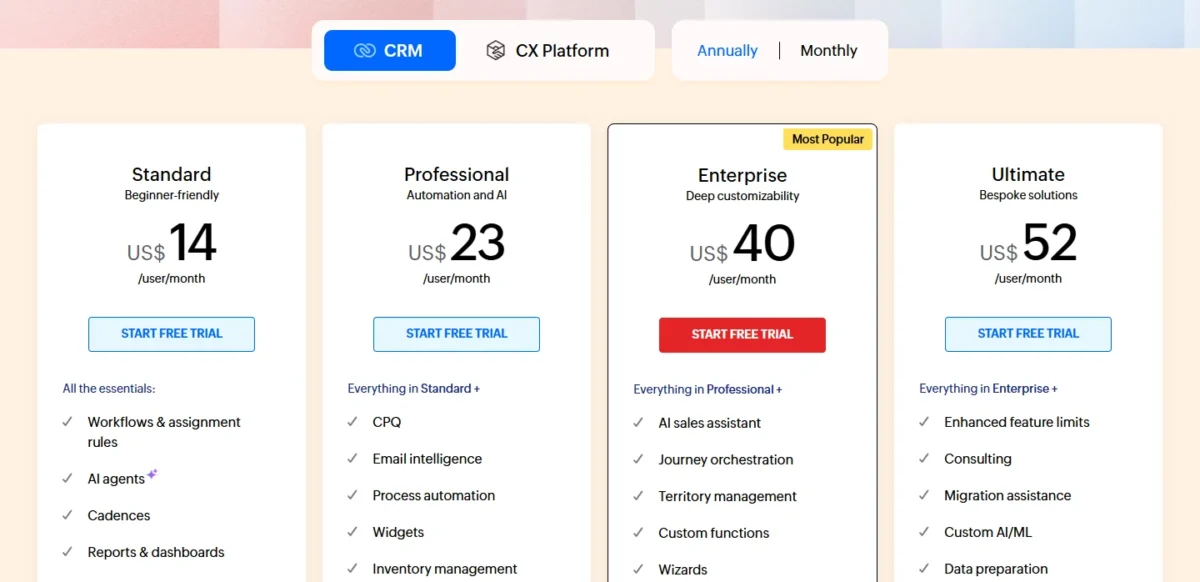
Zoho CRM’s bill grows with every seat, while Bitrix24’s grows only past 5, 50 or 100 users. Both charge local taxes on top of these prices.
| Plan tier | Zoho CRM | Bitrix24 |
|---|---|---|
| Free | Free for 3 users | Free: 1–2 users on the plan card, 5 GB |
| Entry paid | Standard: $14 per user ($20 billed monthly) | Basic: $49 per organization, 5 users ($69 billed monthly) |
| Larger team, pipelines | Standard: $14 per user | Standard: $99 per organization, 50 users ($144 billed monthly) |
| Automation and process control | Professional: $23 per user ($35 billed monthly) | Professional: $199 per organization, 100 users ($289 billed monthly) |
| Top published plan | Ultimate: $52 per user ($65 billed monthly) | Enterprise: from $399 per organization, 250+ users ($579 billed monthly) |
Sources: Zoho CRM pricing, annual and monthly views, Bitrix24 pricing, checked October 2026.
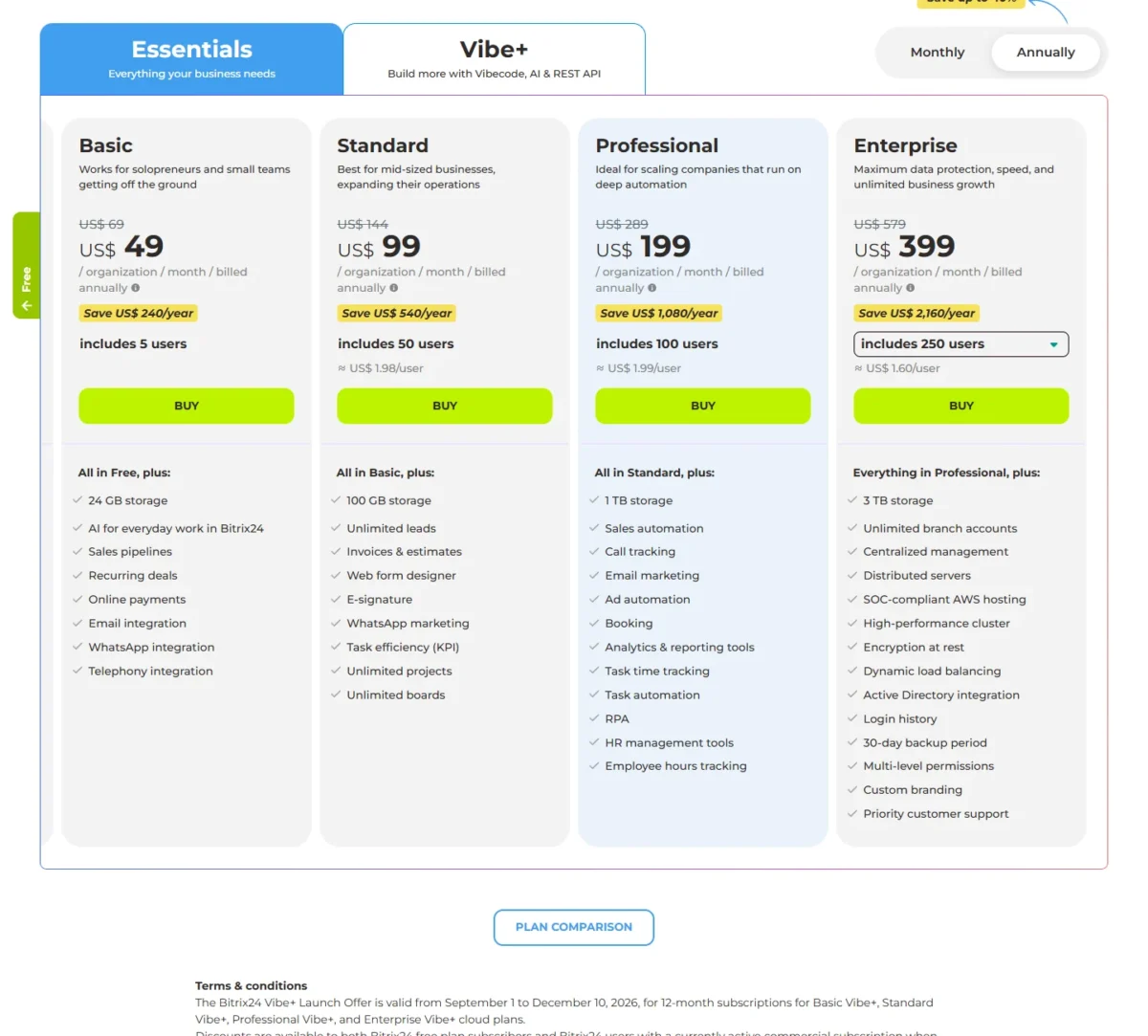
Bitrix24 bills annual plans as one charge every 12 months, with no installments, so Standard means $99 x 12 months = $1,188 up front. The card’s printed $1.98 per user for Standard holds only when all 50 seats are filled, which makes the flat price a bet on growth for a small team.
Pricing note: Vibe+ launch offer
Bitrix24’s Vibe+ plans add the Vibecode app builder, unlimited Market apps and REST API. Launch prices such as Standard Vibe+ at $120 per organization per month, billed annually, apply to 12-month subscriptions bought from September 1 to December 10, 2026; renewals bill at regular prices.
Zoho’s add-ons and upper editions get their own walk-through in my full Zoho CRM pricing breakdown.
The free plans side by side
Zoho CRM Free is the safer free plan for up to 3 users: it holds 5,000 records, automates workflows and includes Basic support. Bitrix24’s Free card reads “for 1–2 users”, while the FAQ on the same page says unlimited users; I would plan around the card.
Bitrix24 Free includes 5 GB, deals and contacts, tasks, calendars, chat and video calls, but no telephony, Market apps or technical support.
Bitrix24’s terms let Alaio, which runs the service, suspend an account still on Free after 50 consecutive days without activity and then delete it with its data. Content a cheaper plan does not allow must also be deleted after a downgrade, or the account can be suspended.
Zoho’s free page, by contrast, promises “Free forever” with “no forced upgrade”.
Cost for 5, 10 and 25 users
For pipelines alone, Bitrix24 costs less at all three sizes; for pipeline automation, Zoho CRM Standard costs less up to 14 users and Bitrix24 Professional from 15.
| Team size | Zoho CRM Standard | Zoho CRM Professional | Bitrix24 pipelines plan | Bitrix24 Professional |
|---|---|---|---|---|
| 5 users | $14 x 5 users x 12 months = $840 | $23 x 5 users x 12 months = $1,380 | Basic: $49 x 12 months = $588 | $199 x 12 months = $2,388 |
| 10 users | $14 x 10 users x 12 months = $1,680 | $23 x 10 users x 12 months = $2,760 | Standard: $99 x 12 months = $1,188 | $199 x 12 months = $2,388 |
| 25 users | $14 x 25 users x 12 months = $4,200 | $23 x 25 users x 12 months = $6,900 | Standard: $99 x 12 months = $1,188 | $199 x 12 months = $2,388 |
| 10 users, billed monthly | $20 x 10 users x 12 months = $2,400 | $35 x 10 users x 12 months = $4,200 | Standard: $144 x 12 months = $1,728 | $289 x 12 months = $3,468 |
Sources: Zoho CRM pricing, Bitrix24 pricing, checked October 2026.
Assumptions: US list prices, annual billing paid up front unless the row says monthly, every Zoho seat paid, each Bitrix24 plan within its user limit. Local taxes, add-ons, extra storage and partner implementation are excluded.
The cheaper bill changes hands early. Zoho CRM Standard at $14 x 15 users = $210 a month passes Bitrix24 Professional, and Zoho CRM Professional passes it at $23 x 9 users = $207 a month.
Each plan also has its upgrade trigger: Zoho Free at a 4th user or 5,001st record, Bitrix24 Basic at a 6th user, Bitrix24 Standard when you need sales automation. Headcount, more than features, decides which bill is lower.
Support, Security and Data Hosting
Zoho CRM includes Basic support on every edition, while Bitrix24 gives Free accounts no technical support. Zoho adds Classic support on paid editions; Bitrix24 opens its Bitrix24Care team to commercial plans and lists priority support on Enterprise.
Zoho CRM lists field-level security from Professional and encrypts traffic with TLS 1.2/1.3. Bitrix24 hosts cloud data on AWS in Virginia or Frankfurt, with two-step authorization and daily backups.
Encryption at rest sits on Enterprise in both products, so a team that requires it pays for an Enterprise plan either way. Bitrix24 Enterprise also adds a 99.95% SLA, and the HIPAA, ISO 27001 and SOC certifications Bitrix24 names belong to AWS, its host.
Bitrix24 On-Premise, the self-hosted edition, costs $3,590 for the Business license and comes with a 30-day trial and source code access.
Zoho CRM vs Bitrix24: Pros and Cons
The downsides of Zoho CRM are per-seat cost and features held for Professional; its strengths are early automation and published limits. My full Zoho CRM review judges it on its own.
Pros
- Workflow rules on every edition, Free included
- Published limits for records, API credits, modules and Blueprints
- Free for 3 users with Basic support
Cons
- Every seat adds to the bill, so a 25-person team pays 25 licenses
- Quotes, invoices and Blueprint wait for Professional at $23 per user per month, billed annually
- Projects and help desk work need separate Zoho apps
- Skip it if:
- your team reaches 15 automated seats or wants tasks and chat in the same tool as its deals.
Bitrix24 trades published CRM limits for flat pricing and bundled team tools; my Bitrix24 CRM review covers whether it is a good CRM on its own.
Pros
- One flat price up to 50 users on Standard or 100 on Professional
- Tasks, chat, video calls and a Contact Center in the same account
- A self-hosted On-Premise edition and a 15-day trial without a credit card
Cons
- Sales automation and RPA start on Professional
- Free accounts get no technical support and can be suspended after 50 inactive days
- Market installs are capped at 2 to 10 apps on classic plans
- Skip it if:
- fewer than 15 sellers need sales automation, since Professional costs $199 per organization per month, billed annually.
Which Is Better for Your Needs?
Bitrix24 is the better fit when headcount and shared work tools drive the decision, and Zoho CRM when a small sales team needs automation and a controlled process. If monday is the other tool on your shortlist, open monday vs Zoho CRM before you narrow it down.
| Your priority | Better fit | Reason | Trade-off |
|---|---|---|---|
| Lowest cost at 10-50 users | Bitrix24 | Standard: $99 a month for up to 50 users, billed annually | No sales automation below Professional |
| Automation at 3-14 users | Zoho CRM | Workflows on Standard from $14 per user per month | Cost per seat |
| Enforced sales stages | Zoho CRM | Blueprint and validation rules on Professional | $23 per user per month, billed annually; costs more than Bitrix24 Professional from 9 users |
| CRM, tasks and chat in one tool | Bitrix24 | Tasks, chat and video calls on every plan | Fewer published CRM limits |
| Free plan for 3 people | Zoho CRM | Free for 3 users with Basic support | 5,000-record cap |
| Self-hosting | Bitrix24 | On-Premise Business license at $3,590 | Your own server to run |
| AI output quality | Insufficient evidence | No comparable AI limits published | Compare in the 15-day trials |
Sources: Zoho CRM pricing, Bitrix24 pricing, Bitrix24 On-Premise, checked October 2026.
With 3 to 14 reps who need rules-based deals, start on Zoho CRM Standard and revisit Bitrix24 Professional past 14 automated seats. When the CRM is one part of a team workspace, start on Bitrix24 Standard. If Insightly is the CRM you are weighing against Zoho CRM instead, see Zoho CRM vs Insightly.
Switching Between Zoho CRM and Bitrix24
Moving from Bitrix24 to Zoho CRM has a documented migration route, while the reverse runs through export and import.
From Bitrix24 to Zoho CRM:
- In Bitrix24, create an inbound webhook with Tasks, CRM, Users, Online Store and Commercial catalog permissions, and copy its REST API URL.
- In Zoho CRM, go to Setup, Data Administration, Import, choose Bitrix and paste the URL.
- Wait for the email: the migration runs in the background, and you can undo or rerun it 3 times.
- Check Import History. Products linked to leads and deals carry over only on Zoho Enterprise or above.
From Zoho CRM to Bitrix24:
- Export each module from Zoho CRM; every edition includes module export.
- Import the files into Bitrix24 from CSV or Excel, or use a migration app from the Market.
Neither route lists automation rules, reports or integrations among what moves, so plan to rebuild them. Zoho imports 10,000 records per batch on Standard and 30,000 on Enterprise. If Salesforce is the destination you are weighing instead, read Bitrix vs Salesforce.
How I Compared Zoho CRM and Bitrix24
I read both vendors’ US pricing pages on October 21, 2026, Zoho’s in annual and monthly views, plus Zoho’s edition comparison, both security pages and Bitrix24’s terms, support, Market and On-Premise pages.
I set plans that do the same job side by side: Free against Free, entry plans for pipelines, and Zoho Standard and Professional against Bitrix24 Professional for automation. Where a vendor’s own pages differ, its pricing page decides. For support response terms, Bitrix24’s support page points to its separate Service Level Agreement.
FAQ
Is Bitrix24 a Russian company?
For a US customer, Bitrix24’s terms name Alaio Inc. of Alexandria, Virginia, as the contracting company. The same terms list the Russian Federation and Belarus among embargoed destinations. Bitrix24 cloud data sits on AWS in Virginia or Frankfurt, and the On-Premise edition runs on your own server.
Do Zoho CRM and Bitrix24 offer free trials?
Yes. Zoho CRM offers a 15-day free trial, and Bitrix24 a 15-day trial of most higher-tier features with no credit card required. Run the same pipeline in both trials at once to judge setup effort for your own team.
Do Zoho CRM and Bitrix24 have mobile apps?
Yes. Zoho CRM Mobile is part of every edition, Free included, and the Zoho CRM Analytics app starts on Standard. Bitrix24 runs in a browser, in iOS and Android apps, and in desktop apps for Mac and Windows.
Final Verdict: Zoho CRM or Bitrix24?
Choose by headcount and by how much of the team’s work should live inside the CRM.
Choose Zoho CRM if
- You have 3 to 14 sellers who need workflow rules now, from $14 per user per month on Standard
- Reps must follow set stages, which Blueprint enforces from Professional
- You want a written record and API limit for every edition, and a custom-module limit on Enterprise and Ultimate
Choose Bitrix24 if
- You have 15 or more users and want one flat price for up to 100 on Professional
- Sales, tasks, chat and video calls should share one workspace
- Your data must sit on your own server through the On-Premise edition
If Zoho costs too much per seat and Bitrix24 is more workspace than you need, my shortlist of other Zoho CRM alternatives is the next place to look.
For a wider view of the category, my ranking of the best CRM software for small teams sets both against other options.





