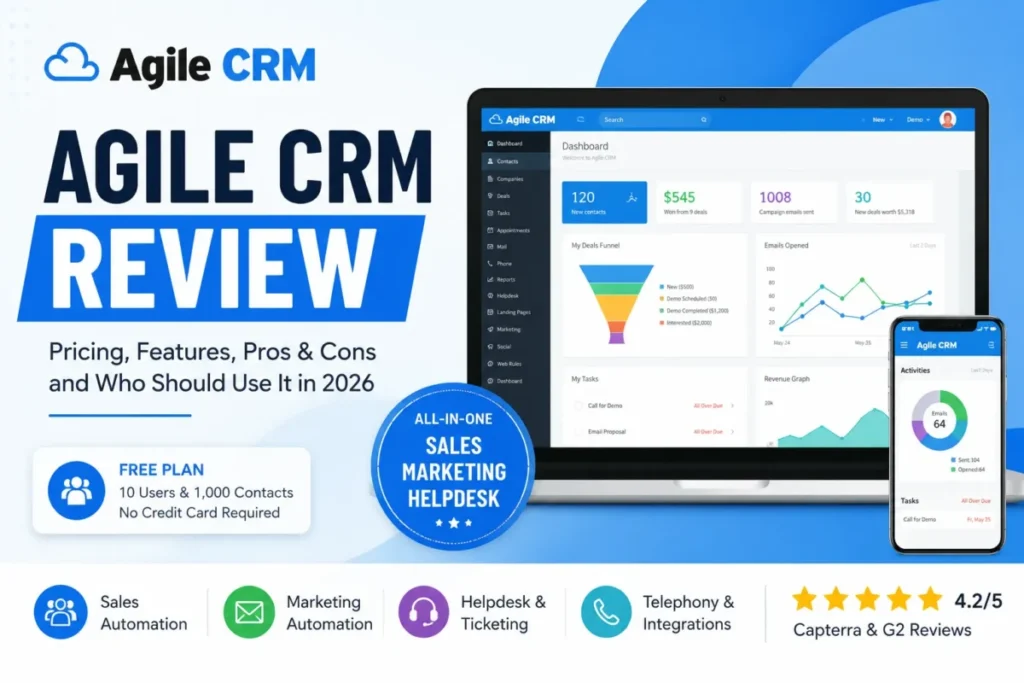
Agile CRM earns its money when a 3 to 15 person team needs contacts, email campaigns, light automation, and a ticket queue behind one login. It is the wrong purchase for teams that need modern reporting, published compliance evidence, or fast support on a cheap plan.
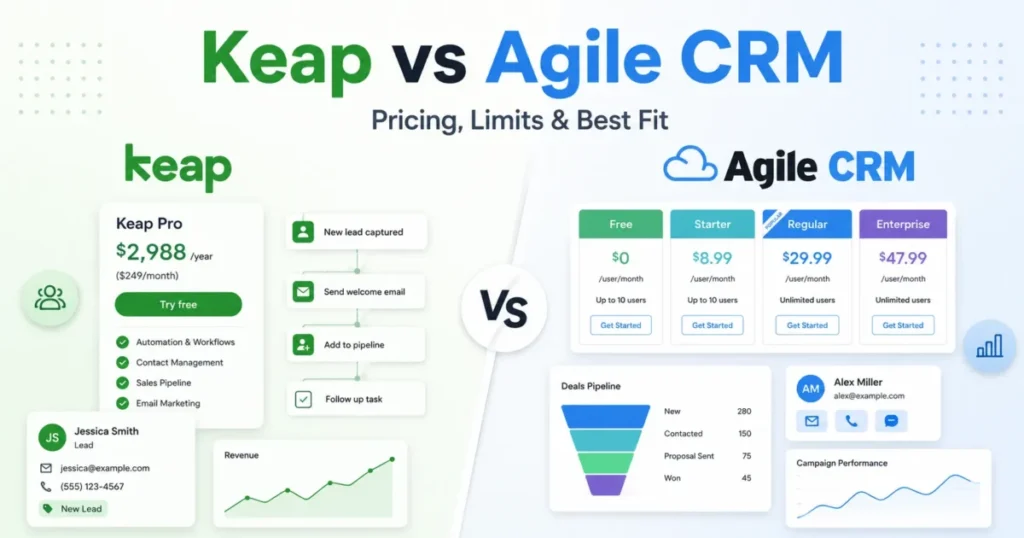
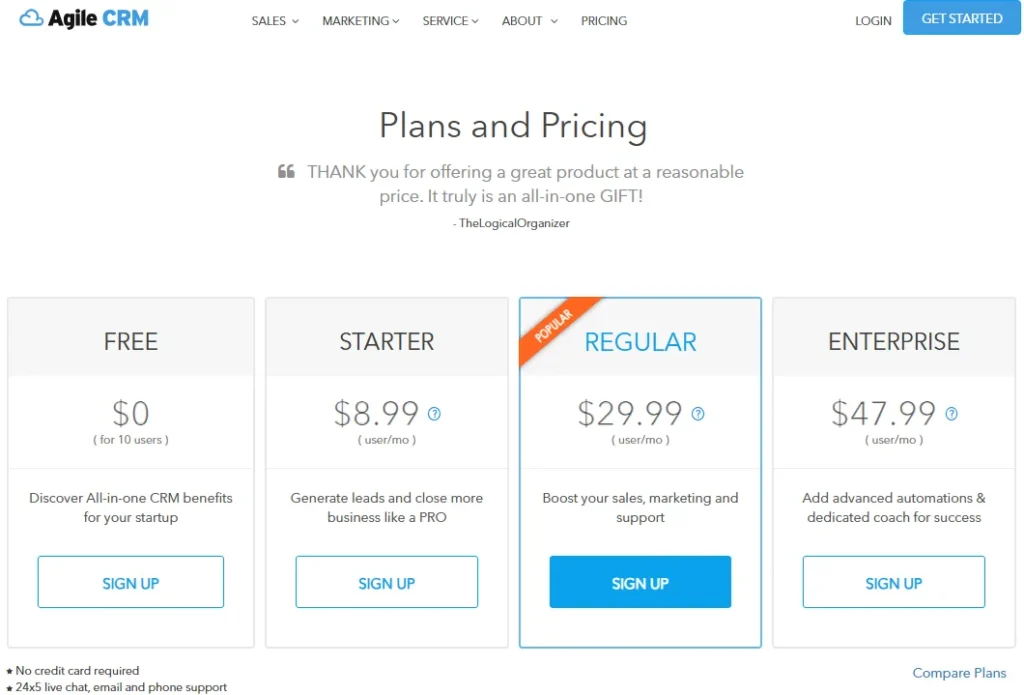
The free plan covers 10 users. The official pricing page, checked on July 10, 2026, lists Starter as low as $8.99 per user per month, Regular at $29.99, and Enterprise at $47.99.
Position it correctly before you evaluate it. Agile CRM sits at the budget end of the best CRM software picks, not at the enterprise end.
This Agile CRM review is built on official pricing, feature, integration, API, support, and mobile pages, plus public review patterns from G2, Capterra, Software Advice, and TrustRadius. No hands-on account testing was performed, and nothing below pretends otherwise.
One finding moved my recommendation more than the seat price did. The limit that forces you to upgrade is almost never the number of users.
In This Article (20 sections)
Agile CRM Verdict and Buyer Fit
Agile CRM is a conditional buy. The product does what it says at a seat price most CRM vendors cannot match, and the plan grid quietly decides whether that price holds.
| Category | Verdict |
|---|---|
| Best for | 3 to 15 person teams running sales, email nurture, and support tickets from one contact database |
| Not ideal for | RevOps teams that need forecasting, regulated buyers who need certification evidence, and teams with four or more core integrations on a small budget |
| Starting price | $0 for 10 users. Starter as low as $8.99 per user/ |
| Best practical plan | Regular at $29.99 per user/ |
| Free plan | Yes: 10 users, 1,000 contacts, 1 integration, 1 campaign workflow |
| Setup difficulty | Medium, and higher for teams with no CRM admin |
| Main strength | Sales, marketing automation, and helpdesk on one contact record at a low seat cost |
| Main limitation | Automation, integration, and API caps trigger the upgrade long before seat count does |
| Biggest unknown | Roadmap direction while official pages promote the 500apps suite |
| Best alternative | HubSpot CRM for interface and reporting. Zoho CRM for admin depth at a similar budget |
Read that table as a budget warning rather than a price list. The $8.99 tier is real, and three integrations plus five campaign workflows is the ceiling that comes with it.
Who Should Use Agile CRM
Four buyer profiles get real value here, and none of them are “small businesses” in general.
A 3 to 15 person team running sales and support from the same contact record is the core fit. One database for deals, tickets, and email removes the handoff gap that kills small revenue teams.
Budget-conscious agencies that need lead nurture plus a ticket queue are the second fit. Paying $29.99 per seat for automation plus helpdesk beats stitching a $20 CRM to a $50 email tool.
Small ecommerce teams already on Shopify and a payment gateway are the third. Native ecommerce and billing connectors mean the contact record carries order context without middleware.
Founder-led teams leaving spreadsheets are the fourth. The free plan holds 1,000 contacts, which is enough runway to prove the workflow before anyone signs a contract.
None of these four are “all small businesses”, and the difference matters when you compare against the broader small business CRM picks.
Who Should Skip Agile CRM
Skip it if your reporting requirement includes forecasting, multi-touch attribution, or a board-ready revenue dashboard. Public review patterns on G2 and Capterra describe reporting as usable for pipeline and activity, not for executive analysis.
Skip it if you must produce compliance certification evidence during procurement. The verified public sources describe safe namespacing on Google cloud and a 99.5 percent uptime guarantee on paid plans, and no SOC 2, HIPAA, or GDPR certification page was found in this research.
Skip it if role-based permissions are a launch requirement and Enterprise is out of budget. Access controls sit on the top tier at $47.99 per user per month.
Skip it if the sales team has strong opinions about interface quality. Dated UI and slow loading are recurring criticisms across G2, Capterra, and TechRadar in 2026.
Skip it if you need a guaranteed support response time on an inexpensive plan. Published hours exist, but a response-time guarantee does not appear in the sources checked here.
Agile CRM Pros and Cons
Each item below traces to the official plan grid or to a documented review pattern. That is the rule this Agile CRM review follows everywhere, including the cons.
| Pros | Cons |
|---|---|
| Free plan carries 10 users and 1,000 contacts with no card required | One integration and one campaign workflow on Free break at the first real campaign |
| Sales, marketing automation, and helpdesk share one contact record instead of three tools | Starter caps integrations at three, which a Gmail plus Shopify plus Stripe stack exceeds |
| Regular at $29.99 per user/ | Access controls, call recording, and automated voicemails are Enterprise-only |
| Native connectors for Shopify, WooCommerce, Magento, Stripe, Twilio, and RingCentral | Reporting stops short of forecasting and multi-touch attribution |
| REST API with wrappers for PHP, Java, Python, Ruby, Node.js, C#, and iOS | Dated interface and slow loading are the most repeated complaints in 2026 review platforms |
| Published support channels include email 24/5 and weekday phone hours | Marketing email volume is branded and capped, and add-on packages sit outside the seat price |
Every con above maps to a plan row or a documented pattern, not to a feeling about the product. The pros only hold if your integration count stays under three on Starter.
How We Reviewed Agile CRM
Agile CRM was evaluated against official pricing, features, integrations, API, support, mobile, and product-update pages, plus public review sentiment on G2, Capterra, Software Advice, and TrustRadius. Pricing and plan limits were checked on July 10, 2026.
Testing level: official_research_only. No account was created, no trial was run, and no workflow was executed inside the product, in line with our review methodology.
That boundary matters for what you can trust here. Every price, plan limit, integration name, API cap, and support hour below comes from an official Agile CRM page or a named review platform, and interpretation is labeled as interpretation.
Two known limits apply. Official pricing shows “as low as” amounts without exposing every billing-term option, and no dedicated trust center or certification page was located.
Where sources disagree, this Agile CRM review uses the official page and says so. Macedona writes every review on saascrmreview.com under the same rule: verified facts first, editorial judgment second, and no invented evidence in between.
What Agile CRM Is, and What It Is Not
Agile CRM is a single-database CRM that bundles three product suites: sales automation, marketing automation, and helpdesk or service automation. The company is publicly identified as Agile CRM by Mantra, and current official pages also promote the broader 500apps ecosystem.
It clears the standard bar for what CRM software does, then adds marketing automation and a ticket queue that most CRM vendors sell as separate products.
That three-suite shape is the reason it appears on shortlists. A 10-person team gets a 360-degree contact view, deal milestones, lead scoring, email campaigns, a drag-and-drop automation builder, landing pages, appointment scheduling, and a knowledge base.
It is not a sales-only pipeline tool, and it is not a marketing platform with a contact list bolted on. Buyers who only need one of the three suites usually get better depth elsewhere for the same money.
The buying mistake I see repeated is treating the three suites as three independent budgets. Campaign workflows, automation triggers, and API calls are pooled across sales, marketing, and service on the same plan.
Agile CRM Pricing Reality, Checked July 2026
Agile CRM’s official pricing page lists four tiers, all priced per user per month with an “as low as” qualifier.
| Plan | Price (per user/ | Best for | Key limits | Worth it? |
|---|---|---|---|---|
| Free | $0 (10 users) | Proving the workflow | 1,000 contacts, 1 integration, 1 campaign workflow | Yes, for a 60-day pilot |
| Starter | as low as $8.99 | Solo and 2-person sales | 10,000 contacts, 3 integrations, 5 campaign workflows | Only if your stack is small |
| Regular | as low as $29.99 | Most buying teams | 50,000 contacts, 50+ integrations, 10 campaign workflows | The practical plan |
| Enterprise | as low as $47.99 | Permissions and volume | Unlimited contacts, unlimited workflows, 25,000 API calls/ | Only for ACLs, call recording, or onboarding help |
The “as low as” wording is doing quiet work in that table. Confirm the billing term at checkout before you compare it against a competitor’s monthly rate.
Seat math for a 10-person team, using the official per-user amounts:
| Plan | Per user/ | 10 users/ | 10 users/ |
|---|---|---|---|
| Free | $0 | $0 | $0 |
| Starter | $8.99 | $89.90 | $1,078.80 |
| Regular | $29.99 | $299.90 | $3,598.80 |
| Enterprise | $47.99 | $479.90 | $5,758.80 |
A 10-seat Regular subscription costs $3,598.80 a year before any email add-on. That is the number to take to finance, not the $8.99 headline.
Where the Free Plan Stops Working
Free is generous on seats and stingy on everything that makes a CRM useful after week three. Ten users cost nothing, and the operational ceilings arrive fast.
| Free plan limit | Value | What breaks it first |
|---|---|---|
| Users | 10 | Rarely the first ceiling you hit |
| Contacts and companies | 1,000 | One webinar list or one trade-show import |
| Plugins / integrations | 1 | Gmail plus Shopify already exceeds it |
| Campaign workflows | 1 | A welcome sequence leaves nothing for onboarding |
| Nodes per campaign | 5 | Any wait step, branch, or condition |
| Automation rule triggers | 1 | Lead routing competes with nurture for the same slot |
| API calls per day | 500 | One enrichment tool or one nightly sync |
Contact count is the ceiling most teams notice, and integration count is the one that actually forces the invoice. A single plugin means Gmail sync or Shopify sync, never both.
If a free tier is the whole point of your shortlist, compare this against other free CRM software options before you import anything.
The Starter Plan Integration Ceiling
Starter at $8.99 per user per month looks like the value pick until you count your stack. The official grid caps Starter at three plugins or integrations.
Write down what a normal small team connects: Gmail or Google Apps, Shopify or WooCommerce, Stripe, a form tool, and a phone system. That is five, and Starter buys three.
Teams with four or more core integrations should price Regular from day one. The jump from $8.99 to $29.99 per seat is $210 a month at 10 users, and it is cheaper than running a parallel spreadsheet to bridge the gap.
Two-way telephony and mobile marketing also arrive at Regular, not Starter. A phone-heavy sales team on Starter is buying the wrong plan.
Hidden Costs: Branded Emails and Add-On Packages
Marketing email volume on Agile CRM is capped and branded, and the official pricing FAQ confirms that users can buy email add-on packages that last one month. No add-on price appears on the parsed page, so treat it as an open line item rather than a known cost.
That is a total-cost problem for exactly one buyer type: the marketing-led team that chose this product because email automation was included. Your effective cost per seat depends on send volume, not on the plan label.
Ask sales for the add-on price sheet before you commit to an annual term. I would model two scenarios, one at your current send volume and one at triple, before signing anything.
The second hidden cost is time. A three-integration ceiling on Starter usually gets patched with manual CSV exports, and that work has a salary attached to it.
Why Other 2026 Pages Quote Different Prices
TechRadar’s 2026 review lists Regular at $39.99 and Enterprise at $64.99 per user per month. Agile CRM’s own pricing page, checked on July 10, 2026, shows $29.99 and $47.99.
Both can be honest. Vendor pricing pages usually display the annual-commitment rate, and third-party tables sometimes capture a month-to-month figure or an older snapshot.
Use the official page as your source of truth, then verify the billing term in checkout. A $10 per-seat gap on Regular is $1,200 a year at 10 seats, which is enough to change the shortlist.
This is also a reminder about review freshness. Any Agile CRM review that does not name a date on its pricing table is asking you to trust a number nobody checked.
The Practical Plan for Most Teams
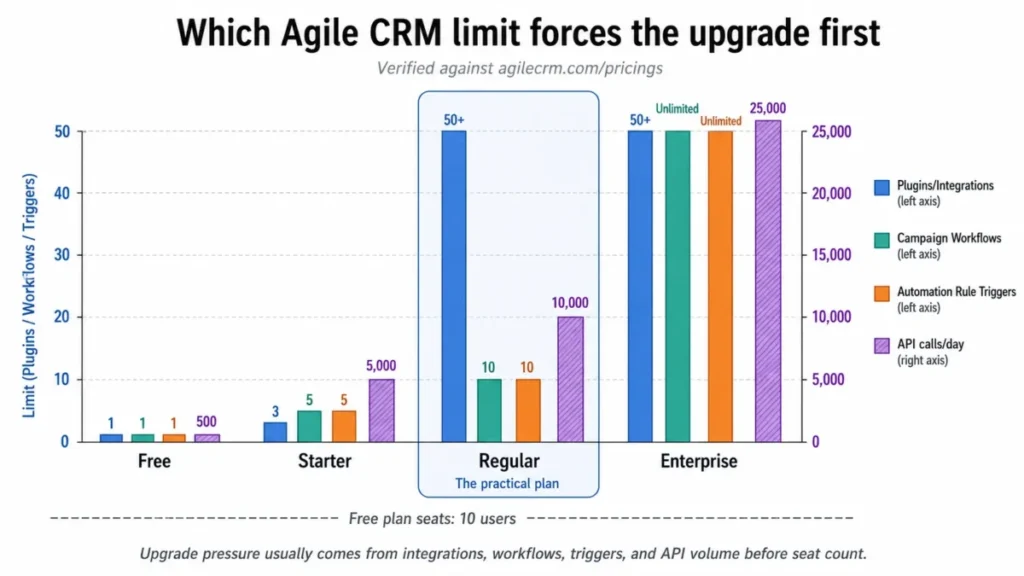
Regular at $29.99 per user per month is the plan I would budget for, and the reason is not feature envy. It is the first tier where the integration count, the automation count, and the API ceiling stop fighting each other.
Free is a pilot, not a plan. Starter is a real plan for a two-person operation with a three-tool stack and one nurture sequence.
Enterprise earns its $47.99 only when one of four things is true: you need access controls, call recording, automated voicemails, or a named onboarding coach. Unlimited contacts is rarely the reason.
For a budget comparison at the same seat count, HubSpot pricing breakdown shows how quickly a “free CRM” turns into a paid marketing seat once automation enters the picture.
Feature Gates: What You Get on Each Plan
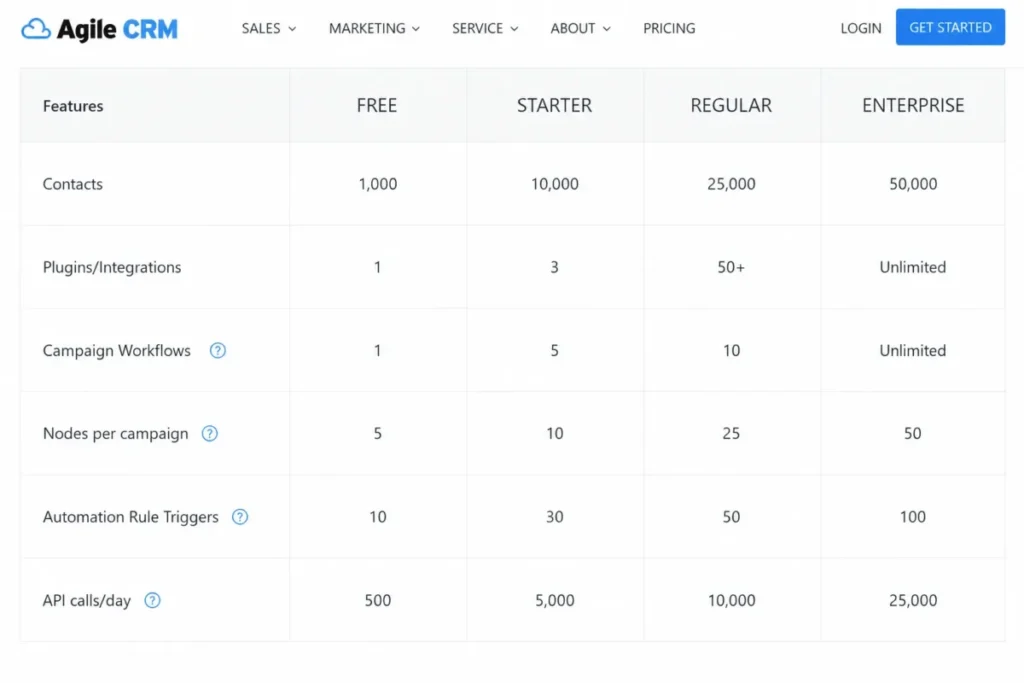
The grid below reflects Agile CRM’s official pricing page as checked on July 10, 2026. Rows marked “Not included” reflect features the official grid shows at a higher tier.
| Feature or limit | Free | Starter | Regular | Enterprise |
|---|---|---|---|---|
| Price per user/ | $0 | as low as $8.99 | as low as $29.99 | as low as $47.99 |
| Contacts and companies | 1,000 | 10,000 | 50,000 | Unlimited |
| Plugins / integrations | 1 | 3 | 50+ | 50+ |
| Campaign workflows | 1 | 5 | 10 | Unlimited |
| Nodes per campaign | 5 | 10 | 25 | 50 |
| Automation rule triggers | 1 | 5 | 10 | Unlimited |
| API calls per day | 500 | 5,000 | 10,000 | 25,000 |
| Google Sync | Not included | Yes | Yes | Yes |
| 2-way telephony | Not included | Not included | Yes | Yes |
| Mobile marketing | Not included | Not included | Yes | Yes |
| Call recording | Not included | Not included | Not included | Yes |
| Automated voicemails | Not included | Not included | Not included | Yes |
| Access controls (ACLs) | Not included | Not included | Not included | Yes |
| Dedicated account rep | Not included | Not included | Not included | Yes |
| Onboarding coach | Not included | Not included | Not included | Yes |
Four rows in that grid decide most purchases: plugins, campaign workflows, API calls, and access controls. Everything else is a rounding error next to those.
Marketing Automation Limits Nobody Prices In
Marketing automation is included on every paid plan, which is exactly why buyers stop reading. Included is not the same as usable at your volume.
Agile CRM meters automation three ways: how many campaign workflows you can run, how many nodes each workflow can hold, and how many automation rule triggers exist across the account. Miss any one of the three and the plan you priced is not the plan you need.
If marketing automation is the main reason Agile CRM is on your list, compare it against CRM tools built for marketing automation before you sign.
Campaign Workflows by Tier
| Plan | Campaign workflows | What that supports |
|---|---|---|
| Free | 1 | One welcome sequence, nothing else |
| Starter | 5 | Welcome, onboarding, reactivation, one webinar, one promo |
| Regular | 10 | The above plus segment-specific nurture and lifecycle sends |
| Enterprise | Unlimited | Per-segment and per-product campaigns without triage |
Five workflows sounds like plenty until you write yours down. Most 10-person B2B teams need a welcome sequence, a demo no-show sequence, an onboarding sequence, a churn-risk sequence, a renewal sequence, and a win-back sequence, and that is six.
Nodes per Campaign, the Complexity Cap
Workflow count tells you how many campaigns you can run. Node count tells you whether any of them can be intelligent.
A node is a step: a send, a wait, a condition, a branch, a score update, a task creation. Free gives you 5, Starter 10, Regular 25, and Enterprise 50.
A linear welcome sequence with three emails and two waits fits inside 5 nodes. A lifecycle campaign that branches on lead score, waits, checks for a reply, and creates a sales task will not fit inside 10.
Draw your most complex intended campaign on paper and count the boxes. If the count lands above 10, Starter is not a candidate, regardless of what the seat price says.
Automation Triggers Are a Shared Budget
This is the limit that surprises revenue teams. Automation rule triggers are counted per account, not per department: 1 on Free, 5 on Starter, 10 on Regular, unlimited on Enterprise.
Sales wants a trigger for lead routing, one for stale-deal alerts, and one for task creation after a call. Support wants one for ticket escalation, and marketing wants one per nurture entry point.
At 10 triggers on Regular, three teams are splitting a pool that a single team could exhaust. Budget the triggers before the launch meeting, or the last department to build will find the door closed.
Sales Features and Telephony Gates
The sales side gives you a 360-degree contact view, deal tracking with custom milestones, lead scoring, email tracking, appointment scheduling, and gamification. Those are the reasons sales leaders shortlist it against a $60 per seat competitor.
Telephony is where the plan grid bites. Two-way telephony appears at Regular, and call recording plus automated voicemails appear only at Enterprise.
An SDR team of six doing 60 dials a day therefore has one honest path. Regular at $29.99 handles the calling, and Enterprise at $47.99 is the price of listening to those calls afterward.
That is a $1,296 annual difference for six seats, spent entirely on call recording, voicemail automation, and access controls. Decide whether call review is a coaching requirement before you pick the tier.
Helpdesk, Knowledge Base, and Service Fit
The service suite gives small teams a ticket queue, a knowledge base, and canned responses on the same contact record as the deal history. A support agent can see the last invoice, the last campaign, and the open deal without a second tab.
That single-record view is the strongest argument for Agile CRM over a two-tool stack. It is also the argument that collapses if support volume grows faster than the automation trigger pool.
Service teams should treat the knowledge base as a deflection tool, not a documentation platform. It exists, it works for FAQ-level content, and it is not a replacement for a dedicated help center product.
Support ticket automation draws from the same trigger allowance as sales routing. Two escalation rules on Starter leaves three triggers for the rest of the business.
Reporting Depth and Where It Runs Out
Agile CRM reports on pipeline, activity, campaign performance, and web engagement. For a founder reviewing deal stages on a Monday, that is enough.
Reporting is not enough for revenue forecasting, multi-touch attribution, or executive dashboards that finance will accept. Review patterns on G2 and TechRadar in 2026 repeat limited customization and limited reporting depth as the two structural complaints.
The buyer consequence is specific. If your board asks for pipeline coverage by source with weighted forecast, you will export to a spreadsheet, and the CRM becomes a data-entry tax.
Teams whose entire problem is deal hygiene and forecast accuracy usually land better with a pipeline-first product, and the Pipedrive CRM review explains where that tradeoff pays off.
API Capacity and Integration Paths
Agile CRM’s developer API page publishes a REST API with wrappers for JavaScript, PHP, Java, C#, Ruby, Node.js, and Python, plus an iOS SDK, a landing-page API, a pop-ups API, widget APIs, webhooks, and SSO guidance. That is a real developer surface for a product at this price.
The surface is not the constraint. The daily call ceiling is.
API Calls per Day by Plan
| Plan | API calls per day | How to think about it |
|---|---|---|
| Free | 500 | A single low-volume form or a test script |
| Starter | 5,000 | One ecommerce sync or one enrichment tool, not both |
| Regular | 10,000 | Two or three active integrations plus a nightly export |
| Enterprise | 25,000 | Middleware, warehouse exports, and high-volume ecommerce |
Those right-hand estimates are my interpretation, not a vendor commitment. Count the writes your real integrations perform per contact, per order, and per ticket, then multiply by daily volume before you choose a tier.
An ecommerce team syncing 300 orders a day with order-line detail can exhaust 5,000 calls without touching the CRM by hand. That is a Starter plan failing on day one for reasons the pricing page never explains.
Integrations by Category
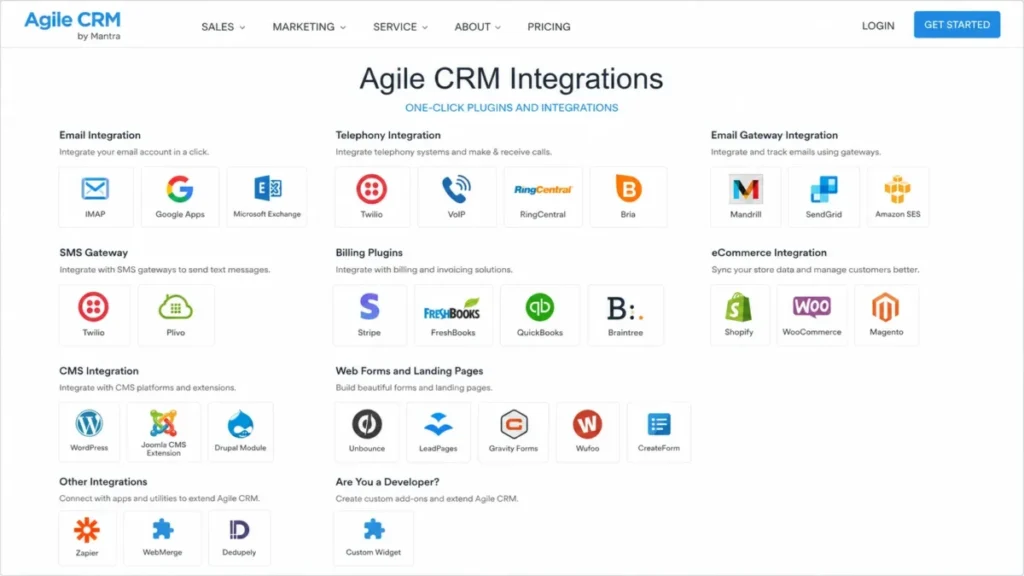
Agile CRM’s integrations page groups connectors by function rather than by logo count. Mapping them by category tells you whether your stack fits.
| Category | Named connectors | Path |
|---|---|---|
| Email and calendar | IMAP, Google Apps, Microsoft Exchange | Native |
| Telephony and VoIP | Twilio, RingCentral, Bria | Native, plan-gated |
| Email gateway | Amazon SES, Mandrill, SendGrid | Native |
| SMS | Twilio SMS, Plivo | Native |
| Billing and accounting | Stripe, Braintree, FreshBooks, QuickBooks | Native |
| Ecommerce | Shopify, WooCommerce, Magento | Native |
| CMS | WordPress, Joomla, Drupal | Native |
| Landing pages and forms | Unbounce, LeadPages, Gravity Forms, Wufoo | Native |
| Documents and data hygiene | WebMerge, Dedupely | Native |
| Everything else | Zapier | Connector |
| Custom builds | REST API, widgets, webhooks | Build |
Anything reachable only through Zapier carries a second subscription and a second failure point. Count Zapier as an integration when you check yourself against the three-plugin Starter ceiling.
Google, Shopify, and Stripe Sync Gates
Google Sync appears on the official grid from Starter upward. A free-plan team should verify that row before designing any workflow around Gmail sync.
Shopify and Stripe are native connectors, and they still consume plugin slots. Gmail, Shopify, and Stripe together is exactly three, which leaves a Starter team zero slots for forms, telephony, or accounting.
That arithmetic is the single most useful thing on this page. Three named tools is the Starter ceiling, and most ecommerce teams are already at four.
Ease of Use, Setup, and Adoption Risk
Setup difficulty is medium, and it climbs for teams without a CRM admin. The friction is not feature complexity, it is an interface that feels older than the CRM your reps used at their last job.
Review patterns on <a href=”https://www.capterra.com/p/135148/Agile-CRM/” rel=”ugc noopener” target=”_blank”>Capterra’s Agile CRM profile</a>, which shows a 4.1 overall rating across 524 reviews, split cleanly. Buyers praise automation and value, and critics describe convoluted setup, slow loading, and segmentation that fights back.
CRM projects fail on adoption, not on features. A patient, technically comfortable team will configure this and be fine, and a team of relationship-driven reps who expect modern software will quietly return to their inbox.
The 30/90-Day Adoption Test
By day 30, three things should be true. Every rep logs calls and notes inside Agile CRM instead of a notebook, the contact database has fewer than 5 percent duplicate records, and at least one automation runs without a human pressing start.
By day 90, three more should be true. Pipeline reports match what the sales lead believes, one campaign workflow has produced a measurable reply or booking rate, and support tickets route without manual assignment.
If day 30 fails, the problem is interface friction and training, and more features will not fix it. If day 90 fails, the problem is data quality, and it will follow you to the next CRM.
Run this test during the free plan, before any card is entered. Ten free users and 1,000 contacts is enough to answer both questions honestly.
Support Availability Versus Support Quality
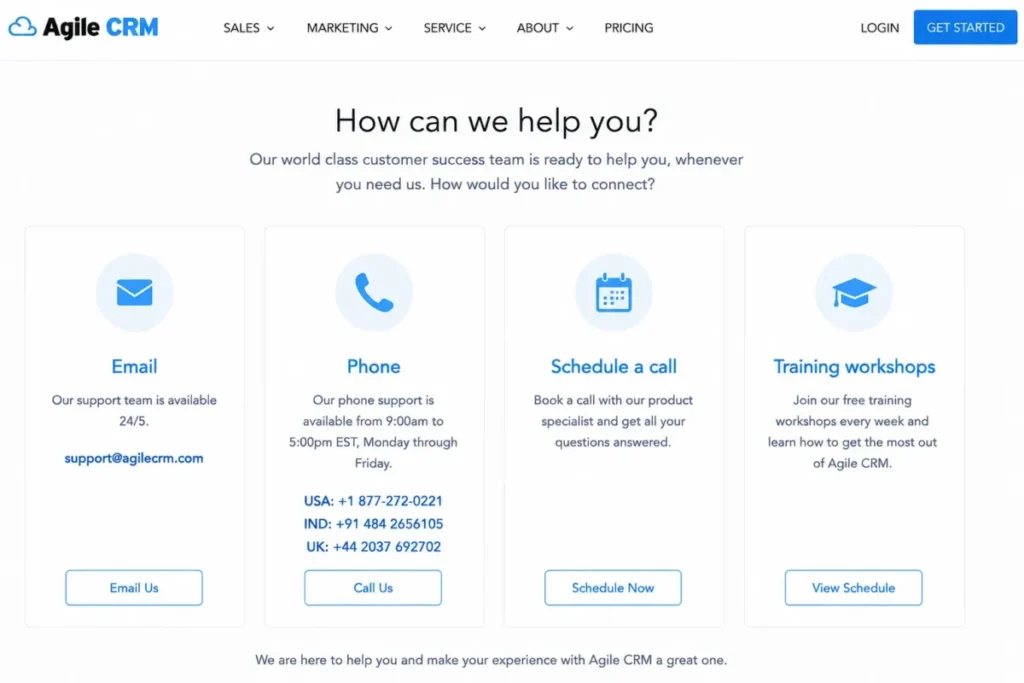
Agile CRM’s support page lists email support 24/5, phone support from 9:00am to 5:00pm EST Monday through Friday, scheduled calls, and weekly training workshops. Those are real channels, published openly with hours attached.
Availability is not the same as responsiveness. Review patterns on https://www.g2.com/products/agile-crm/reviews and on Capterra include both praise for helpful reps and severe criticism of slow or unresolved tickets.
| Support need | Free | Starter | Regular | Enterprise |
|---|---|---|---|---|
| Email support | 24/5 | 24/5 | 24/5 | 24/5 |
| Phone support | 9am-5pm EST, Mon-Fri | 9am-5pm EST, Mon-Fri | 9am-5pm EST, Mon-Fri | 9am-5pm EST, Mon-Fri |
| Scheduled call | Yes | Yes | Yes | Yes |
| Weekly training workshops | Yes | Yes | Yes | Yes |
| Onboarding coach | No | No | No | Yes |
| Dedicated account rep | No | No | No | Yes |
Channels are flat across plans, and human accountability is not. A named account rep and an onboarding coach appear only at $47.99 per user per month.
Onboarding Help Is an Enterprise Feature
The official grid places the dedicated account rep and the onboarding coach on Enterprise only. Free, Starter, and Regular buyers rely on the knowledge base, email support, and the weekly training workshops.
That gate decides who configures your automation. A team with no CRM admin either budgets $47.99 per seat for guided setup, or accepts that the campaign builder gets learned by trial.
At 10 seats, guided onboarding costs $180 a month more than Regular. Weigh that against one week of a marketer’s time before calling it expensive.
Two team types should treat this as a disqualifier. A team with no CRM admin and no internal automation skill is buying Enterprise or buying risk, and a support-critical operation running tickets through Agile CRM needs an escalation path it does not currently have in writing.
Security and Admin Controls
Agile CRM’s pricing FAQ states that customer data sits in a safe namespace on Google cloud, kept separate from other customers’ databases, with a 99.5 percent uptime guarantee on paid plans. That is the extent of the public security evidence found in this research.
No SOC 2 report, HIPAA attestation, GDPR certification, or dedicated trust center was located in the sources checked on July 10, 2026. Absence of a public page is not proof of absence of a control, and it is also not something a procurement team can file.
Access controls, listed as ACLs on the official grid, appear only on Enterprise. A team that adds contractors, an agency, or a second department needs role-based permissions, and that need alone moves the price from $29.99 to $47.99 per seat.
Regulated buyers in healthcare, finance, or education should request certification documentation before a trial, not after. If the vendor cannot produce it in writing, the evaluation ends there.
Mobile CRM: Verify Before You Commit
Agile CRM’s mobile CRM page describes dashboard, contact, deal, and task access from a smartphone or tablet, and official help content states that Android and iOS apps are available. An older official blog post, however, described the native apps as no longer being updated, with the focus shifting to mobile responsiveness.
Those two sources do not agree, and this Agile CRM review will not resolve the conflict without a live app-store check. Field-sales buyers should therefore do three things before rollout.
Open both app stores and read the last update date. Install the app on one rep’s phone and log a call, a note, and a deal-stage change.
Then decide whether the mobile web experience alone is enough for your field workflow. If your reps live in a truck, this verification step is not optional.
Product Momentum and the 500apps Question
Agile CRM’s official pages remain live, and the product-updates page shows entries covering ACL calendar options, dashboard filters, mobile compatibility, and CSV export improvements. Some 2026 review coverage raises concerns about ongoing development pace and interface age, sourced largely from community discussion.
I will not call this product abandoned, because the evidence does not support that claim. The honest statement is narrower: official pages now promote the broader 500apps suite alongside Agile CRM, and buyers signing an annual term deserve confirmation about roadmap direction.
Ask four questions before you commit money for 12 months:
- What shipped in the last two product releases, with dates?
- What is the current median first-response time on support tickets?
- When were the Android and iOS apps last updated in the stores?
- Are the Shopify, Stripe, and Twilio integrations under active maintenance?
A vendor confident in its roadmap answers all four in one email. A vendor that cannot answer question one has told you what you needed to know.
Agile CRM Limitations: The Buyer Risk Ledger
Six limitations change the purchase decision, and this Agile CRM review ties each one to a source and to the buyer it hurts. Read the ledger before you read the price.
| Risk | Evidence basis | Who it hurts | Mitigation |
|---|---|---|---|
| Integration ceiling of 3 on Starter | Official pricing grid | Ecommerce and agency teams | Price Regular from day one |
| Automation triggers pooled across departments | Official pricing grid | Sales, marketing, and support sharing one account | Assign trigger quotas before launch |
| Reporting stops at pipeline and activity | G2 and TechRadar 2026 patterns | RevOps and finance | Plan for spreadsheet exports or choose another CRM |
| ACLs are Enterprise-only | Official pricing grid | Teams adding contractors or agencies | Budget $47.99 per seat, or restrict access manually |
| No public certification evidence | Official pricing FAQ, no trust center found | Regulated buyers | Request documentation before trial |
| Email volume is branded and capped | Official pricing FAQ | Marketing-led buyers | Get the add-on price sheet before signing |
Dated interface belongs on this list too, and it does not fit a single row. It is an adoption tax paid every day by every rep, and it compounds where reporting is already thin.
Customization depth is the seventh risk and the quietest one. Review patterns on G2 and Software Advice describe limited custom fields and layout control, which matters most for teams with a non-standard sales process.
Agile CRM Alternatives Worth Pricing
Three to five alternatives cover the realistic exits from this decision. Each one wins on a specific axis Agile CRM concedes.
| Alternative | Better for | Choose it instead when |
|---|---|---|
| HubSpot CRM | Interface, reporting, adoption | Reps will not tolerate a dated UI, and free-tier polish matters more than seat price |
| Zoho CRM | Admin depth and permissions | You need roles, custom modules, and forecasting inside a similar budget |
| Freshsales | Sales-first pipelines and calling | Marketing automation is secondary and call workflows come first |
| EngageBay | The same all-in-one shape | You want sales, marketing, and service bundled behind a newer interface |
| Pipedrive | Pipeline discipline | Your real problem is deal hygiene, not email campaigns |
Choose HubSpot if adoption risk is your largest exposure and you can absorb the price jump once marketing automation enters the picture. The HubSpot CRM review covers where the free tier stops being free.
Choose Zoho if a system administrator exists on your team and permissions are a launch requirement. The Zoho CRM review maps its plan gates against a similar per-seat budget.
Choose Freshsales if calling and pipeline speed drive the purchase and marketing lives in a separate tool. Choose EngageBay if the all-in-one shape is right and the interface is the only thing you dislike here.
Final Verdict: What This Agile CRM Review Recommends
Agile CRM is worth it for a 3 to 15 person team that needs sales, email nurture, and support tickets on one contact record, and that will stay under three integrations or budget Regular from the start. It is not worth it for teams that need forecasting, certification evidence, role-based permissions under $47.99 a seat, or a modern interface to drive adoption.
Buy Regular at $29.99 per user per month if you are switching from spreadsheets and a standalone email tool. Stay where you are if your current CRM already produces reports finance trusts.
Delay the decision if you cannot answer the roadmap questions above, or if your mobile workflow depends on native apps you have not verified. A 60-day pilot on the free plan costs nothing and answers both.
Teams weighing this against another SMB all-in-one should read the Keap vs Agile CRM comparison before shortlisting either.
One renewal question decides the second year: at your current contact count, integration count, and trigger count, does the plan you pay for still hold? If the answer requires a spreadsheet, the CRM is not doing its job.
Agile CRM FAQ
Is Agile CRM worth it in 2026?
Yes, if your team is between 3 and 15 people, needs sales, marketing automation, and helpdesk in one place, and stays inside the plan limits. No, unless you can accept a dated interface, basic reporting, and no published compliance certifications.
Regular at $29.99 per user per month is the tier where the product stops fighting itself.
How much does Agile CRM cost?
Agile CRM’s official pricing page, checked on July 10, 2026, lists Free for 10 users, Starter as low as $8.99 per user per month, Regular as low as $29.99, and Enterprise as low as $47.99. Ten Regular seats cost $299.90 a month, or $3,598.80 a year.
Confirm the billing term at checkout, because “as low as” reflects an annual commitment on most vendor pages.
Is Agile CRM really free?
Yes, for 10 users, with no credit card required. The free plan holds 1,000 contacts and companies, one integration, one campaign workflow, five nodes per campaign, one automation trigger, and 500 API calls per day.
That is enough to pilot the workflow for 60 days. It is not enough to run a business past the first list import.
What are the limitations of the Agile CRM free plan?
The contact ceiling is 1,000, and one webinar list clears it. The integration ceiling is one, so Gmail sync and Shopify sync cannot coexist.
One campaign workflow means a welcome sequence leaves nothing for onboarding or reactivation. Five nodes per campaign blocks any branch or wait step, and 500 API calls per day stops a single enrichment tool.
Does Agile CRM have marketing automation?
Yes, on every paid plan, with a drag-and-drop campaign builder. The catch is metering: campaign workflows run 1, 5, 10, and unlimited by tier, nodes per campaign run 5, 10, 25, and 50, and automation triggers run 1, 5, 10, and unlimited.
Sales, marketing, and support share the same trigger pool, so budget them before launch.
Does Agile CRM integrate with Gmail and Shopify?
Yes, both appear as native connectors on the official integrations page, alongside Google Apps, Microsoft Exchange, WooCommerce, Magento, Stripe, Twilio, and RingCentral. Here is the trap: Free allows one integration and Starter allows three.
Gmail, Shopify, and Stripe together consume the entire Starter allowance, leaving nothing for forms or telephony.
Is Agile CRM better than HubSpot CRM?
For raw seat price and bundled helpdesk, yes. For interface quality, reporting depth, and rep adoption, no.
Agile CRM Regular runs $29.99 per user per month with 50+ integrations, while HubSpot’s free tier looks cheaper until marketing automation forces a paid seat. Choose Agile CRM on budget, and HubSpot when adoption risk outweighs the invoice.
Does Agile CRM have an API?
Yes. The official developer page publishes a REST API with wrappers for JavaScript, PHP, Java, C#, Ruby, Node.js, and Python, plus an iOS SDK, landing-page and pop-up APIs, widgets, webhooks, and SSO guidance.
Daily call ceilings are 500 on Free, 5,000 on Starter, 10,000 on Regular, and 25,000 on Enterprise. Estimate your sync volume before choosing a tier.
Is Agile CRM good for small business?
It fits a specific kind of small business: 3 to 15 people, running sales and support from one contact record, with three or fewer core integrations, and enough patience for an older interface. It fits poorly for small teams that need forecasting, permissions, or polish.
The Freshsales review covers the sales-first alternative at a similar size.
Does Agile CRM offer a nonprofit discount?
Public pages disagree. One official pricing FAQ says nonprofits can use the free plan and that prices are kept low, while an older pricing page states that no special nonprofit discount is offered.
Nothing here counts as a confirmed discount. Ask Agile CRM sales or support directly in writing before you build a budget around it.