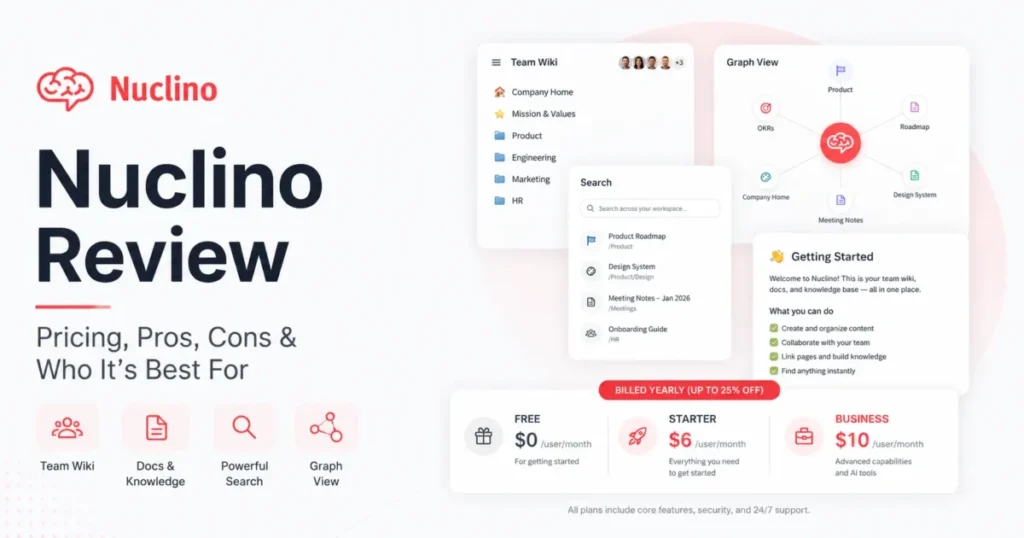
Nuclino is a lightweight team wiki and knowledge base built around speed and low configuration overhead. It sits between heavy enterprise wikis like Confluence and highly configurable workspaces like Notion. The target buyer wants documentation that is easy to write and easy to find, not easy to customize.
This review covers what Nuclino does well, where it stops, what it costs at real team sizes, and which tool to buy instead when Nuclino is the wrong fit. Pricing, plan limits, permissions, security, integrations, AI features and export options were rechecked against Nuclino’s official documentation on September 2, 2026.
In This Article (14 sections)
Nuclino Review 2026: Quick Verdict
Overall editorial score: 7.9 / 10
| Category | Score | Note |
|---|---|---|
| Ease of use | 9.0 | Very few configuration decisions before you can write |
| Knowledge management | 8.0 | Collections, backlinks and graph view cover most wiki needs |
| Collaboration | 8.5 | Real-time editing, comments, mentions |
| Search | 6.5 | Fast, but exact-match behavior is a recurring user complaint |
| Organization and views | 8.5 | List, board, table and graph, plus a separate canvas |
| Integrations | 6.0 | Solid embeds, thin native automation, no workflow triggers |
| AI | 7.5 | MCP on every plan is the standout; Sidekick is Business-gated |
| Admin and security | 7.0 | Strong certifications, simple permission model, paid-only controls |
| Value for money | 8.0 | Cheap entry tier, but guest seats change the math |
These are editorial scores, not measurements. They reflect earlier hands-on use of the product, verification of current features and pricing against Nuclino’s documentation, published user sentiment on G2 and Capterra, and what buyers expect from this software category.
Best for: small and mid-sized teams that want an internal wiki people will actually update, engineering and operations teams writing runbooks and SOPs, and teams that want an AI assistant reading their documentation without a premium upgrade.
- Not ideal for:
- teams needing project management with dependencies and automation, organizations with layered permission requirements across many sub-teams, and teams that collaborate constantly with external guests.
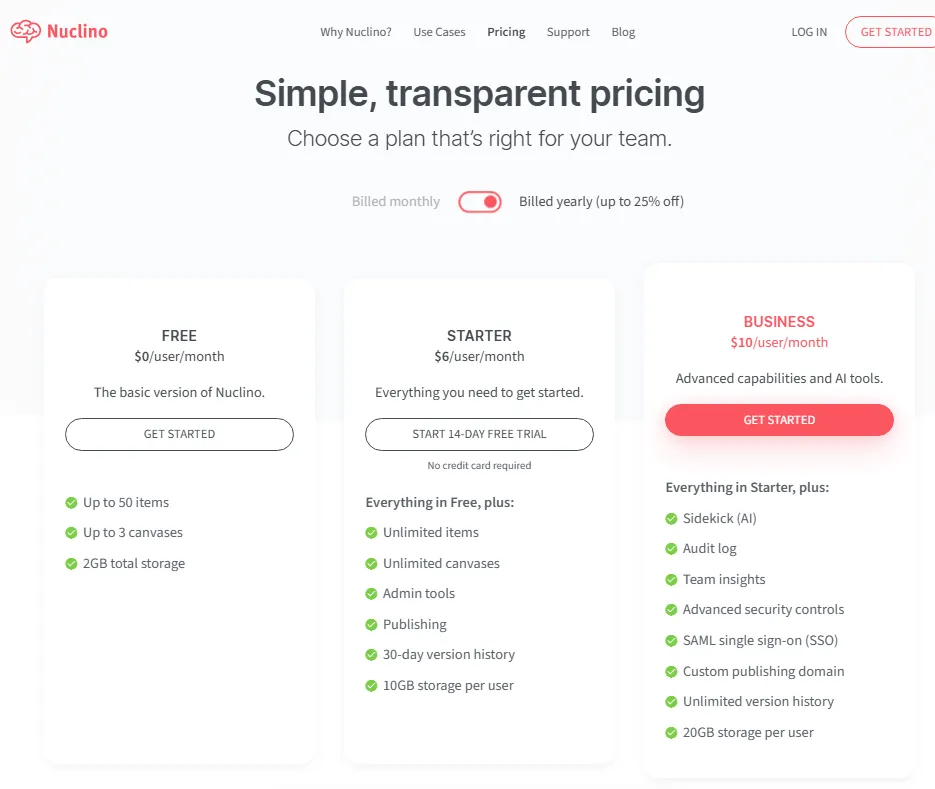
Starting price: Free plan at $0. Starter is $6 per user per month billed yearly. Business is $10 per user per month billed yearly, per Nuclino’s pricing page.
Biggest strength: low complexity. Nuclino asks for almost no setup decisions, which is why documentation written in it tends to stay current.
Biggest weakness: shallow depth. Formatting, permissions, project management and integrations all stop earlier than in Notion or Confluence.
Key pricing warning: Nuclino’s own definition is that “a user is anyone who joins your team in Nuclino, including guests and read-only members.” External collaborators are billable seats. Budget for them before comparing quotes.
Bottom line: Nuclino is worth paying for if simplicity is the actual requirement and your documentation lives inside the company. It is the wrong purchase if you are hoping one tool will absorb your wiki, your project tracker and your database.
How This Review Was Done
This review draws on earlier hands-on use of Nuclino during an evaluation of knowledge base tools. That earlier session is what informs the qualitative observations here about the interface, the editing experience, navigation and content organization.
No detailed testing log was retained from that session. The exact date, the plan in use, page counts, device and browser details and any timing measurements are not recoverable. This review therefore publishes no performance benchmarks, no load-time comparisons and no claims about specific features that cannot be verified from official documentation. Every qualitative impression below is labeled as one.
For this September 2026 update, every factual product claim was rechecked against official sources:
- Pricing, plan limits and feature gates: Nuclino’s pricing page, including its plan comparison matrix
- Permissions and roles: Nuclino’s roles and permissions documentation
- Security and compliance: Nuclino’s security page
- AI, MCP, export and integrations: Nuclino’s help center and apps directory
- User sentiment: current published ratings and review themes on G2 and Capterra
- Competitor prices: each vendor’s own pricing page, checked the same day
Administrative capabilities such as SAML SSO, audit logs, team insights, advanced security controls and the API are treated as documentation-based throughout. None of them were configured or exercised during the earlier session, and this review does not claim otherwise.
Three kinds of statement appear in this article and they are kept separate: an earlier hands-on impression, Nuclino’s documented capability, and what published user reviews report.
What Is Nuclino?
Nuclino is a collaborative team wiki and knowledge base for internal documentation, lightweight project notes and visual brainstorming. Content is organized as workspaces, then collections, then items, and any item can sit in more than one collection.
The product’s defining choice is what it leaves out. There are no relational databases, no formulas, no automation rules and no deeply nested page hierarchies. What you get instead is a fast editor, four ways to look at the same content, and a graph view built from the links between your pages.
Where it sits in the category:
- Lighter than Confluence. Fewer permission layers, no space administration to learn, much faster to stand up.
- Simpler than Notion. Less configurable, which means less setup work and fewer decisions for the person who inherits the workspace.
- More visual than Google Docs. Kanban boards, a graph view and an infinite canvas are built in.
What Nuclino is not: a project management tool, a relational database, or a customer-facing help desk. It can publish public pages, but branding and analytics are thin compared with tools built for that job.
Nuclino Key Features
Each capability below is stated as a documented capability first, taken from Nuclino’s getting-started documentation, and then read for its operating consequence: what changes for a team that runs on it every day. Where a supported feature sits behind a plan gate, the gate is named, because that is usually the real trade-off rather than the feature itself. If your requirement lands on the wrong side of one of those gates, the comparison sections later will tell you which tool to shortlist instead.
Editor and Collaboration
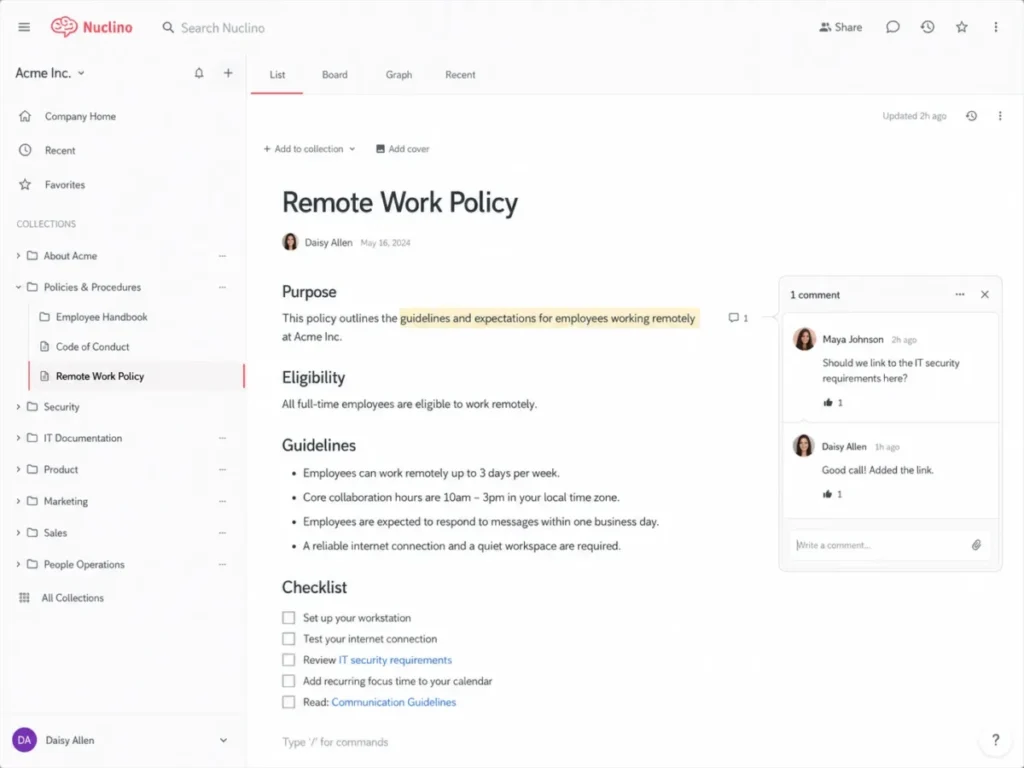
The editor behaves like a document, not like a page builder. Markdown works natively, and formatting options are limited enough that documents written by different people tend to look the same, which matters more in a wiki than most buyers expect.
Supported in the editor: tables, code blocks with syntax highlighting, lists, equations, embeds, drag-and-drop file uploads, @mentions and inline comments. Multiple people can edit an item at once with cursor presence.
Earlier hands-on impression: Nuclino felt noticeably simpler and quicker to work in than more configurable workspace tools, mostly because there is nothing to configure before writing starts.
Documented limitation: there are no custom blocks and no advanced styling. If your documentation needs to look branded, this is the wrong tool.
Collections, Backlinks and Views
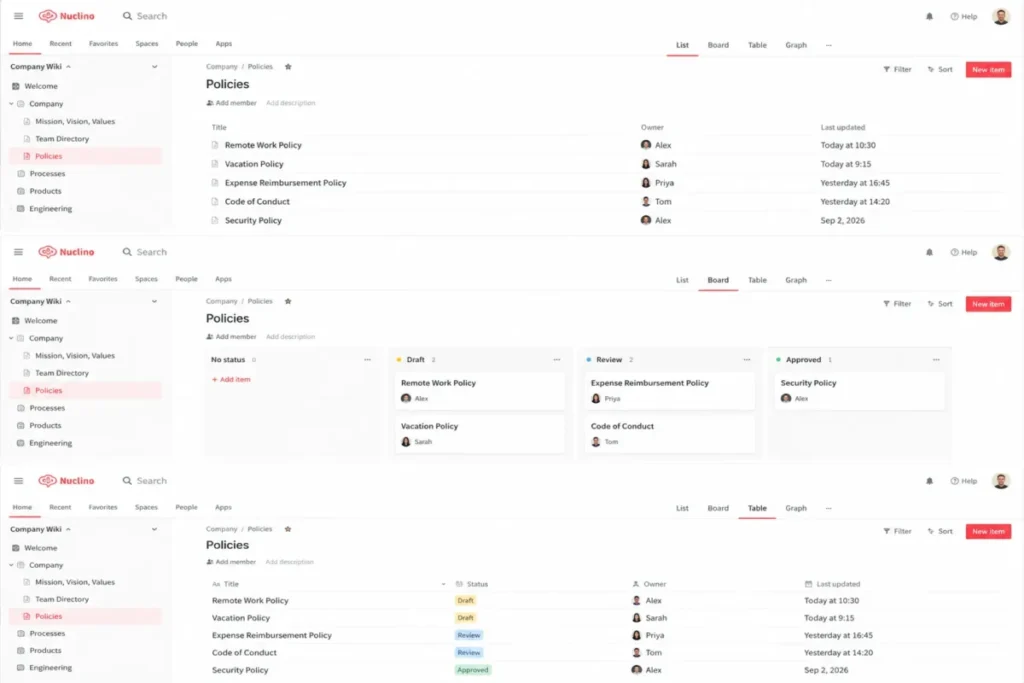
Nuclino gives you four views of the same content:
| View | What it is best for |
|---|---|
| List | Nested outline browsing, the default for documentation |
| Board | Kanban-style tracking of a small process or sprint |
| Table | Scanning many items with their fields side by side |
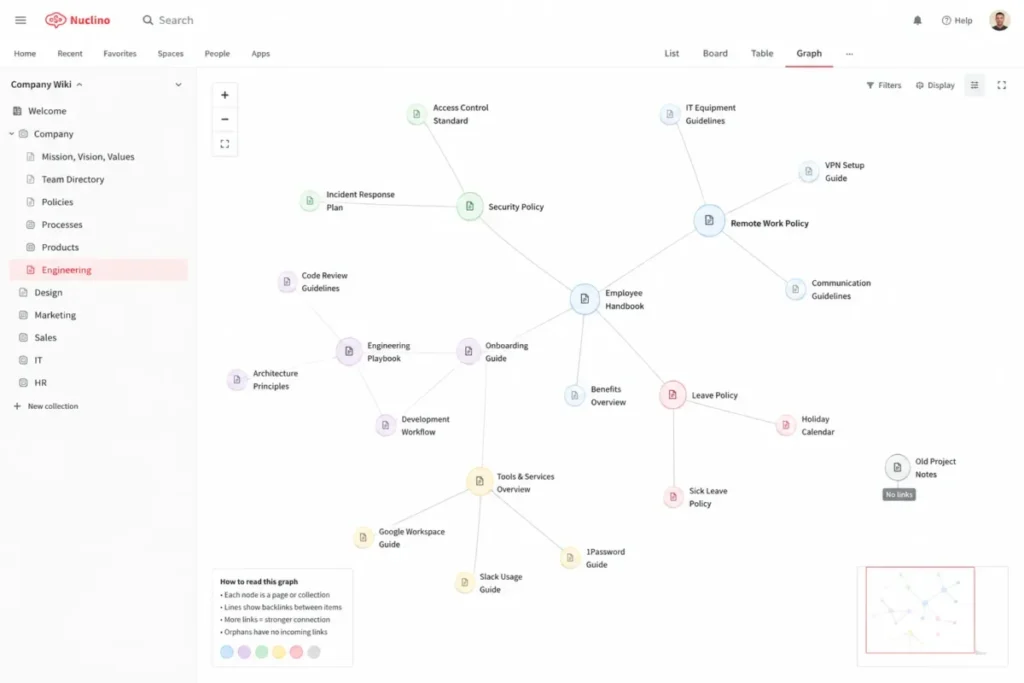
| Graph | Seeing how items link to each other |
Internal links are created by typing @ and the item title. The graph view is built from those links, so it becomes useful only once a workspace has real cross-linking. In a workspace of a dozen pages it shows you very little.
An item can belong to several collections at once, which is Nuclino’s substitute for deep hierarchy. It works well if you commit to linking; it works poorly if your team expects folders inside folders.
Search
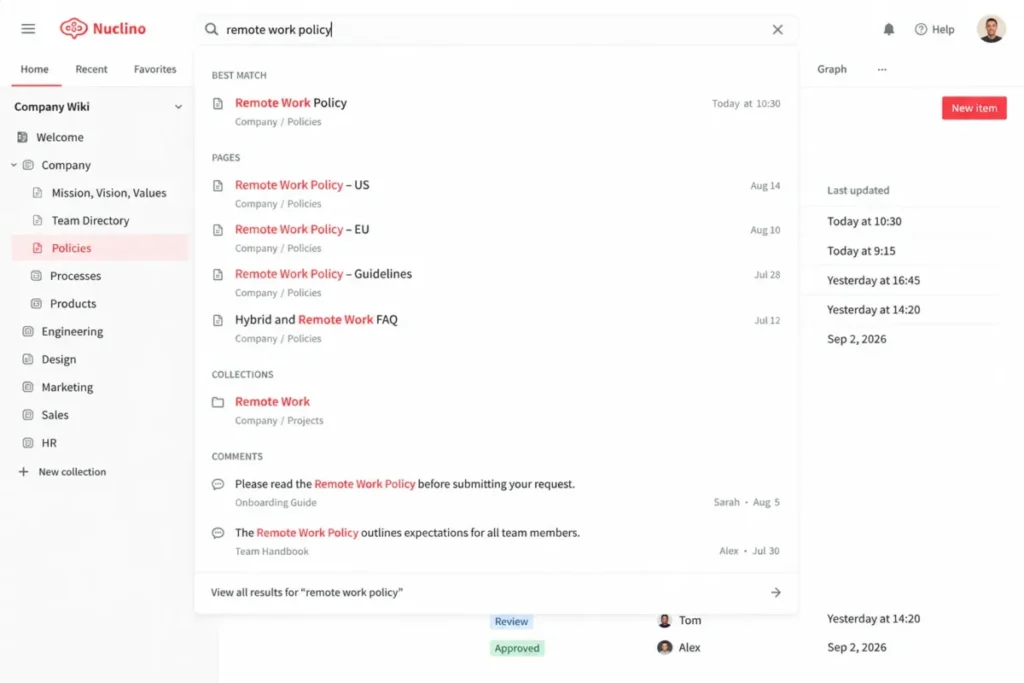
Search indexes content in real time and returns results as you type. It is fast, and it is the most consistently criticized part of the product in published user reviews.
The recurring complaint on both G2 and Capterra is typo tolerance and discoverability in larger workspaces. Reviewers describe search as workable but unforgiving, and note that finding things gets harder as the workspace grows.
Practical consequence for buyers: agree on naming conventions before you migrate content. In a tool where search rewards exact terms, “SOP: Vendor onboarding” and “Vendor onboarding SOP” are not interchangeable.
Canvas
Separate from items, Nuclino includes an infinite canvas for flowcharts, diagrams, sticky-note brainstorming and visual planning. The Free plan allows up to 3 canvases; paid plans are unlimited.
For teams that were paying for a separate diagramming tool only to sketch process flows, this can remove a subscription. It is not a Miro replacement for facilitated workshops.
Permissions and Roles
This is the part most reviews get wrong, so it is worth being precise. Nuclino separates team roles from workspace roles, and several of both are paid-only.
Team roles, from Nuclino’s roles and permissions doc:
| Team role | What it means | Plan |
|---|---|---|
| Owner | Highest permission level, with exclusive actions such as deleting the team. Cannot be removed or demoted by others. | All plans |
| Admin | High permissions over workspaces, including irreversible actions such as deleting a workspace. | All plans |
| Member | Enough permission for daily work, without dangerous actions like deleting workspaces or teams. Can be restricted further with advanced security controls. | Paid plans |
| Guest | No access to team settings, cannot create or see workspaces, must be added to each workspace explicitly. | Paid plans |
Workspace roles:
| Workspace role | What it means | Plan |
|---|---|---|
| Full access | Can modify all workspace content and invite new workspace members. | All plans |
| Comment-only | Cannot edit content, can leave comments and replies. | Paid plans |
| Read-only | Cannot modify content or invite members. | Paid plans |
The Free plan consequence buyers should notice: because Member, Guest, comment-only and read-only are all paid-only, a Free Nuclino team has only Owners, Admins and full access. Everyone you invite on the Free plan can edit everything and can delete workspaces. That is fine for a founding team of four. It is not fine for a pilot where you invite a contractor to look at your documentation.
Access restrictions, editing restrictions, groups and private workspaces also start at Starter. Advanced security controls and the audit log are Business.
Documented limitation: even at Business, Nuclino’s permission model is flatter than Confluence’s. There are no space-level permission schemes and no inherited restriction trees. As an organization grows, the question is not whether Nuclino breaks at some headcount, it is whether a flat model still expresses the access boundaries you need between teams.
Integrations and API
Nuclino publishes its integration list on its apps and integrations page.
Native integrations: Jira link previews and issue fetching, Slack notifications, Microsoft Teams, Microsoft 365, OneDrive, OneDrive for Business, SharePoint, Google Drive, Dropbox, Box, Discord.
Embeds: Loom, Figma, Miro, Lucidchart, Whimsical, MindMeister, Mermaid, draw.io, Gliffy, Typeform, Canva, Sketch, InVision, Framer, Airtable, Google Sheets, Docs and Slides, and the Microsoft Office file types.
API: available on all plans, including Free.
Third-party automation: Zapier, viaSocket and Monkedo bridge Nuclino to tools with no native connector. These are third-party services, not Nuclino-published integrations, so confirm current Nuclino support on the automation vendor’s own directory before designing a workflow around one.
Documented limitation: the Jira integration is link preview and issue fetching, not bi-directional sync. There are no workflow triggers or conditional automation anywhere in Nuclino. G2 reviewers name limited integrations and limited API capability among the most common weaknesses, and that matches what the documentation supports.
Nuclino MCP: One of Its Most Useful 2026 Features
Nuclino runs a Model Context Protocol server, and it is available on all plans, including Free. For a 2026 buyer this is the most consequential thing in the product, and it is missing from most Nuclino reviews.
What MCP is, in plain English: an open standard that lets an external AI assistant connect to a tool and work with its data directly, instead of you copying and pasting content into a chat window. Nuclino implements the server side; your AI assistant is the client.
What Nuclino’s MCP server can actually do. The documentation describes 14 tools, and they go well beyond reading:
| Capability | Tools documented |
|---|---|
| Discover structure | list_teams, list_workspaces, get_workspace, list_items |
| Search and read | search_items, get_item, get_file |
| Create | create_item, create_field |
| Update | update_item, edit_item_content, update_field |
| Organize and remove | delete_item, delete_field (items move to trash rather than being permanently destroyed) |
Nuclino summarizes it as the ability to “search your workspaces for relevant information,” “read the full content of any page,” “create new items and collections,” “update existing pages,” and “organize content by moving items to trash.”
Documented AI clients: Claude Desktop, Cursor, Windsurf, “and others.”
Authentication and permissions: OAuth 2.0 with PKCE is the primary method and is handled automatically; an API key with a bearer token is the fallback for clients without OAuth support. Access is scoped to the connecting account. Nuclino states that “the AI can only access workspaces and teams your account has permission to view or edit” and that “all actions respect your existing permissions.”
How MCP differs from Sidekick: Sidekick is Nuclino’s own AI, built into the product, with its full feature set on the Business plan. MCP is a connection point for the AI assistant your team already pays for, and it is on every plan. They are not substitutes. Sidekick works for people inside Nuclino; MCP works for people whose day runs through an assistant elsewhere.
Why this matters commercially: if the reason you were considering Business was AI, check whether MCP plus your existing assistant covers the need first. A team already paying for Claude or Cursor may get the AI value it wanted on Starter, or even Free.
Where not to overstate it: MCP gives an assistant permission to write and delete. That is useful and it is also a governance question. Scope the connecting account deliberately rather than connecting an Owner account by default.
Sidekick AI
Sidekick handles question answering against your workspace content, drafting and editing, summarizing and extracting action items, translation, and image generation.
The plan situation is genuinely confusing and worth stating clearly. Nuclino’s pricing comparison matrix lists all three Sidekick rows, “Ask questions,” “Draft and edit” and “Generate images,” under the Business plan only. Nuclino’s help center says “a limited version of Sidekick is available on all plans.” It adds that “all Nuclino users can try Sidekick for free with a limited number of requests.” Both statements are accurate. The lower tiers get a capped trial allowance, not an entitlement. Treat Sidekick as a Business feature when you budget, and treat the Free and Starter allowance as a way to evaluate it.
Privacy: Nuclino’s help center states that “the content you store in Nuclino is not used to train any machine learning models.” For regulated teams, that is usually the first question and it has a published answer.
Templates
Nuclino ships templates for employee handbooks, meeting notes, sprint planning, project documentation, SOPs and runbooks. They are functional starting points rather than a template marketplace. You can duplicate items and build your own library, which is what most teams end up doing.
Version History
| Plan | Version history |
|---|---|
| Free | None |
| Starter | 30 days |
| Business | Unlimited |
You can view changes, compare versions and restore earlier states. The Free plan has no version history at all, which is worth knowing before you migrate anything important into it.
The 30-day ceiling on Starter is one of the clearest reasons to consider Business. If a compliance obligation requires you to show what a procedure said nine months ago, Starter cannot answer that question.
Mobile and Desktop
Web, desktop apps for Windows, Mac and Linux, and mobile apps for iOS and Android, on all plans including Free.
Nuclino is a cloud product and is not offline-first. Offline behavior was not exercised during the earlier session, and Nuclino does not publish detailed offline capability. If your team works disconnected regularly, treat this as something to test during a trial rather than something this review can settle.
Publishing
Nuclino can publish a workspace as a public website that search engines can index. Two gates apply:
- Publishing requires Starter or above. It is not on the Free plan.
- Custom publishing domains require Business.
That combination matters if public documentation is your use case: the plan you would use to evaluate the feature is not the plan that has it. Start the Starter trial instead of testing on Free.
Export and Vendor Lock-In
| Scope | Formats |
|---|---|
| Individual item | Markdown, Microsoft Word (.docx), PDF, per Nuclino’s item export doc |
| Entire workspace | .zip archive of Markdown files, with attachments in a separate folder, per Nuclino’s workspace export doc |
This deserves more attention than it usually gets. A full-workspace Markdown export with attachments preserved is close to the best case for a wiki: Markdown imports cleanly into Notion, Obsidian, GitBook and most static site generators, so a future migration is a real option rather than a theoretical one.
Nuclino’s security materials also state that you can “export your data at any time in open and standardized formats.” For a buyer, low switching cost is part of the value of a cheap entry tier. You are not betting the company on the decision.
Nuclino Pricing 2026
Pricing and plan limits last checked September 2, 2026 against Nuclino’s official pricing page.
Plan Comparison
| Plan | Yearly | Monthly | Key inclusions | Key limits |
|---|---|---|---|---|
| Free | $0 | $0 | 50 items, 3 canvases, 2GB total storage, all four views, web, desktop and mobile apps, API, MCP, 2FA, integrations, basic email support | No version history, no publishing, no groups, no access or editing restrictions, no private workspaces, no Member or Guest roles, no SSO |
| Starter | $6 per user/ | $8 per user/ | Unlimited items and canvases, 10GB per user, 30-day version history, groups, private workspaces, default workspaces, access and editing restrictions, publish as website, priority support | No SSO, no audit log, no team insights, no custom domain, version history capped at 30 days |
| Business | $10 per user/ | $12 per user/ | Everything in Starter plus Sidekick AI, SAML SSO, audit log, team insights, advanced security controls, custom publishing domain, unlimited version history, 20GB per user | Highest per-seat cost; guests and read-only members still count as seats |
Source: Nuclino pricing page, checked September 2, 2026. Starter includes a 14-day free trial with no credit card required, and Nuclino asks teams above 100 users to contact the company for a tailored arrangement.
What 5, 10, 25 and 50 Users Actually Cost
Calculated from Nuclino’s published per-user rates on yearly billing. These are derived totals, not vendor-published package prices.
| Users | Starter, per month | Starter, per year | Business, per month | Business, per year |
|---|---|---|---|---|
| 5 | 30 dollars | 360 dollars | 50 dollars | 600 dollars |
| 10 | 60 dollars | 720 dollars | 100 dollars | 1,200 dollars |
| 25 | 150 dollars | 1,800 dollars | 250 dollars | 3,000 dollars |
| 50 | 300 dollars | 3,600 dollars | 500 dollars | 6,000 dollars |
Source: derived from the per-user rates on the Nuclino pricing page, checked September 2, 2026.
The gap between Starter and Business works out at 4 dollars per user per month, or 2,400 dollars a year for a team of 50. That is the number to weigh against SSO, audit logs, unlimited version history and Sidekick.
Guest Billing: The Cost Trap Buyers Miss
Nuclino’s pricing FAQ is unambiguous: “A user is anyone who joins your team in Nuclino, including guests and read-only members. When you upgrade to a paid plan, you upgrade your entire team including all users.”
There is no discounted guest seat and no free read-only tier. A person who will only ever read one page costs the same as an engineer writing runbooks every day.
Worked example: a company with 25 employees and 5 external collaborators is buying access for 30 people, not 25. On Starter that is 2,160 dollars a year instead of 1,800 dollars. On Business it is 3,600 dollars instead of 3,000 dollars.
Who this hits hardest:
- Agencies and consultancies. If you share project documentation with clients, every client contact is a paid seat. Ten clients with two contacts each adds twenty billable seats before you have hired anyone.
- Contractor-heavy teams. Seasonal or project-based contractors are full-price seats for as long as they need access.
- Distributed teams with partner organizations. Anyone from a partner who needs read access is billable.
How to work around it: published public pages do not require the reader to be a team member, so genuinely external, read-only audiences can often be served by publishing a workspace rather than inviting people into it. That requires Starter, and a custom domain requires Business. If your collaboration is read-only, price the publishing route before you price seats.
If most of your collaboration is external and interactive, price a competitor with free guest access. Confluence Standard, for example, includes free guest access, and that alone can reverse the comparison.
When to Upgrade From Free to Starter
Any one of these is a reason to move:
- You hit the 50-item ceiling. Items are documents across all workspaces, so 50 arrives faster than it sounds.
- You need version history. Free has none. Not shorter history, none.
- You need to publish public pages. Publishing starts at Starter.
- You need anyone to be less than an admin. Member and Guest team roles, and comment-only and read-only workspace roles, are all paid-only. On Free, every invitee can delete workspaces.
- You need private workspaces, groups, or access and editing restrictions. All Starter.
- You outgrow the Free plan’s 3 canvases or 2GB of total storage, both listed on Nuclino’s pricing page.
When to Upgrade From Starter to Business
- SAML single sign-on. Starter has none, and this is usually a non-negotiable IT requirement rather than a preference.
- Audit log. Required for most formal compliance programs.
- Unlimited version history. If you need a retention window longer than 30 days, this is the only path inside Nuclino.
- Sidekick AI as a real entitlement rather than a capped trial allowance. Check MCP first; it may cover the need on a cheaper plan.
- Advanced security controls and team insights.
- A custom publishing domain, if public docs need to live on your own domain.
Nuclino Pros and Cons
The points below are weighted by how often they decide a purchase, not by how impressive they sound. A limitation that only matters to one buyer in twenty sits lower than a plan gate that changes the invoice.
Pros
Low complexity is a feature, not a compromise. Wikis fail because nobody updates them. Nuclino removes the setup decisions that make a workspace feel like someone else’s system, which is the mechanism behind the ease-of-use scores it earns in published reviews.
Fast adoption without a rollout project. There are no space schemes, database properties or permission trees to teach. A new joiner can be productive without training, and there is no administrator role that becomes a bottleneck.
Four views over the same content. List, board, table and graph are presentation layers, not separate objects to maintain, so you are not duplicating content to see it differently.
MCP on every plan. An external AI assistant can search, read, create and update workspace content, on the Free plan, with permissions scoped to the connecting account. Very few tools in this category offer that below their top tier.
Sidekick does not train on your content. Nuclino publishes the answer rather than making buyers ask for it.
Security certifications that are unusual at this price. ISO 27001, ISO 27018, SOC 2, GDPR, AES-256 at rest and TLS in transit, with 2FA available on every plan including Free.
Genuinely low switching cost. Full-workspace Markdown export with attachments means a future migration is realistic. That reduces the risk of committing.
Cons
Guest billing changes the real price. Guests and read-only members are full seats. For any team that collaborates externally, this can be the single largest cost factor and it is easy to miss until the invoice arrives.
No automation, no project management depth. No workflow triggers, no conditional logic, no dependencies, no Gantt views. Nuclino is documentation with some project tracking, not the reverse.
Limited formatting and customization. No custom blocks, no advanced styling, and reviewers specifically call out table customization. Branded documentation is out of scope.
Fewer integrations than broader platforms. Embeds are good, native automation is thin, and the Jira integration is previews rather than sync. Limited integrations and limited API capability are both recurring themes in G2 reviews.
The permission model is flat. Even at Business there are no inherited permission schemes. This is a fit question rather than a defect, but it is the constraint that surfaces as an organization gets more complex.
Free has no version history and no restricted roles. These two together make the Free plan poor for evaluating Nuclino with anyone outside your immediate team.
Publishing is gated above Free. If public documentation is the reason you are evaluating Nuclino, the free tier cannot show you the feature you care about.
Search is unforgiving. It is fast, but typo tolerance and discoverability in large workspaces are the most consistent complaints in published reviews.
Cloud-first with limited offline support. Nuclino does not publish detailed offline capability, so treat offline work as unverified and test it during a trial if it matters.
What Real Nuclino Users Say
Ratings and review counts below were checked on September 2, 2026.
| Platform | Rating | Reviews |
|---|---|---|
| Capterra | 4.7 / 5 | 105 |
| G2 reviews for Nuclino | 4.7 / 5 | 25 |
Capterra also publishes sub-scores: ease of use 4.7, customer service 4.6, value for money 4.5, features 4.4.
The shape of that spread is the most useful signal in the data. Nuclino scores highest on being easy to use and lowest on feature depth, which is precisely the tradeoff the product is designed around.
| Theme | What users report | Editorial assessment |
|---|---|---|
| Ease of use | The most consistent praise on both review platforms. Reviewers describe a minimal learning curve and an interface that stays out of the way. | Matches the earlier hands-on impression and the 4.7 ease-of-use sub-score above. This is Nuclino’s real product advantage. |
| Interface | Clean, minimalist design is repeatedly cited as a reason teams adopted it. | Consistent with the design intent. The cost of that cleanliness is the formatting ceiling. |
| Collaboration | Real-time editing and knowledge sharing are named as strengths. Markdown handling gets specific praise. | Supported by documented capability. Reasonable to treat as reliable. |
| Search | The clearest negative theme. Typos returning nothing, and discoverability degrading as workspaces grow. | Credible and repeated on both platforms. Plan naming conventions before migrating, and weight this heavily if your content library will be large. |
| Customization | Reviewers name limited customization, particularly for tables. | Consistent with documentation. This is a deliberate product tradeoff, not a bug that will be fixed. |
| Integrations | Limited integrations and limited API capability are common complaints. | Matches what the apps directory supports. Buyers needing deep tool chains should treat this as a real constraint. |
| Value | The value sub-score of 4.5 is the middle of the range, with storage limits mentioned as a downside. | Fair. The headline price is low, and guest seats plus storage tiers are where the real cost appears. |
| Scale | Some reviewers note the open structure becomes overwhelming with many team members. | Aligns with the flat permission model. Reinforces that Nuclino’s constraint is organizational complexity, not headcount alone. |
Reconciliation. User reviews broadly confirm this review’s central judgment: simplicity is Nuclino’s strongest and most reliable selling point, and the complaints cluster around depth rather than around the core writing and collaboration experience.
Two caveats on the data. The smaller of the two samples is 25 reviews, so treat its individual sub-themes as directional. And the recurring search complaint is the one negative theme strong enough that a buyer with a large content library should test it specifically during the trial.
Best Nuclino Use Cases
Each use case below states why Nuclino fits, the scenario it fits best, the limitation that will surface first, and the tool to choose instead when that limitation is a requirement rather than an inconvenience.
Startups and Small Teams
Why it fits: almost no setup cost, a workable free tier for a founding team, and a price that stays reasonable while headcount grows.
Best scenario: a first internal knowledge base for a team that has been keeping documentation in scattered Google Docs.
Key limitation: on Free, everyone is an admin. The moment you invite a contractor or advisor, you need Starter.
When another tool is better: if you already know you will want databases and automation within a year, starting in Notion avoids a migration.
Product and Engineering Documentation
Why it fits: native Markdown, syntax-highlighted code blocks, Jira link previews, and a graph view that makes architecture relationships visible. MCP means an assistant in the editor can query the docs directly.
Best scenario: runbooks, technical specs, architecture decision records and internal API notes.
Key limitation: no code review workflow, no deep GitHub integration, no versioned doc branches.
When another tool is better: GitBook for developer-facing public documentation with versioning and a Git workflow.
Operations and SOPs
Why it fits: board view for process tracking, version history for change trails, and a low enough barrier that process owners actually maintain their own documents.
Best scenario: HR handbooks, operational playbooks, onboarding checklists, compliance procedures.
Key limitation: no due dates, no reminders, no assignment workflow. Version history caps at 30 days on Starter, which matters for audit trails.
When another tool is better: Confluence if you need formal approval workflows and long retention with granular space permissions.
Internal Company Wiki
Why it fits: this is the core use case. Collections plus backlinks plus fast search covers what most companies actually need from a wiki.
Best scenario: a single source of truth for company policies, team pages and ways-of-working documentation.
Key limitation: the flat permission model. If HR, Finance and Engineering each need genuinely separate access boundaries with inheritance, this gets awkward.
When another tool is better: Confluence, once the number of access boundaries exceeds what groups and private workspaces express cleanly.
Lightweight Project Documentation
Why it fits: board view plus documentation in one place, without maintaining a second system.
Best scenario: small project plans, sprint notes and decision logs that live next to the specs they refer to.
Key limitation: no dependencies, no automation, no reporting. This is project notes, not project management.
When another tool is better: ClickUp or Monday.com if you need the tracker to be the system of record.
Client-Facing Knowledge Base, With Caveats
Why it might fit: you can publish a workspace as a public, indexable website, and public readers do not consume seats.
Best scenario: a simple product help center where content matters more than presentation.
Key limitation: publishing needs Starter, custom domains need Business, and branding and analytics are thin. Nuclino does not publish detailed SEO controls for published sites.
When another tool is better: Helpjuice or Document360 for a branded, governed customer knowledge base, or GitBook for developer documentation.
Nuclino vs Competitors
All competitor prices below were checked on each vendor’s own pricing page on September 2, 2026. Prices are per user per month unless noted, and several vendors price differently by billing cycle and seat count.
| Tool | Best for | Strengths | Weaknesses | Price |
|---|---|---|---|---|
| Nuclino | Fast, simple internal wikis | Low complexity, four views, MCP on all plans, strong certifications for the price | Guest billing, thin integrations, flat permissions, unforgiving search | Free; $6 yearly / $8 monthly (Starter); $10 yearly / $12 monthly (Business) (Nuclino pricing page) |
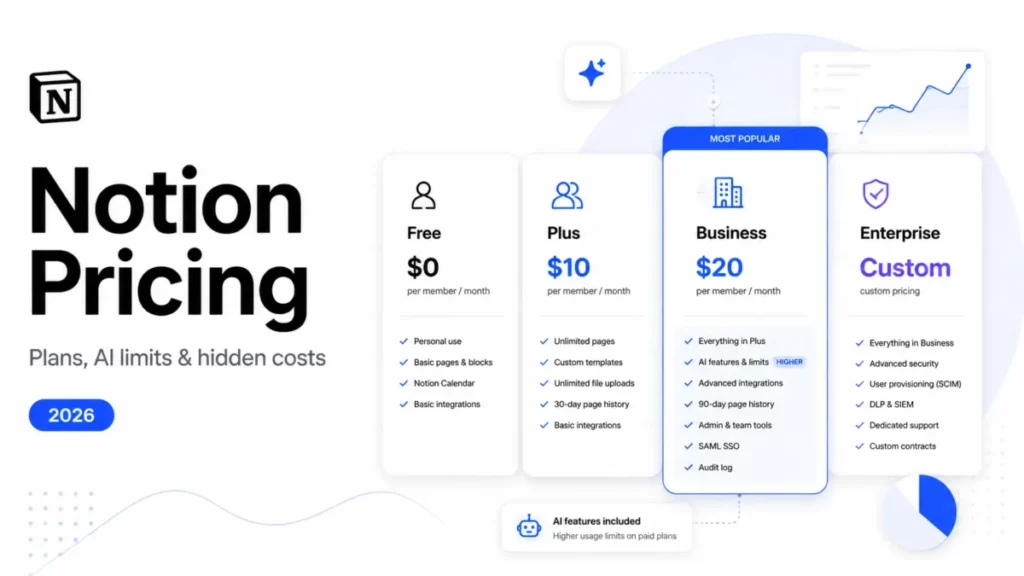
| Notion | Configurable workspaces built on databases | Relational databases, automation, huge template ecosystem, AI | Setup overhead, more decisions to maintain, can sprawl | Free; $10 (Plus); $20 (Business); Enterprise custom (Notion pricing page) |
| Confluence | Enterprise wikis in the Atlassian stack | Granular space permissions, Jira depth, free guest access on paid tiers, long retention | Heavier admin, steeper learning curve | Free for 10 users; from $5.42 (Standard); from $10.44 (Premium); Enterprise annual only (Confluence Cloud pricing) |
| Slite | AI-first team docs | Clean editor, AI “Ask” retrieval, doc verification workflows | No free plan, less flexible organization, higher entry price | $10 (Basic); $20 (Pro), billed yearly; 14-day trial (Slite pricing page) |
| Tettra | Slack-first knowledge bases | Tight Slack integration, AI answers in DMs and channels, simple to run | No free plan, 10-user minimum, weaker formatting | $8 monthly, around $6.40 yearly (Scaling), 10-user minimum; 30-day trial (Tettra pricing page) |
| Guru | Verified answers in the flow of work | Card-based knowledge, browser extension, content verification workflows | Not a traditional wiki, no published pricing, no free plan | Custom pricing, contact sales (Guru pricing page) |
| Superhuman Docs (formerly Coda) | Docs plus automation and tables | Databases, automations, Docs AI, MCP support | Rebranded in 2026, steeper learning curve, higher cost at scale | Free; $12 yearly / $15 monthly (Pro); $33 yearly / $40 monthly (Business), per Doc Maker (Superhuman Docs pricing) |
| GitBook | Developer-facing public documentation | Git workflow, versioning, strong published-site experience | Site-based pricing, overkill for an internal wiki | Free; Premium $65 per site/ |
Sources: each vendor’s own pricing page, linked per row above, starting with Nuclino’s pricing page. All checked September 2, 2026.
Two branding notes for 2026 buyers. Coda now trades as Superhuman Docs, and coda.io redirects there, so a current shortlist should carry the new name. Guru no longer publishes seat pricing, so any comparison quoting a per-user Guru figure is out of date.
Nuclino vs Notion
Where Nuclino wins. Adoption speed. There is no property schema to design, no database to model and no decision about how the workspace should be structured before anyone writes anything. For a team that wants documentation rather than a workspace platform, that absence is the product.
Where Notion wins. Depth. Relational databases, formulas, automation, a template ecosystem and the ability to genuinely replace several tools. If your requirements list includes the word “database,” Nuclino cannot serve it at any price.
Main pricing difference. Nuclino Starter is $6 against Notion Plus at $10, and Nuclino Business is $10 against Notion Business at $20, per Nuclino’s pricing page and Notion’s pricing page. Nuclino is meaningfully cheaper at both comparable tiers. Notion’s free plan is more generous than Nuclino’s for a small team, since Nuclino caps at 50 items and withholds restricted roles.
Main feature difference. Databases. Everything else is a matter of degree; this one is categorical.
Which buyer should choose which. Choose Nuclino if the deliverable is a wiki people maintain and you want the fewest possible decisions between someone having knowledge and someone writing it down. Choose Notion if you want one workspace to hold docs, trackers and structured data, and you have someone willing to own the setup.
Decision rule: if you cannot name a database you need, Nuclino is the cheaper and faster choice.
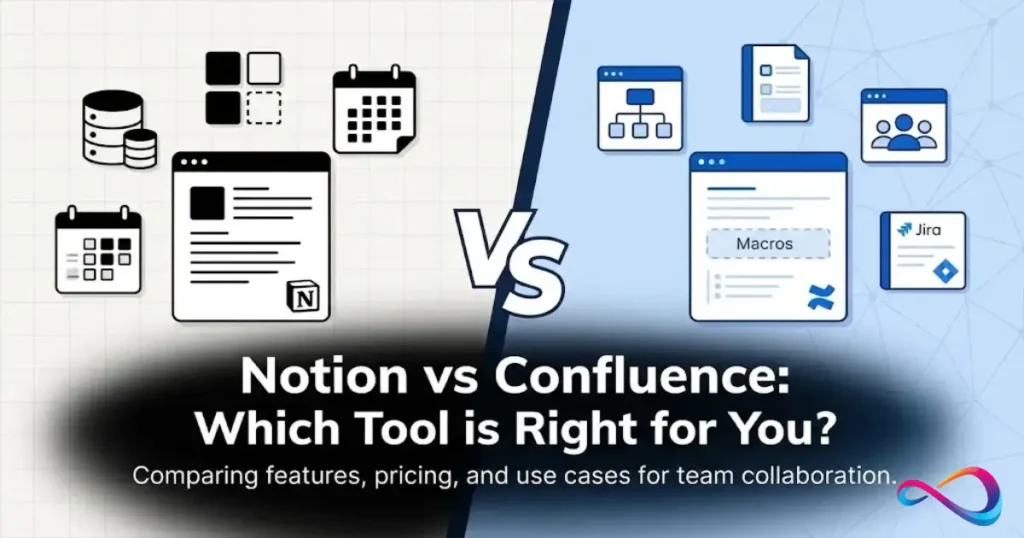
Nuclino vs Confluence
Where Nuclino wins. Setup effort and day-one usability. Confluence carries space administration, permission schemes and an interface that assumes an administrator exists. Nuclino does not.
Where Confluence wins. Permission depth, Jira integration, retention, and free guest access on paid tiers. If your access model needs inheritance and exceptions across many spaces, Confluence expresses that and Nuclino does not.
Main pricing difference. This has changed and it is the most important update in this comparison. Confluence Standard starts at $5.42 per user per month, below Nuclino Starter at $6. Confluence Premium at $10.44 is roughly level with Nuclino Business at $10, per Confluence Cloud pricing and Nuclino’s pricing page. Nuclino is no longer the cheaper option on headline price.
But headline price is not the comparison that matters here, for two reasons pulling in opposite directions. Confluence includes free guest access on paid plans, so a team with many external collaborators can end up substantially cheaper on Confluence than the per-seat rates suggest. Against that, Confluence’s real cost includes administration: someone has to own permission schemes and space structure, and that person’s time does not appear on the invoice. Atlassian also prices by seat count in tiers, so your quote will differ from the published small-team rate.
Main feature difference. Granular, inheritable permissions and Atlassian ecosystem depth versus a flat model that needs no maintenance.
Which buyer should choose which. Choose Confluence if you run Jira, need enterprise permission structures, or have external collaborators who would otherwise be paid Nuclino seats. Choose Nuclino if you have no Atlassian dependency and nobody who wants to administer a wiki.
Decision rule: if you have an admin who will own the wiki, Confluence’s lower entry price is real value. If you do not, Nuclino’s simplicity is worth the price difference.
Nuclino vs Slite
Where Nuclino wins. Organization and price. Nuclino offers board, table and graph views plus an included canvas, and it has a free plan. Slite Basic is $10 per user per month, against Nuclino Starter at $6, per Slite’s pricing page and Nuclino’s pricing page.
Where Slite wins. AI-led knowledge retrieval and content governance. Slite’s “Ask” is built around answering questions from your documentation, and its doc verification workflow addresses wiki rot directly, which is a problem Nuclino leaves to process.
Main pricing difference. Slite has no free plan, only a 14-day trial.
At the entry paid tier Nuclino Starter costs 40 percent less than Slite Basic, and Nuclino is free to start.
Main feature difference. Slite is more opinionated about keeping documentation trustworthy. Nuclino is more flexible about how you organize it.
Which buyer should choose which. Choose Slite if your problem is that nobody trusts the documentation you already have. Choose Nuclino if your problem is that documentation does not get written, and you want more than one way to organize it once it exists.
Decision rule: trust problem, choose Slite. Adoption problem, choose Nuclino.
Nuclino vs Tettra and Guru
Both are narrower products, and the comparison is really about workflow rather than features.
Tettra is a Slack-first knowledge base. If your team asks questions in Slack and expects answers there, Tettra fits a habit Nuclino cannot. The tradeoffs are a 10-user minimum, no free plan, and weaker long-form authoring. Choose Tettra if Slack is where knowledge actually gets requested.
Guru delivers short, verified answers in the flow of work through a browser extension, aimed at sales and support teams who need a snippet during a call rather than a document to read. It is not a wiki, and it no longer publishes seat pricing, so budget for a sales conversation. Choose Guru if verification and in-workflow delivery matter more than authoring.
Choose Nuclino over both if you need real long-form documentation with structure, want a free tier to start on, and do not want your knowledge base to depend on a single delivery channel.
Best Nuclino Alternatives
| Scenario | Choose | Why |
|---|---|---|
| You need relational databases and automation | Notion or Superhuman Docs | Structured data and workflow logic that Nuclino does not have at any tier |
| You run Jira, or need granular permissions | Confluence | Inheritable space permissions, Atlassian depth, free guest access on paid plans |
| Many external collaborators | Confluence | Free guest access avoids the per-seat guest cost set by Nuclino’s user definition |
| Documentation nobody trusts is current | Slite | Doc verification workflows and AI retrieval built around trust |
| Knowledge requests happen in Slack | Tettra | Answers delivered in channels and DMs where the questions are asked |
| Sales or support needs verified snippets mid-task | Guru | Card-based knowledge with a browser extension and verification workflow |
| Developer-facing public documentation | GitBook | Git workflow, versioning, and a published site built for docs |
| Branded customer knowledge base | Helpjuice or Document360 | Branding, governance and analytics for public-facing content |
| Local-first personal knowledge management | Obsidian | Markdown files on your own machine, offline, with a mature graph |
| Microsoft 365 shop wanting minimal new tooling | Microsoft Loop | Lightweight collaborative pages inside an existing license |
Security, Privacy and Compliance
Verified on September 2, 2026 against Nuclino’s security page and help center.
| Requirement | Status |
|---|---|
| ISO 27001 and ISO 27018 | Certified, per Nuclino’s security page |
| SOC 2 | Certified |
| GDPR | Nuclino states commitment to compliance with the EU GDPR |
| Encryption at rest | AES-256 |
| Encryption in transit | TLS |
| Two-factor authentication | Available on all plans, including Free |
| SAML single sign-on | SAML 2.0, Business plan only |
| Documented SSO providers | Okta, Microsoft Entra ID (Azure AD), ADFS, OneLogin, Google Workspace, Auth0 |
| Audit log | Business plan only |
| Backups | Automatic encrypted database backups retained up to 60 days |
| Data export | Available at any time in open formats: Markdown, .docx, PDF per item; Markdown .zip per workspace |
| AI training on customer content | Nuclino states that content stored in Nuclino is not used to train any machine learning models |
| HIPAA | Nuclino does not state HIPAA compliance in the security materials reviewed. Healthcare buyers should verify requirements directly with Nuclino before purchase. |
| Self-hosted or on-premise | Not offered in the materials reviewed. Nuclino is a cloud service. |
| Data residency | Not published in the materials reviewed |
What this means for a buyer. The certification set is genuinely strong for a product at this price, and 2FA on the free plan is more than many competitors offer. The gaps are the ones you would expect from a lean vendor: no published HIPAA position, no self-hosting, and no published data residency options. Those are answerable in a sales conversation, but they are not answerable from the website, and an enterprise security review will ask.
One structural point worth weighing: SSO and the audit log are both Business-only. For many organizations SSO is a hard IT requirement, which effectively means Business is the entry plan regardless of what the feature comparison suggests. Price accordingly.
Final Verdict: Is Nuclino Worth It in 2026?
Nuclino is worth paying for when simplicity is a genuine requirement rather than a preference, and it is a poor purchase when you are hoping one tool will grow into several.
The case for it is narrow and strong. Wikis fail because people do not maintain them, and Nuclino removes more of the friction between having knowledge and writing it down than almost anything else in the category. Published user reviews confirm this is where it delivers, with ease of use scoring highest and feature depth lowest. That spread is the product working as designed.
Three things changed the 2026 calculation.
Confluence Standard now undercuts Nuclino Starter on headline price, at $5.42 against $6, and includes free guest access on paid plans, per Confluence Cloud pricing and Nuclino’s pricing page. Price alone no longer argues for Nuclino. What argues for it is that Confluence needs an administrator and Nuclino does not.
MCP support on every plan is a real differentiator, and one most competitors do not match below their top tier. If your team already works through an AI assistant, Nuclino’s documentation becomes queryable and editable through that assistant on the Free plan.
Guest billing remains the number that decides the purchase for a large share of buyers. Every external collaborator is a full seat. Run that calculation before anything else, because for agencies and client-facing teams it can move Nuclino from the cheapest option to one of the more expensive ones.
Buy Nuclino if you want an internal wiki that stays current, your team is not going to administer a knowledge base, your collaboration is mostly internal, and you value getting out easily as much as getting in cheaply.
Do not buy Nuclino if you need databases, automation, layered permissions, formal long-term retention on a budget tier, or heavy external collaboration.
On balance the strongest argument for Nuclino is that documentation written in it tends to stay current, and that advantage outweighs its thinner feature set for most internal-wiki buyers. Its main limitation is depth: formatting, permissions, project management and integrations all stop earlier than in the alternatives. The recommendation is to shortlist Nuclino alongside Confluence, run the guest-seat calculation for both, and choose on administration burden rather than on headline price.
Frequently Asked Questions
These are the questions buyers ask before a Nuclino trial, answered from the documentation checked for this review rather than from vendor marketing copy.
What is Nuclino used for?
Nuclino is used as an internal team wiki and knowledge base for documentation, SOPs, runbooks, meeting notes, technical specs and lightweight project notes. Teams use it to centralize knowledge, collaborate in real time, and organize content as lists, boards, tables or a link graph.
Is Nuclino free?
Yes. The Free plan costs $0 and includes up to 50 items, 3 canvases, 2GB total storage, all four content views, web, desktop and mobile apps, the API, the MCP server and two-factor authentication, per Nuclino’s pricing page. It does not include version history, publishing, groups, access restrictions, private workspaces, restricted roles or SSO.
How much does Nuclino cost in 2026?
As of September 2, 2026, Nuclino costs $0 on Free, $6 per user per month on Starter billed yearly ($8 billed monthly), and $10 per user per month on Business billed yearly ($12 billed monthly). Starter includes a 14-day trial with no credit card, and Nuclino asks teams above 100 users to contact them. Verify current figures on Nuclino’s pricing page.
Is Nuclino better than Notion?
For a straightforward internal wiki, Nuclino is easier to adopt and costs less. Nuclino Starter is $6 against Notion Plus at $10 at the entry paid tier, per Nuclino’s pricing page and Notion’s pricing page. Notion is better if you need relational databases, automation or a workspace that replaces several tools. The deciding question is whether you need structured data. If you do, Notion. If you do not, Nuclino gets you there faster and cheaper.
Is Nuclino good for a company wiki?
Yes, and it is the use case Nuclino is designed for. Fast search, real-time collaboration, four ways to organize content and strong security certifications make it a solid fit for internal documentation. It becomes a weaker fit as the number of distinct access boundaries between teams grows, because its permission model is flat rather than inheritable.
Does Nuclino work offline?
Offline support is limited. Nuclino does not publish detailed offline capability for its desktop and mobile apps, so if disconnected work matters to your team, test it during the free trial rather than assuming it is supported.
What integrations does Nuclino support?
Nuclino integrates natively with Jira, Slack, Microsoft Teams, Microsoft 365, OneDrive, SharePoint, Google Drive, Dropbox, Box and Discord, and supports embeds from Loom, Figma, Miro, Lucidchart, Whimsical, Mermaid, draw.io, Typeform, Canva, Airtable and the Google and Microsoft file types. The API is on all plans. For tools with no native connector, such as Asana or Trello, use Zapier, viaSocket or Monkedo.
How do Nuclino permissions work?
Nuclino separates team roles from workspace roles. Team roles are Owner, Admin, Member and Guest, with Member and Guest available on paid plans only. Workspace roles are full access, comment-only and read-only, with comment-only and read-only also paid-only. On the Free plan that leaves only Owners, Admins and full access, so everyone you invite can edit and delete. Groups, private workspaces and access restrictions start at Starter; advanced security controls and the audit log are Business.
Can you export data from Nuclino?
Yes. Individual items export as Markdown, Microsoft Word (.docx) or PDF. An entire workspace exports as a .zip archive of Markdown files, with attachments such as images in a separate folder. Because Markdown imports cleanly into most competing tools, switching costs are genuinely low, which is worth knowing before you commit.
Does Nuclino work with Claude or other AI assistants?
Yes, through the Model Context Protocol, and it is available on all plans including Free. Nuclino’s MCP server exposes 14 tools that let a connected assistant search workspaces, read pages, create items and collections, update existing pages and move items to trash. Documented clients include Claude Desktop, Cursor and Windsurf. Access is scoped to the permissions of the connecting account. This is separate from Sidekick, Nuclino’s built-in AI, whose full feature set requires the Business plan.
What is the difference between Nuclino Sidekick and Nuclino MCP?
Sidekick is Nuclino’s own AI, used inside the product, with its full feature set on the Business plan and a capped trial allowance on lower plans. MCP is a connection point that lets an external AI assistant you already use work with your Nuclino content, and it is available on every plan. If AI was your reason to consider Business, check whether MCP with your existing assistant covers the need first.
Who should not use Nuclino?
Nuclino is a poor fit for teams needing project management with dependencies and automation, and for organizations requiring relational databases. It also suits neither enterprises needing inheritable permission structures across many teams nor teams that need deep native integrations without middleware. Teams that collaborate heavily with external guests should also look elsewhere, since every guest is a billable seat.
What are the best Nuclino alternatives in 2026?
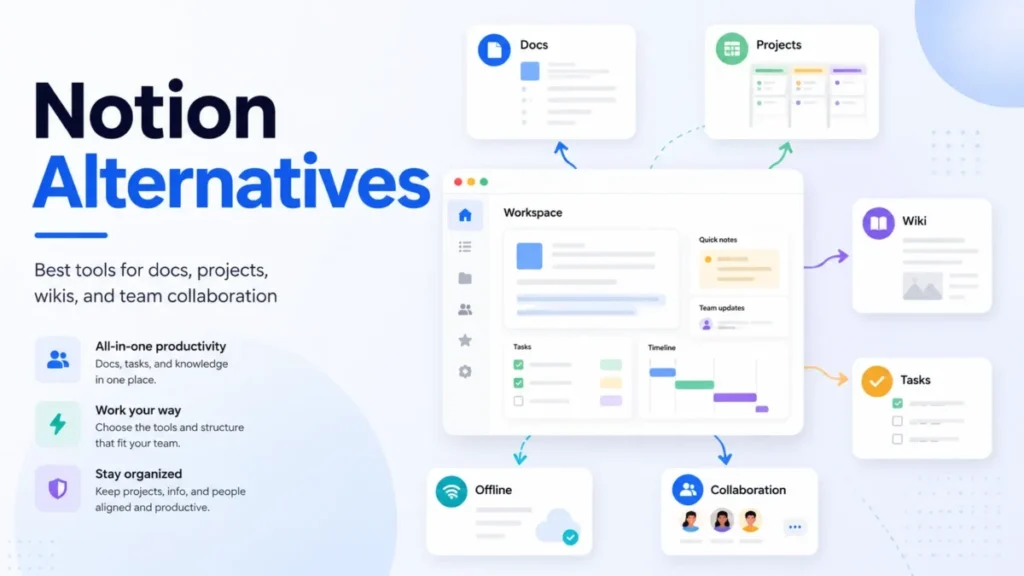
Notion for databases and configurability, Confluence for enterprise permissions and Jira integration, and Slite for AI-led retrieval and doc verification. Tettra covers Slack-first knowledge and Guru covers verified in-workflow answers. Superhuman Docs (formerly Coda) handles docs plus automation, GitBook handles developer documentation, and Obsidian handles local-first personal knowledge management.
Your Next Step
- Run the guest math before anything else. Add every external collaborator to your headcount and recalculate. If externals are a meaningful share of your users, price Confluence in parallel, since its paid plans include free guest access.
- Start the 14-day Starter trial, not the Free plan. Free has no version history, no publishing and no restricted roles, so it cannot demonstrate the features most buying decisions turn on. Starter needs no credit card.
- Test search against real content. Import a realistic slice of your existing documentation, not ten sample pages, and have someone who did not write it try to find five specific things. This is the most consistent complaint in published reviews and the easiest thing to verify yourself.
- Connect MCP during the trial. If your team uses Claude Desktop, Cursor or a similar assistant, connect it and see whether that covers your AI requirement. It may save you the Business upgrade.
- Check whether SSO is a hard requirement. If IT requires SAML, Business is your entry plan at $10 per user per month, per Nuclino’s pricing page, and the Starter comparison is moot. Decide this before you build a business case around the Starter rate.
- Export before you commit. Run a full workspace export during the trial and confirm the archive is what you would want if you ever had to leave. It takes ten minutes and it tells you what your exit looks like.
Pricing, plan limits, permissions, security claims, integrations and competitor prices in this review were verified on September 2, 2026 against each vendor’s own pricing, security and documentation pages. Review ratings were checked the same day. SaaS CRM Review earns affiliate commissions from some links, which never influence ratings or rankings.