Most marketing teams do not fail at project management because they picked a tool with too few features. They fail because they budgeted from the entry price, then discovered six months later that proofing, portfolio visibility, or automation capacity all live one tier higher than the plan they bought.
A second failure is buying a tool built for generic task tracking, then asking it to run campaign intake, creative approval, and cross-channel reporting.
This guide compares 10 marketing project management tools for marketing leaders, operations teams, and agencies. Asana’s marketing review shows why it is the strongest pick for cross-functional in-house teams once you budget for the Advanced tier. Wrike’s creative-ops review explains why it fits governed enterprise creative operations on its Business tier. Teamwork.com’s agency review covers why it is the clearest choice for agencies billing client work on its Accelerate tier. The right pick for your team depends on team size, budget, and which workflow (intake, proofing, resourcing, or client billing) breaks first without the right tool.
In This Article (11 sections)
Quick Picks by Marketing Use Case
| Use case | Best pick | Why it fits |
|---|---|---|
| Strongest pick for in-house cross-functional teams | Asana | Balances campaign intake, timeline planning, creative approval, and portfolio reporting once you’re on the Advanced tier |
| Best for enterprise creative operations | Wrike | Structured request forms, proofing, and resource management built for governed creative teams of 5 to 200+ |
| Best all-in-one marketing workspace | ClickUp | Docs, forms, dashboards, and proofing in one configurable workspace at the lowest per-user Business price in this group |
| Best for highly visual campaign workflows | monday.com | Boards, calendars, and dashboards that are easy to reconfigure without a database mindset |
| Best for portfolio-scale campaign operations | Smartsheet | Sheet-based reporting and workload tracking built for PMO-style oversight across many campaigns at once |
| Best for marketing agencies | Teamwork.com | The only tool in this list that connects campaign delivery directly to time budgets, retainers, and invoicing |
| Best for marketing operations databases | Airtable | Relational records connect campaigns, content, assets, and audiences instead of forcing everything into a task list |
| Best for enterprise content supply chains | Adobe Workfront | Demand, resource, and approval management for large, Adobe-connected enterprises that can absorb custom pricing |
| Best for simple editorial calendars | Trello | The lowest-friction visual calendar for small teams that do not need portfolio-level oversight |
| Best communication-first project hub | Basecamp | Centralizes to-dos, chat, files, and client access without forcing you into complex automation setup |
- Sources (checked 2026-07-27): Asana, Wrike, ClickUp, monday.com, Smartsheet, Teamwork.com, Airtable, Adobe Workfront, Trello, Basecamp.
The cheapest listed price on each vendor’s homepage is rarely the plan a marketing team needs. Read the practical-tier notes in each section below before you compare sticker prices.
How We Evaluated Marketing Project Management Software (How We Chose and Ranked These Tools)
These rankings are based on verified pricing pages, official product documentation, marketing-specific solution pages, and labeled plan and usage-limit documentation for each vendor. Pricing, plan gates, and stated usage limits were checked directly against each vendor’s official site on July 27, 2026.
Each tool was assessed against the same buyer-focused criteria: campaign intake and planning, creative review and approval, resource and workload visibility, automation and integration capacity, client or stakeholder access, and documented plan limits.
Greater weight was given to factors that change a real purchasing decision: which tier unlocks proofing, portfolio, and workload features; how automation ceilings affect active campaign operations; and where seat minimums, role billing, or add-ons change the real monthly cost. Brand recognition and marketing copy did not influence the ranking.
Because each micro-cohort of buyer – a distinct cohort such as in-house creative teams, agencies, or operations-heavy marketing departments – hits a different plan gate first, the ranking reason for each product reflects the winner by scenario for that cohort’s workflow. A marketing leader should weigh that scenario fit over a single overall score. Where official pricing or documentation could not confirm a claim, we treated it as a disqualifier for that section rather than an assumption.
Claims that could not be verified against official evidence were excluded rather than estimated. Where a vendor’s overflow behavior at a stated limit was not published, that is stated directly rather than inferred.
Side-by-Side Pricing Comparison
| Rank | Tool | Best for | Practical marketing tier | Practical tier price | Billing basis |
|---|---|---|---|---|---|
| 1 | Asana | Cross-functional in-house marketing | Advanced | $24.99/user/month (annual) | Per user |
| 2 | Wrike | Enterprise creative operations | Business | $25.00/user/month (annual) | Per user |
| 3 | ClickUp | All-in-one marketing workspace | Business | $12.00/user/month (annual) | Per user |
| 4 | monday.com | Visual, customizable campaign workflows | Pro | $19.00/seat/month (annual) | Per seat |
| 5 | Smartsheet | Portfolio-scale campaign operations | Business | $19.00/member/month (annual) | Per member |
| 6 | Teamwork.com | Marketing and creative agencies | Accelerate | $24.99/user/month (annual) | Per user |
| 7 | Airtable | Marketing operations databases | Team | $20.00/collaborator/month (annual) | Per collaborator |
| 8 | Adobe Workfront | Enterprise content supply chains | Prime | Custom, not publicly listed | Organization |
| 9 | Trello | Simple editorial calendars | Premium | $10.00/user/month (annual) | Per user |
| 10 | Basecamp | Communication-first project hub | Plus | $15.00/full user/month | Per full user |
- Sources (checked 2026-07-27): Asana, Wrike, ClickUp, monday.com, Smartsheet, Teamwork.com, Airtable, Adobe Workfront, Trello, Basecamp.
Pricing verified against official vendor pricing pages on July 27, 2026. Rates shown are the annual-billed effective monthly rate except where a product bills only monthly.
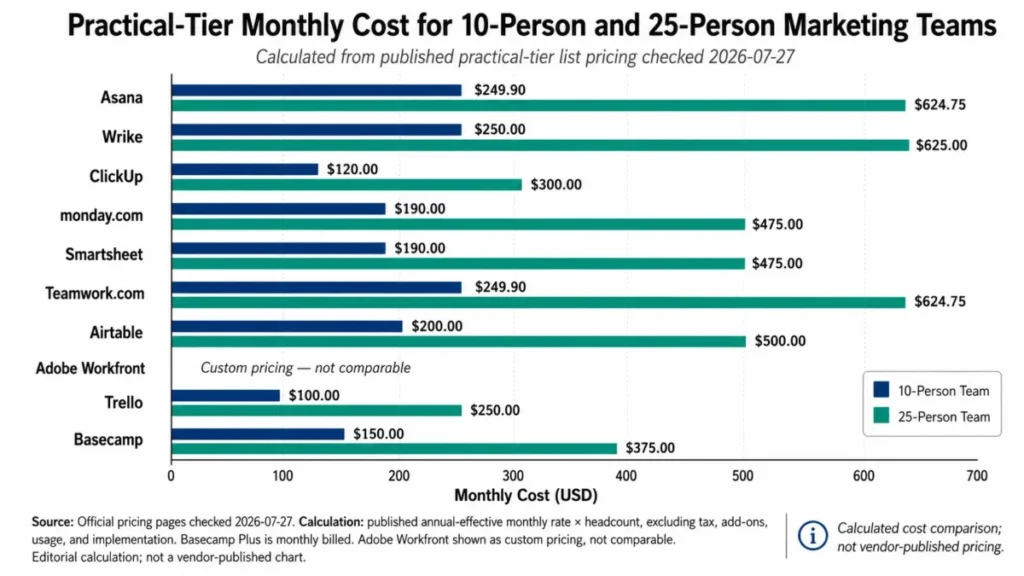
The cheapest plan on a pricing page is not the plan most marketing teams end up paying for. Compare the tier that unlocks proofing, portfolio visibility, or resource management, and use the 10-user and 25-user figures above as your starting budget conversation with finance, not the homepage price.
Detailed Reviews of the 10 Tools
The ten tools below are ranked from the strongest all-around fit for marketing teams to the most situational pick, using the evaluation criteria described above. Each entry covers practical-tier pricing, what the tier actually unlocks, where it falls short, and who should avoid it.
1. Asana: Best Overall for Cross-Functional Marketing Teams

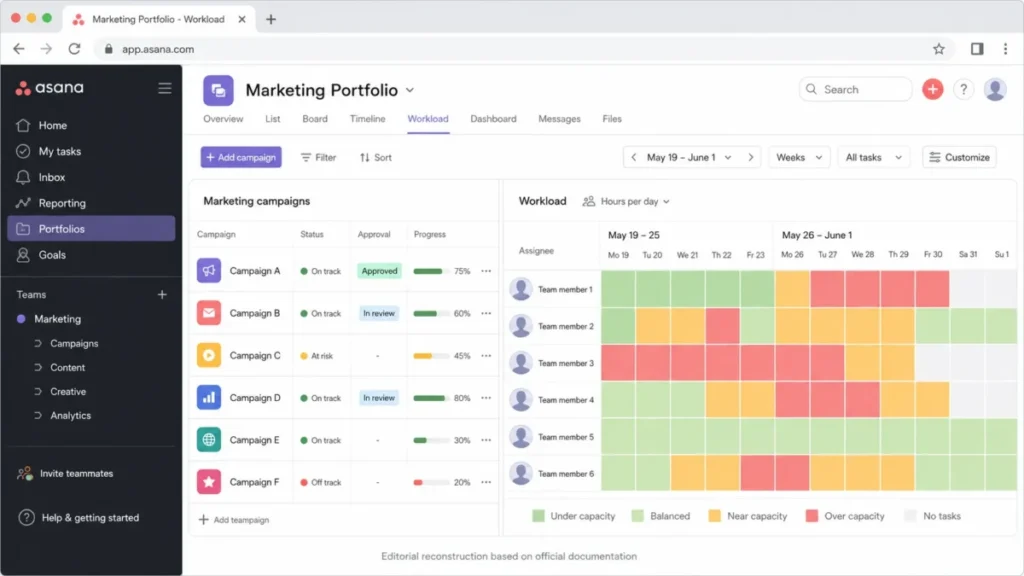
Asana is the strongest general pick for marketing teams that need campaign intake, cross-functional launch coordination, and creative approval in one place. This is not because it has the deepest feature list, but because the path from a submitted brief to an approved, reported campaign is more complete here than in most of the other nine tools.
Pricing starts on the Starter tier, which already includes forms, timeline and Gantt views, and unlimited automations. The practical tier for a marketing team is Advanced, at $24.99 per user per month billed annually ($30.49 billed monthly) per Asana’s official pricing page, because portfolios, workload visibility, approvals, and proofing all sit above Starter.
That gate matters: a team that standardizes intake with Starter forms will still lack a workload view or a recorded approval state until it upgrades, which is the moment budget conversations usually happen.
Source: Asana’s official pricing page.
What it does well:
- Converts a submitted campaign request into a scheduled project with owners, dependencies, and milestones using forms plus timeline and Gantt views.
- Advanced adds portfolio and workload views, so a marketing director can see every active campaign’s status and staffing load in one place instead of stitching together individual project boards.
- Proofing and approvals on Advanced give creative work a recorded, traceable approval state before launch, which matters more for compliance-sensitive campaigns than for a two-person content calendar.
Where it falls short:
- The workflow that matters for marketing (approvals, proofing, portfolio, workload) is locked to Advanced, so the entry-level Starter price is not a fair basis for budgeting.
- File attachments cap at 100 MB per file across listed plans, per Asana’s official pricing page, and the exact behavior once a team exceeds it was not documented in the reviewed pricing page.
| Pros | Cons |
|---|---|
| Unlimited automations are included from Starter, so rules for status changes and notifications do not require an immediate upgrade | Proofing, approvals, portfolios, and workload all sit behind the Advanced tier, not Starter |
| Forms plus timeline/Gantt views give a standardized path from campaign brief to scheduled project | 100 MB per-file attachment cap, with unclear behavior once a team hits it |
| Advanced adds native time tracking, useful for teams that need utilization data without a separate tool | Two-person or single-owner teams without approval or portfolio needs are paying for capability they may not use |
Pricing and plan-limit figures in this section are drawn from Asana’s official pricing page.
Avoid Asana if your team is two people running a simple content calendar with no approval chain to manage. You will pay for portfolio and workload features you are not using.
- Setup difficulty:
- Medium. Most teams can stand up forms and a campaign project quickly, but getting real value out of portfolios and workload views requires standardizing fields and templates across teams first.
- Verdict:
- Choose Asana if your marketing org runs more than one active campaign at a time and needs a documented approval trail before launch, and budget for Advanced from day one rather than starting on Starter and upgrading later.
2. Wrike: Best for Enterprise Creative Operations

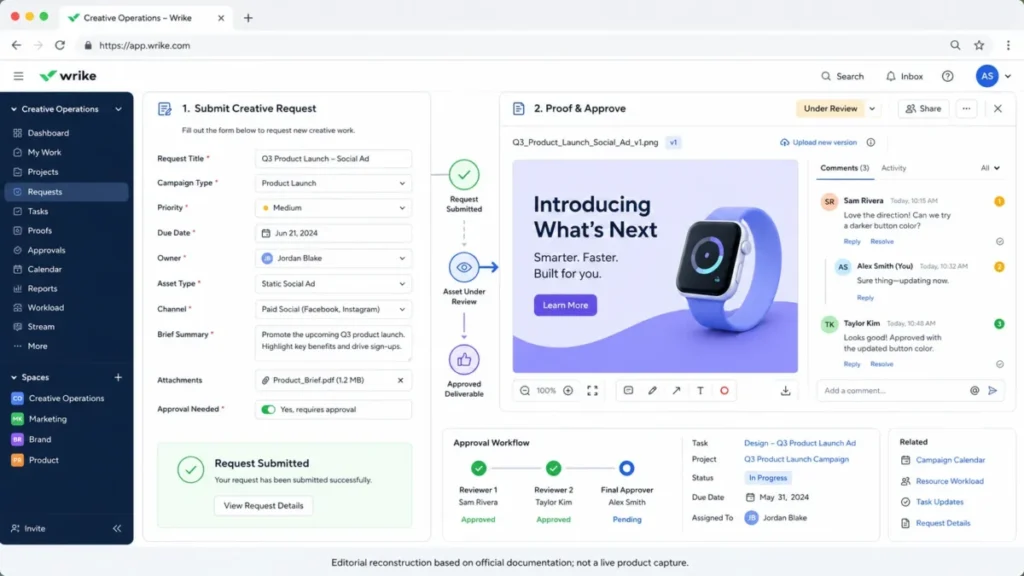
Wrike earns the second spot for one reason: it is the only tool in this list built around a governed request-to-approval chain (structured intake forms, proofing, approvals, and resource management) as its central marketing use case rather than a bolt-on feature.
Business, the practical tier for marketing teams, costs $25 per user per month billed annually per Wrike’s official pricing page and is scoped for organizations of 5 to 200 users. The entry Team plan is $10 per user per month but does not carry the same request-and-approval depth. Business and higher plans are annual-only, and seats are sold in fixed bundles (5-unit increments up to 30 users, 10-unit increments from 30 to 100, and 25-unit increments above 100). A team that needs 32 seats is effectively buying into the next bundle.
Source: Wrike’s official pricing page.
What it does well:
- Request forms route creative and campaign asks into a structured intake instead of ad hoc Slack messages or email threads.
- Proofing and approvals connect directly to resource management and marketing calendars, so an approved asset’s status is visible alongside team capacity.
- Custom dashboards let a creative operations lead build a single view across multiple concurrent campaign requests.
Where it falls short:
- Teams of 20 or more are directed toward a guided deployment process rather than pure self-service signup, which adds implementation time before the tool is fully useful.
- Seat bundles and annual-only Business billing reduce pricing flexibility for teams whose headcount changes mid-year; a Whiteboard add-on runs $15 per user per month on top of the base plan, per Wrike’s official pricing page.
| Pros | Cons |
|---|---|
| Request forms, proofing, and approvals are connected in one workflow rather than separate modules | Business and higher tiers are annual-only, removing the option of flexible monthly billing |
| Resource management gives visibility into team capacity against active creative requests | Seats sell in fixed bundles (5s, then 10s, then 25s), so exact-seat purchasing isn’t available |
| Marketing calendars and dashboards consolidate multi-campaign visibility for creative ops leads | Teams of 20+ are steered into guided deployment, adding setup time before go-live |
The pricing and seat-bundle figures above come from Wrike’s official pricing page.
Avoid Wrike if your team wants simple month-to-month billing or needs to buy an exact, non-bundled seat count. The annual commitment and bundle structure work against a team that expects to flex headcount quarter to quarter.
- Setup difficulty:
- Medium to High, driven mainly by the guided-deployment path larger teams are pushed toward.
- Verdict:
- Choose Wrike if your marketing or creative-operations group needs governed intake, proofing, and resourcing connected in one system, and you can commit to annual billing and a real implementation project rather than a same-day signup.
3. ClickUp: Best All-in-One Marketing Workspace

ClickUp ranks third because it packs docs, forms, dashboards, proofing, and automation into one configurable workspace at the lowest per-user price of any tool in the top half of this list. That combination makes it the strongest pick for a marketing team that wants to consolidate several point tools into one system.
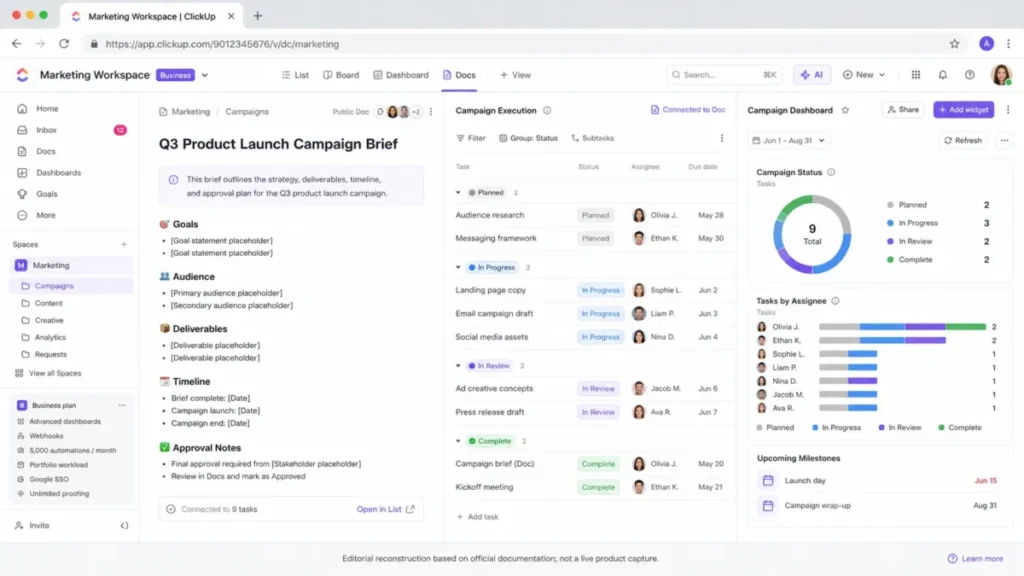
Business, the practical marketing tier, costs $12 per user per month billed annually per ClickUp’s official pricing page; Unlimited, at $7 per user per month, already includes unlimited forms, Gantt views, integrations, storage, time tracking, and resource management. Business adds advanced dashboards, webhooks, 5,000 automations per month, portfolio workload views, Google SSO, and unlimited proofing.
Source: ClickUp’s official pricing page.
What it does well:
- A campaign brief drafted in Docs can link directly to tasks, custom fields, and dependencies without leaving the workspace.
- Unlimited proofing on Business removes the review-volume anxiety that automation caps create elsewhere in this list.
- Advanced dashboards and webhooks give marketing operations a way to build reporting without a separate BI tool.
Where it falls short:
- The Business plan caps automations at 5,000 actions per month, and ClickUp’s official documentation does not state what happens once a team exceeds that ceiling (queued, blocked, or silently dropped is not specified).
- The breadth of configuration options (custom fields, multiple view types, nested workspace structures) creates governance overhead; a team that does not standardize templates early will end up with inconsistent campaign structures across owners.
| Pros | Cons |
|---|---|
| Lowest per-user Business price in the upper half of this ranking, at $12/user/month annually | 5,000 automations per month on Business, with undocumented behavior at the ceiling |
| Unlimited proofing on Business removes review-volume constraints other tools impose | High configuration flexibility becomes a governance burden without early template standardization |
| Docs, forms, custom fields, and dashboards all live in one workspace, reducing tool sprawl | Free plan is limited to 60 MB of storage and a single form, too thin for real evaluation |
Figures in this section are sourced from ClickUp’s official pricing page.
Avoid ClickUp if your team cannot commit an owner to standardizing spaces, templates, and custom fields before rollout; the same configurability that makes it useful is the same flexibility that produces workspace chaos without governance.
- Setup difficulty:
- Medium, weighted toward the up-front schema and template design rather than the sign-up process itself.
- Verdict:
- Choose ClickUp if you want to consolidate campaign briefs, execution, proofing, and reporting into a single workspace and are prepared to assign someone to own its configuration; skip it if you would rather have a narrower, more opinionated tool. See our full ClickUp review for a deeper look at its wider workspace features.
4. monday.com: Best for Visual, Customizable Campaign Workflows

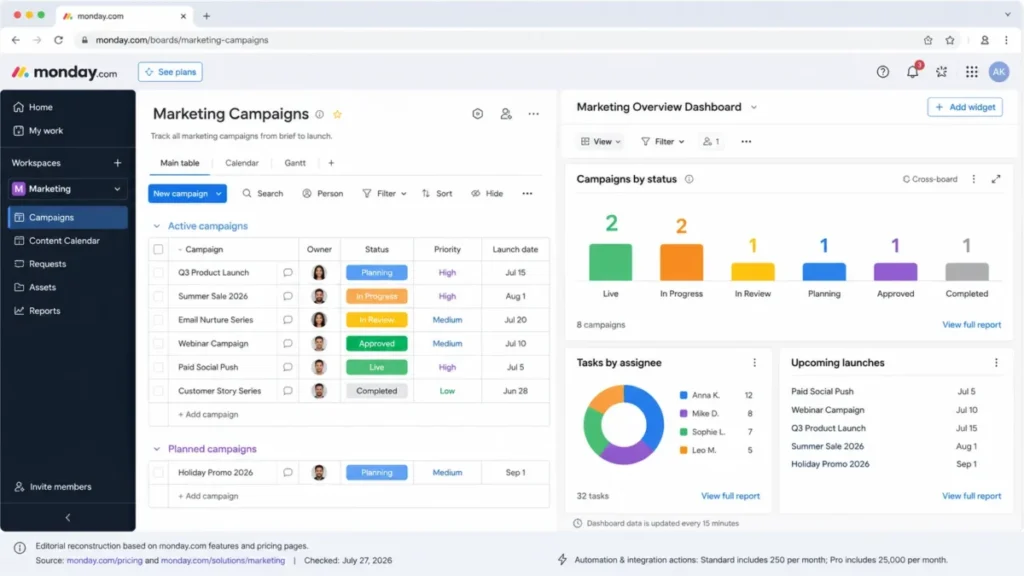
monday.com is the strongest pick for a marketing team that wants highly visual, easily reconfigured boards rather than a database-first mental model. It earns the fourth spot on the strength of how quickly a non-technical marketer can rebuild a workflow without engineering help.
Pro, the practical tier, costs $19 per seat per month billed annually, per monday.com’s official pricing page; Standard sits at $12 and Basic at $9. All paid plans require a minimum of three seats.
The gate that matters most for active marketing operations is automation and integration capacity: Standard includes only 250 automation actions and 250 integration actions per month, while Pro raises both ceilings to 25,000.
Source: monday.com’s official pricing page.
What it does well:
- Boards, calendars, and timeline/Gantt views make it easy to visualize a campaign pipeline without a steep learning curve.
- Custom dashboards can pull from multiple boards, giving a marketing director a cross-channel view without manual rollups.
- Pro’s much higher automation and integration ceiling supports teams running frequent status-change rules and multi-tool integrations.
Where it falls short:
- Standard’s 250-actions-per-month cap is easy to exhaust for a team running even modest routing and notification automations across several campaigns, forcing an earlier-than-expected upgrade to Pro.
- The three-seat minimum on every paid plan means a two-person team pays for a third seat it may not need.
| Pros | Cons |
|---|---|
| Boards and dashboards are fast to reconfigure without developer involvement | Standard’s 250 automation and 250 integration actions per month are easy to exhaust in active campaign operations |
| Pro raises automation and integration ceilings to 25,000 actions per month each | Three-seat minimum on every paid plan penalizes very small teams |
| Documented API allowance (1,000 calls/day on Standard) supports light integration work | Portfolio-level resourcing and advanced governance still favor Enterprise, not Pro |
Plan and pricing details above are drawn from monday.com’s official pricing page.
Avoid monday.com if your team is smaller than three paid seats or if you expect to build extensive automation on Standard without moving to Pro; the action ceiling will become a monthly bottleneck.
- Setup difficulty
- : Low to Medium. Boards are quick to configure, but consistent dashboard rollups across boards require some schema planning.
- Verdict:
- Choose monday.com if visual flexibility and fast reconfiguration matter more than a database-style data model, and budget for Pro rather than Standard the moment automation becomes part of daily campaign operations. Read our full monday.com review for how it handles workflows outside of marketing too.
5. Smartsheet: Best for Portfolio-Scale Campaign Operations

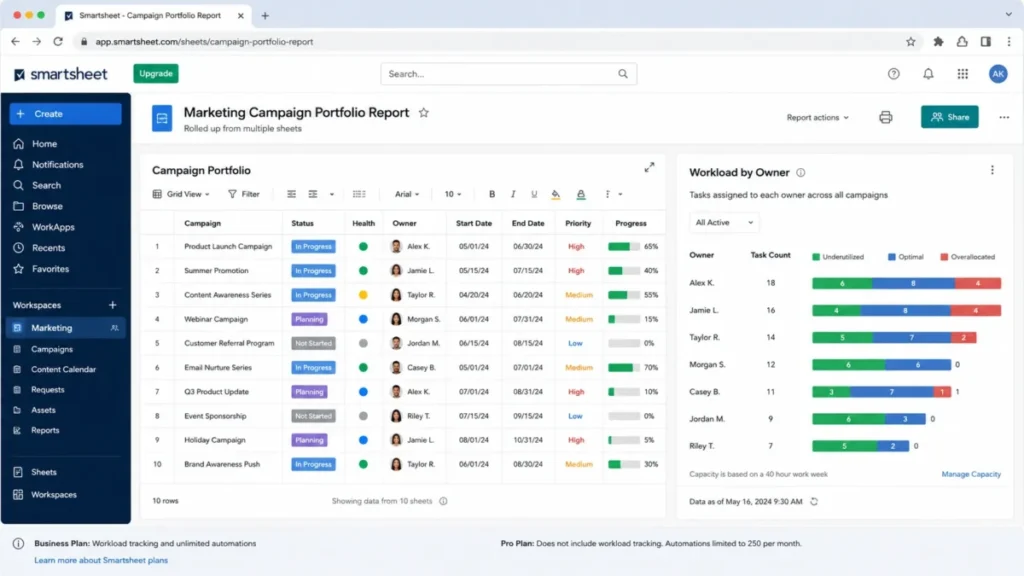
Smartsheet fits marketing operations and PMO-style teams that need to manage many campaigns as a single portfolio through sheets, reports, and dashboards rather than as separate project boards. That is why it ranks fifth ahead of tools with flashier interfaces but weaker rollup reporting.
Business, the practical tier, costs $19 per member per month billed annually (or $24 monthly), per Smartsheet’s official pricing page, and requires a minimum of three members. Business adds workload tracking and unlimited automations over the Pro tier, which is capped at 250 automations per month and lacks workload tracking entirely.
Source: Smartsheet’s official pricing page.
What it does well:
- Sheets, forms, and reports give a marketing operations lead a familiar spreadsheet-like structure that scales to dozens of concurrent campaigns.
- Unlimited automations on Business remove the monthly-cap anxiety that Pro and several competitors carry.
- Proofing and a Brandfolder integration connect creative review to a broader digital asset workflow, when that add-on is in place.
Where it falls short:
- Several high-value marketing operations capabilities, including Brandfolder, Resource Management, Dynamic View, and Data Shuttle, are separate add-ons rather than included features, so the Business list price understates the real cost of a full marketing operations stack.
- Dynamic View starts at $125 per month and Data Shuttle at $100 per month as separate line items, on top of the base Business subscription, per Smartsheet’s official pricing page.
| Pros | Cons |
|---|---|
| Unlimited automations on Business remove the monthly-cap constraint several competitors impose | Brandfolder, Resource Management, Dynamic View, and Data Shuttle are separate add-ons, not included features |
| Reports and dashboards roll up cleanly across many concurrent campaigns for portfolio-level oversight | Dynamic View ($125/month) and Data Shuttle ($100/month) add real cost on top of the base plan |
| Workload tracking on Business gives resourcing visibility that Pro entirely lacks | Three-member minimum applies even to a two-person marketing operations team |
Pricing and add-on costs above are sourced from Smartsheet’s official pricing page.
Avoid Smartsheet if your team wants an inexpensive, fully inclusive plan; the base Business price is a starting point, not the full cost of a marketing operations stack once DAM, resourcing, and data-movement add-ons are priced in.
- Setup difficulty
- : Medium to High, since a full deployment usually means scoping which add-ons the team needs before signing.
- Verdict:
- Choose Smartsheet if your marketing operations function manages campaigns as a portfolio and values reporting and governance over interface polish, and budget separately for the add-ons your workflow requires. See our full Smartsheet review for its non-marketing PMO use cases.
6. Teamwork.com: Best for Marketing Agencies

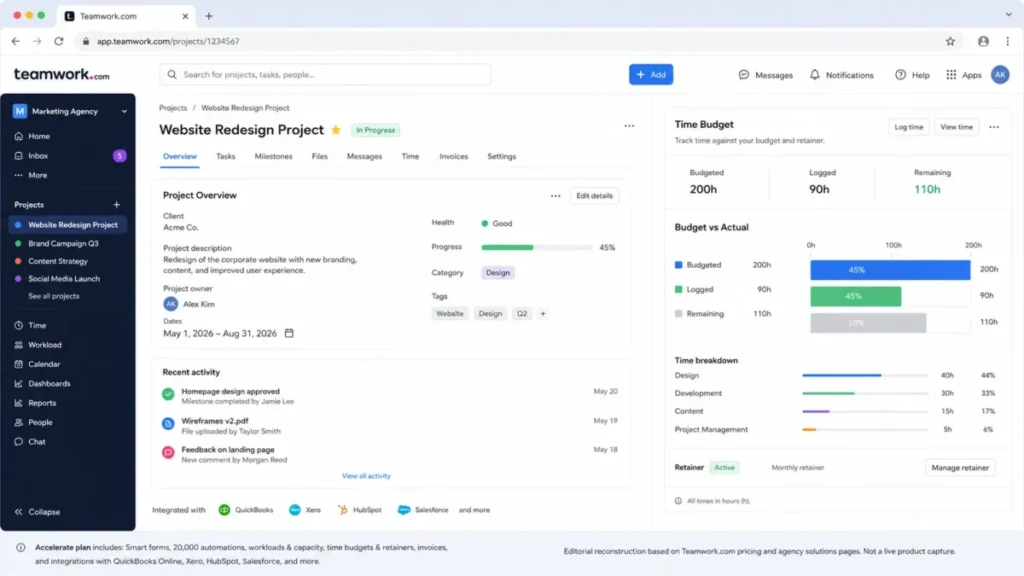
Teamwork.com is the clearest agency-specific pick in this list because it is the only product here that connects campaign delivery directly to time budgets, retainers, invoicing, and client access as core, not bolted-on, functionality.
Accelerate, the practical tier, costs $24.99 per user per month billed annually per Teamwork.com’s official pricing page and carries a five-user minimum; Basics is $9.99 per user per month with a three-user minimum. Accelerate adds smart forms, 20,000 automations per month, workloads and capacity planning, time budgets, retainers, invoicing, and major accounting and CRM integrations.
Source: Teamwork.com’s official pricing page.
What it does well:
- Client users can be added to a project without necessarily consuming a full internal seat, supporting agency-style external collaboration.
- Time budgets and retainer tracking connect creative delivery directly to billable hours and project profitability.
- A 20,000-automation monthly ceiling on Accelerate is high enough that most agencies will not hit it in normal operation.
Where it falls short:
- Every paid tier has a user minimum (three on Basics, five on Accelerate), which penalizes very small agencies or solo consultants.
- AI credits are scheduled to move to usage-based pricing in September 2026, and the vendor has not disclosed the per-credit rate; agencies relying on AI features should treat this as a near-term cost unknown rather than a fixed line item.
| Pros | Cons |
|---|---|
| Time budgets, retainers, and invoicing connect delivery work directly to agency profitability | Five-user minimum on Accelerate excludes very small agencies and solo operators |
| Client users support external collaboration without necessarily billing a full internal seat | AI credits move to usage-based pricing in September 2026 with no published rate yet |
| 20,000 automations per month on Accelerate is generous compared with most competitors in this list | Migration import support (from Wrike, Asana, Basecamp, ClickUp, Trello, monday.com) has undocumented object-level coverage for comments, custom fields, and permissions |
Figures in this section come from Teamwork.com’s official pricing page. Migration-source pricing pages, all checked 2026-07-27: Wrike, Asana, Basecamp, ClickUp, Trello, monday.com.
Avoid Teamwork.com if you run an in-house team with no client billing, retainer, or invoicing needs; you would be paying for agency-economics features you will not use.
- Setup difficulty:
- Medium, and higher still if you are migrating from another platform, since the vendor documents which platforms can be imported from but not what survives the import intact.
- Verdict:
- Choose Teamwork.com if your business model depends on billing client campaign work by time, retainer, or project, and build in time to validate a sandbox migration before committing existing client data.
7. Airtable: Best for Marketing Operations Databases

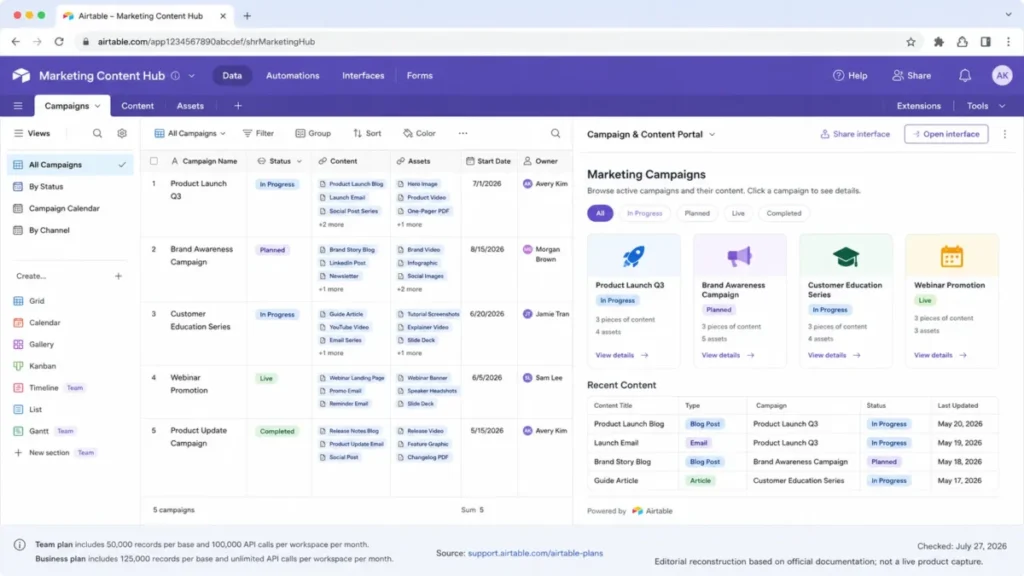
Airtable ranks seventh as the strongest pick for marketing operations teams that need a relational data model connecting campaigns, content, assets, and audiences, rather than a conventional task list, when the workflow genuinely calls for structured, reusable records.
Team, the practical tier, costs $20 per collaborator per month billed annually ($24 monthly), per Airtable’s official pricing page, and provides 50,000 records per base with a separate cap of 100,000 workspace-wide API calls each month. Business, at $45 annually ($54 monthly), raises the record ceiling to 125,000 and removes the workspace API call cap, but requires a private email domain for eligibility.
Source: Airtable’s official pricing page.
What it does well:
- Linked records connect campaign, content, asset, and audience data in one relational model instead of duplicating information across disconnected task boards.
- Interfaces let a marketing operations team expose role-specific, simplified views to stakeholders who should not see the full underlying base.
- Automations and forms cover routine intake and status-update work without requiring a separate integration tool for simple cases.
Where it falls short:
- Billing depends on collaborator role and workspace, so granting broad editor or commenter access to stakeholders can increase cost faster than a team expects, since it is not purely a per-editor model.
- Team plan record ceilings (50,000 per base) and API call limits (100,000 per workspace per month) are real operational constraints for large content operations, and Business eligibility also requires a private email domain, which some smaller marketing teams may not have.
| Pros | Cons |
|---|---|
| Relational records connect campaign, content, asset, and audience data instead of siloing it across boards | Team plan caps at 50,000 records per base and 100,000 API calls per workspace per month |
| Interfaces expose simplified, role-specific views without giving every stakeholder full base access | Collaborator-role billing can increase cost unpredictably with broad editor or commenter access |
| Business tier removes the workspace API cap and raises records to 125,000 per base | Business requires a private email domain, which can exclude some small teams from eligibility |
Record limits and pricing above are drawn from Airtable’s official pricing page.
Avoid Airtable if your team primarily needs conventional task management rather than a relational data model, or if you cannot control who gets editor versus commenter access; both scenarios erode the cost and workflow advantages that make Airtable worth the switch.
- Setup difficulty:
- Medium to High, concentrated in schema and permission design rather than day-to-day use.
- Verdict:
- Choose Airtable if your marketing operations function is data-model-first (campaigns linked to content, assets, and audiences) rather than task-first, and design your permission structure deliberately before inviting a large stakeholder group. Read our full Airtable review for how the same base model applies outside marketing.
8. Adobe Workfront: Best for Enterprise Content Supply Chains

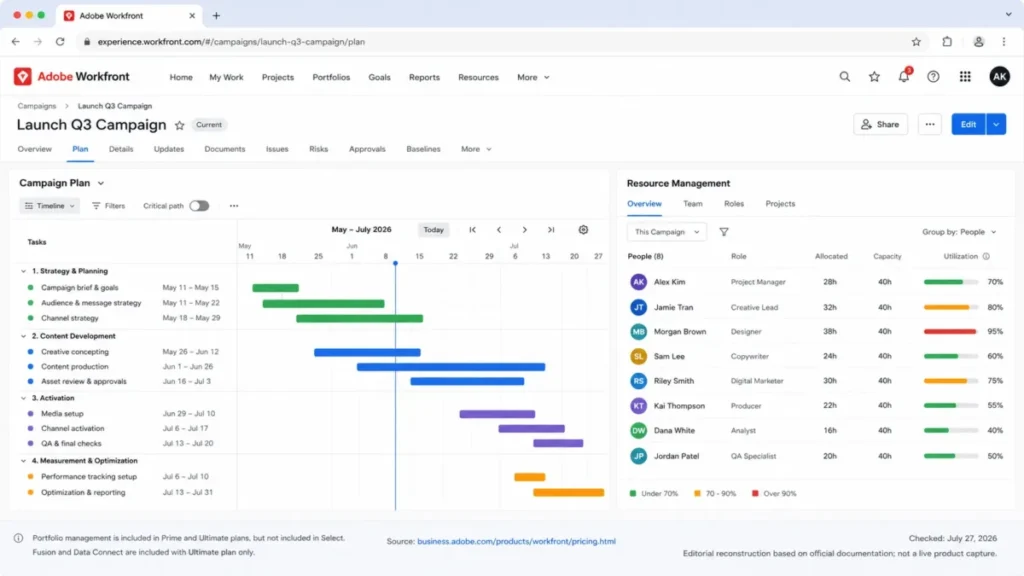
Adobe Workfront is reserved for large enterprises coordinating campaign planning, demand, resources, approvals, and Adobe-connected content operations at a scale where custom pricing and implementation diligence are already an accepted part of the buying process.
Select, Prime, and Ultimate all use custom pricing with no public dollar figure disclosed. Prime, the practical tier for marketing-relevant portfolio work, includes portfolio management, which Select does not; Fusion and Data Connect are included only in Ultimate and otherwise require separate commercial terms.
Because no verified public price exists for any tier, no comparable cost figure can be provided here, and none should be assumed.
Source: Adobe Workfront’s official pricing page.
What it does well:
- Demand and resource management connect campaign planning to actual team capacity at an enterprise scale most other tools in this list are not built for.
- Reviews and approvals integrate with the broader content supply chain rather than functioning as an isolated proofing feature.
- Deep Adobe ecosystem integration is a real advantage for enterprises already standardized on Adobe Creative Cloud and Experience Cloud tools.
Where it falls short:
- Every tier requires a custom quote, so a marketing leader cannot budget from a public price the way they can with the other nine tools in this list; expect a real procurement cycle.
- Fusion and Data Connect, both material for integration-heavy operations, are included only in Ultimate and require separate commercial terms elsewhere, adding further cost uncertainty until a quote is in hand.
| Pros | Cons |
|---|---|
| Demand and resource management scale to enterprise campaign planning most competitors cannot match | All pricing is custom; no public dollar figure exists for Select, Prime, or Ultimate |
| Deep Adobe Creative Cloud and Experience Cloud integration benefits enterprises already on that stack | Fusion and Data Connect require Ultimate or separate commercial terms, adding cost uncertainty |
| Reviews and approvals connect to a broader content-supply-chain workflow, not an isolated proofing tool | Implementation and procurement diligence is a real prerequisite, not a same-day signup |
Tier and feature details above are sourced from Adobe Workfront’s official pricing page.
Avoid Adobe Workfront if you are a small or midmarket team that needs transparent public pricing and fast self-service setup; this is not that product.
- Setup difficulty:
- High, and this reflects a general enterprise-software pattern rather than a documented Workfront-specific timeline, since implementation scope was not independently verified here.
- Verdict:
- Choose Adobe Workfront only if you are a large enterprise with an existing Adobe ecosystem investment and the procurement bandwidth for a custom quote. The evidence base for this product is thinner than the rest of this list because pricing and implementation detail are not public.
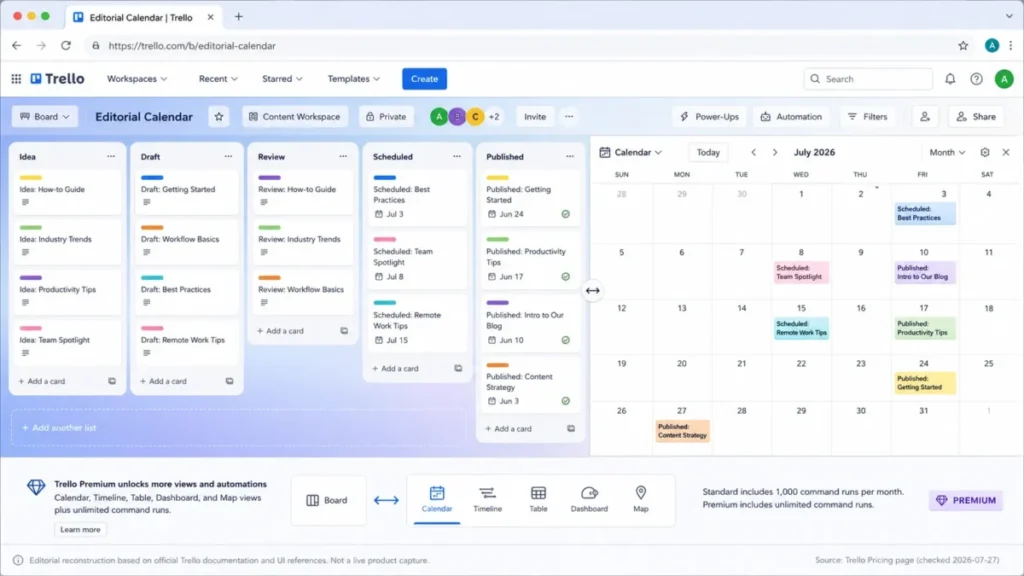
9. Trello: Best for Simple Editorial Calendars

Trello is the right choice for small marketing teams that need a low-friction Kanban board for editorial calendars, launch checklists, and simple campaign tracking, and it ranks ninth because that is a real, narrow job it does well rather than a shortcoming.
Premium, the practical tier once a team needs calendar, timeline, table, dashboard, and map views, costs $10 per user per month billed annually ($12.50 monthly), per Trello’s official pricing page. Standard is $5 annually ($6 monthly) and includes only 1,000 command (automation) runs per month against Premium’s unlimited runs. The Free plan is capped at 10 boards per workspace, 250 command runs per month, and 10 MB per file.
Source: Trello’s official pricing page.
What it does well:
- Boards, lists, and cards map naturally onto an editorial pipeline (idea, draft, review, scheduled, published) with almost no setup friction.
- Premium’s calendar and timeline views give a lightweight visual editorial calendar without adopting a heavier platform.
- Butler automation commands handle simple rules (due-date reminders, card moves on status change) without needing a dedicated automation budget.
Where it falls short:
- Complex dependencies, sophisticated approval chains, and native workload management are not core Trello strengths; a team that outgrows a single-board editorial calendar will feel the ceiling quickly.
- The Free plan’s 10-board and 250-command limits make it too thin for a real evaluation of a growing content operation.
| Pros | Cons |
|---|---|
| Lowest-friction setup in this list for a straightforward editorial calendar or launch checklist | Portfolio-level oversight, deep dependencies, and native workload management are not native strengths |
| Premium’s unlimited command runs remove the automation ceiling that Standard’s 1,000/month imposes | Free plan’s 10-board and 250-command caps are too thin for evaluating a growing content operation |
| Familiar Kanban model requires almost no training for a small content team | Advanced views (calendar, timeline, table, dashboard, map) require Premium, not Standard |
Pricing and command-run limits above come from Trello’s official pricing page.
Avoid Trello if your team manages more than a handful of concurrent campaigns with real dependencies, approval chains, or resourcing needs; you will outgrow it and face a migration sooner than with a portfolio-capable tool.
- Setup difficulty:
- Low, which is the entire point of choosing it.
- Verdict:
- Choose Trello if your marketing operation is a small team running a straightforward editorial calendar or launch checklist, and plan for a future migration once you need portfolio-level visibility or complex approvals. See our full Trello review for its non-marketing use cases.
10. Basecamp: Best Communication-First Project Hub

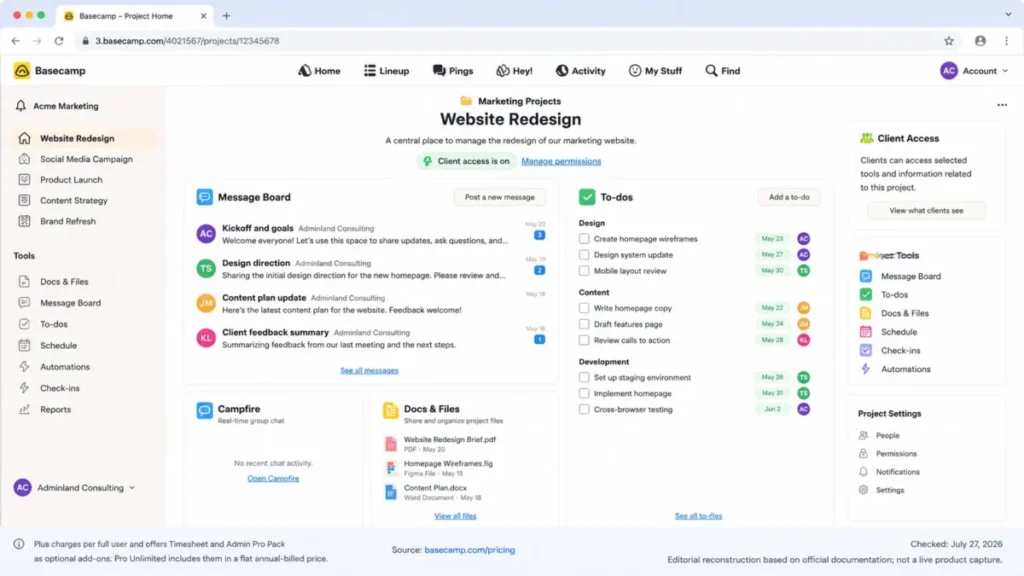
Basecamp rounds out this list as the strongest pick for small marketing teams and agencies that want projects, discussions, chat, schedules, files, and client access in one calm workspace. It does this without asking a team to configure automation rules or a resourcing model to get value on day one.
Plus costs $15 per employee or full user per month, per Basecamp’s official pricing page. Pro Unlimited costs $299 per month billed annually and covers unlimited users, bundling in Timesheet and Admin Pro Pack, which cost $50 per month each as standalone add-ons on Plus. Because Plus bills per full user, the math changes at scale: at 20 full users, Plus headline fees reach $300 per month, already above Pro Unlimited’s flat $299. No add-ons are counted in that figure.
Source: Basecamp’s official pricing page.
What it does well:
- To-dos, message boards, chat, schedules, files, and reports live in one project hub, reducing the tool-switching that fragments small-team communication.
- Client mode allows external stakeholders into a project without the complexity of a full permissions system to configure.
- Pro Unlimited’s flat pricing becomes a genuinely simple budgeting decision once headcount passes roughly 20 full users.
Where it falls short:
- Advanced resource planning, portfolio-level analytics, and deep automation are not core strengths; a marketing operations team that needs those will find Basecamp thin by comparison to Wrike, Smartsheet, or Asana Advanced.
- The Free plan allows only a single project, and Plus add-ons (Timesheet, Admin Pro Pack, additional 1 TB of storage) each cost $50 per month, per Basecamp’s official pricing page, which can add up quickly for a team that needs more than one.
| Pros | Cons |
|---|---|
| Consolidates to-dos, chat, files, schedules, and client access into one hub, reducing tool sprawl | Advanced resourcing, portfolio analytics, and automation depth are not core strengths |
| Client mode gives external stakeholders simple access without complex permission configuration | Plus per-full-user billing means costs scale linearly and can exceed Pro Unlimited around 20 users |
| Pro Unlimited’s flat $299/month becomes cost-competitive at scale with no per-seat math required | Free plan allows only a single project, too thin for evaluating a real marketing workflow |
Pricing and add-on figures above are sourced from Basecamp’s official pricing page.
Avoid Basecamp if your marketing operations function needs resource forecasting, portfolio dashboards, or heavy automation; those workflows belong on Wrike, Smartsheet, or Asana Advanced instead.
- Setup difficulty:
- Low, similar to Trello, since the value proposition is deliberately simple.
- Verdict:
- Choose Basecamp if communication fragmentation, not feature depth, is your team’s core problem. Model your real headcount against Plus versus Pro Unlimited before committing, since the cheaper-looking per-user plan can flip to being the more expensive option around 20 full users. Read our full Basecamp review for its broader project-hub use cases.
Pricing, Limits, and Hidden Costs
The starting price on a vendor’s pricing page is the least useful number for budgeting a marketing project management tool. The number that matters is the practical tier, the cost at your real headcount, and the add-ons or usage caps that turn a clean quote into a larger monthly bill.
10-User and 25-User Cost at the Practical Tier
| Tool | Practical tier | 10-user monthly cost | 25-user monthly cost |
|---|---|---|---|
| Asana | Advanced | $249.90 | $624.75 |
| Wrike | Business | $250.00 | $625.00 |
| ClickUp | Business | $120.00 | $300.00 |
| monday.com | Pro | $190.00 | $475.00 |
| Smartsheet | Business | $190.00 | $475.00 |
| Teamwork.com | Accelerate | $249.90 | $624.75 |
| Airtable | Team | $200.00 | $500.00 |
| Adobe Workfront | Prime | Custom | Custom |
| Trello | Premium | $100.00 | $250.00 |
| Basecamp | Plus | $150.00 | $375.00 |
- Sources (checked 2026-07-27): Asana, Wrike, ClickUp, monday.com, Smartsheet, Teamwork.com, Airtable, Adobe Workfront, Trello, Basecamp.
Calculated as the published annual-effective monthly rate multiplied by headcount. Excludes tax, add-ons, usage-based charges, negotiated discounts, and implementation cost. Basecamp’s Pro Unlimited flat-rate alternative ($299/month for unlimited users, per Basecamp’s official pricing page) is not reflected in this per-user table; see the Basecamp section above for the break-even math. See Asana’s pricing guide, ClickUp’s pricing guide, and Trello’s pricing guide for a deeper breakdown of each plan ladder.
Budget Pressure Point: for every tool in this list except Basecamp’s Pro Unlimited option, cost scales linearly with headcount (price checked: 2026-07-27), so the number that should drive your decision is your 12-month seat forecast, not your current headcount.
A team planning to grow from 8 to 15 marketers in a year should model the 15-seat cost now, not the 8-seat quote a sales rep hands over.
Automation and Usage Limits by Plan
| Tool | Plan | Automation or usage limit | Overflow behavior |
|---|---|---|---|
| ClickUp | Business | 5,000 automations/month | Not documented by vendor |
| monday.com | Standard | 250 automation + 250 integration actions/month | Not documented by vendor |
| monday.com | Pro | 25,000 automation + 25,000 integration actions/month | Not documented by vendor |
| Smartsheet | Pro | 250 automations/month | Not documented by vendor |
| Smartsheet | Business | Unlimited automations | Not applicable |
| Teamwork.com | Basics | 5,000 automations/month | Not documented by vendor |
| Teamwork.com | Accelerate | 20,000 automations/month | Not documented by vendor |
| Airtable | Team | 50,000 records/base; 100,000 API calls/workspace/month | Record limit blocks new records; API call behavior not fully documented |
| Trello | Standard | 1,000 command runs/month | Not documented by vendor |
| Trello | Free | 250 command runs/month; 10 boards/workspace | Not documented by vendor |
- Sources (checked 2026-07-27): ClickUp, monday.com, Smartsheet, Teamwork.com, Airtable, Trello.
Where a vendor’s official documentation does not state what happens at the ceiling (blocked, queued, throttled, or silently dropped), that is stated here as “not documented” rather than assumed, because assuming the wrong behavior can break a live campaign automation without warning.
Feature Gate Comparison
| Tool | Automation | Proofing/approvals | Reporting/dashboards | API/integrations | Admin/SSO |
|---|---|---|---|---|---|
| Asana | Unlimited from Starter | Advanced tier | Advanced tier (portfolio, workload) | Not fully verified | Enterprise tier |
| Wrike | Included, limit not verified | Business tier | Business tier (custom dashboards) | Not fully verified | Higher tiers |
| ClickUp | 5,000/month on Business | Unlimited on Business | Advanced on Business | Webhooks on Business | Google SSO on Business; SAML/SCIM on Enterprise |
| monday.com | 250/mo Standard, 25,000/mo Pro | Not a core Standard/Pro feature | Dashboards on all paid tiers | 1,000 API calls/day on Standard | Enterprise tier |
| Smartsheet | 250/mo Pro, unlimited on Business | Included; DAM via Brandfolder add-on | Business tier (workload) | Not fully verified | SAML on Enterprise |
| Teamwork.com | 5,000/mo Basics, 20,000/mo Accelerate | Included on Accelerate | Accelerate tier | Documented API rate on Basics | SSO on Enterprise |
| Airtable | Included | Not a core feature | Interfaces on Team/Business | 100,000 calls/workspace/mo (Team) | Business/Enterprise |
| Adobe Workfront | Via Fusion (Ultimate or add-on) | Included, tier-dependent | Included, tier-dependent | Via Fusion (tier-dependent) | Enterprise governance |
| Trello | 250 to 1,000 runs/mo, unlimited on Premium | Not a core feature | Premium adds dashboard view | Not fully verified | Enterprise (SSO, Guard) |
| Basecamp | Not a core feature | Not a core feature | Reports included | Not fully verified | Admin Pro Pack add-on |
- Sources (checked 2026-07-27): Asana, Wrike, ClickUp, monday.com, Smartsheet, Teamwork.com, Airtable, Adobe Workfront, Trello, Basecamp.
Hidden Costs to Model Before You Sign
- Seat minimums and bundles. monday.com and Smartsheet require a minimum of three seats on paid plans; Teamwork.com requires three (Basics) or five (Accelerate); Wrike sells Business seats in fixed bundles rather than exact counts.
- Role-based billing. Airtable bills by collaborator role and workspace, so granting broad editor or commenter access to stakeholders can raise cost faster than a simple per-user model would.
- Add-ons that aren’t optional in practice. Smartsheet’s Brandfolder, Resource Management, Dynamic View, and Data Shuttle; Wrike’s Whiteboard; and Basecamp’s Timesheet and Admin Pro Pack are all separate line items for capabilities many marketing teams assume are included.
- Future usage-based pricing. Teamwork.com’s AI credits move to usage-based pricing in September 2026 with no published rate yet; revisit this cost line before renewal.
- Annual-only commitments. Wrike’s Business tier and higher are annual-only, removing the flexibility of a monthly plan if your headcount is uncertain.
Setup and Migration Difficulty
| Tool | Setup difficulty | Why |
|---|---|---|
| Asana | Medium | Forms and timeline views are quick to configure, but portfolio and workload value requires standardized templates across teams first |
| Wrike | Medium to High | Teams of 20+ are directed to guided deployment, adding a real implementation project before go-live |
| ClickUp | Medium | Sign-up is fast, but the workspace’s flexibility requires deliberate schema and template governance to avoid chaos |
| monday.com | Low to Medium | Boards are fast to build; consistent cross-board dashboards need some up-front planning |
| Smartsheet | Medium to High | Add-on scoping (Brandfolder, Resource Management, Dynamic View, Data Shuttle) typically precedes a full rollout |
| Teamwork.com | Medium | Client and retainer setup takes planning; migrating existing client data adds further, only partially documented, effort |
| Airtable | Medium to High | Value depends on schema and permission design done well before broad rollout |
| Adobe Workfront | High | Enterprise implementation is a standard pattern for this class of product; Workfront-specific timelines were not independently verified here |
| Trello | Low | Minimal configuration required, which is the core appeal for small teams |
| Basecamp | Low | Deliberately simple setup, consistent with its communication-first positioning |
- Sources (checked 2026-07-27): Asana, Wrike, ClickUp, monday.com, Smartsheet, Teamwork.com, Airtable, Adobe Workfront, Trello, Basecamp.
What Breaks First: for the mid-tier tools (ClickUp, Airtable, Smartsheet), the first real failure point is usually not the software itself but the absence of a single workspace owner. Without one person responsible for templates, fields, and permissions, these flexible tools drift into inconsistent structures across teams within the first two or three campaigns.
Which Project Management Tool Should You Avoid?
No tool on this list is universally wrong, but several are a poor fit for specific, common buyer situations.
Skip Adobe Workfront if you are a small or midmarket marketing team that needs a transparent public price and same-week setup. Every tier requires a custom quote and a real procurement cycle, which is the wrong trade for a team that just needs to get a campaign calendar running this quarter.
Skip Trello if your marketing operation manages more than a handful of concurrent campaigns with real dependencies or approval chains. It is an excellent editorial calendar and a weak portfolio management tool, and teams that outgrow it typically face a full migration rather than an in-place upgrade.
Skip Basecamp if resource forecasting, portfolio dashboards, or deep automation are core to how your marketing operations function runs. Its strength is communication consolidation, not operational depth, and stretching it to cover those needs usually means bolting on a second tool anyway.
Skip Wrike’s Business tier if your team needs simple monthly billing or an exact seat count; the annual-only commitment and fixed seat bundles work against teams with unpredictable headcount.
How to Choose the Right Project Management Software for Marketing
- Count how many people need access this quarter, and forecast your headcount over a 12-month horizon rather than budgeting to your present number.
- List the workflows that are decision-critical: campaign intake, creative proofing and approval, portfolio-level resourcing, or client billing.
- Identify which plan tier unlocks those workflows, not the cheapest listed price; use the practical-tier prices above as your real budget baseline.
- Check seat minimums, billing bundles, and role-based billing rules against your real team shape before assuming the advertised per-user rate applies.
- Map required integrations (CRM, DAM, accounting, email, analytics) and confirm which plan tier includes the API or integration depth you need.
- Assess how much implementation and governance capacity your team can realistically commit; a flexible, database-style tool without an owner will underperform a simpler, more opinionated one.
- Decide who is responsible for reviewing pricing and plan gates again before renewal, since automation ceilings, add-on costs, and usage-based pricing (like Teamwork.com’s upcoming AI-credit model) can change the real cost after you have already adopted the tool.
Switch-Or-Stay Lens: if your current tool is failing at intake or approval visibility, that is usually a workflow-fit problem worth switching over. If it is failing because nobody configured dashboards, workload views, or templates, that is an adoption problem a migration will not fix on its own; solve governance first, and reassess the tool second.
Common Mistakes When Choosing Marketing Project Management Software
- Budgeting from the entry-tier price. The workflow features that make a tool worth buying for marketing (proofing, portfolios, workload, unlimited automation) are almost always one or two tiers above the cheapest listed plan.
- Ignoring seat minimums and billing bundles. A quote based on your exact headcount can be wrong once you learn a vendor sells seats in bundles of five, ten, or twenty-five, or requires a three- or five-seat minimum.
- Assuming automation limits do not apply to your team. A 250-action monthly cap looks generous until a team runs status-change rules across five concurrent campaigns; model your expected automation volume before choosing a tier.
- Overlooking add-on-dependent capabilities. DAM integration, resource management, dynamic views, and data-movement tools are frequently separate line items, not included features, on otherwise attractive base plans.
- Skipping the migration reality check. A vendor listing “import from X, Y, Z” does not guarantee that comments, custom fields, permissions, and automations survive the move intact; validate with a sandbox import before committing production data.
- Choosing based on interface polish alone. A visually appealing board tool that lacks portfolio or resourcing depth will need to be replaced once your team runs more than a few concurrent campaigns.
- Assuming mobile parity with desktop. Mobile app availability was documented for every tool in this list, but task-level parity for proofing, dashboards, and admin functions on mobile was not independently verified for any of them; do not assume full functionality until you check.
Which Tool Is Best for Your Marketing Team? (Final Verdict)
There is no single best project management software for every marketing team; the right pick depends on your operating model, not a universal score.
For a cross-functional in-house marketing team of 10 to 50 people that needs campaign intake, creative approval, and portfolio-level reporting, Asana on the Advanced tier is the strongest starting point in this list. That holds provided the team budgets for Advanced from day one rather than starting on Starter and discovering the gap later.
For enterprise creative operations groups that need governed request intake, proofing, and resource management with formal deployment support, Wrike Business is the better fit, on the condition that the team accepts annual billing and seat bundling as the cost of that governance.
For agencies billing client campaign work by time, retainer, or project, Teamwork.com Accelerate is the clear choice in this list; no other product here connects delivery directly to invoicing and profitability as core functionality.
For a marketing operations function that thinks in relational data (campaigns linked to content, assets, and audiences) rather than task lists, Airtable Team is the better fit, provided someone owns the permission design.
For a small marketing team of two to six people running a straightforward editorial calendar with no complex approval chain, Trello Premium or Basecamp Plus will do the job at a fraction of the cost of the enterprise-oriented tools above. Switching to a heavier platform before you outgrow the simple one is its own kind of budget mistake. Our project management picks for small teams and free project management options cover that lighter-weight segment in more depth than this marketing-specific list can.
30/90-Day Adoption Check: after 30 days, your team should be able to show one complete campaign that moved from intake to approval inside the tool without a side channel like email or chat. After 90 days, leadership should be able to pull a portfolio or workload view (if the plan offers one) without asking someone to manually compile it.
If neither is true, the problem is more likely governance and templates than the software choice itself.
Frequently Asked Questions
Quick, sourced answers to the questions marketing leaders ask most often while shortlisting a project management tool.
What is the best project management software for marketing teams overall?
Asana is the strongest overall pick for most in-house marketing teams once budgeted on the Advanced tier, because it connects campaign intake, timeline planning, creative proofing, and portfolio reporting in one system. Teams with agency billing needs or database-first workflows may be better served by Teamwork.com or Airtable instead.
Which tool is best for creative proofing and approvals?
Wrike and ClickUp both build proofing and approvals into their practical marketing tier (Business on each). Wrike ties proofing directly to resource management and request intake, while ClickUp includes unlimited proofing on Business at a lower per-user price, making it the better budget option for proofing-heavy teams.
Is Asana or monday.com better for marketing teams?
Asana on Advanced offers deeper portfolio, workload, and approval features built specifically around marketing operations. monday.com on Pro is easier to reconfigure visually and fits teams that prioritize flexible boards over a database-style structure. See our Asana vs monday.com comparison for a feature-by-feature breakdown.
Choose Asana if approvals and portfolio reporting are decision-critical; choose monday.com if visual flexibility matters more.
Which tool is best for a marketing agency?
Teamwork.com is the best fit for marketing agencies in this list because its Accelerate tier connects campaign delivery to time budgets, retainers, and invoicing, which none of the other nine tools do as core functionality. Basecamp is a reasonable lighter-weight alternative for agencies that only need client communication, not billing integration.
How much does marketing project management software cost?
Practical-tier pricing for a 10-person marketing team in this list ranges from roughly $100 per month (Trello Premium) to about $250 per month (Wrike Business, Teamwork.com Accelerate). Adobe Workfront’s custom enterprise pricing is excluded from that range. The starting price on a vendor’s homepage is rarely the tier a marketing team needs.
Can project management software manage an editorial calendar?
Yes, if the tool has calendar or timeline views and your team’s needs are simple. Trello Premium and monday.com both handle editorial calendars well for small to mid-sized content operations.
No, if you need portfolio-level oversight across many concurrent campaigns; Smartsheet or Asana Advanced fit that scale better than a board-based calendar tool.
What is marketing resource management?
Marketing resource management means visibility into team capacity and workload against active campaign demand, not just a list of who is assigned to what task. Wrike, Smartsheet Business, and Asana Advanced include workload or resource views; monday.com, Trello, and Basecamp do not offer this as a core, native feature.
How do I choose between Airtable and a conventional task manager?
Choose Airtable if your marketing operations team needs to connect campaign, content, asset, and audience records relationally, and someone can own schema and permission design. Choose a conventional task manager like Asana, ClickUp, or monday.com if your team primarily needs task assignment, status tracking, and timelines rather than a structured database.
Do these tools have free plans marketing teams can use?
ClickUp, Trello, Teamwork.com, and Basecamp all publish a free tier, though each is limited. For example, Trello’s Free plan caps at 10 boards and 250 monthly automation runs, and Basecamp’s Free plan allows only one project. No free plan was documented in the official pricing pages reviewed for Asana, Wrike, monday.com, Smartsheet, or Airtable’s entry tiers as sourced here.
What automation limits should I check before signing up?
Check the monthly automation or command-run cap on the tier you plan to buy, not just whether automation exists. monday.com Standard (250 actions), Trello Standard (1,000 runs), and Smartsheet Pro (250 automations) all cap well below what an active multi-campaign marketing team can generate. That is a common reason teams end up upgrading sooner than planned.
Whichever project management tool wins for your team, shortlist two finalists, run a real trial against actual campaign workflow, and choose the plan matched to your team’s size and budget before signing an annual contract.